airbag MINI COOPER 2011 Owners Manual
[x] Cancel search | Manufacturer: MINI, Model Year: 2011, Model line: COOPER, Model: MINI COOPER 2011Pages: 210, PDF Size: 3.19 MB
Page 17 of 210
CockpitAT A GLANCE
15
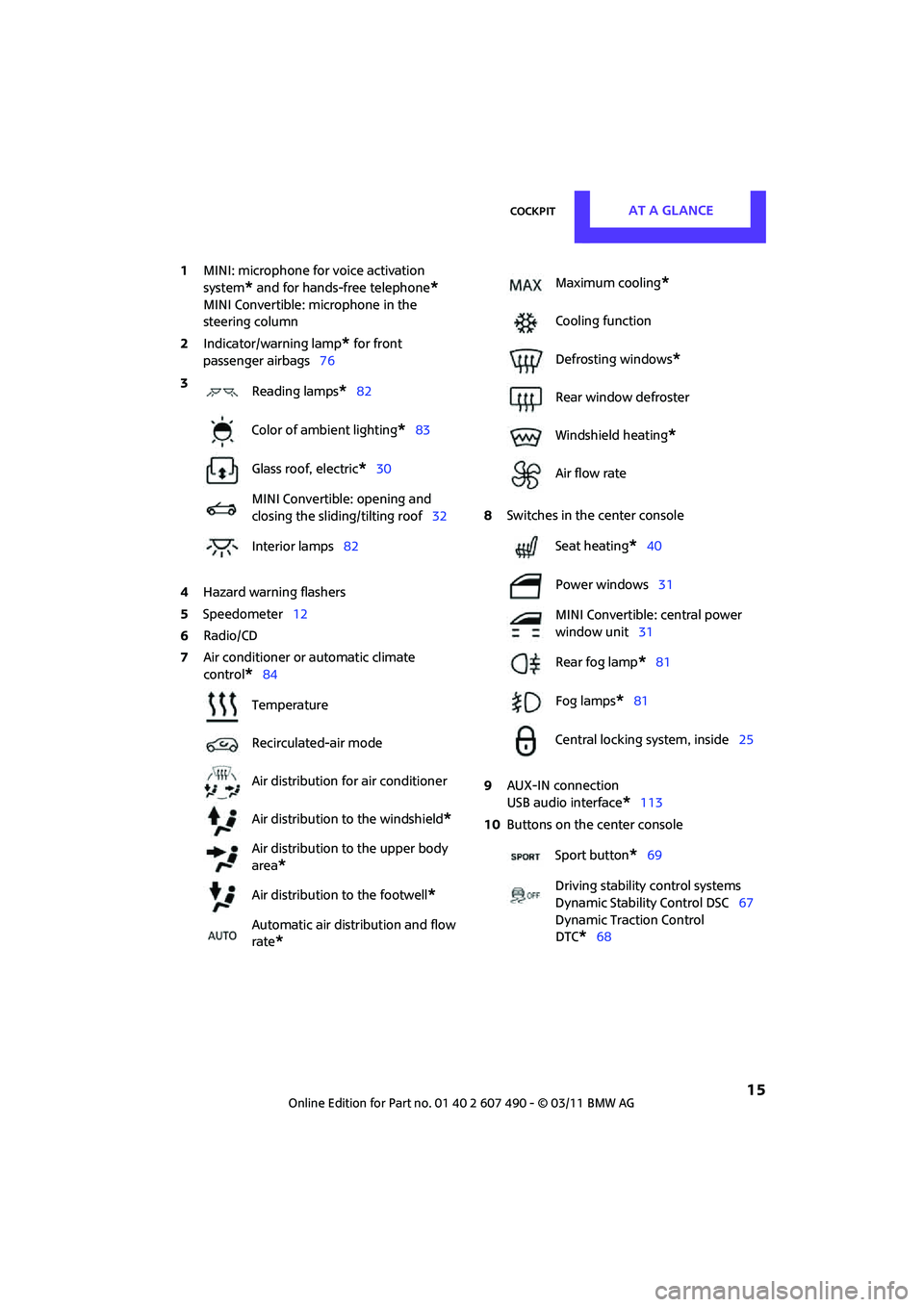
1MINI: microphone for voice activation
system
* and for hands-free telephone*
MINI Convertible: microphone in the
steering column
2 Indicator/warning lamp
* for front
passenger airbags 76
4 Hazard warning flashers
5 Speedometer 12
6 Radio/CD
7 Air conditioner or automatic climate
control
*84 8
Switches in the center console
9 AUX-IN connection
USB audio interface
*113
10 Buttons on the center console
3
Reading lamps
*82
Color of ambient lighting
*83
Glass roof, electric
*30
MINI Convertible: opening and
closing the sliding/tilting roof 32
Interior lamps 82
Temperature
Recirculated-air mode
Air distribution for air conditioner
Air distribution to the windshield
*
Air distribution to the upper body
area
*
Air distribution to the footwell*
Automatic air distribution and flow
rate
*
Maximum cooling*
Cooling function
Defrosting windows
*
Rear window defroster
Windshield heating
*
Air flow rate
Seat heating
*40
Power windows 31
MINI Convertible: central power
window unit 31
Rear fog lamp
*81
Fog lamps
*81
Central locking system, inside 25
Sport button
*69
Driving stability control systems
Dynamic Stability Control DSC 67
Dynamic Traction Control
DTC*68
Page 39 of 210

AdjustmentsCONTROLS
37
Adjustments
Sitting safely
The ideal sitting position can make a vital contri-
bution to relaxed, fatigue-free driving. In con-
junction with the safety belts, the head restraints
and the airbags, the seated position has a major
influence on your safety in the event of an acci-
dent. To ensure that th e safety systems operate
with optimal efficiency, we strongly urge you to
observe the instructions contained in the follow-
ing section.
For additional information on transporting
children safely, refer to page 43.
Airbags
Always maintain an adequate distance
between yourself and the airbags. Always
grip the steering wheel on the rim, with your
hands in the 3 o'clock and 9 o'clock positions, to
minimize the risk of inju ry to the hands or arms
in the event of the airbag being triggered off.
No one and nothing should come between the
airbags and the seat occupant.
Do not use the cover of the front airbag on the
front passenger side as a storage area. Ensure
that the front passenger is correctly seated, e.g.
that no feet or legs are propped against the
dashboard. Otherwise, leg injury could result if
the front airbag suddenly deployed.
Make sure that occupa nts keep their heads
away from the side airbag and do not lean
against the head-level airbag in the MINI; other-
wise injuries can occur when the airbag is
triggered. <
Even if you follow all the instructions, injuries
resulting from contact with airbags cannot be
fully excluded, depending on the circumstances.
The ignition and inflation noise may provoke a
mild hearing loss in ex tremely sensitive individ-
uals. This effect is usually only temporary.
For airbag locations and additional information
on airbags, refer to page 75.
Head restraint
A correctly adjusted head restraint reduces the
risk of neck injury in the event of an accident.
Adjust the head rest raint in such a way
that its center is at approx. ear level.
Otherwise, there is an increased risk of injury in
the event of an accident. <
Head restraints, refer to page 39.
Safety belt
Before every drive, make sure that all occupants
wear their safety belts. Airbags complement the
safety belt as an additi onal safety device, but
they do not represent a substitute.
Number of safety belts
Never allow more th an one person to
wear a single safety belt. Never allow
infants or small children to ride in a passenger's
lap.
Make sure that the belt in the lap area sits low
across the hips and does not press against the
abdomen. The safety belt must not rest against
the throat, run across sh arp edges, pass over
hard or fragile objects or be pinched. Fasten the
safety belt so that it is pulled taut across the lap
and shoulder, fitting the body snugly without
any twists. Otherwise, the belt could slide over
the hips in the event of a frontal collision and
injure the abdomen. Avoid wearing bulky cloth-
ing and regularly pull the belt in the upper-body
area taut; otherwise, its restraining effect could
be impaired. <
Safety belts, refer to page 40.
Page 42 of 210
CONTROLSAdjustments
40
Removing
Only remove a head restraint if no one will be
sitting on the seat in question.
Reinstall the head restraint before trans-
porting passengers, as otherwise the head
restraint cannot provide its protective func-
tion. <
Front
1.Pull up as far as it will go.
2. Fold the backrest forward slightly.
3. Press button 1 and pull the head restraint
out as far as it will go.
4. Fold back the backrest.
Rear
1.Pull up as far as it will go.
2. Press button 1 and pull the head restraint
out completely.
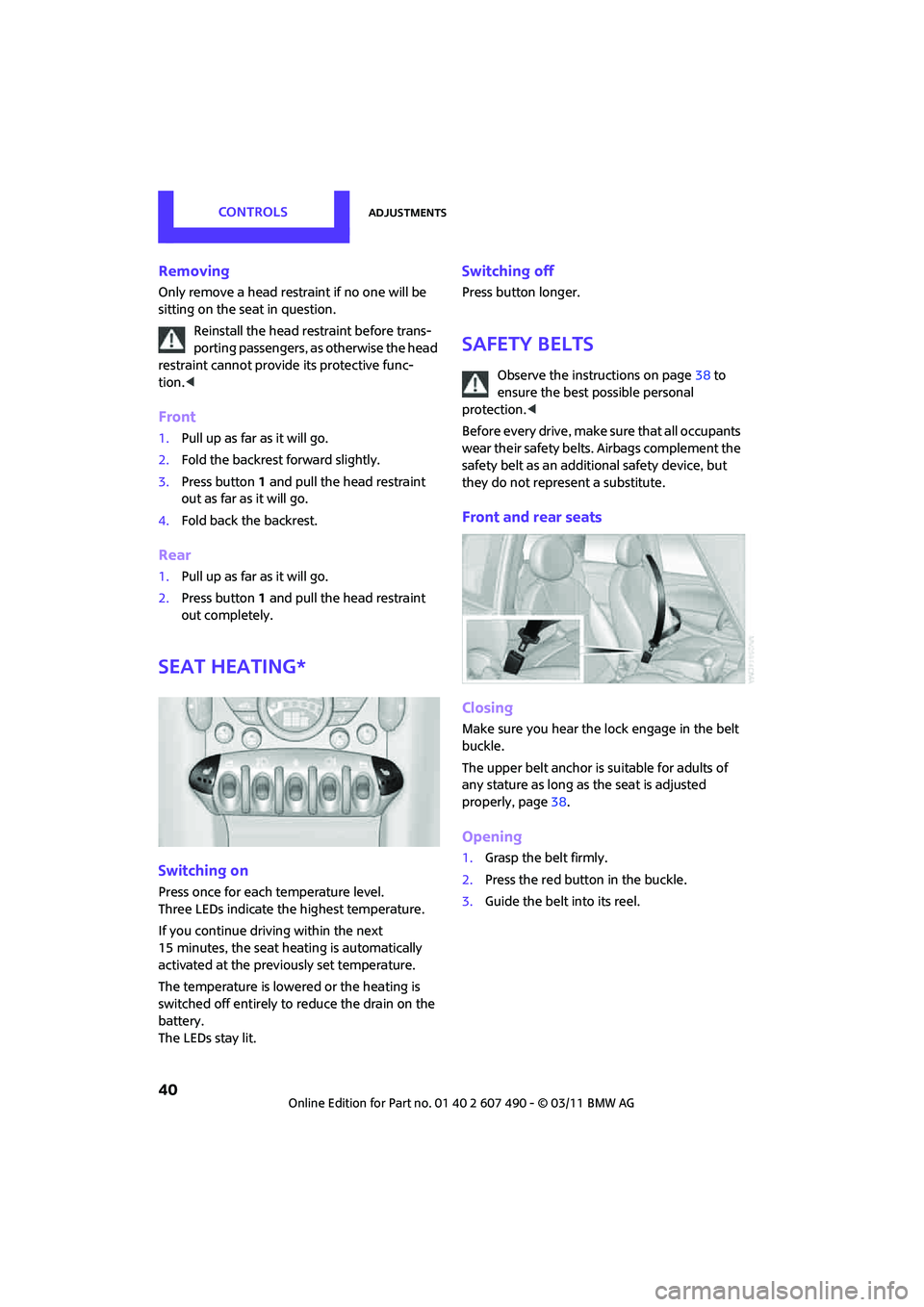
Seat heating*
Switching on
Press once for each temperature level.
Three LEDs indicate the highest temperature.
If you continue driving within the next
15 minutes, the seat heat ing is automatically
activated at the previously set temperature.
The temperature is lowe red or the heating is
switched off entirely to reduce the drain on the
battery.
The LEDs stay lit.
Switching off
Press button longer.
Safety belts
Observe the instructions on page 38 to
ensure the best possible personal
protection. <
Before every drive, make sure that all occupants
wear their safety belts. Airbags complement the
safety belt as an additional safety device, but
they do not represent a substitute.
Front and rear seats
Closing
Make sure you hear the lock engage in the belt
buckle.
The upper belt anchor is suitable for adults of
any stature as long as the seat is adjusted
properly, page 38.
Opening
1. Grasp the belt firmly.
2. Press the red button in the buckle.
3. Guide the belt into its reel.
Page 45 of 210
Transporting children safelyCONTROLS
43
Transporting children safely
The right place for
children
Do not leave children unattended in the
vehicle; otherwise, they could endanger
themselves and/or other persons by opening the
doors, for example.<
Children should always sit in the rear
Accident research has shown that the safest
place for children is on the rear seat.
Only transport children under the age of
13 or smaller than 5 ft/150 cm in the rear
in a child restraint system suitable for their age,
weight and size. Othe rwise, there is an
increased risk of injury in the event of an
accident. <
Children 13 years of age or older must be
buckled in with a safety belt as soon as there
no longer is any child re straint system that is
appropriate for their age, size and weight.
Only install child seats in the rear when the
rear seat backrest is folded all the way
back and engaged. Otherwise, there is an
increased risk of injury in the event of an
accident. <
Exception for front passenger seat
Front passenger airbags
Should it be necessary to use a child
restraint system on the front passenger
seat, the front and side airbags must be deacti-
vated. Otherwise, there is an increased risk of
injury to the child if th e airbags deploy, even if
the child is seated in a child restraint system. <
For more information on automatic deactivation
of the front passenger airbags, refer to page 76.
Child restraint systems,
installation
Observe the child restraint system manu-
facturer's instructions when selecting,
installing and using ch ild restraint systems.
Otherwise, the protective effect may be
diminished. <
On the front passenger seat
After installing a child restraint system on
the front passenger seat, make sure that
the front and side airbags for the front passen-
ger are deactivated; otherwise, there is an
increased risk of injury if the airbags deploy. <
Seat position
Before installing a child restraint system, move
the front passenger seat as far back and up
* as
possible to obtain the be st possible position for
the belt. Do not change the seat position after
this.
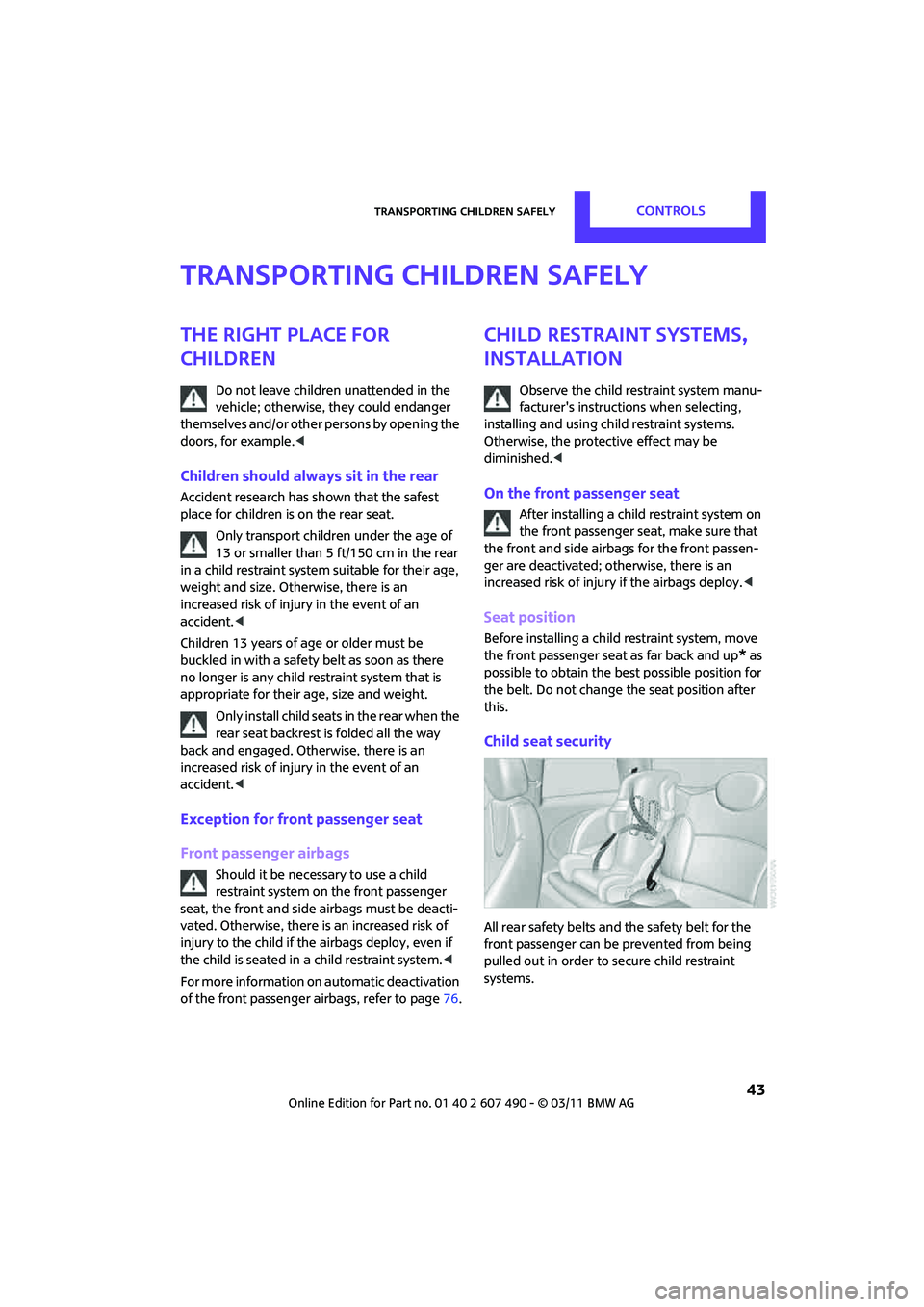
Child seat security
All rear safety belts and the safety belt for the
front passenger can be prevented from being
pulled out in order to secure child restraint
systems.
Page 77 of 210

Technology for driving comfort and safetyCONTROLS
75
telltale after replacing one or more tires or
wheels on your vehicle to ensure that the
replacement or alternate tires and wheels allow
the TPMS to continue to function properly.
Airbags
The following airbags are located under the
marked covers:
MINI:
1 Front airbags
2 Side airbags in backrests
3 Head airbags at the front and rear MINI Convertible:
1
Front airbags
2 Side/head airbags in the backrests
Protective effect
Observe the instructions on page 37 to
ensure the best possible personal
protection. <
The front airbags help protect the driver and
front passenger by responding to frontal
impacts in which safety belts alone cannot pro-
vide adequate restraint. When needed, the head
and side airbags help provide protection in the
event of side impact. Th e relevant side airbag
supports the side upper body area. The respec-
tive head airbag supports the head.
The side/head airbag in the MINI Convertible
protects the head during impact.
The airbags are designed to not be triggered in
every type of collision, e.g. not in minor acci-
dents, certain rollover si tuations or rear impacts. Do not apply adhesive
materials to the cover
panels of the airbags, cover them or modify
them in any other way.
Keep the dashboard and window on the passen-
ger side free from obstruction, i.e. do not cover it
with adhesive film or co verings, and do not affix
any holders such as for a navigation device or a
mobile phone.
Do not attach seat cove rs, cushions or other
objects not specifically approved for seats with
integral side airbags to th e front seats. Do not hang
items of clothing such as coats or jackets over the
backrests. Do not attempt to remove the airbag
retention system from the vehicle. Do not modify
the individual components of the system or its
wiring in any way. This in cludes the upholstery in
the center of the steering wheel, on the instrument
cluster, the doors, and the roof pillars as well as the
sides of the headliner. Do not attempt to remove
or dismantle the steering wheel.
Page 78 of 210
CONTROLSTechnology for driving comfort and safety
76
Do not touch the individual components immedi-
ately after the system has been triggered, because
there is a danger of burns.
In the event of malfunctions, deactivation, or
triggering of the airbag re straint system, have the
testing, repair, removal, and disposal of airbag
generators executed only by a MINI dealer or a
workshop that works acco rding to repair proce-
dures of the manufacturer of your MINI with corre-
spondingly trained person nel and has the required
explosives licenses. Otherwise, unprofessional
attempts to service the syst em could lead to failure
in an emergency or unde sired airbag activation,
either of which could resu lt in personal injury.<
Warning notices and information about the
airbags can also be found on the sun visors.
Automatic deactivation of the front
passenger airbags
An analysis of the impression in the front pas-
senger seat cushion de termines whether and
how the seat is occupied. The front and side
airbags for the front passenger are activated or
deactivated by the system accordingly.
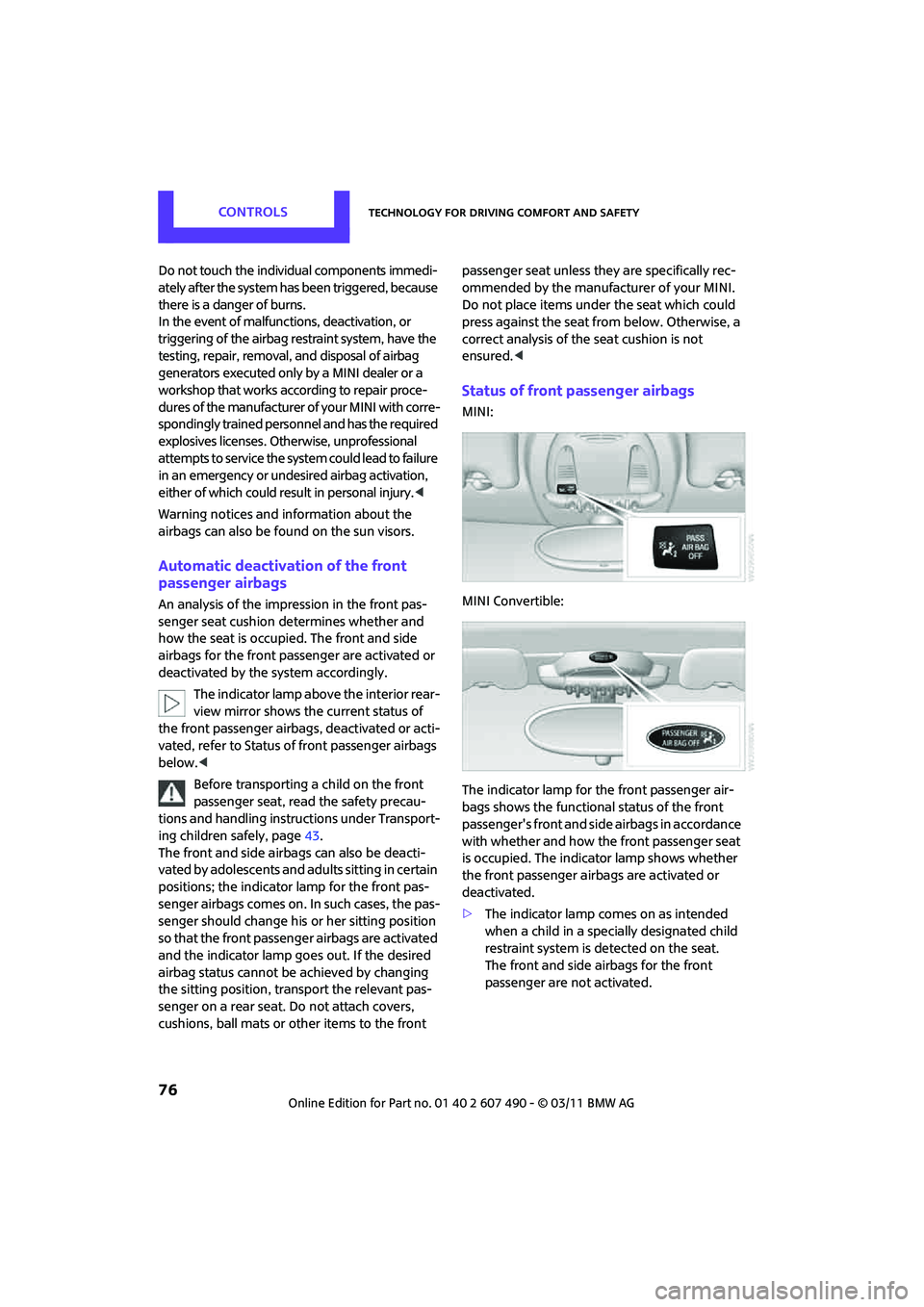
The indicator lamp above the interior rear-
view mirror shows the current status of
the front passenger airbags, deactivated or acti-
vated, refer to Status of front passenger airbags
below. <
Before transporting a child on the front
passenger seat, read the safety precau-
tions and handling instructions under Transport-
ing children safely, page 43.
The front and side airbags can also be deacti-
vated by adolescents and ad ults sitting in certain
positions; the indicator lamp for the front pas-
senger airbags comes on. In such cases, the pas-
senger should change his or her sitting position
so that the front passeng er airbags are activated
and the indicator lamp goes out. If the desired
airbag status cannot be achieved by changing
the sitting position, transport the relevant pas-
senger on a rear seat. Do not attach covers,
cushions, ball mats or other items to the front passenger seat unless they are specifically rec-
ommended by the manufacturer of your MINI.
Do not place items unde
r the seat which could
press against the seat fr om below. Otherwise, a
correct analysis of th e seat cushion is not
ensured. <
Status of front passenger airbags
MINI:
MINI Convertible:
The indicator lamp for the front passenger air-
bags shows the functional status of the front
passenger's front and side airbags in accordance
with whether and how the front passenger seat
is occupied. The indica tor lamp shows whether
the front passenger airbags are activated or
deactivated.
> The indicator lamp co mes on as intended
when a child in a specially designated child
restraint system is detected on the seat.
The front and side airbags for the front
passenger are not activated.
Page 79 of 210
Technology for driving comfort and safetyCONTROLS
77
Most child seats are detected by the
system. This particularly applies to
child seats that were required by NHTSA at
the time of manufacture of the vehicle. After
installing a child seat, check that the indica-
tor lamp for the front passenger airbags
lights up. It indicates that the child seat has
been detected and that the front passenger
airbags are deactivated. <
> The indicator lamp does not come on as long
as a person of sufficient size and in a correct
sitting position is detected on the seat.
The front and side airbags for the front
passenger are activated.
> The indicator lamp does not come on if the
seat is empty.
The front and side airbags for the front
passenger are not activated.
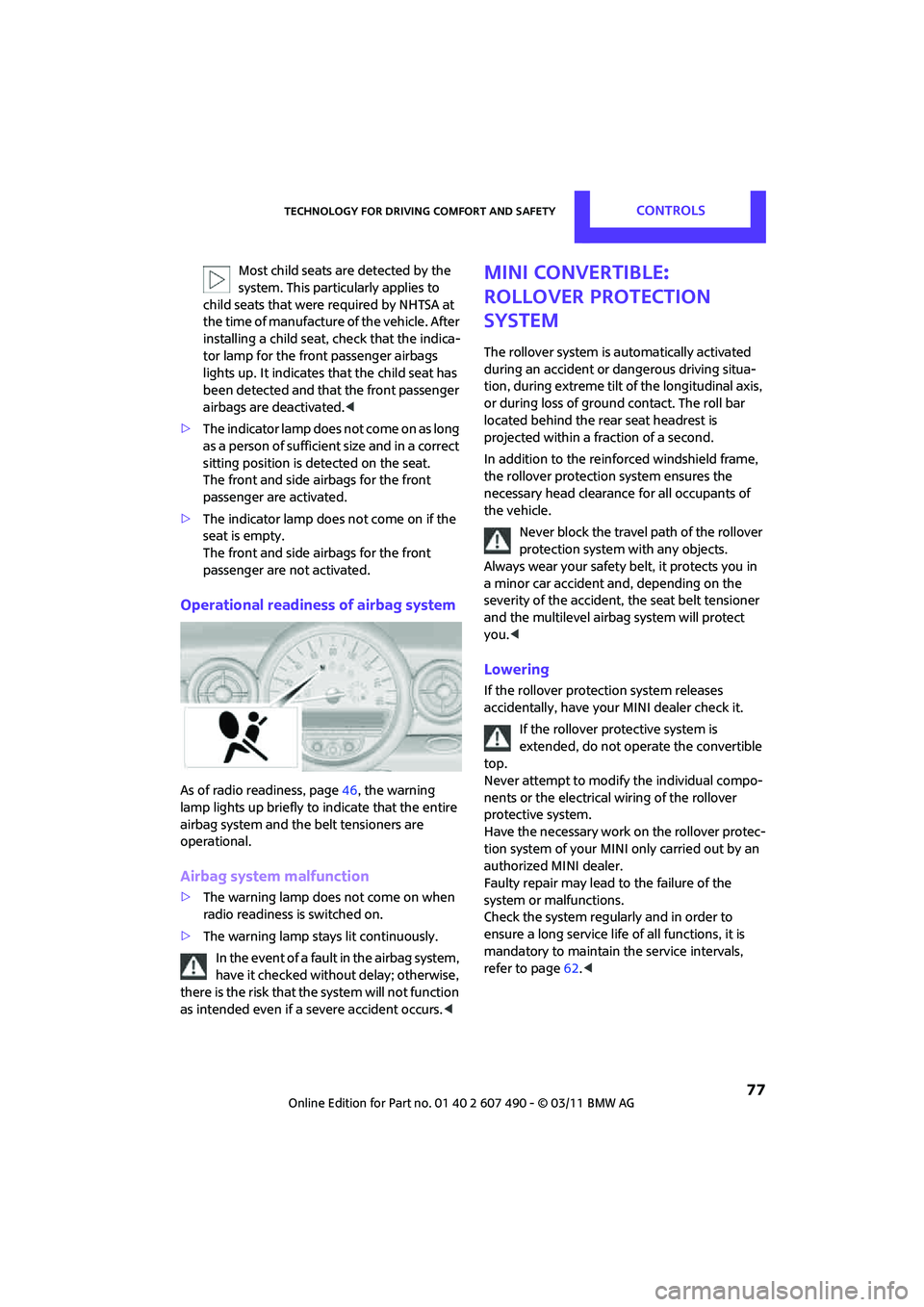
Operational readiness of airbag system
As of radio readiness, page 46, the warning
lamp lights up briefly to indicate that the entire
airbag system and the belt tensioners are
operational.
Airbag system malfunction
> The warning lamp does not come on when
radio readiness is switched on.
> The warning lamp stays lit continuously.
In the event of a fault in the airbag system,
have it checked without delay; otherwise,
there is the risk that the system will not function
as intended even if a severe accident occurs. <
MINI Convertible:
Rollover protection
system
The rollover system is automatically activated
during an accident or dangerous driving situa-
tion, during extreme tilt of the longitudinal axis,
or during loss of ground contact. The roll bar
located behind the rear seat headrest is
projected within a fraction of a second.
In addition to the reinforced windshield frame,
the rollover protection system ensures the
necessary head clearanc e for all occupants of
the vehicle.
Never block the travel path of the rollover
protection system with any objects.
Always wear your safety belt, it protects you in
a minor car accident and, depending on the
severity of the accident, the seat belt tensioner
and the multilevel airb ag system will protect
you. <
Lowering
If the rollover protecti on system releases
accidentally, have your MINI dealer check it.
If the rollover protective system is
extended, do not operate the convertible
top.
Never attempt to modify the individual compo-
nents or the electrical wiring of the rollover
protective system.
Have the necessary work on the rollover protec-
tion system of your MINI only carried out by an
authorized MINI dealer.
Faulty repair may lead to the failure of the
system or malfunctions.
Check the system regularly and in order to
ensure a long service life of all functions, it is
mandatory to ma intain the service intervals,
refer to page 62.<
Page 178 of 210

MOBILITYIndicator and warning lamps
176
Lights up in red:
Service due Arrange a service appointment.Check service requirements, page,
151.
Lights up in yellow:
The next time that the Start/Stop
button is pressed, the engine starts,
possibly even without a foot on the
brakes or without depressing the
clutch
Remote control malfunctioning or, in
cars with Comfort Access, not
detected The engine cannot be started. Have
the remote control
checked, if neces-
sary.
Remote control battery is discharged Use the remote control for a longer journey or, in cars with Comfort
Access, replace the battery.
Belt tensioners and/ or airbag system
failed Have the system checked immedi-
ately. Fasten the safety belts anyway.
Power steering failed You can continue your journey, but moderate your speed and exercise
due caution. Steering response will be
markedly different. Have the system
checked without delay.
Lights up in red:
Engine malfunction Stop the car and switch off the
engine. You cannot continue your
journey. Contact your MINI dealer.
Lights up in yellow:
Full engine power no longer available Y ou can continue your journey, but
moderate your speed and exercise
due caution. Have the engine
checked as soon as possible.
12Cause What to do
Page 196 of 210

194
REFERENCEEverything from A to Z
Everything from A to Z
INDEX
A
ABS Antilock Brake System67
Accessories, refer to Your individual vehicle 4
Acknowledgment signals for
locking/unlocking vehicle 23
Activated-charcoa l filter for
automatic climate control 88
Adaptive Light Control 80
Additives
– coolant 149
– engine oil 149
Adjusting temperature inside the car, refer to Air
conditioner 85
Adjusting temperature inside the car, refer to Automatic
climate control 86
Airbags 75
– sitting safely 37
– warning lamp 77
Air conditioner 84
Air conditioning mode
– air conditioner 85
– automatic cl imate control86
– ventilation 88
Air distribution
– automatic 87
– individual 86
– manual 86
Air flow rate 85,87
– air conditioning system 85
– automatic cl imate control87
– heating, ventilation 85
Airing, refer to Ventilation88
Air outlets, refer to Air vents 84
Air pressure, checking, refer to
Tire inflation pressure 134Air recirculation, refer to
Recirculated-air
mode 85,87
Air supply
– air conditioner 85
– automatic climate control 86
– ventilation 88
Air vents 84
AKI, refer to Fuel grade 133
Alarm system 27
All-season tires, refer to Winter tires 145
Always Open Timer 58
Ambient air, refer to Recirculated-air
mode 85,87
Ambient lighting 83
Antenna, care 153
Antifreeze
– coolant 14
9
– washer fluid 53
Antilock Brake System ABS 67
Anti-theft alarm system, refer
to Alarm system 27
Anti-theft system 21
Approved axle loads, refer to
Weights 191
Approved engine oils 149
Approved gross vehicle
weight, refer to Weights 191
Armrest, refer to Center armrest 92
Ashtray 93
Assistant systems, refer to
– Dynamic Stability Control
DSC 67
Audio device, external 91Automatic
– air distribution
87
– air flow rate 87
– cruise control 54
– headlamp control 78
Automatic climate control 84
– automatic air distribution 87
Automatic station search 107
Automatic station storage 108
Automatic transmission with Steptronic 48
– interlock 49
– overriding selector lever lock 50
– shiftlock 49
– sport program 49
AUTO program for automatic climate control 87
Auto radio, refer to Radio MINI Boost CD 106
AUX-IN, refer to External audio device 91
AUX In connection 106
Average fuel consumption 57
– setting the units 61
Average speed 57
Axle loads, refer to Weights 191
B
Background lighting, refer to
Ambient lighting 83
Backrests, refer to Seats 38
Backup lamps
– replacing bulb 161,162
Band-aids, refer to First aid pouch 169
Bar, refer to Tow-starting, towing away 172
Page 198 of 210

REFERENCEEverything from A to Z
196
Chassis number, refer to Engine compartment 147
Check Control 64
Child restraint fixing system
LATCH 44
Child restraint systems 43
Child seats 43
Chrome parts, care 155
Chrome parts, refer to Care 153
Cigarette lighter 93
Cleaning headlamps 53
– washer fluid 54
Clock
– 12 h/24 h mode 61
– setting time 63
Closing
– from inside 25
– from outside 21
Clothes hooks 92
Cockpit 10
Cold start, refer to Starting the
engine 47
Comfort Access 28
– replacing the battery 30
– what to observe before entering a car wash 29
Comfort area, refer to Around
the center console 14
Compartment for remote
control, refer to Ignition
lock 46
Compressed audio files 111
Computer 57
Condensation, refer to When the vehicle is parked 98
Condition Based Service CBS 151
Configuring settings, refer to
Personal Profile 20
Connecting vacuum cleaner, refer to Connecting electrical
appliances 93
Consumption, refer to Average fuel consumption 57
Control Display
– settings 59 Controls and displays
10
Convenient access, refer to Comfort Access 28
Convenient operation
– convertible top 24
– windows 22
Convenient start, refer to
Starting the engine 47
Convertible top 32
Coolant 149
– checking level 149
– filling 149
Coolant temperature 149
Cooling, maximum 87
Cooli
ng fluid, refer to
Coolant 149
Copyright 2
Cornering light, refer to Adaptive Light Control 80
Cruising range 57
Cupholders 93
Curb weight, refer to
Weights 191
Current fuel consumption 57
D
Dashboard, refer to Cockpit 10
Dashboard instruments, refer to Displays 12
Dashboard lighting, refer to Instrument lighting 82
Data 188
– capacities 193
– dimensions 189
– engine 188
– weights 191
Data memory 152
Date
– setting 64
Date setting 107
Daytime running lights 79
DBC Dynamic Brake Control, refer to Brake Assist 67
Deactivating front passenger
airbags 76 Deadlocking, refer to
Locking 22
Defect
– door lock 25
– fuel filler flap 132
Defogging windows 86,88
Defrosting windows 86,88
Defrosting windows and removing condensation
– air conditioner 86
– automatic climate control 88
Defrosting windshield, refer to Defrosting windows 86,88
Defrost positi on, refer to
Defrosting windows 86,88
Differential, breaking in 96
Digital radio, refer to HD Radio 109
Dimensions 189
Dipstick, engine oil 147
Directional indicators, refer to Turn signals 51
Displacement, refer to Engine data 188
Display lighting, refer to
Instrument lighting 82
Displays 12
– instrument cluster 12
Displays, care 156
Displays and controls 10
Disposal
– of coolant 149
– remote control battery 30
– vehicle battery 168
Distance remaining to service, refer to Service
requirements 62
Distance warning, refer
to Park
Distance Control PDC 66
Door key, refer to Integrated key/remote control 20
Door lock 24
Door lock, confirmation signals 23
Doors, manual operation 25
DOT Quality Grades 142