fuel consumption MINI COOPER 2012 Owners Manual
[x] Cancel search | Manufacturer: MINI, Model Year: 2012, Model line: COOPER, Model: MINI COOPER 2012Pages: 207, PDF Size: 3.18 MB
Page 24 of 207
Opening and closingCONTROLS
23
Personal Profile settings
For more information on specific settings, refer
to the specified pages.
> Response of the central locking system
when the car is being unlocked 23
> Automatic locking of the vehicle 27
> Triple turn signal activation 49
> Settings for the displays in the speedometer
and tachometer:
>12 h/24 h mode of the clock, refer to
Formats and units of measure 58
> Date format, refer to Formats and units
of measure 58
> Units of measure for fuel consumption,
distance covered/re maining distances
and temperature, refer to Formats and
units of measure 58
> Light settings:
>Pathway lighting 76
> Daytime running lights 76
> Automatic climate control: activating/deac-
tivating the AUTO program, setting the tem-
perature, air volume and air distribution 82
> Entertainment:
>Most recent ente rtainment source
> Radio MINI Boost CD:
Setting the volume 104
Setting the tone 105
Central locking system
The concept
The central locking system is ready for operation
whenever the driver's door is closed.
The system simultaneously engages and
releases the locks on the following:
>Doors
> MINI: tailgate
> MINI Clubman: Split Rear Barn Doors
> Fuel filler flap
Operating from outside
>Via the remote control
> Using the door lock
> In cars with Comfor t Access, via the door
handles on the driver's and passenger's
sides
The anti-theft system is also operated at the
same time. It prevents the doors from being
unlocked using the lock buttons or door han-
dles. The remote control can also be used to
switch on/off the welcome lamps and interior
lamps. The alarm system is also activated or
deactivated, page 29.
Operating from inside
Button for central locking system, page 26.
In the event of a sufficiently severe accident, the
central locking system unlocks automatically. In
addition, the hazard warning flashers and inte-
rior lamps come on.
Opening and closing:
from outside
Persons or animals in a parked vehicle
could lock the doors from the inside. Take
the key with you when you leave the vehicle so
that the vehicle can be opened from the out-
side. <
Using the remote control
Unlocking
Press the button.
The welcome lamps and interior lamps come on.
Unlocking mode
You can also set which parts of the car are
unlocked. The setting is stored for the remote
control in use.
Online Edition for Part no. 01 40 2 914 744 - \251 07/12 BMW AG
Page 48 of 207

DrivingCONTROLS
47
Selector lever positions
P R N D M/S + –
Displays in the tachometer
P R N D DS M1 to M6
The selector lever position is displayed, or the
current gear in the manual mode.
Changing selector lever positions
>The selector lever can only be moved out of
position P when the ignition is switched on
or the engine is running.
> Before moving the lever away from P or N
with the vehicle stationary, first depress the
brake; otherwise, the selector lever will
refuse to move: shiftlock.
To prevent the vehicle from creeping
after you select a driving position,
depress the brake until you are ready to
start. <
A lock prevents accidental shifting into selector
lever positions R and P.
Overriding the selector lever lock
Press the button on the front of the selector
lever, arrow.
P Park
Select this only when the vehicle is stationary.
The front wheels are blocked.
R Reverse
Select this only when the vehicle is stationary.
N Neutral
Select this when you are in a car wash, for
example. The vehicle can roll.
D Drive, automatic position
Position for normal ve hicle operation. All
forward gears are selected automatically.
Under normal operatio n conditions, fuel
consumption is lowest when you drive in
position D.
Kickdown
Kickdown enables you to achieve maximum
performance.
Depress the accelerator pedal beyond the full-
throttle resistance point.
Online Edition for Part no. 01 40 2 914 744 - \251 07/12 BMW AG
Page 56 of 207

Controls overviewCONTROLS
55
The following information is displayed sequen-
tially:
> Trip odometer
> Time
> External temperature
Trip odometer
To display trip recorder:
Briefly press button 3.
Resetting the trip odometer:
While the trip recorder is displayed and the
ignition is switched on, press button 3.
Time
To set time, see page 61.
External temperature, external
temperature warning
When the displayed temperature sinks to
approx. +37 7/+3 6, a signal sounds and a
warning lamp lights up. There is an increased
risk of black ice.
Even at temperatures above +37 7/+3 6
ice can form. Therefore, drive carefully,
e.g. on bridges and sections of road in the
shade; otherwise, there is an increased accident
risk. <
Units of measure
Select the respective units of measure, miles or
km for the odometer as well as 7 or 6 for the
external temperature, page 58.
Computer
Displays in tachometer
Press the button in the turn signal lever repeat-
edly to call up variou s items of information.
The following information is displayed sequen-
tially:
> Cruising range
> Average fuel consumption
> Current fuel consumption
> Average speed
To set the corresponding units of measure, refer
to Formats and units of measure on page 58.
Cruising range
Displays the estimated cruising range available
with the remaining fuel. The range is calculated
on the basis of the way the car has been driven
over the last 18 miles/30 km and the amount of
fuel currently in the tank.
If the range displayed is less than
30 miles/50 km, be sure to refuel; other-
wise, engine functions are not guaranteed and
damage could occur.<
Average fuel consumption
Calculated for the time the engine has been
running.
To reset average fuel consumption: press the
button in the turn signal lever for approx.
2 seconds.
Online Edition for Part no. 01 40 2 914 744 - \251 07/12 BMW AG
Page 57 of 207
CONTROLSControls overview
56
Current fuel consumption
Displays the current fuel consumption to allow
you to see whether your current driving style is
conducive to fuel economy with minimum
exhaust emissions.
Average speed
Periods with the vehicle parked and the engine
switched off are not included in the calculations
of average speed.
To reset average speed: press the button in the
turn signal lever for approx. 2 seconds.
Display in Radio MINI Boost CD
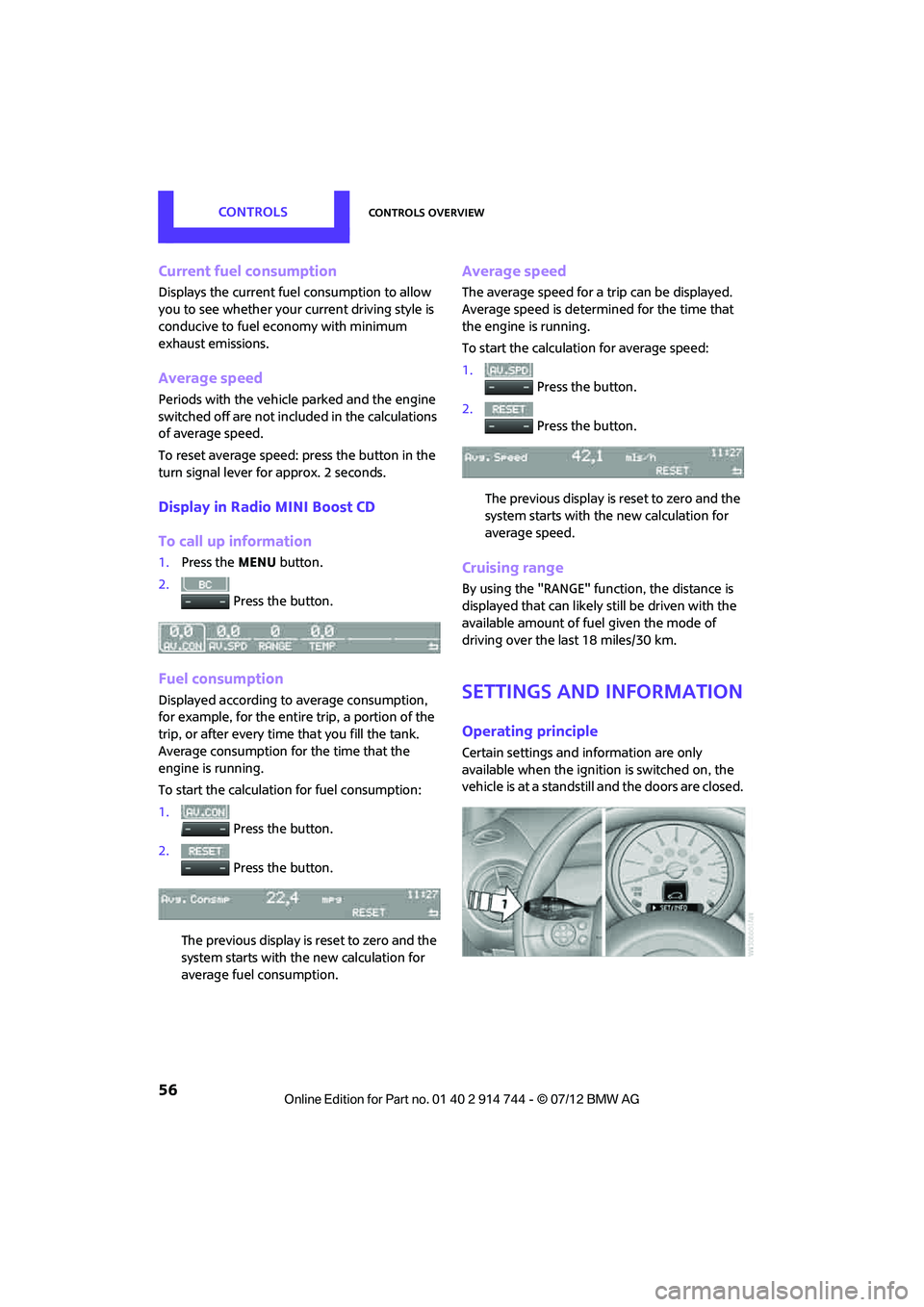
To call up information
1. Press the MENU button.
2. Press the button.
Fuel consumption
Displayed according to average consumption,
for example, for the entire trip, a portion of the
trip, or after every time that you fill the tank.
Average consumption for the time that the
engine is running.
To start the calculation for fuel consumption:
1. Press the button.
2. Press the button.
The previous display is reset to zero and the
system starts with the new calculation for
average fuel consumption.
Average speed
The average speed for a trip can be displayed.
Average speed is determined for the time that
the engine is running.
To start the calculation for average speed:
1. Press the button.
2. Press the button.
The previous display is reset to zero and the
system starts with th e new calculation for
average speed.
Cruising range
By using the "RANGE" function, the distance is
displayed that can likely still be driven with the
available amount of fuel given the mode of
driving over the last 18 miles/30 km.
Settings and information
Operating principle
Certain settings and information are only
available when the igniti on is switched on, the
vehicle is at a standstill and the doors are closed.
Online Edition for Part no. 01 40 2 914 744 - \251 07/12 BMW AG
Page 59 of 207

CONTROLSControls overview
58
Next setting or item of information
1.While in a setting or information item, press
the button in the turn signal indicator
repeatedly until "NEXT" is displayed.
2. Press the button for a longer period.
The display changes direct ly to the next setting
or item of information.
Formats and units of
measure
To set the formats and un its of measure. The set-
tings are stored for the remote control currently
in use, refer also to Personal Profile on page 22.
1. Switch on the ignition, refer to page 44.
2. Press the button in the turn signal indicator
as often as necessary until "SET/INFO" is
displayed.
3. Press and hold the button until the display
changes. 4.
Press the button as often as necessary until
the symbol and "SET" are displayed.
5. Press and hold the button until the display
changes.
6. Press the button repeat edly until the display
shows the illustra ted symbol, arrow.
> Fuel consumption: l/100 km, mpg,
km/l
> Distance covered: miles, km
> Temperature: 7, 6
7. Press and hold the button until the display
changes.
8. Press the button to change the format or the
measurement units.
9. Press and hold the button until the display
changes.
The settings are stored.
Resetting to factory settings
The settings for formats and units of measure
can be reset to the factory settings. The settings
are stored for the remote control currently in
use, refer also to Personal Profile on page 22.
Online Edition for Part no. 01 40 2 914 744 - \251 07/12 BMW AG
Page 101 of 207
DRIVING TIPSThings to remember when driving
100
for attaching the cargo straps. Two of them
are located on the forward wall of the cargo
area.
Comply with the information enclosed with
the load-securing devices.
Always position and secure the cargo as
described above, so that it cannot endan-
ger the car's occupants, for example if sudden
braking or swerves are necessary.
Do not exceed the approved gross vehicle
weight and axle loads, page 191; otherwise, the
operating safety of the vehicle is no longer
assured and the vehicle will not be in compli-
ance with the construction and use regulations.
Heavy or hard objects should not be carried
loose inside the car, since they could be thrown
around, for example as a result of heavy braking,
sudden swerves, etc., and endanger the occu-
pants. Do not secure cargo using the fastening
points for the tether strap, page 42; they may
become damaged. <
Roof-mounted luggage
rack
A special rack system is available as an option for
your MINI. Your MINI dealer will be glad to
advise you. Comply with the installation instruc-
tions supplied with the rack system.
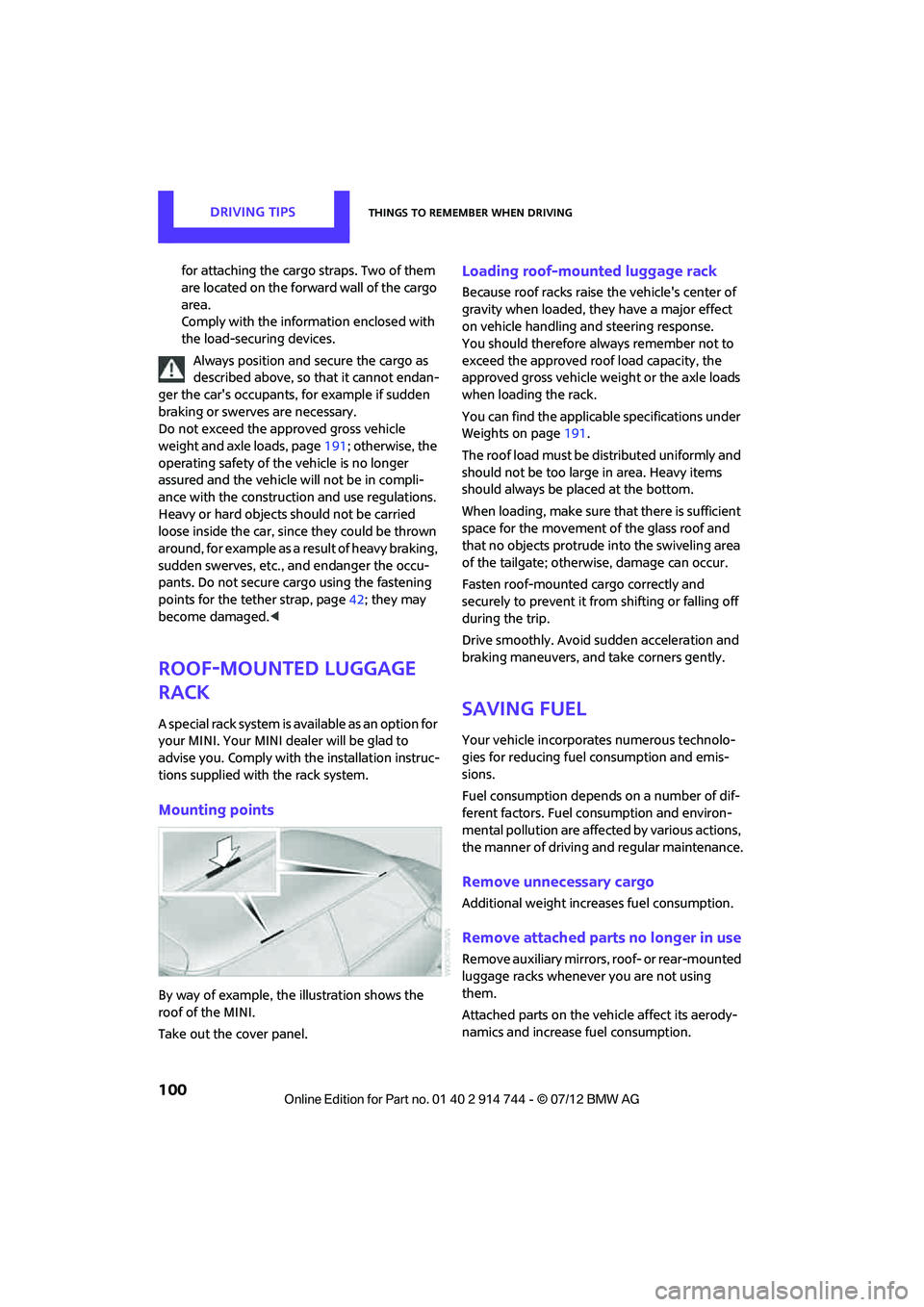
Mounting points
By way of example, the illustration shows the
roof of the MINI.
Take out the cover panel.
Loading roof-mounted luggage rack
Because roof racks raise the vehicle's center of
gravity when loaded, they have a major effect
on vehicle handling and steering response.
You should therefore always remember not to
exceed the approved roof load capacity, the
approved gross vehicle we ight or the axle loads
when loading the rack.
You can find the applicable specifications under
Weights on page 191.
The roof load must be distributed uniformly and
should not be too large in area. Heavy items
should always be placed at the bottom.
When loading, make sure that there is sufficient
space for the movement of the glass roof and
that no objects protrude into the swiveling area
of the tailgate; otherwise, damage can occur.
Fasten roof-mounted cargo correctly and
securely to prevent it from shifting or falling off
during the trip.
Drive smoothly. Avoid su dden acceleration and
braking maneuvers, and take corners gently.
Saving fuel
Your vehicle incorporates numerous technolo-
gies for reducing fuel consumption and emis-
sions.
Fuel consumption depends on a number of dif-
ferent factors. Fuel consumption and environ-
mental pollution are affect ed by various actions,
the manner of driving and regular maintenance.
Remove unnecessary cargo
Additional weight increases fuel consumption.
Remove attached parts no longer in use
Remove auxiliary mirrors, roof- or rear-mounted
luggage racks whenever you are not using
them.
Attached parts on the ve hicle affect its aerody-
namics and increase fuel consumption.
Online Edition for Part no. 01 40 2 914 744 - \251 07/12 BMW AG
Page 102 of 207

Things to remember when drivingDRIVING TIPS
101
Closing windows
Open windows increase air resistance and
therefore fuel consumption.
Check tire inflation pressure regularly
Check and, if necessary, correct tire inflation
pressure at least twic e a month and before
starting on a long trip.
Low inflation pressure increases rolling resis-
tance and thus leads to greater fuel consump-
tion and tire wear.
Drive off immediately
Do not wait for the engine to warm up while the
vehicle remains stationary. Start driving right
away, but at moderate engine speeds. This is the
fastest way for the cold engine to reach its oper-
ating temperature.
Think ahead while driving
Avoid unnecessary accelera tion and braking. by
maintaining a suitable di stance to the vehicle
driving ahead.
Looking-ahead an d smooth driving reduces fuel
consumption.
Avoid high engine speeds
Use first gear only for dr iving off. In second and
higher gears, accelerate smoothly to a suitable
engine and road speed. In doing so, avoid high
engine speeds and shift up early.
When you reach your desired traveling speed,
shift to the highest suitable gear and drive at
constant speed.
As a rule: driving at lo w engine speeds lowers
fuel consumption and reduces wear.
Coasting
When approaching a red traffic light, take your
foot off the accelerator and let the car roll to a
stop in the highest gear possible.
On a downhill gradient, take your foot off the
accelerator and let the vehi cle coast in a suitable
gear. Fuel supply is shut off automatically when the
vehicle is coasting.
Switch off the engine during lengthy
stops
Switch off the engine when stopping for lengthy
periods, e.g. at traffic lights, railroad crossings or
in traffic jams.
Switch off any features that are not
currently required
Features such as air conditioning, seat heaters
and the rear window defroster require a great
deal of energy and result in greater fuel con-
sumption, especially in
city driving and during
Stop & Go operation. For this reason, switch off
these features if they are not really needed.
Have the vehicle serviced
Have your vehicle serviced regularly to achieve
good economy and a long vehicle life. The
manufacturer of your MINI recommends having
the vehicle serviced by a MINI dealer. Also note
the MINI Maintenance System, page 147.
Online Edition for Part no. 01 40 2 914 744 - \251 07/12 BMW AG
Page 145 of 207

MOBILITYEngine compartment
144
Hood
Releasing
Pull the lever.Do not clean the windshield and head-
lamps if the hood is unlocked as this may
damage the headlamp washer system. <
Opening
To avoid damage, make sure that the
wiper arms are against the windshield
before you open the hood. <
Press the release handle and open the hood.
Closing
Close the hood from a height of approx. 16 in/
40 cm with momentum. It must be clearly heard
to engage.
If you notice any signs while driving your
vehicle that the hood is not completely
closed, stop at once and close it securely.
Make sure that the closing path of the hood is
clear; otherwise, injuries may result. <
Engine oil
Engine oil consumption depends on driving style
and operating conditions, e.g., with a very
sporty driving style, the engine oil consumption
is significantly increased.
Therefore, check the engine oil level regularly
after each refueling.
Checking engine oil level
1. With the vehicle's engine at normal operat-
ing temperature, i.e. after uninterrupted
driving for at least 6 miles/10 km, park the
vehicle on a level surface.
2. Switch off the engine.
3. Pull the dipstick out after approx. 5 minutes
and wipe it off with a lint-free cloth, paper
towel or similar material.
4. Carefully push the dipstick all the way into
the guide tube and pull it out again.
The oil level should be between the two
marks on the dipstick.
Online Edition for Part no. 01 40 2 914 744 - \251 07/12 BMW AG
Page 195 of 207

194
REFERENCEEverything from A to Z
Everything from A to Z
Index
A
ABS Antilock Brake System64
Accepting a call 121
Accessories, see Vehicle equipment 4
Acknowledgment signals for locking/unlocking vehicle 24
Activated-charcoa l filter for
automatic climate control 84
Adaptive Light Control 77
Adding engine oil 145
Additives
– coolant 146
– engine oil 145
Adjusting temperature inside the car, refer to Air
conditioner 81
Adjusting temperature inside the car, refer to Automatic
climate control 82
Airbags 72
– sitting safely 35
– warning lamp 73
Air conditioner 80
Air conditioning mode
– air conditioner 81
– automatic cl imate control82
– ventilation 84
Air distribution
– automatic 83
– individual 82
– manual 82
Air flow rate 81,83
– air conditioning system 81
– automatic cl imate control83
– heating, ventilation 81
Airing, refer to Ventilation84
Air outlets, refer to Air vents 80
Air pressure, checking, refer to Tire inflation pressure 131Air recirculation, refer to
Recirculated-air
mode 81,83
Air supply
– air conditioner 81
– automatic climate control 82
– ventilation 84
Air vents 80
AKI, refer to Fuel grade 129
Alarm system 29
All-season tires, refer to Winter tires 141
Ambient air, refer to Recirculated-air
mode 81,83
Ambient lighting 79
Antenna, care 149
An
tifreeze
– coolant 146
– washer fluid 52
Antilock Brake System ABS 64
Anti-theft alarm system, refer to Alarm system 29
Anti-theft system 23
Approved axle loads, refer to Weights 191
Approved engine oils 145
Approved gross vehicle weight, refer to Weights 191
Armrest, refer to Center armrest 89
Ashtray 91
Assistant systems, refer to
– Dynamic Stability Control DSC 64
Audio device, external 89
Automatic
– air distribution 83
– air flow rate 83
– cruise control 52
– headlamp control 75Automatic climate control
80
– automatic air distribution 83
Automatic station search 105
Automatic station storage 106
Automatic transmission with Steptronic 46
– interlock 47
– overriding selector lever lock 48
– shiftlock 47
– sport program 48
AUTO program for automatic
climate control 83
Auto radio, refer to Radio MINI Boost CD 104
AUX-In, refer to External audio device 89
AUX-In connection 104
Average fuel consumption 55
– setting the units 58
Average speed 56
Axle loads, refer to Weights 191
B
Background lighting, refer to
Ambient lighting 79
Backrests, refer to Seats 36
Backup lamps
– replacing bulb 158,159
Band-aids, refer to First aid
pouch 167
Bar, refer to Tow-starting, towing away 170
Base plate for telephone or mobile phone
– refer to Snap-in adapter 124
Online Edition for Part no. 01 40 2 914 744 - \251 07/12 BMW AG
Page 197 of 207

REFERENCEEverything from A to Z
196
Chrome parts, refer to Care 149
Cigarette lighter 91
Cleaning headlamps 51
– washer fluid 52
Clock
– setting time 61
– 12 h/24 h mode 58
Closing
– from inside 26
– from outside 23
Clothes hooks 90
Club Door 28
Cockpit 10
Cold start, refer to Starting the engine 45
Comfort Access 30
– replacing the battery 32
– what to observe before
entering a car wash 32
Comfort area, refer to Around the center console 14
Compartment for remote control, refer to Ignition
lock 44
Compass 87
Compressed audio files 109
Computer 55
Condensation, refer to When the vehicle is parked 96
Condition Based Service CBS 147
Configuring settings, refer to
Personal Profile 22
Connecting vacuum cleaner, refer to Connecting electrical
appliances 91
Consumption, refer to Average fuel consumption 55
Control Display
– settings 56
Controls and displays 10
Convenience operation
– windows 24
Convenient access, refer to
Comfort Access 30 Convenient start, refer to
Starting the engine 45
Coolant 146
– checking level 146
– filling 146
Coolant temperature 146
Cooling, maximum 83
Cooling fluid, refer to Coolant 146
Copyright 2
Cornering light, refer to Adaptive Light Control 77
Cruising range 55,56
Cupholders 90
Curb weight, refer to Weights 191
C
urrent fuel consumption 56
D
Dashboard, refer to Cockpit 10
Dashboard instruments, refer
to Displays 12
Dashboard lighting, refer to Instrument lighting 78
Data 186
– capacities 192
– dimensions 187
– engine 186
– weights 191
Data memory 148
Date
– setting 61
Daytime running lights 76
DBC Dynamic Brake Control, refer to Brake Assist 64
Deactivating front passenger airbags 72
Deadlocking, refer to
Locking 24
Defect
– door lock 26
– fuel filler flap 128
Defogging windows 82,84
Defrosting windows 82,84 Defrosting windows and
removing condensation
– air conditioner 82
– automatic climate control 84
Defrosting windshield, refer to Defrosting windows 82,84
Defrost positi on, refer to
Defrosting windows 82,84
Differential, breaking in 94
Digital compass 87
Digital radio, refer to HD Radio 107
Dimensions 187
Dipstick, engine oil 144
Directional indicators, refer to Turn signals 49
Displacement, refer to Engine data 186
Display lighting, refer to
Instrument lighting 78
Displays 12
– instrument panel 12
Displays, care 152
Displays and controls 10
Disposal
– of coolant 146
– remote control battery 32
– vehicle battery 165
Distance remaining to service, refer to Service
requirements 59
Distance warning, refer
to Park
Distance Control PDC 63
Door
– rear, refer to Club Door 28
Door key, refer to Integrated
key/remote control 22
Door lock 26
Door lock, confirmation
signals 24
Doors, manual operation 26
DOT Quality Grades 139
Double doors, refer to Split Rear Barn Doors 28
Drinks holders, refer to
Cupholders 90
Online Edition for Part no. 01 40 2 914 744 - \251 07/12 BMW AG