automatic transmission MINI COOPER 2013 User Guide
[x] Cancel search | Manufacturer: MINI, Model Year: 2013, Model line: COOPER, Model: MINI COOPER 2013Pages: 267, PDF Size: 3.53 MB
Page 76 of 267
Technology for driving comfort and safetyCONTROLS
75
>Interference from systems or devices with
the same transmission frequency.
> Malfunction.
Resetting the system
Reset the system again after each correction of
the tire inflation pressure and after every tire or
wheel change.
1. "Vehicle Info"
2. "Vehicle status"
3. "Reset"
4. Start the engine – do not drive away.
5. Select "Reset" to start the initialization.
6. Start to drive.
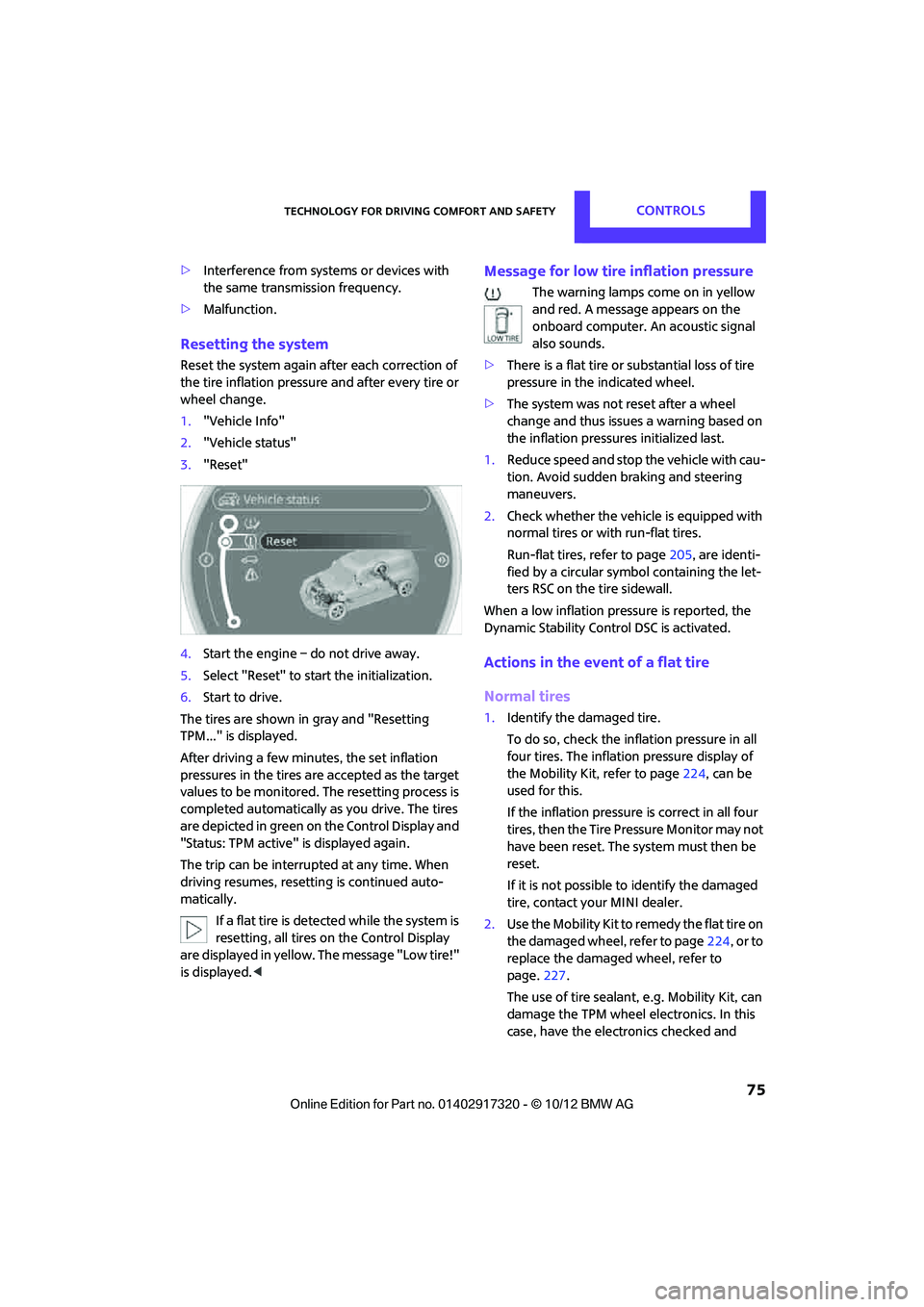
The tires are shown in gray and "Resetting
TPM..." is displayed.
After driving a few minutes, the set inflation
pressures in the tires are accepted as the target
values to be monitored. The resetting process is
completed automatically as you drive. The tires
are depicted in green on the Control Display and
"Status: TPM active" is displayed again.
The trip can be interrupted at any time. When
driving resumes, resetting is continued auto-
matically. If a flat tire is detected while the system is
resetting, all tires on the Control Display
are displayed in yellow. The message "Low tire!"
is displayed. <
Message for low tire inflation pressure
The warning lamps come on in yellow
and red. A message appears on the
onboard computer. An acoustic signal
also sounds.
> There is a flat tire or substantial loss of tire
pressure in the indicated wheel.
> The system was not reset after a wheel
change and thus issues a warning based on
the inflation pressures initialized last.
1. Reduce speed and stop the vehicle with cau-
tion. Avoid sudden braking and steering
maneuvers.
2. Check whether the vehicle is equipped with
normal tires or with run-flat tires.
Run-flat tires, refer to page 205, are identi-
fied by a circular symbol containing the let-
ters RSC on the tire sidewall.
When a low inflation pressure is reported, the
Dynamic Stability Control DSC is activated.
Actions in the event of a flat tire
Normal tires
1. Identify the damaged tire.
To do so, check the inflation pressure in all
four tires. The inflation pressure display of
the Mobility Kit, refer to page 224, can be
used for this.
If the inflation pressure is correct in all four
tires, then the Tire Pressure Monitor may not
have been reset. The system must then be
reset.
If it is not possible to identify the damaged
tire, contact your MINI dealer.
2. Use the Mobility Kit to remedy the flat tire on
the damaged wheel, refer to page 224, or to
replace the damaged wheel, refer to
page. 227.
The use of tire sealant, e.g. Mobility Kit, can
damage the TPM wheel electronics. In this
case, have the electronics checked and
00320051004F004C00510048000300280047004C0057004C005200510003
Page 102 of 267
Things to remember when drivingDRIVING TIPS
101
If special circumstances make it absolutely nec-
essary to drive with the tailgate/Split Rear Barn
Doors open:
1. Close all windows and the glass sunroof.
2. Switch off the recirc ulated-air mode and
switch the airflow contro l of the heating, air
conditioner, or automatic climate control to
high, refe r to page 86 or 88.
Hot exhaust system
As in all vehicles, extremely high tempera-
tures are generated on the exhaust sys-
tem. Do not remove the heat shields installed
adjacent to various sect ions of the exhaust sys-
tem, and never apply undercoating to them.
Make sure that when driving, idling or when
parking, no easily flamma ble materials, such as
hay, leaves, grass, etc. come into contact with
the hot exhaust system. Such contact could lead
to a fire, with the risk of serious personal injuries
and property damage. Do not touch hot exhaust
tail pipes. Otherwise, there is a risk of burns. <
Hydroplaning
When driving on wet or slushy roads,
reduce road speed. If you do not, a wedge
of water can form betw een tires and road sur-
face. This situation, known as hydroplaning, can
cause partial or complete loss of tire contact
with the road surface, so that the car cannot be
steered or braked properly. <
The risk of hydroplaning increases with declining
tread depth on the tires, refer also to Tread
depth on page 204.
Driving through water
Drive through water on the road only if it is
not deeper than 1 ft/30 cm, and then only
at walking speed at the most. Otherwise, the
vehicle's engine, the electrical systems and the
transmission may be damaged. <
Parking brake on inclines
On inclines, do not hold the vehicle with
the clutch; use the parking brake. Other-
wise, greater clutch wear will result. <
For information on driving off using Hill Assist,
refer to page 71.
Braking safely
Your MINI is equipped with ABS. If you are in a
situation which requires full braking, it is best to
brake using maximum brake pressure. Since the
vehicle maintains steeri ng responsiveness, you
can still avoid possible obstacles with a mini-
mum of steering effort.
The pulsation of the brake pedal, together with
the sound of hydraulic regulation, indicates that
ABS is functioning properly.
Objects in the movement range of the
pedals
Keep floor mats, carp et, and other objects
out of the movement range of the pedals;
otherwise, they may inhi bit the function of the
pedals during driving.
Do not place additional floor mats onto an exist-
ing one or onto other objects.
Only use floor mats that have been approved for
the vehicle and can be appropriately fastened.
Make sure that the floo r mats are securely fas-
tened again after they have been removed, e.g.
for cleaning.<
Driving in wet conditions
When roads are wet or ther e is heavy rain, briefly
exert gentle pressure on the brake pedal every
few miles. Monitor traffic conditions to make
sure that this maneuver does not endanger
other road users. The heat generated in this pro-
cess helps dry the pads and rotors to ensure
that. Then full braking fo rce will be immediately
available when it is needed.
00320051004F004C00510048000300280047004C0057004C005200510003
Page 103 of 267
DRIVING TIPSThings to remember when driving
102
Hills
To prevent overheating and the resulting
reduced efficiency of the brake system,
drive long or steep downhill gradients in the
gear in which the least braking is required. Even
light but consistent brake pressure can lead to
high temperatures, brake wear and possibly
even brake failure. <
You can increase the engine's braking effect by
shifting down, all the way to first gear if neces-
sary. This strategy helps you avoid placing
excessive loads on the brake system. Downshift-
ing in manual mode of the automatic transmis-
sion, page 51.
Never drive with the clutch held down,
with the transmission in neutral or with
the engine switched off; otherwise, engine brak-
ing action will not be present or there will be no
power assistance to the brakes or steering.
Never allow floor mats, carpets or any other
objects to protrude into the area around the
pedals; otherwise, pedal function could be
impaired. <
Corrosion on brake rotors
When the vehicle is driven only occasionally,
during extended periods when the vehicle is not
used at all, and in op erating conditions where
brake applications are less frequent, there is an
increased tendency for corrosion to form on
rotors, while contaminants accumulate on the
brake pads. This occurs because the minimum
pressure which must be exerted by the pads
during brake applications to clean the rotors is
not reached.
Should corrosion form on the brake rotors, the
brakes will tend to respond with a pulsating
effect that even extended application will fail to
cure.
When the vehicle is parked
Condensation forms while the automatic climate
control is in operation, and then exits under the
vehicle. Traces of condensed water under the
vehicle are therefore normal. In the MINI Cooper S, the coolant pump may
continue to run for some time after the engine is
switched off. This will
generate noise in the
engine compartment.
Cargo loading
To avoid loading the tires beyond their
approved carrying capacity, never over-
load the vehicle. Overloading can lead to over-
heating and increases the rate at which damage
develops inside the tires. The ultimate result can
assume the form of a sudden blowout. <
Avoid fluid spills in the cargo area as they
could damage the vehicle. <
MINI: cargo area cover
Do not place any objects on the cover;
otherwise, they could endanger the car's
occupants, e.g. in the case of braking or sudden
swerving, or they may damage the cover. <
When you open the tailgate, the roll-up cover is
raised.
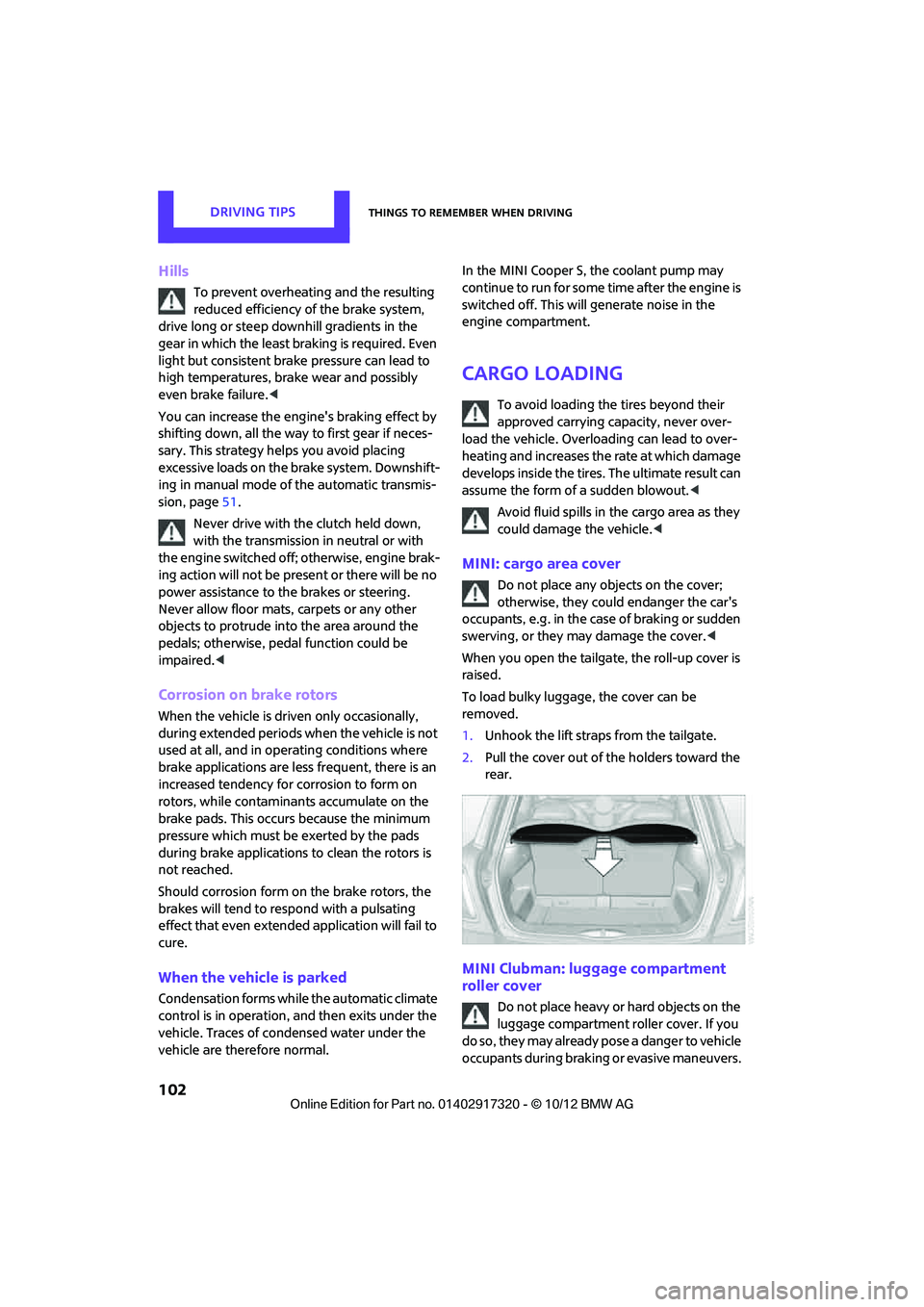
To load bulky luggage, the cover can be
removed.
1. Unhook the lift straps from the tailgate.
2. Pull the cover out of the holders toward the
rear.
MINI Clubman: luggage compartment
roller cover
Do not place heavy or hard objects on the
luggage compartment roller cover. If you
do so, they may already po s e a d a n g e r t o v e h i c l e
occupants during braking or evasive maneuvers.
00320051004F004C00510048000300280047004C0057004C005200510003
Page 141 of 267
ENTERTAINMENTRadio
140
3."Replay - Time shift"
> The red arrow indicates the current playback
position.
> The time difference from the live broadcast
is displayed next to the cache memory bar.
> For live transmissions: "live".
Time shift menu
Automatic time shift
When the function is acti vated, audio playback is
stopped automatically in the event of:
> Incoming and outgoing telephone calls.
> Activation of the voice activation system.
> Muting.
The audio playback then continues with a time
delay.
Activating
1. "Radio"
2. "Satellite radio"
3. "Replay - Time shift"
4. "Automatic time shift"
Deactivating
"Automatic time shift"
Storing favorites
Up to 30 favorites can be stored in the favorites
list. Possible favorites incl ude artist, track, game,
league, and team.
Storing artist, track, or game
Only current broadcasts can be stored as favor-
ites. The channel informat ion must be available.
1. "Radio"
2. "Satellite radio"
3. Select "All channels" or the desired cate-
gory.
4. Select desired channel.
5. Press the MINI joystick again.
6. Select artist, track, or game.
Storing league or team
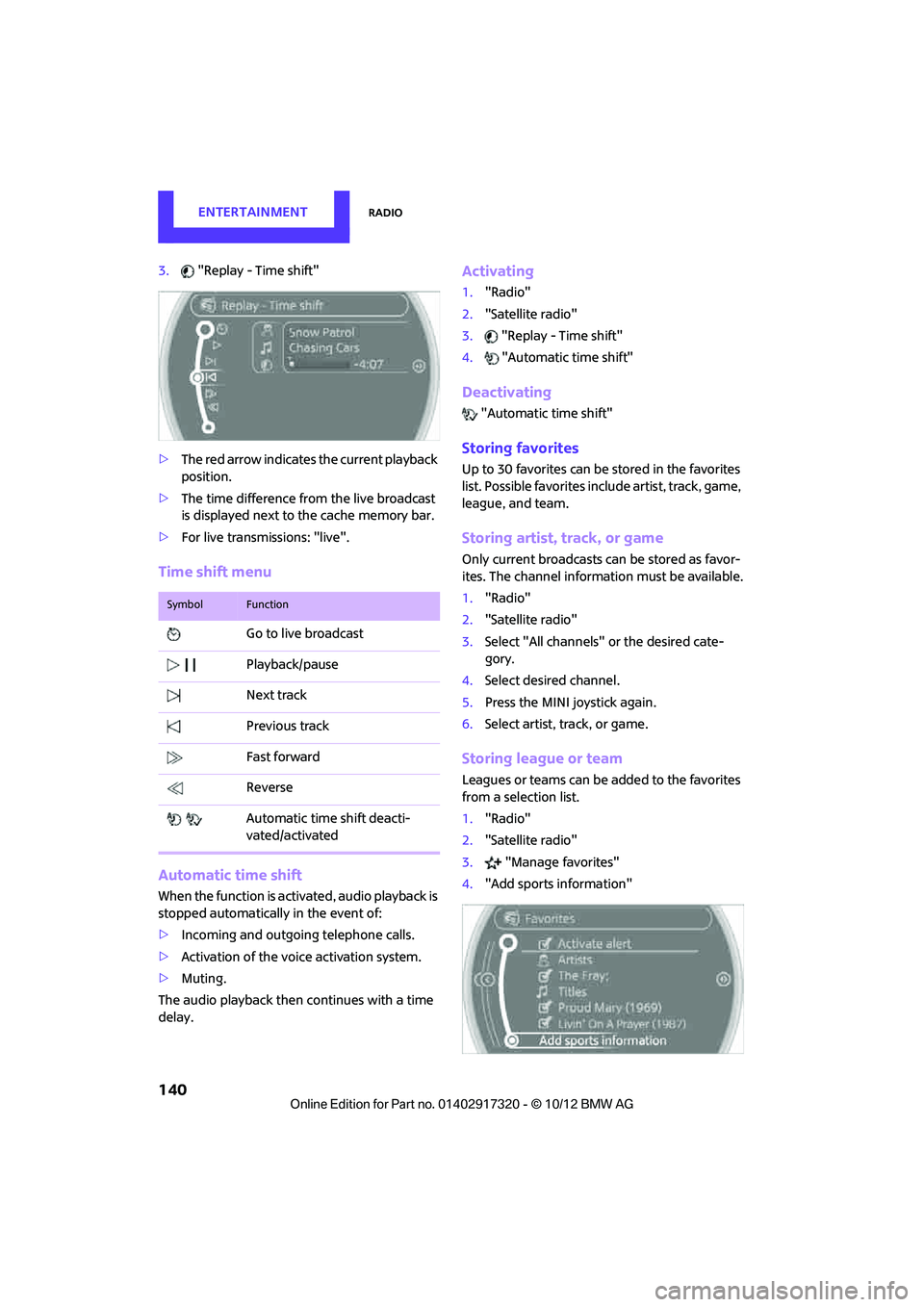
Leagues or teams can be added to the favorites
from a selection list.
1. "Radio"
2. "Satellite radio"
3. "Manage favorites"
4. "Add sports information"
SymbolFunction
Go to live broadcast
Playback/pause
Next track
Previous track
Fast forward
Reverse
Automatic time shift deacti-
vated/activated
00320051004F004C00510048000300280047004C0057004C005200510003
Page 215 of 267
MOBILITYCare
214
>Remove additional atta chments, e.g. spoil-
ers or telephone antennas, if there is a pos-
sibility that they could be damaged.
> Insert the remote control into the ignition
lock.
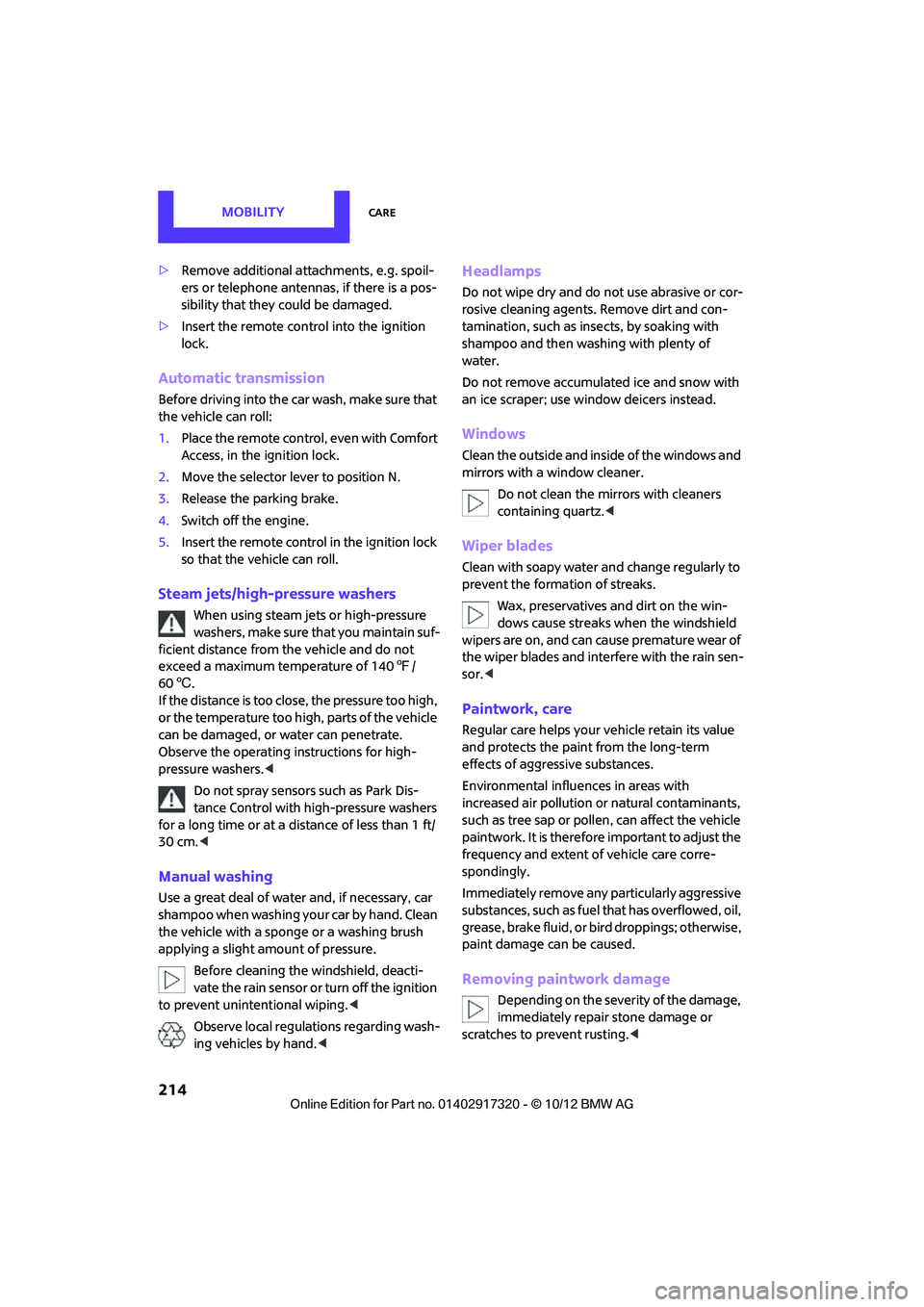
Automatic transmission
Before driving into the car wash, make sure that
the vehicle can roll:
1.Place the remote control, even with Comfort
Access, in the ignition lock.
2. Move the selector lever to position N.
3. Release the parking brake.
4. Switch off the engine.
5. Insert the remote control in the ignition lock
so that the vehicle can roll.
Steam jets/high-pressure washers
When using steam jets or high-pressure
washers, make sure th at you maintain suf-
ficient distance from the vehicle and do not
exceed a maximum temperature of 140 7/
60 6 .
If the distance is too close, the pressure too high,
or the temperature too high, parts of the vehicle
can be damaged, or water can penetrate.
Observe the operating instructions for high-
pressure washers. <
Do not spray sensors such as Park Dis-
tance Control with high-pressure washers
for a long time or at a di stance of less than 1 ft/
30 cm. <
Manual washing
Use a great deal of water and, if necessary, car
shampoo when washing your car by hand. Clean
the vehicle with a sponge or a washing brush
applying a slight amount of pressure.
Before cleaning the windshield, deacti-
vate the rain sensor or turn off the ignition
to prevent unintentional wiping. <
Observe local regulations regarding wash-
ing vehicles by hand. <
Headlamps
Do not wipe dry and do not use abrasive or cor-
rosive cleaning agents. Remove dirt and con-
tamination, such as inse cts, by soaking with
shampoo and then washing with plenty of
water.
Do not remove accumulated ice and snow with
an ice scraper; use window deicers instead.
Windows
Clean the outside and inside of the windows and
mirrors with a window cleaner.
Do not clean the mirrors with cleaners
containing quartz. <
Wiper blades
Clean with soapy water and change regularly to
prevent the formation of streaks.
Wax, preservatives and dirt on the win-
dows cause streaks wh en the windshield
wipers are on, and can cause premature wear of
the wiper blades and interfere with the rain sen-
sor. <
Paintwork, care
Regular care helps your vehicle retain its value
and protects the paint from the long-term
effects of aggressive substances.
Environmental influences in areas with
increased air pollution or natural contaminants,
such as tree sap or pollen, can affect the vehicle
paintwork. It is therefore important to adjust the
frequency and extent of vehicle care corre-
spondingly.
Immediately remove any pa rticularly aggressive
substances, such as fuel that has overflowed, oil,
grease, brake fluid, or bird droppings; otherwise,
paint damage can be caused.
Removing paintwork damage
Depending on the severity of the damage,
immediately repair stone damage or
scratches to prevent rusting. <
00320051004F004C00510048000300280047004C0057004C005200510003
Page 235 of 267
MOBILITYGiving and receiving assistance
234
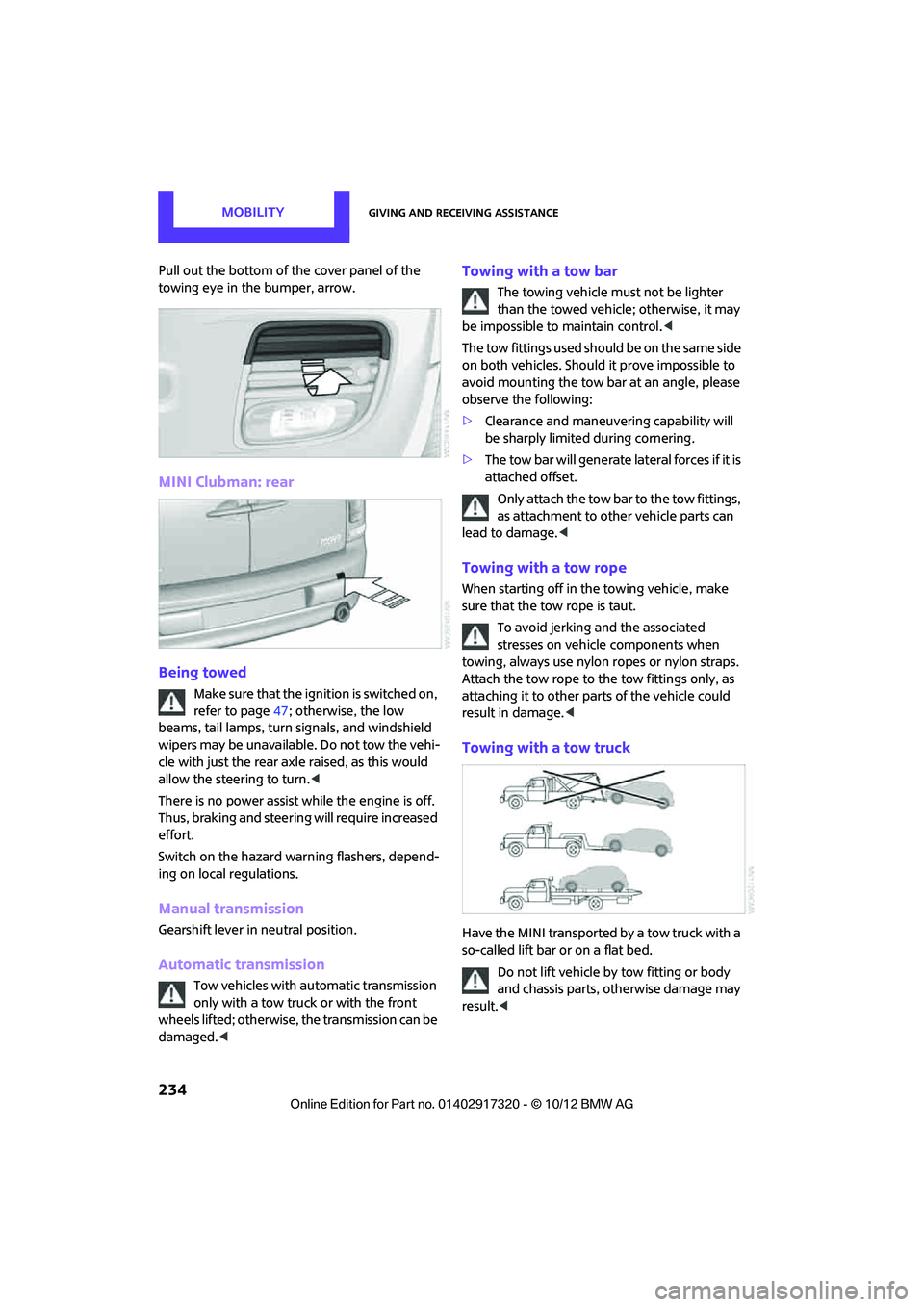
Pull out the bottom of the cover panel of the
towing eye in the bumper, arrow.
MINI Clubman: rear
Being towed
Make sure that the ignition is switched on,
refer to page47; otherwise, the low
beams, tail lamps, turn signals, and windshield
wipers may be unavailable. Do not tow the vehi-
cle with just the rear axle raised, as this would
allow the steering to turn. <
There is no power assist while the engine is off.
Thus, braking and steering will require increased
effort.
Switch on the hazard wa rning flashers, depend-
ing on local regulations.
Manual transmission
Gearshift lever in neutral position.
Automatic transmission
Tow vehicles with automatic transmission
only with a tow truck or with the front
wheels lifted; otherwise, the transmission can be
damaged. <
Towing with a tow bar
The towing vehicle must not be lighter
than the towed vehicle; otherwise, it may
be impossible to maintain control. <
The tow fittings used should be on the same side
on both vehicles. Should it prove impossible to
avoid mounting the tow bar at an angle, please
observe the following:
> Clearance and maneuver ing capability will
be sharply limited during cornering.
> The tow bar will generate lateral forces if it is
attached offset.
Only attach the tow bar to the tow fittings,
as attachment to other vehicle parts can
lead to damage. <
Towing with a tow rope
When starting off in the towing vehicle, make
sure that the tow rope is taut.
To avoid jerking and the associated
stresses on vehicle components when
towing, always use nylon ropes or nylon straps.
Attach the tow rope to the tow fittings only, as
attaching it to other pa rts of the vehicle could
result in damage. <
Towing with a tow truck
Have the MINI transported by a tow truck with a
so-called lift bar or on a flat bed.
Do not lift vehicle by tow fitting or body
and chassis parts, otherwise damage may
result. <
00320051004F004C00510048000300280047004C0057004C005200510003
Page 236 of 267
Giving and receiving assistanceMOBILITY
235
Tow-starting
Avoid tow-starting the vehicle whenever possi-
ble; instead, jump-start the engine, page 232.
Vehicles with a catalytic converter should only
be tow-started when the engine is cold, vehicles
with an automatic transmission cannot be tow-
started at all.
1. Switch on hazard warn ing flashers, comply
with local regulations.
2. Switch on the ignition, page 47.
3. Shift into 3rd gear.
4. Have the vehicle tow-started with the clutch
completely depressed and then slowly
release the clutch. Afte r the engine starts,
immediately depress the clutch completely
again.
5. Stop at a suitable lo cation, remove the tow
bar or rope and switch off the hazard warn-
ing flashers.
6. Have the vehicle checked.
00320051004F004C00510048000300280047004C0057004C005200510003
Page 243 of 267
REFERENCETechnical data
242
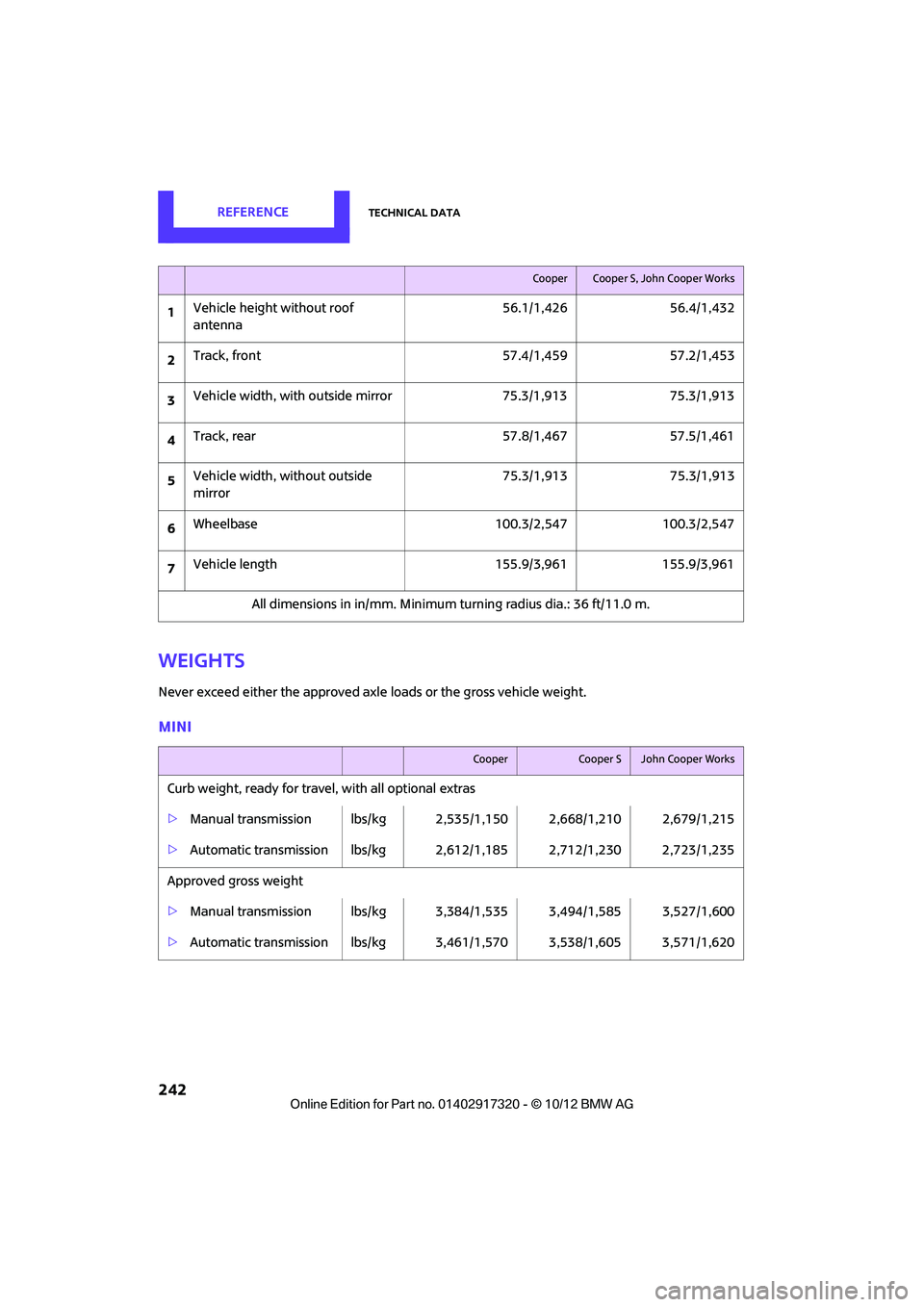
Weights
Never exceed either the approved axle loads or the gross vehicle weight.
MINI
CooperCooper S, John Cooper Works
1Vehicle height without roof
antenna 56.1/1,426 56.4/1,432
2 Track, front 57.4/1,459 57.2/1,453
3 Vehicle width, with outside mirror 75.3/1,913 75.3/1,913
4 Track, rear 57.8/1,467 57.5/1,461
5 Vehicle width, without outside
mirror 75.3/1,913 75.3/1,913
6 Wheelbase 100.3/2,547 100.3/2,547
7 Vehicle length 155.9/3,961 155.9/3,961
All dimensions in in/mm. Minimum turning radius dia.: 36 ft/11.0 m.
CooperCooper SJohn Cooper Works
Curb weight, ready for travel , with all optional extras
> Manual transmission lbs/kg 2, 535/1,150 2,668/1,210 2,679/1,215
> Automatic transmission lbs/kg 2,612/1,185 2,712/1,230 2,723/1,235
Approved gross weight
> Manual transmission lbs/kg 3, 384/1,535 3,494/1,585 3,527/1,600
> Automatic transmission lbs/kg 3,461/1,570 3,538/1,605 3,571/1,620
00320051004F004C00510048000300280047004C0057004C005200510003
Page 244 of 267
Technical dataREFERENCE
243
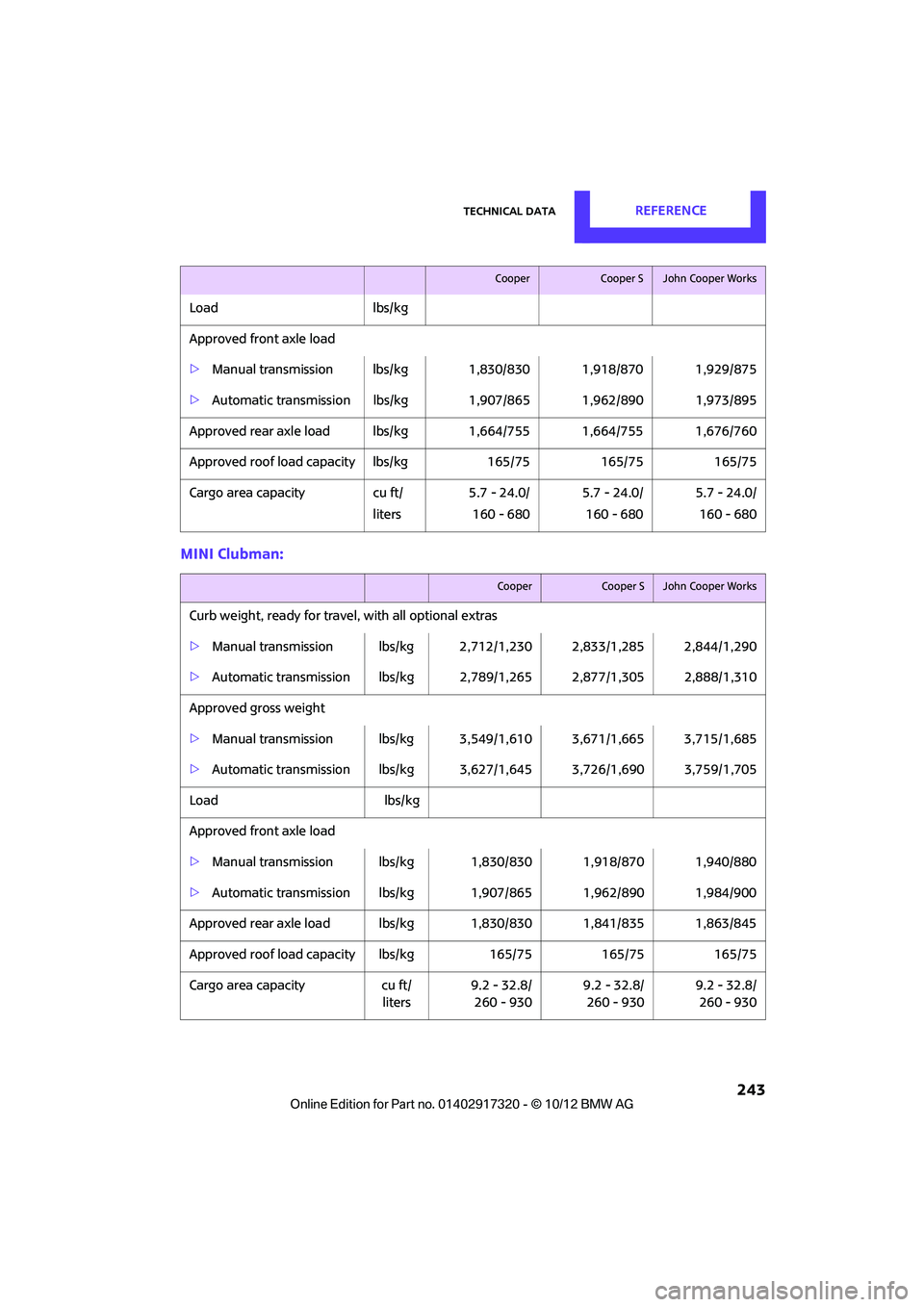
MINI Clubman:
Loadlbs/kg
Approved front axle load
> Manual transmission lb s/kg 1,830/830 1,918/870 1,929/875
> Automatic transmission lbs/kg 1,907/865 1,962/890 1,973/895
Approved rear axle load lbs/kg 1,664/755 1,664/755 1,676/760
Approved roof load capacity lbs/kg 165/75165/75165/75
Cargo area capacity cu ft/
liters 5.7 - 24.0/
160 - 680 5.7 - 24.0/
160 - 680 5.7 - 24.0/
160 - 680
CooperCooper SJohn Cooper Works
CooperCooper SJohn Cooper Works
Curb weight, ready for travel , with all optional extras
> Manual transmission lbs/kg 2, 712/1,230 2,833/1,285 2,844/1,290
> Automatic transmission lbs/kg 2,789/1,265 2,877/1,305 2,888/1,310
Approved gross weight
> Manual transmission lbs/kg 3, 549/1,610 3,671/1,665 3,715/1,685
> Automatic transmission lbs/kg 3,627/1,645 3,726/1,690 3,759/1,705
Load lbs/kg
Approved front axle load
> Manual transmission lb s/kg 1,830/830 1,918/870 1,940/880
> Automatic transmission lbs/kg 1,907/865 1,962/890 1,984/900
Approved rear axle load lbs/kg 1,830/830 1,841/835 1,863/845
Approved roof load capacity lbs/kg 165/75165/75165/75
Cargo area capacity cu ft/
liters 9.2 - 32.8/
260 - 930 9.2 - 32.8/
260 - 930 9.2 - 32.8/
260 - 930
00320051004F004C00510048000300280047004C0057004C005200510003
Page 253 of 267
252
REFERENCEEverything from A to Z
Everything from A to Z
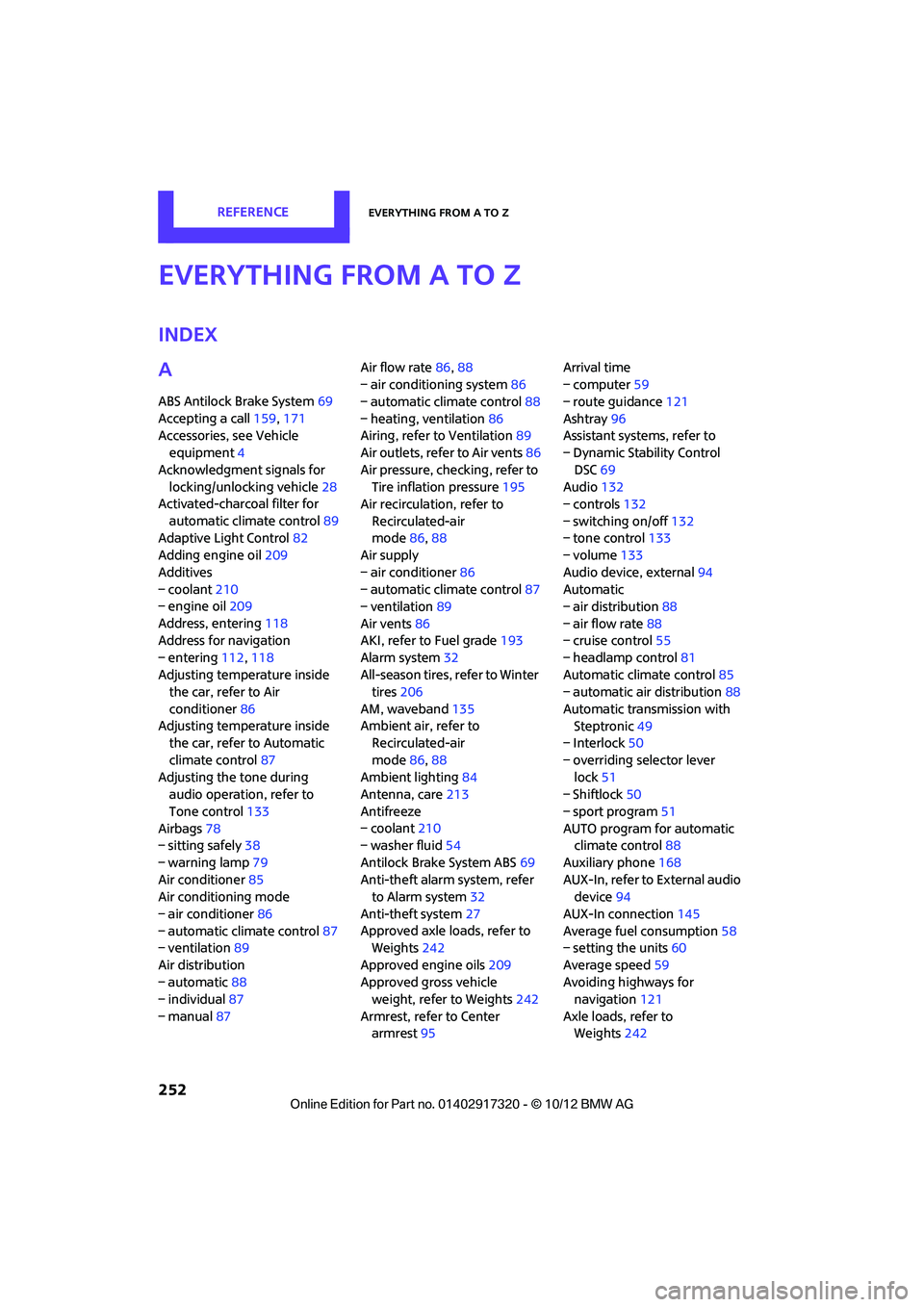
Index
A
ABS Antilock Brake System69
Accepting a call 159,171
Accessories, see Vehicle equipment 4
Acknowledgment signals for locking/unlocking vehicle 28
Activated-charcoa l filter for
automatic climate control 89
Adaptive Light Control 82
Adding engine oil 209
Additives
– coolant 210
– engine oil 209
Address, entering 118
Address for navigation
– entering 112,118
Adjusting temperature inside the car, refer to Air
conditioner 86
Adjusting temperature inside the car, refer to Automatic
climate control 87
Adjusting the tone during audio operation, refer to
Tone control 133
Airbags 78
– sitting safely 38
– warning lamp 79
Air conditioner 85
Air conditioning mode
– air conditioner 86
– automatic cl imate control87
– ventilation 89
Air distribution
– automatic 88
– individual 87
– manual 87 Air flow rate
86,88
– air conditioning system 86
– automatic climate control 88
– heating, ventilation 86
Airing, refer to Ventilation89
Air outlets, refe r to Air vents86
Air pressure, checking, refer to Tire inflation pressure 195
Air recirculation, refer to
Recirculated-air
mode 86,88
Air supply
– air conditioner 86
– automatic climate control 87
– ventilation 89
Air vents 86
AKI, refer to Fuel grade 193
Alarm system 32
All-season ti res, refer to Winter
tires 206
AM, waveband 135
Ambi ent a
ir, refer to
Recirculated-air
mode 86,88
Ambient lighting 84
Antenna, care 213
Antifreeze
– coolant 210
– washer fluid 54
Antilock Brake System ABS 69
Anti-theft alarm system, refer to Alarm system 32
Anti-theft system 27
Approved axle loads, refer to Weights 242
Approved engine oils 209
Approved gross vehicle weight, refer to Weights 242
Armrest, refer to Center armrest 95 Arrival time
– computer
59
– route guidance 121
Ashtray 96
Assistant systems, refer to
– Dynamic Stability Control
DSC 69
Audio 132
– controls 132
– switching on/off 132
– tone control 133
– volume 133
Audio device, external 94
Automatic
– air distribution 88
– air flow rate 88
– cruise control 55
– headlamp control 81
Automatic climate control 85
– automatic air distribution 88
Automatic transmission with Steptronic 49
– Interlock 50
– overriding selector lever lock 51
– Shiftlock 50
– sport program 51
AUTO program for automatic climate control 88
Auxiliary phone 168
AUX-In, refer to External audio device 94
AUX-In connection 145
Average fuel consumption 58
– setting the units 60
Average speed 59
Av oiding highways for
navigati o
n121
Axle loads, refer to Weights 242
00320051004F004C00510048000300280047004C0057004C005200510003