cooling MINI COOPER 2013 Owners Manual
[x] Cancel search | Manufacturer: MINI, Model Year: 2013, Model line: COOPER, Model: MINI COOPER 2013Pages: 267, PDF Size: 3.53 MB
Page 16 of 267
CockpitAT A GLANCE
15
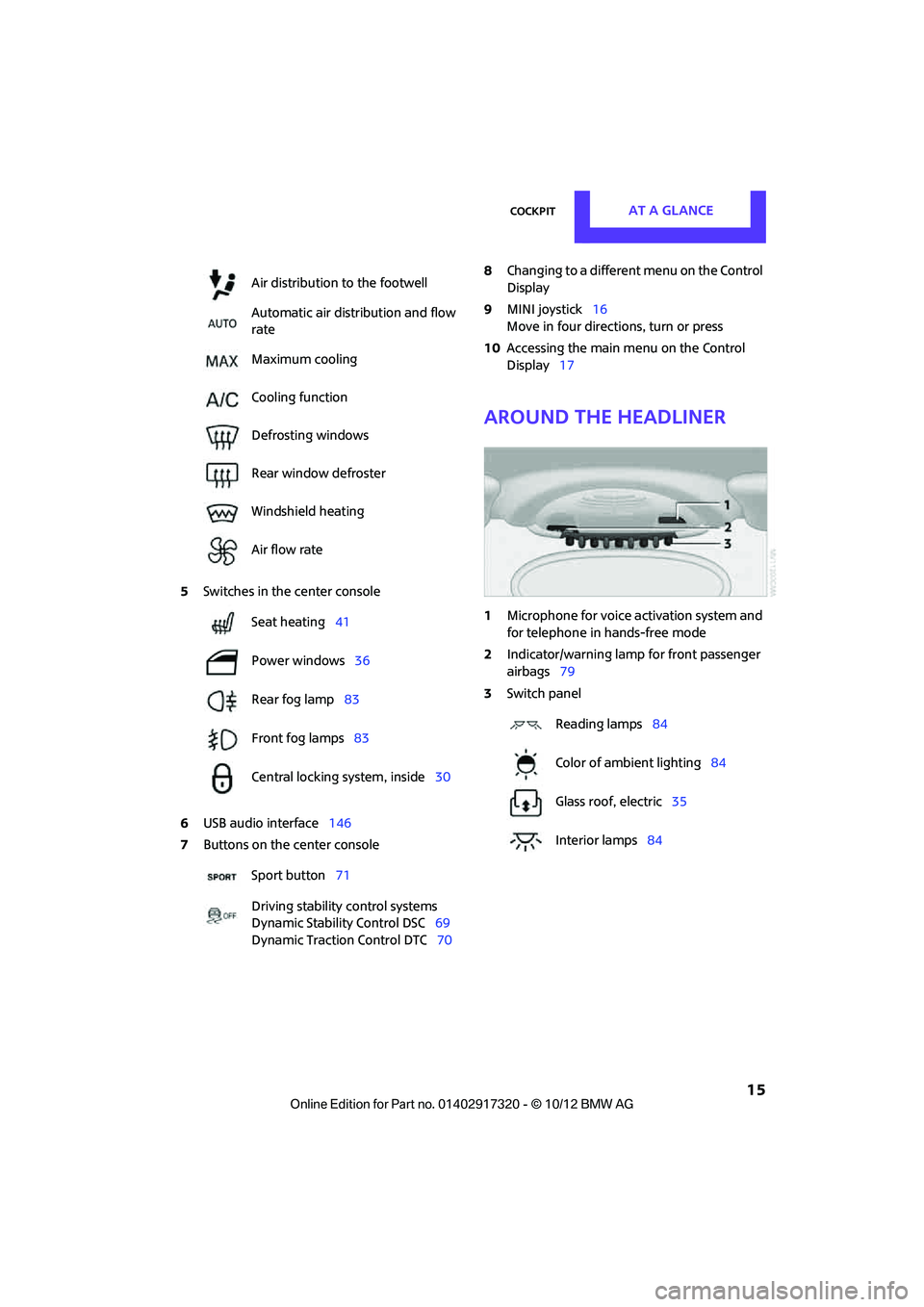
5Switches in the center console
6 USB audio interface 146
7 Buttons on the center console 8
Changing to a differen t menu on the Control
Display
9 MINI joystick 16
Move in four directions, turn or press
10 Accessing the main me nu on the Control
Display 17
Around the headliner
1Microphone for voice activation system and
for telephone in hands-free mode
2 Indicator/warning lamp for front passenger
airbags 79
3 Switch panel
Air distribution to the footwell
Automatic air distribution and flow
rate
Maximum cooling
Cooling function
Defrosting windows
Rear window defroster
Windshield heating
Air flow rate
Seat heating
41
Power windows 36
Rear fog lamp 83
Front fog lamps 83
Central locking system, inside 30
Sport button 71
Driving stability control systems
Dynamic Stability Control DSC 69
Dynamic Traction Control DTC 70
Reading lamps84
Color of ambient lighting 84
Glass roof, electric 35
Interior lamps 84
00320051004F004C00510048000300280047004C0057004C005200510003
Page 87 of 267
CONTROLSClimate
86
Air vents
3Airflow directed toward the windshield and
side windows 4
Air to the upper body area, draft-free venti-
lation
5 Air to the footwell
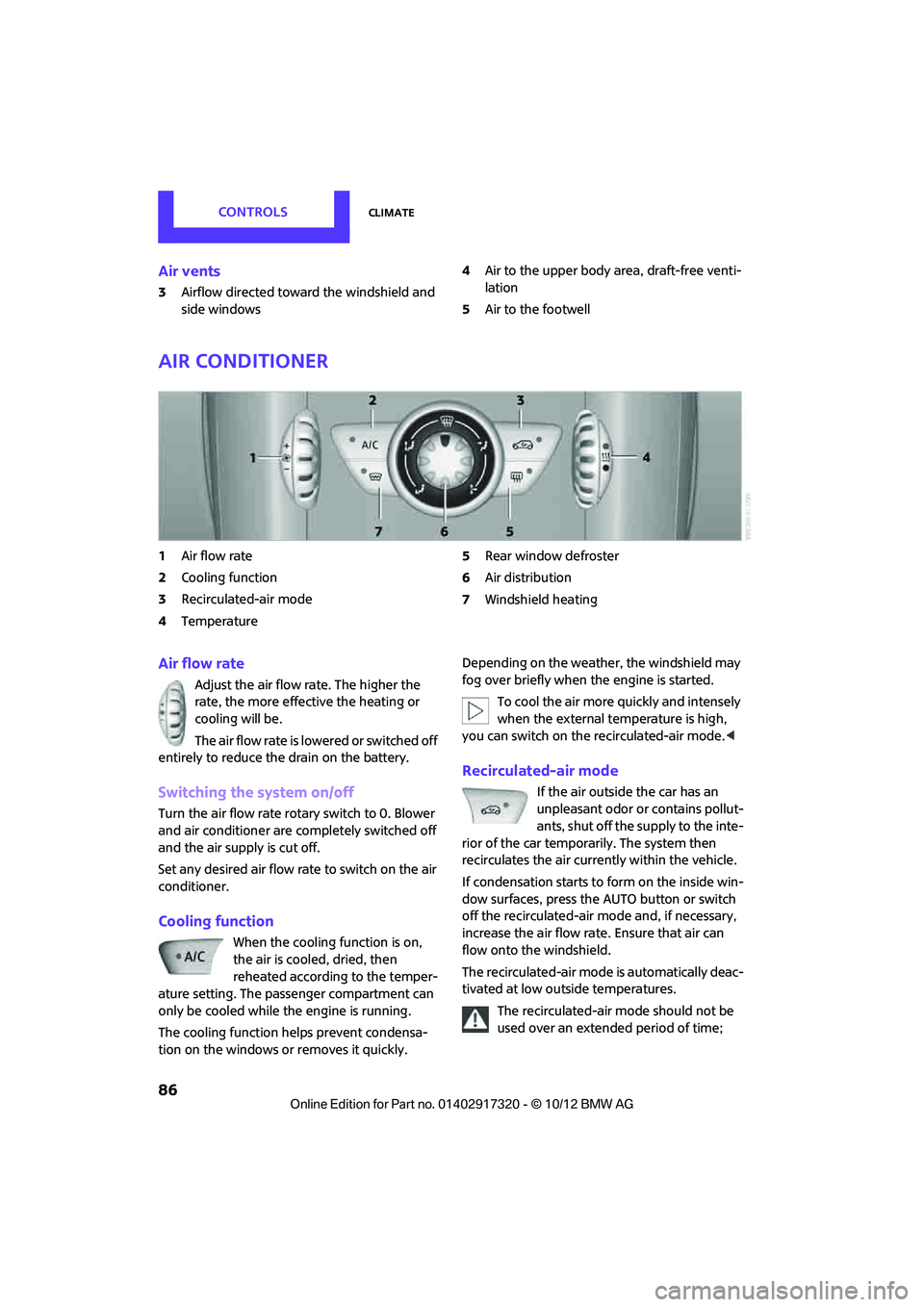
Air conditioner
1Air flow rate
2 Cooling function
3 Recirculated-air mode
4 Temperature 5
Rear window defroster
6 Air distribution
7 Windshield heating
Air flow rate
Adjust the air flow rate. The higher the
rate, the more effective the heating or
cooling will be.
The air flow rate is lowered or switched off
entirely to reduce the drain on the battery.
Switching the system on/off
Turn the air flow rate rota ry switch to 0. Blower
and air conditioner are co mpletely switched off
and the air supply is cut off.
Set any desired air flow rate to switch on the air
conditioner.
Cooling function
When the cooling function is on,
the air is cooled, dried, then
reheated according to the temper-
ature setting. The passenger compartment can
only be cooled while the engine is running.
The cooling function helps prevent condensa-
tion on the windows or removes it quickly. Depending on the weather, the windshield may
fog over briefly when the engine is started.
To cool the air more quickly and intensely
when the external temperature is high,
you can switch on the recirculated-air mode.<
Recirculated-air mode
If the air outside the car has an
unpleasant odor or contains pollut-
ants, shut off the supply to the inte-
rior of the car temporarily. The system then
recirculates the air currently within the vehicle.
If condensation starts to form on the inside win-
dow surfaces, press the AUTO button or switch
off the recirculated-air mode and, if necessary,
increase the air flow ra te. Ensure that air can
flow onto the windshield.
The recirculated-air mode is automatically deac-
tivated at low outside temperatures.
The recirculated-air mode should not be
used over an extended period of time;
00320051004F004C00510048000300280047004C0057004C005200510003
Page 88 of 267
ClimateCONTROLS
87
otherwise, the air quality in the passenger com-
partment will deteriorate continuously. <
Temperature
Turn upward, red, to increase the temper-
ature.
Turn downward, blue, to decrease the
temperature.
Rear window defroster
The defroster is switched off auto-
matically after a certain time.
The rear window he ating is lowered
or switched off entirely to reduce the drain on
the battery.
Air distribution
Direct the flow of air to the
windows , to the upper body
area or to the footwell .
Intermediate settings are possible.
Windshield heating
The windshield heating is switched
off automatically after a short time.
The front window heating is low-
ered or switched off entirely to reduce the drain
on the battery.
Defrosting windows and removing
condensation
1. Set air flow rate to the maximum level.
2. Set air distributi on to position .
Condensation is removed from the windows
more quickly when the cooling function is
also activated.
3. Set to the highest temperature, red.
4. Deactivate recirculated-air mode.
5. Turn on windshield heating if necessary.
6. Turn on rear window defroster if necessary.
Microfilter
The microfilter captures dust and pollen. The
microfilter is changed by your MINI dealer dur-
ing routine maintenance work.
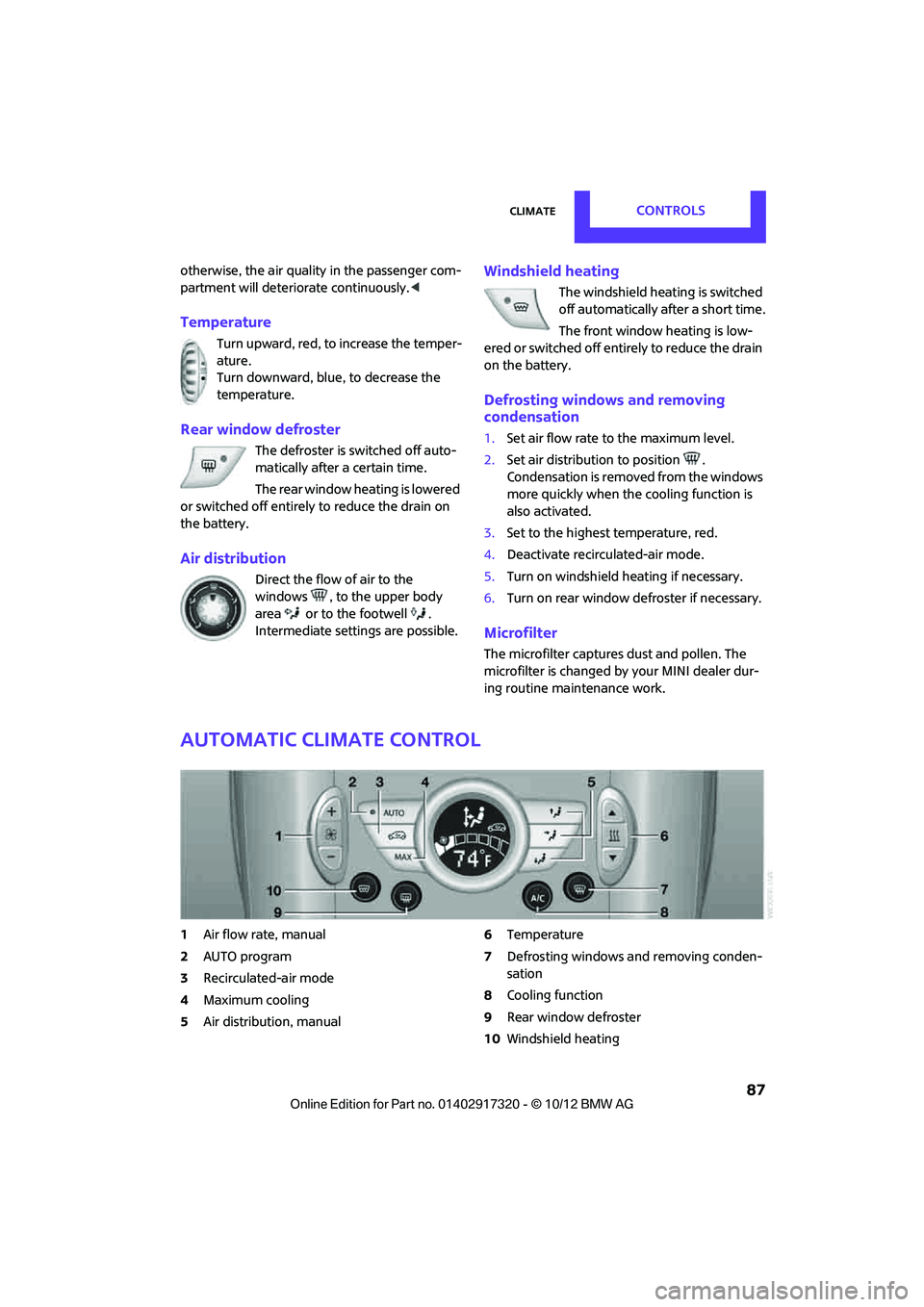
Automatic climate control
1Air flow rate, manual
2 AUTO program
3 Recirculated-air mode
4 Maximum cooling
5 Air distribution, manual 6
Temperature
7 Defrosting windows and removing conden-
sation
8 Cooling function
9 Rear window defroster
10 Windshield heating
00320051004F004C00510048000300280047004C0057004C005200510003
Page 89 of 267
CONTROLSClimate
88
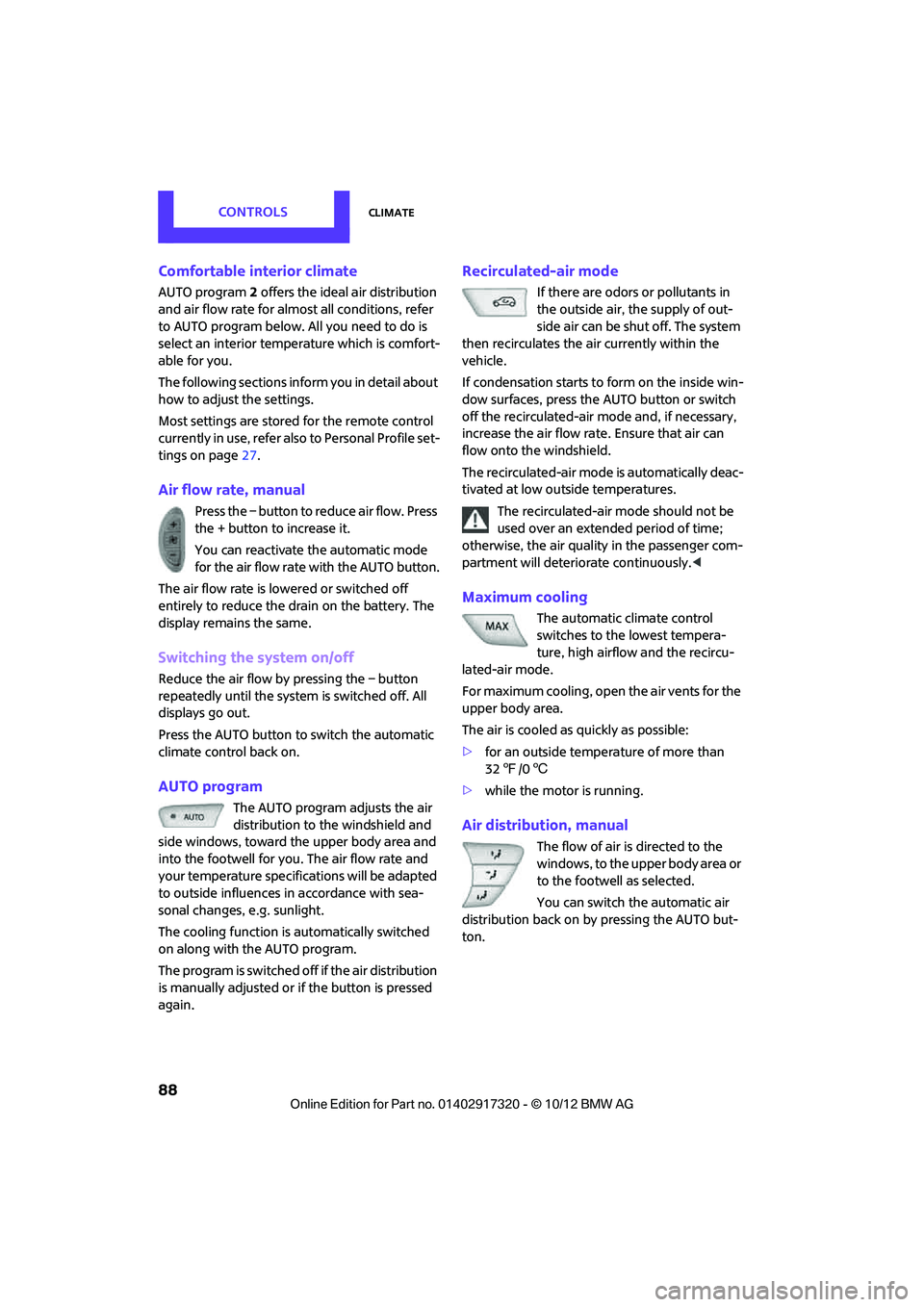
Comfortable interior climate
AUTO program2 offers the ideal air distribution
and air flow rate for almo st all conditions, refer
to AUTO program below. All you need to do is
select an interior temperature which is comfort-
able for you.
The following sections inform you in detail about
how to adjust the settings.
Most settings are stored for the remote control
currently in use, refer also to Personal Profile set-
tings on page 27.
Air flow rate, manual
Press the – button to reduce air flow. Press
the + button to increase it.
You can reactivate the automatic mode
for the air flow rate with the AUTO button.
The air flow rate is lo wered or switched off
entirely to reduce the drain on the battery. The
display remains the same.
Switching the system on/off
Reduce the air flow by pressing the – button
repeatedly until the system is switched off. All
displays go out.
Press the AUTO button to switch the automatic
climate control back on.
AUTO program
The AUTO program adjusts the air
distribution to the windshield and
side windows, toward the upper body area and
into the footwell for you. The air flow rate and
your temperature specifications will be adapted
to outside influences in accordance with sea-
sonal changes, e.g. sunlight.
The cooling function is automatically switched
on along with the AUTO program.
The program is switched off if the air distribution
is manually adjusted or if the button is pressed
again.
Recirculated-air mode
If there are odors or pollutants in
the outside air, the supply of out-
side air can be shut off. The system
then recirculates the air currently within the
vehicle.
If condensation starts to form on the inside win-
dow surfaces, press the AUTO button or switch
off the recirculated-air mode and, if necessary,
increase the air flow ra te. Ensure that air can
flow onto the windshield.
The recirculated-air mode is automatically deac-
tivated at low outside temperatures.
The recirculated-air mode should not be
used over an extended period of time;
otherwise, the air quality in the passenger com-
partment will deteriorate continuously. <
Maximum cooling
The automatic climate control
switches to the lowest tempera-
ture, high airflow and the recircu-
lated-air mode.
For maximum cooling, open the air vents for the
upper body area.
The air is cooled as quickly as possible:
> for an outside temper ature of more than
32 7 /06
> while the motor is running.
Air distribution, manual
The flow of air is directed to the
windows, to the upper body area or
to the footwell as selected.
You can switch the automatic air
distribution back on by pressing the AUTO but-
ton.
00320051004F004C00510048000300280047004C0057004C005200510003
Page 90 of 267
ClimateCONTROLS
89
Temperature
Set the desired temperature individually.
The automatic climate control achieves
this temperature as quickly as possible
regardless of the season, using maximum
cooling or heating power if necessary, and then
maintains it.
If you switch between different tempera-
ture settings in quic k succession, the auto-
matic climate control do es not have enough
time to achieve the set temperature. <
Rear window defroster
The defroster is switched off auto-
matically after a certain time.
Defrosting windows and removing
condensation
Quickly removes ice and condensa-
tion from the windshield and front
side windows.
For this purpose, also switch on the
cooling function.
The windshield heating is switched on automat-
ically.
Windshield heating
The windshield heating is switched
off automatically after a certain
time.
Cooling function
When the cooling function is on,
the air is cooled, dried, then
reheated according to the temper-
ature setting. The passenger com-
partment can only be cooled while
the engine is running.
The cooling function helps prevent condensa-
tion on the windows or removes it quickly. Depending on the weather, the windshield may
fog over briefly when the engine is started. The
recirculated-air mode may be switched on auto-
matically.
When the AUTO button is pressed, the cooling
function switches on automatically.
Microfilter/activated-charcoal filter
The microfilter captures dust and pollen. The
activated-charcoal filter provides additional pro-
tection by filtering gase
ous pollutants from the
outside air. Your MINI dealer replaces this com-
bined filter as a standard part of your scheduled
maintenance.
You can call up further information in the service
requirements display, page 61.
Ventilation
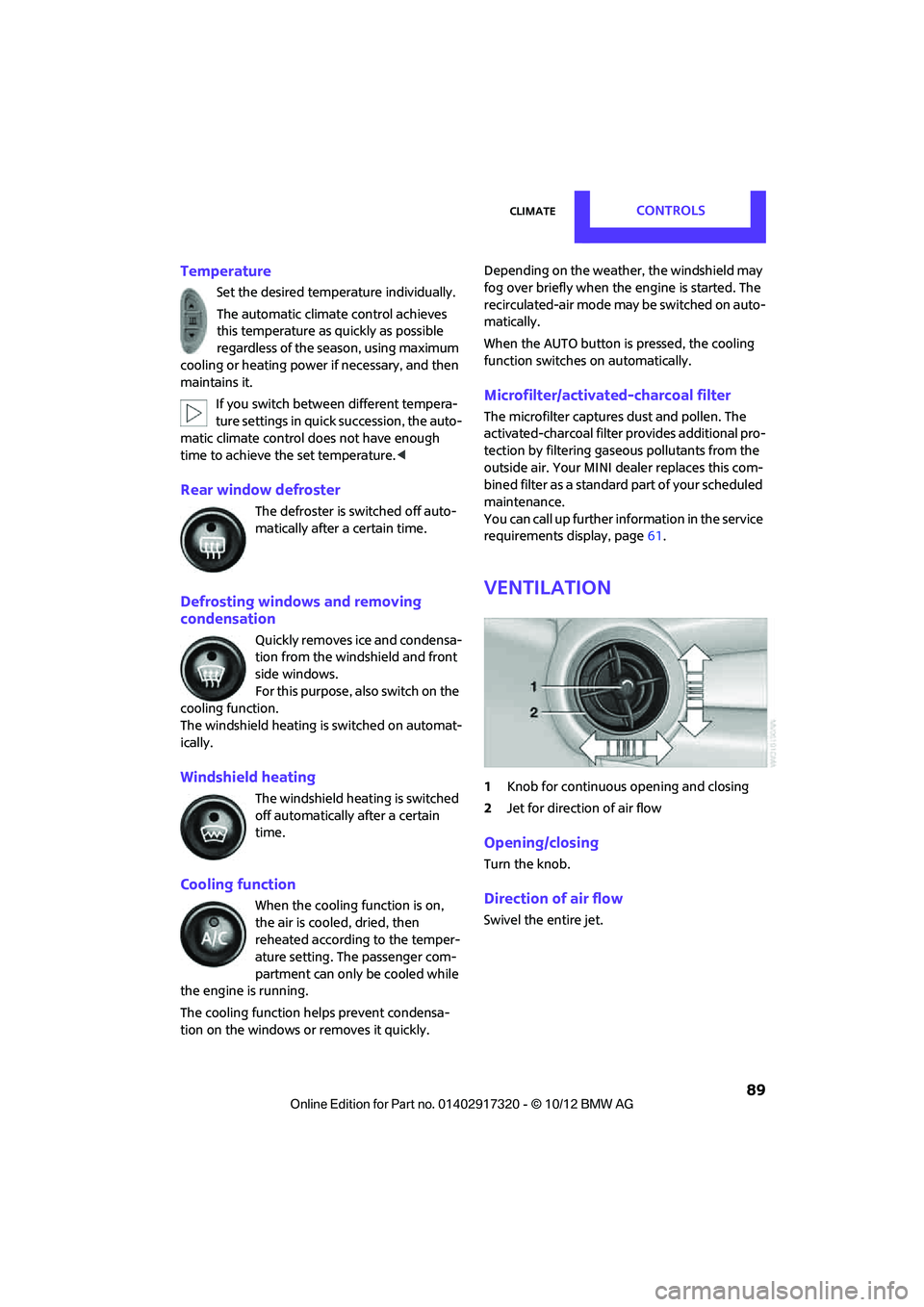
1 Knob for continuous opening and closing
2 Jet for direction of air flow
Opening/closing
Turn the knob.
Direction of air flow
Swivel the entire jet.
00320051004F004C00510048000300280047004C0057004C005200510003
Page 91 of 267
CONTROLSPractical interior accessories
90
Practical interior accessories
Vehicle equipment
In this chapter, all production, country, and
optional equipment that is offered in the model
range is described. Equipment is also described
that is not available because of, for example,
selected options or coun try version. This also
applies to safety relate d functions and systems.
Integrated universal
remote control
The concept
By using the Integrated universal remote con-
trol, up to 3 functions of remote controlled
devices, e.g., garage door openers or lighting
systems, can be operated . As a result, the uni-
versal remote control can replace up to 3 differ-
ent remote controls. To operate, the buttons on
the rearview mirror must be programmed with
the desired functions. For programming, the
remote control for each device is needed.
To prevent possible damage or injury,
before programming or using the inte-
grated universal remote control, always inspect
the immediate area to make certain that no
people, animals or object s are within the travel
range of the device.
Comply also with the safe ty instructions supplied
with the original hand-held transmitter. <
Before selling the vehicle, delete the stored
functions as a safe ty precaution, page 92.
Compatibility
Depending on your vehicle's equip-
ment, the glove compartment can be
ventilated and, if the cooling function is
switched on, can also be cooled.
For additional informatio n, please contact your
MINI dealer or call: 1-800-355-3515. A list of compatible remote controls is available
on the Internet at www.homelink.com.
HomeLink is a registered trademark of Johnson
Controls, Inc.
Operating elements on the rearview
mirror
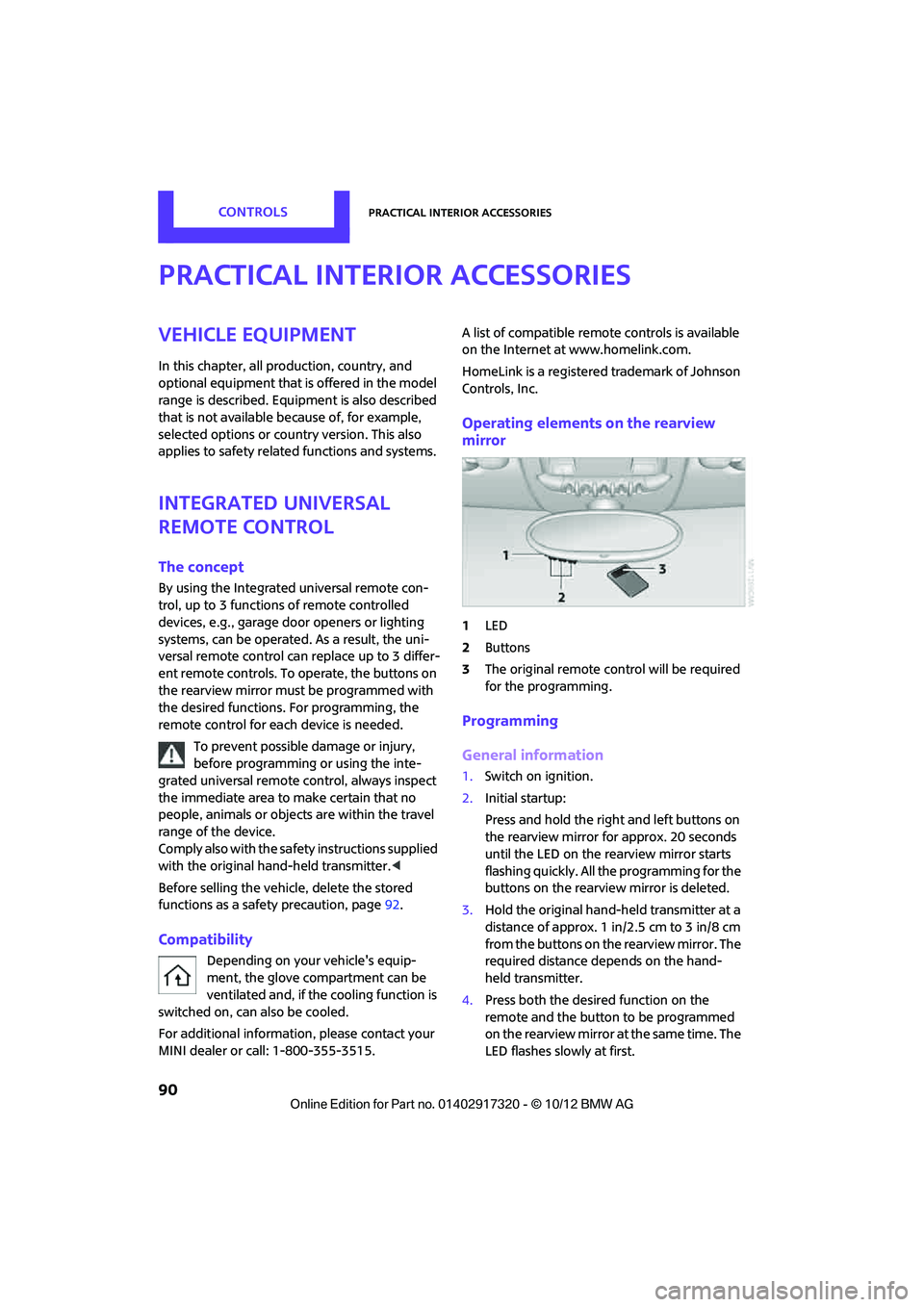
1
LED
2 Buttons
3 The original remote control will be required
for the programming.
Programming
General information
1.Switch on ignition.
2. Initial startup:
Press and hold the righ t and left buttons on
the rearview mirror for approx. 20 seconds
until the LED on the rearview mirror starts
flashing quickly. All the programming for the
buttons on the rearview mirror is deleted.
3. Hold the original hand-held transmitter at a
distance of approx. 1in/2.5cm to 3in/8cm
from the buttons on the rearview mirror. The
required distance depends on the hand-
held transmitter.
4. Press both the desired function on the
remote and the button to be programmed
on the rearview mirror at the same time. The
LED flashes slowly at first.
00320051004F004C00510048000300280047004C0057004C005200510003
Page 95 of 267
CONTROLSPractical interior accessories
94
Glove compartment
Opening
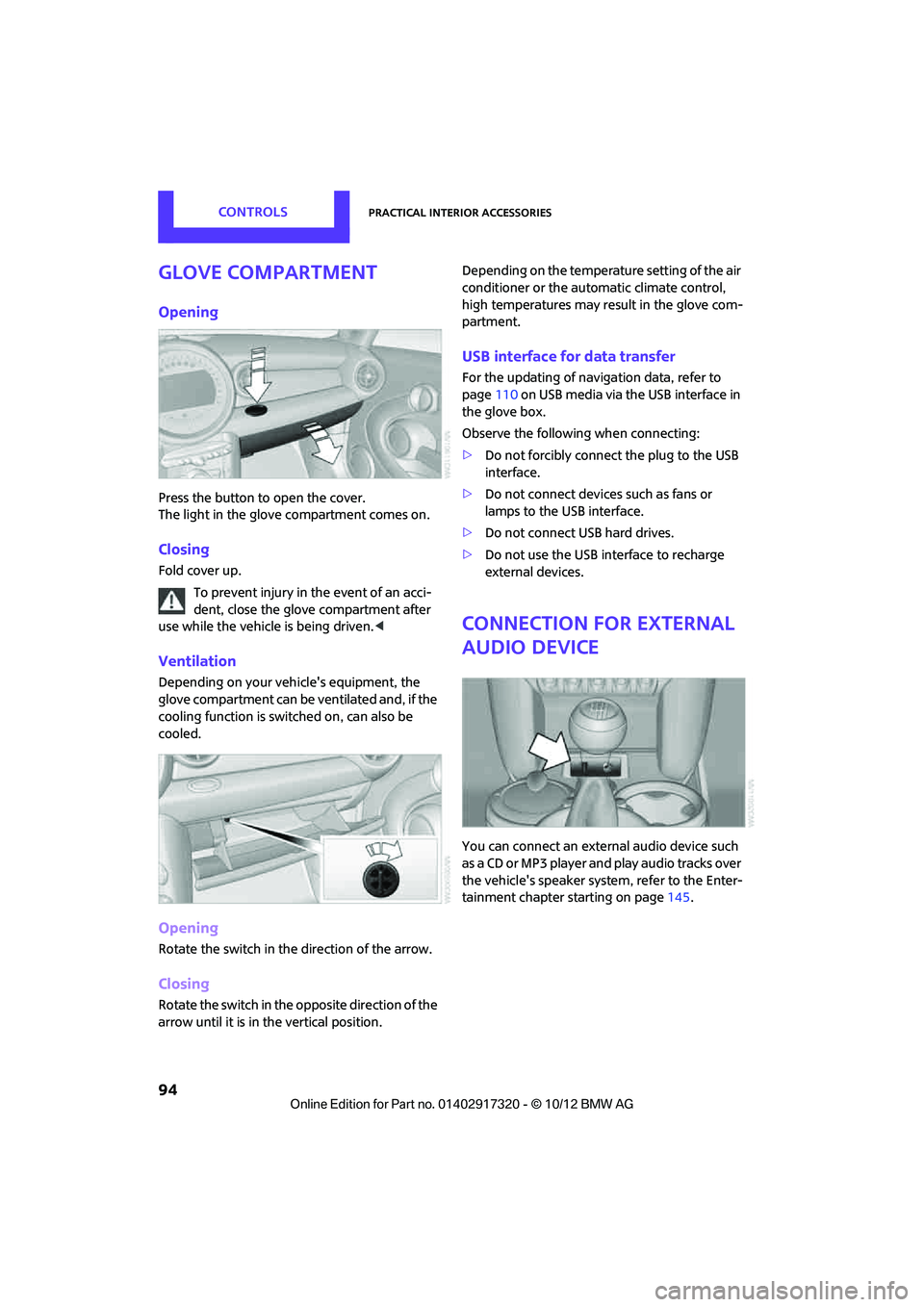
Press the button to open the cover.
The light in the glove compartment comes on.
Closing
Fold cover up.To prevent injury in the event of an acci-
dent, close the glove compartment after
use while the vehicle is being driven.<
Ventilation
Depending on your vehicle's equipment, the
glove compartment can be ventilated and, if the
cooling function is switched on, can also be
cooled.
Opening
Rotate the switch in the direction of the arrow.
Closing
Rotate the switch in the opposite direction of the
arrow until it is in the vertical position. Depending on the temperature setting of the air
conditioner or the automatic climate control,
high temperatures may result in the glove com-
partment.
USB interface for data transfer
For the updating of navigation data, refer to
page
110 on USB media via the USB interface in
the glove box.
Observe the following when connecting:
> Do not forcibly connect the plug to the USB
interface.
> Do not connect devices such as fans or
lamps to the USB interface.
> Do not connect USB hard drives.
> Do not use the USB interface to recharge
external devices.
Connection for external
audio device
You can connect an external audio device such
as a CD or MP3 player and play audio tracks over
the vehicle's speaker syst em, refer to the Enter-
tainment chapter starting on page 145.
00320051004F004C00510048000300280047004C0057004C005200510003
Page 211 of 267
MOBILITYEngine compartment
210
Oil change
Only MINI dealers are to perform oil changes.
Coolant
Coolant consists of half water and half additive.
Not all commercially available additives are suit-
able for your MINI. Your MINI dealer knows
which additives are suitab le and will be glad to
advise you.
Only use suitable additives; otherwise,
engine damage may result. Because addi-
tives are harmful to your health, it is important
to follow the instructions on the containers. <
Comply with the appropriate environmen-
tal protection regulations when disposing
of coolant additives. <
Coolant temperature
If the coolant, and therefore the engine, should
overheat, then a warning lamp will go on.
A message appears on the Control Display.
Checking coolant level
Do not add coolant to the cooling system
when the engine is hot. Escaping coolant
can cause burns. <
Do not open the hood until the engine has
cooled down.
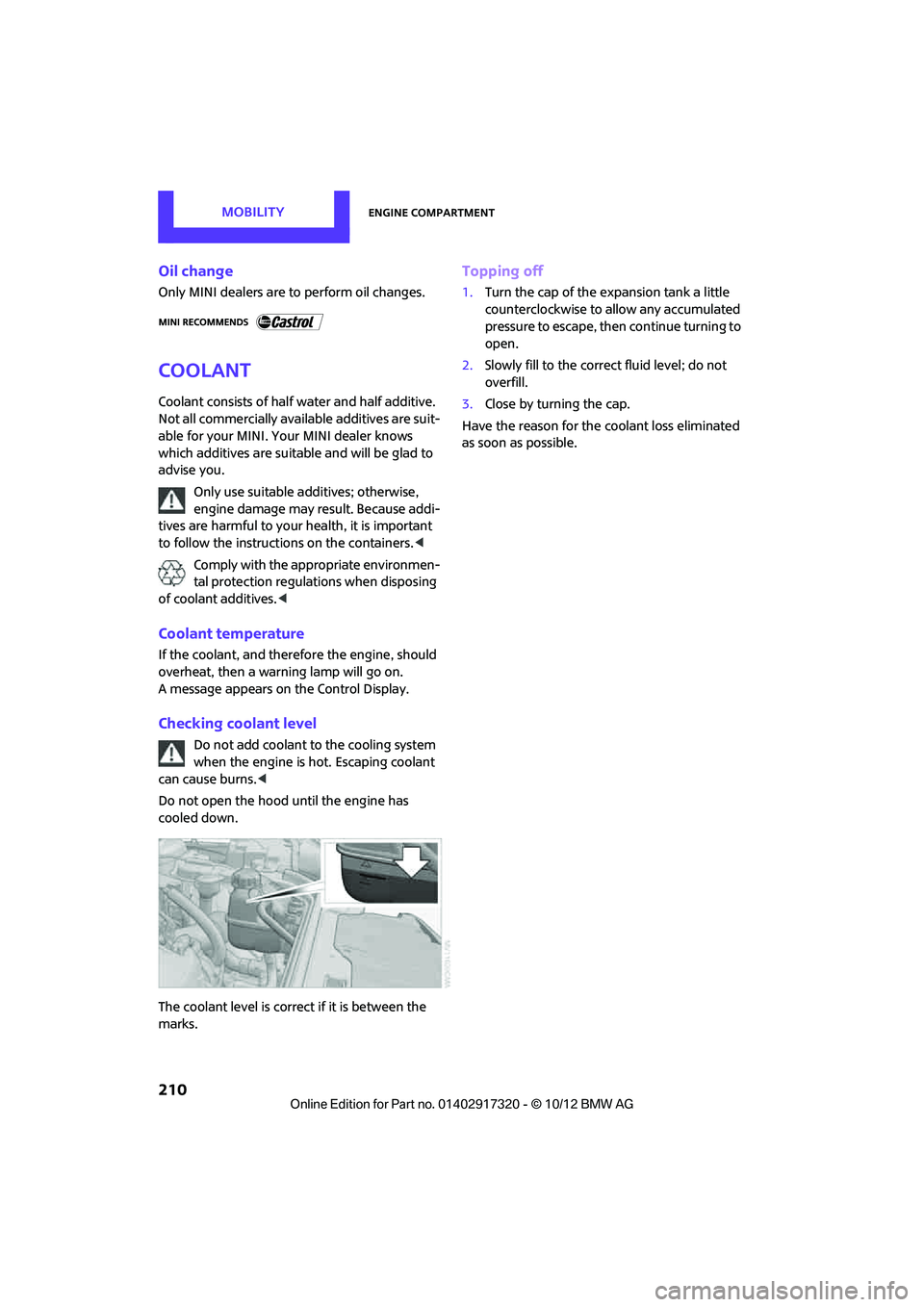
The coolant level is correct if it is between the
marks.
Topping off
1. Turn the cap of the expansion tank a little
counterclockwise to allow any accumulated
pressure to escape, then continue turning to
open.
2. Slowly fill to the correct fluid level; do not
overfill.
3. Close by turning the cap.
Have the reason for the coolant loss eliminated
as soon as possible.
00320051004F004C00510048000300280047004C0057004C005200510003
Page 255 of 267
REFERENCEEverything from A to Z
254
Car wash, care213
Car washes 213
Catalytic conver ter, refer to
Hot exhaust system 101
CD, audio playback 143
CD player 143
– controls 132
– fast forward/reverse 144
– random order 144
– selecting a track 143
– switching on/off 132
– tone control 133
– volume 133
Center armrest 95
Center brake lamp 224
Center console, refer to
Around the center
console 14
Central locking system 27
– Comfort Access 33
– from inside 30
– from outside 27
Changing bulbs 219
Changing the language on the Control Display 66
Changing the measurement units on the Control
Display 60
Changing wheels 227
Charging the battery 229
Chassis number, refer to Engine compartment 207
Check Control 63
Child restraint fixing system LATCH 45
Child restraint systems 44
Child seats 44
Chrome parts, care 215
Chrome parts, refer to
Care 213
Cigarette lighter 96
Cleaning headlamps 54
– washer fluid 55
Clock
– setting time 62
– 12 h/24 h mode 63Closing
– from inside
30
– from outside 27
Clothes hooks 95
Club Door 30
Cockpit 10
Cold start, refer to Starting the
engine 48
Comfort Access 33
– replacing the battery 35
– what to observe before entering a car wash 35
C omfort ar
ea, refer to Around
the center console 14
Compartment for remote control, refer to Ignition
lock 47
Compass 92
Computer 58
– displays on Control Display 59
Condensation, refer to When
the vehicle is parked 102
Condition Based Service CBS 211
Configuring settings, refer to Personal Profile 26
Connecting vacuum cleaner,
refer to Connecting electrical
appliances 97
Consumption, refer to Average fuel consumption 58
Contact
– editing 164
Contacts 163,180
– new contact 181
Continuing route guidance 121
Control Display
– settings 60
Control Display, refer to iDrive
– switching on/off 16
Control Display, refer to Onboard computer 16
Controls and displays 10
Control stick, refer to Onboard computer 16 Control unit, refer to Onboard
computer 16
Convenience operation
– windows 28
Convenient access, refer to Comfort Access 33
Convenient star t, refer to
Starting the engine 48
Coolant 210
– checking level 210
– filling 210
Coolant temperature 210
Cooling, maximum 88
Cooling fluid, refer to Coolant 210
Copyright 2
Cornering light, refer to Adaptive Light Control 82
Criteria for route 121
Cruise control
– indicator lamp 13
Cruising range 58
Cupholders 96
Curb weight, refer to Weights 242
Current fuel consumption 59
Curren t playback
– external devices 148
D
Dashboard, refer to Cockpit 10
Dashboard instruments, refer
to Displays 12
Dashboard lighting, refer to Instrument lighting 83
Data 238
– capacities 244
– dimensions 239
– engine 238
– weights 242
Date
– setting 63
– setting format 63
Daytime running lights 82
DBC Dynamic Brake Control, refer to Brake Assist 69
00320051004F004C00510048000300280047004C0057004C005200510003
Page 256 of 267
Everything from A to ZREFERENCE
255
Deactivating front passenger airbags 78
Deadlocking, refer to Locking 28
Defect
– door lock 29
Defective
– fuel filler flap 192
Defining a home address 181
Defogging windows 87,89
Defrosting windows 87,89
Defrosting windows and removing condensation
– air conditioner 87
– automatic climate control 89
Defrosting windshield, refer to
Defrosting windows 87,89
Defrost position, refer to Defrosting windows 87,89
Deleting contacts 165,182
Destination address
– entering 112,118
Destination for navigation
– entering 112
– entering via map 117
Differential, breaking in 100
Digital compass 92
Digital radio, refer to HD
Radio 136
Dimensions 239
Dipstick, engine oil 208
Directional indicators, refer to Turn signals 52
Direction announcements, refer to Voice
instructions 125
Direction instructions, refer to Voice instructions 125
Directory for navigation, refer
to Address book 114
Displacement, refer to Engine data 238
Display, refer to Onboard computer controls 16
Displaying contact
pictures 182
Displaying contacts 164Displaying special
destinations 117
Display lighting, refer to Instrument lighting 83
Displays 12
– instrument panel 12
– on the Control Display 16
Displays, care 216
Displays and controls 10
Disposal
– of coolan
t210
–
remote control battery 35
– vehicle battery 230
Distance remaining to service, refer to Service
requirements 61
Distance warning, refer to Park Distance Control PDC 68
Door
– rear, refer to Club Door 30
Door key, refer to Integrated key/remote control 26
Door lock 29
Door lock, confirmation signals 28
Doors, manual operation 29
DOT Quality Grades 203
Double doors, refer to Split
Rear Barn Doors 31
Drinks holders, refer to
Cupholders 96
Drive-off assistant, refer to Hill
Assist 71
Driving dynamics control, refer to Sport button 71
Driving lamps, refer to Parking
lamps/low beams 81
Driving notes 100
Driving off on inclines, refer to
Hill Assist 71
Driving stability control systems 69
Driving through water 101
Driving tips, refer to Driving notes 100
Dry air, refer to Cooling function 89 DSC Dynamic Stability
Control 69
DTC Dynamic Traction Control 70
Dynamic Brake Control DBC, refer to Brake Assist 69
Dynamic route guidance 128
Dynamic Stability Control DSC 69
Dynamic Traction Control
DTC 70
E
Eject button, refer to Buttons
on the CD player 132
Electrical malfunction
– door lock 29
– fuel filler flap 192
Electric power windows
– initializing 37
Electronic brake-force
distribution 69
Electronic Stability Program ESP, refer to Dynamic
Stability Control DSC 69
E-mail 183
Emergency operation, refer to
Manual operation
– door lock 29
– fuel filler flap 192
– transmission lock, automatic transmission 51
Emergency services, refer to Roadside Assistance 231
Ending a call 160,172
Engine
– breaking in 100
– data 238
– overheated, refer to Coolant temperature 210
– speed 238
– starting, Comfort Access 33
Engine compartment 207
Engine coolant, refer to
Coolant 210
00320051004F004C00510048000300280047004C0057004C005200510003