seats MINI COOPER 2013 Owners Manual
[x] Cancel search | Manufacturer: MINI, Model Year: 2013, Model line: COOPER, Model: MINI COOPER 2013Pages: 267, PDF Size: 3.53 MB
Page 40 of 267
AdjustmentsCONTROLS
39
ing and regularly pull the belt in the upper-body
area taut; otherwise, its restraining effect could
be impaired. <
Safety belts, refer to page 41.
Seats
Note before adjusting
Never attempt to adjust your seat while
the vehicle is moving. The seat could
respond with unexpected movement, and the
ensuing loss of vehicle control could lead to an
accident.
On the front passenger seat as well, do not
incline the backrest too far to the rear while the
vehicle is being driven; otherwise, there is a dan-
ger in the event of an a ccident of sliding under
the safety belt, eliminat ing the protection nor-
mally provided by the belt. <
Comply with the instruct ions on head restraint
height on page 40 and on damaged safety belts
on page 42.
Seat adjustment
Observe the instructions on page 39 to
ensure the best possible personal protec-
tion. <
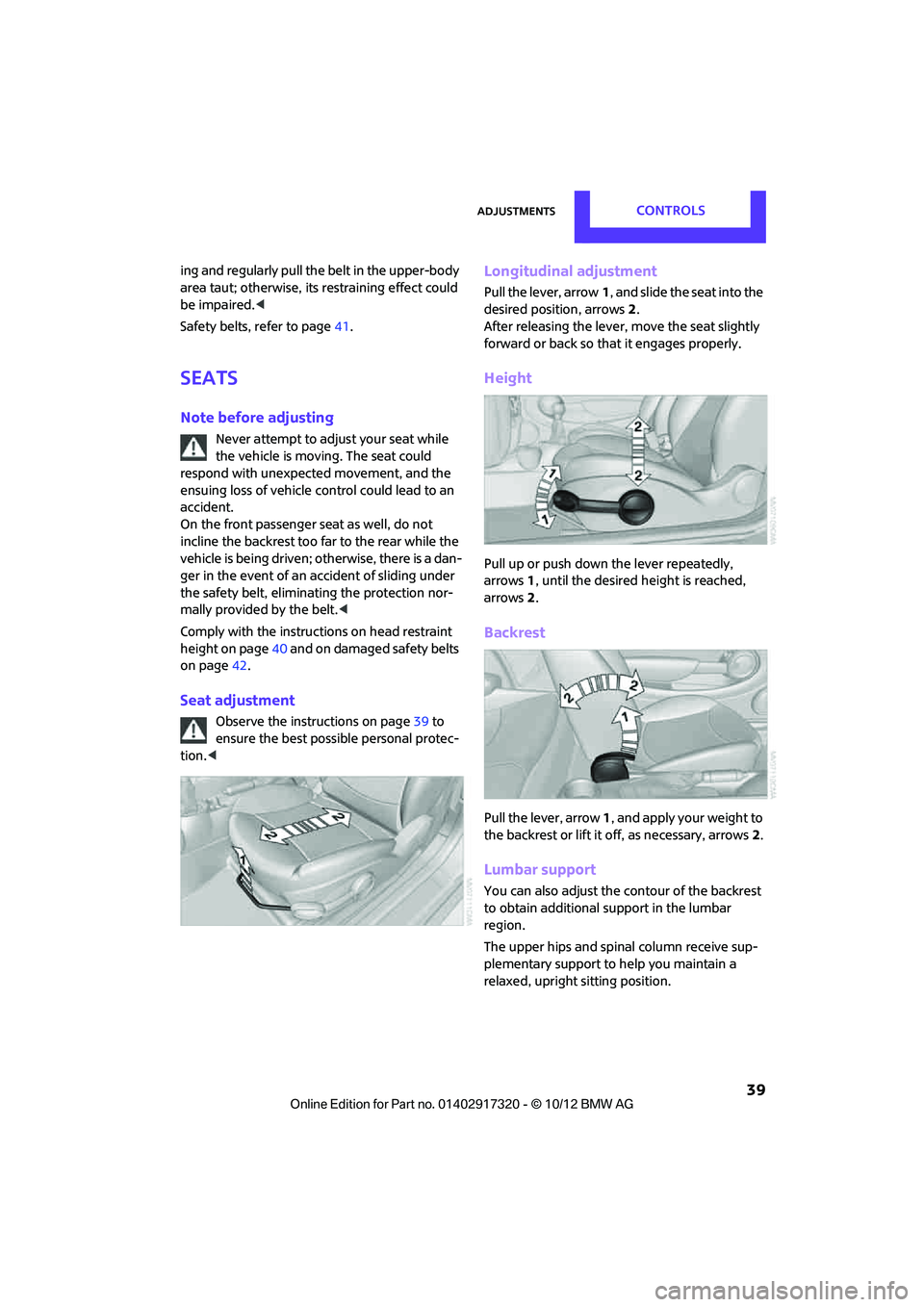
Longitudinal adjustment
Pull the lever, arrow 1, and slide the seat into the
desired position, arrows 2.
After releasing the lever, move the seat slightly
forward or back so that it engages properly.
Height
Pull up or push down the lever repeatedly,
arrows 1, until the desired height is reached,
arrows 2.
Backrest
Pull the lever, arrow 1, and apply your weight to
the backrest or lift it off, as necessary, arrows 2.
Lumbar support
You can also adjust the contour of the backrest
to obtain additional support in the lumbar
region.
The upper hips and spinal column receive sup-
plementary support to help you maintain a
relaxed, upright sitting position.
00320051004F004C00510048000300280047004C0057004C005200510003
Page 41 of 267
CONTROLSAdjustments
40
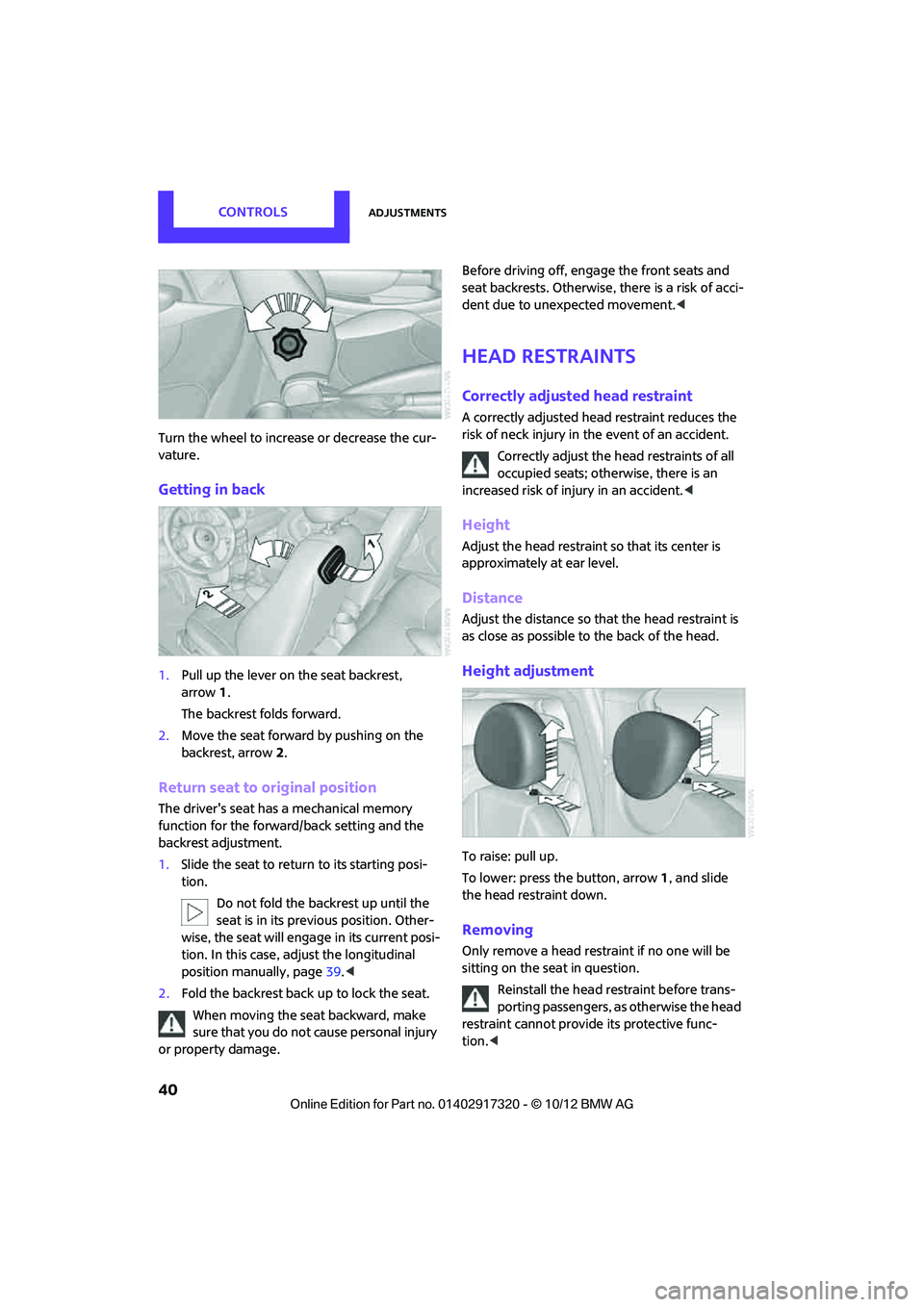
Turn the wheel to increase or decrease the cur-
vature.
Getting in back
1.Pull up the lever on the seat backrest,
arrow 1.
The backrest folds forward.
2. Move the seat forward by pushing on the
backrest, arrow 2.
Return seat to original position
The driver's seat has a mechanical memory
function for the forward/back setting and the
backrest adjustment.
1. Slide the seat to return to its starting posi-
tion.
Do not fold the backrest up until the
seat is in its previous position. Other-
wise, the seat will engage in its current posi-
tion. In this case, ad just the longitudinal
position manually, page 39.<
2. Fold the backrest back up to lock the seat.
When moving the seat backward, make
sure that you do not cause personal injury
or property damage. Before driving off, enga
ge the front seats and
seat backrests. Otherwise, there is a risk of acci-
dent due to unexpected movement. <
Head restraints
Correctly adjusted head restraint
A correctly adjusted head restraint reduces the
risk of neck injury in the event of an accident.
Correctly adjust the head restraints of all
occupied seats; othe rwise, there is an
increased risk of injury in an accident. <
Height
Adjust the head restraint so that its center is
approximately at ear level.
Distance
Adjust the distance so th at the head restraint is
as close as possible to the back of the head.
Height adjustment
To raise: pull up.
To lower: press the button, arrow 1, and slide
the head restraint down.
Removing
Only remove a head rest raint if no one will be
sitting on the seat in question.
Reinstall the head restraint before trans-
porting passengers, as otherwise the head
restraint cannot provide its protective func-
tion. <
00320051004F004C00510048000300280047004C0057004C005200510003
Page 42 of 267
AdjustmentsCONTROLS
41
Front
1.Pull up as far as it will go.
2. Fold the backrest forward slightly.
3. Press button 1 and pull the head restraint
out.
4. Fold back the backrest.
Rear
1.Pull up as far as it will go.
2. Press button 1 and pull the head restraint
out completely.
Seat heating
Switching on
Press once for each temperature level.
Three LEDs indicate the highest temperature.
If you continue driving within the next
15 minutes, the seat heating is automatically
activated at the previously set temperature.
The temperature is lowered or the heating is
switched off entirely to reduce the drain on the
battery.
The LEDs stay lit.
Switching off
Press button longer.
Safety belts
Observe the instructions on page 39 to
ensure the best possible personal protec-
tion. <
Before every drive, make sure that all occupants
wear their safety belts. Airbags complement the
safety belt as an additi onal safety device, but
they do not represent a substitute.
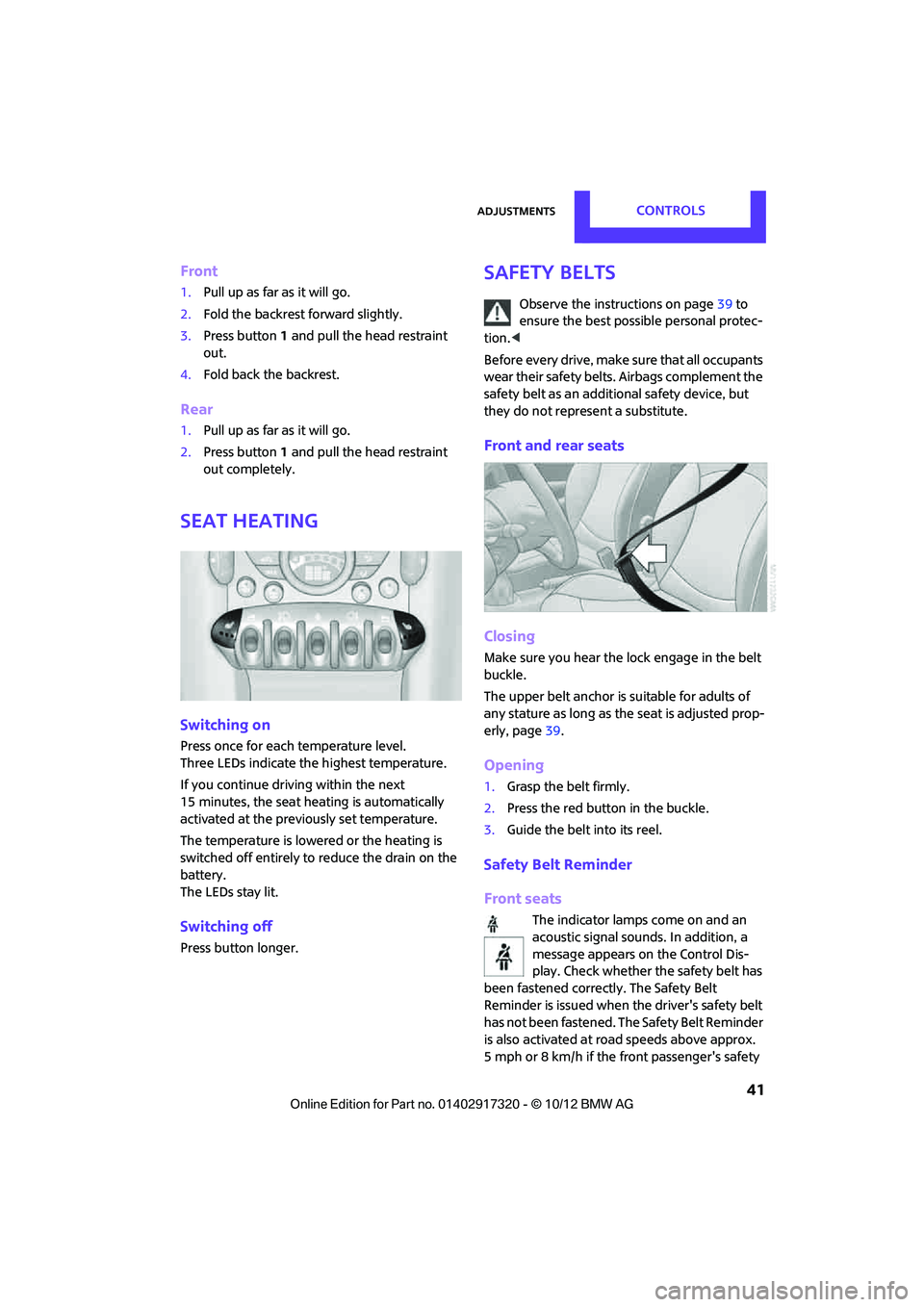
Front and rear seats
Closing
Make sure you hear the lock engage in the belt
buckle.
The upper belt anchor is suitable for adults of
any stature as long as th e seat is adjusted prop-
erly, page 39.
Opening
1.Grasp the belt firmly.
2. Press the red button in the buckle.
3. Guide the belt into its reel.
Safety Belt Reminder
Front seats
The indicator lamps come on and an
acoustic signal sounds. In addition, a
message appears on the Control Dis-
play. Check whether the safety belt has
been fastened correctly. The Safety Belt
Reminder is issued when the driver's safety belt
has not been fastened. The Safety Belt Reminder
is also activated at ro ad speeds above approx.
5mph or 8km/h if the front passenger's safety
00320051004F004C00510048000300280047004C0057004C005200510003
Page 45 of 267
CONTROLSTransporting children safely
44
Transporting children safely
Vehicle equipment
In this chapter, all production, country, and
optional equipment that is offered in the model
range is described. Equipment is also described
that is not available because of, for example,
selected options or coun try version. This also
applies to safety relate d functions and systems.
The right place for
children
Do not leave children unattended in the
vehicle; otherwise, they could endanger
themselves and/or other persons by opening the
doors, for example. <
Children should always sit in the rear
Accident research has shown that the safest
place for children is on the rear seat.
Only transport children under the age of
13 or smaller than 5 ft/150 cm in the rear
in a child restraint system suitable for their age,
weight and size. Otherwise, there is an
increased risk of injury in the event of an acci-
dent. <
Children 13 years of age or older must be buck-
led in with a safety belt as soon as there no
longer is any child restraint system that is appro-
priate for their age, size and weight.
Only install child seats in the rear when the
rear seat backrest is folded all the way
back and engaged. Otherwise, there is an
increased risk of injury in the event of an acci-
dent. <
Exception for front passenger seat
Front passenger airbags
Should it be necessary to use a child
restraint system on the front passenger
seat, the front and side airbags must be deacti-
vated. Otherwise, there is an increased risk of
injury to the child if th e airbags deploy, even if
the child is seated in a child restraint system. <
For more information on automatic deactivation
of the front passenger airbags, refer to page 78.
Child restraint systems,
installation
Observe the child restraint system manu-
facturer's instructions when selecting,
installing and using child restraint systems. Oth-
erwise, the protective effect may be dimin-
ished. <
On the front passenger seat
After installing a chil d restraint system on
the front passenger se at, make sure that
the front and side airbags for the front passen-
ger are deactivated; otherwise, there is an
increased risk of injury if the airbags deploy. <
Seat position
Before installing a child restraint system, move
the front passenger seat as far back and up as
possible to obtain the be st possible position for
the belt. Do not change the seat position after
this.
00320051004F004C00510048000300280047004C0057004C005200510003
Page 79 of 267
CONTROLSTechnology for driving comfort and safety
78
Airbags
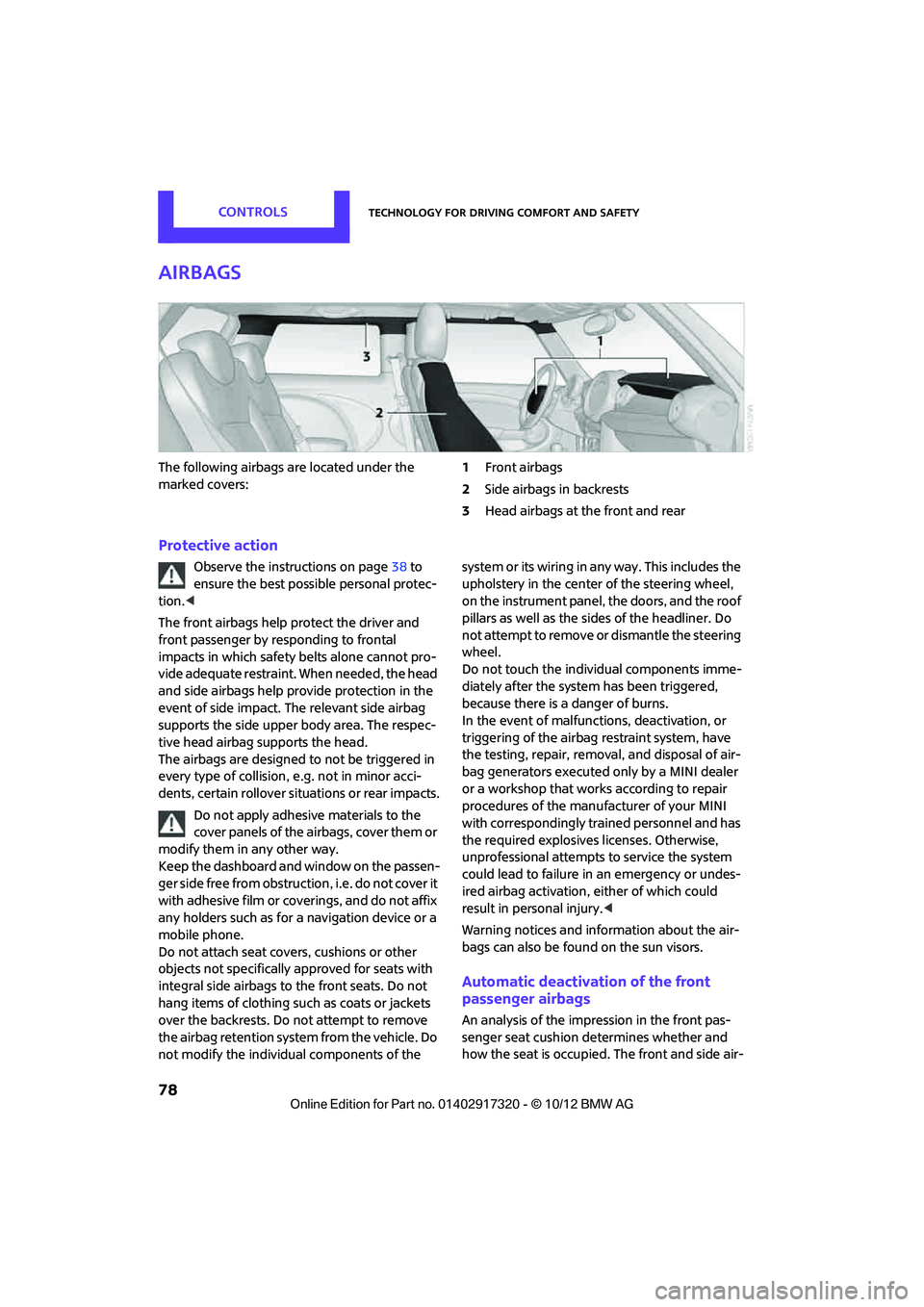
The following airbags are located under the
marked covers:1
Front airbags
2 Side airbags in backrests
3 Head airbags at the front and rear
Protective action
Observe the instructions on page 38 to
ensure the best possible personal protec-
tion. <
The front airbags help protect the driver and
front passenger by re sponding to frontal
impacts in which safety belts alone cannot pro-
vide adequate restraint. When needed, the head
and side airbags help provide protection in the
event of side impact. The relevant side airbag
supports the side upper body area. The respec-
tive head airbag supports the head.
The airbags are designed to not be triggered in
every type of collision, e.g. not in minor acci-
dents, certain rollover situations or rear impacts.
Do not apply adhesive materials to the
cover panels of the airbags, cover them or
modify them in any other way.
Keep the dashboard and window on the passen-
g e r s i d e f r e e f r o m o b s t r u c t i o n , i . e . d o n o t c o v e r i t
with adhesive film or co verings, and do not affix
any holders such as for a navigation device or a
mobile phone.
Do not attach seat cove rs, cushions or other
objects not specifically approved for seats with
integral side airbags to the front seats. Do not
hang items of clothing su ch as coats or jackets
over the backrests. Do not attempt to remove
the airbag retention system from the vehicle. Do
not modify the individual components of the syste m o r its w iring in any way. Th is includ es the
upholstery in the center of the steering wheel,
on the instrument panel, the doors, and the roof
pillars as well as the sides of the headliner. Do
not attempt to remove or dismantle the steering
wheel.
Do not touch the individual components imme-
diately after the system has been triggered,
because there is a danger of burns.
In the event of malfunctions, deactivation, or
triggering of the airbag
restraint system, have
the testing, repair, remova l, and disposal of air-
bag generators executed only by a MINI dealer
or a workshop that work s according to repair
procedures of the manufacturer of your MINI
with correspondingly trained personnel and has
the required explosives licenses. Otherwise,
unprofessional attempts to service the system
could lead to failure in an emergency or undes-
ired airbag activation, either of which could
result in personal injury. <
Warning notices and information about the air-
bags can also be found on the sun visors.
Automatic deactivation of the front
passenger airbags
An analysis of the impression in the front pas-
senger seat cushion determines whether and
how the seat is occupied. The front and side air-
00320051004F004C00510048000300280047004C0057004C005200510003
Page 80 of 267
Technology for driving comfort and safetyCONTROLS
79
bags for the front passenger are activated or
deactivated by the system accordingly.The indicator lamp above the interior rear-
view mirror shows th e current status of
the front passenger airbags, deactivated or acti-
vated, refer to Status of front passenger airbags
below. <
Before transporting a child on the front
passenger seat, read the safety precau-
tions and handling instructions under Transport-
ing children safely, page 44.
The front and side airbags can also be deacti-
vated by adolescents and adults sitting in certain
positions; the indicator lamp for the front pas-
senger airbags comes on. In such cases, the pas-
senger should change his or her sitting position
so that the front passenger airbags are activated
and the indicator lamp goes out. If the desired
airbag status cannot be achieved by changing
the sitting position, transport the relevant pas-
senger on a rear seat. Do not attach covers,
cushions, ball mats or other items to the front
passenger seat unless they are specifically rec-
ommended by the manufacturer of your MINI.
Do not place items under the seat which could
press against the seat from below. Otherwise, a
correct analysis of th e seat cushion is not
ensured. <
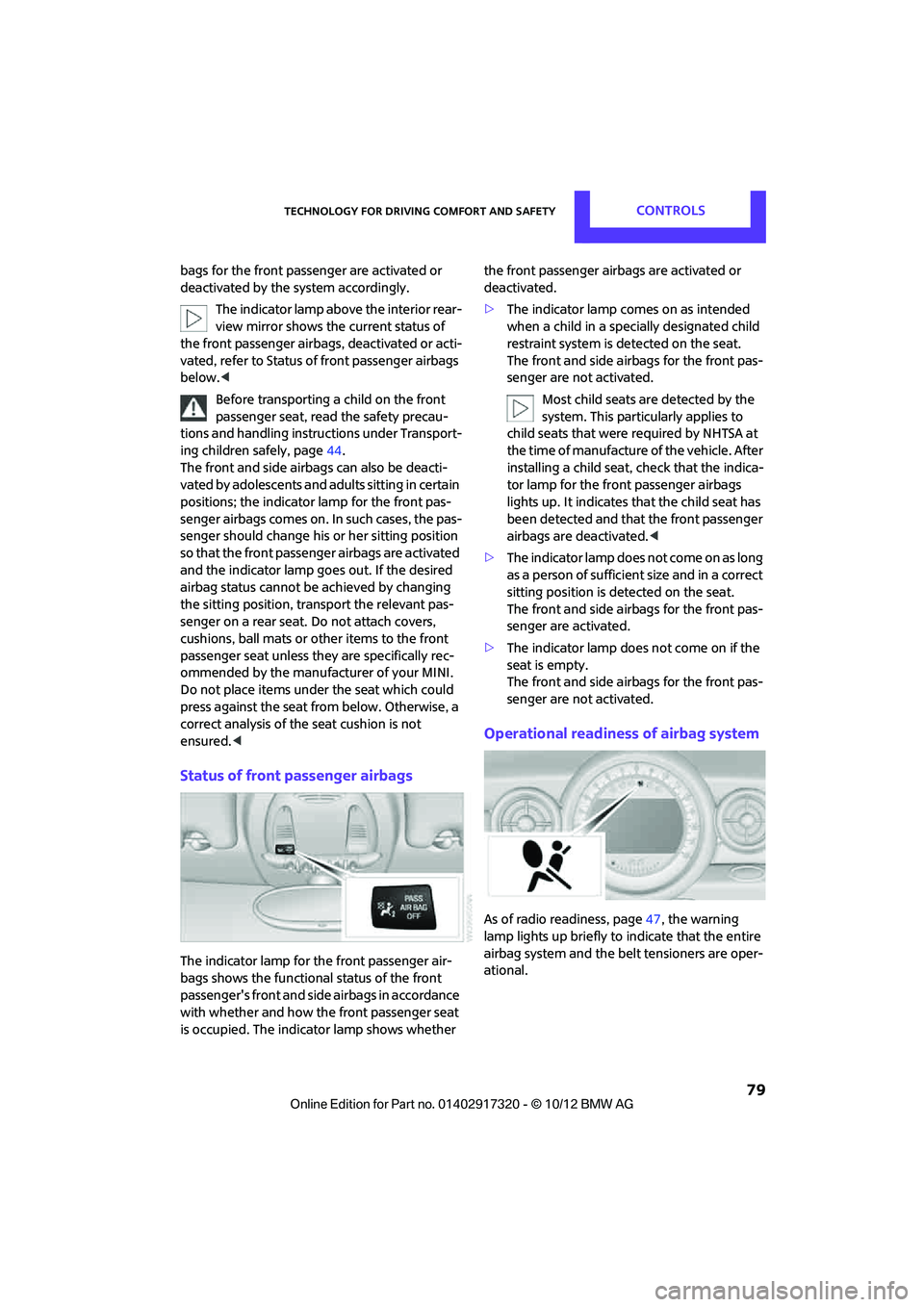
Status of front passenger airbags
The indicator lamp for the front passenger air-
bags shows the functional status of the front
passenger's front and side airbags in accordance
with whether and how th e front passenger seat
is occupied. The indica tor lamp shows whether the front passenger airbags are activated or
deactivated.
>
The indicator lamp co mes on as intended
when a child in a specially designated child
restraint system is detected on the seat.
The front and side airbags for the front pas-
senger are not activated.
Most child seats are detected by the
system. This particularly applies to
child seats that were required by NHTSA at
the time of manufacture of the vehicle. After
installing a child seat, check that the indica-
tor lamp for the front passenger airbags
lights up. It indicates that the child seat has
been detected and that the front passenger
airbags are deactivated. <
> The indicator lamp does not come on as long
as a person of sufficient size and in a correct
sitting position is detected on the seat.
The front and side airbags for the front pas-
senger are activated.
> The indicator lamp does not come on if the
seat is empty.
The front and side airbags for the front pas-
senger are not activated.
Operational readiness of airbag system
As of radio readiness, page 47, the warning
lamp lights up briefly to indicate that the entire
airbag system and the belt tensioners are oper-
ational.
00320051004F004C00510048000300280047004C0057004C005200510003
Page 96 of 267
Practical interior accessoriesCONTROLS
95
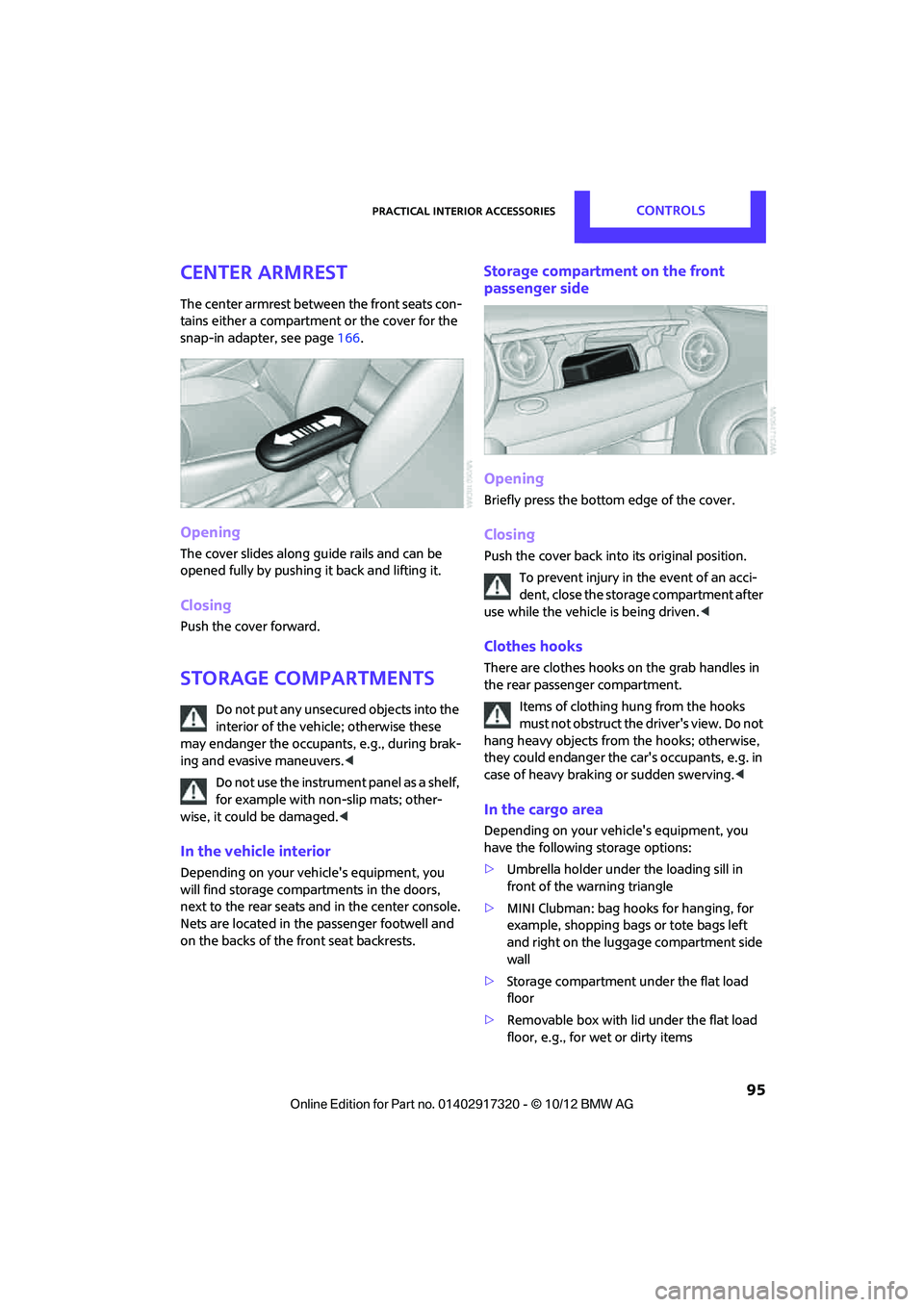
Center armrest
The center armrest between the front seats con-
tains either a compartment or the cover for the
snap-in adapter, see page166.
Opening
The cover slides along guide rails and can be
opened fully by pushing it back and lifting it.
Closing
Push the cover forward.
Storage compartments
Do not put any unsecured objects into the
interior of the vehicle; otherwise these
may endanger the occupants, e.g., during brak-
ing and evasive maneuvers. <
Do not use the instrument panel as a shelf,
for example with non-slip mats; other-
wise, it could be damaged. <
In the vehicle interior
Depending on your vehicle's equipment, you
will find storage compartments in the doors,
next to the rear seats and in the center console.
Nets are located in the passenger footwell and
on the backs of the front seat backrests.
Storage compartment on the front
passenger side
Opening
Briefly press the bottom edge of the cover.
Closing
Push the cover back into its original position.
To prevent injury in the event of an acci-
dent, close the storage compartment after
use while the vehicle is being driven. <
Clothes hooks
There are clothes hooks on the grab handles in
the rear passenger compartment.
Items of clothing hung from the hooks
must not obstruct the driver's view. Do not
hang heavy objects from the hooks; otherwise,
they could endanger the car's occupants, e.g. in
case of heavy braking or sudden swerving. <
In the cargo area
Depending on your vehicle's equipment, you
have the following storage options:
>Umbrella holder under the loading sill in
front of the warning triangle
> MINI Clubman: bag hooks for hanging, for
example, shopping bags or tote bags left
and right on the luggage compartment side
wall
> Storage compartment under the flat load
floor
> Removable box with lid under the flat load
floor, e.g., for wet or dirty items
00320051004F004C00510048000300280047004C0057004C005200510003
Page 105 of 267
DRIVING TIPSThings to remember when driving
104
MINI Clubman: cargo net
Ensure that the cargo net is firmly
attached; otherwise, injuries may occur.<
The cargo net can be mounted in the cargo area
or behind the front seats.
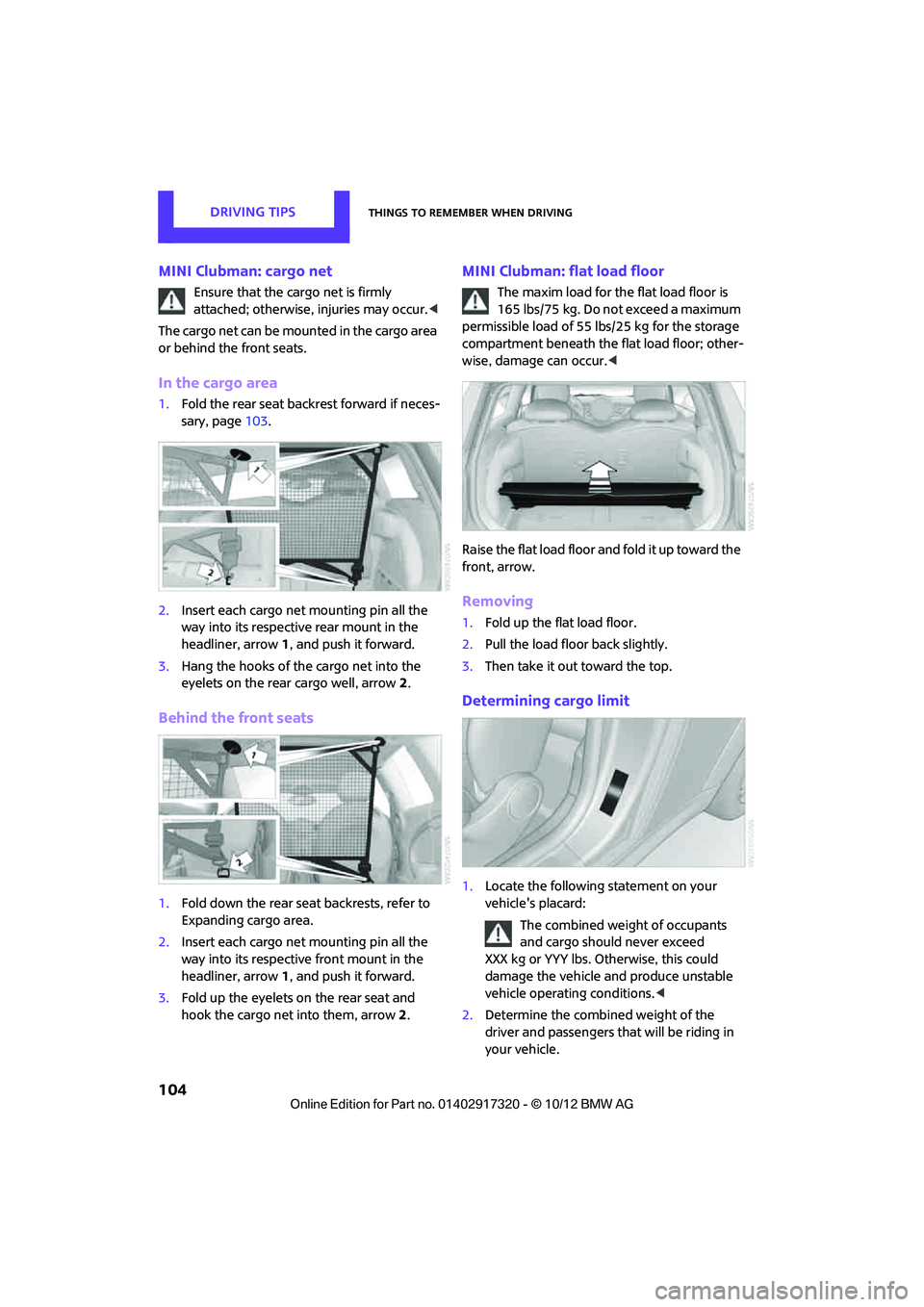
In the cargo area
1. Fold the rear seat backrest forward if neces-
sary, page 103.
2. Insert each cargo net mounting pin all the
way into its respective rear mount in the
headliner, arrow 1, and push it forward.
3. Hang the hooks of the cargo net into the
eyelets on the rear cargo well, arrow2.
Behind the front seats
1. Fold down the rear seat backrests, refer to
Expanding cargo area.
2. Insert each cargo net mounting pin all the
way into its respective front mount in the
headliner, arrow 1, and push it forward.
3. Fold up the eyelets on the rear seat and
hook the cargo net into them, arrow 2.
MINI Clubman: flat load floor
The maxim load for the flat load floor is
165 lbs/75 kg. Do not exceed a maximum
permissible load of 55 lbs/25 kg for the storage
compartment beneath the flat load floor; other-
wise, damage can occur. <
Raise the flat load floor an d fold it up toward the
front, arrow.
Removing
1. Fold up the flat load floor.
2. Pull the load floor back slightly.
3. Then take it out toward the top.
Determining cargo limit
1.Locate the following statement on your
vehicle's placard:
The combined weight of occupants
and cargo should never exceed
XXX kg or YYY lbs. Otherwise, this could
damage the vehicle and produce unstable
vehicle operating conditions. <
2. Determine the combined weight of the
driver and passengers that will be riding in
your vehicle.
00320051004F004C00510048000300280047004C0057004C005200510003
Page 254 of 267
Everything from A to ZREFERENCE
253
B
Background lighting, refer to
Ambient lighting 84
Backrests, refer to Seats 39
Backup lamps
– replacing bulb 222,223
Band-aids, refer to First aid pouch 231
Bar, refer to Tow-starting,
towing away 234
Base plate for telephone or mobile phone
– refer to Snap-in adapter 177
Bass sounds, refer to Tone control 133
Battery 229
– disposal 35,230
– jump-starting 232
– temporary power failure 230
Battery renewal
– remote control 35
Being towed 234
Belts, refer to Safety belts 41
Belt tensioner, refer to Safety
belts 41
Beverage holders, refer to Cupholders 96
Black ice, refer to External temperature warning 58
Blower, refer to Air flow rate 86,88
Bluetooth, activating/
deactivating 157,167
Bluetooth audio 149
– device pairing 150
– disconnecting an audio connection 152
– playback 151
– unpairing device 152
– What to do if... 152
Bottle holders, refer to
Cupholders 96
Brake Assist 69
Brake fluid, refer to Service
requirements 61 Brake lamps
– replacing bulbs
222,223
Brake pads, breaking in 100
Brake rotors 102
– brakes 100
– breaking in 100
Brakes
– ABS 69
– breaking in 100
– MINI Maintenance
System 211
– parking brake 49
– service requirem ents
61
Brakes, refer to Braking sa fely 101
Br
ake system 100
– breaking in 100
– disc brakes 102
– MINI Maintenance
System 211
Breakdown service, refer to Roadside Assistance 231
Breaking in the clutch 100
Break-in period 100
Bulb changing, refer to Lamps
and bulbs 219
Button for starting the engine 47
Buttons on the steering wheel 11
C
Calendar 183
– displaying appointment 183
– selecting calendar day 183
California Proposition 65 warning 5
Call
– ending 160,172
– muting the microphone 173
Calling, refer to Phone
numbers, dialing 160,172
Calling, refer to Telephone 95
Can holders, refer to
Cupholders 96
Capacities 244 Car battery, refer to Vehicle
battery 229
Car care 213
Care 213
– car-care products 213
– car washes 213
– CD/DVD drives 216
– high-pressure washers 214
– leather 215
– manual washing 214
– upholstery and fabrics 215
– windows 214
– wiper blades 214
Cargo, securing 105
Cargo area 102
– capacity 242
– Comfort Access 34
– cover 102
– doors, refer to Split Rear Barn
Doors 31
– lamp 84
– opening from outside 31
– trunk lid, refer to Split Rear Barn Doors 31
Cargo area, expanding 103
Cargo area doors, refer to Split Rear Barn Doors 31
Cargo area lamp 84
Cargo area lid, refer to Tailgate 31
Cargo area partition net, refer to Cargo net 104
Cargo loading 104
– securing cargo 105
– stowing cargo 105
– vehicle 102
Cargo net 104
Car key, refer to Keys/remote controls 26
Carpets, care 215
Car phone
– installation location, refer to
Ce
nter armrest 95
– refer to Telephone 95
Car phone, refer to
Telephone 156,166
Car radio, refer to Radio 135
00320051004F004C00510048000300280047004C0057004C005200510003
Page 255 of 267
REFERENCEEverything from A to Z
254
Car wash, care213
Car washes 213
Catalytic conver ter, refer to
Hot exhaust system 101
CD, audio playback 143
CD player 143
– controls 132
– fast forward/reverse 144
– random order 144
– selecting a track 143
– switching on/off 132
– tone control 133
– volume 133
Center armrest 95
Center brake lamp 224
Center console, refer to
Around the center
console 14
Central locking system 27
– Comfort Access 33
– from inside 30
– from outside 27
Changing bulbs 219
Changing the language on the Control Display 66
Changing the measurement units on the Control
Display 60
Changing wheels 227
Charging the battery 229
Chassis number, refer to Engine compartment 207
Check Control 63
Child restraint fixing system LATCH 45
Child restraint systems 44
Child seats 44
Chrome parts, care 215
Chrome parts, refer to
Care 213
Cigarette lighter 96
Cleaning headlamps 54
– washer fluid 55
Clock
– setting time 62
– 12 h/24 h mode 63Closing
– from inside
30
– from outside 27
Clothes hooks 95
Club Door 30
Cockpit 10
Cold start, refer to Starting the
engine 48
Comfort Access 33
– replacing the battery 35
– what to observe before entering a car wash 35
C omfort ar
ea, refer to Around
the center console 14
Compartment for remote control, refer to Ignition
lock 47
Compass 92
Computer 58
– displays on Control Display 59
Condensation, refer to When
the vehicle is parked 102
Condition Based Service CBS 211
Configuring settings, refer to Personal Profile 26
Connecting vacuum cleaner,
refer to Connecting electrical
appliances 97
Consumption, refer to Average fuel consumption 58
Contact
– editing 164
Contacts 163,180
– new contact 181
Continuing route guidance 121
Control Display
– settings 60
Control Display, refer to iDrive
– switching on/off 16
Control Display, refer to Onboard computer 16
Controls and displays 10
Control stick, refer to Onboard computer 16 Control unit, refer to Onboard
computer 16
Convenience operation
– windows 28
Convenient access, refer to Comfort Access 33
Convenient star t, refer to
Starting the engine 48
Coolant 210
– checking level 210
– filling 210
Coolant temperature 210
Cooling, maximum 88
Cooling fluid, refer to Coolant 210
Copyright 2
Cornering light, refer to Adaptive Light Control 82
Criteria for route 121
Cruise control
– indicator lamp 13
Cruising range 58
Cupholders 96
Curb weight, refer to Weights 242
Current fuel consumption 59
Curren t playback
– external devices 148
D
Dashboard, refer to Cockpit 10
Dashboard instruments, refer
to Displays 12
Dashboard lighting, refer to Instrument lighting 83
Data 238
– capacities 244
– dimensions 239
– engine 238
– weights 242
Date
– setting 63
– setting format 63
Daytime running lights 82
DBC Dynamic Brake Control, refer to Brake Assist 69
00320051004F004C00510048000300280047004C0057004C005200510003