towing MINI COOPER 2013 Owners Manual
[x] Cancel search | Manufacturer: MINI, Model Year: 2013, Model line: COOPER, Model: MINI COOPER 2013Pages: 267, PDF Size: 3.53 MB
Page 33 of 267
CONTROLSOpening and closing
32
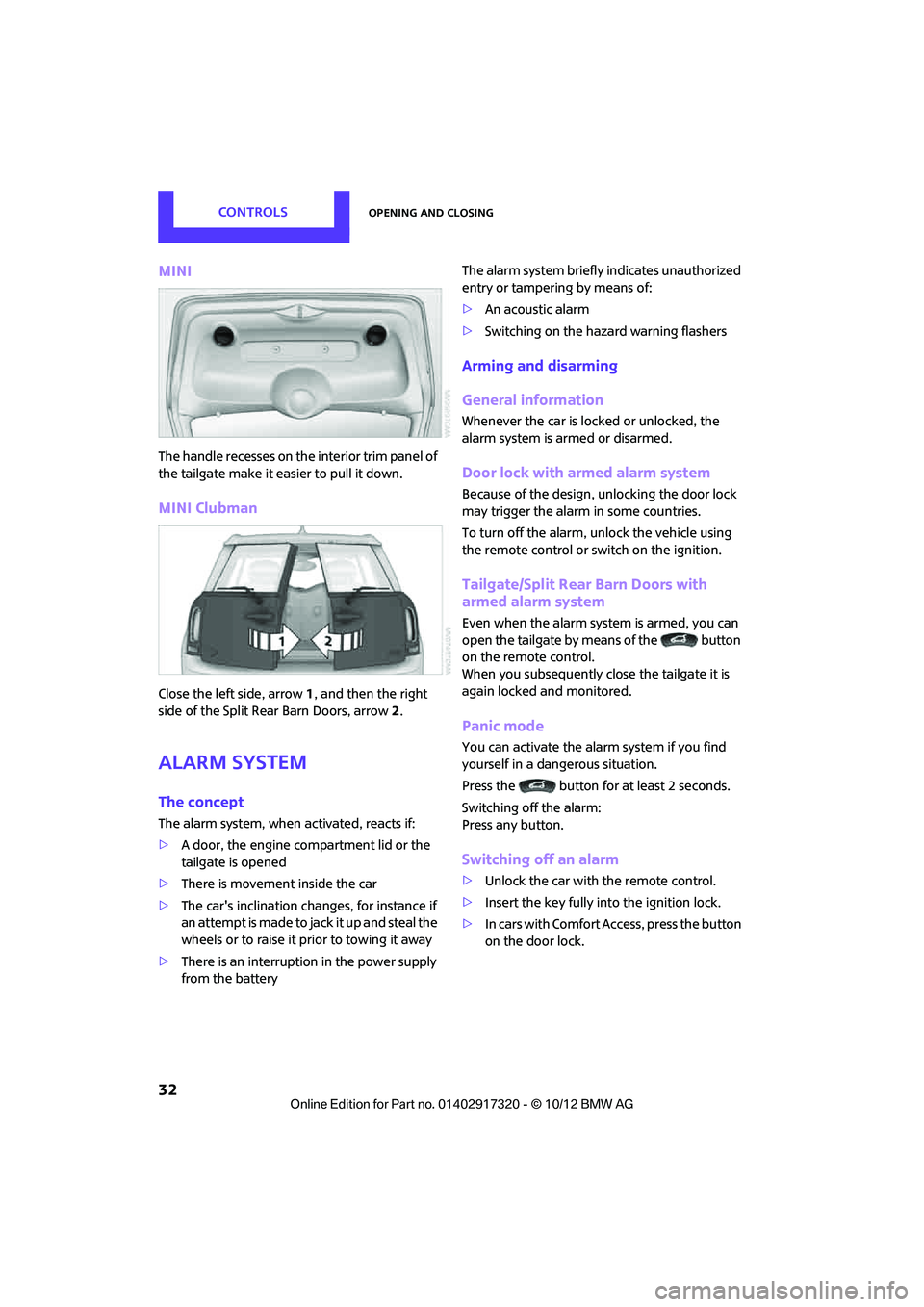
MINI
The handle recesses on the interior trim panel of
the tailgate make it easier to pull it down.
MINI Clubman
Close the left side, arrow1, and then the right
side of the Split Rear Barn Doors, arrow 2.
Alarm system
The concept
The alarm system, when activated, reacts if:
> A door, the engine compartment lid or the
tailgate is opened
> There is movement inside the car
> The car's inclination changes, for instance if
an attempt is made to ja ck it up and steal the
wheels or to raise it prior to towing it away
> There is an interruption in the power supply
from the battery The alarm system briefly indicates unauthorized
entry or tampering by means of:
>
An acoustic alarm
> Switching on the haza rd warning flashers
Arming and disarming
General information
Whenever the car is locked or unlocked, the
alarm system is armed or disarmed.
Door lock with armed alarm system
Because of the design, unlocking the door lock
may trigger the alarm in some countries.
To turn off the alarm, unlock the vehicle using
the remote control or switch on the ignition.
Tailgate/Split Rear Barn Doors with
armed alarm system
Even when the alarm syst em is armed, you can
open the tailgate by means of the button
on the remo te control.
When you subsequently close the tailgate it is
again locked and monitored.
Panic mode
You can activate the alarm system if you find
yourself in a dangerous situation.
Press the button for at least 2 seconds.
Switching off the alarm:
Press any button.
Switching off an alarm
> Unlock the car with the remote control.
> Insert the key fully into the ignition lock.
> In cars with Comfort Access, press the button
on the door lock.
00320051004F004C00510048000300280047004C0057004C005200510003
Page 106 of 267
Things to remember when drivingDRIVING TIPS
105
3.Subtract the combined weight of the driver
and passengers from XXX pounds or YYY
kilograms.
4. The resulting figure equals the available
amount of cargo and luggage load capacity.
For example, if the XXX amount equals
1,400 lbs and there will be four 150 lb-pas-
sengers in your vehicle, the amount of avail-
able cargo and luggage load capacity is
650 lbs:
1,400 lbs minus 750 lbs = 650 lbs.
5. Determine the combined weight of luggage
and cargo being loaded on the vehicle. That
weight may not safely exceed the available
cargo and luggage load capacity calculated
in step 4.
6. If your vehicle will be towing a trailer, part of
the load from your trail er will be transferred
to your vehicle. Consult the manual for
transporting a trailer to determine how this
may reduce the available cargo and luggage
load capacity of your vehicle.
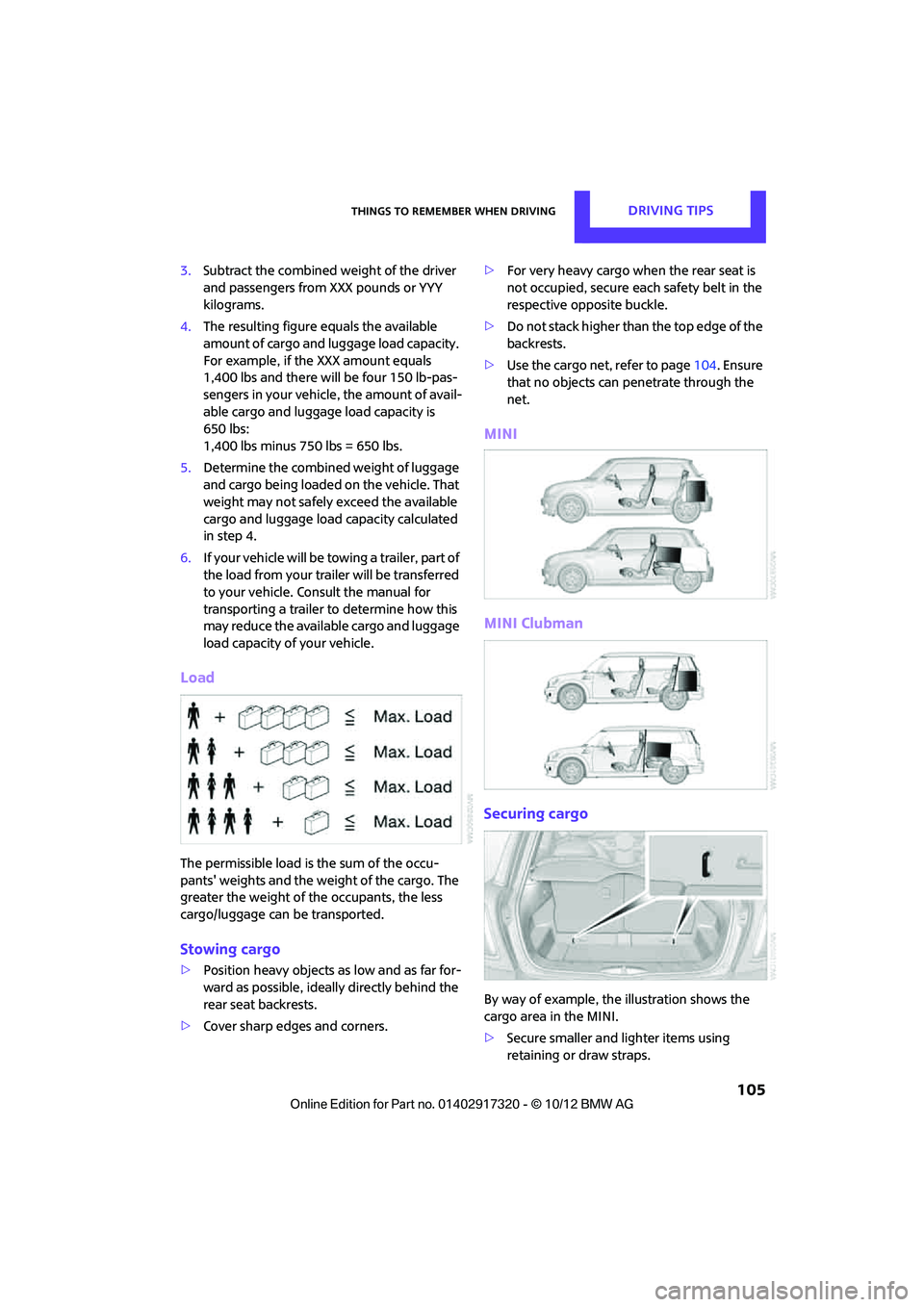
Load
The permissible load is the sum of the occu-
pants' weights and the weight of the cargo. The
greater the weight of the occupants, the less
cargo/luggage can be transported.
Stowing cargo
> Position heavy objects as low and as far for-
ward as possible, ideally directly behind the
rear seat backrests.
> Cover sharp edges and corners. >
For very heavy cargo wh en the rear seat is
not occupied, secure each safety belt in the
respective opposite buckle.
> Do not stack higher than the top edge of the
backrests.
> Use the cargo net, refer to page 104. Ensure
that no objects can penetrate through the
net.
MINI
MINI Clubman
Securing cargo
By way of example, the illustration shows the
cargo area in the MINI.
> Secure smaller and lighter items using
retaining or draw straps.
00320051004F004C00510048000300280047004C0057004C005200510003
Page 218 of 267
Replacing componentsMOBILITY
217
Replacing components
Vehicle equipment
In this chapter, all production, country, and
optional equipment that is offered in the model
range is described. Equipment is also described
that is not available because of, for example,
selected options or count ry version. This also
applies to safety related functions and systems.
Toolkit
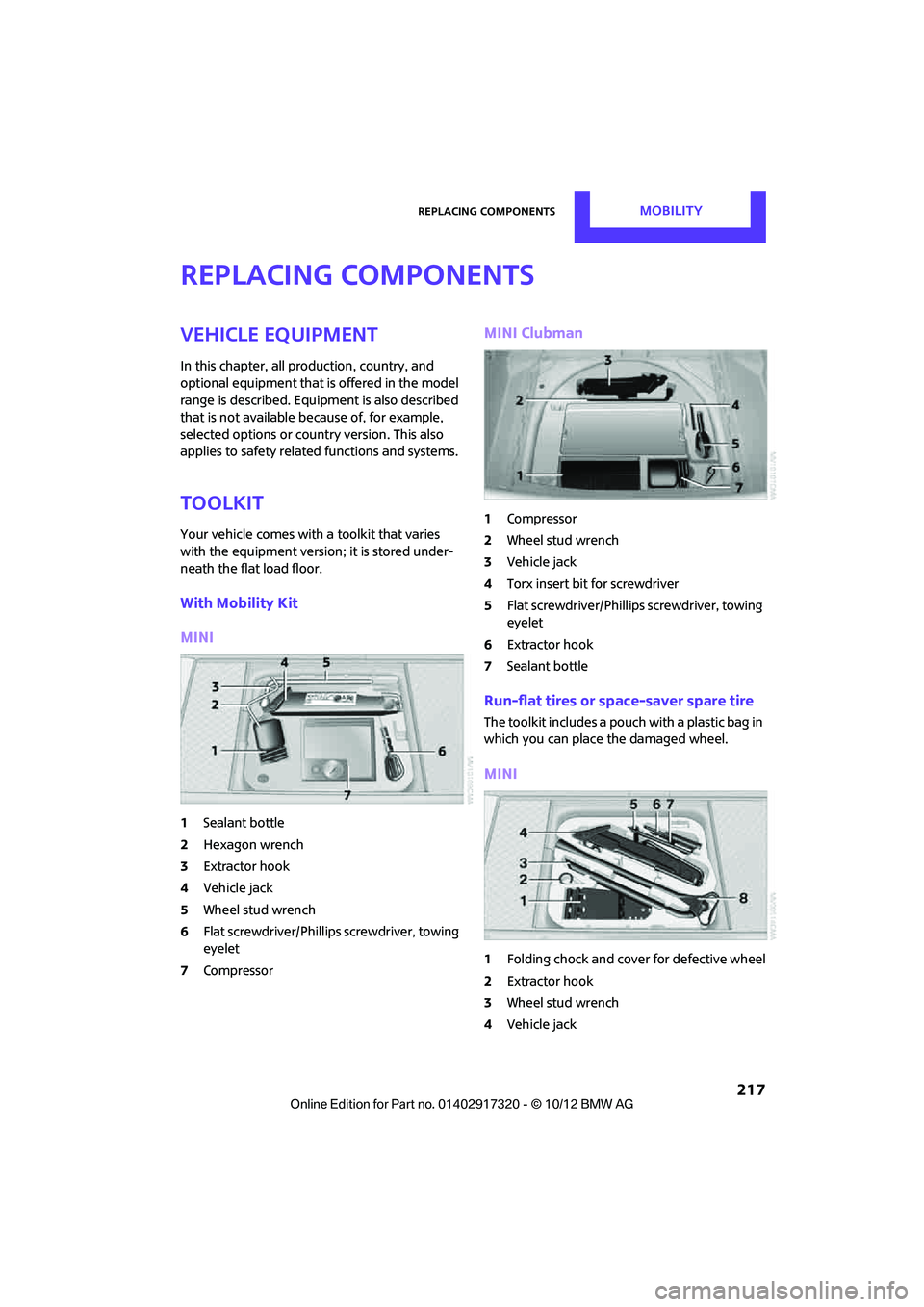
Your vehicle comes with a toolkit that varies
with the equipment version; it is stored under-
neath the flat load floor.
With Mobility Kit
MINI
1 Sealant bottle
2 Hexagon wrench
3 Extractor hook
4 Vehicle jack
5 Wheel stud wrench
6 Flat screwdriver/Phillips screwdriver, towing
eyelet
7 Compressor
MINI Clubman
1Compressor
2 Wheel stud wrench
3 Vehicle jack
4 Torx insert bit for screwdriver
5 Flat screwdriver/Phillips screwdriver, towing
eyelet
6 Extractor hook
7 Sealant bottle
Run-flat tires or space-saver spare tire
The toolkit includes a pouch with a plastic bag in
which you can place the damaged wheel.
MINI
1Folding chock and cove r for defective wheel
2 Extractor hook
3 Wheel stud wrench
4 Vehicle jack
00320051004F004C00510048000300280047004C0057004C005200510003
Page 219 of 267
MOBILITYReplacing components
218
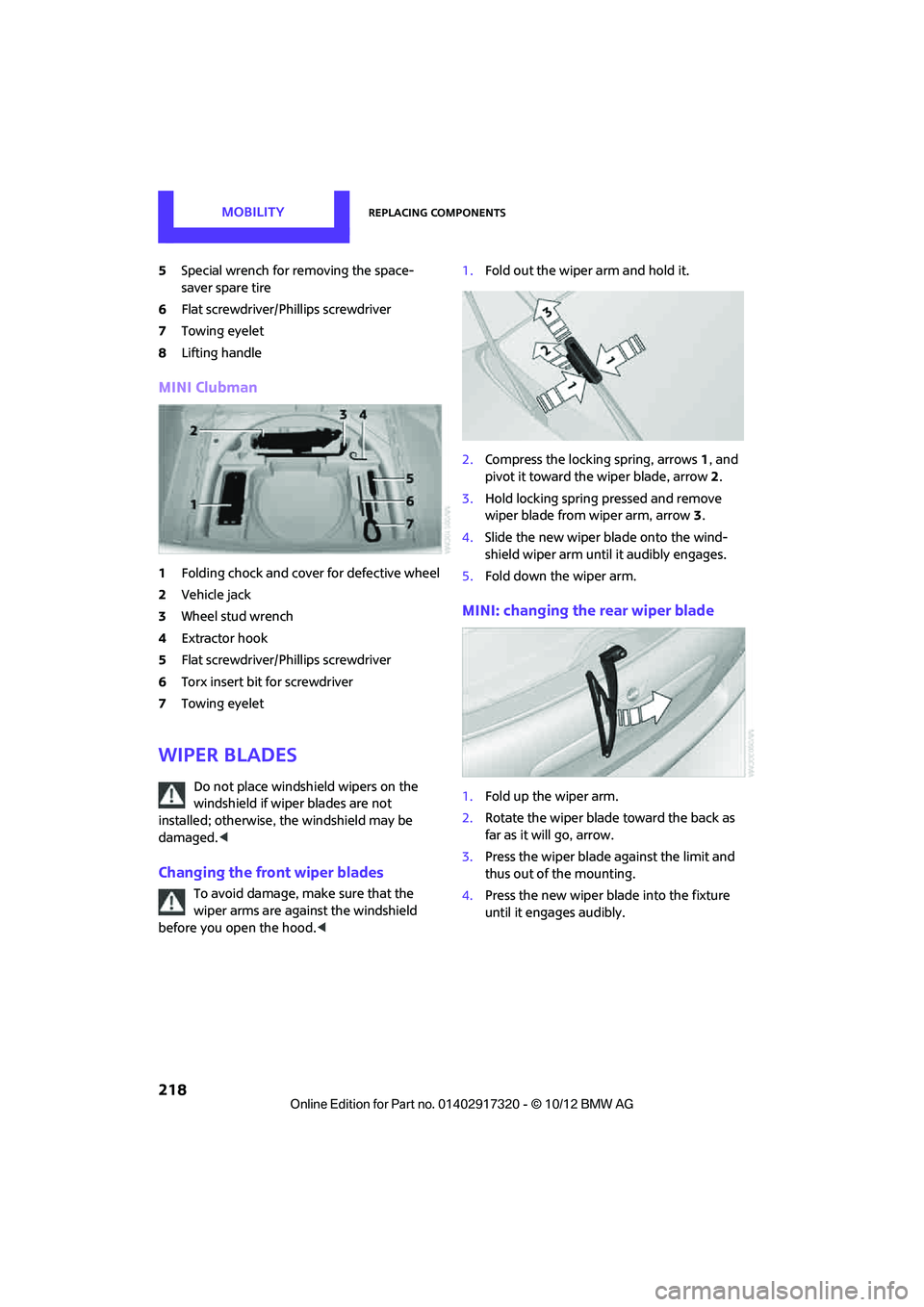
5Special wrench for removing the space-
saver spare tire
6 Flat screwdriver/Phillips screwdriver
7 Towing eyelet
8 Lifting handle
MINI Clubman
1Folding chock and cover for defective wheel
2 Vehicle jack
3 Wheel stud wrench
4 Extractor hook
5 Flat screwdriver/Phillips screwdriver
6 Torx insert bit for screwdriver
7 Towing eyelet
Wiper blades
Do not place windshield wipers on the
windshield if wiper blades are not
installed; otherwise, the windshield may be
damaged. <
Changing the front wiper blades
To avoid damage, make sure that the
wiper arms are against the windshield
before you open the hood. <1.
Fold out the wiper arm and hold it.
2. Compress the locking spring, arrows 1, and
pivot it toward the wiper blade, arrow 2.
3. Hold locking spring pressed and remove
wiper blade from wiper arm, arrow 3.
4. Slide the new wiper blade onto the wind-
shield wiper arm until it audibly engages.
5. Fold down the wiper arm.
MINI: changing the rear wiper blade
1.Fold up the wiper arm.
2. Rotate the wiper blade toward the back as
far as it will go, arrow.
3. Press the wiper blade against the limit and
thus out of the mounting.
4. Press the new wiper blade into the fixture
until it engages audibly.
00320051004F004C00510048000300280047004C0057004C005200510003
Page 227 of 267
MOBILITYReplacing components
226
to about 5 bar/73 psi. Do not switch off the
compressor during this phase.<
Do not run the comp ressor for longer
than 10 minutes; otherwise, the
device will overheat and possibly be dam-
aged.<
8. Switch off the compressor.
If an inflation pressure of 1.8 bar/26 psi is not
reached:
1. Unscrew the filling hose 2 from the wheel
and drive the vehicle forward and backward
approx. 33 ft/10 m to distribute the liquid
sealant in the tire evenly.
2. Inflate the tire again with the compressor.
If an inflation pressure of 1.8 bar/26 psi is
not reached, then the tire is too badly
damaged. Please contact the nearest MINI
dealer. <
Stowing Mobility Kit
1.Unscrew filler hose 2 of the sealant bottle
from the wheel.
2. Unscrew connecting hose of the
compressor 6 from the sealant bottle.
3. Connect the filler hose 2 of the sealant bot-
tle to the unoccupied connection on the
sealant bottle.
This prevents the rest of the sealant from
escaping from the bottle.
4. Wrap the empty sealant bottle in suitable
material to avoid dirt ying the cargo area.
5. Stow Mobility Kit back in the vehicle.
Distributing the sealant.
Immediately drive approx. 3.1 miles/5 km so
that the sealant evenly distributes itself.
Do not exceed speeds of 50 mph/
80 km/h.
If possible, do not drop below 10 mph/
20 km/h. <
Adjusting the tire pressure
1.After driving approx. 3.1 miles/5 km or
10 minutes, stop at a suitable location.
2. Screw the connection hose 6 of the com-
pressor directly onto the tire valve.
3. Insert the plug 5 into the power socket in
the vehicle interior.
4. Adjust tire pressure to 1.8 bar/26 psi. With
the engine running:
> To increase the inflatio n pressure: switch on
the compressor. To ch eck the current infla-
tion pressure, switch off the compressor.
Do not run the compressor for longer
than 10 minutes; otherwise, the
device will overheat and possibly be dam-
aged.<
> To decrease the inflat ion pressure: press the
release button 9.
If the tire cannot m aintain the inflation
pressure, drive the vehicle again, refer to
Distributing the sealan t. Then repeat steps
1to4.
If an inflation pressure of 1.8 bar/26 psi still can-
not be reached, then the tire is too heavily dam-
aged. Contact your ne arest MINI dealer.<
Driving on
Do not exceed the permitted maximum
speed of 50 mph/80 km/h; doing so may
result in an accident. <
Replace the defective tire as soon as possible
and have the new wheel/tire assembly bal-
anced.
Have the Mobility Kit refilled.
00320051004F004C00510048000300280047004C0057004C005200510003
Page 234 of 267
Giving and receiving assistanceMOBILITY
233
Body ground in MINI:
6.Attach the second terminal clamp of the
minus/– jumper cable to the negative termi-
nal of the battery or to the engine or body
ground of the vehicle to be started.
Starting the engine
1.Start the engine of the donor vehicle and
allow it to run for a few minutes at slightly
increased idle speed.
2. Start the engine of the other vehicle in the
usual manner.
If the first start attempt is not successful,
wait a few minutes be fore another attempt
in order to allow the discharged battery to
recharge.
3. Let the engines run for a few minutes.
4. Disconnect the jumper cables by reversing
the above connecting sequence.
If necessary, have the battery checked and
recharged. Never use spray fluids to start the
engine. <
Tow-starting, towing
away
Observe the applicable laws and regula-
tions for tow-starting and towing vehi-
cles. <
Do not transport an y passengers other
than the driver in a vehicle that is being
towed. <
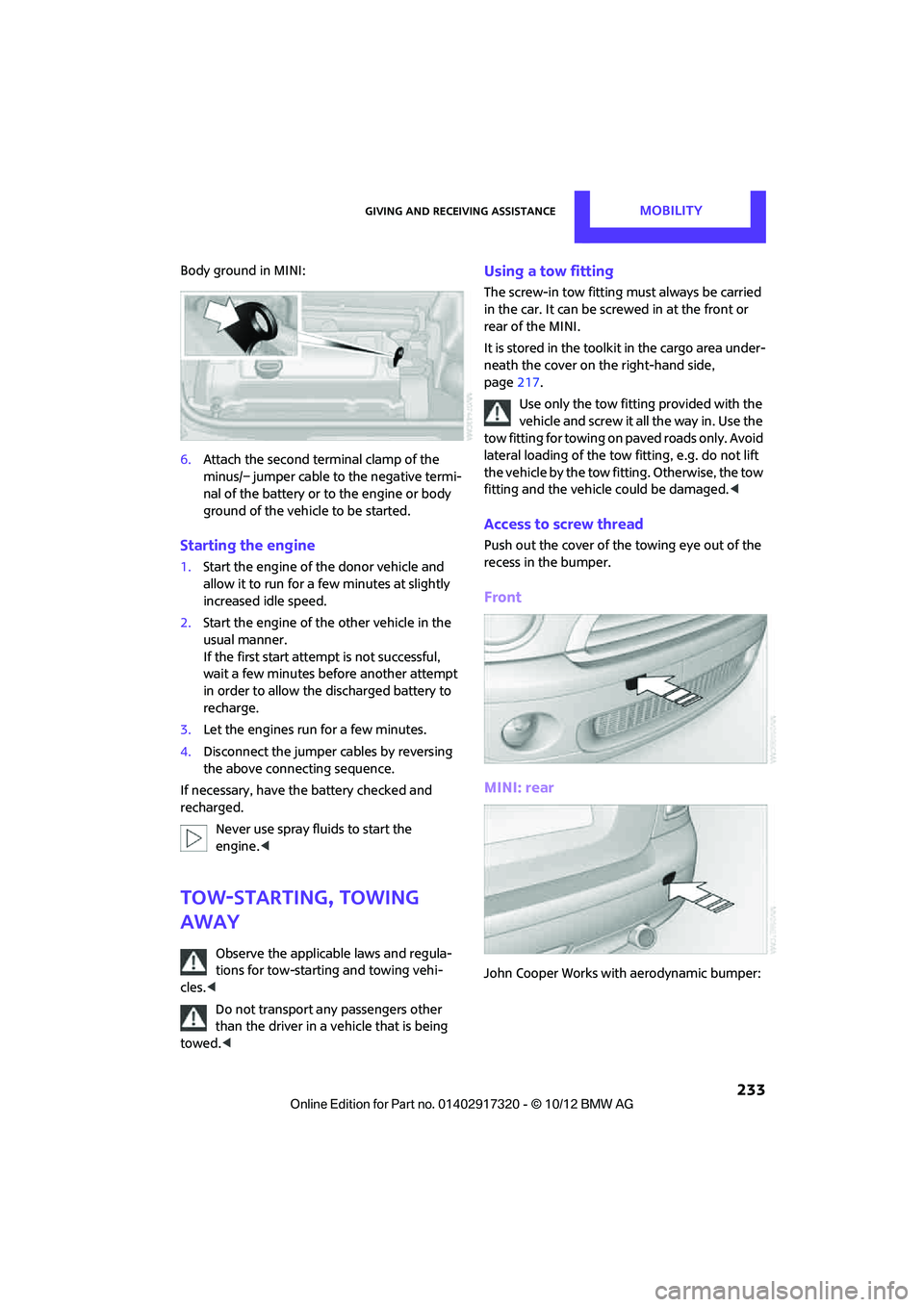
Using a tow fitting
The screw-in tow fitting must always be carried
in the car. It can be screwed in at the front or
rear of the MINI.
It is stored in the toolkit in the cargo area under-
neath the cover on the right-hand side,
page217.
Use only the tow fitting provided with the
vehicle and screw it all the way in. Use the
tow fitting for towing on paved roads only. Avoid
lateral loading of the tow fitting, e.g. do not lift
the vehicle by the tow fitting. Otherwise, the tow
fitting and the vehicle could be damaged. <
Access to screw thread
Push out the cover of the towing eye out of the
recess in the bumper.
Front
MINI: rear
John Cooper Works with aerodynamic bumper:
00320051004F004C00510048000300280047004C0057004C005200510003
Page 235 of 267
MOBILITYGiving and receiving assistance
234
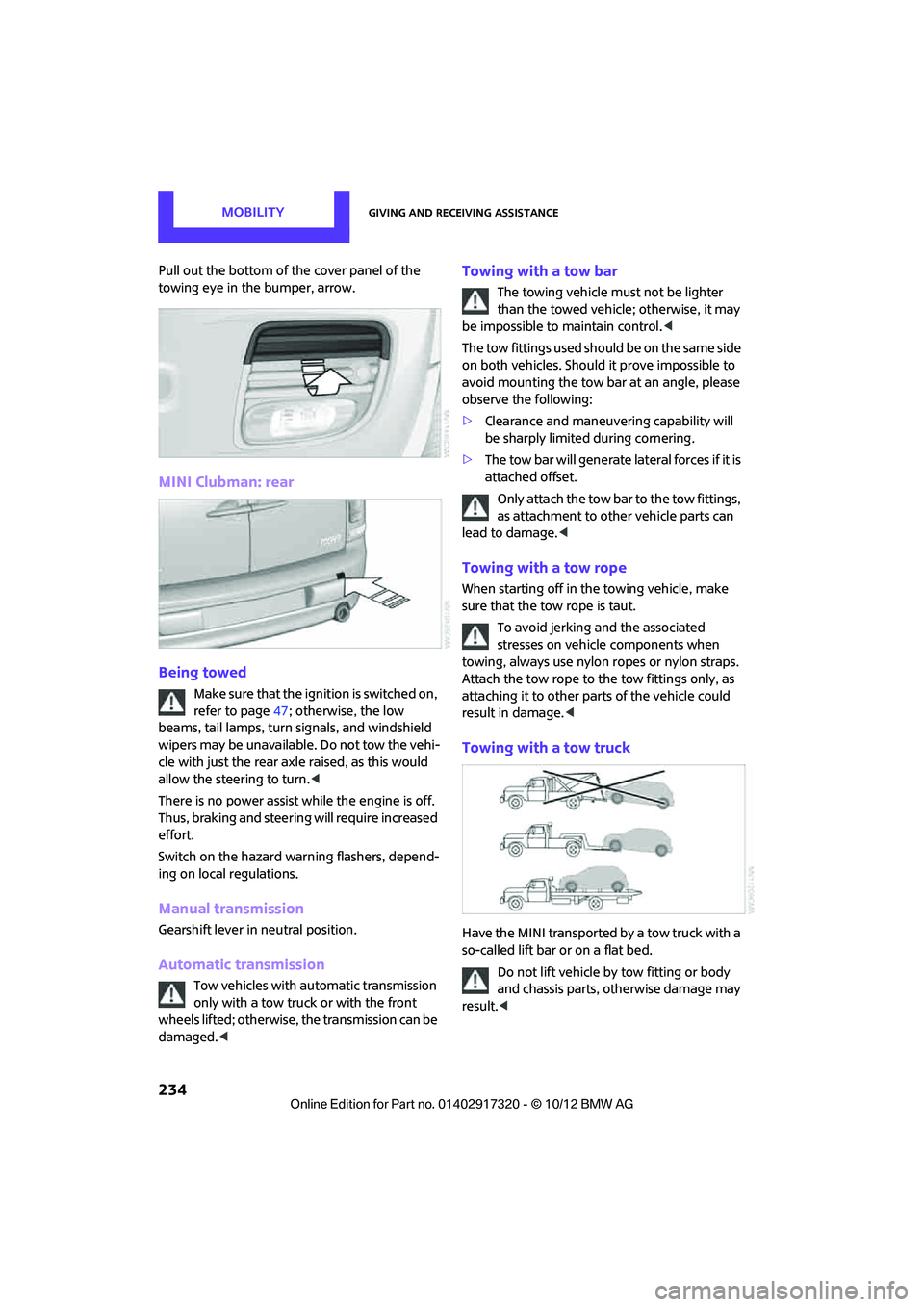
Pull out the bottom of the cover panel of the
towing eye in the bumper, arrow.
MINI Clubman: rear
Being towed
Make sure that the ignition is switched on,
refer to page47; otherwise, the low
beams, tail lamps, turn signals, and windshield
wipers may be unavailable. Do not tow the vehi-
cle with just the rear axle raised, as this would
allow the steering to turn. <
There is no power assist while the engine is off.
Thus, braking and steering will require increased
effort.
Switch on the hazard wa rning flashers, depend-
ing on local regulations.
Manual transmission
Gearshift lever in neutral position.
Automatic transmission
Tow vehicles with automatic transmission
only with a tow truck or with the front
wheels lifted; otherwise, the transmission can be
damaged. <
Towing with a tow bar
The towing vehicle must not be lighter
than the towed vehicle; otherwise, it may
be impossible to maintain control. <
The tow fittings used should be on the same side
on both vehicles. Should it prove impossible to
avoid mounting the tow bar at an angle, please
observe the following:
> Clearance and maneuver ing capability will
be sharply limited during cornering.
> The tow bar will generate lateral forces if it is
attached offset.
Only attach the tow bar to the tow fittings,
as attachment to other vehicle parts can
lead to damage. <
Towing with a tow rope
When starting off in the towing vehicle, make
sure that the tow rope is taut.
To avoid jerking and the associated
stresses on vehicle components when
towing, always use nylon ropes or nylon straps.
Attach the tow rope to the tow fittings only, as
attaching it to other pa rts of the vehicle could
result in damage. <
Towing with a tow truck
Have the MINI transported by a tow truck with a
so-called lift bar or on a flat bed.
Do not lift vehicle by tow fitting or body
and chassis parts, otherwise damage may
result. <
00320051004F004C00510048000300280047004C0057004C005200510003
Page 254 of 267
Everything from A to ZREFERENCE
253
B
Background lighting, refer to
Ambient lighting 84
Backrests, refer to Seats 39
Backup lamps
– replacing bulb 222,223
Band-aids, refer to First aid pouch 231
Bar, refer to Tow-starting,
towing away 234
Base plate for telephone or mobile phone
– refer to Snap-in adapter 177
Bass sounds, refer to Tone control 133
Battery 229
– disposal 35,230
– jump-starting 232
– temporary power failure 230
Battery renewal
– remote control 35
Being towed 234
Belts, refer to Safety belts 41
Belt tensioner, refer to Safety
belts 41
Beverage holders, refer to Cupholders 96
Black ice, refer to External temperature warning 58
Blower, refer to Air flow rate 86,88
Bluetooth, activating/
deactivating 157,167
Bluetooth audio 149
– device pairing 150
– disconnecting an audio connection 152
– playback 151
– unpairing device 152
– What to do if... 152
Bottle holders, refer to
Cupholders 96
Brake Assist 69
Brake fluid, refer to Service
requirements 61 Brake lamps
– replacing bulbs
222,223
Brake pads, breaking in 100
Brake rotors 102
– brakes 100
– breaking in 100
Brakes
– ABS 69
– breaking in 100
– MINI Maintenance
System 211
– parking brake 49
– service requirem ents
61
Brakes, refer to Braking sa fely 101
Br
ake system 100
– breaking in 100
– disc brakes 102
– MINI Maintenance
System 211
Breakdown service, refer to Roadside Assistance 231
Breaking in the clutch 100
Break-in period 100
Bulb changing, refer to Lamps
and bulbs 219
Button for starting the engine 47
Buttons on the steering wheel 11
C
Calendar 183
– displaying appointment 183
– selecting calendar day 183
California Proposition 65 warning 5
Call
– ending 160,172
– muting the microphone 173
Calling, refer to Phone
numbers, dialing 160,172
Calling, refer to Telephone 95
Can holders, refer to
Cupholders 96
Capacities 244 Car battery, refer to Vehicle
battery 229
Car care 213
Care 213
– car-care products 213
– car washes 213
– CD/DVD drives 216
– high-pressure washers 214
– leather 215
– manual washing 214
– upholstery and fabrics 215
– windows 214
– wiper blades 214
Cargo, securing 105
Cargo area 102
– capacity 242
– Comfort Access 34
– cover 102
– doors, refer to Split Rear Barn
Doors 31
– lamp 84
– opening from outside 31
– trunk lid, refer to Split Rear Barn Doors 31
Cargo area, expanding 103
Cargo area doors, refer to Split Rear Barn Doors 31
Cargo area lamp 84
Cargo area lid, refer to Tailgate 31
Cargo area partition net, refer to Cargo net 104
Cargo loading 104
– securing cargo 105
– stowing cargo 105
– vehicle 102
Cargo net 104
Car key, refer to Keys/remote controls 26
Carpets, care 215
Car phone
– installation location, refer to
Ce
nter armrest 95
– refer to Telephone 95
Car phone, refer to
Telephone 156,166
Car radio, refer to Radio 135
00320051004F004C00510048000300280047004C0057004C005200510003
Page 257 of 267
REFERENCEEverything from A to Z
256
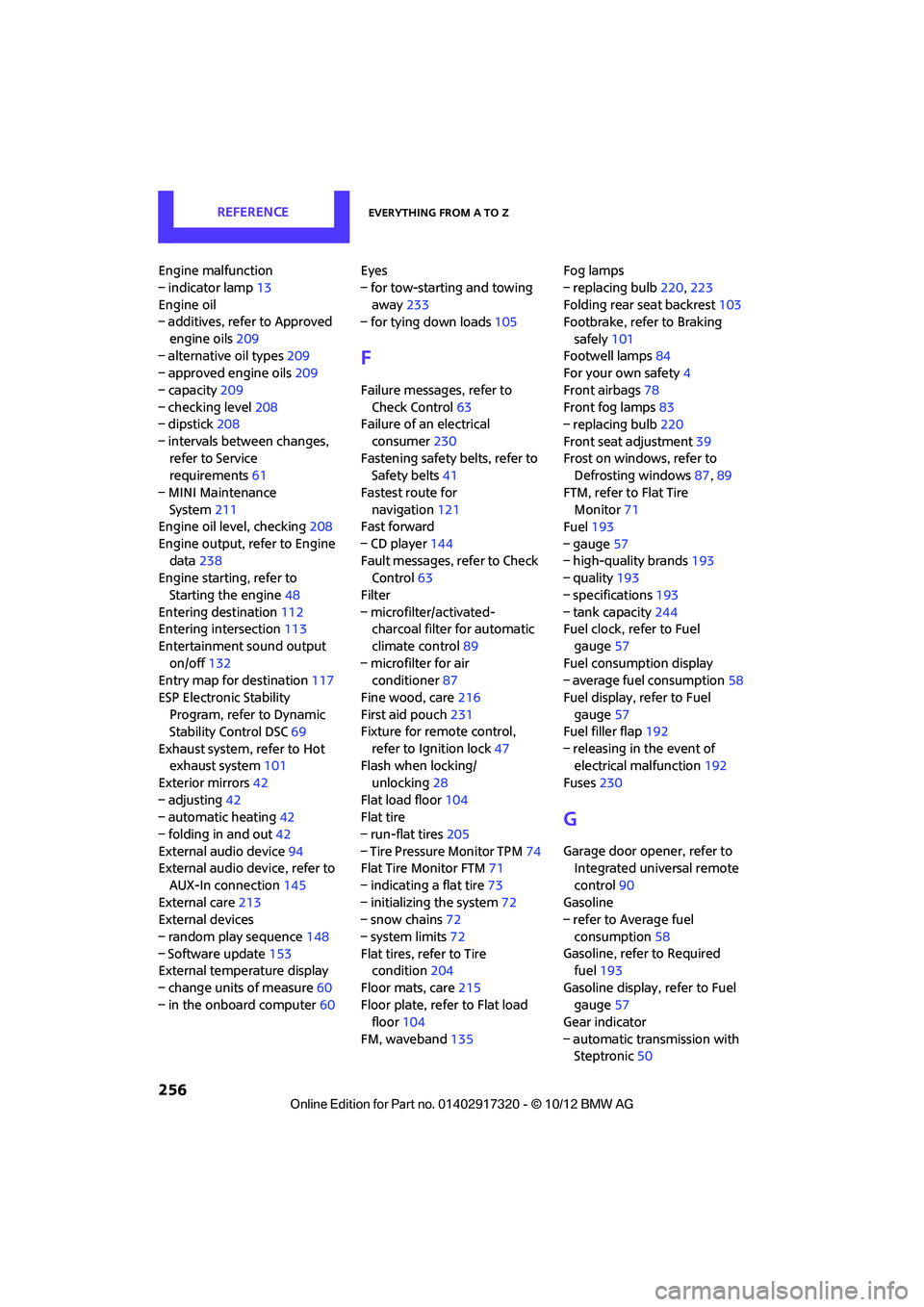
Engine malfunction
– indicator lamp13
Engine oil
– additives, refer to Approved
engine oils 209
– alternative oil types 209
– approved engine oils 209
– capacity 209
– checking level 208
– dipstick 208
– intervals between changes, refer to Service
requirements 61
– MINI Maintenance System 211
Engine oil level, checking 208
Engine output, refer to Engine data 238
Engine starti ng, refer to
Starting the engine 48
Entering destination 112
Entering intersection 113
Entertainment sound output on/off 132
Entry map for destination 117
ESP Electronic Stability Program, refer to Dynamic
Stability Control DSC 69
Exhaust system, refer to Hot exhaust system 101
Exterior mirrors 42
– adjusting 42
– automatic heating 42
– folding in and out 42
External audio device 94
External audio device, refer to
AUX-In connection 145
External care 213
External devices
– random play sequence 148
– Software update 153
External temperature display
– change units of measure 60
– in the onboard computer 60Eyes
– for tow-starting and towing
away 233
– for tying down loads 105
F
Failure messages, refer to
Check Control 63
Failure of an electrical
consumer 230
Fastening safety belts, refer to Safety belts 41
Fastest route for navigation 121
Fast forward
– CD player 144
Fault messages, refer to Check Control 63
Filter
– microfilter/activated- charcoal filter for automatic
climate control 89
– microfilter for air conditioner 87
Fine wood, care 216
First aid pouch 231
Fixture for remote control,
refer to Ignition lock 47
Flash when locking/
unlocking 28
Flat load floor 104
Flat tire
– run-flat tires 205
– Tire Pressure Monitor TPM 74
Flat Tire Monitor FTM 71
– indicating a flat tire 73
– initializing the system 72
– snow chains 72
– system limits 72
Flat tires, refer to Tire condition 204
Floor mats, care 215
Floor plate, refer to Flat load floor 104
FM, waveband 135 Fog lamps
– replacing bulb
220,223
Folding rear seat backrest 103
Footbrake, refer to Braking
safely 101
Footwell lamps 84
For your own safety 4
Front airbags 78
Front fog lamps 83
– replacing bulb 220
Front seat adjustment 39
Frost on windows, refer to Defrosting windows 87,89
FTM, refer to Flat Tire Monitor 71
Fuel 193
– gauge 57
– high-quality brands 193
– quality 193
– specifications 193
– tank capacity 244
Fuel c l
ock, refer to Fuel
gauge 57
Fuel consumption display
– average fuel consumption 58
Fuel display, refer to Fuel gauge 57
Fuel filler flap 192
– releasing in the event of electrical malfunction 192
Fuses 230
G
Garage door opener, refer to
Integrated universal remote
control 90
Gasoline
– refer to Average fuel
consumption 58
Gasoline, refer to Required fuel 193
Gasoline display, refer to Fuel gauge 57
Gear indicator
– automatic transmission with Steptronic 50
00320051004F004C00510048000300280047004C0057004C005200510003
Page 258 of 267
Everything from A to ZREFERENCE
257
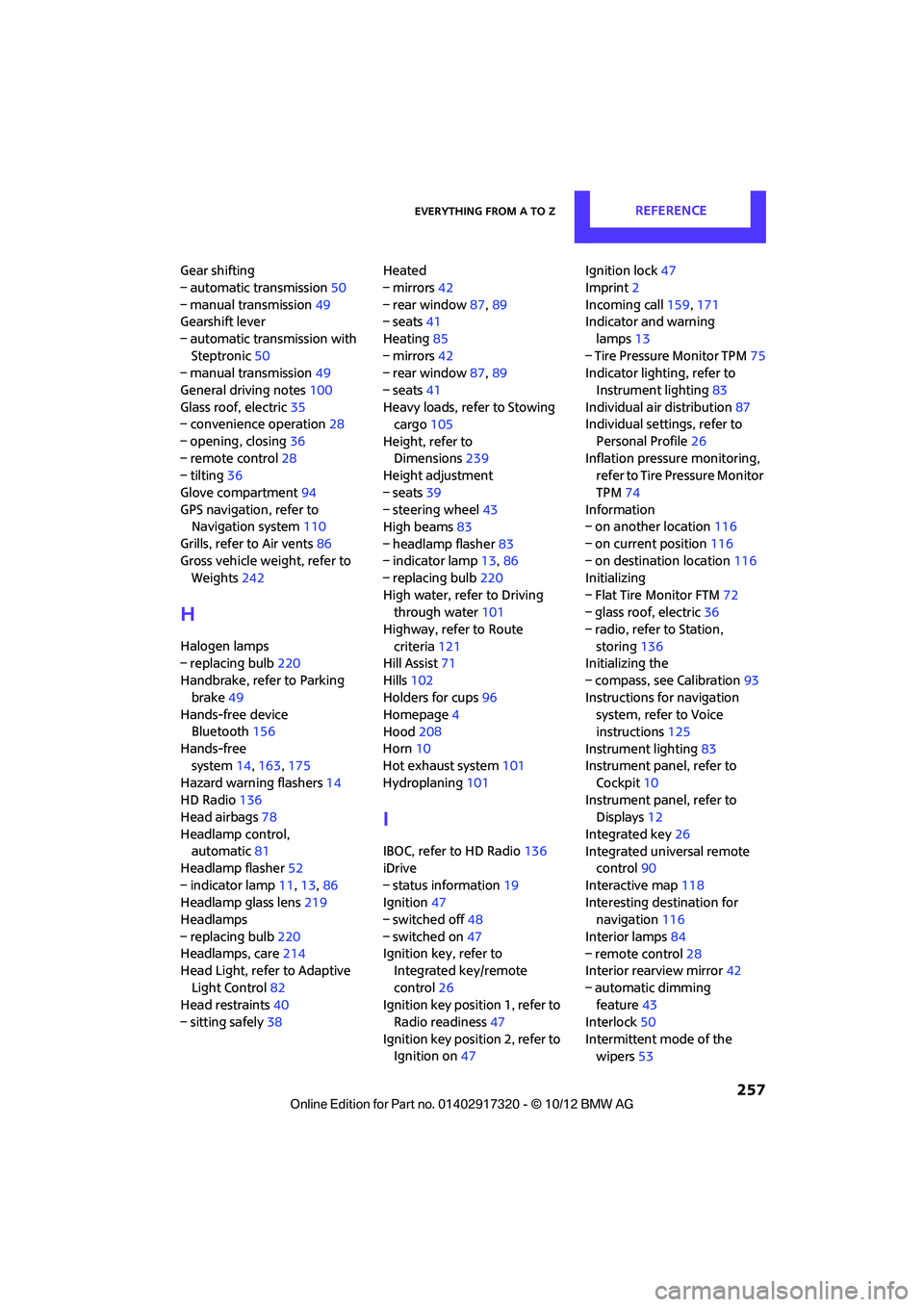
Gear shifting
– automatic transmission50
– manual transmission 49
Gearshift lever
– automatic transmission with Steptronic 50
– manual transmission 49
General driving notes 100
Glass roof, electric 35
– convenience operation 28
– opening, closing 36
– remote control 28
– tilting 36
Glove compartment 94
GPS navigation, refer to Navigation system 110
Grills, refer to Air vents 86
Gross vehicle weight, refer to Weights 242
H
Halogen lamps
– replacing bulb 220
Handbrake, refer to Parking
brake 49
Hands-free device Bluetooth 156
Hands-free system 14,163 ,175
Hazard warning flashers 14
HD Radio 136
Head airbags 78
Headlamp control, automatic 81
Headlamp flasher 52
– indicator lamp 11,13,86
Headlamp glass lens 219
Headlamps
– replacing bulb 220
Headlamps, care 214
Head Light, refer to Adaptive
Light Control 82
Head restraints 40
– sitting safely 38 Heated
– mirrors
42
– rear window 87,89
– seats 41
Heating 85
– mirrors 42
– rear window 87,89
– seats 41
Heavy loads, refer to Stowing cargo 105
Height, refer to Dimensions 239
Height adjustment
– seats 39
– steering wheel 43
High beams 83
– headlamp flasher 83
– indicator lamp 13,86
– replacing bulb 220
High water, refer to Driving through water 101
Highway, refer to Route
criteria 121
Hill Assist 71
Hills 102
Holders for cups 96
Homepage 4
Hood 208
Horn 10
Hot exhaust system 101
Hydroplaning 101
I
IBOC, refer to HD Radio 136
iDrive
– status information 19
Ignition 47
– switched off 48
– switched on 47
Ignition key, refer to Integrated key/remote
control 26
Ignition key position 1, refer to Radio readiness 47
Ignition key position 2, refer to Ignition on 47 Ignition lock
47
Imprint 2
Incoming call 159,171
Indicator and warning
lamps 13
– Tire Pressure Monitor TPM 75
Indicator lighting, refer to
Instrument lighting 83
Individual air distribution 87
Individual settings, refer to
Personal Profile 26
Inflation pressure monitoring, refer to Tire Pressure Monitor
TPM 74
Information
– on another location 116
– on current position 116
– on destination location 116
Initializing
– Flat Tire Monitor FTM 72
– glass roof, electric 36
– radio, refer to Station,
storing 136
Initializing the
– compass, see Calibration 93
Instructions for navigation system, refer to Voice
instructions 125
Instrument lighting 83
Instrument pane l, refer to
Cockpit 10
Instrument pane l, refer to
Displays 12
Integrated key 26
Integrated universal remote control 90
Interactive map 118
Interesting destination for navigation 116
Interior lamps 84
– remote control 28
Interior rearview mirror 42
– automatic dimming feature 43
Interlock 50
Intermittent mode of the wipers 53
00320051004F004C00510048000300280047004C0057004C005200510003