park assist MINI COOPER 2014 User Guide
[x] Cancel search | Manufacturer: MINI, Model Year: 2014, Model line: COOPER, Model: MINI COOPER 2014Pages: 230, PDF Size: 11.58 MB
Page 125 of 230
parking assistant is active, suitable parking
spaces are highlighted.▷The parking procedure is ac‐
tive. Steering control has
been seized.▷Parking space search is always active
whenever the vehicle is moving forwards
slow and straight, even if the system is de‐
activated. When the system is deactivated,
the displays on the Control Display are
shown in gray.
Parking using the parking assistant
Check the traffic situation as well
Loud sounds outside and within the vehi‐
cle can drown out the signal tones of the park‐
ing assistant and PDC.
Check the traffic situation around the vehicle
with your own eyes; otherwise, there is the
danger of an accident. ◀
1.Switch on the parking assistant and activate
it if necessary.
The status of the parking space search is in‐
dicated on the display.2.Follow the instructions on the display.
To achieve the best possible parking posi‐
tion, wait for the automatic steering wheel
movement after the gear change when the
vehicle is stationary.
The end of the parking procedure is indi‐
cated on the display.3.Adjust the parking position yourself if nec‐
essary.
Interrupting manually
The parking assistant can be interrupted at any
time:
▷ "Parking Assistant"▷Press the button.Interrupting automatically
The system is interrupted automatically in the
following situations:▷If the driver grasps the steering wheel or if
he takes over steering.▷If a gear is selected that does not match the
instruction on the display.▷If the vehicle speed exceeds approx.
6 mph/10 km/h.▷On snow-covered or slippery road surfaces
if necessary.▷If a maximum number of parking attempts
or the time taken for parking is exceeded.▷If the Park Distance Control PDC displays
clearances that are too small.▷When switching into other functions of the
radio.
A Check Control message is displayed.
Resume
An interrupted parking procedure can be con‐
tinued if necessary.
To do this, follow the instructions on the dis‐
play.
System limits
No parking assistance The parking assistant does not offer assistance
in the following situations:
▷In tight curves.
Functional limitations
The system may not be fully functional in the
following situations:
▷On bumpy road surfaces such as gravel
roads.▷On slippery ground.▷When leaves or snow has collected in the
parking space.▷With a mounted emergency wheel.Seite 125Driving comfortCONTROLS125
Online Edition for Part no. 01 40 2 927 905 - II/14
Page 126 of 230

Limits of ultrasonic measurement
The detection of objects can reach the physical
limits of ultrasonic measurement, e.g., in the
following circumstances:▷For small children and animals.▷For persons with certain clothing, e.g.
coats.▷If there is an external disturbance of the ul‐
trasound, e.g. from passing vehicles or loud
machines.▷When sensors are dirty, iced over, damaged
or out of position.▷Under certain weather conditions, such as
high relative humidity, rain, snowfall ex‐
treme heat or strong wind.▷With tow bars and trailer hitches of other
vehicles.▷With thin or wedge-shaped objects.▷With moving objects.▷With elevated, protruding objects such as
ledges or cargo.▷With objects with corners and sharp edges.▷With objects with a fine surface structure,
such as fences.▷For objects with porous surfaces.
Low objects already displayed, e.g., curbs, can
move into the blind area of the sensors before
or after a continuous tone sounds.
The parking assistant may identify parking
spaces that are not suitable for parking.
Malfunction A Check Control message is displayed.
The parking assistant failed. Have the system
checked.
Seite 126CONTROLSDriving comfort126
Online Edition for Part no. 01 40 2 927 905 - II/14
Page 150 of 230
Objects in the area around the pedalsNo objects in the area around the pedals
Keep floor mats, carpets, and any other
objects out of the area of motion of the pedals;
otherwise, the function of the pedals could be
impeded while driving and create the risk of an
accident.
Do not place additional floor mats over existing
mats or other objects.
Only use floor mats that have been approved for the vehicle and can be properly fixed in
place.
Ensure that the floor mats are securely fastened
again after they were removed for cleaning, for
example. ◀
Driving in wet conditions When roads are wet or there is heavy rain,
briefly exert gentle pressure on the brake pedal
every few miles.
Ensure that this action does not endanger other
road users.
The heat generated in this process helps dry
the brake discs and pads.
In this way braking efficiency will be available
when you need it.
HillsDrive long or steep downhill gradients in the
gear in which the least braking is required. Oth‐
erwise, the brake system may overheat, result‐
ing in a reduction in the brake system effi‐
ciency.
You can increase the engine's braking effect by
shifting down, going all the way to first gear, if
necessary.
Avoid load on the brakes
Avoid placing excessive load on the brake
system. Light but consistent brake pressure can
lead to high temperatures, brake wear and
possibly even brake failure. ◀Do not drive in neutral
Do not drive in neutral or with the engine
stopped, as doing so disables engine braking.
In addition, steering and brake assist are un‐
available with the engine stopped. ◀
Brake disc corrosion Corrosion on the brake discs and contamina‐
tion on the brake pads are furthered by:▷Low mileage.▷Extended periods when the vehicle is not
used at all.▷Infrequent use of the brakes.
Corrosion occurs when the minimum pressure
that must be exerted by the pads during brake
applications to clean the discs is not reached.
Should corrosion form on the brake discs, the
brakes will tend to respond with a pulsating ef‐
fect that generally cannot be corrected.
Condensation under the parked vehicle
When using the automatic climate control, con‐
densation water develops that exits under‐
neath the vehicle.
Traces of water under the vehicle like this are
normal.
Ground clearance Limited ground clearance
Observe the limited ground clearance of
the vehicle, e. g. while entering underground
parking garages or when driving over obsta‐
cles. Otherwise, damages to the vehicle may
result. ◀
Seite 150DRIVING TIPSThings to remember when driving150
Online Edition for Part no. 01 40 2 927 905 - II/14
Page 202 of 230
▷If the LED is flashing but the MINI Response
Center cannot be heard on the speaker, the
hands-free system may be malfunctioning.
However, the MINI Response Center may
still be able to hear you.
Initiating an Emergency Request
automatically
Under certain conditions, an Emergency Re‐
quest is automatically initiated immediately af‐
ter a severe accident. Automatic Collision Noti‐
fication is not affected by pressing the SOS
button.
Warning triangle
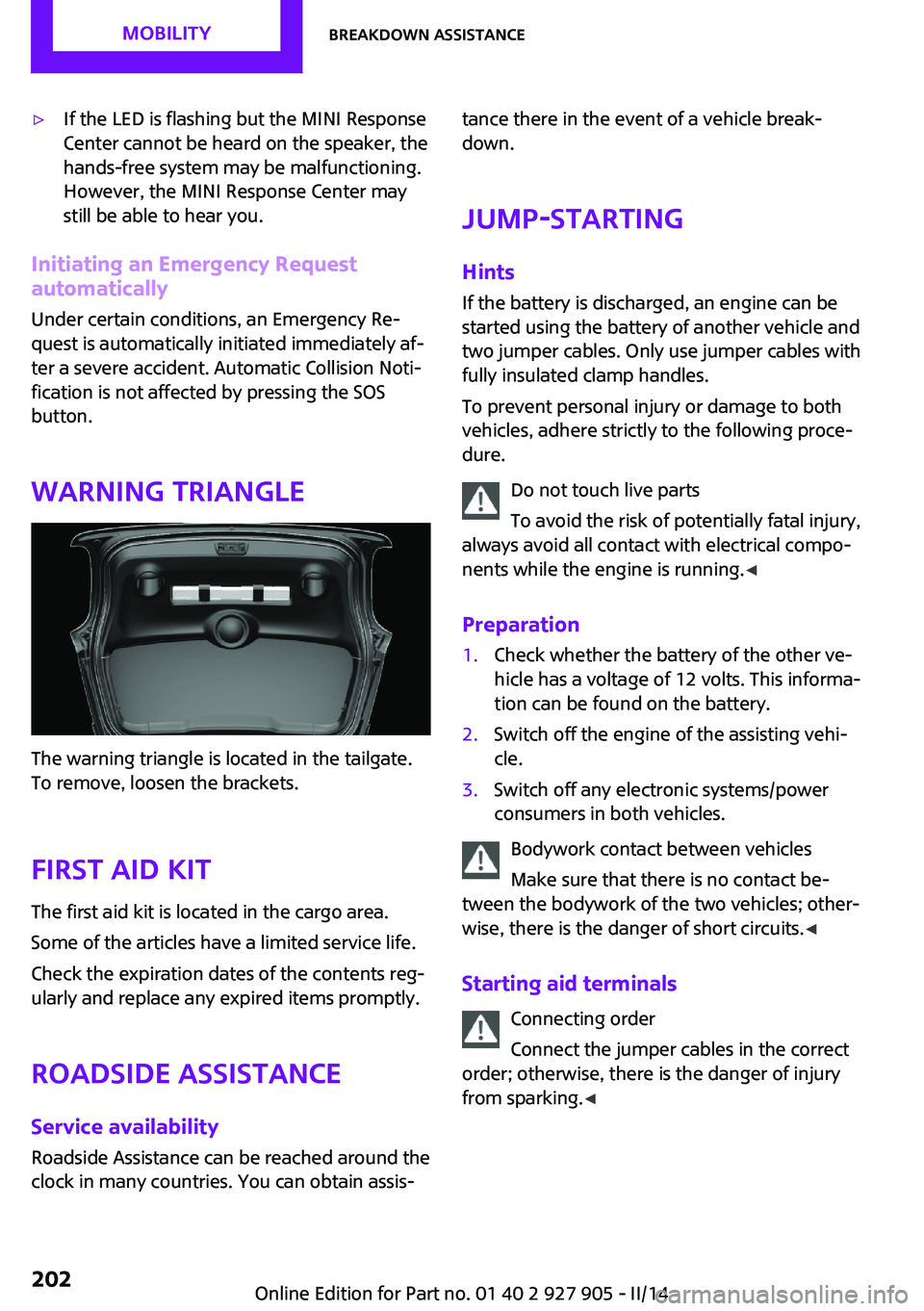
The warning triangle is located in the tailgate.
To remove, loosen the brackets.
First aid kit
The first aid kit is located in the cargo area.
Some of the articles have a limited service life.
Check the expiration dates of the contents reg‐
ularly and replace any expired items promptly.
Roadside Assistance
Service availability Roadside Assistance can be reached around the
clock in many countries. You can obtain assis‐
tance there in the event of a vehicle break‐
down.
Jump-starting
Hints If the battery is discharged, an engine can be
started using the battery of another vehicle and
two jumper cables. Only use jumper cables with
fully insulated clamp handles.
To prevent personal injury or damage to both
vehicles, adhere strictly to the following proce‐
dure.
Do not touch live parts
To avoid the risk of potentially fatal injury,
always avoid all contact with electrical compo‐
nents while the engine is running. ◀
Preparation1.Check whether the battery of the other ve‐
hicle has a voltage of 12 volts. This informa‐
tion can be found on the battery.2.Switch off the engine of the assisting vehi‐
cle.3.Switch off any electronic systems/power
consumers in both vehicles.
Bodywork contact between vehicles
Make sure that there is no contact be‐
tween the bodywork of the two vehicles; other‐
wise, there is the danger of short circuits. ◀
Starting aid terminals Connecting order
Connect the jumper cables in the correct
order; otherwise, there is the danger of injury
from sparking. ◀
Seite 202MOBILITYBreakdown assistance202
Online Edition for Part no. 01 40 2 927 905 - II/14
Page 204 of 230
contact a service center in the event of a break‐
down.
Tow the vehicle only with the front axle
raised
Have the vehicle towed only with the front axle
raised or transported on a loading platform;
otherwise, damage may occur. ◀
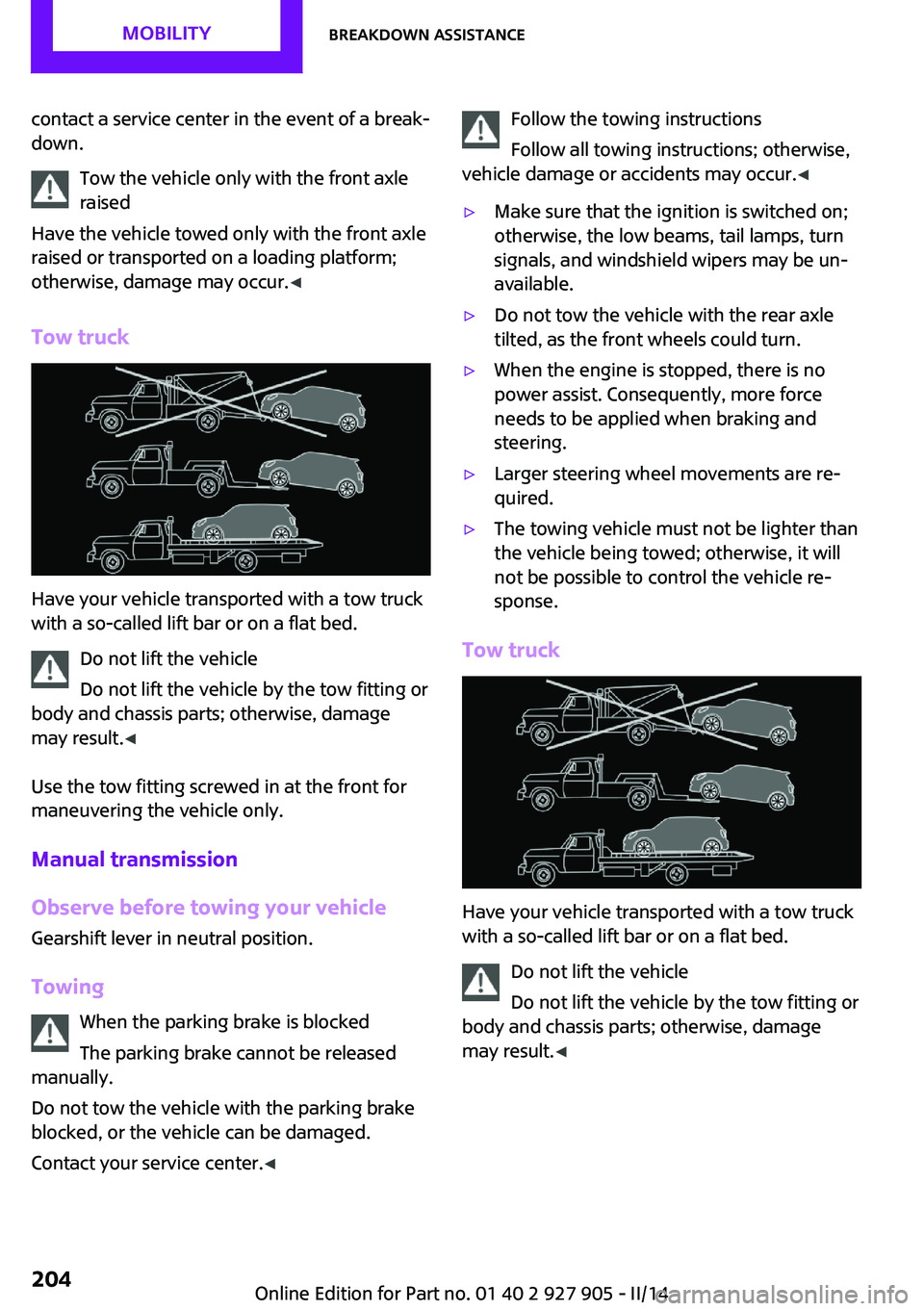
Tow truck
Have your vehicle transported with a tow truck
with a so-called lift bar or on a flat bed.
Do not lift the vehicle
Do not lift the vehicle by the tow fitting or
body and chassis parts; otherwise, damage
may result. ◀
Use the tow fitting screwed in at the front for
maneuvering the vehicle only.
Manual transmission
Observe before towing your vehicle Gearshift lever in neutral position.
Towing When the parking brake is blocked
The parking brake cannot be released
manually.
Do not tow the vehicle with the parking brake
blocked, or the vehicle can be damaged.
Contact your service center. ◀
Follow the towing instructions
Follow all towing instructions; otherwise,
vehicle damage or accidents may occur. ◀▷Make sure that the ignition is switched on;
otherwise, the low beams, tail lamps, turn
signals, and windshield wipers may be un‐
available.▷Do not tow the vehicle with the rear axle
tilted, as the front wheels could turn.▷When the engine is stopped, there is no
power assist. Consequently, more force
needs to be applied when braking and
steering.▷Larger steering wheel movements are re‐
quired.▷The towing vehicle must not be lighter than
the vehicle being towed; otherwise, it will
not be possible to control the vehicle re‐
sponse.
Tow truck
Have your vehicle transported with a tow truck
with a so-called lift bar or on a flat bed.
Do not lift the vehicle
Do not lift the vehicle by the tow fitting or
body and chassis parts; otherwise, damage
may result. ◀
Seite 204MOBILITYBreakdown assistance204
Online Edition for Part no. 01 40 2 927 905 - II/14
Page 223 of 230

Front fog lamps 89
Front passenger airbags, auto‐ matic deactivation 93
Front passenger airbags, indi‐ cator lamp 93
FTM Flat Tire Monitor 97
Fuel 166
Fuel cap 164
Fuel consumption, current 75
Fuel consumption, refer to Average fuel consump‐
tion 79
Fuel filler flap 164
Fuel gauge 74
Fuel quality 166
Fuel recommendation 166
Fuel, tank capacity 215
Fuse 199
G Garage door opener, refer to Universal garage door
opener 133
Gasoline 166
Gear change, automatic trans‐ mission 68
Gear shift indicator 76
General driving notes 148
Glass sunroof, refer to Panor‐ amic glass sunroof 45
Glove compartment 141
GREEN mode 156
GREEN mode, bonus range 158
GREEN mode driving style analysis 160
GREEN mode indicator 156
GREEN - program, driving dy‐ namics 108
GREEN tip 158
Gross vehicle weight, ap‐ proved 214
Ground clearance 150 H
Halogen headlamps 190
Handbrake, refer to parking brake 63
Hand-held transmitter, alter‐ nating code 134
Hazard warning flashers 201
Head airbags 91
Headlamp control, auto‐ matic 87
Headlamp courtesy delay fea‐ ture 87
Headlamp flasher 64
Headlamp glass 189
Headlamps, care 208
Headlamp washer system 64
Headliner 17
Head restraints 47
Head restraints, front 50
Head restraints, rear 51
Head-up Display 83
Head-up Display, standard view 84
Heavy cargo, stowing 152
High-beam Assistant 88
High beams 64
High beams/low beams, refer to High-beam Assistant 88
Hills 150
Hill start assistant, refer to Drive-off assistant 109
Hints 6
Holder for beverages 142
Homepage 6
Hood 180
Horn 14
Hot exhaust system 149
HUD Head-up Display 83
Hydroplaning 149
I
Ice warning, see External tem‐ perature warning 75 Icy roads, see External tem‐
perature warning 75
Identification marks, tires 171
Identification number, refer to Important features in the en‐
gine compartment 180
Ignition key, refer to Remote control 34
Ignition off 59
Ignition on 59
Illuminated ring, central in‐ strument cluster 82
Indication of a flat tire 95, 98
Individual air distribu‐ tion 128, 130
Individual settings, refer to Personal Profile 35
Inflation pressure, tires 168
Inflation pressure warning, tires 97
Info display, refer to Com‐ puter 79
Initialize, Tire Pressure Moni‐ tor TPM 95
Initializing, Flat Tire Monitor FTM 98
Instrument cluster 71
Instrument cluster, electronic displays 72
Instrument lighting 89
Integrated key 34
Intelligent Emergency Re‐ quest 201
Intelligent Safety 99
Intensity, AUTO program 130
Interior equipment 133
Interior lamps 89
Interior lamps via remote con‐ trol 37
Interior motion sensor 43
Interior rearview mirror, auto‐ matic dimming feature 53
Interior rearview mirror, com‐ pass 135
Interior rearview mirror, man‐ ually dimmable 53 Seite 223Everything from A to ZREFERENCE223
Online Edition for Part no. 01 40 2 927 905 - II/14
Page 224 of 230

Internet site 6
Interval display, service re‐ quirements 76
J
Jacking points for the vehicle jack 196
Joystick, automatic transmis‐ sion 68
Jump-starting 202
K Key/remote control 34
Keyless Go, refer to Comfort Access 40
Key Memory, refer to Personal Profile 35
Kickdown, automatic trans‐ mission 68
Knee airbag 91
L Lamp replacement 189
Lamp replacement, front 190
Lamp replacement, rear 192
Lamp replacement, side 195
Lamps and bulbs 189
Language on Control Dis‐ play 82
Lashing eyes, securing cargo 152
LATCH child restraint fixing system 56
Launch Control 70
Leather, care 208
LED bug light 190
LED headlamps 190
LED ring, central instrument cluster 82
LEDs, light-emitting di‐ odes 189
Left-hand traffic, lamp set‐ ting 89 Letters and numbers, enter‐
ing 24
Light 86
Light-alloy wheels, care 209
Light-emitting diodes, LEDs 189
Lighter 138
Lighting 86
Lighting via remote con‐ trol 37
Light switch 86
Load 152
Loading 151
Lock, door 38
Locking/unlocking via door lock 38
Locking/unlocking with re‐ mote control 37
Locking, automatic 42
Locking, settings 42
Low beams 86
Low beams, automatic, refer to High-beam Assistant 88
Lower back support, mechani‐ cal 48
Lug bolt lock 198
Luggage rack, refer to Roof- mounted luggage rack 152
Lumbar support, mechani‐ cal 48
M
Maintenance 186
Maintenance require‐ ments 186
Maintenance, service require‐ ments 76
Maintenance system, MINI 186
Malfunction displays, refer to Check Control 72
Manual air distribu‐ tion 128, 130
Manual air flow 128, 130 Manual mode, transmis‐
sion 68
Manual operation, door lock 38
Manual operation, exterior mirrors 52
Manual operation, fuel filler flap 164
Manual operation, Park Dis‐ tance Control PDC 119
Manual operation, rearview camera 121
Manual transmission 67
Manufacturer of the MINI 7
Marking on approved tires 174
Marking, run-flat tires 175
Master key, refer to Remote control 34
Maximum cooling 130
Maximum speed, display 77
Maximum speed, winter tires 174
Measure, units of 82
Medical kit 202
Menu in instrument cluster 78
Menus, refer to onboard mon‐ itor operating concept 20
Microfilter 129, 132
MID - program, driving dy‐ namics 108
MINI Connected, refer to Integrated Owner's Manual
MINI maintenance sys‐ tem 186
MINIMALISM Analyser 160
MINIMALISM info 159
Minimum tread, tires 172
Mirrors 52
Mobile communication devi‐ ces in the vehicle 149
Mobility System 175
Mode, GREEN Mode 156
Modifications, technical, refer to Safety 7
Moisture in headlamp 189 Seite 224REFERENCEEverything from A to Z224
Online Edition for Part no. 01 40 2 927 905 - II/14
Page 225 of 230

Monitor, refer to Control Dis‐play 18
Mounting of child restraint fix‐ ing systems 55
Multifunction steering wheel, buttons 14
Multimedia, refer to Integrated Owner's Manual
N Navigation, refer to Integrated Owner's Manual
Neck restraints, front, refer to Head restraints 50
Neck restraints, rear, refer to Head restraints 51
New wheels and tires 173
No Passing Information 77
Nylon rope for tow-starting/ towing 205
O
OBD Onboard Diagnos‐ tics 186
Obstacle marking, rearview camera 122
Octane rating, refer to Recom‐ mended fuel grade 166
Odometer 74
Office, refer to Integrated Owner's Manual
Oil 182
Oil, adding 183
Oil additives 183
Oil change 184
Oil change interval, service re‐ quirements 76
Oil filler neck 183
Oil types, alternative 184
Oil types, approved 184
Old batteries, disposal 199
Onboard Diagnostics OBD 186
Onboard monitor 18 Onboard monitor operating
concept 18
Onboard monitor, refer to Control Display 18
Onboard vehicle tool kit 188
Opening/closing via door lock 38
Opening/closing with remote control 37
Operating menus, onboard monitor 18
Optional equipment, standard equipment 6
Outside air, refer to Automatic recirculated-air control 131
Overheating of engine, refer to Coolant temperature 74
P Paint, vehicle 208
Panoramic glass sunroof 45
Parallel parking assistant 122
Park Distance Control PDC 118
Parked-car ventilation 132
Parked vehicle, condensa‐ tion 150
Parking aid, refer to PDC 118
Parking assistant 122
Parking brake 63
Parking lamps 86
Particulate filter 149
Parts and accessories 7
Passenger side mirror, tilting downward 52
Pathway lines, rearview cam‐ era 121
PDC Park Distance Con‐ trol 118
Pedestrian warning with city braking function 103
Performance Control 107
Personal Profile 35
Phone, refer to Integrated Owner's Manual Pinch protection system, glasssunroof 46
Pinch protection system, win‐ dows 44
Plastic, care 209
Power failure 199
Power windows 44
Pressure, tire air pressure 168
Pressure warning, tires 97
Profile, refer to Personal Pro‐ file 35
Protective function, glass sun‐ roof 46
Protective function, win‐ dows 44
Push-and-turn switch, refer to Controller 18, 19
R Radiator fluid 185
Radio-operated key, refer to Remote control 34
Radio ready state 60
Radio, refer to Integrated Owner's Manual
Rain sensor 65
Rear fog lamps 89
Rear lamps 192
Rear luggage rack 153
Rearview camera 120
Rearview mirror 52
Rear window de‐ froster 128, 131
Recirculated-air filter 132
Recirculated-air mode 128, 131
Recommended fuel grade 166
Recommended tire brands 174
Refueling 164
Remaining range 75
Remote control/key 34
Remote control, blocking 35 Seite 225Everything from A to ZREFERENCE225
Online Edition for Part no. 01 40 2 927 905 - II/14