ECO mode MINI COOPER 2014 Owner's Manual
[x] Cancel search | Manufacturer: MINI, Model Year: 2014, Model line: COOPER, Model: MINI COOPER 2014Pages: 230, PDF Size: 11.58 MB
Page 159 of 230
SymbolMeasureManual shift transmission: follow
shifting instructions.Manual shift transmission: engage
neutral for engine stop.
Indications on the Control Display
MINIMALISM
Information on fuel consumption and technol‐
ogy can be displayed during driving.
1. "Vehicle Info"2."MINIMALISM"
Displaying MINIMALISM info
The current efficiency can be displayed.
"MINIMALISM info"
The following systems are displayed:
▷Automatic engine Start/Stop function.▷Energy recovery.▷Climate control output.▷Coasting.
Displaying GREEN mode tips
"GREEN Tips"
Driving instruction and an additional symbol
are displayed.
The setting is stored for the profile currently in
use.
Coasting
The concept
The system helps to conserve fuel.
To do this, under certain conditions the engine
is automatically decoupled from the transmis‐
sion when selector lever position D is engaged.
The vehicle continues traveling with the engine
idling to reduce fuel consumption. Selector
lever position D remains engaged.
This driving condition is referred to as coasting.
As soon as the brake or accelerator pedal is de‐
pressed, the engine is automatically coupled to
the transmission again.
Hints
Coasting is a component of the GREEN mode,
refer to page 156, driving mode.
Coasting is automatically activated when
GREEN mode is called via the Driving Dynamics
Control, refer to page 108.
The function is available in a certain speed
range.
A forward-looking driving style helps the driver
to use the function as often as possible and
supports the fuel-conserving effect of coasting.
Safety mode
The function is not available if one of the fol‐
lowing conditions is satisfied.▷DSC OFF or TRACTION activated.▷Driving in the dynamic limit range and on
steep uphill or downhill grades.▷Battery charge status temporarily too low
or vehicle electrical system drawing exces‐
sive current.▷Cruise control activated.
Functional requirements
In GREEN mode, this function is available in a
speed range from approximately 30 mph, ap‐
prox. 50 km/h to 100 mph, approx. 160 km/h,
if the following conditions are satisfied:
▷Accelerator pedal and brake pedal are not
operated.▷The selector lever is in transmission position
D.▷Engine and transmission are at operating
temperature.Seite 159Saving fuelDRIVING TIPS159
Online Edition for Part no. 01 40 2 927 905 - II/14
Page 166 of 230
FuelVehicle equipmentAll standard, country-specific and optional
equipment that is offered in the model series is
described in this chapter. Therefore, equipment
is also described that is not available in a vehi‐
cle, e. g., because of the selected optional
equipment or country variant. This also applies
for safety-related functions and systems.
Fuel recommendation Note General fuel quality
Even fuels that conform to the specifica‐
tions can be of low quality. This may cause en‐
gine problems, for instance poor engine start‐
ing behavior, poor handling and/or
performance. Switch gas stations or use a
brand name fuel with a higher octane rating. ◀
Gasoline For the best fuel economy, the gasoline should
be sulfur-free or very low in sulfur content.
Fuels that are marked on the gas pump as con‐
taining metal must not be used.
Refuel only with unleaded gasoline with‐
out metallic additives.
Do not refuel with any leaded gasoline or gaso‐
line with metallic additives, e. g. manganese or
iron, or permanent damage to the catalytic
converter and other components. ◀
Fuels with a maximum ethanol content of
25 %, i. e. E10 or E25, may be used for refuel‐
ing.
Ethanol should satisfy the following quality
standards:
US: ASTM 4806–xxCAN: CGSB-3.511–xx
xx: comply with the current standard in each
case.
Do not use a fuel with a higher percent‐
age of ethanol
Do not use a fuel with a higher ethanol per‐
centage than recommended or one with other
types of alcohol, i.e. no Flex Fuel, otherwise this
could damage the engine and fuel supply sys‐
tem. ◀
Recommended fuel grade
MINI recommends AKI 91.
Minimum fuel grade MINI recommends AKI 89.
Minimum fuel grade
Do not use any gasoline below the mini‐
mum fuel grade as this may impair engine per‐
formance. ◀
If you use gasoline with this minimum AKI Rat‐
ing, the engine may produce knocking sounds
when starting at high outside temperatures.
This has no effect on the engine life.
Fuel quality
The use of poor-quality fuels may result in
harmful engine deposits or damage. Addition‐
ally, problems relating to drivability, starting
and stalling, especially under certain environ‐
mental conditions such as high ambient tem‐
perature and high altitude, may occur.
If drivability problems are encountered, we rec‐
ommend switching to a high quality gasoline
brand and a higher octane grade — AKI num‐
ber — for a few tank fills. To avoid harmful en‐
gine deposits, it is highly recommended to pur‐
chase gasoline from BP or Top Tier retailers.Seite 166MOBILITYFuel166
Online Edition for Part no. 01 40 2 927 905 - II/14
Page 168 of 230
Wheels and tiresVehicle equipment
All standard, country-specific and optional
equipment that is offered in the model series is
described in this chapter. Therefore, equipment
is also described that is not available in a vehi‐
cle, e. g., because of the selected optional
equipment or country variant. This also applies
for safety-related functions and systems.
Tire inflation pressure
Safety information The tire characteristics and tire inflation pres‐
sure influence the following:▷The service life of the tires.▷Road safety.▷Driving comfort.
Checking the pressure
Tires have a natural, consistent loss of pressure.
Check the tire inflation pressure regularly
Regularly check the tire inflation pressure,
and correct it as needed: at least twice a month
and before a long trip. If you fail to observe this
precaution, you may be driving on tires with in‐
correct tire pressures, a condition that may not
only compromise your vehicle's driving stabil‐
ity, but also lead to tire damage and the risk of
an accident. ◀
Tires heat up during driving, and the tire infla‐
tion pressure increases along with the temper‐
ature of the tire. The tire inflation pressure
specifications relate to cold tires or tires with
the ambient temperature.
Only check the tire inflation pressure when the
tires are cold. This means after driving no more
than 1.25 miles/2 km or when the vehicle has
been parked for at least 2 hours.
The displays of inflation devices may under-
read by up to 0.1bar, 2psi.
For Flat Tire Monitor: after correcting the tire
inflation pressure, reinitialize the Flat Tire Moni‐
tor.
For Tire Pressure Monitor: after correcting the
tire inflation pressure, reset the Tire Pressure
Monitor.▷Reinitialize the Flat Tire Monitor.▷Reinitialize the Tire Pressure Monitor.
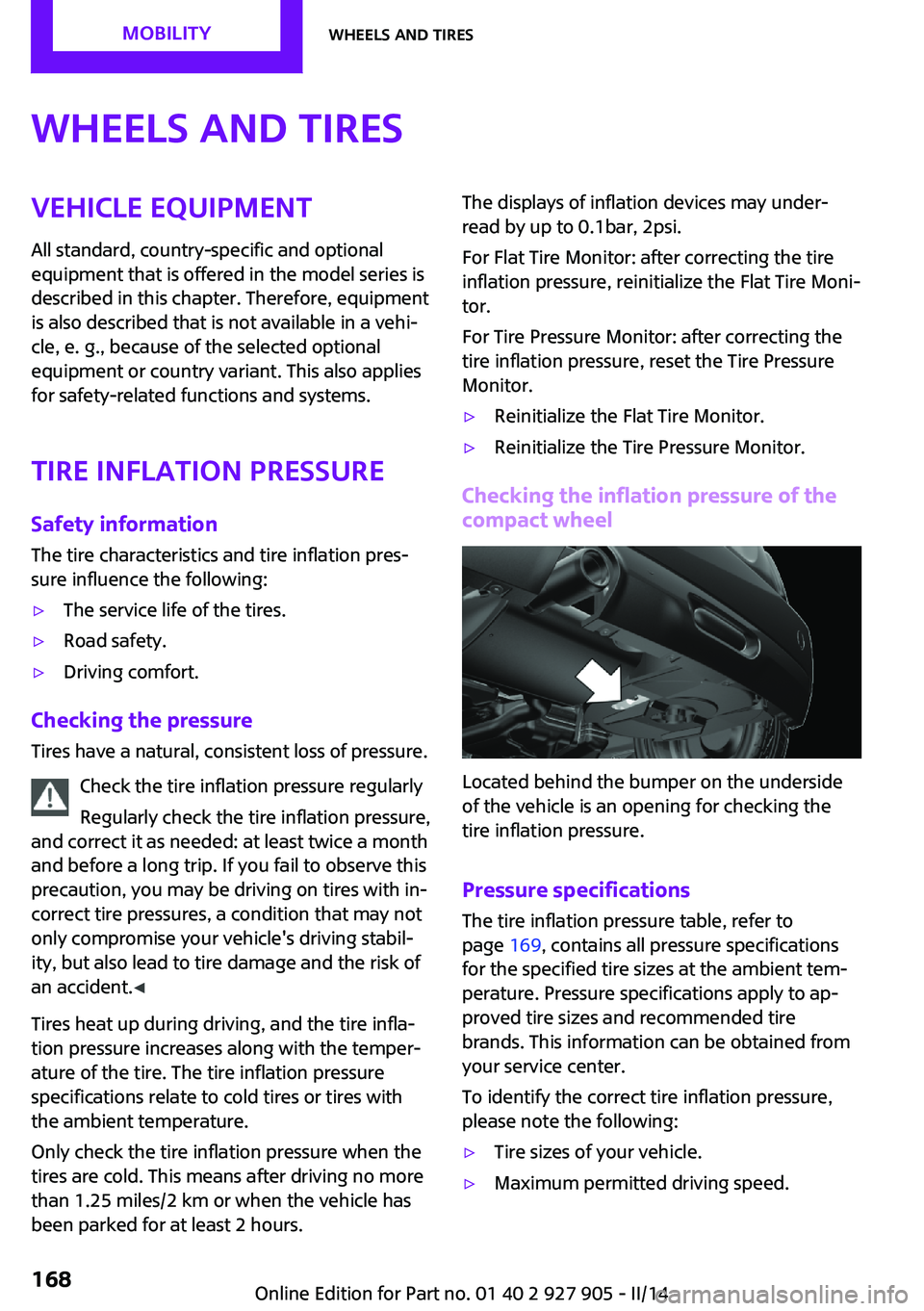
Checking the inflation pressure of the
compact wheel
Located behind the bumper on the underside
of the vehicle is an opening for checking the
tire inflation pressure.
Pressure specifications
The tire inflation pressure table, refer to
page 169, contains all pressure specifications
for the specified tire sizes at the ambient tem‐
perature. Pressure specifications apply to ap‐
proved tire sizes and recommended tire
brands. This information can be obtained from
your service center.
To identify the correct tire inflation pressure,
please note the following:
▷Tire sizes of your vehicle.▷Maximum permitted driving speed.Seite 168MOBILITYWheels and tires168
Online Edition for Part no. 01 40 2 927 905 - II/14
Page 186 of 230

MaintenanceVehicle equipment
All standard, country-specific and optional
equipment that is offered in the model series is
described in this chapter. Therefore, equipment
is also described that is not available in a vehi‐
cle, e. g., because of the selected optional
equipment or country variant. This also applies
for safety-related functions and systems.
MINI maintenance system
The maintenance system indicates required
maintenance measures, and thereby provides
support in maintaining road safety and the op‐
erational reliability of the vehicle.
Condition Based Service
CBS
Sensors and special algorithms take into ac‐
count the driving conditions of your vehicle.
Based on this, Condition Based Service deter‐
mines the maintenance requirements.
The system makes it possible to adapt the
amount of maintenance you need to your user
profile.
Detailed information on service requirements,
refer to page 76, can be displayed on the Con‐
trol Display.
Service data in the remote control
Information on the required maintenance is
continuously stored in the remote control. Your
service center will read out this data and sug‐
gest the right array of service procedures for
your vehicle.
Therefore, hand your service specialist the re‐
mote control that you used most recently.Storage periods
Storage periods during which the vehicle bat‐
tery was disconnected are not taken into ac‐
count.
If this occurs, have a service center update the
time-dependent maintenance procedures, such
as checking brake fluid and, if necessary,
changing the engine oil and the microfilter/acti‐
vated-charcoal filter.
Service and Warranty In‐
formation Booklet for
US models and Warranty
and Service Guide Book‐
let for Canadian models
Please consult your Service and Warranty Infor‐
mation Booklet for US models and Warranty
and Service Guide Booklet for Canadian models
for additional information on service require‐
ments.
Maintenance and repair should be performed
by your service center. Make sure to have regu‐
lar maintenance procedures recorded in the ve‐
hicle's Service and Warranty Information Book‐
let for US models, and in the Warranty and
Service Guide Booklet for Canadian models.
These entries are proof of regular maintenance.
Socket for OBD Onboard
Diagnosis
Note Socket for Onboard Diagnosis
The socket for onboard diagnostics may
only be used by the service center or a work‐ shop that operates in accordance with theSeite 186MOBILITYMaintenance186
Online Edition for Part no. 01 40 2 927 905 - II/14
Page 223 of 230

Front fog lamps 89
Front passenger airbags, auto‐ matic deactivation 93
Front passenger airbags, indi‐ cator lamp 93
FTM Flat Tire Monitor 97
Fuel 166
Fuel cap 164
Fuel consumption, current 75
Fuel consumption, refer to Average fuel consump‐
tion 79
Fuel filler flap 164
Fuel gauge 74
Fuel quality 166
Fuel recommendation 166
Fuel, tank capacity 215
Fuse 199
G Garage door opener, refer to Universal garage door
opener 133
Gasoline 166
Gear change, automatic trans‐ mission 68
Gear shift indicator 76
General driving notes 148
Glass sunroof, refer to Panor‐ amic glass sunroof 45
Glove compartment 141
GREEN mode 156
GREEN mode, bonus range 158
GREEN mode driving style analysis 160
GREEN mode indicator 156
GREEN - program, driving dy‐ namics 108
GREEN tip 158
Gross vehicle weight, ap‐ proved 214
Ground clearance 150 H
Halogen headlamps 190
Handbrake, refer to parking brake 63
Hand-held transmitter, alter‐ nating code 134
Hazard warning flashers 201
Head airbags 91
Headlamp control, auto‐ matic 87
Headlamp courtesy delay fea‐ ture 87
Headlamp flasher 64
Headlamp glass 189
Headlamps, care 208
Headlamp washer system 64
Headliner 17
Head restraints 47
Head restraints, front 50
Head restraints, rear 51
Head-up Display 83
Head-up Display, standard view 84
Heavy cargo, stowing 152
High-beam Assistant 88
High beams 64
High beams/low beams, refer to High-beam Assistant 88
Hills 150
Hill start assistant, refer to Drive-off assistant 109
Hints 6
Holder for beverages 142
Homepage 6
Hood 180
Horn 14
Hot exhaust system 149
HUD Head-up Display 83
Hydroplaning 149
I
Ice warning, see External tem‐ perature warning 75 Icy roads, see External tem‐
perature warning 75
Identification marks, tires 171
Identification number, refer to Important features in the en‐
gine compartment 180
Ignition key, refer to Remote control 34
Ignition off 59
Ignition on 59
Illuminated ring, central in‐ strument cluster 82
Indication of a flat tire 95, 98
Individual air distribu‐ tion 128, 130
Individual settings, refer to Personal Profile 35
Inflation pressure, tires 168
Inflation pressure warning, tires 97
Info display, refer to Com‐ puter 79
Initialize, Tire Pressure Moni‐ tor TPM 95
Initializing, Flat Tire Monitor FTM 98
Instrument cluster 71
Instrument cluster, electronic displays 72
Instrument lighting 89
Integrated key 34
Intelligent Emergency Re‐ quest 201
Intelligent Safety 99
Intensity, AUTO program 130
Interior equipment 133
Interior lamps 89
Interior lamps via remote con‐ trol 37
Interior motion sensor 43
Interior rearview mirror, auto‐ matic dimming feature 53
Interior rearview mirror, com‐ pass 135
Interior rearview mirror, man‐ ually dimmable 53 Seite 223Everything from A to ZREFERENCE223
Online Edition for Part no. 01 40 2 927 905 - II/14
Page 225 of 230

Monitor, refer to Control Dis‐play 18
Mounting of child restraint fix‐ ing systems 55
Multifunction steering wheel, buttons 14
Multimedia, refer to Integrated Owner's Manual
N Navigation, refer to Integrated Owner's Manual
Neck restraints, front, refer to Head restraints 50
Neck restraints, rear, refer to Head restraints 51
New wheels and tires 173
No Passing Information 77
Nylon rope for tow-starting/ towing 205
O
OBD Onboard Diagnos‐ tics 186
Obstacle marking, rearview camera 122
Octane rating, refer to Recom‐ mended fuel grade 166
Odometer 74
Office, refer to Integrated Owner's Manual
Oil 182
Oil, adding 183
Oil additives 183
Oil change 184
Oil change interval, service re‐ quirements 76
Oil filler neck 183
Oil types, alternative 184
Oil types, approved 184
Old batteries, disposal 199
Onboard Diagnostics OBD 186
Onboard monitor 18 Onboard monitor operating
concept 18
Onboard monitor, refer to Control Display 18
Onboard vehicle tool kit 188
Opening/closing via door lock 38
Opening/closing with remote control 37
Operating menus, onboard monitor 18
Optional equipment, standard equipment 6
Outside air, refer to Automatic recirculated-air control 131
Overheating of engine, refer to Coolant temperature 74
P Paint, vehicle 208
Panoramic glass sunroof 45
Parallel parking assistant 122
Park Distance Control PDC 118
Parked-car ventilation 132
Parked vehicle, condensa‐ tion 150
Parking aid, refer to PDC 118
Parking assistant 122
Parking brake 63
Parking lamps 86
Particulate filter 149
Parts and accessories 7
Passenger side mirror, tilting downward 52
Pathway lines, rearview cam‐ era 121
PDC Park Distance Con‐ trol 118
Pedestrian warning with city braking function 103
Performance Control 107
Personal Profile 35
Phone, refer to Integrated Owner's Manual Pinch protection system, glasssunroof 46
Pinch protection system, win‐ dows 44
Plastic, care 209
Power failure 199
Power windows 44
Pressure, tire air pressure 168
Pressure warning, tires 97
Profile, refer to Personal Pro‐ file 35
Protective function, glass sun‐ roof 46
Protective function, win‐ dows 44
Push-and-turn switch, refer to Controller 18, 19
R Radiator fluid 185
Radio-operated key, refer to Remote control 34
Radio ready state 60
Radio, refer to Integrated Owner's Manual
Rain sensor 65
Rear fog lamps 89
Rear lamps 192
Rear luggage rack 153
Rearview camera 120
Rearview mirror 52
Rear window de‐ froster 128, 131
Recirculated-air filter 132
Recirculated-air mode 128, 131
Recommended fuel grade 166
Recommended tire brands 174
Refueling 164
Remaining range 75
Remote control/key 34
Remote control, blocking 35 Seite 225Everything from A to ZREFERENCE225
Online Edition for Part no. 01 40 2 927 905 - II/14