lights MINI COOPER 2014 Service Manual
[x] Cancel search | Manufacturer: MINI, Model Year: 2014, Model line: COOPER, Model: MINI COOPER 2014Pages: 230, PDF Size: 11.58 MB
Page 132 of 230
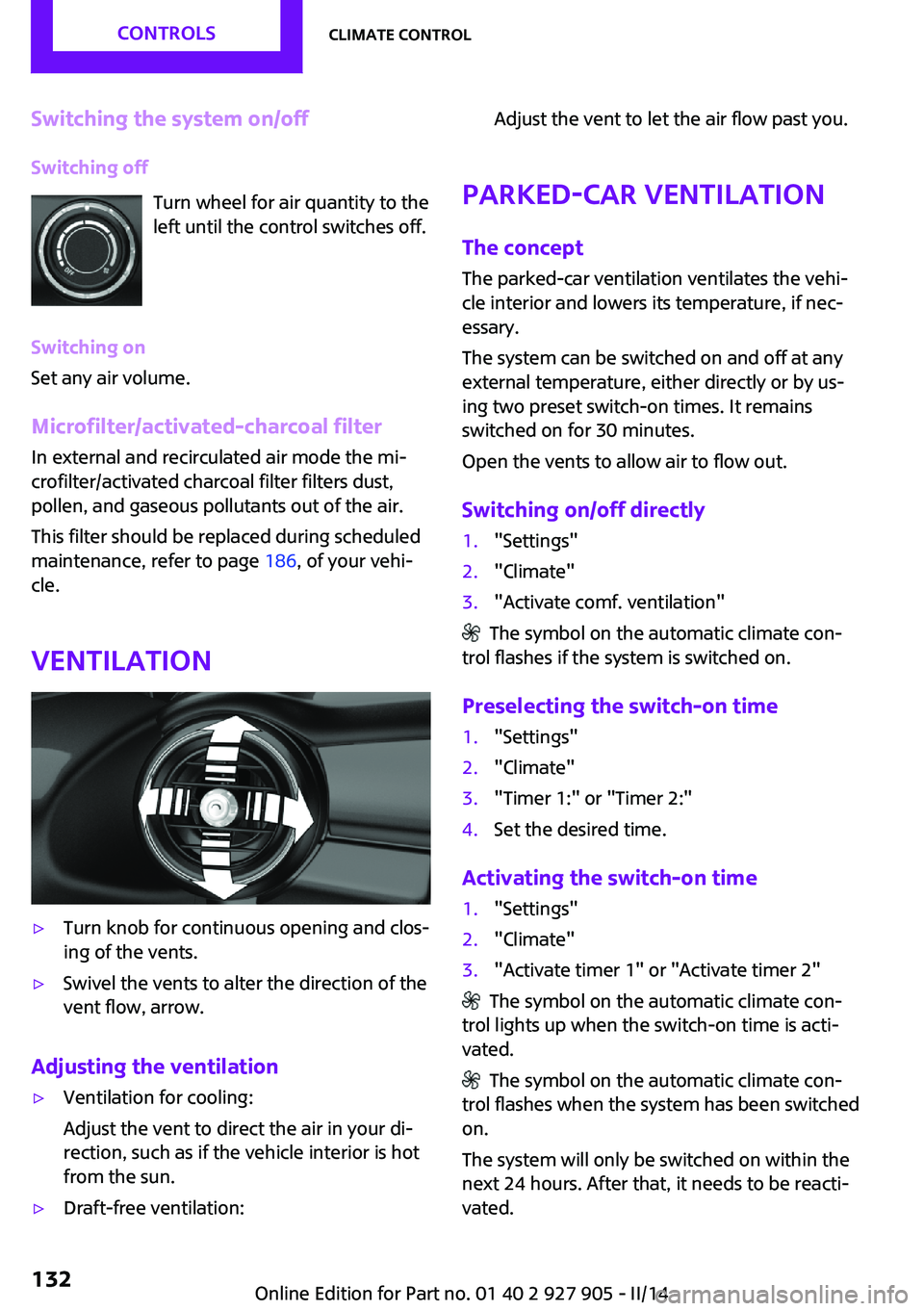
Switching the system on/offSwitching off Turn wheel for air quantity to the
left until the control switches off.
Switching on
Set any air volume.
Microfilter/activated-charcoal filter In external and recirculated air mode the mi‐
crofilter/activated charcoal filter filters dust,
pollen, and gaseous pollutants out of the air.
This filter should be replaced during scheduled
maintenance, refer to page 186, of your vehi‐
cle.
Ventilation▷Turn knob for continuous opening and clos‐
ing of the vents.▷Swivel the vents to alter the direction of the
vent flow, arrow.
Adjusting the ventilation
▷Ventilation for cooling:
Adjust the vent to direct the air in your di‐
rection, such as if the vehicle interior is hot
from the sun.▷Draft-free ventilation:Adjust the vent to let the air flow past you.
Parked-car ventilation
The concept
The parked-car ventilation ventilates the vehi‐
cle interior and lowers its temperature, if nec‐ essary.
The system can be switched on and off at any
external temperature, either directly or by us‐
ing two preset switch-on times. It remains
switched on for 30 minutes.
Open the vents to allow air to flow out.
Switching on/off directly
1."Settings"2."Climate"3."Activate comf. ventilation"
The symbol on the automatic climate con‐
trol flashes if the system is switched on.
Preselecting the switch-on time
1."Settings"2."Climate"3."Timer 1:" or "Timer 2:"4.Set the desired time.
Activating the switch-on time
1."Settings"2."Climate"3."Activate timer 1" or "Activate timer 2"
The symbol on the automatic climate con‐
trol lights up when the switch-on time is acti‐
vated.
The symbol on the automatic climate con‐
trol flashes when the system has been switched
on.
The system will only be switched on within the
next 24 hours. After that, it needs to be reacti‐
vated.
Seite 132CONTROLSClimate control132
Online Edition for Part no. 01 40 2 927 905 - II/14
Page 156 of 230
Avoid high engine speeds
Use 1st gear to get the vehicle in motion. Be‐
ginning with 2nd gear, accelerate rapidly. When
accelerating, shift up before reaching high en‐
gine speeds.
When you reach the desired speed, shift into
the highest applicable gear and drive with the
engine speed as low as possible and at a con‐
stant speed.
As a rule: driving at low engine speeds lowers
fuel consumption and reduces wear.
The gear shift indicator, refer to page 76, of
your vehicle indicates the most fuel efficient
gear.
Use coasting conditions
When approaching a red light, take your foot
off the accelerator and let the vehicle coast to a
halt.
On a downhill gradient, take your foot off the
accelerator and let the vehicle roll.
The flow of fuel is interrupted while coasting.
Switch off the engine
during longer stops
Switch off the engine during longer stops, e.g.,
at traffic lights, railroad crossings or in traffic
congestion.
Auto Start/Stop function The Auto Start/Stop function of your vehicle au‐
tomatically switches off the engine during a
stop.
If the engine is switched off and then restarted
rather than leaving the engine running con‐
stantly, fuel consumption and emissions are re‐
duced. Savings can begin within a few seconds
of switching off the engine.In addition, fuel consumption is also deter‐
mined by other factors, such as driving style,
road conditions, maintenance or environmental
factors.
Switch off any functions
that are not currently
needed
Functions such as seat heating and the rear
window defroster require a lot of energy and
consume additional fuel, especially in city and
stop-and-go traffic.
Therefore, switch off these functions if they are
not actually needed.
Have maintenance car‐
ried out
Have vehicles maintained regularly to achieve
optimal vehicle economy and operating life.
Have the maintenance carried out by your
service center.
Please also note the MINI Maintenance System,
refer to page 186.
GREEN mode The concept
The GREEN mode supports a driving style that
saves on fuel consumption. For this purpose,
the engine control and comfort functions, e. g.
the climate control output, are adjusted.
In cars with automatic transmission:
The Coasting driving condition is enabled under
certain conditions.
Under certain conditions the engine is auto‐
matically decoupled from the transmission in
selector lever position D. The vehicle continues
traveling with the engine idling to reduce fuelSeite 156DRIVING TIPSSaving fuel156
Online Edition for Part no. 01 40 2 927 905 - II/14
Page 187 of 230
specifications of the vehicle manufacturer with
correspondingly trained personnel and other
authorized persons. Otherwise, use may result
in operating problems for the vehicle. ◀
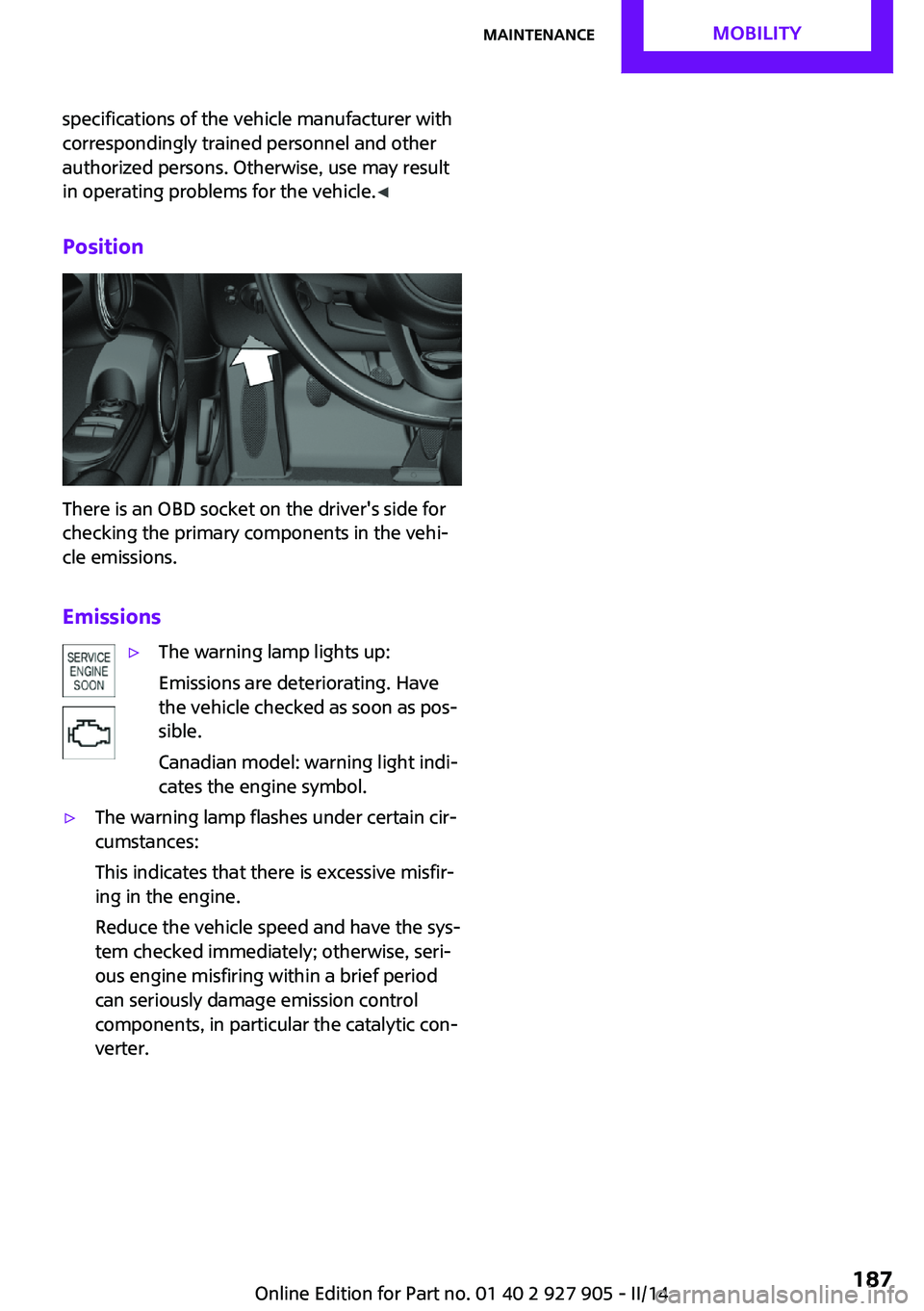
Position
There is an OBD socket on the driver's side for
checking the primary components in the vehi‐
cle emissions.
Emissions
▷The warning lamp lights up:
Emissions are deteriorating. Have
the vehicle checked as soon as pos‐
sible.
Canadian model: warning light indi‐
cates the engine symbol.▷The warning lamp flashes under certain cir‐
cumstances:
This indicates that there is excessive misfir‐
ing in the engine.
Reduce the vehicle speed and have the sys‐
tem checked immediately; otherwise, seri‐
ous engine misfiring within a brief period
can seriously damage emission control
components, in particular the catalytic con‐
verter.Seite 187MaintenanceMOBILITY187
Online Edition for Part no. 01 40 2 927 905 - II/14
Page 189 of 230
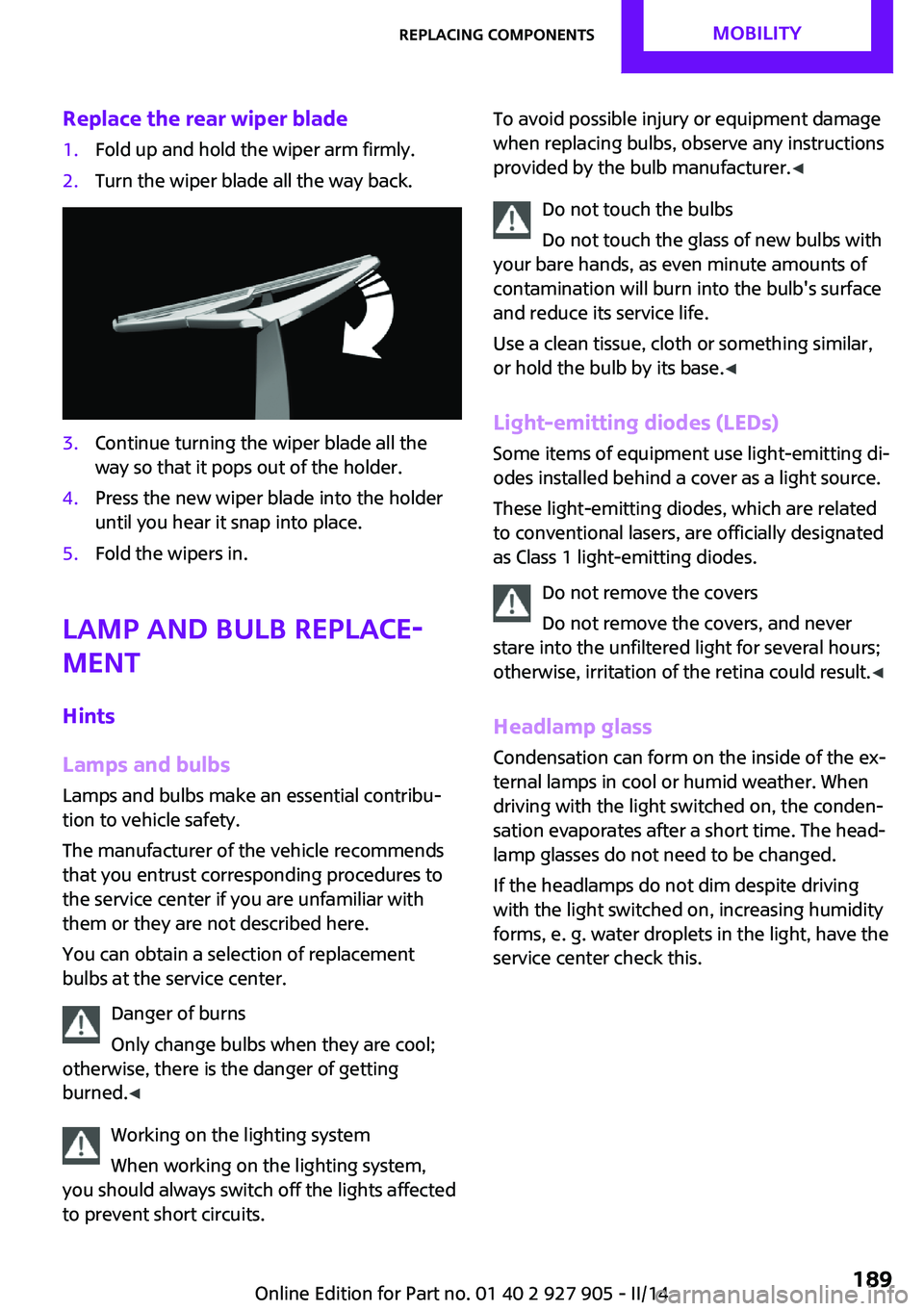
Replace the rear wiper blade1.Fold up and hold the wiper arm firmly.2.Turn the wiper blade all the way back.3.Continue turning the wiper blade all the
way so that it pops out of the holder.4.Press the new wiper blade into the holder
until you hear it snap into place.5.Fold the wipers in.
Lamp and bulb replace‐
ment
Hints
Lamps and bulbs Lamps and bulbs make an essential contribu‐
tion to vehicle safety.
The manufacturer of the vehicle recommends
that you entrust corresponding procedures to
the service center if you are unfamiliar with
them or they are not described here.
You can obtain a selection of replacement
bulbs at the service center.
Danger of burns
Only change bulbs when they are cool;
otherwise, there is the danger of getting
burned. ◀
Working on the lighting system
When working on the lighting system,
you should always switch off the lights affected
to prevent short circuits.
To avoid possible injury or equipment damage
when replacing bulbs, observe any instructions
provided by the bulb manufacturer. ◀
Do not touch the bulbs
Do not touch the glass of new bulbs with
your bare hands, as even minute amounts of
contamination will burn into the bulb's surface
and reduce its service life.
Use a clean tissue, cloth or something similar,
or hold the bulb by its base. ◀
Light-emitting diodes (LEDs)
Some items of equipment use light-emitting di‐
odes installed behind a cover as a light source.
These light-emitting diodes, which are related
to conventional lasers, are officially designated as Class 1 light-emitting diodes.
Do not remove the covers
Do not remove the covers, and never
stare into the unfiltered light for several hours;
otherwise, irritation of the retina could result. ◀
Headlamp glass Condensation can form on the inside of the ex‐
ternal lamps in cool or humid weather. When
driving with the light switched on, the conden‐
sation evaporates after a short time. The head‐
lamp glasses do not need to be changed.
If the headlamps do not dim despite driving
with the light switched on, increasing humidity
forms, e. g. water droplets in the light, have the
service center check this.Seite 189Replacing componentsMOBILITY189
Online Edition for Part no. 01 40 2 927 905 - II/14
Page 190 of 230
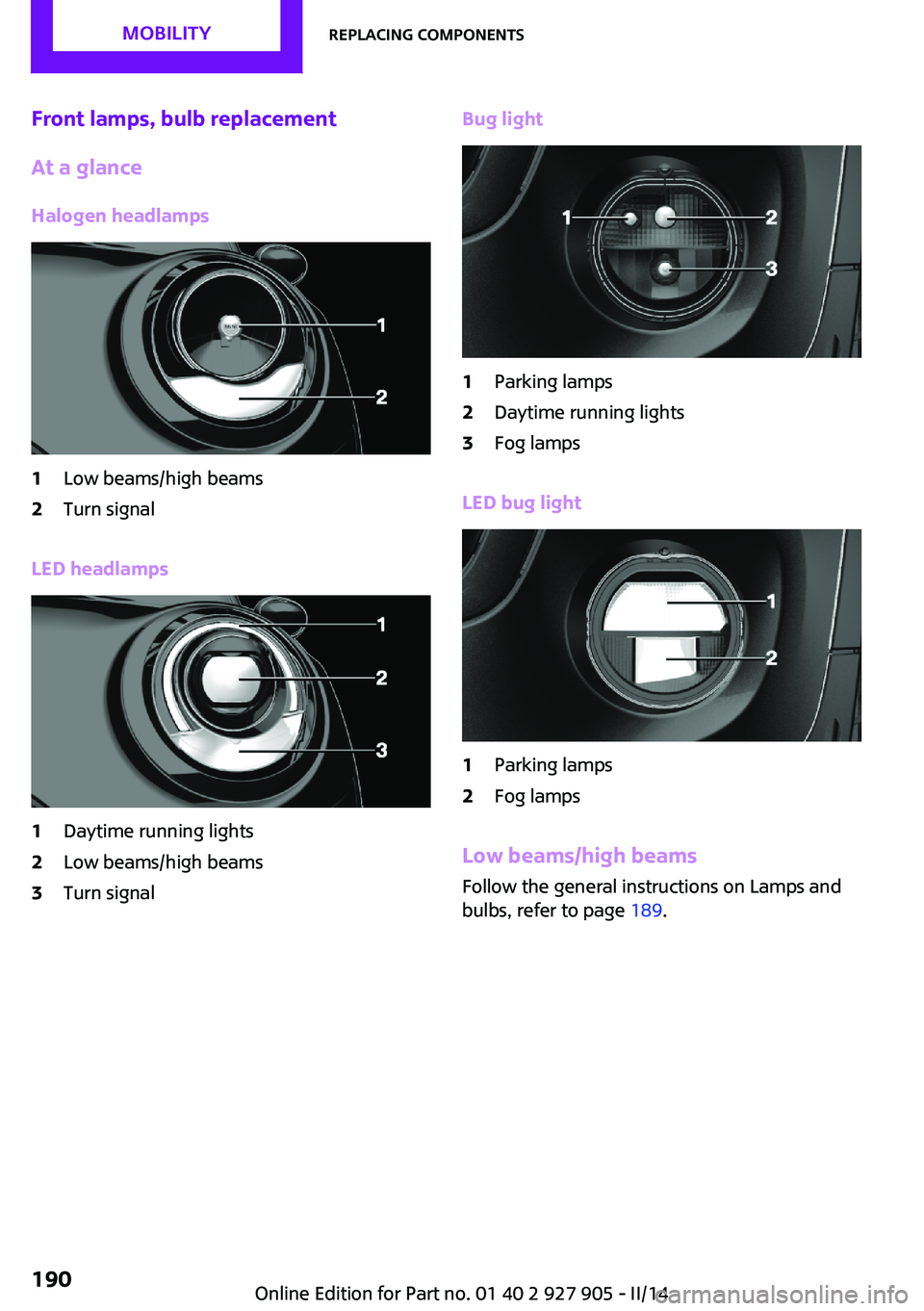
Front lamps, bulb replacement
At a glance
Halogen headlamps1Low beams/high beams2Turn signal
LED headlamps
1Daytime running lights2Low beams/high beams3Turn signalBug light1Parking lamps2Daytime running lights3Fog lamps
LED bug light
1Parking lamps2Fog lamps
Low beams/high beams Follow the general instructions on Lamps and
bulbs, refer to page 189.
Seite 190MOBILITYReplacing components190
Online Edition for Part no. 01 40 2 927 905 - II/14
Page 192 of 230
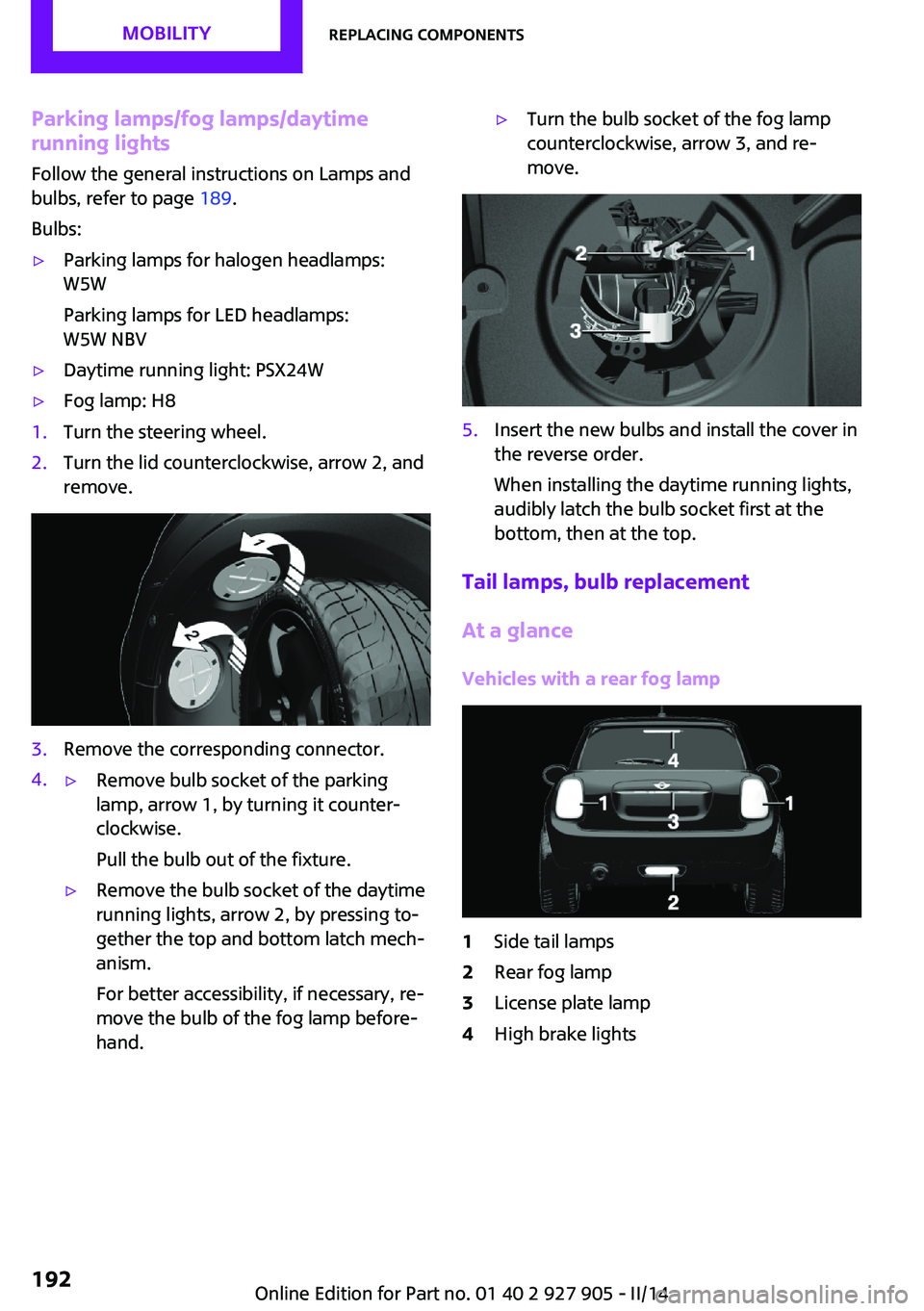
Parking lamps/fog lamps/daytime
running lights
Follow the general instructions on Lamps and
bulbs, refer to page 189.
Bulbs:▷Parking lamps for halogen headlamps:
W5W
Parking lamps for LED headlamps:
W5W NBV▷Daytime running light: PSX24W▷Fog lamp: H81.Turn the steering wheel.2.Turn the lid counterclockwise, arrow 2, and
remove.3.Remove the corresponding connector.4.▷Remove bulb socket of the parking
lamp, arrow 1, by turning it counter‐
clockwise.
Pull the bulb out of the fixture.▷Remove the bulb socket of the daytime
running lights, arrow 2, by pressing to‐
gether the top and bottom latch mech‐
anism.
For better accessibility, if necessary, re‐
move the bulb of the fog lamp before‐
hand.▷Turn the bulb socket of the fog lamp
counterclockwise, arrow 3, and re‐
move.5.Insert the new bulbs and install the cover in
the reverse order.
When installing the daytime running lights,
audibly latch the bulb socket first at the
bottom, then at the top.
Tail lamps, bulb replacement
At a glance
Vehicles with a rear fog lamp
1Side tail lamps2Rear fog lamp3License plate lamp4High brake lightsSeite 192MOBILITYReplacing components192
Online Edition for Part no. 01 40 2 927 905 - II/14
Page 193 of 230
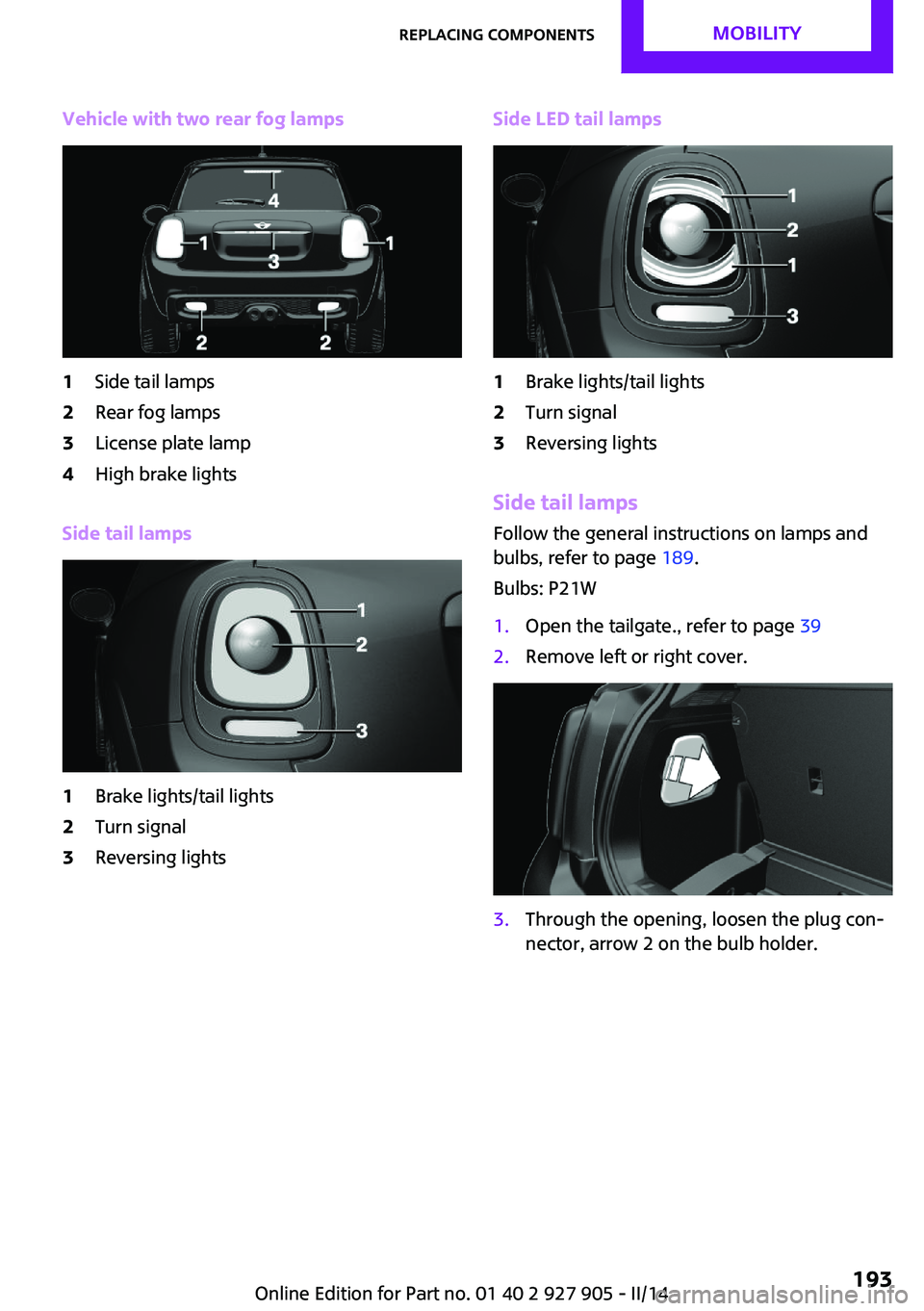
Vehicle with two rear fog lamps1Side tail lamps2Rear fog lamps3License plate lamp4High brake lights
Side tail lamps
1Brake lights/tail lights2Turn signal3Reversing lightsSide LED tail lamps1Brake lights/tail lights2Turn signal3Reversing lights
Side tail lampsFollow the general instructions on lamps and
bulbs, refer to page 189.
Bulbs: P21W
1.Open the tailgate., refer to page 392.Remove left or right cover.3.Through the opening, loosen the plug con‐
nector, arrow 2 on the bulb holder.Seite 193Replacing componentsMOBILITY193
Online Edition for Part no. 01 40 2 927 905 - II/14
Page 194 of 230
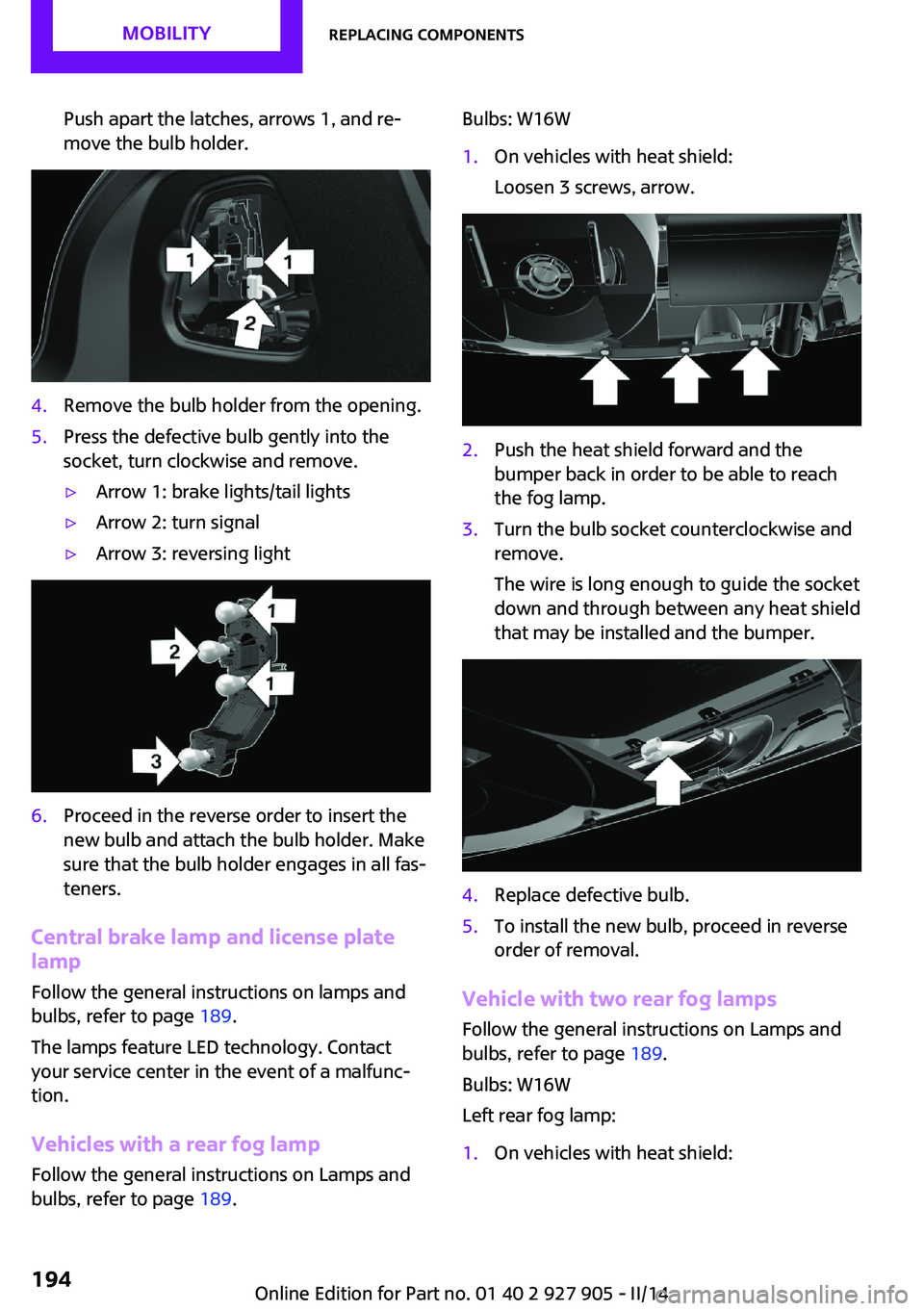
Push apart the latches, arrows 1, and re‐
move the bulb holder.4.Remove the bulb holder from the opening.5.Press the defective bulb gently into the
socket, turn clockwise and remove.▷Arrow 1: brake lights/tail lights▷Arrow 2: turn signal▷Arrow 3: reversing light6.Proceed in the reverse order to insert the
new bulb and attach the bulb holder. Make
sure that the bulb holder engages in all fas‐
teners.
Central brake lamp and license plate
lamp
Follow the general instructions on lamps and
bulbs, refer to page 189.
The lamps feature LED technology. Contact your service center in the event of a malfunc‐
tion.
Vehicles with a rear fog lamp
Follow the general instructions on Lamps and
bulbs, refer to page 189.
Bulbs: W16W1.On vehicles with heat shield:
Loosen 3 screws, arrow.2.Push the heat shield forward and the
bumper back in order to be able to reach
the fog lamp.3.Turn the bulb socket counterclockwise and
remove.
The wire is long enough to guide the socket
down and through between any heat shield
that may be installed and the bumper.4.Replace defective bulb.5.To install the new bulb, proceed in reverse
order of removal.
Vehicle with two rear fog lamps
Follow the general instructions on Lamps and
bulbs, refer to page 189.
Bulbs: W16W
Left rear fog lamp:
1.On vehicles with heat shield:Seite 194MOBILITYReplacing components194
Online Edition for Part no. 01 40 2 927 905 - II/14
Page 201 of 230

Breakdown assistanceVehicle equipment
All standard, country-specific and optional
equipment that is offered in the model series is
described in this chapter. Therefore, equipment
is also described that is not available in a vehi‐
cle, e. g., because of the selected optional
equipment or country variant. This also applies
for safety-related functions and systems.
Hazard warning flash‐
ers
The button is located above the Control Dis‐
play.
Intelligent Emergency Re‐
quest
Requirements
▷The radio ready state is switched on.▷The Assist system is functional.▷The SIM card integrated in the vehicle has
been activated.
General information
Only press the SOS button in an emergency.
Hints
Emergency Request not guaranteed
For technical reasons, the Emergency Re‐
quest cannot be guaranteed under unfavorable
conditions. ◀
Initiating an Emergency Request1.Press the cover briefly to open it.2.Press the SOS button until the LED in the
button lights up.▷The LED lights up: an Emergency Request
was initiated.
If the situation allows, wait in your vehicle
until the voice connection has been estab‐
lished.▷The LED flashes when a connection to the
MINI Response Center has been estab‐
lished.
When the emergency request is received at
the MINI Response Center, the MINI Re‐
sponse Center contacts you and takes fur‐
ther steps to help you.
Even if you are unable to respond, the MINI
Response Center can take further steps to
help you under certain circumstances.
For this purpose, data that are used to de‐
termine the necessary rescue measures,
such as the current position of the vehicle if
it can be established, are transmitted to the
MINI Response Center.Seite 201Breakdown assistanceMOBILITY201
Online Edition for Part no. 01 40 2 927 905 - II/14
Page 221 of 230
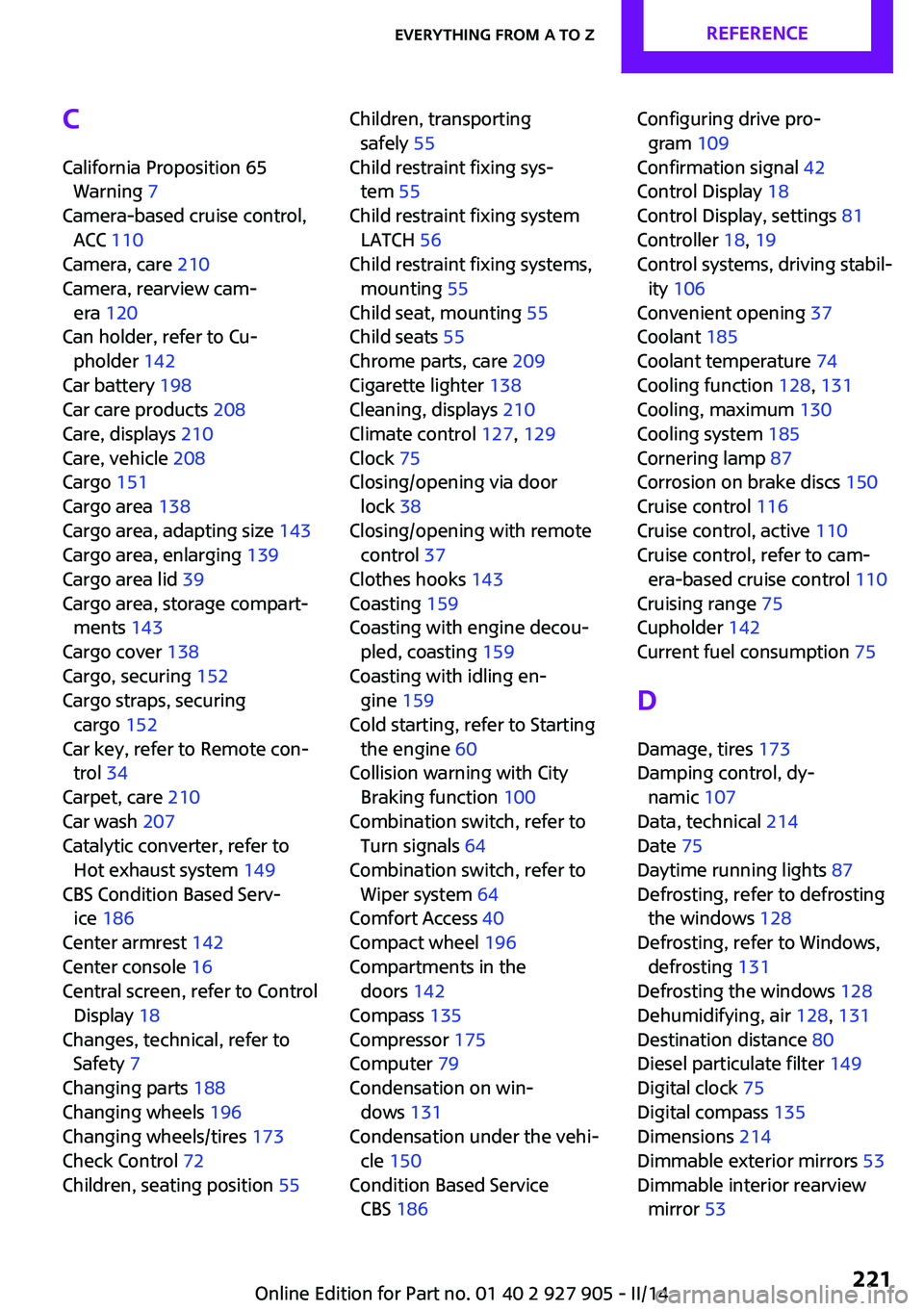
C
California Proposition 65 Warning 7
Camera-based cruise control, ACC 110
Camera, care 210
Camera, rearview cam‐ era 120
Can holder, refer to Cu‐ pholder 142
Car battery 198
Car care products 208
Care, displays 210
Care, vehicle 208
Cargo 151
Cargo area 138
Cargo area, adapting size 143
Cargo area, enlarging 139
Cargo area lid 39
Cargo area, storage compart‐ ments 143
Cargo cover 138
Cargo, securing 152
Cargo straps, securing cargo 152
Car key, refer to Remote con‐ trol 34
Carpet, care 210
Car wash 207
Catalytic converter, refer to Hot exhaust system 149
CBS Condition Based Serv‐ ice 186
Center armrest 142
Center console 16
Central screen, refer to Control Display 18
Changes, technical, refer to Safety 7
Changing parts 188
Changing wheels 196
Changing wheels/tires 173
Check Control 72
Children, seating position 55 Children, transporting
safely 55
Child restraint fixing sys‐ tem 55
Child restraint fixing system LATCH 56
Child restraint fixing systems, mounting 55
Child seat, mounting 55
Child seats 55
Chrome parts, care 209
Cigarette lighter 138
Cleaning, displays 210
Climate control 127, 129
Clock 75
Closing/opening via door lock 38
Closing/opening with remote control 37
Clothes hooks 143
Coasting 159
Coasting with engine decou‐ pled, coasting 159
Coasting with idling en‐ gine 159
Cold starting, refer to Starting the engine 60
Collision warning with City Braking function 100
Combination switch, refer to Turn signals 64
Combination switch, refer to Wiper system 64
Comfort Access 40
Compact wheel 196
Compartments in the doors 142
Compass 135
Compressor 175
Computer 79
Condensation on win‐ dows 131
Condensation under the vehi‐ cle 150
Condition Based Service CBS 186 Configuring drive pro‐
gram 109
Confirmation signal 42
Control Display 18
Control Display, settings 81
Controller 18, 19
Control systems, driving stabil‐ ity 106
Convenient opening 37
Coolant 185
Coolant temperature 74
Cooling function 128, 131
Cooling, maximum 130
Cooling system 185
Cornering lamp 87
Corrosion on brake discs 150
Cruise control 116
Cruise control, active 110
Cruise control, refer to cam‐ era-based cruise control 110
Cruising range 75
Cupholder 142
Current fuel consumption 75
D
Damage, tires 173
Damping control, dy‐ namic 107
Data, technical 214
Date 75
Daytime running lights 87
Defrosting, refer to defrosting the windows 128
Defrosting, refer to Windows, defrosting 131
Defrosting the windows 128
Dehumidifying, air 128, 131
Destination distance 80
Diesel particulate filter 149
Digital clock 75
Digital compass 135
Dimensions 214
Dimmable exterior mirrors 53
Dimmable interior rearview mirror 53 Seite 221Everything from A to ZREFERENCE221
Online Edition for Part no. 01 40 2 927 905 - II/14