transmission MINI COOPER 2015 Owner's Manual
[x] Cancel search | Manufacturer: MINI, Model Year: 2015, Model line: COOPER, Model: MINI COOPER 2015Pages: 248, PDF Size: 5.43 MB
Page 167 of 248

By maintaining a suitable distance to the vehi‐
cle driving ahead of you.
Driving smoothly and proactively reduces fuel
consumption.
Avoid high engine speeds
As a rule: driving at low engine speeds lowers
fuel consumption and reduces wear.
Use 1st gear to get the vehicle moving. Starting
with the 2nd gear, accelerate rapidly. When ac‐
celerating, shift up before reaching high engine
speeds.
When you reach the desired speed, shift into
the highest applicable gear and drive with the
engine speed as low as possible and at a con‐
stant speed.
The gear shift indicator, refer to page 83, of
your vehicle indicates the most fuel efficient gear.
Use coasting conditions When approaching a red light, take your foot
off the accelerator and let the vehicle coast to a
halt.
For going downhill take your foot off the accel‐
erator and let the vehicle roll.
The flow of fuel is interrupted while coasting.
Switch off the engine
during longer stops
Switch off the engine during longer stops, for
example, at traffic lights, railroad crossings or in
traffic congestion.
Auto Start/Stop function
The Auto Start/Stop function of your vehicle au‐
tomatically switches off the engine during a
stop.If the engine is switched off and then restarted
rather than leaving the engine running con‐
stantly, fuel consumption and emissions are re‐
duced. Savings can begin within a few seconds
of switching off the engine.
In addition, fuel consumption is also deter‐
mined by other factors, such as driving style,
road conditions, maintenance or environmental
factors.
Switch off any functions
that are not currently
needed
Functions such as seat heating and the rear
window defroster require a lot of energy and
consume additional fuel, especially in city and
stop-and-go traffic.
Therefore, switch off these functions if they are
not actually needed.
Have maintenance car‐
ried out
Have vehicles maintained regularly to achieve
optimal vehicle efficiency and service life. MINI
recommends that maintenance work be per‐
formed by a MINI service center.
Also note the MINI maintenance systems, refer
to page 202.
GREEN Mode
The concept The GREEN Mode supports a driving style that
saves on fuel consumption. For this purpose,
the engine control and comfort features, e. g.
the climate control output, are adjusted.
For Steptronic transmission:Seite 167Saving fuelDRIVING TIPS167
Online Edition for Part no. 01 40 2 964 625 - X/15
Page 168 of 248

The Coasting driving condition is enabled under
certain conditions.
Under certain conditions the engine is auto‐
matically decoupled from the transmission in
selector lever position D. The vehicle continues
traveling with the engine idling to reduce fuel
consumption. Selector lever position D remains
engaged. An indicator provides information
about the distance traveled in Coasting mode.
In addition, context-sensitive instructions are
displayed to assist with an optimized fuel con‐
sumption driving style.
The achieved extended range is displayed in
the instrument cluster.
Overview The system includes the following MINIMAL
functions and displays:▷GREEN bonus range, refer to page 169.▷GREEN tips driving instruction, refer to
page 169.▷GREEN climate control, refer to page 168.▷MINIMALISM analyzer, refer to page 171.▷Coasting driving condition, refer to
page 170.
Activating GREEN Mode
Turn Driving Dynamics Control to
the right until GREEN Mode is
displayed in the instrument clus‐
ter.
Configuring GREEN Mode
Via the Driving Dynamics Control
1.Activating GREEN Mode.2."Configure GREEN"3.Configure the program.
Via onboard monitor:
1. "Settings"2."GREEN Mode"
Or
1. "Settings"2."Driving mode"3."Configure GREEN"
Configure the program.
GREEN tip
▷"Tip at:"
Set the GREEN Mode speed at which a
GREEN Mode tip is to be displayed.▷"GREEN speed warning":
Displays a reminder when the set GREEN
Mode speed is exceeded.
Coasting
Fuel-efficiency can be optimized by disengag‐
ing the engine and Coasting, refer to page 170,
with the engine idling.
This function is only available in GREEN Mode.
GREEN climate control
"GREEN climate control"
Climate control is set to be fuel-efficient.
By making a slight change to the set tempera‐
ture, or adjusting the rate of heating or cooling
of the car's interior fuel consumption can be
economized.
The outputs of the seat heater and the exterior
Additionally heat output to seats and exterior
mirror is reduced.
Exterior mirror heat is available when outside
temperatures are very low.
GREEN potential
The percentage of potential savings that can be
achieved with the current configuration is dis‐
played.
Seite 168DRIVING TIPSSaving fuel168
Online Edition for Part no. 01 40 2 964 625 - X/15
Page 169 of 248
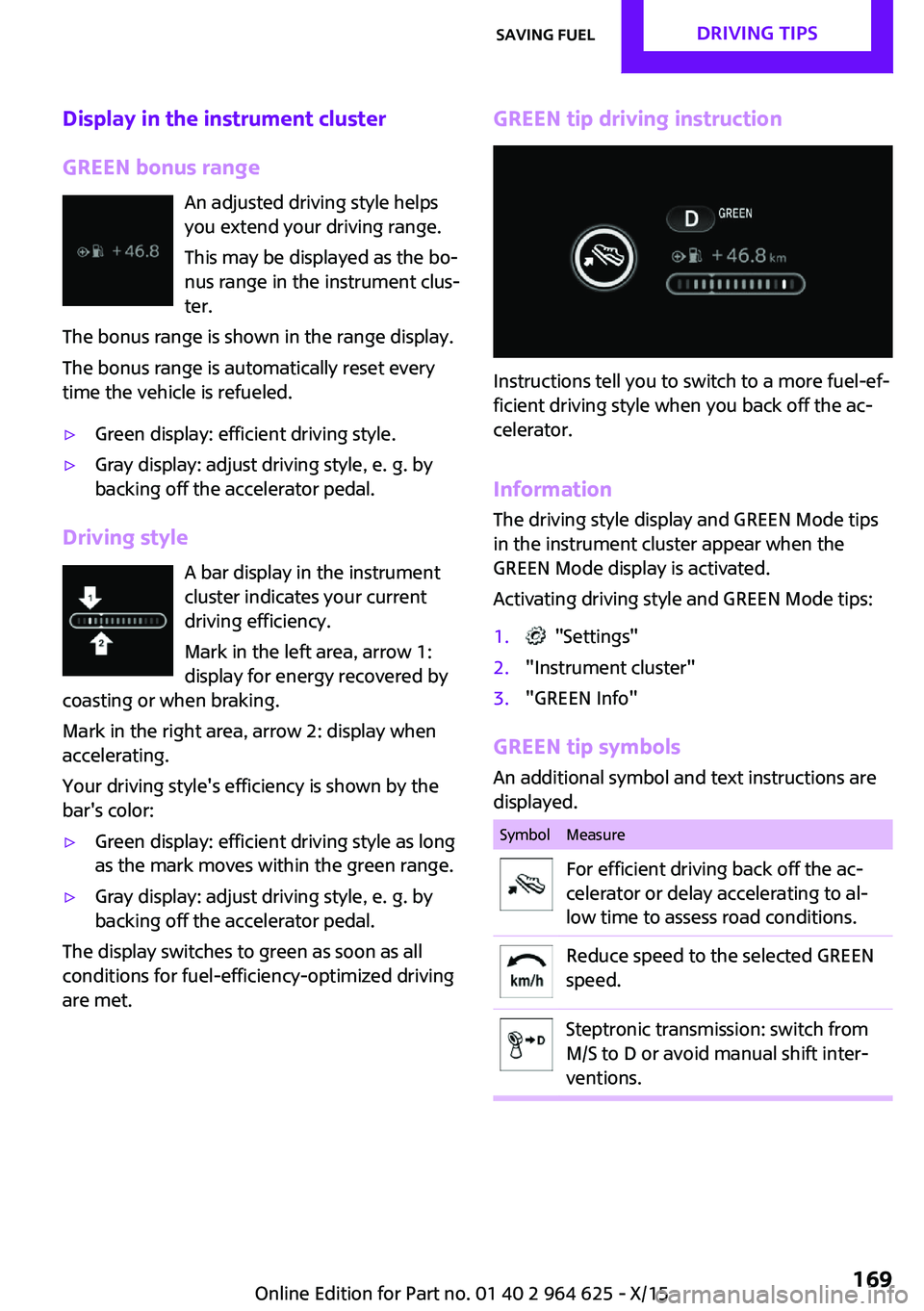
Display in the instrument cluster
GREEN bonus range An adjusted driving style helps
you extend your driving range.
This may be displayed as the bo‐
nus range in the instrument clus‐
ter.
The bonus range is shown in the range display.
The bonus range is automatically reset every
time the vehicle is refueled.▷Green display: efficient driving style.▷Gray display: adjust driving style, e. g. by
backing off the accelerator pedal.
Driving style
A bar display in the instrument
cluster indicates your current
driving efficiency.
Mark in the left area, arrow 1:
display for energy recovered by
coasting or when braking.
Mark in the right area, arrow 2: display when
accelerating.
Your driving style's efficiency is shown by the
bar's color:
▷Green display: efficient driving style as long
as the mark moves within the green range.▷Gray display: adjust driving style, e. g. by
backing off the accelerator pedal.
The display switches to green as soon as all
conditions for fuel-efficiency-optimized driving
are met.
GREEN tip driving instruction
Instructions tell you to switch to a more fuel-ef‐
ficient driving style when you back off the ac‐
celerator.
Information The driving style display and GREEN Mode tips
in the instrument cluster appear when the
GREEN Mode display is activated.
Activating driving style and GREEN Mode tips:
1. "Settings"2."Instrument cluster"3."GREEN Info"
GREEN tip symbols An additional symbol and text instructions aredisplayed.
SymbolMeasureFor efficient driving back off the ac‐
celerator or delay accelerating to al‐
low time to assess road conditions.Reduce speed to the selected GREEN
speed.Steptronic transmission: switch from
M/S to D or avoid manual shift inter‐
ventions.Seite 169Saving fuelDRIVING TIPS169
Online Edition for Part no. 01 40 2 964 625 - X/15
Page 170 of 248
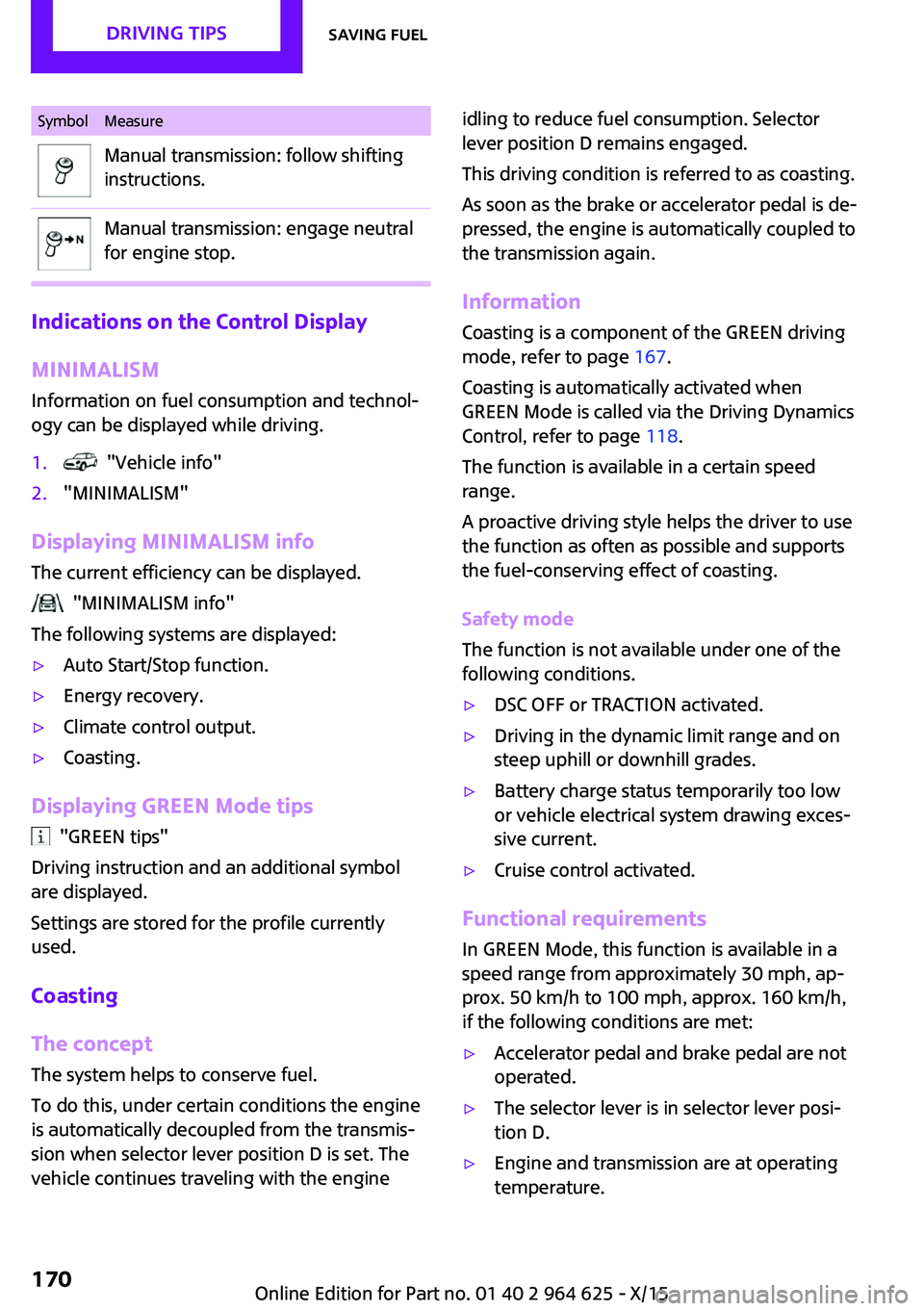
SymbolMeasureManual transmission: follow shifting
instructions.Manual transmission: engage neutral
for engine stop.
Indications on the Control Display
MINIMALISM
Information on fuel consumption and technol‐
ogy can be displayed while driving.
1. "Vehicle info"2."MINIMALISM"
Displaying MINIMALISM info
The current efficiency can be displayed.
"MINIMALISM info"
The following systems are displayed:
▷Auto Start/Stop function.▷Energy recovery.▷Climate control output.▷Coasting.
Displaying GREEN Mode tips
"GREEN tips"
Driving instruction and an additional symbol
are displayed.
Settings are stored for the profile currently
used.
Coasting
The concept The system helps to conserve fuel.
To do this, under certain conditions the engine
is automatically decoupled from the transmis‐ sion when selector lever position D is set. The
vehicle continues traveling with the engine
idling to reduce fuel consumption. Selector
lever position D remains engaged.
This driving condition is referred to as coasting.
As soon as the brake or accelerator pedal is de‐
pressed, the engine is automatically coupled to
the transmission again.
Information
Coasting is a component of the GREEN driving
mode, refer to page 167.
Coasting is automatically activated when
GREEN Mode is called via the Driving Dynamics
Control, refer to page 118.
The function is available in a certain speed
range.
A proactive driving style helps the driver to use
the function as often as possible and supports
the fuel-conserving effect of coasting.
Safety mode
The function is not available under one of the
following conditions.▷DSC OFF or TRACTION activated.▷Driving in the dynamic limit range and on
steep uphill or downhill grades.▷Battery charge status temporarily too low
or vehicle electrical system drawing exces‐
sive current.▷Cruise control activated.
Functional requirements
In GREEN Mode, this function is available in a
speed range from approximately 30 mph, ap‐
prox. 50 km/h to 100 mph, approx. 160 km/h,
if the following conditions are met:
▷Accelerator pedal and brake pedal are not
operated.▷The selector lever is in selector lever posi‐
tion D.▷Engine and transmission are at operating
temperature.Seite 170DRIVING TIPSSaving fuel170
Online Edition for Part no. 01 40 2 964 625 - X/15
Page 197 of 248

CAUTION
Too much engine oil can damage the en‐
gine or the catalytic converter. There is risk of
property damage. Do not add too much engine
oil. When too much engine oil is added, have oil
level corrected by a dealer’s service center or
another qualified service center or repair
shop. ◀
Detailed measurement
The concept
In the detailed measurement the engine oil
level is checked when the vehicle is stationary,
and displayed via a scale.
If the engine oil level reaches the minimum
level, a check control message is displayed.
During the measurement, the idle speed is in‐
creased somewhat.
Requirements▷Vehicle is parked in a horizontal position.▷Manual transmission: shift lever in neutral
position, clutch and accelerator pedals not
depressed.▷Steptronic transmission: selector lever in se‐
lector lever position N or P and accelerator
pedal not depressed.▷Engine is running and is at operating tem‐
perature.
Performing a detailed measurement
On the Control Display:
1. "Vehicle info"2."Vehicle status"3. "Measure engine oil level"4."Start measurement"
The engine oil level is checked and displayed
via a scale.
Time: approx. 1 minute.
Adding engine oil
Information WARNING
Operating materials, for example oils,
greases, coolants, fuels, can contain harmful in‐
gredients. There is risk of injuries or danger to
life. Observe the instructions on the containers. Avoid the contact of articles of clothing, skin or
eyes with operating materials. Do not refill op‐
erating materials into different bottles. Store
operating materials out of reach of children. ◀
CAUTION
A too low engine oil level causes engine
damage. There is risk of property damage.
Add engine oil within the next
125 miles/200 km. ◀
CAUTION
Too much engine oil can damage the en‐
gine or the catalytic converter. There is risk of
property damage. Do not add too much engine
oil. When too much engine oil is added, have oil level corrected by a dealer’s service center or
another qualified service center or repair
shop. ◀
General information
Only add engine oil when the message is dis‐
played in the instrument cluster. The quantity
to be added is indicated in the message dis‐
played in the instrument cluster.
Switch off the ignition and safely park the vehi‐
cle before engine oil is added.
Overview
The oil filler neck is located in the engine com‐
partment, refer to page 194.
Opening the oil filler neck1.Open the hood, refer to page 194.Seite 197Engine oilMOBILITY197
Online Edition for Part no. 01 40 2 964 625 - X/15
Page 214 of 248
The nonworking wheel cannot be stored in
the emergency wheel bracket because of
its size.3.Check tire inflation pressure at the next op‐
portunity and correct as needed.4.Reinitialize the Flat Tire Monitor, refer to
page 107.
Reinitialize the Tire Pressure Monitor, refer
to page 104.5.Check to make sure the lug bolts are tight
with a calibrated torque wrench.
Driving with emergency wheel
WARNING
The emergency wheel has particular di‐
mensions. When driving with an emergency wheel, changed driving properties may occur at
higher speeds, for example reduced lane stabil‐
ity when braking, longer braking distance and
changed self-steering properties in the limit
area. There is risk of an accident. Drive moder‐
ately and do not exceed a speed of
50 mph/80 km/h. ◀
After the trip with emergency wheel Have the following work performed only by a
dealer's service center or another qualified
service center or repair shop.
1.Replace the damaged tires as soon as pos‐
sible.2.Replace the emergency wheel with a new
wheel.3.Have the tray with the emergency wheel
installed.
Vehicle battery
Maintenance
The battery is maintenance-free.
The added amount of acid is sufficient for the
service life of the battery.
More information about the battery can be re‐
quested from a dealer’s service center or an‐
other qualified service center or repair shop.
Battery replacement CAUTION
Vehicle batteries that are not compatible
can damage vehicle systems and impair vehicle
functions. There is a risk of personal and prop‐
erty damage. Only vehicle batteries that are
compatible with your vehicle type should be in‐
stalled in your vehicle. Information on compati‐
ble vehicle batteries is available at your dealer’s
service center. ◀
After a battery replacement, the manufacturer
of your vehicle recommends that the vehicle
battery be registered on the vehicle by a
dealer’s service center or another qualified
service center or repair shop to ensure that all
comfort features are fully available and that
any Check Control messages of these comfort
features are no longer displayed.
Charging the battery
General information
Make sure that the battery is always sufficiently
charged to guarantee that the battery remains
usable for its full service life.
The battery may need to be charged in the fol‐
lowing cases:▷When making frequent short-distance
drives.▷If the vehicle is not used for more than a
month.▷Steptronic transmission: when parked for
long periods of time in selector lever posi‐
tion D, R or N.Seite 214MOBILITYReplacing components214
Online Edition for Part no. 01 40 2 964 625 - X/15
Page 218 of 248
3.Let both engines run for several minutes.4.Disconnect the jumper cables in the reverse
order.
Check the battery and recharge if needed.
Tow-starting and towing
Information WARNING
Due to system limits, individual functions
can malfunction during tow-starting/towing
with the Intelligent Safety systems activated,
for example approach control warning with
light braking function. There is risk of an acci‐
dent. Switch all Intelligent Safety systems off
prior to tow-starting/towing. ◀
Switching off Intelligent Safety systems, refer to
page 109.
Steptronic transmission: transporting
the vehicle
Information The vehicle must not be towed if the front
wheels are touching the ground.
CAUTION
The vehicle can be damaged when tow‐
ing the vehicle with a lifted rear axle. There is
risk of property damage. Have vehicle trans‐
ported only with lifted front axle or on a load‐
ing platform. ◀
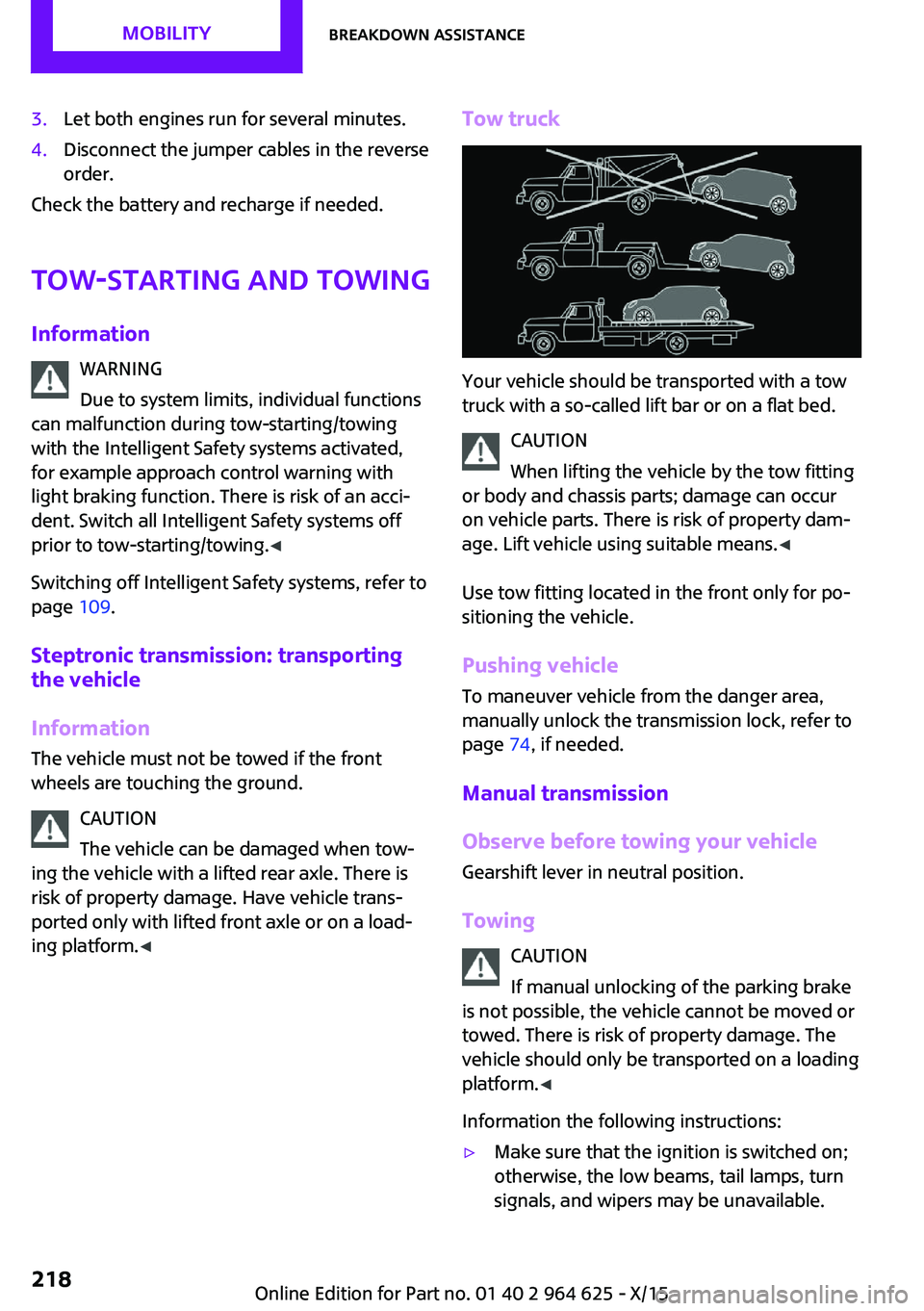
Tow truck
Your vehicle should be transported with a tow
truck with a so-called lift bar or on a flat bed.
CAUTION
When lifting the vehicle by the tow fitting
or body and chassis parts; damage can occur
on vehicle parts. There is risk of property dam‐
age. Lift vehicle using suitable means. ◀
Use tow fitting located in the front only for po‐
sitioning the vehicle.
Pushing vehicle
To maneuver vehicle from the danger area,
manually unlock the transmission lock, refer to
page 74, if needed.
Manual transmission
Observe before towing your vehicle
Gearshift lever in neutral position.
Towing CAUTION
If manual unlocking of the parking brake
is not possible, the vehicle cannot be moved or
towed. There is risk of property damage. The
vehicle should only be transported on a loading
platform. ◀
Information the following instructions:
▷Make sure that the ignition is switched on;
otherwise, the low beams, tail lamps, turn
signals, and wipers may be unavailable.Seite 218MOBILITYBreakdown assistance218
Online Edition for Part no. 01 40 2 964 625 - X/15
Page 220 of 248

Tow fitting
General information
The screw-in tow fitting should always be car‐
ried in the vehicle.
The tow fitting can be screwed in at the front or
rear of the vehicle.
The tow fitting and the onboard vehicle tool kit,
refer to page 204, are together in the cargo
area.
Information CAUTION
If the tow fitting is not used as intended,
there can be damage to the vehicle or to the
tow fitting. There is risk of property damage.
Observe the notes on using the tow fitting. ◀
Use of the tow fitting:
▷Use only the tow fitting provided with the
vehicle and screw it all the way in.▷Use the tow fitting for towing on paved
roads only.▷Use tow fitting located in the front only for
positioning the vehicle.▷Avoid lateral loading of the tow fitting, for
example, do not lift the vehicle by the tow
fitting.Screw thread for tow fitting
Threaded holes for the tow fitting are located in
the front and rear of the vehicle on the right
side with respect to the direction of travel.
Push out the cover by pressing on the top edge.
Tow-starting
Steptronic transmission Do not tow-start the vehicle.
Tow-starting the engine is not possible due to
the Steptronic transmission.
Have the cause of the starting problems fixed.
Manual transmission
If possible, do not tow-start the vehicle but
start the engine by jump-starting, refer to
page 216. If the vehicle is equipped with a cat‐
alytic converter, only tow-start while the engine
is cold.
1.Switch on the hazard warning system and
comply with local regulations.2.Switch on the ignition, refer to page 62.3.Engage third gear.4.Have the vehicle tow-started with the
clutch pedal pressed and slowly release the
pedal. After the engine starts, immediately
press on the clutch pedal again.5.Stop at a suitable location, remove the tow
bar or rope, and switch off the hazard
warning system.6.Have the vehicle checked.Seite 220MOBILITYBreakdown assistance220
Online Edition for Part no. 01 40 2 964 625 - X/15
Page 222 of 248

Before driving into a car washIn order to ensure that the vehicle can roll in a
car wash, take the following steps:
Manual transmission:1.Drive into the car wash.2.Shift to neutral.3.Switch the engine off.4.Switch on the ignition.
Steptronic transmission:
1.Drive into the car wash.2.Engage selector lever position N.3.Make sure that the parking brake is re‐
leased.4.Press the Start/Stop button to switch off the
engine.
In this way, the ignition remains switched
on, and two Check-Control messages are
displayed.
A signal sounds when you leave the vehicle
while in selector lever position N.
The vehicle cannot be locked from the outside
when in selector lever position N. A signal is
sounded when an attempt is made to lock the
vehicle.
To start the engine with manual transmission:
1.Press on the clutch pedal.2.Press the Start/Stop button.
To start the engine with Steptronic transmis‐
sion:
1.Depress the brake pedal.2.Press the Start/Stop button.
Headlights
▷Do not rub dry and do not use abrasive or
acidic cleansers.▷Soak areas that have been dirtied e. g.,
from insects, with shampoo and wash off
with water.▷Thaw ice with de-icing spray; do not use an
ice scraper.
After washing the vehicle
After washing the vehicle, apply the brakes
briefly to dry them; otherwise, braking action
can be reduced and corrosion of the brake
discs can occur.
Completely remove all residues on the win‐
dows, to minimize loss of visibility due to
smearing and to reduce wiper noises and wiper
blade wear.
Vehicle care Car care products
The manufacturer of your vehicle recommends
using care and cleaning products from MINI.
WARNING
Cleansers can contain substances that are
dangerous and harmful to your health. There is
risk of injuries. When cleaning the interior, open
the doors or windows. Only use products in‐
tended for cleaning vehicles. Follow the instruc‐
tions on the container. ◀
Vehicle paint
Regular care contributes to driving safety and
value retention. Environmental influences in
areas with elevated air pollution or natural con‐
taminants, such as tree resin or pollen can af‐
fect the vehicle's paintwork. Tailor the fre‐
quency and extent of your car care to these
influences.
Aggressive substances such as spilled fuel, oil,
grease or bird droppings must be removed im‐
mediately to prevent the finish from being al‐
tered or discolored.
Leather careRemove dust from the leather often, using acloth or vacuum cleaner.
Seite 222MOBILITYCare222
Online Edition for Part no. 01 40 2 964 625 - X/15
Page 229 of 248
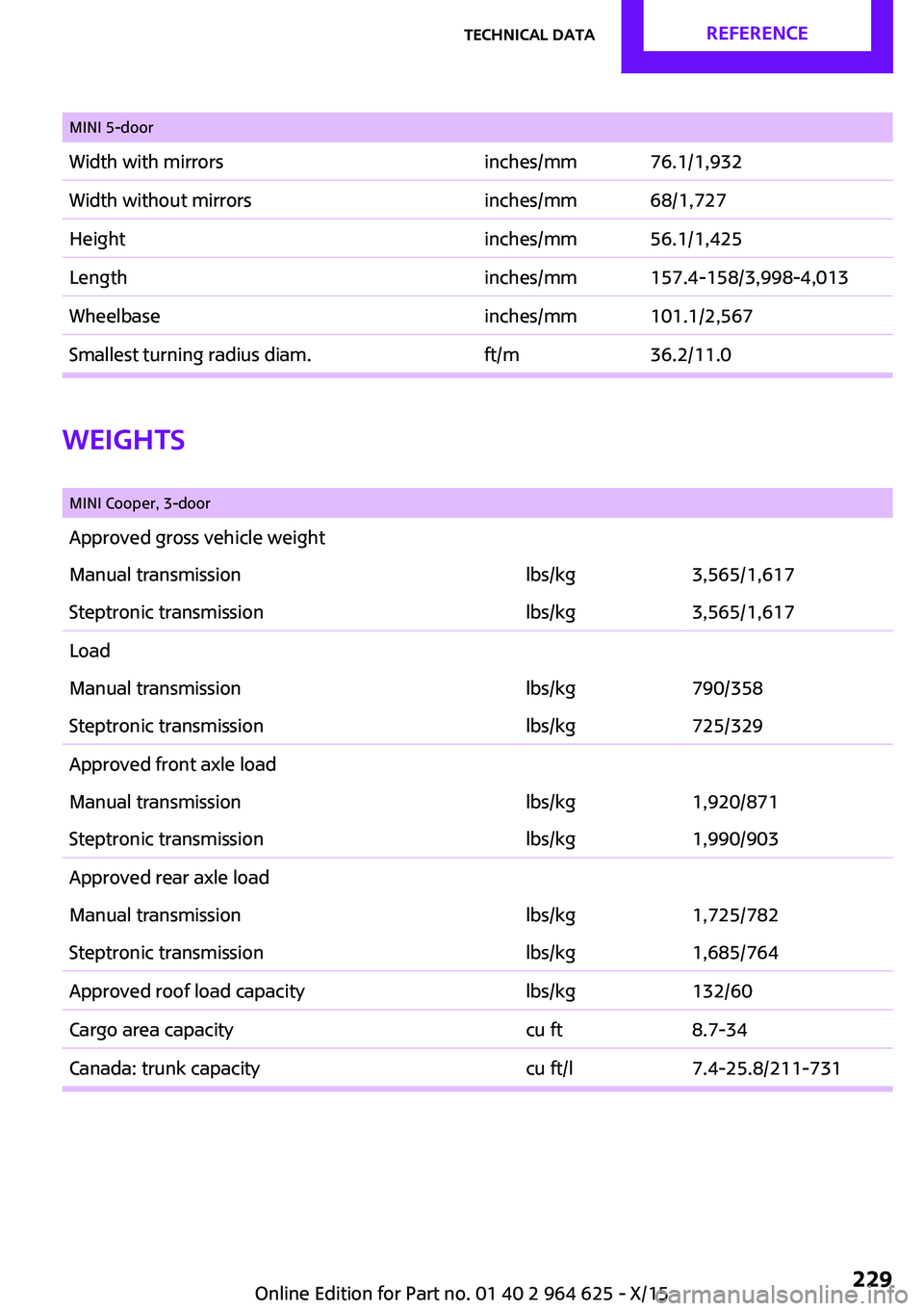
MINI 5-doorWidth with mirrorsinches/mm76.1/1,932Width without mirrorsinches/mm68/1,727Heightinches/mm56.1/1,425Lengthinches/mm157.4-158/3,998-4,013Wheelbaseinches/mm101.1/2,567Smallest turning radius diam.ft/m36.2/11.0
Weights
MINI Cooper, 3-doorApproved gross vehicle weightManual transmissionlbs/kg3,565/1,617Steptronic transmissionlbs/kg3,565/1,617LoadManual transmissionlbs/kg790/358Steptronic transmissionlbs/kg725/329Approved front axle loadManual transmissionlbs/kg1,920/871Steptronic transmissionlbs/kg1,990/903Approved rear axle loadManual transmissionlbs/kg1,725/782Steptronic transmissionlbs/kg1,685/764Approved roof load capacitylbs/kg132/60Cargo area capacitycu ft8.7-34Canada: trunk capacitycu ft/l7.4-25.8/211-731Seite 229Technical dataREFERENCE229
Online Edition for Part no. 01 40 2 964 625 - X/15