202 MINI COOPER 2015 Owners Manual
[x] Cancel search | Manufacturer: MINI, Model Year: 2015, Model line: COOPER, Model: MINI COOPER 2015Pages: 248, PDF Size: 5.43 MB
Page 5 of 248
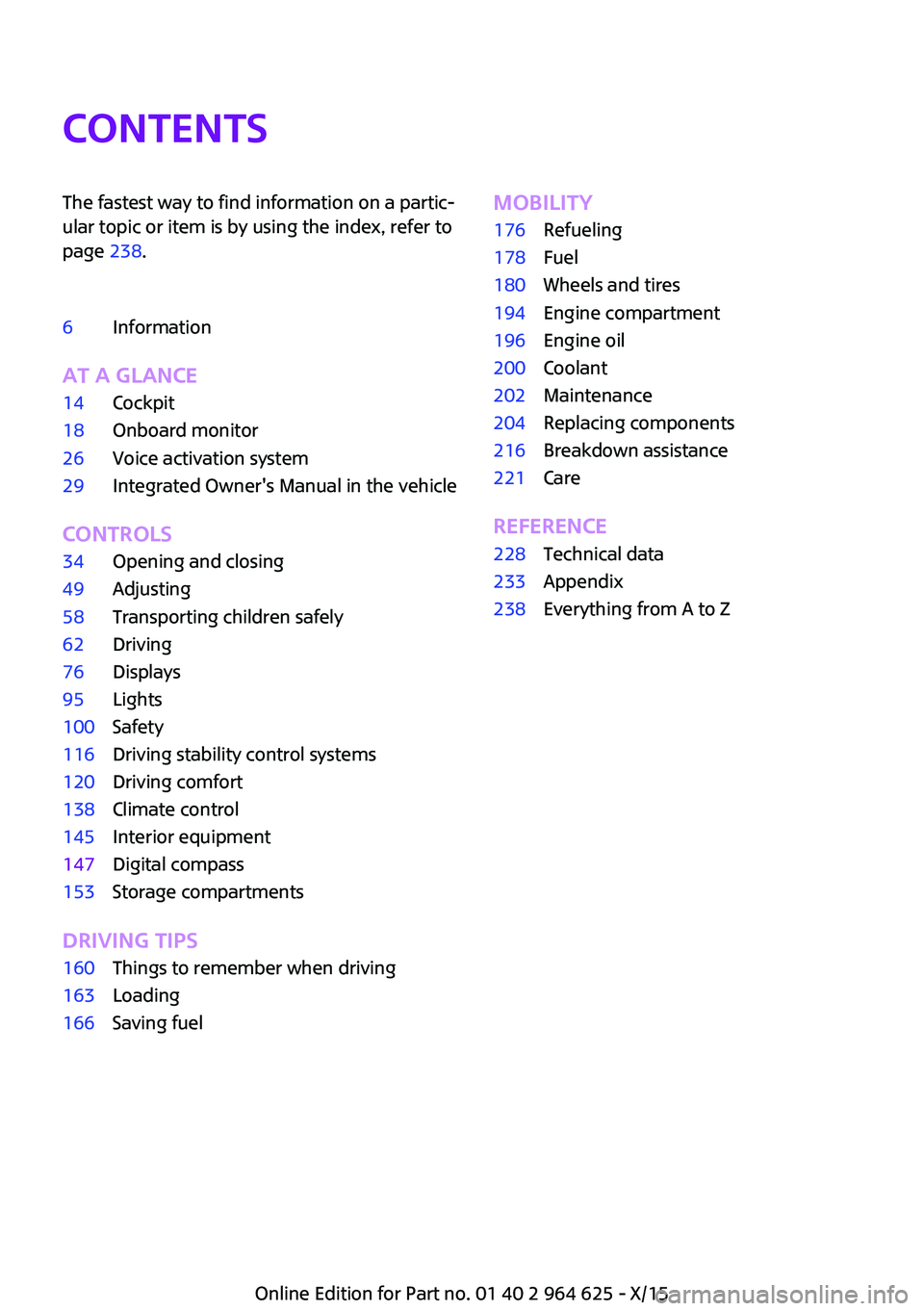
ContentsThe fastest way to find information on a partic‐
ular topic or item is by using the index, refer to
page 238.6Information
AT A GLANCE
14Cockpit18Onboard monitor26Voice activation system29Integrated Owner's Manual in the vehicle
CONTROLS
34Opening and closing49Adjusting58Transporting children safely62Driving76Displays95Lights100Safety116Driving stability control systems120Driving comfort138Climate control145Interior equipment147Digital compass153Storage compartments
DRIVING TIPS
160Things to remember when driving163Loading166Saving fuelMOBILITY176Refueling178Fuel180Wheels and tires194Engine compartment196Engine oil200Coolant202Maintenance204Replacing components216Breakdown assistance221Care
REFERENCE
228Technical data233Appendix238Everything from A to Z
Online Edition for Part no. 01 40 2 964 625 - X/15
Page 34 of 248

Opening and closingVehicle features and op‐
tions
This chapter describes all standard, country-
specific and optional features offered with the
series. It also describes features that are not
necessarily available in your car, e. g., due to
the selected options or country versions. This
also applies to safety-related functions and sys‐
tems. The respectively applicable country provi‐
sions must be observed when using the respec‐
tive features and systems.
Remote control/key General information The vehicle is supplied with two remote con‐
trols with integrated key.
Every remote control holds a replaceable bat‐
tery.
You may set the key functions depending on
the optional features and country-specific ver‐
sion. For Settings, refer to page 43.
The vehicle stores personal settings for every
remote control. Personal Profile, refer to
page 36.
The remote controls hold information on re‐
quired maintenance. Service data in the remote
control, refer to page 202Overview1Unlocking2Locking3Unlock the tailgate4Panic mode
Integrated key
Press button, arrow 1, and remove the key, ar‐
row 2.
The integrated key fits the driver's door lock.
Replacing the battery
1.Remove integrated key from remote con‐
trol.2.Slide the key into the opening and raise the
cover.Seite 34CONTROLSOpening and closing34
Online Edition for Part no. 01 40 2 964 625 - X/15
Page 140 of 248
Defrosts windows and removes
condensation
Direct the air distribution toward windows, in‐
crease the air flow and temperature, and, if
needed, use the cooling function.
Windshield defroster Press button.
The front window defroster switches
off automatically after a certain period of time.
Rear window defroster Press button.
The rear window defroster switches off
automatically after a certain period of time.When GREEN Mode, refer to page 167, is acti‐
vated, the heater output is reduced.
Microfilter
In external and recirculated air mode the mi‐
crofilter filters dust and pollen from the air.
This filter should be replaced during scheduled
maintenance, refer to page 202, of your vehi‐
cle.
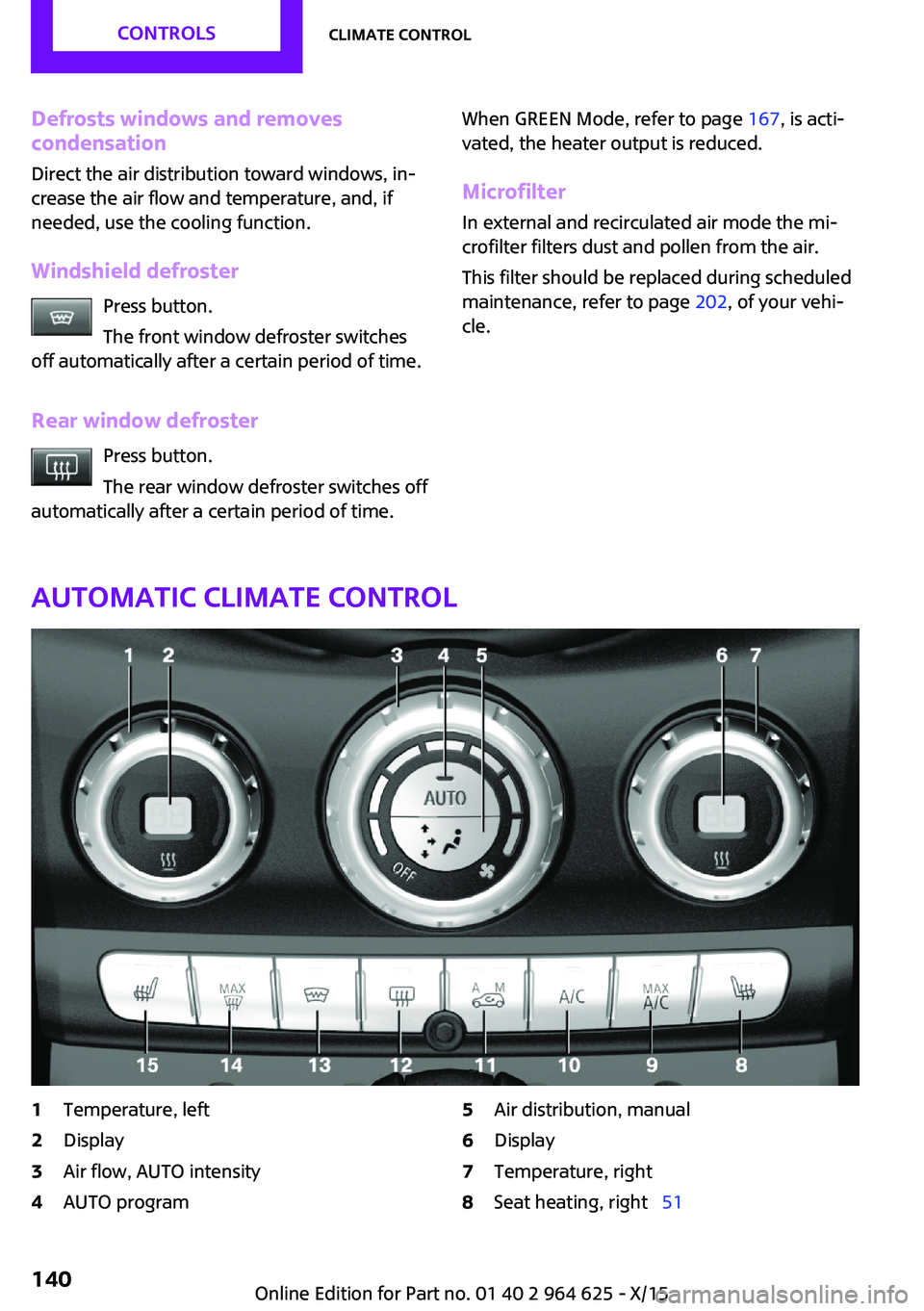
Automatic climate control
1Temperature, left2Display3Air flow, AUTO intensity4AUTO program5Air distribution, manual6Display7Temperature, right8Seat heating, right 51Seite 140CONTROLSClimate control140
Online Edition for Part no. 01 40 2 964 625 - X/15
Page 143 of 248
The front window defroster switches off auto‐
matically after a certain period of time.
Rear window defroster Press button.
The rear window defroster switches off
automatically after a certain period of time.
When GREEN Mode, refer to page 167, is acti‐
vated, the heater output is reduced.
Microfilter/activated-charcoal filter In external and recirculated air mode the mi‐
crofilter/activated charcoal filter filters dust,
pollen, and gaseous pollutants out of the air.
This filter should be replaced during scheduled
maintenance, refer to page 202, of your vehi‐
cle.
Ventilation
Setting The air flow directions can be individually ad‐
justed:▷Direct ventilation:
The air flow is directly pointed onto the per‐
son. The air flow heats or cools noticeably,
depending on the adjusted temperature.▷Indirect ventilation:
If the vents are fully or partly closed, the air
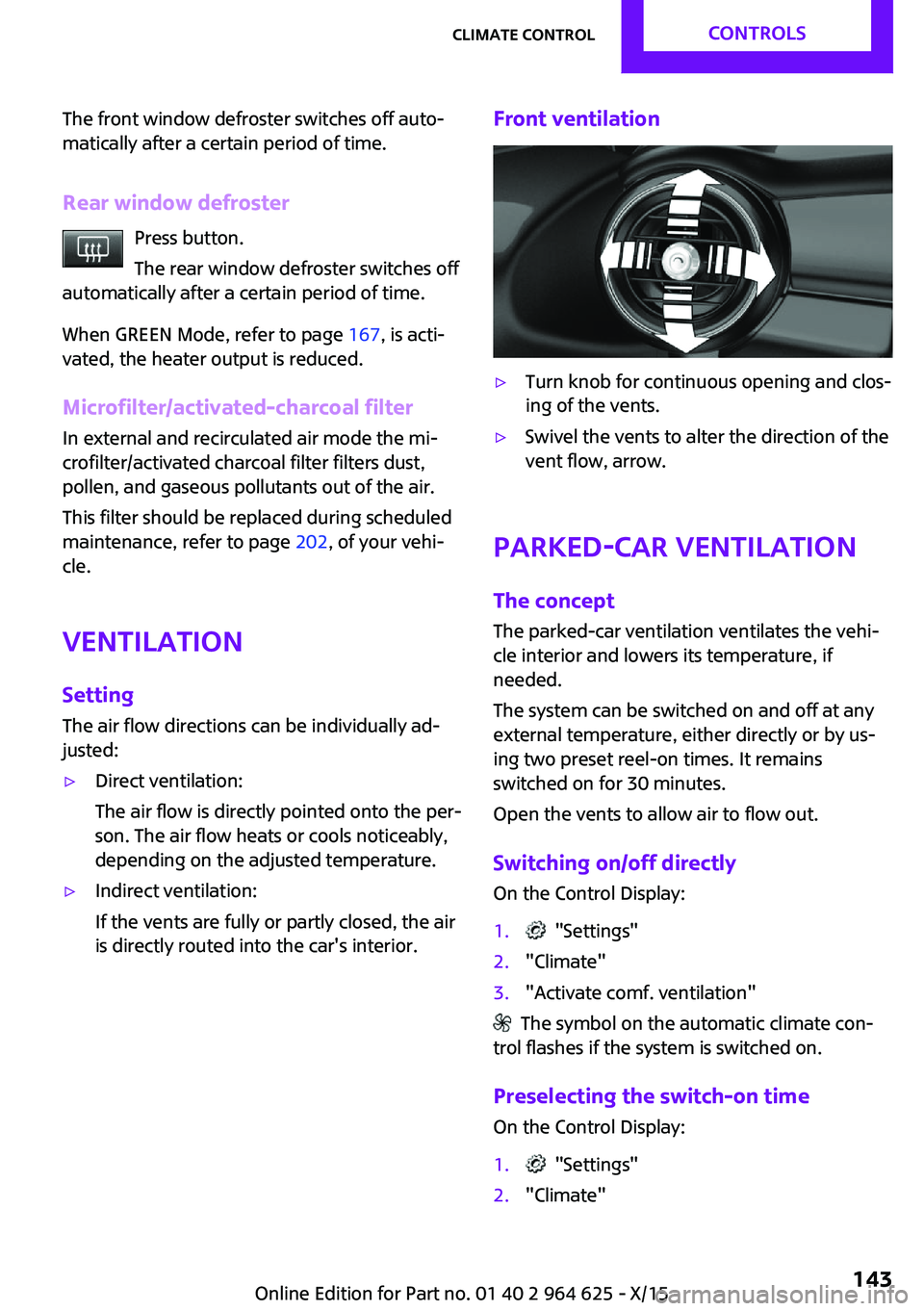
is directly routed into the car's interior.Front ventilation▷Turn knob for continuous opening and clos‐
ing of the vents.▷Swivel the vents to alter the direction of the
vent flow, arrow.
Parked-car ventilation
The concept
The parked-car ventilation ventilates the vehi‐
cle interior and lowers its temperature, if needed.
The system can be switched on and off at any
external temperature, either directly or by us‐
ing two preset reel-on times. It remains
switched on for 30 minutes.
Open the vents to allow air to flow out.
Switching on/off directly On the Control Display:
1. "Settings"2."Climate"3."Activate comf. ventilation"
The symbol on the automatic climate con‐
trol flashes if the system is switched on.
Preselecting the switch-on time
On the Control Display:
1. "Settings"2."Climate"Seite 143Climate controlCONTROLS143
Online Edition for Part no. 01 40 2 964 625 - X/15
Page 167 of 248

By maintaining a suitable distance to the vehi‐
cle driving ahead of you.
Driving smoothly and proactively reduces fuel
consumption.
Avoid high engine speeds
As a rule: driving at low engine speeds lowers
fuel consumption and reduces wear.
Use 1st gear to get the vehicle moving. Starting
with the 2nd gear, accelerate rapidly. When ac‐
celerating, shift up before reaching high engine
speeds.
When you reach the desired speed, shift into
the highest applicable gear and drive with the
engine speed as low as possible and at a con‐
stant speed.
The gear shift indicator, refer to page 83, of
your vehicle indicates the most fuel efficient gear.
Use coasting conditions When approaching a red light, take your foot
off the accelerator and let the vehicle coast to a
halt.
For going downhill take your foot off the accel‐
erator and let the vehicle roll.
The flow of fuel is interrupted while coasting.
Switch off the engine
during longer stops
Switch off the engine during longer stops, for
example, at traffic lights, railroad crossings or in
traffic congestion.
Auto Start/Stop function
The Auto Start/Stop function of your vehicle au‐
tomatically switches off the engine during a
stop.If the engine is switched off and then restarted
rather than leaving the engine running con‐
stantly, fuel consumption and emissions are re‐
duced. Savings can begin within a few seconds
of switching off the engine.
In addition, fuel consumption is also deter‐
mined by other factors, such as driving style,
road conditions, maintenance or environmental
factors.
Switch off any functions
that are not currently
needed
Functions such as seat heating and the rear
window defroster require a lot of energy and
consume additional fuel, especially in city and
stop-and-go traffic.
Therefore, switch off these functions if they are
not actually needed.
Have maintenance car‐
ried out
Have vehicles maintained regularly to achieve
optimal vehicle efficiency and service life. MINI
recommends that maintenance work be per‐
formed by a MINI service center.
Also note the MINI maintenance systems, refer
to page 202.
GREEN Mode
The concept The GREEN Mode supports a driving style that
saves on fuel consumption. For this purpose,
the engine control and comfort features, e. g.
the climate control output, are adjusted.
For Steptronic transmission:Seite 167Saving fuelDRIVING TIPS167
Online Edition for Part no. 01 40 2 964 625 - X/15
Page 202 of 248

MaintenanceVehicle features and op‐
tions
This chapter describes all standard, country-
specific and optional features offered with the
series. It also describes features that are not
necessarily available in your car, e. g., due to
the selected options or country versions. This
also applies to safety-related functions and sys‐
tems. The respectively applicable country provi‐
sions must be observed when using the respec‐
tive features and systems.
MINI maintenance system
The maintenance system indicates required
maintenance measures, and thereby provides
support in maintaining road safety and the op‐
erational reliability of the vehicle.
In some cases scopes and intervals may vary
according to the country-specific version. Re‐
placement work, spare parts, fuels and lubri‐
cants and wear materials are calculated sepa‐
rately. Further information is available from a
dealer’s service center or another qualified
service center or repair shop.
Condition Based Service
CBS
Sensors and special algorithms take into ac‐
count the driving conditions of your vehicle.
Based on this, Condition Based Service recog‐
nizes the maintenance requirements.
The system makes it possible to adapt the
amount of maintenance corresponding to your
user profile.Detailed information on service requirements,
refer to page 82, can be displayed on the Con‐
trol Display.
Service data in the remote control Information on the required maintenance is
continuously stored in the remote control. The
dealer’s service center can read this data out
and suggest an optimized maintenance scope
for your vehicle.
Therefore, hand the service advisor the remote
control with which the vehicle was driven most
recently.
Storage periods Storage periods during which the vehicle bat‐
tery was disconnected are not taken into ac‐
count.
If this occurs, have a dealer's service center or
another qualified service center or repair shop
update the time-dependent maintenance pro‐
cedures, such as checking brake fluid and, if
necessary, changing the engine oil and the mi‐
crofilter/activated-charcoal filter.
Service and Warranty In‐
formation Booklet for
US models and Warranty
and Service Guide Book‐
let for Canadian models
Please consult your Service and Warranty Infor‐
mation Booklet for US models and Warranty
and Service Guide Booklet for Canadian models
for additional information on service require‐
ments.
The manufacturer of your vehicle recommends
that maintenance and repair be performed by a
dealer’s service center or another qualifiedSeite 202MOBILITYMaintenance202
Online Edition for Part no. 01 40 2 964 625 - X/15
Page 239 of 248
Camera-based cruise con‐trol 120
Camera lenses, care 224
Camera, rearview cam‐ era 131
Can holder, see Cu‐ pholder 154
Car battery 214
Car care products 222
Care, displays 224
Care, vehicle 222
Cargo area 150
Cargo area, adapting size 155
Cargo area, enlarging 151
Cargo area lid 40
Cargo area, storage compart‐ ments 155
Cargo cover 150
Cargo, securing 164
Cargo straps, securing cargo 164
Car key, see Remote con‐ trol 34
Carpet, care 224
Car wash 221
Catalytic converter, see Hot exhaust system 161
CBS Condition Based Serv‐ ice 202
Center armrest 154
Center console 16
Central instrument cluster, LED ring 89
Central locking system 40
Central screen, refer to Control Display 18
Changes, technical, refer to Own Safety 7
Changing parts 204
Changing wheels 212
Changing wheels/tires 188
Chassis number, see vehicle identification number 10
Check Control 77
Checking the oil level elec‐ tronically 196 Children, seating position 58
Children, transporting safely 58
Child restraint fixing sys‐ tem 58
Child restraint fixing system LATCH 60
Child restraint fixing systems, mounting 59
Child safety locks 61
Child seat, mounting 59
Child seats 58
Chrome parts, care 223
Chrono package, cockpit 93
Cigarette lighter 149
Cleaning, displays 224
Climate control 138, 140
Clock 81
Closing/opening via door lock 39
Closing/opening with remote control 37
Clothes hooks 155
Coasting 170
Coasting with engine decou‐ pled, coasting 170
Coasting with idling en‐ gine 170
Combination switch, see Turn signals 67
Combi switch, see wiper sys‐ tem 68
Comfort Access 41
Compartments in the doors 154
Compass 147
Compressor 190
Condensation on win‐ dows 142
Condensation under the vehi‐ cle 162
Condition Based Service CBS 202
Configuring driving pro‐ gram 119
Confirmation signal 43 Control Display 18
Control Display, settings 88
Controller 19
Control systems, driving stabil‐ ity 116
Convenient opening 38
Coolant 200
Cooling function 139, 141
Cooling, maximum 141
Cooling system 200
Cornering lamp 97
Corrosion on brake discs 162
Cosmetic mirror 149
Courtesy lamps during unlock‐ ing 37
Courtesy lamps with the vehi‐ cle locked 38
Cruise control 126
Cruise control, active 120
Cruising range 82
Cupholder 154
Current fuel consumption 82
D
Damage, tires 188
Damping control, dy‐ namic 118
Data, technical 228
Date 81
Daytime running lights 97
Defrosting, see defrosting the windows 140
Defrosting, see Windows, de‐ frosting 142
Defrosting the windows 140
Dehumidifying, air 139, 141
Deleting personal data 24
Deletion of personal data 24
Destination distance 86
Digital clock 81
Digital compass 147
Dimensions 228
Dimmable exterior mirrors 56
Dimmable interior mirror 56 Seite 239Everything from A to ZREFERENCE239
Online Edition for Part no. 01 40 2 964 625 - X/15
Page 242 of 248

Interior mirror, automaticdimming feature 56
Interior mirror, manually dim‐ mable 56
Interior motion sensor 44
Interior rearview mirror, com‐ pass 147
Internet site 6
Interval display, service re‐ quirements 82
Interval mode 69
J Jacking points for the vehicle jack 212
Joystick, Steptronic transmis‐ sion 72
Jump-starting 216
K
Key/remote control 34
Keyless Go, see Comfort Ac‐ cess 41
Key Memory, see Personal Profile 36
Kickdown, Steptronic trans‐ mission 72
Knee airbag 101
L
Label on recommended tires 189
Lamp replacement 205
Lamp replacement, front 206
Lamp replacement, rear 208
Lamp replacement, side 211
Language on Control Dis‐ play 89
Lashing eyes, securing cargo 164
LATCH child restraint sys‐ tem 60
Launch Control 74 Leather, care 222
LED bug light 206
LED headlights 206
LED ring, central instrument cluster 89
LEDs, light-emitting di‐ odes 205
Letters and numbers, enter‐ ing 25
Light 95
Light-alloy wheels, care 223
Light-emitting diodes, LEDs 205
Lighter 149
Lighting 95
Lights and bulbs 205
Light switch 95
Load 164
Loading 163
Lock, door 39
Locking/unlocking via door lock 39
Locking/unlocking with re‐ mote control 37
Locking, automatic 43
Locking, settings 43
Lock, power window 46
Locks, doors, and windows 61
Low beams 95
Low beams, automatic, see High-beam Assistant 97
Lower back support, mechani‐ cal 50
Luggage rack, refer to Roof- mounted luggage rack 164
Lumbar support, mechani‐ cal 50
M
Maintenance 202
Maintenance require‐ ments 202
Maintenance, service require‐ ments 82 Maintenance system,
MINI 202
Make-up mirror 149
Malfunction displays, see Check Control 77
Manual air distribu‐ tion 139, 142
Manual air flow 139, 142
Manual mode, transmis‐ sion 73
Manual operation, door lock 39
Manual operation, exterior mirrors 55
Manual operation, fuel filler flap 176
Manual operation, Park Dis‐ tance Control PDC 129
Manual operation, rearview camera 131
Manual transmission 71
Manufacturer of the MINI 7
Marking, run-flat tires 190
Master key, see Remote con‐ trol 34
Maximum cooling 141
Maximum speed, display 83
Maximum speed, winter tires 189
Measurement, units of 89
Medical kit 216
Menu in instrument cluster 85
Menus, refer to onboard mon‐ itor operating concept 20
Messages, see Check Con‐ trol 77
Microfilter 140, 143
MID - program, driving dy‐ namics 118
MINI Connected, refer to Integrated Owner's Manual
MINI maintenance sys‐ tem 202
MINIMALISM Analyser 171
MINIMALISM info 170
MINI Motorer’s Guide app 6 Seite 242REFERENCEEverything from A to Z242
Online Edition for Part no. 01 40 2 964 625 - X/15
Page 244 of 248

Recommended fuelgrade 178
Recommended tire brands 189
Refueling 176
Remaining range 82
Remote control/key 34
Remote control, blocking 35
Remote control, malfunc‐ tion 39
Remote control, replacing the battery 34
Remote control, univer‐ sal 145
Replacement fuse 215
Replacing parts 204
Replacing the battery, remote control 34
Replacing wheels/tires 188
Reporting safety malfunc‐ tions 10
RES CNCL button, see camera- based cruise control 120
RES CNCL button, see Cruise control 126
Reserve warning, see Range 82
Reset, Tire Pressure Monitor TPM 104
Retaining straps, securing cargo 164
Retreaded tires 189
Roadside parking lights 96
RON recommended fuel grade 178
Roofliner 17
Roof load capacity 229
Roof-mounted luggage rack 164
RSC Run Flat System Compo‐ nent, see Run-flat tires 190
Rubber components, care 223
Run-flat tires 190 S
Safe braking 161
Safety belt reminder for driv‐ er's seat and front passenger
seat 52
Safety belts 51
Safety belts, care 224
Safety switch, windows 46
Safety systems, airbags 100
Saving fuel 166
Screen, refer to Control Dis‐ play 18
Screwdriver 204
Sealant 190
Seat belts, see Safety belts 51
Seat heating, front 51
Seating position for chil‐ dren 58
Seats 49
Selection list in instrument cluster 85
Selector lever, Steptronic transmission 72
Sensors, care 224
Service and warranty 8
Service requirements, Condi‐ tion Based Service CBS 202
Service requirements, dis‐ play 82
SET button, see camera-based cruise control 120
SET button, see Cruise con‐ trol 126
Settings, locking/unlocking 43
Settings, mirrors 55
Settings on Control Display 88
Shift paddles on the steering wheel 73
Shift point indicator, Head-Up Display 92
Side airbag 100
Signaling, horn 14
Signals when unlocking 43
Sitting safely 49
Size 228 Slide/tilt glass roof 47
Snow chains 193
Socket 149
Socket, OBD Onboard Diag‐ nostics 203
Spare fuse 215
Spare tire, see Emergency wheel 212
Speed, average 86
Speed limit detection, on‐ board computer 86
Speed limiter, display 83
Speed Limit Information 83
Speed warning 88
Split screen 23
Sport displays 87
Sport displays, Head-up Dis‐ play 92
Sport instruments, cockpit 93
SPORT program, Dynamic Driving Control 118
Sport program, transmis‐ sion 73
Stability control systems 116
Standard view, Head-up Dis‐ play 91
Start/stop, automatic func‐ tion 64
Start/Stop button 62
Start function during malfunc‐ tion 35
Starting the engine 63
Status control display, tires 104
Status information, onboard monitor 23
Status of Owner's Manual 7
Steering wheel, adjusting 57
Steptronic Sport transmission, see Steptronic transmis‐
sion 72
Steptronic transmission 72
Stopping the engine 63
Storage compartments 153
Storage, tires 189
Storing the vehicle 224 Seite 244REFERENCEEverything from A to Z244
Online Edition for Part no. 01 40 2 964 625 - X/15