change time MINI COOPER 2016 User Guide
[x] Cancel search | Manufacturer: MINI, Model Year: 2016, Model line: COOPER, Model: MINI COOPER 2016Pages: 251, PDF Size: 8.4 MB
Page 122 of 251

on the interior rearview mirror flashes. This
erases all programming of the buttons on
the interior rearview mirror.3.Hold the hand-held transmitter for the sys‐
tem to be controlled approx. 1 to 3 in/2.5
to 8 cm away from the buttons of the inte‐
rior rearview mirror. The required distance
depends on the manual transmitter.4.Simultaneously press and hold the button
of the desired function on the hand-held
transmitter and the button to be program‐
med on the interior rearview mirror. The
LED on the interior rearview mirror will be‐
gin flashing slowly.5.Release both buttons as soon as the LED
flashes more rapidly. The LED flashing
faster indicates that the button on the inte‐
rior rearview mirror has been programmed.
If the LED does not flash faster after at least
60 seconds, change the distance between
the interior rearview mirror and the hand-
held transmitter and repeat the step. Sev‐
eral more attempts at different distances
may be necessary. Wait at least 15 seconds
between attempts.
Canada: if programming with the hand-
held transmitter was interrupted, hold
down the interior rearview mirror button
and repeatedly press and release the hand-
held transmitter button for 2 seconds.6.To program other functions on other but‐
tons, repeat steps 3 to 5.
The systems can be controlled using the interior
rearview mirror buttons.
Special feature of the alternating-code
wireless system
If you are unable to operate the system after
repeated programming, please check if the sys‐
tem to be controlled features an alternating-
code system.
Read the system's operating manual, or press
the programmed button on the interior rear‐
view mirror longer. If the LED on the interior
rearview mirror starts flashing rapidly and then
stays lit constantly for 2 seconds, the system
features an alternating-code system. Flashing
and continuous illumination of the LED will re‐
peat for approximately 20 seconds.
For systems with an alternating-code system,
the Universal Integrated Remote Control and
the system also have to be synchronized.
Please read the operating manual to find out
how to synchronize the system.
Synchronizing is easier with the aid of a second
person.
To synchronize:1.Park the vehicle within range of the re‐
mote-controlled system.2.Program the relevant button on the interior
rearview mirror as described.3.Locate and press the synchronizing button
on the system being programmed. You
have approx. 30 seconds for the next step.4.Hold down the programmed button on the
interior rearview mirror for approximately
3 seconds and then release it. If necessary,
repeat this step up to three times in order
to finish synchronization. Once synchroni‐
zation is complete, the programmed func‐
tion will be carried out.
Reprogramming individual buttons
1.Switch on the ignition.2.Press and hold the interior rearview mirror
button to be programmed.3.As soon as the interior rearview mirror LED
starts flashing slowly, hold the hand-held
transmitter for the system to be controlled
approx. 1 to 3 in/2.5 to 8 cm away from the
buttons of the interior rearview mirror. The
required distance depends on the manual
transmitter.Seite 122CONTROLSInterior equipment122
Online Edition for Part no. 01 40 2 963 307 - VI/15
Page 144 of 251
The Coasting driving condition is enabled under
certain conditions.
Under certain conditions the engine is auto‐
matically decoupled from the transmission in
selector lever position D. The vehicle continues
traveling with the engine idling to reduce fuel
consumption. Selector lever position D remains
engaged. An indicator provides information
about the distance traveled in Coasting mode.
In addition, context-sensitive instructions are
displayed to assist with an optimized fuel con‐
sumption driving style.
The achieved extended range is displayed in
the instrument cluster.
Overview The system includes the following MINIMAL
functions and displays:▷GREEN bonus range, refer to page 144.▷GREEN tips driving instruction, refer to
page 145.▷GREEN climate control, refer to page 144.▷Coasting driving condition, refer to
page 145.
Activating GREEN mode
Turn Driving Dynamics Control to
the right until GREEN mode is
displayed in the instrument clus‐
ter.
Configuring GREEN mode
Via radio
1. "Settings"2.Select between "Driving mode" or "GREEN
Mode"
Configure the program.
GREEN tip
"GREEN speed warning":
Displays a reminder when the set GREEN mode
speed is exceeded.
GREEN climate control
"GREEN climate control":
Climate control is set to be fuel-efficient.
By making a slight change to the set tempera‐
ture, or adjusting the rate of heating or cooling
of the car's interior fuel consumption can be
economized.
The outputs of the seat heater and the exterior
Additionally heat output to seats and exterior
mirror is reduced.
Exterior mirror heat is available when outside
temperatures are very low.
Coasting
Fuel-efficiency can be optimized by disengag‐
ing the engine and Coasting, refer to page 145,
with the engine idling.
This function is only available in GREEN mode.
Display in the instrument cluster
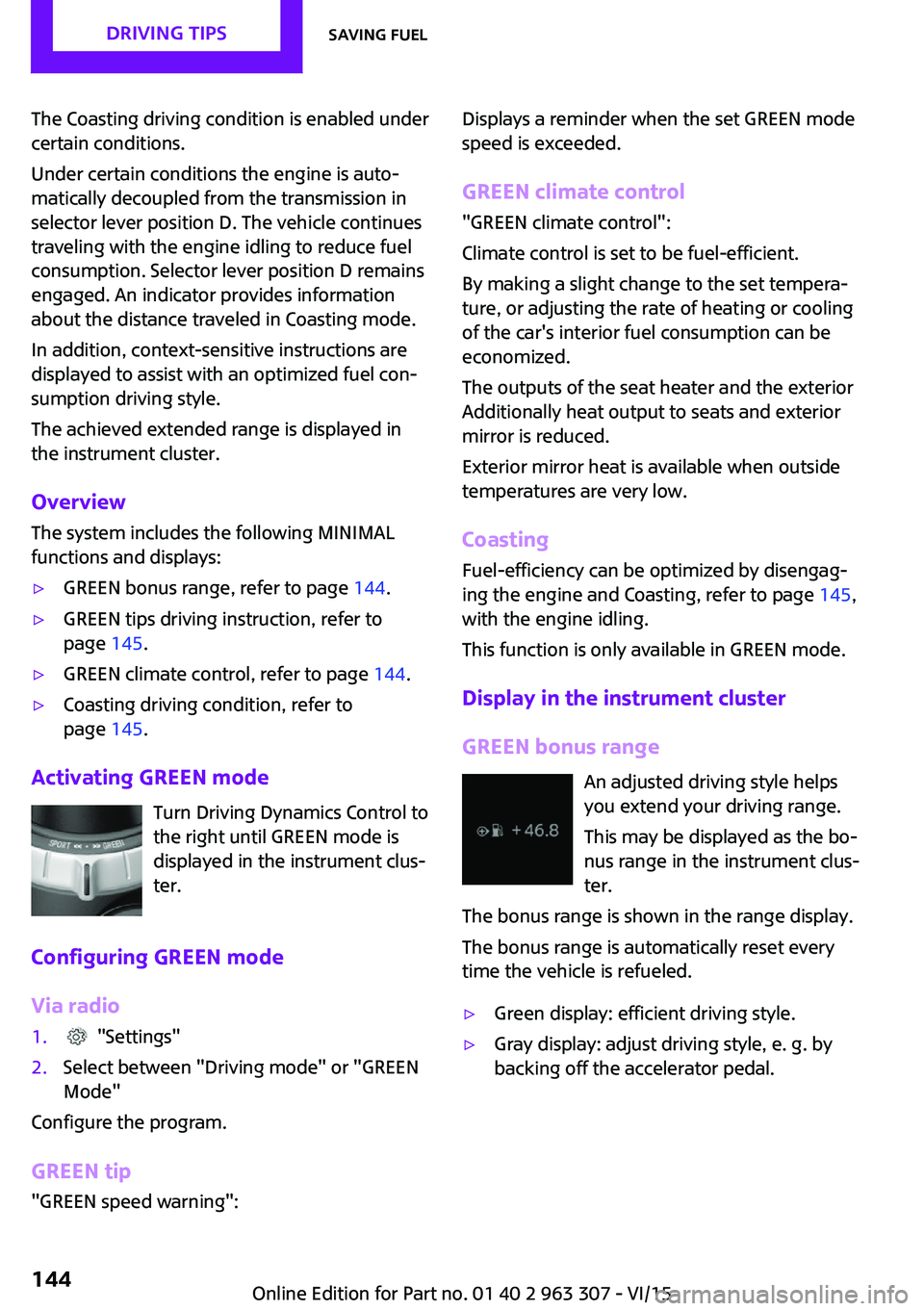
GREEN bonus range An adjusted driving style helps
you extend your driving range.
This may be displayed as the bo‐
nus range in the instrument clus‐
ter.
The bonus range is shown in the range display.
The bonus range is automatically reset every
time the vehicle is refueled.▷Green display: efficient driving style.▷Gray display: adjust driving style, e. g. by
backing off the accelerator pedal.Seite 144DRIVING TIPSSaving fuel144
Online Edition for Part no. 01 40 2 963 307 - VI/15
Page 156 of 251
MultimediaExternal devices
The concept Various external devices can be connected to
the vehicle. Sound is played back through the
vehicle loudspeakers. The system can be oper‐
ated via the radio, depending on how the ex‐
ternal device is connected to the vehicle.SymbolMeaning AUX-IN port. USB audio interface.
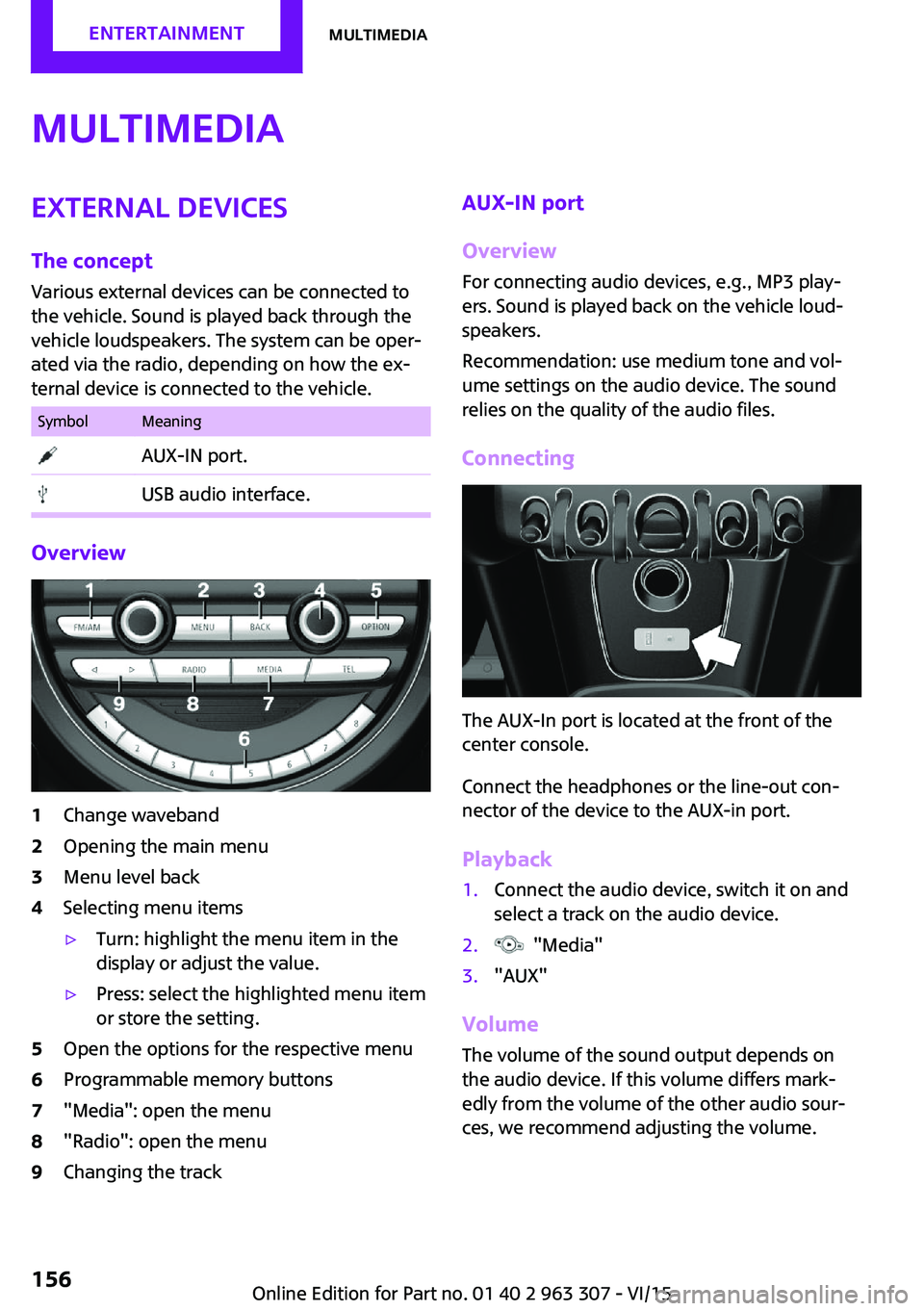
Overview
1Change waveband2Opening the main menu3Menu level back4Selecting menu items▷Turn: highlight the menu item in the
display or adjust the value.▷Press: select the highlighted menu item
or store the setting.5Open the options for the respective menu6Programmable memory buttons7"Media": open the menu8"Radio": open the menu9Changing the trackAUX-IN port
Overview
For connecting audio devices, e.g., MP3 play‐
ers. Sound is played back on the vehicle loud‐
speakers.
Recommendation: use medium tone and vol‐
ume settings on the audio device. The sound
relies on the quality of the audio files.
Connecting
The AUX-In port is located at the front of the
center console.
Connect the headphones or the line-out con‐
nector of the device to the AUX-in port.
Playback
1.Connect the audio device, switch it on and
select a track on the audio device.2. "Media"3."AUX"
Volume
The volume of the sound output depends on
the audio device. If this volume differs mark‐
edly from the volume of the other audio sour‐
ces, we recommend adjusting the volume.
Seite 156ENTERTAINMENTMultimedia156
Online Edition for Part no. 01 40 2 963 307 - VI/15
Page 197 of 251
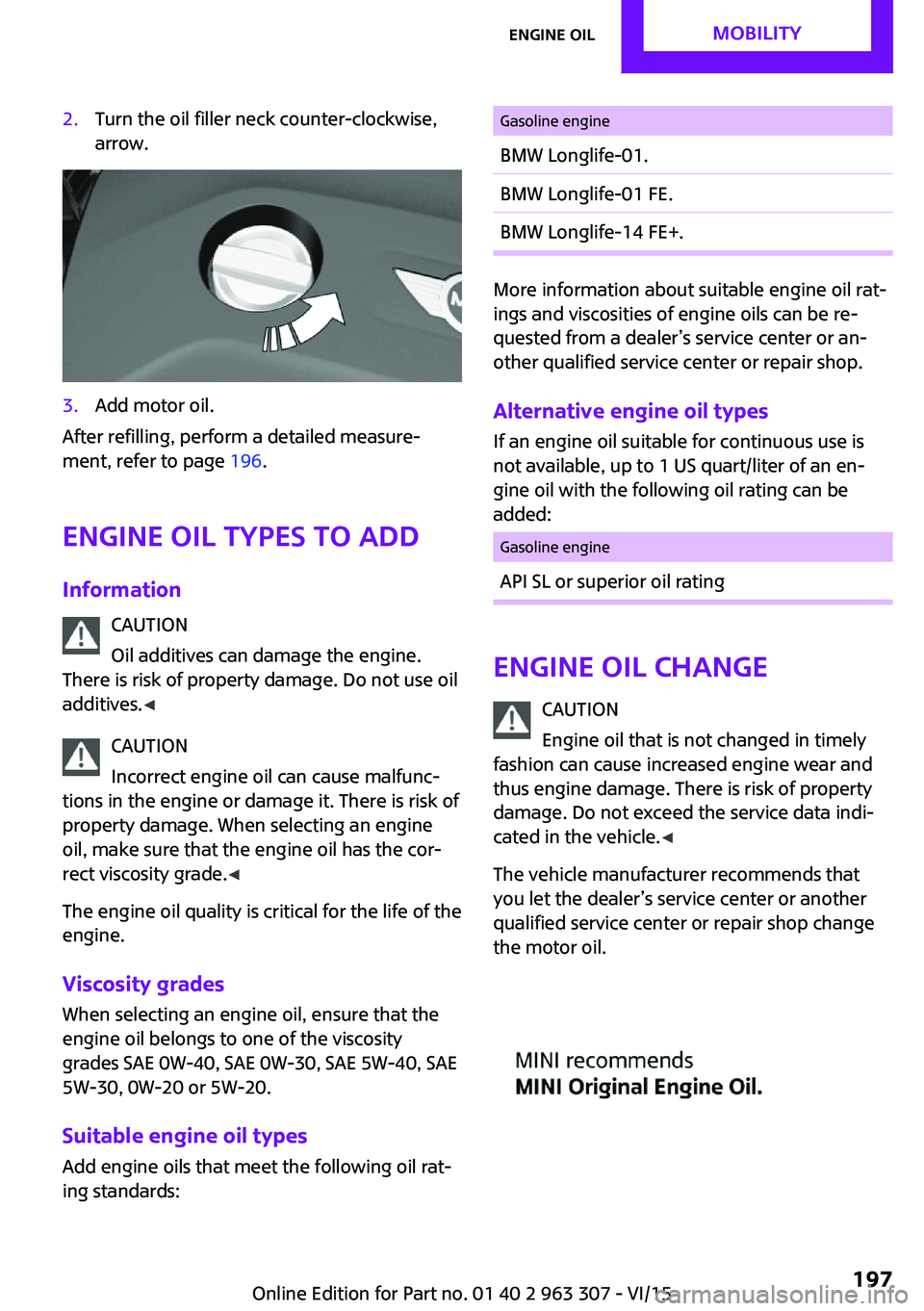
2.Turn the oil filler neck counter-clockwise,
arrow.3.Add motor oil.
After refilling, perform a detailed measure‐
ment, refer to page 196.
Engine oil types to add
Information CAUTION
Oil additives can damage the engine.
There is risk of property damage. Do not use oil
additives. ◀
CAUTION
Incorrect engine oil can cause malfunc‐
tions in the engine or damage it. There is risk of
property damage. When selecting an engine
oil, make sure that the engine oil has the cor‐
rect viscosity grade. ◀
The engine oil quality is critical for the life of the
engine.
Viscosity grades
When selecting an engine oil, ensure that the
engine oil belongs to one of the viscosity
grades SAE 0W-40, SAE 0W-30, SAE 5W-40, SAE
5W-30, 0W-20 or 5W-20.
Suitable engine oil types Add engine oils that meet the following oil rat‐
ing standards:
Gasoline engineBMW Longlife-01.BMW Longlife-01 FE.BMW Longlife-14 FE+.
More information about suitable engine oil rat‐
ings and viscosities of engine oils can be re‐
quested from a dealer’s service center or an‐
other qualified service center or repair shop.
Alternative engine oil types If an engine oil suitable for continuous use is
not available, up to 1 US quart/liter of an en‐
gine oil with the following oil rating can be
added:
Gasoline engineAPI SL or superior oil rating
Engine oil change
CAUTION
Engine oil that is not changed in timely
fashion can cause increased engine wear and
thus engine damage. There is risk of property
damage. Do not exceed the service data indi‐ cated in the vehicle. ◀
The vehicle manufacturer recommends that
you let the dealer’s service center or another
qualified service center or repair shop change
the motor oil.
Seite 197Engine oilMOBILITY197
Online Edition for Part no. 01 40 2 963 307 - VI/15
Page 203 of 251
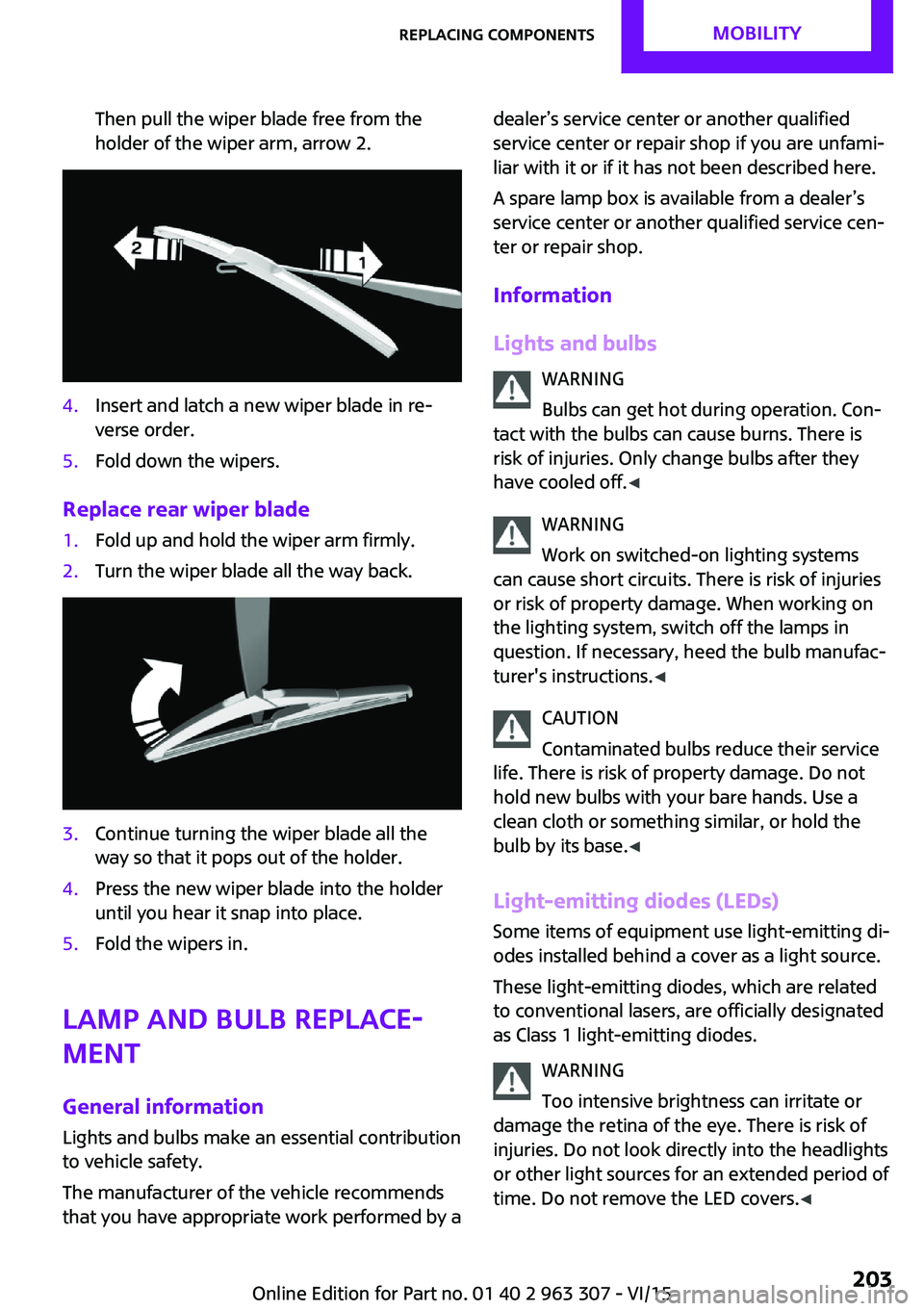
Then pull the wiper blade free from the
holder of the wiper arm, arrow 2.4.Insert and latch a new wiper blade in re‐
verse order.5.Fold down the wipers.
Replace rear wiper blade
1.Fold up and hold the wiper arm firmly.2.Turn the wiper blade all the way back.3.Continue turning the wiper blade all the
way so that it pops out of the holder.4.Press the new wiper blade into the holder
until you hear it snap into place.5.Fold the wipers in.
Lamp and bulb replace‐
ment
General information Lights and bulbs make an essential contribution
to vehicle safety.
The manufacturer of the vehicle recommends
that you have appropriate work performed by a
dealer’s service center or another qualified
service center or repair shop if you are unfami‐
liar with it or if it has not been described here.
A spare lamp box is available from a dealer’s
service center or another qualified service cen‐
ter or repair shop.
Information
Lights and bulbs WARNING
Bulbs can get hot during operation. Con‐
tact with the bulbs can cause burns. There is
risk of injuries. Only change bulbs after they
have cooled off. ◀
WARNING
Work on switched-on lighting systems
can cause short circuits. There is risk of injuries
or risk of property damage. When working on
the lighting system, switch off the lamps in
question. If necessary, heed the bulb manufac‐
turer's instructions. ◀
CAUTION
Contaminated bulbs reduce their service
life. There is risk of property damage. Do not
hold new bulbs with your bare hands. Use a
clean cloth or something similar, or hold the
bulb by its base. ◀
Light-emitting diodes (LEDs)
Some items of equipment use light-emitting di‐
odes installed behind a cover as a light source.
These light-emitting diodes, which are related
to conventional lasers, are officially designated
as Class 1 light-emitting diodes.
WARNING
Too intensive brightness can irritate or
damage the retina of the eye. There is risk of
injuries. Do not look directly into the headlights
or other light sources for an extended period of
time. Do not remove the LED covers. ◀Seite 203Replacing componentsMOBILITY203
Online Edition for Part no. 01 40 2 963 307 - VI/15
Page 204 of 251
Headlight glass
Condensation can form on the inside of the ex‐
ternal lights in cool or humid weather. When
driving with the lights switched on, the conden‐
sation evaporates after a short time. The head‐
light glass does not need to be changed.
If despite driving with the lights switched on,
increasing humidity forms, e. g. water droplets
in the lamp, the manufacturer of your vehicle
recommends having it checked by a dealer’s
service center or another qualified service cen‐
ter or repair shop.
Front lights, bulb replacement
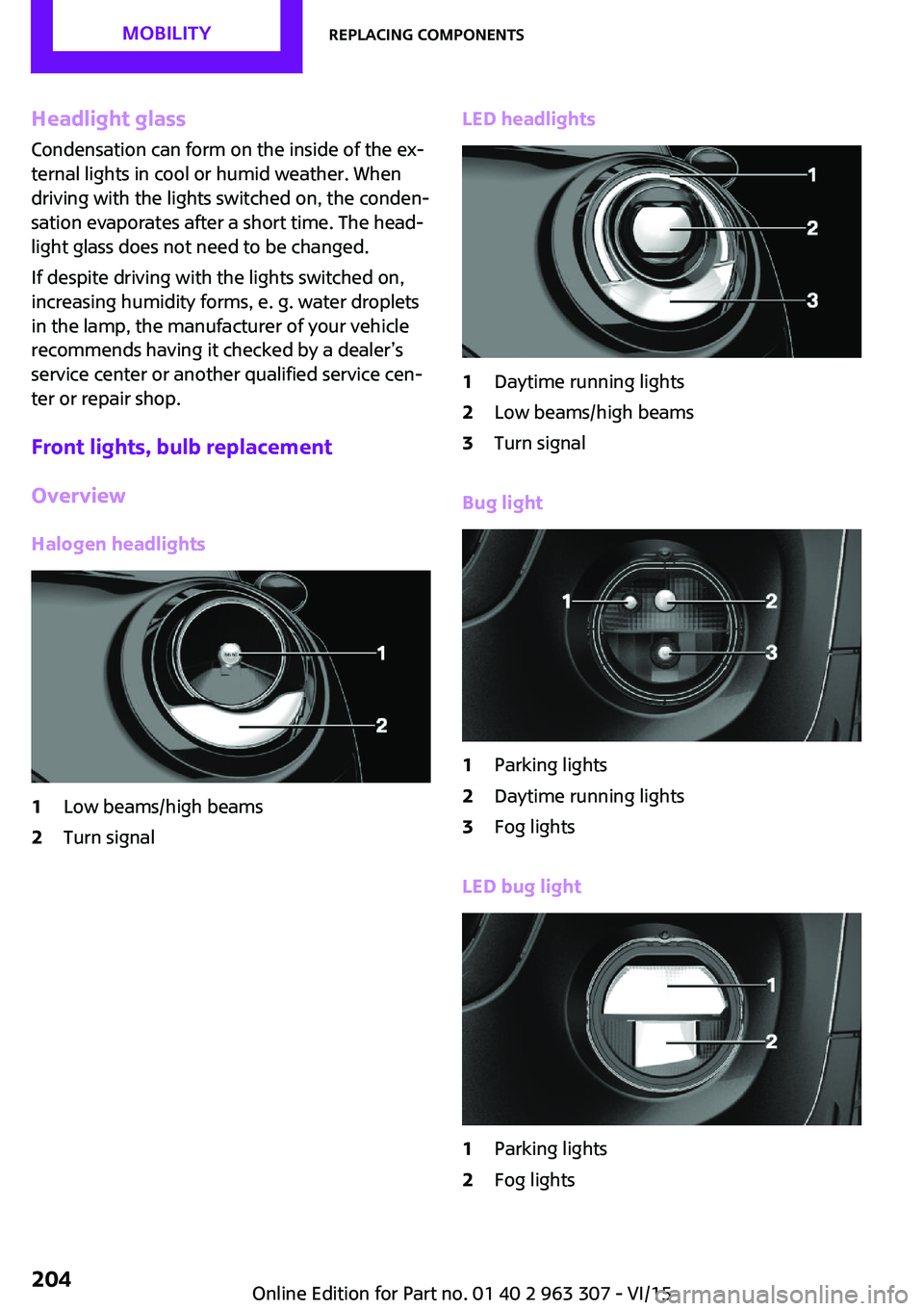
Overview Halogen headlights1Low beams/high beams2Turn signalLED headlights1Daytime running lights2Low beams/high beams3Turn signal
Bug light
1Parking lights2Daytime running lights3Fog lights
LED bug light
1Parking lights2Fog lightsSeite 204MOBILITYReplacing components204
Online Edition for Part no. 01 40 2 963 307 - VI/15
Page 212 of 251

3.Check tire inflation pressure at the next op‐
portunity and correct as needed.4.Reinitialize the Flat Tire Monitor, refer to
page 88.
Reinitialize the Tire Pressure Monitor, refer
to page 85.5.Check to make sure the lug bolts are tight
with a calibrated torque wrench.
Driving with emergency wheel
WARNING
The emergency wheel has particular di‐
mensions. When driving with an emergency wheel, changed driving properties may occur at
higher speeds, e.g. reduced lane stability when
braking, longer braking distance and changed
self-steering properties in the limit area. There
is risk of an accident. Drive moderately and do
not exceed a speed of 50 mph/80 km/h. ◀
After the trip with emergency wheel
Have the following work performed by a deal‐
er's service center or another qualified service
center or repair shop.
1.Replace the damaged tires as soon as pos‐
sible.2.Replace the emergency wheel with a new
wheel.3.Have the tray with the emergency wheel
installed.
Vehicle battery
Maintenance
The battery is maintenance-free.
The added amount of acid is sufficient for the
service life of the battery.
More information about the battery can be re‐
quested from a dealer’s service center or an‐
other qualified service center or repair shop.
Battery replacement
CAUTION
Vehicle batteries that are not compatible
can damage vehicle systems and impair vehicle
functions.There is risk of property damage. In‐ formation on the compatible vehicle batteries is
available at your dealer's service center. ◀
After a battery replacement, the manufacturer
of your vehicle recommends that the vehicle
battery be registered on the vehicle by a
dealer’s service center or another qualified
service center or repair shop to ensure that all
comfort features are fully available and that
any Check Control messages of these comfort
features are no longer displayed.
Charging the battery
General information Make sure that the battery is always sufficiently
charged to guarantee that the battery remains
usable for its full service life.
The battery may need to be charged in the fol‐
lowing cases:▷When making frequent short-distance
drives.▷If the vehicle is not used for prolonged peri‐
ods, longer than a month.▷Steptronic transmission: when parked for
long periods of time in selector lever posi‐
tion D, R or N.
Information
CAUTION
Battery chargers for the vehicle battery
can work with high voltages and currents, which means that the 12V on-board network
can be overloaded or damaged. There is risk of
property damage. Only connect battery charg‐
ers for the vehicle battery to the starting aid
terminals in the engine compartment. ◀
Seite 212MOBILITYReplacing components212
Online Edition for Part no. 01 40 2 963 307 - VI/15
Page 243 of 251

C
California Proposition 65 Warning 7
Camera-based cruise con‐ trol 101
Camera lenses, care 223
Can holder, see Cu‐ pholder 130
Car battery 212
Car care products 221
Care, displays 223
Care, vehicle 221
Cargo area 126
Cargo area, adapting size 131
Cargo area, enlarging 127
Cargo area lid 27
Cargo area, storage compart‐ ments 131
Cargo cover 126
Cargo, securing 140
Cargo straps, securing cargo 140
Car key, see Remote con‐ trol 22
Carpet, care 223
Car wash 220
Catalytic converter, see Hot exhaust system 137
CBS Condition Based Serv‐ ice 200
Center armrest 130
Center console 16
Central instrument cluster, LED ring 73
Central locking system 26
Changes, technical, refer to Own Safety 7
Changing parts 202
Changing the station 152
Changing wheels 210
Changing wheels/tires 186
Chassis number, see vehicle identification number 9
Check Control 63 Checking the oil level elec‐
tronically 195
Children, seating position 45
Children, transporting safely 45
Child restraint fixing sys‐ tem 45
Child restraint fixing system LATCH 47
Child restraint fixing systems, mounting 46
Child safety locks 48
Child seat, mounting 46
Child seats 45
Chrome parts, care 222
Chrono package, cockpit 74
Cigarette lighter 125
Cleaning, displays 223
Climate control 115, 117
Clock 67
Closing/opening via door lock 26
Closing/opening with remote control 24
Clothes hooks 131
Coasting 145
Coasting with engine decou‐ pled, coasting 145
Coasting with idling en‐ gine 145
Combination switch, see Turn signals 54
Combi switch, see wiper sys‐ tem 55
Comfort Access 28
Compartments in the doors 130
Compass 123
Compressor 188
Condensation on win‐ dows 119
Condensation under the vehi‐ cle 138
Condition Based Service CBS 200
Confirmation signal 30 Control systems, driving stabil‐
ity 97
Convenient opening 24
Coolant 198
Cooling function 116, 118
Cooling, maximum 118
Cooling system 198
Cornering lamp 78
Corrosion on brake discs 138
Cosmetic mirror 125
Courtesy lamps during unlock‐ ing 24
Courtesy lamps with the vehi‐ cle locked 25
Cruise control 106
Cruise control, active 101
Cruising range 67
Cupholder 130
Current fuel consumption 68
D
Damage, tires 186
Damping control, dynamic 99
Data, technical 226
Date 67
Date, radio 73
Date, setting on radio 73
Daytime running lights 78
Defrosting, refer to defrosting the windows 116
Defrosting, see Windows, de‐ frosting 119
Defrosting the windows 116
Dehumidifying, air 116, 118
Digital clock 67
Digital compass 123
Digital radio 153
Dimensions 226
Dimmable exterior mirrors 43
Dimmable interior rearview mirror 43
Direction indicator, see Turn signals 54
Display, electronic, instrument cluster 63 Seite 243Everything from A to ZREFERENCE243
Online Edition for Part no. 01 40 2 963 307 - VI/15
Page 248 of 251

RON recommended fuelgrade 176
Roofliner 17
Roof load capacity 227
Roof-mounted luggage rack 140
Rope for tow-starting/ towing 217
RSC Run Flat System Compo‐ nent, see Run-flat tires 187
Rubber components, care 222
Run-flat tires 187
S
Safe braking 137
Safety belt reminder for driv‐ er's seat and front passenger
seat 39
Safety belts 38
Safety belts, care 222
Safety switch, windows 33
Safety systems, airbags 81
Satellite radio 154
Saving fuel 142
Screwdriver 202
Screw thread for tow fit‐ ting 218
Sealant 188
Seat belts, see Safety belts 38
Seat heating, front 38
Seating position for chil‐ dren 45
Seats 36
Select a station 151
Selecting a station man‐ ually 152
Selection list in instrument cluster 70
Selector lever, Steptronic transmission 58
Sensors, care 223
Service and warranty 8
Service requirements, Condi‐ tion Based Service CBS 200 Service requirements, dis‐
play 68
SET button, see camera-based cruise control 101
SET button, see Cruise con‐ trol 106
Settings and information 72
Settings, locking/unlocking 29
Settings, mirrors 42
Shift paddles on the steering wheel 60
Side airbag 81
Signaling, horn 14
Signals when unlocking 30
Sitting safely 36
Size 226
Slide/tilt glass roof 33
Snow chains 191
Socket 125
Socket, OBD Onboard Diag‐ nostics 201
Sound settings 150
Spare fuse 213
Spare tire, refer to Emergency wheel 210
Speed, average 72
Speed limit detection, on- board computer 72
Speed limiter, display 69
Speed Limit Information 69
Speed warning 72
Sport instruments, cockpit 74
SPORT program, Dynamic Driving Control 99
Sport program, transmis‐ sion 59
Stability control systems 97
Start/stop, automatic func‐ tion 51
Start/Stop button 49
Start function during malfunc‐ tion 23
Starting the engine 50
Station, storing 152
Status of Owner's Manual 7
Steering wheel, adjusting 44 Steptronic Sport transmission,
refer to Steptronic transmis‐
sion 58
Steptronic transmission 58
Stopping the engine 50
Storage compartments 129
Storage, tires 187
Storing the vehicle 223
Suitable engine oil types 197
Summer tires, tread 185
Sun visor 125
Supplementary text mes‐ sages 66
Switch for Dynamic Driving 99
Switch, see Cockpit 14
Symbols 6
T Tachometer 67
Tailgate 27
Tailgate via remote control 25
Tail lights 206
Technical changes, refer to Own Safety 7
Technical data 226
Temperature, air condi‐ tioner 116
Temperature, automatic cli‐ mate control 118
Temperature display for exter‐ nal temperature 67
Temperature display, setting units 72
Temperature, engine 72
Tempomat, see camera-based cruise control 101
Terminal, starting aid 215
Text messages, supplemen‐ tary 66
Theft alarm system, see Alarm system 30
Thigh support 37
Tilt alarm sensor 31
Time, radio, setting time on the radio 73 Seite 248REFERENCEEverything from A to Z248
Online Edition for Part no. 01 40 2 963 307 - VI/15