oil MINI COOPER 2016 User Guide
[x] Cancel search | Manufacturer: MINI, Model Year: 2016, Model line: COOPER, Model: MINI COOPER 2016Pages: 251, PDF Size: 8.4 MB
Page 196 of 251

Take care not to add too much engine oil.CAUTION
Too much engine oil can damage the en‐
gine or the catalytic converter. There is risk of
property damage. Do not add too much engine
oil. Have too much engine oil siphoned off by a
dealer’s service center or another qualified
service center or repair shop. ◀
Detailed measurement
The concept
In the detailed measurement the engine oil
level is checked and displayed via a scale.
If the engine oil level reaches the minimum
level, a check control message is displayed.
During the measurement, the idle speed is in‐
creased somewhat.
Requirements▷Vehicle is on level road.▷Manual transmission: shift lever in neutral
position, clutch and accelerator pedals not
depressed.▷Steptronic transmission: selector lever in se‐
lector lever position N or P and accelerator
pedal not depressed.▷Engine is running and is at operating tem‐
perature.
Performing a detailed measurement
In order to perform a detailed measurement of
the engine oil level:
Confirm message regarding engine oil level dis‐ play.
The engine oil level is checked and displayed
via a scale.
Time: approx. 1 minute.
Adding engine oil
Information CAUTION
A too low engine oil level causes engine
damage. There is risk of property damage.
Add engine oil within the next
125 miles/200 km. ◀
CAUTION
Too much engine oil can damage the en‐
gine or the catalytic converter. There is risk of
property damage. Do not add too much engine
oil. Have too much engine oil siphoned off by a
dealer’s service center or another qualified
service center or repair shop. ◀
WARNING
Operating materials, e.g. oils, greases,
coolants, fuels, can contain harmful ingredi‐
ents. There is risk of injuries or danger to life.
Observe the instructions on the containers. Avoid the contact of articles of clothing, skin or
eyes with operating materials. Do not refill op‐
erating materials into different bottles. Store
operating materials out of reach of children. ◀
General information
Only add engine oil when the message is dis‐
played in the instrument cluster. The quantity
to be added is indicated in the message dis‐
played in the instrument cluster.
Switch off the ignition and safely park the vehi‐
cle before engine oil is added.
Overview The oil filler neck is located in the engine com‐
partment, refer to page 193.
Opening the oil filler neck1.Open the hood, refer to page 194.Seite 196MOBILITYEngine oil196
Online Edition for Part no. 01 40 2 963 307 - VI/15
Page 197 of 251
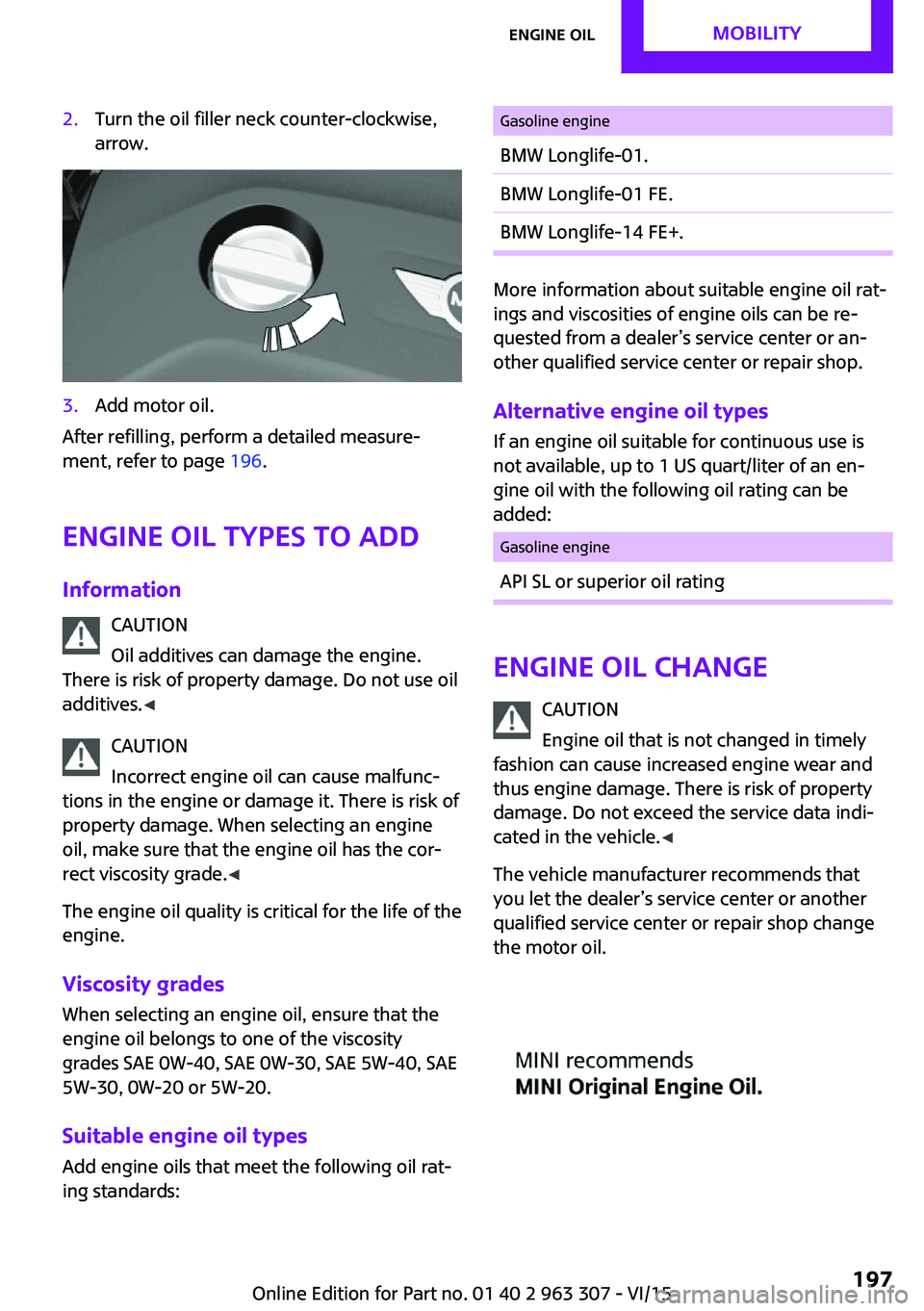
2.Turn the oil filler neck counter-clockwise,
arrow.3.Add motor oil.
After refilling, perform a detailed measure‐
ment, refer to page 196.
Engine oil types to add
Information CAUTION
Oil additives can damage the engine.
There is risk of property damage. Do not use oil
additives. ◀
CAUTION
Incorrect engine oil can cause malfunc‐
tions in the engine or damage it. There is risk of
property damage. When selecting an engine
oil, make sure that the engine oil has the cor‐
rect viscosity grade. ◀
The engine oil quality is critical for the life of the
engine.
Viscosity grades
When selecting an engine oil, ensure that the
engine oil belongs to one of the viscosity
grades SAE 0W-40, SAE 0W-30, SAE 5W-40, SAE
5W-30, 0W-20 or 5W-20.
Suitable engine oil types Add engine oils that meet the following oil rat‐
ing standards:
Gasoline engineBMW Longlife-01.BMW Longlife-01 FE.BMW Longlife-14 FE+.
More information about suitable engine oil rat‐
ings and viscosities of engine oils can be re‐
quested from a dealer’s service center or an‐
other qualified service center or repair shop.
Alternative engine oil types If an engine oil suitable for continuous use is
not available, up to 1 US quart/liter of an en‐
gine oil with the following oil rating can be
added:
Gasoline engineAPI SL or superior oil rating
Engine oil change
CAUTION
Engine oil that is not changed in timely
fashion can cause increased engine wear and
thus engine damage. There is risk of property
damage. Do not exceed the service data indi‐ cated in the vehicle. ◀
The vehicle manufacturer recommends that
you let the dealer’s service center or another
qualified service center or repair shop change
the motor oil.
Seite 197Engine oilMOBILITY197
Online Edition for Part no. 01 40 2 963 307 - VI/15
Page 200 of 251

MaintenanceVehicle features and op‐
tions
This chapter describes all standard, country-
specific and optional features offered with the
series. It also describes features that are not
necessarily available in your car, e. g., due to
the selected options or country versions. This
also applies to safety-related functions and sys‐
tems. The respectively applicable country provi‐
sions must be observed when using the respec‐
tive features and systems.
MINI maintenance system
The maintenance system indicates required
maintenance measures, and thereby provides
support in maintaining road safety and the op‐
erational reliability of the vehicle.
In some cases scopes and intervals may vary
according to the country-specific version. Re‐
placement work, spare parts, fuels and lubri‐
cants and wear materials are calculated sepa‐
rately. Further information is available from a
dealer’s service center or another qualified
service center or repair shop.
Condition Based Service
CBS
Sensors and special algorithms take into ac‐
count the driving conditions of your vehicle.
Based on this, Condition Based Service recog‐
nizes the maintenance requirements.
The system makes it possible to adapt the
amount of maintenance corresponding to your
user profile.
Detailed information on service requirements,
refer to page 68, can be displayed on the radio.Service data in the remote control
Information on the required maintenance is
continuously stored in the remote control. The
dealer’s service center can read this data out
and suggest an optimized maintenance scope
for your vehicle.
Therefore, hand the service advisor the remote
control with which the vehicle was driven most
recently.
Storage periods
Storage periods during which the vehicle bat‐
tery was disconnected are not taken into ac‐
count.
If this occurs, have a dealer's service center or
another qualified service center or repair shop
update the time-dependent maintenance pro‐
cedures, such as checking brake fluid and, if
necessary, changing the engine oil and the mi‐
crofilter/activated-charcoal filter.
Service and Warranty In‐
formation Booklet for
US models and Warranty
and Service Guide Book‐
let for Canadian models
Please consult your Service and Warranty Infor‐
mation Booklet for US models and Warranty
and Service Guide Booklet for Canadian models
for additional information on service require‐
ments.
The manufacturer of your vehicle recommends
that maintenance and repair be performed by a
dealer’s service center or another qualified
service center or repair shop. Records of regu‐
lar maintenance and repair work should be re‐
tained.Seite 200MOBILITYMaintenance200
Online Edition for Part no. 01 40 2 963 307 - VI/15
Page 220 of 251

CareVehicle features and op‐tions
This chapter describes all standard, country-
specific and optional features offered with the series. It also describes features that are not
necessarily available in your car, e. g., due to
the selected options or country versions. This
also applies to safety-related functions and sys‐
tems. The respectively applicable country provi‐
sions must be observed when using the respec‐
tive features and systems.
Car washes
General information Regularly remove foreign objects such as leaves
in the area below the windshield when the
hood is raised.
Wash your vehicle frequently, particularly in
winter. Intense soiling and road salt can dam‐
age the vehicle.
Steam jets or high-pressure washers
Information CAUTION
When cleaning with high-pressure wash‐
ers, components can be damaged due to the
pressure or temperatures being too high. There
is risk of property damage. Maintain sufficient
distance and do not spray too long continu‐
ously. Follow the user's manual for the high-
pressure washer. ◀
Distances and temperature▷Maximum temperature: 140 ℉/60 ℃.▷Minimum distance from sensors, cameras,
seals: 12 in/30 cm.▷Minimum distance from glass sunroof:
31.5 inches/80 cm.
Automatic car washes
Information
▷Give preference to cloth car washes or
those that use soft brushes in order to
avoid paint damage.▷Make sure that the wheels and tires are not
damaged by the transport mechanisms.▷Fold in the exterior mirrors; otherwise, they
may be damaged, depending on the width
of the vehicle.▷Unscrew the rod antenna.▷Deactivate the rain sensor, refer to
page 56, to avoid unintentional wiper acti‐
vation.▷In some cases, an unintentional alarm can
be triggered by the interior motion sensor
of the alarm system. Follow the instructions
on avoiding an unintentional alarm, refer to
page 31.
CAUTION
Too high guide rails in car washes can
damage body parts. There is risk of property
damage. Avoid car washes with guide rails
higher than 4 in/10 cm. ◀
Before driving into a car wash
In order to ensure that the vehicle can roll in a
car wash, take the following steps:
Manual transmission:
1.Drive into the car wash.2.Shift to neutral.3.Switch the engine off.4.Switch on the ignition.Seite 220MOBILITYCare220
Online Edition for Part no. 01 40 2 963 307 - VI/15
Page 221 of 251
Steptronic transmission:1.Drive into the car wash.2.Engage selector lever position N.3.Make sure that the parking brake is re‐
leased.4.Press the Start/Stop button to switch off the
engine.
In this way, the ignition remains switched
on, and two Check-Control messages are
displayed.
A signal sounds when you leave the vehicle
while in selector lever position N.
The vehicle cannot be locked from the outside
when in selector lever position N. A signal is
sounded when an attempt is made to lock the
vehicle.
To start the engine with manual transmission:
1.Press on the clutch pedal.2.Press the Start/Stop button.
To start the engine with Steptronic transmis‐
sion:
1.Depress the brake pedal.2.Press the Start/Stop button.
Headlights
▷Do not rub dry and do not use abrasive or
acidic cleansers.▷Soak areas that have been dirtied e. g.,
from insects, with shampoo and wash off
with water.▷Thaw ice with de-icing spray; do not use an
ice scraper.
After washing the vehicle
After washing the vehicle, apply the brakes
briefly to dry them; otherwise, braking action
can be reduced and corrosion of the brake
discs can occur.
Completely remove all residues on the win‐
dows, to minimize loss of visibility due to
smearing and to reduce wiper noises and wiper
blade wear.
Vehicle care Car care products
The manufacturer of your vehicle recommends
using care and cleaning products from MINI.
WARNING
Cleansers can contain substances that are
dangerous and harmful to your health. There is
risk of injuries. When cleaning the interior, open
the doors or windows. Only use products in‐
tended for cleaning vehicles. Follow the instruc‐
tions on the container. ◀
Vehicle paint
Regular care contributes to driving safety and
value retention. Environmental influences in
areas with elevated air pollution or natural con‐
taminants, such as tree resin or pollen can af‐
fect the vehicle's paintwork. Tailor the fre‐
quency and extent of your car care to these
influences.
Aggressive substances such as spilled fuel, oil,
grease or bird droppings must be removed im‐
mediately to prevent the finish from being al‐
tered or discolored.
Leather careRemove dust from the leather often, using acloth or vacuum cleaner.
Otherwise, particles of dust and road grime
chafe in pores and folds, and lead to increased
wear and premature degradation of the leather
surface.
To guard against discoloration, such as from
clothing, provide leather care roughly every
two months.
Clean light-colored leather more frequently be‐
cause soiling on such surfaces is substantially
more visible.Seite 221CareMOBILITY221
Online Edition for Part no. 01 40 2 963 307 - VI/15
Page 222 of 251
Use leather care products; otherwise, dirt and
grease will gradually break down the protective
layer of the leather surface.
Suitable care products are available from a
dealer’s service center or another qualified
service center or repair shop.
Upholstery material care
Vacuum regularly with a vacuum cleaner.
If upholstery is very dirty, e.g., with beverage
stains, use a soft sponge or microfiber cloth
with a suitable interior cleaner.
Clean the upholstery down to the seams using
large sweeping motions. Avoid rubbing the ma‐
terial vigorously.
CAUTION
Open Velcro® fasteners on articles of
clothing can damage the seat covers. There is
risk of property damage. Ensure that any Vel‐
cro® fasteners are closed. ◀
Caring for special components
Light-alloy wheels
When cleaning the vehicle, use only neutral
wheel cleaners having a pH value from 5 to 9.
Do not use abrasive cleaning agents or steam
jets above 140 ℉/60 ℃. Follow the manufac‐
turer's instructions.
Aggressive, acidic or alkaline cleaning agents can destroy the protective layer of adjacent
components, such as the brake disk.
Chrome surfaces
Carefully clean components such as the radia‐
tor grille or door handles with an ample supply
of water, possibly with shampoo added, partic‐
ularly when they have been exposed to road
salt.
Rubber components Environmental influences can cause surface
soiling of rubber parts and a loss of gloss. Forcleaning, use only water and suitable care
products, the manufacturer of your vehicle rec‐
ommends original MINI care products.
Treat especially worn rubber parts with rubber
care agents at regular intervals. When cleaning
rubber seals, do not use any silicon-containing
car care products in order to avoid damage or
noises.
Fine wood parts Clean fine wood facing and fine wood compo‐
nents only with a moist rag. Then dry with a
soft cloth.
Plastic components These include:▷Imitation leather surfaces.▷Roofliner.▷Lamp lenses.▷Instrument cluster cover.▷Matt black spray-coated components.▷Painted parts in the interior.
Clean with a microfiber cloth.
Dampen cloth lightly with water.
Do not soak the roofliner.
CAUTION
Cleansers that contain alcohol or solvents,
such as lacquer thinners, heavy-duty grease re‐
movers, fuel, or such, can damage plastic parts.
There is risk of property damage. Clean with a
microfiber cloth. Dampen cloth lightly with wa‐
ter. ◀
Safety belts
Dirty belt straps impede the reeling action and
thus have a negative impact on safety.
WARNING
Chemical cleansers can destroy the safety
belt webbing. Missing protective effect of the
safety belts. There is risk of injuries or danger to
Seite 222MOBILITYCare222
Online Edition for Part no. 01 40 2 963 307 - VI/15
Page 226 of 251

Technical dataVehicle features and op‐
tions
This chapter describes all standard, country-
specific and optional features offered with the
series. It also describes features that are not
necessarily available in your car, e. g., due to
the selected options or country versions. This
also applies to safety-related functions and sys‐
tems. The respectively applicable country provi‐
sions must be observed when using the respec‐
tive features and systems.
Information
The technical data and specifications in this
Owner's Manual are used as guidance values.
The vehicle-specific data can deviate from this,
for example, due to the selected special equip‐
ment, country version or country-specific
measurement method. Detailed values can be
found in the approval documents, on labels on
the vehicle or can be obtained from a dealer’s
service center or another qualified service cen‐
ter or repair shop.
The information in the vehicle documents al‐
ways has priority.
Dimensions
The dimensions can vary depending on the
model version, equipment or country-specific
measurement method.
The specified heights do not take into account
attached parts, for example, a roof antenna,
roof racks or spoiler. The heights can deviate,
for example, due to the selected special equip‐
ment, tires, load and chassis version.
Seite 226REFERENCETechnical data226
Online Edition for Part no. 01 40 2 963 307 - VI/15
MINI 3-doorWidth with mirrorsinches/mm76.1/1,932Width without mirrorsinches/mm68.0/1,727Heightinches/mm55.7/1,414LengthCooperinches/mm151.1/3,837Cooper Sinches/mm151.9/3,858John Cooper Worksinches/mmWheelbaseinches/mm98.2/2,495Smallest turning radius diam.ft/m35.4/10.8152.5/3,874
Page 242 of 251

Everything from A to ZIndexA
ABS, Antilock Brake Sys‐ tem 97
Acceleration Assistant, refer to Launch Control 61
ACC, see camera-based cruise control 101
Activated-charcoal filter 120
Active Cruise Control, see camera-based cruise con‐
trol 101
Additives, oil 197
Adjustments, seats/head re‐ straints 36
Adjustments, steering wheel 44
After washing vehicle 221
Airbags 81
Airbags, indicator/warning light 82
Air circulation, refer to Recir‐ culated-air mode 119
Air circulation, see Recircu‐ lated-air mode 116
Air conditioner 115
Air, dehumidifying, see Cool‐ ing function 116, 118
Air distribution, manual 116, 119
Air flow, air conditioner 116
Air flow, automatic climate control 119
Air pressure, tires 178
Air vents, refer to Ventila‐ tion 120
Alarm system 30
Alarm triggering 30
Alarm, unintentional 31
All around the center con‐ sole 16 All around the roofliner 17
All around the steering wheel 14
All-season tires, see Winter tires 187
Alternating-code hand-held transmitter 122
Alternative oil types 197
Antifreeze, washer fluid 57
Antilock Brake System, ABS 97
Anti-slip control, see DSC 97
Apple iPod/iPhone 157
Approved axle load 227
Ash tray 125
Assistance when driving off 100
Assist system, see Intelligent Safety 90
AUTO intensity 118
Automatic car wash 220
Automatic climate con‐ trol 117
Automatic Curb Monitor 42
Automatic deactivation, Front- seat passenger airbags 83
Automatic headlight con‐ trol 77
Automatic locking 30
Automatic recirculated-air control 119
Automatic transmission with Steptronic 58
AUTO program, automatic cli‐ mate control 118
AUTO program, intensity 118
Auto Start/Stop function 51
AUX-IN port 156
Average fuel consumption 71
Average speed 72
Axle loads, weights 227 B
Backrest curvature, refer to Lumbar support 37
Balance 150
Band-aids, see First-aid kit 214
Bar for tow-starting/ towing 217
Bass 150
Battery replacement, vehicle battery 212
Battery, vehicle 212
Belts, safety belts 38
Beverage holder, cu‐ pholder 130
Bluetooth, refer to Hands-free system 164
Bonus range, GREEN mode 144
Bottle holder, see Cu‐ pholder 130
Brake assistant 97
Brake discs, break-in 136
Brake pads, break-in 136
Braking, hints 137
Breakdown assistance 214
Break-in 136
Bug light 204
Bulb replacement 203
Bulb replacement, front 204
Bulb replacement, rear 206
Bulb replacement, side 209
Bulbs and lights 203
Button, Start/Stop 49
Bypassing, see Jump-start‐ ing 214 Seite 242REFERENCEEverything from A to Z242
Online Edition for Part no. 01 40 2 963 307 - VI/15
Page 243 of 251

C
California Proposition 65 Warning 7
Camera-based cruise con‐ trol 101
Camera lenses, care 223
Can holder, see Cu‐ pholder 130
Car battery 212
Car care products 221
Care, displays 223
Care, vehicle 221
Cargo area 126
Cargo area, adapting size 131
Cargo area, enlarging 127
Cargo area lid 27
Cargo area, storage compart‐ ments 131
Cargo cover 126
Cargo, securing 140
Cargo straps, securing cargo 140
Car key, see Remote con‐ trol 22
Carpet, care 223
Car wash 220
Catalytic converter, see Hot exhaust system 137
CBS Condition Based Serv‐ ice 200
Center armrest 130
Center console 16
Central instrument cluster, LED ring 73
Central locking system 26
Changes, technical, refer to Own Safety 7
Changing parts 202
Changing the station 152
Changing wheels 210
Changing wheels/tires 186
Chassis number, see vehicle identification number 9
Check Control 63 Checking the oil level elec‐
tronically 195
Children, seating position 45
Children, transporting safely 45
Child restraint fixing sys‐ tem 45
Child restraint fixing system LATCH 47
Child restraint fixing systems, mounting 46
Child safety locks 48
Child seat, mounting 46
Child seats 45
Chrome parts, care 222
Chrono package, cockpit 74
Cigarette lighter 125
Cleaning, displays 223
Climate control 115, 117
Clock 67
Closing/opening via door lock 26
Closing/opening with remote control 24
Clothes hooks 131
Coasting 145
Coasting with engine decou‐ pled, coasting 145
Coasting with idling en‐ gine 145
Combination switch, see Turn signals 54
Combi switch, see wiper sys‐ tem 55
Comfort Access 28
Compartments in the doors 130
Compass 123
Compressor 188
Condensation on win‐ dows 119
Condensation under the vehi‐ cle 138
Condition Based Service CBS 200
Confirmation signal 30 Control systems, driving stabil‐
ity 97
Convenient opening 24
Coolant 198
Cooling function 116, 118
Cooling, maximum 118
Cooling system 198
Cornering lamp 78
Corrosion on brake discs 138
Cosmetic mirror 125
Courtesy lamps during unlock‐ ing 24
Courtesy lamps with the vehi‐ cle locked 25
Cruise control 106
Cruise control, active 101
Cruising range 67
Cupholder 130
Current fuel consumption 68
D
Damage, tires 186
Damping control, dynamic 99
Data, technical 226
Date 67
Date, radio 73
Date, setting on radio 73
Daytime running lights 78
Defrosting, refer to defrosting the windows 116
Defrosting, see Windows, de‐ frosting 119
Defrosting the windows 116
Dehumidifying, air 116, 118
Digital clock 67
Digital compass 123
Digital radio 153
Dimensions 226
Dimmable exterior mirrors 43
Dimmable interior rearview mirror 43
Direction indicator, see Turn signals 54
Display, electronic, instrument cluster 63 Seite 243Everything from A to ZREFERENCE243
Online Edition for Part no. 01 40 2 963 307 - VI/15
Page 244 of 251
Display, engine tempera‐ture 72
Display lighting, see Instru‐ ment lighting 79
Displays 62
Displays, cleaning 223
Disposal, coolant 199
Disposal, vehicle battery 213
Distance control, see PDC 108
Distance, setting units 72
Door lock, see Remote con‐ trol 22
Drive mode, GREEN mode 143
Drive-off assistant 100
Drive-off assistant, see DSC 97
Driving Dynamics Control 99
Driving instruction, GREEN mode 145
Driving instructions, break- in 136
Driving mode 99
Driving notes, general 136
Driving stability control sys‐ tems 97
Driving tips 136
DSC Dynamic Stability Con‐ trol 97
DTC Dynamic Traction Con‐ trol 98
Dynamic Damping Control 99
Dynamic Stability Control DSC 97
Dynamic Traction Control DTC 98
E Electronic displays, instrument cluster 63
Electronic oil measure‐ ment 195
Electronic Stability Program ESP, see DSC 97 Emergency detection, remote
control 23
Emergency release, fuel filler flap 174
Emergency start function, en‐ gine start 23
Emergency wheel, compact wheel, refer to Emergency
wheel 210
Energy Control 68
Engine, automatic Start/Stop function 51
Engine, automatic switch- off 51
Engine compartment 193
Engine compartment, working in 194
Engine coolant 198
Engine idling when driving, coasting 145
Engine oil 195
Engine oil, adding 196
Engine oil additives 197
Engine oil change 197
Engine oil filler neck 196
Engine oil types, alterna‐ tive 197
Engine oil types, suitable 197
Engine start during malfunc‐ tion 23
Engine start, jump-start‐ ing 214
Engine start, refer to Starting the engine 50
Engine stop 50
Engine temperature, dis‐ play 72
Entering a car wash 220
Equipment, interior 121
Error displays, see Check Con‐ trol 63
ESP Electronic Stability Pro‐ gram, see DSC 97
Exchanging wheels/tires 186
Exhaust system 137 Exterior mirror, automatic
dimming feature 43
Exterior mirrors 42
External start 214
External temperature dis‐ play 67
External temperature warn‐ ing 67
Eyes for securing cargo 140
F
Fader 150
Failure message, see Check Control 63
False alarm, refer to Uninten‐ tional alarm 31
Fan, refer to Air flow 116
Fan, see Air flow 119
Filler neck for engine oil 196
Fine wood, care 222
First-aid kit 214
Fitting for towing, see tow fit‐ ting 218
Flat tire, changing wheels 210
Flat Tire Monitor FTM 88
Flat tire, repairing 188
Flat tire, Tire Pressure Monitor TPM 84
Flat tire, warning lamp 85, 88
Flooding 137
Floor carpet, care 223
Floor mats, care 223
Fogged up windows 116
Folding back rear seat back‐ rests 127
Fold-out position, windshield wipers 57
Foot brake 137
Formats, setting 72
Front airbags 81
Front-end collision warning with City Braking func‐
tion 91
Front fog lights 79 Seite 244REFERENCEEverything from A to Z244
Online Edition for Part no. 01 40 2 963 307 - VI/15