phone MINI COOPER 2016 User Guide
[x] Cancel search | Manufacturer: MINI, Model Year: 2016, Model line: COOPER, Model: MINI COOPER 2016Pages: 251, PDF Size: 8.4 MB
Page 156 of 251
MultimediaExternal devices
The concept Various external devices can be connected to
the vehicle. Sound is played back through the
vehicle loudspeakers. The system can be oper‐
ated via the radio, depending on how the ex‐
ternal device is connected to the vehicle.SymbolMeaning AUX-IN port. USB audio interface.
Overview
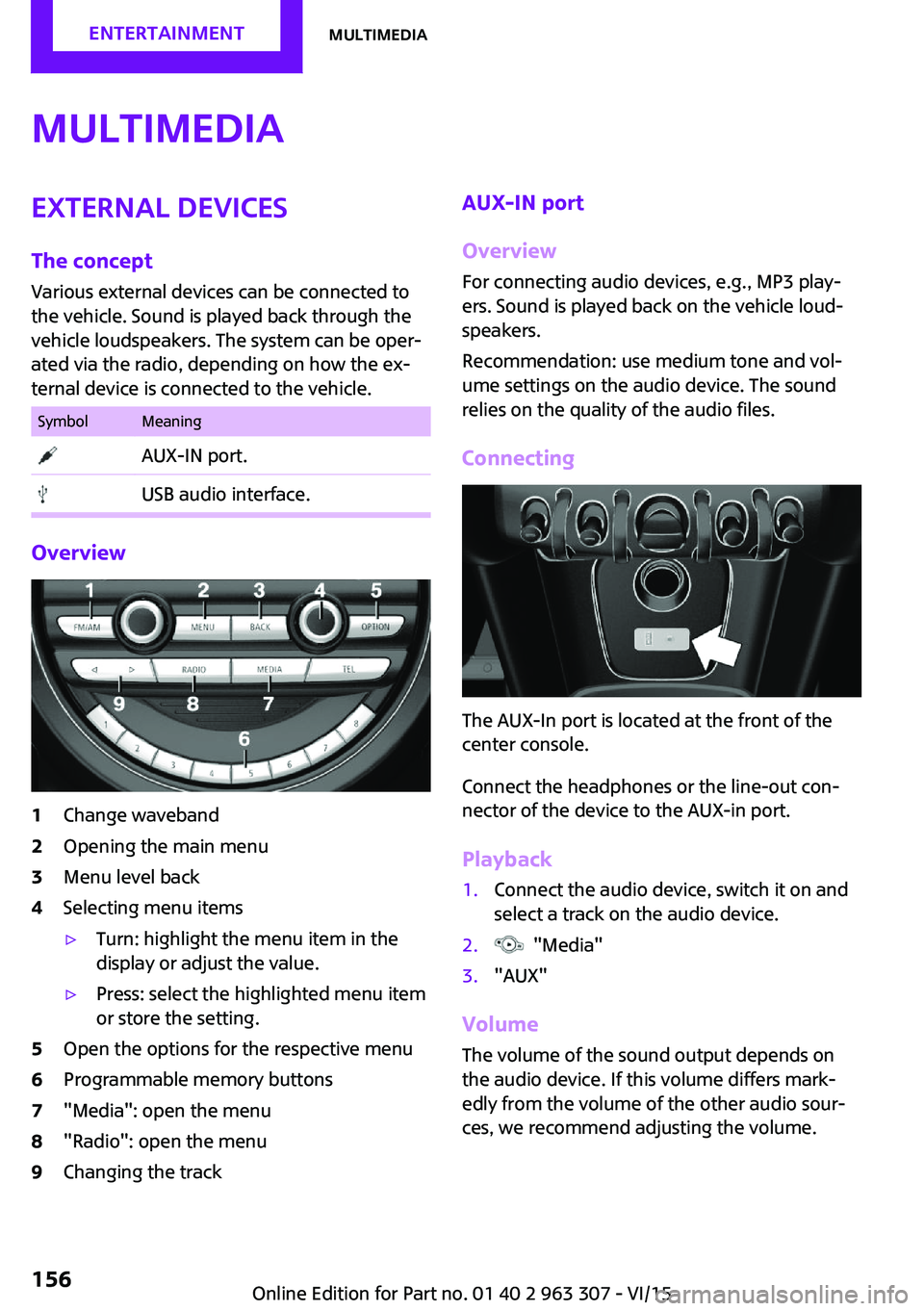
1Change waveband2Opening the main menu3Menu level back4Selecting menu items▷Turn: highlight the menu item in the
display or adjust the value.▷Press: select the highlighted menu item
or store the setting.5Open the options for the respective menu6Programmable memory buttons7"Media": open the menu8"Radio": open the menu9Changing the trackAUX-IN port
Overview
For connecting audio devices, e.g., MP3 play‐
ers. Sound is played back on the vehicle loud‐
speakers.
Recommendation: use medium tone and vol‐
ume settings on the audio device. The sound
relies on the quality of the audio files.
Connecting
The AUX-In port is located at the front of the
center console.
Connect the headphones or the line-out con‐
nector of the device to the AUX-in port.
Playback
1.Connect the audio device, switch it on and
select a track on the audio device.2. "Media"3."AUX"
Volume
The volume of the sound output depends on
the audio device. If this volume differs mark‐
edly from the volume of the other audio sour‐
ces, we recommend adjusting the volume.
Seite 156ENTERTAINMENTMultimedia156
Online Edition for Part no. 01 40 2 963 307 - VI/15
Page 157 of 251

Adjusting the volume1. "Media"2."AUX"3."Volume"4.Set the desired volume.
USB audio interface
Overview
It is possible to connect external devices. Set
via radio. Sound is played back on the vehicle
loudspeakers.
Connectors for external devices
Connection via USB audio interface: Apple iPod/
iPhone, USB devices, e.g., MP3 players, USB
flash drives, or mobile phones that are sup‐
ported by the USB audio interface.
Due to the large number of audio devices avail‐
able on the market, it cannot be guaranteed
that every device/mobile phone is operable on
the vehicle.
Depending on the configuration of the audio
files, for example bit rates greater than
256 kbit/s or the number of different compres‐
sion technologies, the files may not play back
correctly in each case.
Information about compatible USB devices can
be found at www.miniusa.com/bluetooth.
Audio files
Standard audio files and playlists can be played
back.
File systems
Popular file systems for USB devices are sup‐
ported. FAT32 and exFAT are the recom‐
mended formats.
USB device connection
The USB port is located at the front of the cen‐
ter console.
Use a flexible adapter cable for connecting to
help protect the USB audio port and the USB
device from mechanical damage. The adapter
cable supplied with the USB device would be
ideal.
After the first connection
Information about the tracks and directories
stored on the USB device is transferred into the
vehicle. This may take some time, depending
on the USB device, the number of tracks and
the folder structure.
Number of tracks
Information for a maximum of 9999 tracks and
directories can be stored in the vehicle.
Copy protection
Music tracks with integrated Digital Rights Man‐
agement, DRM, cannot be played.
Playback
1. "Media"2."USB device"
Playback is started.
Track search
Music tracks can be searched in three ways.
▷Track from the current playlist.▷Via playlists stored in the audio device.Seite 157MultimediaENTERTAINMENT157
Online Edition for Part no. 01 40 2 963 307 - VI/15
Page 159 of 251
Apple iPod/iPhone port
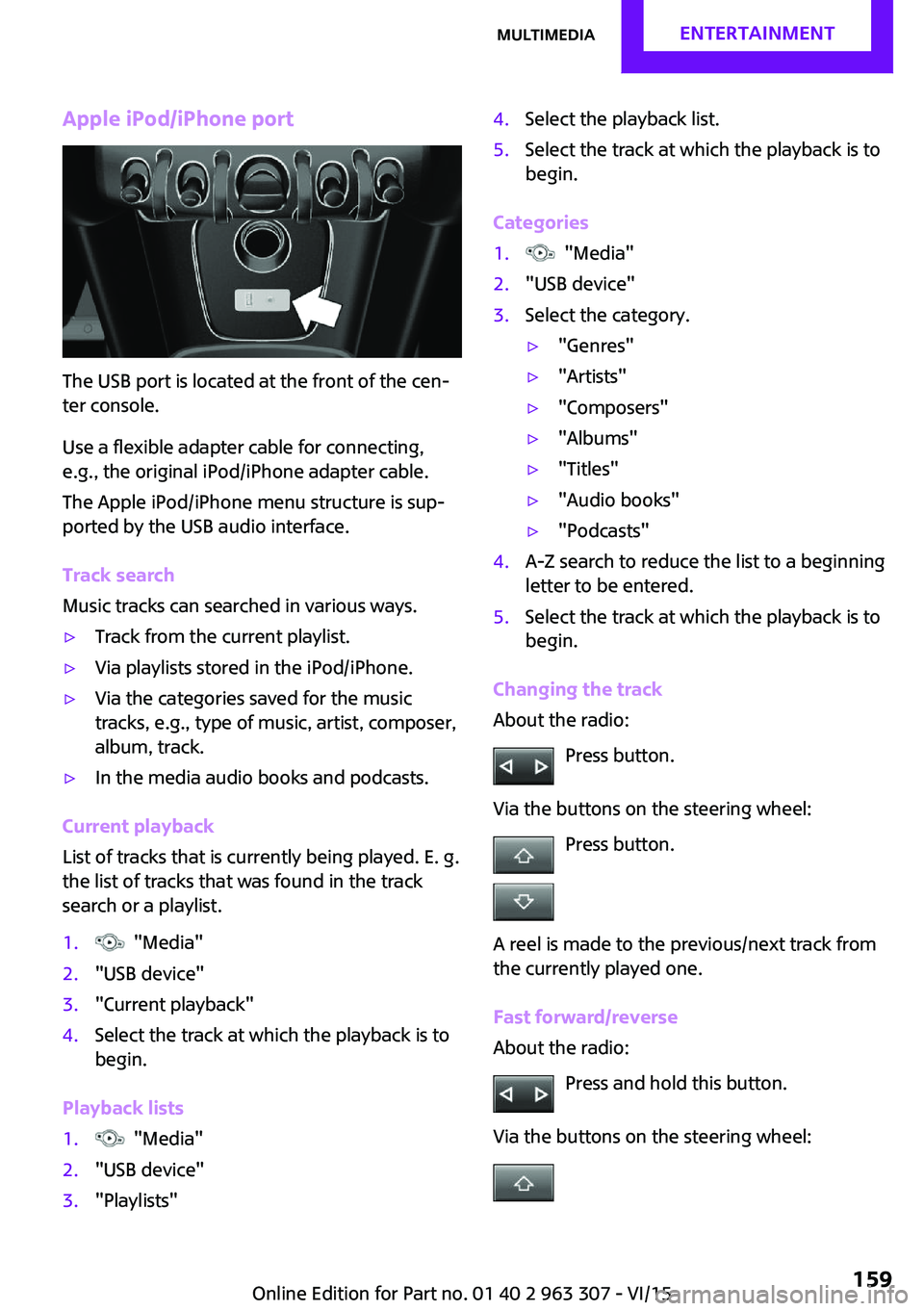
The USB port is located at the front of the cen‐
ter console.
Use a flexible adapter cable for connecting,
e.g., the original iPod/iPhone adapter cable.
The Apple iPod/iPhone menu structure is sup‐
ported by the USB audio interface.
Track search
Music tracks can searched in various ways.
▷Track from the current playlist.▷Via playlists stored in the iPod/iPhone.▷Via the categories saved for the music
tracks, e.g., type of music, artist, composer,
album, track.▷In the media audio books and podcasts.
Current playback
List of tracks that is currently being played. E. g.
the list of tracks that was found in the track
search or a playlist.
1. "Media"2."USB device"3."Current playback"4.Select the track at which the playback is to
begin.
Playback lists
1. "Media"2."USB device"3."Playlists"4.Select the playback list.5.Select the track at which the playback is to
begin.
Categories
1. "Media"2."USB device"3.Select the category.▷"Genres"▷"Artists"▷"Composers"▷"Albums"▷"Titles"▷"Audio books"▷"Podcasts"4.A-Z search to reduce the list to a beginning
letter to be entered.5.Select the track at which the playback is to
begin.
Changing the track
About the radio:
Press button.
Via the buttons on the steering wheel: Press button.
A reel is made to the previous/next track from
the currently played one.
Fast forward/reverse
About the radio:
Press and hold this button.
Via the buttons on the steering wheel:
Seite 159MultimediaENTERTAINMENT159
Online Edition for Part no. 01 40 2 963 307 - VI/15
Page 164 of 251

Bluetooth hands-free systemVehicle features and op‐
tions
This chapter describes all standard, country-
specific and optional features offered with the
series. It also describes features that are not
necessarily available in your car, e. g., due to
the selected options or country versions. This
also applies to safety-related functions and sys‐
tems. The respectively applicable country provi‐
sions must be observed when using the respec‐
tive features and systems.
The concept Mobile phones can be connected to the vehicle
via Bluetooth. After the mobile phones are
paired once, they are recognized automatically
when the ignition is switched on. As soon as
they are inside the vehicle they can be oper‐
ated via the radio and via the buttons on the
steering wheel.
Information WARNING
Operating the integrated information sys‐
tem and communication devices while driving
can distract from traffic. It is possible to lose
control of the vehicle. There is risk of an acci‐
dent. Only use the systems or devices when the
traffic situation allows. If necessary stop and
use the systems and devices while the vehicle is
stationary. ◀
Certain functions may need to be enabled by
the mobile phone provider or service provider.
At high temperatures, the charge functions of
the mobile phone can be limited under certain
circumstances, and some functions are no lon‐
ger executed.Do not operate a mobile phone that is con‐
nected to the vehicle on the mobile phone key‐
pad, as this may lead to a malfunction.
When the mobile phone is used via the vehicle,
refer to the operating manual of the mobile
phone.
Compatible mobile
phones
Accurate information about which mobile
phones are supported with a Bluetooth inter‐
face is available at www.mini.com/connectivity.
These compatible mobile phones, with a cer‐
tain software version, support the vehicle func‐
tions described below.
Malfunctions may occur with other mobile
phones or software versions.
Displaying the vehicle identification
number and software part number
The vehicle identification number and software
part number are needed to determine which
mobile phones are supported by the mobile
phone installation package. The software ver‐
sion of the mobile phone may also be required.1. "Telephone"2. Press button.3."Bluetooth® info"4."System information"
Pairing/unpairing the
mobile phone
Requirements
▷The mobile phone is compatible.Seite 164COMMUNICATIONBluetooth hands-free system164
Online Edition for Part no. 01 40 2 963 307 - VI/15
Page 165 of 251

▷The mobile phone is ready for operation.▷The ignition is switched on.▷Bluetooth connection on the vehicle and on
the mobile phone activated.▷Bluetooth presets may need to be made on
the mobile phone, e.g., for a connection
without confirmation or visibility, refer to
the mobile phone operating instructions.▷Set Bluetooth passkey for one-time use in
the logon procedure.▷Vehicle is stationary.
Bluetooth activation/deactivation
1. "Telephone"2. Press button.3."Bluetooth®"
Pairing and connecting
WARNING
Operating the integrated information sys‐
tem and communication devices while driving
can distract from traffic. It is possible to lose
control of the vehicle. There is risk of an acci‐
dent. Only use the systems or devices when the
traffic situation allows. If necessary stop and
use the systems and devices while the vehicle is
stationary. ◀
1. "Telephone"2.A mobile phone has not yet been paired:
"OK"
A mobile phone has been paired:
"Bluetooth®"3.A mobile phone has not yet been paired:
the Bluetooth name of the vehicle is shown
on the display.
A mobile phone has not yet been paired:
"Add new phone". The Bluetooth name of
the vehicle is shown on the display.4.To perform additional steps on the mobile
phone, refer to the mobile phone operating
instructions.The Bluetooth name of the vehicle appears
on the mobile phone display. Select this.5.Enter the same passkey on the mobile
phone and on the display
or
Compare the control number on the display
with the control number in the display of
the mobile phone and confirm.
Four mobile phones can be logged in on the
vehicle, and one mobile phone can be con‐
nected to the vehicle.
Following the initial pairing Mobile phone is connected to the vehicle after
a brief time.
The phone book entries stored on the SIM card
or in the mobile phone are transferred to the
vehicle.
Specific settings may be necessary in some mo‐
bile phones, e.g., authorization or a secure con‐
nection; refer to the mobile phone operating
instructions.
Connecting a particular mobile phone
1. "Telephone"2."Bluetooth®"3.Select the mobile phone that is to be con‐
nected.
Unpairing the mobile phone
1. "Telephone"2."Bluetooth®"3.Highlight any mobile phone that is to be re‐
moved.4. Press button.5."Remove device" or "Remove all devices"
What to do if...
Information on compatible mobile phones, re‐
fer to page 164.
Seite 165Bluetooth hands-free systemCOMMUNICATION165
Online Edition for Part no. 01 40 2 963 307 - VI/15
Page 166 of 251

The mobile phone could not be paired or con‐
nected.▷Is Bluetooth activated in the vehicle and on
the mobile phone? Activate Bluetooth.▷Do the Bluetooth passkeys on the mobile
phone and the vehicle match? Enter the
same passkey on the mobile phone and on
the radio.▷Did it take longer than 30 seconds to enter
the passkey? Repeat the pairing procedure.▷Do the control numbers on the mobile
phone and vehicle match? Repeat the pair‐
ing procedure.▷Are too many Bluetooth devices connected
to the mobile phone? Delete connections to
other devices.▷Is the mobile phone in power-save mode or
does it have only a limited remaining bat‐
tery life? Charge the mobile phone.
The mobile phone no longer reacts?
▷Switch the mobile phone off and on again.▷Ambient temperature too high or too low?
Do not subject the mobile phone to ex‐
treme ambient temperatures.
No or not all phone book entries are displayed,
or they are incomplete.
▷Transmission of the entries is not yet com‐
plete.▷It is possible that only the phone book en‐
tries from the mobile phone or from the
SIM card are transmitted.▷It may not be possible to display phone
book entries with special characters.▷The number of phone book entries being
stored is too high.
The phone connection quality is poor.
▷It may be possible to adjust the strength of
the Bluetooth signal on the mobile phone.▷Adjust the volume of the microphone and
loudspeakers separately.If all points in this list have been checked and
the required function is still not available, con‐
tact the hotline, a dealer’s service center or an‐
other qualified service center or repair shop.
Controls Adjusting the volumeDuring an active call, turn the left knob on the
radio until the desired volume is selected.
Automatic volume control
The automatic volume control can only be ad‐
justed during an active conversation.1. "Settings"2."Tone"3."Volume settings"4.Select the desired setting: "Microphone" or
"Loudspeak."5.Adjusting: press and turn right button.6.Storing: press right button.
Incoming call
Receiving calls If the number of the caller is stored in the
phone book and is transmitted by the network,
the name of the contact is displayed. Other‐
wise, only the phone number or "Unknown
caller" s displayed.
Accepting a call
About the radio
"Accept"
Via the button on the steering wheel
Press button.
Via the instrument cluster
"Accept"
Seite 166COMMUNICATIONBluetooth hands-free system166
Online Edition for Part no. 01 40 2 963 307 - VI/15
Page 167 of 251

Rejecting a call
About the radio
"Reject"
Via the instrument cluster
"Reject"
Ending a call About the radio
"End call ( )"
Via the button on the steering wheel
Press button.
Via the instrument cluster
"End call"
Dialing a number
1. "Telephone"2."Dial number"3.Enter numbers using the right rotary knob.4. Select the symbol.
Calls with multiple parties
Accepting a second call
If a second call is received during an ongoing
call, a call waiting signal sounds.
"Accept"
The second call is accepted and the current call
is put on hold.
Establishing a second call Establish an additional call during an active call.
Dial the new phone number or select it from a
list.
▷"Phone book"▷"Outgoing calls"▷"Received calls"The first call is put on hold.
Switching between two calls, hold call You can switch between two calls.
Select line with symbol in order to switch
between the conversations.
Active conversation.
Call on hold.
Establishing/ending a conference call
Two calls can be connected to a single tele‐
phone conference call.
1.Establish two calls.2. "Conference call"
When terminating the conference call, both
calls are ended. If one call is terminated by an‐
other party, the other call is continued if
needed.
Muting the microphone When a call is active, the microphone can be
muted.
"Mute microphone"
The muted microphone is automatically muted:
▷When a new connection is established.▷If using call-switching to switch between
call parties.
DTMF suffix dialing
DTMF suffix dialing can be used for gaining ac‐
cess to network services or for controlling devi‐
ces, e.g., to make a remote inquiry of an an‐
swering machine. The DTMF code is needed for
this purpose. The DTMF code is only available
during an active call.
1."Keypad dialing"2.Enter DTMF code.Seite 167Bluetooth hands-free systemCOMMUNICATION167
Online Edition for Part no. 01 40 2 963 307 - VI/15
Page 168 of 251

Favorites
Up to 12 phone numbers can be stored in the
Favorites. Only the occupied places of the Fa‐
vorites list are displayed.
Storing Favorites1. "Telephone"2."Favorites"3. "Add favorite"4.Select the list from which the entry is to be
added:▷"Phone book"▷"Outgoing calls"▷"Received calls"5.Select entry from list and desired phone
number.6.Insert and select the cursor at the desired
place in the Favorites.
Move favorite
1.Highlight the desired favorite.2. Press button and "Move favorite".
or
Press the right button, and select the phone
number.3.Insert and select the cursor at the desired
place in the Favorites.
Remove from Favorites
1.Highlight the desired favorite.2. Press button.3."Remove from favorites"
Deleting Favorites
1. Press button.2."Delete favorites"3."OK"Phone book
General information
The telephone accesses the contacts stored in
the mobile phone. All contacts for which a tele‐
phone number is entered are displayed. Maxi‐
mally 4 phone numbers per contact can be dis‐
played.
Displaying
Phone book entries are automatically transmit‐
ted from the mobile phone to the vehicle, de‐
pending on the mobile phone. Fig. 4 Entries in
the phone book: "Keyword search"1. "Telephone"2."Phone book"
The symbols show how the entries are stored
on the mobile phone.
SymbolMeaning Mobile phone number. Home phone number. Business phone number.
Selecting the sorting order of the
names
The phone book entries can be displayed in dif‐
ferent sequences. Depending on how the con‐
tacts are stored in the mobile phone, the sort‐
ing order of the names may differ from the
selected sorting order.
1. Press button.2."Display:""Last/First name" or "First/Last
name"3."First name Last name" or "Last name, First
name"
Calling
1.Select contact.2.Select the desired phone number.Seite 168COMMUNICATIONBluetooth hands-free system168
Online Edition for Part no. 01 40 2 963 307 - VI/15
Page 169 of 251

Add phone numbers to Favorites1.Mark the entry from the list.2. Press button and "Add to
favorites".
or
Press the right button, and select the phone
number.3.Select the desired phone number as
needed.4.Insert and select the cursor at the desired
place in the Favorites.
Redialing
The list of the last 20 numbers of the mobile
phone selected are displayed.
1. "Telephone"2."Redial"
Add phone numbers to Favorites
1.Mark the entry from the list.2. Press button and "Add to
favorites".
or
Press the right button, and select the phone
number.3.Select the desired phone number as
needed.4.Insert and select the cursor at the desired
place in the Favorites.
Dialing the number via the instrument
cluster
This is possible when there is no active call.
1. Press button on the steering wheel.
The last numbers selected are displayed in
the instrument cluster.2.If necessary, select another number.3. Press the key again to establish the
connection.
Received calls
The list of the 20 last received or missed calls of
the cell phone are displayed.
1. "Telephone"2."Received calls"
Add phone numbers to Favorites
1.Mark the entry from the list.2. Press button and "Add to
favorites".
or
Press the right button, and select the phone
number.3.Select the desired phone number as
needed.4.Insert and select the cursor at the desired
place in the Favorites.
Hands-free system
General information
Calls that are being made on the hands-free
system can be continued on the mobile phone
and vice versa.
From the mobile phone to the hands-
free system
Calls that were begun outside of the Bluetooth
range of the vehicle can be continued on the
hands-free system with the ignition switched
on.
Depending on the mobile phone, the system
automatically switches to the hands-free sys‐
tem.
If the system does not switch over automati‐
cally, follow the instructions on the mobile
phone display; refer also to the mobile phone
operating instructions.
Seite 169Bluetooth hands-free systemCOMMUNICATION169
Online Edition for Part no. 01 40 2 963 307 - VI/15
Page 170 of 251

From the hands-free system to the
mobile phone
Calls that are made on the hands-free system
can in some cases be continued on the mobile
phone; this depends on the mobile phone.
Follow the instructions on the mobile phone
display; refer also to the mobile phone operat‐
ing instructions.Seite 170COMMUNICATIONBluetooth hands-free system170
Online Edition for Part no. 01 40 2 963 307 - VI/15