battery MINI COOPER CONVERTIBLE 2007 User Guide
[x] Cancel search | Manufacturer: MINI, Model Year: 2007, Model line: COOPER CONVERTIBLE, Model: MINI COOPER CONVERTIBLE 2007Pages: 172, PDF Size: 1.9 MB
Page 117 of 172

115
OVERVIEW REPAIRSOPERATIONCONTROLS DATA INDEX
1 Reservoir for windshield and rear
window washer system
*
64
2 Vehicle identification number
3 Coolant expansion tank1184 Engine oil filler neck117
5Battery140
6 Brake fluid reservoir1207 Reservoir for headlamp cleaning
system
*
64
8 Engine oil dipstick117
ENGINE COMPARTMENT: MINI COOPER AND MINI COOPER CONVERTIBLE
Page 131 of 172
129
OVERVIEW REPAIRSOPERATION CONTROLS DATA INDEX
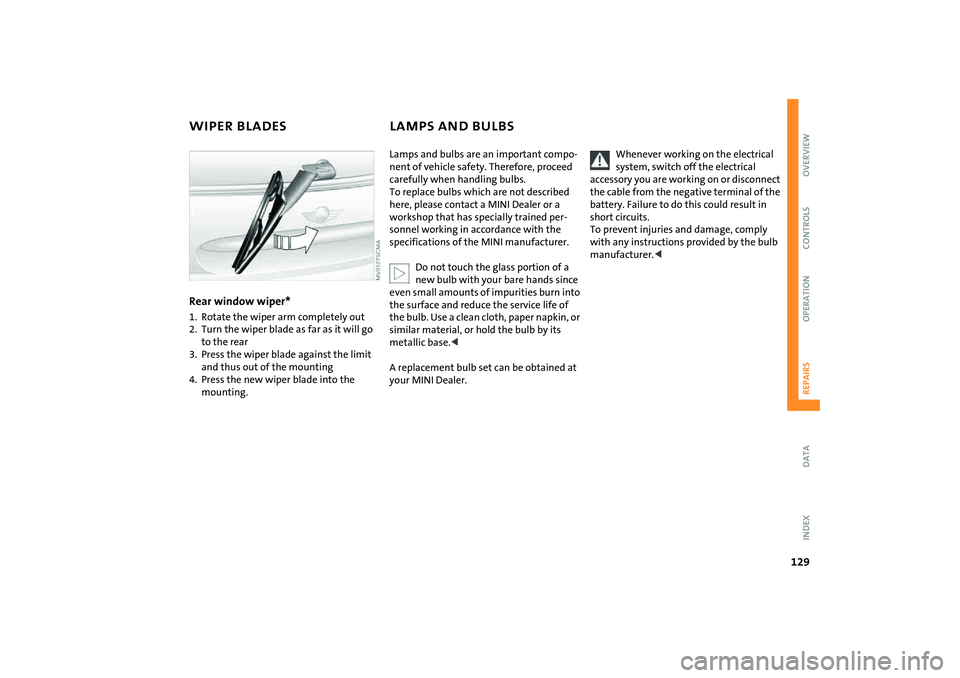
WIPER BLADES LAMPS AND BULBSRear window wiper*1. Rotate the wiper arm completely out
2. Turn the wiper blade as far as it will go
to the rear
3. Press the wiper blade against the limit
and thus out of the mounting
4. Press the new wiper blade into the
mounting.
Lamps and bulbs are an important compo-
nent of vehicle safety. Therefore, proceed
carefully when handling bulbs.
To replace bulbs which are not described
here, please contact a MINI Dealer or a
workshop that has specially trained per-
sonnel working in accordance with the
specifications of the MINI manufacturer.
Do not touch the glass portion of a
new bulb with your bare hands since
even small amounts of impurities burn into
the surface and reduce the service life of
the bulb. Use a clean cloth, paper napkin, or
similar material, or hold the bulb by its
metallic base.<
A replacement bulb set can be obtained at
your MINI Dealer.
Whenever working on the electrical
system, switch off the electrical
accessory you are working on or disconnect
the cable from the negative terminal of the
battery. Failure to do this could result in
short circuits.
To prevent injuries and damage, comply
with any instructions provided by the bulb
manufacturer.<
Page 142 of 172

140
VEHICLE BATTERYStorage locationMINI COOPER and MINI COOPER Convert-
ible:
The battery is located in the engine com-
partment, refer to page115.
MINI COOPER S and MINI COOPER S Con-
vertible:
The battery is located in the luggage com-
partment under the floor mat.Battery careThe battery is absolutely maintenance-free,
that is, the original electrolyte will normally
last for the service life of the battery under
moderate climatic conditions. Your MINI
Dealer will be glad to advise you if you have
any questions regarding the battery.Charging the batteryOnly charge the battery in the vehicle via
the terminals in the engine compartment
with the engine switched off, refer to
'Jump-starting', page142.
Disposal
After replacing old batteries, return
the used batteries to your MINI
Dealer or to a recycling point. Maintain the
battery in an upright position for transport
and storage. Secure the battery to prevent
it from tilting during transport.<
Power failureAfter a temporary power failure, e.g. due to
a discharged battery, some of your vehicle's
equipment will function only to a limited
extent and must be reinitialized or read-
justed. Individual settings are also lost and
must be reprogrammed:
>The clock must be reset, refer to page67
>The power windows must be reinitial-
ized, refer to page32
>Radio
*:
The stations must be reset, refer to the
Owner's Manual for Radio
>Navigation system
*:
It may take some time for its operability
to be restored, refer to the Owner's Man-
ual for Navigation System.
Page 143 of 172

141
OVERVIEW REPAIRSOPERATION CONTROLS DATA INDEX
FUSES
Do not attempt to repair a blown
fuse or replace it with a fuse of a dif-
ferent color or Ampere rating. To do this
could cause a fire in the vehicle resulting
from a circuit overload.<
If a second fuse blows in the same cir-
cuit, have the cause rectified by your
MINI Dealer.<
A fuse allocation diagram is located on the
inside of the fuse box cover panel.
Plastic tweezers and spare fuses can be
found in the fuse box in the vehicle interior.
In the engine compartmentIn the MINI COOPER and the MINI COOPER
Convertible to the right of the battery.
In the MINI COOPER S and the MINI COO-
PER S Convertible to the right of the air fil-
ter box.
Open the fuse box lid. To do so, press the
clip fastener.
In the vehicle interiorOn the left side of the footwell in the side
trim panel.
Open the fuse box lid. To do so, press the
fastener.
Page 144 of 172

142
JUMP-STARTINGWhen your battery is discharged, you can
use two jumper cables to start your vehicle
with power from the battery in a second
vehicle. Correspondingly you can help start
another vehicle. Only use jumper cables
with fully insulated handles on the termi-
nal clamps.Preparing for jump-starting
Do not touch live wiring and cables
on a running engine. There is a risk of
fatal injury if you do this. Carefully observe
the following instructions to avoid per-
sonal injury and/or damage to either vehi-
cle or both vehicles. Make sure that there is
no contact between the bodywork of the
two vehicles to avoid a short circuit haz-
ard.<
1. Check whether the battery of the sup-
port vehicle has 12 Volts and approxi-
mately the same capacity measured in
Ah. These data are printed on the bat-
tery
2. Switch off the engine of the support
vehicle
3. Switch off any electrical systems and
components in both vehicles.Connect the jumper cables
Always adhere to this sequence when
connecting the jumper cables; failure
to observe this procedure can lead to spark-
ing and pose an injury hazard.<
The illustration shows the auxiliary jump-
starting terminal on the MINI COOPER S
and the MINI COOPER S Convertible.
In the MINI COOPER S and the MINI
COOPER S Convertible, the auxiliary jump-
starting terminal, arrow 1, acts as the posi-
tive battery terminal, refer to view of
engine compartment on page116. The
cover is marked with a +.
1. Remove the cover of the battery or open
the cover of the auxiliary jump-starting
terminal:
>MINI COOPER and MINI COOPER Con-
vertible:
Remove the battery cover.
To do so, press the two clips simulta-
neously.
>MINI COOPER S and MINI COOPER S
Convertible:
Page 145 of 172

143
OVERVIEW REPAIRSOPERATION CONTROLS DATA INDEX
JUMP-STARTING TOWING AND TOW-STARTING
Flip open the cover of the auxiliary
jump-starting terminal, arrow 1
2. Connect one terminal clamp of the
plus/+ jumper cable to the positive bat-
tery terminal or to an auxiliary jump-
starting terminal of the support vehicle
3. Connect the other terminal clamp of the
plus/+ jumper cable to the positive bat-
tery terminal or to an auxiliary jump-
starting terminal of the vehicle to be
started
Engine or body ground in your MINI or MINI
Convertible: arrow 2.
4. Connect one terminal clamp of the
minus/– jumper cable to the negative
battery terminal or to an engine or body
ground of the support vehicle
5. Connect the second terminal clamp of
the minus/– jumper cable to the nega-
tive terminal of the battery or to the
engine or body ground of the vehicle to
be started.
Performing the jump-start1. Start the engine of the support vehicle
and allow it to run at increased idle
speed for several minutes
2. Start the engine of the other vehicle in
the usual manner.
If the first start attempt is not success-
ful, wait a few minutes before another
attempt in order to allow the discharged
battery to recharge
3. Allow the engines of both vehicles to run
for several minutes.
On the MINI or MINI Convertible:
Before disconnecting the jumper
cables, switch on the lighting, the rear
window defroster and the highest
blower speed to prevent a voltage surge
from the regulator to the electrical sys-
tems and components.<
4. Then disconnect the jumper cables in
the reverse order.
If necessary have the battery checked and
completely charged at a MINI Dealer.
Do not use spray starter fluids to start
the engine.<
Observe all applicable laws and regu-
lations for towing and tow-start-
ing.<
Do not transport any occupant other
than the driver in a vehicle that is
being towed.<
Using the towing eyelet The screw-in towing eyelet is stored in the
onboard tool kit, refer to page128; be sure
that it remains with the vehicle at all times.
It can be attached at the front or rear of
your vehicle.
Use only the towing eyelet supplied
with the vehicle and screw it in firmly
until it stops. Use the towing eyelet for
towing on paved roads only. Avoid subject-
ing the towing eyelet to lateral loads, e.g.
do not lift the vehicle using the towing eye-
let. Otherwise, the towing eyelet and the
vehicle could be damaged.<
Page 158 of 172

EVERYTHING FROM A TO Z
156
A
ABS Antilock Brake System72
indicator lamp17,18
Accessories, refer to Your
individual vehicle6
Activated-charcoal filter84
Adjusting interior
temperature80,83
Air circulation, refer to
Recirculated air mode80,83
Air conditioning system79
Air distribution
air conditioning system80
automatic climate control83
individual84
manual80
Air outlets, refer to
Ventilation81,84
Air pressure, refer to Tire
inflation pressure104
Air volume
air conditioning system80
automatic climate control83
Airbags76
passenger airbag status
lamp77
safe seating position42
warning lamp18
AKI, refer to Fuel quality101 All Season traction Control
(ASC)72
indicator lamps17,18
All-season tires, refer to Winter
tires113
Antenna123
Antifreeze
coolant118
washer fluid64
Antilock Brake System (ABS)72
indicator lamp17,18
Anti-theft system24
Approved axle load, refer to
Weights151,152
Approved engine oils118
Approved gross vehicle weight,
refer to Weights151,152
Armrest, refer to Center
armrest86
ASC All Season traction
Control72
indicator lamps17,18
Assistant systems, refer to
All Season traction Control
(ASC)72
Dynamic Stability Control
(DSC)72
AUTO program, refer to
Automatic air distribution83 Automatic
air distribution83
air volume83
cruise control65
Automatic car washes122
Automatic climate control82
Automatic transmission with
Steptronic
ignition53
indicator lamp57
interlock53
selector lever lock56
shiftlock56
towing144
tow-starting145
Aux-In socket85
Average consumption71
setting units71
Average speed71
setting units71
Axle loads, refer to
Weights151,152
B
Backrests, refer to
Adjusting seats44
Backup lamp
bulb replacement131
Bar, towing144
Base plate for telephone or
mobile phone86 Battery140
charging140
disposal140
indicator lamp16
jump-starting142
power failure140
Battery care69,121
Being towed144
Belts, refer to Safety belts46
Beverage holders86
Black ice, refer to Temperature
warning70
Blower
air conditioning system80
automatic climate control83
Blower, refer to Air volume80
Blowers, refer to Draft-free
ventilation81,84
Bonnet114
indicator lamp17
Bottle holders, refer to
Beverage holders86
Brake discs
brake system99
break-in procedures98
Brake fluid120
level120
warning lamp16
Brake lamps, bulb
replacement131
Page 160 of 172

EVERYTHING FROM A TO Z
158
Configuring settings, refer to
Vehicle Memory49
Consumption, refer to
Average consumption71
Current fuel consumption71
Contents2
Control elements, refer to
Cockpit12
Convenience operation
convertible top37
from outside26,27
glass sunroof, electric33
windows31
Convertible top35
care124
convenience operation37
electrical malfunction38
emergency closing38
malfunction38
Coolant118
indicator lamp16
level119
temperature gauge68
Coolant temperature68
Cooling
air conditioning mode83
cooling function80
Cooling function
air conditioning system80
automatic climate control83 Cooling system, refer to
Capacities153
Copyright2
Cornering Brake Control
(CBC)72
warning lamp17
Correct tires108
Cosmetic mirror, refer to
Illuminated vanity mirror48
Cruise control65
buttons on the steering
wheel20
indicator lamp19
Cup holders, refer to Beverage
holders86
Curb weight, refer to
Weights151,152
Current fuel consumption71
setting units71
Cylinders, refer to Engine
data148
D
Daily odometer, refer to Trip
odometer67
Dashboard lighting, refer to
Instrument lighting62
Dashboard, refer to Cockpit12 Data
capacities153
dimensions149
engine148
technical148
weights151
Date of the Owner's Manual7
Daytime running lamps61
Defrost setting, refer to
Defrosting and demisting
windows81,84
Defrosting and demisting
windows
air conditioning system81
automatic climate control84
Defrosting front windows, refer
to Defrosting and demisting
windows81,84
Defrosting windows81,84
air conditioning system80
automatic climate control83
Defrosting windshield, refer to
Defrosting and demisting
windows81,
84
Demisting windows81,84
Digital clock67
Dimensions149,150
Dimming interior rearview
mirror98
Dipstick, engine oil117 Directional turn signal,
refer to Turn signal
indicators61
Disc brakes99
Disengaging the locks, refer to
Unlocking26
Displacement, refer to Engine
data148
Display elements13
with navigation system or
Cockpit Chrono Pack14
Display lighting, refer to
Instrument lighting62
Disposal
coolant118
vehicle battery140
Distance covered, refer to
Odometer67
Distance warning, refer to Park
Distance Control (PDC)78
Door keys24
Door lock27
Doors, locking and unlocking
acknowledgment
signals26,27
from inside28
from outside26
DOT quality grades108
Draft-free ventilation81,84
Drink holders, refer to Beverage
holders86
Page 168 of 172
EVERYTHING FROM A TO Z
166
Tires
age108
break-in procedures98
changing135
condition109
damage110
flat tire111,133
inflation pressure104
replacement112
size, refer to New wheels and
tires112
storage113
tread109
wear indicator, refer to Tire
tread109
winter tires113
Tires with emergency
properties, refer to Run-Flat
Tires111
Tools, refer to Onboard tool
kit128
Torque
engine148
lug bolts136
Tow bar144
Tow rope144
Towing143
with automatic
transmission144,145
Towing eyelet143
Tow-starting145 Track width, refer to
Dimensions149,150
Traction grades109
Transmission
automatic transmission with
Steptronic56
manual transmission55
Transmission lock, refer to
Range selection56
Transmission malfunction,
refer to Malfunction58
Transporting children safely50
Transporting securely, refer to
Securing the load94
Trash container, refer to
Ashtray86
Tread depth, refer to Tire
tread109
Treadwear grade108
Trip odometer67
Trunk, refer to Luggage
compartment in the MINI
Convertible91
Turn signal indicators61
indicator lamp19
Turn signal indicators on the
side, bulb replacement131
Turning circle, refer to
Dimensions149,150 U
Uniform Tire Quality
Grading108
Units
average consumption71
average speed71
temperature70
Universal garage door
opener88
Universal remote control88
Unlocking
bonnet114
from inside28
from outside26
Used batteries, refer to
Disposal140
Using antifreeze64,118
V
Vacuum cleaner, connecting,
refer to Cigarette lighter
socket87
Valve
core137
dust cap135
remover137
spare137
Valve remover, refer to
Onboard tool kit137 Valve stem and replacement
valve, refer to Onboard tool
kit137
Vanity mirror, illuminated48
Vehicle
battery140
break-in procedures98
care122
dimensions149
loading cargo92
parking100
storage125
washing122
weight151,152
Vehicle battery140
Vehicle identification number,
refer to Engine
compartment115,116
Vehicle illumination, refer to
Lamps60
Vehicle Memory49
Ventilation, draft-free81,84
Ventilation, refer to
Air conditioning system81
Automatic climate control83
Ventilation, refer to Draft-free
ventilation81,84
Volume
luggage
compartment151,152