air conditioning MINI COOPER CONVERTIBLE 2007 Owners Manual
[x] Cancel search | Manufacturer: MINI, Model Year: 2007, Model line: COOPER CONVERTIBLE, Model: MINI COOPER CONVERTIBLE 2007Pages: 172, PDF Size: 1.9 MB
Page 5 of 172
3OVERVIEW REPAIRS OPERATION CONTROLS DATA INDEX
Driving:
Ignition lock53
Starting the engine53
Switching off the engine54
Parking brake54
Manual transmission55
Automatic transmission with
Steptronic56
Parking lamps/Low beams60
Turn signal indicator/Headlamp
flasher61
Instrument lighting62
Fog lamps62
Interior lamps62
Washer/wiper system63
Washer fluid64
Cruise control65
Everything under control:
Odometer67
Clock67
Fuel gauge67
Coolant temperature gauge68
Tachometer69
Service interval display69
Onboard computer70Technology for safety and driving
convenience:
Driving stability control systems72
Flat Tire Monitor74
Airbags76
Park Distance Control (PDC)78
Controlling the climate for pleasant
driving:
Air conditioning system79
Automatic climate control82
Interior conveniences:
Glove compartment85
Center armrest85
Drinks holders, ashtray86
Cigarette lighter, 12 V power supply87
Integrated universal remote control88
Loading and transporting cargo:
Luggage compartment in the MINI90
Luggage compartment in the MINI
Convertible91
Loading cargo92
Roof-mounted luggage rack95
OPERATION, CARE, MAINTENANCESpecial operating instructions:
Break-in procedures98
General driving notes98
Refueling101
Wheels and tires:
Tire inflation pressure104
Tire coding108
Tire condition109
Run-Flat Tires111
New wheels and tires112
Snow chains113
Page 81 of 172

79
OVERVIEW REPAIRS OPERATIONCONTROLS DATA INDEX
1 Air onto the windshield and onto the
side windows
2 Air for the upper body area81
3 Air for the front and rear footwells4Temperature80
5 Windshield heating
*
80
6 Air volume/Blower80
7 Cooling function808Air distribution80
9 Recirculated air mode80
10 Rear window defroster80
AIR CONDITIONING SYSTEM
Page 82 of 172

80
AIR CONDITIONING SYSTEMAir volume/Blower
You can select blower speeds
from 1 to 4. Position 0: blower is
switched off.
The heating, ventilation and air
conditioning operate in position 1 or
higher.
Temperature
Turn to the right, red, to increase
the temperature.
Turn to the left, blue, to decrease
the temperature.
Air distribution
Air distribution towards upper
body region , upper body
region and footwell , footwell
, footwell and windows ,
and windows .
Intermediate positions are possible, refer to
illustration and overview on page79.
Rear window defroster
The LED is lit when the rear win-
dow defroster is on.
The heater switches off auto-
matically after a short time.
Windshield heating*
The LED is lit when the wind-
shield heating is on.
The windshield heating switches
off automatically after a short time.
Cooling function
The LED is lit when the cooling
function is on.
The air is cooled and dehumidi-
fied and, depending on the temperature
setting, rewarmed.
Depending on the weather, the windshield
can fog up temporarily after the engine is
started.
When the cooling function is on, con-
densation forms which then exits
under the vehicle. Traces of condensed
water on the ground are therefore nor-
mal.<
Recirculated air mode
The LED is lit when the recircu-
lated air mode is on. Supply of
outside air into the vehicle is
blocked.
The air within the vehicle is recirculated.
If the windows fog up in the recircu-
lated air mode, turn the recirculated
air mode off and, if necessary, increase the
air supply. The recirculated air mode should
not be used constantly over a longer period
of time; otherwise the air quality in the
vehicle's interior will gradually deterio-
rate.<
Page 83 of 172

81
OVERVIEW REPAIRS OPERATIONCONTROLS DATA INDEX
AIR CONDITIONING SYSTEMDraft-free ventilationButton 1: air outlets can be opened and
closed by turning.
The points indicate the position in each
case.
Nozzle 2: change the direction of the air
flow by swiveling.
MicrofilterThe integrated microfilter removes dust
and pollen from the incoming or recircu-
lated air.
Your MINI Dealer will replace it during rou-
tine maintenance. A substantial reduction
in the air supply indicates that the filter
must be replaced before scheduled mainte-
nance.
Defrosting and demisting windows 1. Set the rotary blower speed control for
the airflow rate to position 4
2. Turn the rotary temperature control
completely to the right, red
3. Turn the rotary switch for air distribu-
tion to position
By activating the cooling function, the
windows are demisted more quickly
4. Turn on windshield heating if necessary
5. To defrost the rear window: switch on
the rear window defroster.
Page 85 of 172

83
OVERVIEW REPAIRS OPERATIONCONTROLS DATA INDEX
AUTOMATIC CLIMATE CONTROL
*
Automatic air distribution and volume
The LED is lit when the AUTO pro-
gram is on.
Automatic adjustment of the air distribu-
tion and volume, and adaptation of the
specified temperatures to external influ-
ences, e.g. outside temperature and insola-
tion.
In the automatic program (AUTO), the air
conditioning is activated automatically. To
create a pleasant air climate, the air tem-
perature coming from the vents in the
upper body area is lower than the air tem-
perature in the footwell.
Air volume/Blower
Switching automatic climate control
off/on
Press the left or right half of the
button to vary the air volume.
Automatic adjustment of the air volume is
deactivated.
Switching air conditioner on/off.
Press the left half of the button while the
blower is at the lowest setting. The blower,
heating and air conditioning are switched
off. All displays go out.
Switch the automatic climate control back
on by pressing any button.
Cooling function
The LED is lit when the cooling
function is on.
The air is cooled and dehumidified and,
depending on the temperature setting,
rewarmed.
The cooling function is automatically acti-
vated in the AUTO program.
Depending on the weather, the windshield
can fog up temporarily after the engine is
started.
When the air conditioning is on, con-
densation is formed which then exits
under the vehicle. Traces of condensed
water on the ground are therefore nor-
mal.<
Recirculated air mode
The LED is lit when the recirculated
air mode is on. Supply of outside air
into the vehicle is blocked.
The air within the vehicle is recirculated.
In the automatic program (AUTO) in hot
weather conditions, the recirculated air
mode is activated temporarily to enable
faster cooling.
The LED for the recirculated air button is
not lit.
The recirculated air mode should not
be used constantly over a longer
period of time; otherwise the air quality in
the vehicle's interior will gradually deterio-
rate. If the windows fog up in the recircu-
lated air mode, turn the recirculated air
mode off and, if necessary, increase the air
supply.<
Rear window defroster and windshield
heating*
The LED comes on when the rear
window/windshield heating is on.
The heater switches off automatically after
a short time.
Temperature
Tap or turn the wheel in the
appropriate direction to change
the temperature step by step.
The figures in the display provide
a general indication of interior tempera-
ture. When you start the vehicle, the sys-
tem ensures that the selected temperature
is achieved as quickly as possible and then
maintained.
Permanent heating with maximum
power output at temperature selec-
tion HI. Permanent cooling at LO. With the
Page 87 of 172
85
OVERVIEW REPAIRS OPERATIONCONTROLS DATA INDEX
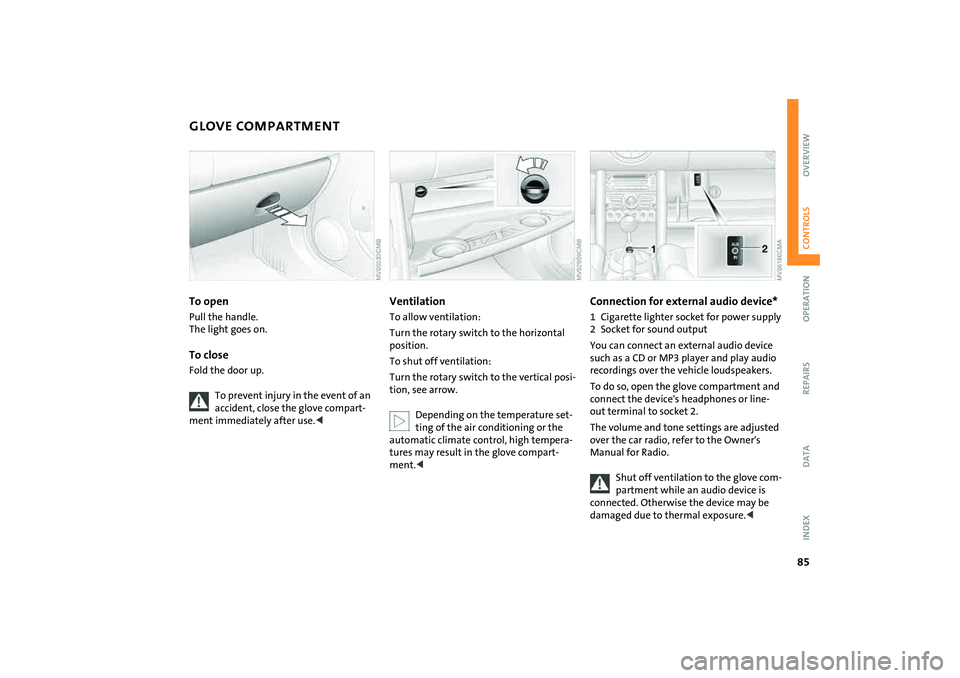
GLOVE COMPARTMENT To openPull the handle.
The light goes on.To closeFold the door up.
To prevent injury in the event of an
accident, close the glove compart-
ment immediately after use.<
VentilationTo allow ventilation:
Turn the rotary switch to the horizontal
position.
To shut off ventilation:
Turn the rotary switch to the vertical posi-
tion, see arrow.
Depending on the temperature set-
ting of the air conditioning or the
automatic climate control, high tempera-
tures may result in the glove compart-
ment.<
Connection for external audio device*1 Cigarette lighter socket for power supply
2 Socket for sound output
You can connect an external audio device
such as a CD or MP3 player and play audio
recordings over the vehicle loudspeakers.
To do so, open the glove compartment and
connect the device's headphones or line-
out terminal to socket 2.
The volume and tone settings are adjusted
over the car radio, refer to the Owner's
Manual for Radio.
Shut off ventilation to the glove com-
partment while an audio device is
connected. Otherwise the device may be
damaged due to thermal exposure.<
Page 102 of 172

100
GENERAL DRIVING NOTESMobile communications in the vehicle
The manufacturer of your MINI rec-
ommends that you do not use mobile
devices, e.g. mobile phones, inside the vehi-
cle without directly connecting them to an
outside antenna. Otherwise, interference
between the vehicle electronics and the
mobile device cannot be ruled out. In addi-
tion, it is not ensured that the radiation
emitted during mobile transmission will be
directed outside of the vehicle.<
Driving through water
Do not drive through water on the
road if it is deeper than 1 ft/30 cm,
and then only at walking speed at the
most. Otherwise, the vehicle's engine, the
electrical systems and the transmission
may be damaged.<
Use the parking brake on inclines
Do not hold the vehicle in place on
slopes by slipping or 'riding' the
clutch. Use the parking brake instead. Oth-
erwise, a high degree of clutch wear could
result.<
Clothes hooks
When suspending clothing from the
hooks, ensure that they will not
obstruct the driver's vision. Do not hang
heavy objects on the hooks. If you do, they
could injure the occupants during braking
or evasive maneuvers.<
Hot exhaust system
High temperatures occur in every
vehicle's exhaust system. Do not
remove the heat protection plates fitted in
the area of the exhaust system and do not
apply body-cavity protectant to this area.
When driving, standing at idle, and parking
the vehicle, take care to avoid contact
between the hot exhaust system and flam-
mable materials, e.g. hay, grass, leaves, etc.
Such contact could lead to a fire resulting in
serious personal injury and property dam-
age. Do not touch hot exhaust pipes. Other-
wise there is a risk of burns.<
Parking the vehicleCondensation forms in the air conditioning
system during operation, and then exits
under the vehicle. Traces of condensed
water on the ground are therefore normal.
Close the tailgate
Drive the vehicle only when the tail-
gate is completely closed. Otherwise,
exhaust fumes could penetrate the interior
of the vehicle.<
Should it be absolutely necessary to drive
with the tailgate open:
1. Close all windows as well as the glass
sunroof or the sliding sunroof of the
MINI Convertible
2. Sharply increase the air supply for the
heater, the air conditioning or the auto-
matic climate control, refer to page79
or82.
Page 158 of 172

EVERYTHING FROM A TO Z
156
A
ABS Antilock Brake System72
indicator lamp17,18
Accessories, refer to Your
individual vehicle6
Activated-charcoal filter84
Adjusting interior
temperature80,83
Air circulation, refer to
Recirculated air mode80,83
Air conditioning system79
Air distribution
air conditioning system80
automatic climate control83
individual84
manual80
Air outlets, refer to
Ventilation81,84
Air pressure, refer to Tire
inflation pressure104
Air volume
air conditioning system80
automatic climate control83
Airbags76
passenger airbag status
lamp77
safe seating position42
warning lamp18
AKI, refer to Fuel quality101 All Season traction Control
(ASC)72
indicator lamps17,18
All-season tires, refer to Winter
tires113
Antenna123
Antifreeze
coolant118
washer fluid64
Antilock Brake System (ABS)72
indicator lamp17,18
Anti-theft system24
Approved axle load, refer to
Weights151,152
Approved engine oils118
Approved gross vehicle weight,
refer to Weights151,152
Armrest, refer to Center
armrest86
ASC All Season traction
Control72
indicator lamps17,18
Assistant systems, refer to
All Season traction Control
(ASC)72
Dynamic Stability Control
(DSC)72
AUTO program, refer to
Automatic air distribution83 Automatic
air distribution83
air volume83
cruise control65
Automatic car washes122
Automatic climate control82
Automatic transmission with
Steptronic
ignition53
indicator lamp57
interlock53
selector lever lock56
shiftlock56
towing144
tow-starting145
Aux-In socket85
Average consumption71
setting units71
Average speed71
setting units71
Axle loads, refer to
Weights151,152
B
Backrests, refer to
Adjusting seats44
Backup lamp
bulb replacement131
Bar, towing144
Base plate for telephone or
mobile phone86 Battery140
charging140
disposal140
indicator lamp16
jump-starting142
power failure140
Battery care69,121
Being towed144
Belts, refer to Safety belts46
Beverage holders86
Black ice, refer to Temperature
warning70
Blower
air conditioning system80
automatic climate control83
Blower, refer to Air volume80
Blowers, refer to Draft-free
ventilation81,84
Bonnet114
indicator lamp17
Bottle holders, refer to
Beverage holders86
Brake discs
brake system99
break-in procedures98
Brake fluid120
level120
warning lamp16
Brake lamps, bulb
replacement131
Page 159 of 172

EVERYTHING FROM A TO Z
157
OVERVIEW REPAIRS OPERATION CONTROLS DATA INDEX
Brake pads99
break-in procedures98
warning lamp18
Brake system120
brake fluid120
brake pads99
break-in procedures98
disc brakes99
warning lamp17
Brake wear warning
brake pads99
warning lamp18
Brakes120
ABS72
brake fluid120
brake pads99
break-in procedures98
CBC72
indicator/warning
lamps16,17,18
parking brake54
Breaking in98
Bulb replacement, refer to
Lamps and bulbs129
Buttons on multifunction
steering wheel20
automatic transmission with
Steptronic58 C
California Proposition 65
warning7
Capacities153
Car care, refer to Caring for your
vehicle122
Car keys, refer to Keys24
Car radio, refer to separate
Owner's Manual
Car telephone, refer to separate
Owner's Manual
Car vacuum cleaner,
connecting, refer to Cigarette
lighter socket
87
Car wash122
Car wash, refer to Washing
your vehicle122
Car-care products122
Care of plastics123
Care of synthetic leather123
Care, vehicle122
Cargo area
opening from the outside29
opening with the remote
control26
volume151,152
Cargo area cover, refer to
Luggage compartment
cover90
Cargo area, refer to Luggage
compartment in the MINI90 Carpet care124
Cassette operation, refer to
Owner's Manual for Radio
Catalytic converter, refer to
Hot exhaust system100
CBC Cornering Brake Control72
CD changer, refer to Owner's
Manual for Radio
CD operation, refer to
Owner's Manual for Radio
Center armrest86
Central locking system24
interior28
Changing bulbs129
Changing the wiper
blades128,129
Changing tires135
space-saver spare tire133
Charge-current indicator
light16
Child seat, refer to Installing
child-restraint systems50
Children, transporting50
Child-restraint fixing system,
LATCH52
Child-restraint systems50
Chock, folding
space-saver spare tire133
Chrome parts, refer to Caring
for your vehicle123
Chrome-plated parts, care123 Cigarette lighter87
Cigarette lighter socket87
Cigarette tray, refer to
Ashtray86
Circulation of air, refer to
Recirculated air mode80,83
Cleaning the rear window64
Cleaning the vehicle, refer to
Caring for your vehicle122
Clock67
12-hour/24-hour mode67
changing the time67
Closing
from inside28
from outside25
Clothes hooks100
Clutch53
break-in procedures98
Cockpit12
Coding, tires108
Cold start, refer to Starting the
engine53
Compact disk operation, refer
to Owner's Manual for Radio
Compartments, refer to
Storage compartments85
Computer, refer to Onboard
computer70
Condensed water, refer to Air
conditioning80,83
Page 160 of 172

EVERYTHING FROM A TO Z
158
Configuring settings, refer to
Vehicle Memory49
Consumption, refer to
Average consumption71
Current fuel consumption71
Contents2
Control elements, refer to
Cockpit12
Convenience operation
convertible top37
from outside26,27
glass sunroof, electric33
windows31
Convertible top35
care124
convenience operation37
electrical malfunction38
emergency closing38
malfunction38
Coolant118
indicator lamp16
level119
temperature gauge68
Coolant temperature68
Cooling
air conditioning mode83
cooling function80
Cooling function
air conditioning system80
automatic climate control83 Cooling system, refer to
Capacities153
Copyright2
Cornering Brake Control
(CBC)72
warning lamp17
Correct tires108
Cosmetic mirror, refer to
Illuminated vanity mirror48
Cruise control65
buttons on the steering
wheel20
indicator lamp19
Cup holders, refer to Beverage
holders86
Curb weight, refer to
Weights151,152
Current fuel consumption71
setting units71
Cylinders, refer to Engine
data148
D
Daily odometer, refer to Trip
odometer67
Dashboard lighting, refer to
Instrument lighting62
Dashboard, refer to Cockpit12 Data
capacities153
dimensions149
engine148
technical148
weights151
Date of the Owner's Manual7
Daytime running lamps61
Defrost setting, refer to
Defrosting and demisting
windows81,84
Defrosting and demisting
windows
air conditioning system81
automatic climate control84
Defrosting front windows, refer
to Defrosting and demisting
windows81,84
Defrosting windows81,84
air conditioning system80
automatic climate control83
Defrosting windshield, refer to
Defrosting and demisting
windows81,
84
Demisting windows81,84
Digital clock67
Dimensions149,150
Dimming interior rearview
mirror98
Dipstick, engine oil117 Directional turn signal,
refer to Turn signal
indicators61
Disc brakes99
Disengaging the locks, refer to
Unlocking26
Displacement, refer to Engine
data148
Display elements13
with navigation system or
Cockpit Chrono Pack14
Display lighting, refer to
Instrument lighting62
Disposal
coolant118
vehicle battery140
Distance covered, refer to
Odometer67
Distance warning, refer to Park
Distance Control (PDC)78
Door keys24
Door lock27
Doors, locking and unlocking
acknowledgment
signals26,27
from inside28
from outside26
DOT quality grades108
Draft-free ventilation81,84
Drink holders, refer to Beverage
holders86