brake light MINI COOPER CONVERTIBLE 2007 Owners Manual
[x] Cancel search | Manufacturer: MINI, Model Year: 2007, Model line: COOPER CONVERTIBLE, Model: MINI COOPER CONVERTIBLE 2007Pages: 172, PDF Size: 1.9 MB
Page 5 of 172
3OVERVIEW REPAIRS OPERATION CONTROLS DATA INDEX
Driving:
Ignition lock53
Starting the engine53
Switching off the engine54
Parking brake54
Manual transmission55
Automatic transmission with
Steptronic56
Parking lamps/Low beams60
Turn signal indicator/Headlamp
flasher61
Instrument lighting62
Fog lamps62
Interior lamps62
Washer/wiper system63
Washer fluid64
Cruise control65
Everything under control:
Odometer67
Clock67
Fuel gauge67
Coolant temperature gauge68
Tachometer69
Service interval display69
Onboard computer70Technology for safety and driving
convenience:
Driving stability control systems72
Flat Tire Monitor74
Airbags76
Park Distance Control (PDC)78
Controlling the climate for pleasant
driving:
Air conditioning system79
Automatic climate control82
Interior conveniences:
Glove compartment85
Center armrest85
Drinks holders, ashtray86
Cigarette lighter, 12 V power supply87
Integrated universal remote control88
Loading and transporting cargo:
Luggage compartment in the MINI90
Luggage compartment in the MINI
Convertible91
Loading cargo92
Roof-mounted luggage rack95
OPERATION, CARE, MAINTENANCESpecial operating instructions:
Break-in procedures98
General driving notes98
Refueling101
Wheels and tires:
Tire inflation pressure104
Tire coding108
Tire condition109
Run-Flat Tires111
New wheels and tires112
Snow chains113
Page 18 of 172

16
INDICATOR AND WARNING LAMPSTechnology that monitors itselfThe system runs a check on the indicator
and warning lamps marked by
+ when you
turn the key in the ignition lock. They each
light up once for different periods of time.
If a malfunction should occur in one of
these systems, the corresponding lamp
does not go out after the engine is started
or it lights up while the vehicle is moving.
You will see below the correct way to react
to this.
Red: stop immediately
Battery charge current
+
The battery is no longer being
charged. Indicates a defective alter-
nator drive belt or a problem with the
charge circuit. Please contact your MINI
Dealer.
If the drive belt is defective, do not
continue driving. The engine could be
damaged due to overheating. When the
power-assist is deactivated, increased
steering effort is required.<
Engine oil pressure
+
The engine oil pressure is too low.
Pull over immediately and switch
off the engine. Please contact your MINI
Dealer.
Do not continue driving; otherwise,
the engine could be damaged
because of inadequate lubrication.<
Brake warning lamp
+
Lights up although the parking
brake is released. The brake fluid
level is too low. Before driving further, be
sure to comply with the information on
page120. Have the system checked imme-
diately.
Canadian models display this
warning lamp.
If equipped with a navigation system or
Cockpit Chrono Pack:
Coolant temperature warning
lamp in the navigation system or
Cockpit Chrono Pack+
Lights up while driving:
engine is too hot. Pull over to the side of
the road immediately, switch off the
engine and allow it to cool down, refer also
to page68. Have the system checked
immediately.
Page 19 of 172
17
OVERVIEW REPAIRS OPERATION CONTROLS DATA INDEX
INDICATOR AND WARNING LAMPSYellow: stop immediately
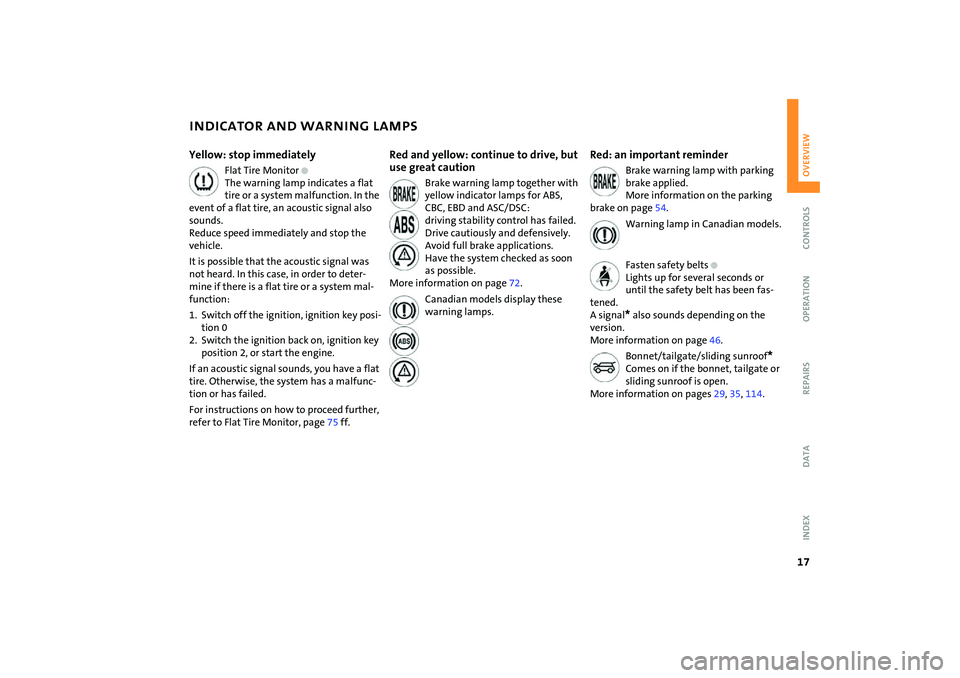
Flat Tire Monitor
+
The warning lamp indicates a flat
tire or a system malfunction. In the
event of a flat tire, an acoustic signal also
sounds.
Reduce speed immediately and stop the
vehicle.
It is possible that the acoustic signal was
not heard. In this case, in order to deter-
mine if there is a flat tire or a system mal-
function:
1. Switch off the ignition, ignition key posi-
tion 0
2. Switch the ignition back on, ignition key
position 2, or start the engine.
If an acoustic signal sounds, you have a flat
tire. Otherwise, the system has a malfunc-
tion or has failed.
For instructions on how to proceed further,
refer to Flat Tire Monitor, page75 ff.
Red and yellow: continue to drive, but
use great caution
Brake warning lamp together with
yellow indicator lamps for ABS,
CBC, EBD and ASC/DSC:
driving stability control has failed.
Drive cautiously and defensively.
Avoid full brake applications.
Have the system checked as soon
as possible.
More information on page72.
Canadian models display these
warning lamps.
Red: an important reminder
Brake warning lamp with parking
brake applied.
More information on the parking
brake on page54.
Warning lamp in Canadian models.
Fasten safety belts
+
Lights up for several seconds or
until the safety belt has been fas-
tened.
A signal* also sounds depending on the
version.
More information on page46.
Bonnet/tailgate/sliding sunroof
*
Comes on if the bonnet, tailgate or
sliding sunroof is open.
More information on pages29, 35, 114.
Page 20 of 172

18
INDICATOR AND WARNING LAMPSRed: have it checked soon
Airbags
+
There is a malfunction in the airbag
system. Have the system checked
as soon as possible.
More information on page77.
Brake pads
The brake pads have reached the
minimum safe limit for lining wear.
Have the brake pads replaced immediately.
More information on page99.
Yellow: have it checked soon
Antilock Brake System (ABS)
+
The ABS has failed. Conventional
braking efficiency is available. Have
the system checked as soon as possible.
More information on page72.
Canadian models display this
warning lamp.
Automatic Stability Control plus
Traction ASC/Dynamic Stability
Control DSC
+
Indicator lamp flashes:
System active: drive and brake forces are
regulated.
Indicator lamp lights up continuously:
ASC/DSC has been deactivated at the but-
ton or is malfunctioning.
If there is a malfunction: have the system
checked as soon as possible.
More information on page72.
Engine
+
The exhaust emissions have deteri-
orated.
Have the vehicle checked as soon as possi-
ble.
Canadian models display this
warning lamp.
Engine electronics
* +
The engine electronics are mal-
functioning. You can continue to
drive with reduced engine output or engine
speed. Have the vehicle checked as soon as
possible.
Page 55 of 172

53
OVERVIEW REPAIRS OPERATIONCONTROLS DATA INDEX
IGNITION LOCK STARTING THE ENGINE0 Steering locked
1 Steering unlocked
2 Ignition switched on
3 Starting the engineSteering lockedThe key can be inserted or removed in this
position only.
To lock the steering:
1. Remove the key
2. Turn the steering wheel slightly to the
left or right until the lock engages.
An alarm goes off if the key remains in the
ignition after opening the driver's door.
Interlock for automatic transmission with
Steptronic:
To turn the key back to the 0 position or to
remove it, first move the selector lever to
position P.Steering unlockedIndividual electrical accessories are ready
for operation.
You will find that it is often easier to turn
the ignition key from position 0 to
position 1 when you move the steering
wheel slightly to help disengage the lock.Ignition switched onAll electrical accessories are ready for oper-
ation.Starting the engine
Vehicles with manual transmission:
step on the clutch when starting the
vehicle. A lockout prevents the engine from
starting if the clutch is not depressed.<
Do not allow the engine to run in
enclosed spaces. Breathing the nox-
ious exhaust gases can lead to uncon-
sciousness and death. The exhaust gases
contain carbon monoxide, an odorless and
colorless, but highly toxic gas.
Do not leave the vehicle unattended with
the engine running. This is a safety hazard.
Before getting out of the vehicle with the
engine running, put the transmission in
idle or position P, and apply the parking
brake. If you fail to do this, the vehicle
could move.<
Do not let the engine warm up with the
vehicle at a standstill. Move off immedi-
ately at a moderate engine speed.
Do not stop the starting procedure
too early, and do not continue it for
more than approx. 20 seconds. Release the
ignition key immediately when the engine
starts.
Extended starting attempts, characterized
by excessively frequent or long periods
with the starter engaged, can lead to dam-
age in the catalytic converter.<
Page 56 of 172

54
STARTING THE ENGINE SWITCHING OFF THE ENGINE PARKING BRAKEManual transmission1. Engage the parking brake
2. Gearshift lever in idle position
3. Depress the clutch
4. Start the engine.Automatic transmission with
Steptronic1. Press the footbrake
2. Put the selector lever in position P or N
3. Start the engine.Special starting conditionsIn the following situations, depress the
accelerator pedal halfway and continue
starting the engine for up to approx.
10 seconds:
>If the engine does not start on the first
attempt, for instance if the engine is very
hot or cold.
>The engine is started at very low temper-
atures, below approx. +57/–156, at
high altitudes above 3,300 ft/1000 m.You should never remove the ignition
key when the vehicle is in motion, as
the steering lock could engage.
When you leave the vehicle, always remove
the ignition key and engage the steering
lock.
When parking on inclines, engage the park-
ing brake, or the vehicle could roll.<
Manual transmissionTurn the ignition key to position 1 or 0.Automatic transmission with
SteptronicEngage selector lever position P, turn the
ignition key to position 1 or 0.
The parking brake is designed primarily to
prevent the vehicle from rolling when it is
parked. It operates against the rear wheels.To engageLever automatically locks in position.
The indicator lamp in the instrument clus-
ter lights up from ignition key position 2,
refer to page17.To release1. Pull up slightly
2. Press the button
3. Push the lever downwards.
If, in exceptional circumstances, it
should be necessary to engage the
parking brake while the vehicle is in
motion, do not pull the lever with excessive
Page 57 of 172

55
OVERVIEW REPAIRS OPERATIONCONTROLS DATA INDEX
PARKING BRAKE MANUAL TRANSMISSIONforce. Keep your thumb pressed against the
release button while pulling the lever up
carefully.
Otherwise, excessive force could lead to
overbraking and loss of traction, i.e. fish-
tailing, at the rear axle.<
To avoid corrosion and one-sided
braking, apply the parking brake
lightly from time to time when coasting to
a standstill, for instance at a traffic light,
provided that it is safe to do so. The brake
lamps do not come on when the parking
brake is engaged.<
6-speed transmission*
When shifting into 5th or 6th gear,
press the gearshift lever to the right.
Otherwise, the engine could be damaged
by accidentally engaging 3rd or 4th gear.<
Reverse gearBefore selecting reverse gear, ensure the
vehicle is stationary; then, fully depress the
clutch and pause briefly before moving the
gearshift lever into position.
5-speed transmission:
Press the gearshift lever to the right and to
the back.
6-speed transmission:
Press the gearshift lever towards the left.
Thereby overcome the slight resistance and
press forward.
Page 68 of 172

66
CRUISE CONTROL
*
To activate via the multifunction
sports steering wheel
1. Start the engine
2. Press button 2.
The indicator lamp in the instrument clus-
ter lights up.
Cruise control is active.To deactivatePress button 2 repeatedly until the indica-
tor lamp goes out.
The cruise control is deactivated when the
ignition key is turned to position 0.
The stored speed is cleared.To maintain, store and increase speedPress button 3.
The system maintains and stores the cur-
rent vehicle speed. Every time you tap the
button, the speed increases by approx.
1mph/ 2km/h.
Press and hold button 3.
The vehicle accelerates without pressure
on the accelerator pedal. When you release
the button, the system maintains and
stores the current speed.
If, on a downhill grade, the engine
braking effect is not sufficient, the
controlled speed can be exceeded. Speed
can drop on uphill grades if the engine out-
put is insufficient.
control, the speed is decreased by approx.
1 mph / 2 km/h every time you tap the but-
ton.
Press and hold button 4.
With the cruise control active, the system
automatically reduces the throttle opening
to slow the vehicle. When you release the
button, the system maintains and stores
the current speed.
To cancel the cruise controlThe cruise control is automatically can-
celed:
>When the brakes are applied
>When the clutch is depressed
>If the cruising speed is either exceeded or
not met for an extended length of time,
for example if you press the accelerator
pedal and exceed the stored speed
>When ASC or DSC is in action.
The indicator lamp stays lit.
You can use the cruise control again as
required.
On the multifunction steering wheel, the
cruise control can be interrupted manually:
When the system is activated, press
button 2.To continue cruise controlPress button 1.
The vehicle accelerates to and maintains
the last speed stored.
Page 77 of 172

75
OVERVIEW REPAIRS OPERATIONCONTROLS DATA INDEX
FLAT TIRE MONITORFlat tire warning
The warning lamp lights up in yel-
low. An acoustic signal also sounds.
There is a flat tire or a significant
loss of pressure in a tire.
1. Reduce speed and stop the vehicle with
caution. Avoid hard brake applications
and steering maneuvers.
2. Determine which tire is damaged.
If this cannot be determined, con-
tact your MINI Dealer.<
3. Repair the flat tire, refer to page133.
Vehicles with Run-Flat Tires:
1. Reduce vehicle speed carefully to under
50 mph / 80 km/h. Avoid hard brake
applications and steering maneuvers. Do
not exceed a speed of 50 mph /
80 km/h.
Do not continue driving if the vehi-
cle is not equipped with Run-Flat
Tires, refer to page111. If you continue
to drive with a flat tire, a serious acci-
dent could result.<
2. Check the tire inflation pressure in all
four tires at the earliest opportunity.
If the tire inflation pressure is cor-
rect in all four tires, it is possible
that the Flat Tire Monitor was not initial-
ized. In this case, initialize the system.<
3. If there is a total loss of tire inflation
pressure, 0 psi/0 kPa, or obvious tire
damage, you can gauge the mileage for
continued driving on the basis of the fol-
lowing indications:
>With a light load:
1 to 2 persons without luggage:
approx. 155 miles/250 km
>With a medium load:
2 persons, luggage compartment full,
or 4 persons without luggage:
approx. 90 miles/150 km
>With a full load:
4 or more persons, luggage compart-
ment full:
approx. 30 miles/50 km.
Drive cautiously. Do not exceed a
speed of 50 mph / 80 km/h. In case of
tire pressure loss you must expect changes
in vehicle handling such as lower track sta-
bility during braking, longer braking dis-
tances and changes in self-steering proper-
ties when close to the handling limit.
For safety reasons, the manufacturer of
your MINI recommends not having dam-
aged Run-Flat Tires repaired, but to consult
a MINI Dealer in such cases.<
Malfunction
The warning lamp lights up in yel-
low. There is a malfunction in the
Flat Tire Monitor or the system has
failed. Have the system checked as soon as
possible.
Page 100 of 172

98
BREAK-IN PROCEDURES GENERAL DRIVING NOTESMoving parts need to be given some time
until they can interact smoothly with one
another. To ensure that your vehicle pro-
vides maximum economy throughout a
long service life, we request that you com-
ply with the following information:EngineComply with the local speed limits.
Up to 1,250 miles/2,000 km:
Drive at varying engine and road speeds,
but do not exceed the following:
4,500 rpm or
95 mph / 150 km/h.
Absolutely avoid putting the accelerator in
full-throttle or kickdown position.
After 1,250 miles/2,000 km:
Engine and road speeds can be gradually
increased.
TiresDue to technical factors associated with
their manufacture, tires do not achieve
their full traction potential until after an
initial break-in period. Therefore drive care-
fully during the first 200 miles/300 km.Brake systemApprox. 300 miles/500 km must be driven
before the brake pads and rotors achieve
the optimum pad-surface and wear pat-
terns required for trouble-free operation
and an extended service life.ClutchRoughly 300 miles/500 km must be driven
before the clutch starts to operate at opti-
mum efficiency. Remember to engage the
clutch carefully during this initial period.After a part replacementYou should again comply with these break-
in procedures if parts mentioned above
have to be replaced later in the vehicle's
life.
Interior mirror, automatic dimming*While the vehicle is being driven forward,
these mirrors dim light through an infi-
nitely variable range depending on the
light's incidence. Two photocells in the
interior rearview mirror serve this purpose.
One is positioned on the underside of the
mirror frame, while the other is slightly off-
set on the back of the mirror.
In order for the photocells to work opti-
mally, keep them clean and do not cover
the area between the interior rearview mir-
ror and the windshield. Do not place stick-
ers or toll tags on the windshield in front of
the mirror.