warning light MINI COOPER CONVERTIBLE 2008 User Guide
[x] Cancel search | Manufacturer: MINI, Model Year: 2008, Model line: COOPER CONVERTIBLE, Model: MINI COOPER CONVERTIBLE 2008Pages: 176, PDF Size: 2.4 MB
Page 105 of 176
103
OVERVIEW REPAIRSOPERATIONCONTROLS DATA INDEX
GENERAL DRIVING NOTESSafe braking Your vehicle is equipped with ABS as a stan-
dard feature. If you are in a situation which
requires full braking, it is best to brake
using maximum brake pressure. Since the
vehicle remains maneuverable, you can still
go around any obstacles with the smallest
possible steering movements.
The pulsation of the brake pedal, together
with the sound of hydraulic regulation,
indicates to you that ABS is actively taking
effect.
Wet roads:
It is a good idea to periodically dry the
brakes with a gentle application when driv-
ing in rain and on wet roads. Monitor traffic
conditions to ensure that this maneuver
does not hinder other road users. The
resulting heat dries brake rotors and pads.
Then if the braking force is needed, it is
immediately available.
Driving downhill:
To prevent overheating and the
resulting reduced efficiency of the
brake system, drive down extended or
steep mountain gradients in the gear
which requires the least brake applications.
Otherwise, even light but consistent pres-
sure on the brake can lead to high tempera-
tures, brake wear and possibly even brake
failure.<
The braking effect of the engine can be
increased by downshifting in the manual
mode of the automatic transmission, to
first gear if necessary, refer to page58. This
protects the brakes from excessive loads.
Do not coast with the clutch
depressed, the transmission in idle or
the engine switched off. Otherwise, the
engine provides no braking effect, and
there is no power-assist for braking or
steering.
Make sure that there are no floor mats,
floor carpets or other objects in the vicinity
of the pedals; otherwise pedal function
could be impeded.<
Corrosion on the brake rotors:
When the vehicle is driven only occasion-
ally, during extended periods when the
vehicle is not used at all, and in operating
conditions where brake applications are
less frequent, there is an increased ten-
dency for corrosion of the brake rotors and
accumulation of contamination on the
brake pads. This occurs because the mini-
mal pressure that must be exerted by the
pads to clean the rotors by brake applica-
tions is not reached.
Corrosion on brake rotors is signaled by a
running or pulsation during braking; even
extended subsequent braking will not cure
this phenomenon.Brake pads
Sensors in the left front and right
rear brake pads monitor pad condi-
tion. When the brake pads have
worn to the permissible limit, this is indi-
cated by the brake wear warning light,
refer to page18.
Hydroplaning
When driving on wet or slushy roads,
reduce road speed. If you do not, a
wedge of water can form between tires
and road surface. This phenomenon is char-
acterized by a partial or complete loss of
contact between the tires and the road sur-
face. The ultimate results are loss of steer-
ing and braking control.<
Page 126 of 176
124
BRAKE SYSTEMBrake fluid level
The warning lamp comes on
although the parking brake is not
engaged:
The brake fluid level in the reservoir is too
low, refer to page16. At the same time,
brake pedal travel may become signifi-
cantly longer.
Have the system checked immediately.
If the brake fluid level is too low and brake
pedal travel has become longer, there may
be a defect in one of the brake system's
hydraulic circuits.
Canadian models display this
warning lamp.
If you continue driving, higher brake
application pressure may be neces-
sary, and there may be a slight pull to one
side. Brake pedal travel may also be longer.
Adapt your driving style accordingly.<
Page 128 of 176

126
SOCKET FOR ONBOARD DIAGNOSTICS OBD CARING FOR YOUR VEHICLEPrimary components of exhaust emissions
can be checked by a device via the OBD
socket.
This socket is located to the left of the
driver's side, on the bottom of the instru-
ment panel underneath a cover.Exhaust emission values
The warning lamp comes on. The
exhaust emissions have deterio-
rated. Have the vehicle checked as
soon as possible.
Canadian models display this
warning lamp.
Under some circumstances, the lamp will
flash. This indicates severe engine misfir-
ing. In this case, you should reduce your
speed and visit your nearest MINI Dealer as
soon as possible. Severe engine misfiring
can quickly lead to serious damage of emis-
sions-related components, especially the
catalytic converter.
If the fuel filler cap is not properly
tightened, the OBD system may con-
clude that fuel vapors are escaping, causing
an indicator to light up. If the filler cap is
then tightened, the indicator should go out
within a few days.<
Suitable car-care products
Use the cleaning and car-care prod-
ucts available at your MINI Dealer.<
Washing your vehicleYou can wash your new MINI or MINI Con-
vertible in automatic car washes from the
beginning. Preference should be for cloth
car washes. If, due to lack of availability,
brush car washes must be used, modern
systems with soft brushes should be given
preference.
When using steam cleaners or high-
pressure cleaners, maintain sufficient
distance to the vehicle and do not exceed a
maximum temperature of 1407/606. If
the jet is too close or the pressure is too
high, this can lead to damage or initial
damage that can develop into more serious
damage. Water that enters vehicle compo-
nents can lead to damage over the long
term.
After washing the vehicle, apply the brakes
briefly to dry them, otherwise water can
reduce braking efficiency over the short
term and the brake rotors can corrode.
Switch the rain sensor off when passing
through an automatic car wash, refer to
page63. Failure to do so could result in
Page 143 of 176
141
OVERVIEW REPAIRSOPERATION CONTROLS DATA INDEX
MINI MOBILITY SYSTEM
*
MINI Mobility System
The MINI Mobility System is provided to
help you repair a flat tire. With the help of
this system you can apply a liquid sealant
on the inside of the tire, which seals the
damaged area and enables you to continue
to drive.Preparing for tire repair
Before using the MINI Mobility Sys-
tem read the warning and danger
precautions on the equipment.<
If possible, leave objects in which have
been forced into the tire.
Take off the tag regarding speed limits and
stick it onto the steering wheel.
Using the MINI Mobility SystemIn order to repair a flat tire with the MINI
Mobility System, proceed as follows:
>Pump in liquid sealant, refer to page142
>Reinflate the tire, refer to page142
>Distribute liquid sealant, refer to
page143
>Check tire inflation pressure, refer to
page143
>Drive on, refer to page143.
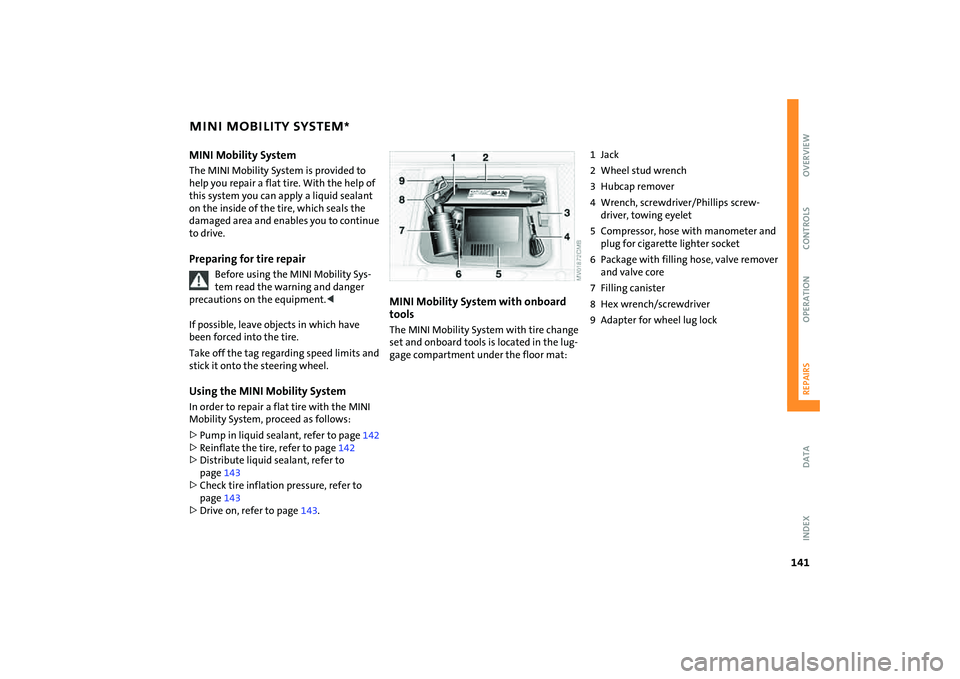
MINI Mobility System with onboard
tools The MINI Mobility System with tire change
set and onboard tools is located in the lug-
gage compartment under the floor mat:
1Jack
2 Wheel stud wrench
3 Hubcap remover
4 Wrench, screwdriver/Phillips screw-
driver, towing eyelet
5 Compressor, hose with manometer and
plug for cigarette lighter socket
6 Package with filling hose, valve remover
and valve core
7 Filling canister
8 Hex wrench/screwdriver
9 Adapter for wheel lug lock
Page 150 of 176
148
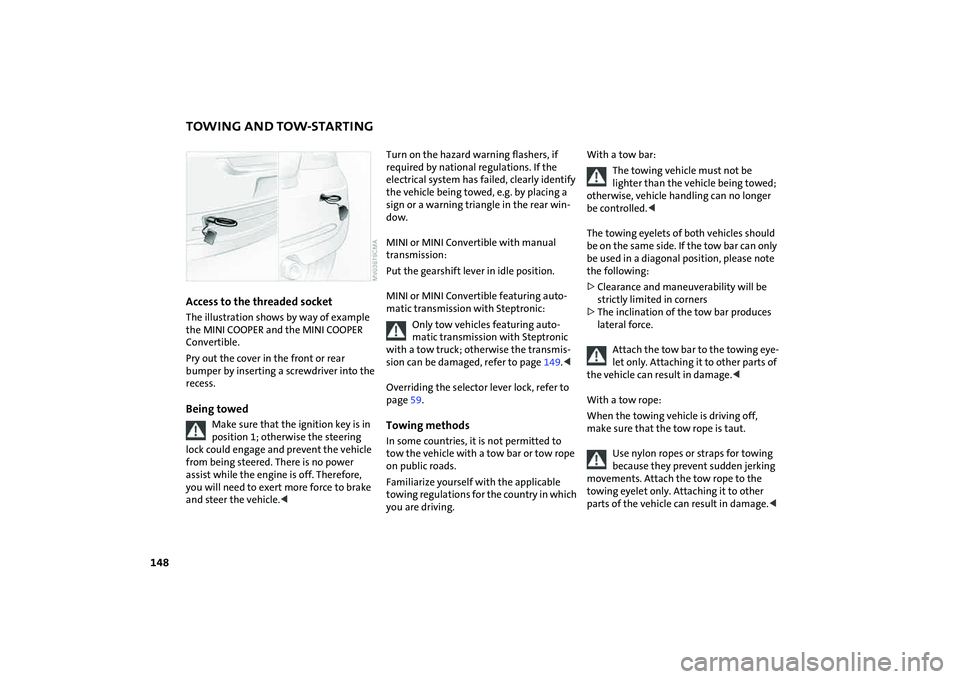
TOWING AND TOW-STARTINGAccess to the threaded socket The illustration shows by way of example
the MINI COOPER and the MINI COOPER
Convertible.
Pry out the cover in the front or rear
bumper by inserting a screwdriver into the
recess.Being towed
Make sure that the ignition key is in
position 1; otherwise the steering
lock could engage and prevent the vehicle
from being steered. There is no power
assist while the engine is off. Therefore,
you will need to exert more force to brake
and steer the vehicle.<
Turn on the hazard warning flashers, if
required by national regulations. If the
electrical system has failed, clearly identify
the vehicle being towed, e.g. by placing a
sign or a warning triangle in the rear win-
dow.
MINI or MINI Convertible with manual
transmission:
Put the gearshift lever in idle position.
MINI or MINI Convertible featuring auto-
matic transmission with Steptronic:
Only tow vehicles featuring auto-
matic transmission with Steptronic
with a tow truck; otherwise the transmis-
sion can be damaged, refer to page149.<
Overriding the selector lever lock, refer to
page59.Towing methodsIn some countries, it is not permitted to
tow the vehicle with a tow bar or tow rope
on public roads.
Familiarize yourself with the applicable
towing regulations for the country in which
you are driving.
With a tow bar:
The towing vehicle must not be
lighter than the vehicle being towed;
otherwise, vehicle handling can no longer
be controlled.<
The towing eyelets of both vehicles should
be on the same side. If the tow bar can only
be used in a diagonal position, please note
the following:
>Clearance and maneuverability will be
strictly limited in corners
>The inclination of the tow bar produces
lateral force.
Attach the tow bar to the towing eye-
let only. Attaching it to other parts of
the vehicle can result in damage.<
With a tow rope:
When the towing vehicle is driving off,
make sure that the tow rope is taut.
Use nylon ropes or straps for towing
because they prevent sudden jerking
movements. Attach the tow rope to the
towing eyelet only. Attaching it to other
parts of the vehicle can result in damage.<
Page 163 of 176
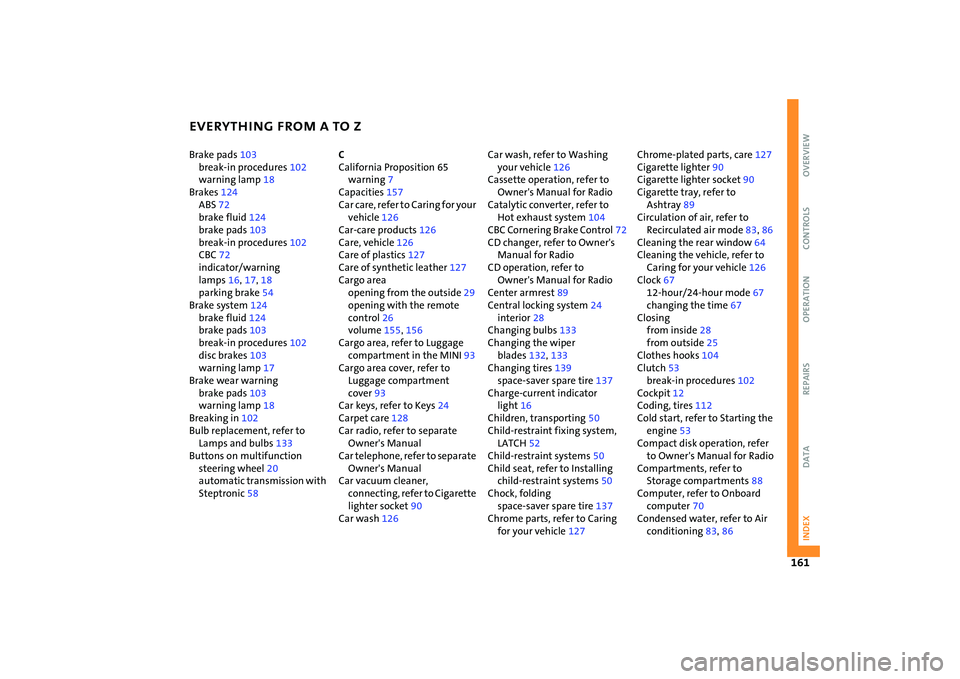
EVERYTHING FROM A TO Z
161
OVERVIEW REPAIRS OPERATION CONTROLS DATA INDEX
Brake pads103
break-in procedures102
warning lamp18
Brakes124
ABS72
brake fluid124
brake pads103
break-in procedures102
CBC72
indicator/warning
lamps16
,17,18
parking brake54
Brake system124
brake fluid124
brake pads103
break-in procedures102
disc brakes103
warning lamp17
Brake wear warning
brake pads103
warning lamp18
Breaking in102
Bulb replacement, refer to
Lamps and bulbs133
Buttons on multifunction
steering wheel20
automatic transmission with
Steptronic58C
California Proposition 65
warning7
Capacities157
Car care, refer to Caring for your
vehicle126
Car-care products126
Care, vehicle126
Care of plastics127
Care of synthetic leather127
Cargo area
opening from the outside29
opening with the remote
control26
volume155
,156
Cargo area, refer to Luggage
compartment in the MINI93
Cargo area cover, refer to
Luggage compartment
cover93
Car keys, refer to Keys24
Carpet care128
Car radio, refer to separate
Owner's Manual
Car telephone, refer to separate
Owner's Manual
Car vacuum cleaner,
connecting, refer to Cigarette
lighter socket90
Car wash126Car wash, refer to Washing
your vehicle126
Cassette operation, refer to
Owner's Manual for Radio
Catalytic converter, refer to
Hot exhaust system104
CBC Cornering Brake Control72
CD changer, refer to Owner's
Manual for Radio
CD operation, refer to
Owner's Manual for Radio
Center armrest89
Central locking system24
interior28
Changing bulbs133
Changing the wiper
blades132
,133
Changing tires139
space-saver spare tire137
Charge-current indicator
light16
Children, transporting50
Child-restraint fixing system,
LATCH52
Child-restraint systems50
Child seat, refer to Installing
child-restraint systems50
Chock, folding
space-saver spare tire137
Chrome parts, refer to Caring
for your vehicle127Chrome-plated parts, care127
Cigarette lighter90
Cigarette lighter socket90
Cigarette tray, refer to
Ashtray89
Circulation of air, refer to
Recirculated air mode83
,86
Cleaning the rear window64
Cleaning the vehicle, refer to
Caring for your vehicle126
Clock67
12-hour/24-hour mode67
changing the time67
Closing
from inside28
from outside25
Clothes hooks104
Clutch53
break-in procedures102
Cockpit12
Coding, tires112
Cold start, refer to Starting the
engine53
Compact disk operation, refer
to Owner's Manual for Radio
Compartments, refer to
Storage compartments88
Computer, refer to Onboard
computer70
Condensed water, refer to Air
conditioning83
,86
Page 164 of 176

EVERYTHING FROM A TO Z
162
Configuring settings, refer to
Vehicle Memory49
Consumption, refer to
Average consumption71
Current fuel consumption71
Contents2
Control elements, refer to
Cockpit12
Convenience operation
convertible top37
from outside26
,27
glass sunroof, electric33
windows31
Convertible top35
care128
convenience operation37
electrical malfunction37
emergency closing37
malfunction37
Coolant122
indicator lamp16
level123
temperature gauge68
Coolant temperature68
Cooling
air conditioning mode86
cooling function83
Cooling function
air conditioning system83
automatic climate control86Cooling system, refer to
Capacities157
Copyright2
Cornering Brake Control
(CBC)72
warning lamp17
Correct tires112
Cosmetic mirror, refer to
Illuminated vanity mirror48
Cruise control65
buttons on the steering
wheel20
indicator lamp19
Cup holders, refer to Beverage
holders89
Curb weight, refer to
Weights155
,156
Current fuel consumption71
setting units71
Cylinders, refer to Engine
data152
D
Daily odometer, refer to Trip
odometer67
Dashboard, refer to Cockpit12
Dashboard lighting, refer to
Instrument lighting62Data
capacities157
dimensions153
engine152
technical152
weights155
Date of the Owner's Manual7
Daytime running lamps61
Defrosting and demisting
windows
air conditioning system84
automatic climate control87
Defrosting front windows, refer
to Defrosting and demisting
windows84
,87
Defrosting windows84
,87
air conditioning system83
automatic climate control86
Defrosting windshield, refer to
Defrosting and demisting
windows84
,87
Defrost setting, refer to
Defrosting and demisting
windows84,87
Demisting windows84
,87
Digital clock67
Dimensions153
,154
Dimming interior rearview
mirror102
Dipstick, engine oil121Directional turn signal,
refer to Turn signal
indicators61
Disc brakes103
Disengaging the locks, refer to
Unlocking26
Displacement, refer to Engine
data152
Display elements13
with navigation system or
Cockpit Chrono Pack14
Display lighting, refer to
Instrument lighting62
Disposal
coolant122
vehicle battery144
Distance covered, refer to
Odometer67
Distance warning, refer to Park
Distance Control (PDC)81
Door keys24
Door lock27
Doors, locking and unlocking
acknowledgment
signals26
,27
from inside28
from outside26
DOT quality grades112
Draft-free ventilation84
,87
Drink holders, refer to Beverage
holders89
Page 167 of 176

EVERYTHING FROM A TO Z
165
OVERVIEW REPAIRS OPERATION CONTROLS DATA INDEX
I
Ice warning, refer to Outside
temperature warning70
Ignition53
Ignition key24
Ignition key positions, refer to
Ignition lock53
Ignition lock53
Illuminated vanity mirror48
Imitation leather127
Imprint2
Index160
Indicator/warning lamp
airbags80
ASC73
brakes124
coolant temperature68
DSC73
fasten safety belts46
Flat Tire Monitor75
fog lamps62
reserve fuel capacity67
,68
Indicator and warning lamps
Tire Pressure Monitor
TPM77
Indicator and warning lamps,
overview16
Individual air distribution87
Individual settings, refer to
Vehicle Memory49Inflation pressure, refer to Tire
inflation pressure108
Inflation pressure monitor,
refer to Flat Tire Monitor74
Inflation pressure monitoring,
refer to Tire Pressure Monitor
TPM76
Inspection69
Instrument cluster, refer to
Display elements13
Instrument lighting62
Instrument panel, refer to
Cockpit12
Integrated universal remote
control91
Interior lamp, remote
control26
Interior lamps62
Interior rearview mirror48
automatic dimming102
Interlock, refer to Steering
locked53
Intermittent operation of the
wipers63
Interval
display, service125
J
Jack137
,141
points140Jack, refer to Tire change set
MINI Mobility System141
Run-Flat Tires115
space-saver spare tire137
Jacking points140
Jets, refer to Ventilation84
,87
Jets, refer to Windshield
washer jets64
John Cooper Works Kit152
Jump-starting146
K
Keys24
Kickdown57
Knock control105
L
Lamp defect133
Lamp replacement, refer to
Lamps and bulbs133
Lamps, refer to Parking lamps/
Low beams60
Lamps and bulbs133
Lashing eyelets, refer to
Securing the load97
LATCH child-restraint fixing
system52
Leather care128
LEDs light-emitting diodes136
Length, refer to
Dimensions153
,154License plate lamp, bulb
replacement136
Lifting handle, space-saver
spare tire137
Light-alloy wheels, care127
Light-emitting diodes
(LEDs)136
Lighter90
Lighting
lamps and bulbs133
Lighting of the instruments62
Lights on warning61
Light switch60
Loading
securing cargo97
stowing cargo97
Loading the vehicle95
Loads, refer to Loading cargo95
Load securing devices, refer to
Securing the load97
Locking
from inside28
from outside26
Locking/unlocking the vehicle,
acknowledgment
signals26
,27
Low beams60
bulb replacement134
Lower back support, refer to
Lumbar support44
Page 169 of 176

EVERYTHING FROM A TO Z
167
OVERVIEW REPAIRS OPERATION CONTROLS DATA INDEX
Oil change intervals, refer to
Service and Warranty
Information Booklet for US
models, Warranty and
Service Guide Booklet for
Canadian models
Oil consumption121
Oil level121
indicator lamp16
Oil pressure, indicator lamp16
Oil service69
Onboard computer70
Onboard tool kit132
MINI Mobility System141
Run-Flat Tires132
space-saver spare tire137
Opening and closing
from inside28
from outside25
via remote control26
via the door lock27
Outlets, refer to
Ventilation82
,85
Outside air83
air conditioning system83
Outside air mode, automatic
climate control86
Outside temperature
display70
changing units70
in the onboard computer70Outside temperature
warning70
Overriding the selector lever
lock59
P
Paintwork care, refer to Vehicle
paintwork127
Park Distance Control (PDC)81
Parking
the vehicle104
Parking aid, refer to Park
Distance Control (PDC)81
Parking brake54
warning lamp17
Parking lamps60
bulb replacement134
Parking lamps/Low beams60
Parking lock, refer to
PParking56
Parts and accessories, refer to
Your individual vehicle6
Pathway lighting60
PDC Park Distance Control81
Pinch protection system,
glass sunroof, electric34
Plastic127
Pollen, refer to
Microfilter84
Microfilter/Activated-
charcoal filter87Power convertible top35
Power failure144
Power output, refer to Engine
data152
Power supply, refer to Cigarette
lighter socket90
Power windows31
Pressure, tires108
reinflation using MINI
Mobility System142
Pressure monitoring of tires,
refer to Tire Pressure Monitor
TPM76
Protective function, electric
glass sunroof34
Pumping in liquid sealant142
Q
Quality grades, refer to
Uniform Tire Quality
Grading112
R
Radiator, refer to Coolant122
Radio, refer to separate
Owner's Manual
Rain sensor
63
Range70
Reading lamps63
Rear backrest, foldable93
,94Rear fog lamp62
bulb replacement136
indicator lamp62
Rear lamps, bulb
replacement135
Rear lamps, refer to Tail
lamps135
Rear seats, adjusting head
restraints44
Rear shelf, refer to Luggage
compartment cover93
Rear turn signal indicators, bulb
replacement135
Rearview mirror48
Rear window wiper64
,65
replacement133
Recirculated air mode
air conditioning system83
automatic climate control86
Reclining seat, refer to Backrest
tilt44
Refueling105
fuel filler door105
Remaining distance, refer to
Range70
Remaining distance for
service69
Remote control25
,26
garage door opener91
malfunction27