tires MINI COOPER CONVERTIBLE 2008 Owner's Manual
[x] Cancel search | Manufacturer: MINI, Model Year: 2008, Model line: COOPER CONVERTIBLE, Model: MINI COOPER CONVERTIBLE 2008Pages: 176, PDF Size: 2.4 MB
Page 134 of 176
132
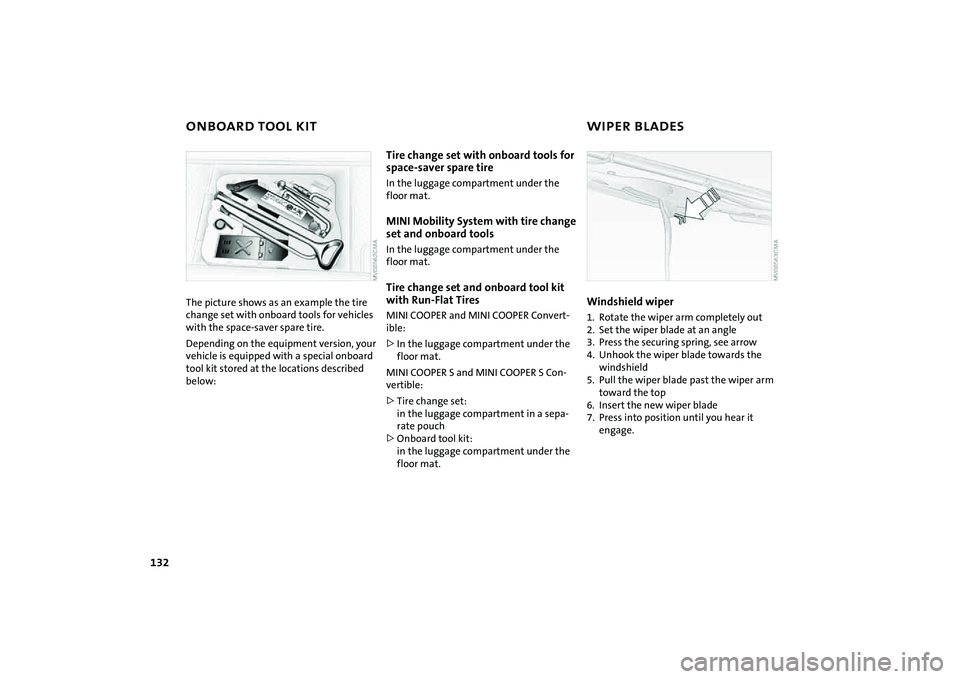
ONBOARD TOOL KIT WIPER BLADESThe picture shows as an example the tire
change set with onboard tools for vehicles
with the space-saver spare tire.
Depending on the equipment version, your
vehicle is equipped with a special onboard
tool kit stored at the locations described
below:
Tire change set with onboard tools for
space-saver spare tireIn the luggage compartment under the
floor mat.MINI Mobility System with tire change
set and onboard toolsIn the luggage compartment under the
floor mat.Tire change set and onboard tool kit
with Run-Flat TiresMINI COOPER and MINI COOPER Convert-
ible:
>In the luggage compartment under the
floor mat.
MINI COOPER S and MINI COOPER S Con-
vertible:
>Tire change set:
in the luggage compartment in a sepa-
rate pouch
>Onboard tool kit:
in the luggage compartment under the
floor mat.
Windshield wiper1. Rotate the wiper arm completely out
2. Set the wiper blade at an angle
3. Press the securing spring, see arrow
4. Unhook the wiper blade towards the
windshield
5. Pull the wiper blade past the wiper arm
toward the top
6. Insert the new wiper blade
7. Press into position until you hear it
engage.
Page 139 of 176
137
OVERVIEW REPAIRSOPERATION CONTROLS DATA INDEX
REPAIRING A FLAT TIRE SPACE-SAVER SPARE TIRE
*
Safety measures in the event of a
flat:
Park the vehicle as far away from flowing
traffic as possible, and switch on the haz-
ard warning flashers.
Turn the steering wheel to the straight-
ahead wheel position and engage the
steering lock. Engage the parking brake and
shift into 1st or reverse gear – selector lever
in P.
All passengers should be outside the vehi-
cle and well away from your immediate
working area – behind a guardrail, for
instance.
If a portable hazard warning lamp is avail-
able, set it up on the roadside at an appro-
priate distance from the rear of the vehicle.
Comply with all safety guidelines and regu-
lations.<
In the event of a flat tire, different proce-
dures should be followed depending on the
equipment included in your vehicle:
>Vehicles with Run-Flat Tires, refer to
page115
>Vehicles with a space-saver spare tire,
refer to the following section
>Vehicles with MINI Mobility System,
refer to page141.
To change a space-saver spare tire, proceed
as follows:
>Remove space-saver spare tire, refer to
the section after the next one
>Prepare for tire change, refer to page139
>Jack up the vehicle, refer to page140
>Mount the space-saver spare tire, refer
to page140
>Tighten the lug bolts, refer to page140
>Drive with space-saver spare tire, refer to
page139.
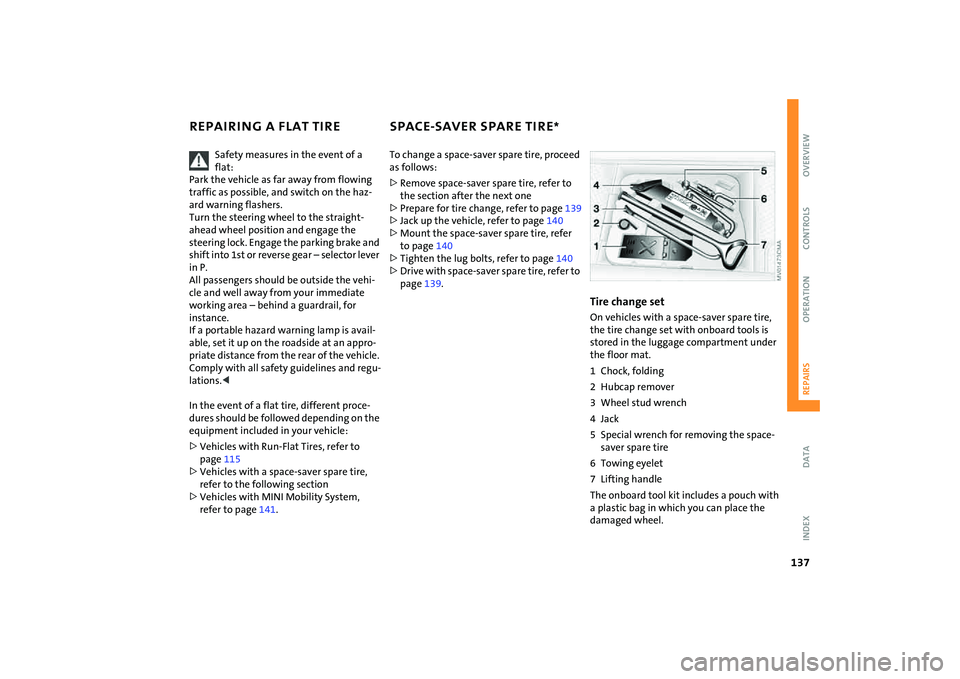
Tire change setOn vehicles with a space-saver spare tire,
the tire change set with onboard tools is
stored in the luggage compartment under
the floor mat.
1 Chock, folding
2 Hubcap remover
3 Wheel stud wrench
4Jack
5 Special wrench for removing the space-
saver spare tire
6 Towing eyelet
7 Lifting handle
The onboard tool kit includes a pouch with
a plastic bag in which you can place the
damaged wheel.
Page 141 of 176
139
OVERVIEW REPAIRSOPERATION CONTROLS DATA INDEX
SPACE-SAVER SPARE TIRE
*
CHANGING TIRES
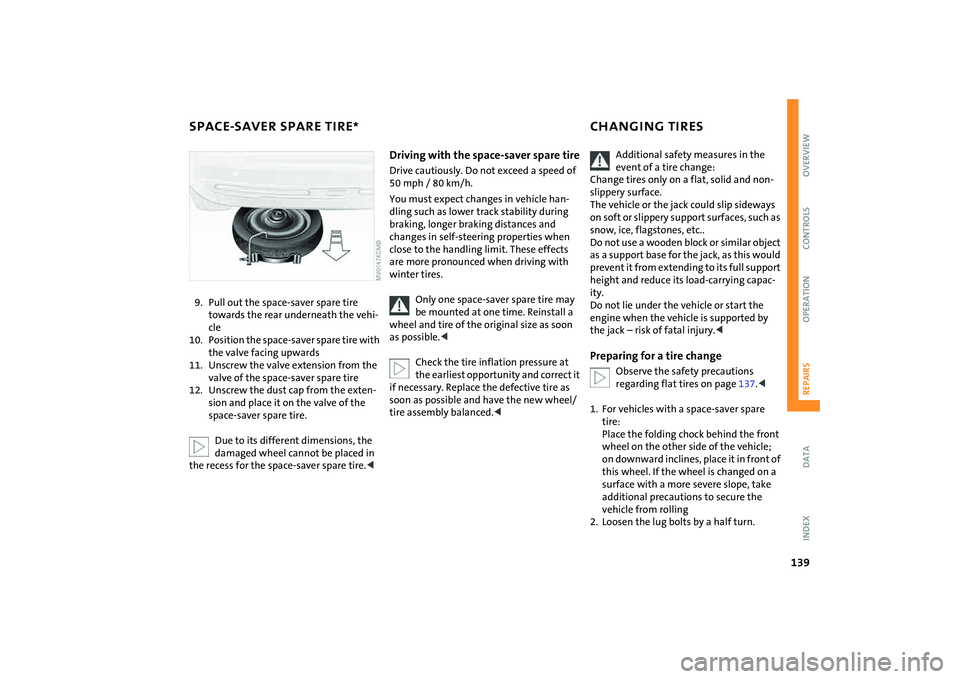
9. Pull out the space-saver spare tire
towards the rear underneath the vehi-
cle
10. Position the space-saver spare tire with
the valve facing upwards
11. Unscrew the valve extension from the
valve of the space-saver spare tire
12. Unscrew the dust cap from the exten-
sion and place it on the valve of the
space-saver spare tire.
Due to its different dimensions, the
damaged wheel cannot be placed in
the recess for the space-saver spare tire.<
Driving with the space-saver spare tireDrive cautiously. Do not exceed a speed of
50 mph / 80 km/h.
You must expect changes in vehicle han-
dling such as lower track stability during
braking, longer braking distances and
changes in self-steering properties when
close to the handling limit. These effects
are more pronounced when driving with
winter tires.
Only one space-saver spare tire may
be mounted at one time. Reinstall a
wheel and tire of the original size as soon
as possible.<
Check the tire inflation pressure at
the earliest opportunity and correct it
if necessary. Replace the defective tire as
soon as possible and have the new wheel/
tire assembly balanced.<
Additional safety measures in the
event of a tire change:
Change tires only on a flat, solid and non-
slippery surface.
The vehicle or the jack could slip sideways
on soft or slippery support surfaces, such as
snow, ice, flagstones, etc..
Do not use a wooden block or similar object
as a support base for the jack, as this would
prevent it from extending to its full support
height and reduce its load-carrying capac-
ity.
Do not lie under the vehicle or start the
engine when the vehicle is supported by
the jack – risk of fatal injury.<
Preparing for a tire change
Observe the safety precautions
regarding flat tires on page137.<
1. For vehicles with a space-saver spare
tire:
Place the folding chock behind the front
wheel on the other side of the vehicle;
on downward inclines, place it in front of
this wheel. If the wheel is changed on a
surface with a more severe slope, take
additional precautions to secure the
vehicle from rolling
2. Loosen the lug bolts by a half turn.
Page 142 of 176
140
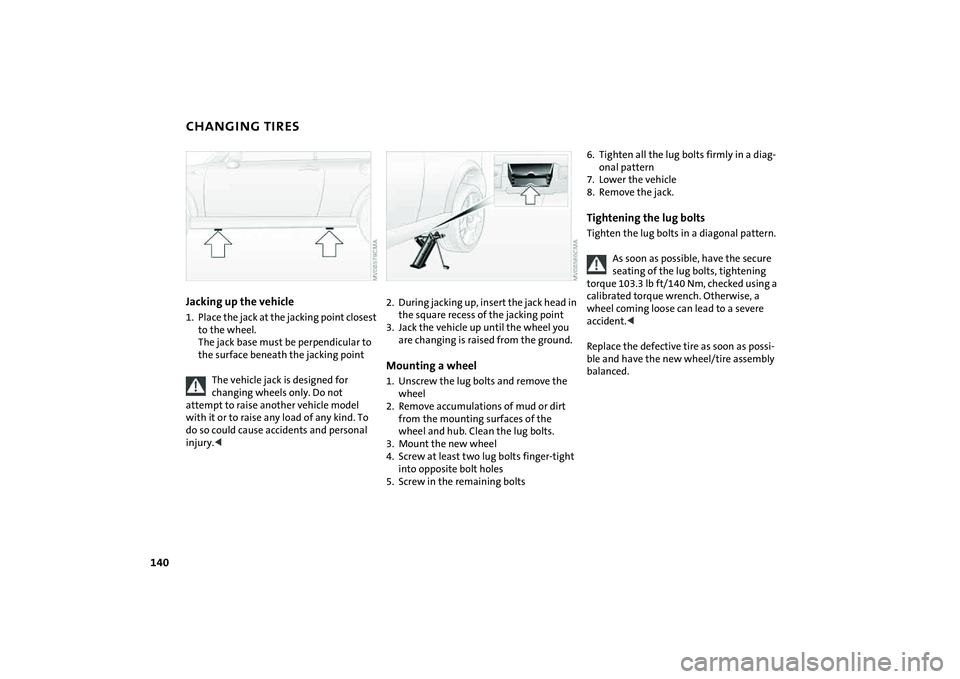
CHANGING TIRESJacking up the vehicle1. Place the jack at the jacking point closest
to the wheel.
The jack base must be perpendicular to
the surface beneath the jacking point
The vehicle jack is designed for
changing wheels only. Do not
attempt to raise another vehicle model
with it or to raise any load of any kind. To
do so could cause accidents and personal
injury.<
2. During jacking up, insert the jack head in
the square recess of the jacking point
3. Jack the vehicle up until the wheel you
are changing is raised from the ground.Mounting a wheel1. Unscrew the lug bolts and remove the
wheel
2. Remove accumulations of mud or dirt
from the mounting surfaces of the
wheel and hub. Clean the lug bolts.
3. Mount the new wheel
4. Screw at least two lug bolts finger-tight
into opposite bolt holes
5. Screw in the remaining bolts
6. Tighten all the lug bolts firmly in a diag-
onal pattern
7. Lower the vehicle
8. Remove the jack.Tightening the lug boltsTighten the lug bolts in a diagonal pattern.
As soon as possible, have the secure
seating of the lug bolts, tightening
torque 103.3 lb ft/140 Nm, checked using a
calibrated torque wrench. Otherwise, a
wheel coming loose can lead to a severe
accident.<
Replace the defective tire as soon as possi-
ble and have the new wheel/tire assembly
balanced.
Page 144 of 176
142
MINI MOBILITY SYSTEM
*
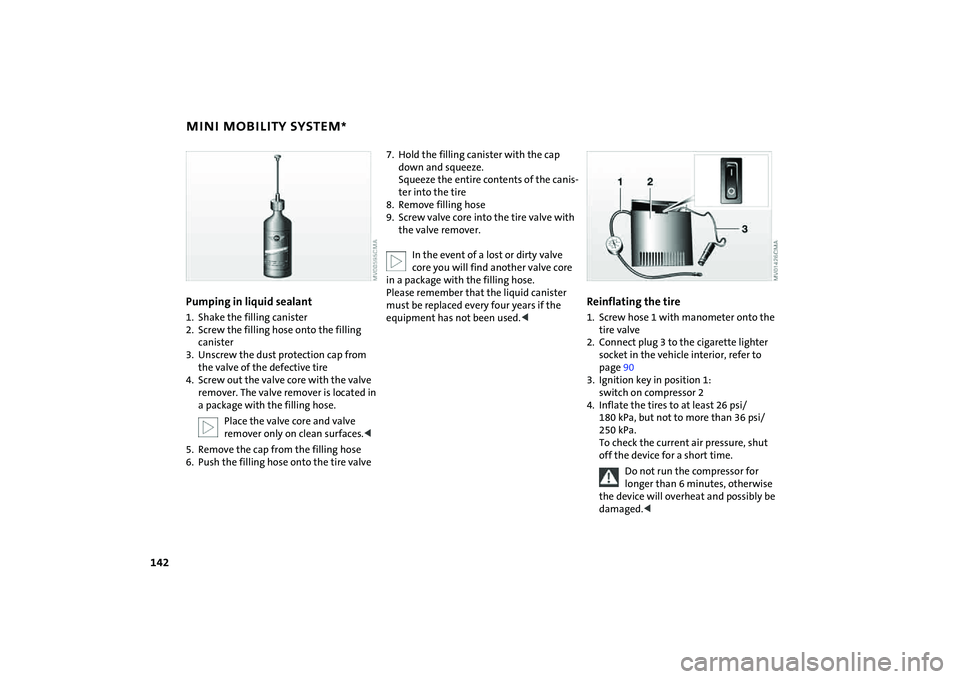
Pumping in liquid sealant
1. Shake the filling canister
2. Screw the filling hose onto the filling
canister
3. Unscrew the dust protection cap from
the valve of the defective tire
4. Screw out the valve core with the valve
remover. The valve remover is located in
a package with the filling hose.
Place the valve core and valve
remover only on clean surfaces.<
5. Remove the cap from the filling hose
6. Push the filling hose onto the tire valve
7. Hold the filling canister with the cap
down and squeeze.
Squeeze the entire contents of the canis-
ter into the tire
8. Remove filling hose
9. Screw valve core into the tire valve with
the valve remover.
In the event of a lost or dirty valve
core you will find another valve core
in a package with the filling hose.
Please remember that the liquid canister
must be replaced every four years if the
equipment has not been used.<
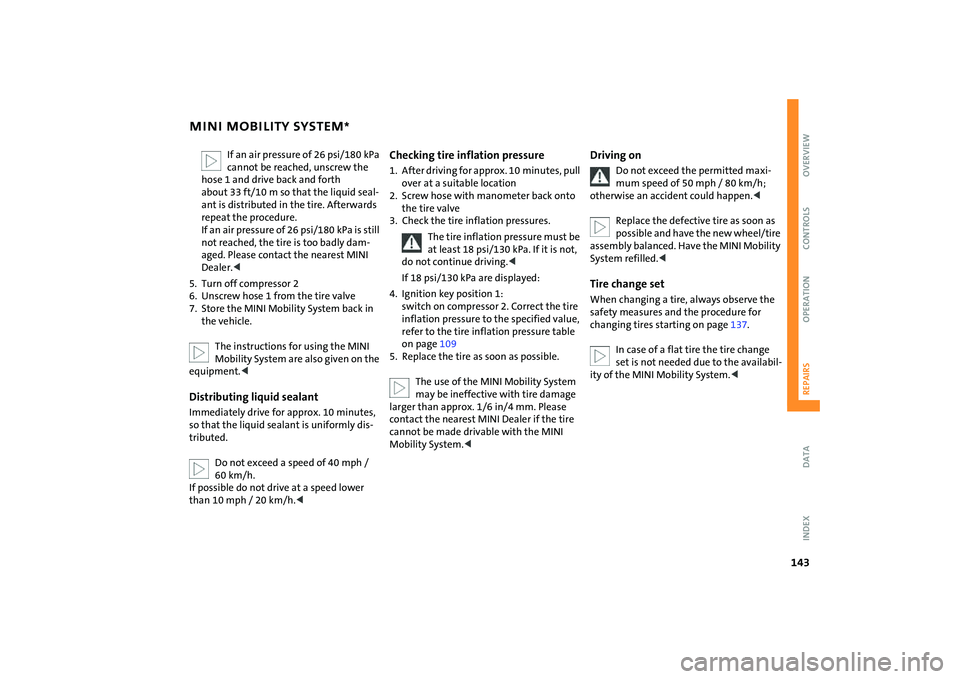
Reinflating the tire1. Screw hose 1 with manometer onto the
tire valve
2. Connect plug 3 to the cigarette lighter
socket in the vehicle interior, refer to
page90
3. Ignition key in position 1:
switch on compressor 2
4. Inflate the tires to at least 26 psi/
180 kPa, but not to more than 36 psi/
250 kPa.
To check the current air pressure, shut
off the device for a short time.
Do not run the compressor for
longer than 6 minutes, otherwise
the device will overheat and possibly be
damaged.<
Page 145 of 176
143
OVERVIEW REPAIRSOPERATION CONTROLS DATA INDEX
MINI MOBILITY SYSTEM
*
If an air pressure of 26 psi/180 kPa
cannot be reached, unscrew the
hose 1 and drive back and forth
about 33 ft/10 m so that the liquid seal-
ant is distributed in the tire. Afterwards
repeat the procedure.
If an air pressure of 26 psi/180 kPa is still
not reached, the tire is too badly dam-
aged. Please contact the nearest MINI
Dealer.<
5. Turn off compressor 2
6. Unscrew hose 1 from the tire valve
7. Store the MINI Mobility System back in
the vehicle.
The instructions for using the MINI
Mobility System are also given on the
equipment.<
Distributing liquid sealantImmediately drive for approx. 10 minutes,
so that the liquid sealant is uniformly dis-
tributed.
Do not exceed a speed of 40 mph /
60 km/h.
If possible do not drive at a speed lower
than 10 mph / 20 km/h.<
Checking tire inflation pressure1. After driving for approx. 10 minutes, pull
over at a suitable location
2. Screw hose with manometer back onto
the tire valve
3. Check the tire inflation pressures.
The tire inflation pressure must be
at least 18 psi/130 kPa. If it is not,
do not continue driving.<
If 18 psi/130 kPa are displayed:
4. Ignition key position 1:
switch on compressor 2. Correct the tire
inflation pressure to the specified value,
refer to the tire inflation pressure table
on page109
5. Replace the tire as soon as possible.
The use of the MINI Mobility System
may be ineffective with tire damage
larger than approx. 1/6 in/4 mm. Please
contact the nearest MINI Dealer if the tire
cannot be made drivable with the MINI
Mobility System.<
Driving on
Do not exceed the permitted maxi-
mum speed of 50 mph / 80 km/h;
otherwise an accident could happen.<
Replace the defective tire as soon as
possible and have the new wheel/tire
assembly balanced. Have the MINI Mobility
System refilled.<
Tire change setWhen changing a tire, always observe the
safety measures and the procedure for
changing tires starting on page137.
In case of a flat tire the tire change
set is not needed due to the availabil-
ity of the MINI Mobility System.<
Page 162 of 176
EVERYTHING FROM A TO Z
160
A
ABS Antilock Brake System72
indicator lamp17
,18
Accessories, refer to Your
individual vehicle6
Activated-charcoal filter87
Adjusting interior
temperature83
,86
Airbags79
passenger airbag status
lamp80
safe seating position42
warning lamp18
Air circulation, refer to
Recirculated air mode83
,86
Air conditioning system82
Air distribution
air conditioning system83
automatic climate control86
individual87
manual83
Air outlets, refer to
Ventilation84
,87
Air pressure, refer to Tire
inflation pressure108
Air volume
air conditioning system83
automatic climate control86
AKI, refer to Fuel quality105
All-season tires, refer to Winter
tires117All Season traction Control
(ASC)72
indicator lamps17
,18
Antenna127
Antifreeze
coolant122
washer fluid64
Antilock Brake System (ABS)72
indicator lamp17,18
Anti-theft system24
Approved axle load, refer to
Weights155
,156
Approved engine oils122
Approved gross vehicle weight,
refer to Weights155
,156
Armrest, refer to Center
armrest89
ASC All Season traction
Control72
indicator lamps17
,18
Assistant systems, refer to
All Season traction Control
(ASC)72
Dynamic Stability Control
(DSC)72
Automatic
air distribution86
air volume86
cruise control65
Automatic car washes126
Automatic climate control85Automatic transmission with
Steptronic
ignition53
indicator lamp57
interlock53
selector lever lock56
shiftlock56
towing148
tow-starting149
AUTO program, refer to
Automatic air distribution86
Aux-In socket88
Average consumption71
setting units71
Average speed71
setting units71
Axle loads, refer to
Weights155
,156
B
Backrests, refer to
Adjusting seats44
Backup lamp
bulb replacement135
Bar, towing148
Base plate for telephone or
mobile phone89Battery144
charging144
disposal144
indicator lamp16
jump-starting146
power failure144
Battery care69
,125
Being towed148
Belts, refer to Safety belts46
Beverage holders89
Black ice, refer to Temperature
warning70
Blower
air conditioning system83
automatic climate control86
Blower, refer to Air volume83
Blowers, refer to Draft-free
ventilation84,87
Bonnet118
indicator lamp17
Bottle holders, refer to
Beverage holders89
Brake discs
brake system103
break-in procedures102
Brake fluid124
level124
warning lamp16
Brake lamps, bulb
replacement135
Page 163 of 176
EVERYTHING FROM A TO Z
161
OVERVIEW REPAIRS OPERATION CONTROLS DATA INDEX
Brake pads103
break-in procedures102
warning lamp18
Brakes124
ABS72
brake fluid124
brake pads103
break-in procedures102
CBC72
indicator/warning
lamps16
,17,18
parking brake54
Brake system124
brake fluid124
brake pads103
break-in procedures102
disc brakes103
warning lamp17
Brake wear warning
brake pads103
warning lamp18
Breaking in102
Bulb replacement, refer to
Lamps and bulbs133
Buttons on multifunction
steering wheel20
automatic transmission with
Steptronic58C
California Proposition 65
warning7
Capacities157
Car care, refer to Caring for your
vehicle126
Car-care products126
Care, vehicle126
Care of plastics127
Care of synthetic leather127
Cargo area
opening from the outside29
opening with the remote
control26
volume155
,156
Cargo area, refer to Luggage
compartment in the MINI93
Cargo area cover, refer to
Luggage compartment
cover93
Car keys, refer to Keys24
Carpet care128
Car radio, refer to separate
Owner's Manual
Car telephone, refer to separate
Owner's Manual
Car vacuum cleaner,
connecting, refer to Cigarette
lighter socket90
Car wash126Car wash, refer to Washing
your vehicle126
Cassette operation, refer to
Owner's Manual for Radio
Catalytic converter, refer to
Hot exhaust system104
CBC Cornering Brake Control72
CD changer, refer to Owner's
Manual for Radio
CD operation, refer to
Owner's Manual for Radio
Center armrest89
Central locking system24
interior28
Changing bulbs133
Changing the wiper
blades132
,133
Changing tires139
space-saver spare tire137
Charge-current indicator
light16
Children, transporting50
Child-restraint fixing system,
LATCH52
Child-restraint systems50
Child seat, refer to Installing
child-restraint systems50
Chock, folding
space-saver spare tire137
Chrome parts, refer to Caring
for your vehicle127Chrome-plated parts, care127
Cigarette lighter90
Cigarette lighter socket90
Cigarette tray, refer to
Ashtray89
Circulation of air, refer to
Recirculated air mode83
,86
Cleaning the rear window64
Cleaning the vehicle, refer to
Caring for your vehicle126
Clock67
12-hour/24-hour mode67
changing the time67
Closing
from inside28
from outside25
Clothes hooks104
Clutch53
break-in procedures102
Cockpit12
Coding, tires112
Cold start, refer to Starting the
engine53
Compact disk operation, refer
to Owner's Manual for Radio
Compartments, refer to
Storage compartments88
Computer, refer to Onboard
computer70
Condensed water, refer to Air
conditioning83
,86
Page 164 of 176

EVERYTHING FROM A TO Z
162
Configuring settings, refer to
Vehicle Memory49
Consumption, refer to
Average consumption71
Current fuel consumption71
Contents2
Control elements, refer to
Cockpit12
Convenience operation
convertible top37
from outside26
,27
glass sunroof, electric33
windows31
Convertible top35
care128
convenience operation37
electrical malfunction37
emergency closing37
malfunction37
Coolant122
indicator lamp16
level123
temperature gauge68
Coolant temperature68
Cooling
air conditioning mode86
cooling function83
Cooling function
air conditioning system83
automatic climate control86Cooling system, refer to
Capacities157
Copyright2
Cornering Brake Control
(CBC)72
warning lamp17
Correct tires112
Cosmetic mirror, refer to
Illuminated vanity mirror48
Cruise control65
buttons on the steering
wheel20
indicator lamp19
Cup holders, refer to Beverage
holders89
Curb weight, refer to
Weights155
,156
Current fuel consumption71
setting units71
Cylinders, refer to Engine
data152
D
Daily odometer, refer to Trip
odometer67
Dashboard, refer to Cockpit12
Dashboard lighting, refer to
Instrument lighting62Data
capacities157
dimensions153
engine152
technical152
weights155
Date of the Owner's Manual7
Daytime running lamps61
Defrosting and demisting
windows
air conditioning system84
automatic climate control87
Defrosting front windows, refer
to Defrosting and demisting
windows84
,87
Defrosting windows84
,87
air conditioning system83
automatic climate control86
Defrosting windshield, refer to
Defrosting and demisting
windows84
,87
Defrost setting, refer to
Defrosting and demisting
windows84,87
Demisting windows84
,87
Digital clock67
Dimensions153
,154
Dimming interior rearview
mirror102
Dipstick, engine oil121Directional turn signal,
refer to Turn signal
indicators61
Disc brakes103
Disengaging the locks, refer to
Unlocking26
Displacement, refer to Engine
data152
Display elements13
with navigation system or
Cockpit Chrono Pack14
Display lighting, refer to
Instrument lighting62
Disposal
coolant122
vehicle battery144
Distance covered, refer to
Odometer67
Distance warning, refer to Park
Distance Control (PDC)81
Door keys24
Door lock27
Doors, locking and unlocking
acknowledgment
signals26
,27
from inside28
from outside26
DOT quality grades112
Draft-free ventilation84
,87
Drink holders, refer to Beverage
holders89
Page 165 of 176
EVERYTHING FROM A TO Z
163
OVERVIEW REPAIRS OPERATION CONTROLS DATA INDEX
Driving downhill103
Driving hints, refer to Driving
notes102
Driving lamps, refer to Parking
lamps/Low beams60
Driving notes102
Driving stability control
systems72
Driving through water104
Dry air, refer to Cooling
function83
,86
Drying air,
refer to Cooling
function83,86
DSC Dynamic Stability
Control72
indicator lamp17
Dynamic Stability Control
(DSC)72
indicator lamp17
E
Easy entry to the rear45
EBD Electronic Brake Force
Distribution72Electrical malfunction
automatic transmission with
Steptronic58
convertible top37
door lock27
driver's door27
fuel filler door106
,107
glass sunroof, electric34
tailgate30
Electric glass sunroof33
Electric power windows31
initializing32
Electronic Brake Force
Distribution (EBD)72
Electronic Stability Program
(ESP), refer to
Dynamic Stability Control
(DSC)72
Emergency operation, refer to
Manual operation
convertible top37
driver's door27
fuel filler door106,107
glass sunroof, electric34
tailgate30
transmission lock, automatic
transmission with
Steptronic56Engine
break-in procedures102
data152
electronics18
indicator lamp18
overheated, refer to
Coolant temperature
gauge68
speed69
starting53
switching off54
Engine compartment
MINI COOPER and MINI
COOPER Convertible119
MINI COOPER S and MINI
COOPER S Convertible120
Engine coolant122
Engine data152
Engine oil121
adding121
dipstick121
indicator/warning lamp16
recommended oils122
specified oil grades122
Engine oil level121
indicator/warning lamp16
Engine oil level, checking121
Engine oil pressure, indicator/
warning lamp16
Engine output, refer to Engine
data152Entry to the rear45
ESP Electronic Stability
Program, refer to Dynamic
Stability Control (DSC)72
Exhaust system, refer to
Hot exhaust system104
Exterior mirrors48
adjusting48
automatic heating48
folding in and out48
External audio device88
Eyelet, for towing and tow-
starting147
F
Failure of an electrical
consumer144
Fastening safety belts, refer to
Safety belts46
Filling canister, refer to MINI
Mobility System142
Filling hose, refer to MINI
Mobility System142
Filter, refer to
Microfilter84
Microfilter/Activated-
charcoal filter
87
Flat
Run Flat tires77