belt MINI COOPER CONVERTIBLE 2011 User Guide
[x] Cancel search | Manufacturer: MINI, Model Year: 2011, Model line: COOPER CONVERTIBLE, Model: MINI COOPER CONVERTIBLE 2011Pages: 186, PDF Size: 3.25 MB
Page 98 of 186
Things to remember when driving
96
When folding the backrest back into its
original position, always ensure that the
catch engages securely. A loose backrest might
fail to prevent cargo from entering the passen-
ger compartment during sudden braking or eva-
sive maneuvers, posing a potential hazard to
occupants.
The belt guide loop, refer to page39, must be
closed.<
Determining cargo limit
1.Locate the following statement on your
vehicle's placard
*:
The combined weight of occupants
and cargo should never exceed
XXX kg or YYY lbs. Otherwise, this could
damage the vehicle and produce unstable
vehicle operating conditions.<
2.Determine the combined weight of the
driver and passengers that will be riding in
your vehicle.
3.Subtract the combined weight of the driver
and passengers from XXX kilograms or YYY
pounds.
4.The resulting figure equals the available
amount of cargo and luggage load capacity.
For example, if the XXX amount equals
1,400 lbs. and there will be four 150 lbs. pas-
sengers in your vehicle, the amount of avail-
able cargo and luggage load capacity is
650 lbs:
1,400 lbs. minus 750 lbs. = 650 lbs.5.Determine the combined weight of luggage
and cargo being loaded on the vehicle. That
weight may not safely exceed the available
cargo and luggage load capacity calculated
in step 4.
6.I f y o u r v e h icl e w i ll be t o w i n g a t r a il e r , pa r t o f
the load from your trailer will be transferred
to your vehicle. Consult the manual for
transporting a trailer to determine how this
may reduce the available cargo and luggage
load capacity of your vehicle.
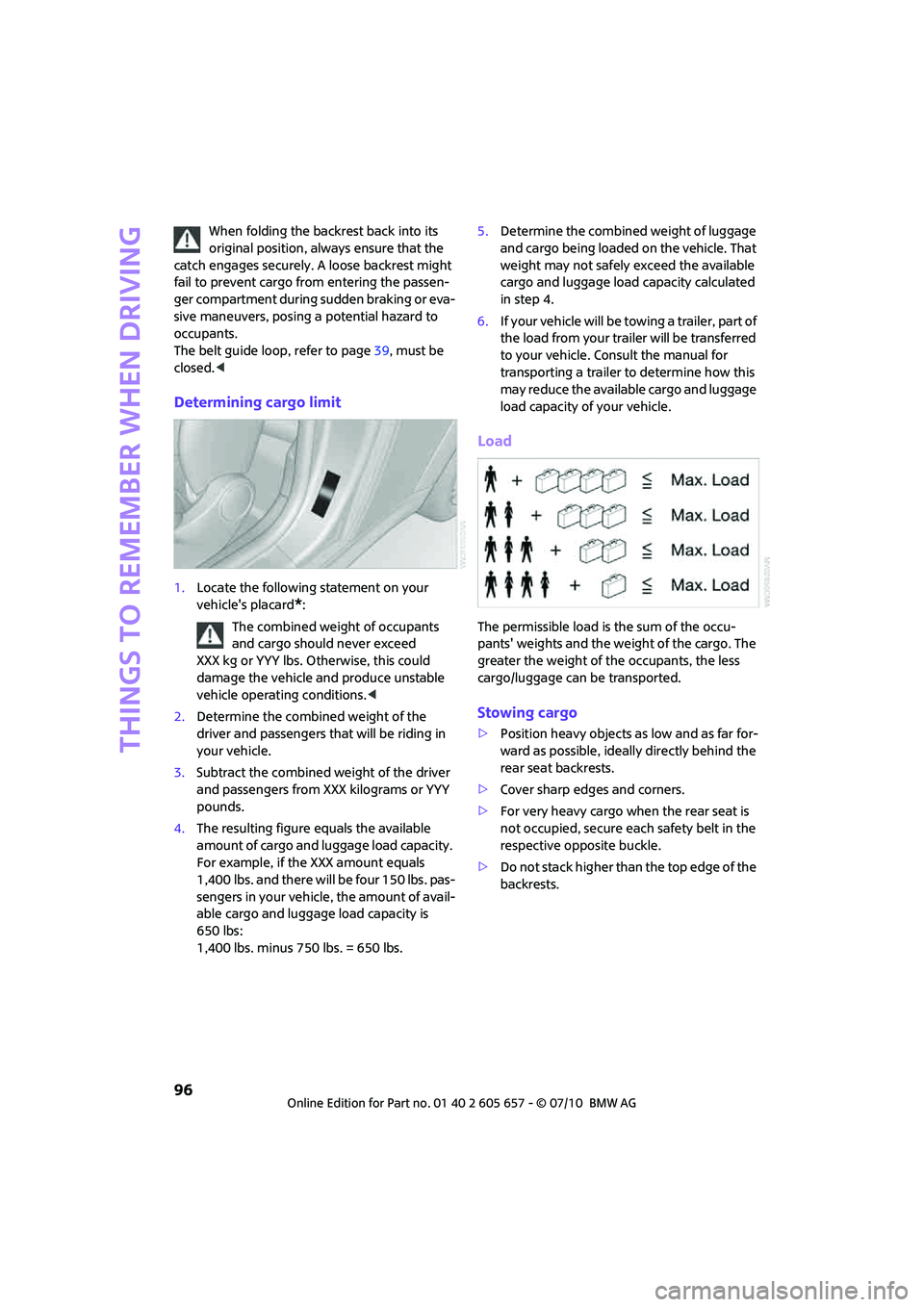
Load
The permissible load is the sum of the occu-
pants' weights and the weight of the cargo. The
greater the weight of the occupants, the less
cargo/luggage can be transported.
Stowing cargo
>Position heavy objects as low and as far for-
ward as possible, ideally directly behind the
rear seat backrests.
>Cover sharp edges and corners.
>For very heavy cargo when the rear seat is
not occupied, secure each safety belt in the
respective opposite buckle.
>Do not stack higher than the top edge of the
backrests.
Page 125 of 186
123
AT A GLANCE REFERENCEMOBILITYCONTROLS DRIVING TIPS COMMUNICATIONS
Tire coding
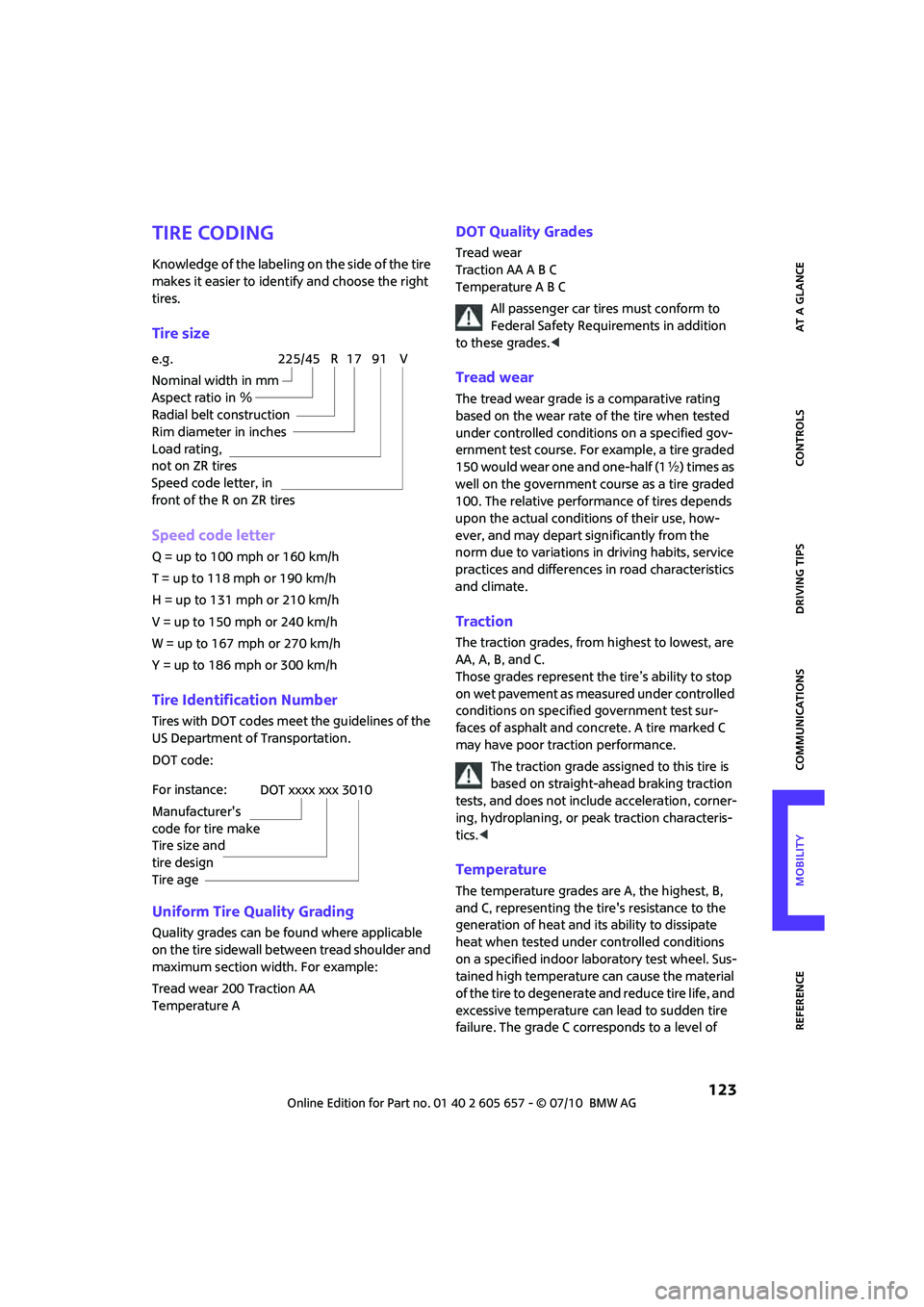
Knowledge of the labeling on the side of the tire
makes it easier to identify and choose the right
tires.
Tire size
Speed code letter
Q = up to 100 mph or 160 km/h
T = up to 118 mph or 190 km/h
H = up to 131 mph or 210 km/h
V = up to 150 mph or 240 km/h
W = up to 167 mph or 270 km/h
Y = up to 186 mph or 300 km/h
Tire Identification Number
Tires with DOT codes meet the guidelines of the
US Department of Transportation.
DOT code:
Uniform Tire Quality Grading
Quality grades can be found where applicable
on the tire sidewall between tread shoulder and
maximum section width. For example:
Tread wear 200 Traction AA
Temperature A
DOT Quality Grades
Tread wear
Traction AA A B C
Temperature A B C
All passenger car tires must conform to
Federal Safety Requirements in addition
to these grades.<
Tread wear
The tread wear grade is a comparative rating
based on the wear rate of the tire when tested
under controlled conditions on a specified gov-
ernment test course. For example, a tire graded
150 would wear one and one-half (1γ) times as
well on the government course as a tire graded
100. The relative performance of tires depends
upon the actual conditions of their use, how-
ever, and may depart significantly from the
norm due to variations in driving habits, service
practices and differences in road characteristics
and climate.
Traction
The traction grades, from highest to lowest, are
AA, A, B, and C.
Those grades represent the tire’s ability to stop
on wet pavement as measured under controlled
conditions on specified government test sur-
faces of asphalt and concrete. A tire marked C
may have poor traction performance.
The traction grade assigned to this tire is
based on straight-ahead braking traction
tests, and does not include acceleration, corner-
ing, hydroplaning, or peak traction characteris-
tics.<
Temperature
The temperature grades are A, the highest, B,
and C, representing the tire's resistance to the
generation of heat and its ability to dissipate
heat when tested under controlled conditions
on a specified indoor laboratory test wheel. Sus-
tained high temperature can cause the material
of the tire to degenerate and reduce tire life, and
excessive temperature can lead to sudden tire
failure. The grade C corresponds to a level of e.g.
Nominal width in mm
Aspect ratio in Ξ
Radial belt construction
Rim diameter in inches
Load rating,
not on ZR tires
Speed code letter, in
front of the R on ZR tires
225/45 R 17 91 V
For instance:
Manufacturer's
code for tire make
Tire size and
tire design
Tire ageDOT xxxx xxx 3010
Page 138 of 186

Care
136
Carpets/floor mats*
Keep floor mats, carpet, and other objects
out of the movement range of the pedals;
otherwise, they may inhibit the function of the
pedals during driving.
Do not place additional floor mats onto an exist-
ing one or onto other objects.
O n l y u s e f l o o r m a t s t h a t h a v e b e e n a p p r o v e d f o r
the vehicle and can be appropriately fastened.
Make sure that the floor mats are securely fas-
tened again after they have been removed, e.g.
for cleaning.<
Floor mats can be removed to be cleaned.
If the carpets are very dirty, clean with a microfi-
ber cloth and water or an interior cleaner. When
doing so, rub forward and back in the driving
direction; otherwise, the carpet may become
matted.
Interior plastic parts
These include:
>Plastic surfaces
>Lamp glass
>Display panes
>Mat parts
Only clean with water and, if necessary, solvent-
free plastic cleaners.
Do not use solvents such as alcohol, lac-
quer thinner, cold cleaners, fuel, or similar,
as these will damage the surfaces.<
Decorative strips*
Only clean decorative strips with moist cloths.
Wipe dry with a soft cloth.
Safety belts
Dirty belt straps impede the reeling action and
thus have a negative impact on safety.
Do not clean chemically, as this may
destroy the webbing.<
Displays
To clean displays such as radios or display ele-
ments, use a display cleaning cloth or a soft,
non-scratching, lint-free cloth.
Avoid pressing too hard when cleaning
the display as this can cause damage.<
Do not use chemical or abrasive house-
hold cleaning agents. Keep fluids of any
kind away from the device. Surfaces or electrical
components may otherwise become corroded
or damaged.<
CD/DVD drives
Do not use cleaning CDs as this could
damage parts of the drive.<
Vehicle storage
If you are not going to drive your car for more
than three months, please ask for advice from
your MINI dealer or a workshop that works
according to MINI manufacturer specifications.
Page 154 of 186
Indicator and warning lamps
152
Indicator and warning lamps
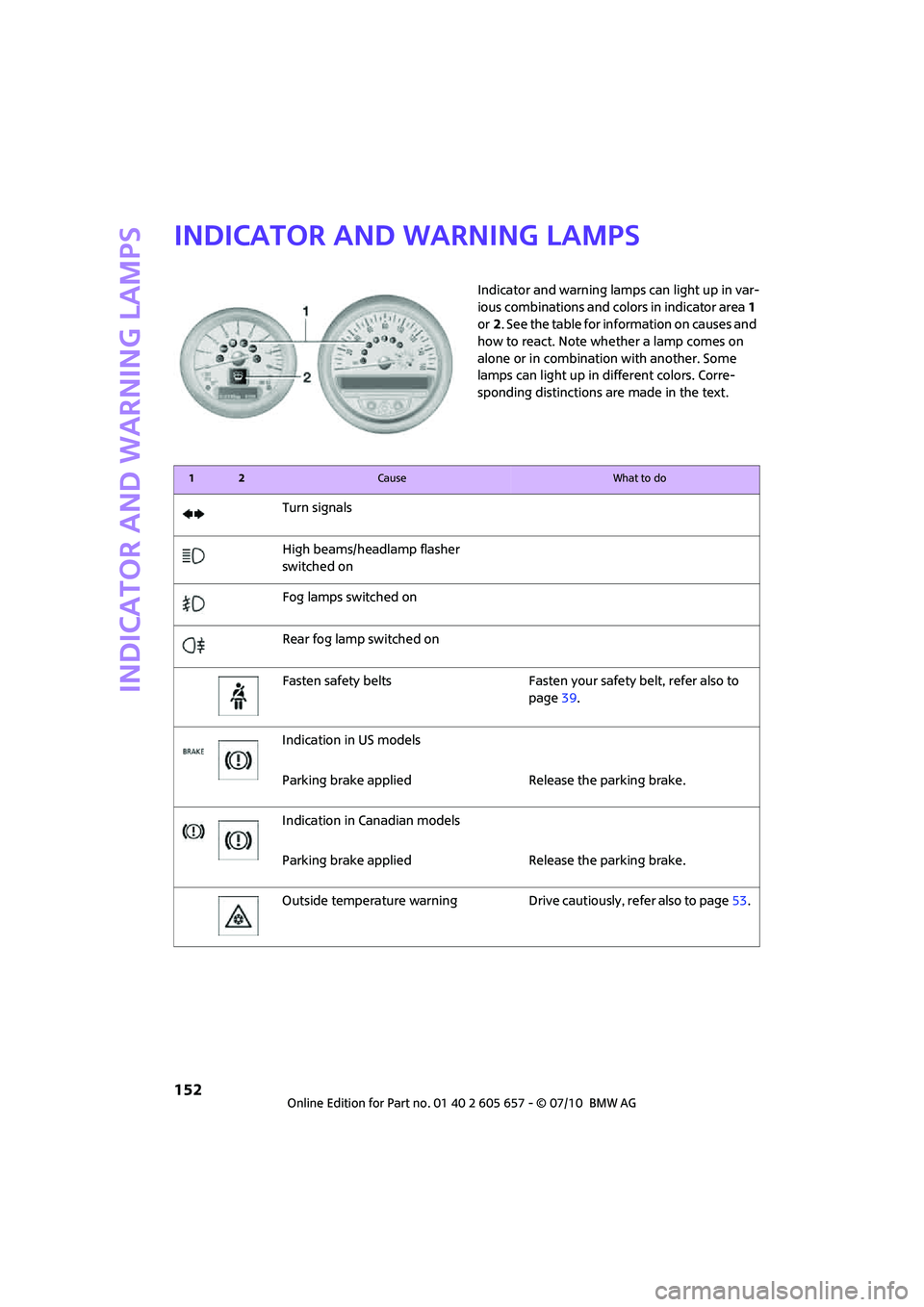
Indicator and warning lamps can light up in var-
ious combinations and colors in indicator area 1
or2. See the table for information on causes and
how to react. Note whether a lamp comes on
alone or in combination with another. Some
lamps can light up in different colors. Corre-
sponding distinctions are made in the text.
12Cause What to do
Turn signals
High beams/headlamp flasher
switched on
Fog lamps switched on
Rear fog lamp switched on
Fasten safety belts Fasten your safety belt, refer also to
page39.
Indication in US models
Parking brake applied Release the parking brake.
Indication in Canadian models
Parking brake applied Release the parking brake.
Outside temperature warning Drive cautiously, refer also to page53.
Page 157 of 186

155
AT A GLANCE REFERENCEMOBILITYCONTROLS DRIVING TIPS COMMUNICATIONS
Remote control malfunctioning or, in
cars with Comfort Access, not
detectedThe engine cannot be started. Have
the remote control checked, if neces-
sary.
Remote control battery is discharged Use the remote control for a longer
journey or, in cars with Comfort
Access, replace the battery.
Belt tensioners and/or airbag system
failedHave the system checked immedi-
ately. Fasten the safety belts anyway.
Power steering failed You can continue your journey, but
moderate your speed and exercise
due caution. Steering response will be
markedly different. Have the system
checked without delay.
Lights up in red:
Engine malfunction
Stop the car and switch off the
engine. You cannot continue your
journey. Contact your MINI dealer.
Lights up in yellow:
Full engine power no longer available You can continue your journey, but
moderate your speed and exercise
due caution. Have the engine
checked as soon as possible.
Indicator lamp1 flashes:
Engine malfunction under high load.
High engine load will result in dam-
age to the catalytic converterYou can continue your journey, but
moderate your speed and exercise
due caution. Have the vehicle
checked without delay.
Indicator lamp1 comes on:
Engine malfunction with adverse
effect on exhaust emissionsYou can continue your journey, but
moderate your speed and exercise
due caution. Have the car checked as
soon as possible.
12Cause What to do
Page 174 of 186
Everything from A to Z
172
Everything from A to Z
INDEX
A
ABS Antilock Brake System63
Accessories, refer to Your
individual vehicle4
Acknowledgment signals for
locking/unlocking vehicle21
Activated-charcoal filter for
automatic climate control82
Adaptive Light Control75
Additives
– coolant129
– engine oil129
Adjusting temperature inside
the car, refer to Air
conditioner79
Adjusting temperature inside
the car, refer to Automatic
climate control80
Air conditioner78
Air conditioning mode
– air conditioner79
– automatic climate control80
– ventilation82
Air distribution
– automatic81
– individual80
– manual80
Air flow rate79,81
– air conditioning system79
– automatic climate control81
– heating, ventilation79
Air outlets, refer to Air vents78
Air pressure, checking, refer to
Tire inflation pressure118
Air recirculation, refer to
Recirculated-air
mode79,81
Air supply
– air conditioner79
– automatic climate control80
– ventilation82
Air vents78Airbags70
– sitting safely35
– warning lamp72
Airing, refer to Ventilation82
AKI, refer to fuel grade117
Alarm system25
All-season tires, refer to Winter
tires126
Always Open Timer55
Ambient air, refer to
Recirculated-air
mode79,81
Ambient lighting77
Antenna, care133
Antifreeze
– coolant129
– washer fluid
51
Antilock Brake System ABS63
Anti-theft alarm system, refer
to Alarm system25
Anti-theft system19
Approved axle loads, refer to
Weights169
Approved engine oils129
Approved gross vehicle
weight, refer to Weights169
Armrest, refer to Center
armrest85
Ashtray87
Assistant systems, refer to
– Dynamic Stability Control
DSC63
Audio device, external85
AUTO program for automatic
climate control81
Automatic
– air distribution81
– air flow rate81
– cruise control51
– headlamp control73
Automatic climate control78
– automatic air distribution81Automatic transmission with
Steptronic46
– interlock46
– overriding selector lever
lock48
– shiftlock46
– sport program47
AUX-IN, refer to External audio
device85
Average fuel consumption54
– setting the units57
Average speed54
Axle loads, refer to
Weights169B
Background lighting, refer to
Ambient lighting77
Backrests, refer to Seats36
Backup lamps
– replacing bulb140,141
Band-aids, refer to First aid
pouch148
Bar, refer to Tow-starting,
towing away150
Base plate for telephone or
mobile phone
– refer to Snap-in adapter113
Battery146
– charging147
– disposal28,147
– jump-starting148
– temporary power failure147
Battery renewal
– remote control28
Being towed150
Belt tensioner, refer to Safety
belts38
Belts, refer to Safety belts38
Beverage holders, refer to
Cupholders87
Page 177 of 186
175
AT A GLANCE REFERENCEMOBILITYCONTROLS DRIVING TIPS COMMUNICATIONS
Emergency operation, refer to
Manual operation
– convertible top32
– door lock22
– fuel filler flap116
– liftgate24
– transmission lock, automatic
transmission48
Emergency services, refer to
Roadside Assistance148
Engine
– breaking in92
– data166
– overheated, refer to Coolant
temperature53
– speed166
– starting45
– starting, Comfort Access26
– switching off45
Engine compartment128
Engine coolant, refer to
Coolant129
Engine oil
– adding129
– additives, refer to Approved
engine oils129
– alternative oil types129
– approved engine oils129
– capacity129
– checking level128
– dipstick128
– intervals between changes,
refer to Service
requirements58
– MINI Maintenance
System131
Engine oil level, checking128
Engine output, refer to Engine
data166
Engine starting, refer to
Starting the engine45
ESP Electronic Stability
Program, refer to Dynamic
Stability Control DSC63
Exhaust system, refer to Hot
exhaust system92Exterior mirrors39
– adjusting39
– automatic heating39
– folding in and out39
External audio device85
Eyes
– for tow-starting and towing
away150
– for tying down loads97
F
Failure messages, refer to
Check Control60
Failure of an electrical
consumer147
Fastening safety belts, refer to
Safety belts38
Fault messages, refer to Check
Control60
Filter
– microfilter for air
conditioner80
– microfilter/activated-
charcoal filter for automatic
climate control82
Fine wood, care136
First aid pouch148
Fixture for remote control,
refer to Ignition lock44
Flash when locking/
unlocking21
Flat tire
– run-flat tires125
– Tire Pressure Monitor TPM67
Flat Tire Monitor FTM65
– indicating a flat tire66
– initializing the system65
– snow chains65
– system limits65
Flat tires, refer to Tire
condition124
Floor mats, care136
Fog lamps
– replacing bulb139,141
Folding rear seat backrest94
Folding roof, refer to
Convertible top with
integrated sliding sunroof30Footbrake, refer to Braking
safely93
Footwell lamps77
For your own safety5
Front airbags70
Front fog lamps76
– indicator lamp152
– replacing bulb139
Front seat adjustment36
Frost on windows, refer to
Defrosting windows80,82
FTM, refer to Flat Tire
Monitor65
Fuel117
– gauge53
– high-quality brands117
– quality117
– specifications117
– tank capacity170
Fuel clock, refer to Fuel
gauge53
Fuel consumption display
– average fuel consumption54
Fuel display, refer to Fuel
gauge53
Fuel filler flap116
– releasing in the event of
electrical malfunction116
Fuses147
G
Garage door opener, refer to
Integrated universal remote
control83
Gasoline
– refer to Average fuel
consumption54
Gasoline display, refer to Fuel
gauge53
Gasoline, refer to Required
fuel117
Gear indicator
– automatic transmission with
Steptronic46
Gear shifting
– automatic transmission46
– manual transmission46
Page 180 of 186

Everything from A to Z
178
N
Neck support, refer to Head
restraints37
Nets, refer to Storage
compartments86
New tires125
Number of cylinders, refer to
Engine data166
Number of safety belts35
Nylon rope, refer to Tow
rope151
O
OBD socket, refer to Socket for
On-Board Diagnosis131
Octane ratings, refer to Fuel
specifications117
Odometer53
Oil consumption128
Oil level128
Oil, refer to Engine oil128
Oil types129
Old batteries, refer to
Disposal147
On-board vehicle tool kit137
Opening and closing
– Comfort Access26
– from inside23
– from outside19
– using the door lock22
– using the remote control19
Opening and unlocking
– from inside23
Outlets
– refer to Ventilation82
Outlets, refer to Air vents78
Output, refer to Engine
data166
Outside temperature display
– change units of measure57
– in the onboard computer57
Outside-air mode
– automatic climate control81
Overheated engine, refer to
Coolant temperature53
P
Paintwork, care135
Park Distance Control PDC62
Parking
– vehicle45
Parking aid, refer to Park
Distance Control PDC62
Parking brake45
Parking lamps, replacing
bulb139
Parking lamps/low beams73
Parts and accessories, refer to
Your individual vehicle4
Pathway lighting73
Personal Profile18
Phone numbers
– dialing108
Pinch protection system
– windows30
Plastic parts, care136
Pollen
– refer to Microfilter for air
conditioner80
– refer to Microfilter/activated-
charcoal filter for automatic
climate control82
Power convertible top30
Power failure147
Power windows29
Power windows, refer to
Windows29
Pressure monitoring of tires,
refer to Tire Pressure Monitor
TPM67
Pressure monitoring, tires65
– Flat Tire Monitor65
Pressure, tires118
Protective function, refer to
Pinch protection system
– windows30
Puncture
– Flat Tire Monitor65
R
Radio key, refer to Integrated
key/remote control18Radio position, refer to Radio
readiness44
Radio readiness44
– switched off44
– switched on44
Rain sensor49
Range, refer to Cruising
range54
Reading lamps77
Rear fog lamp76
– indicator lamp152
– replacing bulb141
Rear lamps
– bulb replacement141
Rear lamps, refer to Tail
lamps140
Rear seat backrest, folding94
Rear seats
– folding the backrests94
Rear window defroster79,82
Rearview mirror, refer to
Mirrors39
Recirculated-air mode79,81
Recirculation of air, refer to
Recirculated-air
mode79,81
Reclining seat, refer to
Backrest36
Refueling116
Releasing
– hood127
Remote control18
– battery renewal28
– Comfort Access26
– garage door opener83
– liftgate21
– malfunctions22,27
– service data131
Replacement remote
control18
Replacing bulbs, refer to
Lamps and bulbs137
Replacing tires, refer to New
wheels and tires125
Reporting safety defects6
Reserve warning, refer to Fuel
gauge53
Reservoir for washer
systems51
Page 181 of 186
179
AT A GLANCE REFERENCEMOBILITYCONTROLS DRIVING TIPS COMMUNICATIONS
Restraint systems
– for children41
– refer to Safety belts38
Reverse gear
– automatic transmission with
Steptronic47
– manual transmission46
Roadside Assistance148
Roadside parking lamps75
– replacing bulb139
Roadworthiness test, refer to
Service requirements58
Roof load capacity169
Roof-mounted luggage
rack97
Rope, refer to Tow-starting,
towing away151
RSC Run-flat System
Component, refer to Run-flat
tires125
Rubber parts, care135
Run-flat System Component
RSC, refer to Run-flat
tires125
Run-flat tires125
– flat tire66
– tire inflation pressure118
– tire replacement125
– winter tires126
S
Safety belt
– number35
Safety Belt Reminder39
Safety belts38
– damage39
– indicator lamp39
– reminder39
– sitting safely35
Safety belts, care136
Safety systems
– airbags70
– Antilock Brake System
ABS63
– Dynamic Stability Control
DSC63
– safety belts38Safety tires, refer to Run-flat
tires125
Screw thread for tow
fitting150
Seat adjustment
– mechanical36
Seats36
– adjusting the seats36
– heating38
– sitting safely35
Securing the vehicle
– from inside23
– from outside19
Selector lever
– automatic transmission with
Steptronic46
Selector lever lock
– automatic transmission with
Steptronic, refer to
Shiftlock46
– overriding manually48
Selector lever positions
– automatic transmission with
Steptronic46
Service car, refer to Roadside
Assistance148
Service data in the remote
control131
Service Interval Display, refer
to Condition Based Service
CBS131
Service, refer to Roadside
Assistance148
Service requirement display,
refer to Condition Based
Service CBS131
Service requirements58
Settings
– clock, 12h/24h mode57
Shifting gears
– automatic transmission with
Steptronic47
– manual transmission46
Shiftlock
– automatic transmission, refer
to Changing selector lever
positions46
Side airbags70Side turn signal
– replacing bulb140
Side windows, refer to
Windows29
Signal horn, refer to Horn10
Sitting safely35
– airbags35
– safety belts35
– with head restraint35
Size, refer to Dimensions167
Sliding/tilt sunroof
– refer to Glass sunroof,
electric28
Slipstream deflector, refer to
Wind deflector33
Slot for remote control44
Smokers' package, refer to
Ashtray87
Snap-in adapter
– inserting/removing113
– use102
Snap-in adapter, refer to
Center armrest storage
compartment85
Snow chains126
Socket for On-Board Diagnosis
OBD131
Socket, refer to Connecting
electrical appliances87
Space-saver spare tire
– changing tires144
– inflation pressure118
Spare wheel, refer to Space-
saver spare tire144
Special oils, refer to Approved
engine oils129
Speed166
– with winter tires126
Speedo, refer to
Speedometer12
Speedometer12
Split rear backrest, refer to
Through-loading system95
Split rear seat backrest, refer to
Expanding the cargo area94
Sport button64
Stability control, refer to
Driving stability control
systems62
Page 182 of 186
Everything from A to Z
180
Start/Stop button44
– starting the engine45
– switching off the engine45
Starting assistance, refer to
Jump-starting148
Starting, refer to Starting the
engine45
Starting the engine
– Start/Stop button44
Start-off assistance, refer to
– DSC63
– Hill Assist64
Status of this Owner's Manual
at time of printing4
Steering wheel40
– adjustment40
– buttons on steering wheel11
– lock44
– shift paddles47
Steptronic, refer to Automatic
transmission with
Steptronic46
Storage area
– cargo area94
Storage compartment, front
passenger side86
Storage compartments86
Storage space
– storage compartments86
Storage space, refer to
– Luggage compartment in the
MINI Convertible95
Storing the vehicle136
Storing tires126
Stowage, refer to Storage
compartments86
Summer tires, refer to Wheels
and tires118
Switches, refer to Cockpit10
Switching off
– engine45
Switching off the engine
– Start/Stop button44
Switching the cooling function
on and off82
Symbols4T
Tachometer53
Tail lamp, refer to Tail
lamps140
– replacing bulb140
Tail lamps140
Tank volume, refer to
Capacities170
Technical data166
Technical modifications5
Telephone102
– hands-free system110
– installation location, refer to
Center armrest85
– refer to separate Owner's
Manual
– voice commands111
Telephone call, refer to the
Owner's Manual for the
telephone
Temperature display
– setting the units57
Temperature of coolant, refer
to Coolant temperature53
Temperature setting
– air conditioner79
– automatic climate control81
Tempomat, refer to Cruise
control51
Tensioning straps, refer to
Securing cargo97
The individual vehicle4
Third brake lamp, refer to
Center brake lamp141
Three-point safety belt38
Through-loading system95
Tightening the lug bolts
– keys144
– torque146
Tightening torque, refer to
Tightening lug bolts146
Tire change set
– space-saver spare tire144Tire failure
– Flat Tire Monitor66
– indicator/warning lamp66
– MINI Mobility System142
– run-flat tires66
– space-saver spare tire144
– Tire Pressure Monitor67
Tire inflation pressure118
– loss66
– space-saver spare tire118
Tire Pressure Monitor TPM67
– limitations of system67
– resetting system67
– warning lamp68
Tire pressure monitoring, refer
to Flat Tire Monitor65
Tire Quality Grading123
Tires
– age125
– breaking in92
– changing, refer to Changing
wheels144
– condition124
– damage124
– inflation pressure118
– inflation pressure loss68
– minimum tread depth124
– new tires125
– pressure monitoring, refer to
Flat Tire Monitor65
– pressure monitoring, refer to
Tire Pressure Monitor
TPM67
– puncture66
– size123
– wear indicators, refer to
Minimum tread depth124
– winter tires126
– with emergency operation
properties125
Tires with emergency
operation properties, refer to
Run-flat tires125
Tires with safety features, refer
to Run-flat tires125
Tools, refer to On-board
vehicle tool kit137
Torque166
– lug bolts146