reset MINI COOPER CONVERTIBLE 2011 User Guide
[x] Cancel search | Manufacturer: MINI, Model Year: 2011, Model line: COOPER CONVERTIBLE, Model: MINI COOPER CONVERTIBLE 2011Pages: 186, PDF Size: 3.25 MB
Page 70 of 186
Technology for driving comfort and safety
68
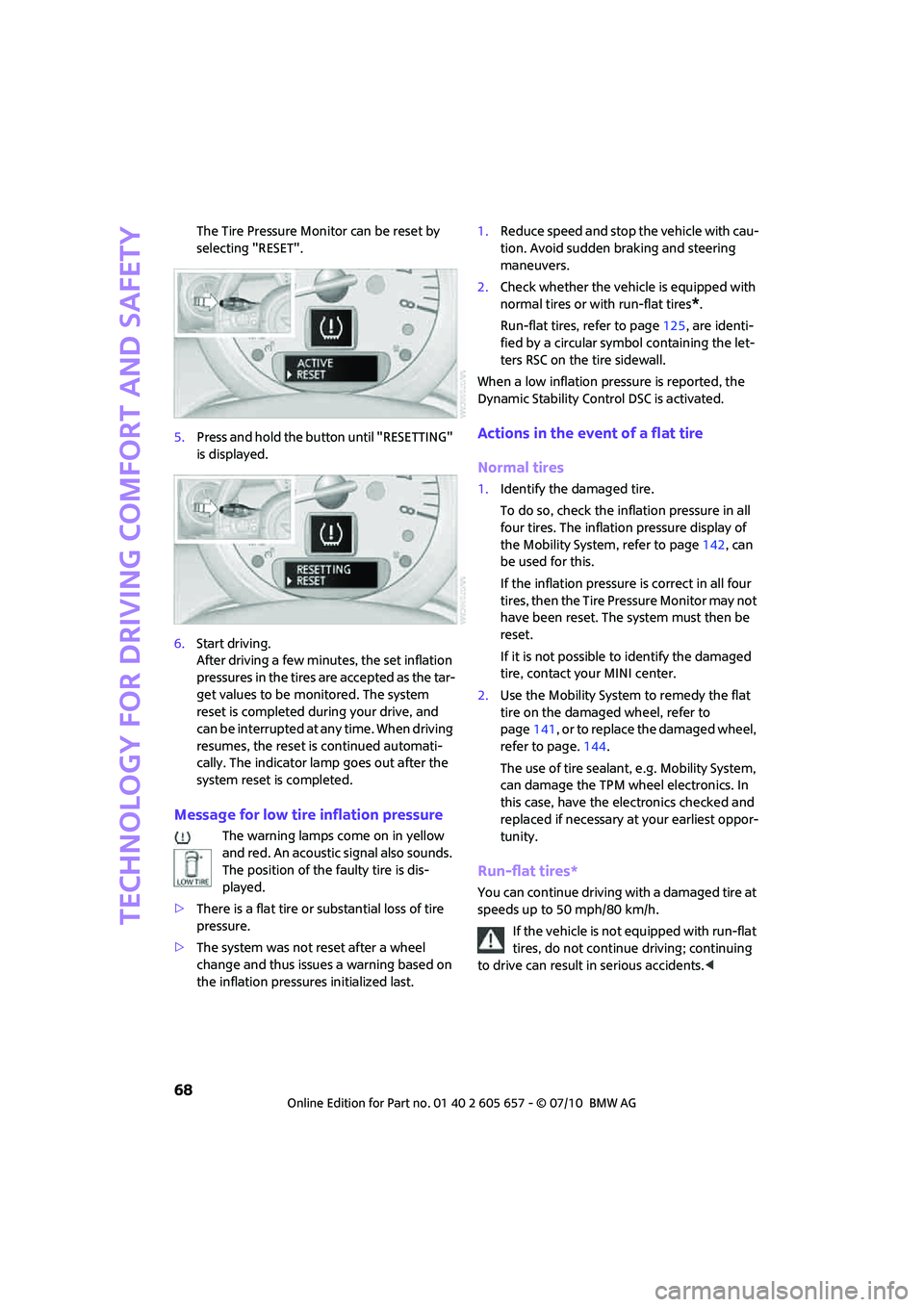
The Tire Pressure Monitor can be reset by
selecting "RESET".
5.Press and hold the button until "RESETTING"
is displayed.
6.Start driving.
After driving a few minutes, the set inflation
pressures in the tires are accepted as the tar-
get values to be monitored. The system
reset is completed during your drive, and
c a n b e i n t e r r u p t e d a t a n y t i m e . W h e n d r i v i n g
resumes, the reset is continued automati-
cally. The indicator lamp goes out after the
system reset is completed.
Message for low tire inflation pressure
The warning lamps come on in yellow
and red. An acoustic signal also sounds.
The position of the faulty tire is dis-
played.
>There is a flat tire or substantial loss of tire
pressure.
>The system was not reset after a wheel
change and thus issues a warning based on
the inflation pressures initialized last.1.Reduce speed and stop the vehicle with cau-
tion. Avoid sudden braking and steering
maneuvers.
2.Check whether the vehicle is equipped with
normal tires or with run-flat tires
*.
Run-flat tires, refer to page125, are identi-
fied by a circular symbol containing the let-
ters RSC on the tire sidewall.
When a low inflation pressure is reported, the
Dynamic Stability Control DSC is activated.
Actions in the event of a flat tire
Normal tires
1.Identify the damaged tire.
To do so, check the inflation pressure in all
four tires. The inflation pressure display of
the Mobility System, refer to page142, can
be used for this.
If the inflation pressure is correct in all four
tires, then the Tire Pressure Monitor may not
have been reset. The system must then be
reset.
If it is not possible to identify the damaged
tire, contact your MINI center.
2.Use the Mobility System to remedy the flat
tire on the damaged wheel, refer to
page141, or to replace the damaged wheel,
refer to page.144.
The use of tire sealant, e.g. Mobility System,
can damage the TPM wheel electronics. In
this case, have the electronics checked and
replaced if necessary at your earliest oppor-
tunity.
Run-flat tires*
You can continue driving with a damaged tire at
speeds up to 50 mph/80 km/h.
If the vehicle is not equipped with run-flat
tires, do not continue driving; continuing
to drive can result in serious accidents.<
Page 71 of 186
69
AT A GLANCE REFERENCE MOBILITYCONTROLS DRIVING TIPS COMMUNICATIONS
Continued driving with a flat tire
When driving with a damaged tire:
1.Avoid sudden braking and steering maneu-
vers.
2.Do not exceed a speed of 50 mph/80 km/h.
3.At the next opportunity, check the air pres-
sure in all four tires.
If the inflation pressure is correct in all four
tires, then the Tire Pressure Monitor may not
have been reset. The system must then be
reset.
Possible driving distance with complete loss of
tire inflation pressure:
The distance it is possible to drive with a flat tire
depends on the load and the stress on the vehi-
cle while driving.
With an average load, it may be possible to drive
for approx. 50 miles/80 km.
When driving with damaged tires, the handling
characteristics change, e.g. the vehicle will skid
sooner when braking, braking distances will be
longer, or self-steering response will change.
Adapt your driving style accordingly. Avoid turn-
ing abruptly and driving over obstacles such as
curbs, potholes, etc.
Since the possible driving distance depends to a
considerable degree on the strain exerted on
the vehicle while driving, it can be shorter or,
with a gentle driving style, can also be longer,
depending on the speed, road condition, out-
side temperature, vehicle load, etc.
Drive cautiously and do not exceed a
speed of 50 mph/80 km/h.
A loss of tire inflation pressure results in a
change in the handling characteristics, e.g.
reduced lane stability during braking, a longer
braking distance and altered self-steering prop-
erties.<
Vibrations or loud noises while driving can
indicate complete failure of the tire.
Reduce your speed and bring the vehicle to a
stop; otherwise, pieces of tire may come off,
which could result in an accident. Do not con-
tinue driving and contact your MINI center.<
Malfunction
The small warning lamp flashes in yel-
low and then lights up continuously; the
larger warning lamp comes on in yel-
low. No punctures can be detected.
This type of message is shown in the following
situations:
>If there is a malfunction.
Have the system checked.
>If a wheel without TPM electronics has been
mounted.
>If TPM is temporarily malfunctioning due to
other systems or devices using the same
radio frequency.
Message for unsuccessful system reset
Both warning lamps come on in yellow.
The system is not reset after a tire has
been changed, for example.
Check the tire inflation pressure and
reset the system, page67.
Declaration according to NHTSA/
FMVSS 138 Tire Pressure Monitoring
Systems
Each tire, including the spare, should be
checked monthly when cold and inflated to the
inflation pressure recommended by the vehicle
manufacturer on the vehicle placard or tire infla-
tion pressure label. If your vehicle has tires of a
different size than the size indicated on the vehi-
cle placard or tire inflation pressure label, you
should determine the proper tire inflation pres-
sure for those tires. As an added safety feature,
your vehicle has been equipped with a tire pres-
sure monitoring system TPMS that illuminates a
low tire pressure telltale when one or more of
your tires are significantly underinflated.
Accordingly, when the low tire pressure telltale
illuminates, you should stop and check your tires
as soon as possible, and inflate them to the
proper pressure. Driving on a significantly
underinflated tire causes the tire to overheat
and can lead to tire failure. Underinflation also
reduces fuel efficiency and tire tread life, and
may affect the vehicle's handling and stopping
ability. Please note that the TPMS is not a substi-
Page 106 of 186
Telephone
104
10Switching displays108
>"PHONE": telephone
>"COMP": computer
>"CONFIG": adjusting
11Radio on/off, volume
>Press: to switch radio on/off
>Turn: adjusting volume108
12Ejecting CD, refer to owner's manual for the
radio
This symbol appears on the radio display
when a phone call is being made with the
hands-free system.
Menu navigation
Selecting and confirming function
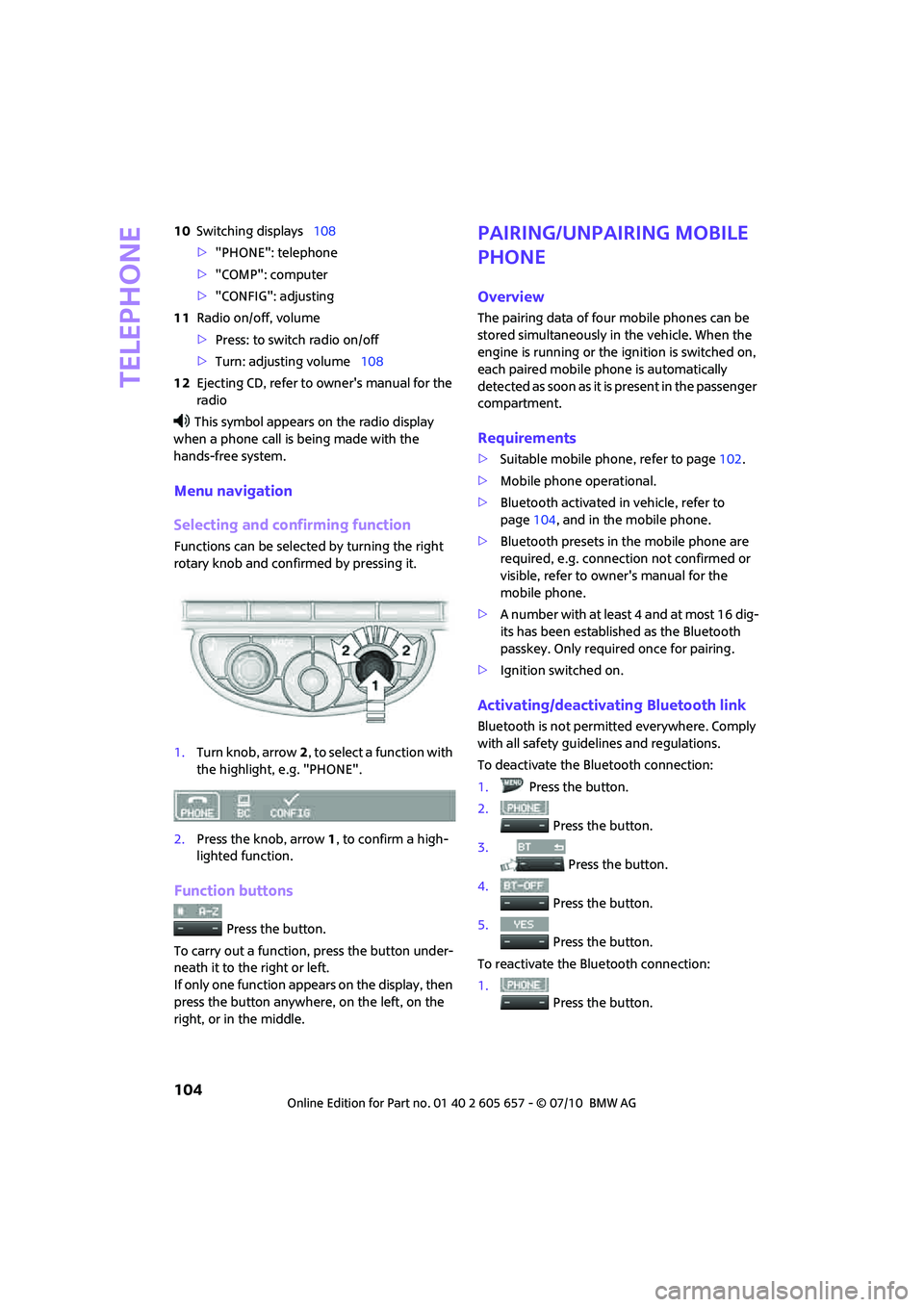
Functions can be selected by turning the right
rotary knob and confirmed by pressing it.
1.Turn knob, arrow2, to select a function with
the highlight, e.g. "PHONE".
2.Press the knob, arrow1, to confirm a high-
lighted function.
Function buttons
Press the button.
To carry out a function, press the button under-
neath it to the right or left.
If only one function appears on the display, then
press the button anywhere, on the left, on the
right, or in the middle.
Pairing/unpairing mobile
phone
Overview
The pairing data of four mobile phones can be
stored simultaneously in the vehicle. When the
engine is running or the ignition is switched on,
each paired mobile phone is automatically
detected as soon as it is present in the passenger
compartment.
Requirements
>Suitable mobile phone, refer to page102.
>Mobile phone operational.
>Bluetooth activated in vehicle, refer to
page104, and in the mobile phone.
>Bluetooth presets in the mobile phone are
required, e.g. connection not confirmed or
visible, refer to owner's manual for the
mobile phone.
>A number with at least 4 and at most 16 dig-
its has been established as the Bluetooth
passkey. Only required once for pairing.
>Ignition switched on.
Activating/deactivating Bluetooth link
Bluetooth is not permitted everywhere. Comply
with all safety guidelines and regulations.
To deactivate the Bluetooth connection:
1.Press the button.
2.
Press the button.
3.
Press the button.
4.
Press the button.
5.
Press the button.
To reactivate the Bluetooth connection:
1.
Press the button.
Page 120 of 186
Wheels and tires
118
Wheels and tires
Tire inflation pressures
Information for your safety
It is not merely the tires' service life, but also
driving comfort and, to a great extent, driving
safety that depend on the condition of the tires
and the maintenance of the specified tire pres-
sure.
Checking pressure
Check the tire inflation pressure regularly
and correct it, if necessary: at least twice a
month and before starting long trips. If you fail
to observe this precaution you may be driving
on tires with incorrect tire pressures, a condition
that can not only compromise your vehicle's
driving stability, but also lead to tire damage and
the risk of an accident. Do not drive with
deflated, i.e. flat tires, except when using run-
flat tires. A flat tire will seriously impair your
vehicle's handling and braking response.
Attempts to drive on a flat tire can lead to loss of
control over the vehicle.<
Check the tire inflation pressures only on cold
tires. This means after a maximum of 1.25 miles/
2 km driving or when the vehicle has been
parked for at least 2 hours. When tires are warm,
the tire inflation pressure is higher.
After adjusting the tire inflation pressure,
reinitialize the flat tire monitor, page65,
or reset the Tire Pressure Monitor, page67.<
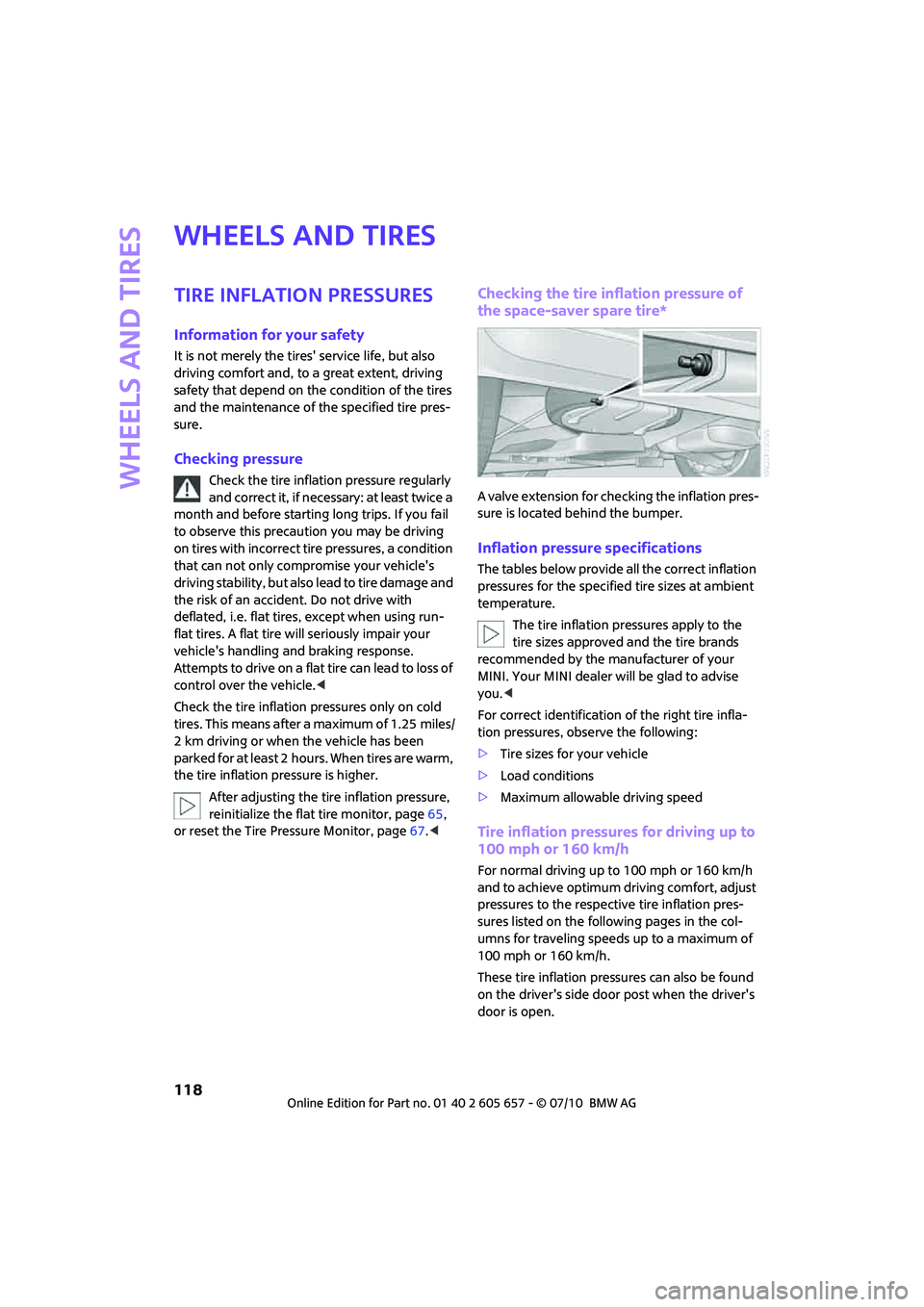
Checking the tire inflation pressure of
the space-saver spare tire*
A valve extension for checking the inflation pres-
sure is located behind the bumper.
Inflation pressure specifications
The tables below provide all the correct inflation
pressures for the specified tire sizes at ambient
temperature.
The tire inflation pressures apply to the
tire sizes approved and the tire brands
recommended by the manufacturer of your
MINI. Your MINI dealer will be glad to advise
you.<
For correct identification of the right tire infla-
tion pressures, observe the following:
>Tire sizes for your vehicle
>Load conditions
>Maximum allowable driving speed
Tire inflation pressures for driving up to
100 mph or 160 km/h
For normal driving up to 100 mph or 160 km/h
and to achieve optimum driving comfort, adjust
pressures to the respective tire inflation pres-
sures listed on the following pages in the col-
umns for traveling speeds up to a maximum of
100 mph or 160 km/h.
These tire inflation pressures can also be found
on the driver's side door post when the driver's
door is open.
Page 162 of 186
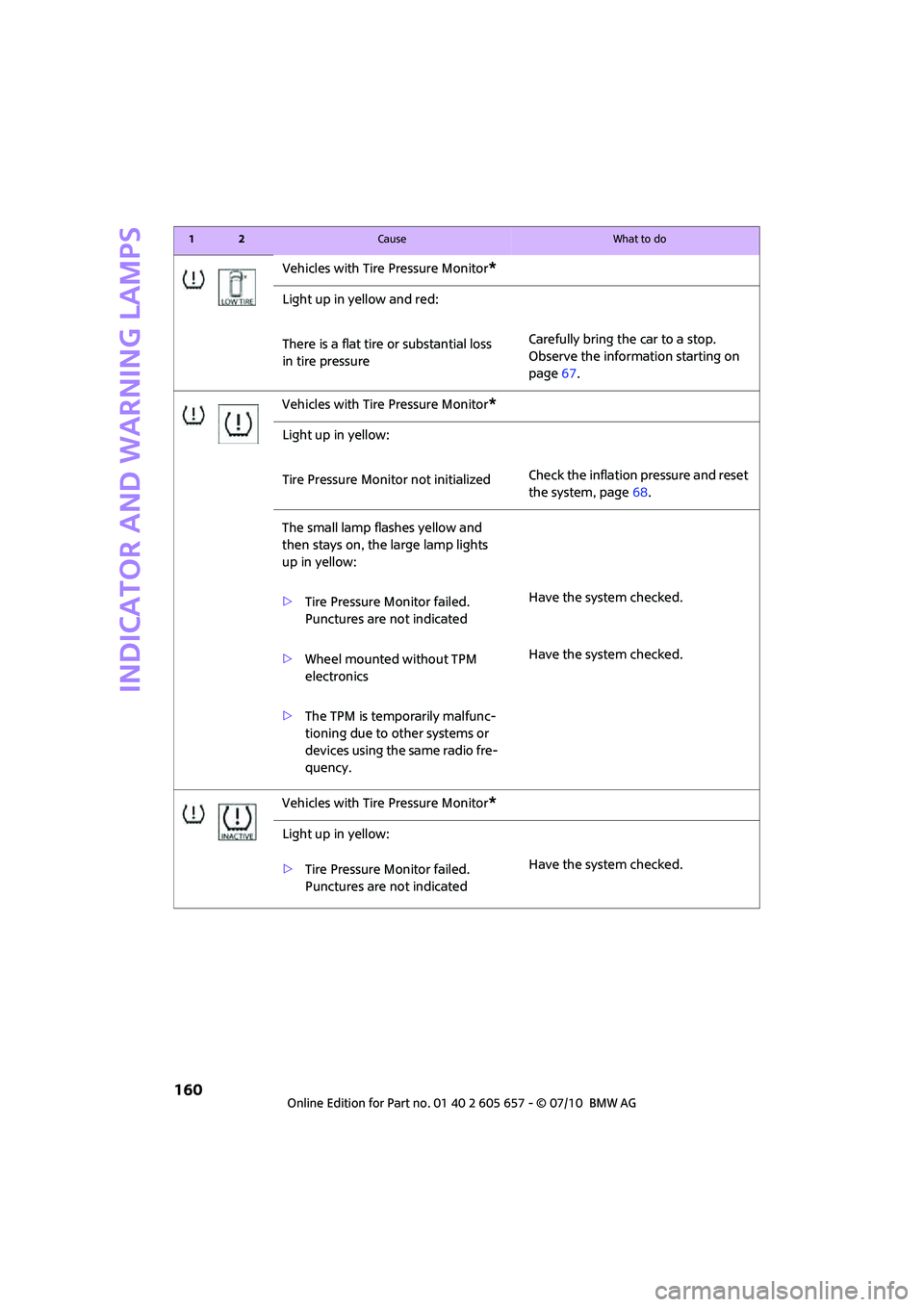
Indicator and warning lamps
160
Vehicles with Tire Pressure Monitor*
Light up in yellow and red:
There is a flat tire or substantial loss
in tire pressureCarefully bring the car to a stop.
Observe the information starting on
page67.
Vehicles with Tire Pressure Monitor
*
Light up in yellow:
Tire Pressure Monitor not initializedCheck the inflation pressure and reset
the system, page68.
The small lamp flashes yellow and
then stays on, the large lamp lights
up in yellow:
>Tire Pressure Monitor failed.
Punctures are not indicatedHave the system checked.
>Wheel mounted without TPM
electronicsHave the system checked.
>The TPM is temporarily malfunc-
tioning due to other systems or
devices using the same radio fre-
quency.
Vehicles with Tire Pressure Monitor
*
Light up in yellow:
>Tire Pressure Monitor failed.
Punctures are not indicatedHave the system checked.
12Cause What to do
Page 182 of 186
Everything from A to Z
180
Start/Stop button44
– starting the engine45
– switching off the engine45
Starting assistance, refer to
Jump-starting148
Starting, refer to Starting the
engine45
Starting the engine
– Start/Stop button44
Start-off assistance, refer to
– DSC63
– Hill Assist64
Status of this Owner's Manual
at time of printing4
Steering wheel40
– adjustment40
– buttons on steering wheel11
– lock44
– shift paddles47
Steptronic, refer to Automatic
transmission with
Steptronic46
Storage area
– cargo area94
Storage compartment, front
passenger side86
Storage compartments86
Storage space
– storage compartments86
Storage space, refer to
– Luggage compartment in the
MINI Convertible95
Storing the vehicle136
Storing tires126
Stowage, refer to Storage
compartments86
Summer tires, refer to Wheels
and tires118
Switches, refer to Cockpit10
Switching off
– engine45
Switching off the engine
– Start/Stop button44
Switching the cooling function
on and off82
Symbols4T
Tachometer53
Tail lamp, refer to Tail
lamps140
– replacing bulb140
Tail lamps140
Tank volume, refer to
Capacities170
Technical data166
Technical modifications5
Telephone102
– hands-free system110
– installation location, refer to
Center armrest85
– refer to separate Owner's
Manual
– voice commands111
Telephone call, refer to the
Owner's Manual for the
telephone
Temperature display
– setting the units57
Temperature of coolant, refer
to Coolant temperature53
Temperature setting
– air conditioner79
– automatic climate control81
Tempomat, refer to Cruise
control51
Tensioning straps, refer to
Securing cargo97
The individual vehicle4
Third brake lamp, refer to
Center brake lamp141
Three-point safety belt38
Through-loading system95
Tightening the lug bolts
– keys144
– torque146
Tightening torque, refer to
Tightening lug bolts146
Tire change set
– space-saver spare tire144Tire failure
– Flat Tire Monitor66
– indicator/warning lamp66
– MINI Mobility System142
– run-flat tires66
– space-saver spare tire144
– Tire Pressure Monitor67
Tire inflation pressure118
– loss66
– space-saver spare tire118
Tire Pressure Monitor TPM67
– limitations of system67
– resetting system67
– warning lamp68
Tire pressure monitoring, refer
to Flat Tire Monitor65
Tire Quality Grading123
Tires
– age125
– breaking in92
– changing, refer to Changing
wheels144
– condition124
– damage124
– inflation pressure118
– inflation pressure loss68
– minimum tread depth124
– new tires125
– pressure monitoring, refer to
Flat Tire Monitor65
– pressure monitoring, refer to
Tire Pressure Monitor
TPM67
– puncture66
– size123
– wear indicators, refer to
Minimum tread depth124
– winter tires126
– with emergency operation
properties125
Tires with emergency
operation properties, refer to
Run-flat tires125
Tires with safety features, refer
to Run-flat tires125
Tools, refer to On-board
vehicle tool kit137
Torque166
– lug bolts146