key MINI COOPER CONVERTIBLE 2011 Owner's Manual
[x] Cancel search | Manufacturer: MINI, Model Year: 2011, Model line: COOPER CONVERTIBLE, Model: MINI COOPER CONVERTIBLE 2011Pages: 186, PDF Size: 3.25 MB
Page 104 of 186
Telephone
102
Telephone
Overview
The concept
Mobile phones or other external devices, e.g.
audio players, can be connected to the vehicle
via Bluetooth.
Your MINI is equipped with a complete mobile
phone preparation. After a suitable mobile
phone is paired with the vehicle once, the
mobile phone can be controlled via the radio,
the buttons
* on the steering wheel, and by
voice
*.
It may be necessary for some functions to be
activated by the mobile phone provider.
Only make entries when traffic conditions
permit. Do not hold the mobile phone in
your hand while you are driving; use the hands-
free system instead. If you do not observe this
precaution, your being distracted can endanger
vehicle occupants and other road users.<
Snap-in adapter*
The snap-in adapter, refer to page113, makes it
possible to:
>Accommodate the mobile phone.
>Recharge its battery.
>Connect it to an external antenna of the
vehicle.
This assures a better network connection
and constant sound quality.
A mobile phone that is connected to the vehicle
should not be operated via the mobile phone
keypad; otherwise, malfunctions may occur.
Suitable mobile phones
For precise information about which mobile
phones and external devices can be with a Blue-
tooth interface are supported by the complete
mobile phone preparation, go to
www.mini.com/connectivity.
*
Page 106 of 186
Telephone
104
10Switching displays108
>"PHONE": telephone
>"COMP": computer
>"CONFIG": adjusting
11Radio on/off, volume
>Press: to switch radio on/off
>Turn: adjusting volume108
12Ejecting CD, refer to owner's manual for the
radio
This symbol appears on the radio display
when a phone call is being made with the
hands-free system.
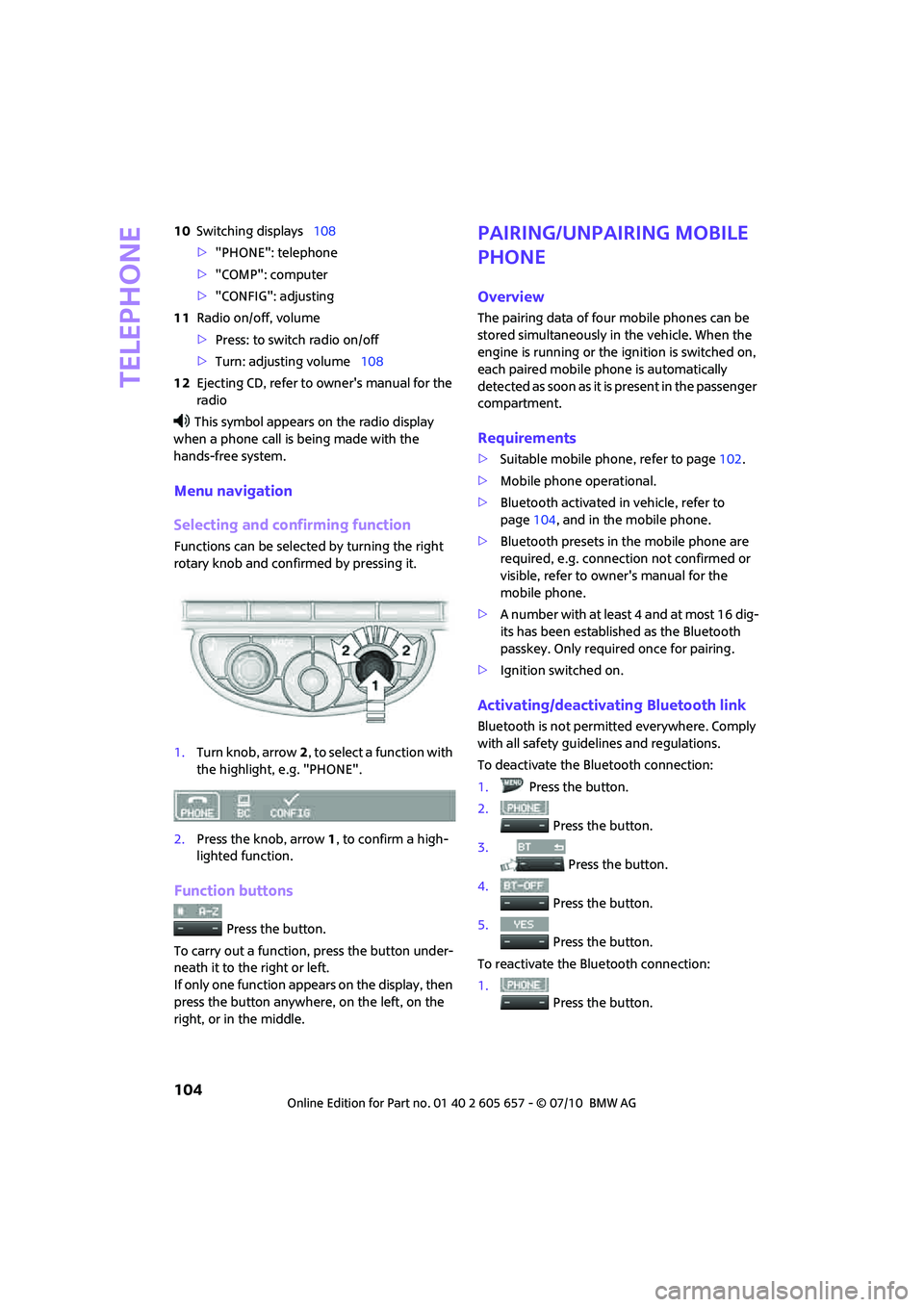
Menu navigation
Selecting and confirming function
Functions can be selected by turning the right
rotary knob and confirmed by pressing it.
1.Turn knob, arrow2, to select a function with
the highlight, e.g. "PHONE".
2.Press the knob, arrow1, to confirm a high-
lighted function.
Function buttons
Press the button.
To carry out a function, press the button under-
neath it to the right or left.
If only one function appears on the display, then
press the button anywhere, on the left, on the
right, or in the middle.
Pairing/unpairing mobile
phone
Overview
The pairing data of four mobile phones can be
stored simultaneously in the vehicle. When the
engine is running or the ignition is switched on,
each paired mobile phone is automatically
detected as soon as it is present in the passenger
compartment.
Requirements
>Suitable mobile phone, refer to page102.
>Mobile phone operational.
>Bluetooth activated in vehicle, refer to
page104, and in the mobile phone.
>Bluetooth presets in the mobile phone are
required, e.g. connection not confirmed or
visible, refer to owner's manual for the
mobile phone.
>A number with at least 4 and at most 16 dig-
its has been established as the Bluetooth
passkey. Only required once for pairing.
>Ignition switched on.
Activating/deactivating Bluetooth link
Bluetooth is not permitted everywhere. Comply
with all safety guidelines and regulations.
To deactivate the Bluetooth connection:
1.Press the button.
2.
Press the button.
3.
Press the button.
4.
Press the button.
5.
Press the button.
To reactivate the Bluetooth connection:
1.
Press the button.
Page 107 of 186

105
AT A GLANCE REFERENCE MOBILITYCONTROLS DRIVING TIPS COMMUNICATIONS
2.
Press the button.
Pairing and connecting
Only pair the mobile phone when the
vehicle is stopped; otherwise, inattention
may lead to endangerment of passengers or
other road users.<
Switching on ignition
1.Insert the remote control as far as possible
into the ignition lock.
2.Switch on the ignition; to do so, press the
start/stop button without stepping on the
brake or clutch pedal.
Preparation on the radio display
3.Press the button.
4.
Press the button.
5.
Press the button.
6.
Press the button.
Press the right rotary knob to display the Blue-
tooth name of your vehicle on the display.
Preparation with mobile phone
7.Other operations must be performed on the
mobile phone and differ depending on the
type of mobile phone, refer to owner's man-
ual of the mobile phone, e.g. under Con-necting or coupling Bluetooth device. The
Bluetooth name of the vehicle appears on
the mobile phone display.
8.Select the Bluetooth name of the vehicle on
the mobile phone display.
Pairing
The mobile phone or the radio display will
prompt you to enter the same Bluetooth pass-
key.
Depending on the mobile phone, you have
approx. 30 seconds to enter the Bluetooth pass-
key using the mobile phone and the radio dis-
play.
If the Bluetooth passkey can be entered using
the radio, then the following appears on the dis-
play:
:
9.Enter the Bluetooth passkey using the num-
ber buttons of the mobile phone.
10.
Press the button to enter the Blue-
tooth passkey using the radio.
11.Using the function buttons 0-9, enter the
same Bluetooth passkey that was entered
into the mobile phone.
To delete the last digit:
Press the button.
12.
Press the button to confirm the
Bluetooth passkey.
The following display will appear after a few
seconds:
Page 109 of 186
107
AT A GLANCE REFERENCE MOBILITYCONTROLS DRIVING TIPS COMMUNICATIONS
What to do if…
For information on suitable mobile phones, refer
to page102.
The mobile phone could not be paired or con-
nected.
>Is Bluetooth activated in the vehicle and in
the mobile phone? Activate Bluetooth in the
vehicle and in the mobile phone.
>Do the Bluetooth passkeys on the mobile
phone and the vehicle match? Enter the
same passkey on the mobile phone and via
the radio.
>Is the passkey input taking longer than 30
seconds? Repeat the pairing procedure.
>Are too many Bluetooth devices connected
to the mobile phone? If so, delete the con-
nections with other devices on the mobile
phone.
>Is the mobile phone in power economy
m o d e o r d o e s i t o n l y h a v e a s m a l l a m o u n t o f
battery charge remaining? Charge the
mobile phone in the snap-in adapter
* or via
a charging cable.
>Depending on the mobile phone, it may only
be possible to connect one device to the
vehicle. Unpair the connected device from
the vehicle and only pair and connect one
device.
>Is the mobile phone no longer responding?
Switch the mobile phone off and back on
again. Repeat the pairing procedure.
Phone book entries are not displayed, not all of
them are displayed, or they are displayed
incompletely.
>The transfer of phone book entries has not
yet completed.
>It is possible that only the phone book
entries of the mobile phone or the SIM card
*
are transferred.
>It may not be possible to display phone book
entries with special characters.
>The number of phone book entries to be
stored is too high.
>The data volume of the phone book entry is
too great, e.g. due to additionally stored information such as notes? Reduce the data
volume.
The telephone connection quality is low.
>Depending on the mobile phone, it is possi-
ble to adjust the strength of the Bluetooth
signal.
>Insert the mobile phone into the snap-in
adapter
* o r p la ce it in t h e v ic in it y o f t h e ce n -
ter console.
>Adjust the volume of the microphone and
speaker separately.
If you have gone through all items in the list and
still cannot activate the desired function please
contact the Hotline or your MINI center.
Operation
Overview
The following functions can be operated using
the radio:
>Accepting/refusing a call
>Dialing phone numbers
>Dialing a phone number from the phone
book
>Dialing a stored phone number, e.g. from
the list of accepted calls
>Ending a call
When the ignition is switched off and in radio-
ready mode, e.g. after removal of the infrared
remote control, an ongoing conversation can be
continued for a maximum of 25 minutes using
the hands-free system.
Page 110 of 186
Telephone
108
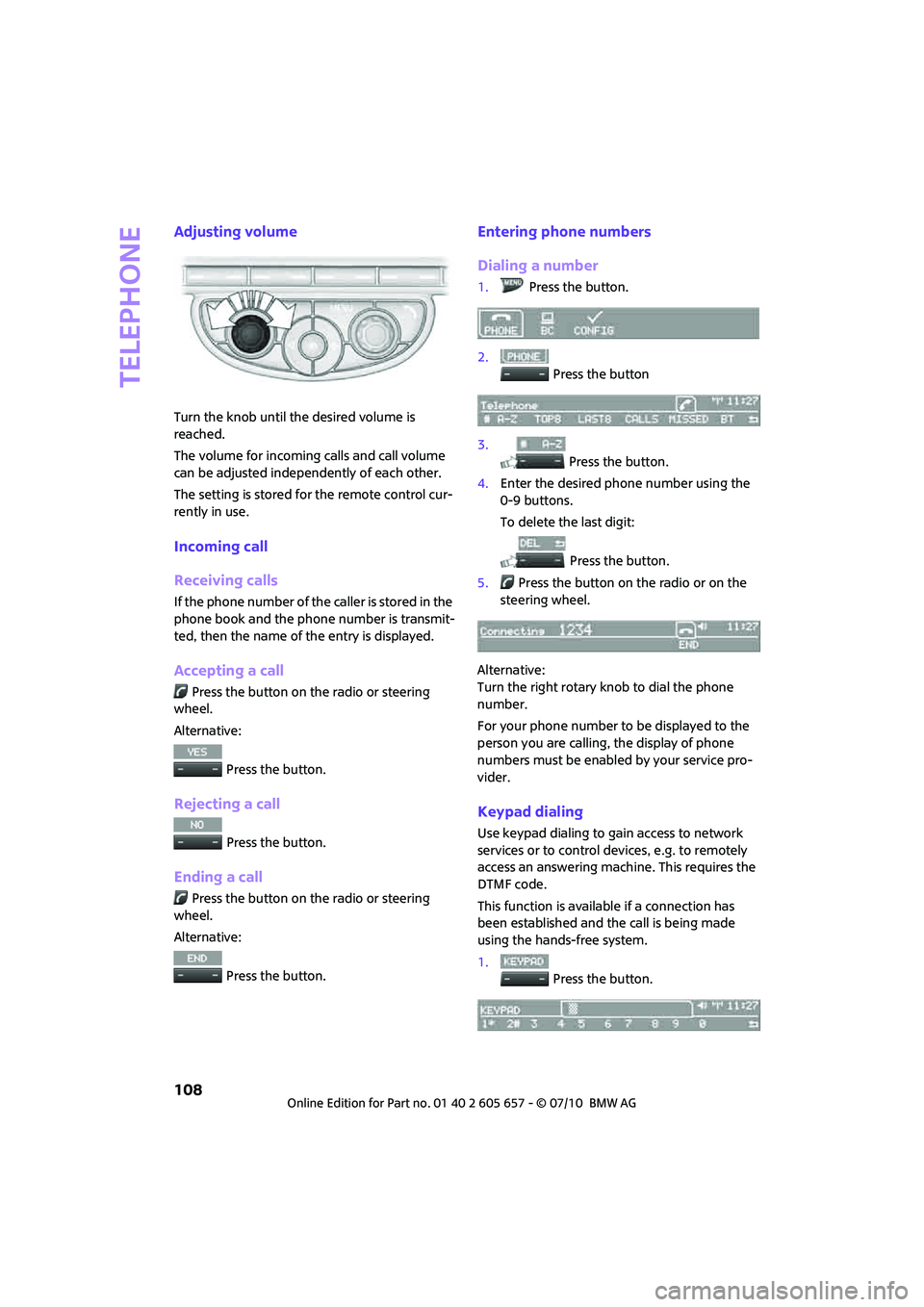
Adjusting volume
Turn the knob until the desired volume is
reached.
The volume for incoming calls and call volume
can be adjusted independently of each other.
The setting is stored for the remote control cur-
rently in use.
Incoming call
Receiving calls
If the phone number of the caller is stored in the
phone book and the phone number is transmit-
ted, then the name of the entry is displayed.
Accepting a call
Press the button on the radio or steering
wheel.
Alternative:
Press the button.
Rejecting a call
Press the button.
Ending a call
Press the button on the radio or steering
wheel.
Alternative:
Press the button.
Entering phone numbers
Dialing a number
1.Press the button.
2.
Press the button
3.
Press the button.
4.Enter the desired phone number using the
0-9 buttons.
To delete the last digit:
Press the button.
5.Press the button on the radio or on the
steering wheel.
Alternative:
Turn the right rotary knob to dial the phone
number.
For your phone number to be displayed to the
person you are calling, the display of phone
numbers must be enabled by your service pro-
vider.
Keypad dialing
Use keypad dialing to gain access to network
services or to control devices, e.g. to remotely
access an answering machine. This requires the
DTMF code.
This function is available if a connection has
been established and the call is being made
using the hands-free system.
1.
Press the button.
Page 175 of 186
173
AT A GLANCE REFERENCEMOBILITYCONTROLS DRIVING TIPS COMMUNICATIONS
Black ice, refer to Outside
temperature warning53
Blower, refer to Air flow
rate79,81
Bluetooth, activating/
deactivating104
Bottle holders, refer to
Cupholders87
Brake Assist63
Brake fluid, refer to Service
requirements58
Brake lamps
– replacing bulbs141
Brake pads, breaking in92
Brake rotors93
– brakes92
– breaking in92
Brake system92
– breaking in92
– disc brakes93
– MINI Maintenance
System131
Brakes
– ABS63
– breaking in92
– MINI Maintenance
System131
– parking brake45
– service requirements58
Brakes, refer to Braking
safely93
Breakdown service, refer to
Roadside Assistance148
Break-in period92
Breaking in the clutch92
Bulb changing, refer to Lamps
and bulbs137
Button for starting the
engine44
Buttons on steering wheel11
C
California Proposition 65
warning5
Call
– accepting108
– ending108
– rejecting108Calling, refer to Phone
numbers, dialing108
Can holders, refer to
Cupholders87
Capacities170
Car battery, refer to Vehicle
battery146
Car care133
Car key, refer to Keys/remote
controls18
Car phone
– installation location, refer to
Center armrest85
– refer to separate Owner's
Manual
Car phone, refer to
Telephone102
Car wash, care133
Car washes133
Care133
– car washes133
– car-care products133
– CD/DVD drives136
– external133
– high-pressure washers134
– internal135
– leather135
– manual washing134
– upholstery and fabrics135
– windows134
– wiper blades134
Cargo area94
– capacity169
– Comfort Access27
– cover94
– lamp77
– opening from outside24
Cargo area, expanding94
Cargo area lamp77
Cargo area lid, refer to
Liftgate24
Cargo loading96
– securing cargo97
– stowing cargo96
– vehicle94
Cargo, securing97
Carpets, care136
Catalytic converter, refer to
Hot exhaust system92Center armrest85
Center brake lamp141
Center console, refer to
Around the center
console14
Central locking system19
– Comfort Access26
– from inside23
– from outside19
Changing bulbs137
Changing wheels144
Chassis number, refer to
Engine compartment128
Check Control60
Child restraint fixing system
LATCH42
Child restraint systems41
Child seats41
Chock, folding
– space-saver spare tire144
Chrome parts, care135
Chrome parts, refer to
Care133
Cigarette lighter87
Cleaning headlamps50
– washer fluid51
Clock
– 12h/24h mode57
– setting time60
Closing
– from inside23
– from outside19
Clothes hooks87
Cockpit10
Cold start, refer to Starting the
engine45
Comfort Access26
– replacing the battery28
– what to observe before
entering a car wash27
Comfort area, refer to Around
the center console14
Compartment for remote
control, refer to Ignition
lock44
Computer54
Condensation, refer to When
the vehicle is parked94
Page 176 of 186

Everything from A to Z
174
Condition Based Service
CBS131
Configuring settings, refer to
Personal Profile18
Connecting vacuum cleaner,
refer to Connecting electrical
appliances87
Consumption, refer to Average
fuel consumption54
Control Display
– settings56
Controls and displays10
Convenient access, refer to
Comfort Access26
Convenient operation
– convertible top22
– windows20
Convenient start, refer to
Starting the engine45
Convertible top30
Coolant129
– checking level129
– filling129
Coolant temperature53
Cooling fluid, refer to
Coolant129
Cooling, maximum81
Copyright2
Cornering light, refer to
Adaptive Light Control75
Cruising range54
Cupholders87
Curb weight, refer to
Weights169
Current fuel consumption54
D
Dashboard instruments, refer
to Displays12
Dashboard lighting, refer to
Instrument lighting76
Dashboard, refer to Cockpit10
Data166
– capacities170
– dimensions167
– engine166
– weights169
Data memory132Date
– setting60
Daytime running lights74
DBC Dynamic Brake Control,
refer to Brake Assist63
Deactivating front passenger
airbags71
Deadlocking, refer to
Locking20
Defect
– door lock22
– fuel filler flap116
Defogging windows80,82
Defrost position, refer to
Defrosting windows80,82
Defrosting windows80,82
Defrosting windows and
removing condensation
– air conditioner80
– automatic climate control82
Defrosting windshield, refer to
Defrosting windows80,82
Differential, breaking in92
Dimensions167
Dipstick, engine oil128
Directional indicators, refer to
Turn signals48
Displacement, refer to Engine
data166
Display lighting, refer to
Instrument lighting76
Displays12
– instrument cluster12
Displays and controls10
Displays, care136
Disposal
– of coolant129
– remote control battery28
– vehicle battery147
Distance remaining to service,
refer to Service
requirements58
Distance warning, refer to Park
Distance Control PDC62
Door key, refer to Integrated
key/remote control
18
Door lock22
Door lock, confirmation
signals21Doors, manual operation22
DOT Quality Grades123
Drinks holders, refer to
Cupholders87
Drive-off assistant, refer to Hill
Assist64
Driving dynamics control, refer
to Sport button64
Driving lamps, refer to Parking
lamps/low beams73
Driving notes92
Driving off on inclines, refer to
Hill Assist64
Driving stability control
systems62
Driving through water93
Driving tips, refer to Driving
notes92
Dry air, refer to Cooling
function82
DTC Dynamic Traction Control
DTC63
Dynamic Brake Control DBC,
refer to Brake Assist63
Dynamic Stability Control
DSC63
Dynamic Traction Control63
E
Electric power windows
– initializing29
Electrical malfunction
– convertible top32
– door lock22
– fuel filler flap116
– liftgate24
Electronic brake-force
distribution63
Electronic Stability Program
ESP, refer to Dynamic
Stability Control DSC63
Page 178 of 186
Everything from A to Z
176
Gearshift lever
– automatic transmission with
Steptronic46
– manual transmission46
General driving notes92
Glass sunroof, electric28
– Convenient operation20,22
– opening, closing28
– remote control20
– tilting28
Glove compartment85
Grills, refer to Air vents78
Gross vehicle weight, refer to
Weights169
H
Halogen lamps
– replacing bulb138
Handbrake, refer to Parking
brake45
Hands-free system14,110
Hazard warning flashers14
Head airbags70
Head Light, refer to Adaptive
Light Control75
Head restraints37
– sitting safely35
Headlamp control,
automatic73
Headlamp flasher48
– indicator lamp11,152
Headlamps
– replacing bulb138
Headlamps, care134
Headlight glass lens138
Heated
– mirrors39
– rear window79,82
– seats38
Heating78
– mirrors39
– rear window79,82
– seats38
Heavy loads, refer to Stowing
cargo96
Height adjustment
– seats36
– steering wheel40Height, refer to
Dimensions167
High beams75
– headlamp flasher75
– indicator lamp152
– replacing bulb138
High water, refer to Driving
through water93
Hill Assist64
Hills93
Holders for cups87
Homepage4
Hood127
Horn10
Hot exhaust system92
Hydroplaning93I
Ignition44
– switched off44
– switched on44
Ignition key position 1, refer to
Radio readiness44
Ignition key position 2, refer to
Ignition on44
Ignition key, refer to
Integrated key/remote
control18
Ignition lock44
Imprint2
Incoming call108
Indicator and warning
lamps13,152
– Tire Pressure Monitor TPM68
Indicator lighting, refer to
Instrument lighting76
Individual air distribution80
Individual settings, refer to
Personal Profile18
Inflation pressure monitoring,
refer to Tire Pressure Monitor
TPM67
Initializing
– Flat Tire Monitor FTM65
– glass sunroof, electric29
Instrument cluster, refer to
Displays12
Instrument lighting76Instrument panel, refer to
Cockpit10
Instrument panel, refer to
Displays12
Integrated key18
Integrated universal remote
control83
Interior lamps77
– remote control21
Interior rearview mirror40
– automatic dimming
feature40
Interlock46
Intermittent mode of the
wipers49
Internet page4
J
Jacking points146
Jets, refer to Window washer
nozzles51
Jumpering, refer to Jump-
starting148
Jump-starting148
K
Key Memory, refer to Personal
Profile18
Key, refer to Keys/remote
controls18
Keyless opening and closing,
refer to Comfort Access26
Keyless-Go, refer to Comfort
Access26
Keypad dialing108
Kickdown47
– automatic transmission with
Steptronic47
Knock control117
L
Lamps and bulbs, replacing
bulbs137
Lamps, refer to Parking lamps/
Low beams73
Page 179 of 186

177
AT A GLANCE REFERENCEMOBILITYCONTROLS DRIVING TIPS COMMUNICATIONS
Lashing eyes, refer to Securing
cargo97
LATCH child restraint fixing
system42
Leather care135
LEDs light-emitting diodes138
Length, refer to
Dimensions167
License plate lamp
– bulb replacement141
Liftgate24
– Comfort Access27
– emergency operation24
– manually releasing24
– opening from outside24
– opening/closing24
– unlocking with remote
control21
Light switch73
Light-alloy wheels, care135
Light-emitting diodes
LEDs138
Lighter87
– socket87
Lighting
– lamps and bulbs137
– of the instruments76
– of vehicle, refer to Lamps73
Limit163
Load96
Load securing equipment,
refer to Securing cargo97
Lock buttons of doors, refer to
Locking23
Locking
– adjusting confirmation
signal21
– from inside23
– from outside20
– without remote control, refer
to Comfort Access26
Locking and unlocking doors
– confirmation signals21
– from inside23
– from outside19
Low beams73
– automatic73
– replacing bulb138Lower back support, refer to
Lumbar support36
Luggage compartment
– emergency operation, refer
to Manually releasing24
– increasing the capacity95
– opening from the inside24
Luggage compartment lid
– emergency actuation, refer
to manually releasing24
Luggage compartment lid,
refer to Liftgate24
Luggage compartment, refer
to Cargo area
24
Luggage rack, refer to Roof-
mounted luggage rack97
Lumbar support36
M
M+S tires, refer to Winter
tires126
Maintenance, refer to Service
Booklet
Maintenance system131
Malfunction
– convertible top32
– liftgate24
Malfunction warnings, refer to
Check Control60
Manual air distribution80
Manual mode
– automatic transmission with
Steptronic47
Manual operation
– door lock22
– fuel filler flap116
– liftgate24
– power convertible top32
– transmission lock, automatic
transmission48
Manual transmission46
Manual washing134
Master key, refer to Integrated
key/remote control18
Maximum cooling81
Maximum speed
– with winter tires126Medical assistance, refer to
First aid pouch148
Microfilter
– for air conditioner80
– for automatic climate
control82
– MINI Maintenance
System131
Microfilter/activated-charcoal
filter
– MINI Maintenance
System131
Microphone for telephone14
MINI Internet page4
MINI Maintenance System131
Mirror dimming feature40
Mirrors39
– exterior mirrors39
– heating39
– interior rearview mirror40
Mobile phone
– adjusting volume108
– connecting, refer to Mobile
phone, pairing104
– installation location, refer to
Center armrest85
– pairing104
– refer to separate Owner's
Manual
– What to do if…107
Mobile phone, installation
location, refer to Center
armrest85
Mobile phone, refer to the
separate Owner's Manual
Mobility System142
Modifications, technical, refer
to For your own safety5
Monitoring system for tire
pressures, refer to Flat Tire
Monitor65
Multifunction switch
– refer to Turn signals/
headlamp flasher48
– refer to Wiper system49
Multifunctional steering
wheel, refer to Buttons on
the steering wheel11
Page 180 of 186

Everything from A to Z
178
N
Neck support, refer to Head
restraints37
Nets, refer to Storage
compartments86
New tires125
Number of cylinders, refer to
Engine data166
Number of safety belts35
Nylon rope, refer to Tow
rope151
O
OBD socket, refer to Socket for
On-Board Diagnosis131
Octane ratings, refer to Fuel
specifications117
Odometer53
Oil consumption128
Oil level128
Oil, refer to Engine oil128
Oil types129
Old batteries, refer to
Disposal147
On-board vehicle tool kit137
Opening and closing
– Comfort Access26
– from inside23
– from outside19
– using the door lock22
– using the remote control19
Opening and unlocking
– from inside23
Outlets
– refer to Ventilation82
Outlets, refer to Air vents78
Output, refer to Engine
data166
Outside temperature display
– change units of measure57
– in the onboard computer57
Outside-air mode
– automatic climate control81
Overheated engine, refer to
Coolant temperature53
P
Paintwork, care135
Park Distance Control PDC62
Parking
– vehicle45
Parking aid, refer to Park
Distance Control PDC62
Parking brake45
Parking lamps, replacing
bulb139
Parking lamps/low beams73
Parts and accessories, refer to
Your individual vehicle4
Pathway lighting73
Personal Profile18
Phone numbers
– dialing108
Pinch protection system
– windows30
Plastic parts, care136
Pollen
– refer to Microfilter for air
conditioner80
– refer to Microfilter/activated-
charcoal filter for automatic
climate control82
Power convertible top30
Power failure147
Power windows29
Power windows, refer to
Windows29
Pressure monitoring of tires,
refer to Tire Pressure Monitor
TPM67
Pressure monitoring, tires65
– Flat Tire Monitor65
Pressure, tires118
Protective function, refer to
Pinch protection system
– windows30
Puncture
– Flat Tire Monitor65
R
Radio key, refer to Integrated
key/remote control18Radio position, refer to Radio
readiness44
Radio readiness44
– switched off44
– switched on44
Rain sensor49
Range, refer to Cruising
range54
Reading lamps77
Rear fog lamp76
– indicator lamp152
– replacing bulb141
Rear lamps
– bulb replacement141
Rear lamps, refer to Tail
lamps140
Rear seat backrest, folding94
Rear seats
– folding the backrests94
Rear window defroster79,82
Rearview mirror, refer to
Mirrors39
Recirculated-air mode79,81
Recirculation of air, refer to
Recirculated-air
mode79,81
Reclining seat, refer to
Backrest36
Refueling116
Releasing
– hood127
Remote control18
– battery renewal28
– Comfort Access26
– garage door opener83
– liftgate21
– malfunctions22,27
– service data131
Replacement remote
control18
Replacing bulbs, refer to
Lamps and bulbs137
Replacing tires, refer to New
wheels and tires125
Reporting safety defects6
Reserve warning, refer to Fuel
gauge53
Reservoir for washer
systems51