remote control MINI COOPER CONVERTIBLE 2011 Owner's Manual
[x] Cancel search | Manufacturer: MINI, Model Year: 2011, Model line: COOPER CONVERTIBLE, Model: MINI COOPER CONVERTIBLE 2011Pages: 186, PDF Size: 3.25 MB
Page 87 of 186
85
AT A GLANCE REFERENCE MOBILITYCONTROLS DRIVING TIPS COMMUNICATIONS
Glove compartment
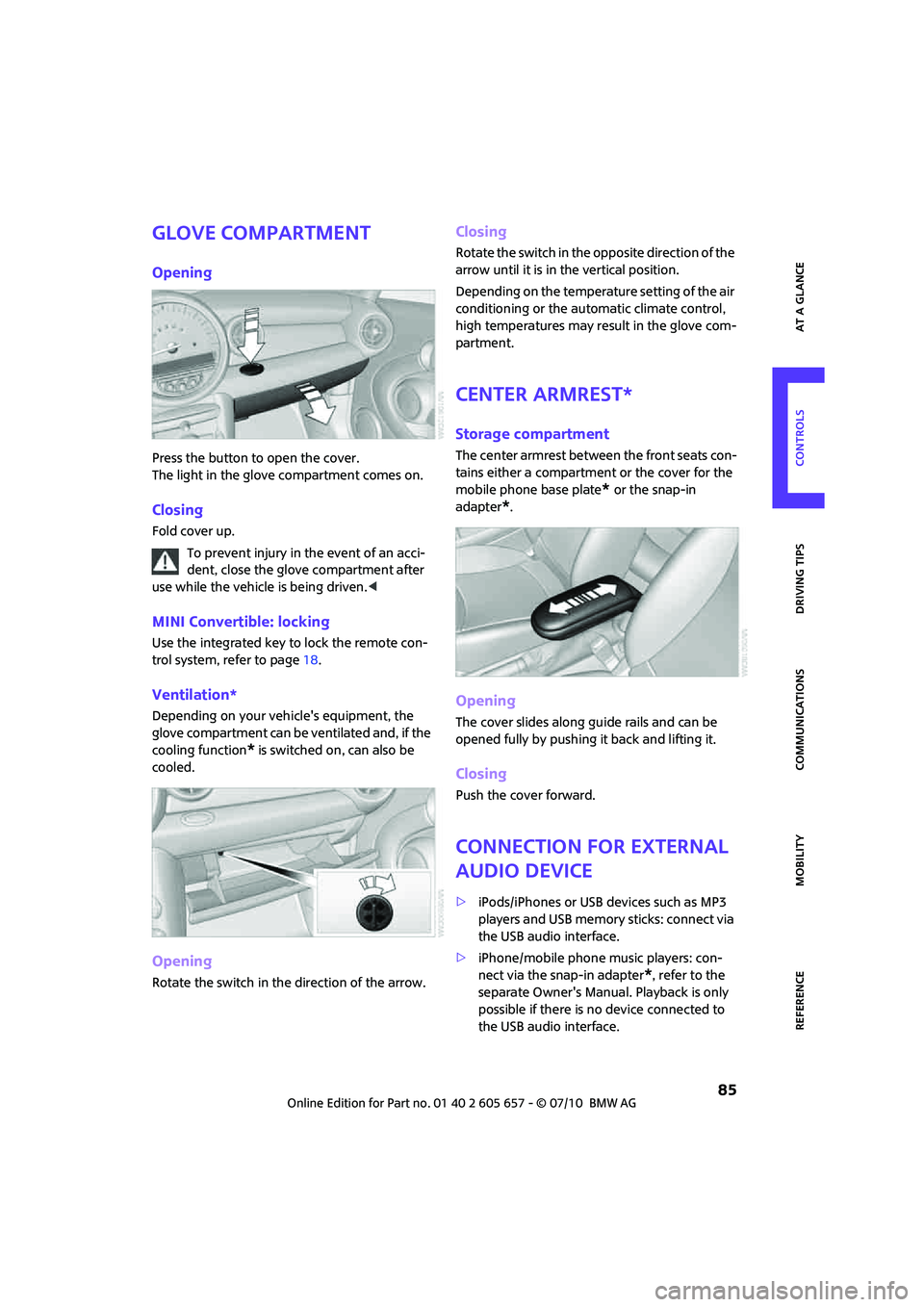
Opening
Press the button to open the cover.
The light in the glove compartment comes on.
Closing
Fold cover up.
To prevent injury in the event of an acci-
dent, close the glove compartment after
use while the vehicle is being driven.<
MINI Convertible: locking
Use the integrated key to lock the remote con-
trol system, refer to page18.
Ventilation*
Depending on your vehicle's equipment, the
glove compartment can be ventilated and, if the
cooling function
* is switched on, can also be
cooled.
Opening
Rotate the switch in the direction of the arrow.
Closing
Rotate the switch in the opposite direction of the
arrow until it is in the vertical position.
Depending on the temperature setting of the air
conditioning or the automatic climate control,
high temperatures may result in the glove com-
partment.
Center armrest*
Storage compartment
The center armrest between the front seats con-
tains either a compartment or the cover for the
mobile phone base plate
* or the snap-in
adapter
*.
Opening
The cover slides along guide rails and can be
opened fully by pushing it back and lifting it.
Closing
Push the cover forward.
Connection for external
audio device
>iPods/iPhones or USB devices such as MP3
players and USB memory sticks: connect via
the USB audio interface.
>iPhone/mobile phone music players: con-
nect via the snap-in adapter
*, refer to the
separate Owner's Manual. Playback is only
possible if there is no device connected to
the USB audio interface.
Page 107 of 186

105
AT A GLANCE REFERENCE MOBILITYCONTROLS DRIVING TIPS COMMUNICATIONS
2.
Press the button.
Pairing and connecting
Only pair the mobile phone when the
vehicle is stopped; otherwise, inattention
may lead to endangerment of passengers or
other road users.<
Switching on ignition
1.Insert the remote control as far as possible
into the ignition lock.
2.Switch on the ignition; to do so, press the
start/stop button without stepping on the
brake or clutch pedal.
Preparation on the radio display
3.Press the button.
4.
Press the button.
5.
Press the button.
6.
Press the button.
Press the right rotary knob to display the Blue-
tooth name of your vehicle on the display.
Preparation with mobile phone
7.Other operations must be performed on the
mobile phone and differ depending on the
type of mobile phone, refer to owner's man-
ual of the mobile phone, e.g. under Con-necting or coupling Bluetooth device. The
Bluetooth name of the vehicle appears on
the mobile phone display.
8.Select the Bluetooth name of the vehicle on
the mobile phone display.
Pairing
The mobile phone or the radio display will
prompt you to enter the same Bluetooth pass-
key.
Depending on the mobile phone, you have
approx. 30 seconds to enter the Bluetooth pass-
key using the mobile phone and the radio dis-
play.
If the Bluetooth passkey can be entered using
the radio, then the following appears on the dis-
play:
:
9.Enter the Bluetooth passkey using the num-
ber buttons of the mobile phone.
10.
Press the button to enter the Blue-
tooth passkey using the radio.
11.Using the function buttons 0-9, enter the
same Bluetooth passkey that was entered
into the mobile phone.
To delete the last digit:
Press the button.
12.
Press the button to confirm the
Bluetooth passkey.
The following display will appear after a few
seconds:
Page 109 of 186
107
AT A GLANCE REFERENCE MOBILITYCONTROLS DRIVING TIPS COMMUNICATIONS
What to do if…
For information on suitable mobile phones, refer
to page102.
The mobile phone could not be paired or con-
nected.
>Is Bluetooth activated in the vehicle and in
the mobile phone? Activate Bluetooth in the
vehicle and in the mobile phone.
>Do the Bluetooth passkeys on the mobile
phone and the vehicle match? Enter the
same passkey on the mobile phone and via
the radio.
>Is the passkey input taking longer than 30
seconds? Repeat the pairing procedure.
>Are too many Bluetooth devices connected
to the mobile phone? If so, delete the con-
nections with other devices on the mobile
phone.
>Is the mobile phone in power economy
m o d e o r d o e s i t o n l y h a v e a s m a l l a m o u n t o f
battery charge remaining? Charge the
mobile phone in the snap-in adapter
* or via
a charging cable.
>Depending on the mobile phone, it may only
be possible to connect one device to the
vehicle. Unpair the connected device from
the vehicle and only pair and connect one
device.
>Is the mobile phone no longer responding?
Switch the mobile phone off and back on
again. Repeat the pairing procedure.
Phone book entries are not displayed, not all of
them are displayed, or they are displayed
incompletely.
>The transfer of phone book entries has not
yet completed.
>It is possible that only the phone book
entries of the mobile phone or the SIM card
*
are transferred.
>It may not be possible to display phone book
entries with special characters.
>The number of phone book entries to be
stored is too high.
>The data volume of the phone book entry is
too great, e.g. due to additionally stored information such as notes? Reduce the data
volume.
The telephone connection quality is low.
>Depending on the mobile phone, it is possi-
ble to adjust the strength of the Bluetooth
signal.
>Insert the mobile phone into the snap-in
adapter
* o r p la ce it in t h e v ic in it y o f t h e ce n -
ter console.
>Adjust the volume of the microphone and
speaker separately.
If you have gone through all items in the list and
still cannot activate the desired function please
contact the Hotline or your MINI center.
Operation
Overview
The following functions can be operated using
the radio:
>Accepting/refusing a call
>Dialing phone numbers
>Dialing a phone number from the phone
book
>Dialing a stored phone number, e.g. from
the list of accepted calls
>Ending a call
When the ignition is switched off and in radio-
ready mode, e.g. after removal of the infrared
remote control, an ongoing conversation can be
continued for a maximum of 25 minutes using
the hands-free system.
Page 110 of 186
Telephone
108
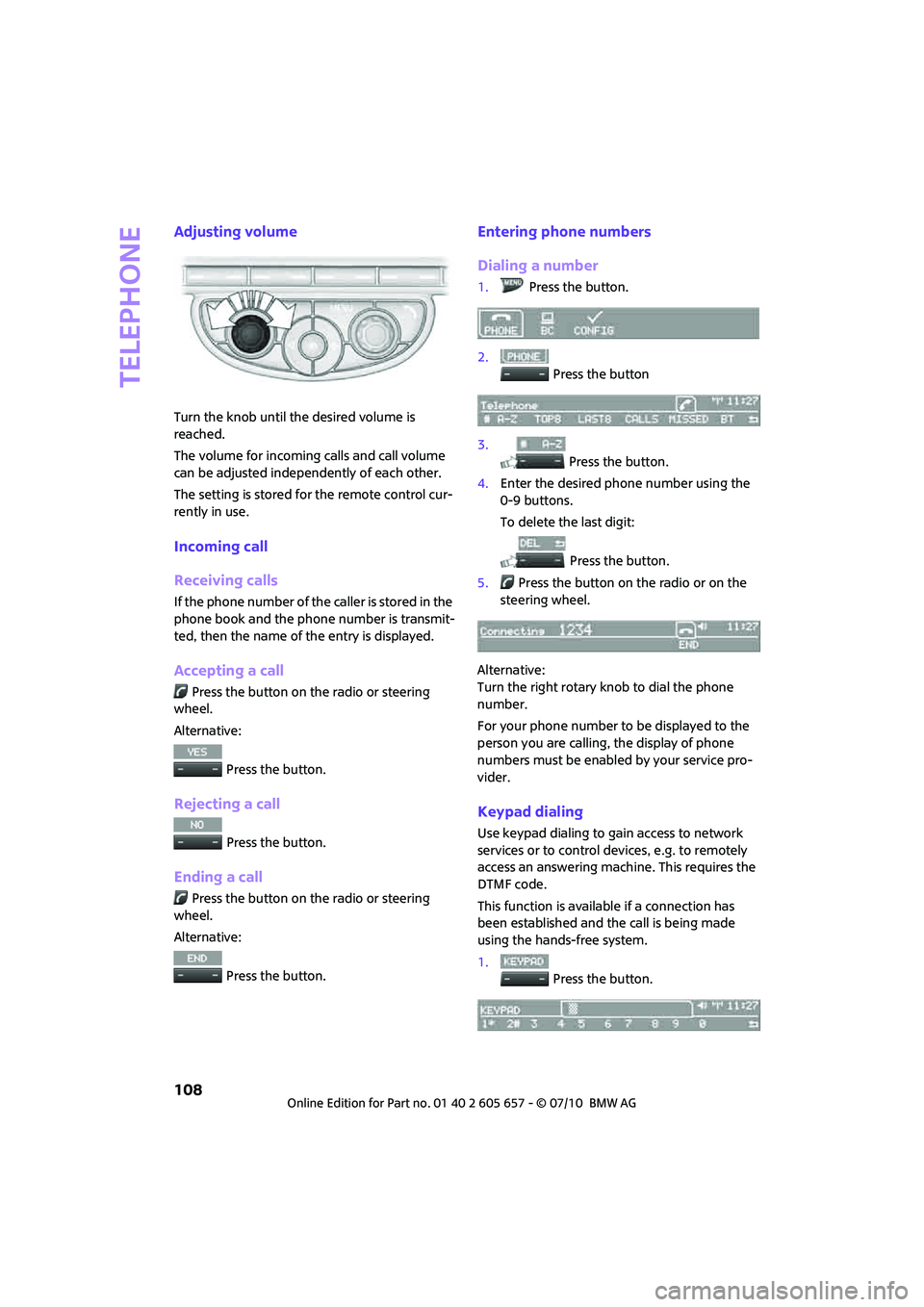
Adjusting volume
Turn the knob until the desired volume is
reached.
The volume for incoming calls and call volume
can be adjusted independently of each other.
The setting is stored for the remote control cur-
rently in use.
Incoming call
Receiving calls
If the phone number of the caller is stored in the
phone book and the phone number is transmit-
ted, then the name of the entry is displayed.
Accepting a call
Press the button on the radio or steering
wheel.
Alternative:
Press the button.
Rejecting a call
Press the button.
Ending a call
Press the button on the radio or steering
wheel.
Alternative:
Press the button.
Entering phone numbers
Dialing a number
1.Press the button.
2.
Press the button
3.
Press the button.
4.Enter the desired phone number using the
0-9 buttons.
To delete the last digit:
Press the button.
5.Press the button on the radio or on the
steering wheel.
Alternative:
Turn the right rotary knob to dial the phone
number.
For your phone number to be displayed to the
person you are calling, the display of phone
numbers must be enabled by your service pro-
vider.
Keypad dialing
Use keypad dialing to gain access to network
services or to control devices, e.g. to remotely
access an answering machine. This requires the
DTMF code.
This function is available if a connection has
been established and the call is being made
using the hands-free system.
1.
Press the button.
Page 114 of 186
Telephone
112
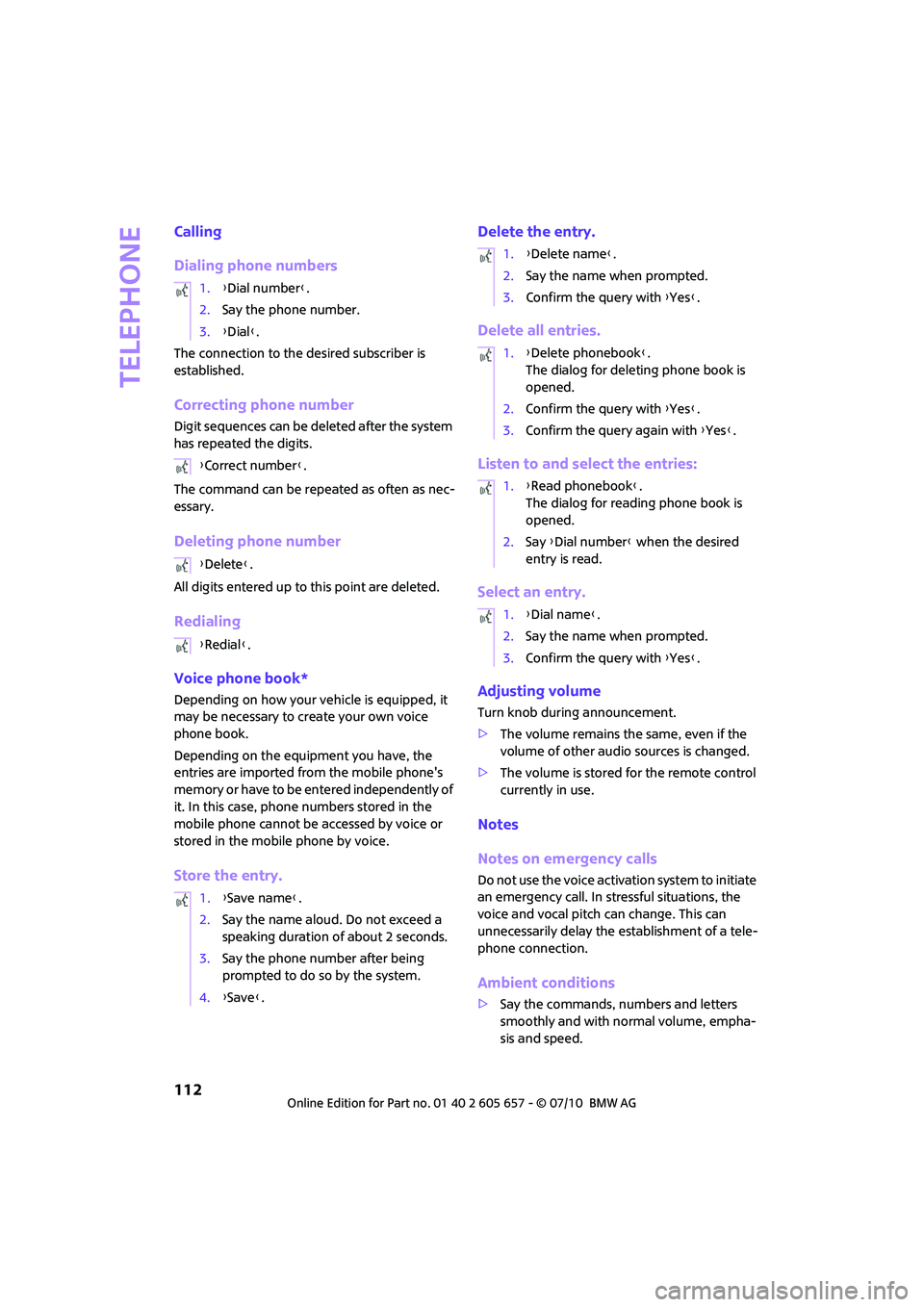
Calling
Dialing phone numbers
The connection to the desired subscriber is
established.
Correcting phone number
Digit sequences can be deleted after the system
has repeated the digits.
The command can be repeated as often as nec-
essary.
Deleting phone number
All digits entered up to this point are deleted.
Redialing
Voice phone book*
Depending on how your vehicle is equipped, it
may be necessary to create your own voice
phone book.
Depending on the equipment you have, the
entries are imported from the mobile phone's
memory or have to be entered independently of
it. In this case, phone numbers stored in the
mobile phone cannot be accessed by voice or
stored in the mobile phone by voice.
Store the entry.Delete the entry.
Delete all entries.
Listen to and select the entries:
Select an entry.
Adjusting volume
Turn knob during announcement.
>The volume remains the same, even if the
volume of other audio sources is changed.
>The volume is stored for the remote control
currently in use.
Notes
Notes on emergency calls
Do not use the voice activation system to initiate
an emergency call. In stressful situations, the
voice and vocal pitch can change. This can
unnecessarily delay the establishment of a tele-
phone connection.
Ambient conditions
>Say the commands, numbers and letters
smoothly and with normal volume, empha-
sis and speed. 1.{Dial number}.
2.Say the phone number.
3.{Dial}.
{Correct number}.
{Delete}.
{Redial}.
1.{Save name}.
2.Say the name aloud. Do not exceed a
speaking duration of about 2 seconds.
3.Say the phone number after being
prompted to do so by the system.
4.{Save}.
1.{Delete name}.
2.Say the name when prompted.
3.Confirm the query with {Yes}.
1.{Delete phonebook}.
The dialog for deleting phone book is
opened.
2.Confirm the query with {Yes}.
3.Confirm the query again with {Yes}.
1.{Read phonebook}.
The dialog for reading phone book is
opened.
2.Say {Dial number} when the desired
entry is read.
1.{Dial name}.
2.Say the name when prompted.
3.Confirm the query with {Yes}.
Page 133 of 186

131
AT A GLANCE REFERENCEMOBILITYCONTROLS DRIVING TIPS COMMUNICATIONS
Maintenance
MINI Maintenance System
The MINI Maintenance System supports the
preservation of the traffic and operating safety
of your MINI. The objective is to optimize efforts
with respect to minimal vehicle maintenance
costs.
If and when you come to sell your MINI, a com-
prehensive record of servicing will prove a signif-
icant benefit.
Condition Based Service CBS
Sensors and special algorithms take the different
driving conditions of your MINI into account.
Condition Based Service uses this to determine
the current and future service requirements. By
letting you define a service and maintenance
regimen that reflects your own individual
requirements, the system builds the basis for
trouble-free driving.
In the tachometer, you can have the remaining
times or distances for selected maintenance
tasks and any legally prescribed dates displayed,
page58.
Service data in the remote control
Your vehicle continuously stores service-
requirement information in the remote control
while you are driving. Your MINI dealer can read
out this data from the remote control unit, and
propose an optimized maintenance approach.
Whenever you take your car in for servicing you
should therefore hand your MINI dealer the
remote control unit that you last used.Make sure that the date in the tachometer
is always set correctly, page60; otherwise,
the effectiveness of Condition Based Service CBS
is not assured.<
Service and Warranty Information
Booklet for US models and Warranty and
Service Guide Booklet for Canadian
models
Please consult your Service and Warranty Infor-
mation Booklet for US models and Warranty and
Service Guide Booklet for Canadian models for
additional information on service requirements.
The manufacturer of the MINI recom-
mends that you have service and repair
operations performed at your MINI dealer.
Take the time to ensure that these service pro-
cedures are confirmed by entries in your vehi-
cle's Service and Warranty Information Booklet
for US models and Warranty and Service Guide
Booklet for Canadian models. These entries ver-
ify that your vehicle has received the specified
regular maintenance.<
Socket for On-Board
Diagnosis OBD
The primary components that make up the
emissions can be checked by a device via the
OBD socket.
Page 134 of 186

Maintenance
132
Emissions
The warning lamps come on. The vehicle
is producing higher emissions. You can
continue your journey, but moderate
your speed and exercise due caution.
Have the car checked as soon as possible.
Under certain circumstances, one of the lamps
will flash or light up continuously. This indicates
excessive misfiring or a malfunction in the
engine. If this happens, reduce your speed and
visit the nearest MINI dealer as soon as possible.
Severe misfiring can quickly lead to serious
damage of emissions-related components,
especially the catalytic converter. In addition,
mechanical engine components can become
damaged.
If the fuel filler cap is not properly tight-
ened, the OBD system may conclude
that fuel vapors are escaping, causing an
indicator to light up. If the filler cap is then tight-
ened, the indicator should go out within a few
days.
Data memory
Your vehicle displays data about the operation,
malfunctions, and user settings. These data are
stored in the vehicle and can be partly stored in
the remote control; the data can be read by suit-
able devices, in particular at your service center.
The data read out are used for supporting the
service processes and repair or for optimization
and development of vehicle functions.
Page 135 of 186
133
AT A GLANCE REFERENCEMOBILITYCONTROLS DRIVING TIPS COMMUNICATIONS
Care
Car-care products
Regular cleaning and care helps to maintain the
value of your MINI.
The manufacturer of your MINI recommends
using manufacturer-approved products to clean
and care for your vehicle.
MINI Service would be pleased to advise you on
cleaning and care products and services for your
MINI.
The ingredients of original MINI Care Prod-
ucts have been tested, and the products
have been tested in the laboratory and in prac-
tice. They offer optimum care and protection for
your vehicle.<
Do not use any cleansers containing alco-
hol or solvents as these may cause dam-
age.<
Cleaning agents may contain hazardous
or health-damaging substances. Follow
the warning and hazard instructions on the
packaging. For interior cleaning, always open
the doors or windows of the vehicle.
Do not use any products that are not intended
for cleaning the vehicle.<
External care
Washing your vehicle
Especially during the winter months the
vehicle should be frequently washed. Dirt
and road salt can damage the vehicle.<
After washing the vehicle, apply the
brakes briefly to dry them; otherwise,
water can reduce braking efficiency over the
short term and the brake rotors can corrode.<
Car washes
Preference should be given to cloth car washes.
Do not use automatic high-pressure car
washes; otherwise, water may drip into
the vehicle around the windows.<
Before driving into the car wash, check if the sys-
tem is suitable for your MINI. Observe the fol-
lowing points:
>Vehicle dimensions, page167
>If necessary: fold in the outside mirrors,
page39.
>Maximum permissible tire width
Avoid car washes with tracks higher than
4 in/10 cm; otherwise, the chassis could
be damaged.<
Preparations for driving into the car wash:
>Unscrew the rod antenna.
>Deactivate the rain sensor
* to prevent unin-
tentional wiping.
>Deactivate the rear window wiper
* and pro-
tect it from damage. Ask the car wash oper-
ator about measures that can be taken to
protect the wipers.
>Remove additional attachments, e.g. spoil-
ers or telephone antennas, if there is a pos-
sibility that they could be damaged.
Automatic transmission
Before driving into the car wash, make sure that
the vehicle can roll:
1.Place the remote control, even with Comfort
Access, in the ignition lock.
2.Move the selector lever to position N.
3.Release the parking brake.
4.Switch off the engine.
5.Insert the remote control in the ignition lock
so that the vehicle can roll.
Page 157 of 186

155
AT A GLANCE REFERENCEMOBILITYCONTROLS DRIVING TIPS COMMUNICATIONS
Remote control malfunctioning or, in
cars with Comfort Access, not
detectedThe engine cannot be started. Have
the remote control checked, if neces-
sary.
Remote control battery is discharged Use the remote control for a longer
journey or, in cars with Comfort
Access, replace the battery.
Belt tensioners and/or airbag system
failedHave the system checked immedi-
ately. Fasten the safety belts anyway.
Power steering failed You can continue your journey, but
moderate your speed and exercise
due caution. Steering response will be
markedly different. Have the system
checked without delay.
Lights up in red:
Engine malfunction
Stop the car and switch off the
engine. You cannot continue your
journey. Contact your MINI dealer.
Lights up in yellow:
Full engine power no longer available You can continue your journey, but
moderate your speed and exercise
due caution. Have the engine
checked as soon as possible.
Indicator lamp1 flashes:
Engine malfunction under high load.
High engine load will result in dam-
age to the catalytic converterYou can continue your journey, but
moderate your speed and exercise
due caution. Have the vehicle
checked without delay.
Indicator lamp1 comes on:
Engine malfunction with adverse
effect on exhaust emissionsYou can continue your journey, but
moderate your speed and exercise
due caution. Have the car checked as
soon as possible.
12Cause What to do
Page 174 of 186
Everything from A to Z
172
Everything from A to Z
INDEX
A
ABS Antilock Brake System63
Accessories, refer to Your
individual vehicle4
Acknowledgment signals for
locking/unlocking vehicle21
Activated-charcoal filter for
automatic climate control82
Adaptive Light Control75
Additives
– coolant129
– engine oil129
Adjusting temperature inside
the car, refer to Air
conditioner79
Adjusting temperature inside
the car, refer to Automatic
climate control80
Air conditioner78
Air conditioning mode
– air conditioner79
– automatic climate control80
– ventilation82
Air distribution
– automatic81
– individual80
– manual80
Air flow rate79,81
– air conditioning system79
– automatic climate control81
– heating, ventilation79
Air outlets, refer to Air vents78
Air pressure, checking, refer to
Tire inflation pressure118
Air recirculation, refer to
Recirculated-air
mode79,81
Air supply
– air conditioner79
– automatic climate control80
– ventilation82
Air vents78Airbags70
– sitting safely35
– warning lamp72
Airing, refer to Ventilation82
AKI, refer to fuel grade117
Alarm system25
All-season tires, refer to Winter
tires126
Always Open Timer55
Ambient air, refer to
Recirculated-air
mode79,81
Ambient lighting77
Antenna, care133
Antifreeze
– coolant129
– washer fluid
51
Antilock Brake System ABS63
Anti-theft alarm system, refer
to Alarm system25
Anti-theft system19
Approved axle loads, refer to
Weights169
Approved engine oils129
Approved gross vehicle
weight, refer to Weights169
Armrest, refer to Center
armrest85
Ashtray87
Assistant systems, refer to
– Dynamic Stability Control
DSC63
Audio device, external85
AUTO program for automatic
climate control81
Automatic
– air distribution81
– air flow rate81
– cruise control51
– headlamp control73
Automatic climate control78
– automatic air distribution81Automatic transmission with
Steptronic46
– interlock46
– overriding selector lever
lock48
– shiftlock46
– sport program47
AUX-IN, refer to External audio
device85
Average fuel consumption54
– setting the units57
Average speed54
Axle loads, refer to
Weights169B
Background lighting, refer to
Ambient lighting77
Backrests, refer to Seats36
Backup lamps
– replacing bulb140,141
Band-aids, refer to First aid
pouch148
Bar, refer to Tow-starting,
towing away150
Base plate for telephone or
mobile phone
– refer to Snap-in adapter113
Battery146
– charging147
– disposal28,147
– jump-starting148
– temporary power failure147
Battery renewal
– remote control28
Being towed150
Belt tensioner, refer to Safety
belts38
Belts, refer to Safety belts38
Beverage holders, refer to
Cupholders87