bulb MINI COOPER CONVERTIBLE 2011 Owners Manual
[x] Cancel search | Manufacturer: MINI, Model Year: 2011, Model line: COOPER CONVERTIBLE, Model: MINI COOPER CONVERTIBLE 2011Pages: 186, PDF Size: 3.25 MB
Page 50 of 186
Driving
48
If you do not shift gears with the shift paddles or
accelerate for a certain amount of time, the
transmission automatically returns to D, auto-
matic drive.
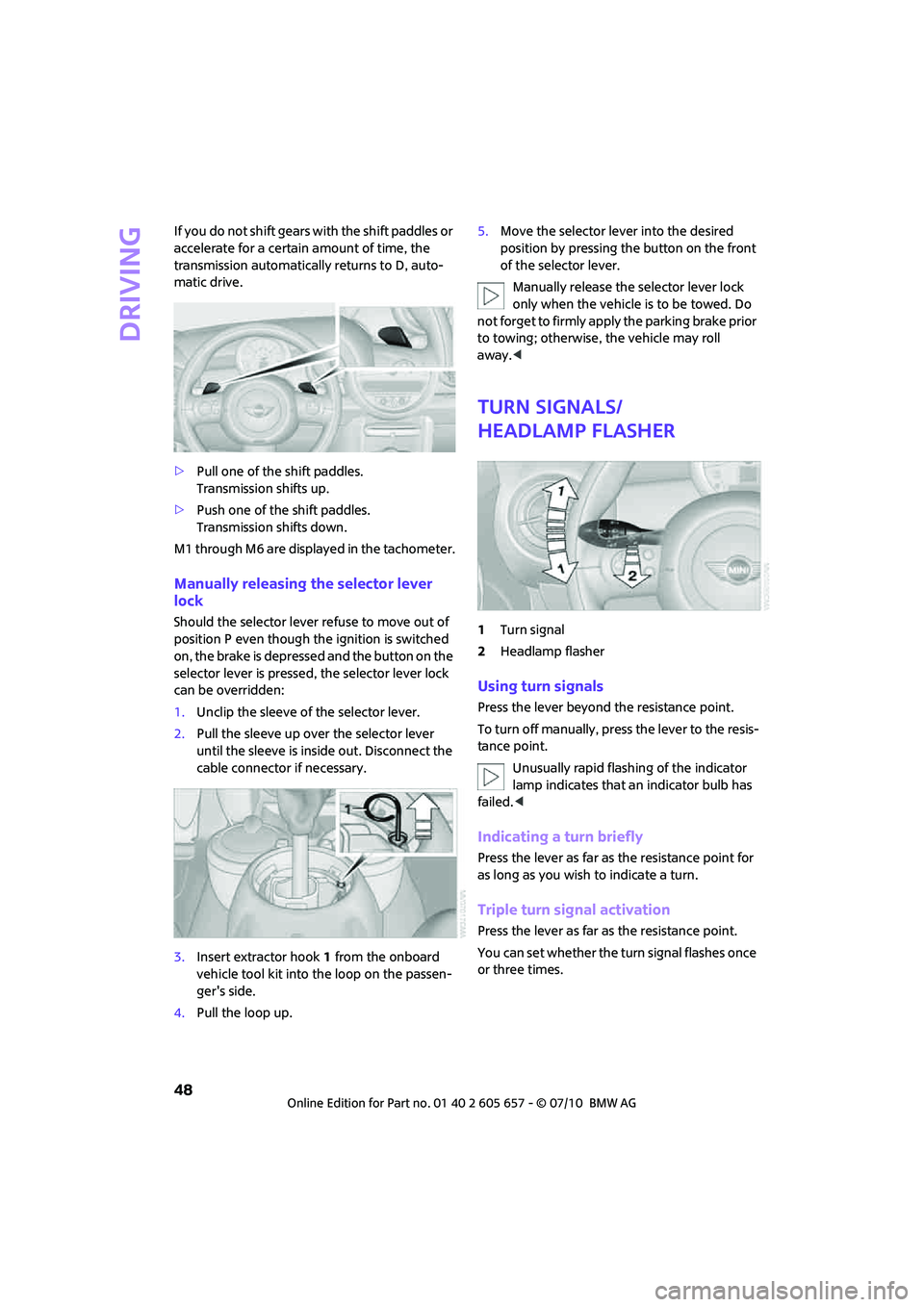
>Pull one of the shift paddles.
Transmission shifts up.
>Push one of the shift paddles.
Transmission shifts down.
M1 through M6 are displayed in the tachometer.
Manually releasing the selector lever
lock
Should the selector lever refuse to move out of
position P even though the ignition is switched
on, the brake is depressed and the button on the
selector lever is pressed, the selector lever lock
can be overridden:
1.Unclip the sleeve of the selector lever.
2.Pull the sleeve up over the selector lever
until the sleeve is inside out. Disconnect the
cable connector if necessary.
3.Insert extractor hook1 from the onboard
vehicle tool kit into the loop on the passen-
ger's side.
4.Pull the loop up.5.Move the selector lever into the desired
position by pressing the button on the front
of the selector lever.
Manually release the selector lever lock
only when the vehicle is to be towed. Do
not forget to firmly apply the parking brake prior
to towing; otherwise, the vehicle may roll
away.<
Turn signals/
headlamp flasher
1Turn signal
2Headlamp flasher
Using turn signals
Press the lever beyond the resistance point.
To turn off manually, press the lever to the resis-
tance point.
Unusually rapid flashing of the indicator
lamp indicates that an indicator bulb has
failed.<
Indicating a turn briefly
Press the lever as far as the resistance point for
as long as you wish to indicate a turn.
Triple turn signal activation
Press the lever as far as the resistance point.
You can set whether the turn signal flashes once
or three times.
Page 139 of 186
137
AT A GLANCE REFERENCEMOBILITYCONTROLS DRIVING TIPS COMMUNICATIONS
Replacing components
On-board vehicle tool kit
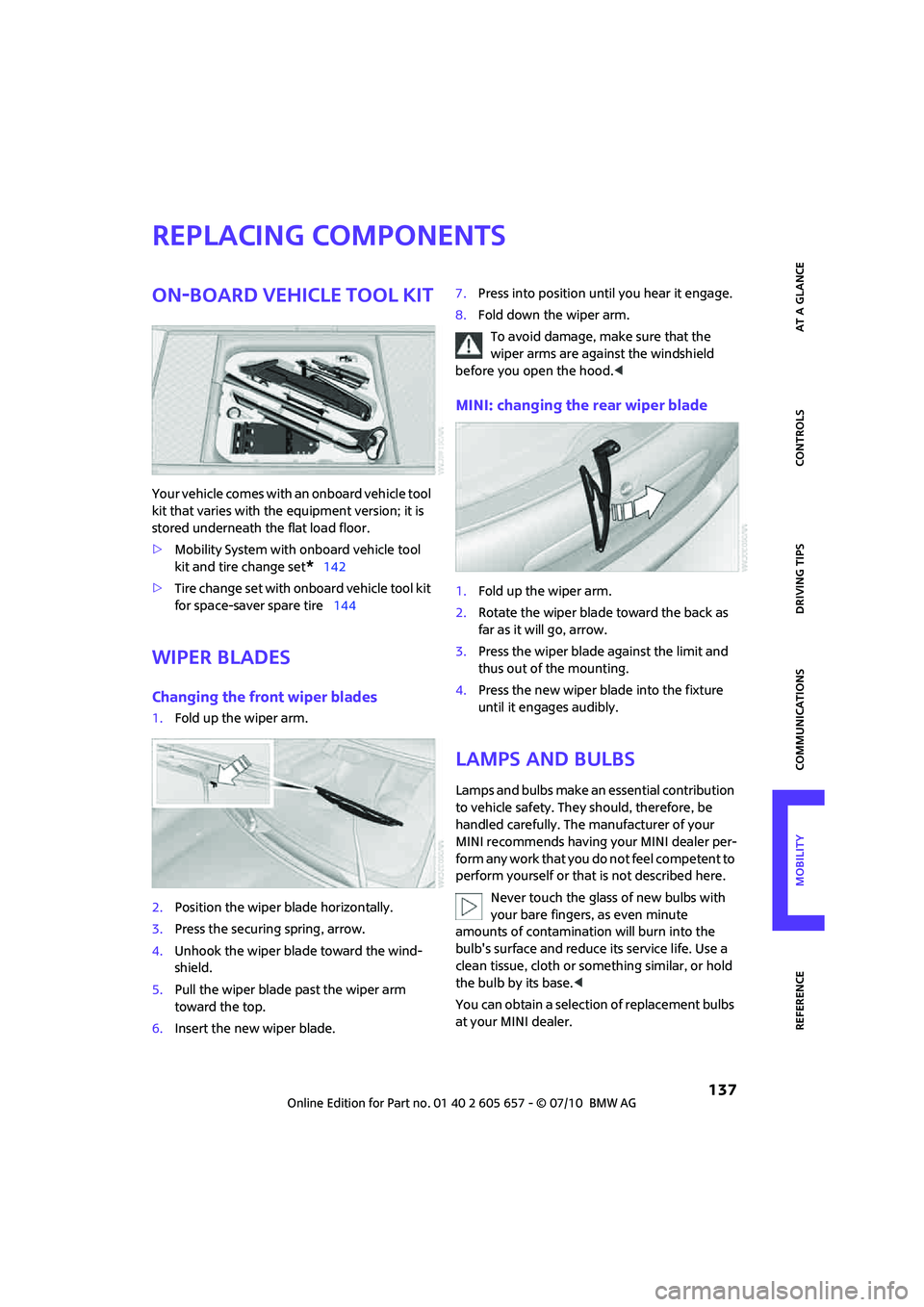
Your vehicle comes with an onboard vehicle tool
kit that varies with the equipment version; it is
stored underneath the flat load floor.
>Mobility System with onboard vehicle tool
kit and tire change set
*142
>Tire change set with onboard vehicle tool kit
for space-saver spare tire144
Wiper blades
Changing the front wiper blades
1.Fold up the wiper arm.
2.Position the wiper blade horizontally.
3.Press the securing spring, arrow.
4.Unhook the wiper blade toward the wind-
shield.
5.Pull the wiper blade past the wiper arm
toward the top.
6.Insert the new wiper blade.7.Press into position until you hear it engage.
8.Fold down the wiper arm.
To avoid damage, make sure that the
wiper arms are against the windshield
before you open the hood.<
MINI: changing the rear wiper blade
1.Fold up the wiper arm.
2.Rotate the wiper blade toward the back as
far as it will go, arrow.
3.Press the wiper blade against the limit and
thus out of the mounting.
4.Press the new wiper blade into the fixture
until it engages audibly.
Lamps and bulbs
Lamps and bulbs make an essential contribution
to vehicle safety. They should, therefore, be
handled carefully. The manufacturer of your
MINI recommends having your MINI dealer per-
f o r m a n y w o r k t h a t y o u d o n o t f e e l c o m p e t e n t t o
perform yourself or that is not described here.
Never touch the glass of new bulbs with
your bare fingers, as even minute
amounts of contamination will burn into the
bulb's surface and reduce its service life. Use a
clean tissue, cloth or something similar, or hold
the bulb by its base.<
You can obtain a selection of replacement bulbs
at your MINI dealer.
Page 140 of 186

Replacing components
138
When working on electrical systems,
always begin by switching off the con-
sumer in question; otherwise, short circuits
could result. To avoid possible injury or equip-
ment damage when replacing bulbs, observe
any instructions provided by the bulb manufac-
turer.<
Caring for headlamps, refer to page134.
For any bulb replacement not described
below, contact a MINI dealer or a work-
shop that has specially trained personnel work-
ing in accordance with the specifications of the
MINI manufacturer.<
For checking and adjusting headlamp aim,
please contact your MINI dealer.<
Light-emitting diodes LEDs
Light-emitting diodes installed behind translu-
cent lenses serve as the light sources for many of
the controls and displays in your vehicle. These
light-emitting diodes are related to conven-
tional laser diodes, and legislation defines them
as Class 1 light-emitting diodes.
Do not remove the covers or expose the
eyes directly to the unfiltered light source
for several hours; otherwise, this could cause
irritation of the retina.<
Headlight glass lens
In cool or humid weather, condensation may
occur on the interior of outside lights. The con-
densation disappears a short time after the light
is switched on. The headlamp glasses do not
need to be changed. If a lot of moisture is
present, e.g. water droplets in the light, have
them checked by your service center.
Xenon lamps*
The service life of these bulbs is very long and
the probability of failure very low, provided that
they are not switched on and off an excessive
number of times. If a xenon lamp fails neverthe-
less, switch on the fog lamps and continue the
journey with great care, provided that local leg-
islation does not prohibit this.Have any work on the xenon lamp system,
including bulb replacement, carried out
only by a MINI dealer or a workshop that has
specially trained personnel working in accor-
dance with the specifications of the MINI manu-
facturer. Due to high voltage, there is a risk of
fatal injury if work on the xenon lamps is carried
out improperly.<
Halogen low beams and high beams
H13 bulb, 60/55 watts
The H13 bulb is pressurized. Therefore,
wear safety glasses and protective gloves.
Otherwise, there is a risk of injury if the bulb is
damaged.<
Be careful when installing the cover; oth-
erwise, leaks could occur and cause dam-
age to the headlamp system.<
Accessing the lamp from the engine
compartment
The low-beam/high-beam bulb can be changed
from the engine compartment.
Removing the cover:
1.Press the tab.
2.Flip open the cover and take it out of the
holder.
Follow the same steps in reverse order to reat-
tach the cover.
Be careful when installing the cover; oth-
erwise, leaks could occur and cause dam-
age to the headlamp system.<
Page 141 of 186
139
AT A GLANCE REFERENCEMOBILITYCONTROLS DRIVING TIPS COMMUNICATIONS
Replacing the bulb
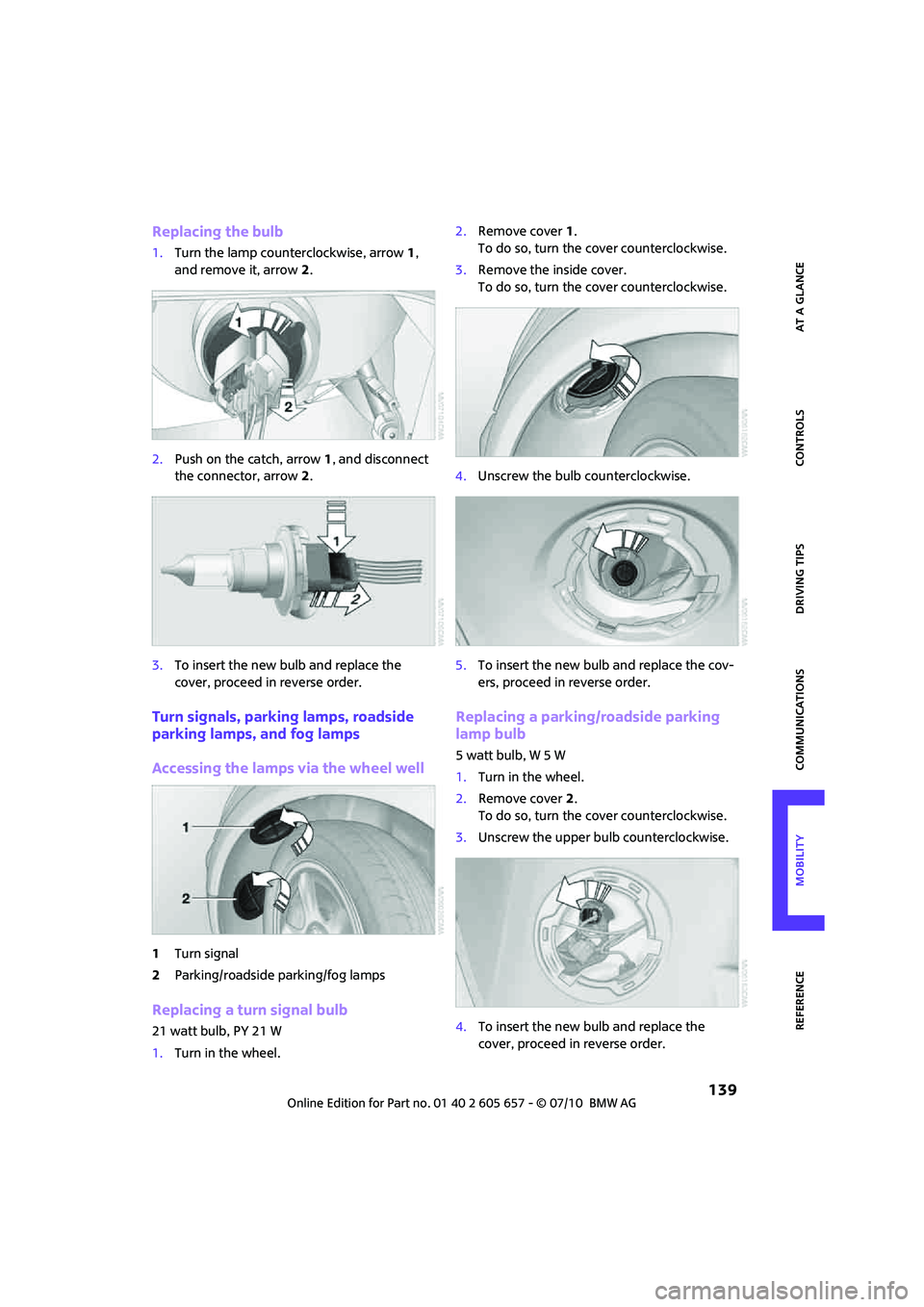
1.Turn the lamp counterclockwise, arrow1,
and remove it, arrow2.
2.Push on the catch, arrow 1, and disconnect
the connector, arrow2.
3.To insert the new bulb and replace the
cover, proceed in reverse order.
Turn signals, parking lamps, roadside
parking lamps, and fog lamps
Accessing the lamps via the wheel well
1Turn signal
2Parking/roadside parking/fog lamps
Replacing a turn signal bulb
21 watt bulb, PY 21 W
1.Turn in the wheel.2.Remove cover 1.
To do so, turn the cover counterclockwise.
3.Remove the inside cover.
To do so, turn the cover counterclockwise.
4.Unscrew the bulb counterclockwise.
5.To insert the new bulb and replace the cov-
ers, proceed in reverse order.
Replacing a parking/roadside parking
lamp bulb
5watt bulb, W5W
1.Turn in the wheel.
2.Remove cover 2.
To do so, turn the cover counterclockwise.
3.Unscrew the upper bulb counterclockwise.
4.To insert the new bulb and replace the
cover, proceed in reverse order.
Page 142 of 186
Replacing components
140
Replacing a fog lamp bulb
H8 bulb, 35 watts
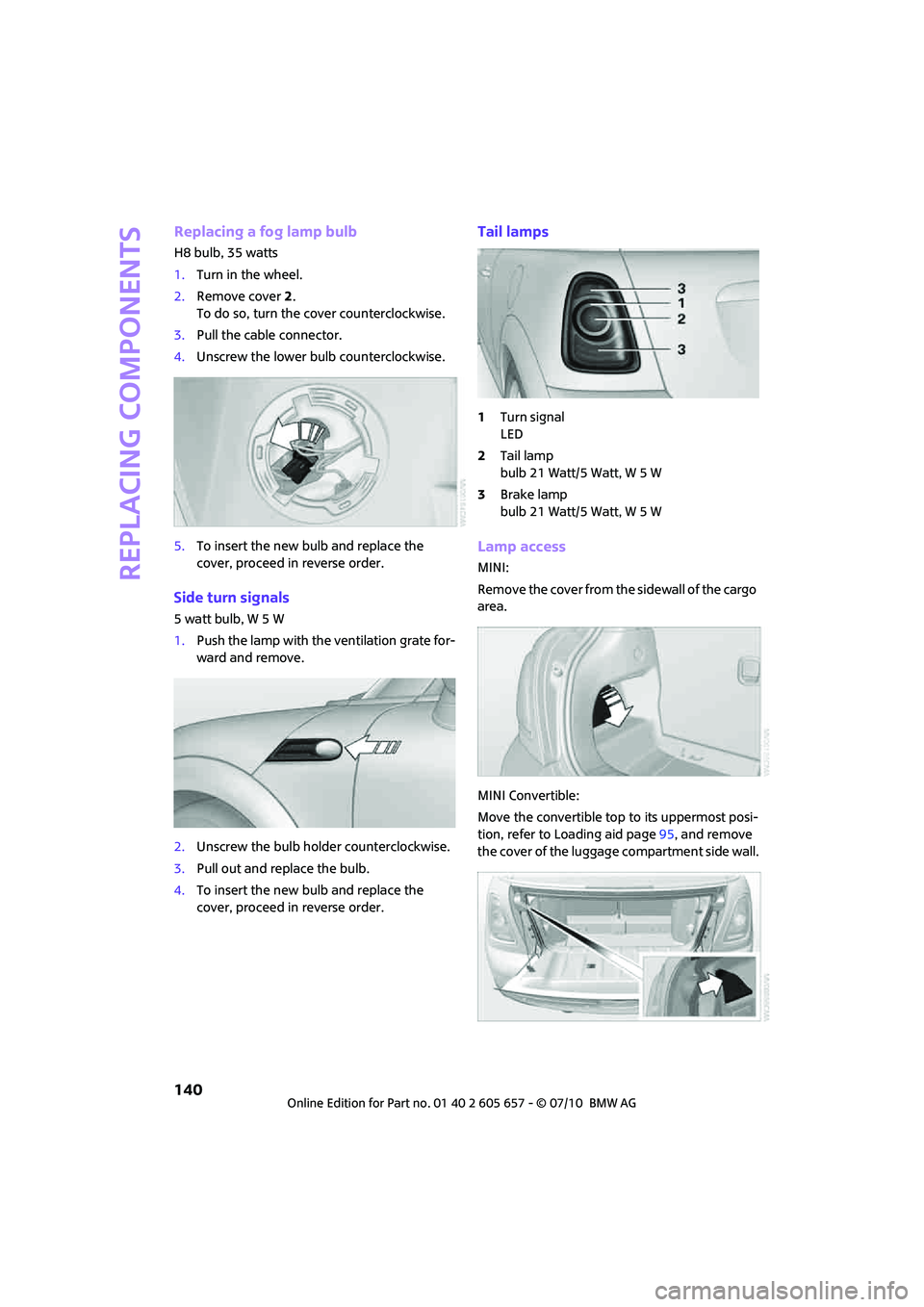
1.Turn in the wheel.
2.Remove cover 2.
To do so, turn the cover counterclockwise.
3.Pull the cable connector.
4.Unscrew the lower bulb counterclockwise.
5.To insert the new bulb and replace the
cover, proceed in reverse order.
Side turn signals
5 watt bulb, W 5 W
1.Push the lamp with the ventilation grate for-
ward and remove.
2.Unscrew the bulb holder counterclockwise.
3.Pull out and replace the bulb.
4.To insert the new bulb and replace the
cover, proceed in reverse order.
Tail lamps
1Turn signal
LED
2Tail lamp
bulb 21 Watt/5 Watt, W 5 W
3Brake lamp
bulb 21 Watt/5 Watt, W 5 W
Lamp access
MINI:
Remove the cover from the sidewall of the cargo
area.
MINI Convertible:
Move the convertible top to its uppermost posi-
tion, refer to Loading aid page95, and remove
the cover of the luggage compartment side wall.
Page 143 of 186
141
AT A GLANCE REFERENCEMOBILITYCONTROLS DRIVING TIPS COMMUNICATIONS
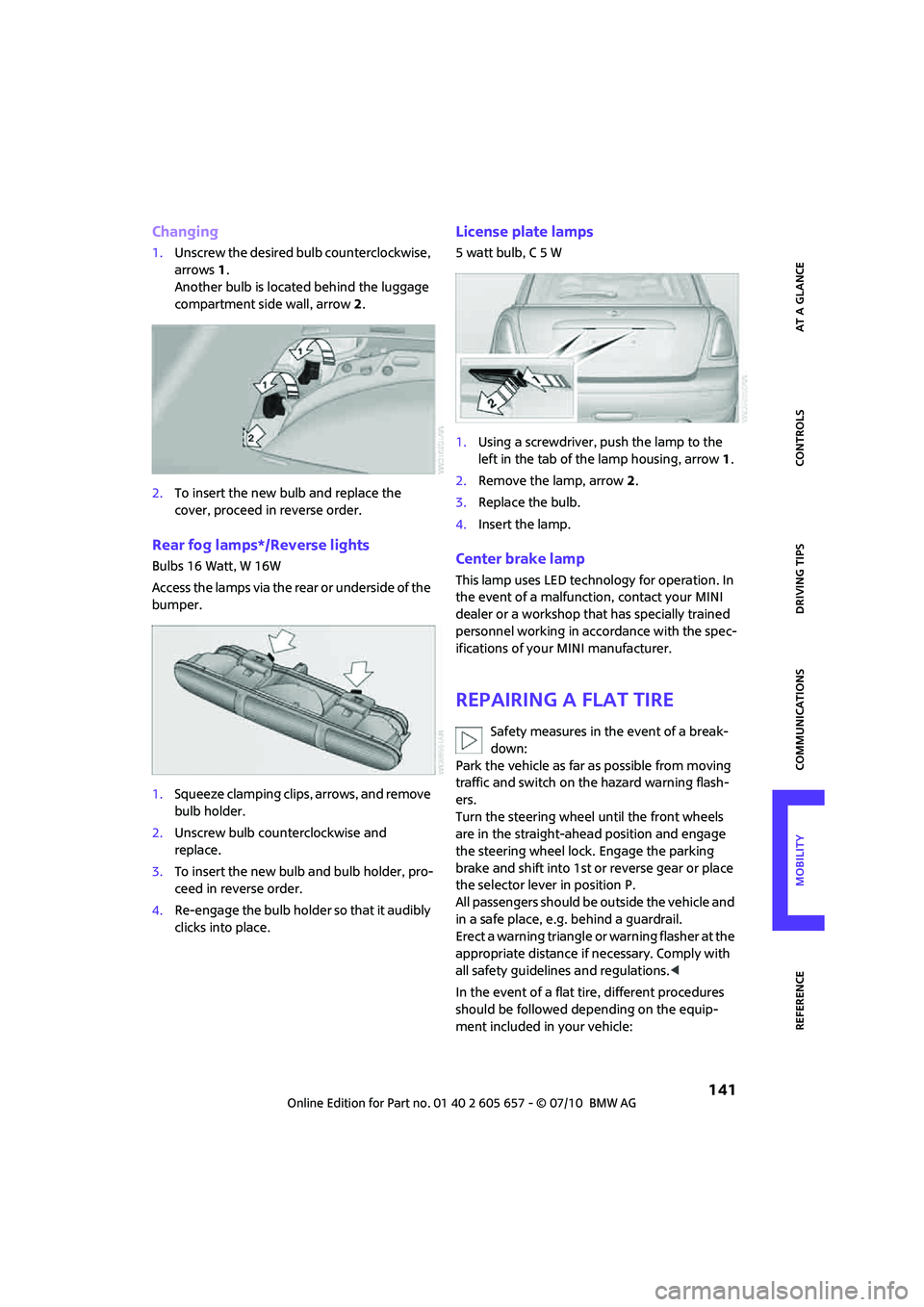
Changing
1.Unscrew the desired bulb counterclockwise,
arrows1.
Another bulb is located behind the luggage
compartment side wall, arrow2.
2.To insert the new bulb and replace the
cover, proceed in reverse order.
Rear fog lamps*/Reverse lights
Bulbs 16 Watt, W 16W
Access the lamps via the rear or underside of the
bumper.
1.Squeeze clamping clips, arrows, and remove
bulb holder.
2.Unscrew bulb counterclockwise and
replace.
3.To insert the new bulb and bulb holder, pro-
ceed in reverse order.
4.Re-enga ge the bulb holde r so th at it au dibly
clicks into place.
License plate lamps
5watt bulb, C5W
1.Using a screwdriver, push the lamp to the
left in the tab of the lamp housing, arrow1.
2.Remove the lamp, arrow 2.
3.Replace the bulb.
4.Insert the lamp.
Center brake lamp
This lamp uses LED technology for operation. In
the event of a malfunction, contact your MINI
dealer or a workshop that has specially trained
personnel working in accordance with the spec-
ifications of your MINI manufacturer.
Repairing a flat tire
Safety measures in the event of a break-
down:
Park the vehicle as far as possible from moving
traffic and switch on the hazard warning flash-
ers.
Turn the steering wheel until the front wheels
are in the straight-ahead position and engage
the steering wheel lock. Engage the parking
brake and shift into 1st or reverse gear or place
the selector lever in position P.
All passengers should be outside the vehicle and
in a safe place, e.g. behind a guardrail.
Erect a warning triangle or warning flasher at the
appropriate distance if necessary. Comply with
all safety guidelines and regulations.<
In the event of a flat tire, different procedures
should be followed depending on the equip-
ment included in your vehicle:
Page 164 of 186
Indicator and warning lamps
162
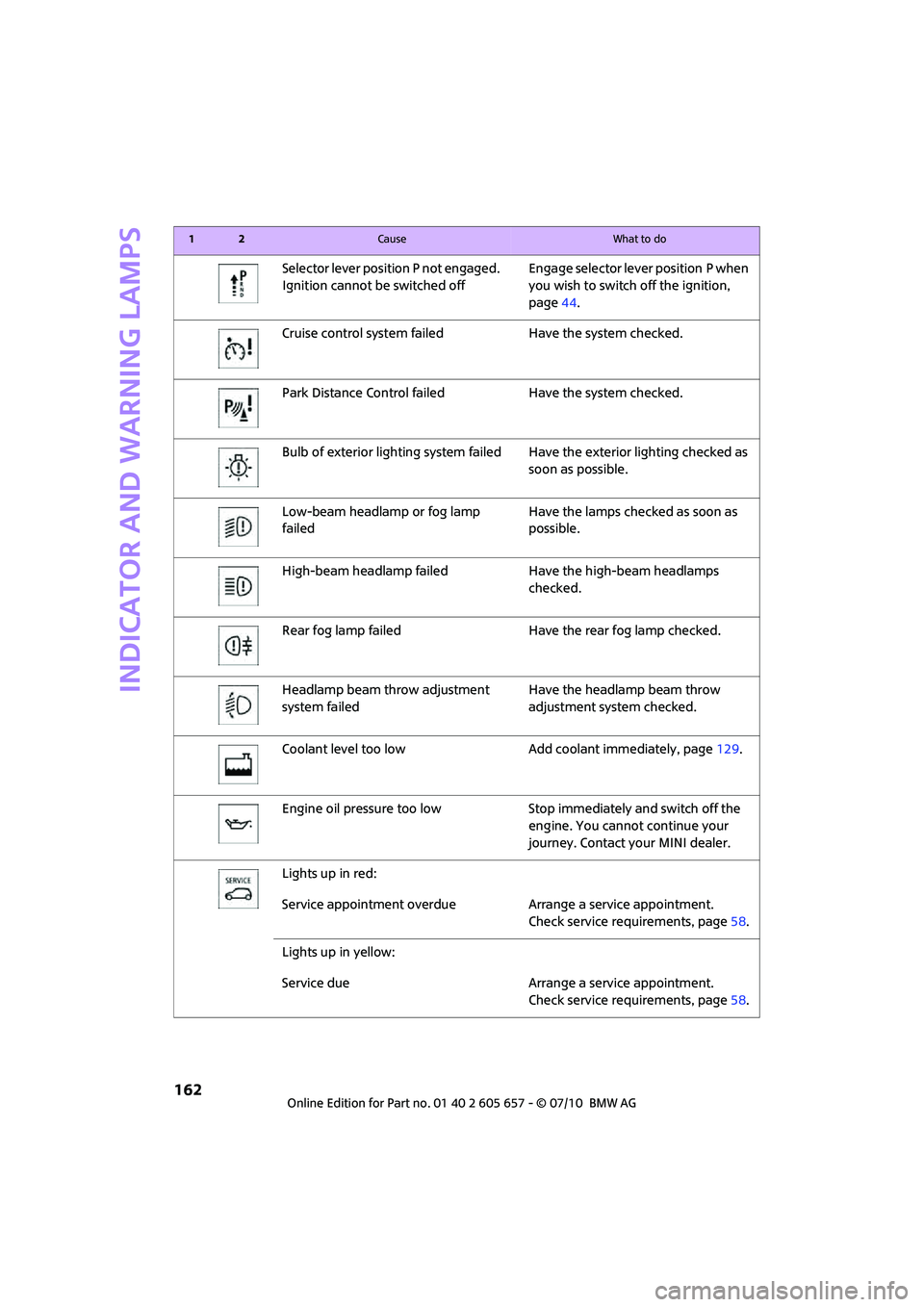
Selector lever position P not engaged.
Ignition cannot be switched offEngage selector lever position P when
you wish to switch off the ignition,
page44.
Cruise control system failed Have the system checked.
Park Distance Control failed Have the system checked.
Bulb of exterior lighting system failed Have the exterior lighting checked as
soon as possible.
Low-beam headlamp or fog lamp
failedHave the lamps checked as soon as
possible.
High-beam headlamp failed Have the high-beam headlamps
checked.
Rear fog lamp failed Have the rear fog lamp checked.
Headlamp beam throw adjustment
system failedHave the headlamp beam throw
adjustment system checked.
Coolant level too low Add coolant immediately, page129.
Engine oil pressure too low Stop immediately and switch off the
engine. You cannot continue your
journey. Contact your MINI dealer.
Lights up in red:
Service appointment overdue Arrange a service appointment.
Check service requirements, page58.
Lights up in yellow:
Service due Arrange a service appointment.
Check service requirements, page58.
12Cause What to do
Page 174 of 186
Everything from A to Z
172
Everything from A to Z
INDEX
A
ABS Antilock Brake System63
Accessories, refer to Your
individual vehicle4
Acknowledgment signals for
locking/unlocking vehicle21
Activated-charcoal filter for
automatic climate control82
Adaptive Light Control75
Additives
– coolant129
– engine oil129
Adjusting temperature inside
the car, refer to Air
conditioner79
Adjusting temperature inside
the car, refer to Automatic
climate control80
Air conditioner78
Air conditioning mode
– air conditioner79
– automatic climate control80
– ventilation82
Air distribution
– automatic81
– individual80
– manual80
Air flow rate79,81
– air conditioning system79
– automatic climate control81
– heating, ventilation79
Air outlets, refer to Air vents78
Air pressure, checking, refer to
Tire inflation pressure118
Air recirculation, refer to
Recirculated-air
mode79,81
Air supply
– air conditioner79
– automatic climate control80
– ventilation82
Air vents78Airbags70
– sitting safely35
– warning lamp72
Airing, refer to Ventilation82
AKI, refer to fuel grade117
Alarm system25
All-season tires, refer to Winter
tires126
Always Open Timer55
Ambient air, refer to
Recirculated-air
mode79,81
Ambient lighting77
Antenna, care133
Antifreeze
– coolant129
– washer fluid
51
Antilock Brake System ABS63
Anti-theft alarm system, refer
to Alarm system25
Anti-theft system19
Approved axle loads, refer to
Weights169
Approved engine oils129
Approved gross vehicle
weight, refer to Weights169
Armrest, refer to Center
armrest85
Ashtray87
Assistant systems, refer to
– Dynamic Stability Control
DSC63
Audio device, external85
AUTO program for automatic
climate control81
Automatic
– air distribution81
– air flow rate81
– cruise control51
– headlamp control73
Automatic climate control78
– automatic air distribution81Automatic transmission with
Steptronic46
– interlock46
– overriding selector lever
lock48
– shiftlock46
– sport program47
AUX-IN, refer to External audio
device85
Average fuel consumption54
– setting the units57
Average speed54
Axle loads, refer to
Weights169B
Background lighting, refer to
Ambient lighting77
Backrests, refer to Seats36
Backup lamps
– replacing bulb140,141
Band-aids, refer to First aid
pouch148
Bar, refer to Tow-starting,
towing away150
Base plate for telephone or
mobile phone
– refer to Snap-in adapter113
Battery146
– charging147
– disposal28,147
– jump-starting148
– temporary power failure147
Battery renewal
– remote control28
Being towed150
Belt tensioner, refer to Safety
belts38
Belts, refer to Safety belts38
Beverage holders, refer to
Cupholders87
Page 175 of 186
173
AT A GLANCE REFERENCEMOBILITYCONTROLS DRIVING TIPS COMMUNICATIONS
Black ice, refer to Outside
temperature warning53
Blower, refer to Air flow
rate79,81
Bluetooth, activating/
deactivating104
Bottle holders, refer to
Cupholders87
Brake Assist63
Brake fluid, refer to Service
requirements58
Brake lamps
– replacing bulbs141
Brake pads, breaking in92
Brake rotors93
– brakes92
– breaking in92
Brake system92
– breaking in92
– disc brakes93
– MINI Maintenance
System131
Brakes
– ABS63
– breaking in92
– MINI Maintenance
System131
– parking brake45
– service requirements58
Brakes, refer to Braking
safely93
Breakdown service, refer to
Roadside Assistance148
Break-in period92
Breaking in the clutch92
Bulb changing, refer to Lamps
and bulbs137
Button for starting the
engine44
Buttons on steering wheel11
C
California Proposition 65
warning5
Call
– accepting108
– ending108
– rejecting108Calling, refer to Phone
numbers, dialing108
Can holders, refer to
Cupholders87
Capacities170
Car battery, refer to Vehicle
battery146
Car care133
Car key, refer to Keys/remote
controls18
Car phone
– installation location, refer to
Center armrest85
– refer to separate Owner's
Manual
Car phone, refer to
Telephone102
Car wash, care133
Car washes133
Care133
– car washes133
– car-care products133
– CD/DVD drives136
– external133
– high-pressure washers134
– internal135
– leather135
– manual washing134
– upholstery and fabrics135
– windows134
– wiper blades134
Cargo area94
– capacity169
– Comfort Access27
– cover94
– lamp77
– opening from outside24
Cargo area, expanding94
Cargo area lamp77
Cargo area lid, refer to
Liftgate24
Cargo loading96
– securing cargo97
– stowing cargo96
– vehicle94
Cargo, securing97
Carpets, care136
Catalytic converter, refer to
Hot exhaust system92Center armrest85
Center brake lamp141
Center console, refer to
Around the center
console14
Central locking system19
– Comfort Access26
– from inside23
– from outside19
Changing bulbs137
Changing wheels144
Chassis number, refer to
Engine compartment128
Check Control60
Child restraint fixing system
LATCH42
Child restraint systems41
Child seats41
Chock, folding
– space-saver spare tire144
Chrome parts, care135
Chrome parts, refer to
Care133
Cigarette lighter87
Cleaning headlamps50
– washer fluid51
Clock
– 12h/24h mode57
– setting time60
Closing
– from inside23
– from outside19
Clothes hooks87
Cockpit10
Cold start, refer to Starting the
engine45
Comfort Access26
– replacing the battery28
– what to observe before
entering a car wash27
Comfort area, refer to Around
the center console14
Compartment for remote
control, refer to Ignition
lock44
Computer54
Condensation, refer to When
the vehicle is parked94
Page 177 of 186
175
AT A GLANCE REFERENCEMOBILITYCONTROLS DRIVING TIPS COMMUNICATIONS
Emergency operation, refer to
Manual operation
– convertible top32
– door lock22
– fuel filler flap116
– liftgate24
– transmission lock, automatic
transmission48
Emergency services, refer to
Roadside Assistance148
Engine
– breaking in92
– data166
– overheated, refer to Coolant
temperature53
– speed166
– starting45
– starting, Comfort Access26
– switching off45
Engine compartment128
Engine coolant, refer to
Coolant129
Engine oil
– adding129
– additives, refer to Approved
engine oils129
– alternative oil types129
– approved engine oils129
– capacity129
– checking level128
– dipstick128
– intervals between changes,
refer to Service
requirements58
– MINI Maintenance
System131
Engine oil level, checking128
Engine output, refer to Engine
data166
Engine starting, refer to
Starting the engine45
ESP Electronic Stability
Program, refer to Dynamic
Stability Control DSC63
Exhaust system, refer to Hot
exhaust system92Exterior mirrors39
– adjusting39
– automatic heating39
– folding in and out39
External audio device85
Eyes
– for tow-starting and towing
away150
– for tying down loads97
F
Failure messages, refer to
Check Control60
Failure of an electrical
consumer147
Fastening safety belts, refer to
Safety belts38
Fault messages, refer to Check
Control60
Filter
– microfilter for air
conditioner80
– microfilter/activated-
charcoal filter for automatic
climate control82
Fine wood, care136
First aid pouch148
Fixture for remote control,
refer to Ignition lock44
Flash when locking/
unlocking21
Flat tire
– run-flat tires125
– Tire Pressure Monitor TPM67
Flat Tire Monitor FTM65
– indicating a flat tire66
– initializing the system65
– snow chains65
– system limits65
Flat tires, refer to Tire
condition124
Floor mats, care136
Fog lamps
– replacing bulb139,141
Folding rear seat backrest94
Folding roof, refer to
Convertible top with
integrated sliding sunroof30Footbrake, refer to Braking
safely93
Footwell lamps77
For your own safety5
Front airbags70
Front fog lamps76
– indicator lamp152
– replacing bulb139
Front seat adjustment36
Frost on windows, refer to
Defrosting windows80,82
FTM, refer to Flat Tire
Monitor65
Fuel117
– gauge53
– high-quality brands117
– quality117
– specifications117
– tank capacity170
Fuel clock, refer to Fuel
gauge53
Fuel consumption display
– average fuel consumption54
Fuel display, refer to Fuel
gauge53
Fuel filler flap116
– releasing in the event of
electrical malfunction116
Fuses147
G
Garage door opener, refer to
Integrated universal remote
control83
Gasoline
– refer to Average fuel
consumption54
Gasoline display, refer to Fuel
gauge53
Gasoline, refer to Required
fuel117
Gear indicator
– automatic transmission with
Steptronic46
Gear shifting
– automatic transmission46
– manual transmission46