wheel MINI COOPER CONVERTIBLE 2015 Workshop Manual
[x] Cancel search | Manufacturer: MINI, Model Year: 2015, Model line: COOPER CONVERTIBLE, Model: MINI COOPER CONVERTIBLE 2015Pages: 231, PDF Size: 5.56 MB
Page 189 of 231

3.Mount the new wheel.4.Screw in at least two bolts crosswise.5.Screw in the remaining lug bolts.6.Fully tighten all lug bolts in a diagonal pat‐
tern.7.Lower the vehicle.8.Remove the jack.
Retightening the lug bolts
Retighten the lug bolts diagonally.
Checking that the lug bolts are tight
Always have the lug bolts checked with a
calibrated torque wrench as soon as possible to
ensure that they are tightened to the specified
torque. Otherwise, incorrectly tightened lug
bolts are a hidden safety risk. ◀
The tightening torque equals
103.3 lb ft/140 Nm.
Replace the defective tire as soon as possible
and have the new wheel balanced.
Vehicle battery Maintenance
The battery is maintenance-free, i.e., the elec‐
trolyte will last for the life of the battery in tem‐
perate climate conditions.
The service center will be happy to answer any
questions on the battery.
Battery replacement Use approved vehicle batteries
Only use vehicle batteries that have been
approved for your vehicle by the manufacturer;
otherwise, the vehicle could be damaged and
systems or functions may not be fully availa‐
ble. ◀
Have the vehicle battery registered by the serv‐
ice center after it is replaced to ensure that all comfort functions are available without restric‐
tions and that any associated Check Control
messages are no longer displayed.
Charging the battery
Note Do not connect the charger to the socket
Do not connect the battery charger to the
socket installed in the vehicle at the factory as
this could damage the battery. ◀
Only charge the battery in the vehicle when the
engine is switched off. Connections, refer to
page 189.
General information Ensure that the battery is sufficiently charged to
achieve the full battery life.
It may be necessary to charge the battery in
the following cases:▷When the vehicle is frequently used to
travel short distances.▷When the vehicle has not been driven for
more than one month.
Power failure
After a temporary power failure, some equip‐
ment will be restricted in its use and will need
to be reinitialized. In addition, certain individual
settings will be lost and must be updated:
▷Time and date: the values must be up‐
dated, refer to page 71.▷Radio: the stations need to be stored again,
refer to page 130.
Disposing of old batteries
Have used batteries disposed of by the
service center after they are replaced or
take them to a recycling center.
Maintain the battery in an upright position for
transport and storage. Secure the battery so
that it does not tip over during transport.
Seite 187Replacing componentsMOBILITY187
Online Edition for Part no. 01 40 2 961 029 - II/15
Page 194 of 231
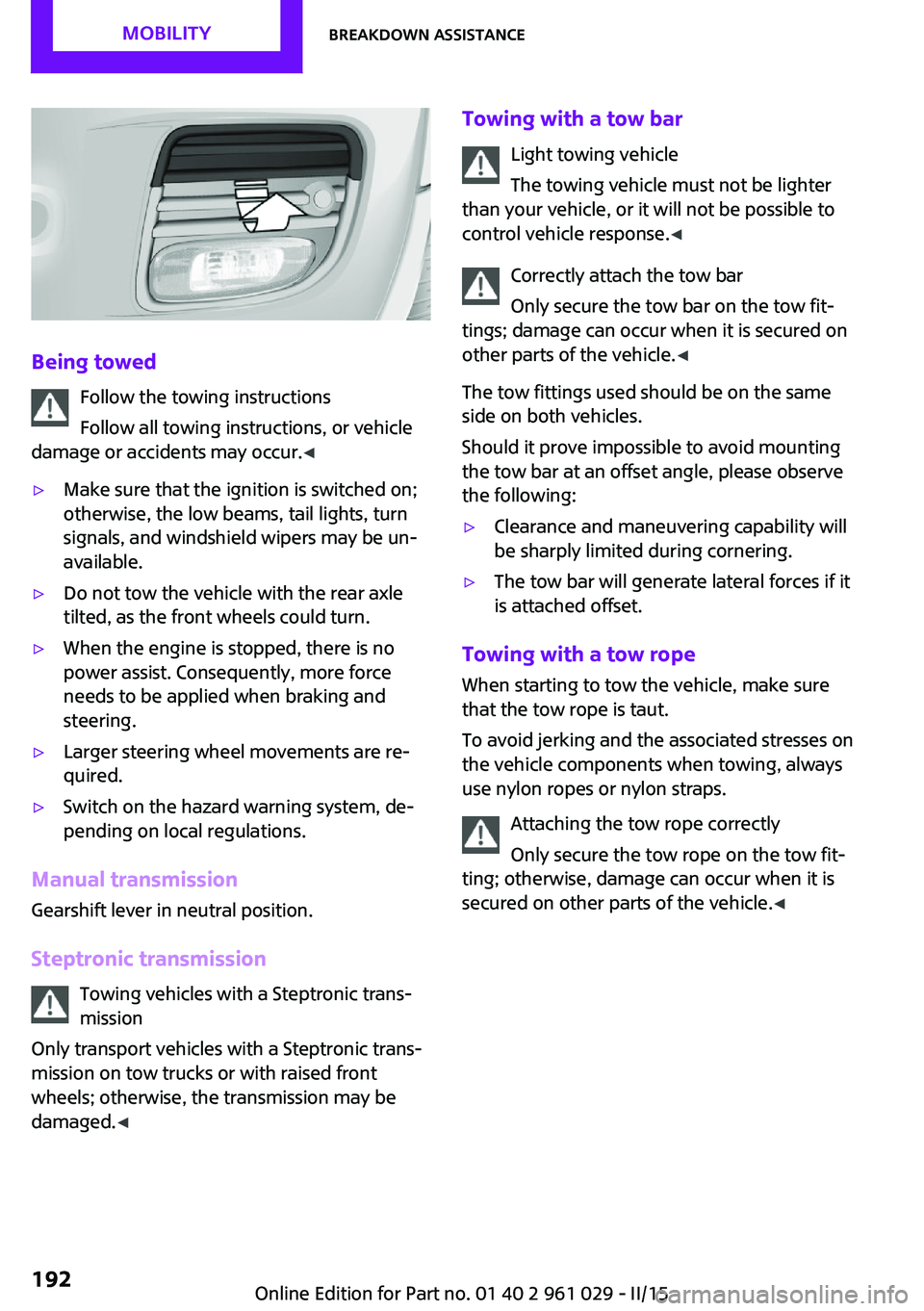
Being towedFollow the towing instructions
Follow all towing instructions, or vehicle
damage or accidents may occur. ◀
▷Make sure that the ignition is switched on;
otherwise, the low beams, tail lights, turn
signals, and windshield wipers may be un‐
available.▷Do not tow the vehicle with the rear axle
tilted, as the front wheels could turn.▷When the engine is stopped, there is no
power assist. Consequently, more force
needs to be applied when braking and
steering.▷Larger steering wheel movements are re‐
quired.▷Switch on the hazard warning system, de‐
pending on local regulations.
Manual transmission
Gearshift lever in neutral position.
Steptronic transmission Towing vehicles with a Steptronic trans‐
mission
Only transport vehicles with a Steptronic trans‐
mission on tow trucks or with raised front
wheels; otherwise, the transmission may be
damaged. ◀
Towing with a tow bar
Light towing vehicle
The towing vehicle must not be lighter
than your vehicle, or it will not be possible to
control vehicle response. ◀
Correctly attach the tow bar
Only secure the tow bar on the tow fit‐
tings; damage can occur when it is secured on
other parts of the vehicle. ◀
The tow fittings used should be on the same
side on both vehicles.
Should it prove impossible to avoid mounting
the tow bar at an offset angle, please observe
the following:▷Clearance and maneuvering capability will
be sharply limited during cornering.▷The tow bar will generate lateral forces if it
is attached offset.
Towing with a tow rope
When starting to tow the vehicle, make sure
that the tow rope is taut.
To avoid jerking and the associated stresses on
the vehicle components when towing, always
use nylon ropes or nylon straps.
Attaching the tow rope correctly
Only secure the tow rope on the tow fit‐
ting; otherwise, damage can occur when it is
secured on other parts of the vehicle. ◀
Seite 192MOBILITYBreakdown assistance192
Online Edition for Part no. 01 40 2 961 029 - II/15
Page 199 of 231

Make especially sure that light-colored leather
is cleaned regularly as it is more susceptible to
soiling.
Twice a year, treat the leather with a leather lo‐
tion as dirt and grease will attack the protective
layer of the leather.
Upholstery material care
Vacuum regularly with a vacuum cleaner to re‐
move superficial soiling.
In case of heavy soiling, e.g., beverage stains,
use a soft sponge or lint-free microfiber cloth in
combination with a suitable interior cleaner.
Follow the instructions on the container.
Clean the upholstery material down to the
seams using large sweeping motions. Avoid
rubbing the material vigorously.
Damage from Velcro® fasteners
Open Velcro® fasteners on pants or other
articles of clothing can damage the seat covers.
Ensure that any Velcro® fasteners are closed. ◀
Caring for special components
Interior plastic parts These include:▷Imitation leather surfaces▷Lamp lenses▷Indicator covers▷Matte components
Clean with water and a solvent-free plastic
cleaner if necessary.
Do not use cleansers that contain alcohol
or solvents
Do not use cleansers that contain alcohol or
solvents, such as lacquer thinners, heavy-duty
grease removers, fuel, or such; this could lead
to surface damage. ◀
Rubber seals Only treat with water or a rubber care product.
When cleaning rubber seals, do not use silicone
sprays or other care products containing sili‐
cone; otherwise, noise and damage may result.
Chrome surfaces Carefully clean components such as the radia‐
tor grille or door handles with an ample supply
of water, possibly with shampoo added, partic‐
ularly when they have been exposed to road
salt. For additional treatment, use a chrome
polish.
Light-alloy wheels When cleaning the wheels on the vehicle, only
use a neutral wheel rim cleaner with a pH value
of 5 to 9.
Do not use abrasive cleaners or a steam jet hot‐
ter than 140 ℉/60 ℃; otherwise, damage may
result. Adhere to the manufacturer instructions.
Aggressive, acidic, or alkaline cleaners may de‐
stroy the protective coating of neighboring
components such as the brake disc.
Exterior sensors The sensors on the outside of the vehicle, such
as for Park Distance Control, must be kept clean
and free of ice to ensure that they remain fully
functional.
Decorative trim Clean decorative trims and fine wood compo‐
nents with a moist cloth only. Then dry with a
soft cloth.
Safety belts Dirty belt straps impede the reeling action and
thus have a negative impact on safety.
No chemical cleaning
Do not clean chemically; this can destroy
the webbing. ◀Seite 197CareMOBILITY197
Online Edition for Part no. 01 40 2 961 029 - II/15
Page 210 of 231

12CauseHow to respondThe small light flashes yellow and then
stays on, the large light lights up in yellow:Tire Pressure Monitor failed. Punctures are
not indicated.Have the system checked.A wheel without TPM electronics is
mounted.Have the system checked.TPM is temporarily malfunctioning due to
other systems or devices using the same
radio frequency.In vehicles with the Tire Pressure MonitorThe small light flashes yellow and then
stays on, the large light lights up in yellow:Tire Pressure Monitor failed. Punctures are
not indicated.Have the system checked.A wheel without TPM electronics is
mounted.Have the system checked.Lights up in red:Transmission limp-home program active
with restricted range of gears, possibly
with reduced acceleration.You can continue your journey, but
moderate your speed and exercise
due caution. Have the system
checked immediately.Gears can be engaged without depressing
the brake.Always depress the brake to engage
a gear.Automatic selector lever locked:Manually unlock the selector lever
lock, refer to page 65.Lights up in yellow:Have the system checked as soon as
possible.Automatic selector lever locked:
The selector lever is locked in position P
with the engine running or the ignition
switched on and the brake depressed orManually unlock the selector lever
lock, refer to page 65.Seite 208MOBILITYIndicator/warning lamps208
Online Edition for Part no. 01 40 2 961 029 - II/15
Page 216 of 231

Technical dataVehicle equipment
This chapter describes all series equipment as
well as country-specific and special equipment
offered for this model series. Therefore, it also
describes equipment that may not be found in
your vehicle, for instance due to the selectedspecial equipment or the country version. This
also applies to safety-related functions and sys‐
tems.
When using the features and systems described
here, adhere to local regulations.
Note
The technical data and specifications in this
Owner's Manual are used as guidance values.
The vehicle-specific data can deviate from this,
for example, due to the selected special equip‐
ment, country version or country-specific
measurement method. Detailed values can befound in the approval documents, on informa‐
tion signs on the vehicle or can be obtained
from the service center.
The information in the vehicle documents al‐
ways has priority.
Dimensions
The dimensions can vary depending on the
model version, equipment or country-specific
measurement method.
The specified heights do not take into account
attached parts, for example, a roof antenna,roof racks or spoiler. The heights can deviate,
for example, due to the selected special equip‐
ment, tires, load and chassis version.
MINI Coupe
MINI CoupeCooperCooper SJohn Cooper WorksWidth with mirrorsinches/mm74.5/1,89274.5/1,89274.5/1,892Width without mirrorsinches/mm66.3/1,68366.3/1,68366.3/1,683Height without roof antennainches/mm54.3/1,37854.5/1,38454.5/1,385Lengthinches/mm146.8/3,728147.0/3,734148.0/3,758Wheelbaseinches/mm97.1/2,46797.1/2,46797.1/2,467Smallest turning circle dia.ft/m35.1/10.735.1/10.735.1/10.7Seite 214REFERENCETechnical data214
Online Edition for Part no. 01 40 2 961 029 - II/15
Page 217 of 231

MINI Roadster
MINI RoadsterCooperCooper SJohn Cooper WorksWidth with mirrorsinches/mm74.5/1,89274.5/1,89274.5/1,892Width without mirrorsinches/mm66.3/1,68366.3/1,68366.3/1,683Height without roof antennainches/mm54.5/1,38454.7/1,39054.8/1,391Lengthinches/mm146.8/3,728147.0/3,734148.0/3,758Wheelbaseinches/mm97.1/2,46797.1/2,46797.1/2,467Smallest turning circle dia.ft/m35.1/10.735.1/10.735.1/10.7
MINI Convertible
MINI ConvertibleCooperCooper SJohn Cooper WorksWidth with mirrorsinches/mm75.3/1,91375.3/1,91375.3/1,913Width without mirrorsinches/mm66.3/1,68366.3/1,68366.3/1,683Height without roof antennainches/mm55.7/1,41455.7/1,41455.7/1,414Lengthinches/mm146.6/3,723146.8/3,729148.0/3,758Wheelbaseinches/mm97.1/2,46797.1/2,46797.1/2,467Smallest turning circle dia.ft/m35.1/10.735.1/10.735.1/10.7Weights
Never exceed either the approved axle loads or
the gross vehicle weight.MINI Coupe
CooperCooper SJohn Cooper WorksApproved gross vehicle weightManual transmissionlbs/kg3,175/1,4403,252/1,4753,263/1,480Steptronic transmissionlbs/kg3,252/1,4753,307/1,5003,318/1,505Loadlbs/kg507/230507/230507/230Approved front axle loadManual transmissionlbs/kg1,786/8101,885/8551,896/860Seite 215Technical dataREFERENCE215
Online Edition for Part no. 01 40 2 961 029 - II/15
Page 221 of 231
Brakes, service require‐ments 71
Brake system, MINI mainte‐ nance system 175
Braking, notes 116
Braking, parking brake 58
Breakdown assistance, Road‐ side Assistance 189
Breaking in 114
Button for starting the engine, refer to Start/Stop button 56
C
California Proposition 65 Warning 7
Car battery, refer to Vehicle battery 187
Car care products 195
Care, displays 198
Care, vehicle 195
Cargo area, Comfort Ac‐ cess 30
Cargo area door, refer to Tail‐ gate 27
Cargo area, emergency opera‐ tion, refer to Unlocking man‐
ually 27
Cargo area, emergency un‐ locking 28
Cargo area light, refer to Inte‐ rior lights 79
Cargo area, opening from the outside 27
Car horn, refer to Horn 12
Carpet, care 198
Car phone, refer to Tele‐ phone 140
Car wash 194
CBC, Cornering Brake Con‐ trol 91
CBS Condition Based Serv‐ ice 175
CD/DVD drives, care 198 Center console, refer to
Around the center con‐
sole 15
Central locking, Comfort Ac‐ cess 29
Central locking from the in‐ side 26
Central locking system, con‐ cept 21
Central locking system, from the outside 21
Changes, technical, refer to Safety 6
Changing wheels/tires 165
Check Control 73
Children, transporting 51
Child restraint fixing system LATCH 53
Child restraint fixing sys‐ tems 51
Child restraint fixing systems, mounting 51
Child seat, mounting 51
Child seats, refer to Transport‐ ing children safely 51
Chrome parts, care 197
Circulation of air, refer to Re‐ circulated air mode, air con‐
ditioner 100
Circulation of air, refer to Re‐ circulated air mode, auto‐
matic climate control 102
Cleaning, displays 198
Cleaning, refer to Care 194
Climate 99
Climate mode, ventila‐ tion 104
Clock 66
Clock, 12h/24h mode 70
Closing from the inside 26
Closing, from the outside 22
Clutch, breaking in 114
Cockpit 12
Cold start, refer to Starting the engine 57 Combination instrument, refer
to Displays 14
Combination switch, refer to Turn signal/high-beams/
headlight flasher 59
Combination switch, refer to Washer/wiper system 60
Comfort Access 29
Comfort Access, in the car wash 30
Comfort Access, replacing the battery 31
Comfort area, refer to Around the center console 15
Compact wheel, inflation pres‐ sure 161
Compartment for remote con‐ trol, refer to Ignition lock 56
Computer 67
Computer, displaying informa‐ tion 67
Condition Based Service CBS 175
Confirmation signals for vehi‐ cle locking/unlocking 24
Consumption, refer to Aver‐ age fuel consumption 68
Control Display, care 198
Controls and displays 12
Control systems, driving stabil‐ ity 91
Convenient operation, win‐ dow 23
Convertible top 34
Convertible top, manual 39
Convertible top, mechani‐ cal 39
Coolant temperature 67
Cooling function, switching on and off 103
Cooling, maximum 103
Cornering Brake Control, CBC 91
Corrosion on brake discs 116 Seite 219Everything from A to ZREFERENCE219
Online Edition for Part no. 01 40 2 961 029 - II/15
Page 223 of 231
Engine, starting, Comfort Ac‐cess 29
Engine, starting, Start/Stop button 56
Engine, stopping, Start/Stop button 56
Engine, switching off 58
ESP Electronic Stability Pro‐ gram, refer to Dynamic Sta‐
bility Control DSC 91
Exchanging wheels/tires 165
Exterior mirrors 49
Exterior mirrors, adjusting 49
Exterior mirrors, folding in and out 49
Exterior sensors, care 197
External temperature dis‐ play 66
External temperature display, changing the units 70
External temperature warn‐ ing 66
F Failure messages, refer to Check Control 73
False alarm, refer to Avoiding unintentional alarms 32
Fan, refer to Air flow rate for air conditioner 100
Fan, refer to Air flow rate with automatic climate con‐
trol 102
Fastening safety belts, refer to Safety belts 47
Fault messages, refer to Check Control 73
Filling capacities 217
Filter, refer to Activated-char‐ coal filter 101
Filter, refer to Microfilter 101
Filter, refer to Microfilter/acti‐ vated-charcoal filter with au‐
tomatic climate control 103
First aid kit 189 First aid, refer to First aid
kit 189
Flashing when locking/unlock‐ ing 24
Flat tire, Flat Tire Monitor 85
Flat tire, indicator/warning lamp 85
Flat Tire Monitor FTM 84
Flat Tire Monitor FTM, flat tire message 85
Flat Tire Monitor FTM, initializ‐ ing the system 84
Flat Tire Monitor FTM, snow chains 84
Flat Tire Monitor FTM, system limits 84
Flat tire, run-flat tire 85
Flat tire, Tire Pressure Moni‐ tor 86
Flat tire, Tire Pressure Monitor TPM 86
Flat tire, wheel change 184
Floor mats, care 198
Fog lights 78
Folding roof, refer to Convertible top with
integrated sliding sun‐
roof 34
Foot brake 116
Footwell lights, refer to Inte‐ rior lights 79
Front airbags 81
Front fog light, bulb replace‐ ment 181
Front fog lights 78
Front lights, bulb replace‐ ment 179
Front passenger airbags, de‐ activating 82
FTM Flat Tire Monitor 84
Fuel 154
Fuel, additives 154
Fuel, average consump‐ tion 68
Fuel cap, closing 152 Fuel consumption display,
average fuel consump‐
tion 68
Fuel filler flap, closing 152
Fuel filler flap, opening 152
Fuel filler flap, unlocking in case of an electrical malfunc‐
tion 152
Fuel gauge 67
Fuel, refer to Average fuel consumption 68
Fuel, saving 121
Fuel tank capacity, refer to Filling capacities 217
Fuel tank contents, refer to Filling capacities 217
Fuel tank, refer to Filling ca‐ pacities 217
Fuse 188
G
Gasoline 154
Gasoline gauge, refer to Fuel gauge 67
Gear change, manual trans‐ mission 62
Gear change, Steptronic trans‐ mission 63
Gear display, Steptronic trans‐ mission 63
Glare protection 105
H
Halogen headlights, bulb re‐ placement 180
Handbrake, refer to Parking brake 58
Hand car wash, care 195
Hands-free microphone 15
Hazard warning system 15
Head airbags 81
Headlamp control, refer to Parking lamps/low
beams 75 Seite 221Everything from A to ZREFERENCE221
Online Edition for Part no. 01 40 2 961 029 - II/15
Page 224 of 231
Headlamps, care 195
Headlight control, auto‐ matic 75
Headlight courtesy delay fea‐ ture 77
Headlight flasher 59
Headlights 75
Headlights, cleaning, washer fluid 62
Head restraints 48
Head restraints, adjusting the height 48
Head restraints, removing 48
Heatable rear window, air conditioner 100
Heatable windshield 103
Heating, rear window with au‐ tomatic climate control 103
Heating, seats 47
Heating, windshield 103
Height adjustment, seats 45
High-beams 76
High beams, bulb replace‐ ment 180
Hill drive-off assistant 93
Hills 116
Holder for remote control, re‐ fer to Ignition lock 56
Homepage 6
Hood 171
Hood, closing 171
Hood, opening 171
Hood, unlocking 171
Horn 12
Hydraulic brake assistant 91
I
Ice warning, refer to External temperature warning 66
Icy roads, refer to External temperature warning 66
Identification marks, run-flat tires 166
Identification marks, tires 162
Ignition 57 Ignition key position 1, refer
to Radio ready state 56
Ignition key position 2, refer to Ignition on 57
Ignition key, refer to Remote control with integrated
key 20
Ignition lock 56
Ignition, switched off 57
Ignition, switched on 57
Indicator and warning lamps, overview 199
Indicator and warning lamps, Tire Pressure Monitor
TPM 87
Indicator and warning lights 15
Individual air distribution 100
Inflation pressure monitor, re‐ fer to Flat Tire Monitor 84
Inflation pressure monitor, re‐ fer to Tire Pressure Monitor
TPM 86
Inflation pressure, refer to Tire inflation pressure 156
Initializing, Flat Tire Monitor FTM 84
Instrument cluster, refer to Displays 14
Instrument lighting 78
Instruments, refer to Cock‐ pit 12
Integrated key 20
Interior lights 79
Interior lights, remote con‐ trol 24
Interior mirror 50
Interior motion sensor 32
Interior temperature, setting, air conditioner 99
Interior temperature, setting, automatic climate con‐
trol 101
Internet page 6 J
Jump-starting 189
K
Keyless Go, refer to Comfort Access 29
Keyless opening and closing, refer to Comfort Access 29
Key Memory, refer to Personal Profile 21
Key, refer to Remote control with integrated key 20
Kickdown, Steptronic trans‐ mission 64
Knocking control 154
L Lamp and bulb replacement, bulb replacement 178
Lamp, replacing, refer to Lamp and bulb replace‐
ment 178
Lamps 75
Lamps, automatic headlight control 75
Lap-and-shoulder belt, refer to Safety belts 47
LATCH child restraint fixing system 53
Leather, care 196
Leather care 196
LEDs, light-emitting di‐ odes 179
License plate light, bulb re‐ placement 182
Light-alloy wheels, care 197
Light-emitting diodes, LEDs 179
Lighter, socket 106
Lighting, instruments 78
Lighting, lamp and bulb re‐ placement 178 Seite 222REFERENCEEverything from A to Z222
Online Edition for Part no. 01 40 2 961 029 - II/15
Page 225 of 231

Lighting, vehicle, refer toLamps 75
Lights, parking lamps/low beams 75
Light switch 75
Lock buttons on doors, refer to Locking 26
Locking from the inside 26
Locking, from the outside 23
Locking, setting the confirma‐ tion signal 24
Locking the vehicle from the inside 26
Locking vehicle, from the out‐ side 22
Locking without remote con‐ trol, refer to Comfort Ac‐
cess 29
Longlife oils, alternative oil types 173
Longlife oils, refer to Ap‐ proved engine oils 173
Low beams 75
Low beams, automatic 75
Low beams, bulb replace‐ ment 180
Lower back support, refer to Lumbar support 46
Luggage compartment lid, re‐ fer to Tailgate 27
Luggage compartment, refer to Cargo area 27
Lumbar support 46
M
Main inspection, refer to Serv‐ ice requirements 71
Maintenance, refer to Service booklet
Maintenance, refer to Service requirements 71
Maintenance require‐ ments 175
Maintenance system MINI 175 Makeup mirror 105
Malfunction, convertible top 36, 42
Malfunction, door lock 26
Malfunction, fuel filler flap 152
Malfunction, Steptronic trans‐ mission 65
Malfunction, tailgate 27
Malfunction warnings, refer to Check Control 73
Manual air distribution, air conditioner 100
Manual air distribution, auto‐ matic climate control 103
Manual convertible top 39
Manual mode, Steptronic transmission 64
Manual operation, door lock 26
Manual operation, electrical convertible top 36, 42
Manual operation, fuel filler flap 152
Manual operation, selector lever lock, Steptronic trans‐
mission 65
Manual operation, tailgate 27
Marking on approved tires 165
Maximum cooling 103
Maximum speed, winter tires 166
Mechanical convertible top 39
Microfilter 101
Microfilter, with automatic cli‐ mate control 103
MINI Homepage 6
MINI Internet page 6
MINI maintenance sys‐ tem 175
MINI Mobility System 167
Minimum tread, tires 164
Mirrors 49
Mirrors, folding in and out 49 Mirrors, interior mirror 50
Mobile communication devi‐ ces in the vehicle 115
Mobile phone, refer to Tele‐ phone 140
Mobility System 167
Modifications, technical, refer to Safety 6
Mounting of child restraint fix‐ ing systems 51
N Neck restraints, refer to Head restraints 48
New wheels and tires 165
Notes 6
Nozzles, refer to Ventila‐ tion 104
O
OBD Onboard Diagnos‐ tics 176
OBD socket, refer to Socket for OBD Onboard Diagno‐
sis 176
Octane number, refer to Fuel quality 154
Octane rating, refer to Recom‐ mended fuel grade 154
Odometer 66
Oil additives 173
Oil level 172
Oil types, alternative 173
Oil types, approved 173
Onboard Diagnostics OBD 176
Onboard vehicle tool kit 177
Opening and closing, Comfort Access 29
Opening and closing from the inside 26
Opening and closing, from the outside 22 Seite 223Everything from A to ZREFERENCE223
Online Edition for Part no. 01 40 2 961 029 - II/15