high beam MINI COOPER CONVERTIBLE 2015 Owners Manual
[x] Cancel search | Manufacturer: MINI, Model Year: 2015, Model line: COOPER CONVERTIBLE, Model: MINI COOPER CONVERTIBLE 2015Pages: 231, PDF Size: 5.56 MB
Page 14 of 231
CockpitVehicle equipment
This chapter describes all series equipment as
well as country-specific and special equipment
offered for this model series. Therefore, it also
describes equipment that may not be found in
your vehicle, for instance due to the selectedspecial equipment or the country version. This
also applies to safety-related functions and sys‐
tems.
When using the features and systems described
here, adhere to local regulations.
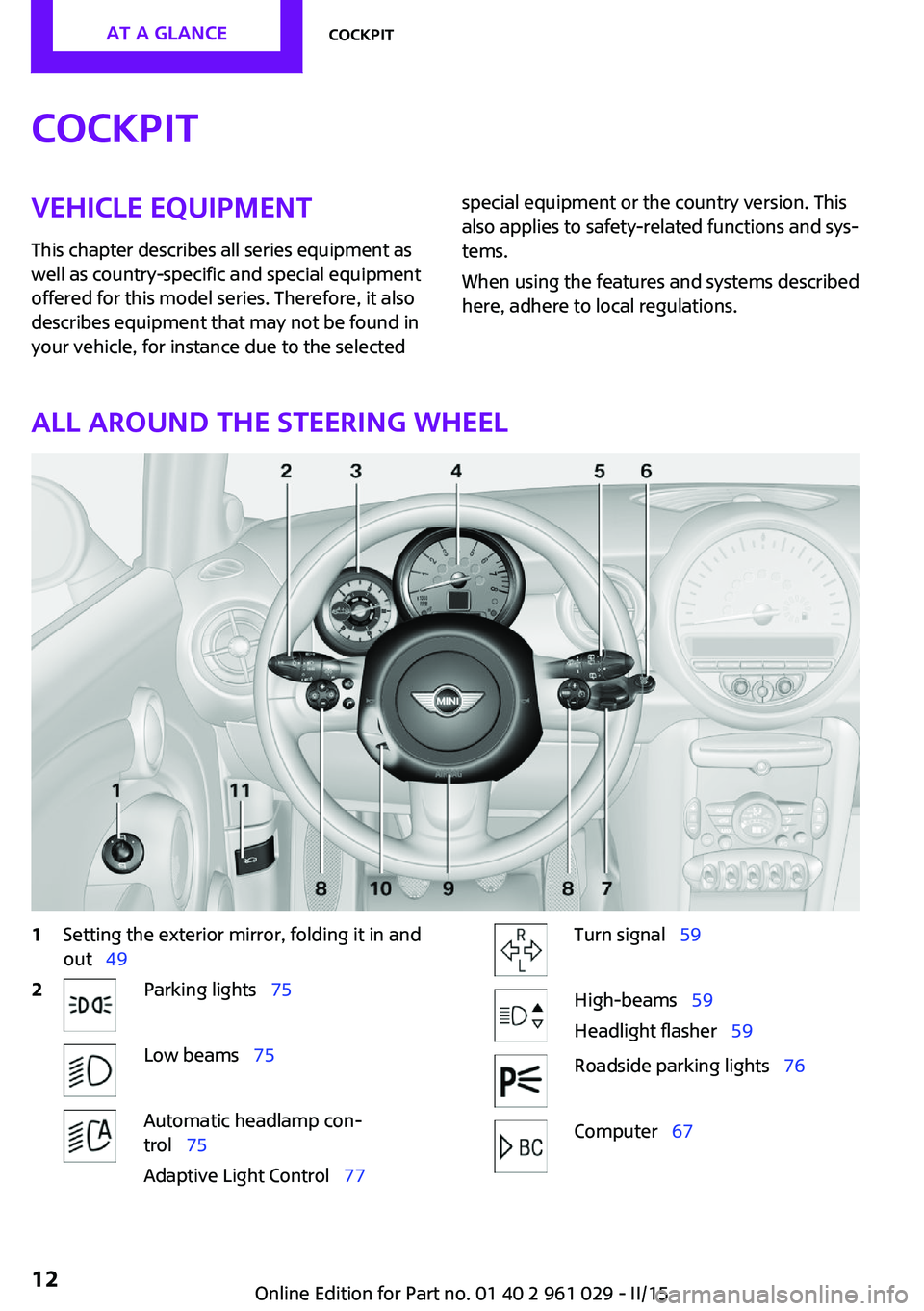
All around the steering wheel
1Setting the exterior mirror, folding it in and
out 492Parking lights 75Low beams 75Automatic headlamp con‐
trol 75
Adaptive Light Control 77Turn signal 59High-beams 59
Headlight flasher 59Roadside parking lights 76Computer 67Seite 12AT A GLANCECockpit12
Online Edition for Part no. 01 40 2 961 029 - II/15
Page 59 of 231
Ignition onAll electrical consumers can operate. Most indi‐
cator and warning lights light up for different
lengths of time.
To save battery power when the engine is off,
switch off the ignition and any unnecessary electronic systems/power consumers.
Radio ready state and ignition off All indicator and warning lights in the displays
go out.
The ignition switches off automatically when
the driver's door is opened. Pressing the Start/
Stop button again switches the ignition back
on.
For example, the ignition is not switched off in
the following situations:▷Depress the clutch or brake pedal.▷The low beams are switched on.
Starting the engine
General information Enclosed areas
Do not let the engine run in enclosed
areas; otherwise, breathing of exhaust fumes
may lead to loss of consciousness and death.
The exhaust gases contain carbon monoxide,
an odorless and colorless but highly toxic gas. ◀
Unattended vehicle
Do not leave the car unattended with the
engine running; otherwise, it presents a poten‐
tial source of danger.
Before leaving the car with the engine running,
shift to neutral or engage transmission posi‐
tion P and set the parking brake firmly; other‐ wise, the vehicle may begin to roll. ◀
Frequent starting in quick succession
Avoid repeated futile attempts at starting
the car and avoid starting the car frequently in
quick succession. Otherwise, the fuel is not
burned or is inadequately burned, and there is
the danger of overheating and damaging the
catalytic converter. ◀
Do not wait for the engine to warm-up while
the vehicle remains stationary; start driving
right away, but at moderate engine speeds.
Do not depress the accelerator when starting
the engine.
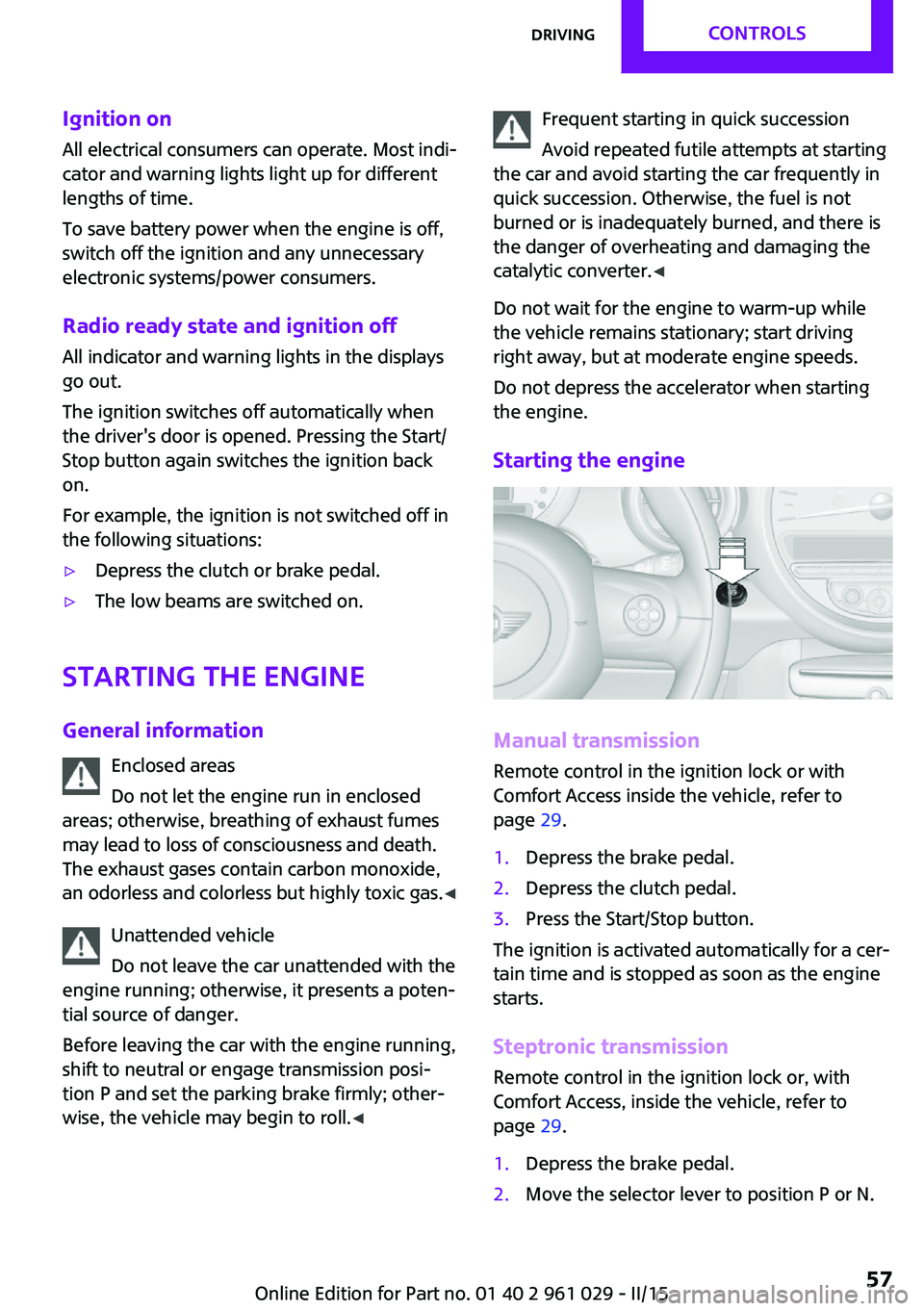
Starting the engine
Manual transmission
Remote control in the ignition lock or with
Comfort Access inside the vehicle, refer to
page 29.
1.Depress the brake pedal.2.Depress the clutch pedal.3.Press the Start/Stop button.
The ignition is activated automatically for a cer‐
tain time and is stopped as soon as the engine
starts.
Steptronic transmission
Remote control in the ignition lock or, with
Comfort Access, inside the vehicle, refer to
page 29.
1.Depress the brake pedal.2.Move the selector lever to position P or N.Seite 57DrivingCONTROLS57
Online Edition for Part no. 01 40 2 961 029 - II/15
Page 61 of 231
Excessive application of the parking brake can
block the rear wheels and lead to fishtailing of
the vehicle. ◀
The brake lights do not light up when the park‐
ing brake is pulled.
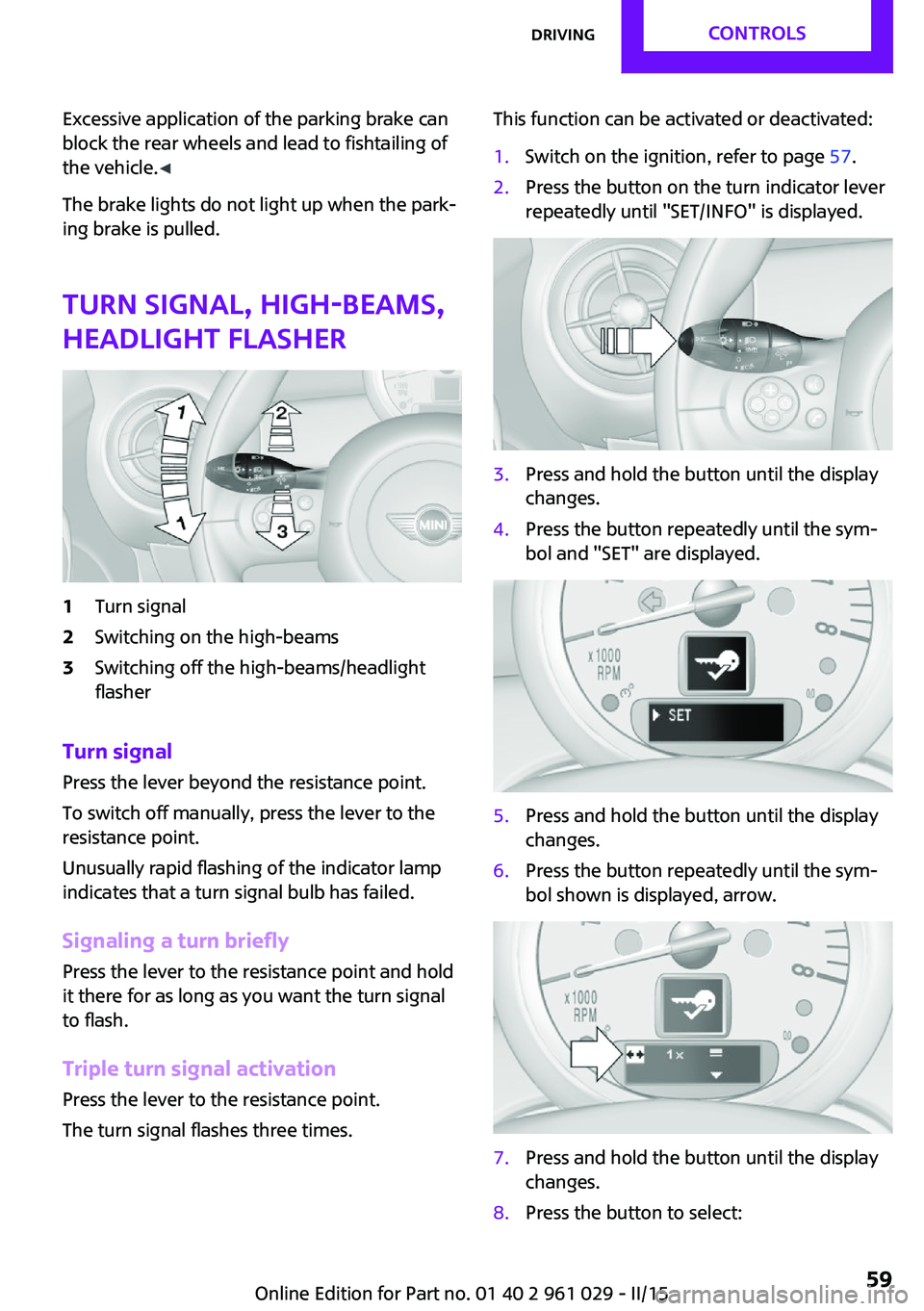
Turn signal, high-beams,
headlight flasher1Turn signal2Switching on the high-beams3Switching off the high-beams/headlight
flasher
Turn signal
Press the lever beyond the resistance point.
To switch off manually, press the lever to the
resistance point.
Unusually rapid flashing of the indicator lamp
indicates that a turn signal bulb has failed.
Signaling a turn briefly Press the lever to the resistance point and hold
it there for as long as you want the turn signal
to flash.
Triple turn signal activation Press the lever to the resistance point.
The turn signal flashes three times.
This function can be activated or deactivated:1.Switch on the ignition, refer to page 57.2.Press the button on the turn indicator lever
repeatedly until "SET/INFO" is displayed.3.Press and hold the button until the display
changes.4.Press the button repeatedly until the sym‐
bol and "SET" are displayed.5.Press and hold the button until the display
changes.6.Press the button repeatedly until the sym‐
bol shown is displayed, arrow.7.Press and hold the button until the display
changes.8.Press the button to select:Seite 59DrivingCONTROLS59
Online Edition for Part no. 01 40 2 961 029 - II/15
Page 78 of 231

For example, the sensors are unable to detect
fog or hazy weather. To avoid safety risks, you
should always switch on the lamps manually
under these conditions. ◀
The exterior lighting goes out automatically af‐
ter the vehicle is switched off.
High-beams/roadside parking lights1Turn signal/roadside parking light2Switching on the high-beams3Switching off the high-beams/headlight
flasher
To assist in parking, the vehicle can be illumi‐
nated on one side; note the country-specific
regulations.
The roadside parking lights drain the battery.
Therefore, do not leave them on for unduly
long periods of time; otherwise, the battery
might not have enough power to start the en‐
gine.
Switching on the roadside parking light
To switch on the roadside parking light on the
left or right, press the turn indicator lever up or
down after switching off the vehicle, arrow 1.
Switching off the roadside parking light
Press the lever up or down to the resistance
point.
Daytime running lights
The daytime running lights light up in switch
position 0, 1, or 3 when the ignition is switched
on.
The exterior lighting goes out automatically af‐
ter the vehicle is switched off.
In switch position 1, the parking lights light up
after the ignition is switched off.
Activating/deactivating
In some countries, driving with daytime run‐
ning lights is mandatory; for this reason, day‐
time running lights cannot be deactivated in
these cases.1.Switch on the ignition, refer to page 56.2.Press the button on the turn indicator lever
repeatedly until "SET/INFO" is displayed.3.Press and hold the button until the display
changes.4.Press the button repeatedly until the sym‐
bol and "SET" are displayed.5.Press and hold the button until the display
changes.Seite 76CONTROLSLamps76
Online Edition for Part no. 01 40 2 961 029 - II/15
Page 80 of 231
Depending on the steering angle and other pa‐
rameters, the light from the headlight follows
the course of the road.
Activating With the ignition switch on, turn the light switch
to position 3, refer to page 75.
To avoid blinding oncoming traffic, the Adap‐
tive Light Control does not swivel to the driver's
side when the vehicle is at a standstill.
When driving in reverse, Adaptive Light Control
is not active.
Malfunction The warning light lights up. Adaptive
Light Control is malfunctioning or has
failed. Have the system checked as
soon as possible.
More information, refer to page 199.
Fog lights
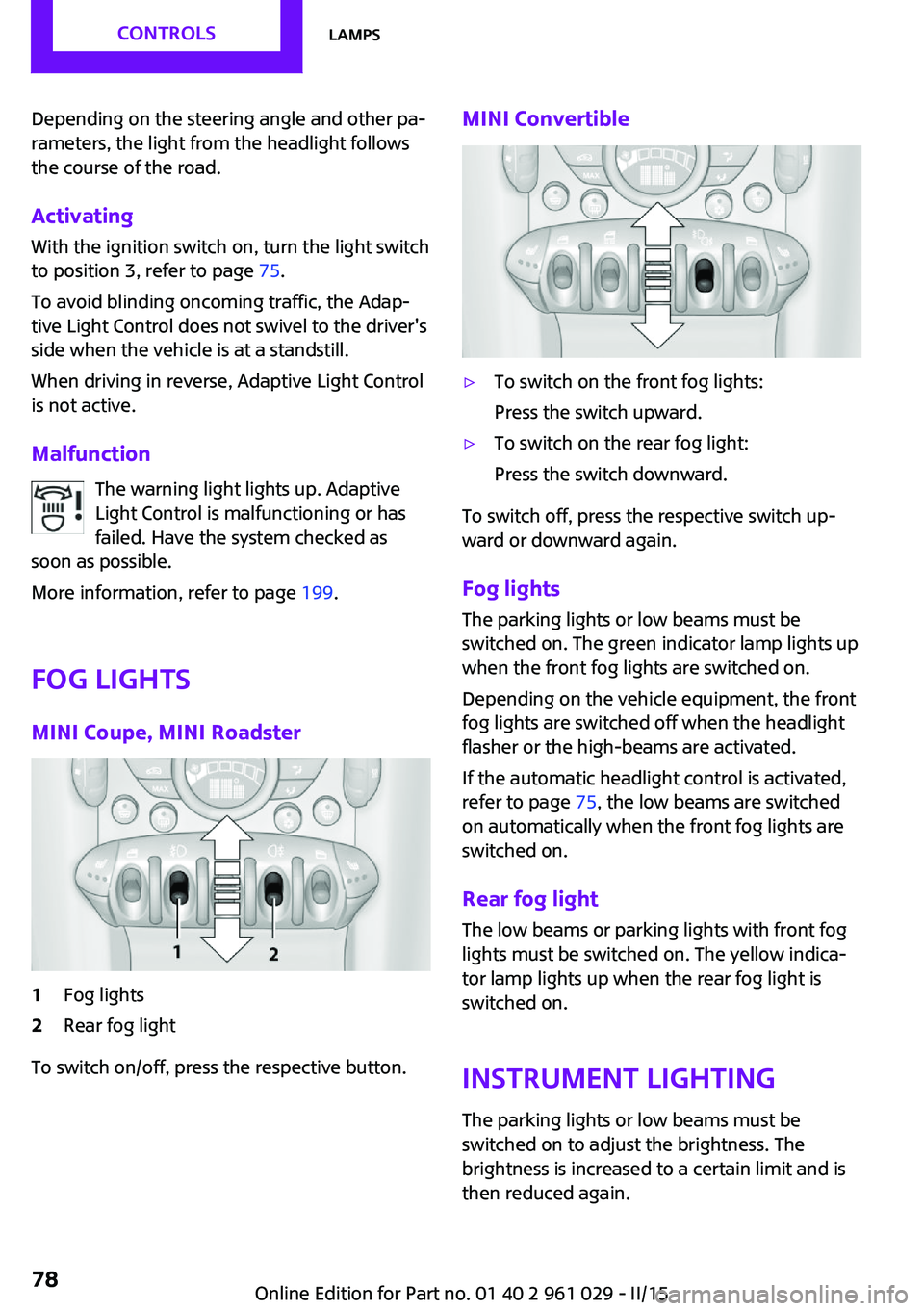
MINI Coupe, MINI Roadster1Fog lights2Rear fog light
To switch on/off, press the respective button.
MINI Convertible▷To switch on the front fog lights:
Press the switch upward.▷To switch on the rear fog light:
Press the switch downward.
To switch off, press the respective switch up‐
ward or downward again.
Fog lights The parking lights or low beams must be
switched on. The green indicator lamp lights up
when the front fog lights are switched on.
Depending on the vehicle equipment, the front
fog lights are switched off when the headlight
flasher or the high-beams are activated.
If the automatic headlight control is activated,
refer to page 75, the low beams are switched
on automatically when the front fog lights are
switched on.
Rear fog light The low beams or parking lights with front fog
lights must be switched on. The yellow indica‐
tor lamp lights up when the rear fog light is
switched on.
Instrument lightingThe parking lights or low beams must be
switched on to adjust the brightness. The
brightness is increased to a certain limit and is
then reduced again.
Seite 78CONTROLSLamps78
Online Edition for Part no. 01 40 2 961 029 - II/15
Page 181 of 231

Use a clean tissue, cloth or something similar,
or hold the bulb by its base. ◀
Caring for the headlights, refer to page 195.
For bulb replacement that is not described
here, please contact the service center or a
workshop that works according to the repair
procedures of the manufacturer with corre‐
spondingly trained personnel.
For checking and adjusting headlight aim,
please contact your MINI dealer.
Light-emitting diodes LEDs In some equipment, the light source is provided
by light-emitting diodes behind a cover.
These light-emitting diodes, which operate us‐
ing a concept similar to that applied in conven‐
tional lasers, are designated as Class 1 light-
emitting diodes.
Do not remove the covers
Do not remove the covers, and never
stare into the unfiltered light for several hours;
otherwise, irritation of the retina could result. ◀
Headlight glass Condensation can form on the inside of the
headlights in cool or humid weather. When the
light is switched on, the condensation evapo‐
rates after a short time. The headlights do not
need to be changed.
If the condensation in the headlights does not
evaporate after trips with the lights switched
on, and the amount of moisture in the head‐
lights increases, for example if water droplets
form, have them checked by your service cen‐
ter.
Bi-xenon headlights
These bulbs have a very long life and the likeli‐
hood of failure is very low, provided that they
are not switched on and off excessively. If a
bulb should nevertheless fail, you can continue
driving cautiously with the front fog lights, pro‐
vided this is permitted by local laws.Do not perform work/bulb replacement
on xenon headlamps
Have any work on the xenon lighting system,
including bulb replacement, performed only by
a service center.
Due to the high voltage present in the system,
there is the danger of fatal injuries if work is
carried out improperly. ◀
Front lights, bulb replacement
At a glance
Headlights1Low beams/high-beams2Turn signal
Lower front lights
1Parking lights2Daytime running lights or fog lightsSeite 179Replacing componentsMOBILITY179
Online Edition for Part no. 01 40 2 961 029 - II/15
Page 182 of 231

Lower LED front lights1Parking lights / daytime running lights2Fog lights
Halogen low beams and high-beams
H13 bulb, 60/55 watt
Wear protective goggles and glovesHalogen bulbs are pressurized. Therefore,
wear protective goggles and gloves. Otherwise,
there is a danger of injuries if the bulb is acci‐
dentally damaged during replacement. ◀
Attach the cover carefully
When attaching the cover, proceed care‐
fully; otherwise, leaks may occur, causing dam‐
age to the headlamp system. ◀
Access to the bulbs through the engine
compartment
Follow the general instructions on lamps and
bulbs, refer to page 178.
Low beam/high-beam bulbs can be changed
from the engine compartment.
To remove the cover:
1.Press the tab.2.Fold away the cover and take it out of the
holder.
Proceed in reverse order to attach the cover.
Attach the cover carefully
When attaching the cover, proceed care‐
fully; otherwise, leaks may occur, causing dam‐
age to the headlamp system. ◀
Replacing the bulb
1.Turn the bulb counterclockwise, arrow 1,
and remove it, arrow 2.2.Press the release, arrow 1, and pull off the
connector, arrow 2.Seite 180MOBILITYReplacing components180
Online Edition for Part no. 01 40 2 961 029 - II/15
Page 201 of 231

Indicator/warning lampsVehicle equipment
This chapter describes all series equipment as
well as country-specific and special equipment
offered for this model series. Therefore, it also
describes equipment that may not be found in
your vehicle, for instance due to the selectedspecial equipment or the country version. This
also applies to safety-related functions and sys‐
tems.
When using the features and systems described
here, adhere to local regulations.
Overview
The indicator and warning lights can light up in
a variety of combinations and colors in display
area 1 or 2. The table contains information on
causes and how to respond. Note whether a
lamp lights up alone or in combination with an‐
other. Some lights can light up in different col‐
ors. Corresponding distinctions are made in the
text. 12CauseHow to respondTurn signalThe high-beams/headlight flasher are
switched on.The front fog lamps are switched on.The rear fog lights are switched on.Fasten safety belts.Fasten safety belt, refer to page 48.External temperature warningDrive conservatively, refer to
page 66.Seite 199Indicator/warning lampsMOBILITY199
Online Edition for Part no. 01 40 2 961 029 - II/15
Page 211 of 231

12CauseHow to respondThe brake signal is malfunctioning: a gear
can be engaged without depressing the
brake.To engage a gear while the vehicle is
at a standstill, always depress the
brake. Before leaving the vehicle,
move the selector lever to position P
and switch off the engine.Lights up in red:The transmission is overheating.Bring the car to a stop and move the
selector lever to position P. Allow the
transmission to cool down. You can
continue your journey, but moderate
your speed and exercise due cau‐
tion. Have the system checked if the
situation reoccurs.Lights up in yellow:The transmission is too hot.Avoid high engine loads. You can
continue your journey, but moderate
your speed and exercise due cau‐
tion.Selector lever position P not engaged. The
vehicle is not secured against rolling.Selector lever position P not engaged. The
ignition cannot be switched off.Engage selector lever position P
when you wish to switch off the igni‐
tion, refer to page 56.The cruise control system has failed.Have the system checked.The Park Distance Control has failed.Have the system checked.A bulb of the exterior lighting system has
failed.Have the exterior lighting checked as
soon as possible.A low-beam headlight or front fog light
has failed.Have the lights checked as soon as
possible.A high-beam headlight has failed.Have the high-beam headlights
checked.Seite 209Indicator/warning lampsMOBILITY209
Online Edition for Part no. 01 40 2 961 029 - II/15
Page 221 of 231
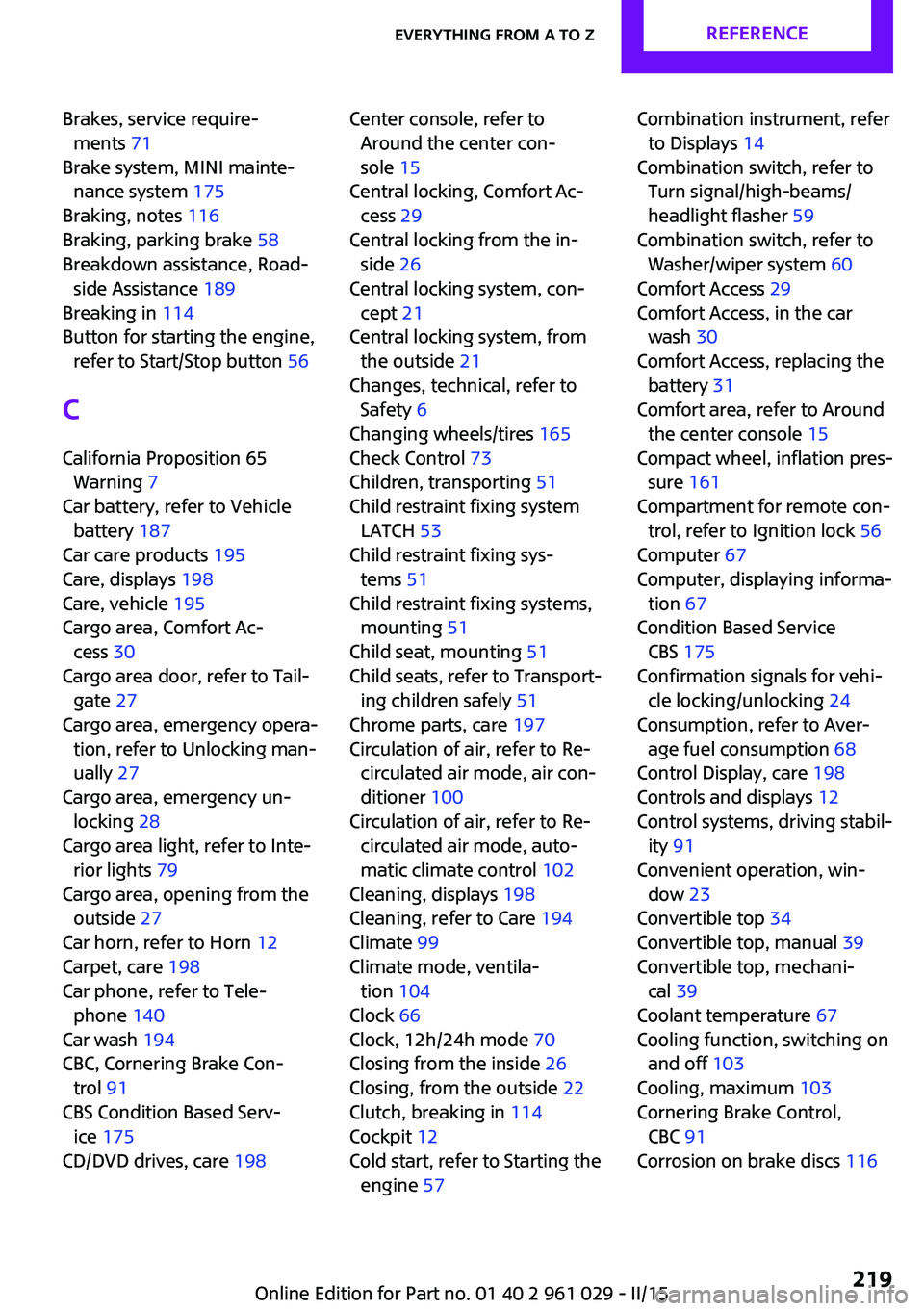
Brakes, service require‐ments 71
Brake system, MINI mainte‐ nance system 175
Braking, notes 116
Braking, parking brake 58
Breakdown assistance, Road‐ side Assistance 189
Breaking in 114
Button for starting the engine, refer to Start/Stop button 56
C
California Proposition 65 Warning 7
Car battery, refer to Vehicle battery 187
Car care products 195
Care, displays 198
Care, vehicle 195
Cargo area, Comfort Ac‐ cess 30
Cargo area door, refer to Tail‐ gate 27
Cargo area, emergency opera‐ tion, refer to Unlocking man‐
ually 27
Cargo area, emergency un‐ locking 28
Cargo area light, refer to Inte‐ rior lights 79
Cargo area, opening from the outside 27
Car horn, refer to Horn 12
Carpet, care 198
Car phone, refer to Tele‐ phone 140
Car wash 194
CBC, Cornering Brake Con‐ trol 91
CBS Condition Based Serv‐ ice 175
CD/DVD drives, care 198 Center console, refer to
Around the center con‐
sole 15
Central locking, Comfort Ac‐ cess 29
Central locking from the in‐ side 26
Central locking system, con‐ cept 21
Central locking system, from the outside 21
Changes, technical, refer to Safety 6
Changing wheels/tires 165
Check Control 73
Children, transporting 51
Child restraint fixing system LATCH 53
Child restraint fixing sys‐ tems 51
Child restraint fixing systems, mounting 51
Child seat, mounting 51
Child seats, refer to Transport‐ ing children safely 51
Chrome parts, care 197
Circulation of air, refer to Re‐ circulated air mode, air con‐
ditioner 100
Circulation of air, refer to Re‐ circulated air mode, auto‐
matic climate control 102
Cleaning, displays 198
Cleaning, refer to Care 194
Climate 99
Climate mode, ventila‐ tion 104
Clock 66
Clock, 12h/24h mode 70
Closing from the inside 26
Closing, from the outside 22
Clutch, breaking in 114
Cockpit 12
Cold start, refer to Starting the engine 57 Combination instrument, refer
to Displays 14
Combination switch, refer to Turn signal/high-beams/
headlight flasher 59
Combination switch, refer to Washer/wiper system 60
Comfort Access 29
Comfort Access, in the car wash 30
Comfort Access, replacing the battery 31
Comfort area, refer to Around the center console 15
Compact wheel, inflation pres‐ sure 161
Compartment for remote con‐ trol, refer to Ignition lock 56
Computer 67
Computer, displaying informa‐ tion 67
Condition Based Service CBS 175
Confirmation signals for vehi‐ cle locking/unlocking 24
Consumption, refer to Aver‐ age fuel consumption 68
Control Display, care 198
Controls and displays 12
Control systems, driving stabil‐ ity 91
Convenient operation, win‐ dow 23
Convertible top 34
Convertible top, manual 39
Convertible top, mechani‐ cal 39
Coolant temperature 67
Cooling function, switching on and off 103
Cooling, maximum 103
Cornering Brake Control, CBC 91
Corrosion on brake discs 116 Seite 219Everything from A to ZREFERENCE219
Online Edition for Part no. 01 40 2 961 029 - II/15