ECO mode MINI COOPER CONVERTIBLE 2016 User Guide
[x] Cancel search | Manufacturer: MINI, Model Year: 2016, Model line: COOPER CONVERTIBLE, Model: MINI COOPER CONVERTIBLE 2016Pages: 252, PDF Size: 5.41 MB
Page 174 of 252
Driving smoothly and proactively reduces fuel
consumption.
Avoid high engine speeds
As a rule: driving at low engine speeds lowers
fuel consumption and reduces wear.
Use 1st gear to get the vehicle moving. Starting
with the 2nd gear, accelerate rapidly. When ac‐
celerating, shift up before reaching high engine
speeds.
When you reach the desired speed, shift into
the highest applicable gear and drive with the
engine speed as low as possible and at a con‐
stant speed.
The gear shift indicator, refer to page 87, of
your vehicle indicates the most fuel efficient gear.
Use coasting conditions When approaching a red light, take your foot
off the accelerator and let the vehicle coast to a
halt.
For going downhill take your foot off the accel‐
erator and let the vehicle roll.
The flow of fuel is interrupted while coasting.
Switch off the engine
during longer stops
Switch off the engine during longer stops, for
example, at traffic lights, railroad crossings or in
traffic congestion.
Auto Start/Stop function
The Auto Start/Stop function of the vehicle au‐
tomatically switches off the engine during a
stop.
If the engine is switched off and then restarted
rather than leaving the engine running con‐stantly, fuel consumption and emissions are re‐
duced. Savings can begin within a few seconds
of switching off the engine.
In addition, fuel consumption is also deter‐
mined by other factors, such as driving style,
road conditions, maintenance or environmental
factors.
Switch off any functions
that are not currently
needed
Functions such as seat heating and the rear
window defroster require a lot of energy and
consume additional fuel, especially in city and
stop-and-go traffic.
Therefore, switch off these functions if they are
not actually needed.
Have maintenance car‐
ried out
Have vehicles maintained regularly to achieve
optimal vehicle efficiency and service life. MINI
recommends that maintenance work be per‐
formed by a MINI service center.
Also note the MINI maintenance systems, refer
to page 206.
GREEN Mode
The concept The GREEN Mode supports a driving style that
saves on fuel consumption. For this purpose,
the engine control and comfort features, e. g.
the climate control output, are adjusted.
For Steptronic transmission:
The Coasting driving condition is enabled under
certain conditions.Seite 174DRIVING TIPSSaving fuel174
Online Edition for Part no. 01 40 2 969 276 - II/16
Page 175 of 252
Under certain conditions the engine is auto‐
matically decoupled from the transmission in
selector lever position D. The vehicle continues
traveling with the engine idling to reduce fuel
consumption. Selector lever position D remains
engaged. An indicator provides information
about the distance traveled in Coasting mode.
In addition, context-sensitive instructions are
displayed to assist with an optimized fuel con‐
sumption driving style.
The achieved extended range is displayed in
the instrument cluster.
Overview The system includes the following MINIMAL
functions and displays:▷GREEN bonus range, refer to page 176.▷GREEN tips driving instruction, refer to
page 176.▷GREEN climate control, refer to page 175.▷MINIMALISM analyzer, refer to page 178.▷Coasting driving condition, refer to
page 177.
Activating GREEN Mode
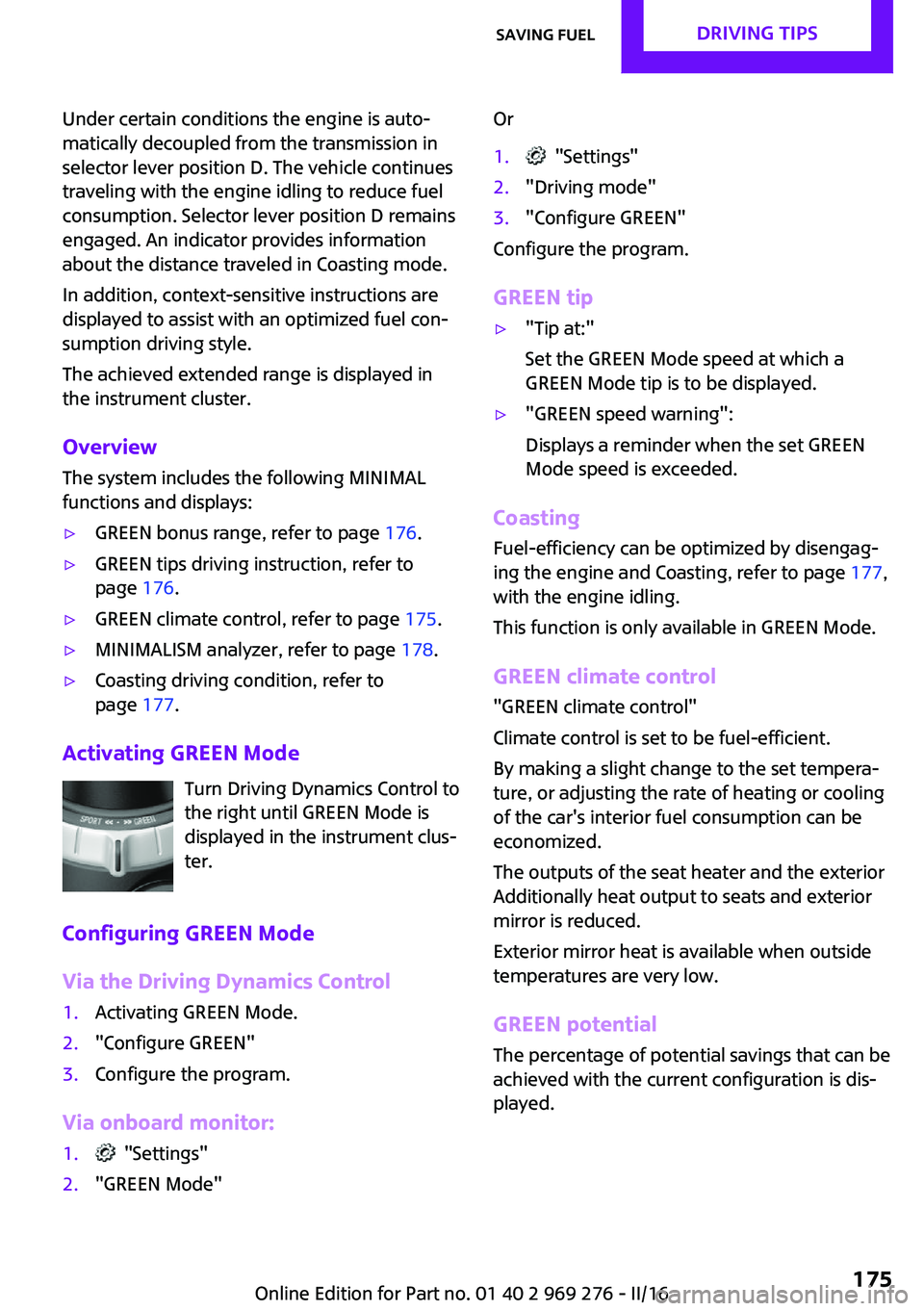
Turn Driving Dynamics Control to
the right until GREEN Mode is
displayed in the instrument clus‐
ter.
Configuring GREEN Mode
Via the Driving Dynamics Control
1.Activating GREEN Mode.2."Configure GREEN"3.Configure the program.
Via onboard monitor:
1. "Settings"2."GREEN Mode"Or1. "Settings"2."Driving mode"3."Configure GREEN"
Configure the program.
GREEN tip
▷"Tip at:"
Set the GREEN Mode speed at which a
GREEN Mode tip is to be displayed.▷"GREEN speed warning":
Displays a reminder when the set GREEN
Mode speed is exceeded.
Coasting
Fuel-efficiency can be optimized by disengag‐
ing the engine and Coasting, refer to page 177,
with the engine idling.
This function is only available in GREEN Mode.
GREEN climate control
"GREEN climate control"
Climate control is set to be fuel-efficient.
By making a slight change to the set tempera‐
ture, or adjusting the rate of heating or cooling
of the car's interior fuel consumption can be
economized.
The outputs of the seat heater and the exterior
Additionally heat output to seats and exterior
mirror is reduced.
Exterior mirror heat is available when outside
temperatures are very low.
GREEN potential
The percentage of potential savings that can be
achieved with the current configuration is dis‐
played.
Seite 175Saving fuelDRIVING TIPS175
Online Edition for Part no. 01 40 2 969 276 - II/16
Page 176 of 252
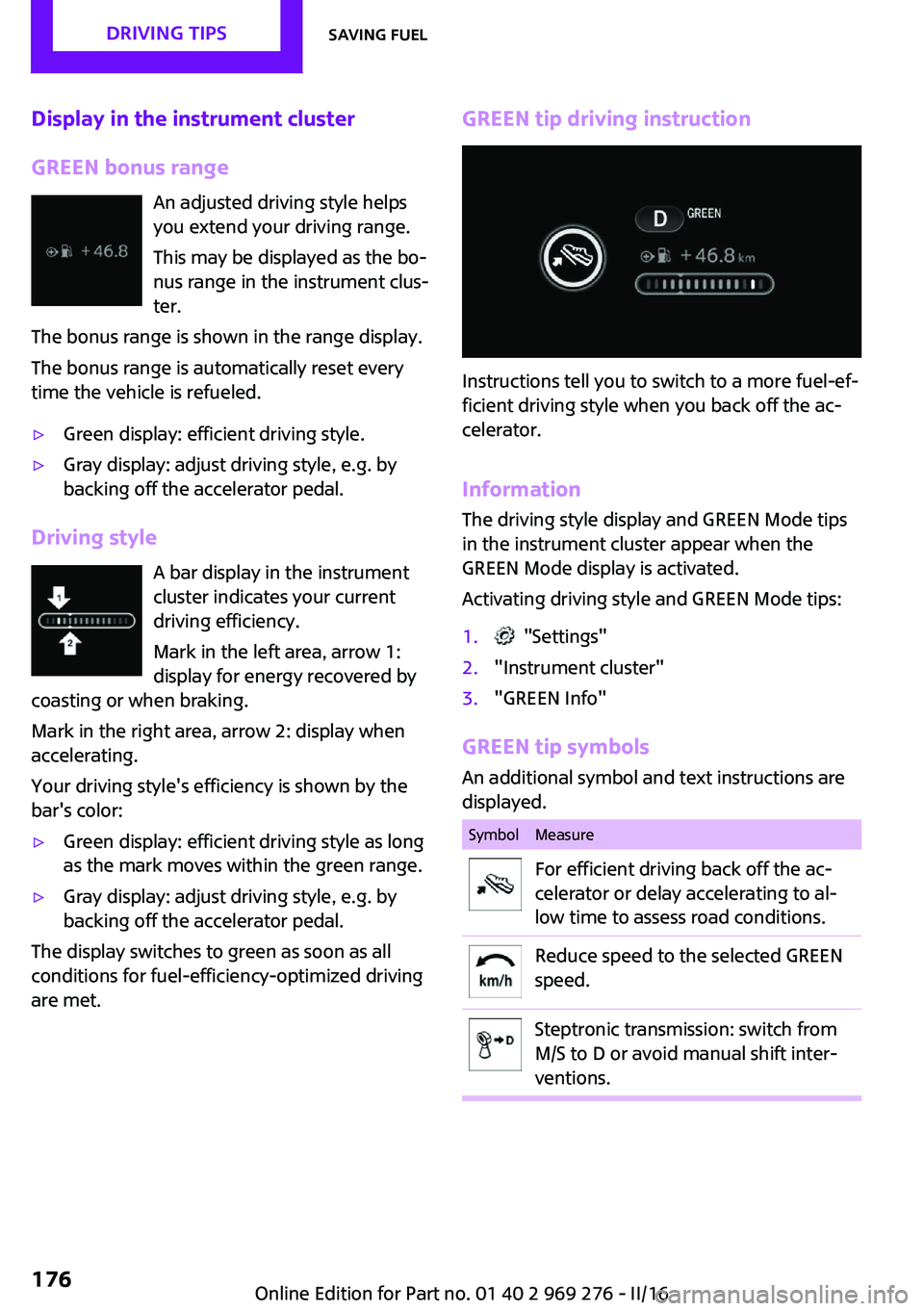
Display in the instrument cluster
GREEN bonus range An adjusted driving style helps
you extend your driving range.
This may be displayed as the bo‐
nus range in the instrument clus‐
ter.
The bonus range is shown in the range display.
The bonus range is automatically reset every
time the vehicle is refueled.▷Green display: efficient driving style.▷Gray display: adjust driving style, e.g. by
backing off the accelerator pedal.
Driving style
A bar display in the instrument
cluster indicates your current
driving efficiency.
Mark in the left area, arrow 1:
display for energy recovered by
coasting or when braking.
Mark in the right area, arrow 2: display when
accelerating.
Your driving style's efficiency is shown by the
bar's color:
▷Green display: efficient driving style as long
as the mark moves within the green range.▷Gray display: adjust driving style, e.g. by
backing off the accelerator pedal.
The display switches to green as soon as all
conditions for fuel-efficiency-optimized driving
are met.
GREEN tip driving instruction
Instructions tell you to switch to a more fuel-ef‐
ficient driving style when you back off the ac‐
celerator.
Information The driving style display and GREEN Mode tips
in the instrument cluster appear when the
GREEN Mode display is activated.
Activating driving style and GREEN Mode tips:
1. "Settings"2."Instrument cluster"3."GREEN Info"
GREEN tip symbols An additional symbol and text instructions aredisplayed.
SymbolMeasureFor efficient driving back off the ac‐
celerator or delay accelerating to al‐
low time to assess road conditions.Reduce speed to the selected GREEN
speed.Steptronic transmission: switch from
M/S to D or avoid manual shift inter‐
ventions.Seite 176DRIVING TIPSSaving fuel176
Online Edition for Part no. 01 40 2 969 276 - II/16
Page 177 of 252
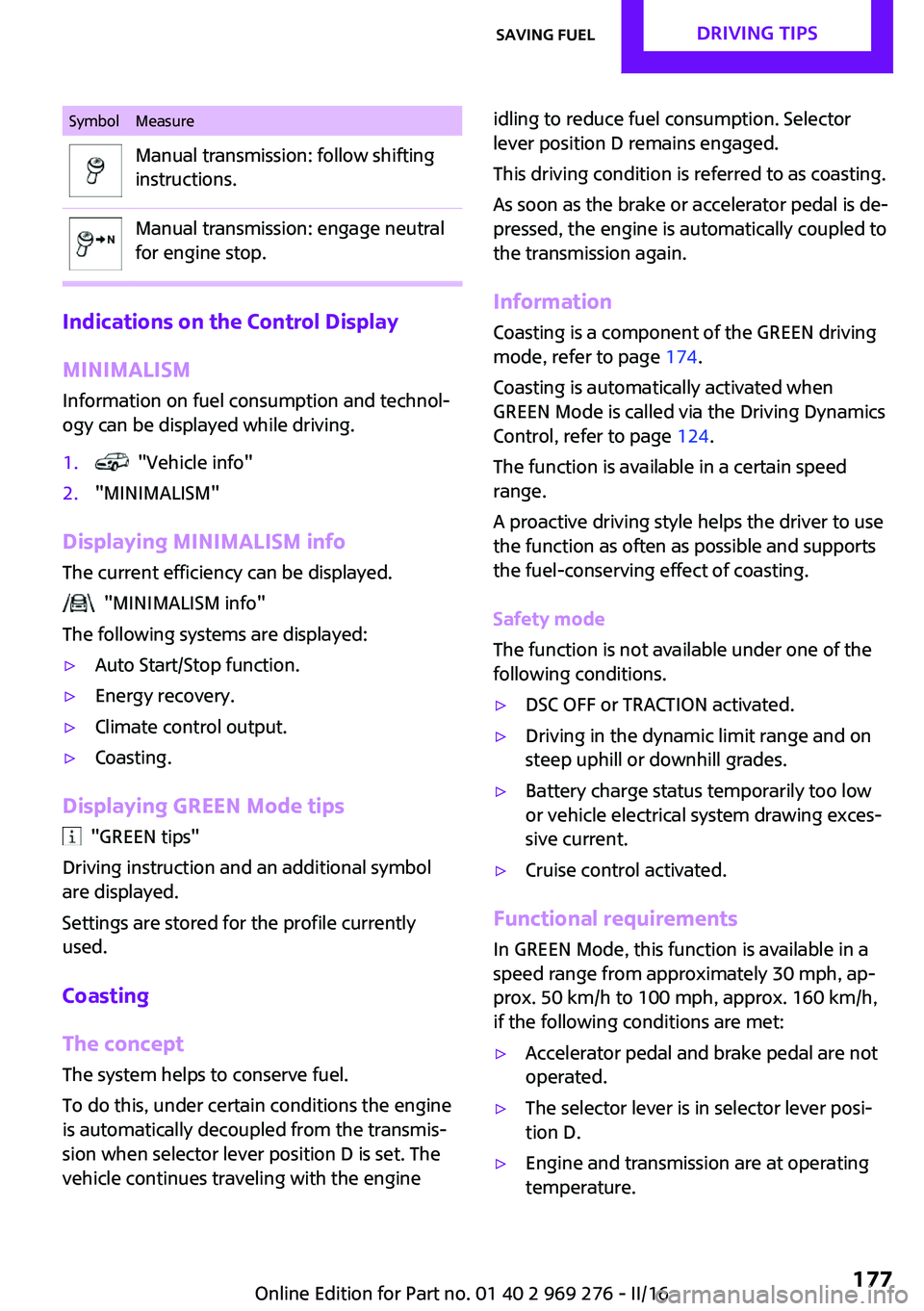
SymbolMeasureManual transmission: follow shifting
instructions.Manual transmission: engage neutral
for engine stop.
Indications on the Control Display
MINIMALISM
Information on fuel consumption and technol‐
ogy can be displayed while driving.
1. "Vehicle info"2."MINIMALISM"
Displaying MINIMALISM info
The current efficiency can be displayed.
"MINIMALISM info"
The following systems are displayed:
▷Auto Start/Stop function.▷Energy recovery.▷Climate control output.▷Coasting.
Displaying GREEN Mode tips
"GREEN tips"
Driving instruction and an additional symbol
are displayed.
Settings are stored for the profile currently
used.
Coasting
The concept The system helps to conserve fuel.
To do this, under certain conditions the engine
is automatically decoupled from the transmis‐ sion when selector lever position D is set. The
vehicle continues traveling with the engine
idling to reduce fuel consumption. Selector
lever position D remains engaged.
This driving condition is referred to as coasting.
As soon as the brake or accelerator pedal is de‐
pressed, the engine is automatically coupled to
the transmission again.
Information
Coasting is a component of the GREEN driving
mode, refer to page 174.
Coasting is automatically activated when
GREEN Mode is called via the Driving Dynamics
Control, refer to page 124.
The function is available in a certain speed
range.
A proactive driving style helps the driver to use
the function as often as possible and supports
the fuel-conserving effect of coasting.
Safety mode
The function is not available under one of the
following conditions.▷DSC OFF or TRACTION activated.▷Driving in the dynamic limit range and on
steep uphill or downhill grades.▷Battery charge status temporarily too low
or vehicle electrical system drawing exces‐
sive current.▷Cruise control activated.
Functional requirements
In GREEN Mode, this function is available in a
speed range from approximately 30 mph, ap‐
prox. 50 km/h to 100 mph, approx. 160 km/h,
if the following conditions are met:
▷Accelerator pedal and brake pedal are not
operated.▷The selector lever is in selector lever posi‐
tion D.▷Engine and transmission are at operating
temperature.Seite 177Saving fuelDRIVING TIPS177
Online Edition for Part no. 01 40 2 969 276 - II/16
Page 190 of 252

On 3-door models: JOHN COOPER
WORKSTire sizePressure specifications in
bar/PSISpecifications in
bar/PSI with cold
tires185/50 R 17 86 H
M+S XL RSC
205/45 R 17 88 W
XL RSC
205/45 R 17 88 V M
+S XL A/S RSC
205/45 R 17 88 V M
+S XL RSC3.2 / 463.0 / 44205/40 R 18 86 W
XL RSC3.4 / 493.2 / 46
Tire identification marks
Tire size 205/45 R 17 84 V
205: nominal width in mm
45: aspect ratio in %
R: radial tire code
17: rim diameter in inches
84: load rating, not for ZR tires
F: speed rating, before the R on ZR tires
Speed letterT = up to 118 mph, 190 km/h
H = up to 131 mph, 210 km/h
V = up to 150 mph, 240 km/h
W = up to 167 mph, 270 km/h
Y = up to 186 mph, 300 km/h
Tire Identification Number DOT code: DOT xxxx xxx 0116
xxxx: manufacturer code for the tire brand
xxx: tire size and tire design
0116: tire age
Tires with DOT codes meet the guidelines of
the U.S. Department of Transportation.
Tire age DOT … 0116: the tire was manufactured in the
1st week of 2016.
Recommendation
Regardless of wear and tear, replace tires at
least every 6 years.
Uniform Tire Quality Grading Quality grades can be found where applicable
on the tire sidewall between tread shoulder
and maximum section width.
For example: Treadwear 200; Traction AA;
Temperature A
DOT Quality Grades Treadwear
Traction AA A B C
Temperature A B C
All passenger car tires must conform to Federal
Safety Requirements in addition to these
grades.
Treadwear
The treadwear grade is a comparative rating
based on the wear rate of the tire when tested
under controlled conditions on a specified gov‐
ernment test course. For example, a tire graded
150 would wear one and one-half, 1 g, times as
well on the government course as a tire graded
100. The relative performance of tires depends
upon the actual conditions of their use, how‐
ever, and may depart significantly from the
norm due to variations in driving habits, serviceSeite 190MOBILITYWheels and tires190
Online Edition for Part no. 01 40 2 969 276 - II/16
Page 206 of 252
MaintenanceVehicle features and op‐
tions
This chapter describes all standard, country-
specific and optional features offered with the
series. It also describes features that are not
necessarily available in your car, e. g., due to
the selected options or country versions. This
also applies to safety-related functions and sys‐
tems. The respectively applicable country provi‐
sions must be observed when using the respec‐
tive features and systems.
MINI maintenance system
The maintenance system indicates required
maintenance measures, and thereby provides
support in maintaining road safety and the op‐
erational reliability of the vehicle.
In some cases scopes and intervals may vary
according to the country-specific version. Re‐
placement work, spare parts, fuels and lubri‐
cants and wear materials are calculated sepa‐
rately. Further information is available from a
dealer’s service center or another qualified
service center or repair shop.
Condition Based Service
CBS
Sensors and special algorithms take into ac‐
count the driving conditions of the vehicle.
Based on this, Condition Based Service recog‐
nizes the maintenance requirements.
The system makes it possible to adapt the
amount of maintenance corresponding to your
user profile.Information on service requirements, refer to
page 86, can be displayed on the Control Dis‐
play.
Service data in the remote control Information on the required maintenance is
continuously stored in the remote control. The
dealer’s service center can read this data out
and suggest an optimized maintenance scope
for the vehicle.
Therefore, hand the service advisor the remote
control with which the vehicle was driven most
recently.
Storage periods
Storage periods during which the vehicle bat‐
tery was disconnected are not taken into ac‐
count.
If this occurs, have a dealer's service center or
another qualified service center or repair shop
update the time-dependent maintenance pro‐
cedures, such as checking brake fluid and, if
necessary, changing the engine oil and the mi‐
crofilter/activated-charcoal filter.
Service and Warranty In‐
formation Booklet for
US models and Warranty
and Service Guide Book‐
let for Canadian models
Please consult your Service and Warranty Infor‐
mation Booklet for US models and Warranty
and Service Guide Booklet for Canadian models
for additional information on service require‐
ments.
The manufacturer of your vehicle recommends
that maintenance and repair be performed by a
dealer’s service center or another qualifiedSeite 206MOBILITYMaintenance206
Online Edition for Part no. 01 40 2 969 276 - II/16
Page 243 of 252
Bulbs and lights 209
Button, Start/Stop 66
Bypassing, see Jump-start‐ ing 220
C California Proposition 65 Warning 8
Camera-based cruise con‐ trol 126
Camera lenses, care 230
Camera, rearview cam‐ era 137
Can holder, see Cup holder 161
Car battery 217
Care, displays 230
Care, vehicle 227
Cargo area, enlarging 158
Cargo area partition 158
Cargo area, storage compart‐ ments 162
Cargo straps, securing cargo 171
Car key, see Remote con‐ trol 34
Carpet, care 229
Car wash 226
Catalytic converter, see Hot exhaust system 167
CBS Condition Based Serv‐ ice 206
Center armrest 161
Center console 16
Central instrument cluster, LED ring 94
Central locking system 40
Central screen, refer to Control Display 18
Changes, technical, refer to Own Safety 7
Changing parts 208
Changing wheels 215
Changing wheels/tires 192 Chassis number, see vehicle
identification number 10
Check Control 81
Checking the oil level elec‐ tronically 200
Children, seating position 63
Children, transporting safely 63
Child restraint fixing sys‐ tem 63
Child restraint fixing system LATCH 65
Child restraint fixing systems, mounting 64
Child seat, mounting 64
Child seats 63
Chrome parts, care 229
Chrono package, cockpit 97
Cigarette lighter 155
Cleaning, displays 230
Climate control 144, 146
Clock 85
Closing/opening via door lock 40
Closing/opening with remote control 38
Coasting 177
Coasting with engine decou‐ pled, coasting 177
Coasting with idling en‐ gine 177
Combination switch, see Turn signals 71
Combi switch, see wiper sys‐ tem 72
Comfort Access 41
Comfort entry 38
Compartments in the doors 161
Compass 153
Compressor 194
Condensation on win‐ dows 149
Condensation under the vehi‐ cle 168 Condition Based Service
CBS 206
Configuring driving pro‐ gram 125
Confirmation signal 44
Control Display 18
Control Display, settings 92
Controller 19
Control systems, driving stabil‐ ity 122
Convenient closing with the remote control 39
Convenient opening 38
Convertible, convertible top 47
Convertible mode, automatic climate control 148
Convertible program, auto‐ matic climate control 148
Convertible, roof 47
Convertible top 47
Convertible top, care 227
Convertible top, cargo area partition 50
Convertible top, emergency operation 50
Convertible top, rollover pro‐ tection system 108
Coolant 204
Cooling function 145, 147
Cooling, maximum 147
Cooling system 204
Cornering light 102
Corrosion on brake discs 168
Cosmetic mirror 155
Courtesy lamps during unlock‐ ing 38
Courtesy lamps with the vehi‐ cle locked 39
Cruise control 131
Cruise control, active 126
Cruise control with distance control, see camera-based
cruise control 126 Seite 243Everything from A to ZREFERENCE243
Online Edition for Part no. 01 40 2 969 276 - II/16
Page 245 of 252
Exterior mirror, automaticdimming feature 61
Exterior mirrors 60
External start 220
External temperature dis‐ play 85
External temperature warn‐ ing 85
Eyes for securing cargo 171
F
Failure message, see Check Control 81
False alarm, see Unintentional alarm 45
Fan, see Air flow 145, 148
Favorites buttons, onboard monitor 24
Filler neck for engine oil 201
Fine wood, care 229
First-aid kit 220
Flat tire, changing wheels 215
Flat Tire Monitor FTM 113
Flat tire, repairing 194
Flat tire, Tire Pressure Monitor TPM 109
Flat tire, warning lamp 110, 113
Flooding 167
Floor carpet, care 229
Floor mats, care 229
Fogged up windows 146
Fold-away position, wind‐ shield wipers 74
Folding back rear seat backr‐ ests 158
Foot brake 167
Front airbags 105
Front-end collision warning with City Braking func‐
tion 116
Front fog lights 103
Front-seat passenger airbags, automatic deactivation 107 Front-seat passenger airbags,
indicator lamp 107
FTM Flat Tire Monitor 113
Fuel 184
Fuel consumption, see Aver‐ age fuel consumption 90
Fuel filler flap 182
Fuel gauge 85
Fuel lid 182
Fuel quality 184
Fuel recommendation 184
Fuel, tank capacity 236
Fuse 219
G Garage door opener, see Uni‐ versal Integrated Remote
Control 151
Gasoline 184
Gear change, Steptronic trans‐ mission 76
Gear shift indicator 87
General driving notes 167
Glare shield 155
Glove compartment 160
GREEN Mode 174
GREEN Mode, bonus range 176
GREEN Mode driving style analysis 178
GREEN Mode indicator 174
GREEN - program, driving dy‐ namics 124
GREEN tip 176
Gross vehicle weight, ap‐ proved 235
Ground clearance 168
H Halogen headlights 209
Handbrake, see parking brake 71
Hand-held transmitter, alter‐ nating code 152 Hazard warning flashers 220
Headlamp control, auto‐ matic 101
Headlight courtesy delay fea‐ ture 101
Headlight flasher 72
Headlight glass 209
Headlights, care 227
Head restraints 54
Head restraints, front 58
Head restraints, rear 59
Head-up Display 94
Head-Up Display, Shift point indicator 96
Head-up Display, sport dis‐ plays 96
Head-up Display, standard view 95
Heavy cargo, stowing 171
High-beam Assistant 102
High beams 72
High beams/low beams, see High-beam Assistant 102
Hills 168
Hill start assistant, see Drive- off assistant 125
Holder for beverages 161
Homepage 6
Hood 198
Horn 14
Hot exhaust system 167
HUD Head-up Display 94
Hydroplaning 167
I
Ice warning, see External tem‐ perature warning 85
Icy roads, see External tem‐ perature warning 85
Identification marks, tires 190
Identification number, see ve‐ hicle identification num‐
ber 10
Ignition key, see Remote con‐ trol 34 Seite 245Everything from A to ZREFERENCE245
Online Edition for Part no. 01 40 2 969 276 - II/16
Page 246 of 252
Ignition off 66
Ignition on 66
Illuminated ring, central in‐ strument cluster 94
Indication of a flat tire 110 , 113
Indicator lamp, see Check Control 81
Individual air distribu‐ tion 145, 148
Individual settings, see Per‐ sonal Profile 36
Inflation pressure, tires 186
Inflation pressure warning, tires 113
Info display, refer to On-Board computer 89
Information 6
Initialize, Tire Pressure Moni‐ tor TPM 110
Initializing, Flat Tire Monitor FTM 113
Instrument cluster 80
Instrument cluster, electronic displays 81
Instrument lighting 103
Integrated key 34
Integrated Owner's Manual in the vehicle 29
Intelligent Safety 115
Intensity, AUTO program 148
Interior equipment 151
Interior lights 104
Interior lights during unlock‐ ing 38
Interior lights with the vehicle locked 39
Interior mirror 17
Interior mirror, automatic dimming feature 61
Interior mirror, manually dim‐ mable 61
Interior motion sensor 45
Interior rearview mirror, com‐ pass 153
Internet site 6 Interval display, service re‐
quirements 86
Interval mode 73
J Jacking points for the vehicle jack 215
Joystick, Steptronic transmis‐ sion 76
Jump-starting 220
K
Key/remote control 34
Keyless Go, see Comfort Ac‐ cess 41
Key Memory, see Personal Profile 36
Kickdown, Steptronic trans‐ mission 76
Knee airbag 105
L
Label on recommended tires 192
Lamp replacement 209
Lamp replacement, front 209
Lamp replacement, rear 212
Lamp replacement, side 214
Language on Control Dis‐ play 93
Lashing eyes, securing cargo 171
LATCH child restraint sys‐ tem 65
Launch Control 78
Leather, care 228
LED bug light 210
LED headlights 210
LED ring, central instrument cluster 94
LEDs, light-emitting di‐ odes 209 Letters and numbers, enter‐
ing 25
Light 100
Light-alloy wheels, care 229
Light-emitting diodes, LEDs 209
Lighter 155
Lighting 100
Lights and bulbs 209
Light switch 100
Load 171
Loading 170
Loading aid 157
Loading, see Interior equip‐ ment 157
Lock, door 40
Locking/unlocking via door lock 40
Locking/unlocking with re‐ mote control 38
Locking, automatic 43
Locking, settings 43
Low beams 100
Low beams, automatic, see High-beam Assistant 102
Lower back support, mechani‐ cal 55
Lumbar support, mechani‐ cal 55
M
Maintenance 206
Maintenance require‐ ments 206
Maintenance, service require‐ ments 86
Maintenance system, MINI 206
Make-up mirror 155
Malfunction displays, see Check Control 81
Manual air distribu‐ tion 145, 148
Manual air flow 145, 148 Seite 246REFERENCEEverything from A to Z246
Online Edition for Part no. 01 40 2 969 276 - II/16
Page 247 of 252
Manual mode, transmis‐sion 76
Manual operation, door lock 40
Manual operation, exterior mirrors 60
Manual operation, Park Dis‐ tance Control PDC 135
Manual operation, rearview camera 137
Manual transmission 75
Manufacturer of the MINI 7
Marking, run-flat tires 193
Master key, see Remote con‐ trol 34
Maximum cooling 147
Maximum speed, display 87
Maximum speed, winter tires 193
Measurement, units of 93
Medical kit 220
Menu in instrument cluster 89
Menus, refer to onboard mon‐ itor operating concept 20
Messages, see Check Con‐ trol 81
Microfilter 146, 149
MID - program, driving dy‐ namics 124
MINI Connected, refer to Inte‐ grated Owner's Manual
MINI driving modes 124
MINI logo projection during unlocking 38
MINI maintenance sys‐ tem 206
MINIMALISM Analyser 178
MINIMALISM info 177
MINI Motorer’s Guide app 6
Minimum tread, tires 191
Mirrors 60
Mobile communication devi‐ ces in the vehicle 167
Mobility System 194
Mode, GREEN Mode 174 Modifications, technical, refer
to Own Safety 7
Moisture in headlight 209
Monitor, refer to Control Dis‐ play 18
Mounting of child restraint systems 64
Multifunction steering wheel, buttons 14
Multimedia, refer to Inte‐ grated Owner's Manual
N
Navigation, refer to Integrated Owner's Manual
Neck restraints, front, see Head restraints 58
Neck restraints, rear, see Head restraints 59
New wheels and tires 192
O
OBD Onboard Diagnos‐ tics 207
Obstacle marking, rearview camera 138
Octane rating, see Recom‐ mended fuel grade 185
Odometer 85
Office, refer to Integrated Owner's Manual
Oil 200
Oil, adding 201
Oil additives 202
Oil change 202
Oil change interval, service re‐ quirements 86
Oil filler neck 201
Oil types, alternative 202
Oil types, suitable 202
Old batteries, disposal 218
On-board computer 89
On-board computer, refer to On-board computer 89 Onboard Diagnostics
OBD 207
Onboard monitor 18
Onboard monitor operating concept 18
Onboard vehicle tool kit 208
Opening/closing via door lock 40
Opening/closing with remote control 38
Operating menus, onboard monitor 18
Optional equipment 7
Outside air, see Automatic re‐ circulated-air control 148
Own safety 7
P Paint, vehicle 227
Parallel parking assistant 139
Park Distance Control PDC 134
Parked-car ventilation 149
Parked vehicle, condensa‐ tion 168
Parking aid, see PDC 134
Parking assistant 139
Parking brake 71
Parking lights 100
Parts and accessories 8
Passenger side mirror, tilting downward 60
Pathway lines, rearview cam‐ era 138
PDC Park Distance Con‐ trol 134
Performance Control 123
Personal Profile 36
Person warning with City light braking function 119
Phone, refer to Integrated Owner's Manual
Pinch protection system, win‐ dows 46
Plastic, care 229 Seite 247Everything from A to ZREFERENCE247
Online Edition for Part no. 01 40 2 969 276 - II/16