belt MINI COOPER CONVERTIBLE 2016 User Guide
[x] Cancel search | Manufacturer: MINI, Model Year: 2016, Model line: COOPER CONVERTIBLE, Model: MINI COOPER CONVERTIBLE 2016Pages: 252, PDF Size: 5.41 MB
Page 69 of 252

Engine stop
The engine is switched off automatically during
a stop under the following conditions:
Manual transmission:▷Neutral is engaged and the clutch pedal is
not pressed.▷The driver's safety belt is buckled or the
driver's door is closed.
Steptronic transmission:
▷The selector lever is in selector lever posi‐
tion D.▷Brake pedal remains depressed while the
vehicle is stopped.▷The driver's safety belt is buckled or the
driver's door is closed.
In order to be able to release the brake pedal,
engage lever in position P. The engine remains
off.
To continue driving depress the brake pedal.
When a gear is engaged, the engine starts au‐
tomatically.
The air flow from the air conditioner is reduced
when the engine is switched off.
Displays in the instrument cluster The display indicates that theAuto Start/Stop function is ready
for an Automatic engine start.
The display indicates that the
conditions for an automatic en‐
gine stop have not been met.
Functional limitations The engine is not switched off automatically in
the following situations:
▷External temperature too low.▷The external temperature is high and auto‐
matic climate control is running.▷The car's interior has not yet been heated
or cooled to the required level.▷The engine is not yet at operating tempera‐
ture.▷The wheels are at a sharp angle or the
steering wheel is being turned.▷After driving in reverse.▷Fogging of the windows when the auto‐
matic climate control is switched on.▷The vehicle battery charge is very low.▷At higher elevations.▷The engine compartment lid is unlocked.▷The parking assistant is activated.▷Stop-and-go traffic.▷Selector lever in selector lever position R, N
or M/S.
Starting the engine
The engine starts automatically under the fol‐
lowing conditions:
▷Manual transmission: clutch pedal is
pressed.▷Steptronic transmission: by releasing the
brake pedal.
After the engine starts, accelerate as usual.
Safety mode
After the engine switches off automatically, it
will not start again automatically if any one of
the following conditions are met:
▷The driver's safety belt is unbuckled and
the driver's door is open.▷The hood was unlocked.
Some indicator lights light up for a varied
length of time.
The engine can only be started via the Start/
Stop button.
Seite 69DrivingCONTROLS69
Online Edition for Part no. 01 40 2 969 276 - II/16
Page 81 of 252
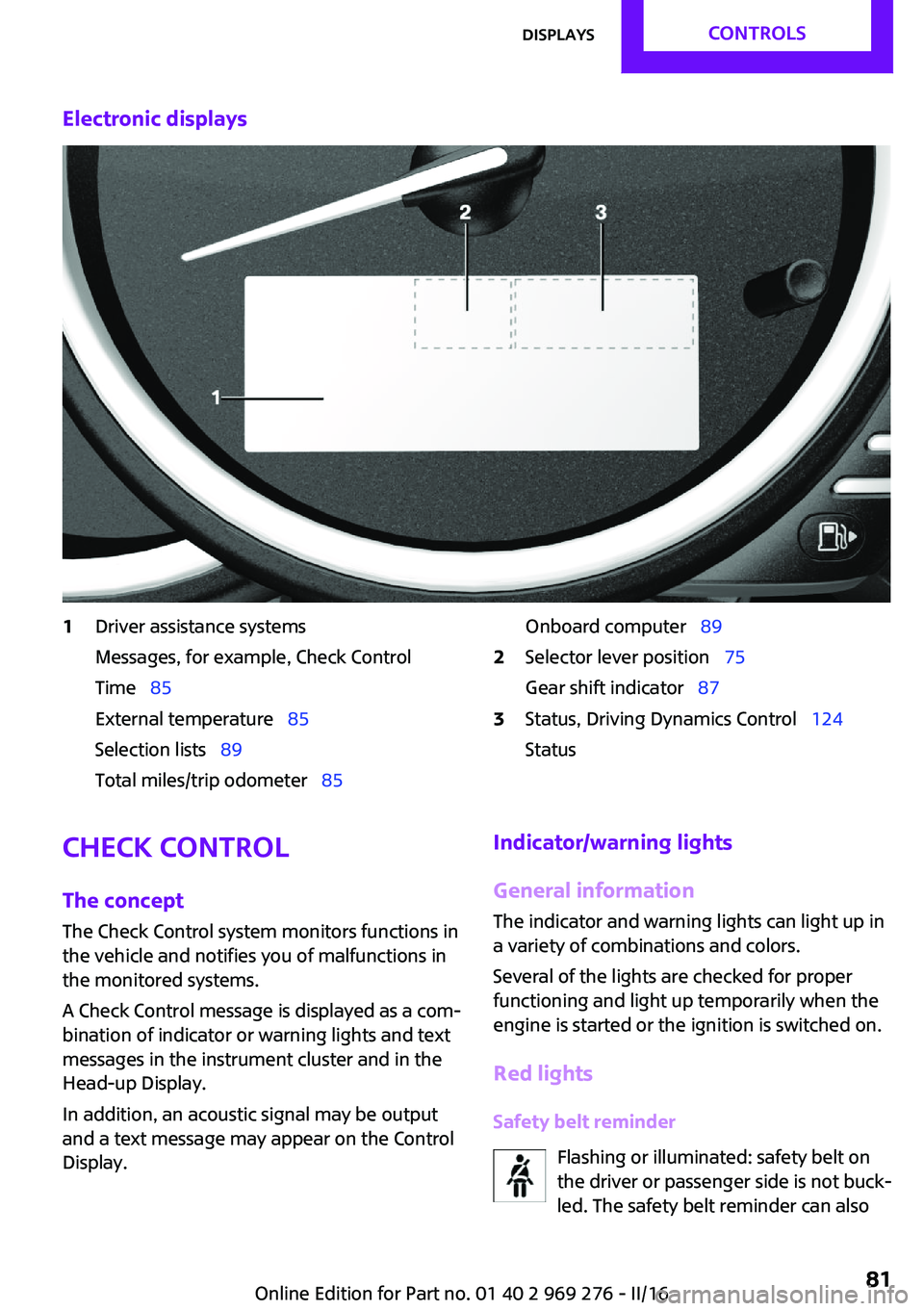
Electronic displays1Driver assistance systems
Messages, for example, Check Control
Time 85
External temperature 85
Selection lists 89
Total miles/trip odometer 85Onboard computer 892Selector lever position 75
Gear shift indicator 873Status, Driving Dynamics Control 124
StatusCheck Control
The concept
The Check Control system monitors functions in
the vehicle and notifies you of malfunctions in the monitored systems.
A Check Control message is displayed as a com‐
bination of indicator or warning lights and text
messages in the instrument cluster and in the
Head-up Display.
In addition, an acoustic signal may be output
and a text message may appear on the Control Display.Indicator/warning lights
General information
The indicator and warning lights can light up in
a variety of combinations and colors.
Several of the lights are checked for proper
functioning and light up temporarily when the
engine is started or the ignition is switched on.
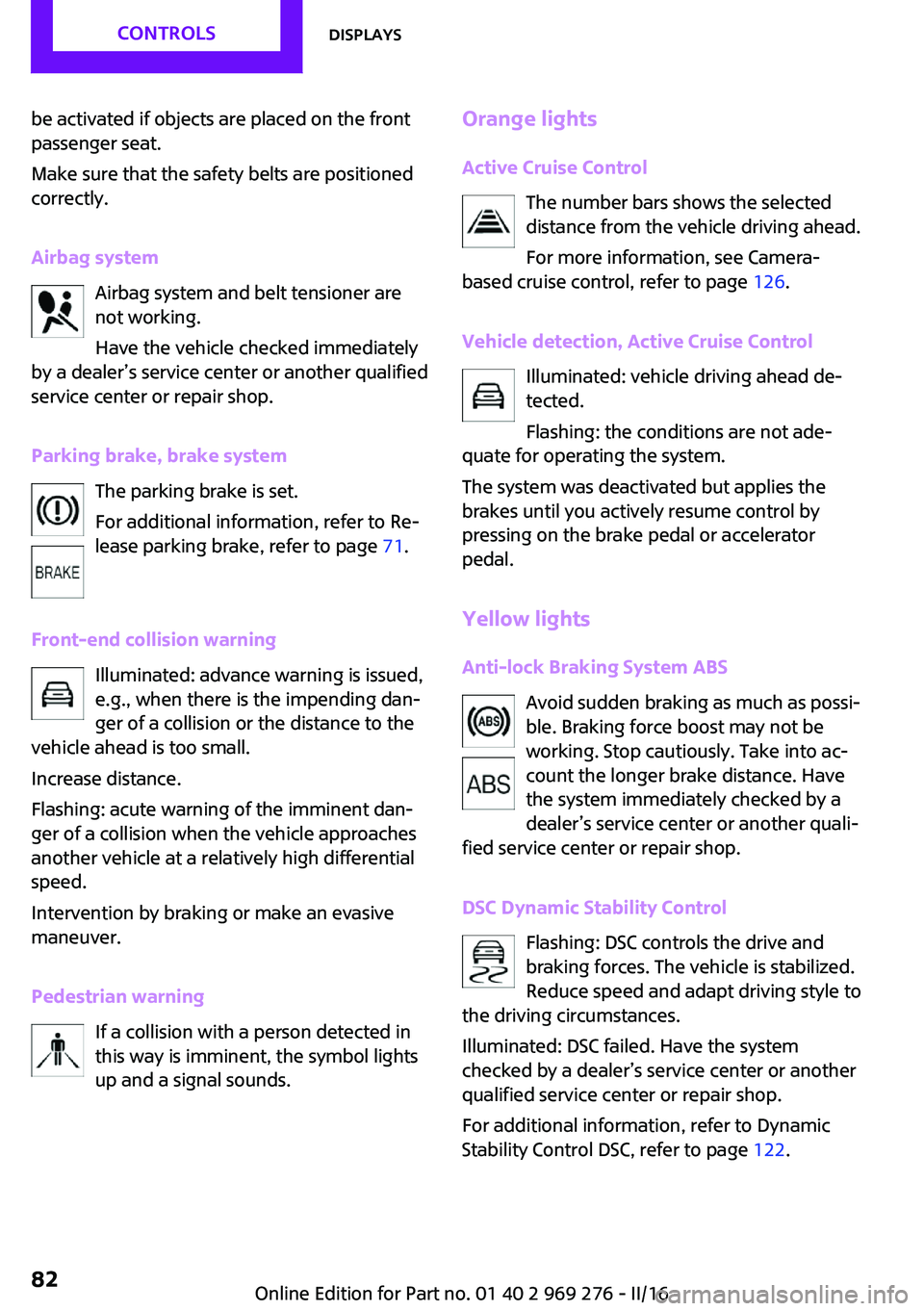
Red lights Safety belt reminder Flashing or illuminated: safety belt on
the driver or passenger side is not buck‐
led. The safety belt reminder can alsoSeite 81DisplaysCONTROLS81
Online Edition for Part no. 01 40 2 969 276 - II/16
Page 82 of 252
be activated if objects are placed on the front
passenger seat.
Make sure that the safety belts are positioned
correctly.
Airbag system Airbag system and belt tensioner are
not working.
Have the vehicle checked immediately
by a dealer’s service center or another qualified
service center or repair shop.
Parking brake, brake system The parking brake is set.
For additional information, refer to Re‐
lease parking brake, refer to page 71.
Front-end collision warning Illuminated: advance warning is issued,
e.g., when there is the impending dan‐
ger of a collision or the distance to the
vehicle ahead is too small.
Increase distance.
Flashing: acute warning of the imminent dan‐
ger of a collision when the vehicle approaches
another vehicle at a relatively high differential
speed.
Intervention by braking or make an evasive
maneuver.
Pedestrian warning If a collision with a person detected in
this way is imminent, the symbol lights
up and a signal sounds.Orange lights
Active Cruise Control The number bars shows the selected
distance from the vehicle driving ahead.
For more information, see Camera-
based cruise control, refer to page 126.
Vehicle detection, Active Cruise Control Illuminated: vehicle driving ahead de‐
tected.
Flashing: the conditions are not ade‐
quate for operating the system.
The system was deactivated but applies the
brakes until you actively resume control by
pressing on the brake pedal or accelerator
pedal.
Yellow lights Anti-lock Braking System ABS Avoid sudden braking as much as possi‐
ble. Braking force boost may not be
working. Stop cautiously. Take into ac‐
count the longer brake distance. Have
the system immediately checked by a
dealer’s service center or another quali‐
fied service center or repair shop.
DSC Dynamic Stability Control Flashing: DSC controls the drive and
braking forces. The vehicle is stabilized.
Reduce speed and adapt driving style to
the driving circumstances.
Illuminated: DSC failed. Have the system
checked by a dealer’s service center or another
qualified service center or repair shop.
For additional information, refer to Dynamic
Stability Control DSC, refer to page 122.Seite 82CONTROLSDisplays82
Online Edition for Part no. 01 40 2 969 276 - II/16
Page 105 of 252
SafetyVehicle features and op‐
tions
This chapter describes all standard, country-
specific and optional features offered with the
series. It also describes features that are notnecessarily available in your car, e. g., due to
the selected options or country versions. This
also applies to safety-related functions and sys‐
tems. The respectively applicable country provi‐
sions must be observed when using the respec‐
tive features and systems.
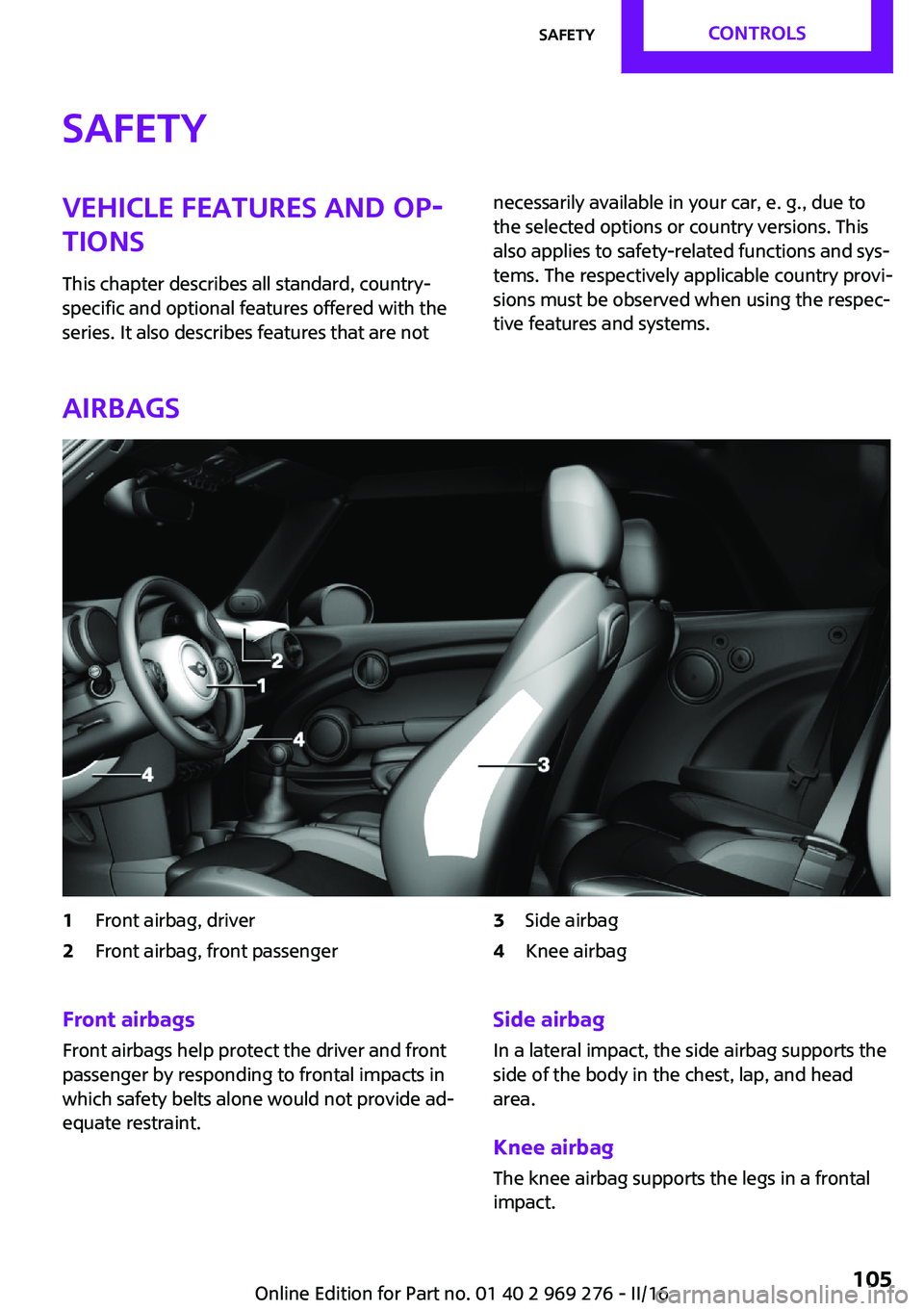
Airbags
1Front airbag, driver2Front airbag, front passenger3Side airbag4Knee airbagFront airbags
Front airbags help protect the driver and front
passenger by responding to frontal impacts in
which safety belts alone would not provide ad‐
equate restraint.Side airbag
In a lateral impact, the side airbag supports the
side of the body in the chest, lap, and head
area.
Knee airbag The knee airbag supports the legs in a frontal
impact.Seite 105SafetyCONTROLS105
Online Edition for Part no. 01 40 2 969 276 - II/16
Page 107 of 252
Correct functionWhen the ignition is switched on, the
warning lamp in the instrument cluster
lights up briefly and thereby indicates
the operational readiness of the entire airbag
system and the belt tensioner.
Airbag system malfunctioning▷Warning lamp does not come on when the
ignition is turned on.▷The warning lamp lights up continuously.
Automatic deactivation of the front-
seat passenger airbags
The concept
The system reads if the front passenger seat is
occupied by measuring the human body's re‐
sistance.
Front, knee and side airbag on the front pas‐
senger's side are either activated or deacti‐
vated.
Information Before transporting a child on the front passen‐
ger seat, refer to the safety notes and instruc‐
tions for children on the front passenger seat,
see Children.
WARNING
To ensure the front-seat passenger airbag
function, it must be detected, whether a person
occupies the front passenger seat. The entire
seat cushion area must be used for this pur‐ pose. There is a risk of injury or danger to life.
Make sure that the front passenger keeps his or
her feet in the floor area. ◀
Malfunction of the automatic
deactivation system
When transporting older children and adults,
the front-seat passenger airbags may be deac‐
tivated in certain sitting positions. In this case,
the indicator lamp for the front-seat passenger
airbags lights up.
In this case, change the sitting position so that
the front-seat passenger airbags are activated
and the indicator lamp goes out.
If it is not possible to activate the airbags, have
the person sit in the rear.
To enable correct recognition of the occupied
seat cushion.▷Do not attach covers, cushions, ball mats or
other items to the front passenger seat un‐
less they are specifically determined to be
safe for use on the front passenger seat.▷Do not place any electronic devices on the
passenger seat if a child restraint system is
to be installed on it.▷Do not place objects under the seat that
could press against the seat from below.▷No moisture in or on the seat.
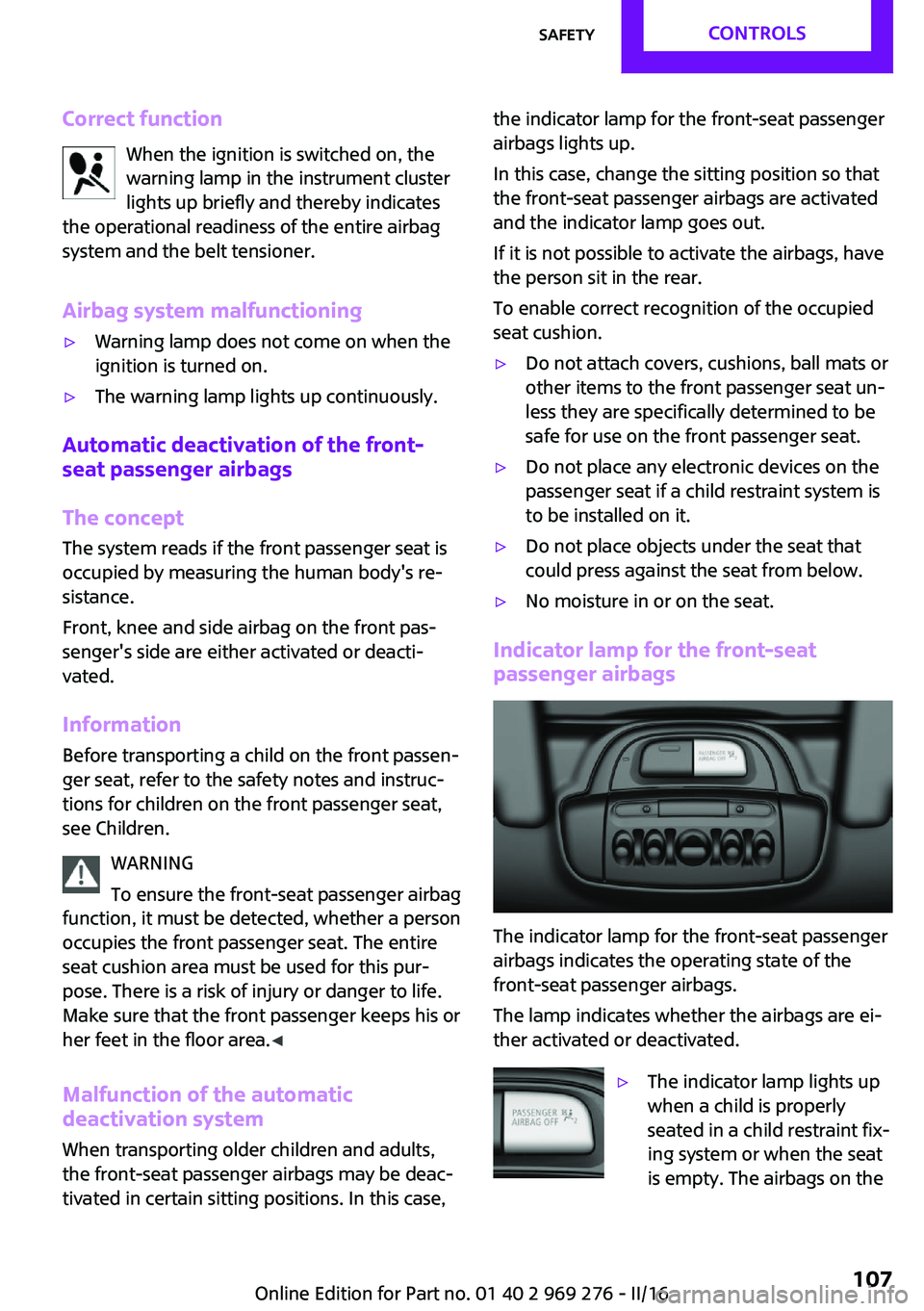
Indicator lamp for the front-seat
passenger airbags
The indicator lamp for the front-seat passenger
airbags indicates the operating state of the
front-seat passenger airbags.
The lamp indicates whether the airbags are ei‐
ther activated or deactivated.
▷The indicator lamp lights up
when a child is properly
seated in a child restraint fix‐
ing system or when the seat
is empty. The airbags on theSeite 107SafetyCONTROLS107
Online Edition for Part no. 01 40 2 969 276 - II/16
Page 159 of 252
adjust the height of the head restraints or re‐
move them. ◀
WARNING
With an unlocked backrest, an unsecured
load can be thrown into the vehicle's interior,
e.g., in case of an accident, braking or evasive
maneuver. There is a a risk of injury. Make sure
that the backrest engages into the locking after
folding it back. ◀
WARNING
Body parts can be jammed when moving
the head restraint. There is a a risk of injury.
Make sure that the area of movement is clear
when moving the head restraint. ◀
Folding down rear seat backrests
The rear seat backrests can be folded down
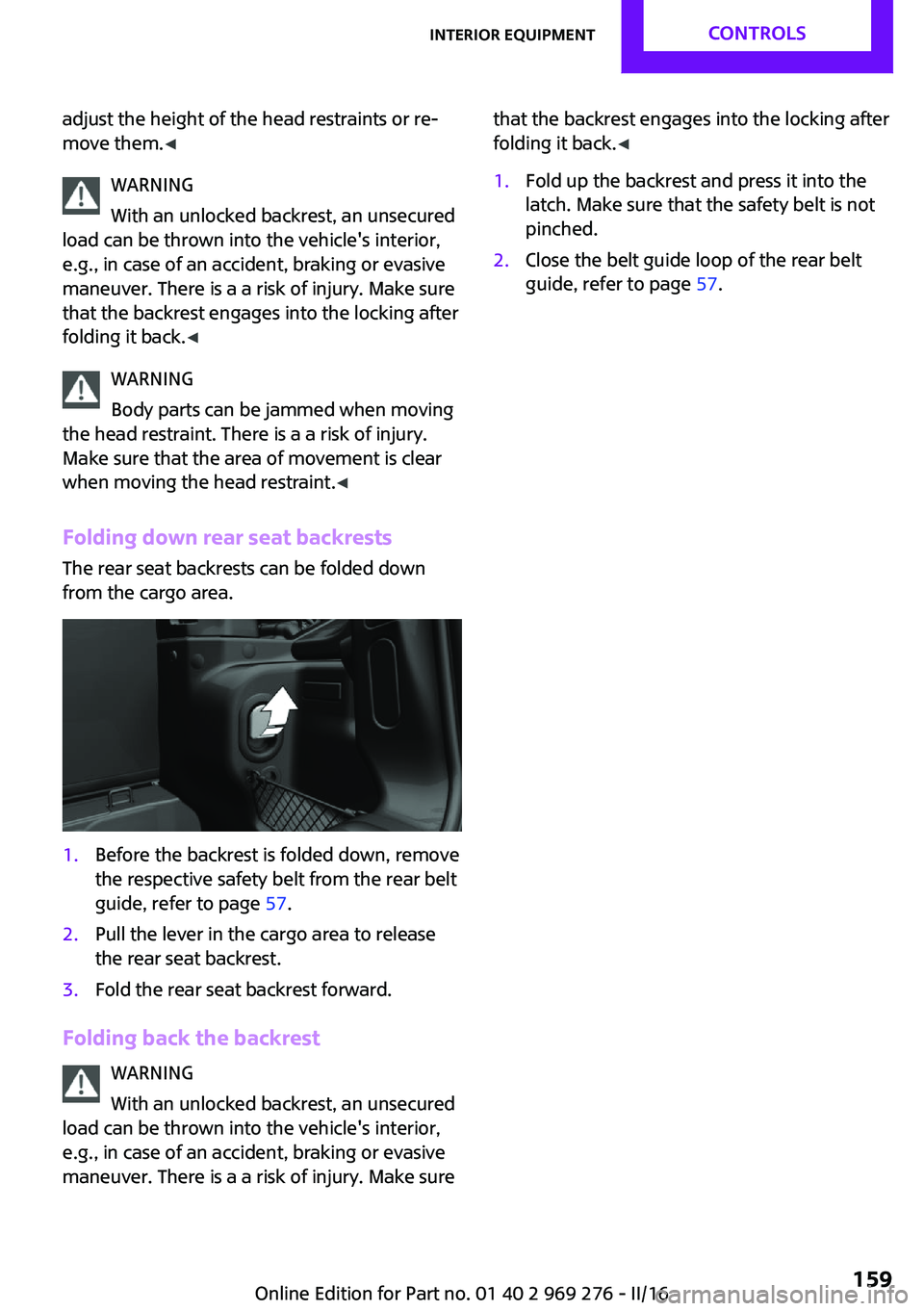
from the cargo area.1.Before the backrest is folded down, remove
the respective safety belt from the rear belt
guide, refer to page 57.2.Pull the lever in the cargo area to release
the rear seat backrest.3.Fold the rear seat backrest forward.
Folding back the backrest
WARNING
With an unlocked backrest, an unsecured
load can be thrown into the vehicle's interior,
e.g., in case of an accident, braking or evasive
maneuver. There is a a risk of injury. Make sure
that the backrest engages into the locking after
folding it back. ◀1.Fold up the backrest and press it into the
latch. Make sure that the safety belt is not
pinched.2.Close the belt guide loop of the rear belt
guide, refer to page 57.Seite 159Interior equipmentCONTROLS159
Online Edition for Part no. 01 40 2 969 276 - II/16
Page 171 of 252
Load
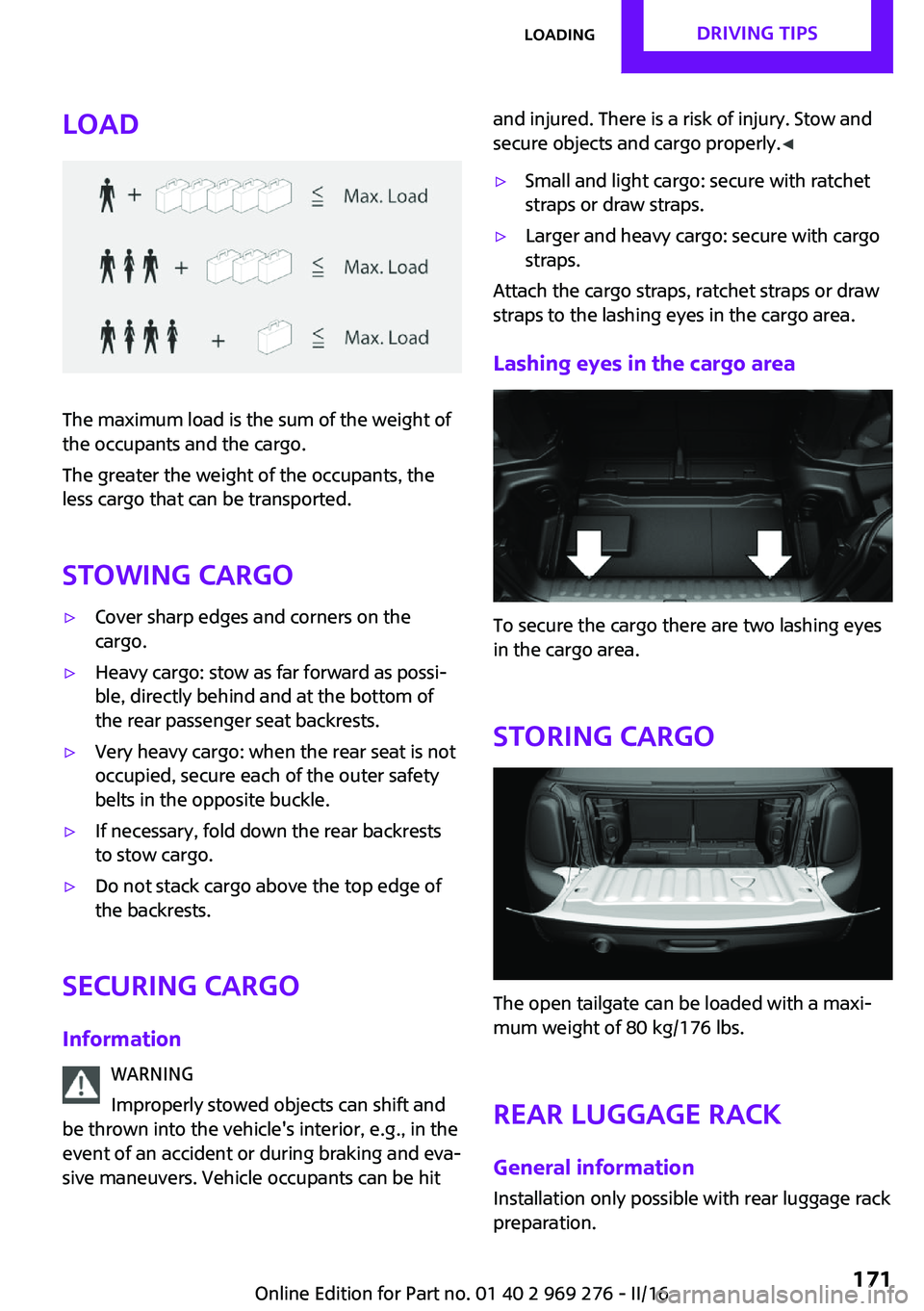
The maximum load is the sum of the weight of
the occupants and the cargo.
The greater the weight of the occupants, the
less cargo that can be transported.
Stowing cargo
▷Cover sharp edges and corners on the
cargo.▷Heavy cargo: stow as far forward as possi‐
ble, directly behind and at the bottom of
the rear passenger seat backrests.▷Very heavy cargo: when the rear seat is not
occupied, secure each of the outer safety
belts in the opposite buckle.▷If necessary, fold down the rear backrests
to stow cargo.▷Do not stack cargo above the top edge of
the backrests.
Securing cargo
Information WARNING
Improperly stowed objects can shift and
be thrown into the vehicle's interior, e.g., in the
event of an accident or during braking and eva‐
sive maneuvers. Vehicle occupants can be hit
and injured. There is a risk of injury. Stow and
secure objects and cargo properly. ◀▷Small and light cargo: secure with ratchet
straps or draw straps.▷Larger and heavy cargo: secure with cargo
straps.
Attach the cargo straps, ratchet straps or draw
straps to the lashing eyes in the cargo area.
Lashing eyes in the cargo area
To secure the cargo there are two lashing eyes
in the cargo area.
Storing cargo
The open tailgate can be loaded with a maxi‐
mum weight of 80 kg/176 lbs.
Rear luggage rack
General information Installation only possible with rear luggage rack
preparation.
Seite 171LoadingDRIVING TIPS171
Online Edition for Part no. 01 40 2 969 276 - II/16
Page 229 of 252
ATTENTION
Open Velcro® fasteners on articles of
clothing can damage the seat covers. There is a
risk of damage to property. Ensure that any
Velcro® fasteners are closed. ◀
Caring for special components Light-alloy wheels
When cleaning the vehicle, use only neutral
wheel cleaners having a pH value from 5 to 9.
Do not use abrasive cleaning agents or steam
jets above 140 ℉/60 ℃. Follow the manufac‐
turer's instructions.
Aggressive, acidic or alkaline cleaning agents
can destroy the protective layer of adjacent
components, such as the brake disk.
Chrome surfaces
Carefully clean components such as the radia‐
tor grille or door handles with an ample supply
of water, possibly with shampoo added, partic‐
ularly when they have been exposed to road
salt.
Rubber components Environmental influences can cause surface
soiling of rubber parts and a loss of gloss. For
cleaning, use only water and suitable care
products, the manufacturer of your vehicle rec‐
ommends original MINI care products.
Treat especially worn rubber parts with rubber
care agents at regular intervals. When cleaning
rubber seals, do not use any silicon-containing
car care products in order to avoid damage or
noises.
Fine wood parts Clean fine wood facing and fine wood compo‐
nents only with a moist rag. Then dry with a
soft cloth.
Plastic components
These include:▷Imitation leather surfaces.▷Roofliner.▷Lamp lenses.▷Instrument cluster cover.▷Matt black spray-coated components.▷Painted parts in the interior.
Clean with a microfiber cloth.
Dampen cloth lightly with water.
Do not soak the roofliner.
ATTENTION
Cleansers that contain alcohol or solvents,
such as lacquer thinners, heavy-duty grease re‐
movers, fuel, or such, can damage plastic parts.
There is a risk of damage to property. Clean
with a microfiber cloth. Dampen cloth lightly
with water. ◀
Safety belts Dirty belt straps impede the reeling action and
thus have a negative impact on safety.
WARNING
Chemical cleansers can destroy the safety
belt webbing. Missing protective effect of the
safety belts. There is a risk of injury or danger to
life. Use only a mild soapy solution for cleaning
the safety belts. ◀
Use only a mild soapy solution, with the safety
belts clipped into their buckles.
Do not allow the switchs to retract the safety
belts until they are dry.
Carpets and floor mats WARNING
Objects in the driver's floor area can limit
the pedal distance or block a depressed pedal.
There is risk of an accident. Stow objects in the
vehicle such that they are secured and cannot
enter into the driver's floor area. Use floor mats
that are suitable for the vehicle and can be
safely attached to the floor. Do not use loose
Seite 229CareMOBILITY229
Online Edition for Part no. 01 40 2 969 276 - II/16
Page 242 of 252
Everything from A to ZIndexA
ABS, Antilock Brake Sys‐ tem 122
Acceleration Assistant, see Launch Control 78
Accessories and parts 8
ACC, see camera-based cruise control 126
Activated-charcoal filter 149
Active Cruise Control, see camera-based cruise con‐
trol 126
Additional information, on‐ board monitor 23
Additives, oil 202
Adjustments, seats/head re‐ straints 54
Adjustments, steering wheel 62
After washing vehicle 227
Airbags 105
Airbags, indicator/warning light 106
Air circulation, see Recircu‐ lated-air mode 145, 148
Air conditioner 144
Air, dehumidifying, see Cool‐ ing function 145, 147
Air distribution, man‐ ual 145 , 148
Air flow, air conditioner 145
Air flow, automatic climate control 148
Air pressure, tires 186
Air vents, see Ventilation 149
Alarm system 44
Alarm triggering 44
Alarm, unintentional 45
All around the center con‐ sole 16 All around the interior mir‐
ror 17
All around the steering wheel 14
All-season tires, see Winter tires 193
Alternating-code hand-held transmitter 152
Alternative oil types 202
Always Open Timer, Control Display 97
Always Open Timer, onboard computer 90
Antifreeze, washer fluid 74
Antilock Brake System, ABS 122
Anti-slip control, see DSC 122
App, MINI Motorer’s Guide 6
Approved axle load 235
Arrival time 91
Ash tray 155
Assistance, Roadside Assis‐ tance 220
Assistance when driving off 125
Assist system, refer to Intelli‐ gent Safety 115
AUTO intensity 148
Automatic car wash 226
Automatic climate con‐ trol 146
Automatic Curb Monitor 60
Automatic deactivation, Front- seat passenger airbags 107
Automatic headlamp con‐ trol 101
Automatic locking 43
Automatic recirculated-air control 148
Automatic transmission with Steptronic 75 AUTO program, automatic cli‐
mate control 147
AUTO program, intensity 148
Auto Start/Stop function 68
AUX-IN port, position in vehi‐ cle 156
Average fuel consumption 90
Average speed 90
Axle loads, weights 235
B
Backrest curvature, see Lum‐ bar support 55
Band-aids, see First-aid kit 220
Battery replacement, vehicle battery 218
Battery, vehicle 217
Being towed, see Tow-starting and towing 222
Belts, safety belts 56
Beverage holder, cup holder 161
Bonus range, GREEN Mode 176
Bottle holder, see Cup holder 161
Brake assistant 122
Brake discs, break-in 166
Brake pads, break-in 166
Braking, information 167
Breakdown assistance 220
Break-in 166
Brightness of Control Dis‐ play 93
Bug light 210
Bulb replacement 209
Bulb replacement, front 209
Bulb replacement, rear 212
Bulb replacement, side 214 Seite 242REFERENCEEverything from A to Z242
Online Edition for Part no. 01 40 2 969 276 - II/16
Page 248 of 252
Post Crash — iBrake 121
Power failure 218
Power windows 45
Prescribed engine oil types 202
Pressure, tire air pressure 186
Pressure warning, tires 113
Profile, see Personal Pro‐ file 36
Protective function, win‐ dows 46
Push-and-turn switch, see Controller 19
R
Racetrack operation 169
Radiator fluid 204
Radio-operated key, see Re‐ mote control 34
Radio ready state 66
Radio, refer to Integrated Owner's Manual
Rain sensor 73
Ratchet straps, securing cargo 171
Rear fog lights 103
Rear lights 212
Rear luggage rack 171
Rearview camera 137
Rearview mirror 60
Rear window de‐ froster 146, 149
Recirculated-air filter 149
Recirculated-air mode 145, 148
Recommended fuel grade 185
Recommended tire brands 192
Refueling 182
Remaining range 86
Remote control/key 34
Remote control, blocking 35
Remote control, malfunc‐ tion 39 Remote control, replacing the
battery 35
Remote control, univer‐ sal 151
Replacement fuse 219
Replacing parts 208
Replacing the battery, remote control 35
Replacing wheels/tires 192
Reporting safety malfunc‐ tions 10
RES CNCL button, see camera- based cruise control 126
RES CNCL button, see Cruise control 131
Reserve warning, see Range 86
Reset, Tire Pressure Monitor TPM 110
Retreaded tires 193
Roadside parking lights 101
Rollover protection sys‐ tem 108
RON recommended fuel grade 185
Roof load capacity 235
Roof, see convertible top 47
RSC Run Flat System Compo‐ nent, see Run-flat tires 193
Rubber components, care 229
Run-flat tires 193
S Safe braking 167
Safety belt reminder for driv‐ er's seat and front passenger
seat 57
Safety belts 56
Safety belts, care 229
Safety belts, rear 57
Safety systems, airbags 105
Saving fuel 173
Screen, refer to Control Dis‐ play 18 Screwdriver 208
Sealant 194
Seat belts, see Safety belts 56
Seat heating, front 56
Seating position for chil‐ dren 63
Seats 54
Securing cargo 171
Selection list in instrument cluster 89
Selector lever, Steptronic transmission 76
Sensors, care 230
Service and warranty 8
Service requirements, Condi‐ tion Based Service CBS 206
Service requirements, dis‐ play 86
Service, Roadside Assis‐ tance 220
SET button, see camera-based cruise control 126
SET button, see Cruise con‐ trol 131
Settings, locking/unlocking 43
Settings, mirrors 60
Settings on Control Display 92
Shift paddles on the steering wheel 77
Shift point indicator, Head-Up Display 96
Side airbag 105
Signaling, horn 14
Signals when unlocking 44
Sitting safely 54
Size 234
Snow chains 197
Socket 155
Socket, OBD Onboard Diag‐ nostics 207
Spare fuse 219
Spare tire, see Emergency wheel 215
Speed, average 90
Speed limit detection 87 Seite 248REFERENCEEverything from A to Z248
Online Edition for Part no. 01 40 2 969 276 - II/16