change time MINI COOPER CONVERTIBLE 2016 User Guide
[x] Cancel search | Manufacturer: MINI, Model Year: 2016, Model line: COOPER CONVERTIBLE, Model: MINI COOPER CONVERTIBLE 2016Pages: 252, PDF Size: 5.41 MB
Page 113 of 252
FTM Flat Tire Monitor
The concept
The system does not measure the actual infla‐
tion pressure in the tires.
It detects a tire inflation pressure loss by com‐
paring the rotational speeds of the individual
wheels while moving.
In the event of a tire inflation pressure loss, the
diameter and therefore the rotational speed of
the corresponding wheel changes. This will be
detected and reported as a flat tire.
Functional requirements
The system must have been initialized when
the tire inflation pressure was correct; other‐
wise, reliable flagging of a flat tire is not as‐
sured. Initialize the system after each correc‐
tion of the tire inflation pressure and after
every tire or wheel change.
Status display The current status of the Flat Tire Monitor can
be displayed on the Control Display, e.g.,
whether or not the FTM is active.
On the Control Display:1. "Vehicle info"2."Vehicle status"3. "Flat Tire Monitor (FTM)"
The status is displayed.
Initialization When initializing the once set inflation tire pres‐
sures serve as reference values in order to de‐
tect a flat tire. Initialization is started by con‐
firming the inflation pressures.
Do not initialize the system when driving with
snow chains.
On the Control Display:
1. "Vehicle info"2."Vehicle status"3. "Perform reset"4.Start the engine - do not drive off.5.Start the initialization with "Perform reset".6.Drive away.
The initialization is completed while driving,
which can be interrupted at any time.
The initialization automatically continues when
driving resumes.
Indication of a flat tire The yellow warning lamp lights up. A
Check Control message is displayed.
There is a flat tire or a major loss in tire
inflation pressure.
1.Reduce your speed and stop cautiously.
Avoid sudden braking and steering maneu‐
vers.2.Check whether the vehicle is fitted with
normal tires or run-flat tires.
Run-flat tires, refer to page 193, are la‐
beled with a circular symbol containing the
letters RSC marked on the tire's sidewall.
WARNING
A damaged regular tire with low or miss‐
ing tire inflation pressure impacts handling,
such as steering and braking response. Run-flat
tires can maintain limited stability. There is risk
of an accident. Do not continue driving if the
vehicle is not equipped with run-flat tires. Fol‐
low the information on run-flat tires and con‐
tinued driving with these tires. ◀
When a flat tire is indicated, DSC Dynamic Sta‐
bility Control is switched on if needed.
System limits A natural, even tire inflation pressure loss in all
four tires will not be recognized. Therefore,
check the tire inflation pressure regularly.
Sudden serious tire damage caused by external
circumstances cannot be recognized in ad‐
vance.
Seite 113SafetyCONTROLS113
Online Edition for Part no. 01 40 2 969 276 - II/16
Page 148 of 252
page 148, are automatically also switched on
in the AUTO program.
To switch off the program: press the button
again or manually adjust the air distribution.
Intensity of the AUTO program
With the AUTO program activated, the auto‐
matic intensity control can be changed.
Turn the ring to set the desired
intensity from soft to intensive.
The set intensity is displayed via the position of
the illuminated LED segment.
Convertible program
When the convertible top is open, the converti‐
ble program is activated as well. In the conver‐
tible program, the automatic climate control is
optimized for driving with the convertible top
open. In addition, the air flow is increased as
the vehicle speed increases.
The efficiency of the convertible program can
be greatly enhanced by installing the wind de‐
flector.
Automatic recirculated-air control/
recirculated-air mode
You may respond to unpleasant odors or pollu‐
tants in the immediate environment by tempo‐
rarily suspending the supply of outside air. The
system then recirculates the air currently within
the vehicle.
Press button repeatedly to select an
operating mode:▷LEDs off: outside air flows in continuously.▷Left LED on, automatic recirculated-air con‐
trol: a sensor detects pollutants in the out‐
side air and shuts off automatically.▷Right LED on, recirculated-air mode: the
supply of outside air into the vehicle is per‐
manently blocked.
To prevent window condensation, recirculated
air mode switches off automatically after a cer‐
tain amount of time, depending on the external
temperature.
With constant recirculated-air mode, the air
quality in the car's interior deteriorates and the
fogging of the windows increases.
If windows are fogged over, switch off the recir‐
culating mode and press the AUTO button.
Make sure that air can flow to the windshield.
Air flow, manual To manually adjust air flow turn off AUTO pro‐
gram first.
Turn the ring to set the desired
air volume.
The manually adjusted air flow is displayed via
illuminated LED segments.
The air flow of the automatic climate control
may be reduced automatically to save battery power.
Manual air distribution Press button repeatedly to select a
program:
▷Upper body region.▷Upper body region and floor area.▷Floor area.▷Windows and floor area.▷Windows, upper body region, and floor
area.▷Windows and upper body region.▷Windows.Seite 148CONTROLSClimate control148
Online Edition for Part no. 01 40 2 969 276 - II/16
Page 152 of 252
for approximately 20 seconds until the LED
on the interior rearview mirror flashes. This
erases all programming of the buttons on
the interior rearview mirror.3.Hold the hand-held transmitter for the sys‐
tem to be controlled approx. 1 to 3 in‐
ches/2.5 to 8 cm away from the buttons of
the interior rearview mirror. The required
distance depends on the manual transmit‐
ter.4.Simultaneously press and hold the button
of the desired function on the hand-held
transmitter and the button to be program‐
med on the interior rearview mirror. The
LED on the interior rearview mirror will be‐
gin flashing slowly.5.Release both buttons as soon as the LED
flashes more rapidly. The LED flashing
faster indicates that the button on the inte‐
rior rearview mirror has been programmed.
If the LED does not flash faster after at least
60 seconds, change the distance between
the interior rearview mirror and the hand-
held transmitter and repeat the step. Sev‐
eral more attempts at different distances
may be necessary. Wait at least 15 seconds
between attempts.
Canada: if programming with the hand-
held transmitter was interrupted, hold
down the interior rearview mirror button
and repeatedly press and release the hand-
held transmitter button for 2 seconds.6.To program other functions on other but‐
tons, repeat steps 3 to 5.
The systems can be controlled using the interior
rearview mirror buttons.
Special feature of the alternating-code
wireless system
If you are unable to operate the system after
repeated programming, please check if the sys‐
tem to be controlled features an alternating-
code radio system.
Read the system's operating manual, or press
the programmed button on the interior rear‐
view mirror longer. If the LED on the interior
mirror starts flashing rapidly and then stays lit
constantly for 2 seconds, the system features
an alternating-code radio system. Flashing and
continuous illumination of the LED will repeat
for approximately 20 seconds.
For systems with an alternating-code radio sys‐
tem, the universal remote control and the sys‐
tem also have to be synchronized.
Please read the operating manual to find out
how to synchronize the system.
Synchronizing is easier with the aid of a second
person.
Synchronizing the universal remote control
with the system:1.Park the vehicle within range of the re‐
mote-controlled system.2.Program the relevant button on the interior
rearview mirror as described.3.Locate and press the synchronizing button
on the system being programmed. You
have approx. 30 seconds for the next step.4.Hold down the programmed button on the
interior rearview mirror for approximately
3 seconds and then release it. If necessary,
repeat this step up to three times in order
to finish synchronization. Once synchroni‐
zation is complete, the programmed func‐
tion will be carried out.
Reprogramming individual buttons
1.Switch on the ignition.2.Press and hold the interior rearview mirror
button to be programmed.3.As soon as the interior rearview mirror LED
starts flashing slowly, hold the hand-held
transmitter for the system to be controlled
approx. 1 to 3 inches/2.5 to 8 cm away
from the buttons of the interior rearview
mirror. The required distance depends on
the manual transmitter.Seite 152CONTROLSInterior equipment152
Online Edition for Part no. 01 40 2 969 276 - II/16
Page 202 of 252
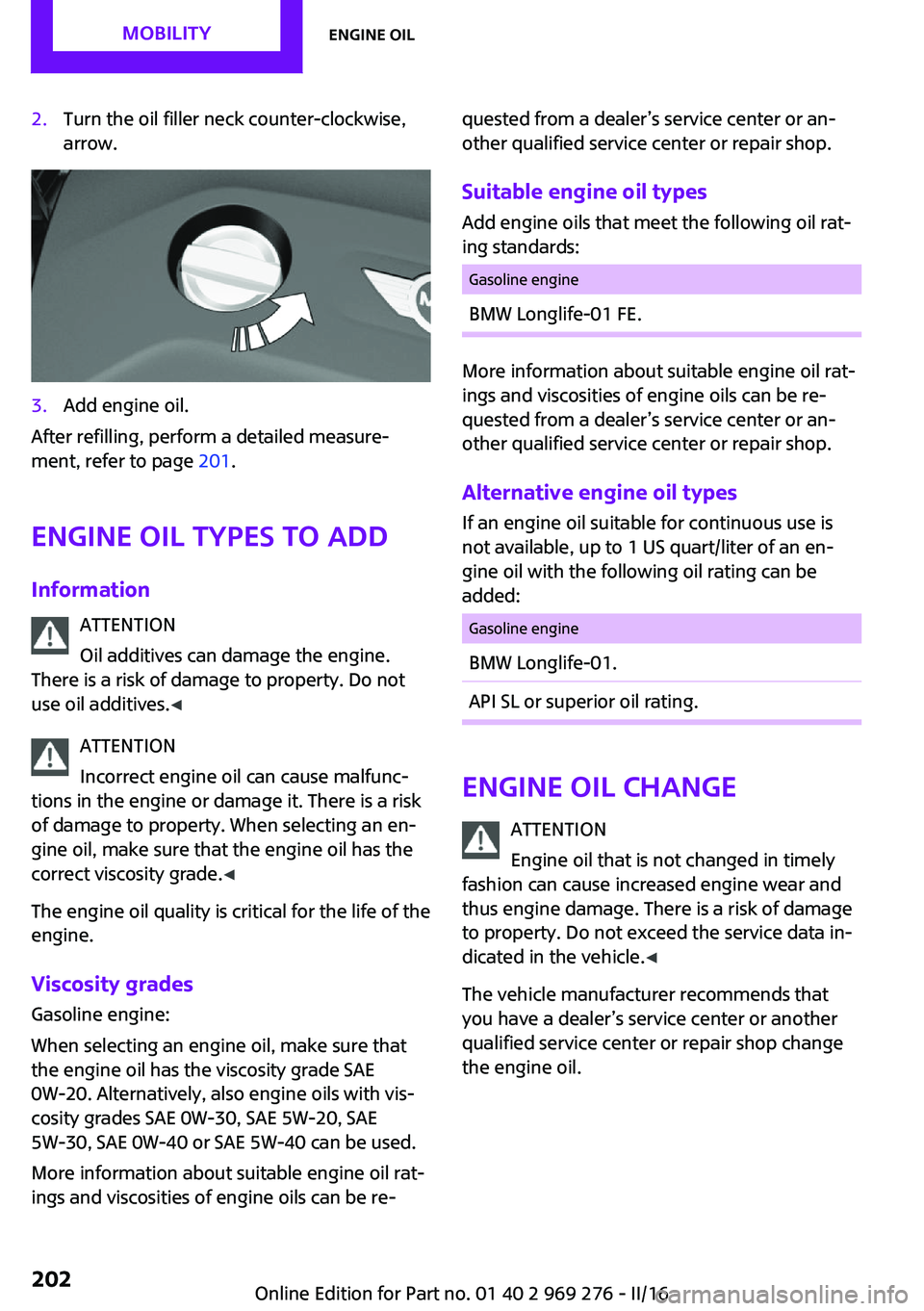
2.Turn the oil filler neck counter-clockwise,
arrow.3.Add engine oil.
After refilling, perform a detailed measure‐
ment, refer to page 201.
Engine oil types to add
Information ATTENTION
Oil additives can damage the engine.
There is a risk of damage to property. Do not
use oil additives. ◀
ATTENTION
Incorrect engine oil can cause malfunc‐
tions in the engine or damage it. There is a risk
of damage to property. When selecting an en‐
gine oil, make sure that the engine oil has the
correct viscosity grade. ◀
The engine oil quality is critical for the life of the
engine.
Viscosity grades
Gasoline engine:
When selecting an engine oil, make sure that
the engine oil has the viscosity grade SAE
0W-20. Alternatively, also engine oils with vis‐
cosity grades SAE 0W-30, SAE 5W-20, SAE
5W-30, SAE 0W-40 or SAE 5W-40 can be used.
More information about suitable engine oil rat‐
ings and viscosities of engine oils can be re‐
quested from a dealer’s service center or an‐
other qualified service center or repair shop.
Suitable engine oil types Add engine oils that meet the following oil rat‐
ing standards:Gasoline engineBMW Longlife-01 FE.
More information about suitable engine oil rat‐
ings and viscosities of engine oils can be re‐
quested from a dealer’s service center or an‐
other qualified service center or repair shop.
Alternative engine oil types If an engine oil suitable for continuous use is
not available, up to 1 US quart/liter of an en‐
gine oil with the following oil rating can be
added:
Gasoline engineBMW Longlife-01.API SL or superior oil rating.
Engine oil change
ATTENTION
Engine oil that is not changed in timely
fashion can cause increased engine wear and
thus engine damage. There is a risk of damage to property. Do not exceed the service data in‐
dicated in the vehicle. ◀
The vehicle manufacturer recommends that
you have a dealer’s service center or another
qualified service center or repair shop change
the engine oil.
Seite 202MOBILITYEngine oil202
Online Edition for Part no. 01 40 2 969 276 - II/16
Page 209 of 252
Lamp and bulb replace‐
ment
General information Lights and bulbs make an essential contribution
to vehicle safety.
The manufacturer of the vehicle recommends
that you have appropriate work performed by a
dealer’s service center or another qualified
service center or repair shop if you are unfami‐
liar with it or if it has not been described here.
A spare lamp box is available from a dealer’s
service center or another qualified service cen‐
ter or repair shop.
Information
Lights and bulbs WARNING
Bulbs can get hot during operation. Con‐
tact with the bulbs can cause burns. There is a
risk of injuries. Only change bulbs after they
have cooled off. ◀
WARNING
Work on switched-on lighting systems
can cause short circuits. There is a risk of inju‐
ries or a risk of property damage. When work‐
ing on the lighting system, switch off the lamps
in question. If necessary, heed the bulb manu‐
facturer's instructions. ◀
CAUTION
Dirty bulbs have a reduced service life.
There is a risk of property damage. Do not hold
new bulbs with your bare hands. Use a clean
cloth or something similar, or hold the bulb by
its base. ◀
Light-emitting diodes (LEDs) Some items of equipment use light-emitting di‐
odes installed behind a cover as a light source.These light-emitting diodes, which are related
to conventional lasers, are officially designated
as Class 1 light-emitting diodes.
WARNING
Too intensive brightness can irritate or
damage the retina of the eye. There is a a risk
of injury. Do not look directly into the head‐
lights or other light sources. Do not remove the
LED covers. ◀
Headlight glass Condensation can form on the inside of the ex‐
ternal lights in cool or humid weather. When
driving with the lights switched on, the conden‐
sation evaporates after a short time. The head‐
light glass does not need to be changed.
If despite driving with the lights switched on,
increasing humidity forms, e. g. water droplets
in the lamp, the manufacturer of your vehicle
recommends having it checked by a dealer’s
service center or another qualified service cen‐
ter or repair shop.
Front lights, bulb replacement
Overview
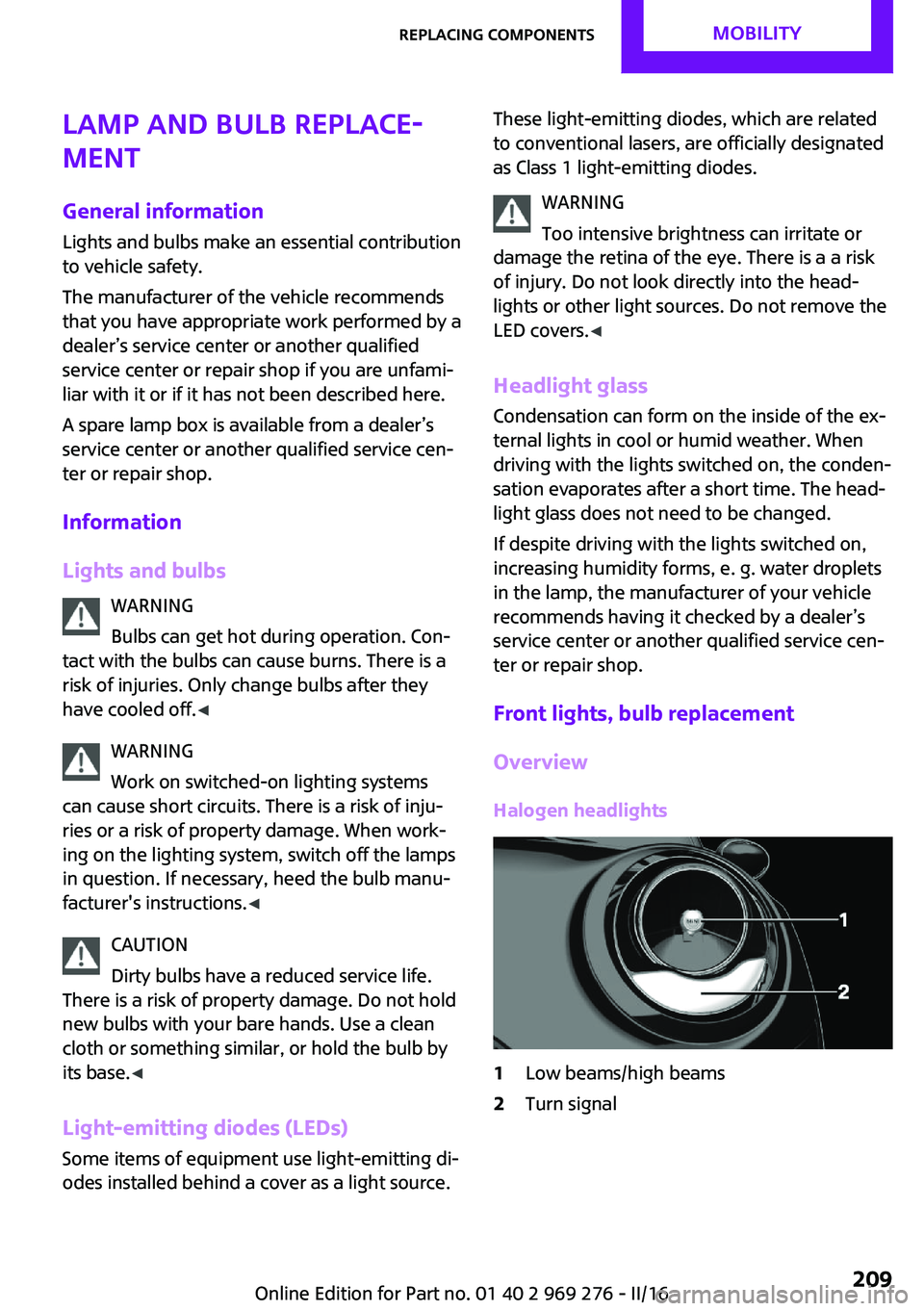
Halogen headlights1Low beams/high beams2Turn signalSeite 209Replacing componentsMOBILITY209
Online Edition for Part no. 01 40 2 969 276 - II/16
Page 244 of 252
Cruise control without dis‐tance control, see cruise con‐
trol 131
Cruising range 86
Cup holder 161
Current fuel consumption 86
D
Damage, tires 191
Damping control, dy‐ namic 124
Data, technical 234, 236
Date 85
Daytime running lights 102
Defrosting, see defrosting the windows 146
Defrosting, see Windows, de‐ frosting 149
Defrosting the windows 146
Dehumidifying, air 145, 147
Deleting personal data 24
Deletion of personal data 24
Destination distance 91
Digital clock 85
Digital compass 153
Dimensions 234
Dimmable exterior mirrors 61
Dimmable interior mirror 61
Direction indicator, see Turn signals 71
Display, electronic, instrument cluster 81
Display, engine tempera‐ ture 90
Display lighting, see Instru‐ ment lighting 103
Displays 80
Displays, cleaning 230
Disposal, coolant 205
Disposal, vehicle battery 218
Distance control, see PDC 134
Distance to destination 91
Divided screen view, split screen 23 Door lock, see Remote con‐
trol 34
Drive mode, GREEN Mode 174
Drive-off assistant 125
Drive-off assistant, see DSC 122
Driving Dynamics Control 124
Driving Excitement, SPORT 91
Driving instruction, GREEN Mode 176
Driving instructions, break- in 166
Driving modes 124
Driving notes, general 167
Driving on racetracks 169
Driving stability control sys‐ tems 122
Driving style analysis 178
Driving tips 167
DSC Dynamic Stability Con‐ trol 122
DTC Dynamic Traction Con‐ trol 123
Dynamic Damping Con‐ trol 124
Dynamic Stability Control DSC 122
Dynamic Traction Control DTC 123
E Electronic displays, instrument cluster 81
Electronic oil measure‐ ment 200
Electronic Stability Program ESP, see DSC 122
Emergency detection, remote control 35
Emergency operation, conver‐ tible top 50
Emergency service, see Road‐ side Assistance 220 Emergency start function, en‐
gine start 35
Emergency unlocking, tail‐ gate 41
Emergency wheel, compact wheel, see Emergency
wheel 215
Energy Control 86
Engine, automatic Start/Stop function 68
Engine, automatic switch- off 68
Engine compartment 198
Engine compartment, working in 198
Engine coolant 204
Engine idling when driving, coasting 177
Engine oil 200
Engine oil, adding 201
Engine oil additives 202
Engine oil change 202
Engine oil filler neck 201
Engine oil types, alterna‐ tive 202
Engine oil types, suitable 202
Engine start during malfunc‐ tion 35
Engine start, jump-start‐ ing 220
Engine start, see Starting the engine 67
Engine stop 68
Engine temperature, dis‐ play 90
Entering a car wash 226
Equipment, interior 151
Error displays, see Check Con‐ trol 81
ESP Electronic Stability Pro‐ gram, see DSC 122
Exchanging wheels/tires 192
Exhaust system 167
Expanding the cargo area vol‐ ume 158 Seite 244REFERENCEEverything from A to Z244
Online Edition for Part no. 01 40 2 969 276 - II/16
Page 247 of 252
Manual mode, transmis‐sion 76
Manual operation, door lock 40
Manual operation, exterior mirrors 60
Manual operation, Park Dis‐ tance Control PDC 135
Manual operation, rearview camera 137
Manual transmission 75
Manufacturer of the MINI 7
Marking, run-flat tires 193
Master key, see Remote con‐ trol 34
Maximum cooling 147
Maximum speed, display 87
Maximum speed, winter tires 193
Measurement, units of 93
Medical kit 220
Menu in instrument cluster 89
Menus, refer to onboard mon‐ itor operating concept 20
Messages, see Check Con‐ trol 81
Microfilter 146, 149
MID - program, driving dy‐ namics 124
MINI Connected, refer to Inte‐ grated Owner's Manual
MINI driving modes 124
MINI logo projection during unlocking 38
MINI maintenance sys‐ tem 206
MINIMALISM Analyser 178
MINIMALISM info 177
MINI Motorer’s Guide app 6
Minimum tread, tires 191
Mirrors 60
Mobile communication devi‐ ces in the vehicle 167
Mobility System 194
Mode, GREEN Mode 174 Modifications, technical, refer
to Own Safety 7
Moisture in headlight 209
Monitor, refer to Control Dis‐ play 18
Mounting of child restraint systems 64
Multifunction steering wheel, buttons 14
Multimedia, refer to Inte‐ grated Owner's Manual
N
Navigation, refer to Integrated Owner's Manual
Neck restraints, front, see Head restraints 58
Neck restraints, rear, see Head restraints 59
New wheels and tires 192
O
OBD Onboard Diagnos‐ tics 207
Obstacle marking, rearview camera 138
Octane rating, see Recom‐ mended fuel grade 185
Odometer 85
Office, refer to Integrated Owner's Manual
Oil 200
Oil, adding 201
Oil additives 202
Oil change 202
Oil change interval, service re‐ quirements 86
Oil filler neck 201
Oil types, alternative 202
Oil types, suitable 202
Old batteries, disposal 218
On-board computer 89
On-board computer, refer to On-board computer 89 Onboard Diagnostics
OBD 207
Onboard monitor 18
Onboard monitor operating concept 18
Onboard vehicle tool kit 208
Opening/closing via door lock 40
Opening/closing with remote control 38
Operating menus, onboard monitor 18
Optional equipment 7
Outside air, see Automatic re‐ circulated-air control 148
Own safety 7
P Paint, vehicle 227
Parallel parking assistant 139
Park Distance Control PDC 134
Parked-car ventilation 149
Parked vehicle, condensa‐ tion 168
Parking aid, see PDC 134
Parking assistant 139
Parking brake 71
Parking lights 100
Parts and accessories 8
Passenger side mirror, tilting downward 60
Pathway lines, rearview cam‐ era 138
PDC Park Distance Con‐ trol 134
Performance Control 123
Personal Profile 36
Person warning with City light braking function 119
Phone, refer to Integrated Owner's Manual
Pinch protection system, win‐ dows 46
Plastic, care 229 Seite 247Everything from A to ZREFERENCE247
Online Edition for Part no. 01 40 2 969 276 - II/16
Page 249 of 252
Speed limit detection, com‐puter 91
Speed limits, display 87
Speed warning 92
Split screen 23
Sport displays 91
Sport displays, Head-up Dis‐ play 96
Sport instruments, cockpit 97
SPORT program, Dynamic Driving Control 124
Sport program, transmis‐ sion 76
Stability control systems 122
Standard equipment 7
Standard view, Head-up Dis‐ play 95
Start/stop, automatic func‐ tion 68
Start/Stop button 66
Start function during malfunc‐ tion 35
Starting the engine 67
Status control display, tires 109
Status of Owner's Manual 7
Steering wheel, adjusting 62
Steptronic Sport transmission, see Steptronic transmis‐
sion 75
Steptronic transmission 75
Stopping the engine 68
Storage compartments 160
Storage, tires 193
Storing the vehicle 230
Suitable engine oil types 202
Summer tires, tread 191
Sun visor 155
Supplementary text mes‐ sages 84
Switch for driving dynam‐ ics 124
Switch-on times, parked-car ventilation 150
Switch, see Cockpit 14
Symbols 6 Symbols in the status field 23
T Tachometer 85
Tailgate, emergency unlock‐ ing 41
Tail lamps 212
Technical changes, refer to Own Safety 7
Technical data 234, 236
Temperature, air condi‐ tioner 145
Temperature, automatic cli‐ mate control 147
Temperature display for exter‐ nal temperature 85
Temperature, engine 90
Terminal, starting aid 221
Text messages, supplemen‐ tary 84
Theft alarm system, see Alarm system 44
Thigh support 55
Tilt alarm sensor 45
Time of arrival 91
Tire damage 191
Tire identification marks 190
Tire inflation pressure 186
Tire inflation pressure moni‐ tor, refer to FTM 113
Tire Pressure Monitor TPM 109
Tire repair kit, see Mobility System 194
Tires, changing 192
Tire sealant, see Mobility Sys‐ tem 194
Tires, everything on wheels and tires 186
Tires, run-flat tires 193
Tire tread 191
Tone, refer to Integrated Owner's Manual
Tools 208
Total vehicle weight 235 Touchpad 21
Towing 222
Tow-starting 222
TPM Tire Pressure Moni‐ tor 109
Traction control 123
TRACTION drive mode, driving dynamics 123
Transmission lock, releasing manually 78
Transmission, manual trans‐ mission 75
Transmission, see Steptronic transmission 75
Transporting children safely 63
Tread, tires 191
Triple turn signal activa‐ tion 71
Trip odometer 85
Trip onboard computer 91
Trip recorder, see Trip odome‐ ter 85
Trunk, cargo area parti‐ tion 158
Trunk lid 41
Trunk lid via remote con‐ trol 39
Turning circle lines, rearview camera 138
Turn signal, front 209
Turn signal, side 214
Turn signals, operation 71
Turn signals, rear, bulb re‐ placement 212
U
Unintentional alarm 45
Units of measurement 93
Universal remote control 151
Unlock button, Steptronic transmission 76
Unlocking/locking via door lock 40 Seite 249Everything from A to ZREFERENCE249
Online Edition for Part no. 01 40 2 969 276 - II/16