change wheel MINI COOPER CONVERTIBLE 2016 User Guide
[x] Cancel search | Manufacturer: MINI, Model Year: 2016, Model line: COOPER CONVERTIBLE, Model: MINI COOPER CONVERTIBLE 2016Pages: 252, PDF Size: 5.41 MB
Page 114 of 252
The system could be delayed or malfunction in
the following situations:▷When the system has not been initialized.▷When driving on a snowy or slippery road
surface.▷Sporty driving style: spinning traction
wheels, high lateral acceleration (drifting).▷When driving with snow chains.
Actions in the event of a flat tire
Normal tires
1.Identify the damaged tire.
Check the air pressure in all four tires, e.g.
using the tire pressure gage of a tire repair
kit.
If the tire inflation pressure in all four tires is
correct, the Flat Tire Monitor may not have
been initialized. In this case, initialize the
system.
If identification of flat tire damage is not
possible, please contact a dealer’s service
center or another qualified service center or
repair shop.2.Repair the flat tire, e.g. with a tire repair kit
or by changing the tire.
Run-flat tires
Maximum speed
You may continue driving with a damaged tire at speeds up to 50 mph/80 km/h.
Continued driving with a flat tire
If continuing to drive with a damaged tire:
1.Avoid sudden braking and steering maneu‐
vers.2.Do not exceed a speed of 50 mph/80 km/h.3.Check the air pressure in all four tires at the
next opportunity.
If the tire inflation pressure in all four tires is
correct, the Flat Tire Monitor may not havebeen initialized. In this case, initialize the
system.
Possible driving distance with complete loss of
tire inflation pressure:
The possible driving distance with a flat tire de‐
pends on cargo load, driving style and road
conditions.
A vehicle with an average load has a possible
driving range of approx. 50 miles/80 km.
A vehicle with a damaged tire reacts differently,
e.g., it has reduced lane stability during brak‐
ing, a longer braking distance and different
self-steering properties. Adjust your driving
style accordingly. Avoid abrupt steering ma‐
neuvers or driving over obstacles, e.g., curbs,
potholes, etc.
Because the possible driving distance depends
on how the vehicle is used during the trip, the
actual distance may be shorter or longer de‐
pending on the driving speed, road conditions,
external temperature, cargo load, etc.
WARNING
Your vehicle handles differently when a
run-flat tire is damaged and has low or missing
tire inflation pressure, e.g., your lane stability is
reduced when braking, braking distances are
longer and the self-steering properties will
change. There is risk of an accident.
Drive moderately and do not exceed a speed of
50 mph/80 km/h. ◀
Final tire failure
Vibrations or loud noises while driving can indi‐
cate the final failure of a tire.
Reduce speed and stop; otherwise, pieces of
the tire could come loose and cause an acci‐
dent.
Do not continue driving. Contact a dealer’s
service center or another qualified service cen‐
ter or repair shop.
Seite 114CONTROLSSafety114
Online Edition for Part no. 01 40 2 969 276 - II/16
Page 126 of 252
Driving comfortVehicle features and op‐
tions
This chapter describes all standard, country-
specific and optional features offered with the
series. It also describes features that are not
necessarily available in your car, e. g., due to
the selected options or country versions. This
also applies to safety-related functions and sys‐
tems. The respectively applicable country provi‐
sions must be observed when using the respec‐
tive features and systems.
Camera-based cruise con‐
trol
The concept
Using this system, a desired speed and a dis‐
tance to a vehicle ahead can be adjusted using
the buttons on the steering wheel.
The system maintains the desired speed on
clear roads. For this purpose, the vehicles accel‐
erates or brakes automatically.
If a vehicle is driving ahead of you, the system
adjusts the speed of your vehicle within the
given system limits so that the set distance to
the vehicle ahead is maintained.
The distance can be adjusted in several steps.
For safety reasons, it depends on the repective
speed.
General information
A camera on the interior rear view mirror is
used to detect vehicles driving ahead.
The system is functional at speeds beginning at
approx. 20 mph/30 km/h.
Active cruise control is paused below approx.
20 mph/30 km/h.The system does not brake to a stop.
Depending on the driving settings, the features
of the cruise control can change in certain
areas.
Information WARNING
The system does not release from the
personal responsibility to correctly assess the
traffic situation. Based on the limits of the sys‐
tem, it cannot independently react to all traffic situations. There is risk of an accident. Adjust
the driving style to the traffic conditions. Watch
traffic closely and actively intervene in the re‐
spective situations. ◀
WARNING
The desired speed can be incorrectly ad‐
justed or called up by mistake. There is risk of
an accident. Adjust the desired speed to the
traffic conditions. Watch traffic closely and ac‐
tively intervene in the respective situations. ◀
WARNING
Risk of accident due to too high speed
differences to other vehicles, e.g., in the follow‐
ing situations:▷When fast approaching a slowly moving ve‐
hicle.▷Suddenly swerving vehicle onto the own
lane.▷When fast approaching standing vehicles.
There is a risk of injury or danger to life. Watch
traffic closely and actively intervene in the re‐
spective situations. ◀
Seite 126CONTROLSDriving comfort126
Online Edition for Part no. 01 40 2 969 276 - II/16
Page 131 of 252
Cornering
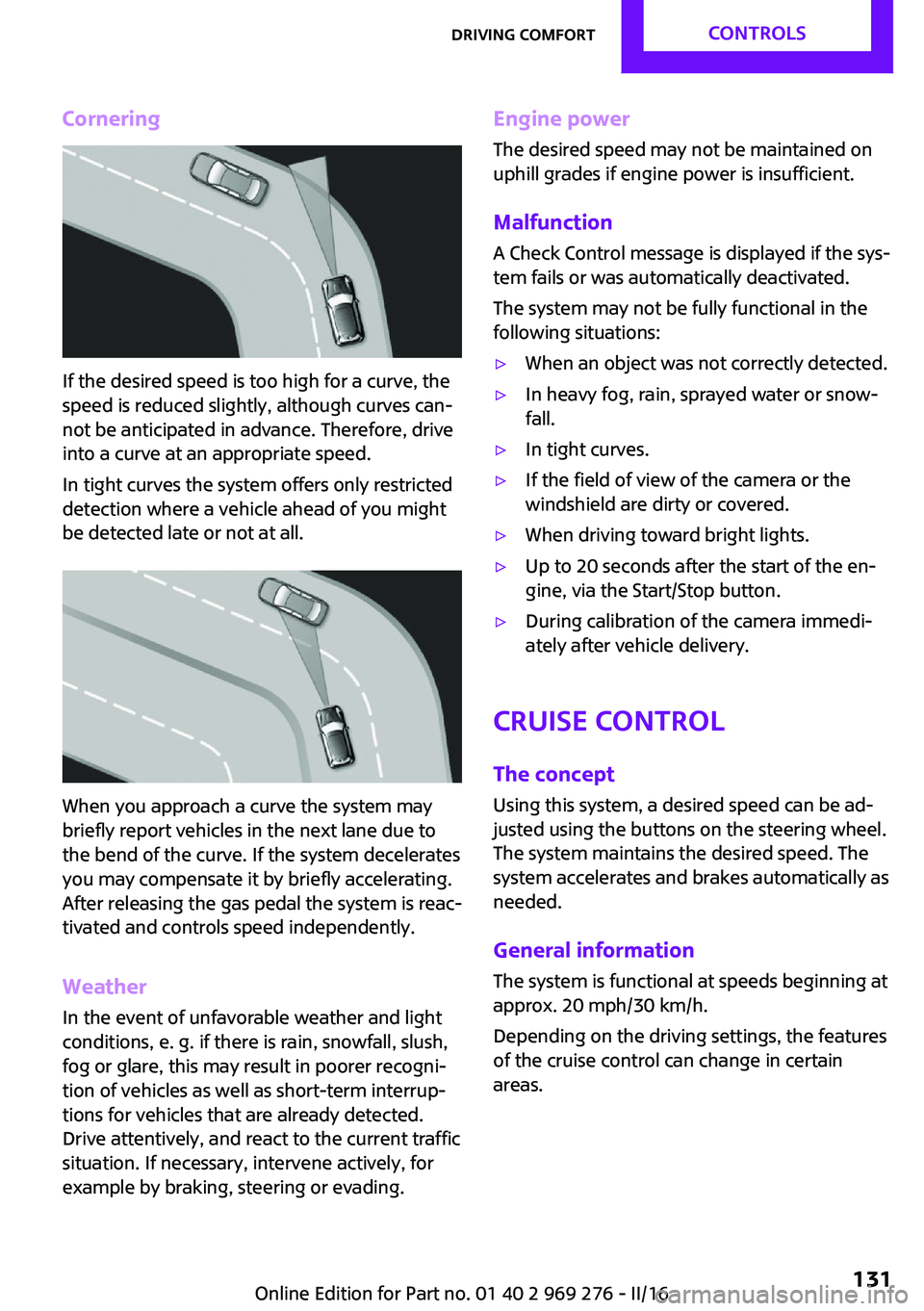
If the desired speed is too high for a curve, the
speed is reduced slightly, although curves can‐
not be anticipated in advance. Therefore, drive
into a curve at an appropriate speed.
In tight curves the system offers only restricted
detection where a vehicle ahead of you might
be detected late or not at all.
When you approach a curve the system may
briefly report vehicles in the next lane due to
the bend of the curve. If the system decelerates
you may compensate it by briefly accelerating.
After releasing the gas pedal the system is reac‐
tivated and controls speed independently.
Weather
In the event of unfavorable weather and light conditions, e. g. if there is rain, snowfall, slush,
fog or glare, this may result in poorer recogni‐
tion of vehicles as well as short-term interrup‐
tions for vehicles that are already detected.
Drive attentively, and react to the current traffic
situation. If necessary, intervene actively, for
example by braking, steering or evading.
Engine power
The desired speed may not be maintained on
uphill grades if engine power is insufficient.
Malfunction A Check Control message is displayed if the sys‐
tem fails or was automatically deactivated.
The system may not be fully functional in the
following situations:▷When an object was not correctly detected.▷In heavy fog, rain, sprayed water or snow‐
fall.▷In tight curves.▷If the field of view of the camera or the
windshield are dirty or covered.▷When driving toward bright lights.▷Up to 20 seconds after the start of the en‐
gine, via the Start/Stop button.▷During calibration of the camera immedi‐
ately after vehicle delivery.
Cruise control
The concept
Using this system, a desired speed can be ad‐
justed using the buttons on the steering wheel.
The system maintains the desired speed. The
system accelerates and brakes automatically as
needed.
General information
The system is functional at speeds beginning at
approx. 20 mph/30 km/h.
Depending on the driving settings, the features
of the cruise control can change in certain
areas.
Seite 131Driving comfortCONTROLS131
Online Edition for Part no. 01 40 2 969 276 - II/16
Page 141 of 252

▷When parking in parking spaces on the
driver's side, the corresponding turn signal
must be set.
Switching on and activating
Switching on with the button Press park assistance button.
The LED lights up.
The current status of the parking space search
is indicated on the Control Display.
Parking assistant is activated automatically.
Switching on with reverse gear
Shift into reverse.
The current status of the parking space search
is indicated on the Control Display.
To activate:
"Parking Assistant"
Indicator on the Control Display
System activated/deactivated
SymbolMeaning Gray: the system is not available.
White: the system is available but not
activated. The system is activated.
Parking space search and system status
▷Colored symbols, see arrows, on the side of
the vehicle illustrated. Parking assistant isactivated and search for parking space ac‐
tive.▷Control Display shows suitable parking
spaces at the edge of the road next to the
vehicle symbol. When the parking assistant
is active, suitable parking spaces are high‐
lighted.▷The parking procedure is ac‐
tive. Steering control has
been taken over by system.▷Parking space search is always active
whenever the vehicle is moving forward
slow and straight, even if the system is de‐
activated. When the system is deactivated,
the displays on the Control Display are
shown in gray.
Parking using the parking assistant
1. Press park assistance button or shift
into reverse gear to switch the parking as‐
sistant on, refer to page 141. Activate the
parking assistant if needed.
Parking assistant is activated.
2.Pass the row of parked vehicles at a speed
of up to approx. 22 mph/35 km/h and at a
distance of maximum 5 ft/1.5 m.
The status of the parking space search and
possible parking spaces are displayed on
the display, refer to page 141.3.Follow the instructions on the display.
The best possible parking position will
come after gear change on the stationary
vehicle - wait for the automatic steering
wheel move.
The end of the parking procedure is indi‐
cated on the display.4.Adjust the parking position yourself if
needed.Seite 141Driving comfortCONTROLS141
Online Edition for Part no. 01 40 2 969 276 - II/16
Page 215 of 252
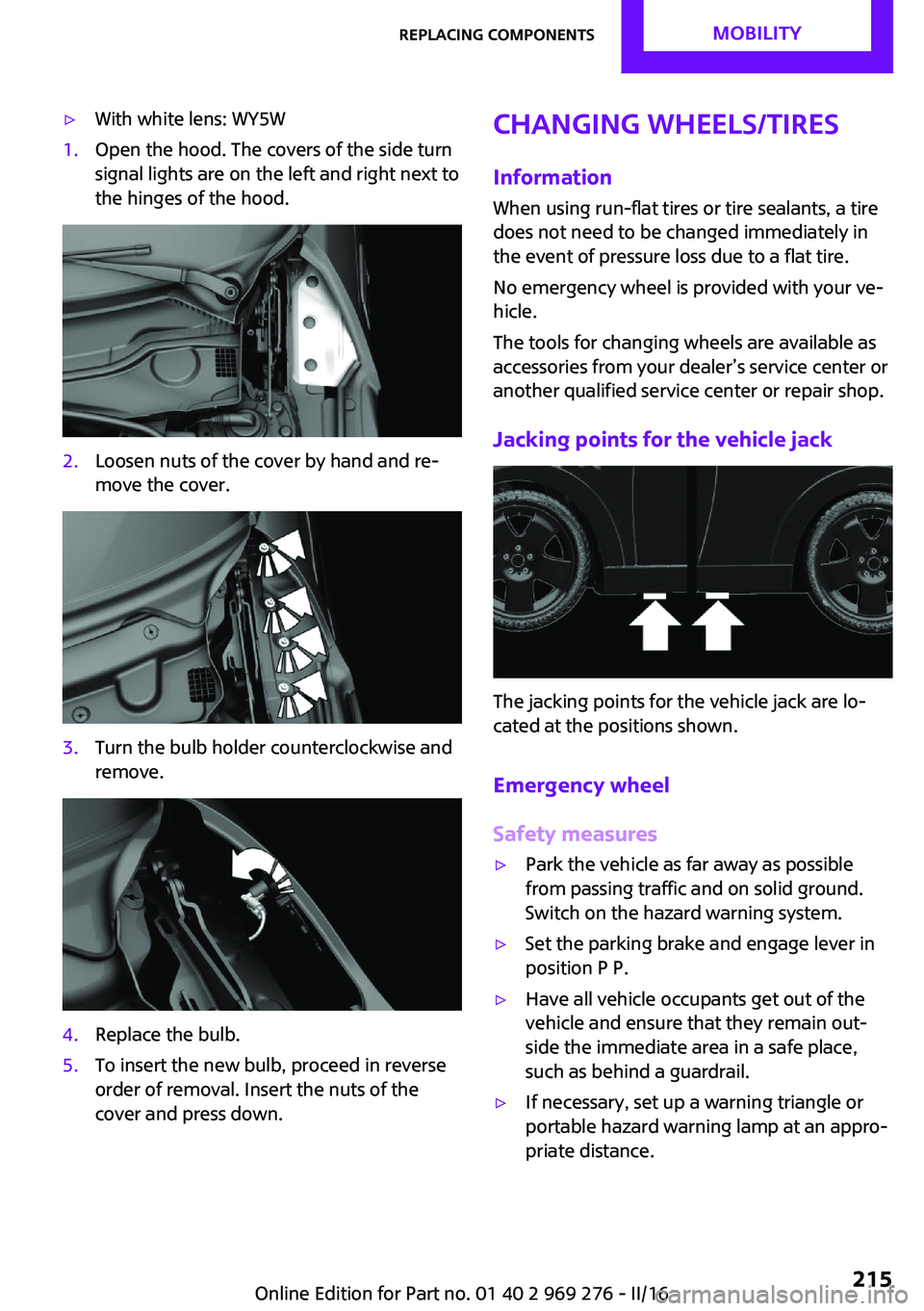
▷With white lens: WY5W1.Open the hood. The covers of the side turn
signal lights are on the left and right next to
the hinges of the hood.2.Loosen nuts of the cover by hand and re‐
move the cover.3.Turn the bulb holder counterclockwise and
remove.4.Replace the bulb.5.To insert the new bulb, proceed in reverse
order of removal. Insert the nuts of the
cover and press down.Changing wheels/tires
InformationWhen using run-flat tires or tire sealants, a tire
does not need to be changed immediately in
the event of pressure loss due to a flat tire.
No emergency wheel is provided with your ve‐
hicle.
The tools for changing wheels are available as
accessories from your dealer’s service center or
another qualified service center or repair shop.
Jacking points for the vehicle jack
The jacking points for the vehicle jack are lo‐
cated at the positions shown.
Emergency wheel
Safety measures
▷Park the vehicle as far away as possible
from passing traffic and on solid ground.
Switch on the hazard warning system.▷Set the parking brake and engage lever in
position P P.▷Have all vehicle occupants get out of the
vehicle and ensure that they remain out‐
side the immediate area in a safe place,
such as behind a guardrail.▷If necessary, set up a warning triangle or
portable hazard warning lamp at an appro‐
priate distance.Seite 215Replacing componentsMOBILITY215
Online Edition for Part no. 01 40 2 969 276 - II/16
Page 216 of 252
▷Perform wheel change only on a flat, solid
and slip-resistant surface. On soft or slip‐
pery ground, for example, snow, ice, tiles,
etc., the vehicle or vehicle jack can slip
away to the side.▷Do not place wood blocks or similar items
under the vehicle jack; otherwise, it cannot
reach its carrying capacity because of the
restricted height.▷If the vehicle is raised, do not lie under the
vehicle and do not start the engine; other‐
wise, a fatal hazard exists.
Information
WARNING
The vehicle jack is optimized for lifting
the vehicle and for the jacking points on the ve‐
hicle only. There is a a risk of injury. Do not lift
any other vehicle or cargo using the vehicle
jack. ◀
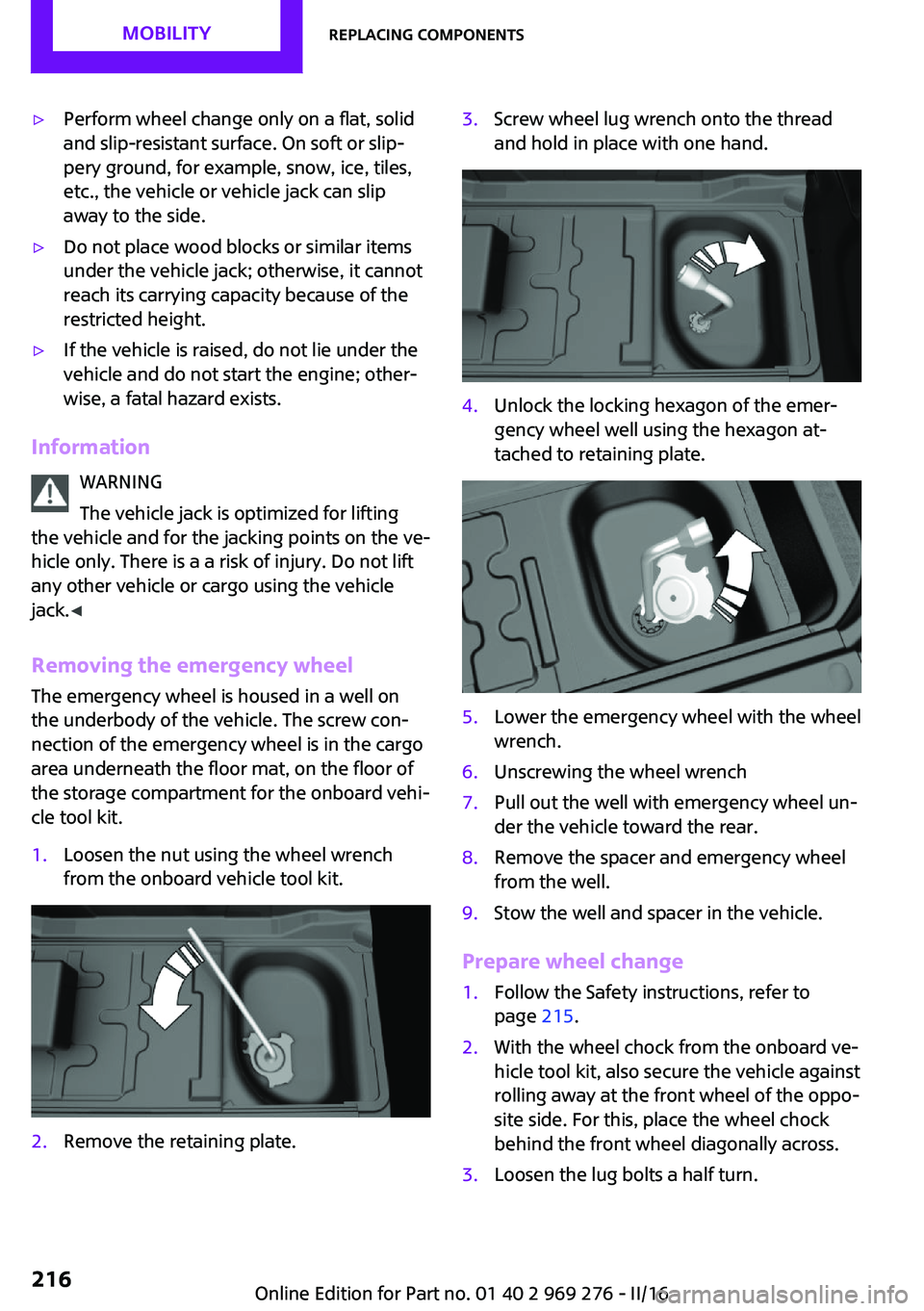
Removing the emergency wheel The emergency wheel is housed in a well on
the underbody of the vehicle. The screw con‐
nection of the emergency wheel is in the cargo
area underneath the floor mat, on the floor of
the storage compartment for the onboard vehi‐
cle tool kit.
1.Loosen the nut using the wheel wrench
from the onboard vehicle tool kit.2.Remove the retaining plate.3.Screw wheel lug wrench onto the thread
and hold in place with one hand.4.Unlock the locking hexagon of the emer‐
gency wheel well using the hexagon at‐
tached to retaining plate.5.Lower the emergency wheel with the wheel
wrench.6.Unscrewing the wheel wrench7.Pull out the well with emergency wheel un‐
der the vehicle toward the rear.8.Remove the spacer and emergency wheel
from the well.9.Stow the well and spacer in the vehicle.
Prepare wheel change
1.Follow the Safety instructions, refer to
page 215.2.With the wheel chock from the onboard ve‐
hicle tool kit, also secure the vehicle against
rolling away at the front wheel of the oppo‐
site side. For this, place the wheel chock
behind the front wheel diagonally across.3.Loosen the lug bolts a half turn.Seite 216MOBILITYReplacing components216
Online Edition for Part no. 01 40 2 969 276 - II/16
Page 217 of 252
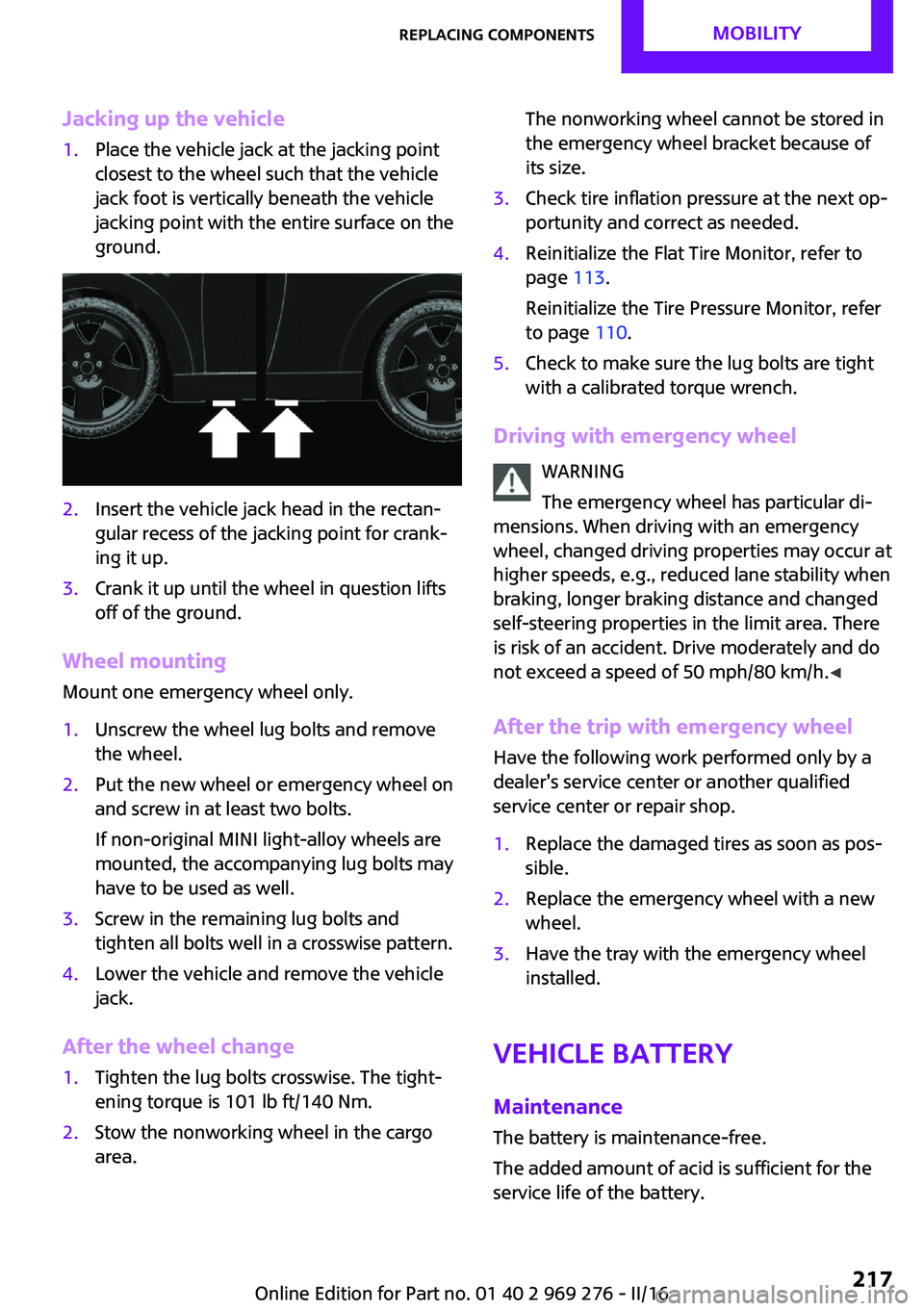
Jacking up the vehicle1.Place the vehicle jack at the jacking point
closest to the wheel such that the vehicle
jack foot is vertically beneath the vehicle
jacking point with the entire surface on the
ground.2.Insert the vehicle jack head in the rectan‐
gular recess of the jacking point for crank‐
ing it up.3.Crank it up until the wheel in question lifts
off of the ground.
Wheel mounting
Mount one emergency wheel only.
1.Unscrew the wheel lug bolts and remove
the wheel.2.Put the new wheel or emergency wheel on
and screw in at least two bolts.
If non-original MINI light-alloy wheels are
mounted, the accompanying lug bolts may
have to be used as well.3.Screw in the remaining lug bolts and
tighten all bolts well in a crosswise pattern.4.Lower the vehicle and remove the vehicle
jack.
After the wheel change
1.Tighten the lug bolts crosswise. The tight‐
ening torque is 101 lb ft/140 Nm.2.Stow the nonworking wheel in the cargo
area.The nonworking wheel cannot be stored in
the emergency wheel bracket because of
its size.3.Check tire inflation pressure at the next op‐
portunity and correct as needed.4.Reinitialize the Flat Tire Monitor, refer to
page 113.
Reinitialize the Tire Pressure Monitor, refer
to page 110.5.Check to make sure the lug bolts are tight
with a calibrated torque wrench.
Driving with emergency wheel
WARNING
The emergency wheel has particular di‐
mensions. When driving with an emergency wheel, changed driving properties may occur at
higher speeds, e.g., reduced lane stability when
braking, longer braking distance and changed
self-steering properties in the limit area. There
is risk of an accident. Drive moderately and do
not exceed a speed of 50 mph/80 km/h. ◀
After the trip with emergency wheel
Have the following work performed only by a
dealer's service center or another qualified
service center or repair shop.
1.Replace the damaged tires as soon as pos‐
sible.2.Replace the emergency wheel with a new
wheel.3.Have the tray with the emergency wheel
installed.
Vehicle battery
Maintenance
The battery is maintenance-free.
The added amount of acid is sufficient for the
service life of the battery.
Seite 217Replacing componentsMOBILITY217
Online Edition for Part no. 01 40 2 969 276 - II/16
Page 243 of 252
Bulbs and lights 209
Button, Start/Stop 66
Bypassing, see Jump-start‐ ing 220
C California Proposition 65 Warning 8
Camera-based cruise con‐ trol 126
Camera lenses, care 230
Camera, rearview cam‐ era 137
Can holder, see Cup holder 161
Car battery 217
Care, displays 230
Care, vehicle 227
Cargo area, enlarging 158
Cargo area partition 158
Cargo area, storage compart‐ ments 162
Cargo straps, securing cargo 171
Car key, see Remote con‐ trol 34
Carpet, care 229
Car wash 226
Catalytic converter, see Hot exhaust system 167
CBS Condition Based Serv‐ ice 206
Center armrest 161
Center console 16
Central instrument cluster, LED ring 94
Central locking system 40
Central screen, refer to Control Display 18
Changes, technical, refer to Own Safety 7
Changing parts 208
Changing wheels 215
Changing wheels/tires 192 Chassis number, see vehicle
identification number 10
Check Control 81
Checking the oil level elec‐ tronically 200
Children, seating position 63
Children, transporting safely 63
Child restraint fixing sys‐ tem 63
Child restraint fixing system LATCH 65
Child restraint fixing systems, mounting 64
Child seat, mounting 64
Child seats 63
Chrome parts, care 229
Chrono package, cockpit 97
Cigarette lighter 155
Cleaning, displays 230
Climate control 144, 146
Clock 85
Closing/opening via door lock 40
Closing/opening with remote control 38
Coasting 177
Coasting with engine decou‐ pled, coasting 177
Coasting with idling en‐ gine 177
Combination switch, see Turn signals 71
Combi switch, see wiper sys‐ tem 72
Comfort Access 41
Comfort entry 38
Compartments in the doors 161
Compass 153
Compressor 194
Condensation on win‐ dows 149
Condensation under the vehi‐ cle 168 Condition Based Service
CBS 206
Configuring driving pro‐ gram 125
Confirmation signal 44
Control Display 18
Control Display, settings 92
Controller 19
Control systems, driving stabil‐ ity 122
Convenient closing with the remote control 39
Convenient opening 38
Convertible, convertible top 47
Convertible mode, automatic climate control 148
Convertible program, auto‐ matic climate control 148
Convertible, roof 47
Convertible top 47
Convertible top, care 227
Convertible top, cargo area partition 50
Convertible top, emergency operation 50
Convertible top, rollover pro‐ tection system 108
Coolant 204
Cooling function 145, 147
Cooling, maximum 147
Cooling system 204
Cornering light 102
Corrosion on brake discs 168
Cosmetic mirror 155
Courtesy lamps during unlock‐ ing 38
Courtesy lamps with the vehi‐ cle locked 39
Cruise control 131
Cruise control, active 126
Cruise control with distance control, see camera-based
cruise control 126 Seite 243Everything from A to ZREFERENCE243
Online Edition for Part no. 01 40 2 969 276 - II/16
Page 244 of 252
Cruise control without dis‐tance control, see cruise con‐
trol 131
Cruising range 86
Cup holder 161
Current fuel consumption 86
D
Damage, tires 191
Damping control, dy‐ namic 124
Data, technical 234, 236
Date 85
Daytime running lights 102
Defrosting, see defrosting the windows 146
Defrosting, see Windows, de‐ frosting 149
Defrosting the windows 146
Dehumidifying, air 145, 147
Deleting personal data 24
Deletion of personal data 24
Destination distance 91
Digital clock 85
Digital compass 153
Dimensions 234
Dimmable exterior mirrors 61
Dimmable interior mirror 61
Direction indicator, see Turn signals 71
Display, electronic, instrument cluster 81
Display, engine tempera‐ ture 90
Display lighting, see Instru‐ ment lighting 103
Displays 80
Displays, cleaning 230
Disposal, coolant 205
Disposal, vehicle battery 218
Distance control, see PDC 134
Distance to destination 91
Divided screen view, split screen 23 Door lock, see Remote con‐
trol 34
Drive mode, GREEN Mode 174
Drive-off assistant 125
Drive-off assistant, see DSC 122
Driving Dynamics Control 124
Driving Excitement, SPORT 91
Driving instruction, GREEN Mode 176
Driving instructions, break- in 166
Driving modes 124
Driving notes, general 167
Driving on racetracks 169
Driving stability control sys‐ tems 122
Driving style analysis 178
Driving tips 167
DSC Dynamic Stability Con‐ trol 122
DTC Dynamic Traction Con‐ trol 123
Dynamic Damping Con‐ trol 124
Dynamic Stability Control DSC 122
Dynamic Traction Control DTC 123
E Electronic displays, instrument cluster 81
Electronic oil measure‐ ment 200
Electronic Stability Program ESP, see DSC 122
Emergency detection, remote control 35
Emergency operation, conver‐ tible top 50
Emergency service, see Road‐ side Assistance 220 Emergency start function, en‐
gine start 35
Emergency unlocking, tail‐ gate 41
Emergency wheel, compact wheel, see Emergency
wheel 215
Energy Control 86
Engine, automatic Start/Stop function 68
Engine, automatic switch- off 68
Engine compartment 198
Engine compartment, working in 198
Engine coolant 204
Engine idling when driving, coasting 177
Engine oil 200
Engine oil, adding 201
Engine oil additives 202
Engine oil change 202
Engine oil filler neck 201
Engine oil types, alterna‐ tive 202
Engine oil types, suitable 202
Engine start during malfunc‐ tion 35
Engine start, jump-start‐ ing 220
Engine start, see Starting the engine 67
Engine stop 68
Engine temperature, dis‐ play 90
Entering a car wash 226
Equipment, interior 151
Error displays, see Check Con‐ trol 81
ESP Electronic Stability Pro‐ gram, see DSC 122
Exchanging wheels/tires 192
Exhaust system 167
Expanding the cargo area vol‐ ume 158 Seite 244REFERENCEEverything from A to Z244
Online Edition for Part no. 01 40 2 969 276 - II/16
Page 245 of 252
Exterior mirror, automaticdimming feature 61
Exterior mirrors 60
External start 220
External temperature dis‐ play 85
External temperature warn‐ ing 85
Eyes for securing cargo 171
F
Failure message, see Check Control 81
False alarm, see Unintentional alarm 45
Fan, see Air flow 145, 148
Favorites buttons, onboard monitor 24
Filler neck for engine oil 201
Fine wood, care 229
First-aid kit 220
Flat tire, changing wheels 215
Flat Tire Monitor FTM 113
Flat tire, repairing 194
Flat tire, Tire Pressure Monitor TPM 109
Flat tire, warning lamp 110, 113
Flooding 167
Floor carpet, care 229
Floor mats, care 229
Fogged up windows 146
Fold-away position, wind‐ shield wipers 74
Folding back rear seat backr‐ ests 158
Foot brake 167
Front airbags 105
Front-end collision warning with City Braking func‐
tion 116
Front fog lights 103
Front-seat passenger airbags, automatic deactivation 107 Front-seat passenger airbags,
indicator lamp 107
FTM Flat Tire Monitor 113
Fuel 184
Fuel consumption, see Aver‐ age fuel consumption 90
Fuel filler flap 182
Fuel gauge 85
Fuel lid 182
Fuel quality 184
Fuel recommendation 184
Fuel, tank capacity 236
Fuse 219
G Garage door opener, see Uni‐ versal Integrated Remote
Control 151
Gasoline 184
Gear change, Steptronic trans‐ mission 76
Gear shift indicator 87
General driving notes 167
Glare shield 155
Glove compartment 160
GREEN Mode 174
GREEN Mode, bonus range 176
GREEN Mode driving style analysis 178
GREEN Mode indicator 174
GREEN - program, driving dy‐ namics 124
GREEN tip 176
Gross vehicle weight, ap‐ proved 235
Ground clearance 168
H Halogen headlights 209
Handbrake, see parking brake 71
Hand-held transmitter, alter‐ nating code 152 Hazard warning flashers 220
Headlamp control, auto‐ matic 101
Headlight courtesy delay fea‐ ture 101
Headlight flasher 72
Headlight glass 209
Headlights, care 227
Head restraints 54
Head restraints, front 58
Head restraints, rear 59
Head-up Display 94
Head-Up Display, Shift point indicator 96
Head-up Display, sport dis‐ plays 96
Head-up Display, standard view 95
Heavy cargo, stowing 171
High-beam Assistant 102
High beams 72
High beams/low beams, see High-beam Assistant 102
Hills 168
Hill start assistant, see Drive- off assistant 125
Holder for beverages 161
Homepage 6
Hood 198
Horn 14
Hot exhaust system 167
HUD Head-up Display 94
Hydroplaning 167
I
Ice warning, see External tem‐ perature warning 85
Icy roads, see External tem‐ perature warning 85
Identification marks, tires 190
Identification number, see ve‐ hicle identification num‐
ber 10
Ignition key, see Remote con‐ trol 34 Seite 245Everything from A to ZREFERENCE245
Online Edition for Part no. 01 40 2 969 276 - II/16