door lock MINI COOPER CONVERTIBLE 2016 User Guide
[x] Cancel search | Manufacturer: MINI, Model Year: 2016, Model line: COOPER CONVERTIBLE, Model: MINI COOPER CONVERTIBLE 2016Pages: 252, PDF Size: 5.41 MB
Page 63 of 252
Transporting children safelyVehicle features and op‐
tions
This chapter describes all standard, country-
specific and optional features offered with the
series. It also describes features that are notnecessarily available in your car, e. g., due to
the selected options or country versions. This
also applies to safety-related functions and sys‐
tems. The respectively applicable country provi‐
sions must be observed when using the respec‐
tive features and systems.
The right place for children
Information
WARNING
Unattended children or animals can
cause the vehicle to move and endanger them‐
selves and traffic, e.g., due to the following ac‐
tions:▷Pressing the Start/Stop button.▷Releasing the parking brake.▷Opening and closing the doors or windows.▷Engaging selector lever position N.▷Using vehicle equipment.
There is risk of accidents or injuries. Do not
leave children or animals unattended in the ve‐
hicle. Take the remote control with you when
exiting and lock the vehicle. ◀
Children should always be in the rear WARNING
Children shorter than 5 ft, 150 cm cannot
correctly fasten the safety belt without suitable
additional restraint systems. The protective ef‐
fect of the safety belts can be limited or lost
when safety belts are fastened incorrectly. An
incorrectly fastened safety belt can cause addi‐
tional injuries, e.g., in the event of an accident
or during braking and evasive maneuvers.
There is a risk of injury or danger to life. Secure
children shorter than 5 ft, 150 cm using suitable
restraint systems. ◀
Accident research shows that the safest place
for children is in the rear seat.
Only transport children younger than 13 years
of age or shorter than 5 ft, 150 cm in the rear in
suitable child restraint systems provided in ac‐
cordance with the age, weight and size of the
child.
Children 13 years of age or older must wear a
safety belt as soon as a suitable child restraint
system can no longer be used due to their age,
weight and size.
Children on the front passenger seat
Before using a child restraint system on the
front passenger seat, ensure that the front,
knee, and side airbags on the front passenger
side are deactivated. Automatic deactivation of
front-seat passenger airbags, refer to
page 107.
Information WARNING
Active front-seat passenger airbags can
injure a child in a child restraint system when
the airbags are activated. There is a risk of in‐
jury. Make sure that the front-seat passenger
airbags are deactivated and that the PASSEN‐
GER AIRBAG OFF indicator lamp lights up. ◀Seite 63Transporting children safelyCONTROLS63
Online Edition for Part no. 01 40 2 969 276 - II/16
Page 66 of 252

DrivingVehicle features and op‐
tions
This chapter describes all standard, country-
specific and optional features offered with the
series. It also describes features that are not
necessarily available in your car, e. g., due to
the selected options or country versions. This
also applies to safety-related functions and sys‐
tems. The respectively applicable country provi‐
sions must be observed when using the respec‐
tive features and systems.
Start/Stop button The concept Pressing the Start/Stop button
switches the ignition on or off
and starts the engine.
Steptronic transmission: the en‐
gine starts in selector lever posi‐
tion P or N with the brake pedal pressed when
you press the Start/Stop button.
Manual transmission: the engine starts with the
clutch pedal pressed when the Start/Stop but‐
ton is pressed.
Ignition on Manual transmission: press the Start/Stop but‐
ton without stepping on the clutch pedal.
Steptronic transmission: press the Start/Stop
button, and do not press on the brake pedal at
the same time.
All vehicle systems are ready for operation.
Most of the indicator and warning lights in the
instrument cluster light up for a varied length of
time.To save battery power when the engine is off,
switch off the ignition and any unnecessary
electronic systems/power consumers.
Ignition off
Manual transmission: press the Start/Stop but‐
ton again without stepping on the clutch pedal.
Steptronic transmission: shift to selector lever
position P, press the Start/Stop button again
without stepping on the brake.
All indicator lights in the instrument cluster go
out.
To save battery power when the engine is off,
switch off the ignition and any unnecessary electronic systems/power consumers.
The ignition is switched off automatically in the
following situations while the vehicle is station‐
ary and the engine is off:▷During locking, also with the low beams ac‐
tivated.▷Shortly before the battery is discharged
completely, so that the engine can still be
started. This function is only available when
the low beams are turned off.▷When opening and closing the driver door,
if the driver's safety belt is unbuckled and
the low beams are turned off.▷While the driver's safety belt is unbuckled
with driver's door open and low beams off.▷The low beams switch to parking lights af‐
ter approx. 15 minutes of no use.
Radio ready state
Activate radio-ready state: when the engine is
running: press the Start/Stop button.
Some electronic systems/power consumers re‐
main ready for operation.
The radio-ready state is switched off automati‐
cally in the following situations:
Seite 66CONTROLSDriving66
Online Edition for Part no. 01 40 2 969 276 - II/16
Page 67 of 252
▷After approx. 8 minutes.▷When the vehicle is locked using the central
locking system.▷Shortly before the battery is discharged
completely, so that the engine can still be
started.
The radio-ready state remains active if, for ex‐
ample, the ignition is automatically switched off
for the following reasons:
▷Opening or closing the driver's door.▷Unfastening of the driver's safety belt.▷When automatically switching from low
beams to parking lights.
If the engine is switched off and the ignition is
switched on, the system automatically switches
to the radio-ready state if the lights are turned
off or, if correspondingly equipped, the day‐
time running lights are activated.
Starting the engine
Information DANGER
If the exhaust pipe is blocked or ventila‐
tion is insufficient, harmful exhaust gases can
enter into the vehicle. The exhaust gases con‐
tain carbon monoxide, an odorless and color‐
less but highly toxic gas. In enclosed areas, ex‐
haust gases can also accumulate outside of the
vehicle. There is danger to life. Keep the ex‐
haust pipe free and ensure sufficient ventila‐
tion. ◀
WARNING
An unsecured vehicle can begin to move
and possibly roll away. There is risk of an acci‐
dent. Before exiting, secure the vehicle against
rolling.
In order to ensure that the vehicle is secured
against rolling away, observe the following:
▷Set the parking brake.▷On uphill grades or on a downhill slope,
turn the front wheels in the direction of the
curb.▷On uphill grades or on a downhill slope,
also secure the vehicle, e.g., with a wheel
chock. ◀
ATTENTION
In the case of repeated starting attempts
or repeated starting in quick succession, the
fuel is not burned or is inadequately burned.
The catalytic converter can overheat. There is a
risk of damage to property. Avoid repeated
starting in quick succession. ◀
Steptronic transmission
Starting the engine
1.Depress the brake pedal.2.Engage selector lever position P or N.3.Press the Start/Stop button.
The ignition is activated automatically for a cer‐
tain time and is stopped as soon as the engine
starts.
Manual transmission
Starting the engine
1.Depress the brake pedal.2.Press on the clutch pedal and shift to neu‐
tral.3.Press the Start/Stop button.
The ignition is activated automatically for a cer‐
tain time and is stopped as soon as the engine
starts.
Seite 67DrivingCONTROLS67
Online Edition for Part no. 01 40 2 969 276 - II/16
Page 68 of 252
Engine stop
Information WARNING
Unattended children or animals can
cause the vehicle to move and endanger them‐
selves and traffic, e.g., due to the following ac‐
tions:▷Pressing the Start/Stop button.▷Releasing the parking brake.▷Opening and closing the doors or windows.▷Engaging selector lever position N.▷Using vehicle equipment.
There is risk of accidents or injuries. Do not
leave children or animals unattended in the ve‐
hicle. Take the remote control with you when
exiting and lock the vehicle. ◀
WARNING
An unsecured vehicle can begin to move
and possibly roll away. There is risk of an acci‐
dent. Before exiting, secure the vehicle against
rolling.
In order to ensure that the vehicle is secured
against rolling away, observe the following:
▷Set the parking brake.▷On uphill grades or on a downhill slope,
turn the front wheels in the direction of the
curb.▷On uphill grades or on a downhill slope,
also secure the vehicle, e.g., with a wheel
chock. ◀
Before driving into a car wash
So that the vehicle can roll into a car wash ob‐
serve instructions for going into an automatic
car wash, refer to page 226.
Steptronic transmission
Switching off the engine1.Engage selector lever position P with the
vehicle stopped.2.Press the Start/Stop button.
The engine is switched off.
The radio-ready state is switched on.3.Set the parking brake.
Manual transmission
Switching off the engine
1.With the vehicle at a standstill, press the
Start/Stop button.
The engine is switched off.
The radio-ready state is switched on.2.Shift into first gear or reverse.3.Set the parking brake.
Auto Start/Stop function
The concept
The Auto Start/Stop function helps save fuel.
The system switches off the engine during a
stop, for example, in traffic congestion or at
traffic lights. The ignition remains switched on.
The engine starts automatically for driving off.
Information
After every start of the engine using the Start/ Stop button, the Auto Start/Stop function is in
the last selected state, refer to page 70. When
the Auto Start/Stop function is active, it is avail‐
able when the vehicle is traveling faster than
about 3 mph, approx. 5 km/h.
Depending on the selected driving mode, refer
to page 124, the system is automatically acti‐
vated or deactivated.
Seite 68CONTROLSDriving68
Online Edition for Part no. 01 40 2 969 276 - II/16
Page 69 of 252

Engine stop
The engine is switched off automatically during
a stop under the following conditions:
Manual transmission:▷Neutral is engaged and the clutch pedal is
not pressed.▷The driver's safety belt is buckled or the
driver's door is closed.
Steptronic transmission:
▷The selector lever is in selector lever posi‐
tion D.▷Brake pedal remains depressed while the
vehicle is stopped.▷The driver's safety belt is buckled or the
driver's door is closed.
In order to be able to release the brake pedal,
engage lever in position P. The engine remains
off.
To continue driving depress the brake pedal.
When a gear is engaged, the engine starts au‐
tomatically.
The air flow from the air conditioner is reduced
when the engine is switched off.
Displays in the instrument cluster The display indicates that theAuto Start/Stop function is ready
for an Automatic engine start.
The display indicates that the
conditions for an automatic en‐
gine stop have not been met.
Functional limitations The engine is not switched off automatically in
the following situations:
▷External temperature too low.▷The external temperature is high and auto‐
matic climate control is running.▷The car's interior has not yet been heated
or cooled to the required level.▷The engine is not yet at operating tempera‐
ture.▷The wheels are at a sharp angle or the
steering wheel is being turned.▷After driving in reverse.▷Fogging of the windows when the auto‐
matic climate control is switched on.▷The vehicle battery charge is very low.▷At higher elevations.▷The engine compartment lid is unlocked.▷The parking assistant is activated.▷Stop-and-go traffic.▷Selector lever in selector lever position R, N
or M/S.
Starting the engine
The engine starts automatically under the fol‐
lowing conditions:
▷Manual transmission: clutch pedal is
pressed.▷Steptronic transmission: by releasing the
brake pedal.
After the engine starts, accelerate as usual.
Safety mode
After the engine switches off automatically, it
will not start again automatically if any one of
the following conditions are met:
▷The driver's safety belt is unbuckled and
the driver's door is open.▷The hood was unlocked.
Some indicator lights light up for a varied
length of time.
The engine can only be started via the Start/
Stop button.
Seite 69DrivingCONTROLS69
Online Edition for Part no. 01 40 2 969 276 - II/16
Page 161 of 252
Locking
The glove compartment can be locked with an
integrated key to separately secure the trunk
lid, refer to page 41, e.g.
This prevents access to the glove compartment
and to the trunk.
After the glove compartment is locked, the re‐
mote control can be handed over, such as at a
hotel, without the integrated key.
Compartments in the
doors
WARNING
Breakable objects, e.g., glass bottles, can
break in the event of an accident. Broken glass
can be scattered in the vehicle's interior. There
is a a risk of injury. Do not stow any breakable
objects in the vehicle's interior. ◀
Center armrest The center armrest contains a storage compart‐
ment.
Opening
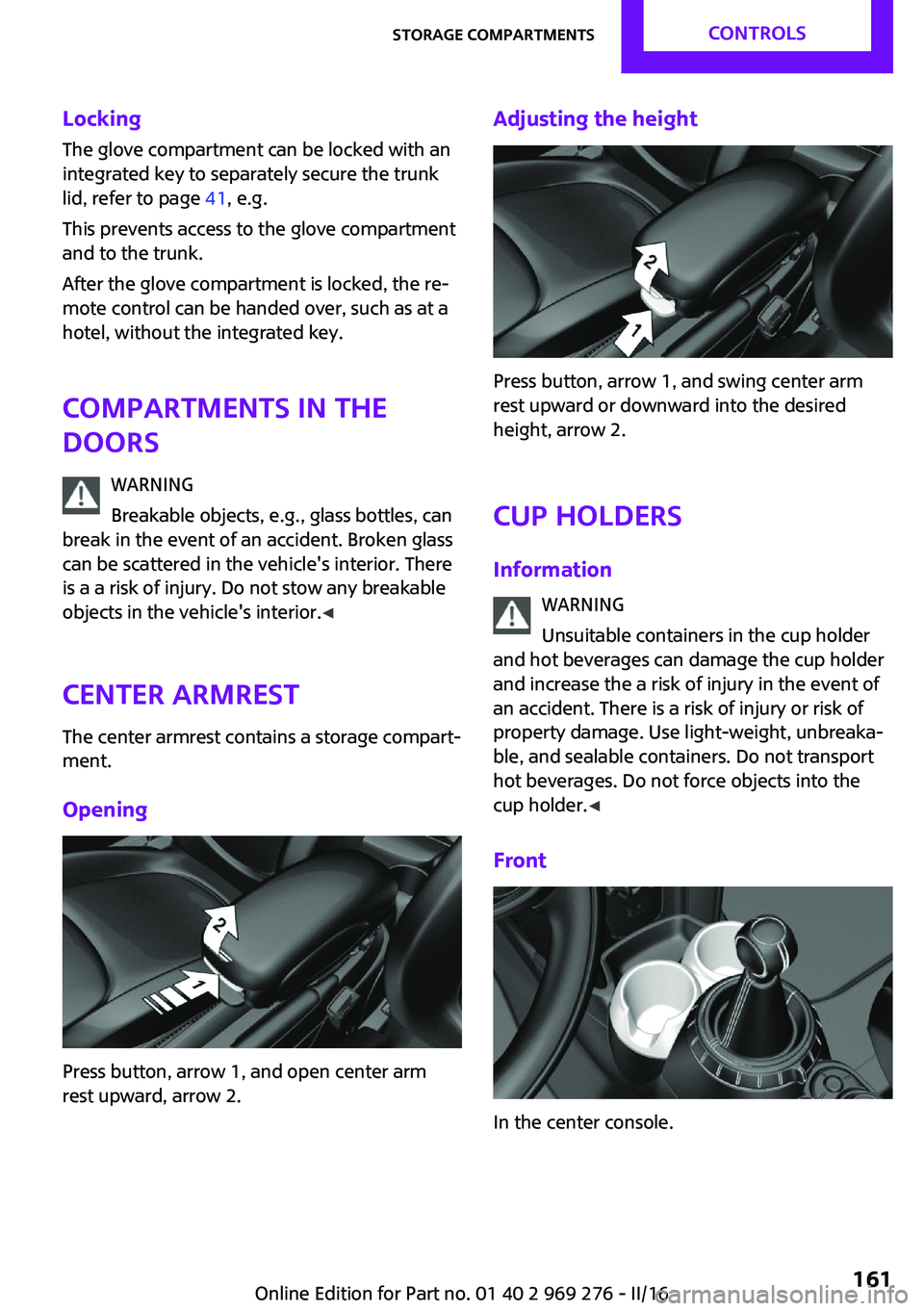
Press button, arrow 1, and open center arm
rest upward, arrow 2.
Adjusting the height
Press button, arrow 1, and swing center arm
rest upward or downward into the desired
height, arrow 2.
Cup holders Information WARNING
Unsuitable containers in the cup holder
and hot beverages can damage the cup holder
and increase the a risk of injury in the event of
an accident. There is a risk of injury or risk of
property damage. Use light-weight, unbreaka‐
ble, and sealable containers. Do not transport
hot beverages. Do not force objects into the
cup holder. ◀
Front
In the center console.
Seite 161Storage compartmentsCONTROLS161
Online Edition for Part no. 01 40 2 969 276 - II/16
Page 227 of 252
Before driving into a car washIn order to ensure that the vehicle can roll in a
car wash, take the following steps:
Manual transmission:1.Drive into the car wash.2.Shift to neutral.3.Switch the engine off.4.Switch on the ignition.
Steptronic transmission:
1.Drive into the car wash.2.Engage selector lever position N.3.Make sure that the parking brake is re‐
leased.4.Press the Start/Stop button to switch off the
engine.
In this way, the ignition remains switched
on, and two Check-Control messages are
displayed.
A signal sounds when you leave the vehicle
while in selector lever position N.
The vehicle cannot be locked from the outside
when in selector lever position N. A signal is
sounded when an attempt is made to lock the
vehicle.
To start the engine with manual transmission:
1.Press on the clutch pedal.2.Press the Start/Stop button.
To start the engine with Steptronic transmis‐
sion:
1.Depress the brake pedal.2.Press the Start/Stop button.
Headlights
▷Do not rub dry and do not use abrasive or
acidic cleansers.▷Soak areas that have been dirtied e. g.,
from insects, with shampoo and wash off
with water.▷Thaw ice with de-icing spray; do not use an
ice scraper.
After washing the vehicle
After washing the vehicle, apply the brakes
briefly to dry them; otherwise, braking action
can be reduced and corrosion of the brake
discs can occur.
Completely remove all residues on the win‐
dows, to minimize loss of visibility due to
smearing and to reduce wiper noises and wiper
blade wear.
Vehicle care Vehicle care products
The manufacturer of your vehicle recommends
using care and cleaning products from MINI.
WARNING
Cleansers can contain substances that are
dangerous and harmful to your health. There is
a risk of injury. When cleaning the interior,
open the doors or windows. Only use products
intended for cleaning vehicles. Follow the in‐
structions on the container. ◀
Vehicle paint Regular care contributes to driving safety and
value retention. Environmental influences in
areas with elevated air pollution or natural con‐
taminants, such as tree resin or pollen can af‐
fect the vehicle's paintwork. Tailor the fre‐
quency and extent of your vehicle care to these
influences.
Aggressive substances such as spilled fuel, oil,
grease or bird droppings, must be removed im‐
mediately to prevent the finish from being al‐
tered or discolored.
Caring for the convertible top
The appearance and life of the convertible top
depend on correct care and operation.
Seite 227CareMOBILITY227
Online Edition for Part no. 01 40 2 969 276 - II/16
Page 229 of 252
ATTENTION
Open Velcro® fasteners on articles of
clothing can damage the seat covers. There is a
risk of damage to property. Ensure that any
Velcro® fasteners are closed. ◀
Caring for special components Light-alloy wheels
When cleaning the vehicle, use only neutral
wheel cleaners having a pH value from 5 to 9.
Do not use abrasive cleaning agents or steam
jets above 140 ℉/60 ℃. Follow the manufac‐
turer's instructions.
Aggressive, acidic or alkaline cleaning agents
can destroy the protective layer of adjacent
components, such as the brake disk.
Chrome surfaces
Carefully clean components such as the radia‐
tor grille or door handles with an ample supply
of water, possibly with shampoo added, partic‐
ularly when they have been exposed to road
salt.
Rubber components Environmental influences can cause surface
soiling of rubber parts and a loss of gloss. For
cleaning, use only water and suitable care
products, the manufacturer of your vehicle rec‐
ommends original MINI care products.
Treat especially worn rubber parts with rubber
care agents at regular intervals. When cleaning
rubber seals, do not use any silicon-containing
car care products in order to avoid damage or
noises.
Fine wood parts Clean fine wood facing and fine wood compo‐
nents only with a moist rag. Then dry with a
soft cloth.
Plastic components
These include:▷Imitation leather surfaces.▷Roofliner.▷Lamp lenses.▷Instrument cluster cover.▷Matt black spray-coated components.▷Painted parts in the interior.
Clean with a microfiber cloth.
Dampen cloth lightly with water.
Do not soak the roofliner.
ATTENTION
Cleansers that contain alcohol or solvents,
such as lacquer thinners, heavy-duty grease re‐
movers, fuel, or such, can damage plastic parts.
There is a risk of damage to property. Clean
with a microfiber cloth. Dampen cloth lightly
with water. ◀
Safety belts Dirty belt straps impede the reeling action and
thus have a negative impact on safety.
WARNING
Chemical cleansers can destroy the safety
belt webbing. Missing protective effect of the
safety belts. There is a risk of injury or danger to
life. Use only a mild soapy solution for cleaning
the safety belts. ◀
Use only a mild soapy solution, with the safety
belts clipped into their buckles.
Do not allow the switchs to retract the safety
belts until they are dry.
Carpets and floor mats WARNING
Objects in the driver's floor area can limit
the pedal distance or block a depressed pedal.
There is risk of an accident. Stow objects in the
vehicle such that they are secured and cannot
enter into the driver's floor area. Use floor mats
that are suitable for the vehicle and can be
safely attached to the floor. Do not use loose
Seite 229CareMOBILITY229
Online Edition for Part no. 01 40 2 969 276 - II/16
Page 243 of 252
Bulbs and lights 209
Button, Start/Stop 66
Bypassing, see Jump-start‐ ing 220
C California Proposition 65 Warning 8
Camera-based cruise con‐ trol 126
Camera lenses, care 230
Camera, rearview cam‐ era 137
Can holder, see Cup holder 161
Car battery 217
Care, displays 230
Care, vehicle 227
Cargo area, enlarging 158
Cargo area partition 158
Cargo area, storage compart‐ ments 162
Cargo straps, securing cargo 171
Car key, see Remote con‐ trol 34
Carpet, care 229
Car wash 226
Catalytic converter, see Hot exhaust system 167
CBS Condition Based Serv‐ ice 206
Center armrest 161
Center console 16
Central instrument cluster, LED ring 94
Central locking system 40
Central screen, refer to Control Display 18
Changes, technical, refer to Own Safety 7
Changing parts 208
Changing wheels 215
Changing wheels/tires 192 Chassis number, see vehicle
identification number 10
Check Control 81
Checking the oil level elec‐ tronically 200
Children, seating position 63
Children, transporting safely 63
Child restraint fixing sys‐ tem 63
Child restraint fixing system LATCH 65
Child restraint fixing systems, mounting 64
Child seat, mounting 64
Child seats 63
Chrome parts, care 229
Chrono package, cockpit 97
Cigarette lighter 155
Cleaning, displays 230
Climate control 144, 146
Clock 85
Closing/opening via door lock 40
Closing/opening with remote control 38
Coasting 177
Coasting with engine decou‐ pled, coasting 177
Coasting with idling en‐ gine 177
Combination switch, see Turn signals 71
Combi switch, see wiper sys‐ tem 72
Comfort Access 41
Comfort entry 38
Compartments in the doors 161
Compass 153
Compressor 194
Condensation on win‐ dows 149
Condensation under the vehi‐ cle 168 Condition Based Service
CBS 206
Configuring driving pro‐ gram 125
Confirmation signal 44
Control Display 18
Control Display, settings 92
Controller 19
Control systems, driving stabil‐ ity 122
Convenient closing with the remote control 39
Convenient opening 38
Convertible, convertible top 47
Convertible mode, automatic climate control 148
Convertible program, auto‐ matic climate control 148
Convertible, roof 47
Convertible top 47
Convertible top, care 227
Convertible top, cargo area partition 50
Convertible top, emergency operation 50
Convertible top, rollover pro‐ tection system 108
Coolant 204
Cooling function 145, 147
Cooling, maximum 147
Cooling system 204
Cornering light 102
Corrosion on brake discs 168
Cosmetic mirror 155
Courtesy lamps during unlock‐ ing 38
Courtesy lamps with the vehi‐ cle locked 39
Cruise control 131
Cruise control, active 126
Cruise control with distance control, see camera-based
cruise control 126 Seite 243Everything from A to ZREFERENCE243
Online Edition for Part no. 01 40 2 969 276 - II/16
Page 244 of 252
Cruise control without dis‐tance control, see cruise con‐
trol 131
Cruising range 86
Cup holder 161
Current fuel consumption 86
D
Damage, tires 191
Damping control, dy‐ namic 124
Data, technical 234, 236
Date 85
Daytime running lights 102
Defrosting, see defrosting the windows 146
Defrosting, see Windows, de‐ frosting 149
Defrosting the windows 146
Dehumidifying, air 145, 147
Deleting personal data 24
Deletion of personal data 24
Destination distance 91
Digital clock 85
Digital compass 153
Dimensions 234
Dimmable exterior mirrors 61
Dimmable interior mirror 61
Direction indicator, see Turn signals 71
Display, electronic, instrument cluster 81
Display, engine tempera‐ ture 90
Display lighting, see Instru‐ ment lighting 103
Displays 80
Displays, cleaning 230
Disposal, coolant 205
Disposal, vehicle battery 218
Distance control, see PDC 134
Distance to destination 91
Divided screen view, split screen 23 Door lock, see Remote con‐
trol 34
Drive mode, GREEN Mode 174
Drive-off assistant 125
Drive-off assistant, see DSC 122
Driving Dynamics Control 124
Driving Excitement, SPORT 91
Driving instruction, GREEN Mode 176
Driving instructions, break- in 166
Driving modes 124
Driving notes, general 167
Driving on racetracks 169
Driving stability control sys‐ tems 122
Driving style analysis 178
Driving tips 167
DSC Dynamic Stability Con‐ trol 122
DTC Dynamic Traction Con‐ trol 123
Dynamic Damping Con‐ trol 124
Dynamic Stability Control DSC 122
Dynamic Traction Control DTC 123
E Electronic displays, instrument cluster 81
Electronic oil measure‐ ment 200
Electronic Stability Program ESP, see DSC 122
Emergency detection, remote control 35
Emergency operation, conver‐ tible top 50
Emergency service, see Road‐ side Assistance 220 Emergency start function, en‐
gine start 35
Emergency unlocking, tail‐ gate 41
Emergency wheel, compact wheel, see Emergency
wheel 215
Energy Control 86
Engine, automatic Start/Stop function 68
Engine, automatic switch- off 68
Engine compartment 198
Engine compartment, working in 198
Engine coolant 204
Engine idling when driving, coasting 177
Engine oil 200
Engine oil, adding 201
Engine oil additives 202
Engine oil change 202
Engine oil filler neck 201
Engine oil types, alterna‐ tive 202
Engine oil types, suitable 202
Engine start during malfunc‐ tion 35
Engine start, jump-start‐ ing 220
Engine start, see Starting the engine 67
Engine stop 68
Engine temperature, dis‐ play 90
Entering a car wash 226
Equipment, interior 151
Error displays, see Check Con‐ trol 81
ESP Electronic Stability Pro‐ gram, see DSC 122
Exchanging wheels/tires 192
Exhaust system 167
Expanding the cargo area vol‐ ume 158 Seite 244REFERENCEEverything from A to Z244
Online Edition for Part no. 01 40 2 969 276 - II/16