tailgate MINI COOPER CONVERTIBLE 2016 User Guide
[x] Cancel search | Manufacturer: MINI, Model Year: 2016, Model line: COOPER CONVERTIBLE, Model: MINI COOPER CONVERTIBLE 2016Pages: 252, PDF Size: 5.41 MB
Page 140 of 252
InformationA component of the parking assistant is the
PDC Park Distance Control, refer to page 134.
When parking, also take note of the visual and
acoustic information issued by the PDC, the
parking assistant and, where applicable, the
rearview camera, and react accordingly.
Loud noises from outside and inside the vehicle
may prevent you from hearing the PDC's signal tone.
WARNING
The system does not release from the
personal responsibility to correctly assess the
traffic situation. Based on the limits of the sys‐
tem, it cannot independently react to all traffic situations. There is risk of an accident. Adjust
the driving style to the traffic conditions. Watch
traffic closely and actively intervene in the re‐
spective situations. ◀
ATTENTION
The parking assistant can steer the vehi‐
cle over or onto curbs. There is a risk of damage
to property. Watch traffic closely and actively intervene in the respective situations. ◀
An engine that has been switched off by the
Auto Start Stop function is restarted automati‐
cally when the parking assistant is activated.
Overview
Button in the vehicle
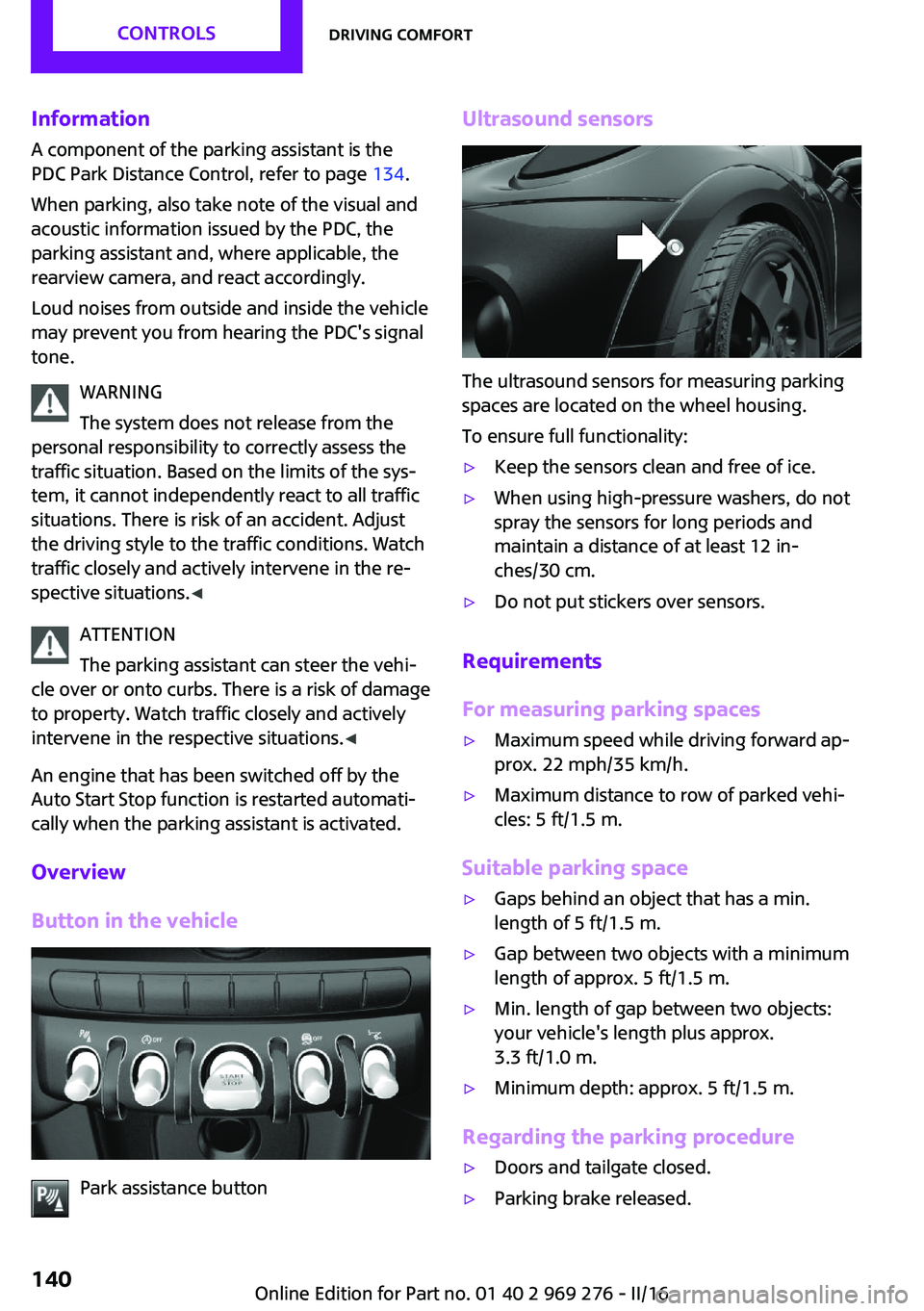
Park assistance button
Ultrasound sensors
The ultrasound sensors for measuring parking
spaces are located on the wheel housing.
To ensure full functionality:
▷Keep the sensors clean and free of ice.▷When using high-pressure washers, do not
spray the sensors for long periods and
maintain a distance of at least 12 in‐
ches/30 cm.▷Do not put stickers over sensors.
Requirements
For measuring parking spaces
▷Maximum speed while driving forward ap‐
prox. 22 mph/35 km/h.▷Maximum distance to row of parked vehi‐
cles: 5 ft/1.5 m.
Suitable parking space
▷Gaps behind an object that has a min.
length of 5 ft/1.5 m.▷Gap between two objects with a minimum
length of approx. 5 ft/1.5 m.▷Min. length of gap between two objects:
your vehicle's length plus approx.
3.3 ft/1.0 m.▷Minimum depth: approx. 5 ft/1.5 m.
Regarding the parking procedure
▷Doors and tailgate closed.▷Parking brake released.Seite 140CONTROLSDriving comfort140
Online Edition for Part no. 01 40 2 969 276 - II/16
Page 157 of 252
Overview
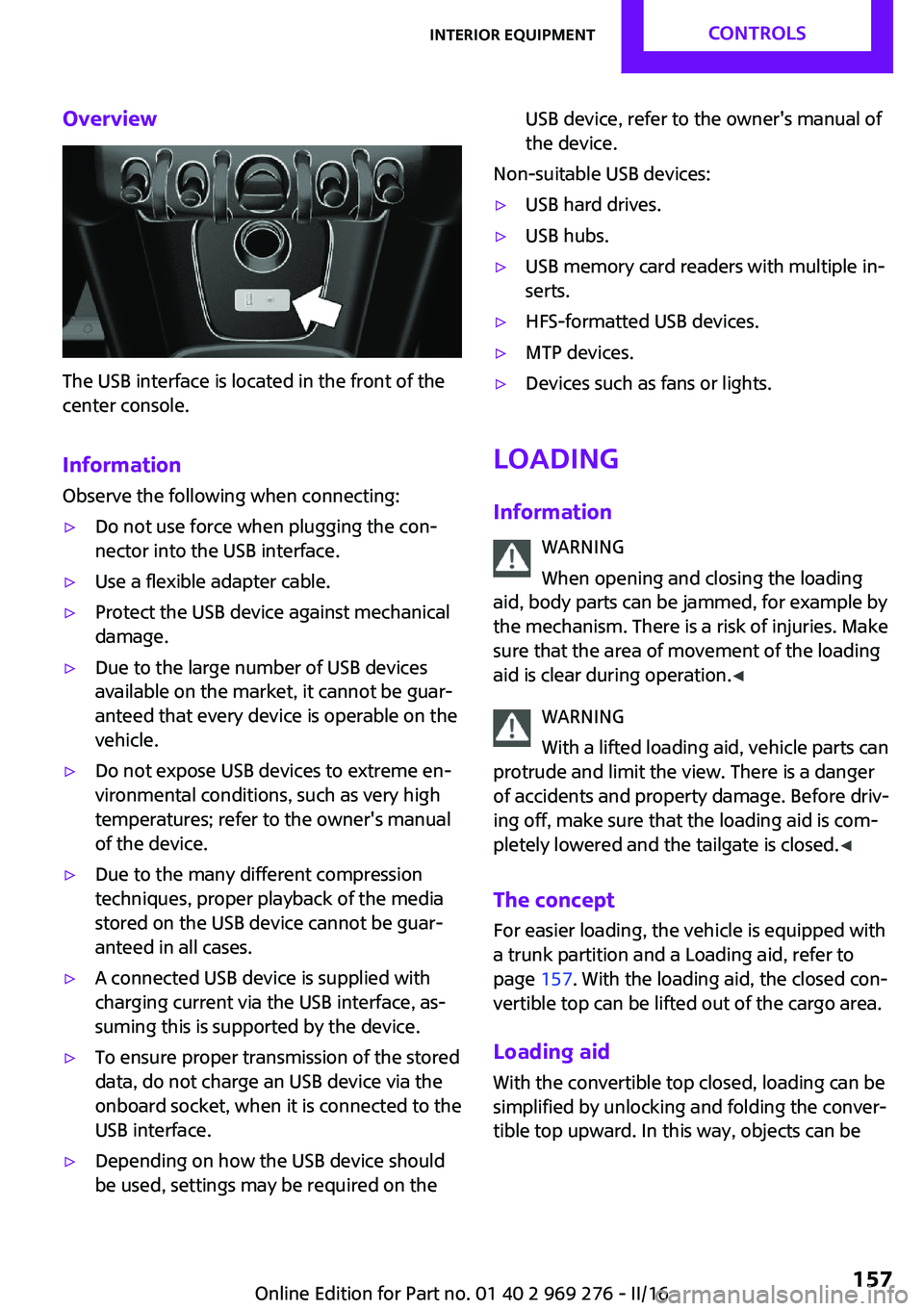
The USB interface is located in the front of the
center console.
Information Observe the following when connecting:
▷Do not use force when plugging the con‐
nector into the USB interface.▷Use a flexible adapter cable.▷Protect the USB device against mechanical
damage.▷Due to the large number of USB devices
available on the market, it cannot be guar‐
anteed that every device is operable on the
vehicle.▷Do not expose USB devices to extreme en‐
vironmental conditions, such as very high
temperatures; refer to the owner's manual
of the device.▷Due to the many different compression
techniques, proper playback of the media
stored on the USB device cannot be guar‐
anteed in all cases.▷A connected USB device is supplied with
charging current via the USB interface, as‐
suming this is supported by the device.▷To ensure proper transmission of the stored
data, do not charge an USB device via the
onboard socket, when it is connected to the
USB interface.▷Depending on how the USB device should
be used, settings may be required on theUSB device, refer to the owner's manual of
the device.
Non-suitable USB devices:
▷USB hard drives.▷USB hubs.▷USB memory card readers with multiple in‐
serts.▷HFS-formatted USB devices.▷MTP devices.▷Devices such as fans or lights.
Loading
Information WARNING
When opening and closing the loading
aid, body parts can be jammed, for example by
the mechanism. There is a risk of injuries. Make
sure that the area of movement of the loading
aid is clear during operation. ◀
WARNING
With a lifted loading aid, vehicle parts can
protrude and limit the view. There is a danger
of accidents and property damage. Before driv‐
ing off, make sure that the loading aid is com‐
pletely lowered and the tailgate is closed. ◀
The concept
For easier loading, the vehicle is equipped with
a trunk partition and a Loading aid, refer to
page 157. With the loading aid, the closed con‐
vertible top can be lifted out of the cargo area.
Loading aid With the convertible top closed, loading can be
simplified by unlocking and folding the conver‐
tible top upward. In this way, objects can be
Seite 157Interior equipmentCONTROLS157
Online Edition for Part no. 01 40 2 969 276 - II/16
Page 167 of 252
General driving notes
Closing the tailgate WARNING
An open tailgate protrudes from the vehi‐
cle and can endanger occupants and other traf‐
fic participants or damage the vehicle in the
event of an accident, braking or evasive ma‐
neuvers. In addition, exhaust fumes may enter
the vehicle interior. There is a risk of injury or
risk of property damage. Do not drive with the
tailgate open. ◀
If driving with the tailgate open cannot be
avoided:▷If the convertible top is closed, close all
windows and the sliding sun roof.▷Greatly increase the air flow from the vents.▷Drive moderately.
Hot exhaust system
WARNING
During driving operation, high tempera‐
tures can occur underneath the vehicle body,
e.g., caused by the exhaust gas system. If com‐
bustible materials, such as leaves or grass,
come in contact with hot parts of the exhaust
gas system, these materials can ignite. There is
a risk of injury or risk of property damage.
Do not remove the heat shields installed and
never apply undercoating to them. Make sure
that no combustible materials can come in con‐
tact with hot vehicle parts in driving operation,
idle or during parking. Do not touch the hot ex‐
haust system. ◀
Mobile communication devices in the vehicle
WARNING
Vehicle electronics and mobile phones
can influence one another. There is radiation
due to the transmission operations of mobile
phones. There is a risk of injury or risk of prop‐
erty damage. If possible, in the vehicle's interior
use only mobile phones with direct connections
to an exterior antenna in order to exclude mu‐
tual disturbance and deflect the radiation from
the vehicle's interior. ◀
Hydroplaning On wet or slushy roads, a wedge of water can
form between the tires and road surface.
This phenomenon is referred to as hydroplan‐
ing. It is characterized by a partial or complete
loss of contact between the tires and the road
surface, ultimately undermining your ability to
steer and brake the vehicle.
Driving through water ATTENTION
When driving too quickly through too
deep water, water can enter into the engine compartment, the electrical system or the
transmission. There is a risk of damage to prop‐
erty. When driving through water, do not ex‐
ceed the maximum indicated water level and
the maximum speed for driving through wa‐
ter. ◀
When driving through water, observe the fol‐
lowing:▷Drive through calm water only.▷Drive through water only if it is not deeper
than maximum 9.8 inches/25 cm.▷Drive through water no faster than walking
speed, up to 3 mph/5 km/h.
Braking safely
Your vehicle is equipped with ABS as a standard
feature.
Perform an emergency stop in situations that require such.
Steering is still responsive. You can still avoid
any obstacles with a minimum of steering ef‐
fort.
Seite 167Things to remember when drivingDRIVING TIPS167
Online Edition for Part no. 01 40 2 969 276 - II/16
Page 171 of 252
Load
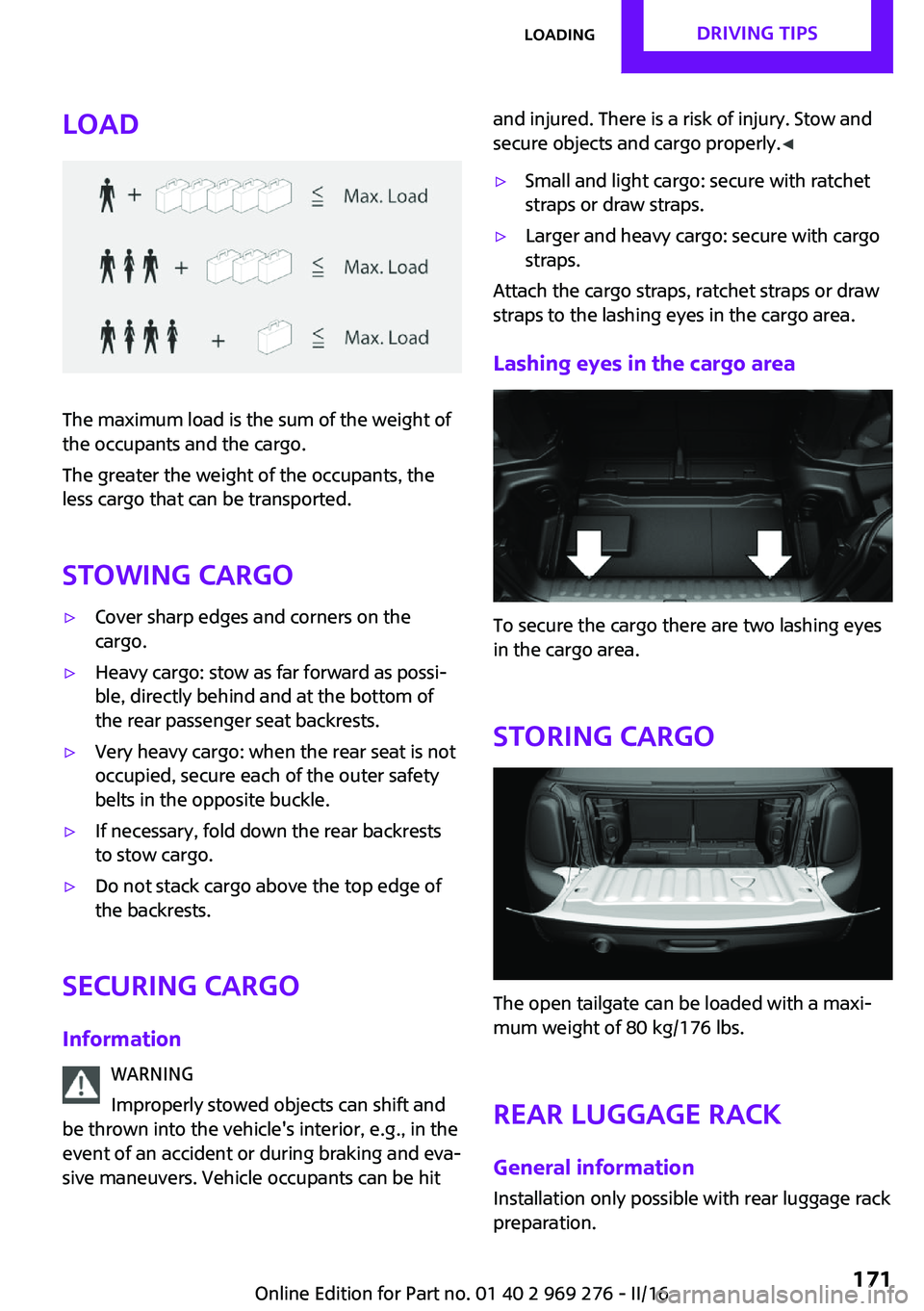
The maximum load is the sum of the weight of
the occupants and the cargo.
The greater the weight of the occupants, the
less cargo that can be transported.
Stowing cargo
▷Cover sharp edges and corners on the
cargo.▷Heavy cargo: stow as far forward as possi‐
ble, directly behind and at the bottom of
the rear passenger seat backrests.▷Very heavy cargo: when the rear seat is not
occupied, secure each of the outer safety
belts in the opposite buckle.▷If necessary, fold down the rear backrests
to stow cargo.▷Do not stack cargo above the top edge of
the backrests.
Securing cargo
Information WARNING
Improperly stowed objects can shift and
be thrown into the vehicle's interior, e.g., in the
event of an accident or during braking and eva‐
sive maneuvers. Vehicle occupants can be hit
and injured. There is a risk of injury. Stow and
secure objects and cargo properly. ◀▷Small and light cargo: secure with ratchet
straps or draw straps.▷Larger and heavy cargo: secure with cargo
straps.
Attach the cargo straps, ratchet straps or draw
straps to the lashing eyes in the cargo area.
Lashing eyes in the cargo area
To secure the cargo there are two lashing eyes
in the cargo area.
Storing cargo
The open tailgate can be loaded with a maxi‐
mum weight of 80 kg/176 lbs.
Rear luggage rack
General information Installation only possible with rear luggage rack
preparation.
Seite 171LoadingDRIVING TIPS171
Online Edition for Part no. 01 40 2 969 276 - II/16
Page 213 of 252
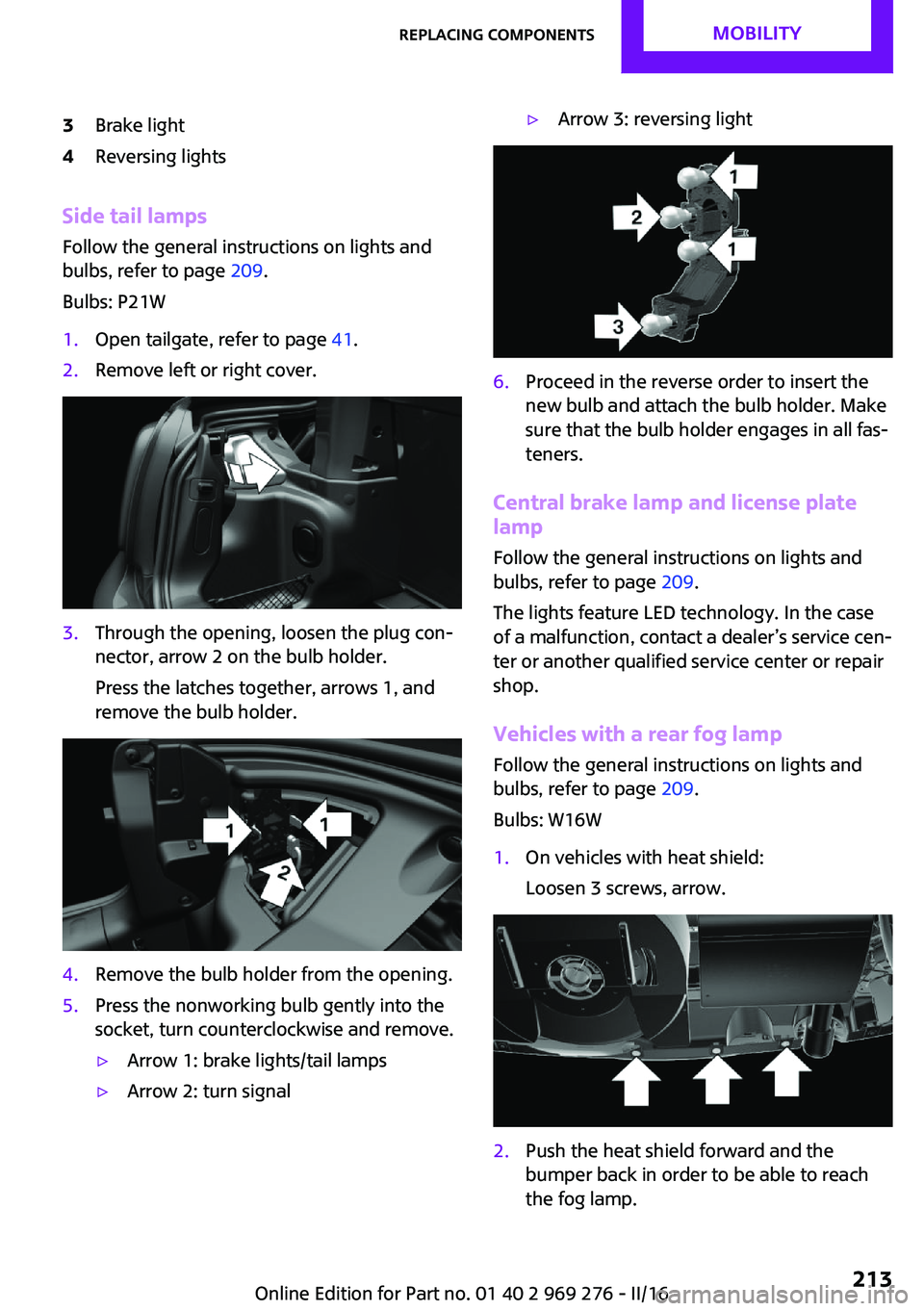
3Brake light4Reversing lights
Side tail lampsFollow the general instructions on lights and
bulbs, refer to page 209.
Bulbs: P21W
1.Open tailgate, refer to page 41.2.Remove left or right cover.3.Through the opening, loosen the plug con‐
nector, arrow 2 on the bulb holder.
Press the latches together, arrows 1, and
remove the bulb holder.4.Remove the bulb holder from the opening.5.Press the nonworking bulb gently into the
socket, turn counterclockwise and remove.▷Arrow 1: brake lights/tail lamps▷Arrow 2: turn signal▷Arrow 3: reversing light6.Proceed in the reverse order to insert the
new bulb and attach the bulb holder. Make
sure that the bulb holder engages in all fas‐
teners.
Central brake lamp and license plate
lamp
Follow the general instructions on lights and
bulbs, refer to page 209.
The lights feature LED technology. In the case
of a malfunction, contact a dealer’s service cen‐
ter or another qualified service center or repair
shop.
Vehicles with a rear fog lamp Follow the general instructions on lights and
bulbs, refer to page 209.
Bulbs: W16W
1.On vehicles with heat shield:
Loosen 3 screws, arrow.2.Push the heat shield forward and the
bumper back in order to be able to reach
the fog lamp.Seite 213Replacing componentsMOBILITY213
Online Edition for Part no. 01 40 2 969 276 - II/16
Page 249 of 252
Speed limit detection, com‐puter 91
Speed limits, display 87
Speed warning 92
Split screen 23
Sport displays 91
Sport displays, Head-up Dis‐ play 96
Sport instruments, cockpit 97
SPORT program, Dynamic Driving Control 124
Sport program, transmis‐ sion 76
Stability control systems 122
Standard equipment 7
Standard view, Head-up Dis‐ play 95
Start/stop, automatic func‐ tion 68
Start/Stop button 66
Start function during malfunc‐ tion 35
Starting the engine 67
Status control display, tires 109
Status of Owner's Manual 7
Steering wheel, adjusting 62
Steptronic Sport transmission, see Steptronic transmis‐
sion 75
Steptronic transmission 75
Stopping the engine 68
Storage compartments 160
Storage, tires 193
Storing the vehicle 230
Suitable engine oil types 202
Summer tires, tread 191
Sun visor 155
Supplementary text mes‐ sages 84
Switch for driving dynam‐ ics 124
Switch-on times, parked-car ventilation 150
Switch, see Cockpit 14
Symbols 6 Symbols in the status field 23
T Tachometer 85
Tailgate, emergency unlock‐ ing 41
Tail lamps 212
Technical changes, refer to Own Safety 7
Technical data 234, 236
Temperature, air condi‐ tioner 145
Temperature, automatic cli‐ mate control 147
Temperature display for exter‐ nal temperature 85
Temperature, engine 90
Terminal, starting aid 221
Text messages, supplemen‐ tary 84
Theft alarm system, see Alarm system 44
Thigh support 55
Tilt alarm sensor 45
Time of arrival 91
Tire damage 191
Tire identification marks 190
Tire inflation pressure 186
Tire inflation pressure moni‐ tor, refer to FTM 113
Tire Pressure Monitor TPM 109
Tire repair kit, see Mobility System 194
Tires, changing 192
Tire sealant, see Mobility Sys‐ tem 194
Tires, everything on wheels and tires 186
Tires, run-flat tires 193
Tire tread 191
Tone, refer to Integrated Owner's Manual
Tools 208
Total vehicle weight 235 Touchpad 21
Towing 222
Tow-starting 222
TPM Tire Pressure Moni‐ tor 109
Traction control 123
TRACTION drive mode, driving dynamics 123
Transmission lock, releasing manually 78
Transmission, manual trans‐ mission 75
Transmission, see Steptronic transmission 75
Transporting children safely 63
Tread, tires 191
Triple turn signal activa‐ tion 71
Trip odometer 85
Trip onboard computer 91
Trip recorder, see Trip odome‐ ter 85
Trunk, cargo area parti‐ tion 158
Trunk lid 41
Trunk lid via remote con‐ trol 39
Turning circle lines, rearview camera 138
Turn signal, front 209
Turn signal, side 214
Turn signals, operation 71
Turn signals, rear, bulb re‐ placement 212
U
Unintentional alarm 45
Units of measurement 93
Universal remote control 151
Unlock button, Steptronic transmission 76
Unlocking/locking via door lock 40 Seite 249Everything from A to ZREFERENCE249
Online Edition for Part no. 01 40 2 969 276 - II/16