display MINI COOPER CONVERTIBLE 2016 Service Manual
[x] Cancel search | Manufacturer: MINI, Model Year: 2016, Model line: COOPER CONVERTIBLE, Model: MINI COOPER CONVERTIBLE 2016Pages: 252, PDF Size: 5.41 MB
Page 94 of 252
Settings are stored for the profile currently
used.
Depending on the light conditions, the bright‐
ness settings may not be clearly visible.
LED ring on the central
instrument cluster
The concept
The LED ring displays light animations to repre‐
sent specific functions.
Basic displays
Basic functions, for example the tachometer,
can be set to be displayed continually if so de‐
sired.
Event displays Functions that are only displayed temporarily,
for example the volume or temperature set‐ tings, can be set as event displays.
Several vehicle assistance functions can also be displayed on the LED ring. This display corre‐
sponds with the displays of the function in the
respective display.
Example: tachometer Like the tachometer in the instrument cluster,
the light animations of the tachometer's basic
display show the current RPMs and the respec‐
tive RPM warning margins.
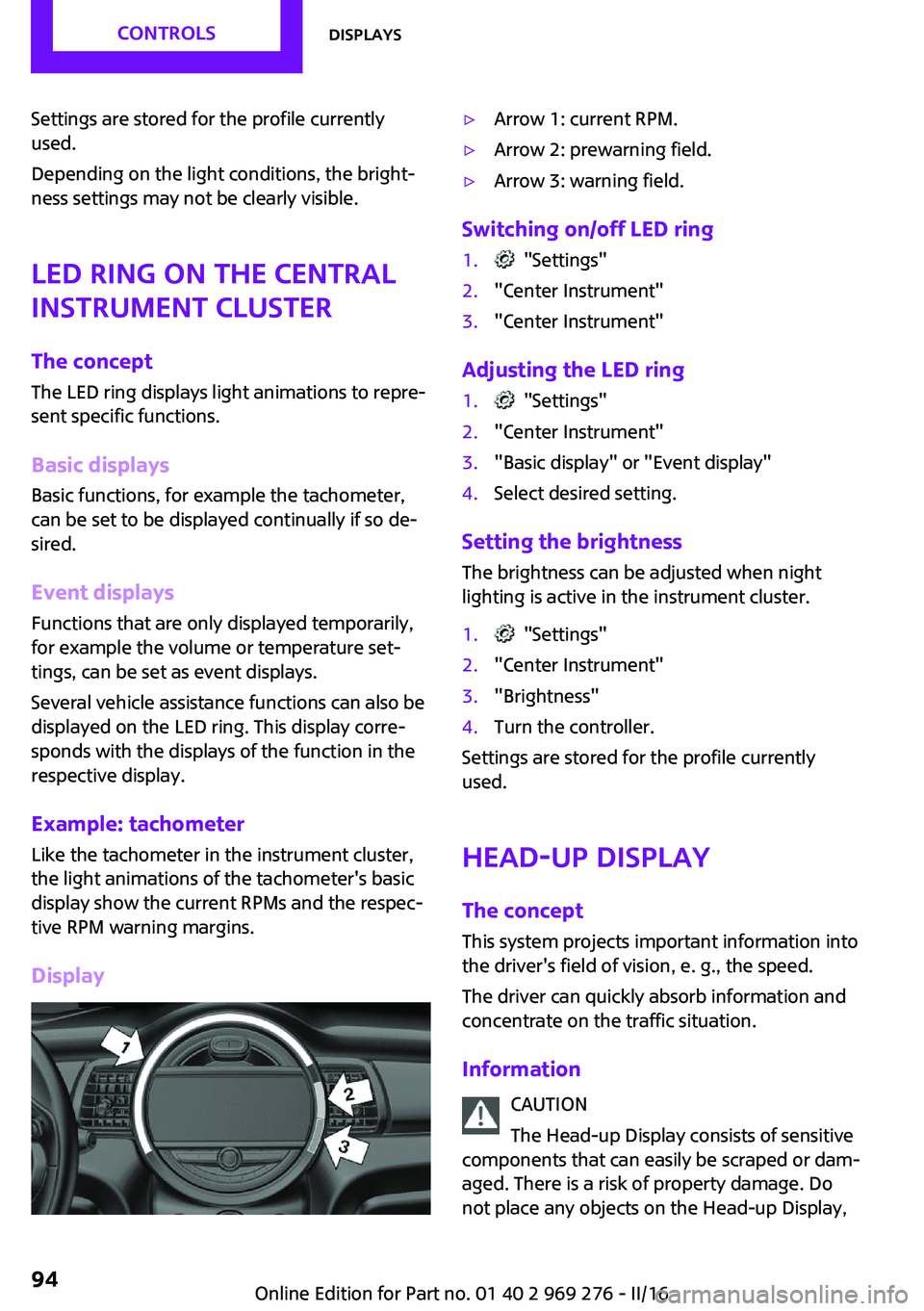
Display▷Arrow 1: current RPM.▷Arrow 2: prewarning field.▷Arrow 3: warning field.
Switching on/off LED ring
1. "Settings"2."Center Instrument"3."Center Instrument"
Adjusting the LED ring
1. "Settings"2."Center Instrument"3."Basic display" or "Event display"4.Select desired setting.
Setting the brightnessThe brightness can be adjusted when night
lighting is active in the instrument cluster.
1. "Settings"2."Center Instrument"3."Brightness"4.Turn the controller.
Settings are stored for the profile currently
used.
Head-up Display
The concept This system projects important information into
the driver's field of vision, e. g., the speed.
The driver can quickly absorb information and
concentrate on the traffic situation.
Information CAUTION
The Head-up Display consists of sensitive
components that can easily be scraped or dam‐
aged. There is a risk of property damage. Do
not place any objects on the Head-up Display,
Seite 94CONTROLSDisplays94
Online Edition for Part no. 01 40 2 969 276 - II/16
Page 95 of 252
attach to system components or plug into the
system. Do not move the moving parts man‐
ually. ◀
WARNING
When extending and retracting the pro‐
jection screen of the Head-up Display, body
parts can be jammed. There is a risk of injuries.
Make sure that the area of movement of the
projection screen is clear during opening and
closing. ◀
Follow the instructions for cleaning the Head-
up Display, refer to page 230.
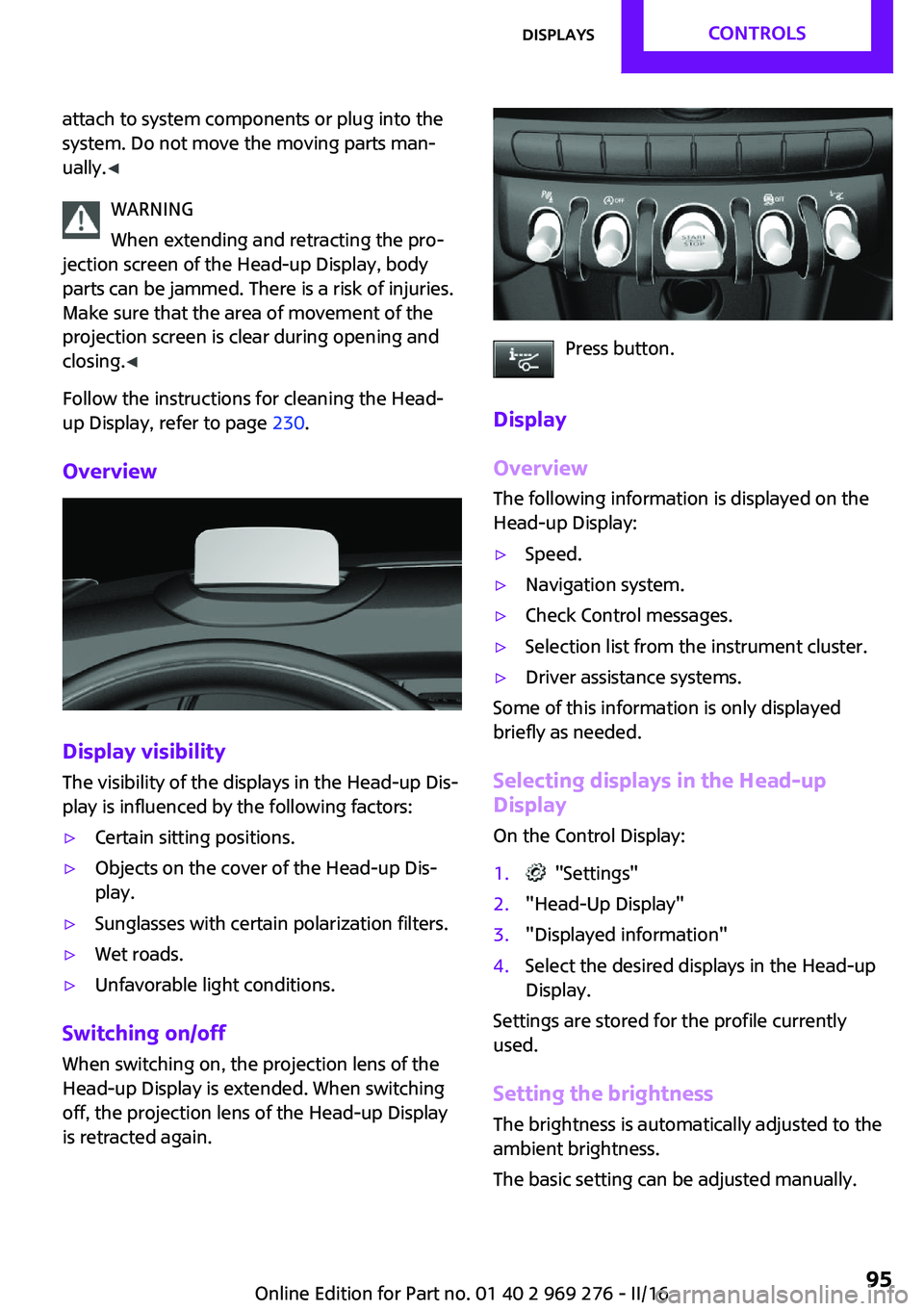
Overview
Display visibility
The visibility of the displays in the Head-up Dis‐
play is influenced by the following factors:
▷Certain sitting positions.▷Objects on the cover of the Head-up Dis‐
play.▷Sunglasses with certain polarization filters.▷Wet roads.▷Unfavorable light conditions.
Switching on/off
When switching on, the projection lens of the
Head-up Display is extended. When switching
off, the projection lens of the Head-up Display
is retracted again.
Press button.
Display
Overview
The following information is displayed on the
Head-up Display:
▷Speed.▷Navigation system.▷Check Control messages.▷Selection list from the instrument cluster.▷Driver assistance systems.
Some of this information is only displayed
briefly as needed.
Selecting displays in the Head-up
Display
On the Control Display:
1. "Settings"2."Head-Up Display"3."Displayed information"4.Select the desired displays in the Head-up
Display.
Settings are stored for the profile currently
used.
Setting the brightness The brightness is automatically adjusted to the
ambient brightness.
The basic setting can be adjusted manually.
Seite 95DisplaysCONTROLS95
Online Edition for Part no. 01 40 2 969 276 - II/16
Page 96 of 252
On the Control Display:1. "Settings"2."Head-Up Display"3."Brightness"4.Turn the Controller until the desired bright‐
ness is set.5.Press the Controller.
When the low beams are activated, the bright‐
ness of the Head-up Display can be additionally
influenced using the instrument lighting, refer
to page 103.
Settings are stored for the profile currently
used.
Adjusting the height On the Control Display:
1. "Settings"2."Head-Up Display"3."Height"4.Turn the Controller until the desired height
is reached.5.Press the Controller.
Settings are stored for the profile currently
used.
Setting the rotation The screen of the Head-up Display can be ro‐
tated around its own axis.
On the Control Display:
1. "Settings"2."Head-Up Display"3."Rotation"4.Turn the Controller until the desired setting
is selected.5.Press the Controller.
Settings are stored for the profile currently
used.
John Cooper Works: Sport displays in the Head-up Display
General information
The sport displays in the Head-up Display assist
with a sporty driving style.
Switching on1. "Settings"2."Head-Up Display"3."Displayed information"4."Sport displays"
With navigation system: if the sport displays are
switched on, no navigation content will be dis‐
played on the Head-up Display.
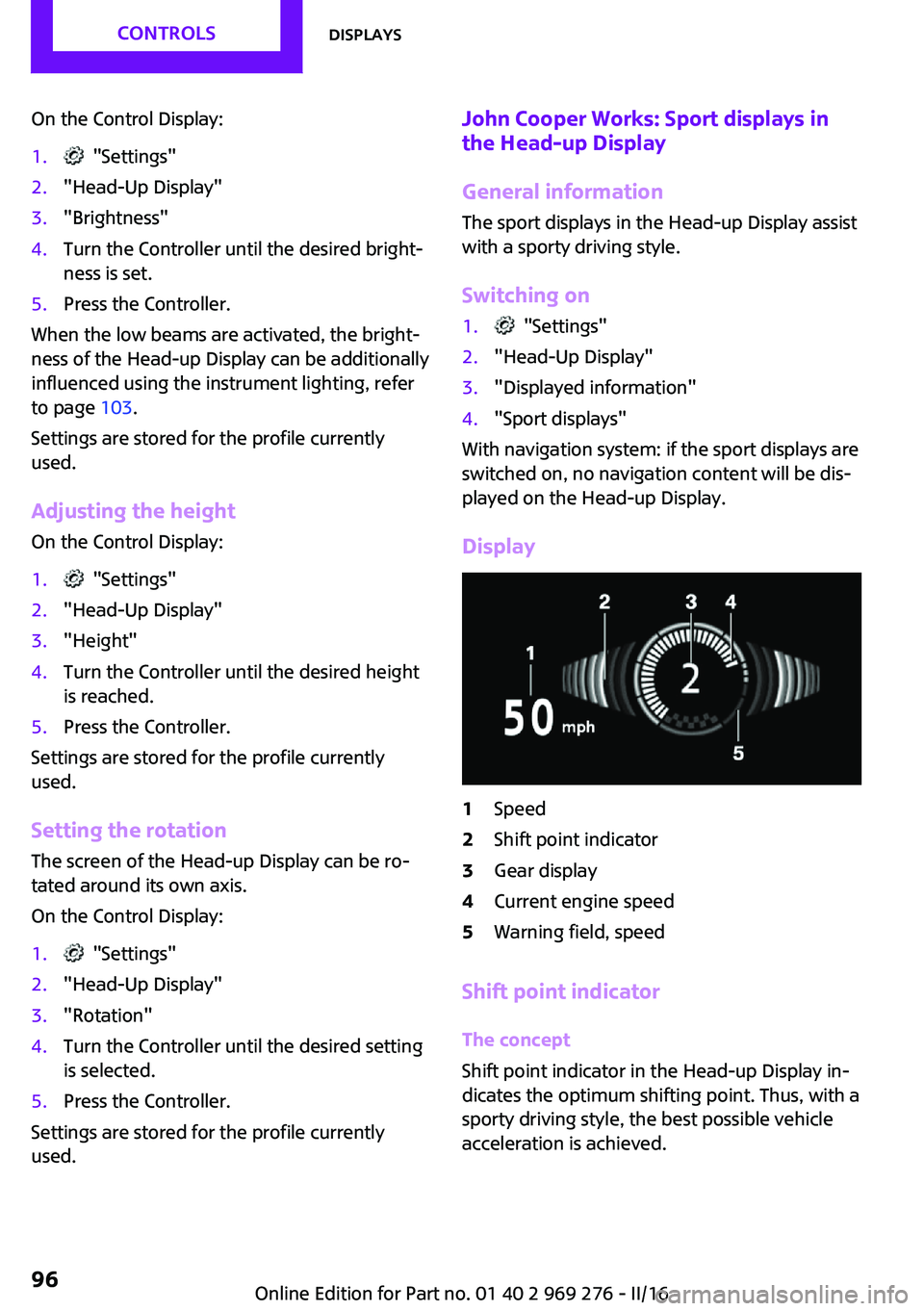
Display
1Speed2Shift point indicator3Gear display4Current engine speed5Warning field, speed
Shift point indicator
The concept
Shift point indicator in the Head-up Display in‐
dicates the optimum shifting point. Thus, with a
sporty driving style, the best possible vehicle
acceleration is achieved.
Seite 96CONTROLSDisplays96
Online Edition for Part no. 01 40 2 969 276 - II/16
Page 97 of 252
Functional requirements▷Steptronic transmission:
Manual mode M/S and if necessary the Dy‐
namic Traction Control DTC are activated.▷Press the gas pedal all the way down.
Switching on
Shift point indicators are displayed in the Head-
up if the sport displays, refer to page 96,are
switched on.
1. "Settings"2."Head-Up Display"3."Displayed information"4."Sport displays"
Display
Successive gray illuminated fields indicate the
upcoming upshift moment.
As soon as the red fields light up, shift up im‐
mediately.
When the permitted maximum speed is
reached, all shift point indicators flash.
When the maximum speed is exceeded, the
supply of fuel is interrupted in order to protect
the engine.
Always Open Timer The concept
The Always Open Timer displays the driving
times with open convertible top on the Control
Display and in the onboard computer, refer to
page 89.
General information
With the respective equipment, the Always
Open Timer can also be displayed as light ani‐
mation on the LED ring of the central instru‐
ment cluster.
Displaying the Always Open Timer1. "Vehicle info"2."Always Open"
Display
The following information is displayed on the
Control Display:
▷Current driving time with the convertible
top open in minutes and hours.▷Total driving time with the convertible top
open in minutes and hours.▷Current external temperature while driving
with the convertible top open.
Maximum 99 hours and 59 minutes are dis‐
played for the current driving time, and maxi‐
mum 999 hours and 59 minutes for the total
driving time.
Resetting the current driving time
1. "Vehicle info"2."Always Open"3."Reset trip"
To reset the total driving time, contact your
service center.
Chrono package in the
cockpit
The concept The Chrono package consists of three display
instruments in the cockpit, where the engine oil
pressure, the turbocharger boost, and the time
are displayed. In addition, intermediate and to‐
tal times can be measured using the stop
watch.
The display elements of the Chrono package
mainly support a sporty driving style, e,g, on
racetracks.
Seite 97DisplaysCONTROLS97
Online Edition for Part no. 01 40 2 969 276 - II/16
Page 98 of 252
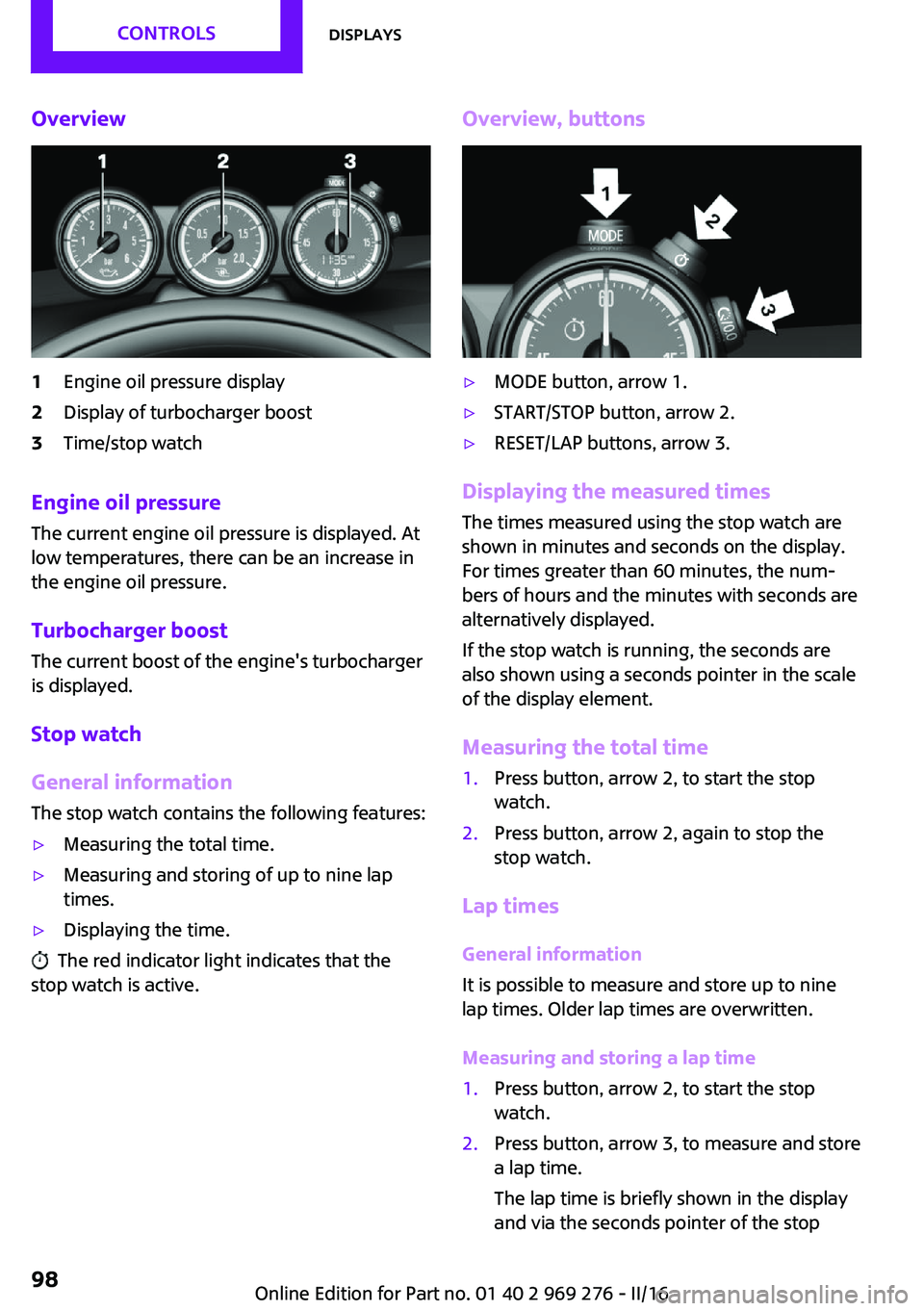
Overview1Engine oil pressure display2Display of turbocharger boost3Time/stop watch
Engine oil pressure
The current engine oil pressure is displayed. At
low temperatures, there can be an increase in
the engine oil pressure.
Turbocharger boostThe current boost of the engine's turbocharger
is displayed.
Stop watch
General information The stop watch contains the following features:
▷Measuring the total time.▷Measuring and storing of up to nine lap
times.▷Displaying the time.
The red indicator light indicates that the
stop watch is active.
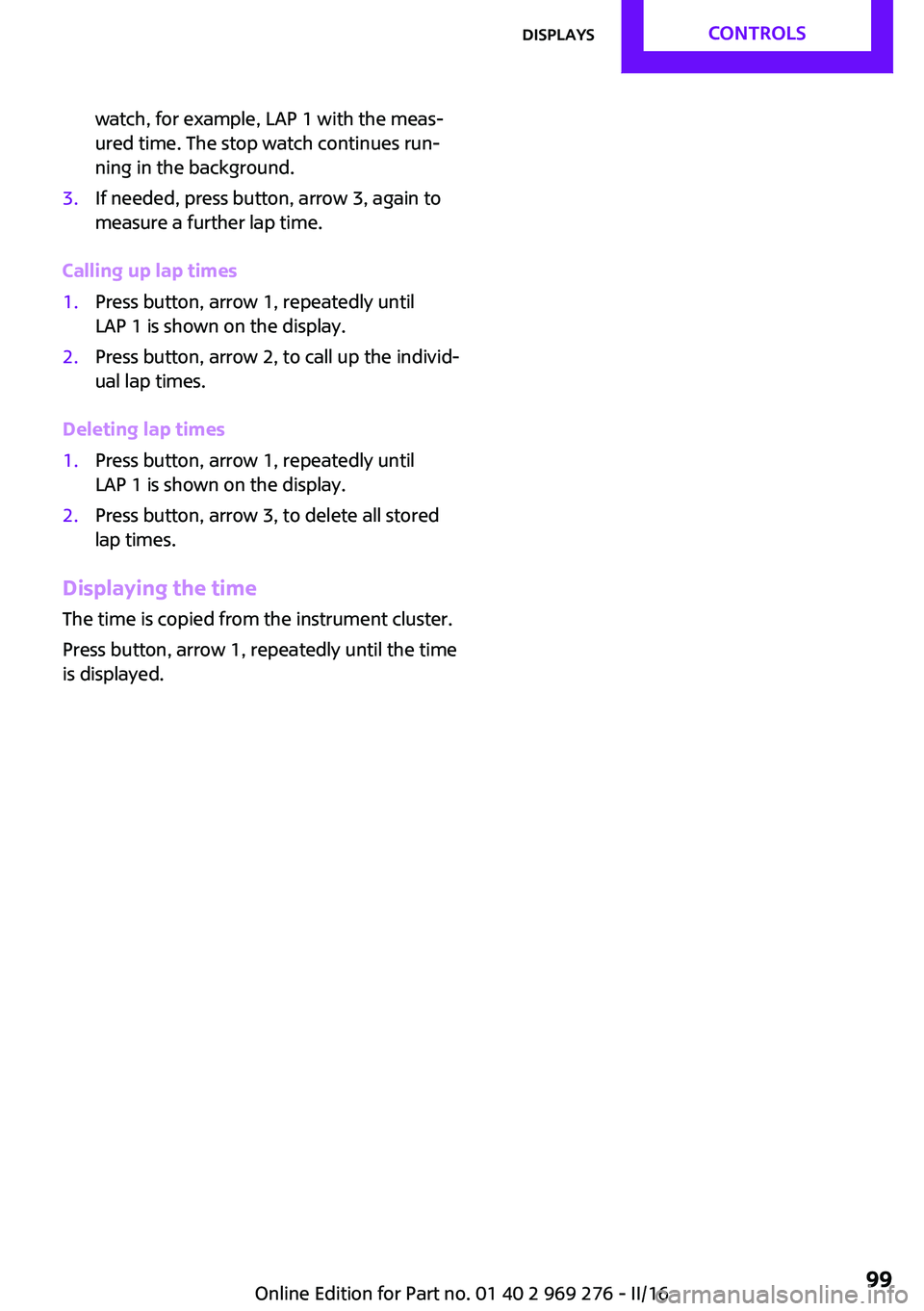
Overview, buttons▷MODE button, arrow 1.▷START/STOP button, arrow 2.▷RESET/LAP buttons, arrow 3.
Displaying the measured times
The times measured using the stop watch are
shown in minutes and seconds on the display.
For times greater than 60 minutes, the num‐ bers of hours and the minutes with seconds are
alternatively displayed.
If the stop watch is running, the seconds are
also shown using a seconds pointer in the scale
of the display element.
Measuring the total time
1.Press button, arrow 2, to start the stop
watch.2.Press button, arrow 2, again to stop the
stop watch.
Lap times
General information
It is possible to measure and store up to nine
lap times. Older lap times are overwritten.
Measuring and storing a lap time
1.Press button, arrow 2, to start the stop
watch.2.Press button, arrow 3, to measure and store
a lap time.
The lap time is briefly shown in the display
and via the seconds pointer of the stopSeite 98CONTROLSDisplays98
Online Edition for Part no. 01 40 2 969 276 - II/16
Page 99 of 252
watch, for example, LAP 1 with the meas‐
ured time. The stop watch continues run‐
ning in the background.3.If needed, press button, arrow 3, again to
measure a further lap time.
Calling up lap times
1.Press button, arrow 1, repeatedly until
LAP 1 is shown on the display.2.Press button, arrow 2, to call up the individ‐
ual lap times.
Deleting lap times
1.Press button, arrow 1, repeatedly until
LAP 1 is shown on the display.2.Press button, arrow 3, to delete all stored
lap times.
Displaying the time
The time is copied from the instrument cluster.
Press button, arrow 1, repeatedly until the time
is displayed.
Seite 99DisplaysCONTROLS99
Online Edition for Part no. 01 40 2 969 276 - II/16
Page 102 of 252
System limits
The automatic headlamp control cannot serve
as a substitute for your personal judgment of
lighting conditions.
E.g. the sensors are unable to detect fog or
hazy weather. To avoid safety risks under these
conditions, you should always switch on the
lights manually.
Daytime running lights General information
Position of switch:
, ,
The daytime running lights light up when the
ignition is switched on. After the ignition is
switched off, the parking lights light up in posi‐
tion
.
Activating/deactivating
In some countries, daytime running lights are
mandatory, so it may not be possible to deacti‐ vate the daytime running lights.
On the Control Display:
1. "Settings"2."Lighting"3."Daytime running lamps"
Settings are stored for the remote control cur‐
rently used.
Cornering light General information Position of switch:
When going around corners, the cornering light
also lights the interior area of the curve. Below
a speed of approx. 25 mph/40 km/h when the
turn signal is switched on and the steering an‐
gle is detected, there is automatic activation.
Malfunction
A Check Control message is displayed.
Cornering light is malfunctioning or has failed.
Have the system immediately checked by a
dealer’s service center or another qualified
service center or repair shop.
High-beam Assistant The concept The high-beam Assistant detects other traffic
participants early on and automatically
switches the high beams on or off depending
on the traffic situation. The assistant ensures
that the high beams are switched on, whenever
the traffic situation allows. In the low speed
range, the high beams are not switched on by
the system.
General information The system responds to light from oncoming
traffic and traffic driving ahead of you, and to
adequate illumination, e.g., in towns and cities.
The driver can intervene at any time and switch
the high beams on and off as usual.
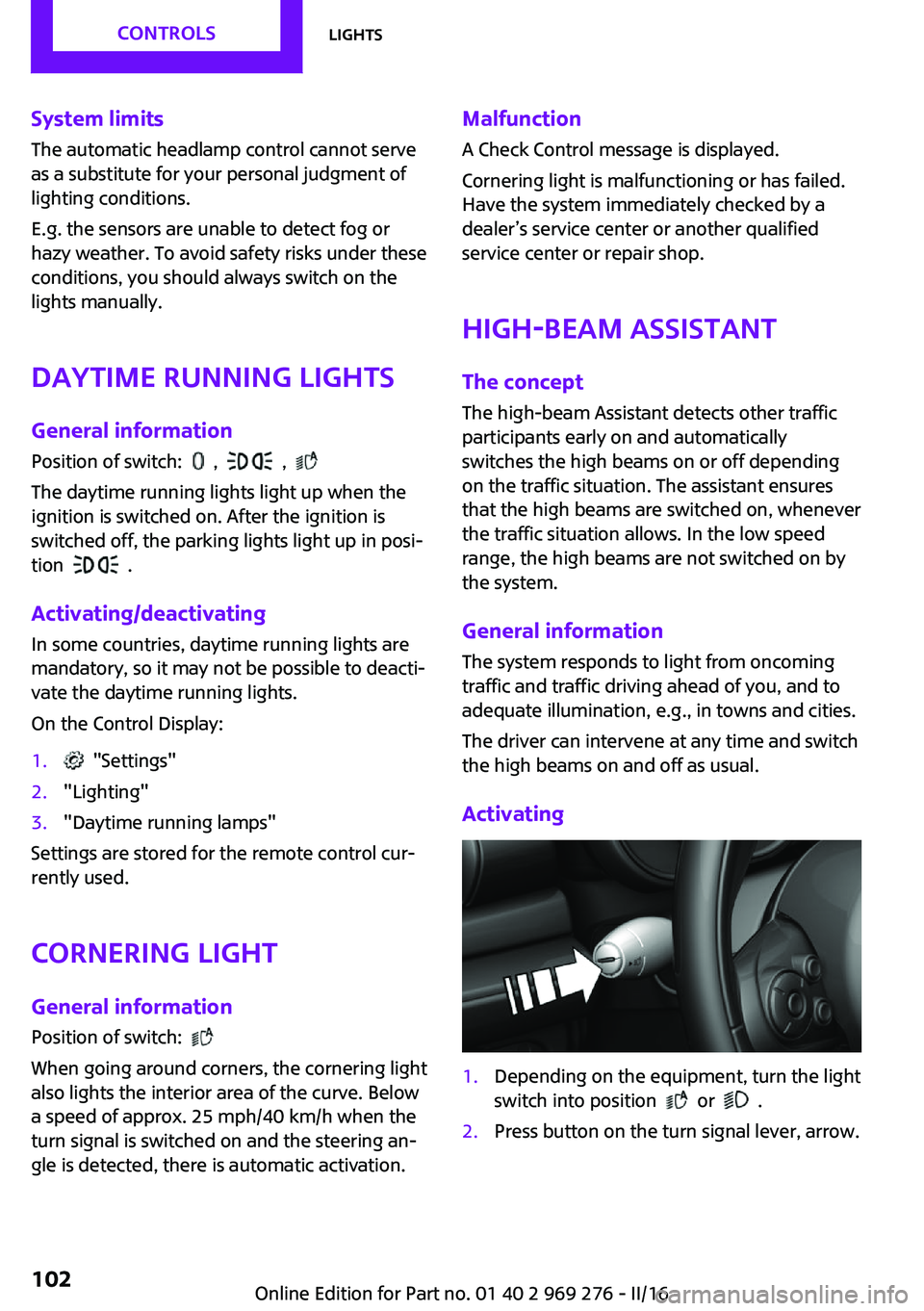
Activating1.Depending on the equipment, turn the light
switch into position
or .
2.Press button on the turn signal lever, arrow.Seite 102CONTROLSLights102
Online Edition for Part no. 01 40 2 969 276 - II/16
Page 104 of 252
Interior lights
General information Depending on the equipment, the interior
lights, footwell lights, entry lamps, and courtesy
lamps are controlled automatically.
Thumb wheel for the instrument lighting con‐
trols brightness of some of these features.
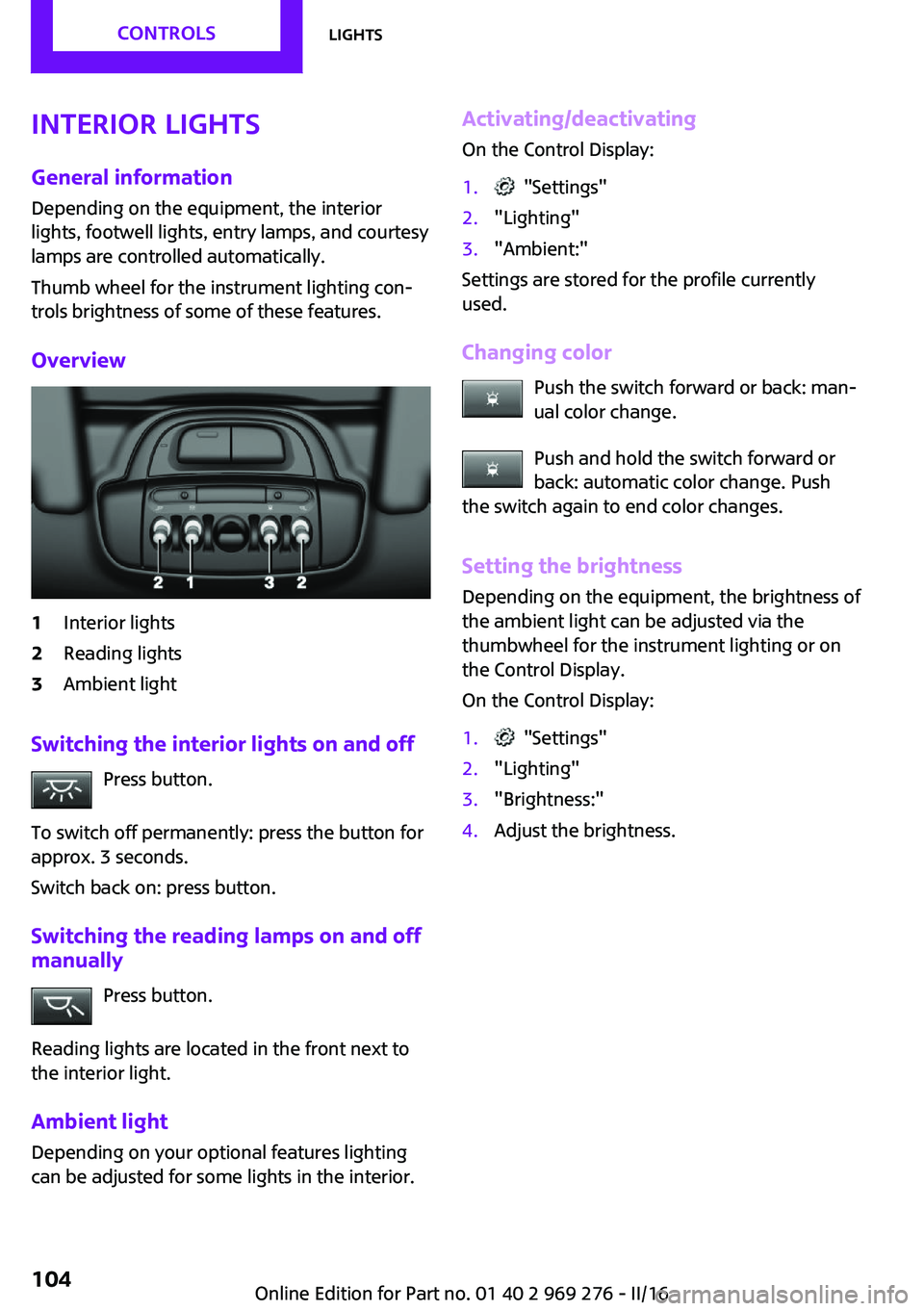
Overview1Interior lights2Reading lights3Ambient light
Switching the interior lights on and off Press button.
To switch off permanently: press the button for
approx. 3 seconds.
Switch back on: press button.
Switching the reading lamps on and off manually
Press button.
Reading lights are located in the front next to
the interior light.
Ambient light
Depending on your optional features lighting
can be adjusted for some lights in the interior.
Activating/deactivating
On the Control Display:1. "Settings"2."Lighting"3."Ambient:"
Settings are stored for the profile currently
used.
Changing color Push the switch forward or back: man‐
ual color change.
Push and hold the switch forward or
back: automatic color change. Push
the switch again to end color changes.
Setting the brightnessDepending on the equipment, the brightness of
the ambient light can be adjusted via the
thumbwheel for the instrument lighting or on
the Control Display.
On the Control Display:
1. "Settings"2."Lighting"3."Brightness:"4.Adjust the brightness.Seite 104CONTROLSLights104
Online Edition for Part no. 01 40 2 969 276 - II/16
Page 108 of 252
front passenger side are not
activated.▷The indicator lamp does not light up when,
for example, a correctly seated person of
sufficient size is detected on the seat. The
airbags on the front passenger side are ac‐
tivated.
Detected child seats
The system generally detects children seated in
a child seat, particularly in child seats required
by NHTSA when the vehicle was manufactured.
After installing a child seat, make sure that the
indicator lamp for the front-seat passenger air‐
bags lights up. This indicates that the child seat
has been detected and the front-seat passen‐
ger airbags are not activated.
Strength of the driver's and front-seat
passenger airbag
The explosive power that activates driver's/
front passenger's airbags very much depends
on the positions of the driver's/front passeng‐
er's seat.
To maintain the accuracy of this function over
the long-term, calibrate the front seats as soon
as a relevant Check Control message is dis‐
played. A message also appears on the Control
Display.
Calibrating the front seats WARNING
There is risk of jamming when moving the
seats. There is a risk of injury or risk of property
damage. Make sure that the area of movement
of the seat is clear prior to any adjustment. ◀
An appropriate Check Control message is dis‐
played.
1.Move the respective seat all the way for‐
ward.2.Move the respective seat forward again. It
moves forward briefly.3.Readjust the seat to the desired position.The calibration procedure is completed when
the Check Control message disappears.
If the message continues to be displayed, re‐
peat the calibration.
If the message does not disappear after a re‐
peat calibration, have the system checked as
soon as possible.
Rollover protection sys‐
tem
The concept
The rollover protection system is automatically
activated in the event of a sufficiently serious
accident or if the longitudinal axis is tilted ex‐
cessively. The safety frames located behind the
rear headrests extend within fractions of a sec‐
ond.
Supplementing the reinforced front windshield
frame, the rollover protection system further in‐
creases passenger safety.
Information WARNING
There can be damage or injuries when
the rollover protection system is triggered.
There is a risk of injuries or a risk of property
damage. Make sure that the area of movement
of the rollover protection system is clear. ◀
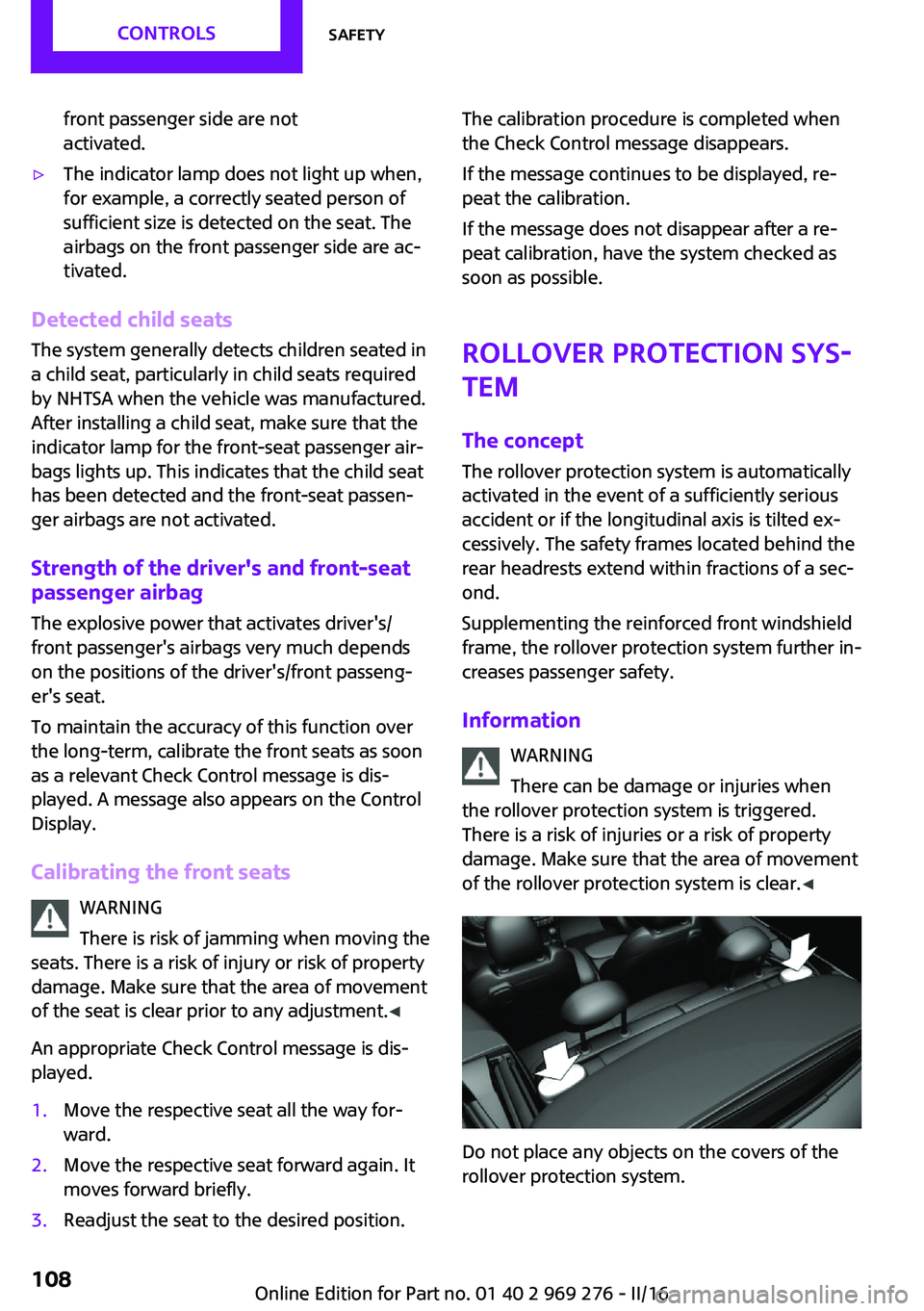
Do not place any objects on the covers of the
rollover protection system.
Seite 108CONTROLSSafety108
Online Edition for Part no. 01 40 2 969 276 - II/16
Page 109 of 252
WARNING
Improperly executed work can lead to
failure, malfunction or unintentional triggering
of the system. In the case of a malfunction, the
system could not trigger as intended in the
event of an accident despite respective acci‐
dent severity. There is a risk of injury or danger
to life. Have the system checked, repaired, dis‐
mantled and scrapped by a dealer’s service
center or another qualified service center or re‐
pair shop. ◀
Triggered rollover protection system WARNING
After triggering or damage, system func‐
tionality is limited or not available anymore.
There is a risk of injury or danger to life.
Have the system checked and replaced by a
dealer’s service center or another qualified
service center or repair shop in the event of
triggering of or damage to the system. ◀
WARNING
With an extended rollover protection sys‐
tem, the area of movement of the convertible
top is limited. There is a risk of injuries or a risk
of property damage. When the rollover protec‐
tion system is extended, do not move the con‐
vertible top. ◀
Malfunction A Check Control message is displayed
when there is a malfunction.
Tire Pressure Monitor
TPM
The concept
The system monitors tire inflation pressure in
the four mounted tires. The system warns you if
there is a significant loss of pressure in one ormore tires. For this purpose, sensors in the tire
valves measure the tire inflation pressure.
Information With use of the system observe further infor‐
mation found under Tire inflation pressure, re‐
fer to page 186.
Functional requirements The system must have been reset with the cor‐
rect tire inflation pressure; otherwise, reliable
signaling of tire pressure loss is not assured.
Reset the system after each adjustment of the
tire inflation pressure and after every tire or
wheel change.
Always use wheels with TPM electronics to en‐
sure that the system will operate properly.
Status display The current status of the Tire Pressure Monitor
TPM can be displayed on the Control Display,
e.g., whether or not the TPM is active.
On the Control Display:1. "Vehicle info"2."Vehicle status"3. "Tire Pressure Monitor (TPM)"
The status is displayed.
Status control display Tire and system status are indicated by the
color of the tires and a text message on the
Control Display.
All wheels green System is active and will issue a warning rela‐
tive to the tire inflation pressures stored during
the last reset.
One wheel is yellowA flat tire or major drop in inflation pressure in
the indicated tire.
Seite 109SafetyCONTROLS109
Online Edition for Part no. 01 40 2 969 276 - II/16