service MINI COOPER CONVERTIBLE 2016 Service Manual
[x] Cancel search | Manufacturer: MINI, Model Year: 2016, Model line: COOPER CONVERTIBLE, Model: MINI COOPER CONVERTIBLE 2016Pages: 252, PDF Size: 5.41 MB
Page 211 of 252
Turn signalFollow the general instructions on lights and
bulbs, refer to page 209.
Bulbs: PW24W
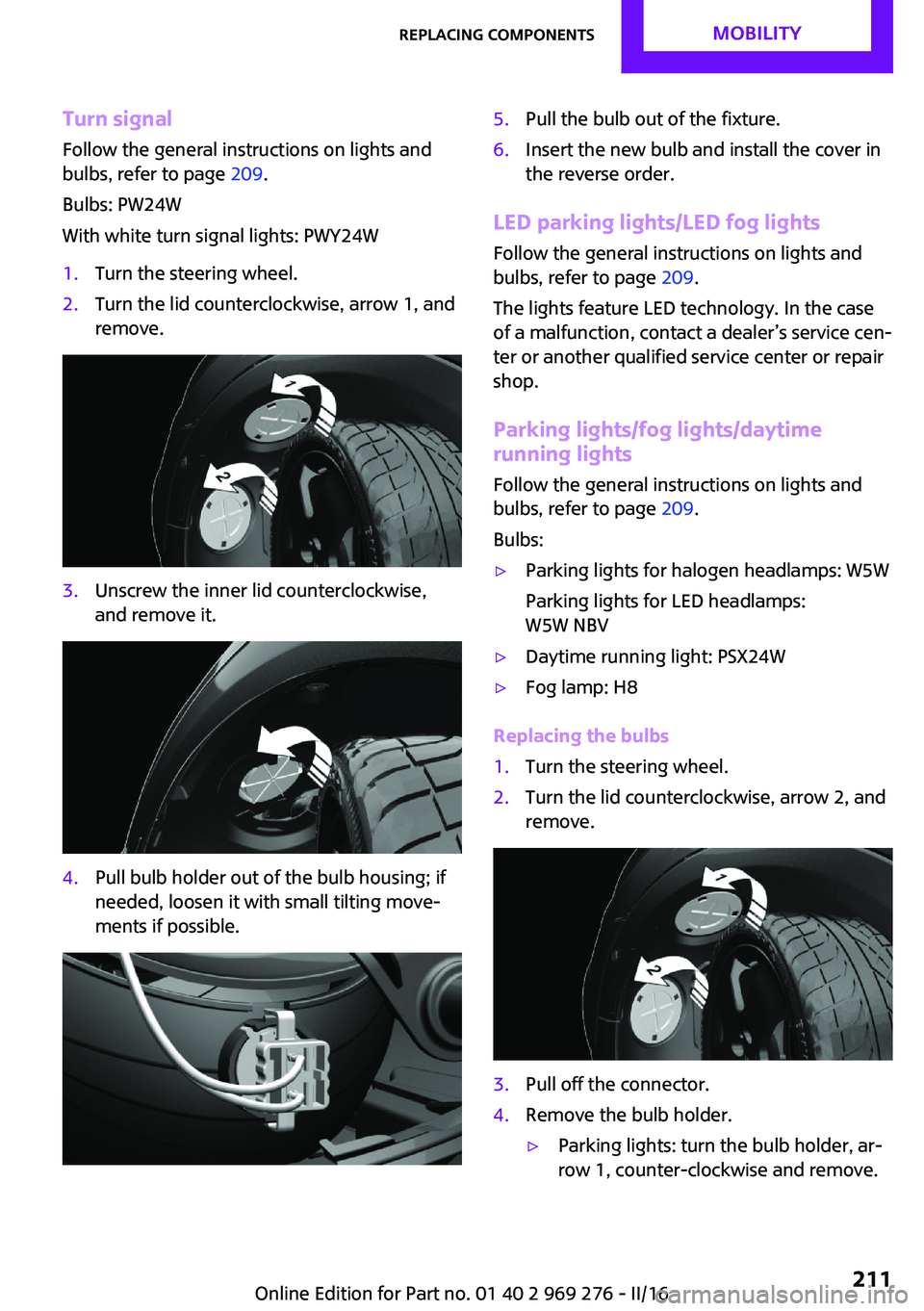
With white turn signal lights: PWY24W1.Turn the steering wheel.2.Turn the lid counterclockwise, arrow 1, and
remove.3.Unscrew the inner lid counterclockwise,
and remove it.4.Pull bulb holder out of the bulb housing; if
needed, loosen it with small tilting move‐
ments if possible.5.Pull the bulb out of the fixture.6.Insert the new bulb and install the cover in
the reverse order.
LED parking lights/LED fog lights
Follow the general instructions on lights and
bulbs, refer to page 209.
The lights feature LED technology. In the case
of a malfunction, contact a dealer’s service cen‐
ter or another qualified service center or repair
shop.
Parking lights/fog lights/daytime
running lights
Follow the general instructions on lights and
bulbs, refer to page 209.
Bulbs:
▷Parking lights for halogen headlamps: W5W
Parking lights for LED headlamps:
W5W NBV▷Daytime running light: PSX24W▷Fog lamp: H8
Replacing the bulbs
1.Turn the steering wheel.2.Turn the lid counterclockwise, arrow 2, and
remove.3.Pull off the connector.4.Remove the bulb holder.▷Parking lights: turn the bulb holder, ar‐
row 1, counter-clockwise and remove.Seite 211Replacing componentsMOBILITY211
Online Edition for Part no. 01 40 2 969 276 - II/16
Page 213 of 252
3Brake light4Reversing lights
Side tail lampsFollow the general instructions on lights and
bulbs, refer to page 209.
Bulbs: P21W
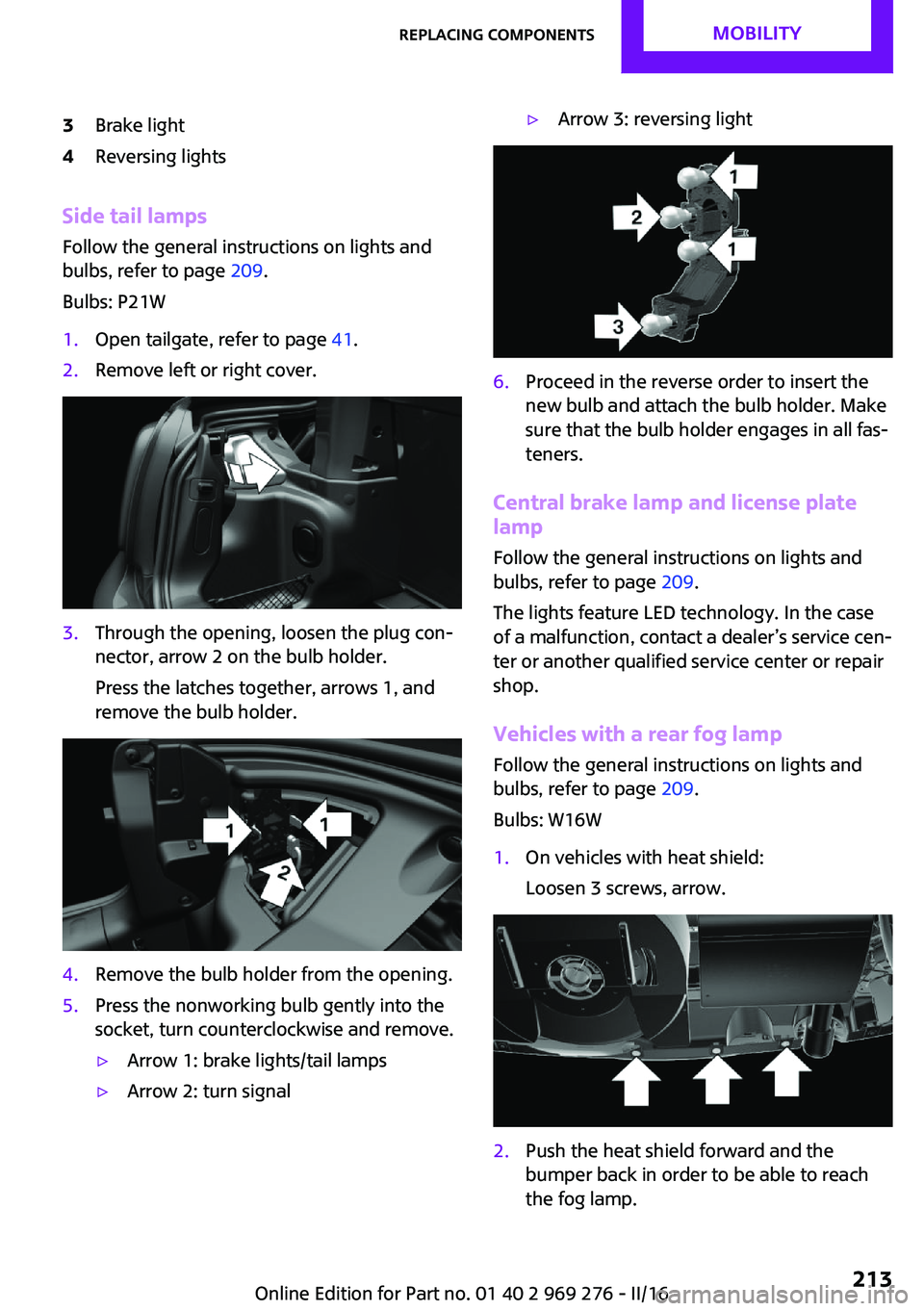
1.Open tailgate, refer to page 41.2.Remove left or right cover.3.Through the opening, loosen the plug con‐
nector, arrow 2 on the bulb holder.
Press the latches together, arrows 1, and
remove the bulb holder.4.Remove the bulb holder from the opening.5.Press the nonworking bulb gently into the
socket, turn counterclockwise and remove.▷Arrow 1: brake lights/tail lamps▷Arrow 2: turn signal▷Arrow 3: reversing light6.Proceed in the reverse order to insert the
new bulb and attach the bulb holder. Make
sure that the bulb holder engages in all fas‐
teners.
Central brake lamp and license plate
lamp
Follow the general instructions on lights and
bulbs, refer to page 209.
The lights feature LED technology. In the case
of a malfunction, contact a dealer’s service cen‐
ter or another qualified service center or repair
shop.
Vehicles with a rear fog lamp Follow the general instructions on lights and
bulbs, refer to page 209.
Bulbs: W16W
1.On vehicles with heat shield:
Loosen 3 screws, arrow.2.Push the heat shield forward and the
bumper back in order to be able to reach
the fog lamp.Seite 213Replacing componentsMOBILITY213
Online Edition for Part no. 01 40 2 969 276 - II/16
Page 215 of 252
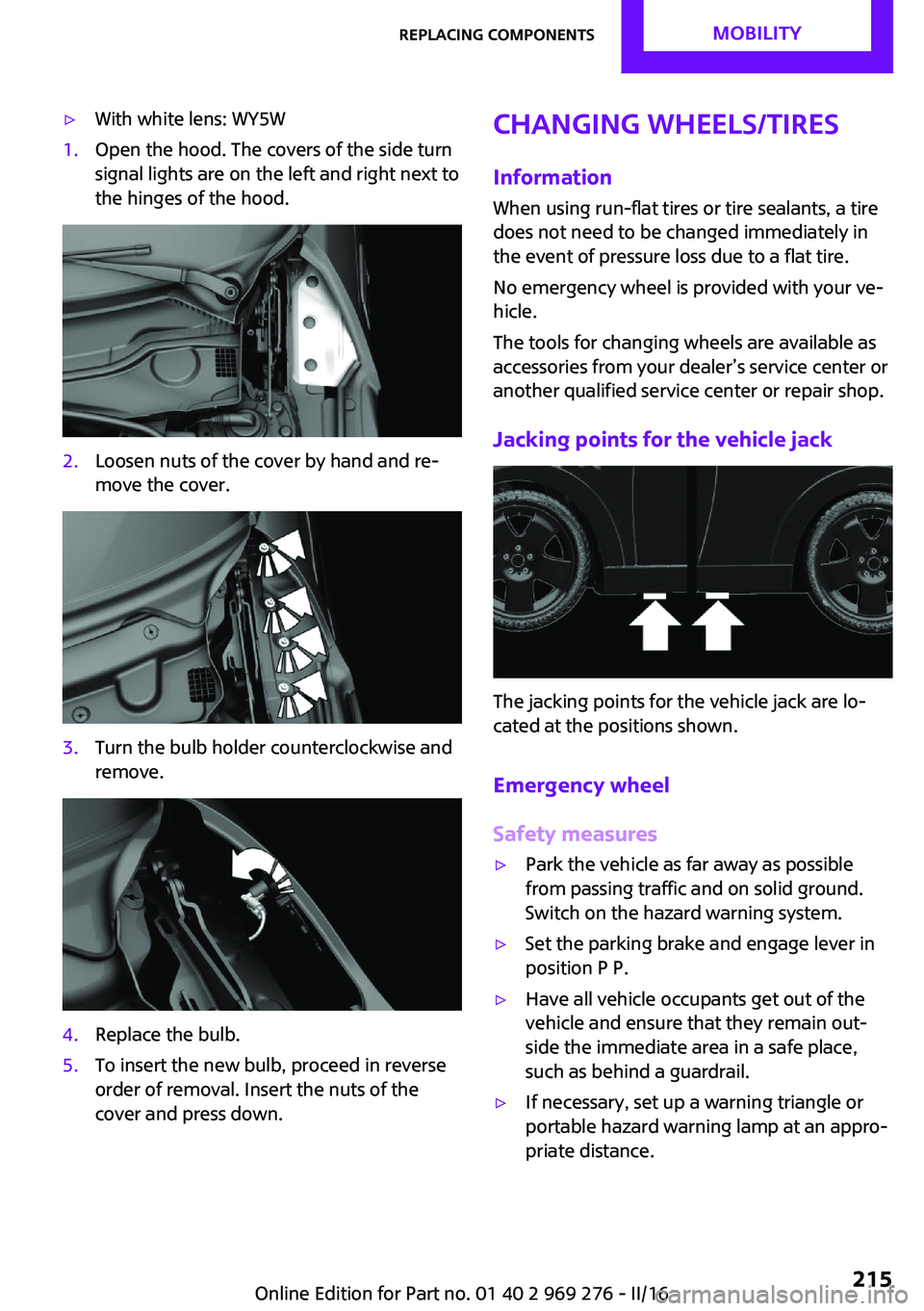
▷With white lens: WY5W1.Open the hood. The covers of the side turn
signal lights are on the left and right next to
the hinges of the hood.2.Loosen nuts of the cover by hand and re‐
move the cover.3.Turn the bulb holder counterclockwise and
remove.4.Replace the bulb.5.To insert the new bulb, proceed in reverse
order of removal. Insert the nuts of the
cover and press down.Changing wheels/tires
InformationWhen using run-flat tires or tire sealants, a tire
does not need to be changed immediately in
the event of pressure loss due to a flat tire.
No emergency wheel is provided with your ve‐
hicle.
The tools for changing wheels are available as
accessories from your dealer’s service center or
another qualified service center or repair shop.
Jacking points for the vehicle jack
The jacking points for the vehicle jack are lo‐
cated at the positions shown.
Emergency wheel
Safety measures
▷Park the vehicle as far away as possible
from passing traffic and on solid ground.
Switch on the hazard warning system.▷Set the parking brake and engage lever in
position P P.▷Have all vehicle occupants get out of the
vehicle and ensure that they remain out‐
side the immediate area in a safe place,
such as behind a guardrail.▷If necessary, set up a warning triangle or
portable hazard warning lamp at an appro‐
priate distance.Seite 215Replacing componentsMOBILITY215
Online Edition for Part no. 01 40 2 969 276 - II/16
Page 217 of 252
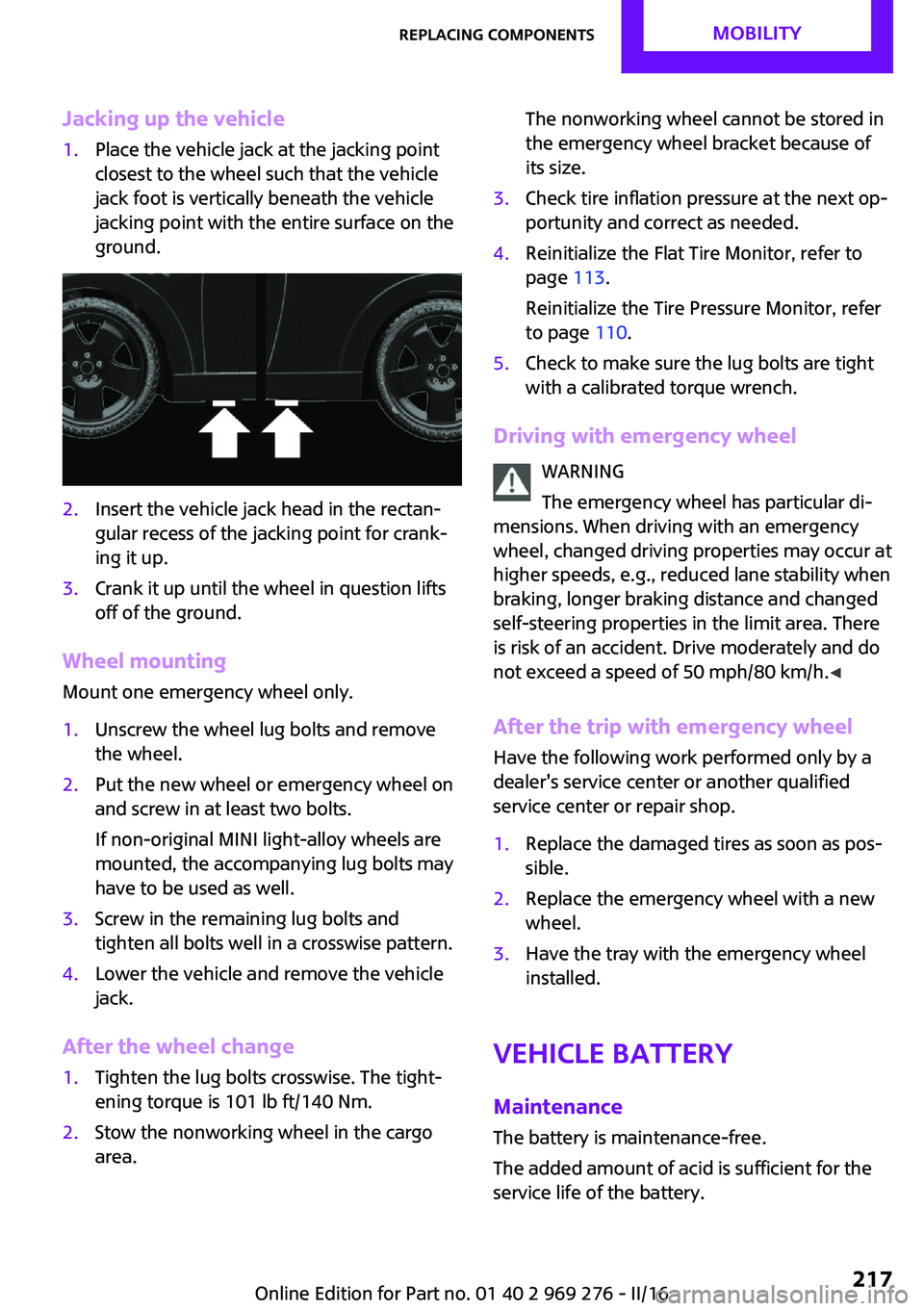
Jacking up the vehicle1.Place the vehicle jack at the jacking point
closest to the wheel such that the vehicle
jack foot is vertically beneath the vehicle
jacking point with the entire surface on the
ground.2.Insert the vehicle jack head in the rectan‐
gular recess of the jacking point for crank‐
ing it up.3.Crank it up until the wheel in question lifts
off of the ground.
Wheel mounting
Mount one emergency wheel only.
1.Unscrew the wheel lug bolts and remove
the wheel.2.Put the new wheel or emergency wheel on
and screw in at least two bolts.
If non-original MINI light-alloy wheels are
mounted, the accompanying lug bolts may
have to be used as well.3.Screw in the remaining lug bolts and
tighten all bolts well in a crosswise pattern.4.Lower the vehicle and remove the vehicle
jack.
After the wheel change
1.Tighten the lug bolts crosswise. The tight‐
ening torque is 101 lb ft/140 Nm.2.Stow the nonworking wheel in the cargo
area.The nonworking wheel cannot be stored in
the emergency wheel bracket because of
its size.3.Check tire inflation pressure at the next op‐
portunity and correct as needed.4.Reinitialize the Flat Tire Monitor, refer to
page 113.
Reinitialize the Tire Pressure Monitor, refer
to page 110.5.Check to make sure the lug bolts are tight
with a calibrated torque wrench.
Driving with emergency wheel
WARNING
The emergency wheel has particular di‐
mensions. When driving with an emergency wheel, changed driving properties may occur at
higher speeds, e.g., reduced lane stability when
braking, longer braking distance and changed
self-steering properties in the limit area. There
is risk of an accident. Drive moderately and do
not exceed a speed of 50 mph/80 km/h. ◀
After the trip with emergency wheel
Have the following work performed only by a
dealer's service center or another qualified
service center or repair shop.
1.Replace the damaged tires as soon as pos‐
sible.2.Replace the emergency wheel with a new
wheel.3.Have the tray with the emergency wheel
installed.
Vehicle battery
Maintenance
The battery is maintenance-free.
The added amount of acid is sufficient for the
service life of the battery.
Seite 217Replacing componentsMOBILITY217
Online Edition for Part no. 01 40 2 969 276 - II/16
Page 218 of 252
More information about the battery can be re‐
quested from a dealer’s service center or an‐
other qualified service center or repair shop.
Battery replacement ATTENTION
Vehicle batteries that are not compatible
can damage vehicle systems and impair vehicle
functions. There is a risk of personal and prop‐
erty damage. Only vehicle batteries that are
compatible with your vehicle type should be in‐
stalled in your vehicle. Information on compati‐
ble vehicle batteries is available at your dealer’s
service center. ◀
After a battery replacement, the manufacturer
of your vehicle recommends that the vehicle
battery be registered on the vehicle by a
dealer’s service center or another qualified
service center or repair shop to ensure that all
comfort features are fully available and that
any Check Control messages of these comfort
features are no longer displayed.
Charging the battery
General information
Make sure that the battery is always sufficiently
charged to guarantee that the battery remains
usable for its full service life.
The battery may need to be charged in the fol‐
lowing cases:▷When making frequent short-distance
drives.▷If the vehicle is not used for more than a
month.▷Steptronic transmission: when parked for
long periods of time in selector lever posi‐
tion D, R or N.Information
ATTENTION
Battery chargers for the vehicle battery
can work with high voltages and currents, which means that the 12 volt on-board net‐
work can be overloaded or damaged. There is a
risk of damage to property. Only connect bat‐
tery chargers for the vehicle battery to the
starting aid terminals in the engine compart‐
ment. ◀
Starting aid terminals In the vehicle, only charge the battery via the
starting aid terminals, refer to page 221, in the
engine compartment with the engine off.
Power failure
After a power loss, some equipment needs to
be newly initialized or individual settings up‐
dated, for example:▷Time: update.▷Date: update.▷Navigation system: wait for the operability
of the navigation.▷Seat and mirror memory: store the posi‐
tions again.
Disposing of old batteries
Have old batteries disposed of by a
dealer’s service center or another quali‐
fied service center or repair shop or
take them to a collection point.
Maintain the battery in an upright position for
transport and storage. Secure the battery so
that it does not tip over during transport.
Seite 218MOBILITYReplacing components218
Online Edition for Part no. 01 40 2 969 276 - II/16
Page 220 of 252
Breakdown assistanceVehicle features and op‐
tions
This chapter describes all standard, country-
specific and optional features offered with the
series. It also describes features that are not
necessarily available in your car, e. g., due to
the selected options or country versions. This
also applies to safety-related functions and sys‐
tems. The respectively applicable country provi‐
sions must be observed when using the respec‐
tive features and systems.
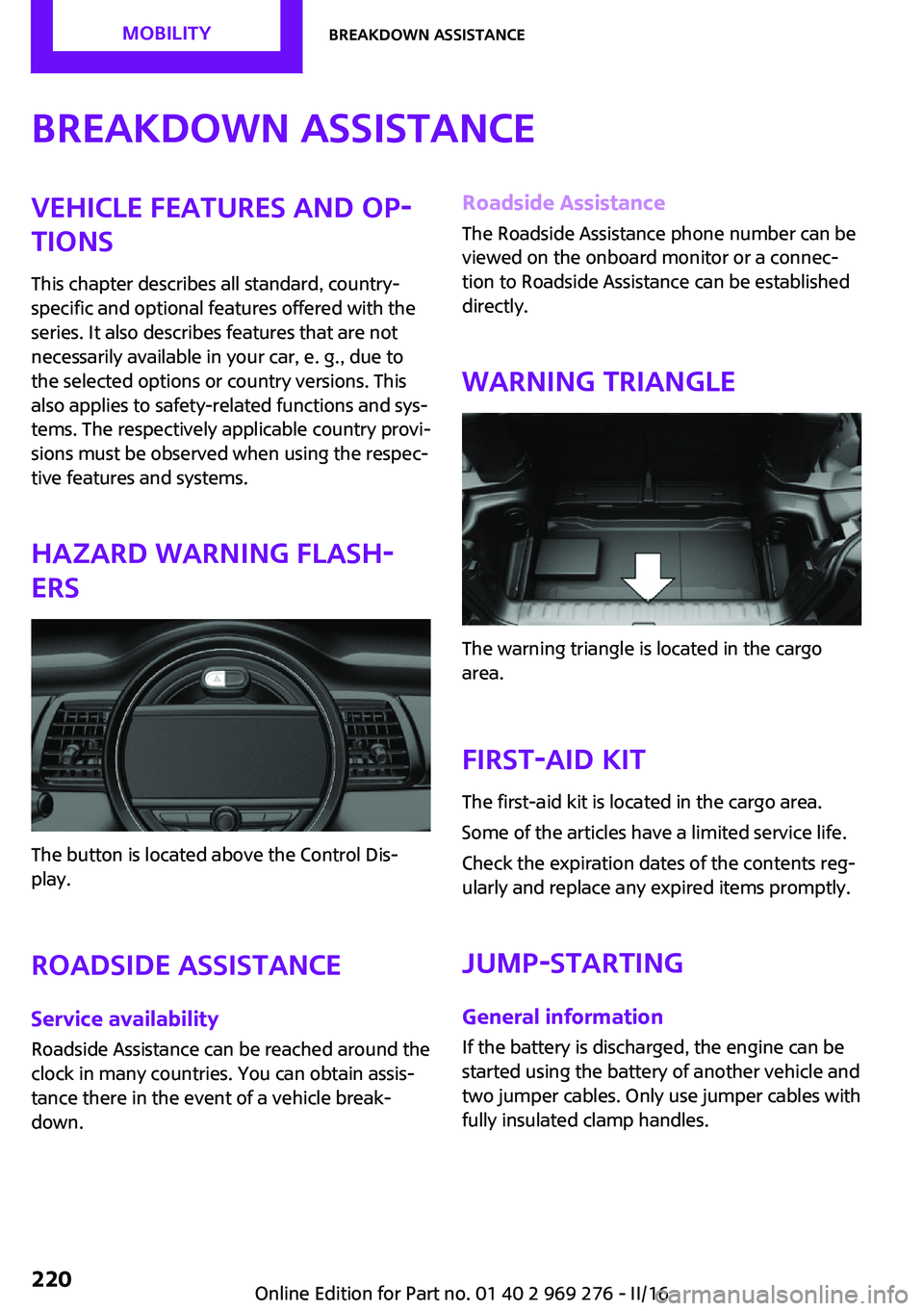
Hazard warning flash‐
ers
The button is located above the Control Dis‐
play.
Roadside Assistance
Service availability Roadside Assistance can be reached around the
clock in many countries. You can obtain assis‐
tance there in the event of a vehicle break‐
down.
Roadside Assistance
The Roadside Assistance phone number can be
viewed on the onboard monitor or a connec‐
tion to Roadside Assistance can be established
directly.
Warning triangle
The warning triangle is located in the cargo
area.
First-aid kit
The first-aid kit is located in the cargo area.
Some of the articles have a limited service life.
Check the expiration dates of the contents reg‐
ularly and replace any expired items promptly.
Jump-starting
General information If the battery is discharged, the engine can be
started using the battery of another vehicle and
two jumper cables. Only use jumper cables with
fully insulated clamp handles.
Seite 220MOBILITYBreakdown assistance220
Online Edition for Part no. 01 40 2 969 276 - II/16
Page 228 of 252
Follow the following instructions:▷Clean roofliner with a microfiber cloth.
Dampen cloth lightly with water.▷Do not soak the roofliner.▷To prevent water stains, mildew spots, and
chafe marks, do not enclose the convertible
top in the convertible top well for a long
period and do not fold and stow the con‐
vertible top in the convertible top well
while the top is wet or frozen.▷Remove water stains that may nevertheless
have appeared on the roofliner using a mi‐
crofiber cloth and an interior cleaner.▷When the vehicle is parked in enclosed
areas for lengthy periods, ensure that the
area is well ventilated.▷If possible, park the vehicle in the shade to
protect it from intensive solar radiation so
that color, rubber and fabric are not af‐
fected.▷Remove bird droppings immediately as
their corrosive effect will otherwise attack
the convertible top and damage the rubber
seals.▷Hard to remove tree sap or bird droppings
can be removed from the convertible top
with special tree sap remover and a soft
brush.
CAUTION
Spot remover, paint thinner, solvents,
gasoline or similar can damage the convertible
top or the rubber coating. There is a risk of
property damage. To remove spots on the con‐
vertible top, use only suitable cleaning agents,
for example special convertible top cleaning
agent. ◀
To remove heavy soiling, especially for light col‐
ored convertible tops, use a special convertible
top cleaner.
Proceed as follows:
1.Spray the convertible top with the converti‐
ble top cleaner.2.Make the convertible top cleaner foam up
using a well saturated sponge, moving it in
circular motions.3.Finish washing the vehicle in the car wash
or rinse with ample amounts of water.
Otherwise, follow the instructions for use from
the manufacturer.
Treat the convertible top with an impregnating
agent after it has been washed three to five
times.
Suitable cleaners and car products can be ob‐
tained from the service department.
Leather care Remove dust from the leather often, using a
cloth or vacuum cleaner.
Otherwise, particles of dust and road grime
chafe in pores and folds, and lead to increased
wear and premature degradation of the leather
surface.
To guard against discoloration, such as from
clothing, clean leather and provide leather care
roughly every two months.
Clean light-colored leather more frequently be‐
cause soiling on such surfaces is substantially
more visible.
Use leather care products; otherwise, dirt and
grease will gradually break down the protective
layer of the leather surface.
Suitable care products are available from a
dealer’s service center or another qualified
service center or repair shop.
Upholstery material care
Vacuum regularly with a vacuum cleaner.
If upholstery is very dirty, for example, with
beverage stains, use a soft sponge or micro‐
fiber cloth with a suitable interior cleaner.
Clean the upholstery down to the seams using
large sweeping motions. Avoid rubbing the ma‐
terial vigorously.
Seite 228MOBILITYCare228
Online Edition for Part no. 01 40 2 969 276 - II/16
Page 230 of 252
floor mats and do not layer several floor mats.
Make sure that there is sufficient clearance for
the pedals. Ensure that the floor mats are se‐
curely fastened again after they were removed,
e.g., for cleaning. ◀
Floor mats can be removed from the car's inte‐
rior for cleaning.
If the floor carpets are very dirty, clean with a
microfiber cloth and water or a textile cleaner.
To prevent matting of the carpet, rub back and
forth in the direction of travel only.
Sensor/camera lenses To clean sensors and camera lenses, use a cloth
moistened with a small amount of glass deter‐
gent.
Displays/Screens/Projection lenses ATTENTION
Chemical cleansers, moisture or fluids of
any kind can damage the surface of displays
and screens. There is a risk of damage to prop‐
erty. Clean with a clean, antistatic microfiber
cloth. ◀
ATTENTION
The surface of displays can be damaged
with improper cleaning. There is a risk of dam‐
age to property. Avoid pressure that is too high
and do not use any scratching materials. ◀
Clean with a clean, antistatic microfiber cloth.
Head-up Display:
For stubborn soiling on the projection lens of
the Head-up Display, dampen the microfiber
cloth with alcohol. Extending projection lens,
refer to page 95.
Long-term vehicle storage
When the vehicle is shut down for longer than
three months, special measures must be taken.
Further information is available from a dealer’s
service center or another qualified service cen‐
ter or repair shop.Seite 230MOBILITYCare230
Online Edition for Part no. 01 40 2 969 276 - II/16
Page 234 of 252

Technical dataVehicle features and op‐
tions
This chapter describes all standard, country-
specific and optional features offered with the
series. It also describes features that are notnecessarily available in your car, e. g., due to
the selected options or country versions. This
also applies to safety-related functions and sys‐
tems. The respectively applicable country provi‐
sions must be observed when using the respec‐
tive features and systems.
Information
The technical data and specifications in this
Owner's Manual are used as guidance values.
The vehicle-specific data can deviate from this,
for example, due to the selected special equip‐
ment, country version or country-specific
measurement method. Detailed values can be
found in the approval documents, on labels onthe vehicle or can be obtained from a dealer’s
service center or another qualified service cen‐
ter or repair shop.
The information in the vehicle documents al‐
ways has priority over the information in this
Owner's Manual.
Dimensions
The dimensions can vary depending on the
model version, equipment or country-specific
measurement method.
The specified heights do not take into account
attached parts, for example, a roof antenna,roof racks or spoiler. The heights can deviate,
for example, due to the selected special equip‐
ment, tires, load and chassis version. MINI CONVERTIBLEWidth with mirrorsinches/mm76.1/1,932Width without mirrorsinches/mm68/1,727Heightinches/mm55.7/1,415Lengthinches/mm151.1-152.5/3,837-3,874Wheelbaseinches/mm98.2/2,495Smallest turning radius diam.ft/m35.5/10.8Seite 234REFERENCETechnical data234
Online Edition for Part no. 01 40 2 969 276 - II/16
Page 243 of 252
Bulbs and lights 209
Button, Start/Stop 66
Bypassing, see Jump-start‐ ing 220
C California Proposition 65 Warning 8
Camera-based cruise con‐ trol 126
Camera lenses, care 230
Camera, rearview cam‐ era 137
Can holder, see Cup holder 161
Car battery 217
Care, displays 230
Care, vehicle 227
Cargo area, enlarging 158
Cargo area partition 158
Cargo area, storage compart‐ ments 162
Cargo straps, securing cargo 171
Car key, see Remote con‐ trol 34
Carpet, care 229
Car wash 226
Catalytic converter, see Hot exhaust system 167
CBS Condition Based Serv‐ ice 206
Center armrest 161
Center console 16
Central instrument cluster, LED ring 94
Central locking system 40
Central screen, refer to Control Display 18
Changes, technical, refer to Own Safety 7
Changing parts 208
Changing wheels 215
Changing wheels/tires 192 Chassis number, see vehicle
identification number 10
Check Control 81
Checking the oil level elec‐ tronically 200
Children, seating position 63
Children, transporting safely 63
Child restraint fixing sys‐ tem 63
Child restraint fixing system LATCH 65
Child restraint fixing systems, mounting 64
Child seat, mounting 64
Child seats 63
Chrome parts, care 229
Chrono package, cockpit 97
Cigarette lighter 155
Cleaning, displays 230
Climate control 144, 146
Clock 85
Closing/opening via door lock 40
Closing/opening with remote control 38
Coasting 177
Coasting with engine decou‐ pled, coasting 177
Coasting with idling en‐ gine 177
Combination switch, see Turn signals 71
Combi switch, see wiper sys‐ tem 72
Comfort Access 41
Comfort entry 38
Compartments in the doors 161
Compass 153
Compressor 194
Condensation on win‐ dows 149
Condensation under the vehi‐ cle 168 Condition Based Service
CBS 206
Configuring driving pro‐ gram 125
Confirmation signal 44
Control Display 18
Control Display, settings 92
Controller 19
Control systems, driving stabil‐ ity 122
Convenient closing with the remote control 39
Convenient opening 38
Convertible, convertible top 47
Convertible mode, automatic climate control 148
Convertible program, auto‐ matic climate control 148
Convertible, roof 47
Convertible top 47
Convertible top, care 227
Convertible top, cargo area partition 50
Convertible top, emergency operation 50
Convertible top, rollover pro‐ tection system 108
Coolant 204
Cooling function 145, 147
Cooling, maximum 147
Cooling system 204
Cornering light 102
Corrosion on brake discs 168
Cosmetic mirror 155
Courtesy lamps during unlock‐ ing 38
Courtesy lamps with the vehi‐ cle locked 39
Cruise control 131
Cruise control, active 126
Cruise control with distance control, see camera-based
cruise control 126 Seite 243Everything from A to ZREFERENCE243
Online Edition for Part no. 01 40 2 969 276 - II/16