bulb MINI COOPER CONVERTIBLE 2016 Owners Manual
[x] Cancel search | Manufacturer: MINI, Model Year: 2016, Model line: COOPER CONVERTIBLE, Model: MINI COOPER CONVERTIBLE 2016Pages: 252, PDF Size: 5.41 MB
Page 72 of 252
2."Lighting"3."Triple turn signal"
Settings are stored for the profile currently
used.
Signaling briefly Press the lever to the resistance point and hold
it there for as long as you want the turn signal
to flash.
Malfunction
Unusually rapid flashing of the indicator lamp
indicates that a turn signal bulb has failed.
High beams, headlight flasher
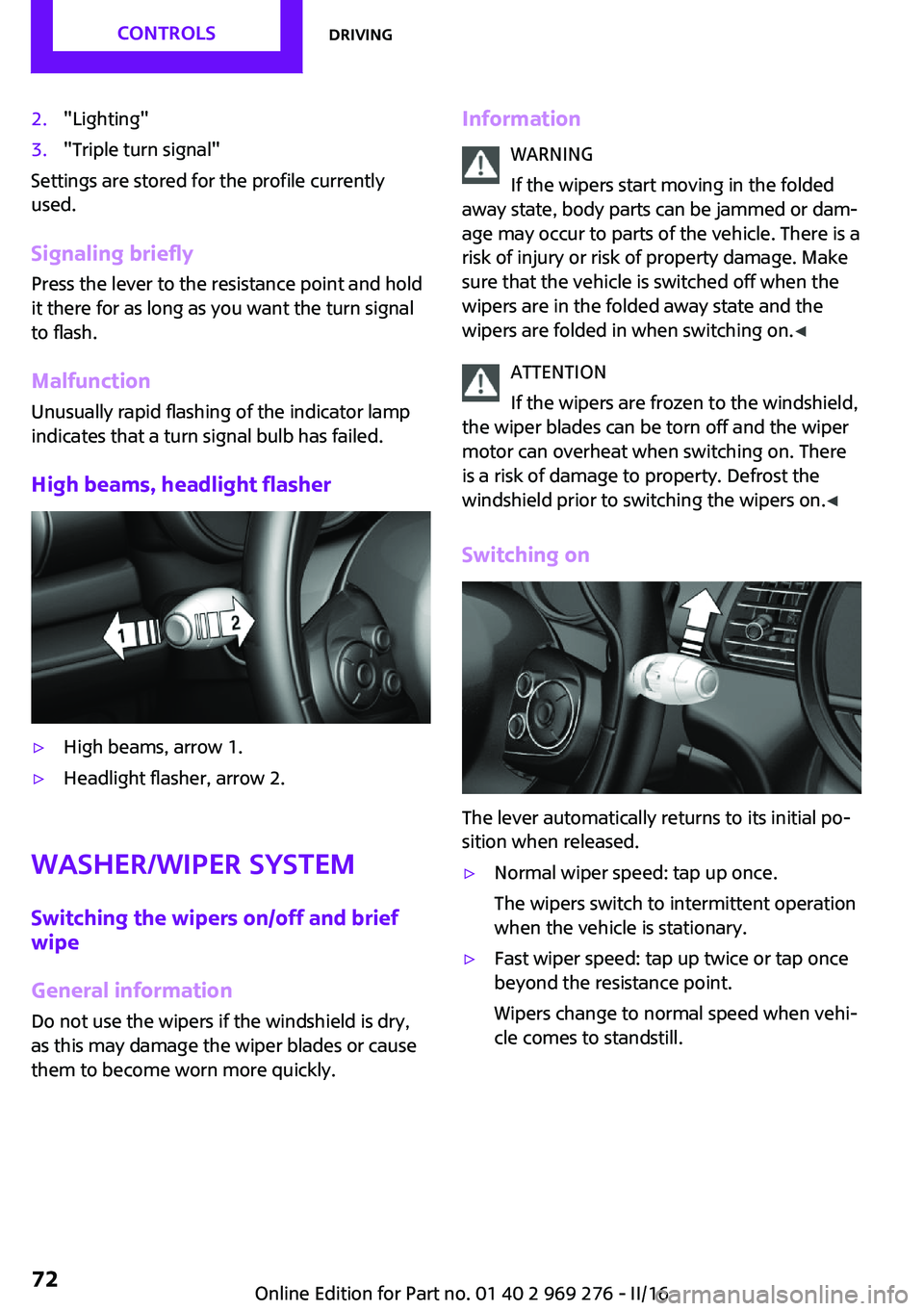
▷High beams, arrow 1.▷Headlight flasher, arrow 2.
Washer/wiper system
Switching the wipers on/off and brief
wipe
General information Do not use the wipers if the windshield is dry,
as this may damage the wiper blades or cause
them to become worn more quickly.
Information
WARNING
If the wipers start moving in the folded
away state, body parts can be jammed or dam‐
age may occur to parts of the vehicle. There is a risk of injury or risk of property damage. Make
sure that the vehicle is switched off when the wipers are in the folded away state and the
wipers are folded in when switching on. ◀
ATTENTION
If the wipers are frozen to the windshield,
the wiper blades can be torn off and the wiper
motor can overheat when switching on. There
is a risk of damage to property. Defrost the
windshield prior to switching the wipers on. ◀
Switching on
The lever automatically returns to its initial po‐
sition when released.
▷Normal wiper speed: tap up once.
The wipers switch to intermittent operation
when the vehicle is stationary.▷Fast wiper speed: tap up twice or tap once
beyond the resistance point.
Wipers change to normal speed when vehi‐
cle comes to standstill.Seite 72CONTROLSDriving72
Online Edition for Part no. 01 40 2 969 276 - II/16
Page 83 of 252
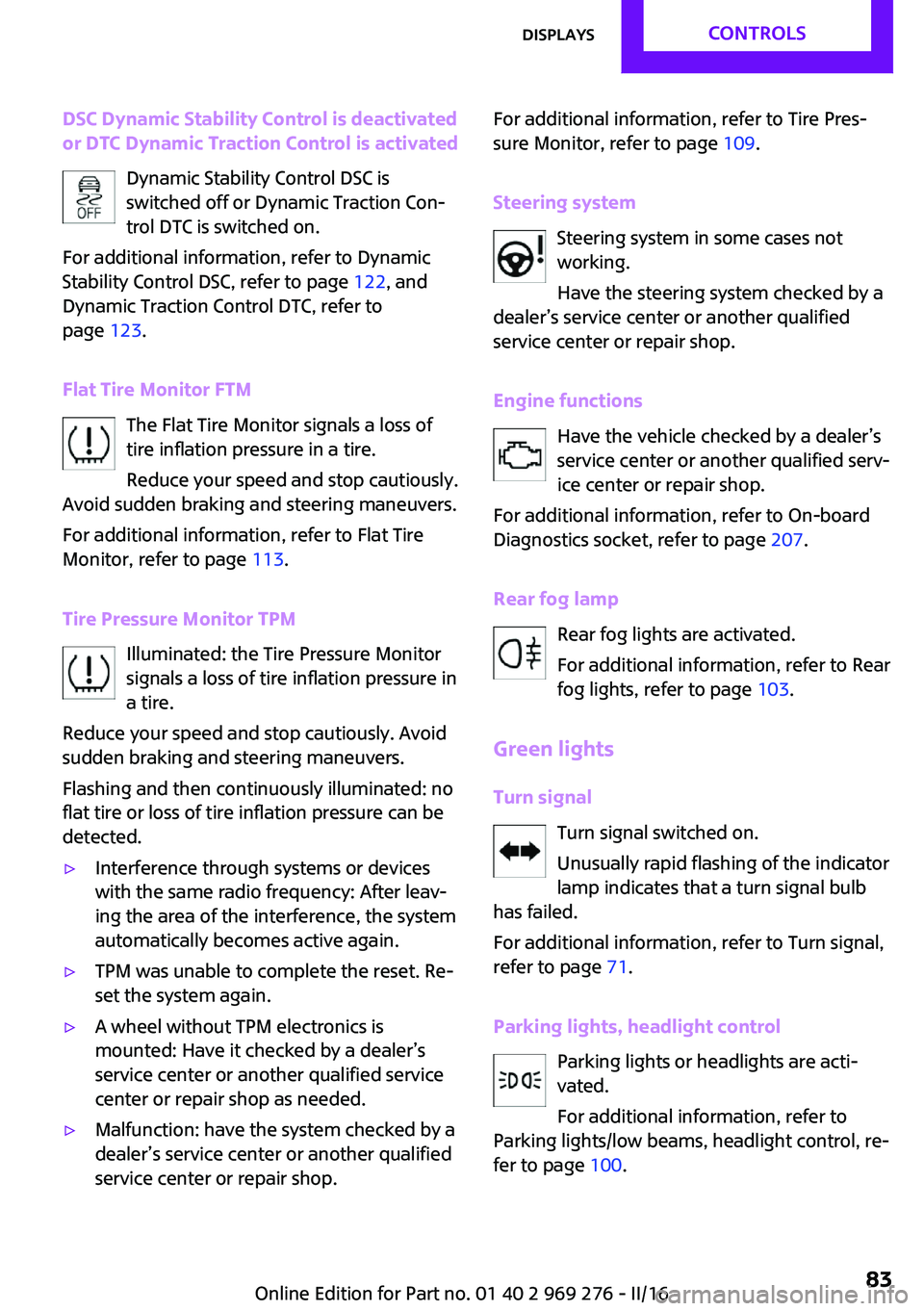
DSC Dynamic Stability Control is deactivated
or DTC Dynamic Traction Control is activated
Dynamic Stability Control DSC is
switched off or Dynamic Traction Con‐
trol DTC is switched on.
For additional information, refer to Dynamic
Stability Control DSC, refer to page 122, and
Dynamic Traction Control DTC, refer to
page 123.
Flat Tire Monitor FTM The Flat Tire Monitor signals a loss of
tire inflation pressure in a tire.
Reduce your speed and stop cautiously.
Avoid sudden braking and steering maneuvers.
For additional information, refer to Flat Tire
Monitor, refer to page 113.
Tire Pressure Monitor TPM Illuminated: the Tire Pressure Monitor
signals a loss of tire inflation pressure in
a tire.
Reduce your speed and stop cautiously. Avoid
sudden braking and steering maneuvers.
Flashing and then continuously illuminated: no
flat tire or loss of tire inflation pressure can be
detected.▷Interference through systems or devices
with the same radio frequency: After leav‐
ing the area of the interference, the system
automatically becomes active again.▷TPM was unable to complete the reset. Re‐
set the system again.▷A wheel without TPM electronics is
mounted: Have it checked by a dealer’s
service center or another qualified service
center or repair shop as needed.▷Malfunction: have the system checked by a
dealer’s service center or another qualified
service center or repair shop.For additional information, refer to Tire Pres‐
sure Monitor, refer to page 109.
Steering system Steering system in some cases not
working.
Have the steering system checked by a
dealer’s service center or another qualified
service center or repair shop.
Engine functions Have the vehicle checked by a dealer’s
service center or another qualified serv‐
ice center or repair shop.
For additional information, refer to On-board
Diagnostics socket, refer to page 207.
Rear fog lamp Rear fog lights are activated.
For additional information, refer to Rear
fog lights, refer to page 103.
Green lights Turn signal Turn signal switched on.
Unusually rapid flashing of the indicator
lamp indicates that a turn signal bulb
has failed.
For additional information, refer to Turn signal,
refer to page 71.
Parking lights, headlight control Parking lights or headlights are acti‐
vated.
For additional information, refer to
Parking lights/low beams, headlight control, re‐
fer to page 100.Seite 83DisplaysCONTROLS83
Online Edition for Part no. 01 40 2 969 276 - II/16
Page 209 of 252
Lamp and bulb replace‐
ment
General information Lights and bulbs make an essential contribution
to vehicle safety.
The manufacturer of the vehicle recommends
that you have appropriate work performed by a
dealer’s service center or another qualified
service center or repair shop if you are unfami‐
liar with it or if it has not been described here.
A spare lamp box is available from a dealer’s
service center or another qualified service cen‐
ter or repair shop.
Information
Lights and bulbs WARNING
Bulbs can get hot during operation. Con‐
tact with the bulbs can cause burns. There is a
risk of injuries. Only change bulbs after they
have cooled off. ◀
WARNING
Work on switched-on lighting systems
can cause short circuits. There is a risk of inju‐
ries or a risk of property damage. When work‐
ing on the lighting system, switch off the lamps
in question. If necessary, heed the bulb manu‐
facturer's instructions. ◀
CAUTION
Dirty bulbs have a reduced service life.
There is a risk of property damage. Do not hold
new bulbs with your bare hands. Use a clean
cloth or something similar, or hold the bulb by
its base. ◀
Light-emitting diodes (LEDs) Some items of equipment use light-emitting di‐
odes installed behind a cover as a light source.These light-emitting diodes, which are related
to conventional lasers, are officially designated
as Class 1 light-emitting diodes.
WARNING
Too intensive brightness can irritate or
damage the retina of the eye. There is a a risk
of injury. Do not look directly into the head‐
lights or other light sources. Do not remove the
LED covers. ◀
Headlight glass Condensation can form on the inside of the ex‐
ternal lights in cool or humid weather. When
driving with the lights switched on, the conden‐
sation evaporates after a short time. The head‐
light glass does not need to be changed.
If despite driving with the lights switched on,
increasing humidity forms, e. g. water droplets
in the lamp, the manufacturer of your vehicle
recommends having it checked by a dealer’s
service center or another qualified service cen‐
ter or repair shop.
Front lights, bulb replacement
Overview
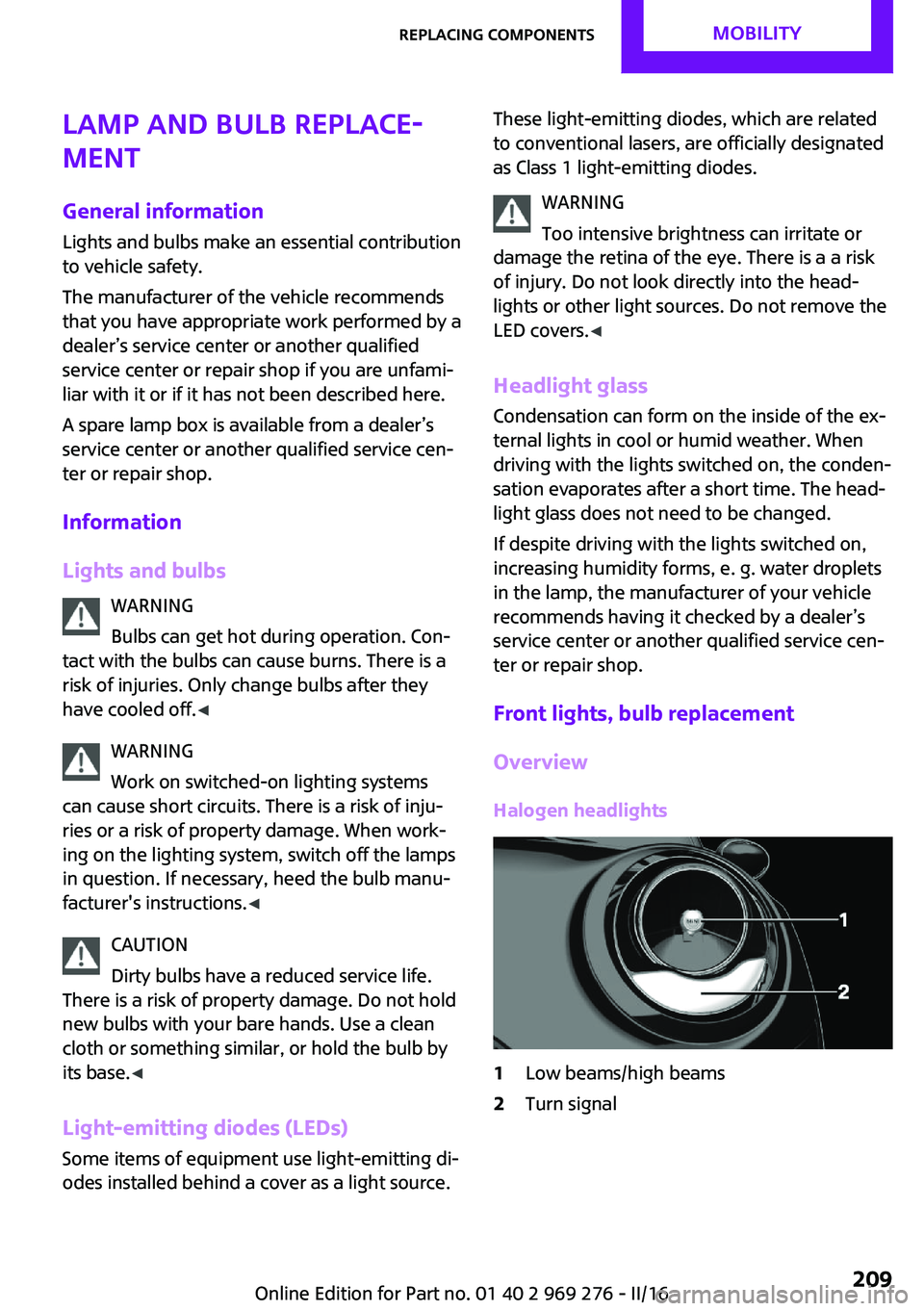
Halogen headlights1Low beams/high beams2Turn signalSeite 209Replacing componentsMOBILITY209
Online Edition for Part no. 01 40 2 969 276 - II/16
Page 210 of 252
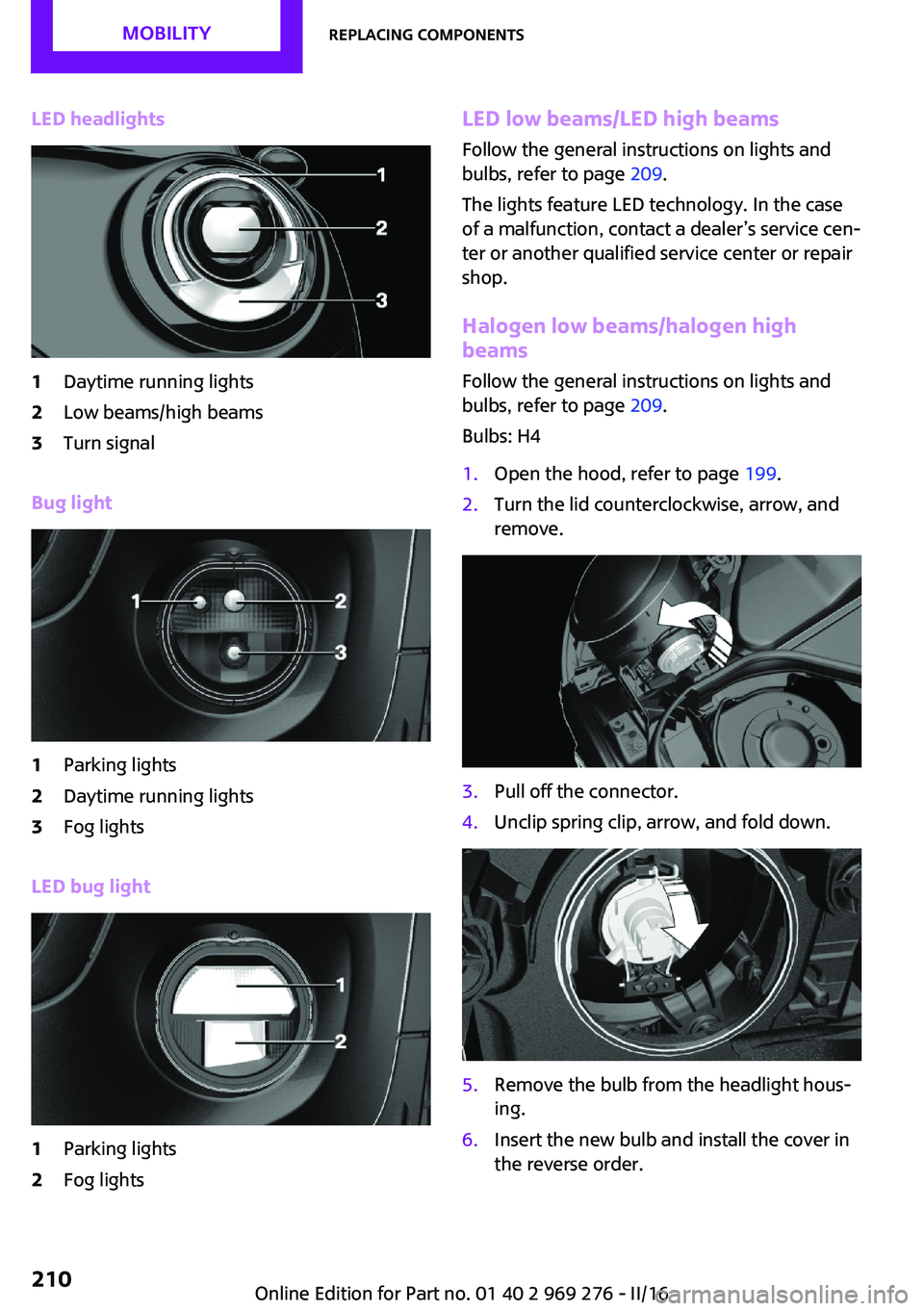
LED headlights1Daytime running lights2Low beams/high beams3Turn signal
Bug light
1Parking lights2Daytime running lights3Fog lights
LED bug light
1Parking lights2Fog lightsLED low beams/LED high beamsFollow the general instructions on lights and
bulbs, refer to page 209.
The lights feature LED technology. In the case
of a malfunction, contact a dealer’s service cen‐
ter or another qualified service center or repair
shop.
Halogen low beams/halogen high
beams
Follow the general instructions on lights and
bulbs, refer to page 209.
Bulbs: H41.Open the hood, refer to page 199.2.Turn the lid counterclockwise, arrow, and
remove.3.Pull off the connector.4.Unclip spring clip, arrow, and fold down.5.Remove the bulb from the headlight hous‐
ing.6.Insert the new bulb and install the cover in
the reverse order.Seite 210MOBILITYReplacing components210
Online Edition for Part no. 01 40 2 969 276 - II/16
Page 211 of 252
Turn signalFollow the general instructions on lights and
bulbs, refer to page 209.
Bulbs: PW24W
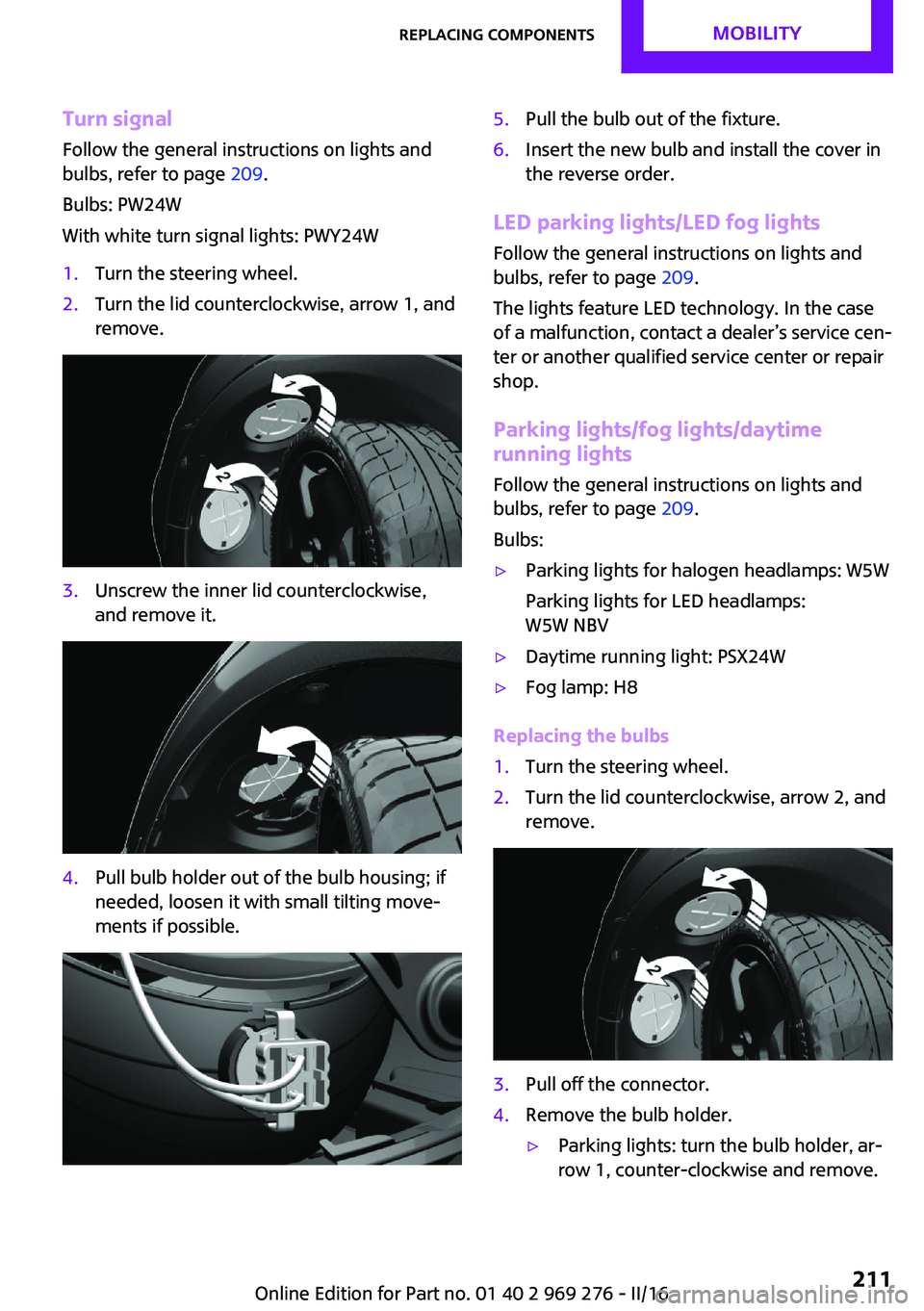
With white turn signal lights: PWY24W1.Turn the steering wheel.2.Turn the lid counterclockwise, arrow 1, and
remove.3.Unscrew the inner lid counterclockwise,
and remove it.4.Pull bulb holder out of the bulb housing; if
needed, loosen it with small tilting move‐
ments if possible.5.Pull the bulb out of the fixture.6.Insert the new bulb and install the cover in
the reverse order.
LED parking lights/LED fog lights
Follow the general instructions on lights and
bulbs, refer to page 209.
The lights feature LED technology. In the case
of a malfunction, contact a dealer’s service cen‐
ter or another qualified service center or repair
shop.
Parking lights/fog lights/daytime
running lights
Follow the general instructions on lights and
bulbs, refer to page 209.
Bulbs:
▷Parking lights for halogen headlamps: W5W
Parking lights for LED headlamps:
W5W NBV▷Daytime running light: PSX24W▷Fog lamp: H8
Replacing the bulbs
1.Turn the steering wheel.2.Turn the lid counterclockwise, arrow 2, and
remove.3.Pull off the connector.4.Remove the bulb holder.▷Parking lights: turn the bulb holder, ar‐
row 1, counter-clockwise and remove.Seite 211Replacing componentsMOBILITY211
Online Edition for Part no. 01 40 2 969 276 - II/16
Page 212 of 252
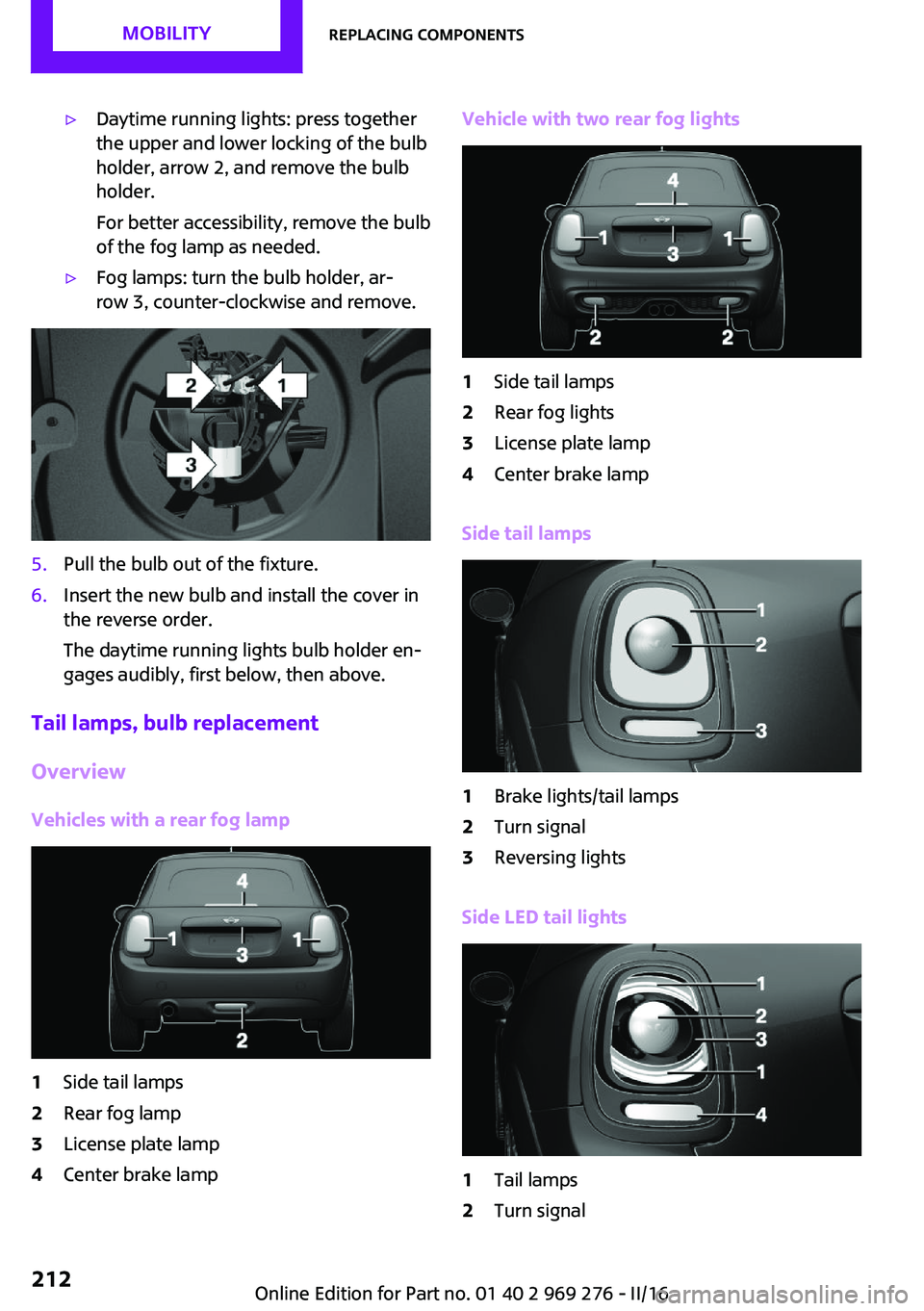
▷Daytime running lights: press together
the upper and lower locking of the bulb
holder, arrow 2, and remove the bulb
holder.
For better accessibility, remove the bulb
of the fog lamp as needed.▷Fog lamps: turn the bulb holder, ar‐
row 3, counter-clockwise and remove.5.Pull the bulb out of the fixture.6.Insert the new bulb and install the cover in
the reverse order.
The daytime running lights bulb holder en‐
gages audibly, first below, then above.
Tail lamps, bulb replacement
Overview
Vehicles with a rear fog lamp
1Side tail lamps2Rear fog lamp3License plate lamp4Center brake lampVehicle with two rear fog lights1Side tail lamps2Rear fog lights3License plate lamp4Center brake lamp
Side tail lamps
1Brake lights/tail lamps2Turn signal3Reversing lights
Side LED tail lights
1Tail lamps2Turn signalSeite 212MOBILITYReplacing components212
Online Edition for Part no. 01 40 2 969 276 - II/16
Page 213 of 252
3Brake light4Reversing lights
Side tail lampsFollow the general instructions on lights and
bulbs, refer to page 209.
Bulbs: P21W
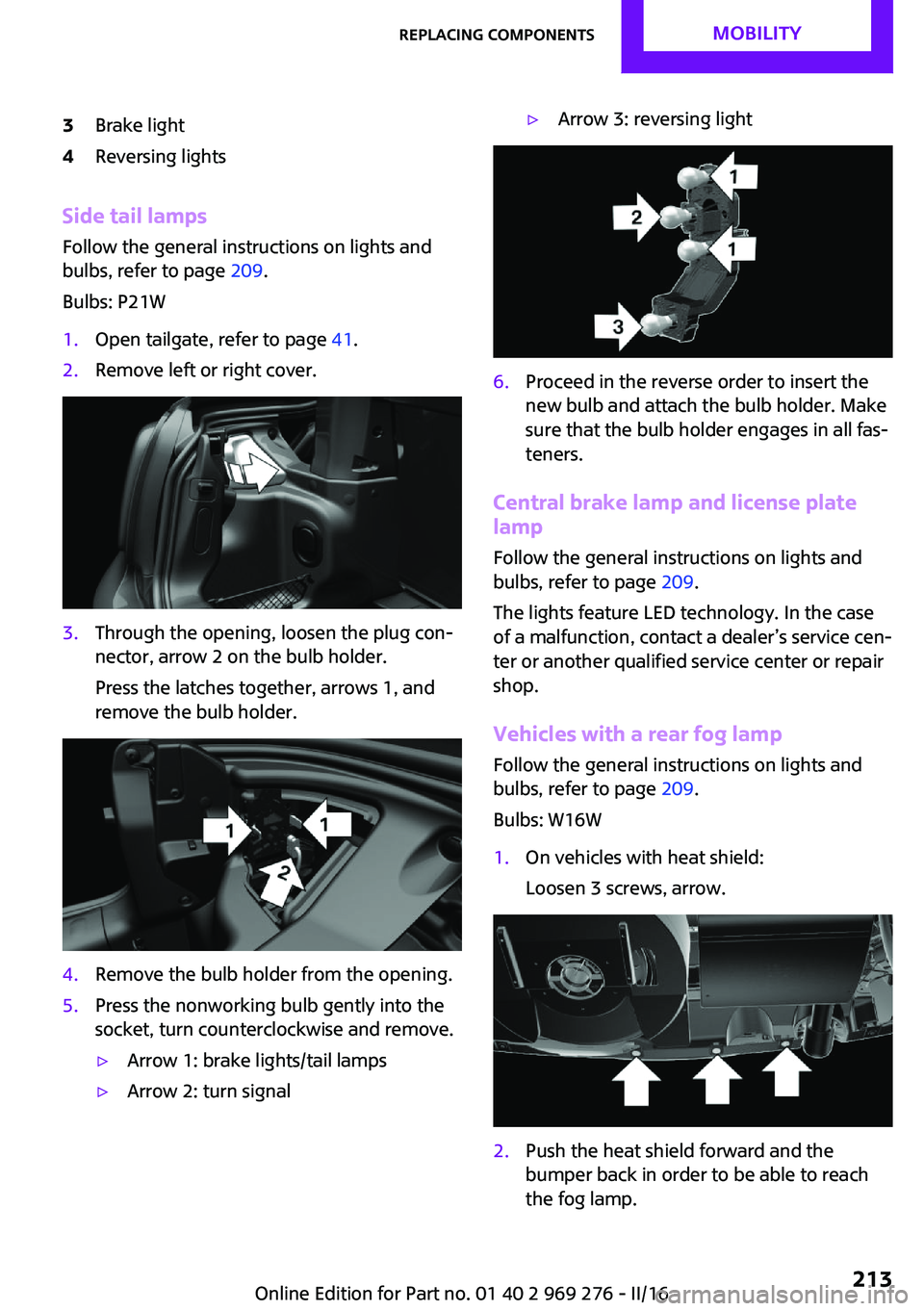
1.Open tailgate, refer to page 41.2.Remove left or right cover.3.Through the opening, loosen the plug con‐
nector, arrow 2 on the bulb holder.
Press the latches together, arrows 1, and
remove the bulb holder.4.Remove the bulb holder from the opening.5.Press the nonworking bulb gently into the
socket, turn counterclockwise and remove.▷Arrow 1: brake lights/tail lamps▷Arrow 2: turn signal▷Arrow 3: reversing light6.Proceed in the reverse order to insert the
new bulb and attach the bulb holder. Make
sure that the bulb holder engages in all fas‐
teners.
Central brake lamp and license plate
lamp
Follow the general instructions on lights and
bulbs, refer to page 209.
The lights feature LED technology. In the case
of a malfunction, contact a dealer’s service cen‐
ter or another qualified service center or repair
shop.
Vehicles with a rear fog lamp Follow the general instructions on lights and
bulbs, refer to page 209.
Bulbs: W16W
1.On vehicles with heat shield:
Loosen 3 screws, arrow.2.Push the heat shield forward and the
bumper back in order to be able to reach
the fog lamp.Seite 213Replacing componentsMOBILITY213
Online Edition for Part no. 01 40 2 969 276 - II/16
Page 214 of 252
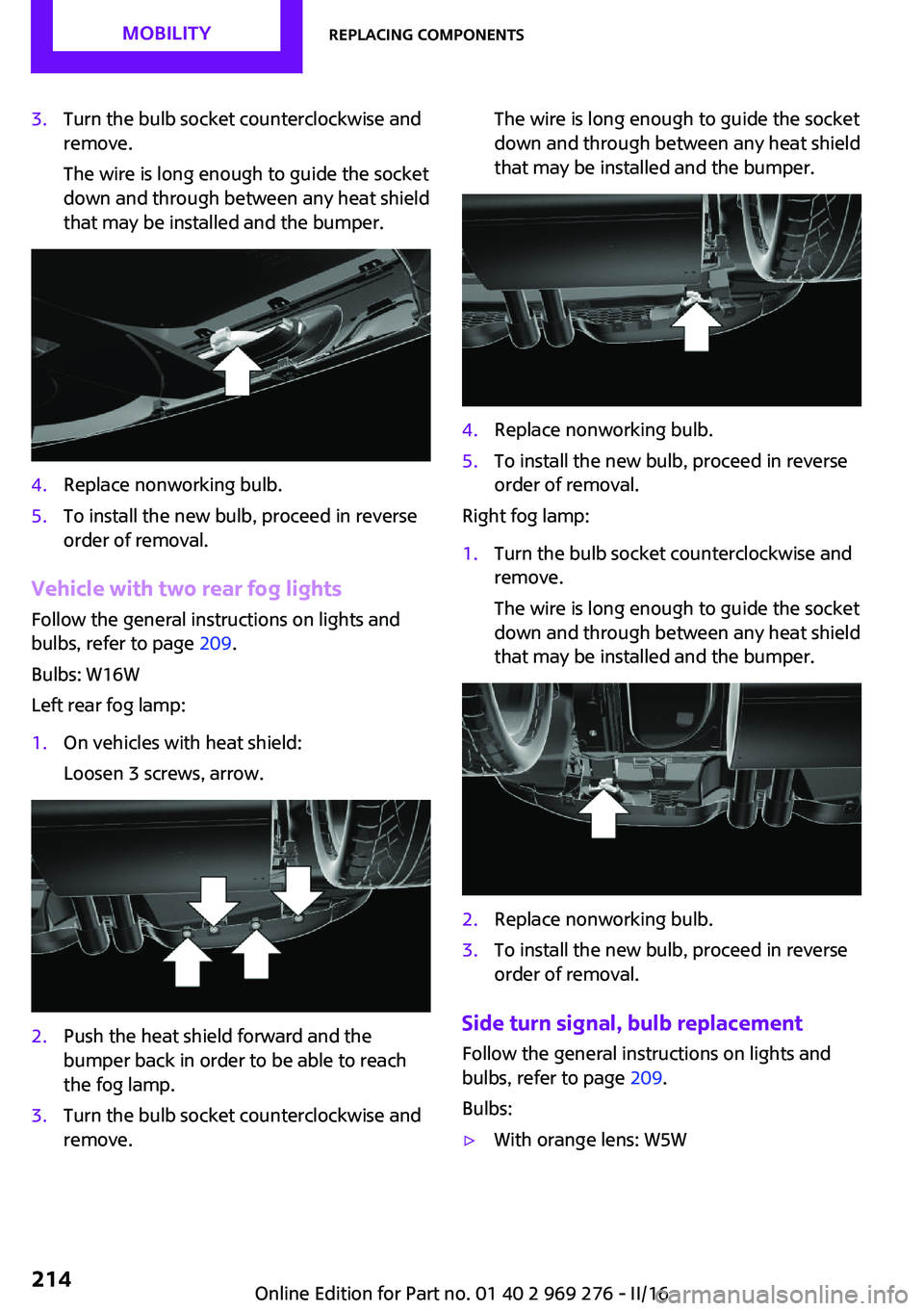
3.Turn the bulb socket counterclockwise and
remove.
The wire is long enough to guide the socket
down and through between any heat shield
that may be installed and the bumper.4.Replace nonworking bulb.5.To install the new bulb, proceed in reverse
order of removal.
Vehicle with two rear fog lights
Follow the general instructions on lights and
bulbs, refer to page 209.
Bulbs: W16W
Left rear fog lamp:
1.On vehicles with heat shield:
Loosen 3 screws, arrow.2.Push the heat shield forward and the
bumper back in order to be able to reach
the fog lamp.3.Turn the bulb socket counterclockwise and
remove.The wire is long enough to guide the socket
down and through between any heat shield
that may be installed and the bumper.4.Replace nonworking bulb.5.To install the new bulb, proceed in reverse
order of removal.
Right fog lamp:
1.Turn the bulb socket counterclockwise and
remove.
The wire is long enough to guide the socket
down and through between any heat shield
that may be installed and the bumper.2.Replace nonworking bulb.3.To install the new bulb, proceed in reverse
order of removal.
Side turn signal, bulb replacement
Follow the general instructions on lights and
bulbs, refer to page 209.
Bulbs:
▷With orange lens: W5WSeite 214MOBILITYReplacing components214
Online Edition for Part no. 01 40 2 969 276 - II/16
Page 215 of 252
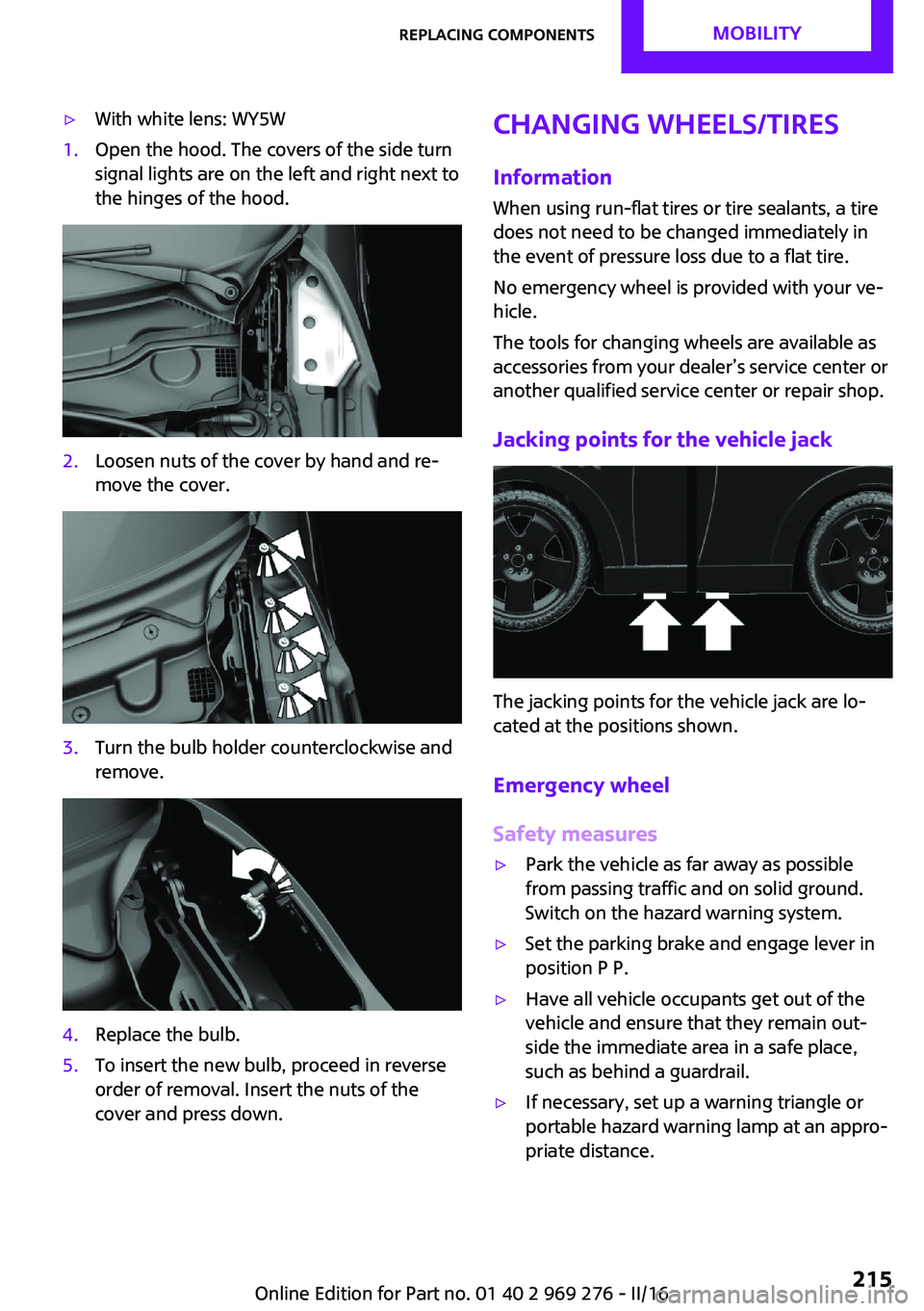
▷With white lens: WY5W1.Open the hood. The covers of the side turn
signal lights are on the left and right next to
the hinges of the hood.2.Loosen nuts of the cover by hand and re‐
move the cover.3.Turn the bulb holder counterclockwise and
remove.4.Replace the bulb.5.To insert the new bulb, proceed in reverse
order of removal. Insert the nuts of the
cover and press down.Changing wheels/tires
InformationWhen using run-flat tires or tire sealants, a tire
does not need to be changed immediately in
the event of pressure loss due to a flat tire.
No emergency wheel is provided with your ve‐
hicle.
The tools for changing wheels are available as
accessories from your dealer’s service center or
another qualified service center or repair shop.
Jacking points for the vehicle jack
The jacking points for the vehicle jack are lo‐
cated at the positions shown.
Emergency wheel
Safety measures
▷Park the vehicle as far away as possible
from passing traffic and on solid ground.
Switch on the hazard warning system.▷Set the parking brake and engage lever in
position P P.▷Have all vehicle occupants get out of the
vehicle and ensure that they remain out‐
side the immediate area in a safe place,
such as behind a guardrail.▷If necessary, set up a warning triangle or
portable hazard warning lamp at an appro‐
priate distance.Seite 215Replacing componentsMOBILITY215
Online Edition for Part no. 01 40 2 969 276 - II/16
Page 242 of 252
Everything from A to ZIndexA
ABS, Antilock Brake Sys‐ tem 122
Acceleration Assistant, see Launch Control 78
Accessories and parts 8
ACC, see camera-based cruise control 126
Activated-charcoal filter 149
Active Cruise Control, see camera-based cruise con‐
trol 126
Additional information, on‐ board monitor 23
Additives, oil 202
Adjustments, seats/head re‐ straints 54
Adjustments, steering wheel 62
After washing vehicle 227
Airbags 105
Airbags, indicator/warning light 106
Air circulation, see Recircu‐ lated-air mode 145, 148
Air conditioner 144
Air, dehumidifying, see Cool‐ ing function 145, 147
Air distribution, man‐ ual 145 , 148
Air flow, air conditioner 145
Air flow, automatic climate control 148
Air pressure, tires 186
Air vents, see Ventilation 149
Alarm system 44
Alarm triggering 44
Alarm, unintentional 45
All around the center con‐ sole 16 All around the interior mir‐
ror 17
All around the steering wheel 14
All-season tires, see Winter tires 193
Alternating-code hand-held transmitter 152
Alternative oil types 202
Always Open Timer, Control Display 97
Always Open Timer, onboard computer 90
Antifreeze, washer fluid 74
Antilock Brake System, ABS 122
Anti-slip control, see DSC 122
App, MINI Motorer’s Guide 6
Approved axle load 235
Arrival time 91
Ash tray 155
Assistance, Roadside Assis‐ tance 220
Assistance when driving off 125
Assist system, refer to Intelli‐ gent Safety 115
AUTO intensity 148
Automatic car wash 226
Automatic climate con‐ trol 146
Automatic Curb Monitor 60
Automatic deactivation, Front- seat passenger airbags 107
Automatic headlamp con‐ trol 101
Automatic locking 43
Automatic recirculated-air control 148
Automatic transmission with Steptronic 75 AUTO program, automatic cli‐
mate control 147
AUTO program, intensity 148
Auto Start/Stop function 68
AUX-IN port, position in vehi‐ cle 156
Average fuel consumption 90
Average speed 90
Axle loads, weights 235
B
Backrest curvature, see Lum‐ bar support 55
Band-aids, see First-aid kit 220
Battery replacement, vehicle battery 218
Battery, vehicle 217
Being towed, see Tow-starting and towing 222
Belts, safety belts 56
Beverage holder, cup holder 161
Bonus range, GREEN Mode 176
Bottle holder, see Cup holder 161
Brake assistant 122
Brake discs, break-in 166
Brake pads, break-in 166
Braking, information 167
Breakdown assistance 220
Break-in 166
Brightness of Control Dis‐ play 93
Bug light 210
Bulb replacement 209
Bulb replacement, front 209
Bulb replacement, rear 212
Bulb replacement, side 214 Seite 242REFERENCEEverything from A to Z242
Online Edition for Part no. 01 40 2 969 276 - II/16