climate control MINI Countryman 2011 (Mini Connected) User Guide
[x] Cancel search | Manufacturer: MINI, Model Year: 2011, Model line: Countryman, Model: MINI Countryman 2011Pages: 254, PDF Size: 3.84 MB
Page 100 of 254
DRIVING TIPSThings to remember when driving
98
increased tendency for corrosion to form on
rotors, while contaminan ts accumulate on the
brake pads. This occurs because the minimum
pressure which must be exerted by the pads
during brake applications to clean the rotors is
not reached.
Should corrosion form on the brake rotors, the
brakes will tend to respond with a pulsating
effect that even extended application will fail to
cure.
When the vehicle is parked
Condensation forms while the automatic climate
control is in operation, and then exits under the
vehicle. Traces of condensed water under the
vehicle are therefore normal.
In the MINI Cooper S, the coolant pump may
continue to run for some time after the engine is
switched off. This will generate noise in the
engine compartment.
Cargo loading
To avoid loading the tires beyond their
approved carrying ca pacity, never over-
load the vehicle. Overloading can lead to over-
heating and increases the rate at which damage
develops inside the tires. The ultimate result can
assume the form of a sudden blowout. <
Avoid fluid spills in the cargo area as they
could damage the vehicle. <
Expanding cargo area
Cargo area cover
Do not place any objects on the cover;
otherwise, they could endanger the car's
occupants, e.g. in the case of braking or sudden
swerving, or they may damage the cover. <
When you open the liftgate, the roll-up cover is
raised.
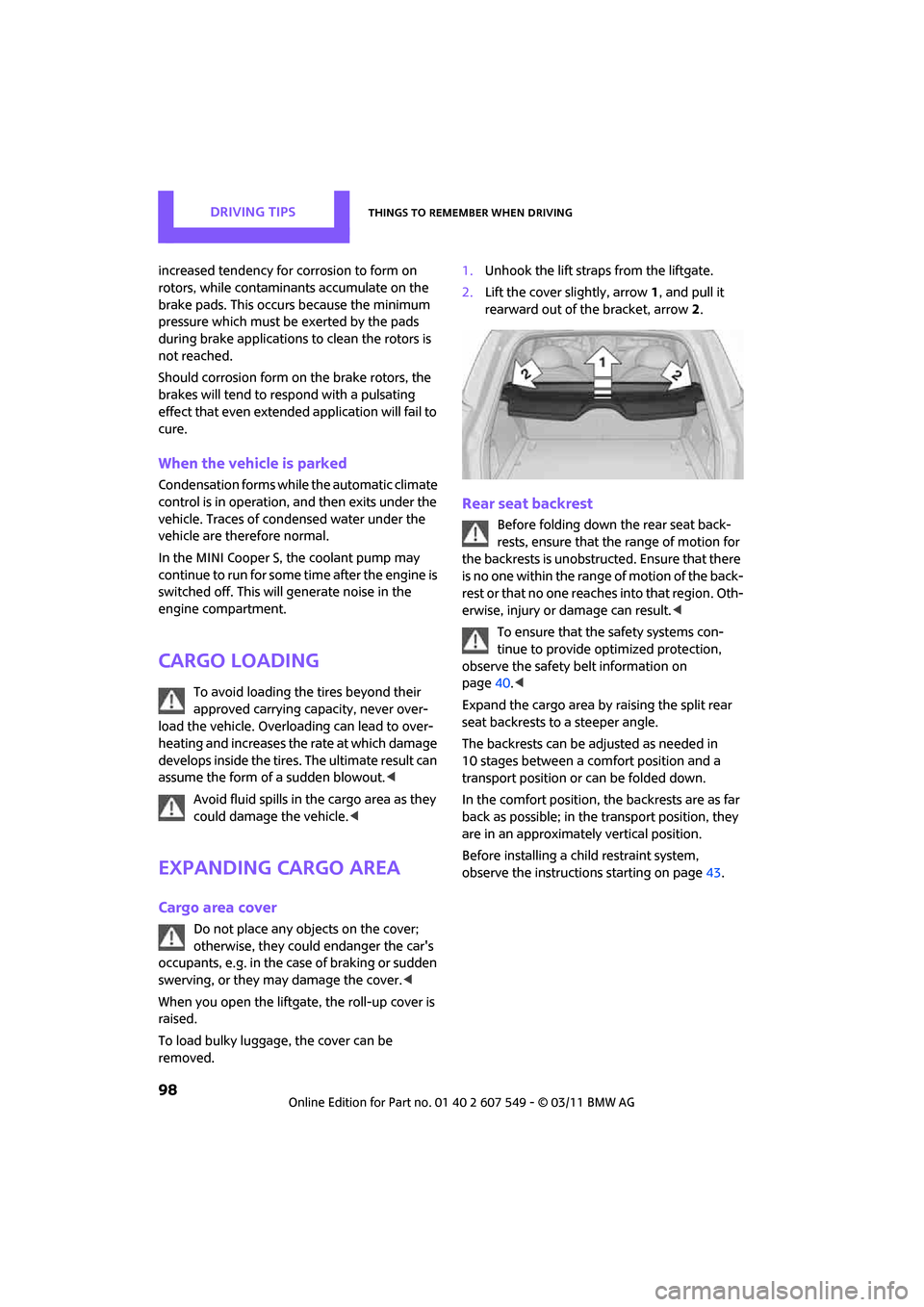
To load bulky luggage, the cover can be
removed. 1.
Unhook the lift straps from the liftgate.
2. Lift the cover slightly, arrow 1, and pull it
rearward out of the bracket, arrow 2.
Rear seat backrest
Before folding down the rear seat back-
rests, ensure that th e range of motion for
the backrests is unobstructed. Ensure that there
is no one within the range of motion of the back-
rest or that no one reac hes into that region. Oth-
erwise, injury or damage can result. <
To ensure that the safety systems con-
tinue to provide optimized protection,
observe the safety belt information on
page 40.<
Expand the cargo area by raising the split rear
seat backrests to a steeper angle.
The backrests can be adjusted as needed in
10 stages between a comfort position and a
transport position or can be folded down.
In the comfort position, the backrests are as far
back as possible; in the transport position, they
are in an approximately vertical position.
Before installing a ch ild restraint system,
observe the instructions starting on page 43.
Page 196 of 254
MOBILITYWheels and tires
194
Tire identification marks
Knowledge of the labeling on the side of the tire
makes it easier to identify and choose the right
tires.
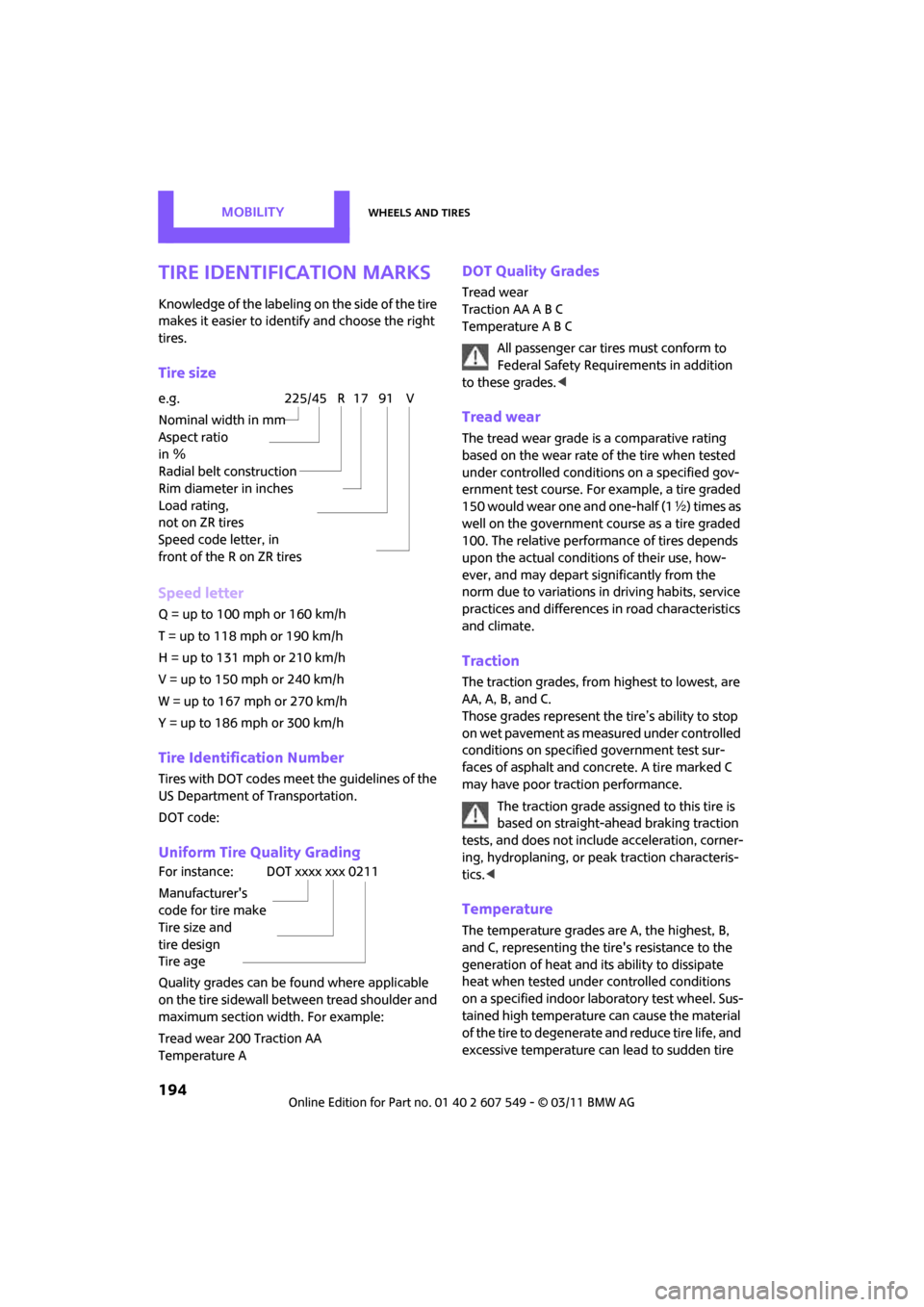
Tire size
Speed letter
Q = up to 100 mph or 160 km/h
T = up to 118 mph or 190 km/h
H = up to 131 mph or 210 km/h
V = up to 150 mph or 240 km/h
W = up to 167 mph or 270 km/h
Y = up to 186 mph or 300 km/h
Tire Identification Number
Tires with DOT codes meet the guidelines of the
US Department of Transportation.
DOT code:
Uniform Tire Quality Grading
Quality grades can be found where applicable
on the tire sidewall between tread shoulder and
maximum section width. For example:
Tread wear 200 Traction AA
Temperature A
DOT Quality Grades
Tread wear
Traction AA A B C
Temperature A B C
All passenger car tires must conform to
Federal Safety Requirements in addition
to these grades. <
Tread wear
The tread wear grade is a comparative rating
based on the wear rate of the tire when tested
under controlled conditions on a specified gov-
ernment test course. For example, a tire graded
150 would wear one and one-half (1 γ) times as
well on the government co urse as a tire graded
100. The relative performance of tires depends
upon the actual conditio ns of their use, how-
ever, and may depart significantly from the
norm due to variations in driving habits, service
practices and differences in road characteristics
and climate.
Traction
The traction grades, from highest to lowest, are
AA, A, B, and C.
Those grades represent the tire’s ability to stop
on wet pavement as measured under controlled
conditions on specified government test sur-
faces of asphalt and concrete. A tire marked C
may have poor traction performance.
The traction grade assigned to this tire is
based on straight-ahead braking traction
tests, and does not incl ude acceleration, corner-
ing, hydroplaning, or pe ak traction characteris-
tics. <
Temperature
The temperature grades are A, the highest, B,
and C, representing the tire's resistance to the
generation of heat and its ability to dissipate
heat when tested under controlled conditions
on a specified indoor labo ratory test wheel. Sus-
tained high temperature can cause the material
of the tire to degenerate and reduce tire life, and
excessive temperature can lead to sudden tire
e.g.
Nominal width in mm
Aspect ratio
in Ξ
Radial belt construction
Rim diameter in inches
Load rating,
not on ZR tires
Speed code letter, in
front of the R on ZR tires225/45 R 17 91 V
For instance:
Manufacturer's
code for tire make
Tire size and
tire design
Tire ageDOT xxxx xxx 0211
Page 238 of 254
236
REFERENCEEverything from A to Z
Everything from A to Z
INDEX
A
ABS Antilock Brake System67
Accessories, refer to Your individual vehicle 4
Acknowledgment signals for
locking/unlocking vehicle 28
Activated-charcoa l filter for
automatic climate control 87
Adaptive Light Control 80
Additives
– coolant 200
– engine oil 200
Address, entering 115
Address for navigation
– entering 109,115
Adjusting temperature inside the car, refer to Air
conditioner 84
Adjusting temperature inside
the car, refer to Automatic
climate control 85
Adjusting the tone during
audio operation, refer to
Tone control 131
Air conditioner 83
Air conditioning mode
– air conditioner 84
– automatic cl imate control85
– ventilation 87
Air distribution
– automatic 86
– individual 85
– manual 85
Air flow rate 84,86
– air conditioning system 84
– automatic cl imate control86
– heating, ventilation 84
Air outlets, refer to Air vents 83
Air pressure, checking, refer to Tire inflation pressure 190Air recirculation, refer to
Recirculated-air
mode 84,86
Air supply
– air conditioner 84
– automatic climate control 85
– ventilation 87
Air vents 83
Airbags 76
– sitting safely 37
– warning lamp 78
Airing, refer to Ventilation87
AKI, refer to Fuel grade 189
Alarm system 31
ALL4 all-wheel drive system 69
All-season tires, refer to Winter tires 197
All-wheel drive, refer to
ALL4 69
AM, wa
veband 132
Ambient air, refer to Recirculated-air
mode 84,86
Ambient lighting 82
Antenna, care 204
Antifreeze
– coolant 200
– washer fluid 53
Antilock Brake System ABS 67
Anti-theft alarm system, refer to Alarm system 31
Approved axle loads, refer to
Weights 226
Approved engine oils 200
Approved gross vehicle
weight, refer to Weights 226
Armrest, refer to Center armrest 91
Arrival time
– computer 57
– route guidance 118Ashtray
92
Assistant systems, refer to
– Dynamic Stability Control
DSC 67
Audio 130
– controls 130
– switching on/off 130
– tone control 131
– volume 130
Audio device, external 90
AUTO program for automatic climate control 86
Automatic
– air distribution 86
– air flow rate 86
– cruise control 53
– headlamp control 79
Automatic climate control 83
– automatic air distribution 86
Automatic transmission with
Steptronic 48
– interlock 48
– overriding selector lever
lock 50
– shiftlock 48
– sport program 49
Auxiliary phone 164
AUX-IN connection 142
AUX-IN, refer to External audio
device 90
Average fuel consumption 56
– setting the units 58
Average speed 56
Avoiding highways for navigation 118
Axle loads, refer to Weights 22
6
Page 241 of 254
Everything from A to ZREFERENCE
239
Data224
– capacities 226
– dimensions 225
– engine 224
– weights 226
Data memory 203
Date
– setting 62
– setting format 62
Daytime running lights 80
DBC Dynamic Brake Control, refer to Brake Assist 67
Deactivating front passenger
airbags 76
Deadlocking, refer to Locking 28
Defect
– door lock 29
– fuel filler flap 188
Defining a home address 178
Defogging windows 85,87
Defrost position, refer to
Defrosting windows 85,87
Defrosting windows 85,87
Defrosting windows and
removing condensation
– air conditioner 85
– automatic climate control 87
Defrosting windshield, refer to Defrosting windows 85,87
Destination address
– entering 109,115
Destination for navigation
– entering 109
– entering via map 114
Differential, breaking in 96
Digital radio, refer to HD Radio 133
Dimensions 225
Dipstick, engine oil 199
Direction announcements, refer to Voice
instructions 122
Direction instructions, refer to Voice instructions 122
Directional indicators, refer to Turn signals 50 Directory for navigation, refer
to Address book 111
Displacement, re fer to Engine
data 224
Display lighting, refer to Instrument lighting 81
Display, refer to On-board
computer controls 16
Displaying contact
pictures 17
8
Displaying special destinations 114
Displays 12
– instrument cluster 12
– on the Control Display 16
Displays and controls 10
Displays, care 207
Disposal
– of coolant 200
– remote control battery 34
– vehicle battery 216
Distance, refe r to Computer 57
Distance remaining to service, refer to Service
requirements 59
Distance to dest ination, refer
to Computer 57
Distance warning, refer to Park
Distance Control PDC 66
Door key, refer to Integrated
key/remote control 26
Door lock 29
Door lock, confirmation
signals 28
Doors, manual operation 29
DOT Quality Grades 194
Drinks holders, refer to Cupholders 92
Drive-off assistant, refer to Hill
Assist 69
Driving dynamics control, refer to Sport button 69
Driving lamps, refer to Parking lamps/low beams 79
Driving notes 96
Driving off on inclines, refer to Hill Assist 69 Driving stability control
systems 67
Driving through water 97
Driving tips, refer to Driving
notes 96
Dry air, refer to Cooling function 87
DSC Dynamic Stability Control 67
DTC Dynamic Traction
Control 68
Dynamic Brake Control DBC, refer to Brake Assist 67
Dynamic route guidance 125
Dynamic Stability Control DSC 67
Dynamic Traction Control DTC 68
E
Eject button, refer to Buttons
on the CD player 130
Electrical malfunction
– door lock 29
– fuel filler flap 188
Electronic brake-force distribution 67
Electronic Stability Program ESP, refer to Dynamic
Stability Control DSC 67
Emergency operation, refer to Manual operation
– door lock 29
– fuel filler flap 188
– transmission lock, automatic
transmission 50
Emergency services, refer to Roadside Assistance 218
Page 242 of 254
REFERENCEEverything from A to Z
240
Engine
– breaking in96
– data 224
– overheated, refer to Coolant
temperature 201
– speed 224
– starting 46
– starting, Comfort Access 32
– switching off 47
Engine compartment 199
Engine coolant, refer to Coolant 200
Engine malfunction
– indicator lamp 13
Engine oil
– adding 200
– additives, refer to Approved engine oils 200
– alternative oil types 200
– approved engine oils 200
– capacity 200
– checking level 199
– dipstick 199
– intervals between changes, refer to Service
requirements 59
– MINI Maintenance System 202
Engine oil level, checking 199
Engine output, refer to Engine
data 224
Engine starti ng, refer to
Starting the engine 46
Entering destination 109
Entering intersection 110
Entertainment sound output
on/off 130
Entry map for destination 114
ESP Electronic Stability
Program, refer to Dynamic
Stability Control DSC 67
Exhaust system, refer to Hot
exhaust system 96 Exterior mirrors
41
– adjusting 41
– automatic dimming feature 42
– automatic heating 41
– folding in and out 41
External audio device 90
External audio de vice, refer to
AUX-IN connection 142
External devices
– random play sequence 145
– software update 149
External temperature display
– change units of measure 58
– in the on-board computer 58
External temperature
warning 56
Eyes
– f
or tow-starting and towing
away 220
– for tying down loads 102
F
Failure messages, refer to
Check Control 62
Failure of an electrical consumer 216
Fast forward
– CD player 141
Fastening safety belts, refer to Safety belts 40
Fastest route for
navigation 118
Fault messages, refer to Check Control 62
Faulty
– tire 71
Filter
– microfilter for air conditioner 85
– microfilter/activated-
charcoal filter for automatic
climate control 87
Fine wood, care 207
First aid pouch 218 Fixture for remote control,
refer to Ignition lock 46
Flash when locking/ unlocking 28
Flat load floor 100
Flat tire
– run-flat tires 196
– Tire Pressure Monitor TPM 72
Flat Tire Monitor FTM 69
– indicating a flat tire 71
– initializing the system 70
– snow chains 70
– system limits 70
Flat tires, refer to Tire condition 195
Floor mats, care 206
Floor plate, refer to Flat load floor 100
FM, waveband 132
Fog lamps
– replacing bulb 210
Folding rear seat backrest 98
Footbrake, refer to Braking safely 97
Footwell lamps 82
For your own safety 5
Four-wheel drive, refer to ALL4 69
Front airbags 76
Front fog lamps 81
– replacing bulb 210
Front seat adjustment 38
Frost on windows, refer to
Defrosting windows 85,87
FTM, refer to Flat Tire Monitor 69
Fuel 189
– gauge 55
– high-quality brands 189
–
quality 189
– specifications 189
– tank capacity 226
Fuel clock, refer to Fuel gauge 55
Fuel consumption display
– average fuel consumption 56
Page 245 of 254

Everything from A to ZREFERENCE
243
M
M+S tires, refer to Winter tires 197
Main menu 17
Maintenance, refer to Service and Warranty Information
Booklet for US models and
Service Guide Booklet for
Canadian models
Maintenance system 202
Malfunction warnings, refer to Check Control 62
Manual air distribution 85
Manual mode
– automatic transmission with
Steptronic 49
Manual operation
– door lock 29
– fuel filler flap 188
– transmission lock, automatic transmission 50
Manual transmission 48
Manual washing 205
Map
– changing scale 121
Map for navigation
– entering destination 114
Master key, refe r to Integrated
key/remote control 26
Maximum cooling 86
Maximum speed
– with winter tires 197
Medical assistance, refer to First aid pouch 218
MENU button 16
Menus, refer to On-board computer 16
Messages 179
Microfilter
– for air conditioner 85
– for automatic climate
control 87
– MINI Maintenance System 202 Microfilter/activated-charcoal
filter
– MINI Maintenance System 202
Microphone for telephone 14
MINI Connected 183
MINI Internet page 4
MINI joystick, refer to On-board computer 16
MINI Maintenance System 202
Mirror dimming feature 42
Mirrors 41
– exterior mirrors 41
– heating 41
– interior rearview mirror 41
Mobile phone
– adjusting volume 157,168
– connecting, refer to Mobile phone, pairing 154,163
– installation location, refer to Center armrest 91
– pairing 154,16
3
– What to do if…. 156,167
Mobile phone, installation location, refer to Center
armrest 91
Mobile phone preparation Bluetooth 163
Mobility System 212
Modifications, technical, refer
to For your own safety 5
Monitor, refer to MINI controls with navigation 16
Monitoring system for tire pressures, refer to Flat Tire
Monitor 69
Multifunction switch
– refer to Turn signals/ headlamp flasher 50
– refer to Wiper system 51
Multifunctional steering wheel, refer to Buttons on
the steering wheel 11
N
Navigation
– storing current position 111
Navigation data 108
Navigation destination
– entering manually 109,115
– home address 112
Navigation instructions, refer to Switching voice
instructions on/off 122
Navigation system 108
– address book 111
– bypassing a route section 120
– continuing route
guidance 118
– destination entry 109
– dynamic route guidance 125
– entering a destination manually 109,115
– opening 108
– planning a trip 116
– route list 119
– selecting destination via
map 114
– selecting route criteria 118
– special destinations 112
– starting route guidance 118
– terminating route
guidance 118
– voice instructions 122
– volume adjustment 122
Neck support, re fer to Head
restraints 39
Nets, refer to Storage
compartments 91
New tires 196
North-facing map 120
Notes 181
Number of cylinders, refer to Engine data 224
Number of safety belts 37
Nylon rope, refer to Tow rope 221
Page 246 of 254
REFERENCEEverything from A to Z
244
O
OBD socket, refer to Socket for On-Board Diagnosis 203
Octane ratings, refer to Fuel specifications 189
Odometer 55
Office 176
– current office 176
– What to do if…. 182
Oil consumption 199
Oil level 199
Oil, refer to Engine oil 199
Oil types 200
Old batteries, refer to
Disposal 216
On-board computer 16
– changing language 65
– menu guidance 17
– operating principles 16
– overview 16
– status information 19
Opening and closing
– Comfort Access 32
– from inside 30
– from outside 27
– using the door lock 29
– using the remote control 27
Opening and unlocking
– from inside 30
Options, selecting for navigation 118
Orientation menu, refer to
Main menu 17
Outlets
– refer to Ventilation 87
Outlets, refer to Air vents 83
Output, refer to Engine data 224
Outside-air mode
– automatic cl imate control86
Overheated engine, refer to
Coolant temperature 201
P
Paintwork, care205
Park Distance Control PDC 66
Parking
– vehicle 47
Parking aid, refer to Park
Distance Control PDC 66
Parking brake 47
– indicator lamp 13
Parking lamps, replacing bulb 210
Parking lamps/low beams 79
Parts and accessories, refer to Your individual vehicle 4
Pathway lighting 79
Personal Profile 26
Phone numbers
– dialing 157,169
Pinch protection system
– windows 36
Plastic parts, care 206
Pollen
– refer to Microfilter for air conditioner 85
– refer to Microfilter/activated-
charcoal filter for automatic
climate control 87
Power failure 216
Power window
– safety switch 36
Power windows 35
Power windows, refer to Windows 35
Pressure monitoring of tires,
refer to Tire Pressure Monitor
TPM 72
Pressure monitoring, tires 69
– Flat Tire Monitor 69
Pressure, tires 190
Protective function, refer to
Pinch protection system
– windows 36
Puncture
– Flat Tire Monitor 69
R
Radio
– controls130
– HD Radio 133
– satellite radio 134
– select waveband 132
– storing stations 133
– switching on/off 130
– tone control 131
– volume 130
Radio key, refer to Integrated key/remote control 26
Radio position, refer to Radio readiness 46
Radio readiness 46
– switched off 46
– switched on 46
Rain sensor 51
Random sequence
– external devices 145
Range, refer to Cruising
range 56
Reading aloud 182
Reading lamps 82
Rear lamps
– bulb replacement 211
Rear lamps, refer to Tail
lamps 211
Rear seat backrest, folding 98
Rear seats
– adjusting 39
– folding down the
backrests 98
Rear window
– windshield wiper 52
Rear window defroster 84,86
Rear window safety switch 36
Rear-mounted luggage
rack 103
Rearview mirror, refer to Mirrors 41
Reception
– quality 133
– radio station 133
Recirculated-air mode 84,86
Page 249 of 254
Everything from A to ZREFERENCE
247
Switching on
– audio130
– CD player 130
– radio 130
Switching the cooling function on and off 87
Symbols 4
– status information 19
T
Tachometer55
Tail lamp, refer to Tail
lamps 211
– replacing bulb 211
Tail lamps 211
Tank volume, refer to Capacities 226
Target cursor for
navigation 114
Tasks 180
Technical data 224
Technical modifications 5
Telephone
– hands-free system 160,172
– installation location, refer to Center armrest 91
– voice commands 172
Telephone receiving power, refer to Status
information 19
Temperature display
– setting the units 58
Temperature of coolant, refer to Coolant temperature 201
Temperature setting
– air conditioner 84
– automatic climate control 86
Tempomat, refer to Cruise
control 53
Tensioning straps, refer to Securing cargo 102
Text message 179
The individual vehicle 4
Third brake lamp, refer to
Center brake lamp 212
Three-point safety belt 40Tightening the lug bolts
– torque
216
Tightening torque, refer to Tightening lug bolts 216
Tire failure
– Flat Tire Monitor 71
– indicator/warning lamp 71
– MINI Mobility System 212
– run-flat tires 71
– Tire Pressure Monitor 72
Tire inflation pressure 190
– loss 71,72
Tire Pressure Monitor TPM 72
– limitations of system 72
– resetting system 73
– warning lamp 73
Tire pressure mo nitoring, refer
to Flat Tire Monitor 69
Tire Quality Grading 194
Tires
– age 196
– breaking in 96
– changing, refe r to Changi
ng
wheels 214
– condition 195
– damage 195
– inflation pressure 190
– inflation pressure loss 73
– minimum tread depth 195
– new tires 196
– pressure monitoring, refer to Flat Tire Monitor 69
– pressure monitoring, refer to
Tire Pressure Monitor
TPM 72
– puncture 71
– size 194
– wear indicators, refer to Minimum tread depth 195
– winter tires 197
– with emergency operation properties 196
Tires with emergency operation properties, refer to
Run-flat tires 196
Tires with safety features, refer
to Run-flat tires 196 TMC station, refer to Traffic
information 122
Tone
– middle setting 131
Tone during audio playback
– adjusting 131
Torque 224
– lug bolts 216
Tow bar 220
Tow fitting 220
– screw thread 220
Tow fittings for tow-starting and towing away 220
Tow rope 221
Towing 219
– car with automatic
transmission 220
– methods 220
Tow-starting 219
TPM, refer to Tire Pressure Monitor 72
Track
– selecting on CD 140
Track width, refer to Dimension 225
Traction control, refer to
– Dynamic Stability Control DSC 67
Traffic bulletins
– categories 124
Traffic bulletins, filtering 124
Traffic congestion
– displaying traffic
information 122
– refer to Route, bypassing segments 120
Traffic information for navigation
– displaying 123
Tr
affic information in
navigation
– screen display in the map
view 124
Page 250 of 254
REFERENCEEverything from A to Z
248
Transmission
– automatic transmission with Steptronic 48
– manual transmission 48
– overriding selector lever lock for automatic transmission
with Steptronic 50
Transport securing devices, refer to Securing cargo 102
Transporting children safely 43
Tread depth, refer to Minimum tire tread 195
Treble, refer to Tone
control 131
Trip computer 57
Trip odometer 55
Trip-distance counter, refer to Trip odometer 55
Triple turn si gnal activation 50
Turn signal 50
– front, replacing bulb 210
– indicator lamp 12,13
– rear, replacing bulb 211
– side, replacing bulb 211
Turning circle, refer to
Dimensions 225
Tying down load s, refer to
Cargo loading 102
U
Uniform Tire Quality Grading
UTQR 194
Units
– average fuel consumption 58
– temperature 58
Universal garage door opener, refer to Integrated universal
remote control 88
Universal remote control 88
Unlatching, refer to Unlocking 33 Unlocking
– from inside
30
– from outside 27
– liftgate 33
– setting unlocking behavior 27
– without remote control, refer
to Comfort Access 32
Updating the navigation data 108
Upholstery, care 206
USB audio interface 143
USB interface 90
V
Vehicle
– battery216
– breaking in 96
– cargo loading 98
– dimensions 225
– identification number, refer
to Engine compartment 199
– parking 47
– storage 207
– weight 226
Vehicle jack
– jacking points 215
Ventilation
– air conditioner 87
Ventilation, refer to Climate control 83
Vents, refer to Air vents 83
Vents, refer to Ventilation 87
Voice commands
– overview 21
– short commands 227
– telephone 172
Voice instructions for
navigation system 122
– repeating 122
– switching on/off 122
– volume 122
Voice phone book 173Volume
130
– audio sources 130
– mobile phone 157,168
– voice instructions 122
Volume balance, tone setting 131
Volume of cargo area 226
W
Warning and indicator
lamps 13
Warning messages, refer to
Check Control 62
Warning triangle 218
Washer fluid 53
– capacity of reservoir 53
Washer fluid reservoir 53
Washer/wiper system
– washer fluid 53
Waste tray, refer to Ashtray 92
Water on roads, refer to
Driving through water 97
Waterfall lighti ng, refer to
Ambient lighting 82
Waveband for radio 132
Wear indicators in tires, refer to Minimum tread depth 195
Weights 226
Welcome lamps 79
Wheelbase, refer to Dimensions 225
Wheels and tires 190
Wheels, new 196
Width, refer to Dimensions 225
Window washer, refer to Washer fluid 53
Window washer reservoir,
refer to Washer fluid
– volume, refer to Capacities 226
Window washer system 51
– washer fluid 53
– washer jets 52