run flat MINI Countryman 2011 User Guide
[x] Cancel search | Manufacturer: MINI, Model Year: 2011, Model line: Countryman, Model: MINI Countryman 2011Pages: 196, PDF Size: 3.06 MB
Page 154 of 196
MobilityReplacing components
152
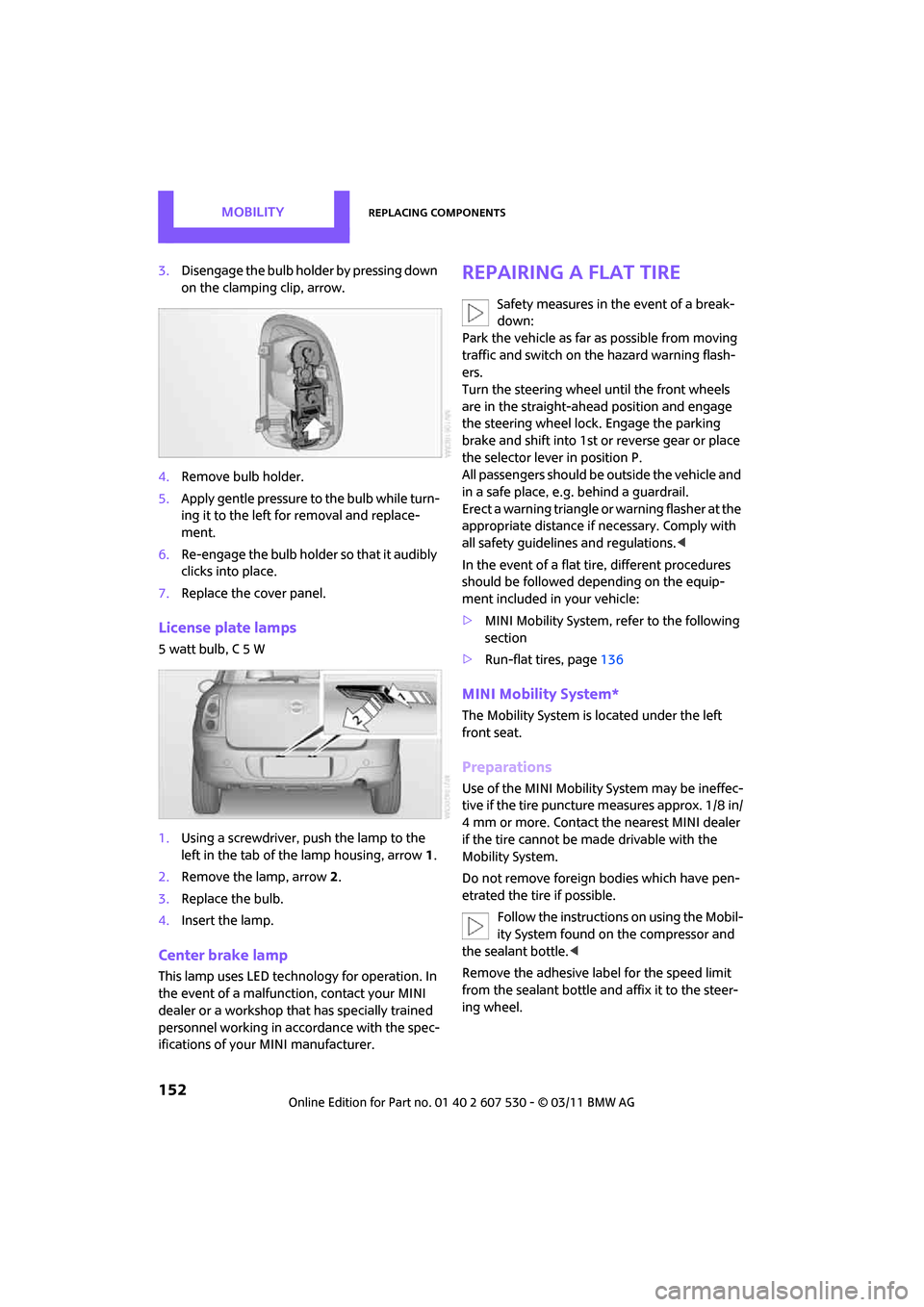
3.Disengage the bulb holder by pressing down
on the clamping clip, arrow.
4. Remove bulb holder.
5. Apply gentle pressure to the bulb while turn-
ing it to the left for removal and replace-
ment.
6. Re-engage the bulb holder so that it audibly
clicks into place.
7. Replace the cover panel.
License plate lamps
5 watt bulb, C 5 W
1.Using a screwdriver, push the lamp to the
left in the tab of the lamp housing, arrow 1.
2. Remove the lamp, arrow 2.
3. Replace the bulb.
4. Insert the lamp.
Center brake lamp
This lamp uses LED techno logy for operation. In
the event of a malfunction, contact your MINI
dealer or a workshop th at has specially trained
personnel working in acco rdance with the spec-
ifications of your MINI manufacturer.
Repairing a flat tire
Safety measures in the event of a break-
down:
Park the vehicle as far as possible from moving
traffic and switch on the hazard warning flash-
ers.
Turn the steering wheel until the front wheels
are in the straight-ahead position and engage
the steering wheel lock. Engage the parking
brake and shift into 1st or reverse gear or place
the selector leve r in position P.
All passengers should be outside the vehicle and
in a safe place, e.g. behind a guardrail.
Erect a warning triangle or warning flasher at the
appropriate distance if necessary. Comply with
all safety guidelines and regulations. <
In the event of a flat ti re, different procedures
should be followed depending on the equip-
ment included in your vehicle:
> MINI Mobility System, refer to the following
section
> Run-flat tires, page 136
MINI Mobility System*
The Mobility System is located under the left
front seat.
Preparations
Use of the MINI Mobility System may be ineffec-
tive if the tire puncture measures approx. 1/8 in/
4 mm or more. Contact the nearest MINI dealer
if the tire cannot be made drivable with the
Mobility System.
Do not remove foreign bodies which have pen-
etrated the tire if possible.
Follow the instructions on using the Mobil-
ity System found on the compressor and
the sealant bottle. <
Remove the adhesive label for the speed limit
from the sealant bottle an d affix it to the steer-
ing wheel.
Page 155 of 196
Replacing componentsMobility
153
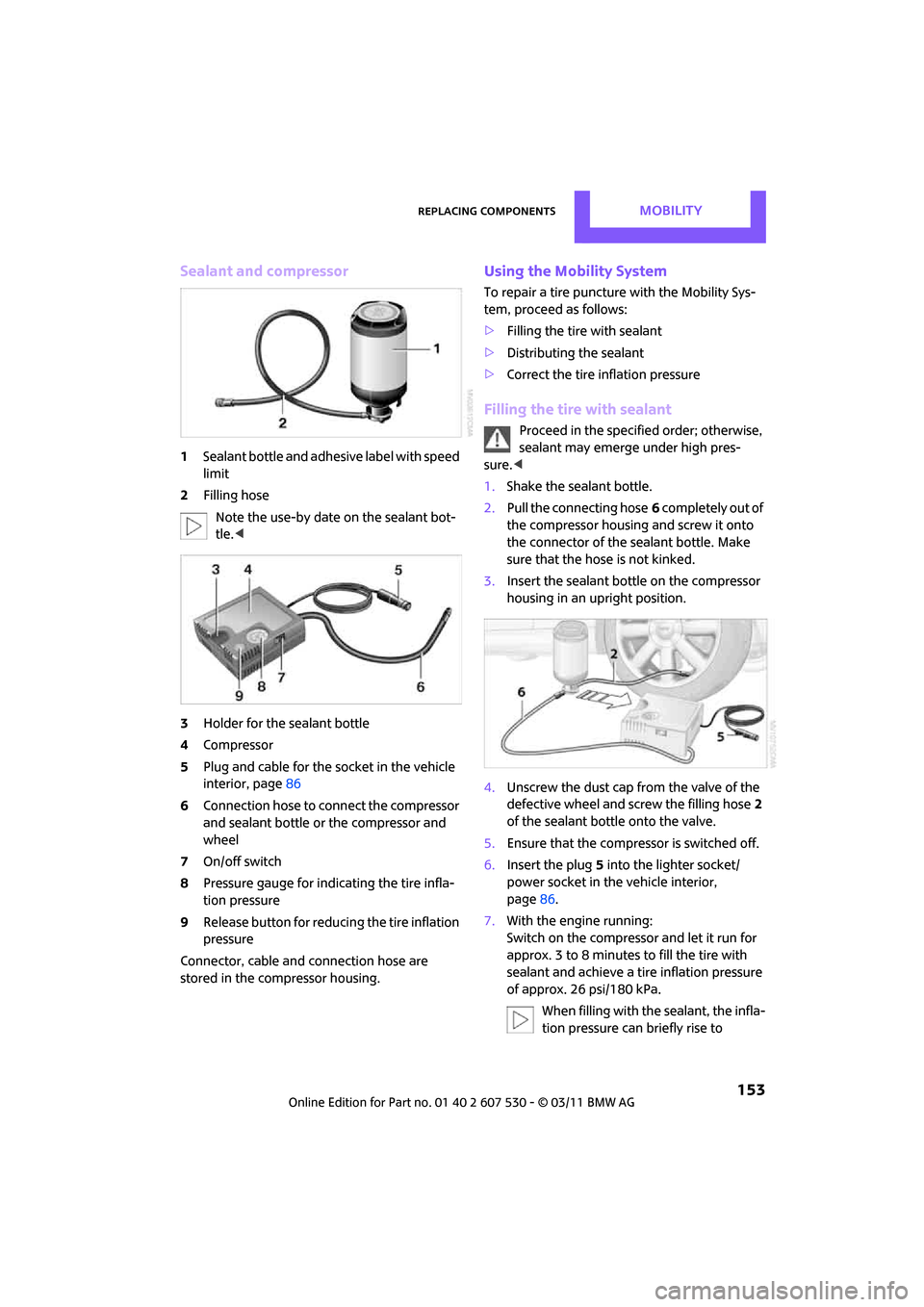
Sealant and compressor
1Sealant bottle and adhesi ve label with speed
limit
2 Filling hose
Note the use-by date on the sealant bot-
tle. <
3 Holder for the sealant bottle
4 Compressor
5 Plug and cable for the socket in the vehicle
interior, page 86
6 Connection hose to connect the compressor
and sealant bottle or the compressor and
wheel
7 On/off switch
8 Pressure gauge for indi cating the tire infla-
tion pressure
9 Release button for reduci ng the tire inflation
pressure
Connector, cable and connection hose are
stored in the compressor housing.
Using the Mobility System
To repair a tire puncture with the Mobility Sys-
tem, proceed as follows:
> Filling the tire with sealant
> Distributing the sealant
> Correct the tire inflation pressure
Filling the tire with sealant
Proceed in the specified order; otherwise,
sealant may emerge under high pres-
sure. <
1. Shake the sealant bottle.
2. Pull the connecting hose 6 completely out of
the compressor housing and screw it onto
the connector of the sealant bottle. Make
sure that the hose is not kinked.
3. Insert the sealant bottle on the compressor
housing in an upright position.
4. Unscrew the dust cap from the valve of the
defective wheel and screw the filling hose 2
of the sealant bottle onto the valve.
5. Ensure that the compressor is switched off.
6. Insert the plug 5 into the lighter socket/
power socket in the vehicle interior,
page 86.
7. With the engine running:
Switch on the compresso r and let it run for
approx. 3 to 8 minutes to fill the tire with
sealant and achieve a ti re inflation pressure
of approx. 26 psi/180 kPa.
When filling with the sealant, the infla-
tion pressure can briefly rise to
Page 156 of 196
MobilityReplacing components
154
approx. 73 psi/500 kPa. Do not switch off
the compressor during this phase.<
Do not run the comp ressor for longer
than 10 minutes; otherwise, the
device will overheat and possibly be dam-
aged.<
8. Switch off the compressor.
If an air pressure of 26 psi/180 kPa is not
reached:
1. Unscrew the filling hose 2 from the wheel
and drive the vehicle forward and backward
approx. 33 ft/10 m to distribute the liquid
sealant in the tire evenly.
2. Inflate the tire again with the compressor.
If an inflation pressure of 26 psi/180 kPa
still cannot be reache d, the tire is too
heavily damaged. Please contact the nearest
MINI dealer. <
Stowing Mobility System
1.Unscrew filler hose 2 of the sealant bottle
from the wheel.
2. Unscrew connecting hose of the
compressor 6 from the sealant bottle.
3. Connect the filler hose 2 of the sealant bot-
tle to the unoccupied connection on the
sealant bottle.
This prevents the rest of the sealant from
escaping from the bottle.
4. Wrap the empty sealant bottle in suitable
material to avoid dirt ying the cargo area.
5. Stow Mobility System back in the vehicle.
Distributing the sealant
Immediately drive approx. 3 miles/5 km so that
the sealant evenly distributes itself.
Do not exceed speeds of 50 mph/
80 km/h.
If possible, do not drop below 10 mph/
20 km/h. <
Correct the tire inflation pressure
1.After driving approx. 3 miles/5 km or ten
minutes, stop at a suitable location.
2. Screw the connection hose 6 of the com-
pressor directly onto the tire valve.
3. Insert the plug 5 into the power socket in
the vehicle interior.
4. Correct inflation pressu re to 26 psi/180 kPa.
With the engine running:
> To increase the inflatio n pressure: switch on
the compressor. To ch eck the current infla-
tion pressure, switch off the compressor.
Do not run the compressor for longer
than 10 minutes; otherwise, the
device will overheat and possibly be dam-
aged.<
> To decrease the inflat ion pressure: press the
release button 9.
If the tire cannot m aintain the inflation
pressure, drive the vehicle again, refer to
Distributing the sealan t. Then repeat steps
1to4.
If an inflation pressure of 26 psi/180 kPa still
cannot be reached, the tire is too heavily dam-
aged. Contact the nearest MINI dealer. <
Driving on
Do not exceed the permitted maximum
speed of 50 mph/80 km/h; doing so may
result in an accident. <
Replace the defective tire as soon as possible
and have the new wheel/tire assembly bal-
anced.
Have the Mobility System refilled.
Page 160 of 196

MobilityGiving and receiving assistance
158
Giving and receiving assistance
Roadside Assistance
Roadside Assistance is available by phone
24 hours a day in many countries. You can
obtain assistance there in the event of a vehicle
breakdown.
First aid pouch*
Some of the articles co ntained in the first aid
pouch have a limited service life. Therefore,
check the expiration dates of the contents regu-
larly and replace any item s in good time, if nec-
essary.
The first aid pouch is located on the rear cargo
well by the left side trim panel or under the pull-
out floor panel.
Warning triangle*
In the cargo area under the loading sill.
To remove, open the two clasps.
Jump-starting
If the car's own battery is flat, your MINI's engine
can be started by connecting two jumper cables
to another vehicle's battery. You can also use
the same method to help start another vehicle.
Only use jumper cables with fully-insulated
clamp handles.
Do not touch any electrically live parts
wh en t he e ngine is run nin g, or a fatal acci-
dent may occur. Carefully adhere to the follow-
ing sequence, both to prevent damage to one or
both vehicles, and to guard against possible per-
sonal injuries. <
Preparation
1.Check whether the battery of the other vehi-
cle has a voltage of 12 volts and approxi-
mately the same capa citance in Ah. This
information can be found on the battery.
2. Switch off the engine of the support vehicle.
3. Switch off any consumers in both vehicles.
There must not be any contact between
the bodies of the two vehicles; otherwise,
there is a danger of shorting. <
Page 185 of 196
Everything from A to ZReference
183
Door key, refer to Integrated key/remote control 20
Door lock 24
Door lock, confirmation
signals 22
Doors, manual operation24
DOT Quality Grades 134
Drinks holders, refer to Cupholders 85
Drive-off assistan t, refer to Hill
Assist 62
Driving dynamics control, refer to Sport button 62
Driving lamps, refer to Parking lamps/low beams 71
Driving notes 90
Driving off on inclines, refer to Hill Assist 62
Driving stability control
systems 59
Driving through water 91
Driving tips, refer to Driving
notes 90
Dry air, refer to Cooling function 80
DSC Dynamic Stability Control 60
DTC Dynamic Traction
Control 61
Dynamic Brake Control DBC,
refer to Brake Assist 60
Dynamic Stability Control DSC 60
Dynamic Traction Control DTC 61
E
Eject button 108
Electrical malfunction
– door lock 24
– fuel filler flap 128
Electronic brake-force distribution 60
Electronic Stability Program
ESP, refer to Dynamic
Stability Control DSC 60Emergency operation, refer to
Manual operation
– door lock 24
– fuel filler flap 128
– transmission lock, automatic transmission 45
Emergency services, refer to
Roadside Assistance 158
Engine
– breaking in 90
– data 176
– overheated, refer to Coolant temperature 141
– speed 176
– starting 42
– starting, Comfort Access 27
– switching off 42
Engine compartment 139
Engine coolant, refer to
Coolant 140
Engine oil
– adding 140
– additives, refer to Approved engine oils 140
– alternative oil types 140
– approved engine oils 140
– capacity 140
– checking level 139
– dipstick 139
– intervals between changes,
refer to Service
requirements 55
– MINI Maintenance
System 142
Engine oil level, checking 139
Engine output, refer to Engine
data 176
Engine starting, refer to Starting the engine 42
ESP Electronic Stability Program, refer to Dynamic
Stability Control DSC 60
Exhaust system, refer to Hot exhaust system 90 Exterior mirrors
36
– adjusting 36
– automatic dimming feature 37
– automatic heating 36
– folding in and out 36
External audio device 83,102
External temperature display
– change units of measure 54
– in the on-board computer 54
Exte
rnal temperature
warning 52
Eyes
– for tow-starting and towing away 160
– for tying down loads 96
F
Failure messages, refer to
Check Control 57
Failure of an electrical
consumer 156
Fast forward
– CD 107
Fastening safety be lts, refer to
Safety belts 35
Fault messages, refer to Check
Control 57
Faulty
– tire 63
Filter
– microfilter for air
conditioner 78
– microfilter/activated- charcoal filter for automatic
climate control 80
Fine wood, care 147
First aid pouch 158
Fixture for remote control, refer to Ignition lock 41
Flash when locking/
unlocking 22
Flat load floor 94
Flat tire
– run-flat tires 136
– Tire Pressure Monitor TPM 64
Page 190 of 196
ReferenceEverything from A to Z
188
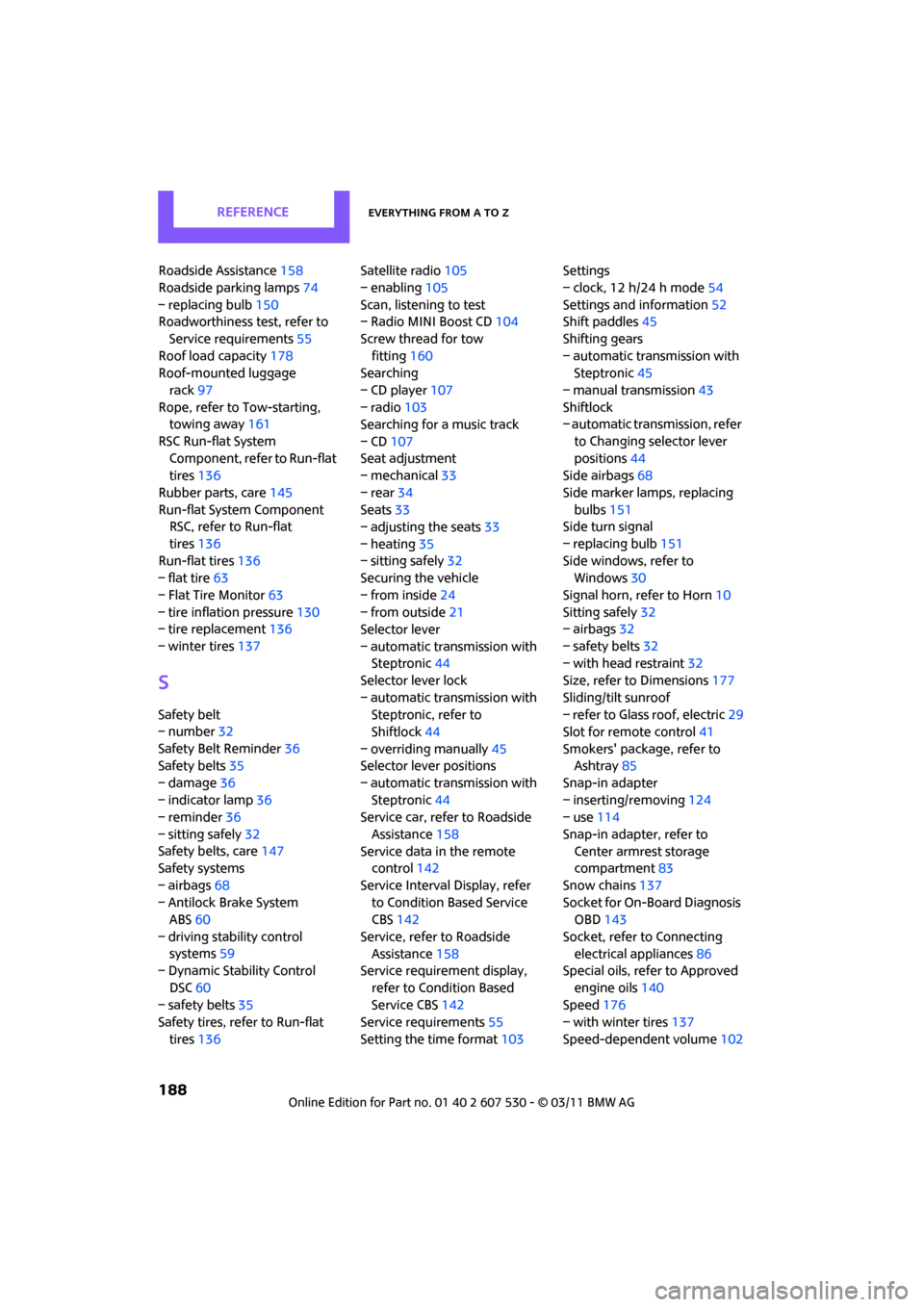
Roadside Assistance158
Roadside parking lamps 74
– replacing bulb 150
Roadworthiness test, refer to
Service requirements 55
Roof load capacity 178
Roof-mounted luggage
rack 97
Rope, refer to Tow-starting,
towing away 161
RSC Run-flat System Component, refer to Run-flat
tires 136
Rubber parts, care 145
Run-flat System Component RSC, refer to Run-flat
tires 136
Run-flat tires 136
– flat tire 63
– Flat Tire Monitor 63
– tire inflation pressure 130
– tire replacement 136
– winter tires 137
S
Safety belt
– number32
Safety Belt Reminder 36
Safety belts 35
– damage 36
– indicator lamp 36
– reminder 36
– sitting safely 32
Safety belts, care 147
Safety systems
– airbags 68
– Antilock Brake System ABS 60
– driving stability control systems 59
– Dynamic Stability Control
DSC 60
– safety belts 35
Safety tires, refer to Run-flat
tires 136 Satellite radio
105
– enabling 105
Scan, listening to test
– Radio MINI Boost CD 104
Screw thread for tow fitting 160
Searching
– CD player 107
– radio 103
Searching for a music track
– CD 107
Seat adjustment
– mechanical 33
– rear 34
Seats 33
– adjusting the seats 33
– heating 35
– sitting safely 32
Securing the vehicle
– from inside 24
– from outside 21
Selector lever
– automatic transmission with Steptronic 44
Selector lever lock
– automatic transmission with Steptronic, refer to
Shiftlock 44
– overriding manually 45
Selector lever positions
– automatic transmission with Steptronic 44
Service car, refe r to Roadside
Assistance 158
Service data in the remote control 142
Service Interval Display, refer to Condition Based Service
CBS 142
Service, refer to Roadside Assistance 158
Service requirement display,
refer to Condition Based
Service CBS 142
Service requirements 55
Setting the time format 103Setti
ngs
– clock, 12 h/24 h mode 54
Settings and information 52
Shift paddles 45
Shifting gears
– automatic transmission with Steptronic 45
– manual transmission 43
Shiftlock
– automatic transmission, refer
to Changing selector lever
positions 44
Side airbags 68
Side marker lamps, replacing bulbs 151
Side turn signal
– replacing bulb 151
Side windows, refer to Windows 30
Signal horn, refer to Horn 10
Sitting safely 32
– airbags 32
– safety belts 32
– with head restraint 32
Size, refer to Dimensions 177
Sliding/tilt sunroof
– refer to Glass roof, electric 29
Slot for remote control 41
Smokers' package, refer to Ashtray 85
Snap-in adapter
– inserting/removing 124
– use 114
Snap-in adapter, refer to Center armrest storage
compartment 83
Snow chains 137
Socket for On-Board Diagnosis OBD 143
Socket, refer to Connecting electrical appliances 86
Special oils, refer to Approved
engine oils 140
Speed 176
– with winter tires 137
Speed-dependent volume 102
Page 191 of 196
Everything from A to ZReference
189
Speedo, refer to Speedometer 12
Speedometer 12
Split rear seat backrest, refer to
Expanding the cargo area 92
Sport button 62
Stability control, refer to
Driving stability control
systems 59
Start/Stop button 41
– starting the engine 42
– switching off the engine 42
Starting assistance, refer to
Jump-starting 158
Starting, refer to Starting the engine 42
Starting the engine
– Start/Stop button 41
Start-off assistance, refer to
– DSC 60
– Hill Assist 62
Stations, refer to Radio MINI
Boost CD 104
Status of this Owner's Manual at time of printing 4
Steering wheel 37
– adjustment 37
– buttons on steering wheel 11
– lock 41
– shift paddles 45
Steptronic, refer to Automatic transmission with
Steptronic 43
Storage area
– cargo area 92
Storage compartments 84
Storage space
– storage compartments 84
Storing the vehicle 147
Storing tires 137
Stowage, refer to Storage compartments 84
Summer tires, re fer to Wheels
and tires 130
Switches, refer to Cockpit 10
Switching off
– engine 42 Switching off the engine
– Start/Stop button
41
Switching on
– CD player 102,107
– Radio MINI Boost CD 102
Switching the co oling function
on and off 80
Symbols 4
T
Tachometer 51
Tail lamp, refer to Tail
lamps 151
– replacing bulb 151
Tail lamps 151
Tank volume, refer to Capacities 179
Technical data 176
Technical modifications 5
Telephone 114
– hands-free system 122
– installation location, refer to Center armrest 83
– voice commands 122
Temperature display
– setting the units 54
Temperature of coolant, refer
to Coolant temperature 141
Temperature setting
– air conditioner 77
– automatic climate control 79
Tempomat, refer to Cruise
control 49
Tensioning straps, refer to Securing cargo 96
The individual vehicle 4
Third brake lamp, refer to Center brake lamp 152
Three-point safety belt 35
Tightening the lug bolts
– torque 156
Tightening torque, refer to Tightening lug bolts 156
Time
– setting 103 Tire failure
– Flat Tire Monitor
63
– indicator/warning lamp 63
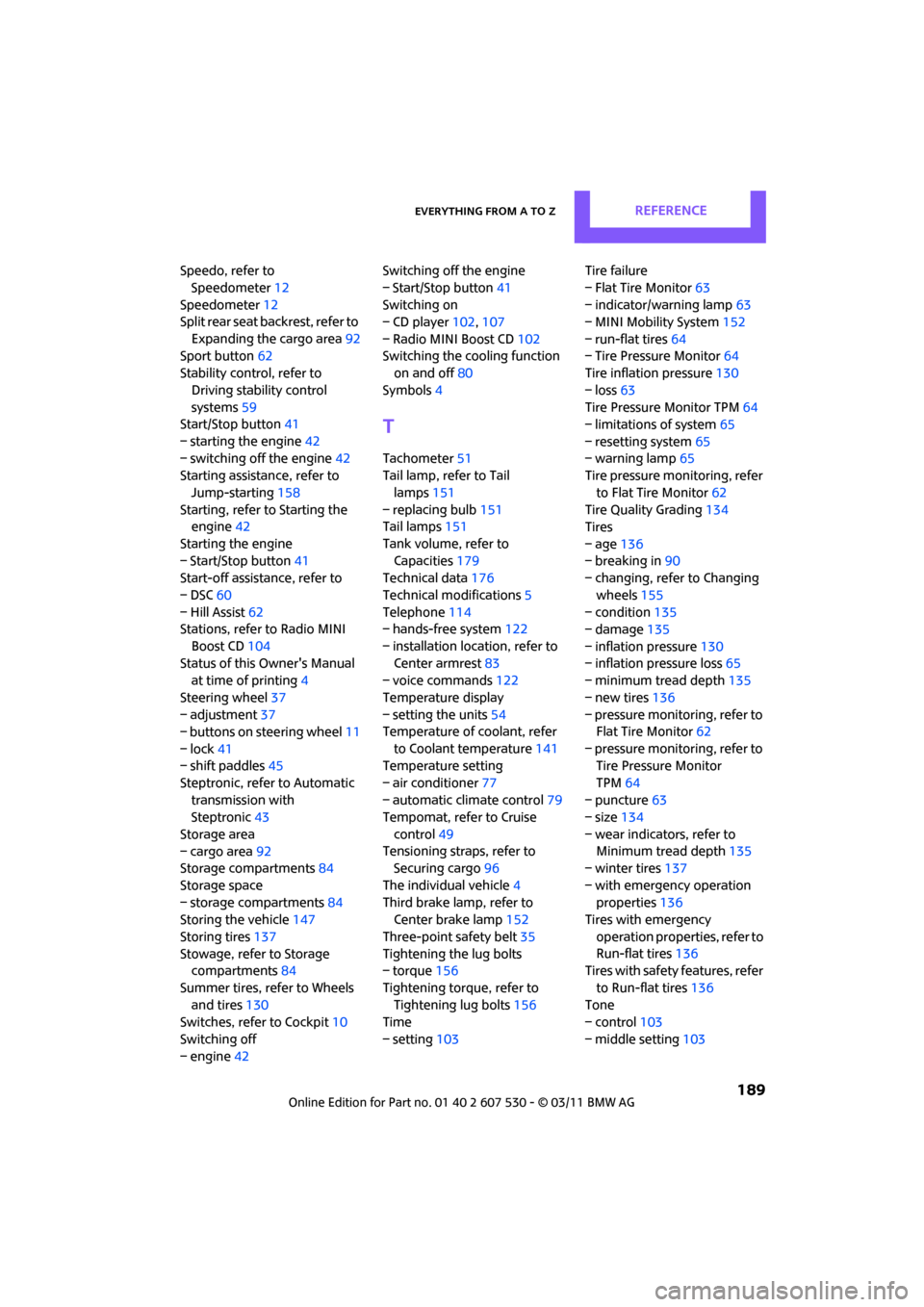
– MINI Mobility System 152
– run-flat tires 64
– Tire Pressure Monitor 64
Tire inflation pressure 130
– loss 63
Tire Pressure Monitor TPM 64
– limitations of system 65
– resetting system 65
– warning lamp 65
Tire pressure monitoring, refer
to Flat Tire Monitor 62
Tire Quality Grading 134
Tires
– age 136
– breaking in 90
– changing, refe r to Changing
wheels 155
– condition 135
– damage 135
– inflation pressure 130
– inflation pressure loss 65
– minimu
m tread depth 135
– new tires 136
– pressure monitoring, refer to Flat Tire Monitor 62
– pressure monitoring, refer to Tire Pressure Monitor
TPM 64
– puncture 63
– size 134
– wear indicators, refer to Minimum tread depth 135
– winter tires 137
– with emergency operation properties 136
Tires with emergency
operation properties, refer to
Run-flat tires 136
Tires with safety features, refer
to Run-flat tires 136
Tone
– control 103
– middle setting 103