engine oil MINI Countryman 2011 Owner's Manual
[x] Cancel search | Manufacturer: MINI, Model Year: 2011, Model line: Countryman, Model: MINI Countryman 2011Pages: 196, PDF Size: 3.06 MB
Page 7 of 196
General informationNotes
5
For your safety
Maintenance and repair
Advanced technology, e.g. the use of
modern materials and powerful electron-
ics, requires specially adapted maintenance and
repair methods. Therefore, have the necessary
work on your MINI only carried out by a MINI
dealer or a workshop that has specially trained
personnel working in acco rdance with the spec-
ifications of the MINI manufacturer. If this work
is not carried out properly , there is a danger of
subsequent damage and related safety haz-
ards. <
Parts and accessories
For your own safety, use genuine parts
and accessories approved by the manu-
facturer of the MINI.
When you purchase accessories tested
and approved by the manufacturer of the MINI
and Original MINI Parts, you simultaneously
acquire the assurance that they have been thor-
oughly tested by the manufacturer of the MINI
to ensure optimum performance when installed
on your vehicle.
The manufacturer of the MINI warrants these
parts to be free from defects in material and
workmanship.
The manufacturer of the MINI will not accept any
liability for damage result ing from installation of
parts and accessories not approved by the man-
ufacturer of the MINI.
The manufacturer of the MINI cannot test every
product made by other manufacturers to verify
if it can be used on a MINI safely and without risk
to either the vehicle, its operation, or its occu-
pants.
Original MINI Parts, MINI Accessories and other
products approved by the manufacturer of the
MINI, together with professional advice on using
these items, are available from all MINI dealers.
Installation and operation of accessories that
have not been approved by the manufacturer of your MINI, such as alarms, radios, amplifiers,
radar detectors, wheels, suspension compo-
nents, brake dust shield
s, telephones, including
operation of any mobile phone from within the
vehicle without using an externally mounted
antenna, or transceiver equipment, for instance,
CBs, walkie-talkies, ham radios or similar acces-
sories, may cause extensiv e damage to the vehi-
cle, compromise its safety, interfere with the
vehicle's electrical s y s t e m o r a f f e c t t h e v a l i d i t y o f
the MINI Limited Warranty. See your MINI dealer
for additional information. <
Maintenance, replacement, or repair of
the emission control devices and systems
may be performed by any automotive repair
establishment or individu al using any certified
automotive part. <
California Proposition 65 warning
California law requires us to issue the following
warning:
Engine exhaust and a wide variety of
automobile components and parts,
including components foun d in the interior fur-
nishings in a vehicle, contain or emit chemicals
known to the State of California to cause cancer
and birth defects and reproductive harm. In
addition, certain fluids co ntained in vehicles and
certain products of component wear contain or
emit chemicals known to the State of California
to cause cancer and birth defects or other repro-
ductive harm.
Battery posts, terminals and related accessories
contain lead and lead compounds. Wash your
hands after handling.
Used engine oil contains chemicals that have
caused cancer in laboratory animals. Always
protect your skin by washing thoroughly with
soap and water.<
Page 58 of 196
ControlsControls overview
56
The extent of service work required can be
read out from the remote control by your
MINI dealer. <
Displaying vehicle check
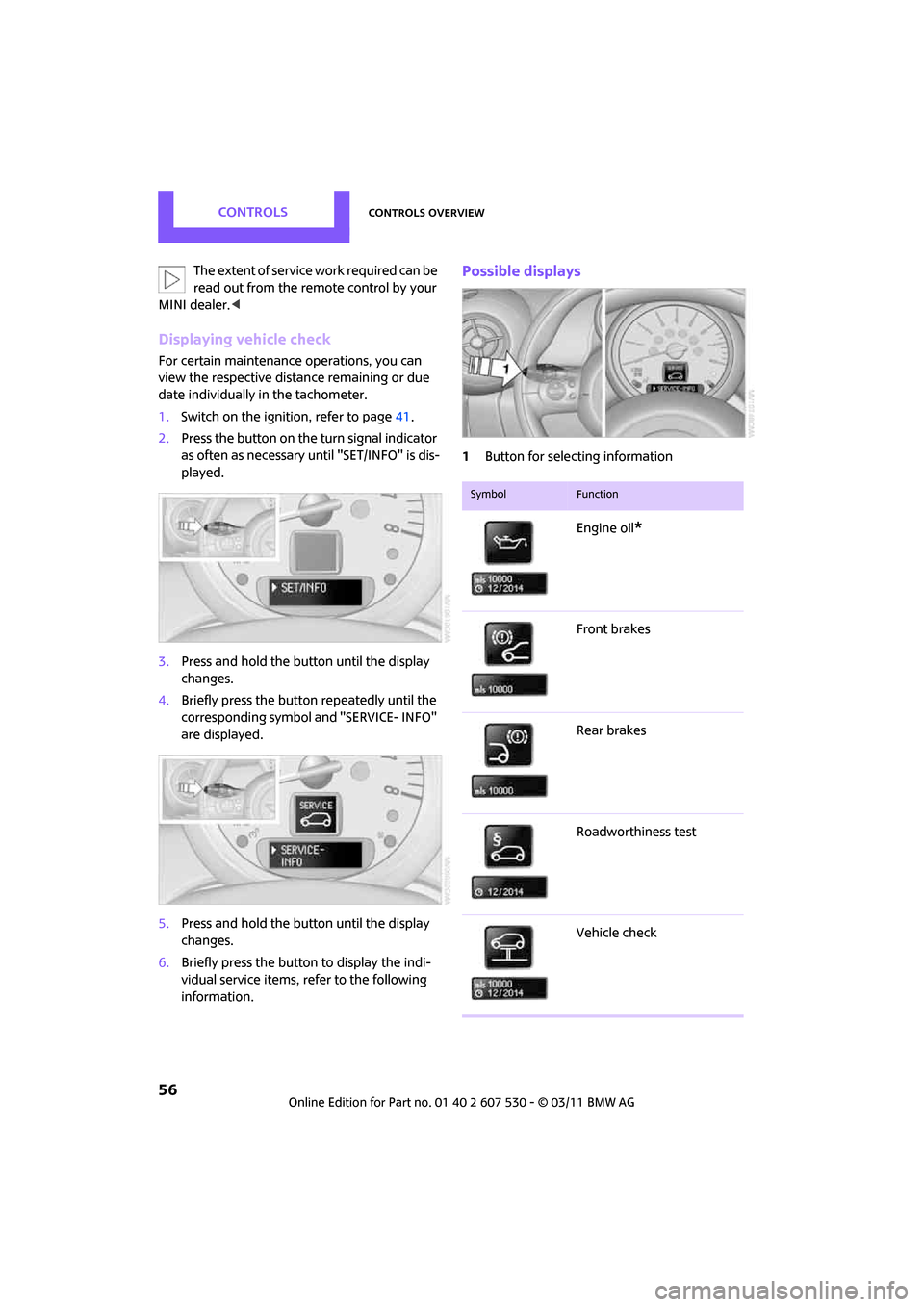
For certain maintenance operations, you can
view the respective distance remaining or due
date individually in the tachometer.
1.Switch on the ignition, refer to page 41.
2. Press the button on the turn signal indicator
as often as necessary until "SET/INFO" is dis-
played.
3. Press and hold the button until the display
changes.
4. Briefly press the button repeatedly until the
corresponding symbol and "SERVICE- INFO"
are displayed.
5. Press and hold the button until the display
changes.
6. Briefly press the button to display the indi-
vidual service items, refer to the following
information.
Possible displays
1Button for selecting information
SymbolFunction
Engine oil*
Front brakes
Rear brakes
Roadworthiness test
Vehicle check
Page 100 of 196
Driving tipsThings to remember when driving
98
Low inflation pressure increases rolling resis-
tance and thus leads to greater fuel consump-
tion and tire wear.
Drive off immediately
Do not wait for the engine to warm up while the
vehicle remains stationary. Start driving right
away, but at moderate engine speeds. This is the
fastest way for the cold engine to reach its oper-
ating temperature.
Think ahead while driving
Avoid unnecessary accelera tion and braking. by
maintaining a suitable di stance to the vehicle
driving ahead.
Driving smoothly and an ticipating impending
traffic situations reduces fuel consumption.
Avoid high engine speeds
Use first gear only for driving off. In second and
higher gears, accelerate smoothly to a suitable
engine and road speed. In doing so, avoid high
engine speeds and shift up early.
When you reach your desired traveling speed,
shift to the highest suitable gear and drive at
constant speed.
As a rule: driving at lo w engine speeds lowers
fuel consumption and reduces wear.
Coasting
When approaching a red traffic light, take your
foot off the accelerator and let the vehicle coast
to a halt in the highest suitable gear.
On a downhill gradient, take your foot off the
accelerator and let the vehicle coast in a suitable
gear.
Fuel supply is shut off automatically when the
vehicle is coasting.
Switch off the engine during lengthy
stops
Switch off the engine when stopping for lengthy
periods, e.g. at traffic li ghts, railroad crossings or
in traffic jams.
Have the vehicle serviced
Have your vehicle servic ed regularly to achieve
good economy and a long vehicle life. The man-
ufacturer of your MINI recommends having the
vehicle serviced by a MINI dealer. Also note the
MINI Maintenance System, page 142.
Driving on poor roads
Your MINI is at home on all roads and surfaces. It
combines an all-wheel drive system* with the
advantages of a normal passenger car.
Do not drive on unpa ved terrain, as other-
wise the vehicle may be damaged. <
When you are driving on poor roads, there are a
few points which you shou ld strictly observe for
your own safety, for that of your passengers,
and for the safety of the vehicle:
> Familiarize yourself with the vehicle before
beginning to drive and do not take risks
under any circumstances.
> Adapt your speed to road conditions. The
steeper and rougher the road surface is, the
lower the speed should be.
> When driving on very steep uphill or down-
hill grades, make sure in advance that the
engine oil and coolant levels are close to the
maximum mark, refer to page 139.
> While driving, watch carefully for obstacles
such as rocks or holes. Try to avoid these
obstacles whenever possible.
> Make sure that the un dercarriage does not
touch the ground, for example on hilltops
and bumpy roads. The ground clearance of
the vehicle is a maximum of approx. 6.0 in/
15 cm. Please note that the ground clear-
ance can vary depending on loading and the
driving conditions of the vehicle.
> Only drive through road surface water up to
a maximum water depth of 1 ft/30 cm and
only at walking speed ; do not remain sta-
tionary.
Page 141 of 196
Under the hoodMobility
139
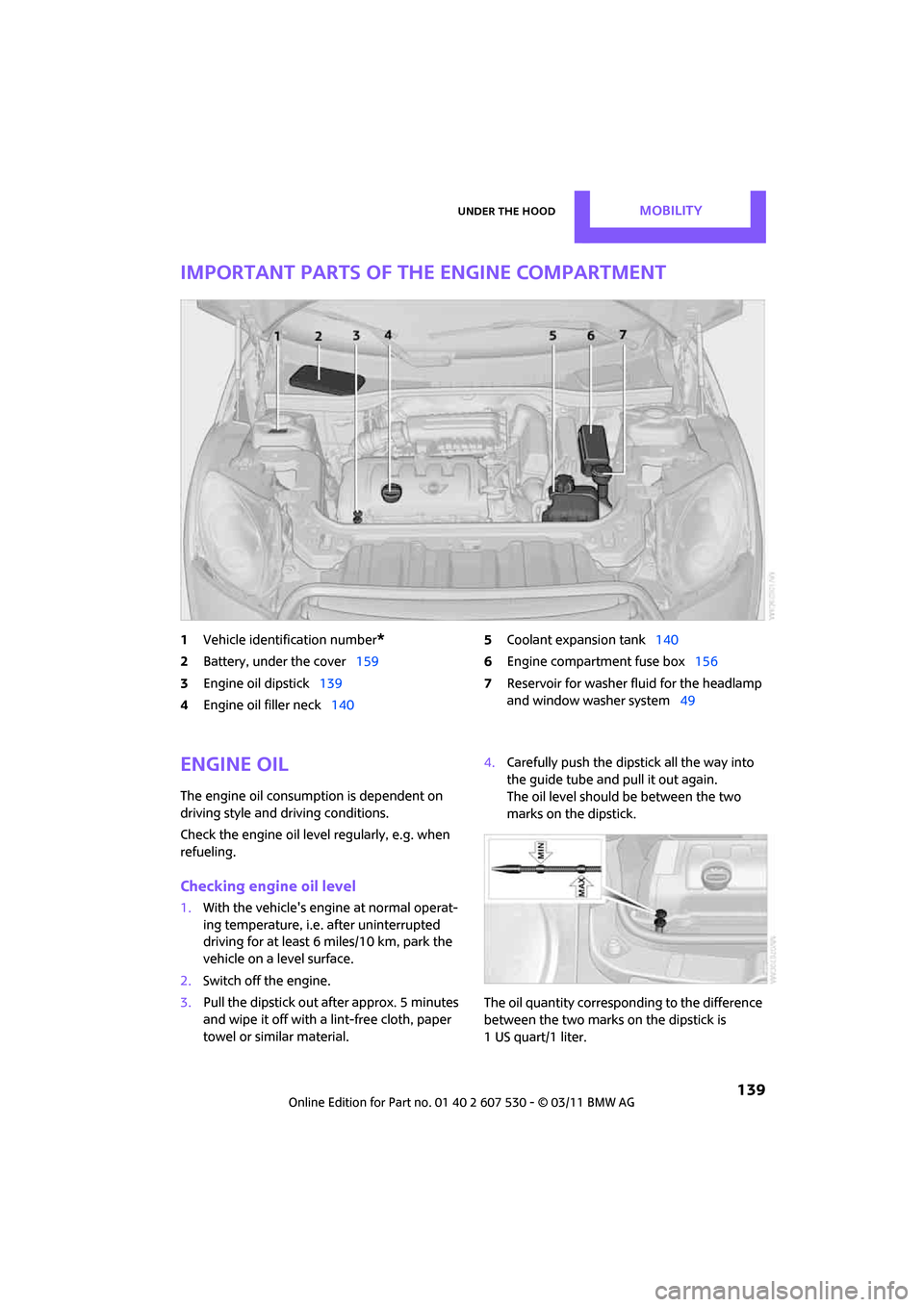
Important parts of the engine compartment
1Vehicle identification number*
2Battery, under the cover 159
3 Engine oil dipstick 139
4 Engine oil filler neck 140 5
Coolant expansion tank 140
6 Engine compartment fuse box 156
7 Reservoir for washer fl uid for the headlamp
and window washer system 49
Engine oil
The engine oil consumption is dependent on
driving style and driving conditions.
Check the engine oil level regularly, e.g. when
refueling.
Checking engine oil level
1.With the vehicle's engi ne at normal operat-
ing temperature, i.e. after uninterrupted
driving for at least 6 miles/10 km, park the
vehicle on a level surface.
2. Switch off the engine.
3. Pull the dipstick out after approx. 5 minutes
and wipe it off with a lint-free cloth, paper
towel or similar material. 4.
Carefully push the dipstick all the way into
the guide tube and pull it out again.
The oil level should be between the two
marks on the dipstick.
The oil quantity corresponding to the difference
between the two marks on the dipstick is
1 US quart/1 liter.
Page 142 of 196
MobilityUnder the hood
140
Do not fill beyond the upper mark on the
dipstick. Excess oil will damage the
engine. <
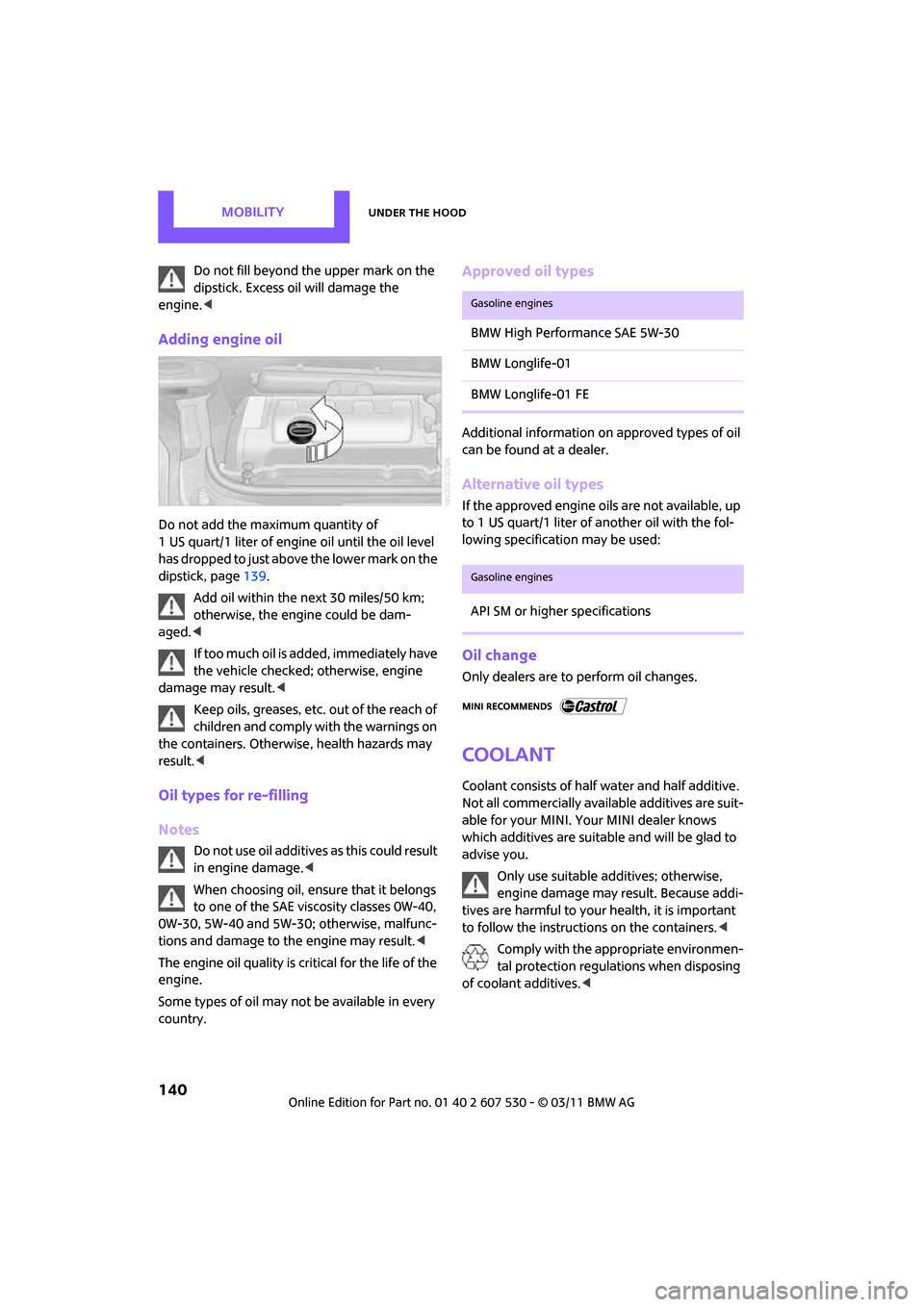
Adding engine oil
Do not add the maximum quantity of
1 US quart/1 liter of engine oil until the oil level
has dropped to just above the lower mark on the
dipstick, page 139.
Add oil within the next 30 miles/50 km;
otherwise, the engine could be dam-
aged. <
If too much oil is added, immediately have
the vehicle checked; otherwise, engine
damage may result. <
Keep oils, greases, etc. out of the reach of
children and comply with the warnings on
the containers. Otherwise, health hazards may
result. <
Oil types for re-filling
Notes
Do not use oil additives as this could result
in engine damage. <
When choosing oil, ensure that it belongs
to one of the SAE viscosity classes 0W-40,
0W-30, 5W-40 and 5W-30; otherwise, malfunc-
tions and damage to the engine may result. <
The engine oil quality is critical for the life of the
engine.
Some types of oil may not be available in every
country.
Approved oil types
Additional information on approved types of oil
can be found at a dealer.
Alternative oil types
If the approved engine oils are not available, up
to 1 US quart/1 liter of another oil with the fol-
lowing specification may be used:
Oil change
Only dealers are to perform oil changes.
Coolant
Coolant consists of half water and half additive.
Not all commercially available additives are suit-
able for your MINI. Your MINI dealer knows
which additives are suitable and will be glad to
advise you.
Only use suitable additives; otherwise,
engine damage may result. Because addi-
tives are harmful to your health, it is important
to follow the instructions on the containers. <
Comply with the appropriate environmen-
tal protection regulations when disposing
of coolant additives. <
Gasoline engines
BMW High Performance SAE 5W-30
BMW Longlife-01
BMW Longlife-01 FE
Gasoline engines
API SM or higher specifications
Page 146 of 196
MobilityCare
144
Care
Car-care products
Regular cleaning and care helps to maintain the
value of your MINI.
The manufacturer of your MINI recommends
using manufacturer-approved products to clean
and care for your vehicle.
Your MINI dealer would be pleased to advise
you on cleaning and care products and services
for your MINI.The ingredients of original MINI Care Prod-
ucts have been tested, and the products
have been tested in the laboratory and in prac-
tice. They offer optimum care and protection for
your vehicle. <
Do not use any cleansers containing alco-
hol or solvents as these may cause dam-
age. <
Cleaning agents may contain hazardous
or health-damaging substances. Follow
the warning and hazard instructions on the
packaging. For interior cleaning, always open
the doors or windows of the vehicle.
Do not use any products that are not intended
for cleaning the vehicle. <
External care
Washing your vehicle
Especially during the winter months the
vehicle should be frequently washed. Dirt
and road salt can damage the vehicle. <
After washing the vehicle, apply the
brakes briefly to dry them; otherwise,
water can reduce braking efficiency over the
short term and the brake rotors can corrode. <
Car washes
Preference should be given to cloth car washes.
Do not use automatic high-pressure car
washes; otherwise, water may drip into
the vehicle around the windows. <
Before driving in to the car wash, check if the sys-
tem is suitable for your MINI. Observe the fol-
lowing points:
> Vehicle dimensions, page 177
> If necessary: fold in the outside mirrors,
page 36
> Maximum permissible tire width
Avoid car washes with tracks higher than
4 in/10 cm; otherwise, the chassis could
be damaged. <
Preparations for driving into the car wash:
> Unscrew the rod antenna.
> Deactivate the rain sensor
* to prevent unin-
tentional wiping.
> Deactivate rear window wiper and protect it
from damage. Ask the car wash operator
about measures that can be taken to protect
the wipers.
> Remove additional atta chments, e.g. spoil-
ers or telephone antennas, if there is a pos-
sibility that they could be damaged.
> Inserting the remote control into the ignition
lock.
Automatic transmission
Before driving into the car wash, make sure that
the vehicle can roll:
1.Place the remote control, even with Comfort
Access, in the ignition lock.
2. Move the selector le ver to position N.
3. Release the parking brake.
4. Switch off the engine.
Page 174 of 196
MobilityIndicator and warning lamps
172
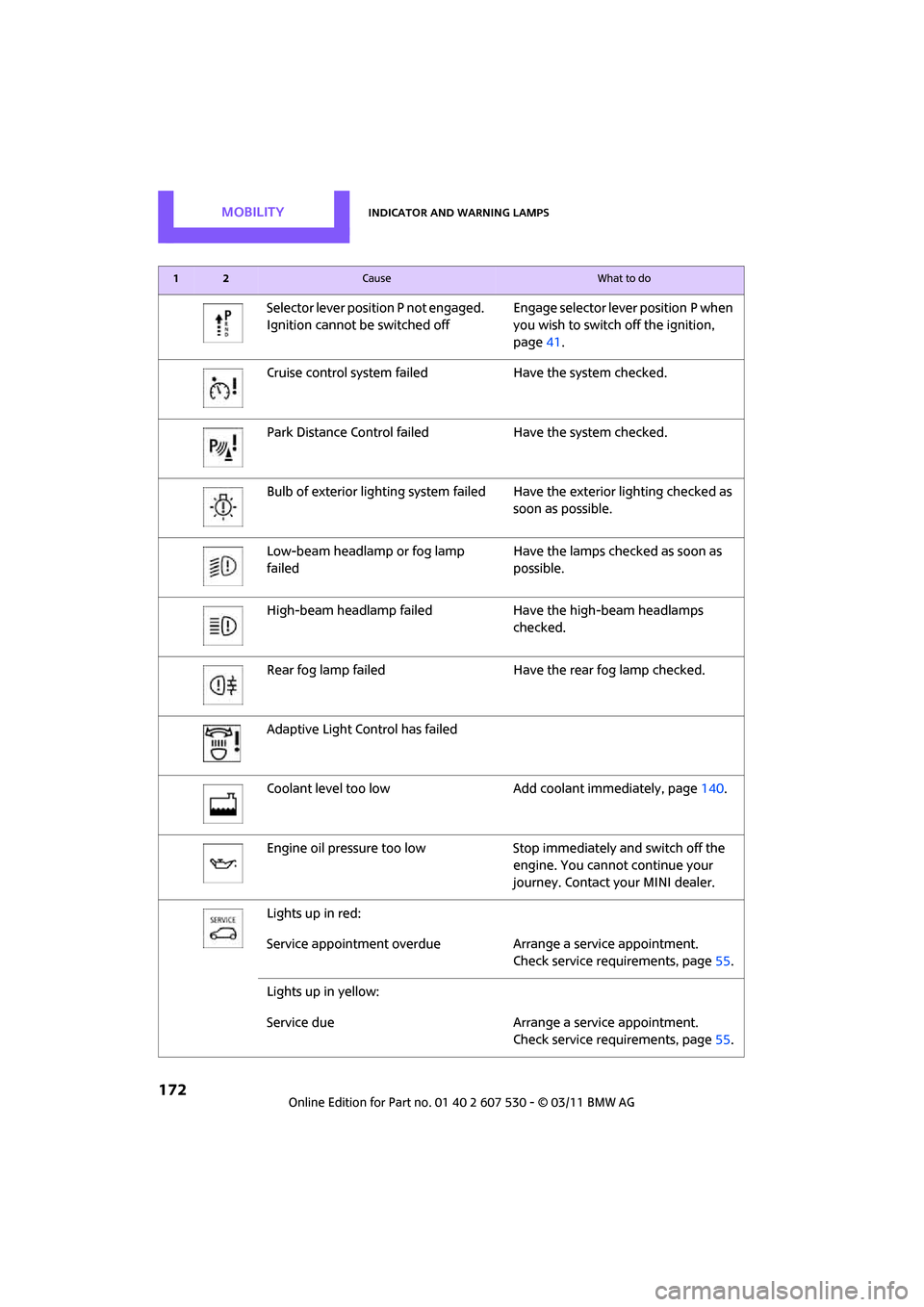
Selector lever position P not engaged.
Ignition cannot be switched offEngage selector lever position P when
you wish to switch off the ignition,
page
41.
Cruise control system fail edHave the system checked.
Park Distance Control fail edHave the system checked.
Bulb of exterior lighting system failed Have the exterior lighting checked as
soon as possible.
Low-beam headlamp or fog lamp
failed Have the lamps checked as soon as
possible.
High-beam headlamp failed Have the high-beam headlamps
checked.
Rear fog lamp failed Have the rear fog lamp checked.
Adaptive Light Control has failed
Coolant level too low Add coolant immediately, page140.
Engine oil pressure too low Stop immediately and switch off the
engine. You cannot continue your
journey. Contact your MINI dealer.
Lights up in red:
Service appointment overdue Arrange a service appointment.
Check service requirements, page 55.
Lights up in yellow:
Service due Arrange a service appointment.
Check service requirements, page 55.
12Cause What to do
Page 182 of 196
180
ReferenceEverything from A to Z
Everything from A to Z
Index
A
ABS Antilock Brake System60
Accessories, refer to Your individual vehicle 4
Acknowledgment signals for
locking/unlocking vehicle 22
Activated-charcoa l filter for
automatic climate control 80
Adaptive Light Control 73
Additives
– coolant 140
– engine oil 140
Adjusting temperature inside the car, refer to Air
conditioner 77
Adjusting temperature inside the car, refer to Automatic
climate control 78
Air conditioner 76
Air conditioning mode
– air conditioner 77
– automatic cl imate control78
– ventilation 80
Air distribution
– automatic 79
– individual 78
– manual 78
Air flow rate 77,79
– air conditioning system 77
– automatic cl imate control79
– heating, ventilation 77
Air outlets, refer to Air vents 76
Air pressure, checking, refer to Tire inflation pressure 130
Air recirculation, refer to Recirculated-air
mode 77,79 Air supply
– air conditioner
77
– automatic climate control 78
– ventilation 80
Air vents 76
Airbags 68
– sitting safely 32
– warning lamp 70
Airing, refer to Ventilation80
AKI, refer to Fuel grade 129
Alarm system 26
ALL4 all-wheel drive system 62
All-season tires, refer to Winter tires 137
All-wheel drive, refer to
ALL4 62
Ambient air, refer to Recirculated-air
mode 77,79
Ambient lighting 75
Antenna, care 144
An
tifreeze
– coolant 140
– washer fluid 49
Antilock Brake System ABS 60
Anti-theft alarm system, refer
to Alarm system 26
Approved axle loads, refer to Weights 178
Approved engine oils 140
Approved gross vehicle weight, refer to Weights 178
Armrest, refer to Center armrest 83
Ashtray 85
Assistant systems, refer to
– Dynamic Stability Control DSC 60
Audio device, external 83
AUTO program for automatic climate control 79 Auto radio, refer to Radio MINI
Boost CD 102
Automatic
– air distribution 79
– air flow rate 79
– cruise control 49
– headlamp control 71
Automatic climate control 76
– automatic air distribution 79
Automatic station search 103
Automatic station storage 103
Automatic transmission with
Steptronic 43
– interlock 44
– overriding selector lever
lock 45
– shiftlock 44
– sport program 45
AUX In connection 102
AUX-IN, refer to External audio
device 83
Average fuel consumption 52
– setting the units 54
Average speed 52
Axle loads, refer to Weights 178
B
Background lighting, refer to
Ambient lighting 75
Backrests, refer to Seats 33
Backup lamps
– replacing bulb 151
Band-aids, refer to First aid
pouch 158
Bar, refer to Tow-starting, towing away 160
Base plate for telephone or mobile phone
– refer to Snap-in adapter 124
Page 184 of 196
ReferenceEverything from A to Z
182
Center Rail, refer to Storage compartments 84
Central locking system 21
– Comfort Access 27
– from inside 24
– from outside 21
– setting unlocking
behavior 21
Changing bulbs 148
Changing wheels 155
Chassis number, refer to Engine compartment 139
Check Control 57
Child restraint fixing system LATCH 39
Child restraint systems 38
Child seats 38
Child-safety locks 40
Chrome parts, care 146
Chrome parts, refer to Care 144
Cigarette lighter 85
Cleaning headlamps 48
– washer fluid 49
Clock
– 12 h/24 h mode 54
– setting time 57
Closing
– from inside 24
– from outside 21
Clothes hooks 85
Cockpit 10
Cold start, refer to Starting the
engine 42
Comfort Access 27
– replacing the battery 29
– what to observe before entering a car wash 29
Comfort area, refer to Around
the center console 14
Compartment for remote control, refer to Ignition
lock 41
Compressed audio files 107
Computer 52
Condensation, refer to When the vehicle is parked 92Condition Based Service
CBS 142
Configuring settings, refer to Personal Profile 20
Connecting vacuum cleaner, refer to Connecting electrical
appliances 86
Consumption, refer to Average fuel consumption 52
Controls and displays 10
Convenient access, refer to Comfort Access 27
Convenient operation
– windows 22
Convenient start, refer to
St
arting the engine 42
Coolant 140
– checking level 141
– filling 141
– temperature 141
Coolant temperature 141
Cooling fluid, refer to
Coolant 140
Cooling, maximum 79
Copyright 2
Cornering light, refer to Adaptive Light Control 73
Cruising range 52
Cupholders 85
Curb weight, refer to
Weights 178
Current fuel consumption 52
D
Dashboard instruments, refer
to Displays 12
Dashboard lighting, refer to Instrument lighting 74
Dashboard, refer to Cockpit 10
Data 176
– capacities 179
– dimensions 177
– engine 176
– weights 178
Data memory 143 Date
– setting
57
Date setting 103
Daytime running lights 72
DBC Dynamic Brake Control, refer to Brake Assist 60
Deactivating front passenger
airbags 68
Deadlocking, refer to Locking 22
Defect
– door lock 24
– fuel filler flap 128
Defogging windows 78,80
Defrost position, refer to Defrosting windows 78,80
Defrosting windows 78,80
Defrosting windows and removing condensation
– air conditioner 78
– automatic climate control 80
Defrosting windshield, refer to
Defrosting windows 78,80
Differential, breaking in 90
Digital radio, refer to HD
Radio 105
Dimensions 177
Dipstick, engine oil 139
Directional indicators, refer to Turn signals 46
Displacement, refer to Engine data 176
Display lighting, refer to
Instrument lighting 74
Displays 12
– instrument cluster 12
Displays and controls 10
Displays, care 147
Disposal
– of coolant 140
– remote control battery 29
– vehicle battery 156
Distance remaining to service, refer to Service
requirements 55
Distance warning, refer
to Park
Distance Control PDC 59
Page 185 of 196
Everything from A to ZReference
183
Door key, refer to Integrated key/remote control 20
Door lock 24
Door lock, confirmation
signals 22
Doors, manual operation24
DOT Quality Grades 134
Drinks holders, refer to Cupholders 85
Drive-off assistan t, refer to Hill
Assist 62
Driving dynamics control, refer to Sport button 62
Driving lamps, refer to Parking lamps/low beams 71
Driving notes 90
Driving off on inclines, refer to Hill Assist 62
Driving stability control
systems 59
Driving through water 91
Driving tips, refer to Driving
notes 90
Dry air, refer to Cooling function 80
DSC Dynamic Stability Control 60
DTC Dynamic Traction
Control 61
Dynamic Brake Control DBC,
refer to Brake Assist 60
Dynamic Stability Control DSC 60
Dynamic Traction Control DTC 61
E
Eject button 108
Electrical malfunction
– door lock 24
– fuel filler flap 128
Electronic brake-force distribution 60
Electronic Stability Program
ESP, refer to Dynamic
Stability Control DSC 60Emergency operation, refer to
Manual operation
– door lock 24
– fuel filler flap 128
– transmission lock, automatic transmission 45
Emergency services, refer to
Roadside Assistance 158
Engine
– breaking in 90
– data 176
– overheated, refer to Coolant temperature 141
– speed 176
– starting 42
– starting, Comfort Access 27
– switching off 42
Engine compartment 139
Engine coolant, refer to
Coolant 140
Engine oil
– adding 140
– additives, refer to Approved engine oils 140
– alternative oil types 140
– approved engine oils 140
– capacity 140
– checking level 139
– dipstick 139
– intervals between changes,
refer to Service
requirements 55
– MINI Maintenance
System 142
Engine oil level, checking 139
Engine output, refer to Engine
data 176
Engine starting, refer to Starting the engine 42
ESP Electronic Stability Program, refer to Dynamic
Stability Control DSC 60
Exhaust system, refer to Hot exhaust system 90 Exterior mirrors
36
– adjusting 36
– automatic dimming feature 37
– automatic heating 36
– folding in and out 36
External audio device 83,102
External temperature display
– change units of measure 54
– in the on-board computer 54
Exte
rnal temperature
warning 52
Eyes
– for tow-starting and towing away 160
– for tying down loads 96
F
Failure messages, refer to
Check Control 57
Failure of an electrical
consumer 156
Fast forward
– CD 107
Fastening safety be lts, refer to
Safety belts 35
Fault messages, refer to Check
Control 57
Faulty
– tire 63
Filter
– microfilter for air
conditioner 78
– microfilter/activated- charcoal filter for automatic
climate control 80
Fine wood, care 147
First aid pouch 158
Fixture for remote control, refer to Ignition lock 41
Flash when locking/
unlocking 22
Flat load floor 94
Flat tire
– run-flat tires 136
– Tire Pressure Monitor TPM 64