reset MINI Countryman 2011 Owner's Manual
[x] Cancel search | Manufacturer: MINI, Model Year: 2011, Model line: Countryman, Model: MINI Countryman 2011Pages: 196, PDF Size: 3.06 MB
Page 13 of 196
CockpitAT A GLANCE
11
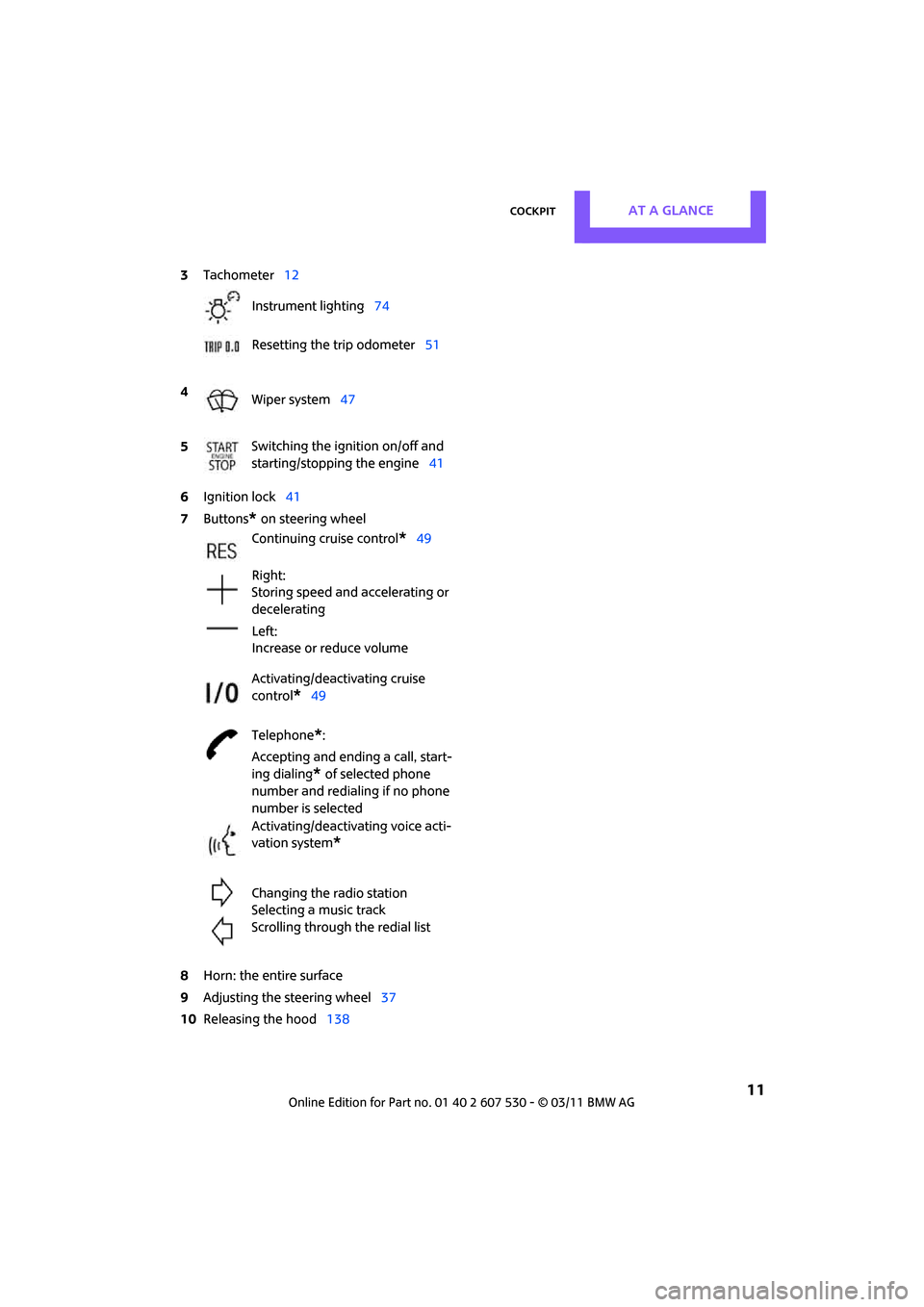
6Ignition lock 41
7 Buttons
* on steering wheel
8 Horn: the entire surface
9 Adjusting the steering wheel 37
10 Releasing the hood 138
3
Tachometer 12
Instrument lighting 74
Resetting the trip odometer 51
4 Wiper system 47
5 Switching the ignition on/off and
starting/stopping the engine
41
Continuing cruise control
*49
Right:
Storing speed and accelerating or
decelerating
Left:
Increase or reduce volume
Activating/deactivating cruise
control
*49
Telephone
*:
Accepting and ending a call, start-
ing dialing
* of selected phone
number and redialing if no phone
number is selected
Activating/deactivating voice acti-
vation system
*
Changing the radio station
Selecting a music track
Scrolling through the redial list
Page 14 of 196
AT A GLANCECockpit
12
Displays
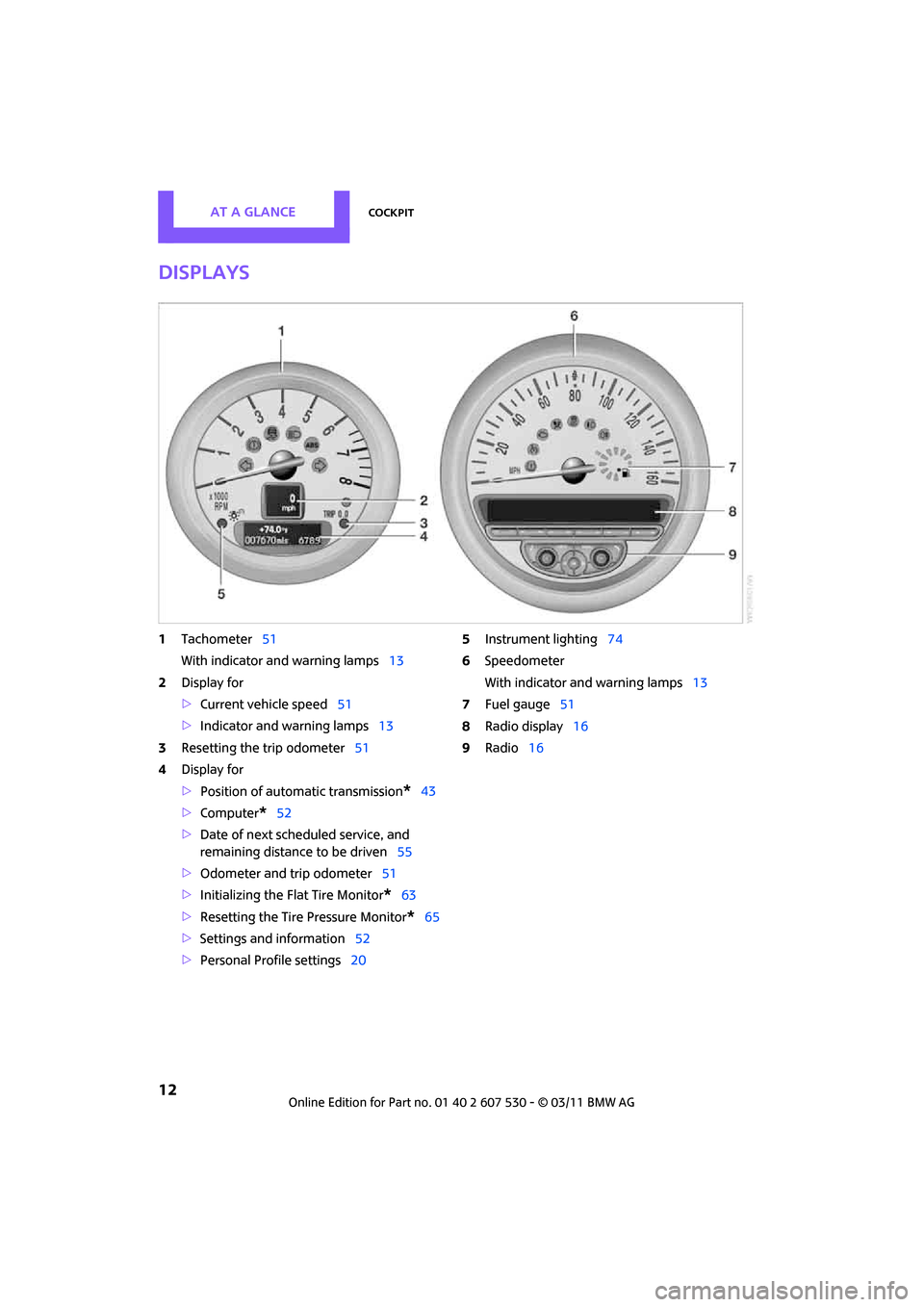
1Tachometer 51
With indicator and warning lamps 13
2 Display for
>Current vehicle speed 51
> Indicator and warning lamps 13
3 Resetting the trip odometer 51
4 Display for
>Position of automatic transmission
*43
> Computer
*52
> Date of next scheduled service, and
remaining distance to be driven 55
> Odometer and trip odometer 51
> Initializing the Fl at Tire Monitor
*63
> Resetting the Tire Pressure Monitor
*65
> Settings and information 52
> Personal Prof ile settings20 5
Instrument lighting 74
6 Speedometer
With indicator and warning lamps 13
7 Fuel gauge 51
8 Radio display 16
9 Radio 16
Page 49 of 196
DrivingControls
47
8.Press the button to select:
>
Brief indication of a turn.
> Triple turn signal.
9. Press and hold the butt on until the display
changes. The setting is stored.
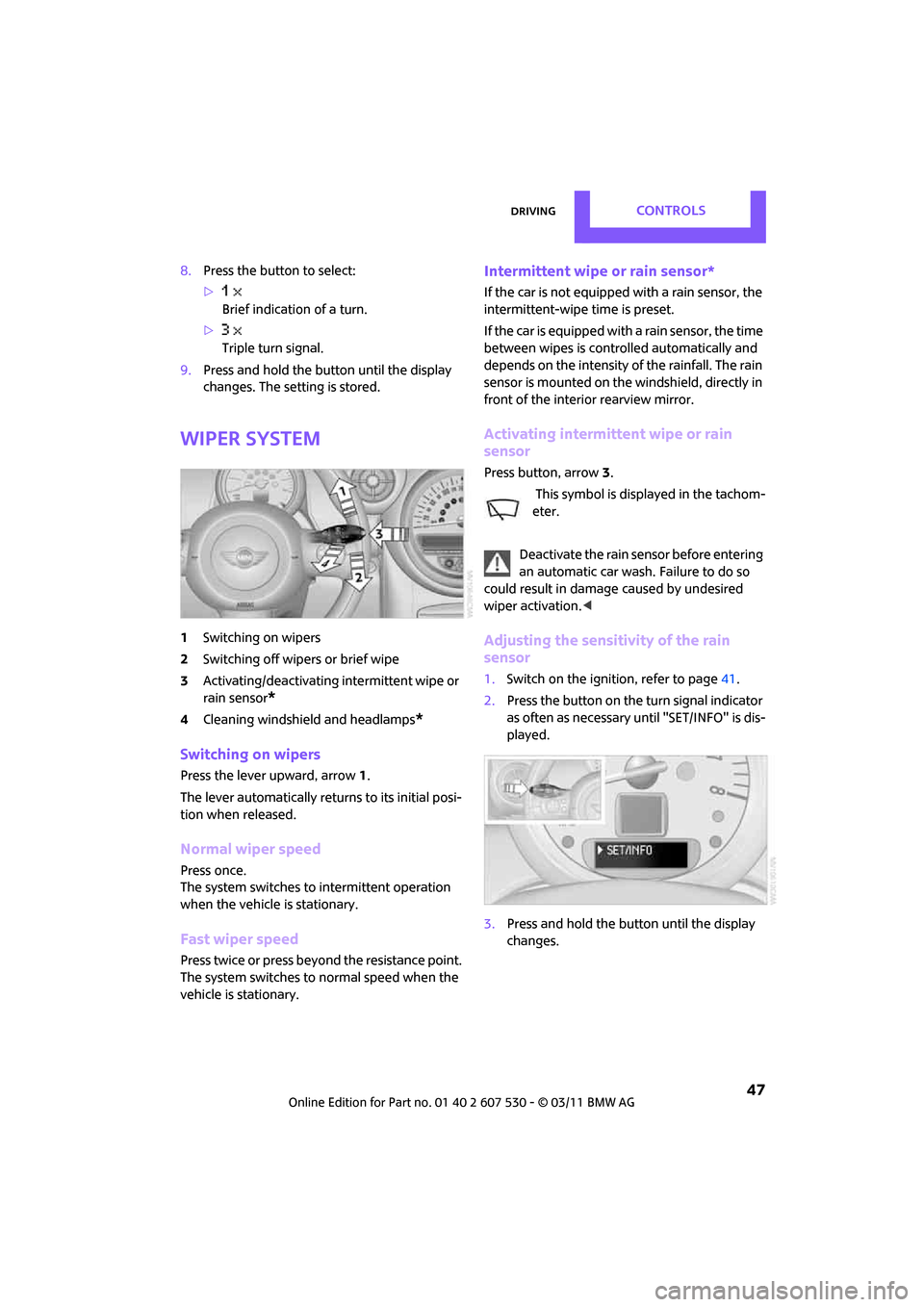
Wiper system
1 Switching on wipers
2 Switching off wipers or brief wipe
3 Activating/deactivating intermittent wipe or
rain sensor
*
4Cleaning windshield and headlamps*
Switching on wipers
Press the lever upward, arrow 1.
The lever automatically returns to its initial posi-
tion when released.
Normal wiper speed
Press once.
The system switches to intermittent operation
when the vehicle is stationary.
Fast wiper speed
Press twice or press beyo nd the resistance point.
The system switches to normal speed when the
vehicle is stationary.
Intermittent wipe or rain sensor*
If the car is not equipped with a rain sensor, the
intermittent-wipe time is preset.
If the car is equipped with a rain sensor, the time
between wipes is contro lled automatically and
depends on the intensity of the rainfall. The rain
sensor is mounted on the windshield, directly in
front of the interior rearview mirror.
Activating intermittent wipe or rain
sensor
Press button, arrow 3.
This symbol is displayed in the tachom-
eter.
Deactivate the rain sensor before entering
an automatic car wash. Failure to do so
could result in damage caused by undesired
wiper activation. <
Adjusting the sensitivity of the rain
sensor
1.Switch on the ignition, refer to page 41.
2. Press the button on the turn signal indicator
as often as necessary until "SET/INFO" is dis-
played.
3. Press and hold the butt on until the display
changes.
Page 53 of 196
Controls overviewControls
51
Controls overview
Tachometer
Never operate the engine with the needle in the
red overspeed zone of the gauge. In this range,
the fuel supply is interrupted to protect the
engine.
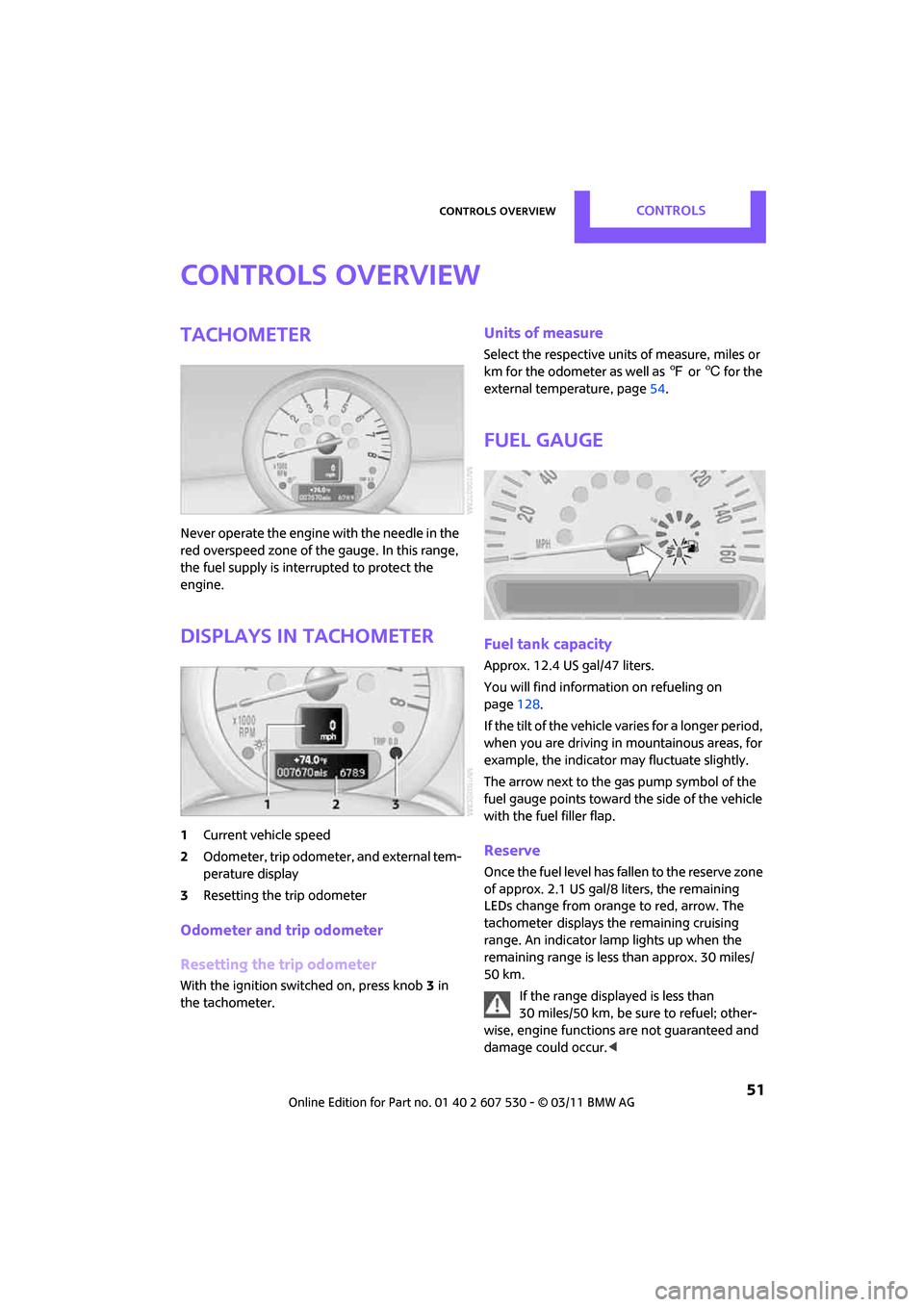
Displays in tachometer
1Current vehicle speed
2 Odometer, trip odometer, and external tem-
perature display
3 Resetting the trip odometer
Odometer and trip odometer
Resetting the trip odometer
With the ignition switched on, press knob 3 in
the tachometer.
Units of measure
Select the respective units of measure, miles or
km for the odometer as well as 7 or 6 for the
external temperature, page 54.
Fuel gauge
Fuel tank capacity
Approx. 12.4USgal/47liters.
You will find information on refueling on
page 128.
If the tilt of the vehicle varies for a longer period,
when you are driving in mountainous areas, for
example, the indicator may fluctuate slightly.
The arrow next to the gas pump symbol of the
fuel gauge points toward the side of the vehicle
with the fuel filler flap.
Reserve
Once the fuel level has fallen to the reserve zone
of approx. 2.1 US gal/8 liters, the remaining
LEDs change from orange to red, arrow. The
tachometer
displays the remaining cruising
range. An indicator lamp lights up when the
remaining range is less than approx. 30 miles/
50 km.
If the range displayed is less than
30 miles/50 km, be sure to refuel; other-
wise, engine functions are not guaranteed and
damage could occur.<
Page 54 of 196

ControlsControls overview
52
Computer*
Displays in the tachometer
Press the button in the turn signal lever repeat-
edly to call up various items of information.
The following items of information are displayed
in the order listed:
> Cruising range
> Average fuel consumption
> Current fuel consumption
> Average speed
> Outside temperature display
To set the corresponding units of measure, refer
to Formats and units of measure on page 54.
Cruising range
Displays the estimated cruising range available
with the remaining fuel. The range is calculated
on the basis of the way the car has been driven
over the last 18 miles/30 km and the amount of
fuel currently in the tank.
If the range displayed is less than
30 miles/50 km, be sure to refuel; other-
wise, engine functions are not guaranteed and
damage could occur. <
Average fuel consumption
Calculated for the time the engine has been run-
ning.
To reset average fuel consumption: press the
button in the turn signal lever for approx.
2seconds.
Current fuel consumption
Displays the current fuel consumption to allow
you to see whether your current driving style is
conducive to fuel economy with minimum
exhaust emissions.
Average speed
Periods with the vehicle parked and the engine
switched off are not includ ed in the calculations
of average speed.
To reset average speed: press the button in the
turn signal lever for approx. 2 seconds.
External temperature warning
When the displayed temperature sinks to
approx. +37 7/+3 6, a signal sounds and a
warning lamp lights up. There is an increased
risk of black ice.
Even at temperatures above +37 7/+3 6
ice can form. Therefore, drive carefully,
e.g. on bridges and sect ions of road in the
shade; otherwise, there is an increased accident
risk. <
Settings and information
Operating principle
Certain settings and information are only avail-
able when the ignition is switched on, the vehi-
cle is at a standstill and the doors are closed.
Page 55 of 196
Controls overviewControls
53
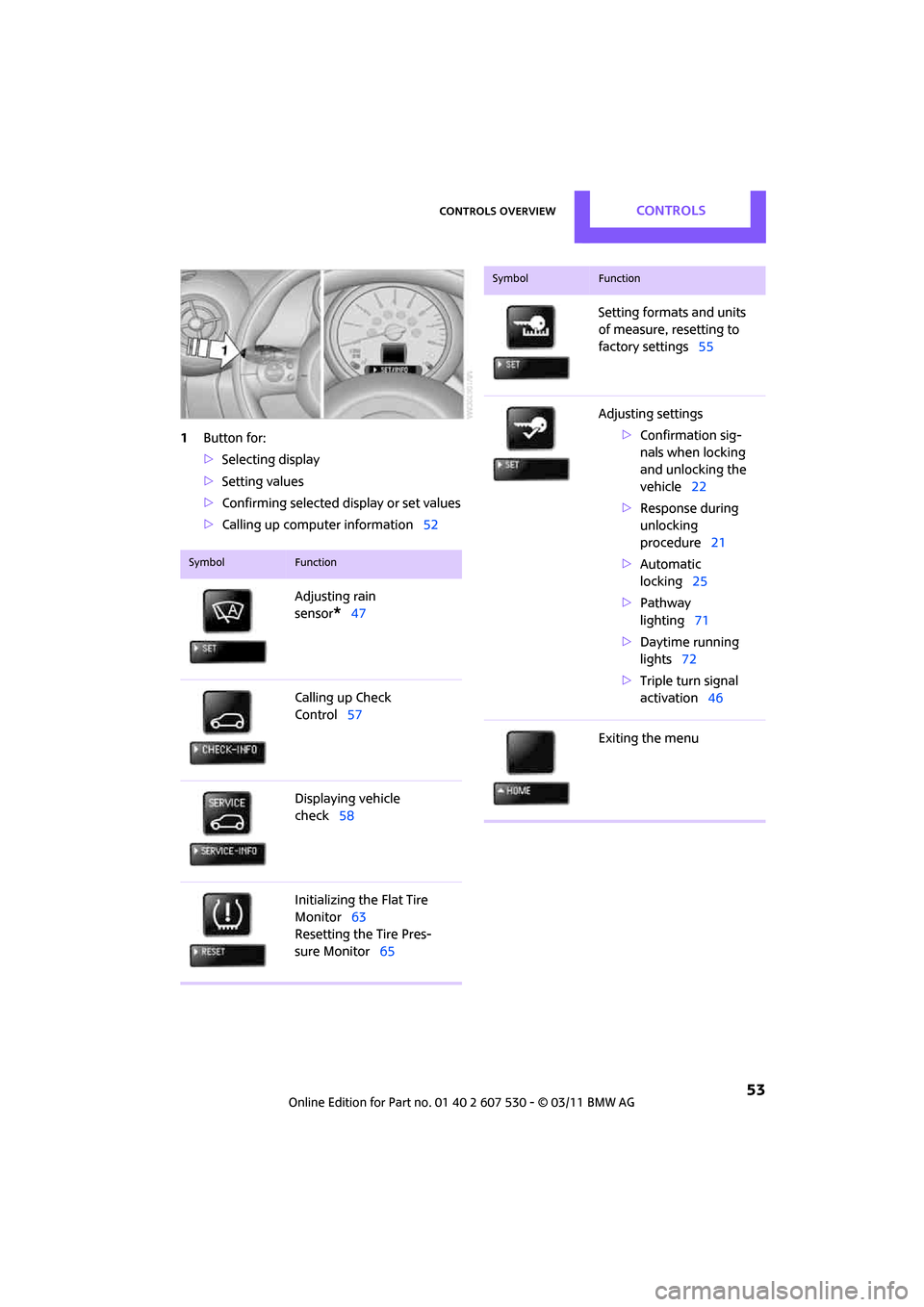
1Button for:
>Selecting display
> Setting values
> Confirming selected display or set values
> Calling up computer information 52
SymbolFunction
Adjusting rain
sensor
*47
Calling up Check
Control 57
Displaying vehicle
check 58
Initializing the Flat Tire
Monitor 63
Resetting the Tire Pres-
sure Monitor 65
Setting formats and units
of measure, resetting to
factory settings 55
Adjusting settings >Confirmation sig-
nals when locking
and unlocking the
vehicle 22
> Response during
unlocking
procedure 21
> Automatic
locking 25
> Pathway
lighting 71
> Daytime running
lights 72
> Triple turn signal
activation 46
Exiting the menu
SymbolFunction
Page 57 of 196
Controls overviewControls
55
> Fuel consumption: l/100 km, mpg,
km/l
*
> Distance covered: miles, km
> Temperature: 7, 6
7. Press and hold the butt on until the display
changes.
8. Press the button briefly to change the for-
mat or unit of measure.
9. Press and hold the butt on until the display
changes.
The settings are stored.
Resetting to factory settings
The settings for formats and units of measure
can be reset to the factory settings. The settings
are stored for the remote control currently in
use, refer also to Personal Profile on page 20.
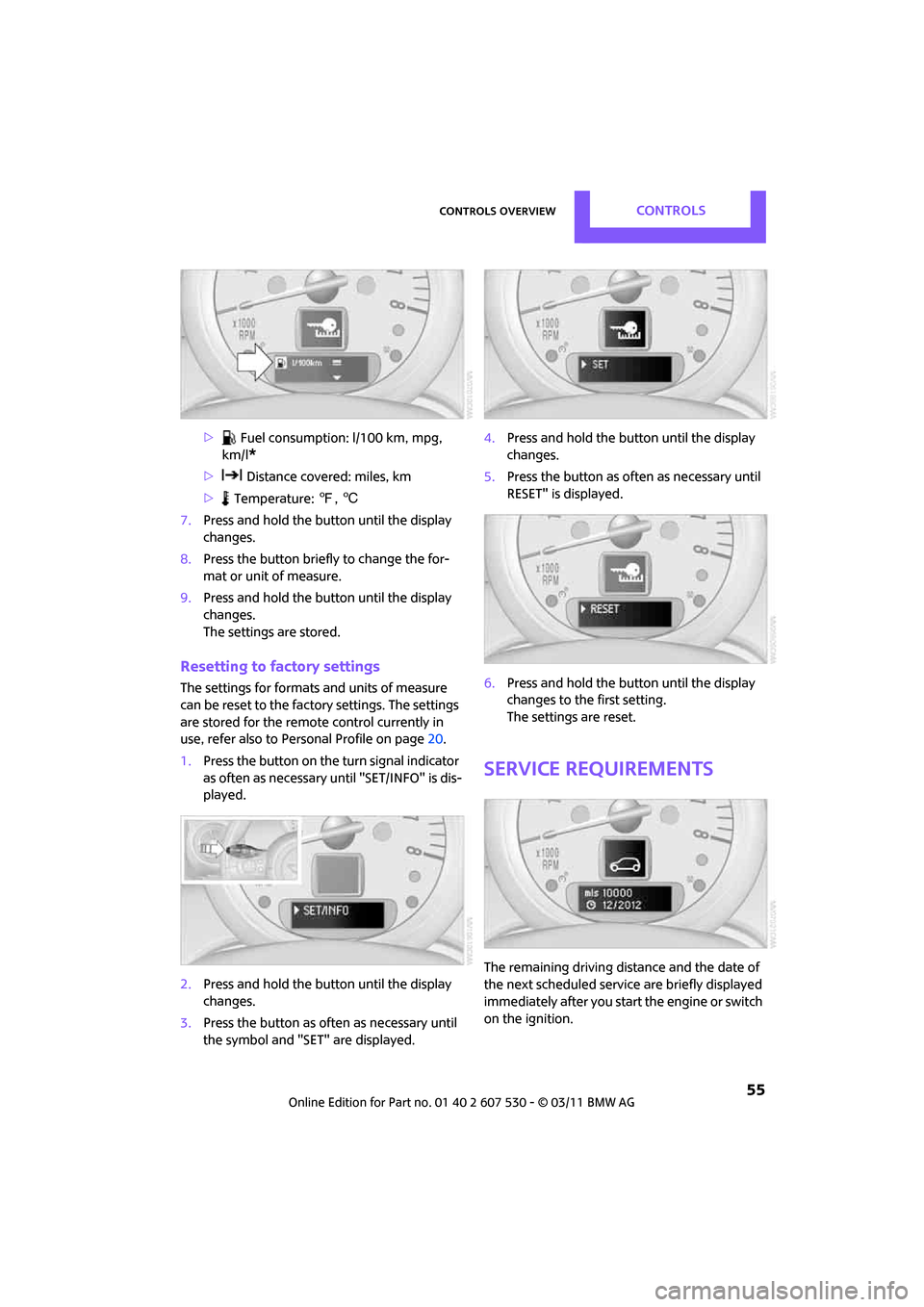
1. Press the button on the turn signal indicator
as often as necessary until "SET/INFO" is dis-
played.
2. Press and hold the butt on until the display
changes.
3. Press the button as of ten as necessary until
the symbol and "SET" are displayed. 4.
Press and hold the butt on until the display
changes.
5. Press the button as of ten as necessary until
RESET" is displayed.
6. Press and hold the butt on until the display
changes to the first setting.
The settings are reset.
Service requirements
The remaining driving dist ance and the date of
the next scheduled service are briefly displayed
immediately after you start the engine or switch
on the ignition.
Page 65 of 196
Technology for driving comfort and safetyControls
63
System limitations
Sudden serious tire damage caused by
external influences cannot be indicated in
advance. <
A natural, even pressure loss in all four tires can-
not be detected. Therefore, check the tire infla-
tion pressure regularly.
In the following situations, the system could be
delayed or malfunction:
> System has not been initialized
> Driving on snowy or slippery road surface
> Performance-oriented styl e of driving: slip in
the drive wheels, high lateral acceleration
> Snow chains are attached
Initializing the system
The initialization process adopts the set inflation
tire pressures as refere nce values for the detec-
tion of a flat tire. Initia lization is started by con-
firming the inflation pressures.
Do not initialize the system when driving with
snow chains.
Using the button in the turn signal lever
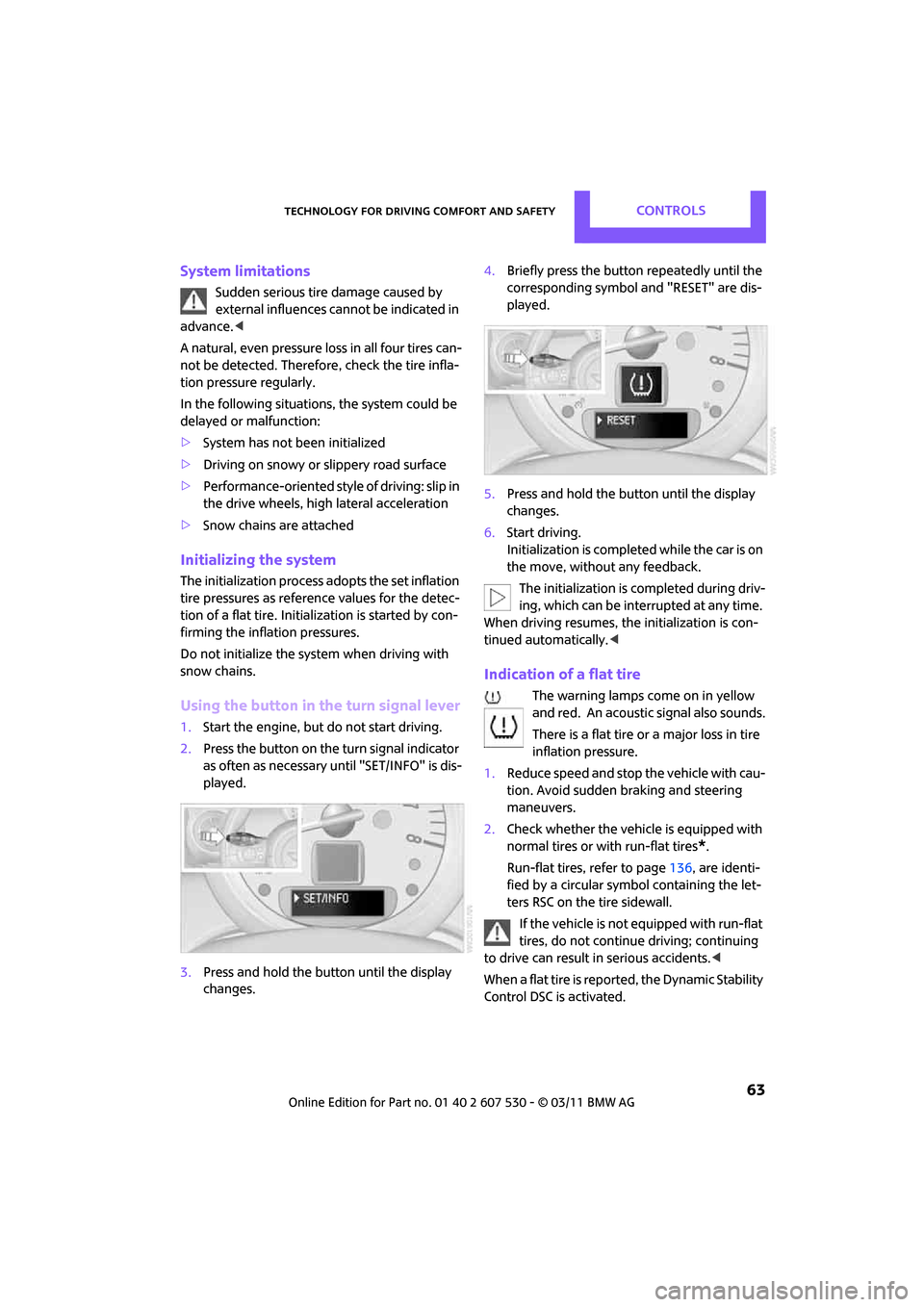
1. Start the engine, but do not start driving.
2. Press the button on the turn signal indicator
as often as necessary until "SET/INFO" is dis-
played.
3. Press and hold the butt on until the display
changes. 4.
Briefly press the button repeatedly until the
corresponding symbol and "RESET" are dis-
played.
5. Press and hold the butt on until the display
changes.
6. Start driving.
Initialization is completed while the car is on
the move, without any feedback.
The initialization is completed during driv-
ing, which can be interrupted at any time.
When driving resumes, the initialization is con-
tinued automatically. <
Indication of a flat tire
The warning lamps come on in yellow
and red. An acoustic signal also sounds.
There is a flat tire or a major loss in tire
inflation pressure.
1. Reduce speed and stop the vehicle with cau-
tion. Avoid sudden braking and steering
maneuvers.
2. Check whether the vehicle is equipped with
normal tires or with run-flat tires
*.
Run-flat tires, refer to page 136, are identi-
fied by a circular symbol containing the let-
ters RSC on the tire sidewall.
If the vehicle is not equipped with run-flat
tires, do not continue driving; continuing
to drive can result in serious accidents. <
When a flat tire is repo rted, the Dynamic Stability
Control DSC is activated.
Page 66 of 196

ControlsTechnology for driving comfort and safety
64
Actions in the event of a flat tire
Normal tires*
1.Identify the damaged tire.
To do so, check the infl ation pressure in all
four tires.
The inflation pressure display of the Mobility
System, page 152, can be used for this pur-
pose.
If the inflation pressure in all four tires is cor-
rect, the Flat Tire Mo nitor might not have
been initialized. The system must then be
initialized.
If it is not possible to identify the damaged
tire, contact your MINI dealer
2. Use the Mobility System to remedy the flat
tire on the damaged wheel, refer to
page 152.
Run-flat tires*
You can continue driving with a damaged tire at
speeds up to 50 mph or 80 km/h.
Continued driving with a flat tire
When driving with a damaged tire:
1.Avoid sudden braking and steering maneu-
vers.
2. Do not exceed a speed of 50 mph or 80 km/
h.
3. At the next opportunity, check the air pres-
sure in all four tires.
If the inflation pressure in all four tires is cor-
rect, the Flat Tire Mo nitor might not have
been initialized. The system must then be
initialized.
Possible driving distance with complete loss of
tire inflation pressure:
The distance it is possible to drive depends on
the load and the stress on the vehicle while driv-
ing.
With an average load, it may be possible to drive
for approx. 50 miles/80 km. When driving with damaged tires, the handling
characteristics change, e.
g. the vehicle will skid
sooner when braking, braking distances will be
longer, or self-steerin g response will change.
Adapt your driving style accordingly. Avoid turn-
ing abruptly and driving over obstacles such as
curbs, potholes, etc.
Since the possible driving distance depends to a
considerable degree on the strain exerted on
the vehicle while driving, it can be shorter or,
with a gentle driving styl e, can also be longer,
depending on the speed, road condition, exter-
nal temperature, vehicle load, etc.
Drive cautiously and do not exceed a
speed of 50 mph/80 km/h.
A loss of tire inflation pressure results in a
change in the handling characteristics, e.g.
reduced lane stability during braking, a longer
braking distance and alte red self-steering prop-
erties. <
Vibrations or loud no ises while driving can
indicate final failure of the tire. Reduce
your speed and bring the vehicle to a stop; oth-
erwise, pieces of tire may come off, which could
result in an accident. Do not continue driving
and contact your MINI dealer. <
Tire Pressure Monitor
TPM*
The concept
Measuring the inflation pressure in the four
mounted tires. The system notifies you if there is
a significant loss of pressure in one or more tires.
Functional requirement
The system must have been reset while the
inflation pressure was correct; otherwise, reli-
able signaling of a flat tire is not ensured.
Always use wheels with TPM electronics to
ensure that the system will operate properly.
Page 67 of 196
Technology for driving comfort and safetyControls
65
Reset the system again after each correction of
the tire inflation pressure and after every tire or
wheel change.
System limitations
Sudden, serious tire damage caused by
external influences ca nnot be indicated in
advance. <
The system does not operate correctly if it has
not been reset. For example, a flat tire may be
indicated despite correct tire inflation pressures.
The system is inactive and cannot indicate a flat
tire:
> If a wheel without TPM electronics is
mounted
> Interference with TPM by other systems or
devices with the same transmission fre-
quency.
Resetting system
Reset the system again after each correction of
the tire inflation pressure and after every tire or
wheel change.
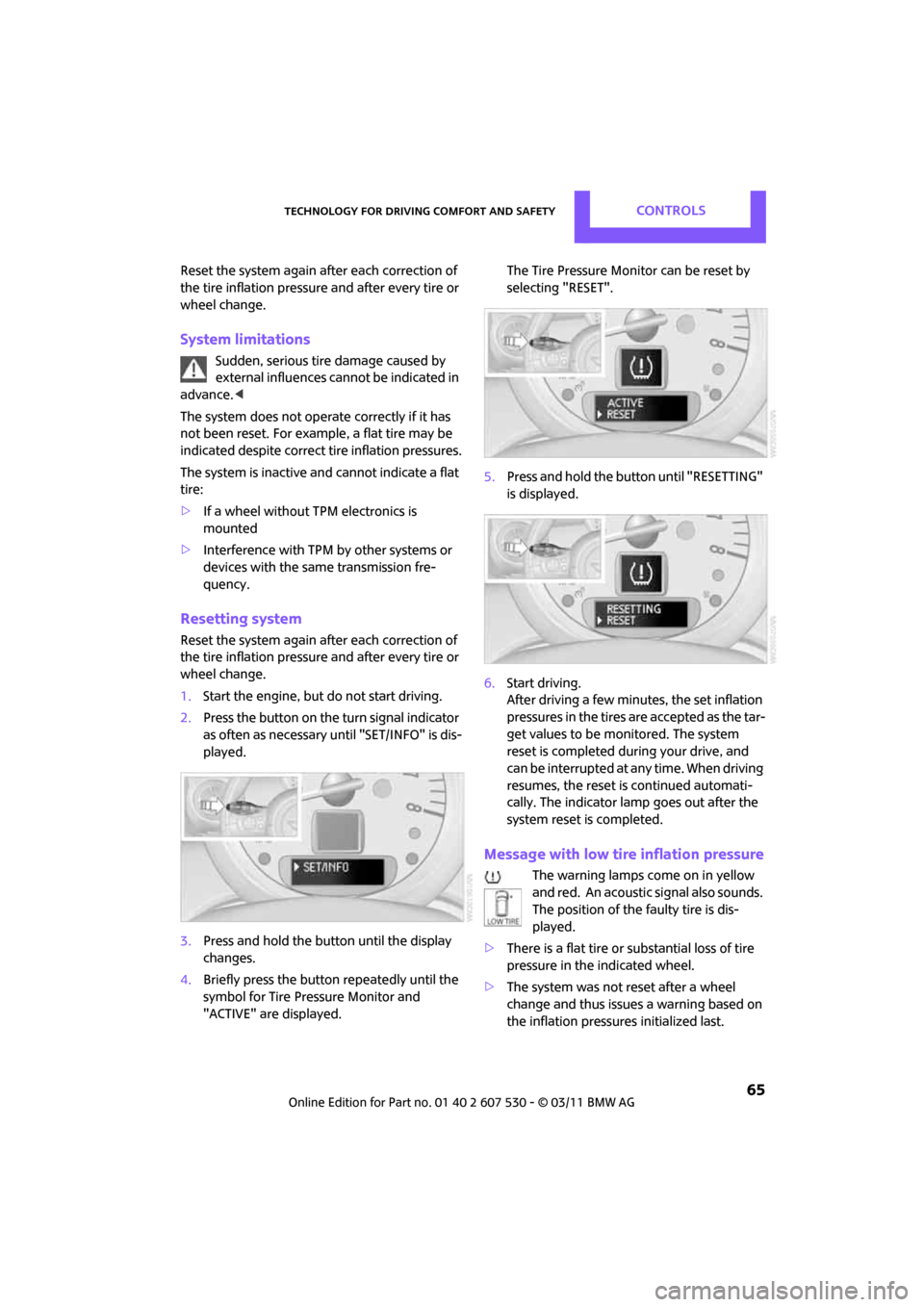
1. Start the engine, but do not start driving.
2. Press the button on the turn signal indicator
as often as necessary until "SET/INFO" is dis-
played.
3. Press and hold the butt on until the display
changes.
4. Briefly press the button repeatedly until the
symbol for Tire Pressure Monitor and
"ACTIVE" are displayed. The Tire Pressure Monitor can be reset by
selecting "RESET".
5. Press and hold the button until "RESETTING"
is displayed.
6. Start driving.
After driving a few minu tes, the set inflation
pressures in the tires are accepted as the tar-
get values to be monitored. The system
reset is completed duri ng your drive, and
can be interrupted at any time. When driving
resumes, the reset is continued automati-
cally. The indicator lamp goes out after the
system reset is completed.
Message with low tire inflation pressure
The warning lamps come on in yellow
and red. An acoustic signal also sounds.
The position of the faulty tire is dis-
played.
> There is a flat tire or substantial loss of tire
pressure in the indicated wheel.
> The system was not reset after a wheel
change and thus issues a warning based on
the inflation pressures initialized last.