seats MINI Countryman 2012 (Mini Connected) User Guide
[x] Cancel search | Manufacturer: MINI, Model Year: 2012, Model line: Countryman, Model: MINI Countryman 2012Pages: 259, PDF Size: 3.07 MB
Page 96 of 259
Practical interior accessoriesCONTROLS
95
Center armrest rear
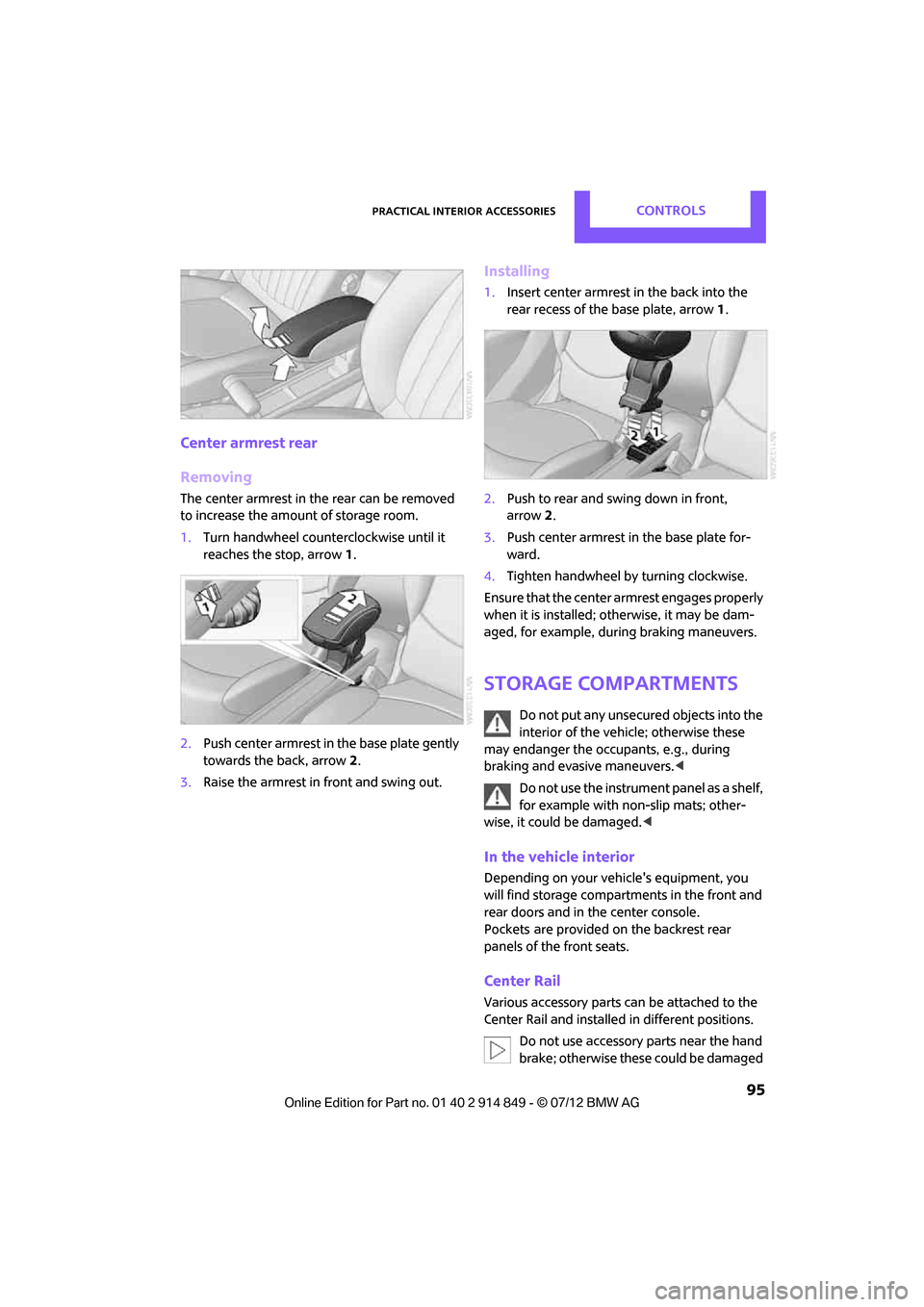
Removing
The center armrest in the rear can be removed
to increase the amo unt of storage room.
1. Turn handwheel counterclockwise until it
reaches the stop, arrow 1.
2. Push center armrest in the base plate gently
towards the back, arrow 2.
3. Raise the armrest in front and swing out.
Installing
1.Insert center armrest in the back into the
rear recess of the base plate, arrow 1.
2. Push to rear and sw ing down in front,
arrow 2.
3. Push center armrest in the base plate for-
ward.
4. Tighten handwheel by turning clockwise.
Ensure that the center armrest engages properly
when it is installed; ot herwise, it may be dam-
aged, for example, during braking maneuvers.
Storage compartments
Do not put any unsecured objects into the
interior of the vehicle; otherwise these
may endanger the occupants, e.g., during
braking and evasive maneuvers. <
Do not use the instrument panel as a shelf,
for example with non-slip mats; other-
wise, it could be damaged. <
In the vehicle interior
Depending on your vehicle's equipment, you
will find storage compartments in the front and
rear doors and in the center console.
Pockets
are provided on the backrest rear
panels of the front seats.
Center Rail
Various accessory parts ca n be attached to the
Center Rail and installed in different positions.
Do not use accessory parts near the hand
brake; otherwise these could be damaged
Online Edition for Part no. 01 40 2 914 849 - \251 07/12 BMW AG
Page 97 of 259

CONTROLSPractical interior accessories
96
when the hand brake lever is operated.
In addition, do not position accessory parts
directly behind the center armrest on the rail;
otherwise they could be damaged upon open-
ing the center armrest.<
Smartphone holder
The upper part of the smartphone holder can be
rotated by 360°.
When installing in the front of the rail, ensure
that there is sufficient space, e.g., away from the
seat; otherwise, damage may be caused when
rotating.
1.Pull the lever 1 up to unlock the mounts.
2. First install the smartphone on the Center
Rail with the mounts 2.
3. To secure, push lever 1 down. Ensure that
the lever can lock it properly.
When connecting a smartphone to the USB
audio interface, see page 150, guide the con-
nection cable under the smartphone holder.
Base plate
On the base plate, vari ous accessories can be
attached, such as cup holders, holders for sun-
glasses and cell phone holders.
Inserting base plate
The lever 3 can be locked in three positions.
0 Locking
1 Sliding along the rail
2 Inserting base plate
For inserting, move the lever into position 2.
Sliding and locking
1. Push lever 3 into position 1.
2. Slide the base plate.
3. Push the lever 3 down, into position 0, and
lock the base plate in place.
Lock the base plate in place before
driving; otherwise, injuries may result in
the event of an accident. <
Example: cupholder
Put cupholder in the back between the rear
seats and push in.
Installing cupholder
1.Lock base plate in place if necessary, refer to
Sliding and locking.
2. Pull the lever 6 up to unlock the mounts.
Online Edition for Part no. 01 40 2 914 849 - \251 07/12 BMW AG
Page 108 of 259
Things to remember when drivingDRIVING TIPS
107
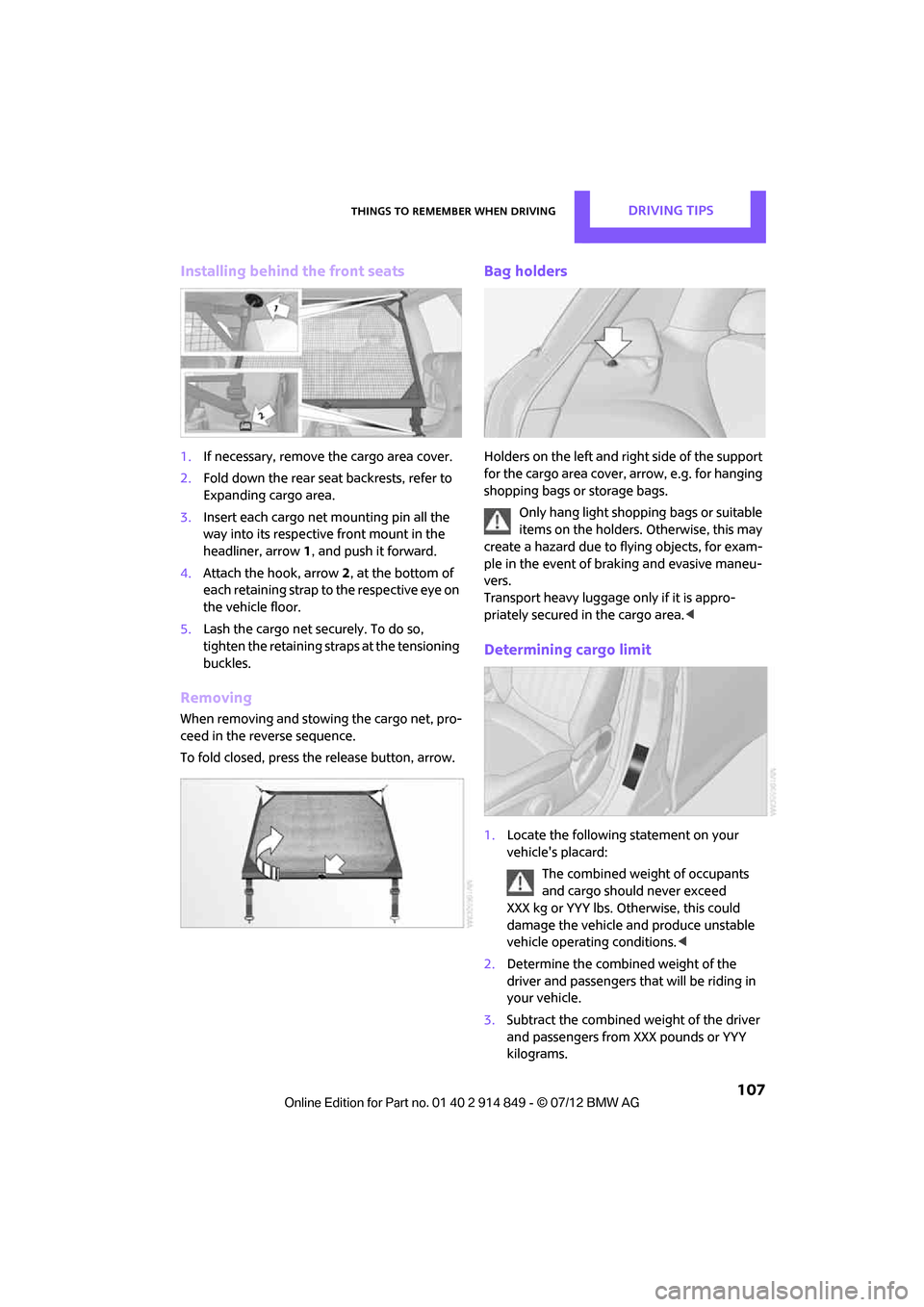
Installing behind the front seats
1.If necessary, remove the cargo area cover.
2. Fold down the rear seat backrests, refer to
Expanding cargo area.
3. Insert each cargo net mounting pin all the
way into its respective front mount in the
headliner, arrow 1, and push it forward.
4. Attach the hook, arrow 2, at the bottom of
each retaining strap to the respective eye on
the vehicle floor.
5. Lash the cargo net se curely. To do so,
tighten the retaining straps at the tensioning
buckles.
Removing
When removing and stowing the cargo net, pro-
ceed in the reverse sequence.
To fold closed, press the release button, arrow.
Bag holders
Holders on the left and right side of the support
for the cargo area cover, arrow, e.g. for hanging
shopping bags or storage bags.
Only hang light shopping bags or suitable
items on the holders. Otherwise, this may
create a hazard due to flying objects, for exam-
ple in the event of braking and evasive maneu-
vers.
Transport heavy luggage only if it is appro-
priately secured in the cargo area. <
Determining cargo limit
1.Locate the following statement on your
vehicle's placard:
The combined weight of occupants
and cargo should never exceed
XXX kg or YYY lbs. Otherwise, this could
damage the vehicle and produce unstable
vehicle operating conditions. <
2. Determine the combined weight of the
driver and passengers that will be riding in
your vehicle.
3. Subtract the combined weight of the driver
and passengers from XXX pounds or YYY
kilograms.
Online Edition for Part no. 01 40 2 914 849 - \251 07/12 BMW AG
Page 246 of 259
Everything from A to ZREFERENCE
245
B
Background lighting, refer to
Ambient lighting 84
Backrests, refer to Seats 38
Backup lamps
– replacing bulb 218,219
Band-aids, refer to First aid pouch 225
Bar, refer to Tow-starting,
towing away 227
Base plate for telephone or mobile phone
– refer to Snap-in adapter 180
Bass sounds, refer to Tone control 137
Battery 223
– disposal 34,223
– jump-starting 225
– temporary power failure 224
Battery renewal
– remote control 34
Being towed 227
Belts, refer to Safety belts 40
Belt tensioner, refer to Safety
belts 40
Beverage holders, refer to Cupholders 97
Black ice, refer to External temperature warning 59
Blower, refer to Air flow rate 86,88
Bluetooth, activating/
deactivating 161,170
Bluetooth audio 153
– device pairing 153
– disconnecting an audio connection 155
– playback 154
– unpairing device 155
– What to do if... 155
Bottle holders, refer to
Cupholders 97
Brake Assist 70
Brake fluid, refer to Service
requirements 62 Brake lamps
– replacing bulbs
219
Brake pads, breaking in 102
Brake rotors 104
– brakes 102
– breaking in 102
Brakes
– ABS 70
– breaking in 102
– MINI Maintenance
System 209
– parking brake 50
– service requirements 62
Br akes,
refer to Braking
safely 103
Brake system 102
– breaking in 102
– disc brakes 104
– MINI Maintenance
System 209
Breakdown service, refer to Roadside Assistance 225
Breaking in the clutch 102
Break-in period 102
Brightness of Control
Display 68
Bulb changing, refer to Lamps and bulbs 215
Button for starting the engine 48
Buttons on the steering wheel 11
C
Calendar 186
– displaying appointment 186
– selecting calendar day 186
California Proposition 65
warning 5
Call
– muting the microphone 176
Call ending 163,175
Calling, refer to Phone numbers, dialing 164,175
Can holders, refer to Cupholders 97 Capacities
235
Car battery, refer to Vehicle battery 223
Car care 211
Care 211
– car-care products 211
– car washes 211
– CD/DVD drives 214
– high-pressure washers 212
– leather 213
– manual washing 212
– upholstery and fabrics 213
– windows 212
– wiper blades 212
Cargo, securing 108
Cargo area 104
– capacity 234
– Comfort Access 33
– expanding 104
– lamp 83
– opening from outside 30
– trunk lid, refer to Tailgate 30
Cargo area lid, refer to Tailgate 30
Cargo area partition net, refer
to Cargo net 106
Cargo loading 107
– securing cargo 108
– stowing cargo 108
– vehicle 104
Cargo net 106
Car key, refer to Keys/remote controls 26
Carpets, care 213
Car phone
– installation location, refer to
Center armrest 94
– refer to Telephone 160,169
Car radio, refer to Radio 139
Car wash
– before driving in 50
– care 211
Car washes 211
Cataly tic convert
er, refer to
Hot exhaust system 103
CD, audio playback 147
Online Edition for Part no. 01 40 2 914 849 - \251 07/12 BMW AG
Page 247 of 259
REFERENCEEverything from A to Z
246
CD player147
– controls 136
– fast forward/reverse 148
– random order 148
– selecting a track 147
– switching on/off 136
– tone control 137
– volume 137
Center armrest 94
Center brake lamp 219
Center console, refer to Around the center
console 14
Center Rail 95
Center Rail, refer to Storage compartments 95
Central locking system 27
– Comfort Access 32
– from inside 30
– from outside 27
– setting unlocking behavior 27
Changing bulbs 215
Changing the language on the Control Display 67
Changing the measurement units on the Control
Display 61
Changing wheels 222
Charging the battery 223
Chassis number, refer to Engine compartment 205
Check Control 65
Child restraint fixing system LATCH 45
Child restraint systems 44
Child-safety locks 47
Child seats 44
Chrome parts, care 213
Chrome parts, refer to Care 211
Cigarette lighter 97
Cleaning headlamps 54
– washer fluid 55
Clock
– setting time 64
– 12 h/24 h mode 64Closing
– from inside
30
– from outside 27
Clothes hooks 97
Cockpit 10
Cold start, refer to Starting the engine 49
Comfort Access 32
– replacing the battery 34
– what to observe before
entering a car wash 34
Comfort area, refer to Around the center console 14
Comp a
rtment for remote
c
ontrol, refer to Ignition
lock 48
Compass 92
Computer 59
– displays on Control
Display 60
Condensation, refer to When the vehicle is parked 104
Condition Based Service CBS 209
Configuring settings, refer to
Personal Profile 26
Connecting vacuum cleaner, refer to Connecting electrical
appliances 98
Consumption, refer to Average
fuel consumption 59
Contact editing 168
Contacts 167,183
– new contact 184
Continuing route guidance 125
Control Display
– adjusting brightness 68
Control Display, refer to iDrive
– switching on/off 16
Control Display, refer to Onboard computer 16
– adjusting brightness 68
Controls and displays 10
Control stick, refer to Onboard
computer 16 Control unit, refer to Onboard
computer 16
Convenience operation
– windows 28
Convenient access, refer to Comfort Access 32
Convenient star t, refer to
Starting the engine 49
Coolant 208
– checking level 208
– filling 208
– temperature 208
Coolant temperature 208
Cooling, maximum 88
Cooling fluid, refer to Coolant 208
Copyright 2
Cornering light, refer to Adaptive Light Control 82
Criteria for route 125
Cruise control
– indicator lamp 13
Cruising range 59
Cupholders 97
Curb weight, refer to
Weights 234
Current fuel consumption 60
Current playback
– ext ernal
d
evices152
D
Dashboard, refer to Cockpit 10
Dashboard instruments, refer to Displays 12
Dashboard lighting, refer to
Instrument lighting 83
Data 232
– capacities 235
– dimensions 233
– engine 232
– weights 234
Data memory 210
Date
– setting 65
– setting format 65
Daytime running lights 82
Online Edition for Part no. 01 40 2 914 849 - \251 07/12 BMW AG
Page 250 of 259
Everything from A to ZREFERENCE
249
Gasoline display, refer to Fuel gauge 58
Gear indicator
– automatic transmission with
Steptronic 51
Gear shifting
– automatic transmission 51
– manual transmission 50
Gearshift lever
– automatic transmission with
Steptronic 51
– manual transmission 50
General driving notes 102
Glass roof, electric 34
– convenience operation 28
– opening, closing 35
– remote control 28
– tilting 34
Glove compartment 94
GPS navigation, refer to Navigation system 114
Grills, refer to Air vents 85
Gross vehicle weight, refer to Weights 234
H
Halogen lamps
– replacing bulb 216
Handbrake, refer to Parking
brake 50
Hands-free device Bluetooth 160
Hands-free system 14,166 ,178
Hazard warning flashers 14
HD Radio 140
Head airbags 78
Headlamp control,
automatic 81
Headlamp flasher 53
– indicator lamp 11,13,86,89
Headlamp glass lens 216
Headlamps
– replacing bulb 216
Headlamps, care 212Head Light, refer to Adaptive
Light Control 82
Head restraints 39
– sitting safely 37
Heated
– mirrors 43
– rear window 86,88
– seats 40
Heating 85
– mirrors 43
– rear window 86,88
– seats 40
Heavy loads, refer to Stowing
cargo 108
Height, refer to Dimensions 233
Height adjustment
– seats 38
– steering wheel 43
High beams 83
– headlamp flasher 83
– indicator lamp 13,86,89
– replacing bulb 216
High water, refer to Driving through water 103
Highway, refer to Route criteria 125
Hill Assist 72
Hills 103
Holders for cups 97
Hom e
pag
e 4
Hood 206
Horn 10
Hot exhaust system 103
Hydroplaning 103
I
IBOC, refer to HD Radio 140
Ice warning, refer to External temperature warning 59
Ignition 48
– switched off 49
– switched on 48
Ignition key, refer to
Integrated key/remote
control 26 Ignition key position 1, refer to
Radio readiness 48
Ignition key position 2, refer to Ignition on 48
Ignition lock 48
Imprint 2
Incoming call 163,174
Indicator and warning lamps 13
– Tire Pressure Monitor TPM 76
Indicator lighting, refer to Instrument lighting 83
Individual air distribution 87
Individual settings, refer to Personal Profile 26
Inflation pressure monitoring,
refer to Tire Pressure Monitor
TPM 75
Information
– on another location 120
– on current position 120
– on destination location 120
Initializing
– Flat Tire Monitor FTM 73
– glass roof, electric 35
– radio, refer to Station, storing 140
Initializing the
– compass, see Calibration 93
Instructions for navigation
system, refer to Voice
instructions 129
Instrument lighting 83
Instrument pane l, refer to
Cockpit 10
Instrument pane l, refer to
Displays 12
Integrated key 26
Integrated universal remote
control 90
Interactive map 121
Interesting destination for
navigation 120
Interior lamps 83
– remote control 28
Online Edition for Part no. 01 40 2 914 849 - \251 07/12 BMW AG
Page 253 of 259
REFERENCEEverything from A to Z
252
P
Paintwork, care212
Park Distance Control PDC 69
Parking
– vehicle 49
Parking aid, refer to Park
Distance Control PDC 69
Parking brake 50
– indicator lamp 13
Parking lamps, replacing bulb 217
Parking lamps/low beams 81
Parts and accessories, see Vehicle equipment 4
Pathway lighting 82
Personal Profile 26
Phone numbers
– dialing 164
Pinch protection system
– windows 36
Plastic parts, care 214
Pollen
– refer to Microfilter/activated- charcoal filter for automatic
climate control 89
– refer to Microfilter for air conditioner 87
Power failure 224
Power window
– safety switch 36
Power windows 35
Power windows, refer to
Windows 35
Pressure, tires 196
Pressure moni toring, tires73
– Flat Tire Monitor 73
Pressure monitoring of tires, refer to Tire Pressure Monitor
TPM 75
Protective function, refer to Pinch protection system
– windows 36
Puncture
– Flat Tire Monitor 73
R
Radio
– controls136
– HD Radio 140
– satellite radio 141
– select waveband 139
– storing stations 140
– tone control 137
– volume 137
Radio key, refer to Integrated key/remote control 26
Radio position, refer to Radio
readiness 48
Radio readiness 48
– switched off 49
– switched on 48
Rain sensor 54
Random play sequence
– external devices 152
Range, refer to Cruising range 59
Reading aloud 188
Reading lamps 84
Rear lamps
– bulb replacement 219
Rear lamps, refer to Tail lamps 218
Rear-mounted luggage rack 109
Rear seat back rest, folding104
Rear seats
– adjusting 39
– folding down the backrests 104
Rearview mirror
– compass 92
Rearview mirror, refer to Mirrors 42
Rear window
– windshield wiper 55
Rear window defroster 86,88
Rear window safety switch 36
Reception
– quality 140
– radio station 140 Recirculated-air mode
86,88
Recirculation of air, refer to Recirculated-air
mode 86,88
Reclining seat , refer to
Backrest 38
Refueling 194
Rejecting a call 163,175
Releasing
– hood 206
Reminders 187
Remote control 26
– battery renewal 34
– Comfort Acces
s32
– garage door opener 90
– malfunctions 29,34
– service data 209
– tailgate 28
Replacement remote
control 26
Replacing bulbs, refer to Lamps and bulbs 215
Replacing tires, refer to New
wheels and tires 203
Reporting safety defects 7
Reserve warning, refer to Fuel gauge 58
Reservoir for washer
systems 55
Reset, refer to Resetting tone
settings 138
Restraint systems
– for children 44
– refer to Safety belts 40
Reverse
– CD player 148
Reverse gear
– automatic transmission with Steptronic 51
– manual transmission 50
Road map 127
Roadside Assistance 225
Roadside parking lamps 83
– replacing bulb 217
Road worthiness test, refer to
Service requirements 62
Online Edition for Part no. 01 40 2 914 849 - \251 07/12 BMW AG
Page 254 of 259
Everything from A to ZREFERENCE
253
Roof load capacity234
Roof-mounted luggage rack 109
Rope, refer to Tow-starting,
towing away 228
Route 125,126
– bypassing sections 126
– changing 125,126
– changing criteria 125
– displaying arrow view 126
– displaying map view 127
– displaying streets or towns/ cities 126
– selecting 125
Route guidance 125
– bypassing a route
section 126
– changing specified route 125
– distance and arrival 125
– voice instructions 129
– volume of voice instructions 129
Route section, changing 126
Route selection 125
RSC Run-flat System
Component, refer to Run-flat
tires 203
Rubber parts, care 213
Run-flat System Component RSC, refer to Run-flat
tires 203
Run-flat tires 203
– flat tire 74
– Flat Tire Monitor 74
– tire inflation pressure 196
– tire replacement 203
– winter tires 204
S
Safety belt
– number37 Safety belts
40
– care 214
– center belt 41
– damage 42
– indicator lamp 42
– reminder 42
– sitting safely 37
Safety systems
– airbags 78
– Antilock Brake System
ABS 70
– driving stability control systems 70
– Dynamic Stability Control DSC 70
– safety belts 40
Safety tires, refer to Run-flat tires 203
Satellite radio 141
– channel, activating or deactivating 142
– channel, selecting 142
– channel, storing 143
– favorites 144
– time shift 143
– Traffic Jump 145
Screen, refer to Onboard computer controls 16
Screw thread for tow fitting 227
SDARS, refer to Satellite radio 141
Seat adjustment
– mechanical 38
– rear 39
Seats 38
– adjusting the seats 38
– heating 40
– sitting safely 37
Securing the vehicle
– from inside 30
– from outside 27
Selecting navigation system 114
Selecting new scale for
navigation 128 Selector lever
– automatic transmission with
Steptronic 51
Selector lever lock
– automatic transmission with Steptronic, refer to
Shiftlock 51
– overriding manually 52
Selector lever positions
– automatic transmission with
Steptronic 51
Service, refer to Roadside Assistance 225
Service car, refer to Roadside Assistance 225
Service data in the remote
control 209
Servi c
e Interv
al Display, refer
to Condition Based Service
CBS 209
Service requirement display, refer to Condition Based
Service CBS 209
Service requirements 62
Settings
– clock, 12 h/24 h mode 64
– date format 65
– language 67
Settings and information 60
Setting time and date 64
Setting time zone, time, and date 64
Shifting gears
– automatic transmission with Steptronic 52
– manual transmission 50
Shiftlock
– automatic transmission, refer to Changing selector lever
positions 51
Shift paddles 52
Short commands for the voice
activation system 236
Short route in navigation, refer to Selecting route 125
Online Edition for Part no. 01 40 2 914 849 - \251 07/12 BMW AG