Control center MINI Countryman 2012 (Mini Connected) Owner's Guide
[x] Cancel search | Manufacturer: MINI, Model Year: 2012, Model line: Countryman, Model: MINI Countryman 2012Pages: 259, PDF Size: 3.07 MB
Page 181 of 259
COMMUNICATIONSMobile phone preparation Bluetooth
180
Reading and selecting the entries
Selecting an entry
Adjusting volume
Turn knob during announcement.
>The volume remains the same, even if the
volume of other audi o sources is changed.
> The volume is stored for the remote control
currently in use.
Notes
Do not use the voice oper ation system to initiate
an emergency call. In st ressful situations, the
voice and vocal pitch can change. This can
unnecessarily delay the establishment of a tele-
phone connection.
Ambient conditions
> Say the commands, numbers and letters
smoothly and with normal volume,
emphasis and speed.
> Always say the commands in the language
of the system. The language for voice
operation system is preset and can not be
changed via the Control Display.
> Keep doors, windows, glass sunroof/
panoramic sunroof, or convertible top
closed to avoid noise interference.
> Avoid ambient noise in the vehicle while
speaking.
Snap-in adapter
The concept
The snap-in adapter makes it possible to do the
following:
>Accommodate the mobile phone.
> Recharge its battery.
> Connect to the outside antenna of the
vehicle.
This assures a better network connection
and constant sound quality.
General information
Detailed information on snap-in adapters that
compatibly support mobile phone functions can
be found at your MINI dealer.
Do not expose your mobile phone to extreme
ambient conditions, for example, very high tem-
peratures; otherwise, fu nctions on your mobile
phone may not work. Follow the operating
instructions for yo ur mobile phone.
Installation location
In the center armrest.
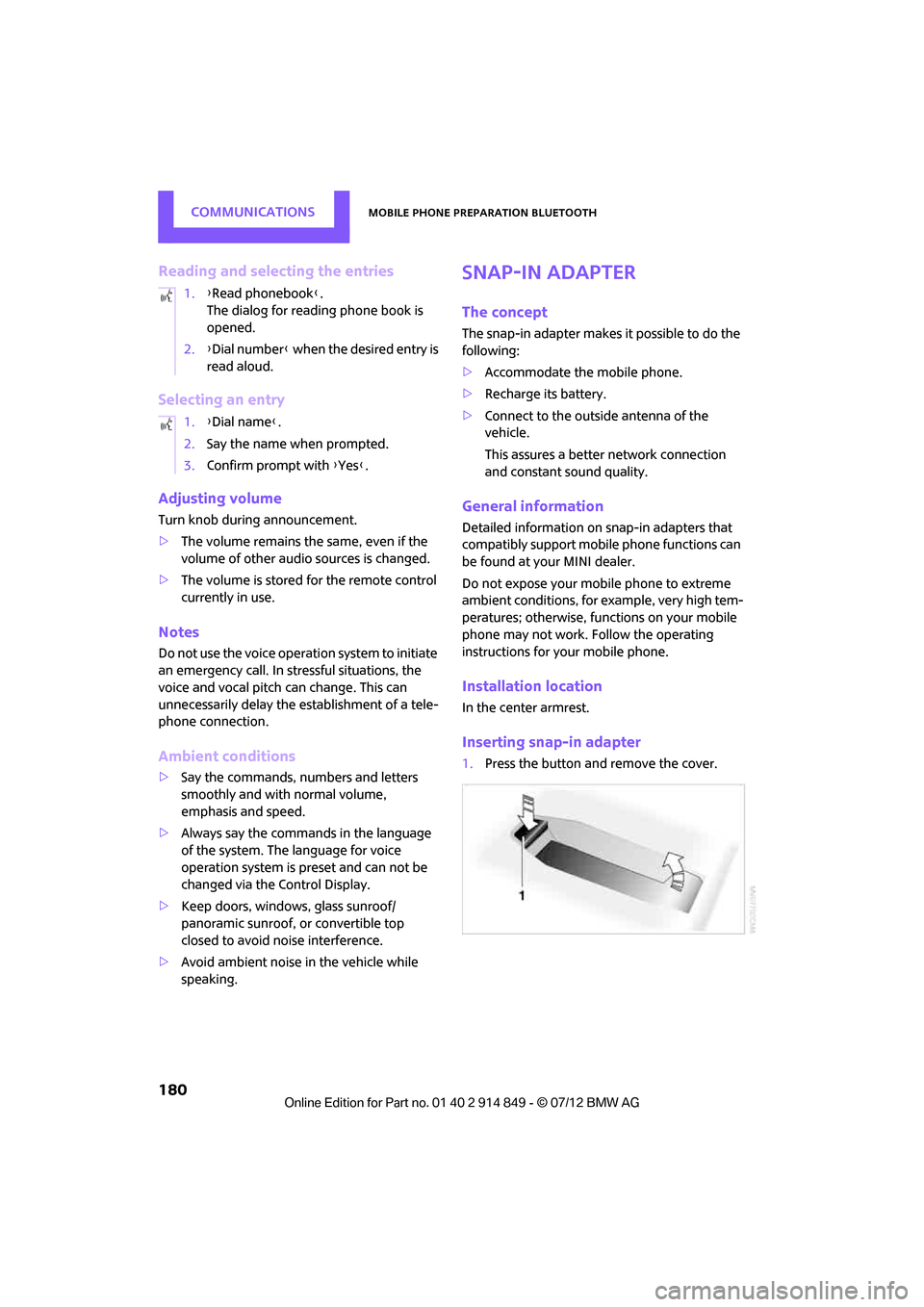
Inserting snap-in adapter
1.Press the button and remove the cover.
1.
{Read phonebook }.
The dialog for reading phone book is
opened.
2. {Dial number } when the desired entry is
read aloud.
1. {Dial name }.
2. Say the name when prompted.
3. Confirm prompt with {Yes }.
Online Edition for Part no. 01 40 2 914 849 - \251 07/12 BMW AG
Page 220 of 259

Replacing componentsMOBILITY
219
Changing
All bulbs are integrated in a central bulb holder.
1.Switch off the light and remove the infrared
remote control from the ignition lock.
2. Push the cover panel out from the rear of the
cargo area side trim panel and remove it.
3. Open emergency release for the fuel filler
flap, see page 194, and then push to the
side with the foam insert.
Ensure that the emergency release is not
damaged.
4. Disengage the bulb holder by pressing down
on the clamping clip, arrow 1.
5. Take out bulb holder and pull out cable,
arrow 2.
6. Exerting gentle pressure, turn bulb to the left
and remove.
7. To insert the new bulb and install the bulb
holder, proceed in reverse order. Ensure that
the lamp holder engages in all the fasteners.
8. Put foam insert in its original position and
install the emergency fuel flap release.
9. Install cover.
License plate lamps
5watt bulb, C5W
1.Using a screwdriver, push the lamp to the
left in the tab of the lamp housing, arrow 1.
2. Remove the lamp, arrow 2.
3. Replace the bulb.
4. Insert the lamp.
Center brake lamp
This lamp uses LED technology for operation. In
the event of a malfunction, contact your MINI
dealer or a workshop that has specially trained
personnel working in accordance with the
specifications of your MINI manufacturer.
Repairing a flat tire
Safety measures in the event of a break-
down:
Park the vehicle as far as possible from moving
traffic and switch on the hazard warning
flashers.
Turn the steering wheel until the front wheels
are in the straight-ahead position and engage
the steering wheel lock. Engage the parking
brake and shift into 1st or reverse gear or place
the selector lever in position P.
All passengers should be outside the vehicle and
in a safe place, e.g. behind a guardrail.
Erect a warning triangle or warning flasher at the
appropriate distance if necessary. Comply with
all safety guidelines and regulations. <
Online Edition for Part no. 01 40 2 914 849 - \251 07/12 BMW AG
Page 224 of 259

Replacing componentsMOBILITY
223
3.As you ratchet up the jack, place the jack
head onto the lifting point on the body,
arrow 2.
4. Jack the vehicle up until the wheel you are
changing is raised off the ground.
Mounting the wheel
1.Unscrew the lug bolts and remove the
wheel.
2. Remove accumulations of mud or dirt from
the mounting surfaces of the wheel and
hub. Clean the lug bolts.
3. Lift the new wheel into place.
4. Screw at least two lug bolts finger-tight into
opposite bolt holes.
5. Screw in the remaining bolts.
6. Tighten all the lug bolts firmly in a diagonal
pattern.
7. Lower the vehicle.
8. Remove the jack.
Tightening the lug bolts
Tighten the lug bolts in a diagonal pattern.
Immediately have the wheels checked
with a calibrated torque wrench to ensure
that the lug bolts are firmly seated. Otherwise,
incorrectly tightened lug bolts can present a
safety hazard. <
Tightening torque: 103.3 lb ft or 140 Nm.
Replace the defective tire as soon as possible
and have the new wheel/tire assembly
balanced.
Vehicle battery
Maintenance
The battery is maintenance-free; that is, the
electrolyte will last for the life of the battery
when the vehicle is operated in a temperate
climate. If you have any questions regarding your
battery, please contact your MINI dealer.
Battery replacement
Only use vehicle batteries that have been
approved for your vehicle by the manu-
facturer; otherwise, the vehicle could be
damaged and systems or functions may not be
fully available. <
After a battery replacement, have the battery
registered on the vehicle by your MINI dealer to
ensure that all convenie nce functions are fully
available and, if nece ssary, the corresponding
Check Control messages are no longer dis-
played.
Charging the battery
Note
Do not connect battery chargers to the
sockets installed in the vehicle at the
factory; otherwise you may cause damage to
the battery. <
Only charge the battery in the vehicle when the
engine is off. Connection s, refer to Jump-start-
ing on page 225.
General information
To guarantee the full service life of the battery,
ensure that the battery is always properly
charged.
It may be necessary to charge the battery in the
following situations:
>If frequent short trips are taken.
> If the vehicle is frequently parked for more
than a month.
Disposal
After replacing old batteries, return the
used batteries to your MINI dealer or to
arecycling center. Maint ain the battery in an
upright position for transport and storage.
Always secure the battery against tipping over
during transport. <
Online Edition for Part no. 01 40 2 914 849 - \251 07/12 BMW AG
Page 245 of 259
244
REFERENCEEverything from A to Z
Everything from A to Z
Index
A
ABS Antilock Brake System70
Accepting a call 163,174
Accessories, see Vehicle equipment 4
Acknowledgment signals for locking/unlocking vehicle 28
Activated-charcoa l filter for
automatic climate control 89
Adaptive Light Control 82
Adding engine oil 207
Additives
– coolant 208
– engine oil 207
Address, entering 122
Address for navigation
– entering 116,122
Adjusting temperature inside the car, refer to Air
conditioner 86
Adjusting temperature inside the car, refer to Automatic
climate control 87
Adjusting the tone during audio operation, refer to
Tone control 137
Airbags 78
– sitting safely 37
– warning lamp 80
Air conditioner 85
Air conditioning mode
– air conditioner 86
– automatic cl imate control87
– ventilation 89
Air distribution
– automatic 88
– individual 87
– manual 87 Air flow rate
86,88
– air conditioning system 86
– automatic climate control 88
– heating, ventilation 86
Airing, refer to Ventilation89
Air outlets, refe r to Air vents85
Air pressure, checking, refer to Tire inflation pressure 196
Air recirculation, refer to
Recirculated-air
mode 86,88
Air supply
– air conditioner 86
– automatic climate control 87
– ventilation 89
Air vents 85
AKI, refer to Fuel grade 195
Alarm system 31
ALL4 all-w h
ee
l drive system 72
All-season tires, refer to Winter
tires 204
All-wheel drive, refer to ALL4 72
AM, waveband 139
Ambient air, refer to Recirculated-air
mode 86,88
Ambient lighting 84
Antenna, care 211
Antifreeze
– coolant 208
– washer fluid 55
Antilock Brake System ABS 70
Anti-theft alarm system, refer to Alarm system 31
Approved axle loads, refer to Weights 234
Approved engine oils 207
Approved gross vehicle weight, refer to Weights 234
Armrest, refer to Center
armrest 94 Arrival time
– computer
60
– route guidance 125
Ashtray 97
Assistant systems, refer to
– Dynamic Stability Control
DSC 70
Audio 136
– controls 136
– switching on/off 136
– tone control 137
– volume 137
Audio device, external 94
Automatic
– air distribution 88
– air flow rate 88
– cruise control 56
– headlamp control 81
Automatic climate control 85
– automatic air distribution 88
Automatic transmission with Steptronic 50
– interlock 51
– overriding selector lever lock 52
– shiftlock 51
– sport program 52
AUTO program for automatic climate control 88
Auxiliary phone 171
AUX-In, refer to External audio device 94
AUX-In connection 149
Average fuel consumption 59
– sett in
g the
units 61
Average speed 60
Avoiding highways for navigation 125
Axle loads, refer to Weights 234
Online Edition for Part no. 01 40 2 914 849 - \251 07/12 BMW AG
Page 246 of 259
Everything from A to ZREFERENCE
245
B
Background lighting, refer to
Ambient lighting 84
Backrests, refer to Seats 38
Backup lamps
– replacing bulb 218,219
Band-aids, refer to First aid pouch 225
Bar, refer to Tow-starting,
towing away 227
Base plate for telephone or mobile phone
– refer to Snap-in adapter 180
Bass sounds, refer to Tone control 137
Battery 223
– disposal 34,223
– jump-starting 225
– temporary power failure 224
Battery renewal
– remote control 34
Being towed 227
Belts, refer to Safety belts 40
Belt tensioner, refer to Safety
belts 40
Beverage holders, refer to Cupholders 97
Black ice, refer to External temperature warning 59
Blower, refer to Air flow rate 86,88
Bluetooth, activating/
deactivating 161,170
Bluetooth audio 153
– device pairing 153
– disconnecting an audio connection 155
– playback 154
– unpairing device 155
– What to do if... 155
Bottle holders, refer to
Cupholders 97
Brake Assist 70
Brake fluid, refer to Service
requirements 62 Brake lamps
– replacing bulbs
219
Brake pads, breaking in 102
Brake rotors 104
– brakes 102
– breaking in 102
Brakes
– ABS 70
– breaking in 102
– MINI Maintenance
System 209
– parking brake 50
– service requirements 62
Br akes,
refer to Braking
safely 103
Brake system 102
– breaking in 102
– disc brakes 104
– MINI Maintenance
System 209
Breakdown service, refer to Roadside Assistance 225
Breaking in the clutch 102
Break-in period 102
Brightness of Control
Display 68
Bulb changing, refer to Lamps and bulbs 215
Button for starting the engine 48
Buttons on the steering wheel 11
C
Calendar 186
– displaying appointment 186
– selecting calendar day 186
California Proposition 65
warning 5
Call
– muting the microphone 176
Call ending 163,175
Calling, refer to Phone numbers, dialing 164,175
Can holders, refer to Cupholders 97 Capacities
235
Car battery, refer to Vehicle battery 223
Car care 211
Care 211
– car-care products 211
– car washes 211
– CD/DVD drives 214
– high-pressure washers 212
– leather 213
– manual washing 212
– upholstery and fabrics 213
– windows 212
– wiper blades 212
Cargo, securing 108
Cargo area 104
– capacity 234
– Comfort Access 33
– expanding 104
– lamp 83
– opening from outside 30
– trunk lid, refer to Tailgate 30
Cargo area lid, refer to Tailgate 30
Cargo area partition net, refer
to Cargo net 106
Cargo loading 107
– securing cargo 108
– stowing cargo 108
– vehicle 104
Cargo net 106
Car key, refer to Keys/remote controls 26
Carpets, care 213
Car phone
– installation location, refer to
Center armrest 94
– refer to Telephone 160,169
Car radio, refer to Radio 139
Car wash
– before driving in 50
– care 211
Car washes 211
Cataly tic convert
er, refer to
Hot exhaust system 103
CD, audio playback 147
Online Edition for Part no. 01 40 2 914 849 - \251 07/12 BMW AG
Page 247 of 259
REFERENCEEverything from A to Z
246
CD player147
– controls 136
– fast forward/reverse 148
– random order 148
– selecting a track 147
– switching on/off 136
– tone control 137
– volume 137
Center armrest 94
Center brake lamp 219
Center console, refer to Around the center
console 14
Center Rail 95
Center Rail, refer to Storage compartments 95
Central locking system 27
– Comfort Access 32
– from inside 30
– from outside 27
– setting unlocking behavior 27
Changing bulbs 215
Changing the language on the Control Display 67
Changing the measurement units on the Control
Display 61
Changing wheels 222
Charging the battery 223
Chassis number, refer to Engine compartment 205
Check Control 65
Child restraint fixing system LATCH 45
Child restraint systems 44
Child-safety locks 47
Child seats 44
Chrome parts, care 213
Chrome parts, refer to Care 211
Cigarette lighter 97
Cleaning headlamps 54
– washer fluid 55
Clock
– setting time 64
– 12 h/24 h mode 64Closing
– from inside
30
– from outside 27
Clothes hooks 97
Cockpit 10
Cold start, refer to Starting the engine 49
Comfort Access 32
– replacing the battery 34
– what to observe before
entering a car wash 34
Comfort area, refer to Around the center console 14
Comp a
rtment for remote
c
ontrol, refer to Ignition
lock 48
Compass 92
Computer 59
– displays on Control
Display 60
Condensation, refer to When the vehicle is parked 104
Condition Based Service CBS 209
Configuring settings, refer to
Personal Profile 26
Connecting vacuum cleaner, refer to Connecting electrical
appliances 98
Consumption, refer to Average
fuel consumption 59
Contact editing 168
Contacts 167,183
– new contact 184
Continuing route guidance 125
Control Display
– adjusting brightness 68
Control Display, refer to iDrive
– switching on/off 16
Control Display, refer to Onboard computer 16
– adjusting brightness 68
Controls and displays 10
Control stick, refer to Onboard
computer 16 Control unit, refer to Onboard
computer 16
Convenience operation
– windows 28
Convenient access, refer to Comfort Access 32
Convenient star t, refer to
Starting the engine 49
Coolant 208
– checking level 208
– filling 208
– temperature 208
Coolant temperature 208
Cooling, maximum 88
Cooling fluid, refer to Coolant 208
Copyright 2
Cornering light, refer to Adaptive Light Control 82
Criteria for route 125
Cruise control
– indicator lamp 13
Cruising range 59
Cupholders 97
Curb weight, refer to
Weights 234
Current fuel consumption 60
Current playback
– ext ernal
d
evices152
D
Dashboard, refer to Cockpit 10
Dashboard instruments, refer to Displays 12
Dashboard lighting, refer to
Instrument lighting 83
Data 232
– capacities 235
– dimensions 233
– engine 232
– weights 234
Data memory 210
Date
– setting 65
– setting format 65
Daytime running lights 82
Online Edition for Part no. 01 40 2 914 849 - \251 07/12 BMW AG
Page 252 of 259
Everything from A to ZREFERENCE
251
Menus, refer to Onboard computer 16
Messages 185
Microfilter
– for air conditioner 87
– for automatic climate control 89
– MINI Maintenance System 209
Microfilter/activated-charcoal
filter
– MINI Maintenance System 209
Microphone for telephone 14
MINI Connected 190
MINI Internet page 4
MINI joystick, refer to Onboard computer 16
MINI Maintenance System 209
Mirror dimming feature 43
Mirrors 42
– exterior mirrors 42
– heating 43
– interior rearview mirror 43
Mobile phone
– adjusting volume 163,174
– connecting, refer to Mobile phone, pairing 160,170
– installation location, refer to Center armrest 94
– pairing 160,170
– What to do if…. 162,173
Mobile phone preparation
Bluetooth 169
Mobility Kit 220
Modifications, te chnical, refer
to For your own safety 4
Monitor, refer to MINI controls with navigation 16
Monitoring system for tire pressures, refer to Flat Tire
Monitor 73
Multifunctional steering wheel, refer to Buttons on
the steering wheel 11Multifunction switch
– refer to Turn signals/
headlamp flasher 53
– refer to Wiper system 53
N
Navigation
– storing current position 118
Navigation data 114
Navigation destination
– entering manually 116,122
– home address 119
Navigation instructions, refer to Switching voice
instructions on/off 129
Navigation system 114
– address book 118
– bypassing a route
section 126
– continuing route guidance 125
– destination entry 116
– dynamic route guidance 132
– entering a destination
manually 116,122
– planning a trip 123
– route list 126
– selecting destination via map 121
– selecting route criteria 125
– special destinations 120
– starting route guidance 125
– terminating route guidance 125
– voice instructions 129
– volume adjustment 129
Neck support, refer to Head restraints 39
Nets, refer to Storage compartments 95
New tires 203
North-facing map 127
Notes 187
Number of cylinders, refer to
Engine data 232 Number of safety belts
37
Nylon rope, refer to Tow rope 228
O
OBD socket, refer to Socket for
On-Board Diagnosis 210
Octane ratings, refer to Fuel specifications 195
Odometer 59
Office 182
– current office 182
– What to do if…. 188
Oil, refer to Engine oil 206
Oil consumption 206
Oil level 206
Oil types 207
Old batteries, refer to
Disposal 223
Onboard computer 16
– changing language 67
– menu guidance 17
– operating principles 16
– overview 16
– status information 19
Opening and closing
– Comfort Access 32
– from inside 30
– from outside 27
– using the door lock 29
– using the remote control 27
Opening and unlocking
– from inside 30
Options, selecting for navigation 125
Orientation menu, refer to Main menu 17
Outlets
– refer to Ventilation 89
Outlets, refer to Air vents 85
Output, refer to Engine
data 232
Outside-air mode
– automatic climate control 88
Overheated engine, refer to Coolant temperature 208
Online Edition for Part no. 01 40 2 914 849 - \251 07/12 BMW AG
Page 254 of 259
Everything from A to ZREFERENCE
253
Roof load capacity234
Roof-mounted luggage rack 109
Rope, refer to Tow-starting,
towing away 228
Route 125,126
– bypassing sections 126
– changing 125,126
– changing criteria 125
– displaying arrow view 126
– displaying map view 127
– displaying streets or towns/ cities 126
– selecting 125
Route guidance 125
– bypassing a route
section 126
– changing specified route 125
– distance and arrival 125
– voice instructions 129
– volume of voice instructions 129
Route section, changing 126
Route selection 125
RSC Run-flat System
Component, refer to Run-flat
tires 203
Rubber parts, care 213
Run-flat System Component RSC, refer to Run-flat
tires 203
Run-flat tires 203
– flat tire 74
– Flat Tire Monitor 74
– tire inflation pressure 196
– tire replacement 203
– winter tires 204
S
Safety belt
– number37 Safety belts
40
– care 214
– center belt 41
– damage 42
– indicator lamp 42
– reminder 42
– sitting safely 37
Safety systems
– airbags 78
– Antilock Brake System
ABS 70
– driving stability control systems 70
– Dynamic Stability Control DSC 70
– safety belts 40
Safety tires, refer to Run-flat tires 203
Satellite radio 141
– channel, activating or deactivating 142
– channel, selecting 142
– channel, storing 143
– favorites 144
– time shift 143
– Traffic Jump 145
Screen, refer to Onboard computer controls 16
Screw thread for tow fitting 227
SDARS, refer to Satellite radio 141
Seat adjustment
– mechanical 38
– rear 39
Seats 38
– adjusting the seats 38
– heating 40
– sitting safely 37
Securing the vehicle
– from inside 30
– from outside 27
Selecting navigation system 114
Selecting new scale for
navigation 128 Selector lever
– automatic transmission with
Steptronic 51
Selector lever lock
– automatic transmission with Steptronic, refer to
Shiftlock 51
– overriding manually 52
Selector lever positions
– automatic transmission with
Steptronic 51
Service, refer to Roadside Assistance 225
Service car, refer to Roadside Assistance 225
Service data in the remote
control 209
Servi c
e Interv
al Display, refer
to Condition Based Service
CBS 209
Service requirement display, refer to Condition Based
Service CBS 209
Service requirements 62
Settings
– clock, 12 h/24 h mode 64
– date format 65
– language 67
Settings and information 60
Setting time and date 64
Setting time zone, time, and date 64
Shifting gears
– automatic transmission with Steptronic 52
– manual transmission 50
Shiftlock
– automatic transmission, refer to Changing selector lever
positions 51
Shift paddles 52
Short commands for the voice
activation system 236
Short route in navigation, refer to Selecting route 125
Online Edition for Part no. 01 40 2 914 849 - \251 07/12 BMW AG
Page 255 of 259
REFERENCEEverything from A to Z
254
Shuffled, refer to Random
– CD player148
Side airbags 78
Side marker lamps, replacing
bulbs 218
Side turn signal
– replacing bulb 218
Side windows, refer to Windows 35
Signal horn, refer to Horn 10
Sitting safely 37
– airbags 37
– safety belts 37
– with head restraint 37
Size, refer to Dimensions 233
Sliding/tilt sunroof
– refer to Glass roof, electric 34
Slot for remote control 48
Smokers' package, refer to
Ashtray 97
Snap-in adapter
– inserting/removing 180
– use 169
Snap-in adapter, refer to Center armrest storage
compartment 94
Snow chains 204
Socket, refer to Connecting
electrical appliances 98
Socket for On-Board Diagnosis
OBD 210
Software update 156
Speaking, refer to Voice
instructions from navigation
system 129
Special destinations 120
Special oils, refer to Approved engine oils 207
Speed 232
– with winter tires 204
Speed limit 67
– setting 67
Speed limit warning, refer to Speed limit 67 Speedo, refer to
Speedometer 12
Speedometer 12
Speed volume 137
Split rear seat backrest, refer to Expanding the cargo
area 104
Sport button 72
Stability contro l, refer to
Driving stability control
systems 70
Start/Stop button 48
– starting the engine 49
– switching off the engine 49
Starting, refer to Starting the engine 49
Starting assistance, refer to Jump-starting 225
Starting route guidance 125
Sta r
ti
ng the engine 49
– Start/Stop button 48
Start-off assistance, refer to
– DSC 70
– Hill Assist 72
State/province, for
navigation 116
Station, selecting
– radio 139
Status information on the Control Display 19
Status of this Owner's Manual at time of printing 4
Steering wheel 43
– adjustment 43
– buttons on steering wheel 11
– lock 48
– shift paddles 52
Steptronic, refer to Automatic transmission with
Steptronic 50
Storage area
– cargo area 104
Storage compartments 95
Storage space
– storage compartments 95Storing a destination in the
address book 118
Storing the vehicle 214
Storing tires 204
Stowage, refer to Storage compartments 95
Summer tires, refer to Wheels
and tires 196
SW, waveband 139
Switches, refer to Cockpit 10
Switching off
– engine 49
Switching off the engine 49
– Start/Stop button 48
Switching on
– audio 136
– CD player 136
– radio 136
Switching radio on/off 136
Switching the cooling function on and off 89
Symbols 4
– status information 19
T
Tachometer58
Tailgate 30
– Comfort Access 33
– opening/closing 30
– opening from outside 30
– unlocking with remote control 28
Tail lamp, refer to Tail lamps 218
– replacing bulb 218
Tail lamps 218
Tank volume, refer to Capacities 235
Target cursor for navigation 121
Tasks 187
Technical data 232
Technical modifications 4
Online Edition for Part no. 01 40 2 914 849 - \251 07/12 BMW AG
Page 256 of 259
Everything from A to ZREFERENCE
255
Telephone
– hands-free system166,178
– installation location, refer to Center armrest 94
– voice commands 178
Telephone receiving power, refer to Status
information 19
Temperature display
– setting the units 61
Temperature of coolant, refer to Coolant temperature 208
Temperature setting
– air conditioner 86
– automatic climate control 88
Tempomat, refer to Cruise
control 56
Tensioning straps, refer to Securing cargo 108
Text message 185
Third brake lamp, refer to Center brake lamp 219
Three-point safety belt 40
Tightening the lug bolts
– torque 223
Tightening torque, refer to Tightening lug bolts 223
Tire failure
– Flat Tire Monitor 74
– indicator/warning lamp 74
– MINI Mobility Kit 220
– run-flat tires 74
– Tire Pressure Monitor 75
Tire inflation pressure 196
– loss 74,75
Tire pressure monitoring, refer
to Flat Tire Monitor 73
Tire Pressure Monitor TPM 75
– limitations of system 75
– resetting system 76
– warning lamp 76
Tire Quality Grading 201Tires
– age
203
– breaking in 102
– changing, refe r to Changing
wheels 222
– condition 202
– damage 202
– inflation pressure 196
– inflation pressure loss 76
– minimum tread depth 202
– new tires 203
– pressure monitoring, refer to Flat Tire Monitor 73
– pressure monitoring, refer to Tire Pressure Monitor
TPM 75
– puncture 74
– size 201
– we ar
indicators, refer to
Minimum tread depth 202
– winter tires 204
– with emergency operation
properties 203
Tires with emergency operation properties, refer to
Run-flat tires 203
Tires with safety features, refer
to Run-flat tires 203
TMC station, refer to Traffic information 129
Tone
– middle setting 138
Tone during audio playback
– adjusting 137
Torque 232
– lug bolts 223
Tow bar 227
Tow fitting 227
– screw thread 227
Tow fittings for tow-starting and towing away 227
Towing 226
– car with automatic transmission 227
– methods 227 Tow rope
228
Tow-starting 226
TPM, refer to Tire Pressure Monitor 75
Track
– selecting on CD 147
Track width, refer to
Dimension 233
Traction control, refer to
– Dynamic Stability Control
DSC 70
Traffic bulletins
– categories 131
– filtering 131
Traffic congestion
– displaying traffic
information 129
– refer to Route, bypassing segments 126
Traffic information for navigation
– displaying 130
Traffic information in navigation
– screen display in the map
view 131
Transmission
– automatic transmission with
Steptronic 50
– manual transmission 50
– overriding selector lever lock for automatic transmission
with Steptronic 52
Transporting children safely 44
Transport securing devices, refer to Securing cargo 108
Tread depth, refer to Minimum tire tread 202
Treble, refer to Tone
control 137
Trip computer 60
Trip-dist a
n
ce counter, refer to
Trip odometer 59
Triple turn signal activation 53
Trip odometer 59
Online Edition for Part no. 01 40 2 914 849 - \251 07/12 BMW AG