USB MINI Countryman 2012 Owner's Manual
[x] Cancel search | Manufacturer: MINI, Model Year: 2012, Model line: Countryman, Model: MINI Countryman 2012Pages: 201, PDF Size: 3.19 MB
Page 16 of 201
CockpitAT A GLANCE
15
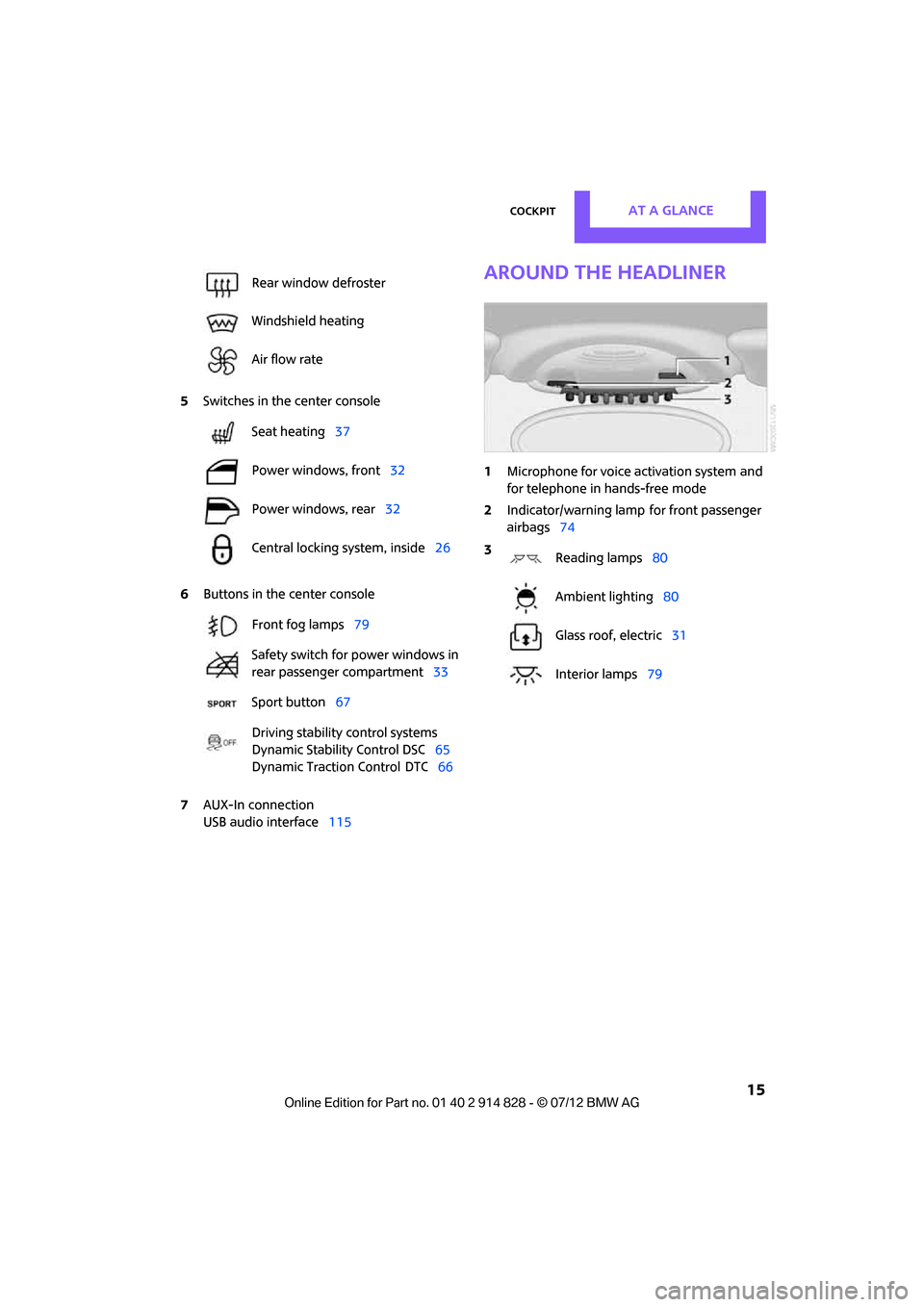
5Switches in the center console
6 Buttons in the center console
7 AUX-In connection
USB audio interface 115
Around the headliner
1Microphone for voice activation system and
for telephone in hands-free mode
2 Indicator/warning lamp
for front passenger
airbags 74
Rear window defroster
Windshield heating
Air flow rate
Seat heating
37
Power windows, front 32
Power windows, rear 32
Central locking system, inside 26
Front fog lamps 79
Safety switch for power windows in
rear passenger compartment 33
Sport button 67
Driving stability control systems
Dynamic Stability Control DSC 65
Dynamic Traction Control
DTC 66
3
Reading lamps 80
Ambient lighting 80
Glass roof, electric 31
Interior lamps 79
Online Edition for Part no. 01 40 2 914 828 - \251 07/12 BMW AG
Page 18 of 201
RadioAT A GLANCE
17
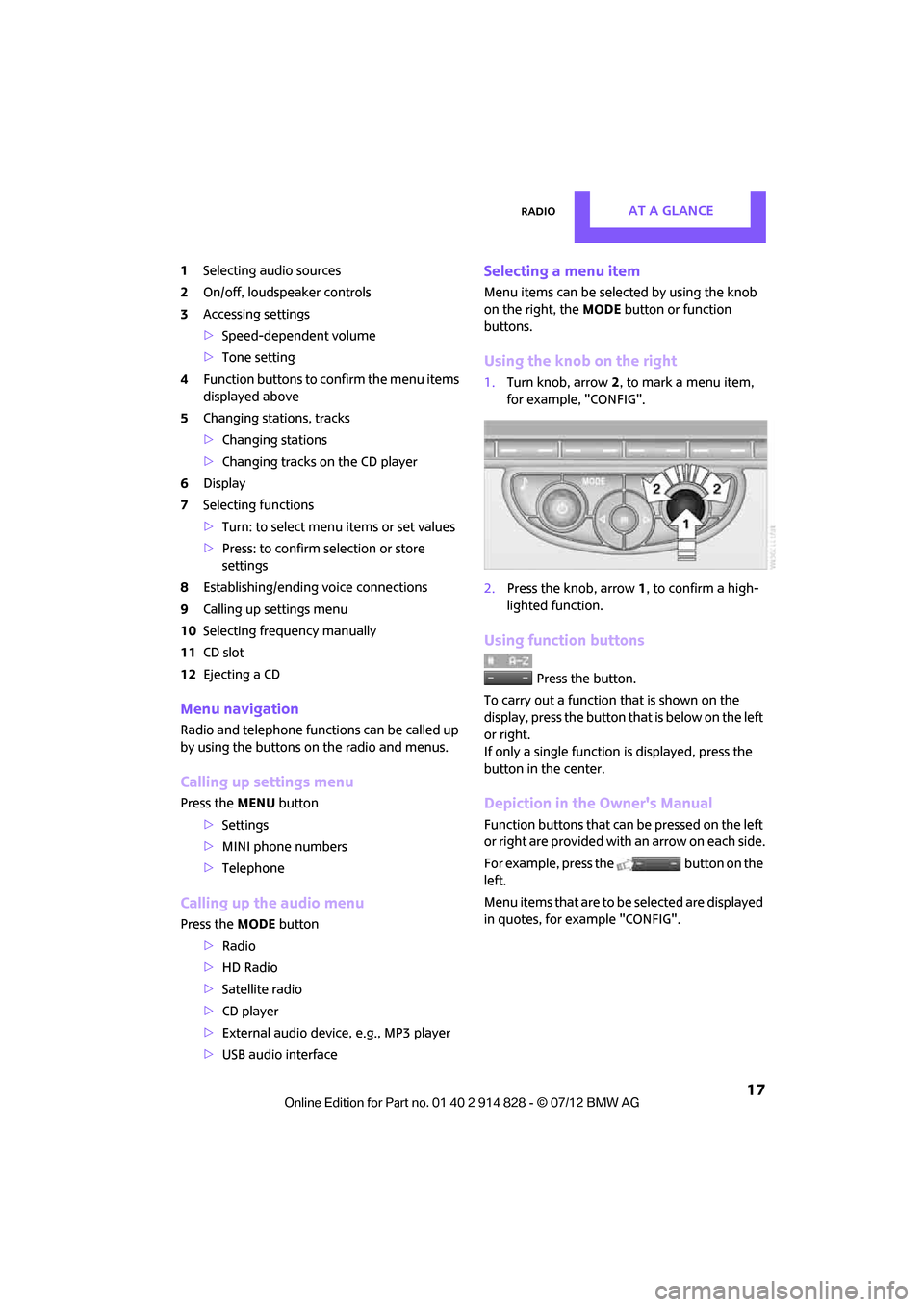
1Selecting audio sources
2 On/off, loudsp eaker controls
3 Accessing settings
>Speed-dependent volume
> Tone setting
4 Function buttons to confirm the menu items
displayed above
5 Changing stations, tracks
>Changing stations
> Changing tracks on the CD player
6 Display
7 Selecting functions
>Turn: to select menu items or set values
> Press: to confirm selection or store
settings
8 Establishing/ending voice connections
9 Calling up settings menu
10 Selecting frequency manually
11 CD slot
12 Ejecting a CD
Menu navigation
Radio and telephone functions can be called up
by using the buttons on the radio and menus.
Calling up settings menu
Press the MENU button
> Settings
> MINI phone numbers
> Telephone
Calling up the audio menu
Press the MODEbutton
> Radio
> HD Radio
> Satellite radio
> CD player
> External audio devi ce, e.g., MP3 player
> USB audio interface
Selecting a menu item
Menu items can be selected by using the knob
on the right, the MODEbutton or function
buttons.
Using the knob on the right
1. Turn knob, arrow 2, to mark a menu item,
for example, "CONFIG".
2. Press the knob, arrow 1, to confirm a high-
lighted function.
Using function buttons
Press the button.
To carry out a function that is shown on the
display, press the button that is below on the left
or right.
If only a single function is displayed, press the
button in the center.
Depiction in the Owner's Manual
Function buttons that can be pressed on the left
or right are provided with an arrow on each side.
For example, press the button on the
left.
Menu items that are to be selected are displayed
in quotes, for example "CONFIG".
Online Edition for Part no. 01 40 2 914 828 - \251 07/12 BMW AG
Page 93 of 201

CONTROLSPractical interior accessories
92
When connecting a smartphone to the USB
audio interface, see page115, guide the con-
nection cable under the smartphone holder.
Base plate
On the base plate, vari ous accessories can be
attached, such as cup holders, holders for sun-
glasses and cell phone holders.
Inserting base plate
The lever 3 can be locked in three positions.
0 Locking
1 Sliding along the rail
2 Inserting base plate
For inserting, move the lever into position 2.
Sliding and locking
1. Push lever 3 into position 1.
2. Slide the base plate.
3. Push the lever 3 down, into position 0, and
lock the base plate in place.
Lock the base plate in place before driv-
ing; otherwise, injuries may result in the
event of an accident. <
Example: cupholder
Put cupholder in the back between the rear
seats and push in.
Installing cupholder
1.Lock base plate in place if necessary, refer to
Sliding and locking.
2. Pull the lever 6 up to unlock the mounts. 3.
First insert the cupholder into the front
mounts 4 and then snap it into the rear
mounts 5.
Make sure that the lever 6 is situated
opposite the mount 4.<
Clothes hooks
There are clothes hooks on the grab handles in
the rear passenger compartment.
Items of clothing hung from the hooks
must not obstruct the driver's view. Do not
hang heavy objects from the hooks; otherwise,
they could endanger the car's occupants, e.g. in
case of heavy braking or sudden swerving. <
In the cargo area
Depending on your vehicle's equipment, you
have the following storage options:
>Storage compartment under the flat load
floor
> Bag holder on the support for the cargo area
cover
Online Edition for Part no. 01 40 2 914 828 - \251 07/12 BMW AG
Page 109 of 201

ENTERTAINMENTRadio MINI Boost CD
108
Radio MINI Boost CD
Vehicle equipment
In this chapter, all production, country, and
optional equipment that is offered in the model
range is described. Equipment is also described
that is not available because of, for example,
selected options or coun try version. This also
applies to safety relate d functions and systems.
Switching radio on/off
Press the left rotary knob. The radio
selects the last set audio source:
>Radio
> HD Radio
> Satellite radio
> CD
> External audio device
> USB audio interface.
Listening to the radi o when the ignition
is switched off
After switching off the radio readiness, the radio
functions are available for approx. 20 minutes.
To do so, switch the radio on again.
To spare the battery, ensure that the radio
is switched off when leaving the vehicle. <
Adjusting volume
Turn left rotary knob. The setting is
stored for the remote control in use.
As soon as you make a phone call using
the hands-free device, the radio will auto-
matically be muted. <
Setting the volume for the PDC and gong
You can raise or lower the audio signals for the
PDC or gong with respect to the volume of the audio sources.
The audio signals have a set minimum and max-
imum volume, below which they can not fall and
above which they can not go.
Set the audio source to a high volume to
be able to better set the volume of the
audio signals. <
1. Press the button.
2. Press the button if necessary.
3. Press the button.
or
Press the button.
4. Select the desired vo lume and press the
knob on the right.
Setting the speed-dependent volume
The speed-dependent volume controls auto-
matically increases the volume as the speed of
the vehicle increases. You can set different levels
for increasing the volume.
1. Press the button.
2. Press the button if necessary.
3. Press the button.
4. Select the desired vo lume and press the
knob on the right.
Setting the volume for external audio
devices
Your radio has the option of connecting an
external audio device, e.g., an MP3 player, and
playing it over the loudspeakers in the vehicle.
You can set the volume by using the radio.
Connecting an external device, refer to
page 115.
Online Edition for Part no. 01 40 2 914 828 - \251 07/12 BMW AG
Page 116 of 201
Radio MINI Boost CDENTERTAINMENT
115
burning processes, as well as low quality or
excessive aging of the blanks that are used.
Only write on the upper surface of CDs with a
writing instrument that is suitable for the pur-
pose.
Damaged CDs
Avoid finger prints as well as dust, scratches and
moisture.
Store CDs in sleeves.
Do not expose CDs to a temperature greater
than 122 7/50 6, high humidity or direct sun-
light.
CDs with copy protection
CDs are often provided with copy protection
from the manufacturer. This can result in CDs not
playing or playing back in only a limited fashion.
Care
If necessary, clean the reflecting side of the CD
with a commercially avail able cleaning cloth by
wiping in a straight line from the center out-
wards.
USB audio interface
> iPods/iPhones or USB devices such as MP3
players and USB memory sticks: connection
via the USB audio interface.
> iPhone/mobile phone music players: con-
nection using a snap-in adapter, refer to
page 130.
> Only one iPod/iPhone can be connected to
the vehicle. Output fr om an iPod/iPhone to
the USB audio interface is only possible if
there is no iPhone in the snap-in adapter.
> Popular audio files, such as MP3, AAC and
M3U playlists, PLS and WPL, can be played.
Depending on the audio file, proper play-
back can not be ensured in every case, such
as for bit rates greater than 256 kbit/s.
> Music tracks with inte grated Digital Rights
Management (DRM) cannot be played. Because of the large number of audio devices on
the market, it can not be ensured that every
device will properly operate in the vehicle. Addi-
tional information
may be found at
www.mini.com/connectivity or at a MINI dealer.
File systems
Popular FAT file system s for USB devices are
supported. The manufacturer of your MINI
recommends the FAT 32 format.
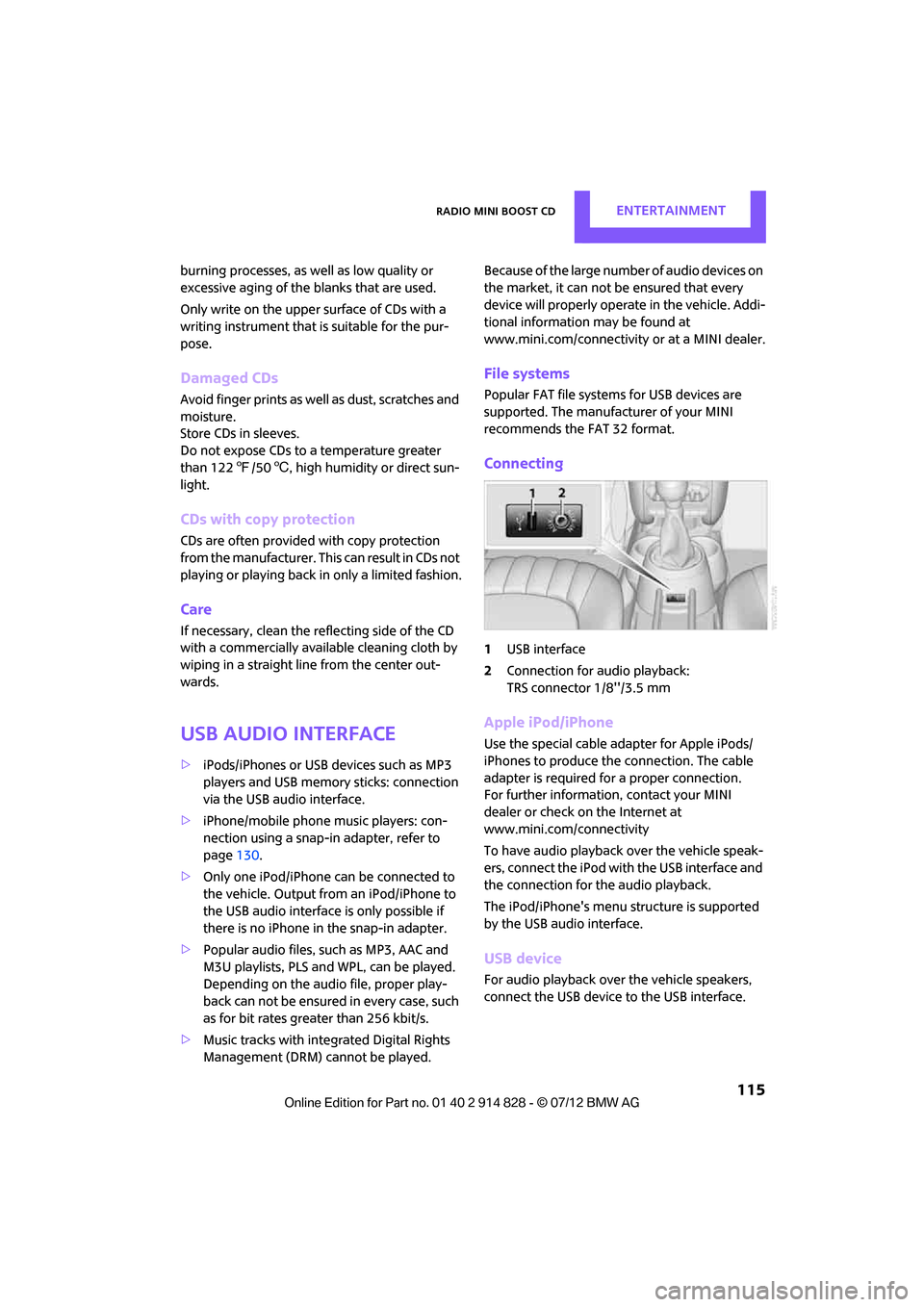
Connecting
1 USB interface
2 Connection for audio playback:
TRS connector 1/8''/3.5 mm
Apple iPod/iPhone
Use the special cable adapter for Apple iPods/
iPhones to produce the connection. The cable
adapter is required for a proper connection.
For further information, contact your MINI
dealer or check on the Internet at
www.mini.com/connectivity
To have audio playback over the vehicle speak-
ers, connect the iPod with the USB interface and
the connection for the audio playback.
The iPod/iPhone's menu structure is supported
by the USB audio interface.
USB device
For audio playback over the vehicle speakers,
connect the USB device to the USB interface.
Online Edition for Part no. 01 40 2 914 828 - \251 07/12 BMW AG
Page 117 of 201
ENTERTAINMENTRadio MINI Boost CD
116
After first connecting
Track information is transferred to the vehicle.
The time required is dependent on the USB
device and on the number of tracks.
The data from up to four USB devices or for
approx. 20,000 tracks can be stored in the
vehicle.
Starting audio playback
iPod
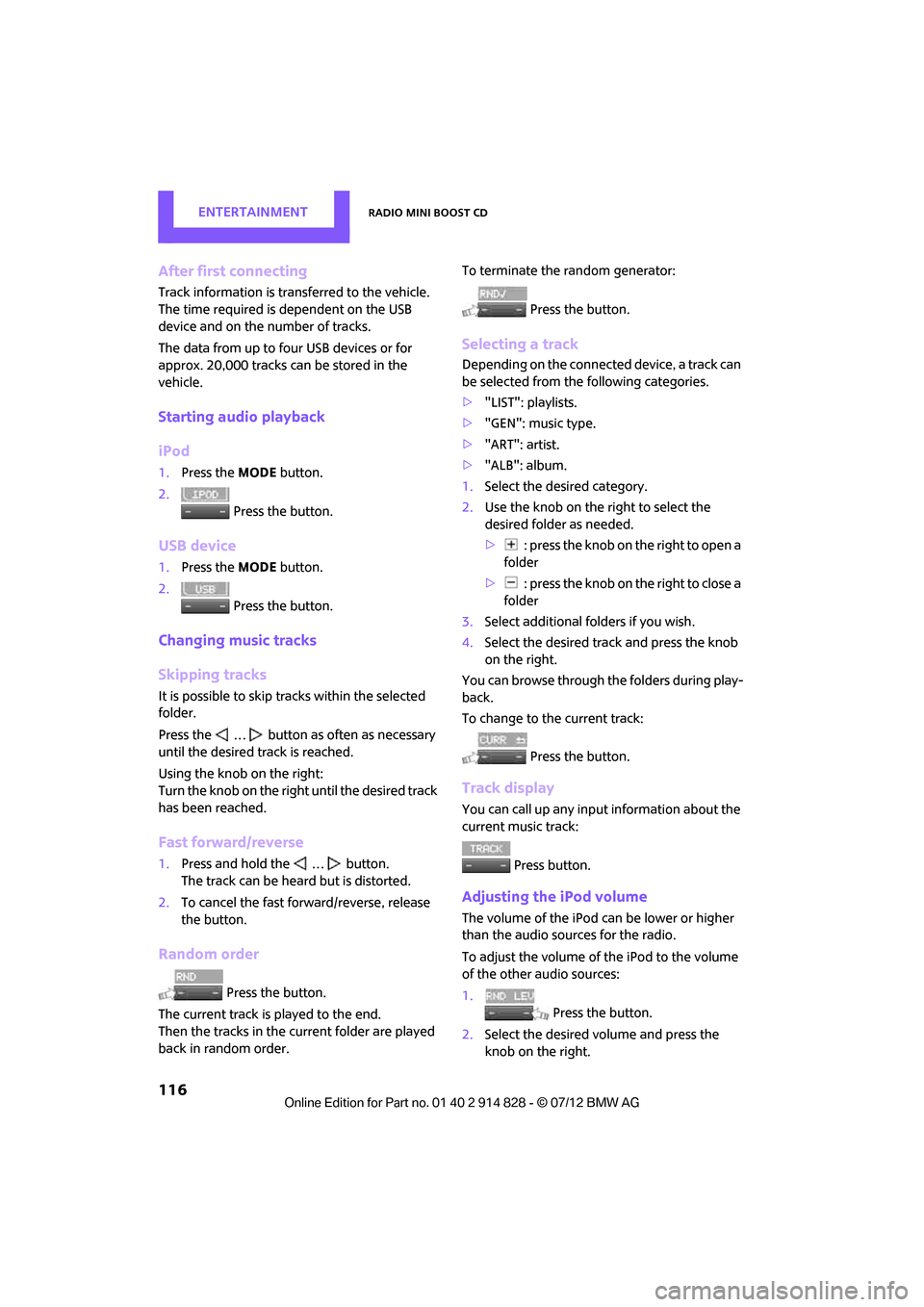
1. Press the MODEbutton.
2. Press the button.
USB device
1.Press the MODEbutton.
2. Press the button.
Changing music tracks
Skipping tracks
It is possible to skip tr acks within the selected
folder.
Press the … button as often as necessary
until the desired track is reached.
Using the knob on the right:
Turn the knob on the right until the desired track
has been reached.
Fast forward/reverse
1. Press and hold the … button.
The track can be heard but is distorted.
2. To cancel the fast forward/reverse, release
the button.
Random order
Press the button.
The current track is played to the end.
Then the tracks in the current folder are played
back in random order. To terminate the random generator:
Press the button.
Selecting a track
Depending on the connected device, a track can
be selected from the following categories.
>"LIST": playlists.
> "GEN": music type.
> "ART": artist.
> "ALB": album.
1. Select the desired category.
2. Use the knob on the right to select the
desired folder as needed.
> : press the knob on the right to open a
folder
> : press the knob on the right to close a
folder
3. Select additional folders if you wish.
4. Select the desired track and press the knob
on the right.
You can browse through the folders during play-
back.
To change to the current track:
Press the button.
Track display
You can call up any input information about the
current music track:
Press button.
Adjusting the iPod volume
The volume of the iPod can be lower or higher
than the audio sources for the radio.
To adjust the volume of the iPod to the volume
of the other audio sources:
1. Press the button.
2. Select the desired vo lume and press the
knob on the right.
Online Edition for Part no. 01 40 2 914 828 - \251 07/12 BMW AG
Page 118 of 201
Radio MINI Boost CDENTERTAINMENT
117
Notes
>The USB audio interface supplies the con-
nected audio devices with power, provided
that this is supported by the audio device.
For this reason, audio devices are not to be
connected to a receptac le in the vehicle dur-
ing operation.
> Do not expose audio devices to extreme
ambient conditions, for example, very high
temperatures; refer to the operating instruc-
tions for the audio device.
> Do not connect any devices, e.g. fans or
lamps, to the USB audio interface.
> Do not connect USB hard drives.
Online Edition for Part no. 01 40 2 914 828 - \251 07/12 BMW AG
Page 132 of 201
TelephoneCOMMUNICATIONS
131
Do not expose your mobile phone to extreme
ambient conditions, for example, very high tem-
peratures; otherwise, functions on your mobile
phone may not work. Follow the operating
instructions for your mobile phone.
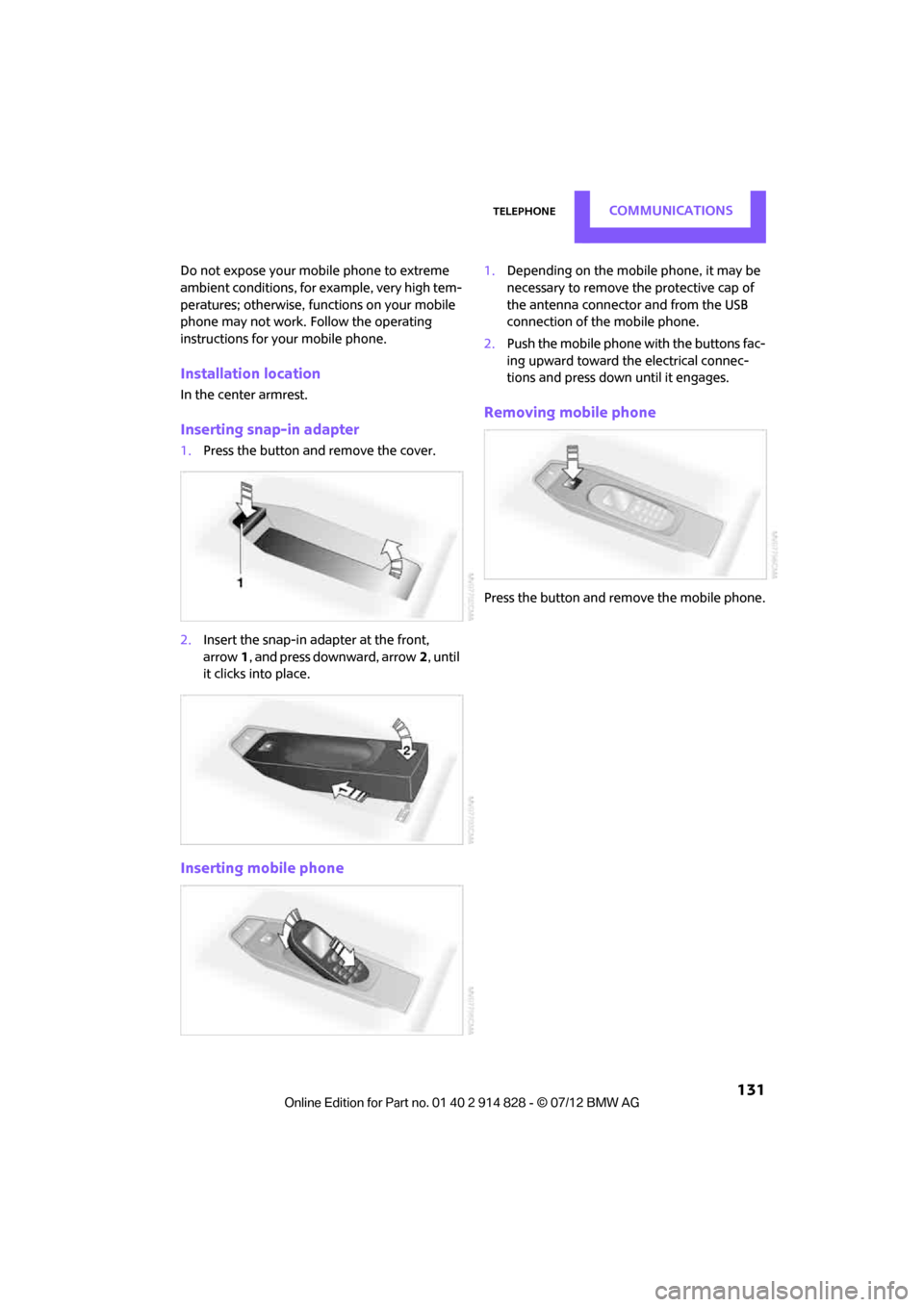
Installation location
In the center armrest.
Inserting snap-in adapter
1. Press the button an d remove the cover.
2. Insert the snap-in adapter at the front,
arrow 1, and press downward, arrow 2, until
it clicks into place.
Inserting mobile phone
1. Depending on the mobile phone, it may be
necessary to remove the protective cap of
the antenna connector and from the USB
connection of the mobile phone.
2. Push the mobile phone with the buttons fac-
ing upward toward the electrical connec-
tions and press down until it engages.
Removing mobile phone
Press the button and remove the mobile phone.
Online Edition for Part no. 01 40 2 914 828 - \251 07/12 BMW AG
Page 199 of 201
REFERENCEEverything from A to Z
198
TPM, refer to Tire Pressure Monitor 70
Track width, refer to Dimension 185
Traction control, refer to
– Dynamic Stability Control DSC 65
Transmission
– automatic transmission with Steptronic 47
– manual transmission 47
– overriding selector lever lock for automatic transmission
with Steptronic 49
Transporting children safely 41
Transport securing devices,
refer to Securing cargo 102
Tread depth, refer to Minimum tire tread 142
Trip-distance counter, refer to Trip odometer 56
Triple turn si gnal activation 50
Trip odometer 56
Turning circle, refer to Dimensions 185
Turn signal 50
– front, replacing bulb 157
– indicator lamp 12
– rear, replacing bulb 158
– side, replacing bulb 158
Tying down load s, refer to
Cargo loading 102
U
Uniform Tire Quality Grading
UTQR 141
Units
– average fuel consumption 59
– temperature 59
Universal garage door opener, refer to Integrated universal
remote control 86
Universal remote control 86Unlatching, refer to
Unlocking 30
Unlocking
– from inside 26
– from outside 23
– setting unlocking behavior 23
– tailgate 30
– without remote control, refer
to Comfort Access 30
Upholstery, care 153
USB audio interface 115
V
Vehicle
– battery163
– breaking in 96
– cargo loading 98
– dimensions 185
– identification number, refer to Engine compartment 145
– parking 46
– storage 154
– weight 186
Vehicle jack
– jacking points 162
Ventilation
– air conditioner 85
Ventilation, refer to Climate
control 81
Vents, refer to Air vents 81
Vents, refer to Ventilation 85
Voice commands
– telephone 128
Voice phone book 129
Volume
– gong 108
– mobile phone 125
– PDC 108
– setting speed- dependent 108
Volume of cargo area 186
W
Warning and indicator
lamps 13,169
Warning messages, refer to Check Control 62
Warning triangle 165
Washer/wiper system
– washer fluid 53
Washer fluid 53
– capacity of reservoir 53
Washer fluid reservoir 53
Waste tray, refer to Ashtray 93
Waterfall lighti ng, refer to
Ambient lighting 80
Water on roads, refer to
Driving through water 97
Wear indicators in tires, refer to Minimum tread depth 142
Weights 186
Welcome lamps 77
Wheelbase, refer to
Dimensions 185
Wheels, new 143
Wheels and tires 136
Width, refer to Dimensions 185
Windows 32
– closing 32
– convenience operation 24
– opening 32
– pinch protection system 33
– safety switch 33
Window washer, refer to Washer fluid 53
Window washer reservoir,
refer to Washer fluid
– volume, refer to Capacities 187
Window washer system 51
– washer fluid 53
– washer jets 52
Windshield
– cleaning 52
– defrosting and removing
condensation 83,85
Online Edition for Part no. 01 40 2 914 828 - \251 07/12 BMW AG