ignition MINI Countryman 2012 Owner's Manual
[x] Cancel search | Manufacturer: MINI, Model Year: 2012, Model line: Countryman, Model: MINI Countryman 2012Pages: 201, PDF Size: 3.19 MB
Page 12 of 201
CockpitAT A GLANCE
11
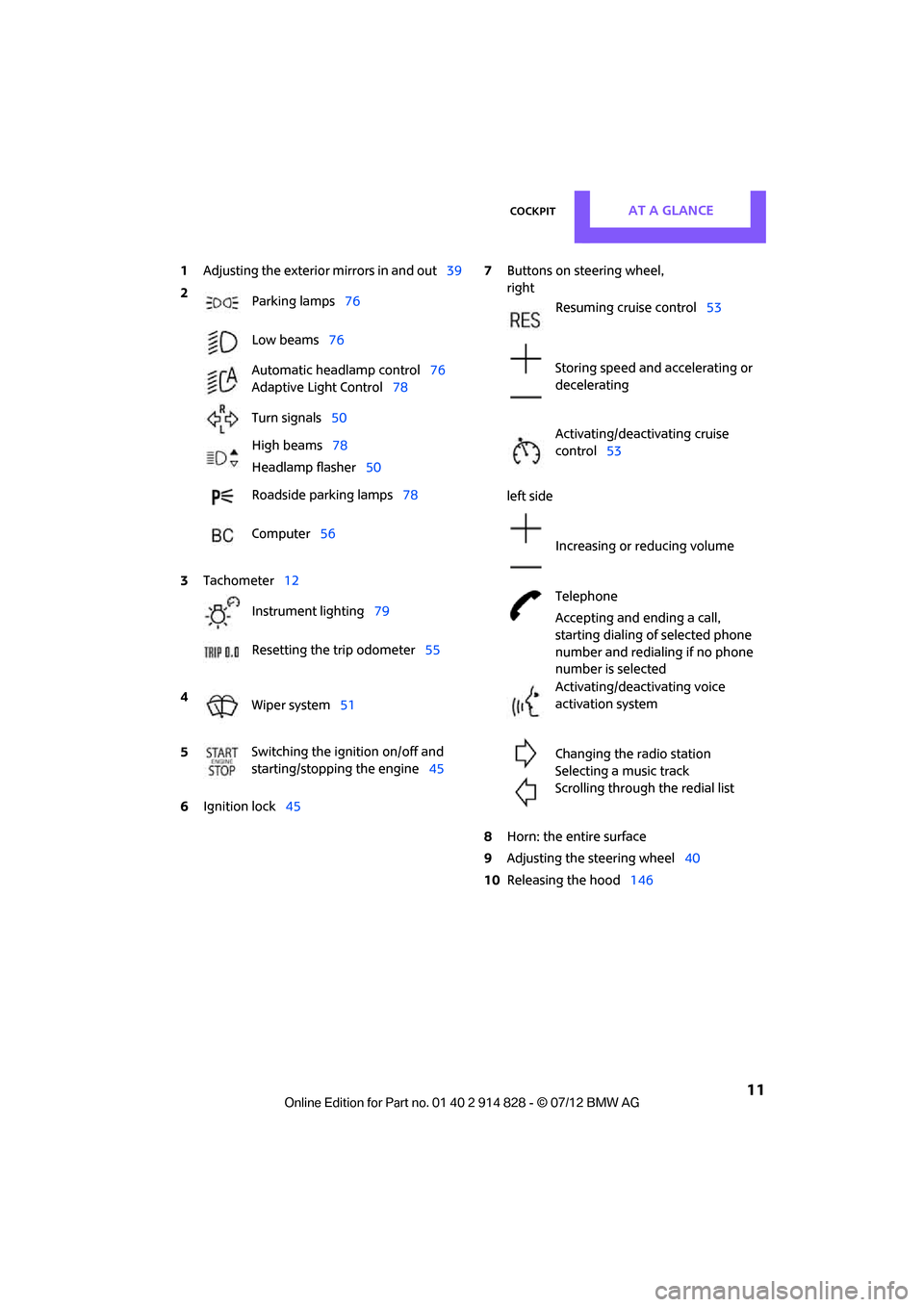
1Adjusting the exterior mirrors in and out39
6 Ignition lock 45 7
Buttons on steering wheel,
right
left side
8 Horn: the entire surface
9 Adjusting the steering wheel 40
10 Releasing the hood 146
2
Parking lamps 76
Low beams 76
Automatic headlamp control 76
Adaptive Light Control 78
Turn signals 50
High beams 78
Headlamp flasher 50
Roadside parking lamps 78
Computer 56
3 Tachometer 12
Instrument lighting 79
Resetting the trip odometer 55
4 Wiper system 51
5 Switching the ignition on/off and
starting/stopping the engine
45
Resuming cruise control53
Storing speed and accelerating or
decelerating
Activating/deactivating cruise
control 53
Increasing or reducing volume
Telephone
Accepting and ending a call,
starting dialing of selected phone
number and redialing if no phone
number is selected
Activating/deactivating voice
activation system
Changing the radio station
Selecting a music track
Scrolling through the redial list
Online Edition for Part no. 01 40 2 914 828 - \251 07/12 BMW AG
Page 14 of 201

CockpitAT A GLANCE
13
Indicator and warning
lamps
The concept
Indicator and warning lamps can light up in var-
ious combinations and colors in indicator area1
or 2.
Some lamps will be tested for proper functioning
when the engine is started or the ignition is
switched on and will therefore light up briefly.
What to do in case of a malfunction
A list of all indicator and warning lamps, as well
as notes on possible caus es of malfunctions and
on how to respond, can be found starting on
page 169.
Online Edition for Part no. 01 40 2 914 828 - \251 07/12 BMW AG
Page 23 of 201
CONTROLSOpening and closing
22
Opening and closing
Vehicle equipment
In this chapter, all production, country, and
optional equipment that is offered in the model
range is described. Equipment is also described
that is not available because of, for example,
selected options or coun try version. This also
applies to safety relate d functions and systems.
Keys/remote controls
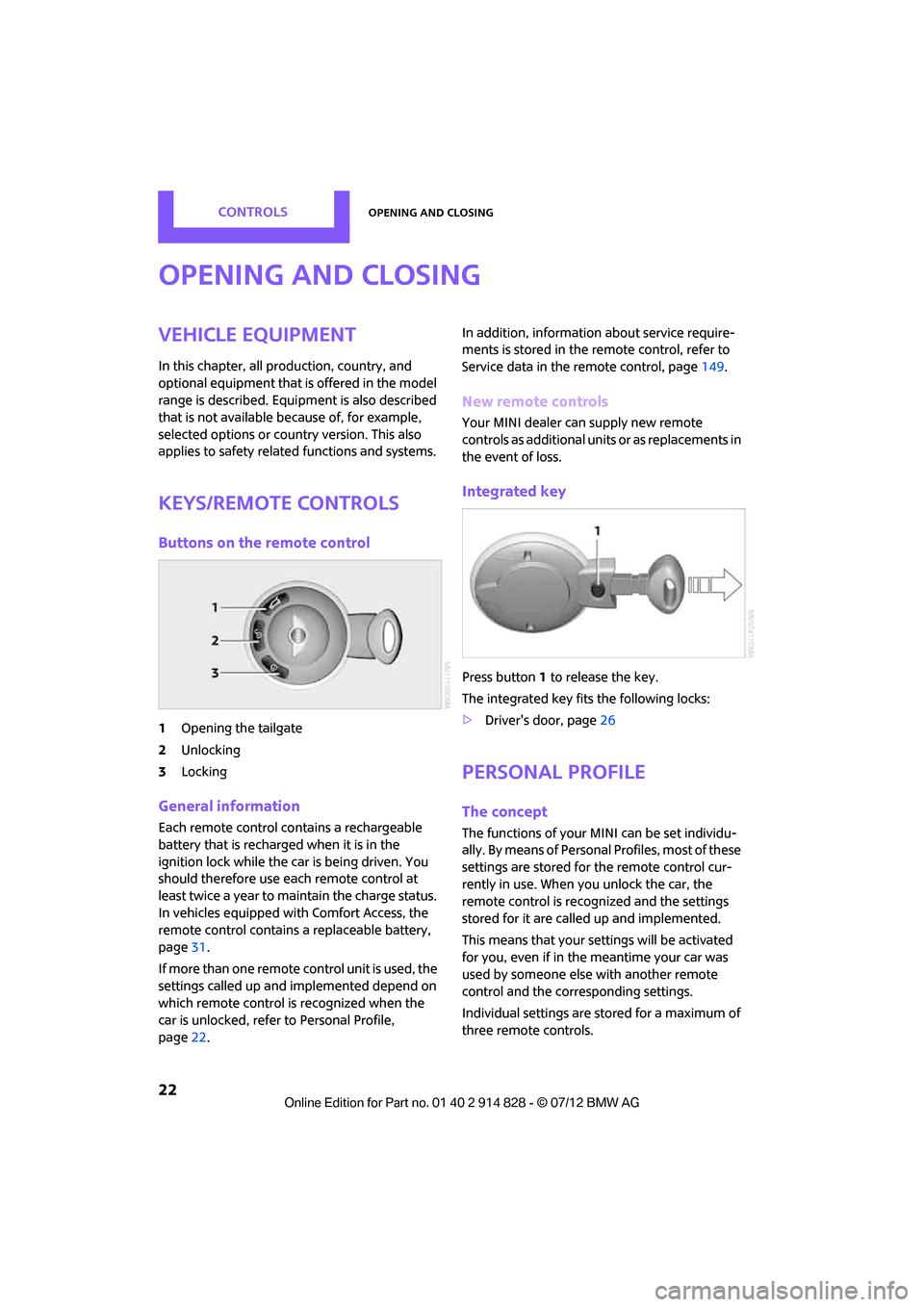
Buttons on the remote control
1Opening the tailgate
2 Unlocking
3 Locking
General information
Each remote control co ntains a rechargeable
battery that is recharged when it is in the
ignition lock while the car is being driven. You
should therefore use each remote control at
least twice a year to maintain the charge status.
In vehicles equipped with Comfort Access, the
remote control contains a replaceable battery,
page 31.
If more than one remote control unit is used, the
settings called up and implemented depend on
which remote control is recognized when the
car is unlocked, refer to Personal Profile,
page 22. In addition, information about service require-
ments is stored in the remote control, refer to
Service data in the remote control, page
149.
New remote controls
Your MINI dealer can supply new remote
controls as additional units or as replacements in
the event of loss.
Integrated key
Press button1 to release the key.
The integrated key fits the following locks:
> Driver's door, page 26
Personal Profile
The concept
The functions of your MINI can be set individu-
ally. By means of Personal Profiles, most of these
settings are stored for the remote control cur-
rently in use. When you unlock the car, the
remote control is recognized and the settings
stored for it are called up and implemented.
This means that your settings will be activated
for you, even if in the meantime your car was
used by someone else with another remote
control and the corresponding settings.
Individual settings are stored for a maximum of
three remote controls.
Online Edition for Part no. 01 40 2 914 828 - \251 07/12 BMW AG
Page 25 of 201

CONTROLSOpening and closing
24
1.Switch on the ignition, refer to page 45.
2. Press the button in the turn signal indicator
as often as necessary until "SET/INFO" is
displayed.
3. Press and hold the button until the display
changes.
4. Press the button as often as necessary until
the symbol and "SET" are displayed.
5. Press and hold the button until the display
changes.
6. Press the button repeatedly until the display
shows the illustra ted symbol, arrow.
7. Press and hold the button until the display
changes. 8.
Press the button to select:
>
Press the button once to unlock
only the driver's door and the fuel filler
flap.
Press the button twice to unlock the
entire vehicle.
> Press the button once to unlock
the entire vehicle.
9. Press and hold the button until the display
changes. The setting is stored for the remote
control currently in use.
Convenient opening
Press and hold the button.
The power windows are opened and the glass
roof
is tilted.
Convenient closing is not possible by
means of the remote control. <
Locking
Press the button.
Do not lock the vehicle from the outside if
there is any person inside, because the
vehicle cannot be unlocked from inside without
special knowledge. <
Setting confirmation signals
To have the vehicle confirm when it has been
locked or unlocked.
Online Edition for Part no. 01 40 2 914 828 - \251 07/12 BMW AG
Page 26 of 201
Opening and closingCONTROLS
25
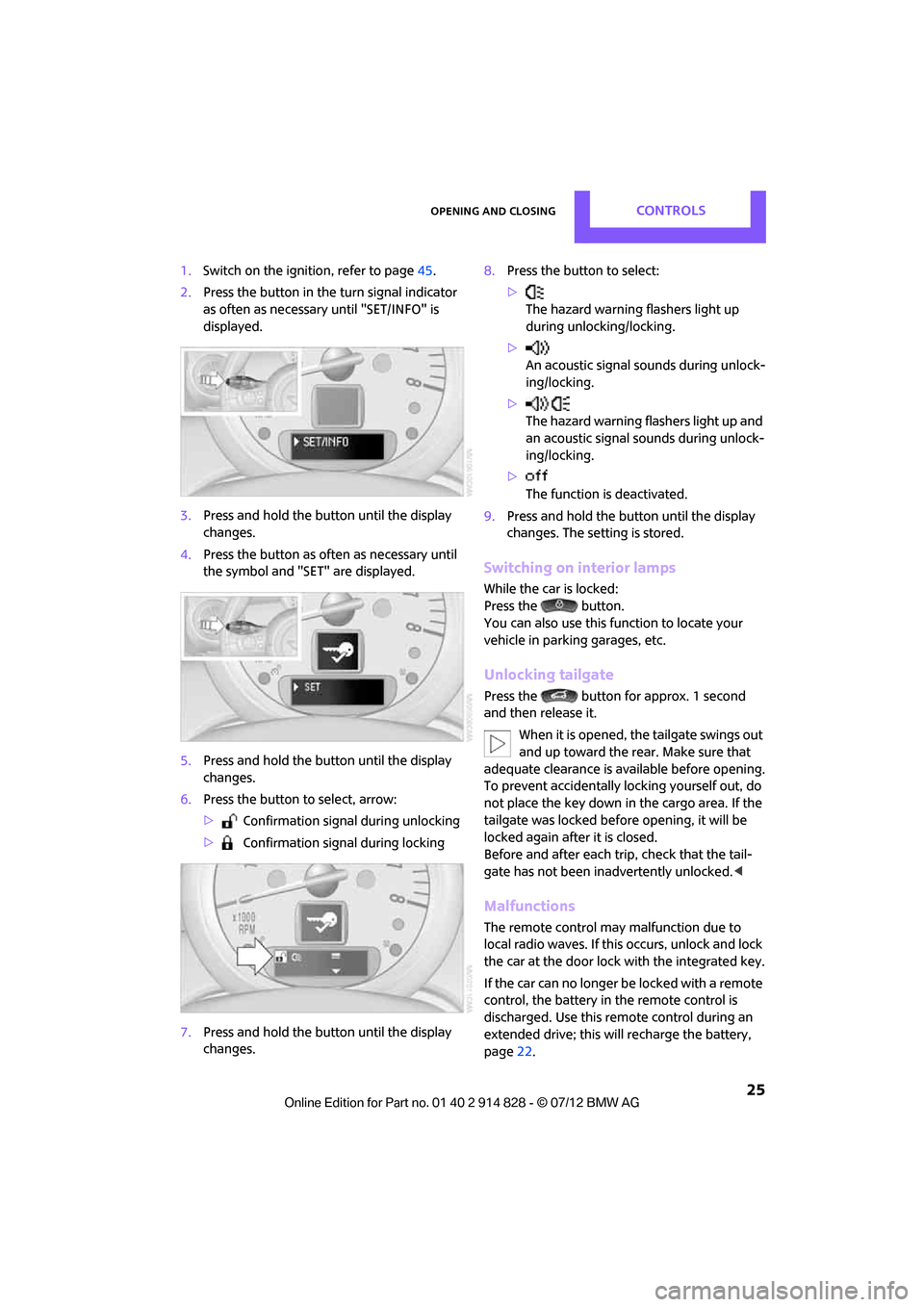
1.Switch on the ignition, refer to page 45.
2. Press the button in the turn signal indicator
as often as necessary until "SET/INFO" is
displayed.
3. Press and hold the butt on until the display
changes.
4. Press the button as of ten as necessary until
the symbol and "SET" are displayed.
5. Press and hold the butt on until the display
changes.
6. Press the button to select, arrow:
> Confirmation signal during unlocking
> Confirmation signal during locking
7. Press and hold the butt on until the display
changes. 8.
Press the button to select:
>
The hazard warning flashers light up
during unlocking/locking.
> An acoustic signal sounds during unlock-
ing/locking.
> The hazard warning flashers light up and
an acoustic signal so unds during unlock-
ing/locking.
> The function is deactivated.
9. Press and hold the butt on until the display
changes. The setting is stored.
Switching on interior lamps
While the car is locked:
Press the button.
You can also use this function to locate your
vehicle in parking garages, etc.
Unlocking tailgate
Press the button for approx. 1 second
and then release it.
When it is opened, th e tailgate swings out
and up toward the re ar. Make sure that
adequate clearance is available before opening.
To prevent accidentally locking yourself out, do
not place the key down in the cargo area. If the
tailgate was locked befo re opening, it will be
locked again after it is closed.
Before and after each trip, check that the tail-
gate has not been inadvertently unlocked. <
Malfunctions
The remote control may malfunction due to
local radio waves. If this occurs, unlock and lock
the car at the door lock with the integrated key.
If the car can no longer be locked with a remote
control, the battery in the remote control is
discharged. Use this remo te control during an
extended drive; this wi ll recharge the battery,
page 22.
Online Edition for Part no. 01 40 2 914 828 - \251 07/12 BMW AG
Page 28 of 201
Opening and closingCONTROLS
27
>pull on the door handle of either door twice:
the first time unlocks the door, the second
time opens it.
Locking
>Press the switch or
> press down the safety lock button of a door.
To prevent you from being locked out, the
open driver's door cannot be locked using
the lock button.
Persons or animals in a parked vehicle
could lock the doors from the inside. Take
the key with you when you leave the vehicle so
that the vehicle can be opened from the out-
side. <
Automatic locking
You can also set the situ ations in which the car
locks. The setting is st ored for the remote con-
trol in use.
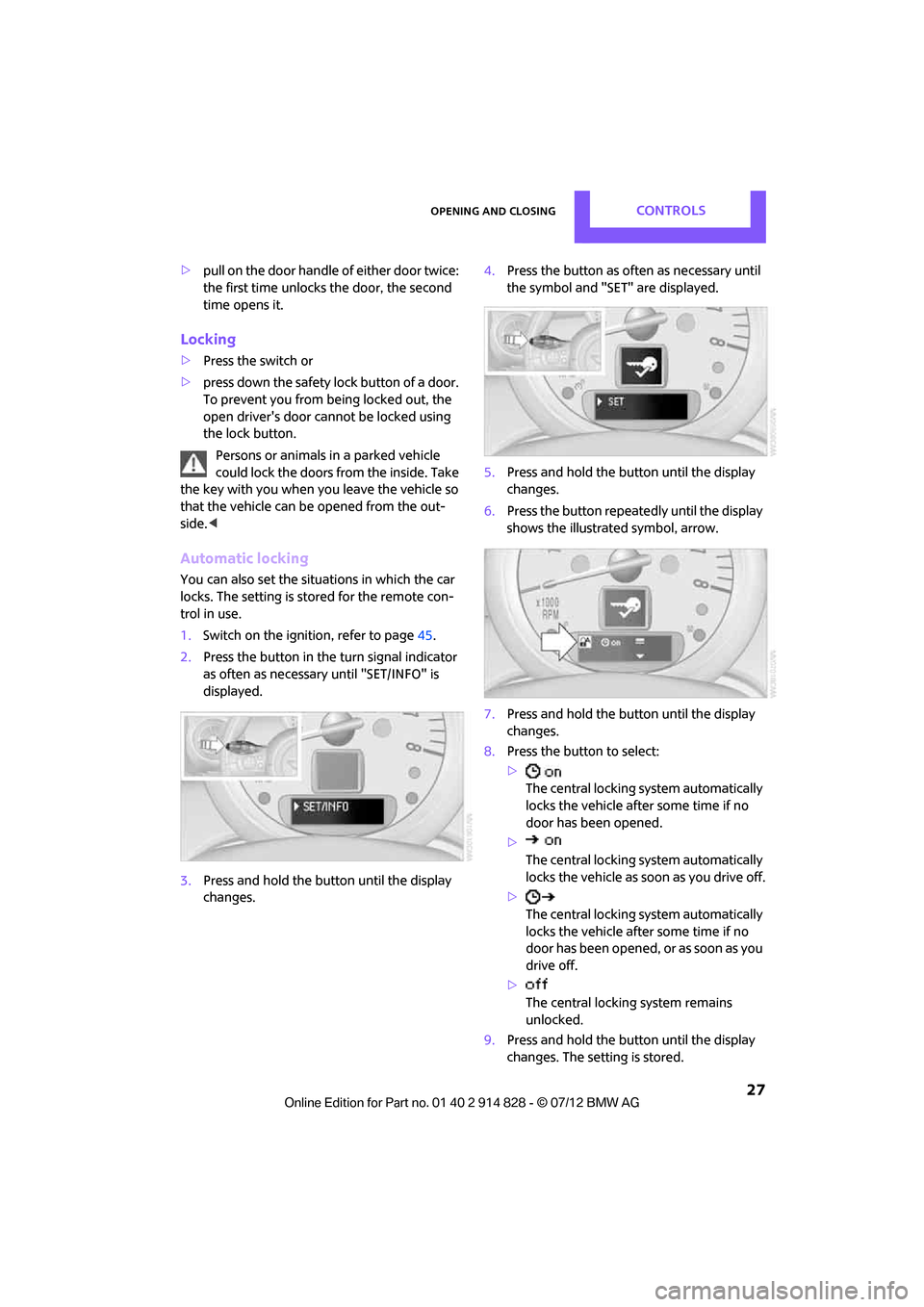
1. Switch on the ignition, refer to page 45.
2. Press the button in the turn signal indicator
as often as necessary until "SET/INFO" is
displayed.
3. Press and hold the butt on until the display
changes. 4.
Press the button as of ten as necessary until
the symbol and "SET" are displayed.
5. Press and hold the butt on until the display
changes.
6. Press the button repeatedly until the display
shows the illustra ted symbol, arrow.
7. Press and hold the butt on until the display
changes.
8. Press the button to select:
>
The central locking system automatically
locks the vehicle after some time if no
door has been opened.
> The central locking system automatically
locks the vehicle as soon as you drive off.
> The central locking system automatically
locks the vehicle after some time if no
door has been opened, or as soon as you
drive off.
> The central locking system remains
unlocked.
9. Press and hold the butt on until the display
changes. The setting is stored.
Online Edition for Part no. 01 40 2 914 828 - \251 07/12 BMW AG
Page 29 of 201
CONTROLSOpening and closing
28
Tailgate
To avoid damage, make sure there is
sufficient clearance before opening the
tailgate. <
While driving, sharp objects or objects
with edges may strike against the rear
window and damage th e heating element for
the rear window. Assure that there are no
objects with sharp edge s near the rear win-
dow. <
Opening
In some market-specific versions, the tail-
gate cannot be unlocked using the remote
control unless the vehicle is unlocked first.
Only drive with the tailgate fully closed; other-
wise, the tail lamps will be obscured and driving
safety will be compromised. <
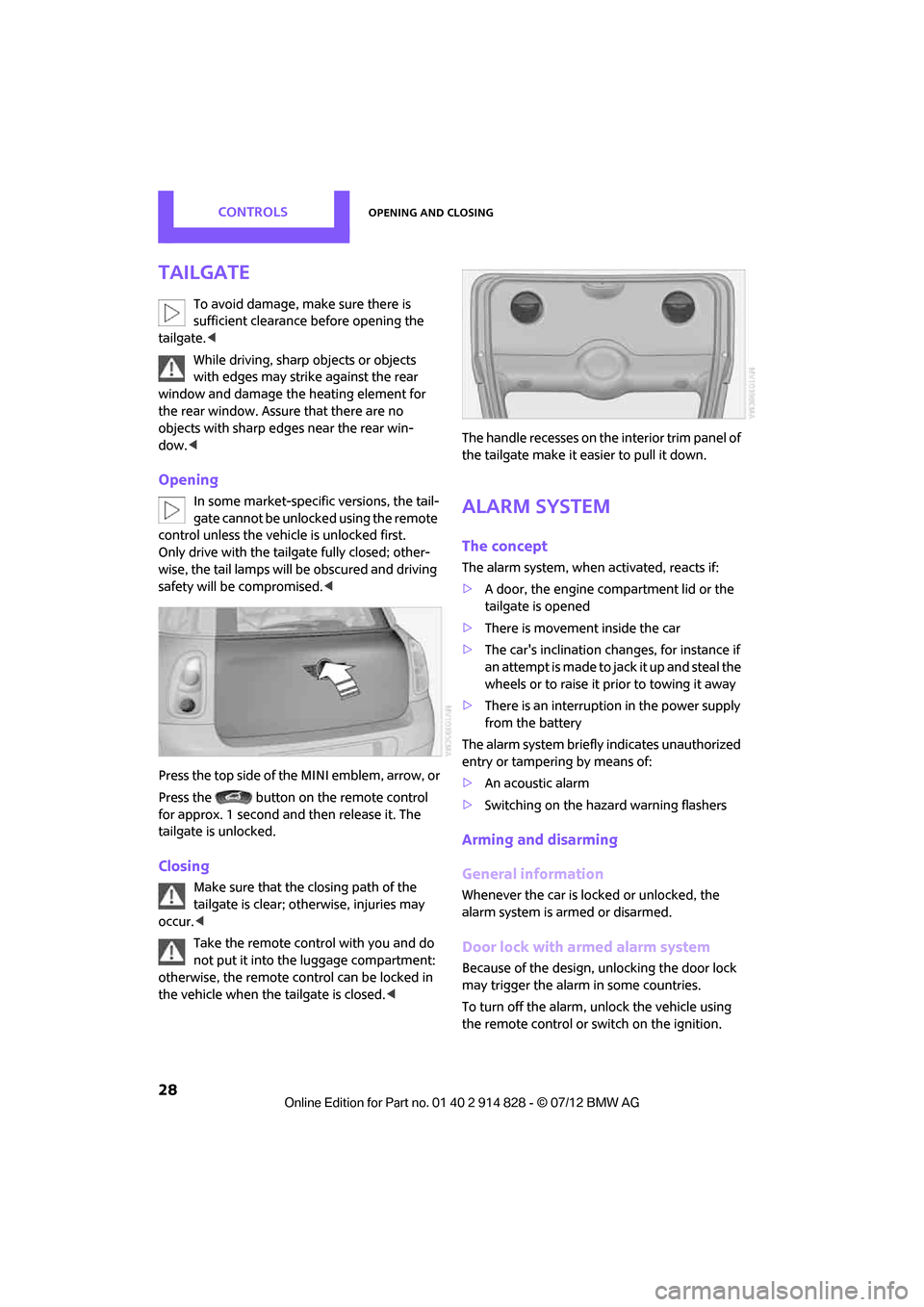
Press the top side of the MINI emblem, arrow, or
Press the button on the remote control
for approx. 1 second and then release it. The
tailgate is unlocked.
Closing
Make sure that the closing path of the
tailgate is clear; otherwise, injuries may
occur. <
Take the remote control with you and do
not put it into the luggage compartment:
otherwise, the remote co ntrol can be locked in
the vehicle when the tailgate is closed.
Alarm system
The concept
The alarm system, when activated, reacts if:
>
A door, the engine compartment lid or the
tailgate is opened
> There is movement inside the car
> The car's inclination changes, for instance if
an attempt is made to ja ck it up and steal the
wheels or to raise it prior to towing it away
> There is an interruption in the power supply
from the battery
The alarm system briefly indicates unauthorized
entry or tampering by means of:
> An acoustic alarm
> Switching on the haza rd warning flashers
Arming and disarming
General information
Whenever the car is locked or unlocked, the
alarm system is armed or disarmed.
Door lock with armed alarm system
Because of the design, unlocking the door lock
may trigger the alarm in some countries.
To turn off the alarm, unlock the vehicle using
the remote control or switch on the ignition.
Online Edition for Part no. 01 40 2 914 828 - \251 07/12 BMW AG
Page 30 of 201
Opening and closingCONTROLS
29
Tailgate with armed alarm system
Even when the alarm system is armed, you can
open the tailgate by means of the button
on the remote control.
When you subsequently close the tailgate it is
again locked and monitored.
Panic mode
You can activate the alarm system if you find
yourself in a dangerous situation.
Press the button for at least two seconds.
Switching off the alarm:
Press any button.
Switching off an alarm
> Unlock the car with the remote control.
> Insert the key fully into the ignition lock.
> In cars with Comfort Access, press the button
on the door lock.
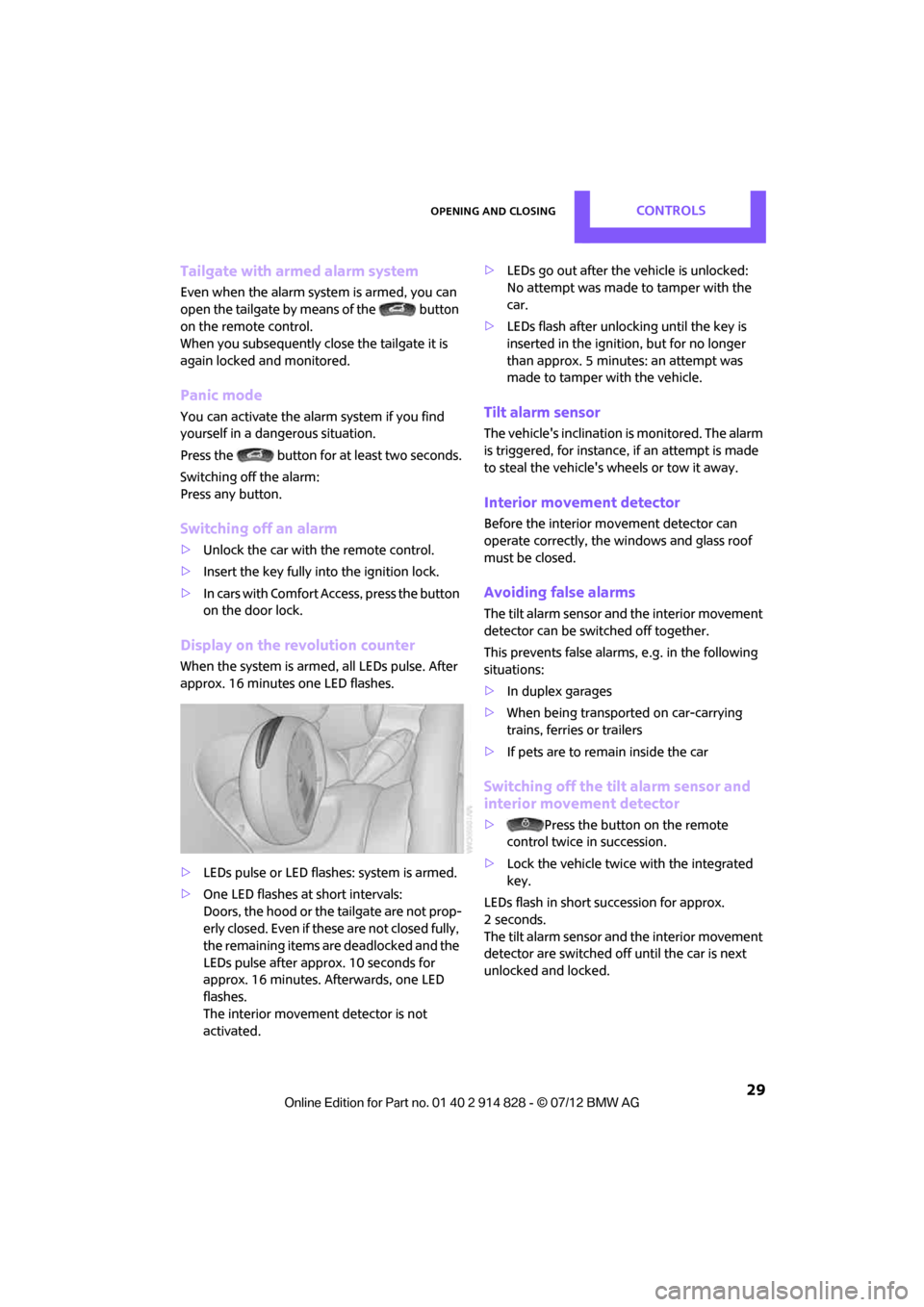
Display on the revolution counter
When the system is armed, all LEDs pulse. After
approx. 16 minutes one LED flashes.
>LEDs pulse or LED flashes: system is armed.
> One LED flashes at short intervals:
Doors, the hood or the tailgate are not prop-
erly closed. Even if these are not closed fully,
the remaining items are deadlocked and the
LEDs pulse after approx. 10 seconds for
approx. 16 minutes. Afterwards, one LED
flashes.
The interior movement detector is not
activated. >
LEDs go out after the vehicle is unlocked:
No attempt was made to tamper with the
car.
> LEDs flash after unlocking until the key is
inserted in the ignition, but for no longer
than approx. 5 minutes: an attempt was
made to tamper with the vehicle.
Tilt alarm sensor
The vehicle's inclination is monitored. The alarm
is triggered, for instance, if an attempt is made
to steal the vehicle's wheels or tow it away.
Interior movement detector
Before the interior mo vement detector can
operate correctly, the windows and glass roof
must be closed.
Avoiding false alarms
The tilt alarm sensor an d the interior movement
detector can be switched off together.
This prevents false alarms, e.g. in the following
situations:
> In duplex garages
> When being transported on car-carrying
trains, ferries or trailers
> If pets are to remain inside the car
Switching off the tilt alarm sensor and
interior movement detector
> Press the button on the remote
control twice in succession.
> Lock the vehicle twice with the integrated
key.
LEDs flash in short succession for approx.
2 seconds.
The tilt alarm sensor an d the interior movement
detector are switched of f until the car is next
unlocked and locked.
Online Edition for Part no. 01 40 2 914 828 - \251 07/12 BMW AG
Page 32 of 201
Opening and closingCONTROLS
31
Insert the remote control into the ignition lock to
be able to operate the windows or glass roof
when the engine is switched off and the doors
are open.
Switching on radio readiness
Switch on radio readiness by pressing the Start/
Stop button, page 45.
Do not depress the brake or the clutch;
otherwise, the engine will start. <
Starting the engine
The engine can be started or the ignition can be
switched on when a remote control is inside the
vehicle. It is not necessary to insert a remote
control into the ignition lock, page 45.
Switching off the engine in cars with
automatic transmission
The engine can only be switched off when the
selector lever is in position P, page 47.
To switch the engine off when the selector lever
is in position N, the re mote control must be in
the ignition lock.
Before driving a vehicle with automatic
transmission into a car wash
1. Insert remote control into ignition lock.
2. Depress the brake.
3. Move the selector lever to position N.
4. Switch off the engine.
The vehicle can roll.
Malfunction
Comfort Access may malfunction due to local
radio waves.
If this happens, open or close the vehicle via the
buttons on the remote control or using the
integrated key.
Insert the remote control into the ignition lock
and start the engine.
Warning lamps
The warning lamp lights up when an
attempt is made to start the engine: the
engine cannot be started. The remote
control is not inside th e vehicle or is malfunc-
tioning. Take the remote control with you inside
the vehicle or have it checked. If necessary,
insert another remote co ntrol into the ignition
lock.
The warning lamp lights up when the
engine is running: the remote control is
no longer inside the vehicle. After the
engine is switched off, the engine can only be
restarted within approx. 10 seconds.
The indicator lamp lights up: replace the
battery in the remote control.
Replacing the battery
The remote control for Comfort Access contains
a battery that will need to be replaced from time
to time.
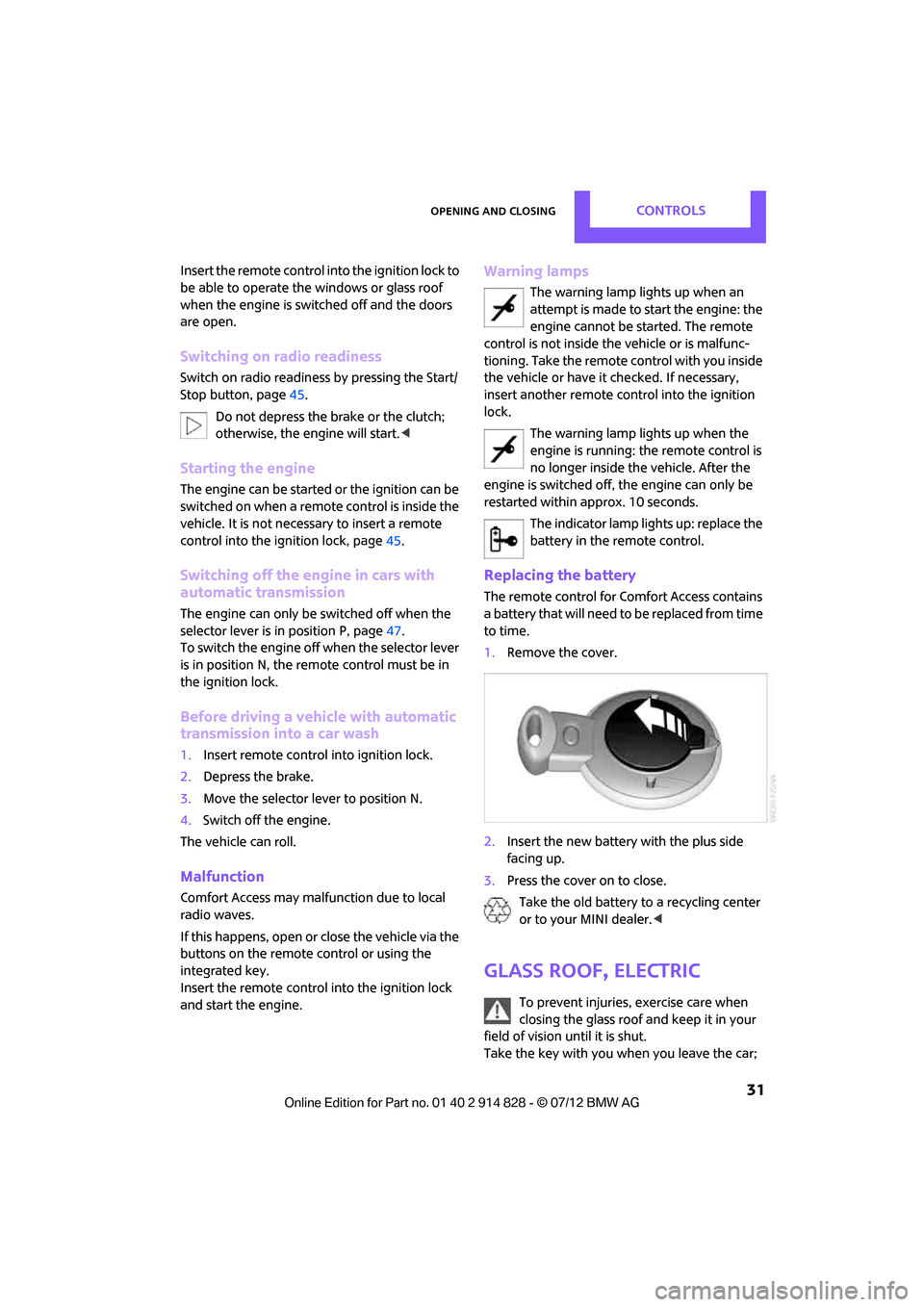
1. Remove the cover.
2. Insert the new battery with the plus side
facing up.
3. Press the cover on to close.
Take the old battery to a recycling center
or to your MINI dealer. <
Glass roof, electric
To prevent injuries, exercise care when
closing the glass roof and keep it in your
field of vision until it is shut.
Take the key with you when you leave the car;
Online Edition for Part no. 01 40 2 914 828 - \251 07/12 BMW AG
Page 33 of 201
CONTROLSOpening and closing
32
otherwise, children could operate the roof and
possibly injure themselves.<
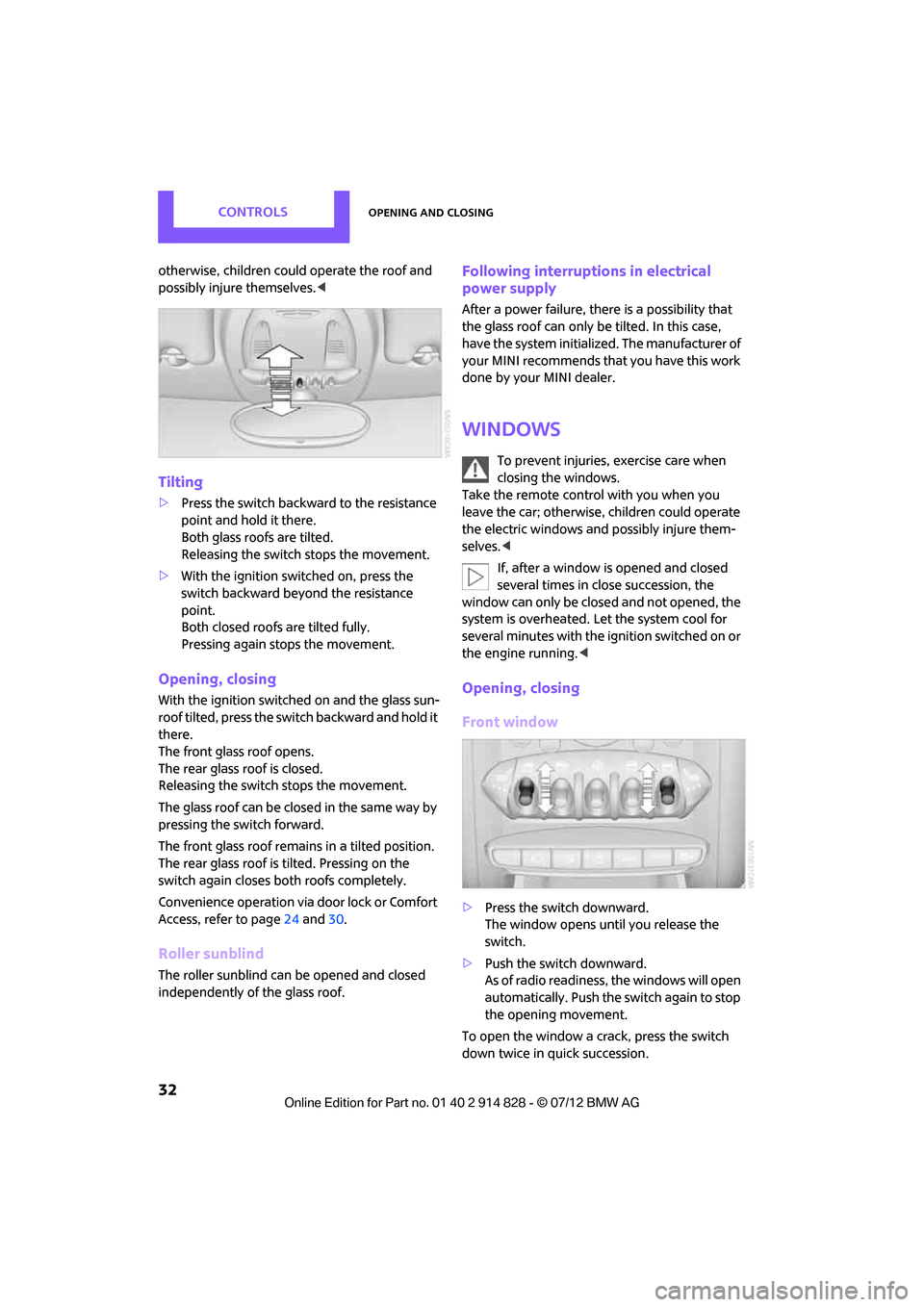
Tilting
>Press the switch backwa rd to the resistance
point and hold it there.
Both glass roofs are tilted.
Releasing the switch stops the movement.
> With the ignition switched on, press the
switch backward beyo nd the resistance
point.
Both closed roofs are tilted fully.
Pressing again st ops the movement.
Opening, closing
With the ignition switch ed on and the glass sun-
roof tilted, press the swit ch backward and hold it
there.
The front glass roof opens.
The rear glass roof is closed.
Releasing the switch stops the movement.
The glass roof can be closed in the same way by
pressing the sw itch forward.
The front glass roof remains in a tilted position.
The rear glass roof is tilted. Pressing on the
switch again closes both roofs completely.
Convenience operation via door lock or Comfort
Access, refer to page 24 and 30.
Roller sunblind
The roller sunblind can be opened and closed
independently of the glass roof.
Following interruptio ns in electrical
power supply
After a power failure, there is a possibility that
the glass roof can only be tilted. In this case,
have the system initiali zed. The manufacturer of
your MINI recommends that you have this work
done by your MINI dealer.
Windows
To prevent injuries, exercise care when
closing the windows.
Take the remote control with you when you
leave the car; otherwise, children could operate
the electric windows and possibly injure them-
selves. <
If, after a window is opened and closed
several times in close succession, the
window can only be closed and not opened, the
system is overheated. Le t the system cool for
several minutes with the ignition switched on or
the engine running. <
Opening, closing
Front window
>Press the swit ch downward.
The window opens until you release the
switch.
> Push the switch downward.
As of radio readiness, the windows will open
automatically. Push the switch again to stop
the opening movement.
To open the window a crack, press the switch
down twice in quick succession.
Online Edition for Part no. 01 40 2 914 828 - \251 07/12 BMW AG