telephone MINI Countryman 2012 Owner's Manual
[x] Cancel search | Manufacturer: MINI, Model Year: 2012, Model line: Countryman, Model: MINI Countryman 2012Pages: 201, PDF Size: 3.19 MB
Page 4 of 201
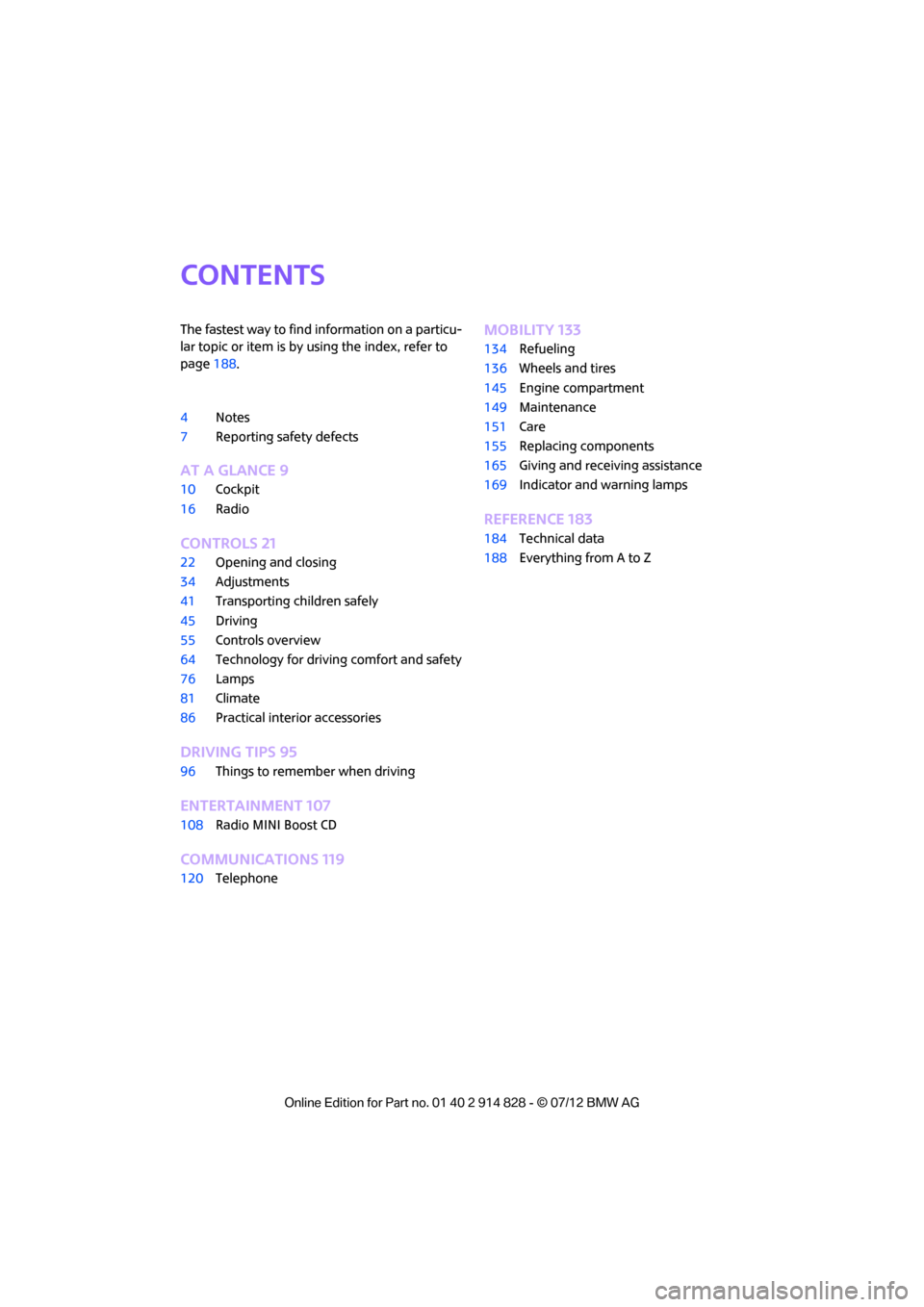
Contents
The fastest way to find information on a particu-
lar topic or item is by using the index, refer to
page188.
4 Notes
7 Reporting safety defects
AT A GLANCE 9
10Cockpit
16 Radio
CONTROLS 21
22Opening and closing
34 Adjustments
41 Transporting children safely
45 Driving
55 Controls overview
64 Technology for drivin g comfort and safety
76 Lamps
81 Climate
86 Practical interior accessories
DRIVING TIPS 95
96Things to remember when driving
ENTERTAINMENT 107
108Radio MINI Boost CD
COMMUNICATIONS 119
120Telephone
MOBILITY 133
134Refueling
136 Wheels and tires
145 Engine compartment
149 Maintenance
151 Care
155 Replacing components
165 Giving and receiving assistance
169 Indicator and warning lamps
REFERENCE 183
184Technical data
188 Everything from A to Z
Online Edition for Part no. 01 40 2 914 828 - \251 07/12 BMW AG
Page 6 of 201
Notes
5
the specifications of the MINI manufacturer. If
this work is not carried out properly, there is a
danger of subsequent damage and related
safety hazards.<
Parts and accessories
For your own safety, use genuine parts
and accessories approved by the manu-
facturer of the MINI.
When you purchase accessories tested
and approved by the manufacturer of the MINI
and Original MINI Parts, you simultaneously
acquire the assurance that they have been
thoroughly tested by the manufacturer of the
MINI to ensure optimum performance when
installed on your vehicle.
The manufacturer of the MINI warrants these
parts to be free from defects in material and
workmanship.
The manufacturer of the MINI will not accept any
liability for damage result ing from installation of
parts and accessories not approved by the man-
ufacturer of the MINI.
The manufacturer of the MINI cannot test every
product made by other manufacturers to verify
if it can be used on a MINI safely and without risk
to either the vehicle, its operation, or its occu-
pants.
Original MINI Parts, MINI Accessories and other
products approved by the manufacturer of the
MINI, together with professional advice on using
these items, are available from all MINI dealers.
Installation and operation of accessories that
have not been approved by the manufacturer of
your MINI, such as alarms, radios, amplifiers,
radar detectors, wheels, suspension compo-
nents, brake dust shield s, telephones, including
operation of any mobile phone from within the
vehicle without using an externally mounted
antenna, or transceiver equipment, for instance,
CBs, walkie-talkies, ham radios or similar acces-
sories, may cause extensiv e damage to the vehi-
cle, compromise its safe ty, interfere with the
vehicle's electrical s y s t e m o r a f f e c t t h e v a l i d i t y o f the MINI Limited Warranty. See your MINI dealer
for additional information.
<
Maintenance, replacement, or repair of
the emission control devices and systems
may be performed by any automotive repair
establishment or individu al using any certified
automotive part. <
California Proposition 65 warning
California law requires us to issue the following
warning:
Engine exhaust and a wide variety of
automobile components and parts,
including components foun d in the interior fur-
nishings in a vehicle, contain or emit chemicals
known to the State of California to cause cancer
and birth defects and reproductive harm. In
addition, certain fluids co ntained in vehicles and
certain products of component wear contain or
emit chemicals known to the State of California
to cause cancer and birth defects or other repro-
ductive harm.
Battery posts, terminals and related accessories
contain lead and lead compounds. Wash your
hands after handling.
Used engine oil contains chemicals that have
caused cancer in laboratory animals. Always
protect your skin by washing thoroughly with
soap and water.<
Service and warranty
We recommend that you read this publication
thoroughly.
Your MINI is covered by the following warran-
ties:
> New Vehicle Limited Warranty
> Rust Perforation Limited Warranty
> Federal Emissions System Defect Warranty
> Federal Emissions Performance Warranty
> California Emission Control System Limited
Warranty
Online Edition for Part no. 01 40 2 914 828 - \251 07/12 BMW AG
Page 8 of 201
Notes
7
Reporting safety defects
For US customers
The following applies only to vehicles owned
and operated in the US.
If you believe that your vehicle has a defect that
could cause a crash or could cause injury or
death, you should immediately inform the
National Highway Traffic Safety Administration,
NHTSA, in addition to notifying MINI of North
America, LLC, P.O. Box 1227, Westwood, New
Jersey 07675-1227, Telephone 1-800-831-
1117.
If NHTSA receives similar complaints, it may
open an investigation, and if it finds that a safety
defect exists in a group of vehicles, it may order
a recall and remedy campaign. However, NHTSA
cannot become involved in individual problems
between you, your dealer, or MINI of North
America, LLC.
To contact NHTSA, you may call the Vehicle
Safety Hotline toll-free at 1-888-327-4236 (TTY:
1-800-424-9153); go to http://www.safer-
car.gov; or write to: Administrator, NHTSA, 400
Seventh Street, SW., Washington, DC 20590. You
can also obtain other information about motor
vehicle safety from http://www.safercar.gov
For Canadian customers
Canadian customers wh o wish to report a
safety-related defect to Transport Canada,
Defect Investigations and Recalls, may tele-
phone the toll-free hotline 1-800-333-0510.
You can also obtain ot her information about
motor vehicle safety from http://www.tc.gc.ca/
roadsafety.
Online Edition for Part no. 01 40 2 914 828 - \251 07/12 BMW AG
Page 12 of 201
CockpitAT A GLANCE
11
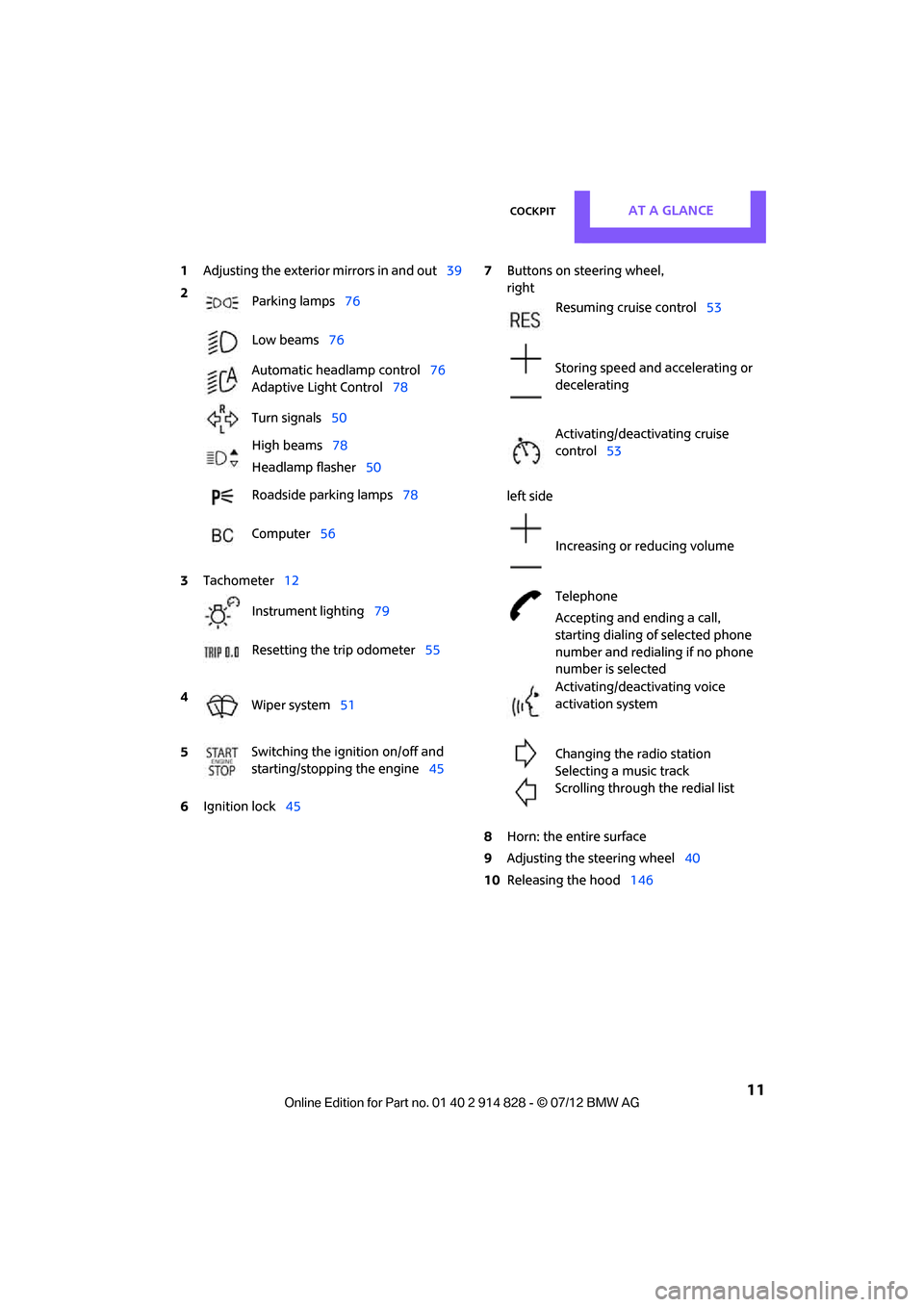
1Adjusting the exterior mirrors in and out39
6 Ignition lock 45 7
Buttons on steering wheel,
right
left side
8 Horn: the entire surface
9 Adjusting the steering wheel 40
10 Releasing the hood 146
2
Parking lamps 76
Low beams 76
Automatic headlamp control 76
Adaptive Light Control 78
Turn signals 50
High beams 78
Headlamp flasher 50
Roadside parking lamps 78
Computer 56
3 Tachometer 12
Instrument lighting 79
Resetting the trip odometer 55
4 Wiper system 51
5 Switching the ignition on/off and
starting/stopping the engine
45
Resuming cruise control53
Storing speed and accelerating or
decelerating
Activating/deactivating cruise
control 53
Increasing or reducing volume
Telephone
Accepting and ending a call,
starting dialing of selected phone
number and redialing if no phone
number is selected
Activating/deactivating voice
activation system
Changing the radio station
Selecting a music track
Scrolling through the redial list
Online Edition for Part no. 01 40 2 914 828 - \251 07/12 BMW AG
Page 16 of 201
CockpitAT A GLANCE
15
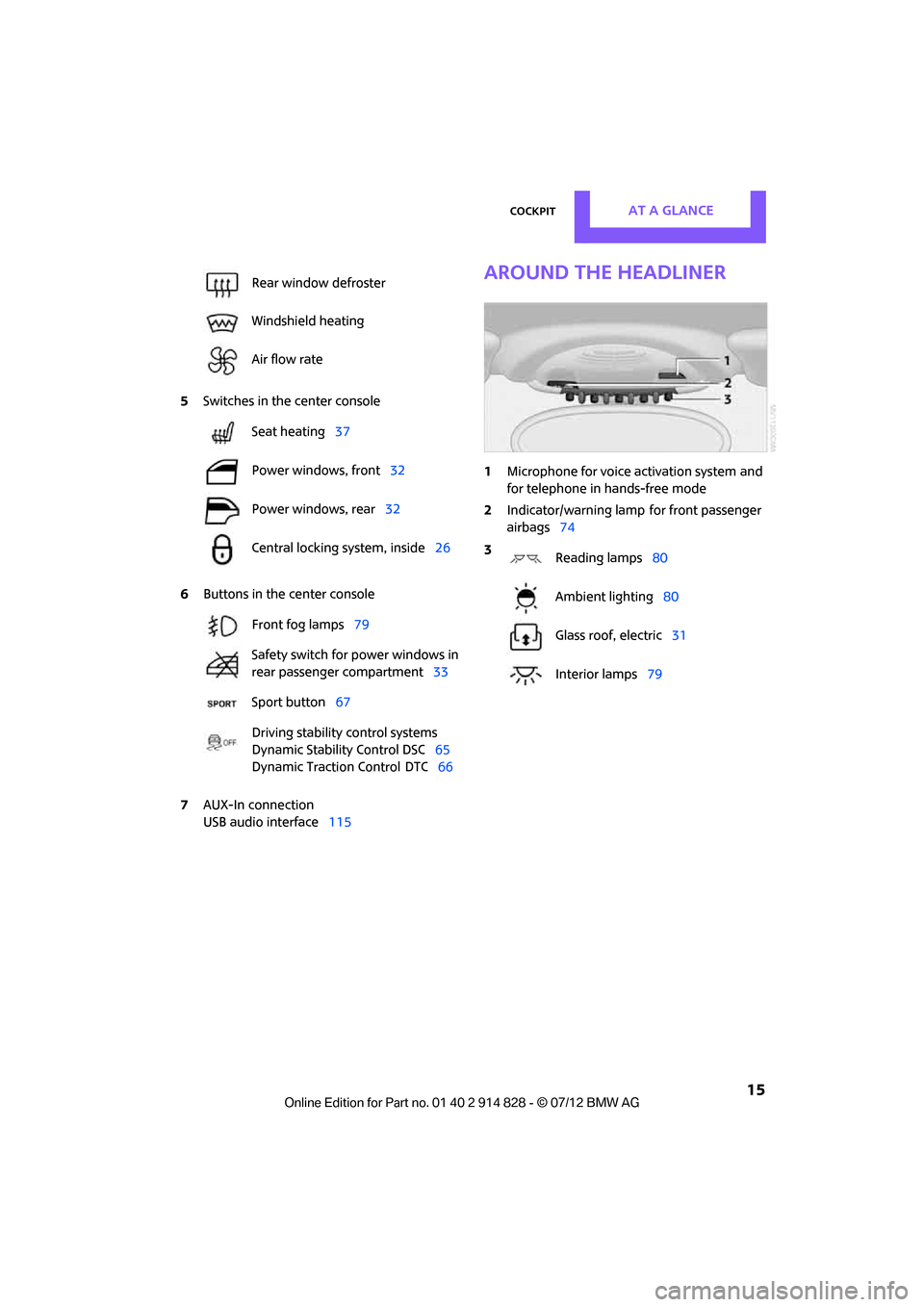
5Switches in the center console
6 Buttons in the center console
7 AUX-In connection
USB audio interface 115
Around the headliner
1Microphone for voice activation system and
for telephone in hands-free mode
2 Indicator/warning lamp
for front passenger
airbags 74
Rear window defroster
Windshield heating
Air flow rate
Seat heating
37
Power windows, front 32
Power windows, rear 32
Central locking system, inside 26
Front fog lamps 79
Safety switch for power windows in
rear passenger compartment 33
Sport button 67
Driving stability control systems
Dynamic Stability Control DSC 65
Dynamic Traction Control
DTC 66
3
Reading lamps 80
Ambient lighting 80
Glass roof, electric 31
Interior lamps 79
Online Edition for Part no. 01 40 2 914 828 - \251 07/12 BMW AG
Page 18 of 201
RadioAT A GLANCE
17
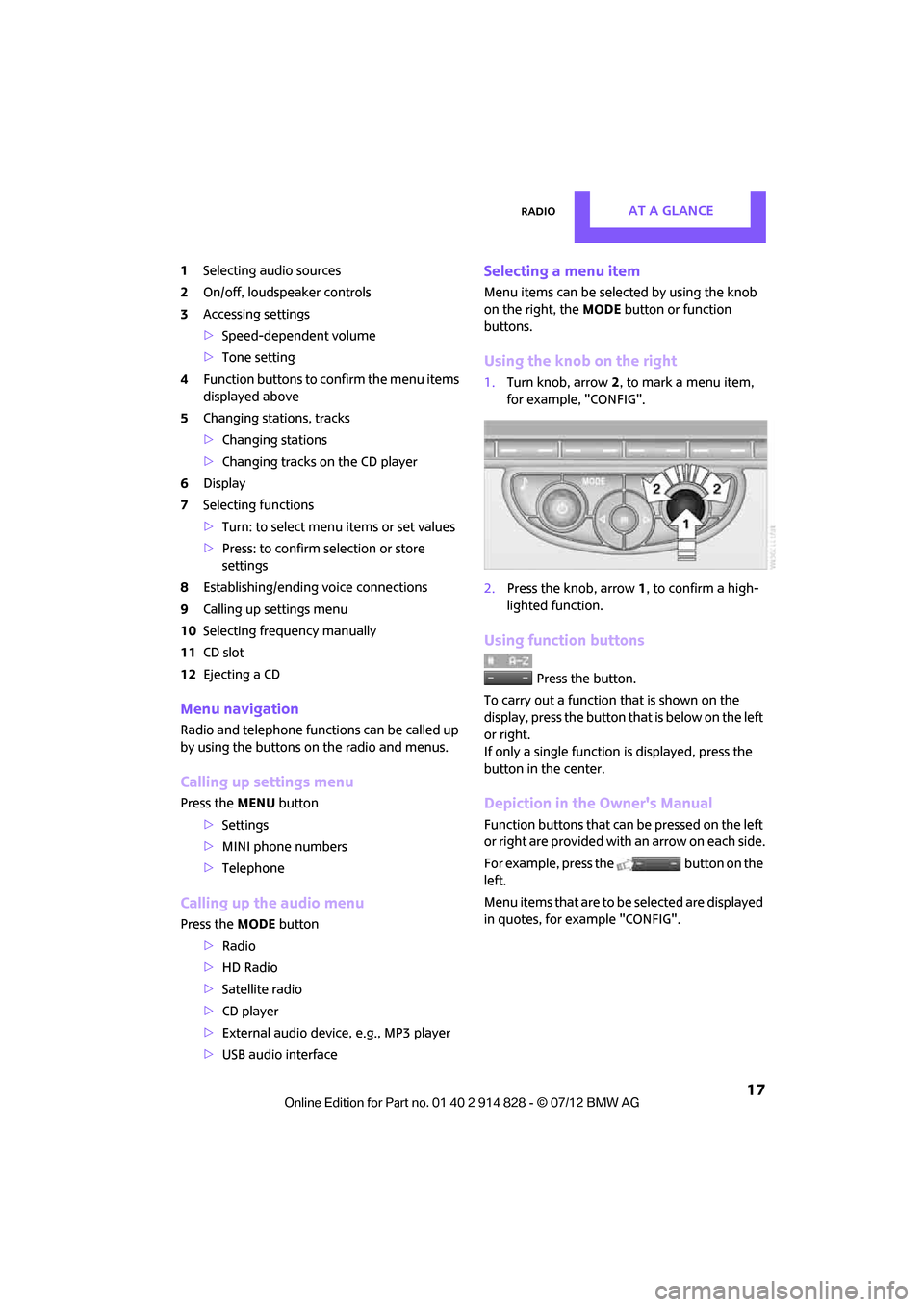
1Selecting audio sources
2 On/off, loudsp eaker controls
3 Accessing settings
>Speed-dependent volume
> Tone setting
4 Function buttons to confirm the menu items
displayed above
5 Changing stations, tracks
>Changing stations
> Changing tracks on the CD player
6 Display
7 Selecting functions
>Turn: to select menu items or set values
> Press: to confirm selection or store
settings
8 Establishing/ending voice connections
9 Calling up settings menu
10 Selecting frequency manually
11 CD slot
12 Ejecting a CD
Menu navigation
Radio and telephone functions can be called up
by using the buttons on the radio and menus.
Calling up settings menu
Press the MENU button
> Settings
> MINI phone numbers
> Telephone
Calling up the audio menu
Press the MODEbutton
> Radio
> HD Radio
> Satellite radio
> CD player
> External audio devi ce, e.g., MP3 player
> USB audio interface
Selecting a menu item
Menu items can be selected by using the knob
on the right, the MODEbutton or function
buttons.
Using the knob on the right
1. Turn knob, arrow 2, to mark a menu item,
for example, "CONFIG".
2. Press the knob, arrow 1, to confirm a high-
lighted function.
Using function buttons
Press the button.
To carry out a function that is shown on the
display, press the button that is below on the left
or right.
If only a single function is displayed, press the
button in the center.
Depiction in the Owner's Manual
Function buttons that can be pressed on the left
or right are provided with an arrow on each side.
For example, press the button on the
left.
Menu items that are to be selected are displayed
in quotes, for example "CONFIG".
Online Edition for Part no. 01 40 2 914 828 - \251 07/12 BMW AG
Page 121 of 201
COMMUNICATIONSTelephone
120
Telephone
Vehicle equipment
In this chapter, all production, country, and
optional equipment that is offered in the model
range is described. Equipment is also described
that is not available because of, for example,
selected options or coun try version. This also
applies to safety relate d functions and systems.
Overview
The concept
Mobile phones can be connected to the vehicle
through Bluetooth.
Bluetooth® is a registered trademark of Blue-
tooth® SIG, Inc.
Your MINI is equipped with a mobile phone
preparation package. Af ter a suitable mobile
phone is paired with the vehicle once, the
mobile phone can be controlled via the radio,
the buttons on the steering wheel, and by voice.
It may be necessary for some functions to be
activated by the mobile phone provider.
Only make entries when traffic conditions
permit. Do not hold the mobile phone in
your hand while you are driving; use the hands-
free system instead. If you do not observe this
precaution, your being distracted can endanger
vehicle occupants and other road users. <
Snap-in adapter
The snap-in adapter, refer to page130, makes it
possible to:
> Accommodate the mobile phone.
> Recharge its battery.
> Connect it to an exte rnal antenna of the
vehicle.
This assures a better network connection
and constant sound quality. A mobile phone that is connected to the vehicle
should not be operated via the mobile phone
keypad; otherwise, ma
lfunctions may occur.
Suitable mobile phones
Precise information as to which mobile phones
are supported by the hands-free device can be
found at www.mini.com/connectivity.
Notes
Do not expose your mobile phone to extreme
ambient conditions, for example, very high tem-
peratures; otherwise, fu nctions on your mobile
phone may not work. Follow the operating
instructions for yo ur mobile phone.
Online Edition for Part no. 01 40 2 914 828 - \251 07/12 BMW AG
Page 122 of 201
TelephoneCOMMUNICATIONS
121
Mobile phone operation over the radio
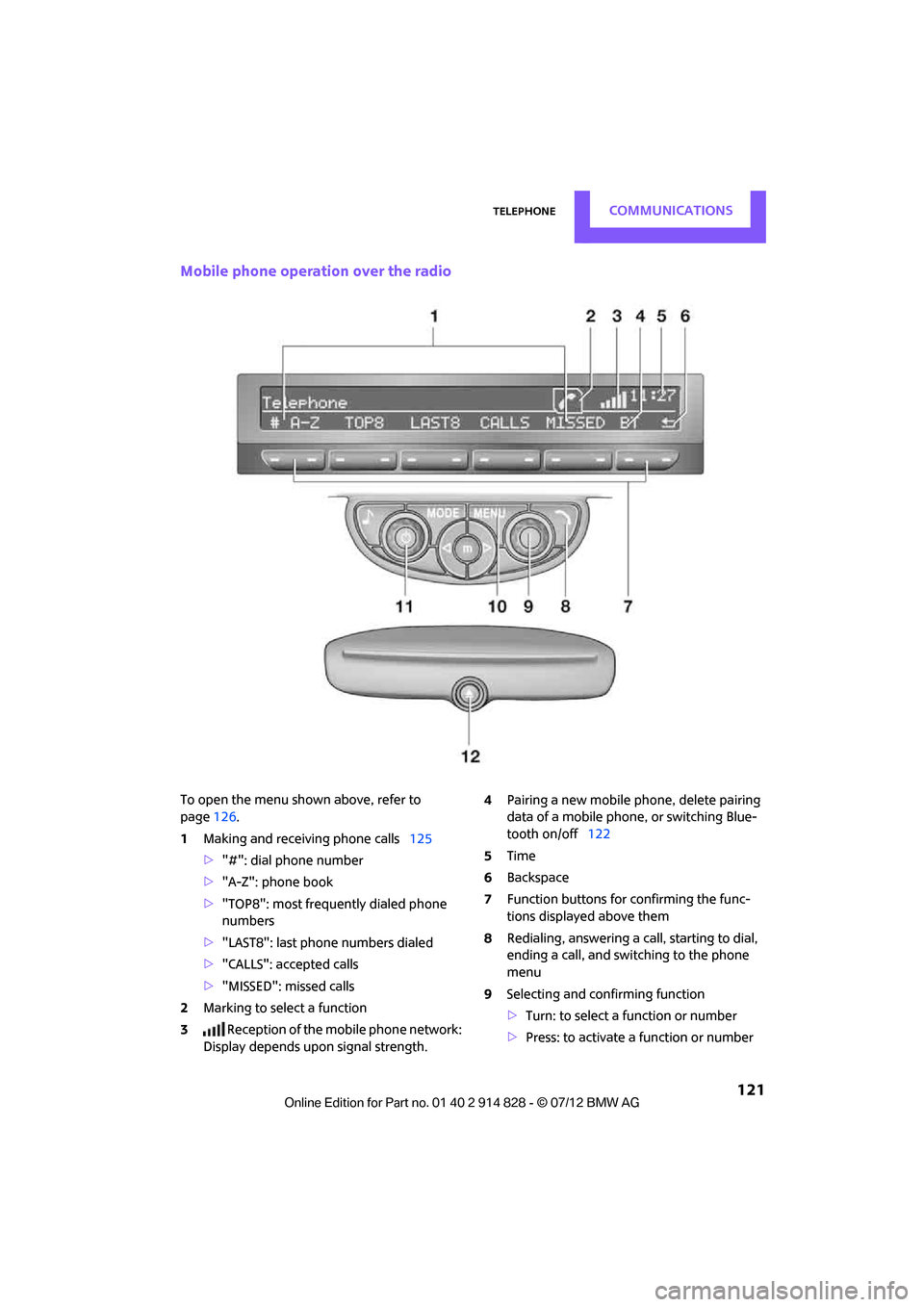
To open the menu shown above, refer to
page126.
1 Making and receiving phone calls 125
> "#": dial phone number
> "A-Z": phone book
> "TOP8": most frequently dialed phone
numbers
> "LAST8": last phone numbers dialed
> "CALLS": accepted calls
> "MISSED": missed calls
2 Marking to select a function
3 Reception of the mobile phone network:
Display depends upon signal strength. 4
Pairing a new mobile phone, delete pairing
data of a mobile phon e, or switching Blue-
tooth on/off 122
5 Time
6 Backspace
7 Function buttons for confirming the func-
tions displayed above them
8 Redialing, answering a ca ll, starting to dial,
ending a call, and switching to the phone
menu
9 Selecting and confirming function
>Turn: to select a function or number
> Press: to activate a function or number
Online Edition for Part no. 01 40 2 914 828 - \251 07/12 BMW AG
Page 123 of 201
COMMUNICATIONSTelephone
122
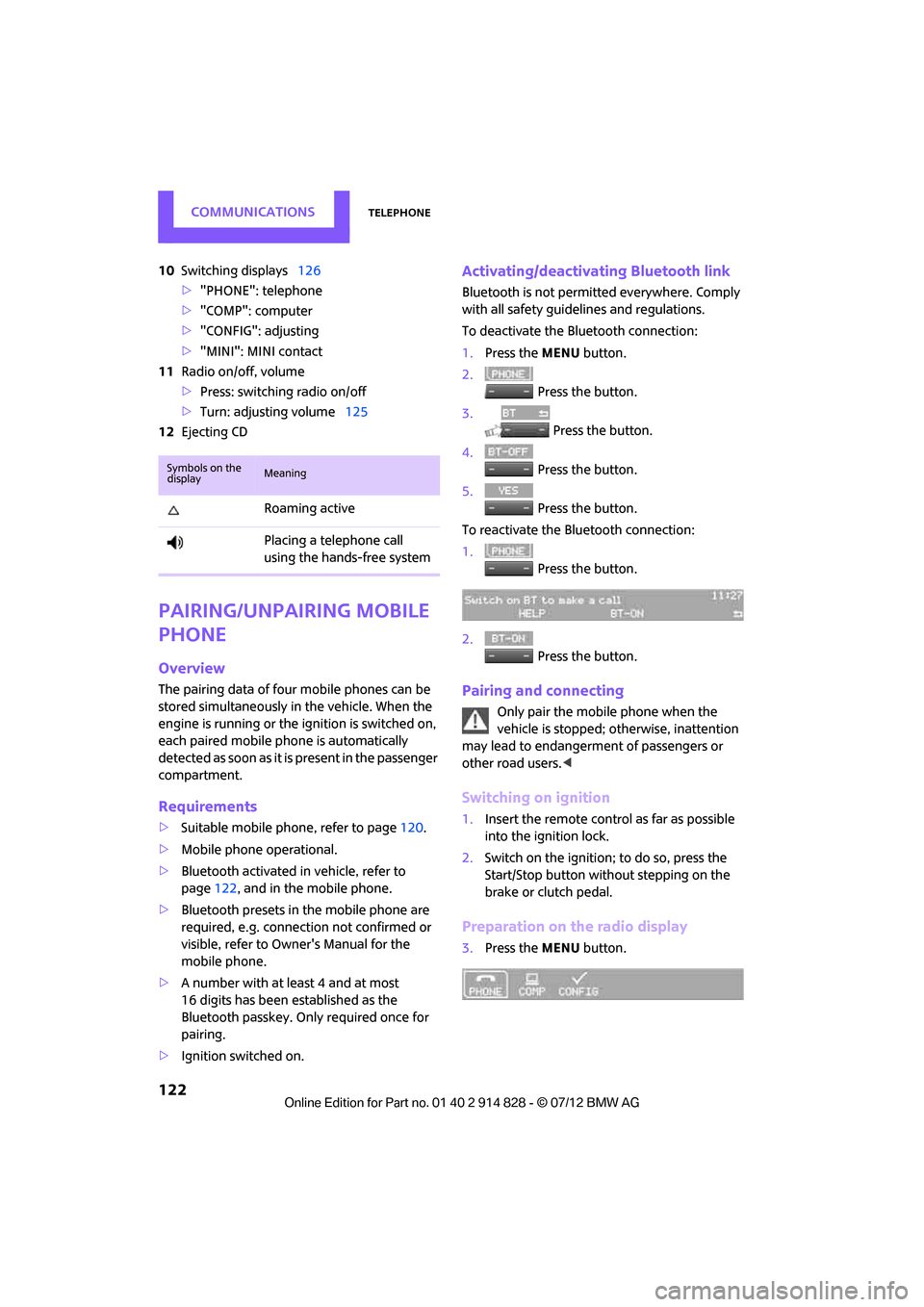
10Switching displays 126
> "PHONE": telephone
> "COMP": computer
> "CONFIG": adjusting
> "MINI": MINI contact
11 Radio on/off, volume
>Press: switchin g radio on/off
> Turn: adjusting volume 125
12 Ejecting CD
Pairing/unpairing mobile
phone
Overview
The pairing data of four mobile phones can be
stored simultaneously in the vehicle. When the
engine is running or the ignition is switched on,
each paired mobile phone is automatically
detected as soon as it is present in the passenger
compartment.
Requirements
>Suitable mobile ph one, refer to page120.
> Mobile phone operational.
> Bluetooth activated in vehicle, refer to
page 122, and in the mobile phone.
> Bluetooth presets in the mobile phone are
required, e.g. connection not confirmed or
visible, refer to Owner's Manual for the
mobile phone.
> A number with at least 4 and at most
16 digits has been established as the
Bluetooth passkey. Only required once for
pairing.
> Ignition switched on.
Activating/deactivating Bluetooth link
Bluetooth is not permitted everywhere. Comply
with all safety guidelines and regulations.
To deactivate the Bluetooth connection:
1.Press the MENU button.
2. Press the button.
3. Press the button.
4. Press the button.
5. Press the button.
To reactivate the Bluetooth connection:
1. Press the button.
2. Press the button.
Pairing and connecting
Only pair the mobile phone when the
vehicle is stopped; otherwise, inattention
may lead to endangerment of passengers or
other road users. <
Switching on ignition
1.Insert the remote control as far as possible
into the ignition lock.
2. Switch on the ignition; to do so, press the
Start/Stop button without stepping on the
brake or clutch pedal.
Preparation on the radio display
3.Press the MENU button.
Symbols on the
displayMeaning
Roaming active
Placing a telephone call
using the hands-free system
Online Edition for Part no. 01 40 2 914 828 - \251 07/12 BMW AG
Page 124 of 201
TelephoneCOMMUNICATIONS
123
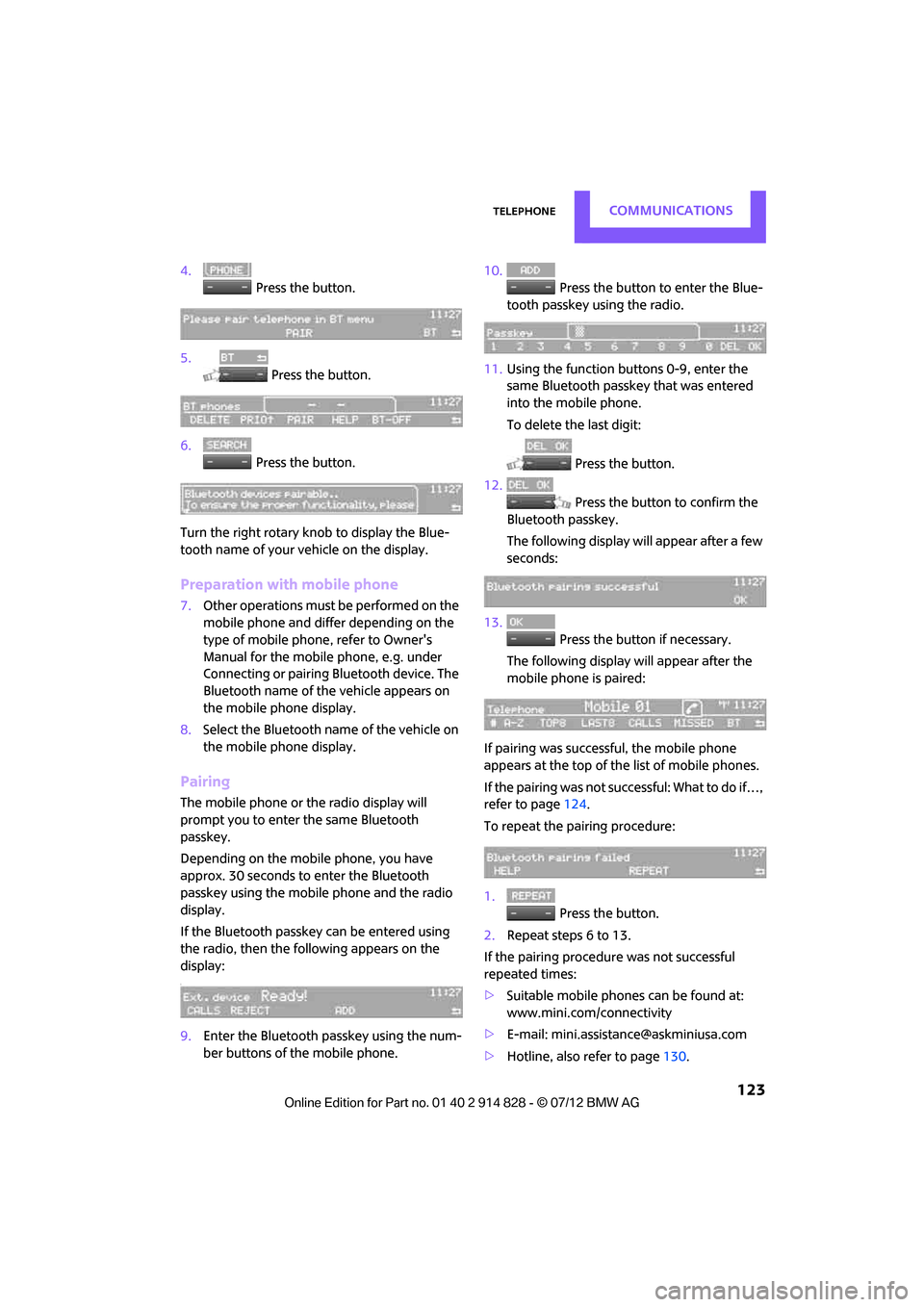
4. Press the button.
5. Press the button.
6. Press the button.
Turn the right rotary knob to display the Blue-
tooth name of your vehicle on the display.
Preparation with mobile phone
7. Other operations must be performed on the
mobile phone and differ depending on the
type of mobile phone, refer to Owner's
Manual for the mobile phone, e.g. under
Connecting or pairing Bluetooth device. The
Bluetooth name of the vehicle appears on
the mobile phone display.
8. Select the Bluetooth name of the vehicle on
the mobile phone display.
Pairing
The mobile phone or the radio display will
prompt you to enter the same Bluetooth
passkey.
Depending on the mobile phone, you have
approx. 30 seconds to enter the Bluetooth
passkey using the mobile phone and the radio
display.
If the Bluetooth passkey can be entered using
the radio, then the following appears on the
display:
:
9.Enter the Bluetooth passkey using the num-
ber buttons of the mobile phone. 10.
Press the button to enter the Blue-
tooth passkey using the radio.
11. Using the function buttons 0-9, enter the
same Bluetooth passke y that was entered
into the mobile phone.
To delete the last digit:
Press the button.
12. Press the button to confirm the
Bluetooth passkey.
The following display will appear after a few
seconds:
13. Press the button if necessary.
The following display will appear after the
mobile phone is paired:
If pairing was successful, the mobile phone
appears at the top of the list of mobile phones.
If the pairing was not successful: What to do if…,
refer to page 124.
To repeat the pairing procedure:
1. Press the button.
2. Repeat steps 6 to 13.
If the pairing procedur e was not successful
repeated times:
> Suitable mobile phones can be found at:
www.mini.com/connectivity
> E-mail: [email protected]
> Hotline, also refer to page 130.
Online Edition for Part no. 01 40 2 914 828 - \251 07/12 BMW AG