Low pressure MINI Countryman 2013 User Guide
[x] Cancel search | Manufacturer: MINI, Model Year: 2013, Model line: Countryman, Model: MINI Countryman 2013Pages: 275, PDF Size: 4.09 MB
Page 114 of 275
Things to remember when drivingDRIVING TIPS
113
Rear luggage rack
A special rear-mounted luggage rack is available
as an optional accessory. It does not require a
trailer hitch.
Please comply with the precautions included
with the installation instructions.
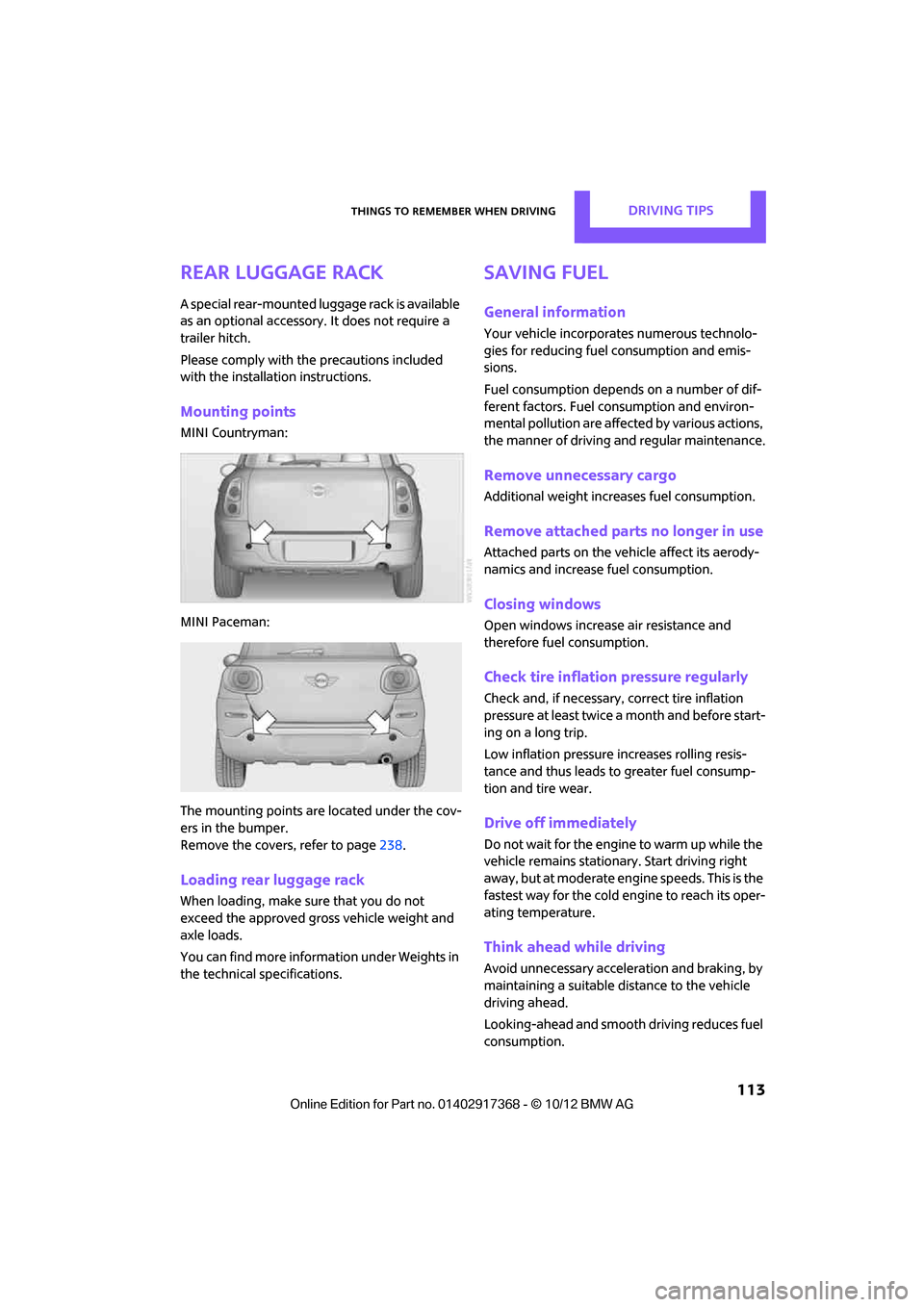
Mounting points
MINI Countryman:
MINI Paceman:
The mounting points ar e located under the cov-
ers in the bumper.
Remove the covers , refer to page238.
Loading rear luggage rack
When loading, make su re that you do not
exceed the approved gross vehicle weight and
axle loads.
You can find more information under Weights in
the technical specifications.
Saving fuel
General information
Your vehicle incorporates numerous technolo-
gies for reducing fuel consumption and emis-
sions.
Fuel consumption depends on a number of dif-
ferent factors. Fuel consumption and environ-
mental pollution are affect ed by various actions,
the manner of driving and regular maintenance.
Remove unnecessary cargo
Additional weight increases fuel consumption.
Remove attached part s no longer in use
Attached parts on the ve hicle affect its aerody-
namics and increase fuel consumption.
Closing windows
Open windows increase air resistance and
therefore fuel consumption.
Check tire inflation pressure regularly
Check and, if necessary, correct tire inflation
pressure at least twice a month and before start-
ing on a long trip.
Low inflation pressure increases rolling resis-
tance and thus leads to greater fuel consump-
tion and tire wear.
Drive off immediately
Do not wait for the engine to warm up while the
vehicle remains stationary. Start driving right
away, but at moderate engi ne speeds. This is the
fastest way for the cold engine to reach its oper-
ating temperature.
Think ahead while driving
Avoid unnecessary accelera tion and braking, by
maintaining a suitable di stance to the vehicle
driving ahead.
Looking-ahead and smooth driving reduces fuel
consumption.
00320051004F004C00510048000300280047004C0057004C005200510003
Page 204 of 275
Wheels and tiresMOBILITY
203
Wheels and tires
Vehicle equipment
In this chapter, all production, country, and
optional equipment that is offered in the model
range is described. Equipment is also described
that is not available because of, for example,
selected options or count ry version. This also
applies to safety related functions and systems.
Tire inflation pressures
Information for your safety
It is not merely the tires' service life, but also
driving comfort and, to a great extent, driving
safety that depend on the condition of the tires
and the maintenance of the specified tire pres-
sure.
Checking pressure
Check the tire inflatio n pressure regularly
and correct it, if nece ssary: at least twice a
month and before starting long trips. If you fail
to observe this precaution you may be driving
on tires with incorrect tire pressures, a condition
that can not only compromise your vehicle's
driving stability, but also lead to tire damage and
the risk of an accident. Do not drive with
deflated, i.e. flat tires, except when using run-
flat tires. A flat tire will seriously impair your
vehicle's handling and braking response.
Attempts to drive on a flat tire can lead to loss of
control over the vehicle. <
Check the tire inflation pressures only on cold
tires. This means after a maximum of 1.25 miles/
2 km driving or when the vehicle has been
parked for at least 2 hours. When tires are warm,
the tire inflation pressure is higher. After adjusting the tire inflation pressure,
reinitialize the Flat Tire Monitor, page 75,
or reset the Tire Pressure Monitor, page 78.<
Pressure specifications
The tables below provide all the correct inflation
pressures for the specifie d tire sizes at ambient
temperature.
The tire inflation pressures apply to the
tire sizes approved and the tire brands
recommended by the manufacturer of your
MINI. Your MINI dealer will be glad to advise
you. <
For correct identification of the right tire infla-
tion pressures, observe the following:
> Tire sizes for your vehicle
> Maximum allowable driving speed
Tire inflation pressures for driving up to
100 mph or 160 km/h
For normal driving up to 100 mph or 160 km/h
and to achieve optimum dr iving comfort, adjust
pressures to the respective tire inflation pres-
sures listed on the foll owing pages in the col-
umns for traveling speeds up to a maximum of
100 mph or 160 km/h.
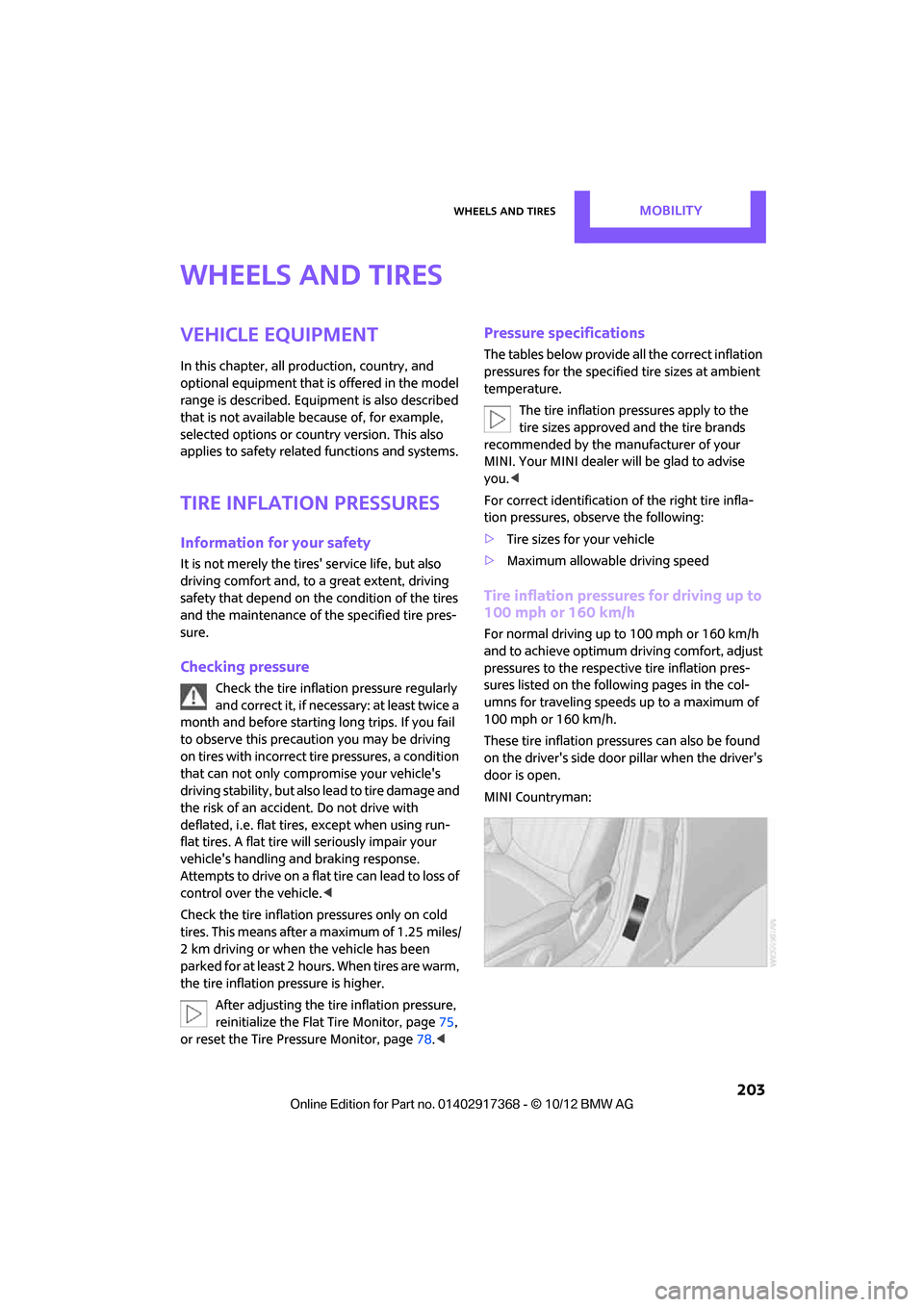
These tire inflation pre ssures can also be found
on the driver's side door pillar when the driver's
door is open.
MINI Countryman:
00320051004F004C00510048000300280047004C0057004C005200510003
Page 214 of 275
Wheels and tiresMOBILITY
213
puncture, refer to page78. Your MINI dealer will
be glad to advise you.
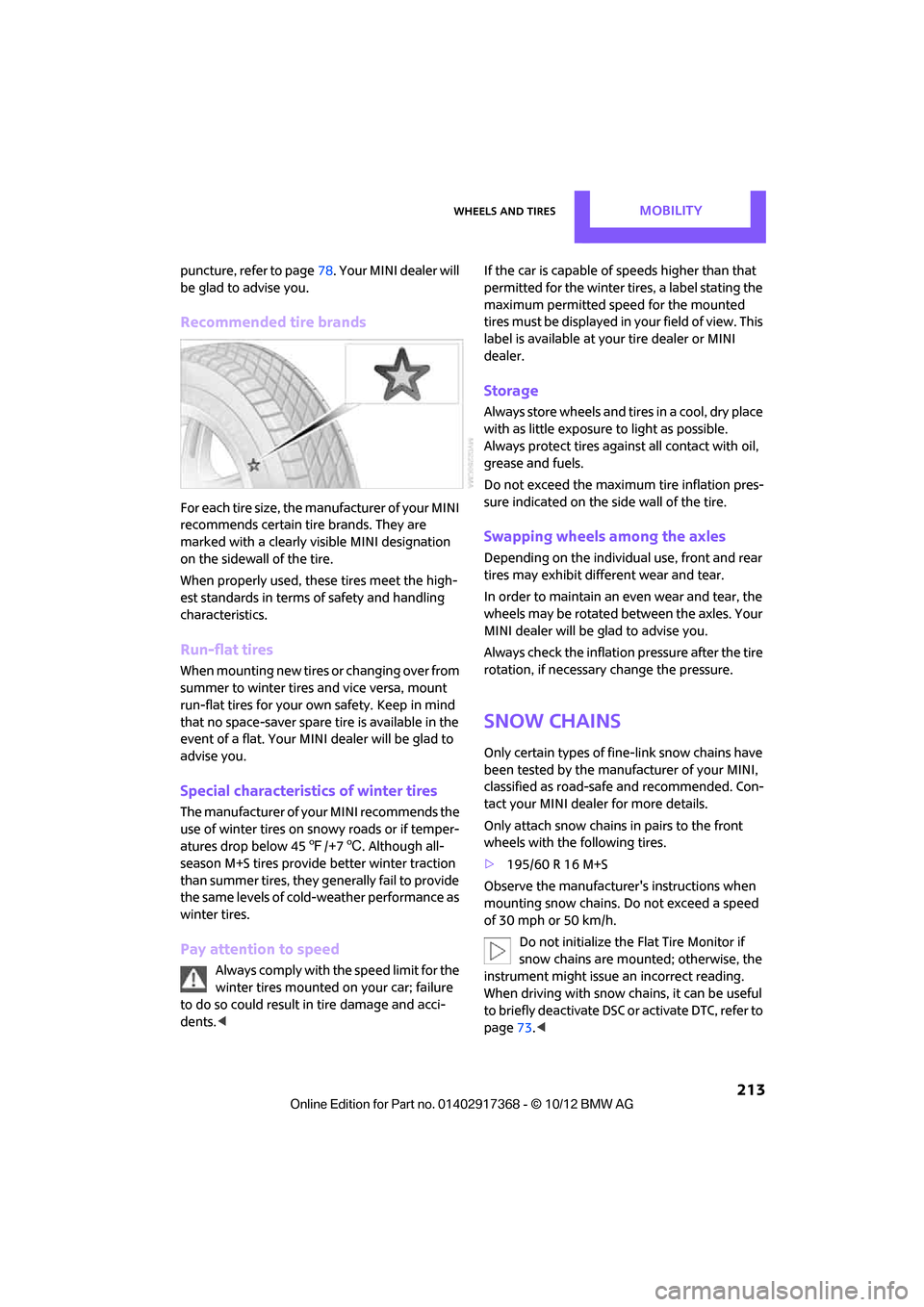
Recommended tire brands
For each tire size, the manufacturer of your MINI
recommends certain tire brands. They are
marked with a clearly visible MINI designation
on the sidewall of the tire.
When properly used, these tires meet the high-
est standards in terms of safety and handling
characteristics.
Run-flat tires
When mounting new tires or changing over from
summer to winter tires and vice versa, mount
run-flat tires for your ow n safety. Keep in mind
that no space-saver spare tire is available in the
event of a flat. Your MINI dealer will be glad to
advise you.
Special characteristics of winter tires
The manufacturer of your MINI recommends the
use of winter tires on snowy roads or if temper-
atures drop below 45 7/+7 6. Although all-
season M+S tires provide better winter traction
than summer tires, they generally fail to provide
the same levels of cold-weather performance as
winter tires.
Pay attention to speed
Always comply with the speed limit for the
winter tires mounted on your car; failure
to do so could result in tire damage and acci-
dents. < If the car is capable of
speeds higher than that
permitted for the winter ti res, a label stating the
maximum permitted speed for the mounted
tires must be displayed in your field of view. This
label is available at your tire dealer or MINI
dealer.
Storage
Always store wheels and tires in a cool, dry place
with as little exposure to light as possible.
Always protect tires agains t all contact with oil,
grease and fuels.
Do not exceed the maximum tire inflation pres-
sure indicated on the side wall of the tire.
Swapping wheels among the axles
Depending on the individual use, front and rear
tires may exhibit diff erent wear and tear.
In order to maintain an even wear and tear, the
wheels may be rotated between the axles. Your
MINI dealer will be glad to advise you.
Always check the inflation pressure after the tire
rotation, if necessary change the pressure.
Snow chains
Only certain types of fi ne-link snow chains have
been tested by the manufacturer of your MINI,
classified as road-saf e and recommended. Con-
tact your MINI deal er for more details.
Only attach snow chains in pairs to the front
wheels with the following tires.
> 195/60 R 16 M+S
Observe the manufacturer's instructions when
mounting snow chains. Do not exceed a speed
of 30 mph or 50 km/h. Do not initialize the Flat Tire Monitor if
snow chains are mounted; otherwise, the
instrument might issue an incorrect reading.
When driving with snow chains, it can be useful
to briefly deactivate DSC or activate DTC, refer to
page 73.<
00320051004F004C00510048000300280047004C0057004C005200510003
Page 218 of 275
Engine compartmentMOBILITY
217
Oil change
Only MINI dealers are to perform oil changes.
Coolant
Coolant consists of half water and half additive.
Not all commercially available additives are suit-
able for your MINI. Your MINI dealer knows
which additives are suitable and will be glad to
advise you.Only use suitable additives; otherwise,
engine damage may result. Because addi-
tives are harmful to your health, it is important
to follow the instructions on the containers. <
Comply with the appropriate environmen-
tal protection regulations when disposing
of coolant additives. <
Coolant temperature
A warning lamp will come on if the coolant, and
therefore the engine, becomes too hot.
A message appears on the Control Display.
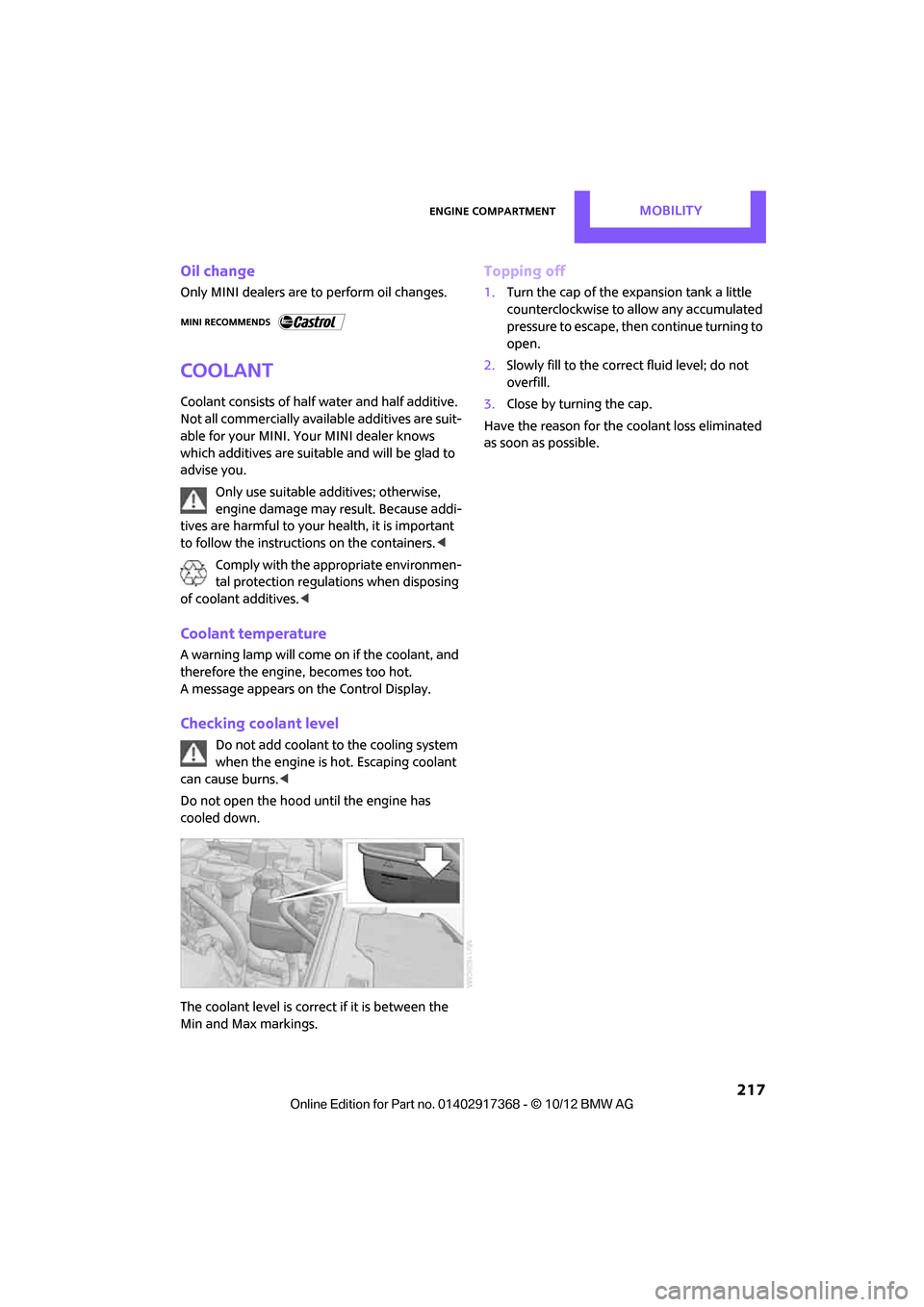
Checking coolant level
Do not add coolant to the cooling system
when the engine is hot. Escaping coolant
can cause burns. <
Do not open the hood until the engine has
cooled down.
The coolant level is correct if it is between the
Min and Max markings.
Topping off
1. Turn the cap of the expansion tank a little
counterclockwise to allow any accumulated
pressure to escape, then continue turning to
open.
2. Slowly fill to the correct fluid level; do not
overfill.
3. Close by turning the cap.
Have the reason for the coolant loss eliminated
as soon as possible.
00320051004F004C00510048000300280047004C0057004C005200510003
Page 221 of 275

MOBILITYCare
220
Care
Vehicle equipment
In this chapter, all production, country, and
optional equipment that is offered in the model
range is described. Equipment is also described
that is not available because of, for example,
selected options or coun try version. This also
applies to safety relate d functions and systems.
Car-care products
Regular cleaning and care helps to maintain the
value of your MINI.
The manufacturer of your MINI recommends
using manufacturer-approved products to clean
and care for your vehicle.
Your MINI dealer would be pleased to advise
you on cleaning and care products and services
for your MINI.
The ingredients of original MINI Care Prod-
ucts have been tested, and the products
have been tested in the laboratory and in prac-
tice. They offer optimum care and protection for
your vehicle. <
Do not use any cleansers containing alco-
hol or solvents as these may cause dam-
age. <
Cleaning agents may contain hazardous
or health-damaging substances. Follow
the warning and hazard instructions on the
packaging. For interior cleaning, always open
the doors or windows of the vehicle.
Do not use any products that are not intended
for cleaning the vehicle. <
External care
Washing your vehicle
Especially during the winter months the
vehicle should be frequently washed. Dirt
and road salt can damage the vehicle. <
After washing the vehicle, apply the
brakes briefly to dry them; otherwise,
water can reduce braking efficiency over the
short term and the brake rotors can corrode. <
Regularly open the hood and clear out any
debris such as leaves th at may have collected in
the region of the windshield.
Car washes
Preference should be given to cloth car washes.
Do not use automatic high-pressure car
washes; otherwise, water may drip into
the vehicle around the windows. <
Before driving in to the car wash, check if the sys-
tem is suitable for your MINI. Observe the fol-
lowing points:
> Vehicle dimensions, page 246
> If necessary: fold in the outside mirrors,
page 44
> Maximum permissible tire width
Avoid car washes with tracks higher than
4 in/10 cm; otherwise, the chassis could
be damaged. <
Preparations for driving into the car wash:
> Unscrew the rod antenna.
> Deactivate the rain sensor to prevent unin-
tentional wiping.
> Deactivate rear window wiper and protect it
from damage. Ask the car wash operator
about measures that can be taken to protect
the wipers.
00320051004F004C00510048000300280047004C0057004C005200510003
Page 222 of 275
CareMOBILITY
221
>Remove additional atta chments, e.g. spoil-
ers or telephone antennas, if there is a pos-
sibility that they could be damaged.
> Insert the remote cont rol into the ignition
lock.
Automatic transmission
Before driving into the ca r wash, make sure that
the vehicle can roll:
1. Place the remote control, even with Comfort
Access, in the ig nition lock.
2. Move the selector lever to position N.
3. Release the parking brake.
4. Switch off the engine.
5. Insert the remote control in the ignition lock
so that the vehicle can roll.
Steam jets/high-pressure washers
When using steam jets or high-pressure
washers, make sure th at you maintain suf-
ficient distance from the vehicle and do not
exceed a maximum temperature of 140 7/
60 6 .
If the distance is too close, the pressure too high,
or the temperature too high, parts of the vehicle
can be damaged, or water can penetrate.
Observe the operating in structions for high-
pressure washers. <
Do not spray sensors such as the Park Dis-
tance Control with hi gh-pressure washers
for a long time and main tain the greatest possi-
ble distance of approx. 1 ft/30 cm from them. <
Manual washing
Use a great deal of water and, if necessary, car
shampoo when washing your car by hand. Clean
the vehicle with a sponge or a washing brush
applying a slight amount of pressure.
Before cleaning the windshield, deacti-
vate the rain sensor or turn off the ignition
to prevent unintentional wiping.
ing vehicles by hand. <
Headlamps
Do not wipe dry and do not use abrasive or cor-
rosive cleaning agents. Remove dirt and con-
tamination, such as inse cts, by soaking with
shampoo and then washing with plenty of
water.
Do not remove accumula ted ice and snow with
an ice scraper; use window deicers instead.
Windows
Clean the outside and inside of the windows and
mirrors with a window cleaner.
Do not clean the mirro rs with cleaners
containing quartz. <
Wiper blades
Clean with soapy water an d change regularly to
prevent the formation of streaks.
Wax, preservatives and dirt on the win-
dows cause streaks when the windshield
wipers are on, and can cause premature wear of
the wiper blades and interfere with the rain sen-
sor.<
Paintwork, care
Regular care helps your vehicle retain its value
and protects the pain t from the long-term
effects of aggressive substances.
Environmental influences in areas with
increased air pollution or natural contaminants,
such as tree sap or pollen, can affect the vehicle
paintwork. It is therefor e important to adjust the
frequency and extent of vehicle care corre-
spondingly.
Immediately remove any pa rticularly aggressive
substances, such as fuel that has overflowed, oil,
grease, brake fluid, or bi rd droppings; otherwise,
paint damage can be caused.
00320051004F004C00510048000300280047004C0057004C005200510003
Page 231 of 275
MOBILITYReplacing components
230
Repairing a flat tire
Safety measures in the event of a break-
down:
Park the vehicle as far as possible from moving
traffic and switch on the hazard warning flash-
ers.
Turn the steering wheel until the front wheels
are in the straight-ahead position and engage
the steering wheel lock. Engage the parking
brake and shift into 1st or reverse gear or place
the selector lever in position P.
All passengers should be outside the vehicle and
in a safe place, e.g. behind a guardrail.
Erect a warning triangle or warning flasher at the
appropriate distance if necessary. Comply with
all safety guidelines and regulations. <
In the event of a flat tire, different procedures
should be followed depending on the equip-
ment included in your vehicle:
> MINI Mobility Kit, refer to the following sec-
tion
> Run-flat tires, page 212
MINI Mobility Kit
The Mobility Kit is located under the left front
seat.
Preparations
Use of the MINI Mobility Kit may be ineffective if
the tire puncture measures approx. 1/8 in/4 mm
or more. Contact the nearest MINI dealer if the
tire cannot be made drivable with the Mobility
Kit.
Do not remove foreign bodies which have pen-
etrated the tire if possible.
Follow the instructions on using the Mobil-
ity Kit found on the compressor and the
sealant bottle. <
Remove the adhesive label for the speed limit
from the sealant bottle an d affix it to the steer-
ing wheel.
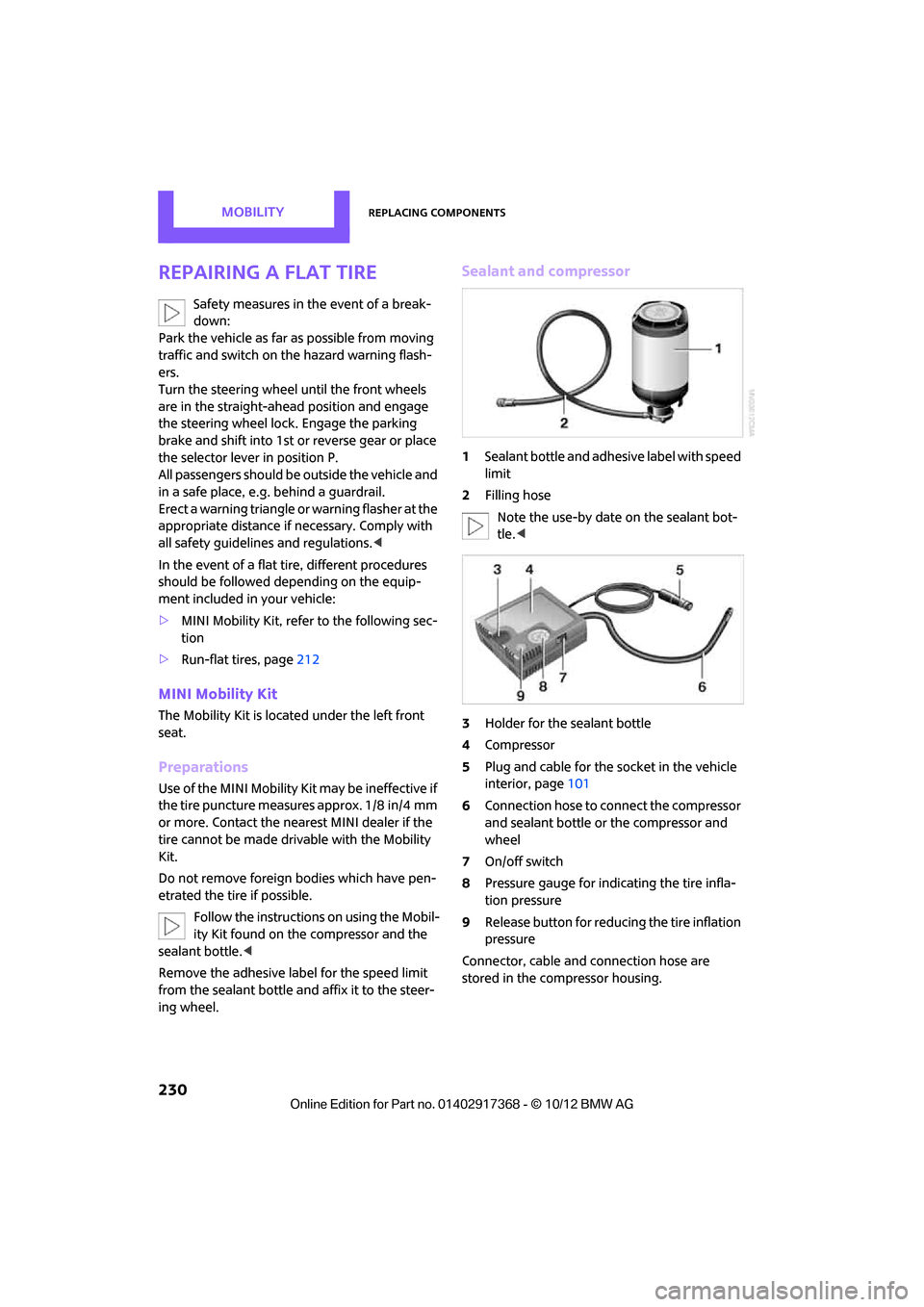
Sealant and compressor
1 Sealant bottle and adhesive label with speed
limit
2 Filling hose
Note the use-by date on the sealant bot-
tle. <
3 Holder for the sealant bottle
4 Compressor
5 Plug and cable for the socket in the vehicle
interior, page 101
6 Connection hose to connect the compressor
and sealant bottle or the compressor and
wheel
7 On/off switch
8 Pressure gauge for indi cating the tire infla-
tion pressure
9 Release button for reduci ng the tire inflation
pressure
Connector, cable and connection hose are
stored in the co mpressor housing.
00320051004F004C00510048000300280047004C0057004C005200510003
Page 232 of 275

Replacing componentsMOBILITY
231
Using the Mobility Kit
To repair a tire puncture with the Mobility Kit,
proceed as follows:
> Filling the tire with sealant.
> Distributing the sealant.
> Correct the tire inflation pressure.
Filling the tire with sealant
Proceed in the specifie d order; otherwise,
sealant may emerge under high pres-
sure. <
1. Shake the sealant bottle.
2. Pull the connecting hose 6 completely out of
the compressor housing and screw it onto
the connector of the sealant bottle. Make
sure that the hose is not kinked.
3. Insert the sealant bottle on the compressor
housing in an upright position.
4. Unscrew the dust cap from the valve of the
defective wheel and screw the filling hose 2
of the sealant bottle onto the valve.
5. Ensure that the compre ssor is switched off.
6. Insert the plug 5 into the lighter socket/
power socket in the vehicle interior,
page 101.
7. With the engine running:
Switch on the compre ssor and let run for
about 3 to 8 minutes in order to add the
sealant and to achieve an inflation pressure
of about 1.8 bar/26 psi. When adding sealant, the filling pres-
sure can temporarily increase up to
about 5 bar/73 psi. Do not switch off the
compressor during this phase. <
Do not run the compressor for longer
than 10 minutes; otherwise, the
device will overheat and possibly be dam-
aged. <
8. Switch off the compressor.
If an inflation pressure of 1.8 bar/26 psi is not
reached:
1. Unscrew the filling hose 2 from the wheel
and drive the vehicle forward and backward
approx. 33 ft/10 m to distribute the liquid
sealant in the tire evenly.
2. Inflate the tire again with the compressor.
If an inflation pressure of 1.8 bar/26 psi
still cannot be reached, then the tire is too
heavily damaged. Please contact the nearest
MINI dealer. <
Stowing Mobility Kit
1.Unscrew filler hose 2 of the sealant bottle
from the wheel.
2. Unscrew connecting hose of the
compressor 6 from the sealant bottle.
3. Connect the filler hose 2 of the sealant bot-
tle to the unoccupied connection on the
sealant bottle.
This prevents the rest of the sealant from
escaping from the bottle.
4. Wrap the empty sealant bottle in suitable
material to avoid dirtying the cargo area.
5. Stow Mobility Kit back in the vehicle.
Distributing the sealant
Immediately drive approx. 3.1 miles/5 km so
that the sealant evenly distributes itself.
Do not exceed speeds of 50 mph/
80 km/h.
If possible, do not drop below 10 mph/
20 km/h.<
00320051004F004C00510048000300280047004C0057004C005200510003
Page 261 of 275
260
REFERENCEEverything from A to Z
Everything from A to Z
Index
A
ABS Antilock Brake System72
Accepting a call 167,179
Accessories, see Vehicle equipment 4
Acknowledgment signals for locking/unlocking vehicle 28
Activated-charcoa l filter for
automatic climate control 91
Adaptive Light Control 85
Adding engine oil 216
Additives
– coolant 217
– engine oil 216
Address, entering 126
Address for navigation
– entering 120,126
Adjusting temperature inside the car, refer to Air
conditioner 88
Adjusting temperature inside the car, refer to Automatic
climate control 90
Adjusting the tone during audio operation, refer to
Tone control 141
Airbags 81
– sitting safely 38
– warning lamp 83
Air conditioner 88
Air conditioning mode
– air conditioner 88
– automatic cl imate control90
– ventilation 92
Air distribution
– automatic 90
– individual 89
– manual 89 Air flow rate
88,90
– air conditioning system 88
– automatic climate control 90
– heating, ventilation 88
Airing, refer to Ventilation92
Air pressure, checking, refer to
Tire inflation pressure 203
Air recirculation, refer to Recirculated-air
mode 89,90
Air supply
– air conditioner 88
– automatic climate control 90
– ventilation 92
AKI, refer to Fuel grade 201
Alarm system 32
ALL4 all-wheel drive system 74
All-season tires, refer to Winter
tires 213
A ll-wh
ee
l drive, refer to
ALL4 74
AM, waveband 143
Ambient air, refer to
Recirculated-air
mode 89,90
Ambient lighting 87
Antenna, care 220
Antifreeze
– coolant 217
– washer fluid 57
Antilock Brake System ABS 72
Anti-theft alarm system, refer
to Alarm system 32
Approved axle loads, refer to Weights 249
Approved engine oils 216
Approved gross vehicle weight, refer to Weights 249
Armrest, refer to Center armrest 97 Arrival time
– computer
62
– route guidance 129
Ashtray 100
Assistant systems, refer to
– Dynamic Stability Control
DSC 72
Audio 140
– controls 140
– switching on/off 140
– tone control 141
– volume 141
Audio device, external 97
Automatic
– air distribution 90
– air flow rate 90
– cruise control 58
– headlamp control 84
Automatic climate control 88
– automatic air distribution 90
Automatic transmission with Steptronic 52
– Interlock 53
– overriding selector lever lock 54
– Shiftlock 53
– sport program 54
AUTO program for automatic climate control 90
Auxiliary phone 176
AUX-In, refer to External audio device 97
AUX-In connection 153
Average fuel consumption 61
– setting the units 64
Average speed 62
Avoiding highways for navigation 129
Axle loads, refer to
Weights 249
00320051004F004C00510048000300280047004C0057004C005200510003
Page 262 of 275
Everything from A to ZREFERENCE
261
B
Background lighting, refer to
Ambient lighting 87
Backrests, refer to Seats 39
Backup lamps
– replacing bulb 228
Band-aids, refer to First aid pouch 236
Bar, refer to Tow-starting,
towing away 239
Base plate for telephone or mobile phone
– refer to Snap-in adapter 185
Bass sounds, refer to Tone control 141
Battery 233
– disposal 35,234
– jump-starting 236
– temporary power failure 234
Battery renewal
– remote control 35
Being towed 238
Belts, refer to Safety belts 42
Belt tensioner, refer to Safety
belts 42
Beverage holders, refer to Cupholders 100
Black ice, refer to External temperature warning 61
Blower, refer to Air flow rate 88,90
Bluetooth, activating/
deactivating 165,175
Bluetooth audio 157
– device pairing 158
– disconnecting an audio connection 160
– playback 159
– unpairing device 160
– what to do if... 160
Bottle holders, refer to
Cupholders 100
Brake Assist 72
Brake fluid, refer to Service
requirements 64 Brake lamps
– replacing bulbs
228
Brake pads, breaking in 104
Brake rotors 106
– brakes 104
– breaking in 104
Brakes
– ABS 72
– breaking in 104
– MINI Maintenance
System 218
– parking brake 52
– service requirements 64
Brakes, refer to Braking safely 105
Br ake system
104
– breaki ng
in104
– disc brakes 106
– MINI Maintenance
System 218
Breakdown service, refer to Roadside Assistance 236
Breaking in the clutch 104
Break-in period 104
Brightness of Control
Display 70
Bulb changing, refer to Lamps and bulbs 224
Button for starting the engine 50
Buttons on the steering wheel 11
C
Calendar 191
– displaying appointment 191
– selecting calendar day 191
California Proposition 65
warning 5
Call
– ending 168,180
– muting the microphone 181
Calling, refer to Phone numbers, dialing 168,180
Can holders, refer to Cupholders 100 Capacities
251
Car battery, refer to Vehicle battery 233
Car care 220
Care 220
– car-care products 220
– car washes 220
– CD/DVD drives 223
– high-pressure washers 221
– leather 222
– manual washing 221
– upholstery and fabrics 222
– windows 221
– wiper blades 221
Cargo, securing 112
Cargo area 106
– capacity 249
– Comfort Access 34
– lamp 87
– opening from outside 31
– trunk lid, refer to Tailgate 31
Cargo area, expanding 106
Cargo area lamp 87
Cargo area lid, refer to Tailgate 31
Cargo area partition net, refer to Cargo net 109
Cargo loading 110
– securing cargo 112
– stowing cargo 111
– vehicle 106
Cargo net 109
Car key, refer to Keys/remote
controls 26
Carpets, care 222
Car phone
– installation location, refer to Center armrest 97
Car phone, refer to
Telephone 164,174
Car radio, refer to Radio 143
Car wash
– before driving in 52
Car wa sh, care
220
Car w a
shes220
Catalytic converter, refer to Hot exhaust system 105
00320051004F004C00510048000300280047004C0057004C005200510003