seat MINI Countryman 2013 User Guide
[x] Cancel search | Manufacturer: MINI, Model Year: 2013, Model line: Countryman, Model: MINI Countryman 2013Pages: 275, PDF Size: 4.09 MB
Page 48 of 275
Transporting children safelyCONTROLS
47
Child seat security
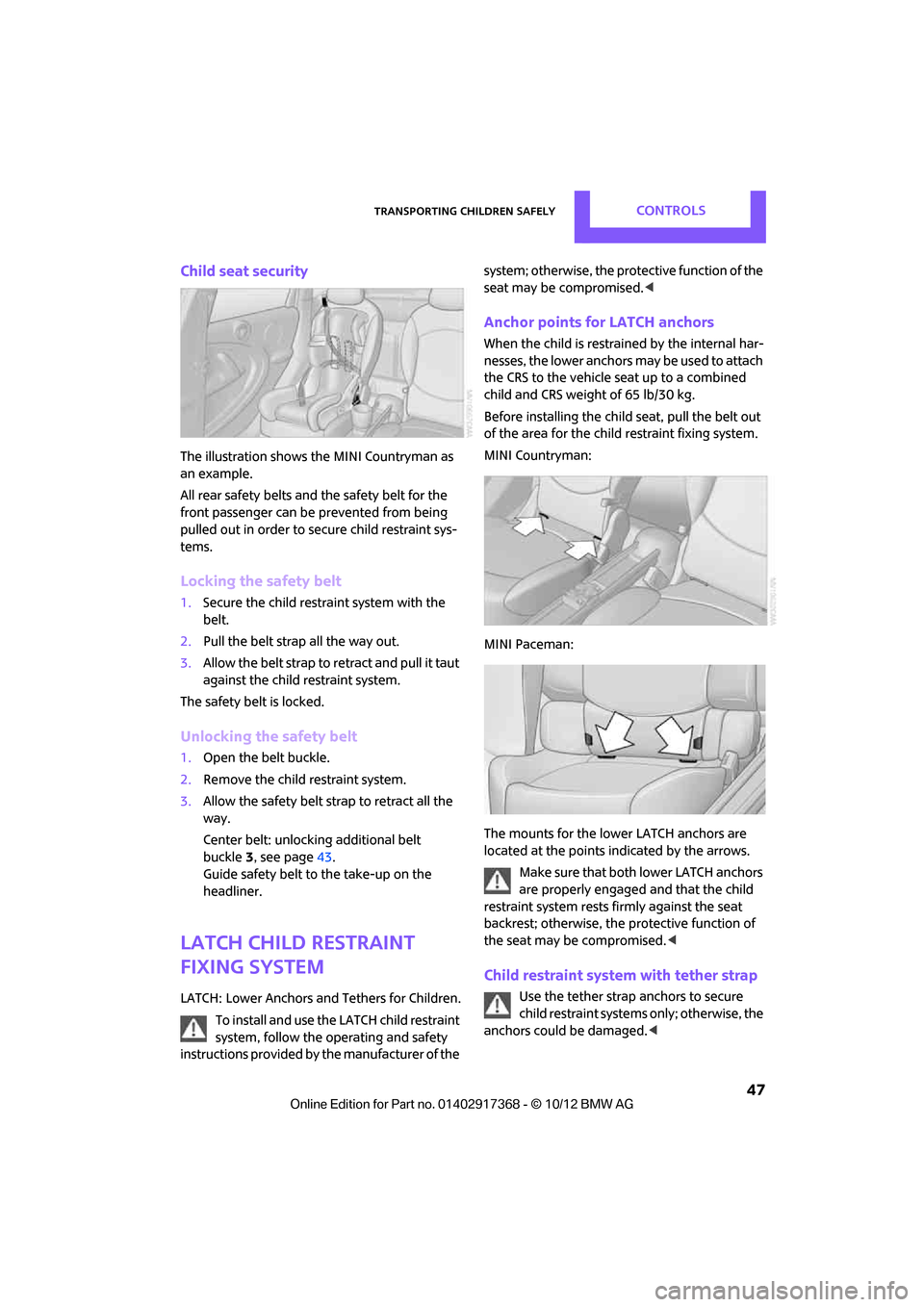
The illustration shows the MINI Countryman as
an example.
All rear safety belts and the safety belt for the
front passenger can be prevented from being
pulled out in order to secure child restraint sys-
tems.
Locking the safety belt
1. Secure the child restraint system with the
belt.
2. Pull the belt strap all the way out.
3. Allow the belt strap to retract and pull it taut
against the child restraint system.
The safety belt is locked.
Unlocking the safety belt
1. Open the belt buckle.
2. Remove the child restraint system.
3. Allow the safety belt strap to retract all the
way.
Center belt: unlocking additional belt
buckle 3, see page 43.
Guide safety belt to the take-up on the
headliner.
LATCH child restraint
fixing system
LATCH: Lower Anchors an d Tethers for Children.
To install and use the LATCH child restraint
system, follow the op erating and safety
instructions provided by the manufacturer of the system; otherwise, the protective function of the
seat may be compromised.
<
Anchor points for LATCH anchors
When the child is restrained by the internal har-
nesses, the lower anchors may be used to attach
the CRS to the vehicle seat up to a combined
child and CRS weight of 65 lb/30 kg.
Before installing the child seat, pull the belt out
of the area for the child restraint fixing system.
MINI Countryman:
MINI Paceman:
The mounts for the lower LATCH anchors are
located at the points indicated by the arrows.
Make sure that both lower LATCH anchors
are properly engaged and that the child
restraint system rests fi rmly against the seat
backrest; otherwise, the protective function of
the seat may be compromised. <
Child restraint system with tether strap
Use the tether strap anchors to secure
child restraint systems only; otherwise, the
anchors could be damaged. <
00320051004F004C00510048000300280047004C0057004C005200510003
Page 49 of 275
CONTROLSTransporting children safely
48
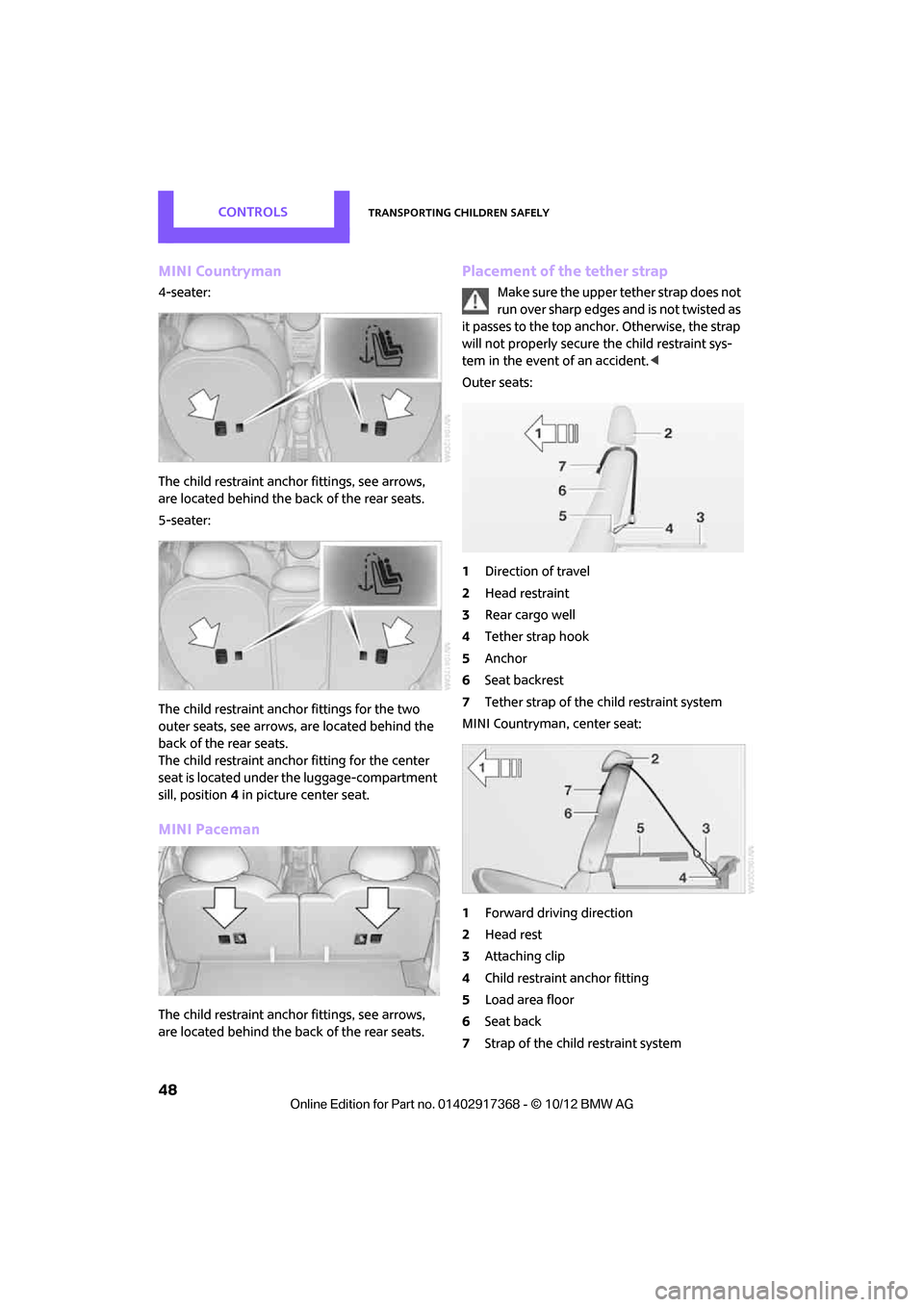
MINI Countryman
4-seater:
The child restraint anchor fittings, see arrows,
are located behind the back of the rear seats.
5-seater:
The child restraint anchor fittings for the two
outer seats, see arrows, are located behind the
back of the rear seats.
The child restraint anchor fitting for the center
seat is located under the luggage-compartment
sill, position4 in picture center seat.
MINI Paceman
The child restraint anchor fittings, see arrows,
are located behind the back of the rear seats.
Placement of the tether strap
Make sure the upper tether strap does not
run over sharp edges and is not twisted as
it passes to the top anchor. Otherwise, the strap
will not properly secure the child restraint sys-
tem in the event of an accident. <
Outer seats:
1 Direction of travel
2 Head restraint
3 Rear cargo well
4 Tether strap hook
5 Anchor
6 Seat backrest
7 Tether strap of the child restraint system
MINI Countryman, center seat:
1 Forward driving direction
2 Head rest
3 Attaching clip
4 Child restraint anchor fitting
5 Load area floor
6 Seat back
7 Strap of the chil d restraint system
00320051004F004C00510048000300280047004C0057004C005200510003
Page 50 of 275
Transporting children safelyCONTROLS
49
Attaching upper tether strap to the
attachment point
1.Slide the head restraint upward.
2. Center seat: fold the load area floor back-
wards
3. Guide the tether strap between the head
restraint holders.
4. Attach the tether strap to the anchor using
the hook.
5. Push the head restraint into its lowermost
position.
6. Pull the tether strap tight.
MINI Countryman:
Securing doors and
windows
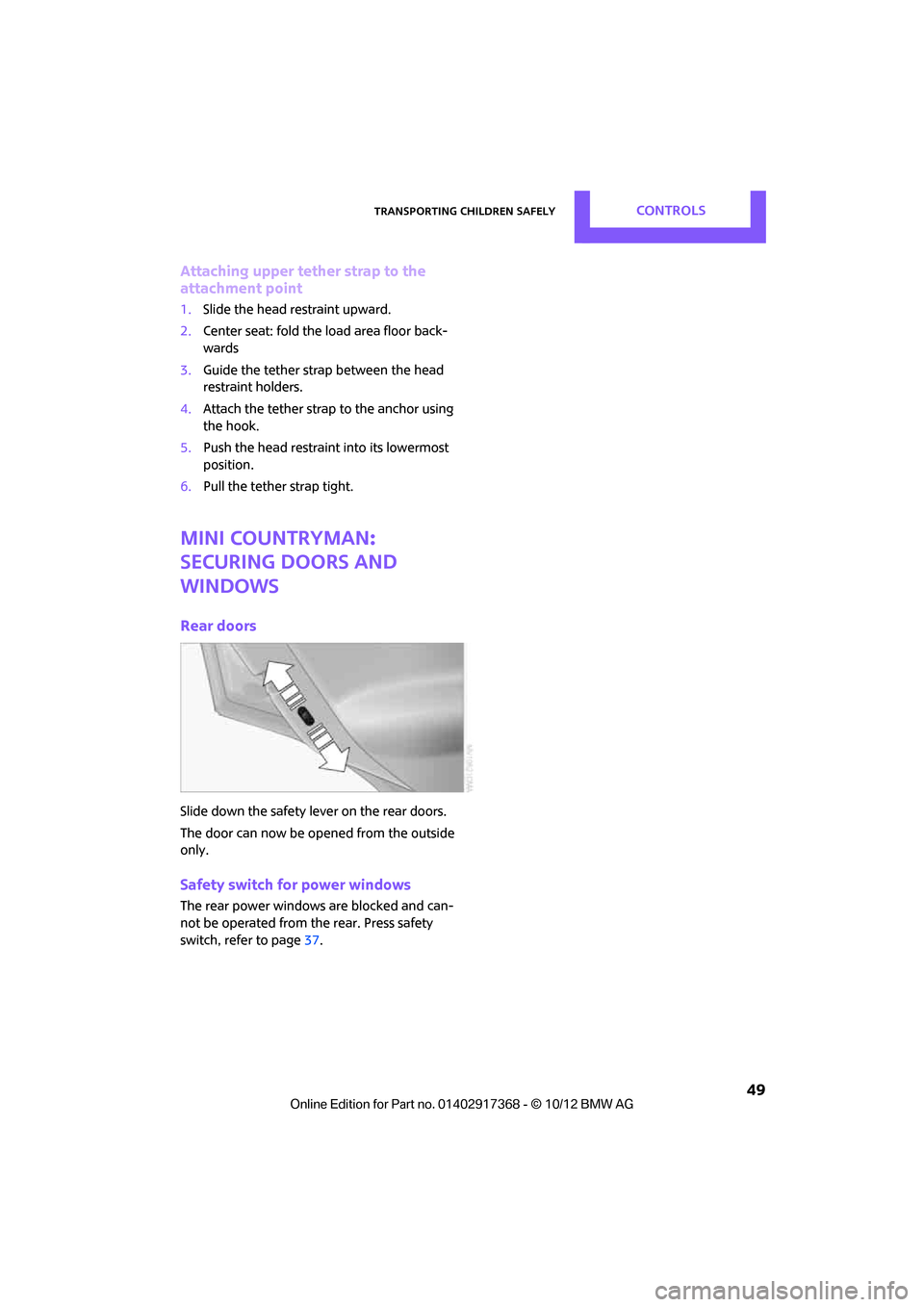
Rear doors
Slide down the safety lever on the rear doors.
The door can now be opened from the outside
only.
Safety switch for power windows
The rear power windows are blocked and can-
not be operated from the rear. Press safety
switch, refe r to page37.
00320051004F004C00510048000300280047004C0057004C005200510003
Page 82 of 275
Technology for driving comfort and safetyCONTROLS
81
Airbags
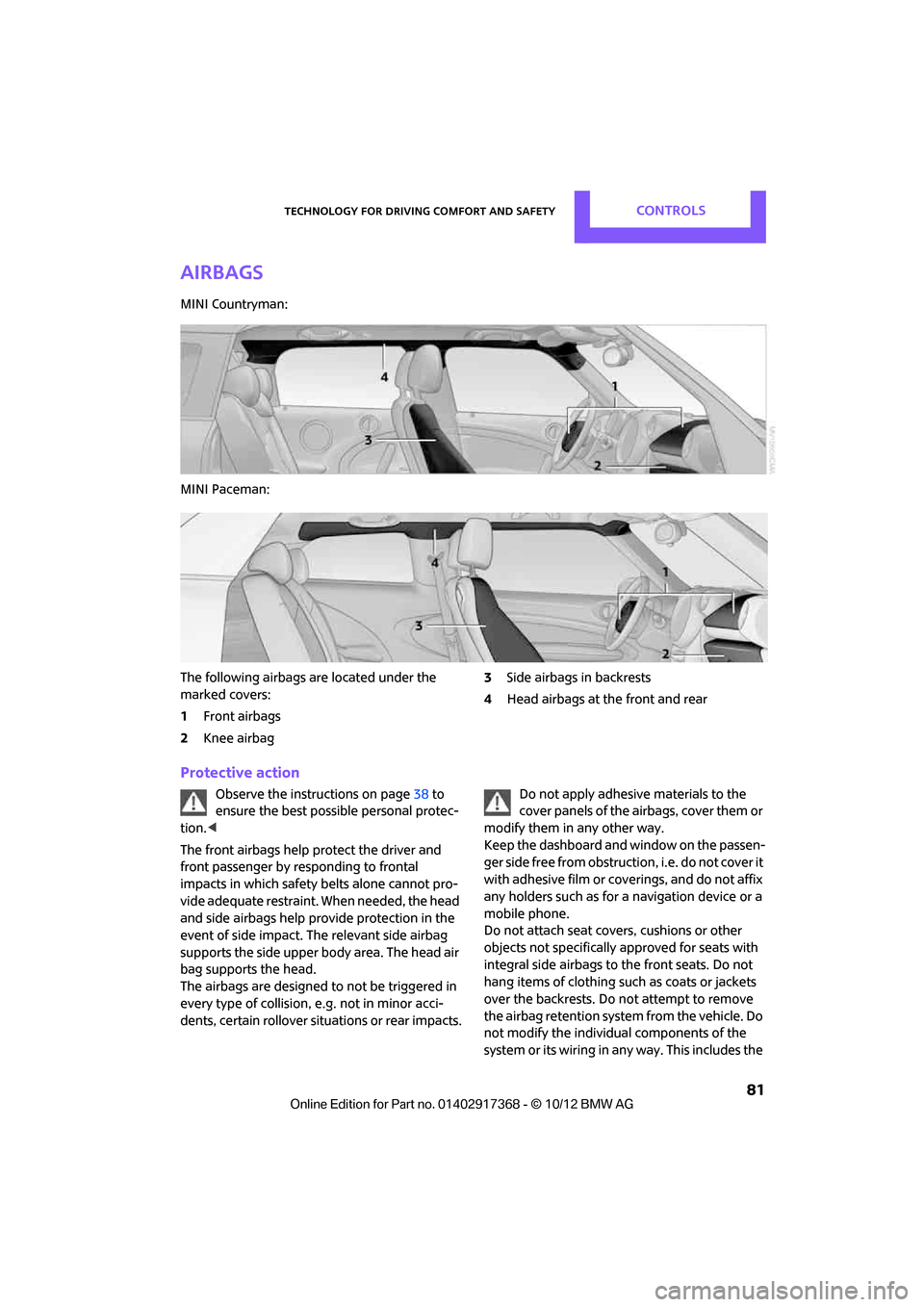
MINI Countryman:
MINI Paceman:
The following airbags are located under the
marked covers:
1Front airbags
2 Knee airbag 3
Side airbags in backrests
4 Head airbags at the front and rear
Protective action
Observe the instructions on page 38 to
ensure the best possible personal protec-
tion. <
The front airbags help protect the driver and
front passenger by responding to frontal
impacts in which safety belts alone cannot pro-
vide adequate restraint. When needed, the head
and side airbags help provide protection in the
event of side impact. Th e relevant side airbag
supports the side upper body area. The head air
bag supports the head.
The airbags are designed to not be triggered in
every type of collision, e.g. not in minor acci-
dents, certain rollover si tuations or rear impacts. Do not apply adhesive materials to the
cover panels of the airbags, cover them or
modify them in any other way.
Keep the dashboard and window on the passen-
g e r s i d e f r e e f r o m o b s t r u c t i o n , i . e . d o n o t c o v e r i t
with adhesive film or co verings, and do not affix
any holders such as for a navigation device or a
mobile phone.
Do not attach seat covers, cushions or other
objects not specifically approved for seats with
integral side airbags to the front seats. Do not
hang items of clothing su ch as coats or jackets
over the backrests. Do not attempt to remove
the airbag retention system from the vehicle. Do
not modify the individual components of the
syst em o r it s w iring in an y w ay . This inclu des th e
00320051004F004C00510048000300280047004C0057004C005200510003
Page 83 of 275
CONTROLSTechnology for driving comfort and safety
82
upholstery in the center of the steering wheel,
on the instrument panel, the doors, and the roof
pillars as well as the sides of the headliner. Do
not attempt to remove or dismantle the steering
wheel.<
Do not touch the individual components
immediately after the system has been
triggered, because there is a danger of burns.
Have the testing, repair, removal, and disposal
o f a i r b a g g e n e r a t o r s e x e c u t e d o n l y b y y o u r M I N I
dealer or a workshop that has the required
explosives licenses.
Otherwise, unprofessiona l attempts to service
the system could lead to failure in an emergency
or undesired airbag activation, either of which
could result in personal injury. <
Warning notices and information about the air-
bags can also be found on the sun visors.
Automatic deactivation of the front
passenger airbags
The presence of a passenger in the front passen-
ger seat is detected by measuring the resistance
of the human body. The system correspondingly
activates or deactivates the front, side, and knee
airbags for the front passenger.
Make sure that the front passenger's feet
remain in the footwell; otherwise, it is not
possible to guarantee the function of the front
passenger airbags.<
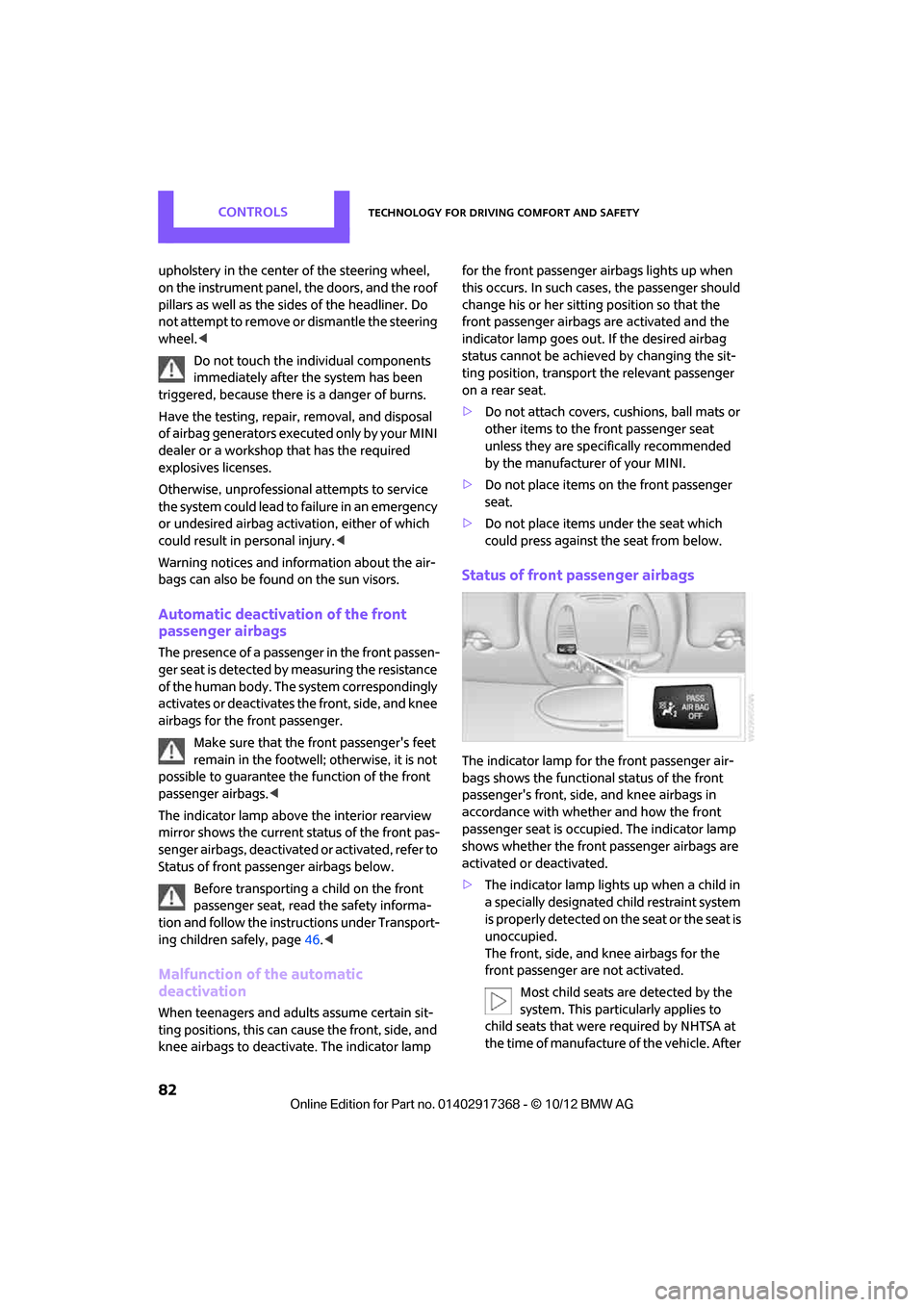
The indicator lamp above the interior rearview
mirror shows the current st atus of the front pas-
senger airbags, deactivated or activated, refer to
Status of front passe nger airbags below.
Before transporting a child on the front
passenger seat, read the safety informa-
tion and follow the instru ctions under Transport-
ing children safely, page 46.<
Malfunction of the automatic
deactivation
When teenagers and adults assume certain sit-
ting positions, this can cause the front, side, and
knee airbags to deactivate. The indicator lamp for the front passenger airbags lights up when
this occurs. In such case
s, the passenger should
change his or her sitting position so that the
front passenger airbags are activated and the
indicator lamp goes out. If the desired airbag
status cannot be achieved by changing the sit-
ting position, transport the relevant passenger
on a rear seat.
> Do not attach covers, cushions, ball mats or
other items to the front passenger seat
unless they are specif ically recommended
by the manufacturer of your MINI.
> Do not place items on the front passenger
seat.
> Do not place items under the seat which
could press against the seat from below.
Status of front passenger airbags
The indicator lamp for the front passenger air-
bags shows the functional status of the front
passenger's front, side, and knee airbags in
accordance with whet her and how the front
passenger seat is occupied. The indicator lamp
shows whether the front passenger airbags are
activated or deactivated.
> The indicator lamp lights up when a child in
a specially designated child restraint system
is properly detected on the seat or the seat is
unoccupied.
The front, side, and knee airbags for the
front passenger are not activated.
Most child seats are detected by the
system. This particularly applies to
child seats that were required by NHTSA at
the time of manufacture of the vehicle. After
00320051004F004C00510048000300280047004C0057004C005200510003
Page 84 of 275

Technology for driving comfort and safetyCONTROLS
83
installing a child seat, check that the indica-
tor lamp for the front passenger airbags
lights up. It indicates that the child seat has
been detected and that the front passenger
airbags are deactivated.<
> The indicator lamp does not come on as long
as a person of sufficient size and in a correct
sitting position is detected on the seat.
The front, side, and knee airbags for the
front passenger are activated.
Operational readiness of airbag system
As of radio readiness, page 50, the warning
lamp lights up briefly to indicate that the entire
airbag system and the belt tensioners are oper-
ational.
Airbag system malfunction
> The warning lamp does not come on when
radio readiness is switched on.
> The warning lamp stays lit continuously.
In the event of a fault in the airbag system,
have it checked without delay; otherwise,
there is the risk that the system will not function
as intended even if a severe accident occurs. <
00320051004F004C00510048000300280047004C0057004C005200510003
Page 98 of 275

Practical interior accessoriesCONTROLS
97
Glove compartment
Opening
Pull the handle to open the cover.
The light in the glove compartment comes on.
Closing
Fold cover up.To prevent injury in the event of an acci-
dent, close the glove compartment after
use while the vehicle is being driven. <
Ventilation
Depending on your vehicle's equipment, the
glove compartment can be ventilated and, if the
cooling function is switched on, can also be
cooled.
Opening
Rotate the switch in the direction of the arrow.
Closing
Rotate the switch in the opposite direction of the
arrow until it is in the vertical position. Depending on the temperature setting of the air
conditioner or the automatic climate control,
high temperatures may result in the glove com-
partment.
USB interface for data transfer
For the updating of navi
gation data, refer to
page 118 on USB media via the USB interface in
the glove box.
Observe the following when connecting:
> Do not forcibly connect the plug to the USB
interface.
> Do not connect devices such as fans or
lamps to the USB interface.
> Do not connect USB hard drives.
> Do not use the USB interface to recharge
external devices.
Connection for external
audio device
You can connect an external audio device such
as a CD or MP3 player an d play audio tracks over
the vehicle's speaker system, refer to the Enter-
tainment chapter starting on page 153.
Center armrest
The center armrest between the front seats con-
tains either a compartment or the cover for the
snap-in adapter, see page 174.
In the center armrest between the back seats,
there is a storage compartment.
In addition, do not position high accessory parts
directly on the center armrest on the rail; other-
wise they could be damaged when the center
armrest is opened or closed.
00320051004F004C00510048000300280047004C0057004C005200510003
Page 99 of 275

CONTROLSPractical interior accessories
98
Center armrest front
Opening
Press the button, arrow, and lift the cover.
Center armrest rear
Removing
The center armrest in the rear can be removed
to increase the amount of storage room.
1.Turn handwheel counterclockwise until it
reaches the stop, arrow 1.
2. Push center armrest in the base plate gently
towards the back, arrow 2.
3. Raise the armrest in front and swing out.
Installing
1.Insert center armrest in the back into the
rear recess of the base plate, arrow 1.
2. Push to rear and swing down in front,
arrow 2.
3. Push center armrest in the base plate for-
ward.
4. Tighten handwheel by turning clockwise.
Ensure that the center armrest engages properly
when it is installed; ot herwise, it may be dam-
aged, for example, during braking maneuvers.
Storage compartments
Do not put any unsecured objects into the
interior of the vehicle; otherwise these
may endanger the occupant s, e.g., during brak-
ing and evasive maneuvers. <
Do not use the instrument panel as a shelf,
for example with non-slip mats; other-
wise, it could be damaged. <
In the vehicle interior
Depending on your vehicle's equipment, you
will find storage compartments in the front and
rear doors and in the center console.
Pockets
are provided on the backrest rear pan-
els of the front seats.
00320051004F004C00510048000300280047004C0057004C005200510003
Page 100 of 275

Practical interior accessoriesCONTROLS
99
Center Rail
Various accessory parts can be attached to the
Center Rail and installe d in different positions.
Do not use accessory parts near the hand
brake; otherwise these could be damaged
when the hand brake lever is operated. <
Smartphone holder
The upper part of the smartphone holder can be
rotated by 360°.
When installing in the front of the rail, make sure
that there is sufficient space, e.g., away from the
seat; otherwise, damage may be caused when
rotating.
1. Pull the lever 1 up to unlock the mounts.
2. First install the smartp hone on the Center
Rail with the mounts 2.
3. To secure, push lever 1 down. Ensure that
the lever can lock it properly.
When connecting a smartphone to the USB
audio interface, see page 154, guide the con-
nection cable under the smartphone holder.
Base plate
On the base plate, vari ous accessories can be
attached, such as cup holders, holders for sun-
glasses and cell phone holders.
Inserting base plate
The lever 3 can be locked in three positions.
0 Locking
1 Sliding along the rail
2 Inserting base plate
For inserting, move th e lever into position2.
Sliding and locking
1. Push lever 3 into position 1.
2. Slide the base plate.
3. Push lever 3 down into position 0.
Make sure not to press the lever beyond the
resistance point.
The base plate is fixed in position.
Lock the base plate in place before driv-
ing; otherwise, injuries may result in the
event of an accident. <
Example: cupholder
Put cupholder in the back between the rear
seats and push in.
Installing cupholder
1.Lock base plate in plac e if necessary, refer to
Sliding and locking.
2. Pull the lever 6 up to unlock the mounts.
00320051004F004C00510048000300280047004C0057004C005200510003
Page 108 of 275
Things to remember when drivingDRIVING TIPS
107
MINI Paceman:
MINI Countryman: rear seat backrest
Before folding down the rear seat back-
rests, make sure that the range of motion
for the backrests is unobstructed. Particularly
with a folded down midd le section, make sure
that there is no one within the range of motion
of the backrest and that no one reaches into that
region. Otherwise, injury or damage can
result. <
To ensure that the safety systems con-
tinue to provide optimized protection,
observe the safety belt information on
page 42.<
5-seater: the rear seat ba ck is divided in the fol-
lowing proportions: 40-20-40.
When the outer rear seat backs are folded
down, no one may sit in the middle posi-
tion. <
If necessary, remove the third head restraint,
refer to Removing head restraints, page 41.
Open the center belt and insert in the take-up
on the headliner, see page 43.
Expand the cargo area by raising the rear seat
backrests to a steeper angle.
The backrests can be adjusted as needed in
10 stages between a comfort position and a
transport position or can be folded down.
In the comfort position, the backrests are as far
back as possible; in the transport position, they
are in an approximatel y vertical position.
Before installing a ch ild restraint system,
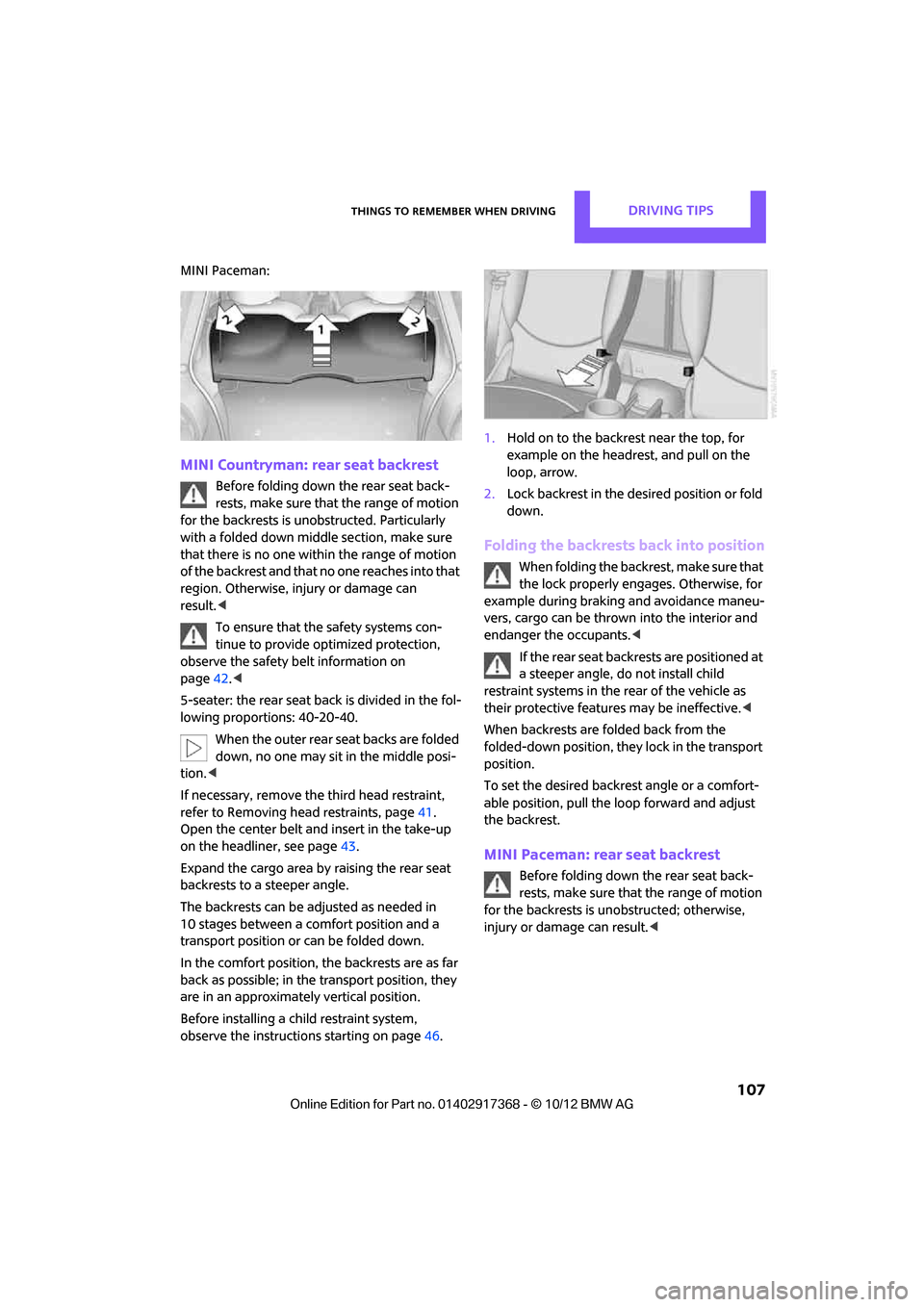
observe the instructio ns starting on page46. 1.
Hold on to the backrest near the top, for
example on the headrest, and pull on the
loop, arrow.
2. Lock backrest in the de sired position or fold
down.
Folding the backrests back into position
When folding the backre st, make sure that
the lock properly engages. Otherwise, for
example during braking and avoidance maneu-
vers, cargo can be thrown into the interior and
endanger the occupants. <
If the rear seat backrests are positioned at
a steeper angle, do not install child
restraint systems in the rear of the vehicle as
their protective featur es may be ineffective.<
When backrests are folded back from the
folded-down position, they lock in the transport
position.
To set the desired backrest angle or a comfort-
able position, pull the lo op forward and adjust
the backrest.
MINI Paceman: rear seat backrest
Before folding down the rear seat back-
rests, make sure that the range of motion
for the backrests is unobstructed; otherwise,
injury or dama ge can result.<
00320051004F004C00510048000300280047004C0057004C005200510003