tire MINI Countryman 2013 Owner's Guide
[x] Cancel search | Manufacturer: MINI, Model Year: 2013, Model line: Countryman, Model: MINI Countryman 2013Pages: 275, PDF Size: 4.09 MB
Page 107 of 275

DRIVING TIPSThings to remember when driving
106
Hills
To prevent overheating and the resulting
reduced efficiency of the brake system,
drive long or steep downhill gradients in the
gear in which the least braking is required. Even
light but consistent brake pressure can lead to
high temperatures, brake wear and possibly
even brake failure. <
You can increase the engine's braking effect by
shifting down, all the way to first gear if neces-
sary. This strategy helps you avoid placing
excessive loads on the brake system. Downshift-
ing in manual mode of the automatic transmis-
sion, page 54.
Never drive with the clutch held down,
with the transmission in neutral or with
the engine switched off; otherwise, engine brak-
ing action will not be present or there will be no
power assistance to the brakes or steering.
Never allow floor mats, carpets or any other
objects to protrude into the area around the
pedals; otherwise, pedal function could be
impaired. <
Corrosion on brake rotors
When the vehicle is driven only occasionally,
during extended periods when the vehicle is not
used at all, and in op erating conditions where
brake applications are less frequent, there is an
increased tendency for corrosion to form on
rotors, while contaminants accumulate on the
brake pads. This occurs because the minimum
pressure which must be exerted by the pads
during brake applications to clean the rotors is
not reached.
Should corrosion form on the brake rotors, the
brakes will tend to respond with a pulsating
effect that even extended application will fail to
cure.
When the vehicle is parked
Condensation forms while the automatic climate
control is in operation, and then exits under the
vehicle. Traces of condensed water under the
vehicle are therefore normal. In the MINI Cooper S, the coolant pump may
continue to run for some time after the engine is
switched off. This will
generate noise in the
engine compartment.
Cargo loading
To avoid loading the tires beyond their
approved carrying capacity, never over-
load the vehicle. Overloading can lead to over-
heating and increases the rate at which damage
develops inside the tires. The ultimate result can
assume the form of a sudden blowout. <
Avoid fluid spills in the cargo area as they
could damage the vehicle. <
Expanding cargo area
Cargo area cover
Do not place any objects on the cover;
otherwise, they could endanger the car's
occupants, e.g. in the case of braking or sudden
swerving, or they may damage the cover. <
When you open the tailgate, the roll-up cover is
raised.
To load bulky luggage, the cover can be
removed.
1. Unhook the lift straps from the tailgate.
2. Lift the cover slightly, arrow 1, and pull it
rearward out of the bracket, arrow 2.
MINI Countryman:
00320051004F004C00510048000300280047004C0057004C005200510003
Page 114 of 275
Things to remember when drivingDRIVING TIPS
113
Rear luggage rack
A special rear-mounted luggage rack is available
as an optional accessory. It does not require a
trailer hitch.
Please comply with the precautions included
with the installation instructions.
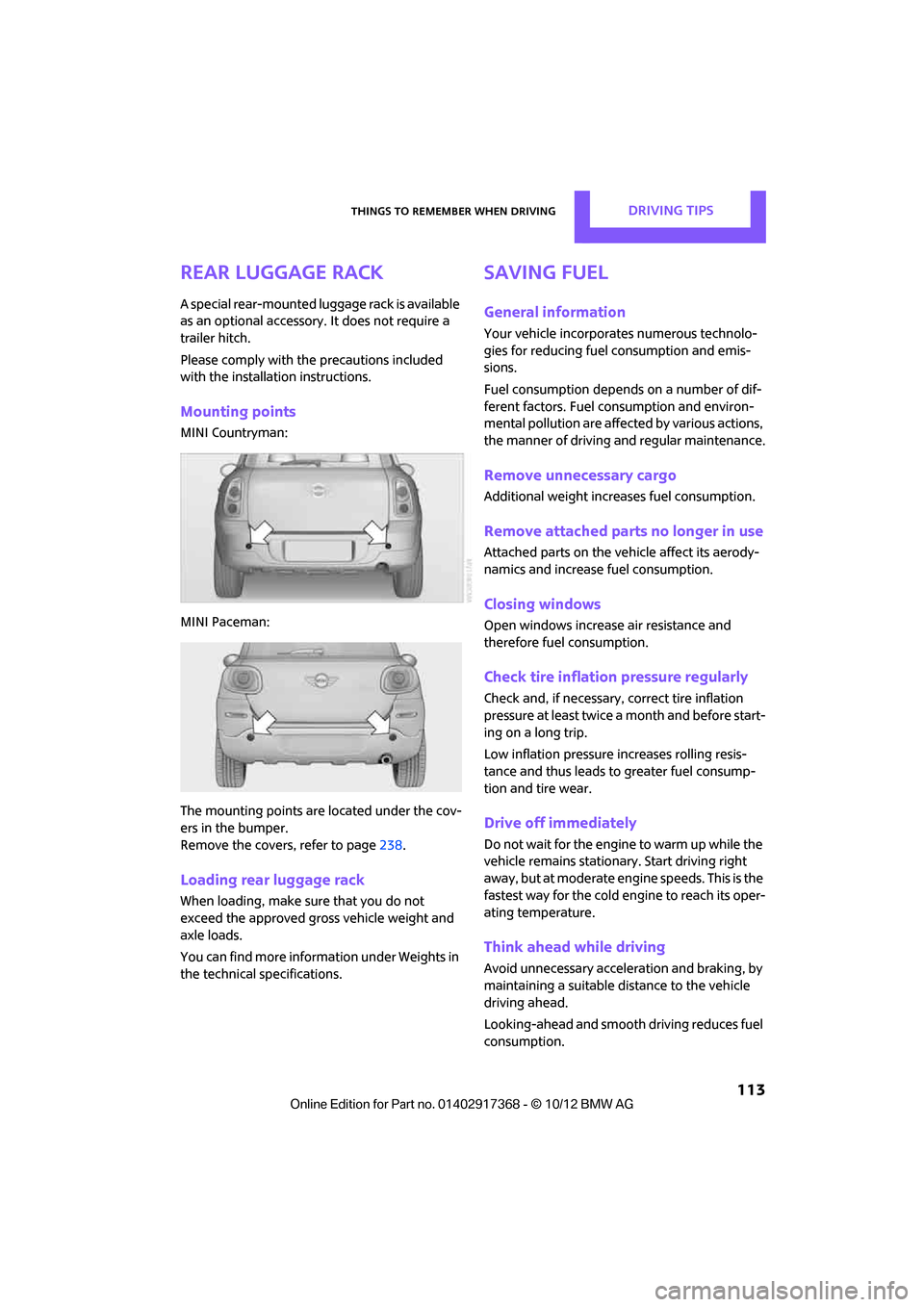
Mounting points
MINI Countryman:
MINI Paceman:
The mounting points ar e located under the cov-
ers in the bumper.
Remove the covers , refer to page238.
Loading rear luggage rack
When loading, make su re that you do not
exceed the approved gross vehicle weight and
axle loads.
You can find more information under Weights in
the technical specifications.
Saving fuel
General information
Your vehicle incorporates numerous technolo-
gies for reducing fuel consumption and emis-
sions.
Fuel consumption depends on a number of dif-
ferent factors. Fuel consumption and environ-
mental pollution are affect ed by various actions,
the manner of driving and regular maintenance.
Remove unnecessary cargo
Additional weight increases fuel consumption.
Remove attached part s no longer in use
Attached parts on the ve hicle affect its aerody-
namics and increase fuel consumption.
Closing windows
Open windows increase air resistance and
therefore fuel consumption.
Check tire inflation pressure regularly
Check and, if necessary, correct tire inflation
pressure at least twice a month and before start-
ing on a long trip.
Low inflation pressure increases rolling resis-
tance and thus leads to greater fuel consump-
tion and tire wear.
Drive off immediately
Do not wait for the engine to warm up while the
vehicle remains stationary. Start driving right
away, but at moderate engi ne speeds. This is the
fastest way for the cold engine to reach its oper-
ating temperature.
Think ahead while driving
Avoid unnecessary accelera tion and braking, by
maintaining a suitable di stance to the vehicle
driving ahead.
Looking-ahead and smooth driving reduces fuel
consumption.
00320051004F004C00510048000300280047004C0057004C005200510003
Page 116 of 275
Things to remember when drivingDRIVING TIPS
115
>Depending on the condition of the surface, it
may be practical to briefly activate DTC, refer
to DTC Dynamic Traction Control on
page 73.
> If the drive wheels spin on one side, depress
the accelerator pedal sufficiently so that the
driving stability control systems can distrib-
ute the drive forces to the individual wheels.
After driving on poor roads, please observe the
following points to maintain the driving safety of
the vehicle:
> Clean the coarsest dirt from the body.
> Clean mud, snow, ice, etc. from the wheels
and tires and check the tires for damage.
00320051004F004C00510048000300280047004C0057004C005200510003
Page 127 of 275

NAVIGATIONDestination entry
126
Specifying the street
If the system does not detect any street, then a
street name in the vicinity or the coordinates of
the destination are displayed.
Additional functions
In the interactive map, the scale can be adjusted
and the visible map sectio n can be shifted. You
can also access other func tions by pressing the
MINI joystick:
>Select the symbol and "Start guid-
ance" if necessary.
> "Exit interactive map"
> Map display
> "Display destination"
The section of the map around the desti-
nation is displayed.
> "Display current location"
The section of the map around the cur-
rent position is displayed.
> "Find points of interest", refer to
page 124.
Entering destination via
voice
General information
>Voice activation system, refer to page 21.
> When entering a destinat ion by voice, it is
possible to switch between voice input and
the onboard computer. >
Having the possible spoken commands read
aloud: {Voice commands }
Saying the entries
>Countries, towns/cities , streets, and inter-
sections can be either spoken aloud as an
entire words or spelled in the system lan-
guage, refer to page 69.
Example: to enter a destination in a US state
as a complete word, the system language
must be English.
> Spell the entry if the language of the area is
different from the system language.
> Speak the letters smoothly and avoid exces-
sive emphasis and pauses.
Entering a town/city
The town/city can be spelled or entered as an
entire word.
The methods of entry depend on the nav-
igation data in use and the country and
language settings. <
2. Wait for the system prompt for the town/
city.
3. Say the name of the town/city or if neces-
sary, spell at least the first three letters.
1.{City} or { Spell city}.
4. Select city/town:
>To select a recommended town/city:
{Yes }
> Select other city/town: {New entry }
> To select an entry, e. g. {Entry …}
> Spell the entry: {Spell city }
00320051004F004C00510048000300280047004C0057004C005200510003
Page 133 of 275

NAVIGATIONRoute guidance
132
Traffic information, refer to page133.
Planned route
After route guidance is started, the planned
route is displayed on the map.
Status boxes
Show/hide: press the MINI joystick.
>Upper status box: time, phone details, and
entertainment details.
> Lower status box: symb ol for active route
guidance, traffic inform ation status, arrival
time, and distance from destination.
Toolbar
The following functions ar e available directly in
the map view:
Changing map scale
"Interactive map"
> Moving map: move the MINI joystick in the
corresponding direction.
> Shifting map diagonally: move the
MINI joystick in the co rresponding direction
and turn the MINI joystick.
Changing scale
1. Select the symbol and press the MINI joy-
stick.
2. Changing scale: turn the MINI joystick.
Automatic scaling of the map
In the map view facing north, turn the
MINI joystick in either direction until the scale
AUTO is displayed. The map shows the entire
path between the location and destination.
Settings for the map display
The settings are stored for the remote control
currently in use.
1.Open "Options".
2. "Settings"
>"Day/night mode"
Select and adjust depending on light
conditions. If "Traffic conditions/gray
map" is activated, then this setting is not
taken into account.
> "Traffic conditions/gray map"
The map is optimized for displaying traf-
fic bulletins. Symbols for the special des-
tinations are no longer displayed.
Displaying arrow view in map display
When route guidance is active, the arrow view
can be displayed additionally on the right side of
the map display.
1. "Navigation"
2. Open "Options".
SymbolFunction
Starting/stopping route
guidance
Switching voice instruc-
tions on/off
Changing route criteria or
selecting route alternatives
Searching for special desti-
nation
Displaying traffic bulletins
Interactive map
Adjusting map views
or arrow display
Changing scale
00320051004F004C00510048000300280047004C0057004C005200510003
Page 192 of 275

OfficeCOMMUNICATIONS
191
Reading text messages aloud
Reading text messages aloud, refer to page193.
E-mail
Displaying e-mail
1."Office"
2. "Messages"
3. Select the desired message.
Displaying e-mail contacts
If the sender and receiver of an e-mail were
transmitted from a mobile phone, they will be
displayed in the e-mail.
"Sender/Recipient"
If the e-mail address is stored in the contacts,
then the contact is displayed. Select contact to
display details.
If the e-mail address is not stored in the con-
tacts, then it may be that only the e-mail address
is displayed.
Using contact data
Contact data from deadlines, tasks, text mes-
sages, e-mails and notes can be stored or
selected, see page 193.
Deactivating entire display
When opening an e-mail when in the vehicle, it
is completely transferred to the vehicle. This
may result in charges.
1."Office"
2. "Messages"
3. Open "Options".
4. "Fully download e-mails"
Only a part of an e-mail from a mobile
phone is loaded into the vehicle.
Reading e-mail
Reading e-mail, see page 193.
Calendar
Displaying calendar
Appointments from the last 20 days and the
next 50 days can be displayed.
1."Office"
2. "Calendar"
Appointments of the current day are dis-
played.
Selecting calendar day
1.Select date.
2. Select desired day or date.
>"Next day"
> "Date:"
> "Previous day"
> "Today"
Displaying appointment
1. Select the desired appointment.
2. To scroll through appointment, if necessary:
>Turn the MINI joystick.
> Select the symbol.
Using contact data
Contact data from deadli nes, tasks, text mes-
sages, e-mails and notes can be stored or
selected, see page 193.
Reading an appointment aloud
Reading an appointment aloud, refer to
page193.
00320051004F004C00510048000300280047004C0057004C005200510003
Page 204 of 275
Wheels and tiresMOBILITY
203
Wheels and tires
Vehicle equipment
In this chapter, all production, country, and
optional equipment that is offered in the model
range is described. Equipment is also described
that is not available because of, for example,
selected options or count ry version. This also
applies to safety related functions and systems.
Tire inflation pressures
Information for your safety
It is not merely the tires' service life, but also
driving comfort and, to a great extent, driving
safety that depend on the condition of the tires
and the maintenance of the specified tire pres-
sure.
Checking pressure
Check the tire inflatio n pressure regularly
and correct it, if nece ssary: at least twice a
month and before starting long trips. If you fail
to observe this precaution you may be driving
on tires with incorrect tire pressures, a condition
that can not only compromise your vehicle's
driving stability, but also lead to tire damage and
the risk of an accident. Do not drive with
deflated, i.e. flat tires, except when using run-
flat tires. A flat tire will seriously impair your
vehicle's handling and braking response.
Attempts to drive on a flat tire can lead to loss of
control over the vehicle. <
Check the tire inflation pressures only on cold
tires. This means after a maximum of 1.25 miles/
2 km driving or when the vehicle has been
parked for at least 2 hours. When tires are warm,
the tire inflation pressure is higher. After adjusting the tire inflation pressure,
reinitialize the Flat Tire Monitor, page 75,
or reset the Tire Pressure Monitor, page 78.<
Pressure specifications
The tables below provide all the correct inflation
pressures for the specifie d tire sizes at ambient
temperature.
The tire inflation pressures apply to the
tire sizes approved and the tire brands
recommended by the manufacturer of your
MINI. Your MINI dealer will be glad to advise
you. <
For correct identification of the right tire infla-
tion pressures, observe the following:
> Tire sizes for your vehicle
> Maximum allowable driving speed
Tire inflation pressures for driving up to
100 mph or 160 km/h
For normal driving up to 100 mph or 160 km/h
and to achieve optimum dr iving comfort, adjust
pressures to the respective tire inflation pres-
sures listed on the foll owing pages in the col-
umns for traveling speeds up to a maximum of
100 mph or 160 km/h.
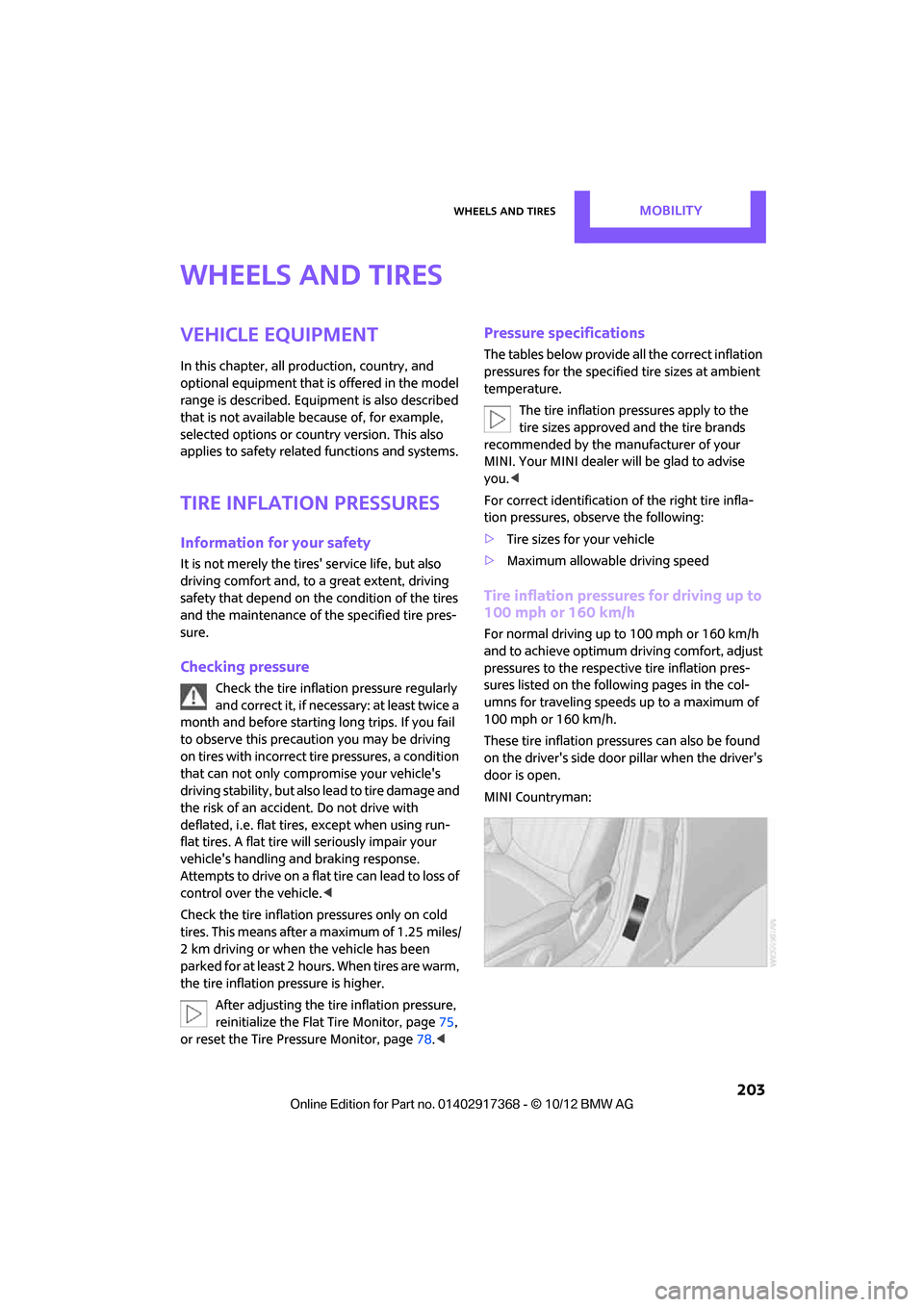
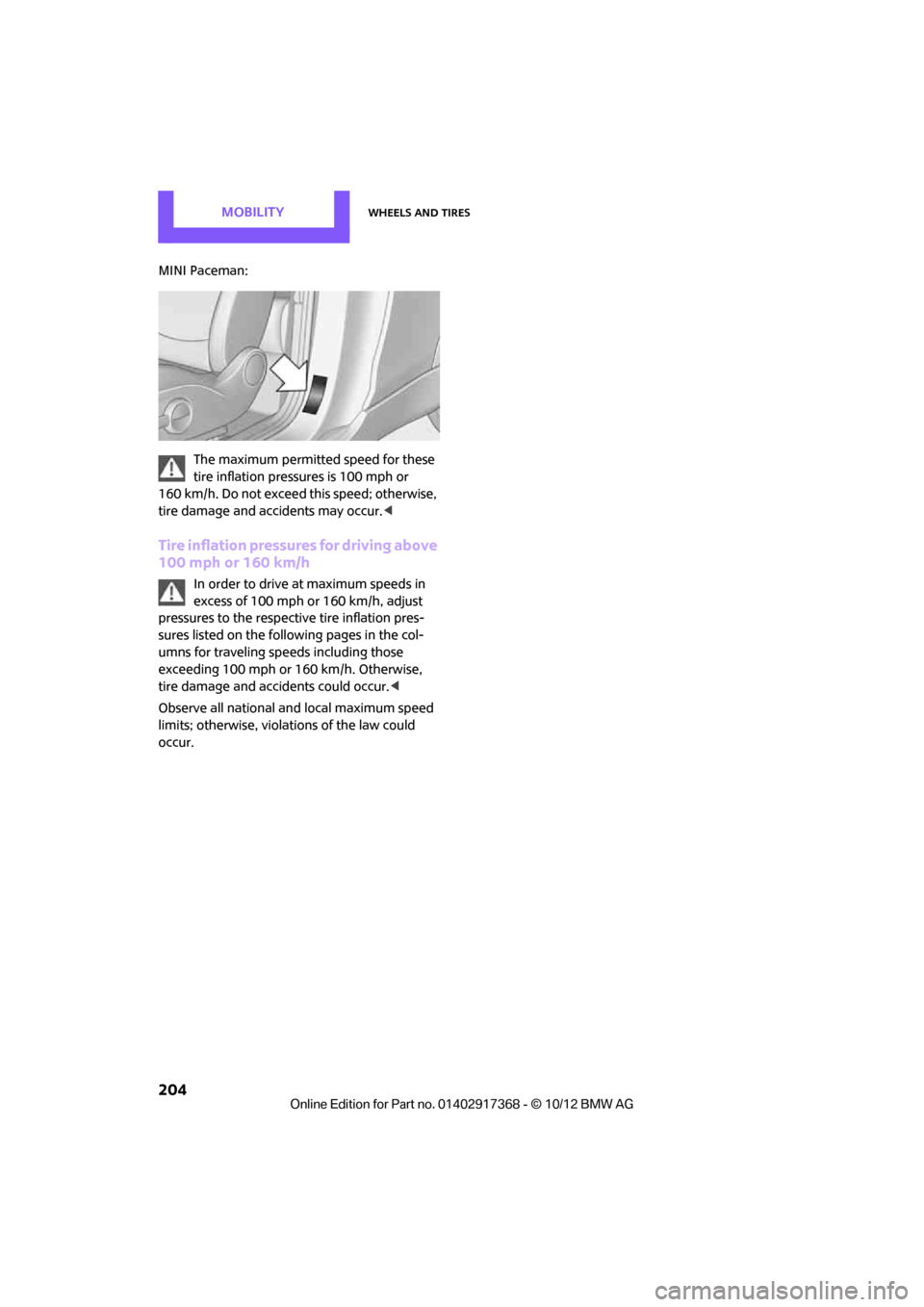
These tire inflation pre ssures can also be found
on the driver's side door pillar when the driver's
door is open.
MINI Countryman:
00320051004F004C00510048000300280047004C0057004C005200510003
Page 205 of 275
MOBILITYWheels and tires
204
MINI Paceman:The maximum permitted speed for these
tire inflation pressures is 100 mph or
160 km/h. Do not exceed this speed; otherwise,
tire damage and accidents may occur. <
Tire inflation pressures for driving above
100 mph or 160 km/h
In order to drive at maximum speeds in
excess of 100 mph or 160 km/h, adjust
pressures to the respective tire inflation pres-
sures listed on the follo wing pages in the col-
umns for traveling speeds including those
exceeding 100 mph or 160 km/h. Otherwise,
tire damage and accidents could occur. <
Observe all national and local maximum speed
limits; otherwise, violat ions of the law could
occur.
00320051004F004C00510048000300280047004C0057004C005200510003
Page 206 of 275
Wheels and tiresMOBILITY
205
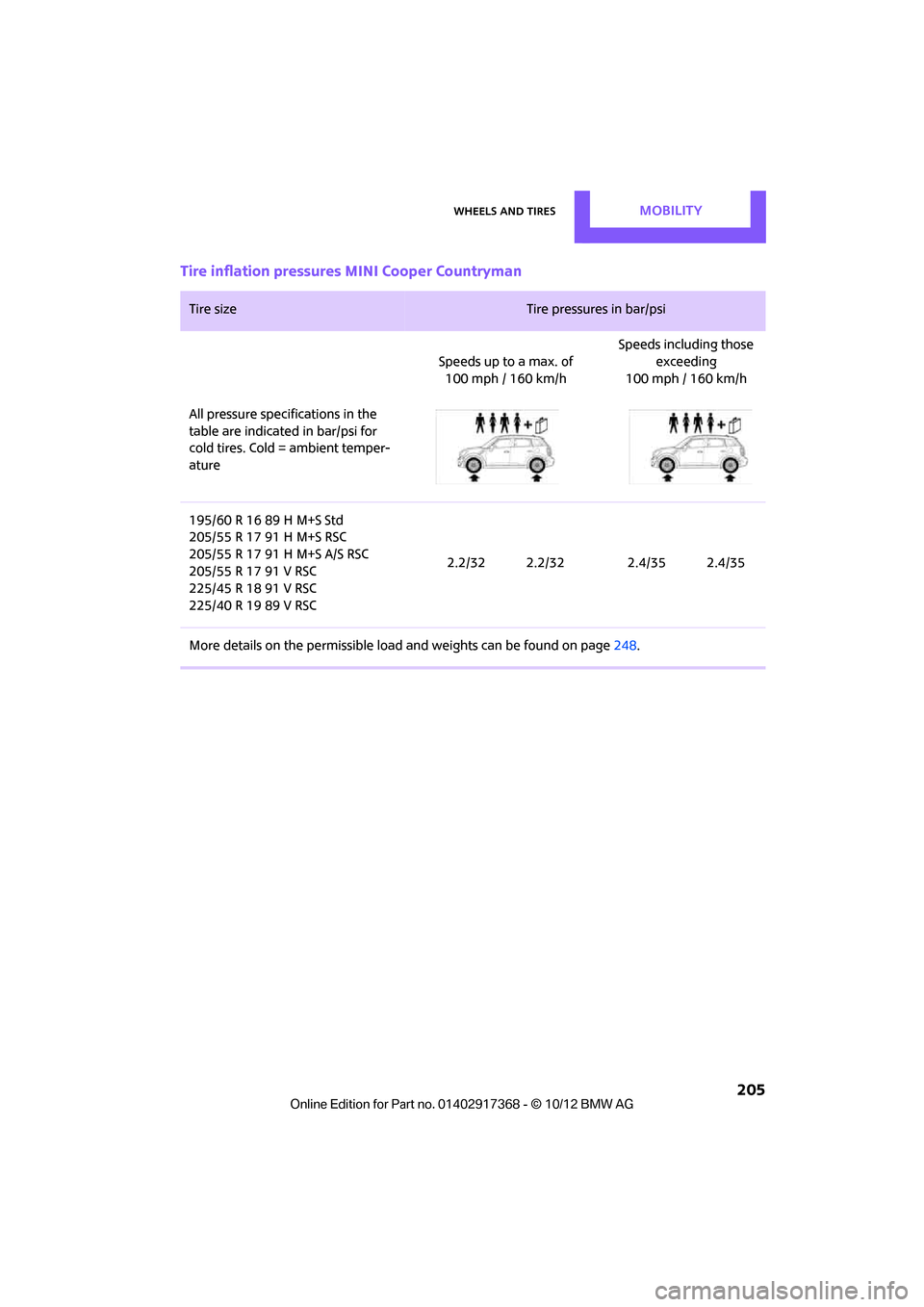
Tire inflation pressures MINI Cooper Countryman
Tire size Tire pressures in bar/psi
Speeds up to a max. of 100 mph / 160 km/h Speeds including those
exceeding
100 mph / 160 km/h
All pressure specifications in the
table are indicated in bar/psi for
cold tires. Cold = ambient temper-
ature
195/60 R 16 89 H M+S Std
205/55 R 17 91 H M+S RSC
205/55 R 17 91 H M+S A/S RSC
205/55 R 17 91 V RSC
225/45 R 18 91 V RSC
225/40 R 19 89 V RSC 2.2/32 2.2/32 2.4/35 2.4/35
More details on the perm issible load and weights can be found on page 248.
00320051004F004C00510048000300280047004C0057004C005200510003
Page 207 of 275

MOBILITYWheels and tires
206
Tire inflation pressures MINI Cooper S Countryman / Cooper S ALL4 Countryman
Tire size Tire pressures in bar/psi
Speeds up to a max. of 100mph / 160km/h Speeds including those
exceeding
100 mph / 160 km/h
All pressure specifications in the
table are indicated in bar/psi for
cold tires. Cold = ambient temper-
ature
195/60 R 16 89 H M+S Std
205/55 R 17 91 H M+S RSC
205/55 R 17 91 H M+S A/S RSC
205/55 R 17 91 V RSC
225/45 R 18 91 V RSC
225/40 R 19 89 V RSC 2.2/32 2.2/32 2.6/38 2.6/38
More details on the permissible load and weights can be found on page248.
00320051004F004C00510048000300280047004C0057004C005200510003