seats MINI Countryman 2015 (Mini Connected) User Guide
[x] Cancel search | Manufacturer: MINI, Model Year: 2015, Model line: Countryman, Model: MINI Countryman 2015Pages: 283, PDF Size: 6.76 MB
Page 118 of 283
USB interface for data transferUpdating the navigation data, refer to
page 132, from the USB medium via the USB
interface in the glove compartment.
Observe the following when connecting:▷Do not use force when plugging the con‐
nector into the USB interface.▷Do not connect devices such as fans or
lamps to the USB interface.▷Do not connect USB hard drives.▷Do not use the USB interface to recharge
external devices.
Center armrest
The center armrest between the front seats
contains a storage compartment or a cover for
the snap-in adapter, refer to page 198, de‐
pending on the equipment.
Do not position tall accessory parts directly on
the center rail of the center armrest; otherwise,
they may be damaged when the center arm‐
rest is opened or closed.
Center armrest front
Opening
Press the button, arrow, and pull up the lid.
Center rail
Various accessory parts can be mounted on the
center rail and moved to different positions.
Do not use accessory parts in the area of the
parking brake; otherwise, they may become
damaged when the parking brake lever is acti‐
vated.
Base plate
Various accessory parts such as cupholders can
be mounted on the base plate.
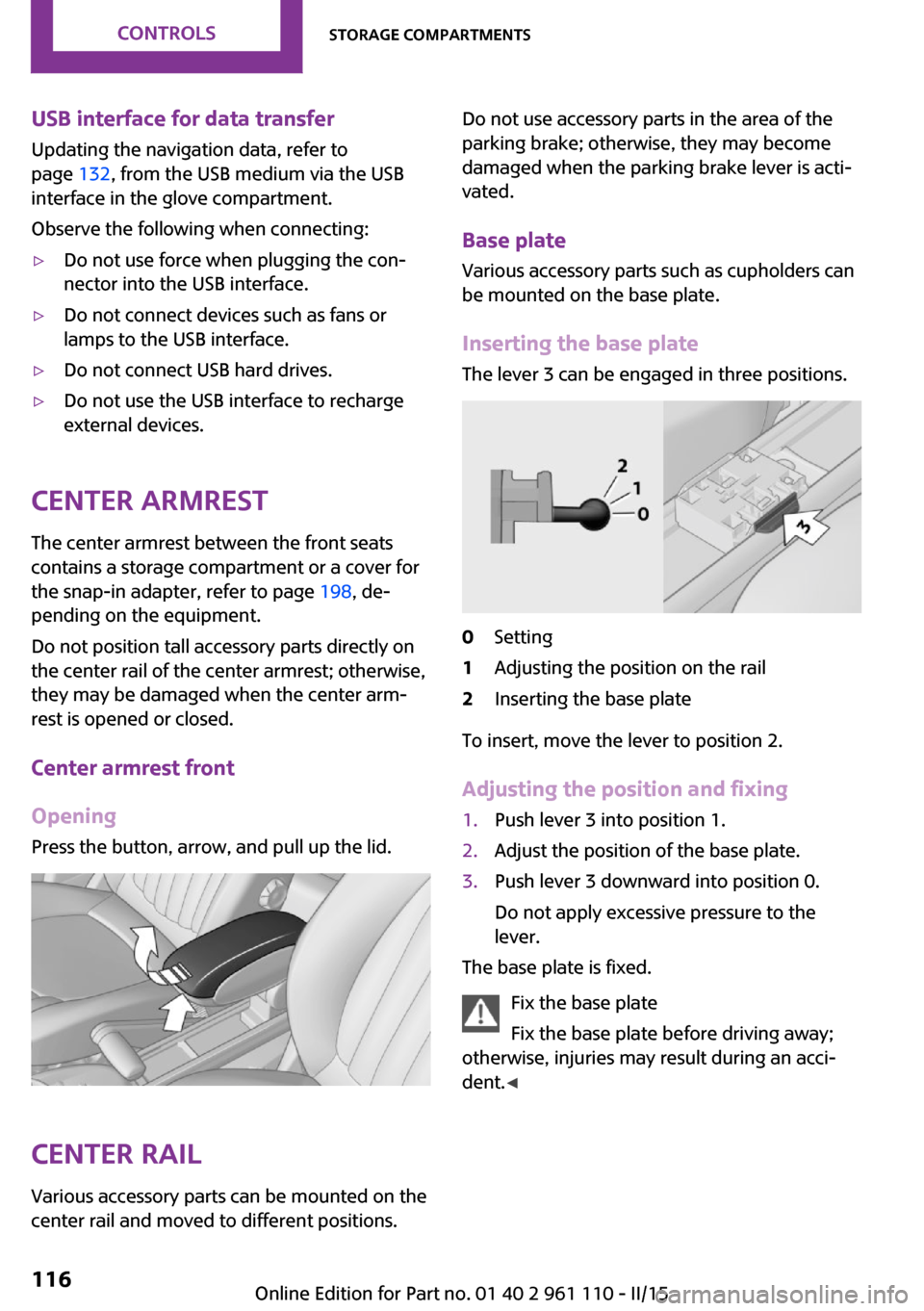
Inserting the base plate The lever 3 can be engaged in three positions.0Setting1Adjusting the position on the rail2Inserting the base plate
To insert, move the lever to position 2.
Adjusting the position and fixing
1.Push lever 3 into position 1.2.Adjust the position of the base plate.3.Push lever 3 downward into position 0.
Do not apply excessive pressure to the
lever.
The base plate is fixed.
Fix the base plate
Fix the base plate before driving away;
otherwise, injuries may result during an acci‐
dent. ◀
Seite 116CONTROLSStorage compartments116
Online Edition for Part no. 01 40 2 961 110 - II/15
Page 270 of 283
Everything from A to ZIndexA
ABS, Antilock Brake Sys‐ tem 92
Acoustic signal, refer to Check Control 74
Activated charcoal filter with automatic climate con‐
trol 103
Adaptive Light Control 79
Additional telephone 188
Additives, engine oil 231
Airbags 81
Airbags, indicator/warning light 84
Air circulation, refer to Recir‐ culated air mode, air condi‐
tioner 100
Air circulation, refer to Recir‐ culated air mode, automatic
climate control 102
Air conditioning 99
Air conditioning mode, air conditioner 99
Air conditioning mode, auto‐ matic climate control 101
Air distribution, air condi‐ tioner, manual 100
Air distribution, auto‐ matic 102
Air distribution, automatic cli‐ mate control, manual 103
Air distribution, individual 100
Air drying, refer to Cooling function 103
Air flow rate for air condi‐ tioner 100
Air flow rate with automatic climate control 102
Air pressure, refer to Tire infla‐ tion pressure 216 Air supply, air conditioner 99
Air supply, automatic climate control 101
Alarm system 39
Alarm system, avoiding unin‐ tentional alarms 40
Alarm system, ending an alarm 39
Alarm system, interior motion sensor 40
Alarm system, tilt alarm sen‐ sor 40
ALL4 all-wheel system 94
All-wheel drive, refer to ALL4 94
Alternating-code hand-held transmitter 106
AM/FM station 156
Ambient lighting 80
Announcement, navigation, refer to Spoken instruc‐
tions 145
Antifreeze, washer fluid 63
Antilock Brake System, ABS 92
Anti-slip control, refer to Dy‐ namic Stability Control
DSC 92
Anti-theft protection 31
Appointments 203
Approved engine oils 231
Ashtray 109
Assistance, roadside 245
Assistance when driving off, refer to Hill drive-off assis‐
tant 94
Assistance with starting en‐ gine, refer to Jump-start‐
ing 245
Audio playback 165 Audio playback, Blue‐
tooth 171
Automatic air distribution 102
Automatic air flow 102
Automatic car wash 250
Automatic climate con‐ trol 101
Automatic climate control, au‐ tomatic air distribution 102
Automatic, cruise control 96
Automatic headlight con‐ trol 77
Automatic transmission with Steptronic 64
AUTO program with auto‐ matic climate control 102
AUX-IN port 167
Average fuel consumption 69
Average speed 69
Average speed, refer to Com‐ puter 68
B Backrest curvature, refer to Lumbar support 45
Backrests, refer to Seats 44
Backup lights, bulb replace‐ ment 240
Balance 154
Bass 154
Battery disposal 39
Battery, refer to Vehicle bat‐ tery 243
Battery, remote control 30
Battery replacement, remote control 39
Belts, refer to Safety belts 46
Belt tensioners, refer to Safety belts 46
Bi-xenon headlights 236 Seite 268REFERENCEEverything from A to Z268
Online Edition for Part no. 01 40 2 961 110 - II/15
Page 271 of 283
Black and white map dis‐play 148
Bluetooth audio 171
Bluetooth connection, activat‐ ing/deactivating, hands-free
system 179
Bluetooth connection, activat‐ ing/deactivating, mobile
phone preparation 189
Bluetooth hands-free sys‐ tem 178
Brake assistant 92
Brake discs, breaking in 120
Brake fluid, refer to Service re‐ quirements 73
Brake force distribution, elec‐ tronic 92
Brake pads, breaking in 120
Brake, refer to Parking brake 59
Brakes, MINI maintenance system 233
Brakes, service require‐ ments 73
Brake system, MINI mainte‐ nance system 233
Braking, notes 121
Braking, parking brake 59
Breakdown assistance, Road‐ side Assistance 245
Breaking in 120
Brightness on the Control Dis‐ play 73
Buckle tongue, height adjust‐ ment 47
Button for starting the engine, refer to Start/Stop button 57
C
Calendar 203
California Proposition 65 Warning 7
Car battery, refer to Vehicle battery 243
Car care products 251 Care, displays 253
Care, vehicle 251
Cargo area, Comfort Ac‐ cess 37
Cargo area door, refer to Tail‐ gate 35
Cargo area, enlarging, cargo cover 111
Cargo area, flat loading floor 113
Cargo area light, refer to Inte‐ rior lights 80
Cargo area, multi-function hook 114
Cargo area, opening from the outside 35
Cargo area, partition net 113
Car horn, refer to Horn 12
Carpet, care 253
Car phone, refer to Tele‐ phone 178
Car phone, refer to Telephone, mobile phone prepara‐
tion 188
Car wash 250
CBC, Cornering Brake Con‐ trol 92
CBS Condition Based Serv‐ ice 233
CD 164
CD/DVD drives, care 254
CD player 164
Center armrest 116
Center console, refer to Around the center con‐
sole 16
Center rail 116
Center rail, refer to Storage compartments 116
Central locking, Comfort Ac‐ cess 37
Central locking from the in‐ side 34
Central locking system, con‐ cept 31 Central locking system, from
the outside 31
Central screen, see Control Display 18
Changes, technical, refer to Safety 6
Changing wheels/tires 223
Check Control 74
Children, transporting 52
Child restraint fixing system LATCH 53
Child restraint fixing sys‐ tems 52
Child restraint fixing systems, mounting 52
Child seat, mounting 52
Child seats, refer to Transport‐ ing children safely 52
Chrome parts, care 253
Circulation of air, refer to Re‐ circulated air mode, air con‐
ditioner 100
Circulation of air, refer to Re‐ circulated air mode, auto‐
matic climate control 102
Cleaning, displays 253
Cleaning, refer to Care 250
Climate 99
Climate mode, ventila‐ tion 104
Clock 67
Clock, 12h/24h format 71
Clock, setting the time and date 71
Clock, setting the time zone 72
Closing from the inside 34
Closing, from the outside 32
Clutch, breaking in 120
Cockpit 12
Cold start, refer to Starting the engine 58
Combination instrument, refer to Displays 14 Seite 269Everything from A to ZREFERENCE269
Online Edition for Part no. 01 40 2 961 110 - II/15
Page 274 of 283
Front fog light, bulb replace‐ment 238
Front fog lights 79
Front lights, bulb replace‐ ment 237
Front passenger airbags, de‐ activating 82
FTM Flat Tire Monitor 84
Fuel 214
Fuel, additives 214
Fuel, average consump‐ tion 69
Fuel cap, closing 212
Fuel consumption display, average fuel consump‐
tion 69
Fuel filler flap, closing 212
Fuel filler flap, opening 212
Fuel filler flap, unlocking in case of an electrical malfunc‐
tion 212
Fuel gauge 68
Fuel, refer to Average fuel consumption 69
Fuel, saving 128
Fuel tank capacity, refer to Filling capacities 261
Fuel tank contents, refer to Filling capacities 261
Fuel tank, refer to Filling ca‐ pacities 261
Fuse 244
G Garage door opener, refer to Integrated universal remote
control 105
Gasoline 214
Gasoline gauge, refer to Fuel gauge 68
Gas station recommenda‐ tion 145
Gear change, manual trans‐ mission 63 Gear change, Steptronic trans‐
mission 64
Gear display, Steptronic trans‐ mission 64
Glare protection 107
Glass sunroof, electrical 40
Glass sunroof, electrical, open‐ ing/closing 41
Glass sunroof, electrical, rais‐ ing 41
Glass sunroof, electric, con‐ venient operation 32
Glass sunroof, electric, remote control 32
GPS navigation, refer to Navi‐ gation system 132
H Halogen headlights, bulb re‐ placement 237
Handbrake, refer to Parking brake 59
Hand car wash, care 251
Hand-held transmitter, alter‐ nating code 106
Hands-free microphone 16
Hands-free system 178
Hazard warning system 16
HD Radio 158
Head airbags 81
Headlamp control, refer to Parking lamps/low
beams 77
Headlamps, care 251
Headlight control, auto‐ matic 77
Headlight courtesy delay fea‐ ture 78
Headlight flasher 60
Headlight flasher, indicator lamp 15
Headlights 77
Headlights, cleaning, washer fluid 63
Head restraints 48 Head restraints, adjusting the
height 48
Head restraints, removing 49
Heatable rear window, air conditioner 100
Heatable windshield 103
Heating, rear window with au‐ tomatic climate control 103
Heating, seats 46
Heating, windshield 103
Height adjustment, seats 44
High-beams 78
High beams, bulb replace‐ ment 237
High-beams, indicator lamp 15
Hill drive-off assistant 94
Hills 122
Holder for remote control, re‐ fer to Ignition lock 57
Homepage 6
Hood 229
Hood, closing 229
Hood, opening 229
Hood, unlocking 229
Horn 12
House number, entering for navigation 135
Hydraulic brake assistant 92
I Ice warning, refer to External temperature warning 67
Icy roads, refer to External temperature warning 67
Identification marks, run-flat tires 224
Identification marks, tires 220
iDrive, changing settings 72
iDrive, changing the date and time 71
iDrive, changing the lan‐ guage 72 Seite 272REFERENCEEverything from A to Z272
Online Edition for Part no. 01 40 2 961 110 - II/15
Page 278 of 283

Remote control, servicedata 233
Remote control, univer‐ sal 105
Remote inquiry, hands-free system 181
Remote inquiry, mobile phone preparation package 193
Replacement remote con‐ trol 30
Replacing wheels/tires 223
Reporting safety defects 9
Reserve warning, refer to Fuel gauge 68
Reservoir for washer fluid, re‐ fer to Washer fluid reser‐
voir 63
Restraining systems, refer to Safety belts 46
Restraint systems for chil‐ dren 52
Retreaded tires 223
Reverse gear, manual trans‐ mission 64
Road, avoiding 143
Road detour 143
Roadside Assistance 245
Roadside parking light, bulb replacement 238
Roadside parking lights 78
RON recommended fuel grade 214
RON, refer to Fuel quality 214
Route 144
Route criteria, route 143
Route, displaying 144
Route section, bypassing 144
Rubber seals, care 253
Run-flat tires 224
Run-flat tires, flat tire 85
Run-flat tires, tire inflation pressure 216
S
Safe braking 121 Safety 6
Safety belts 46
Safety belts, care 253
Safety belts, damage 48
Safety belts, indicator/warning lamp 48
Safety belts, rear center safety belt 47
Safety belts, reminder 48
Safety systems, airbags 81
Safety systems, safety belts 46
Satellite radio 158
Saving fuel 128
Scale, changing during navi‐ gation 147
Screen, see Control Display 18
Seat adjustment 45
Seat adjustment, manual 44
Seat heating 46
Seats 44
Seats, adjusting 44
Seats, heating 46
Seats, sitting safely 44
Selector lever lock, overrid‐ ing 66
Selector lever lock, refer to Se‐ lector level positions, chang‐
ing, shiftlock 64
Selector lever positions, Step‐ tronic transmission 64
Selector lever, Steptronic transmission 64
Service and warranty 7
Service data in the remote control 233
Service interval display, refer to Condition Based Service
CBS 233
Service interval display, refer to Service requirements 73
Service requirements 73
Service requirements, CBS Condition Based Service 233
Settings and information 70 Settings, changing on the
Control Display 72
Settings, clock, 12h/24h mode 71
Settings, configuring, refer to Personal Profile 30
Settings, language 72
Shifting, manual transmis‐ sion 63
Shifting, Steptronic transmis‐ sion 65
Shift lever, Steptronic trans‐ mission 64
Shift paddles on the steering wheel 65
Short commands, voice acti‐ vation 262
Side airbags 81
Side windows, refer to Win‐ dows 41
Sitting safely 44
Sliding/tilting sunroof, refer to Glass sunroof, electrical 40
Slot for remote control 57
Snap-in adapter, mobile phone 198
Snow chains 227
Socket, OBD Onboard Diagno‐ sis 234
Software applications, iPhone 207
Software part number, hands- free system 178
Software part number, mobile phone preparation 188
Software update 174
Special destinations, naviga‐ tion 138
Special equipment, series equipment 6
Speed, average 69
Speed limit 90
Speed limit, setting 90
Speedometer 14
Speed, with winter tires 224 Seite 276REFERENCEEverything from A to Z276
Online Edition for Part no. 01 40 2 961 110 - II/15