radio MINI Countryman 2015 (Mini Connected) Owner's Guide
[x] Cancel search | Manufacturer: MINI, Model Year: 2015, Model line: Countryman, Model: MINI Countryman 2015Pages: 283, PDF Size: 6.76 MB
Page 191 of 283
Do not operate a mobile phone that is con‐
nected to the vehicle on the mobile phone key‐
pad, as this may lead to a malfunction.
Notes
At high temperatures, the charging function of
the mobile phone may be limited and functions
may not be executed.
When using the mobile phone via the vehicle,
note the operating instructions of the mobile
phone.
Pairing/unpairing the
mobile phone
General information The following functions are available:▷Use of a mobile phone as a telephone.▷Use of a mobile phone as an additional te‐
lephone.▷Use of a mobile phone as an audio source.▷Use of an audio device as an audio source,
refer to page 171.
Requirements
▷The mobile phone is suitable, refer to
page 188.▷The mobile phone is ready for operation.▷Bluetooth is activated in the vehicle and on
the mobile phone.▷Bluetooth presettings may need to be
made on the mobile phone, e.g., for a con‐
nection without confirmation or visibility,
refer to the mobile phone operating in‐
structions.▷Deactivate Bluetooth audio if necessary.▷Compare the control number on the Control
Display with the control number on the mo‐
bile phone display. Confirm the control
number on the mobile phone and in the
vehicle.▷A number with at least four and a maxi‐
mum of 16 digits was defined as the Blue‐
tooth passkey. It is only required once for
pairing.▷The radio ready state is switched on.
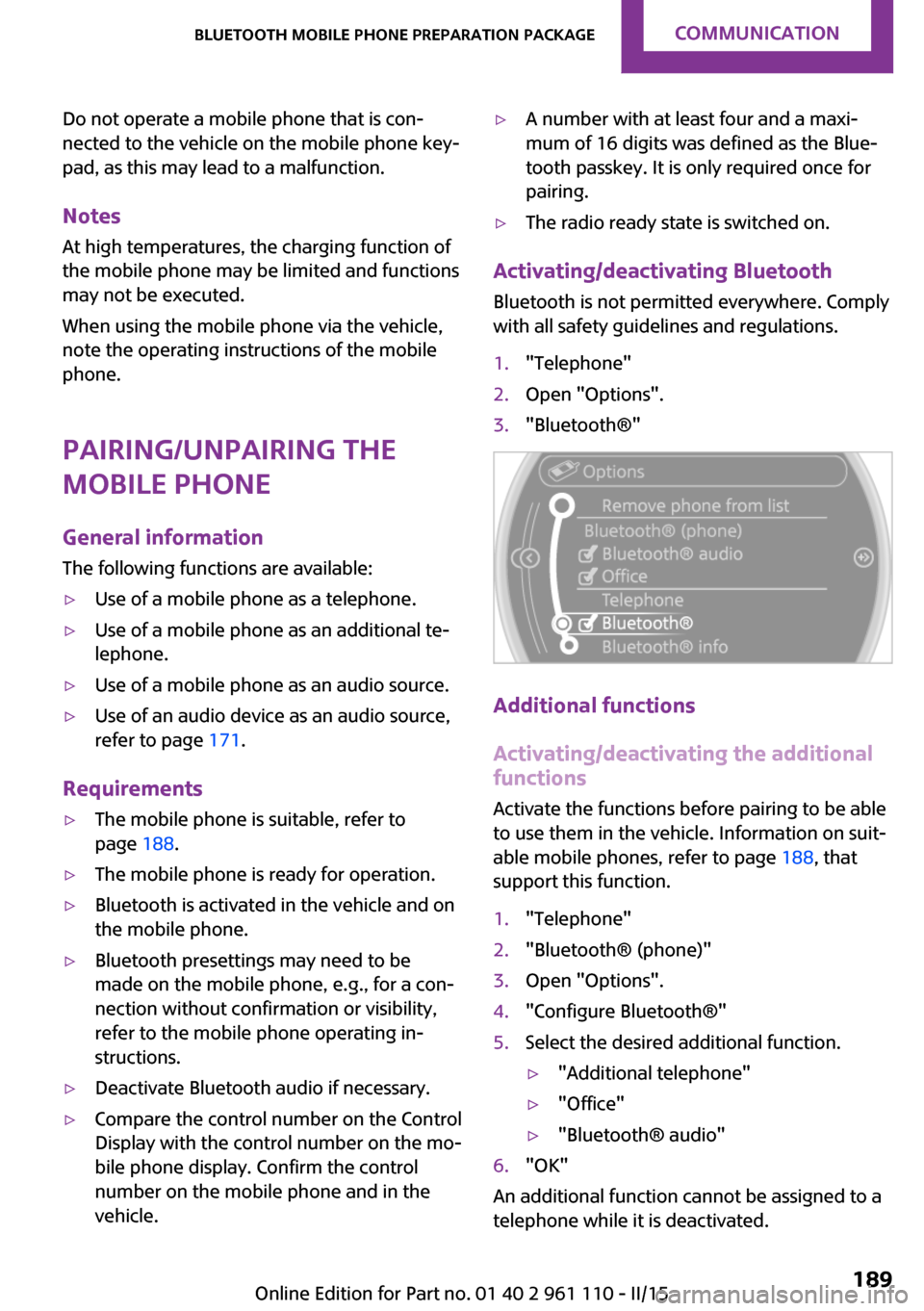
Activating/deactivating Bluetooth
Bluetooth is not permitted everywhere. Comply
with all safety guidelines and regulations.
1."Telephone"2.Open "Options".3."Bluetooth®"
Additional functions
Activating/deactivating the additional functions
Activate the functions before pairing to be able
to use them in the vehicle. Information on suit‐
able mobile phones, refer to page 188, that
support this function.
1."Telephone"2."Bluetooth® (phone)"3.Open "Options".4."Configure Bluetooth®"5.Select the desired additional function.▷"Additional telephone"▷"Office"▷"Bluetooth® audio"6."OK"
An additional function cannot be assigned to a
telephone while it is deactivated.
Seite 189Bluetooth mobile phone preparation packageCOMMUNICATION189
Online Edition for Part no. 01 40 2 961 110 - II/15
Page 200 of 283
Snap-in adapter
General information More information on compatible snap-in
adapters that support the functions of the mo‐
bile phone is available at the service center.
Notes At high temperatures, the charging function of
the mobile phone may be limited and functions
may not be executed.
When using the mobile phone via the vehicle,
note the operating instructions of the mobile
phone.
Installation position In the center armrest.
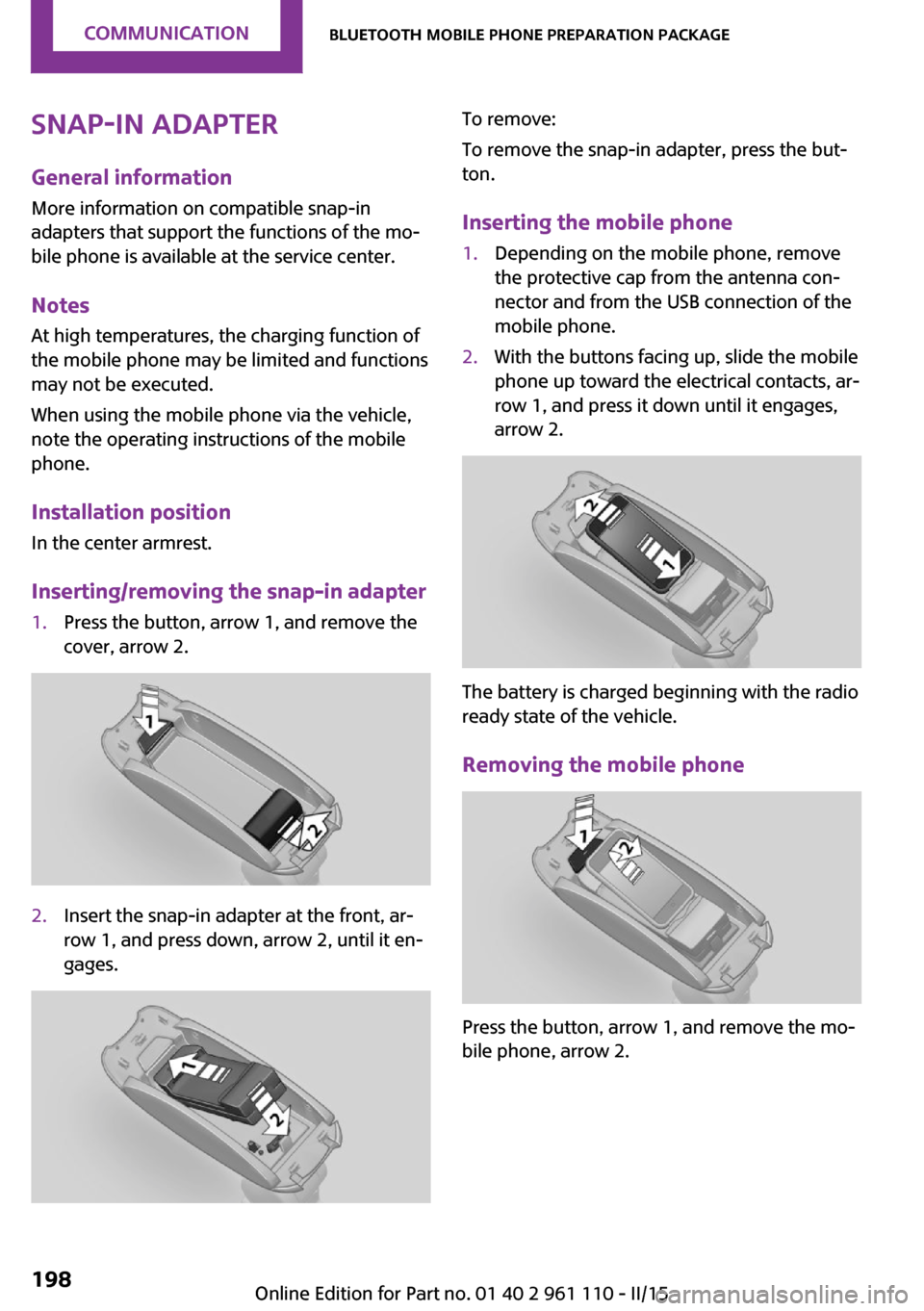
Inserting/removing the snap-in adapter1.Press the button, arrow 1, and remove the
cover, arrow 2.2.Insert the snap-in adapter at the front, ar‐
row 1, and press down, arrow 2, until it en‐
gages.To remove:
To remove the snap-in adapter, press the but‐
ton.
Inserting the mobile phone1.Depending on the mobile phone, remove
the protective cap from the antenna con‐
nector and from the USB connection of the
mobile phone.2.With the buttons facing up, slide the mobile
phone up toward the electrical contacts, ar‐
row 1, and press it down until it engages,
arrow 2.
The battery is charged beginning with the radio
ready state of the vehicle.
Removing the mobile phone
Press the button, arrow 1, and remove the mo‐
bile phone, arrow 2.
Seite 198COMMUNICATIONBluetooth mobile phone preparation package198
Online Edition for Part no. 01 40 2 961 110 - II/15
Page 210 of 283

Control Display and can be operated using the
MINI joystick.
The volume can be set using the following con‐
trols:▷
Buttons on the steering
wheel or
▷Volume button on the radio, refer to
page 156.1.Connect the mobile phone via the snap-in
adapter or via the USB audio interface.2. Press the button. The main menu is
opened.3."MINI Connected"4.Select the desired software application.
Notes
▷The scope of MINI Connected that can be
displayed on the Control Display depends
on the range of software applications in‐
stalled on the mobile phone.▷The data transmission of the software ap‐
plications from the mobile phone to the ve‐
hicle can last some time. Some software
applications depend on the speed of the
available Internet connection of the mobile
phone.▷Some mobile phones cannot simultane‐
ously use MINI Connected and the Blue‐
tooth hands-free system.If necessary, restart the software applica‐
tion on the mobile phone after a phone
conversation.▷Audio and video playback from the snap-in
adapter is only possible if no cable is con‐
nected to the AV-IN port.
PlugIn
The concept
Selected functions of a compatible Apple de‐
vice can be displayed on the Control Display via
a video connection. They are operated using
the MINI joystick and the button on the
MINI joystick.
Functional requirement
▷Suitable iPhone or iPod: as of iPhone 3GS or
iPod with software version iOS 4.1 and
higher.▷The MINI Connected app is not required.
Information on compatible adapters and inter‐
faces can be obtained from the service center.
Activating
1.Connect the Apple device.
Operation takes place via the MINI joystick
with its buttons.2."MINI Connected"3."PlugIn"4.Select the connection type: "Activate via
AUX connection" or"Activate via Snap-In
adapter"5."Activate PlugIn"6.Use the MINI joystick to navigate among
the displayed functions and select, for ex‐
ample, a desired category or track.
Controls
The PlugIn is activated to display the graphic
output of the connected device on the Control
Seite 208COMMUNICATIONMINI Connected208
Online Edition for Part no. 01 40 2 961 110 - II/15
Page 245 of 283
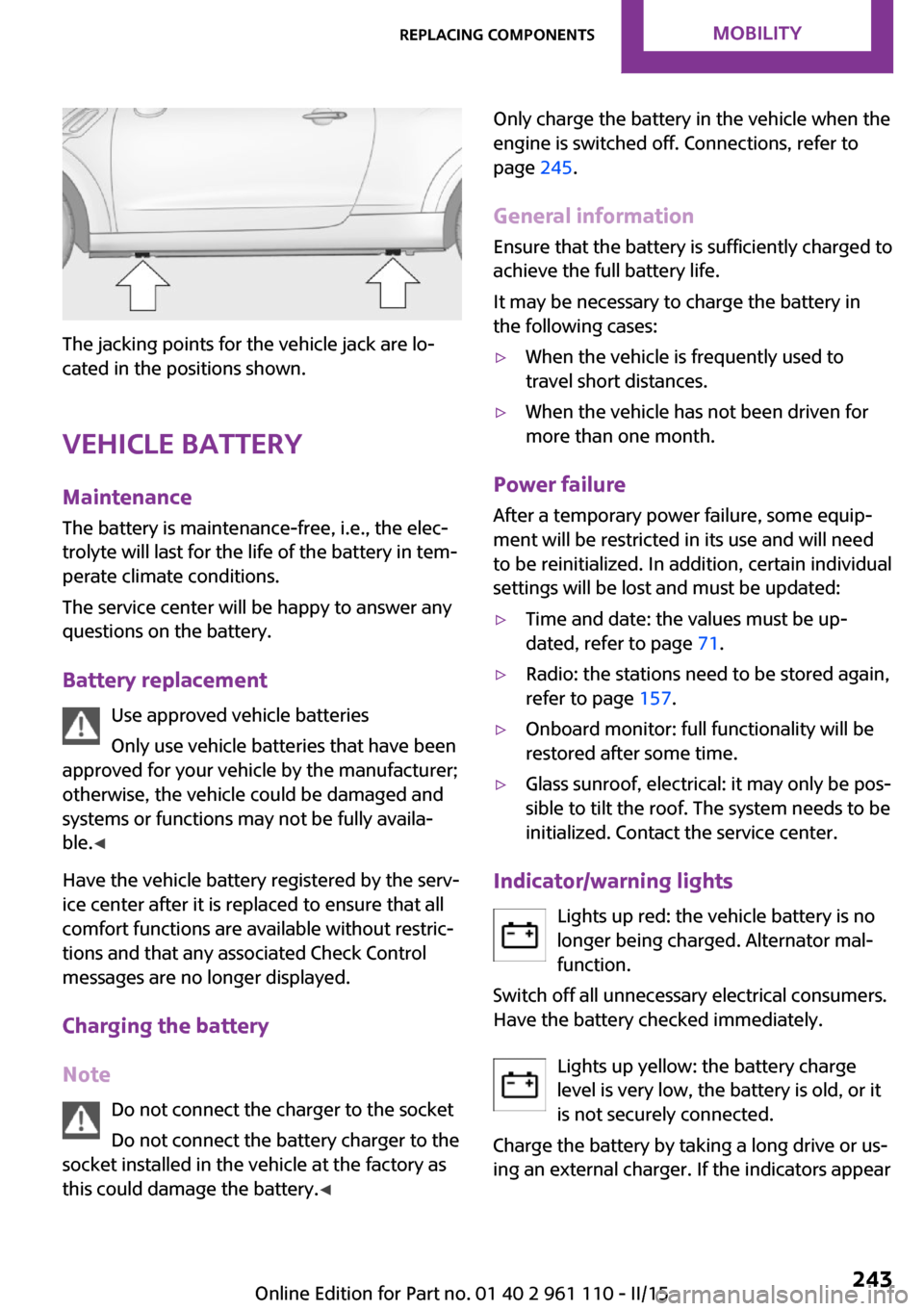
The jacking points for the vehicle jack are lo‐
cated in the positions shown.
Vehicle battery Maintenance
The battery is maintenance-free, i.e., the elec‐
trolyte will last for the life of the battery in tem‐
perate climate conditions.
The service center will be happy to answer any
questions on the battery.
Battery replacement Use approved vehicle batteries
Only use vehicle batteries that have been
approved for your vehicle by the manufacturer;
otherwise, the vehicle could be damaged and
systems or functions may not be fully availa‐
ble. ◀
Have the vehicle battery registered by the serv‐
ice center after it is replaced to ensure that all
comfort functions are available without restric‐
tions and that any associated Check Control
messages are no longer displayed.
Charging the battery
Note Do not connect the charger to the socket
Do not connect the battery charger to the
socket installed in the vehicle at the factory as this could damage the battery. ◀
Only charge the battery in the vehicle when the
engine is switched off. Connections, refer to
page 245.
General information Ensure that the battery is sufficiently charged to
achieve the full battery life.
It may be necessary to charge the battery in
the following cases:▷When the vehicle is frequently used to
travel short distances.▷When the vehicle has not been driven for
more than one month.
Power failure
After a temporary power failure, some equip‐
ment will be restricted in its use and will need
to be reinitialized. In addition, certain individual
settings will be lost and must be updated:
▷Time and date: the values must be up‐
dated, refer to page 71.▷Radio: the stations need to be stored again,
refer to page 157.▷Onboard monitor: full functionality will be
restored after some time.▷Glass sunroof, electrical: it may only be pos‐
sible to tilt the roof. The system needs to be
initialized. Contact the service center.
Indicator/warning lights
Lights up red: the vehicle battery is nolonger being charged. Alternator mal‐function.
Switch off all unnecessary electrical consumers.
Have the battery checked immediately.
Lights up yellow: the battery charge
level is very low, the battery is old, or it
is not securely connected.
Charge the battery by taking a long drive or us‐
ing an external charger. If the indicators appear
Seite 243Replacing componentsMOBILITY243
Online Edition for Part no. 01 40 2 961 110 - II/15
Page 255 of 283
grease removers, fuel, or such; this could lead
to surface damage. ◀
Rubber seals Only treat with water or a rubber care product.
When cleaning rubber seals, do not use silicone
sprays or other care products containing sili‐
cone; otherwise, noise and damage may result.
Chrome surfaces
Carefully clean components such as the radia‐
tor grille or door handles with an ample supply
of water, possibly with shampoo added, partic‐
ularly when they have been exposed to road
salt. For additional treatment, use a chrome
polish.
Light-alloy wheels
When cleaning the wheels on the vehicle, only
use a neutral wheel rim cleaner with a pH value
of 5 to 9.
Do not use abrasive cleaners or a steam jet hot‐
ter than 140 ℉/60 ℃; otherwise, damage may
result. Adhere to the manufacturer instructions.
Aggressive, acidic, or alkaline cleaners may de‐
stroy the protective coating of neighboring
components such as the brake disc.
Exterior sensors
The sensors on the outside of the vehicle, such
as for Park Distance Control, must be kept clean
and free of ice to ensure that they remain fully
functional.
Decorative trim
Clean decorative trims and fine wood compo‐
nents with a moist cloth only. Then dry with a
soft cloth.
Safety belts Dirty belt straps impede the reeling action and
thus have a negative impact on safety.No chemical cleaning
Do not clean chemically; this can destroy
the webbing. ◀
Carpets/floor mats No objects in the area around the pedals
Keep floor mats, carpets, and any other
objects out of the area of motion of the pedals;
otherwise, the function of the pedals could be
impeded while driving
Do not place additional floor mats over existing
mats or other objects.
Only use floor mats that have been approved
for the vehicle and can be properly fixed in
place.
Ensure that the floor mats are securely fastened
again when they are returned after being re‐
moved, such as for cleaning. ◀
Floor mats can be removed for cleaning.
If they are very dirty, clean with a microfiber
cloth and water or an interior cleaner. To pre‐
vent matting of the carpet, rub back and forth
in the direction of travel only.
Displays To clean the displays, such as the radio or dis‐
play elements, use an antistatic microfiber
cloth.
Cleaning displays
Do not use chemical or household cleans‐
ers.
Keep all fluids and moisture away from the
unit.
Otherwise, they could affect or damage surfa‐
ces or electrical components.
Avoid pressing too hard when cleaning and do
not use abrasive materials; otherwise, damage
can result. ◀Seite 253CareMOBILITY253
Online Edition for Part no. 01 40 2 961 110 - II/15
Page 267 of 283
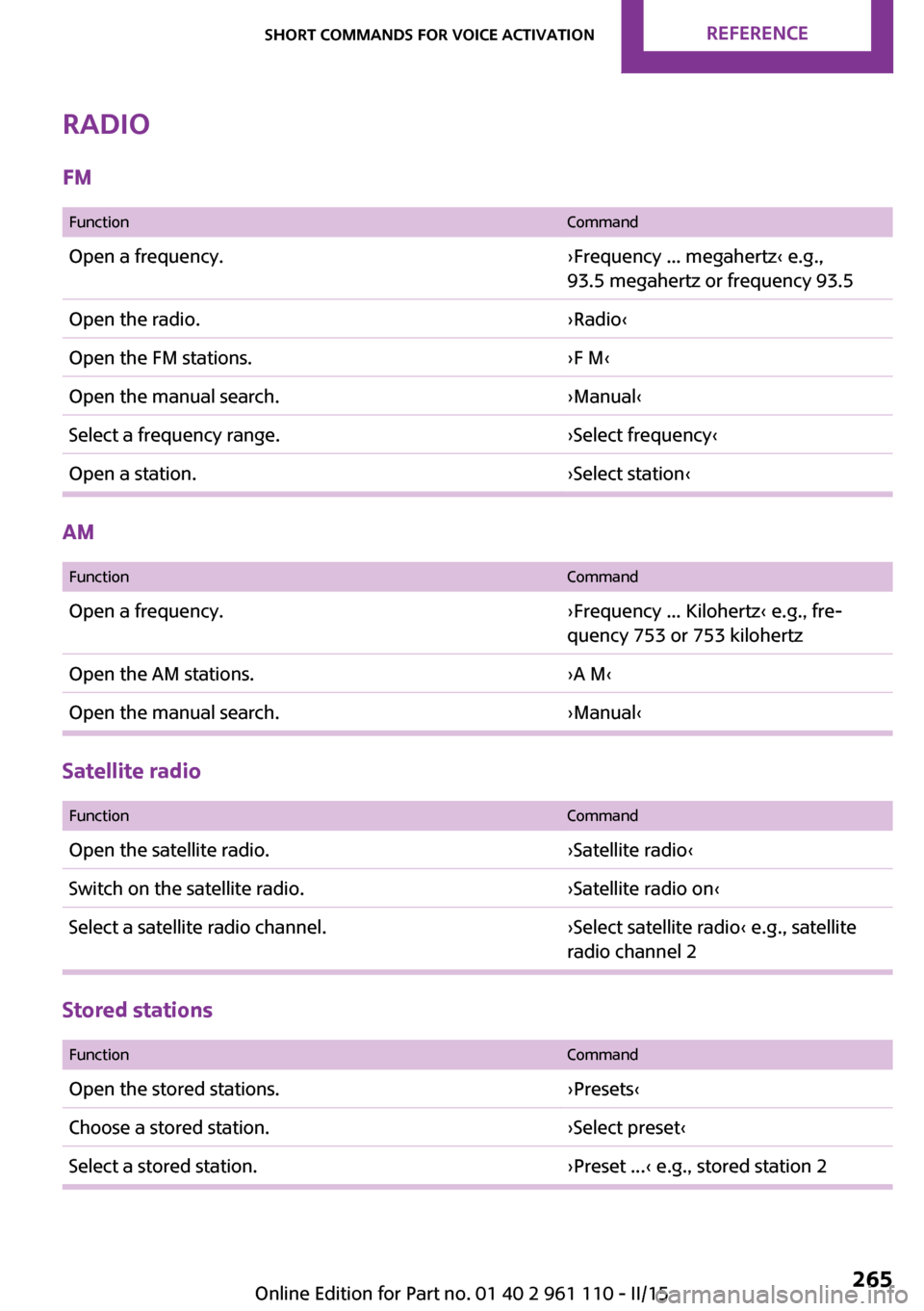
Radio
FM
FunctionCommandOpen a frequency.›Frequency ... megahertz‹ e.g.,
93.5 megahertz or frequency 93.5Open the radio.›Radio‹Open the FM stations.›F M‹Open the manual search.›Manual‹Select a frequency range.›Select frequency‹Open a station.›Select station‹
AM
FunctionCommandOpen a frequency.›Frequency ... Kilohertz‹ e.g., fre‐
quency 753 or 753 kilohertzOpen the AM stations.›A M‹Open the manual search.›Manual‹
Satellite radio
FunctionCommandOpen the satellite radio.›Satellite radio‹Switch on the satellite radio.›Satellite radio on‹Select a satellite radio channel.›Select satellite radio‹ e.g., satellite
radio channel 2
Stored stations
FunctionCommandOpen the stored stations.›Presets‹Choose a stored station.›Select preset‹Select a stored station.›Preset ...‹ e.g., stored station 2Seite 265Short commands for voice activationREFERENCE265
Online Edition for Part no. 01 40 2 961 110 - II/15
Page 272 of 283
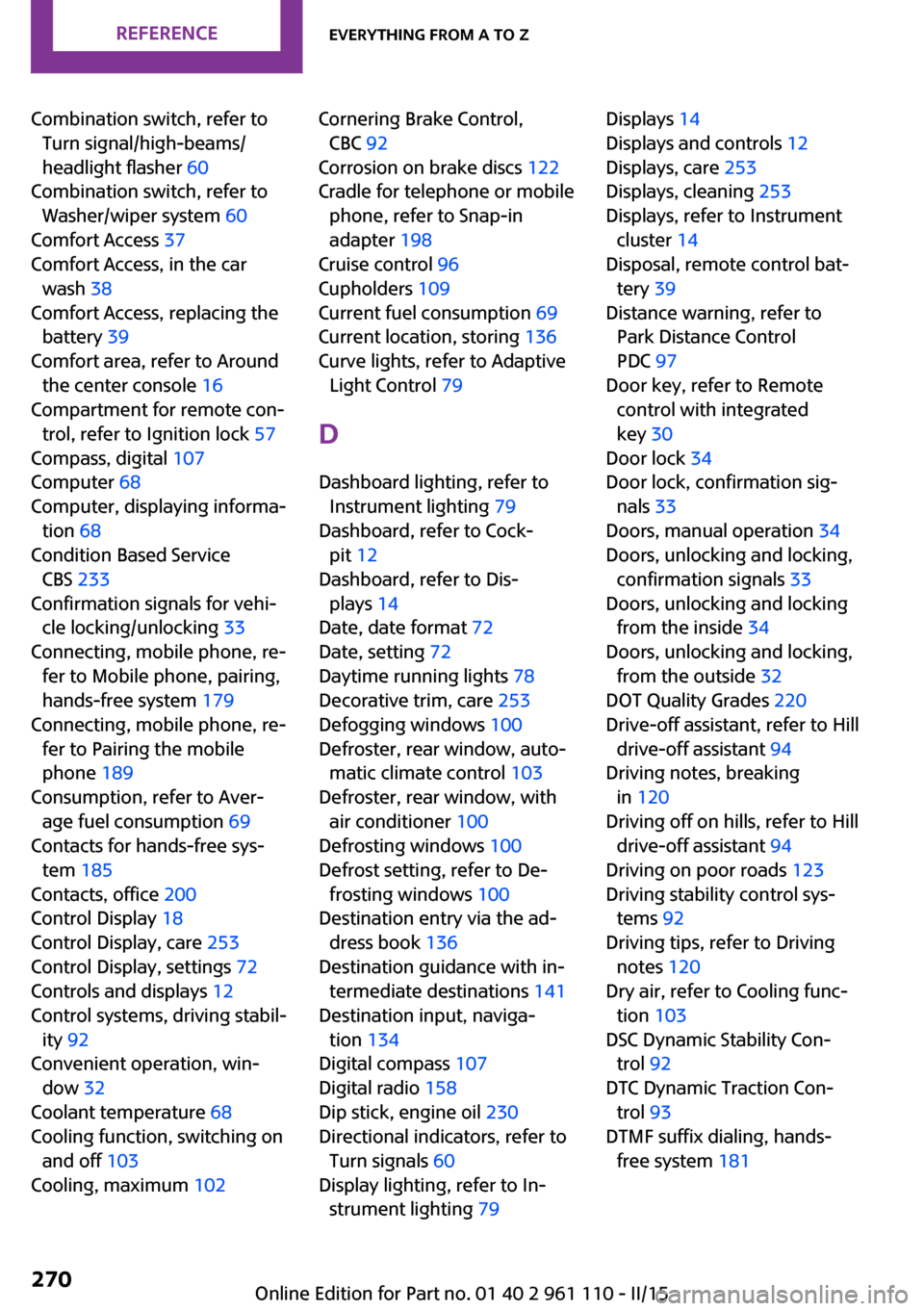
Combination switch, refer toTurn signal/high-beams/
headlight flasher 60
Combination switch, refer to Washer/wiper system 60
Comfort Access 37
Comfort Access, in the car wash 38
Comfort Access, replacing the battery 39
Comfort area, refer to Around the center console 16
Compartment for remote con‐ trol, refer to Ignition lock 57
Compass, digital 107
Computer 68
Computer, displaying informa‐ tion 68
Condition Based Service CBS 233
Confirmation signals for vehi‐ cle locking/unlocking 33
Connecting, mobile phone, re‐ fer to Mobile phone, pairing,
hands-free system 179
Connecting, mobile phone, re‐ fer to Pairing the mobile
phone 189
Consumption, refer to Aver‐ age fuel consumption 69
Contacts for hands-free sys‐ tem 185
Contacts, office 200
Control Display 18
Control Display, care 253
Control Display, settings 72
Controls and displays 12
Control systems, driving stabil‐ ity 92
Convenient operation, win‐ dow 32
Coolant temperature 68
Cooling function, switching on and off 103
Cooling, maximum 102 Cornering Brake Control,
CBC 92
Corrosion on brake discs 122
Cradle for telephone or mobile phone, refer to Snap-in
adapter 198
Cruise control 96
Cupholders 109
Current fuel consumption 69
Current location, storing 136
Curve lights, refer to Adaptive Light Control 79
D Dashboard lighting, refer to Instrument lighting 79
Dashboard, refer to Cock‐ pit 12
Dashboard, refer to Dis‐ plays 14
Date, date format 72
Date, setting 72
Daytime running lights 78
Decorative trim, care 253
Defogging windows 100
Defroster, rear window, auto‐ matic climate control 103
Defroster, rear window, with air conditioner 100
Defrosting windows 100
Defrost setting, refer to De‐ frosting windows 100
Destination entry via the ad‐ dress book 136
Destination guidance with in‐ termediate destinations 141
Destination input, naviga‐ tion 134
Digital compass 107
Digital radio 158
Dip stick, engine oil 230
Directional indicators, refer to Turn signals 60
Display lighting, refer to In‐ strument lighting 79 Displays 14
Displays and controls 12
Displays, care 253
Displays, cleaning 253
Displays, refer to Instrument cluster 14
Disposal, remote control bat‐ tery 39
Distance warning, refer to Park Distance Control
PDC 97
Door key, refer to Remote control with integrated
key 30
Door lock 34
Door lock, confirmation sig‐ nals 33
Doors, manual operation 34
Doors, unlocking and locking, confirmation signals 33
Doors, unlocking and locking from the inside 34
Doors, unlocking and locking, from the outside 32
DOT Quality Grades 220
Drive-off assistant, refer to Hill drive-off assistant 94
Driving notes, breaking in 120
Driving off on hills, refer to Hill drive-off assistant 94
Driving on poor roads 123
Driving stability control sys‐ tems 92
Driving tips, refer to Driving notes 120
Dry air, refer to Cooling func‐ tion 103
DSC Dynamic Stability Con‐ trol 92
DTC Dynamic Traction Con‐ trol 93
DTMF suffix dialing, hands- free system 181 Seite 270REFERENCEEverything from A to Z270
Online Edition for Part no. 01 40 2 961 110 - II/15
Page 274 of 283
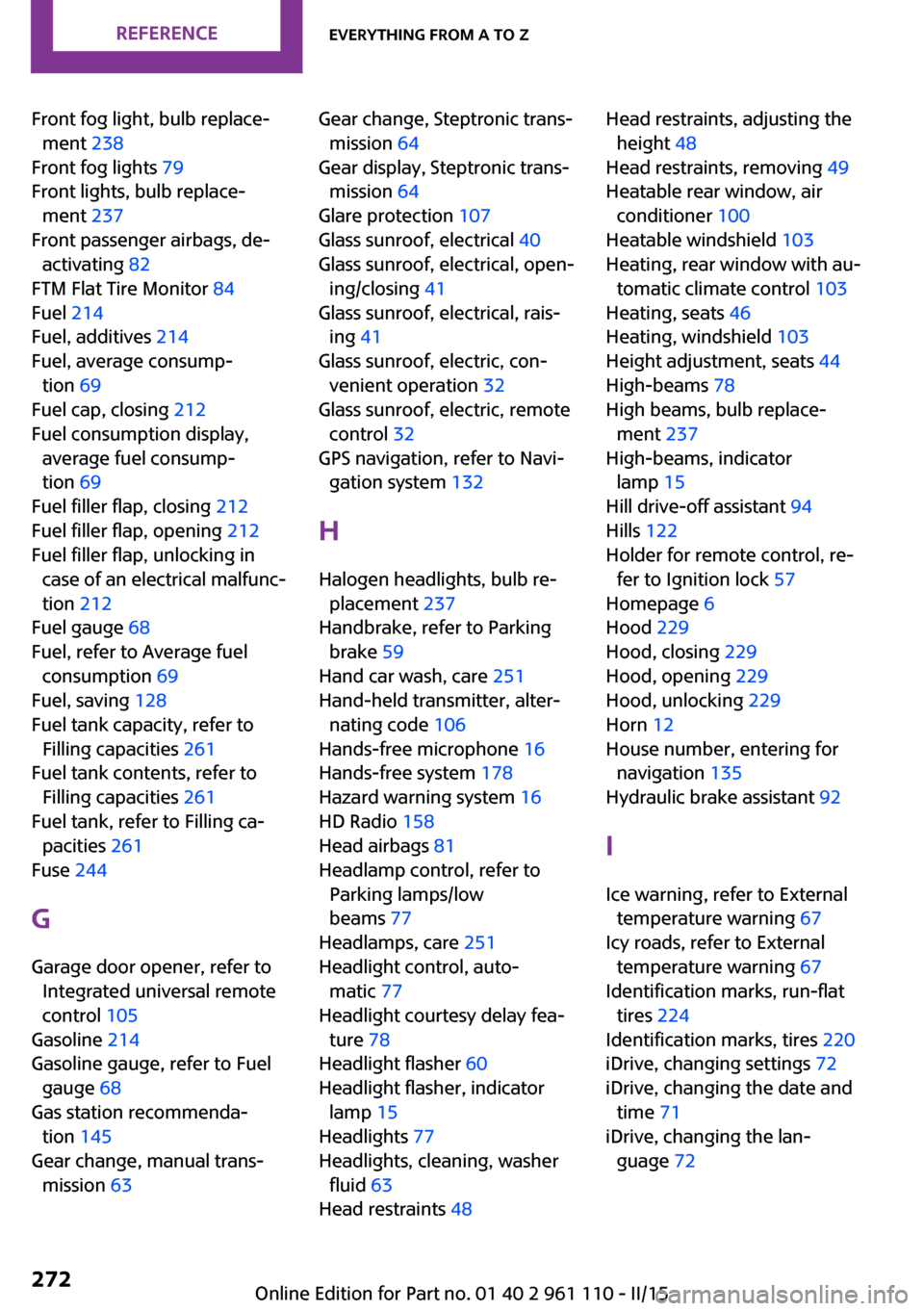
Front fog light, bulb replace‐ment 238
Front fog lights 79
Front lights, bulb replace‐ ment 237
Front passenger airbags, de‐ activating 82
FTM Flat Tire Monitor 84
Fuel 214
Fuel, additives 214
Fuel, average consump‐ tion 69
Fuel cap, closing 212
Fuel consumption display, average fuel consump‐
tion 69
Fuel filler flap, closing 212
Fuel filler flap, opening 212
Fuel filler flap, unlocking in case of an electrical malfunc‐
tion 212
Fuel gauge 68
Fuel, refer to Average fuel consumption 69
Fuel, saving 128
Fuel tank capacity, refer to Filling capacities 261
Fuel tank contents, refer to Filling capacities 261
Fuel tank, refer to Filling ca‐ pacities 261
Fuse 244
G Garage door opener, refer to Integrated universal remote
control 105
Gasoline 214
Gasoline gauge, refer to Fuel gauge 68
Gas station recommenda‐ tion 145
Gear change, manual trans‐ mission 63 Gear change, Steptronic trans‐
mission 64
Gear display, Steptronic trans‐ mission 64
Glare protection 107
Glass sunroof, electrical 40
Glass sunroof, electrical, open‐ ing/closing 41
Glass sunroof, electrical, rais‐ ing 41
Glass sunroof, electric, con‐ venient operation 32
Glass sunroof, electric, remote control 32
GPS navigation, refer to Navi‐ gation system 132
H Halogen headlights, bulb re‐ placement 237
Handbrake, refer to Parking brake 59
Hand car wash, care 251
Hand-held transmitter, alter‐ nating code 106
Hands-free microphone 16
Hands-free system 178
Hazard warning system 16
HD Radio 158
Head airbags 81
Headlamp control, refer to Parking lamps/low
beams 77
Headlamps, care 251
Headlight control, auto‐ matic 77
Headlight courtesy delay fea‐ ture 78
Headlight flasher 60
Headlight flasher, indicator lamp 15
Headlights 77
Headlights, cleaning, washer fluid 63
Head restraints 48 Head restraints, adjusting the
height 48
Head restraints, removing 49
Heatable rear window, air conditioner 100
Heatable windshield 103
Heating, rear window with au‐ tomatic climate control 103
Heating, seats 46
Heating, windshield 103
Height adjustment, seats 44
High-beams 78
High beams, bulb replace‐ ment 237
High-beams, indicator lamp 15
Hill drive-off assistant 94
Hills 122
Holder for remote control, re‐ fer to Ignition lock 57
Homepage 6
Hood 229
Hood, closing 229
Hood, opening 229
Hood, unlocking 229
Horn 12
House number, entering for navigation 135
Hydraulic brake assistant 92
I Ice warning, refer to External temperature warning 67
Icy roads, refer to External temperature warning 67
Identification marks, run-flat tires 224
Identification marks, tires 220
iDrive, changing settings 72
iDrive, changing the date and time 71
iDrive, changing the lan‐ guage 72 Seite 272REFERENCEEverything from A to Z272
Online Edition for Part no. 01 40 2 961 110 - II/15
Page 275 of 283
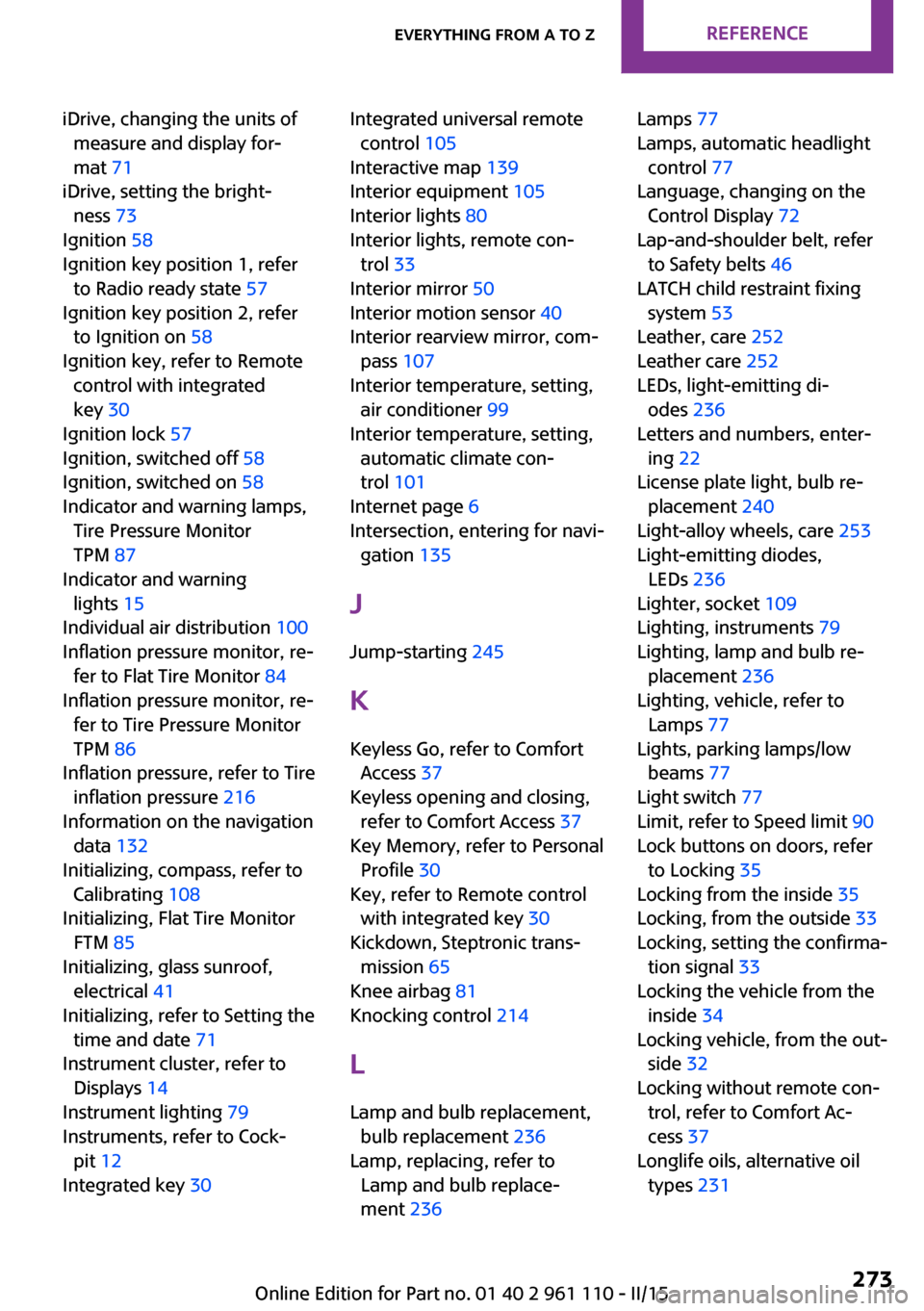
iDrive, changing the units ofmeasure and display for‐
mat 71
iDrive, setting the bright‐ ness 73
Ignition 58
Ignition key position 1, refer to Radio ready state 57
Ignition key position 2, refer to Ignition on 58
Ignition key, refer to Remote control with integrated
key 30
Ignition lock 57
Ignition, switched off 58
Ignition, switched on 58
Indicator and warning lamps, Tire Pressure Monitor
TPM 87
Indicator and warning lights 15
Individual air distribution 100
Inflation pressure monitor, re‐ fer to Flat Tire Monitor 84
Inflation pressure monitor, re‐ fer to Tire Pressure Monitor
TPM 86
Inflation pressure, refer to Tire inflation pressure 216
Information on the navigation data 132
Initializing, compass, refer to Calibrating 108
Initializing, Flat Tire Monitor FTM 85
Initializing, glass sunroof, electrical 41
Initializing, refer to Setting the time and date 71
Instrument cluster, refer to Displays 14
Instrument lighting 79
Instruments, refer to Cock‐ pit 12
Integrated key 30 Integrated universal remote
control 105
Interactive map 139
Interior equipment 105
Interior lights 80
Interior lights, remote con‐ trol 33
Interior mirror 50
Interior motion sensor 40
Interior rearview mirror, com‐ pass 107
Interior temperature, setting, air conditioner 99
Interior temperature, setting, automatic climate con‐
trol 101
Internet page 6
Intersection, entering for navi‐ gation 135
J
Jump-starting 245
K Keyless Go, refer to Comfort Access 37
Keyless opening and closing, refer to Comfort Access 37
Key Memory, refer to Personal Profile 30
Key, refer to Remote control with integrated key 30
Kickdown, Steptronic trans‐ mission 65
Knee airbag 81
Knocking control 214
L Lamp and bulb replacement, bulb replacement 236
Lamp, replacing, refer to Lamp and bulb replace‐
ment 236 Lamps 77
Lamps, automatic headlight control 77
Language, changing on the Control Display 72
Lap-and-shoulder belt, refer to Safety belts 46
LATCH child restraint fixing system 53
Leather, care 252
Leather care 252
LEDs, light-emitting di‐ odes 236
Letters and numbers, enter‐ ing 22
License plate light, bulb re‐ placement 240
Light-alloy wheels, care 253
Light-emitting diodes, LEDs 236
Lighter, socket 109
Lighting, instruments 79
Lighting, lamp and bulb re‐ placement 236
Lighting, vehicle, refer to Lamps 77
Lights, parking lamps/low beams 77
Light switch 77
Limit, refer to Speed limit 90
Lock buttons on doors, refer to Locking 35
Locking from the inside 35
Locking, from the outside 33
Locking, setting the confirma‐ tion signal 33
Locking the vehicle from the inside 34
Locking vehicle, from the out‐ side 32
Locking without remote con‐ trol, refer to Comfort Ac‐
cess 37
Longlife oils, alternative oil types 231 Seite 273Everything from A to ZREFERENCE273
Online Edition for Part no. 01 40 2 961 110 - II/15
Page 277 of 283

Opening and closing, via theremote control 32
Opening and unlocking from the inside 35
Operating concept of the on‐ board monitor 18
Outside air mode, automatic climate control 102
Outside air, refer to Recircu‐ lated air mode, air condi‐
tioner 100
Outside air, refer to Recircu‐ lated air mode, automatic
climate control 102
Overheating of engine, refer to Coolant temperature 68
P Pairing, mobile phone 189
Pairing, mobile phone, hands- free system 179
Park Distance Control PDC 97
Parking aid, refer to Park Dis‐ tance Control PDC 97
Parking assistant, refer to Park Distance Control PDC 97
Parking brake 59
Parking light, bulb replace‐ ment 238
Parking lights 77
Parking lights/low beams 77
PDC Park Distance Control 97
Personal information 199
Personal Profile 30
Pinch protection, windows 42
Pivoting sun visor 107
Plastic, care 252
Pollen, refer to Microfilter 101
Pollen, refer to Microfilter/ activated-charcoal filter 101
Pollen, refer to Microfilter/ activated-charcoal filter with
automatic climate con‐
trol 103
Poor road operation 123 Position, storing 136
Postal code, entering in navi‐ gation 135
Power windows 42
Power windows, refer to Win‐ dows 41
Prescribed engine oils, refer to Approved engine oils 231
Pressure monitoring of tires, refer to Tire Pressure Monitor
TPM 86
Pressure, tires 216
Pressure warning, tires 84
Profile depth, refer to Mini‐ mum tread depth 222
Profile, tires 221
Protective function, refer to Pinch protection system,
windows 42
R
Radio 156
Radio-operated key, refer to Remote control with
integrated key 30
Radio ready state 57
Radio ready state, switched off 58
Radio ready state, switched on 57
Radio setting, refer to Radio ready state 57
Rain sensor 61
Random 165
Random playback 165
Range 69
RDS 157
Reading out loud 205
Rear 45
Rear fog light, bulb replace‐ ment 240
Rear fog lights, indicator lamp 15
Rear lights, refer to Tail lights 240 Rear seat backrests, foldable,
MINI Countryman 111
Rear seat backrests, foldable, MINI Paceman 112
Rearview mirror, refer to Mir‐ rors 49
Rear window defroster with air conditioner 100
Rear window defroster with automatic climate con‐
trol 103
Rear window, washing 62
Rear window wiper 62
Recirculated air mode, air conditioner 100
Recirculated air mode, auto‐ matic climate control 102
Recommended fuel grade 214
Recommended tire brands 223
Redialing, hands-free sys‐ tem 181
Redialing, mobile phone prep‐ aration package 193
Releasing, refer to Unlock‐ ing 37
Remaining range for service, refer to Service require‐
ments 73
Remaining range, refer to Range 69
Reminders 205
Remote control 30
Remote control, battery re‐ placement 39
Remote control, Comfort Ac‐ cess 37
Remote control, Comfort Ac‐ cess, malfunctions 38
Remote control, garage door opener 105
Remote control, radio interfer‐ ence 33
Remote control, removing from the ignition lock 57 Seite 275Everything from A to ZREFERENCE275
Online Edition for Part no. 01 40 2 961 110 - II/15