wheel MINI Countryman 2015 (Mini Connected) Workshop Manual
[x] Cancel search | Manufacturer: MINI, Model Year: 2015, Model line: Countryman, Model: MINI Countryman 2015Pages: 283, PDF Size: 6.76 MB
Page 241 of 283

3.Remove the inside cover. To do this, turn
the cover counterclockwise.4.Turn the bulb counterclockwise and re‐
move it.5.Insert the new bulb and attach the covers
in reverse order.
Replacing the parking light bulb and
roadside parking light bulb
5-watt bulb, W 5 W
1.Turn the wheel.2.Remove cover 2.
To do this, turn the cover counterclockwise.3.Turn the upper bulb counterclockwise and
remove it.4.Insert the new bulb and attach the cover in
reverse order.
Replacing the front fog light bulb
H8 bulb, 35 watt
1.Turn the wheel.2.Remove cover 2.
To do this, turn the cover counterclockwise.3.Pull off the plug-in cable connector.4.Turn the lower bulb counterclockwise and
remove it.5.Insert the new bulb and attach the cover in
reverse order.
Replacing the daytime running light bulb
Bulb PSX24W
1.Turn the wheel.2.Remove cover 2.
To do this, turn the cover counterclockwise.3.Pull off the plug-in cable connector.Seite 239Replacing componentsMOBILITY239
Online Edition for Part no. 01 40 2 961 110 - II/15
Page 244 of 283
9.Apply gentle pressure to the bulb while
turning it to the left and remove it.10.Insert the new bulb and mount the bulb
holder in reverse order. Ensure that the
bulb holder engages in all fasteners.
License plate lights
5-watt bulb, C 5 W
Replacing
MINI Countryman
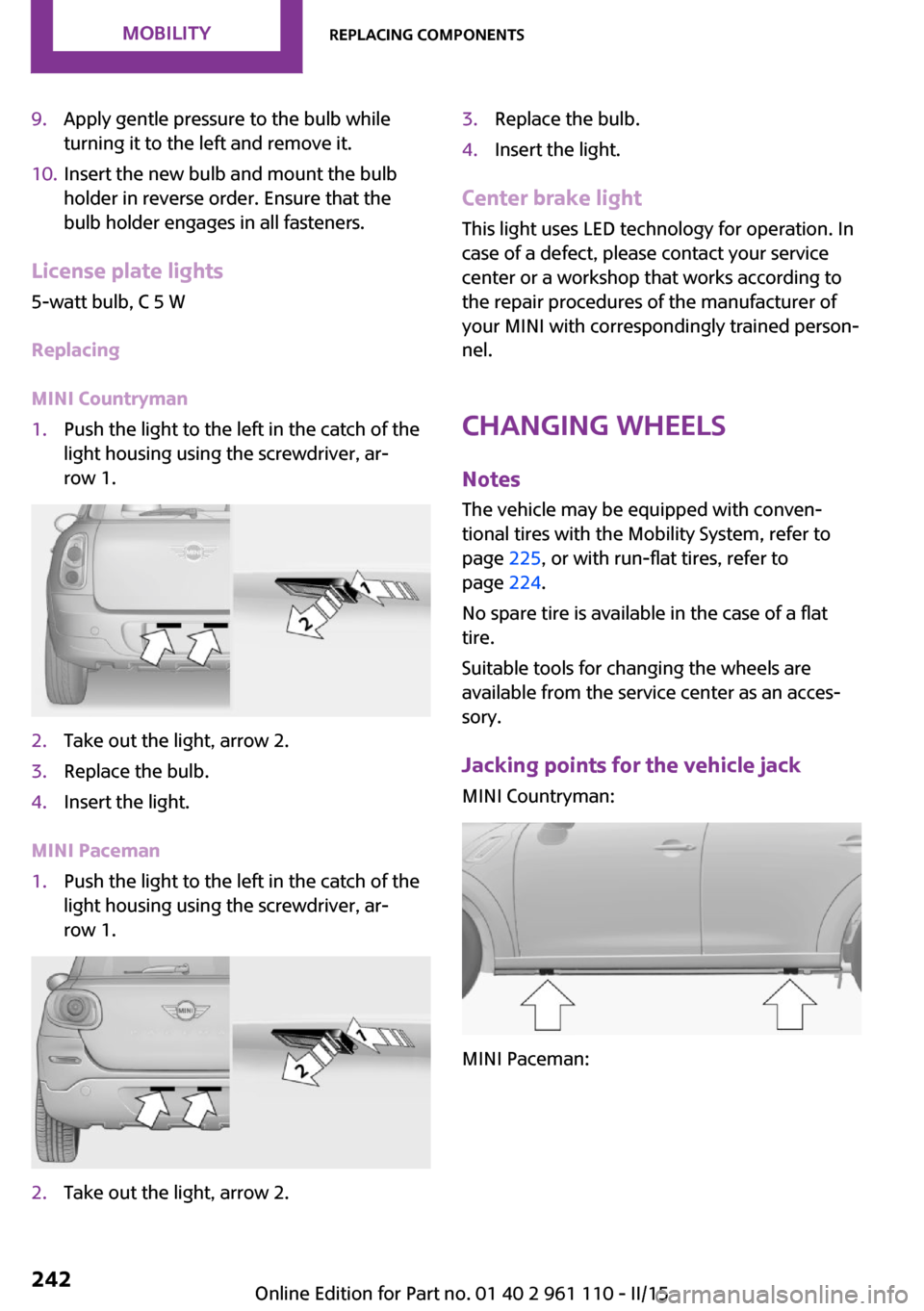
1.Push the light to the left in the catch of the
light housing using the screwdriver, ar‐
row 1.2.Take out the light, arrow 2.3.Replace the bulb.4.Insert the light.
MINI Paceman
1.Push the light to the left in the catch of the
light housing using the screwdriver, ar‐
row 1.2.Take out the light, arrow 2.3.Replace the bulb.4.Insert the light.
Center brake light
This light uses LED technology for operation. In
case of a defect, please contact your service
center or a workshop that works according to
the repair procedures of the manufacturer of
your MINI with correspondingly trained person‐
nel.
Changing wheels
Notes The vehicle may be equipped with conven‐tional tires with the Mobility System, refer to
page 225, or with run-flat tires, refer to
page 224.
No spare tire is available in the case of a flat
tire.
Suitable tools for changing the wheels are
available from the service center as an acces‐
sory.
Jacking points for the vehicle jack MINI Countryman:
MINI Paceman:
Seite 242MOBILITYReplacing components242
Online Edition for Part no. 01 40 2 961 110 - II/15
Page 249 of 283

the battery, or to the engine or body
ground of the vehicle to be started.
Body ground:
Starting the engine
Never use spray fluids to start the engine.
1.Start the engine of the assisting vehicle and
let it run for several minutes at a slightly in‐
creased idle speed.2.Start the engine of the vehicle being started
in the usual way.
If the first starting attempt is not successful,
wait a few minutes before making another
attempt in order to allow the discharged
battery to recharge.3.Let both engines run for several minutes.4.Disconnect the jumper cables in the reverse
order.
Check the battery and recharge if necessary.
Tow-starting and towing
Notes Observe applicable laws and regulations
Observe applicable laws and regulations
for tow-starting and towing. ◀
No additional passengers
Do not transport any passengers other
than the driver in a vehicle that is being
towed. ◀
Using a tow fitting
The screw-in tow fitting must always be carried
in the vehicle. It can be screwed in at the front
or rear of the MINI.
The tow fitting is stowed in the following loca‐
tion, depending on the equipment:▷Under the right or left front seat.▷In the pouch of the wheel change set in the
cargo area.
Tow fitting, information on use
▷Use only the tow fitting provided with
the vehicle and screw it all the way in.▷Use the tow fitting for towing on paved
roads only.▷Avoid lateral loading of the tow fitting, e.g.,
do not lift the vehicle by the tow fitting.
Otherwise, damage to the tow fitting and the
vehicle can occur. ◀
Access to the screw thread Push out the tow fitting cover at the appropri‐
ate recess in the bumper.
Front
Seite 247Breakdown assistanceMOBILITY247
Online Edition for Part no. 01 40 2 961 110 - II/15
Page 250 of 283
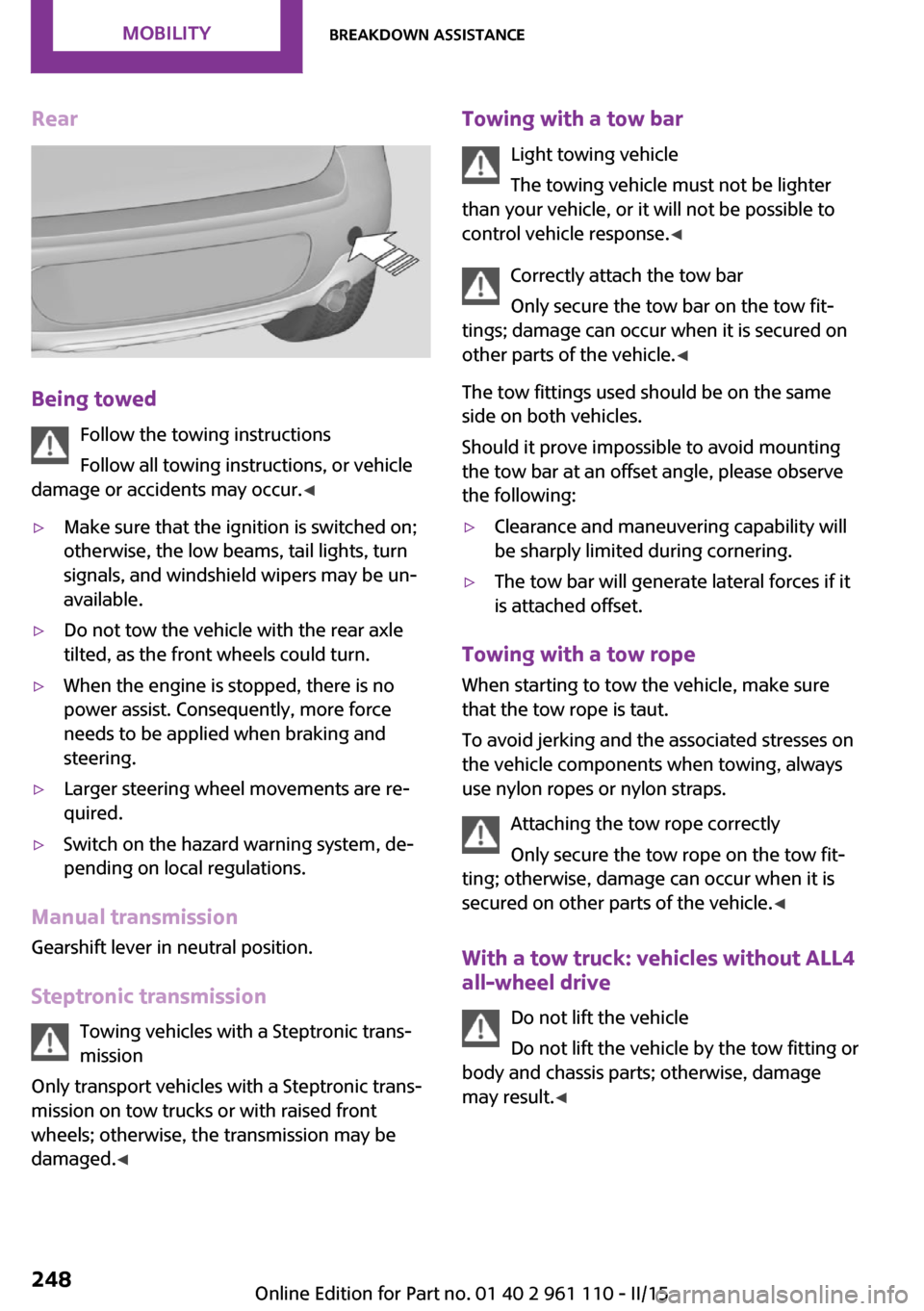
Rear
Being towedFollow the towing instructions
Follow all towing instructions, or vehicle
damage or accidents may occur. ◀
▷Make sure that the ignition is switched on;
otherwise, the low beams, tail lights, turn
signals, and windshield wipers may be un‐
available.▷Do not tow the vehicle with the rear axle
tilted, as the front wheels could turn.▷When the engine is stopped, there is no
power assist. Consequently, more force
needs to be applied when braking and
steering.▷Larger steering wheel movements are re‐
quired.▷Switch on the hazard warning system, de‐
pending on local regulations.
Manual transmission
Gearshift lever in neutral position.
Steptronic transmission Towing vehicles with a Steptronic trans‐
mission
Only transport vehicles with a Steptronic trans‐
mission on tow trucks or with raised front
wheels; otherwise, the transmission may be
damaged. ◀
Towing with a tow bar
Light towing vehicle
The towing vehicle must not be lighter
than your vehicle, or it will not be possible to
control vehicle response. ◀
Correctly attach the tow bar
Only secure the tow bar on the tow fit‐
tings; damage can occur when it is secured on
other parts of the vehicle. ◀
The tow fittings used should be on the same
side on both vehicles.
Should it prove impossible to avoid mounting
the tow bar at an offset angle, please observe
the following:▷Clearance and maneuvering capability will
be sharply limited during cornering.▷The tow bar will generate lateral forces if it
is attached offset.
Towing with a tow rope
When starting to tow the vehicle, make sure
that the tow rope is taut.
To avoid jerking and the associated stresses on
the vehicle components when towing, always
use nylon ropes or nylon straps.
Attaching the tow rope correctly
Only secure the tow rope on the tow fit‐
ting; otherwise, damage can occur when it is
secured on other parts of the vehicle. ◀
With a tow truck: vehicles without ALL4
all-wheel drive
Do not lift the vehicle
Do not lift the vehicle by the tow fitting or
body and chassis parts; otherwise, damage
may result. ◀
Seite 248MOBILITYBreakdown assistance248
Online Edition for Part no. 01 40 2 961 110 - II/15
Page 251 of 283
MINI Countryman:
MINI Paceman:
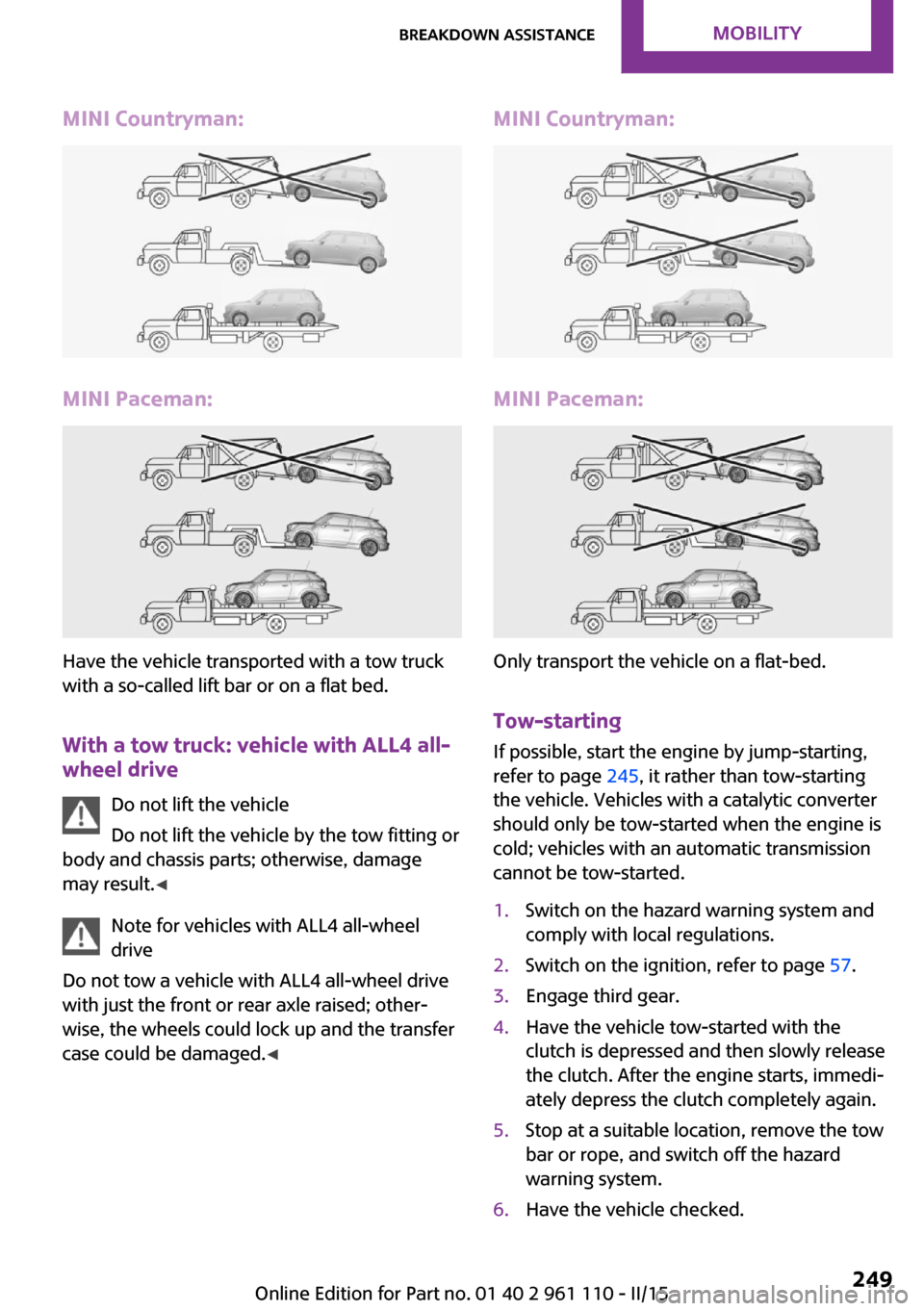
Have the vehicle transported with a tow truck
with a so-called lift bar or on a flat bed.
With a tow truck: vehicle with ALL4 all-wheel drive
Do not lift the vehicle
Do not lift the vehicle by the tow fitting or
body and chassis parts; otherwise, damage
may result. ◀
Note for vehicles with ALL4 all-wheel
drive
Do not tow a vehicle with ALL4 all-wheel drive
with just the front or rear axle raised; other‐
wise, the wheels could lock up and the transfer
case could be damaged. ◀
MINI Countryman:
MINI Paceman:
Only transport the vehicle on a flat-bed.
Tow-starting
If possible, start the engine by jump-starting,
refer to page 245, it rather than tow-starting
the vehicle. Vehicles with a catalytic converter
should only be tow-started when the engine is
cold; vehicles with an automatic transmission
cannot be tow-started.
1.Switch on the hazard warning system and
comply with local regulations.2.Switch on the ignition, refer to page 57.3.Engage third gear.4.Have the vehicle tow-started with the
clutch is depressed and then slowly release
the clutch. After the engine starts, immedi‐
ately depress the clutch completely again.5.Stop at a suitable location, remove the tow
bar or rope, and switch off the hazard
warning system.6.Have the vehicle checked.Seite 249Breakdown assistanceMOBILITY249
Online Edition for Part no. 01 40 2 961 110 - II/15
Page 255 of 283
grease removers, fuel, or such; this could lead
to surface damage. ◀
Rubber seals Only treat with water or a rubber care product.
When cleaning rubber seals, do not use silicone
sprays or other care products containing sili‐
cone; otherwise, noise and damage may result.
Chrome surfaces
Carefully clean components such as the radia‐
tor grille or door handles with an ample supply
of water, possibly with shampoo added, partic‐
ularly when they have been exposed to road
salt. For additional treatment, use a chrome
polish.
Light-alloy wheels
When cleaning the wheels on the vehicle, only
use a neutral wheel rim cleaner with a pH value
of 5 to 9.
Do not use abrasive cleaners or a steam jet hot‐
ter than 140 ℉/60 ℃; otherwise, damage may
result. Adhere to the manufacturer instructions.
Aggressive, acidic, or alkaline cleaners may de‐
stroy the protective coating of neighboring
components such as the brake disc.
Exterior sensors
The sensors on the outside of the vehicle, such
as for Park Distance Control, must be kept clean
and free of ice to ensure that they remain fully
functional.
Decorative trim
Clean decorative trims and fine wood compo‐
nents with a moist cloth only. Then dry with a
soft cloth.
Safety belts Dirty belt straps impede the reeling action and
thus have a negative impact on safety.No chemical cleaning
Do not clean chemically; this can destroy
the webbing. ◀
Carpets/floor mats No objects in the area around the pedals
Keep floor mats, carpets, and any other
objects out of the area of motion of the pedals;
otherwise, the function of the pedals could be
impeded while driving
Do not place additional floor mats over existing
mats or other objects.
Only use floor mats that have been approved
for the vehicle and can be properly fixed in
place.
Ensure that the floor mats are securely fastened
again when they are returned after being re‐
moved, such as for cleaning. ◀
Floor mats can be removed for cleaning.
If they are very dirty, clean with a microfiber
cloth and water or an interior cleaner. To pre‐
vent matting of the carpet, rub back and forth
in the direction of travel only.
Displays To clean the displays, such as the radio or dis‐
play elements, use an antistatic microfiber
cloth.
Cleaning displays
Do not use chemical or household cleans‐
ers.
Keep all fluids and moisture away from the
unit.
Otherwise, they could affect or damage surfa‐
ces or electrical components.
Avoid pressing too hard when cleaning and do
not use abrasive materials; otherwise, damage
can result. ◀Seite 253CareMOBILITY253
Online Edition for Part no. 01 40 2 961 110 - II/15
Page 260 of 283
Technical dataVehicle equipment
This chapter describes all series equipment as
well as country-specific and special equipment
offered for this model series. Therefore, it also
describes equipment that may not be found in
your vehicle, for instance due to the selectedspecial equipment or the country version. This
also applies to safety-related functions and sys‐
tems.
When using the features and systems described
here, adhere to local regulations.
Note
The technical data and specifications in this
Owner's Manual are used as guidance values.
The vehicle-specific data can deviate from this,
for example, due to the selected special equip‐
ment, country version or country-specific
measurement method. Detailed values can befound in the approval documents, on informa‐
tion signs on the vehicle or can be obtained
from the service center.
The information in the vehicle documents al‐
ways has priority.
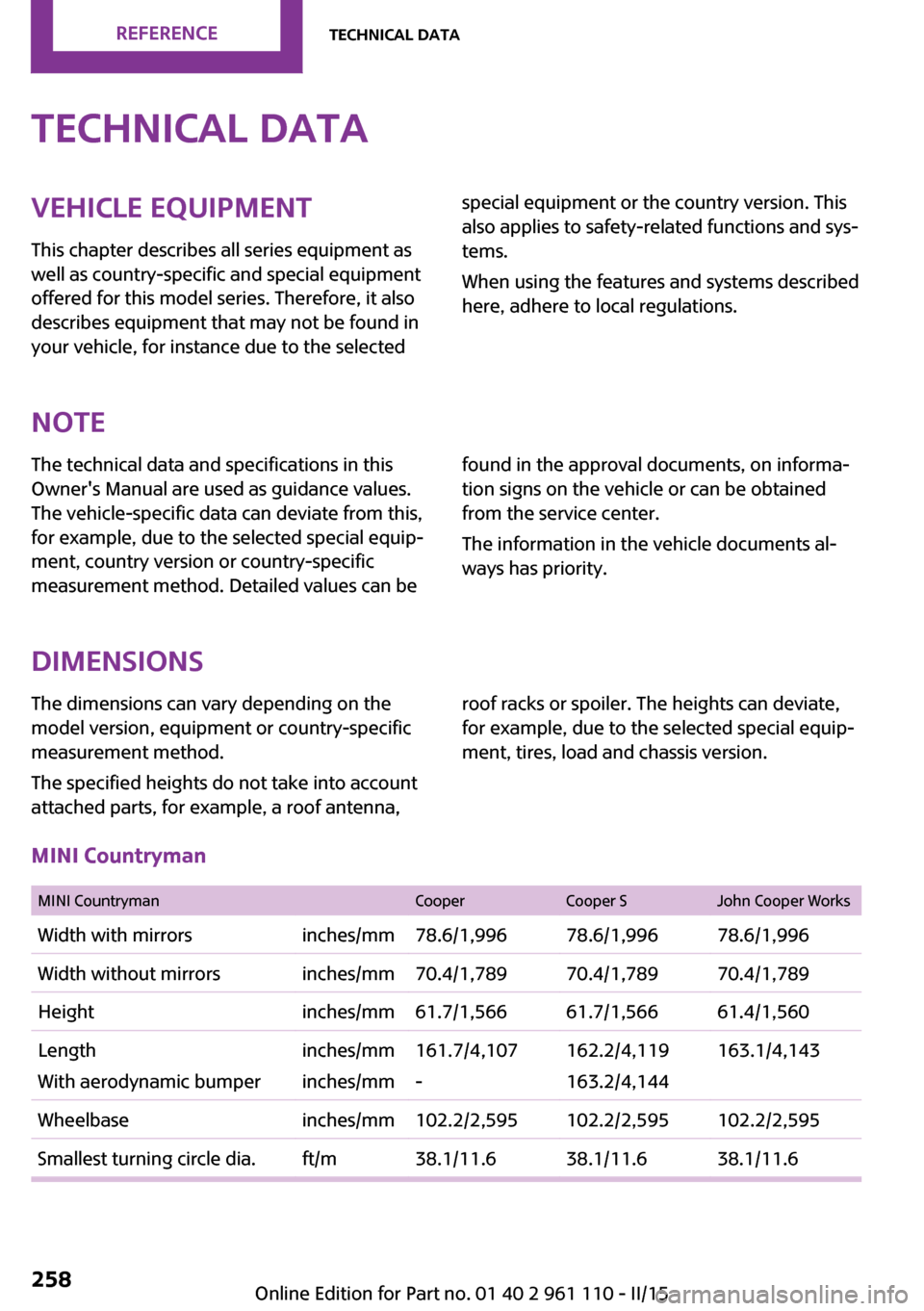
Dimensions
The dimensions can vary depending on the
model version, equipment or country-specific
measurement method.
The specified heights do not take into account
attached parts, for example, a roof antenna,roof racks or spoiler. The heights can deviate,
for example, due to the selected special equip‐
ment, tires, load and chassis version.
MINI Countryman
MINI CountrymanCooperCooper SJohn Cooper WorksWidth with mirrorsinches/mm78.6/1,99678.6/1,99678.6/1,996Width without mirrorsinches/mm70.4/1,78970.4/1,78970.4/1,789Heightinches/mm61.7/1,56661.7/1,56661.4/1,560Length
With aerodynamic bumperinches/mm
inches/mm161.7/4,107
-162.2/4,119
163.2/4,144163.1/4,143Wheelbaseinches/mm102.2/2,595102.2/2,595102.2/2,595Smallest turning circle dia.ft/m38.1/11.638.1/11.638.1/11.6Seite 258REFERENCETechnical data258
Online Edition for Part no. 01 40 2 961 110 - II/15
Page 261 of 283
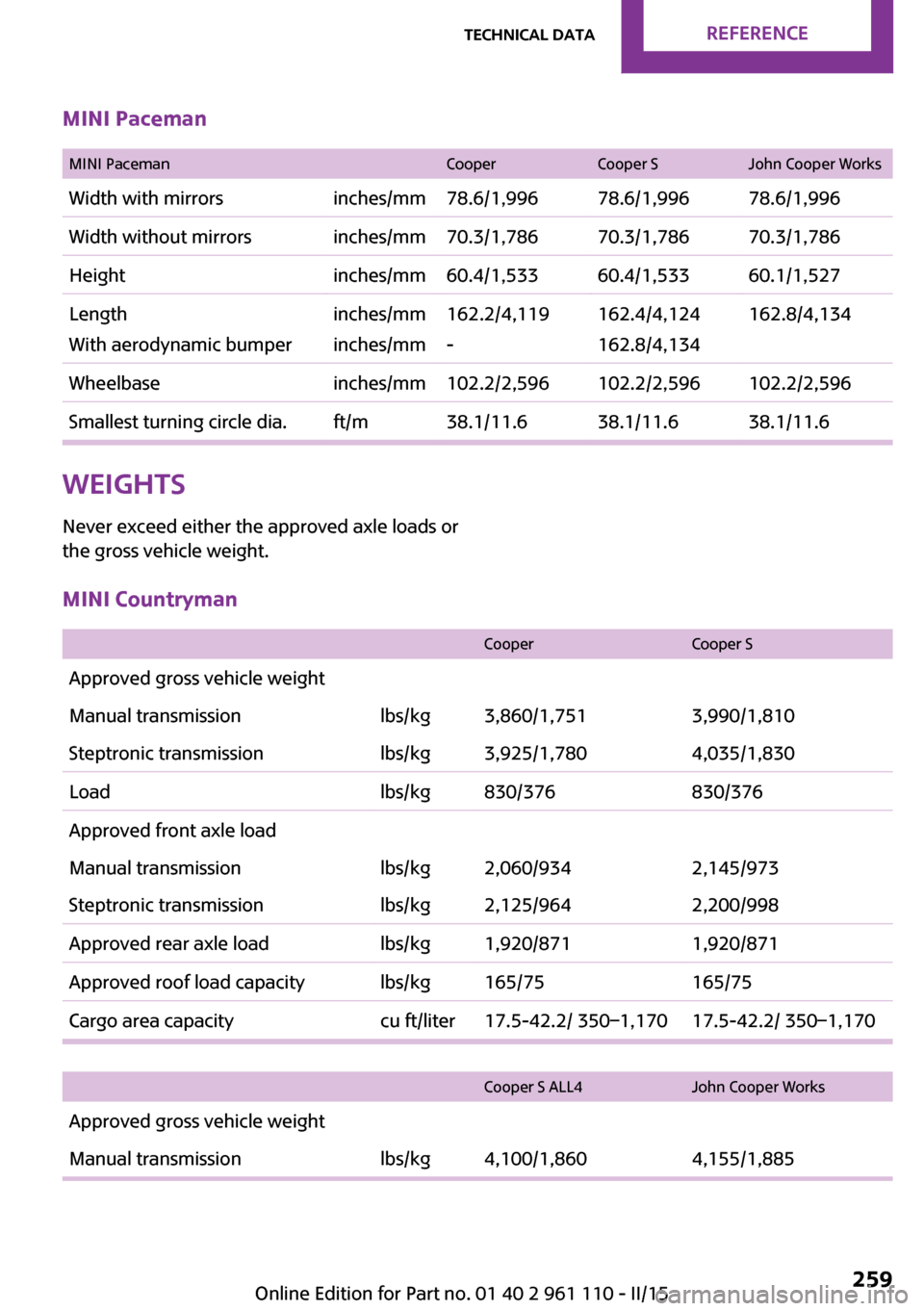
MINI Paceman
MINI PacemanCooperCooper SJohn Cooper WorksWidth with mirrorsinches/mm78.6/1,99678.6/1,99678.6/1,996Width without mirrorsinches/mm70.3/1,78670.3/1,78670.3/1,786Heightinches/mm60.4/1,53360.4/1,53360.1/1,527Length
With aerodynamic bumperinches/mm
inches/mm162.2/4,119
-162.4/4,124
162.8/4,134162.8/4,134Wheelbaseinches/mm102.2/2,596102.2/2,596102.2/2,596Smallest turning circle dia.ft/m38.1/11.638.1/11.638.1/11.6Weights
Never exceed either the approved axle loads or
the gross vehicle weight.MINI Countryman
CooperCooper SApproved gross vehicle weightManual transmissionlbs/kg3,860/1,7513,990/1,810Steptronic transmissionlbs/kg3,925/1,7804,035/1,830Loadlbs/kg830/376830/376Approved front axle loadManual transmissionlbs/kg2,060/9342,145/973Steptronic transmissionlbs/kg2,125/9642,200/998Approved rear axle loadlbs/kg1,920/8711,920/871Approved roof load capacitylbs/kg165/75165/75Cargo area capacitycu ft/liter17.5-42.2/ 350–1,17017.5-42.2/ 350–1,170
Cooper S ALL4John Cooper WorksApproved gross vehicle weightManual transmissionlbs/kg4,100/1,8604,155/1,885Seite 259Technical dataREFERENCE259
Online Edition for Part no. 01 40 2 961 110 - II/15
Page 270 of 283
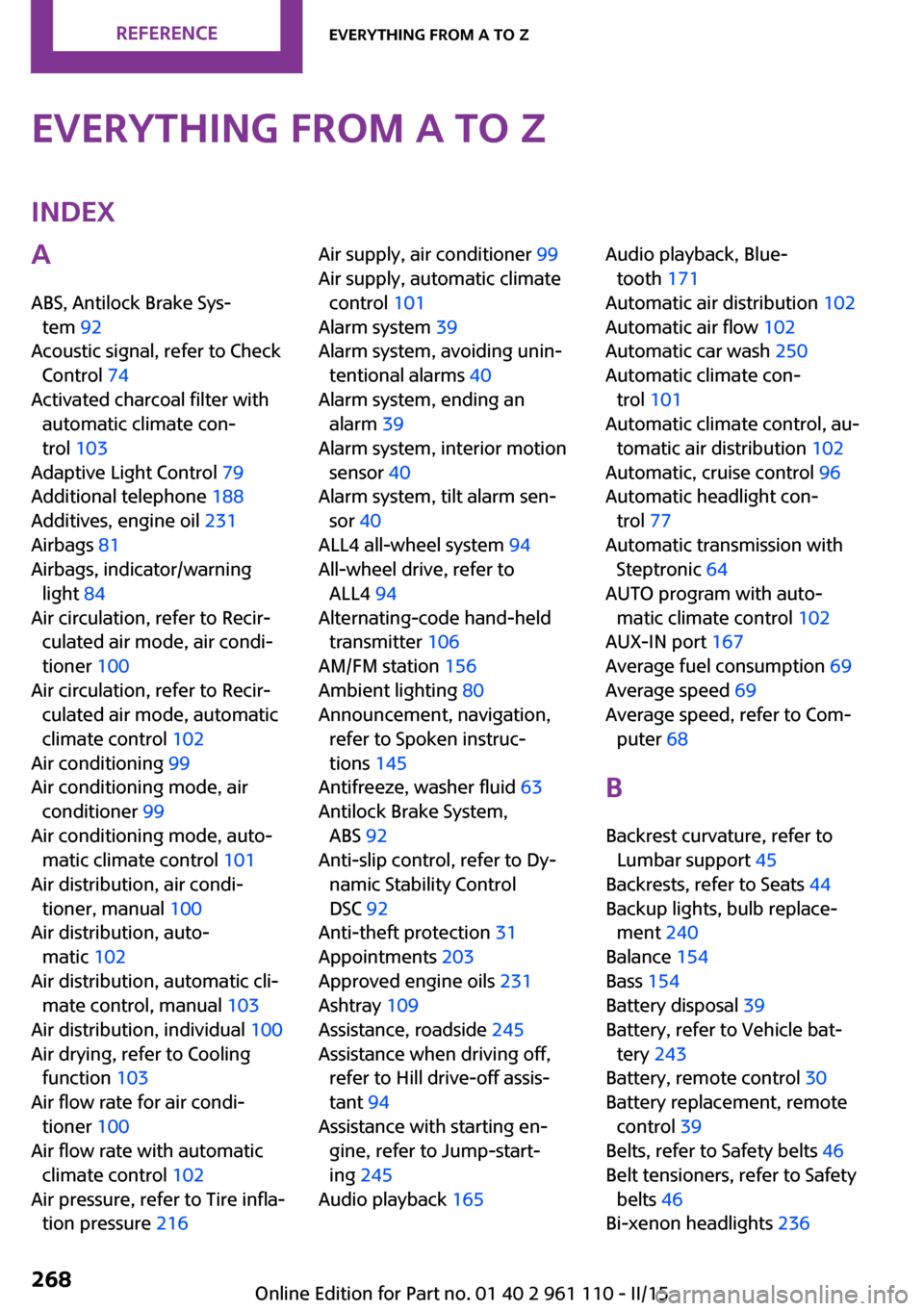
Everything from A to ZIndexA
ABS, Antilock Brake Sys‐ tem 92
Acoustic signal, refer to Check Control 74
Activated charcoal filter with automatic climate con‐
trol 103
Adaptive Light Control 79
Additional telephone 188
Additives, engine oil 231
Airbags 81
Airbags, indicator/warning light 84
Air circulation, refer to Recir‐ culated air mode, air condi‐
tioner 100
Air circulation, refer to Recir‐ culated air mode, automatic
climate control 102
Air conditioning 99
Air conditioning mode, air conditioner 99
Air conditioning mode, auto‐ matic climate control 101
Air distribution, air condi‐ tioner, manual 100
Air distribution, auto‐ matic 102
Air distribution, automatic cli‐ mate control, manual 103
Air distribution, individual 100
Air drying, refer to Cooling function 103
Air flow rate for air condi‐ tioner 100
Air flow rate with automatic climate control 102
Air pressure, refer to Tire infla‐ tion pressure 216 Air supply, air conditioner 99
Air supply, automatic climate control 101
Alarm system 39
Alarm system, avoiding unin‐ tentional alarms 40
Alarm system, ending an alarm 39
Alarm system, interior motion sensor 40
Alarm system, tilt alarm sen‐ sor 40
ALL4 all-wheel system 94
All-wheel drive, refer to ALL4 94
Alternating-code hand-held transmitter 106
AM/FM station 156
Ambient lighting 80
Announcement, navigation, refer to Spoken instruc‐
tions 145
Antifreeze, washer fluid 63
Antilock Brake System, ABS 92
Anti-slip control, refer to Dy‐ namic Stability Control
DSC 92
Anti-theft protection 31
Appointments 203
Approved engine oils 231
Ashtray 109
Assistance, roadside 245
Assistance when driving off, refer to Hill drive-off assis‐
tant 94
Assistance with starting en‐ gine, refer to Jump-start‐
ing 245
Audio playback 165 Audio playback, Blue‐
tooth 171
Automatic air distribution 102
Automatic air flow 102
Automatic car wash 250
Automatic climate con‐ trol 101
Automatic climate control, au‐ tomatic air distribution 102
Automatic, cruise control 96
Automatic headlight con‐ trol 77
Automatic transmission with Steptronic 64
AUTO program with auto‐ matic climate control 102
AUX-IN port 167
Average fuel consumption 69
Average speed 69
Average speed, refer to Com‐ puter 68
B Backrest curvature, refer to Lumbar support 45
Backrests, refer to Seats 44
Backup lights, bulb replace‐ ment 240
Balance 154
Bass 154
Battery disposal 39
Battery, refer to Vehicle bat‐ tery 243
Battery, remote control 30
Battery replacement, remote control 39
Belts, refer to Safety belts 46
Belt tensioners, refer to Safety belts 46
Bi-xenon headlights 236 Seite 268REFERENCEEverything from A to Z268
Online Edition for Part no. 01 40 2 961 110 - II/15
Page 271 of 283
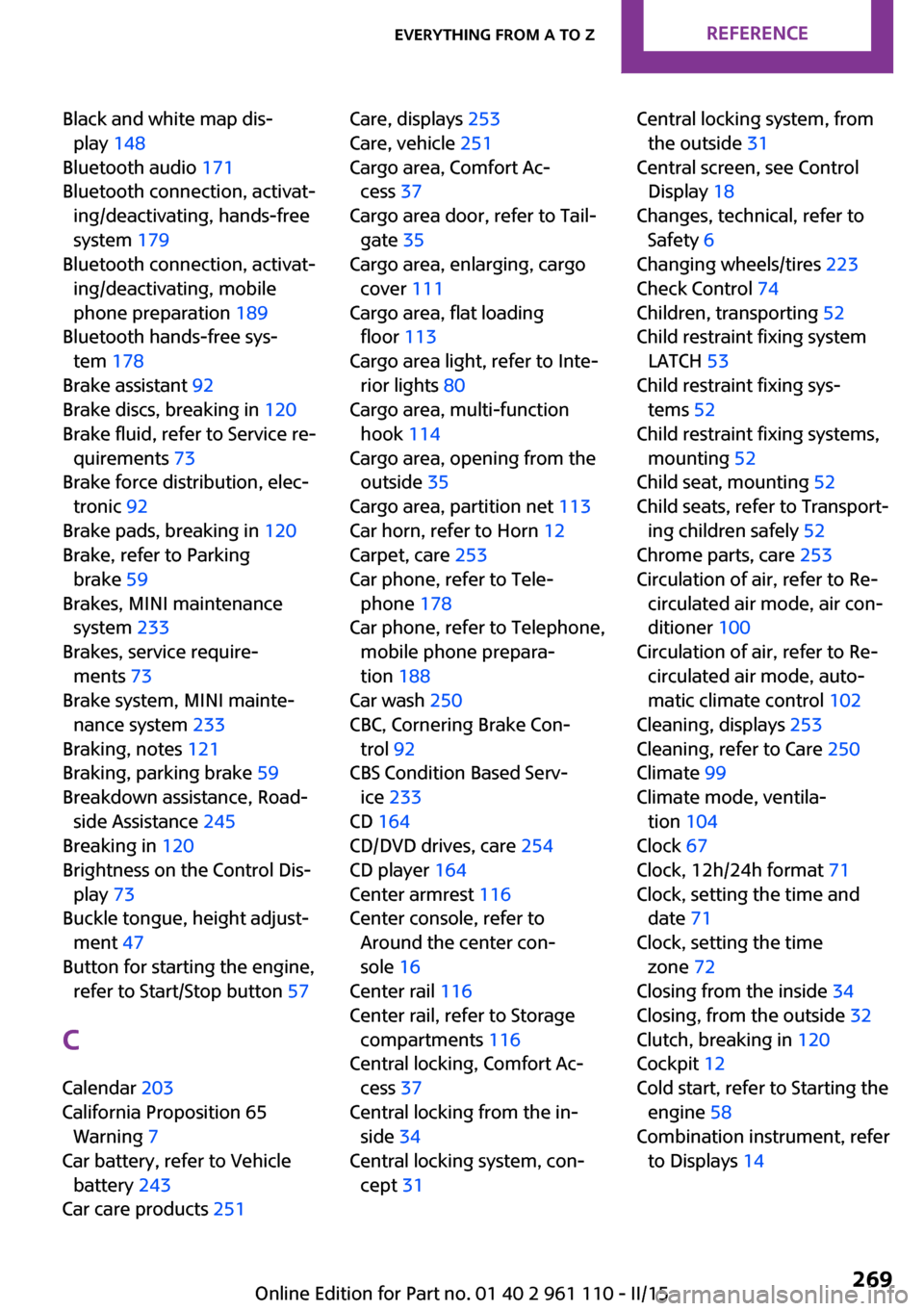
Black and white map dis‐play 148
Bluetooth audio 171
Bluetooth connection, activat‐ ing/deactivating, hands-free
system 179
Bluetooth connection, activat‐ ing/deactivating, mobile
phone preparation 189
Bluetooth hands-free sys‐ tem 178
Brake assistant 92
Brake discs, breaking in 120
Brake fluid, refer to Service re‐ quirements 73
Brake force distribution, elec‐ tronic 92
Brake pads, breaking in 120
Brake, refer to Parking brake 59
Brakes, MINI maintenance system 233
Brakes, service require‐ ments 73
Brake system, MINI mainte‐ nance system 233
Braking, notes 121
Braking, parking brake 59
Breakdown assistance, Road‐ side Assistance 245
Breaking in 120
Brightness on the Control Dis‐ play 73
Buckle tongue, height adjust‐ ment 47
Button for starting the engine, refer to Start/Stop button 57
C
Calendar 203
California Proposition 65 Warning 7
Car battery, refer to Vehicle battery 243
Car care products 251 Care, displays 253
Care, vehicle 251
Cargo area, Comfort Ac‐ cess 37
Cargo area door, refer to Tail‐ gate 35
Cargo area, enlarging, cargo cover 111
Cargo area, flat loading floor 113
Cargo area light, refer to Inte‐ rior lights 80
Cargo area, multi-function hook 114
Cargo area, opening from the outside 35
Cargo area, partition net 113
Car horn, refer to Horn 12
Carpet, care 253
Car phone, refer to Tele‐ phone 178
Car phone, refer to Telephone, mobile phone prepara‐
tion 188
Car wash 250
CBC, Cornering Brake Con‐ trol 92
CBS Condition Based Serv‐ ice 233
CD 164
CD/DVD drives, care 254
CD player 164
Center armrest 116
Center console, refer to Around the center con‐
sole 16
Center rail 116
Center rail, refer to Storage compartments 116
Central locking, Comfort Ac‐ cess 37
Central locking from the in‐ side 34
Central locking system, con‐ cept 31 Central locking system, from
the outside 31
Central screen, see Control Display 18
Changes, technical, refer to Safety 6
Changing wheels/tires 223
Check Control 74
Children, transporting 52
Child restraint fixing system LATCH 53
Child restraint fixing sys‐ tems 52
Child restraint fixing systems, mounting 52
Child seat, mounting 52
Child seats, refer to Transport‐ ing children safely 52
Chrome parts, care 253
Circulation of air, refer to Re‐ circulated air mode, air con‐
ditioner 100
Circulation of air, refer to Re‐ circulated air mode, auto‐
matic climate control 102
Cleaning, displays 253
Cleaning, refer to Care 250
Climate 99
Climate mode, ventila‐ tion 104
Clock 67
Clock, 12h/24h format 71
Clock, setting the time and date 71
Clock, setting the time zone 72
Closing from the inside 34
Closing, from the outside 32
Clutch, breaking in 120
Cockpit 12
Cold start, refer to Starting the engine 58
Combination instrument, refer to Displays 14 Seite 269Everything from A to ZREFERENCE269
Online Edition for Part no. 01 40 2 961 110 - II/15